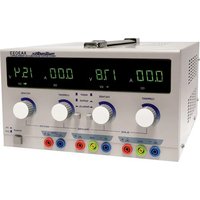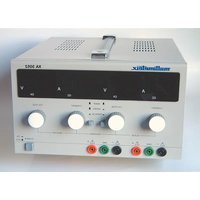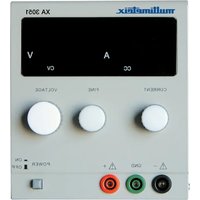
XA3051 - Measuring equipment MULTIMETRIX - Free user manual and instructions
Find the device manual for free XA3051 MULTIMETRIX in PDF.


| Product Type | Laboratory DC Stabilized Power Supply |
| Brand | Multimetrix |
| Model | XA3051 |
| Dimensions | 290 x 132 x 160 mm |
| Weight | ≈ 6.3 kg |
| Supply Voltage | 110/230 VAC ±10%, 50/60 Hz |
| Consumption | < 350 VA, 275 W max |
| Output Voltage | 0 to 30 V |
| Output Current | 0 to 5 A |
| Display | 3-digit numeric LED, simultaneous voltage and current |
| Voltage Regulation | ±0.05% + 5 mV |
| Current Regulation | ±0.5% + 5 mA |
| Residual Ripple | < 1 mVrms |
| Safety | EN 61010-1, CAT II 300 V, Pollution Degree 2 |
| Main Functions | Constant Voltage (CV) source, Constant Current (CC) source, fine and coarse voltage adjustment, adjustable current limiting, short-circuit protection |
| Maintenance and Cleaning | Disconnect the device, clean with a cloth slightly dampened with soapy water, let dry before use. Do not use abrasive products or solvents. |
| Storage | Dry, ventilated and clean place. Disconnect if not used for extended periods. |
| Included Accessories | User manual, 2 fuses (T 2A / 250 V), power cord |
| Replacement Fuse | Type T 2A / 250 V |
Frequently Asked Questions - XA3051 MULTIMETRIX
User questions about XA3051 MULTIMETRIX
0 question about this device. Answer the ones you know or ask your own.
Ask a new question about this device
Download the instructions for your Measuring equipment in PDF format for free! Find your manual XA3051 - MULTIMETRIX and take your electronic device back in hand. On this page are published all the documents necessary for the use of your device. XA3051 by MULTIMETRIX.
USER MANUAL XA3051 MULTIMETRIX
Single Output Power Supplies
General Instructions
Introduction
You have just acquired a single output power supply. This instrument belongs to the MULTIMETRIX range of products. Thank you for your confidence in our products.
This instrument is compliant with safety standard NF EN 61010-1 (2001), single insulation, concerning electronic measuring instruments.
For optimal service, read this manual carefully and observe the operating precautions.
Non-compliance with the warnings and/or operating instructions might damage the unit and/or its components and might be dangerous for the user.
Safety
This instrument complies with the EN 61010-1 safety standard, class 1. It is designed for indoor use, in a level 2 pollution environment, at an altitude below 2,000 m, at a temperature between 0°C and 50°C with a relative humidity < 80 % up to 40°C.
| XA 1525 XA 3051 | ||
| Power supply outputOvervoltage categoryMax. output voltage | CAT II - 15 VDC | CAT II - 30 VDC |
| Mains power supplyOvervoltage categorySupply currentConsumption | CAT II - 110 VAC / 230 VAC ± 10 % | |
Definition of installation categories (cf. IEC 664-1 publication)
CAT1: CAT1 circuits are protected by devices limiting transient overvoltage to a low level. Example: protected electronic circuits
CAT II: CAT II circuits are power supply circuits for household or analog units that can support medium-level transient overvoltage. Example: household appliance and portable tool power supply
CAT III: CAT III circuits are power supply circuits that can support major transient overvoltage. Example: industrial unit or machine power supply
CAT IV: CAT IV circuits can support very high transient overvoltage. Example: power input
Precautions
Before use
- To use this power supply safely, users must comply with the customary safety rules in order to:
- protect them from the dangers of the electric current, - to protect the power supply against incorrect use.
- For your safety, only use the lead delivered with the instrument. Before using it, always check that it is in perfect condition. It must be connected to the mains before connecting measurement or control circuits.
General Instructions (cont'd)
| * Any break in the protective conductor, inside or outside the instrument, or disconnection of the protective earth terminal may make the instrument dangerous. Intentional breaking is prohibited.* When this instrument is supplied via an auto-transformer in order to reduce the external voltage, make sure that the common terminal is connected to the neutral (earthed pole) of the supply circuit.* The plug should only be inserted into a socket equipped with an earthing contact. The safety connection must not be broken by use of an extension lead without a protective conductor. | |
| During use | * When the required voltage and current parameter values are not known, start by using the lowest values.* Before disconnecting the connection leads of the circuit being tested, make sure that the power supply is switched off. This prevents the creation of break or closure extra-currents which may melt the fuse at high currents.* Never exceed a total output of 60 V peak in relation to the earth (common mode).* The instrument must be placed in a ventilated room. Take care not to obstruct the ventilation holes. |
| Symbols on instrument | Caution : Refer to the manual. Incorrect use may damage the instrument and endanger the user.Earth Hot surface |
| Instructions | * Before opening the instrument, disconnect if from all sources of electric current and from the measuring circuits; make sure that you are not charged with static electricity, which could irreparably damage the instrument's internal components.* The fuse must be replaced by a model identical to that delivered with the instrument.*When the instrument is open, some of the internal capacitors may conserve a dangerous potential, even once the instrument has been powered down.* In the event of faults or abnormal constraints, power down the instrument and do not allow anyone to use it until it has been checked.* Adjustments, maintenance or repair work on the instrument must only be carried out by qualified personnel.*A "qualified person" is someone who is familiar with the installation, the construction, the application and the dangers at hand. This person is authorised to power up and power down the installation and equipment, in compliance with safety regulations. |
General Instructions (cont'd)
| Safety features | The fuse protects the primary coil of the power supply transformer against mains voltage errors.Only use a fuse of the following type: T 1.5 A / 250 V for XA 1525T 2 A / 250 V for XA 3051 |
| Guarantee | This equipment is guaranteed against any material or manufacturing defects, in accordance with the general conditions of sale.During the warranty period (1 year), the instrument can only be repaired by the manufacturer, who reserves the right to repair the instrument or to exchange all or part of it. If the equipment is returned to the manufacturer, the outgoing transport costs are borne by the customer.The warranty is not applicable in the following cases:Improper use of the equipment or use of it in conjunction with incompatible equipmentmodifications to the equipment without the explicit authorisation of the manufacturer's technical department;work carried out on the instrument by a person not approved by the manufacturer;adaptation for a specific application not included in the definition of the equipment or the user's manual;knocks, falls or flooding. |
| Metrological verification | Like all measuring or testing devices, a regular check is necessary.Return your instrument to your distributor for any work to be done within or outside the guarantee. |
| Cleaning | Disconnect the instrument and then clean it with a cloth slightly moistened with soapy water; leave to dry before using. Never use abrasive products or solvents. |
| Storage | To guarantee correct operation of the power supply, after a period of storage in extreme environmental conditions, wait for the instrument to return to normal measuring conditions.In particular, an abrupt change in the ambient temperature (cold to hot) may lead to condensation inside the instrument and cause short circuits.Disconnect the unit if it should remain unused for quite a long time. |
| Unpacking, re-packing | All the equipment has been checked both mechanically and electronically before shipment.Every precaution has been taken to ensure that you receive the instrument undamaged. However, it is a good idea to check quickly to detect any damage that may have occurred during transport.If there is any damage, immediately notify the transporter of the customary reservations.If you ship this instrument on elsewhere, use preferably the original packaging and indicate the reasons for reshipment as clearly as possible in a note enclosed with the equipment. |
Instrument Description
Presentation
The unit features in small size good performance, novel appearance... It is the ideal power supply unit for science investigation, college, factory, electronic appliance, maintenance.
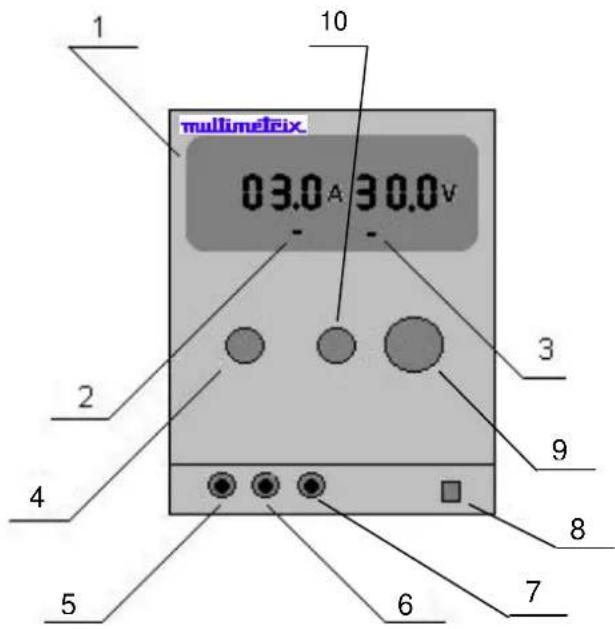
Front panel (illustration)
text_image
1 10 multimetric 03.0 A 30.0 V - 2 3 4 5 6 7 8 9Controls
- Output voltage and current by LED indicator
- Constant current (CC) LED indicator
- Constant voltage (CV) LED indicator
- Current adjustment potentiometer
- Output terminal (-)
- Case ground
- Output terminal (+)
- ON/OFF switch
- Voltage « coarse » adjustment
- Voltage « fine » adjustment
Functional Description
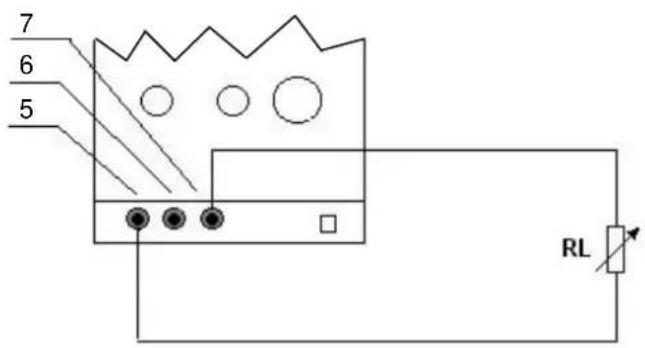
Load connection
text_image
7 6 5 RLVoltage and current adjustment
To use the unit as a current constant source
To use the unit as a voltage constant source
3 digit-LCD (resolution : 2½ digit)
Attention
- Load is connected as shown above.
- Switch the unit on.
• Output current and voltage will be indicated by LED. - You should adjust the load to have the desired value.
- Switch the unit on.
- Turn the adjustments (9) and (10) clockwise to the end, and the (4) anti-clockwise to the end.
- Then connect your load.
- Turn the current-adjustment (4) to get desired current.
• The LED (2) is on and the LED (3) is off. - The current-adjustment (4) must be set to its maximum value.
- Switch on power and adjust the voltage (9) and (10).
• The LED (3) is on and the LED (2) is off. - To adjust the current limit: switch the unit off and short-circuit outputs 5 (+) and 7 (-).
- Switch on again and turn the current-adjustment (4) to get desired desired limit current.
- Switch the unit off. Enlevez le court-circuit and connect the load.
- Switch on again.
To get more accurate measuring value, you should calibrate by external circuit with precision measuring instrument.
- This unit has excellent current-limit protection. If short-circuit occurs, the output current is limited.
- As there is controlling circuit for regulating transistor's power loss in the circuit, when short-circuit occurs, the power loss on large power transistors is not very high, it can't cause any damage to the unit.
- Store the instrument in a dry, clean and ventilated place.
- Disconnect the unit if it should remain unused for quite a long time.
Specifications
Technical specifications
| XA 1525 XA 3051 | ||
| Input voltage | 110 VAC ± 10 %, 230 VAC ± 10 %, 50 / 60 Hz | |
| Output current | 0 to 2.5 A 0 to 5 A | |
| Output voltage | 0 to 15 V 0 to 30 V | |
| Consumption | < 100 VA - 95 W max. < 350 | VA - 275 W max. |
| Display | Voltage ± 1 % + 2 digitsCurrent ± 2 % + 2 digits | |
| Load regulation | Voltage ± 0,05 % + 5 mVCurrent ± 0,5 % + 5 mA | |
| Stabilité | Ondulation < 1 mVrms | |
| EMC | ||
| Immunity | EN 55024 | |
| Emission | EN 55022 – EN 61000-3-2 – EN 61000-3-3 | |
| General specifications | ||
| Display | Digital display - 3 digits - Voltage and current simultaneously | |
| Setting | Potentiometer | |
| Safety | EN 61010-1 (2001) – CAT II 300 V – Pollution 2 | |
| Dimensions | 290 x 132 x 160 mm | |
| Weight | ≈ 6,3 kg | |
| Accessories | User's manual2 fusesMains power cord | |