VT35 - Measuring equipment MULTIMETRIX - Free user manual and instructions
Find the device manual for free VT35 MULTIMETRIX in PDF.


| Product Type | 2P+T Socket and RCD Tester |
| Brand | Multimetrix |
| Model | VT35 |
| Rated Voltage | 230 V |
| Testable Fault Currents | 10, 15, 20, 25, 30 and 35 mA |
| Plug Type | 2P+T (Phase, Neutral, Earth) |
| Installation Category | CAT II |
| Pollution Degree | 2 |
| Maximum Operating Altitude | 2000 m |
| Operating Temperature Range | 5 °C to 40 °C |
| Usage | Indoor |
| Display | Neon Indicators (Light Indicators) |
| Main Functions | 2P+T socket testing (fault detection: earth not connected, Phase/Neutral reversal, Neutral not connected, Phase/Earth reversal, Phase not connected) and RCD testing (≤30 mA) |
| Maintenance and Cleaning | Disconnect, clean with a damp cloth and soap, dry before reuse. Do not use abrasive products or solvents. |
| Safety | Use within specified environmental conditions; respect installation categories; disconnect cords before cleaning. |
| Warranty | 1 year against material or manufacturing defects |
| Maintenance | Return to distributor for any repairs |
| Country of Origin | France (Chauvin Arnoux Group) |
Frequently Asked Questions - VT35 MULTIMETRIX
User questions about VT35 MULTIMETRIX
0 question about this device. Answer the ones you know or ask your own.
Ask a new question about this device
Download the instructions for your Measuring equipment in PDF format for free! Find your manual VT35 - MULTIMETRIX and take your electronic device back in hand. On this page are published all the documents necessary for the use of your device. VT35 by MULTIMETRIX.
USER MANUAL VT35 MULTIMETRIX
General Instructions
Precautions and safety measures
Thank you for purchasing this VT35 tester.
The VT35 is used to test TT-earthed 2P+E sockets and detect first-fault anomalies in socket connections to the electrical installation (presumed compliant).
The VT35 is also used to test differential circuit breakers up to 30mA.
Comply with operating environment and storage conditions.
This hand-held, stand-alone instrument has been designed for use:
- indoors;
- in Pollution Degree 2 environments;
- at altitudes of less than 2,000m and at temperatures of between 5°C and 40°C.
It is suitable for use at up to 230V on Category II installations.
Definition of Installation Categories (see IEC 664-1)
CAT I: Circuits in which measures are taken to limit transient overvoltages to an appropriately low voltage. E.g. protected electronic circuits.
CAT II: Power supply circuits for domestic appliances and the like which may be subject to medium-level transient overvoltages.
E.g. household appliances and portable tools.
CAT III: Power supply circuits for power appliances which may be subject to high-level transient overvoltages.
E.g. industrial machines or devices.
CAT IV: Circuits which may be subject to very high-level transient overvoltages.
Symbols
E.g. power feeders

Directive 2002/96/EC (WEEE)
Cleaning
Unplug the leads from external circuits and turn the instrument off. Clean the instrument with a damp cloth and soap. Never use abrasive products or solvents.
Make sure the instrument is quite dry before reusing i
Warranty
This equipment is warranted to be free of defects in materials or workmanship, in accordance with the general terms and conditions of sale.
During the one-year warranty period, the instrument may be repaired by the manufacturer only, who reserves the right to either repair it or replace it, in full or in part.
In the event the equipment is returned to the manufacturer, postal charges will be borne by the customer.
The warranty does not apply following:
6. misuse of the equipment or use with incompatible equipment;
7. modifications to the equipment without the explicit authorisation of the manufacturer's Technical Department;
8. work carried out on the instrument by a person not approved by the manufacturer;
9. adaptation for a specific application, not included in the definition of the equipment or the user manual;
10. damage caused by knocks, falls or prolonged immersion.
Maintenance
Return the instrument to your distributor for any work that has to be carried out, whether under warranty or not.
Unpacking Repacking
The instrument was fully checked, mechanically and electronically, before shipping. All necessary precautions have been taken to ensure you receive the instrument in good condition. It is advisable to make a quick check of the equipment to ensure no damage has occurred during transportation. In the event of damage, immediately notify the carrier of the customary reservations. If you need to send the instrument to a different site, you should preferably use its original packaging and state your reasons for returning it, as clearly as possible, in a note enclosed with the instrument.
Description
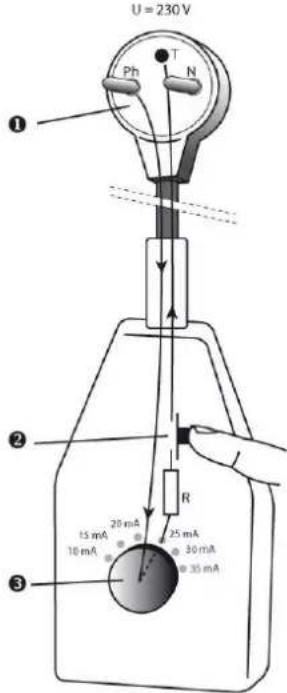
text_image
U = 230 V Ph N ① ② R 15 mA 20 mA 25 mA 10 mA 30 mA 35 mA ③- 2P+E plug
- Test button
- Default current rotary selector switch
Operating instructions
Checking a 2P+E socket
- Insert the device's 2P+E plug into a 10-16A mains socket
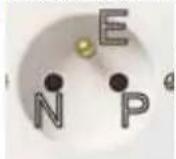
N: Neutral P: Phase E: Earth
-
Check the sequence of neon indicators.
-
If a fault sequence is displayed, correct the fault then do another test.
| ○ neon indicator off | ● neon indicator on |
| OK (no fault) | ||
| Earth not connected | ||
| Phase and Neutral reversed | ||
| Neutral not connected | ||
| Phase and Earth reversed | ||
| Phase not connected |
Note: the VT35 cannot detect a reversed Neutral (N) and Earth (E)
Checking a differential circuit break (≤30mA)
1 - Check the 2P+E socket (see previous chapter) and correct the fault if necessary
2a - Set the rotary selector switch to 10mA (the smallest default current)
3a - Carry out the test by pressing the test button briefly.
If the differential circuit breaker is not activated:
2b - Increase the default current by turning the rotary selector switch clockwise to the next position
3b - Carry out another test
4 - Repeat steps 2b and 3b until the circuit breaker is activated and note the value of the corresponding current.
5 - If the circuit breaker fails to activate, it is faulty.