RPM82 - Measuring equipment MULTIMETRIX - Free user manual and instructions
Find the device manual for free RPM82 MULTIMETRIX in PDF.


| Product type | Digital tachometer with/without contact |
| Brand | Multimetrix |
| Model | RPM82 |
| Dimensions | 160 x 72 x 37 mm |
| Weight | 300 g (with batteries) |
| Power supply | 4 x 1.5 V batteries (type AA) |
| Display | 5 digits |
| Sampling time | 500 ms |
| Range selection | Automatic |
| Detection distance (without contact) | 50 to 500 mm |
| Measuring ranges | Without contact: 2.5 – 99,999 rpm; Contact: 0.5 – 19,999 rpm; Surface speed: 0.05 – 1,999.9 m/min |
| Resolution | 0.1 rpm up to 999.9 rpm, then 1 rpm; surface speed: 0.01 m/min up to 99.99 m/min, then 0.1 m/min |
| Accuracy | 0.05 % + 1 digit |
| Main functions | Contactless measurement (laser), contact measurement (tips), surface speed measurement (wheel), value storage (last, max, min) |
| Maintenance and cleaning | Clean with a damp cloth and soapy water; do not use solvents or abrasives |
| Battery replacement | Low battery icon; open the compartment, replace the 4 x 1.5 V batteries |
| Storage | Remove batteries if unused for more than 60 days |
| Safety | Compliant with EN 50081-1 and EN 50082-1 standards |
| Warranty | 1 year against material and manufacturing defects |
| Repairability | Repair only by the manufacturer; do not open/modify without authorization |
| Supplied accessories | Contact measurement module, concave tip, convex tip, surface speed wheel, reflective stickers, 4 batteries, user manual |
| Operating temperature | 0 to 50 °C |
| Relative humidity | < 80 % RH |
| Power consumption | 50 mA |
Frequently Asked Questions - RPM82 MULTIMETRIX
User questions about RPM82 MULTIMETRIX
0 question about this device. Answer the ones you know or ask your own.
Ask a new question about this device
Download the instructions for your Measuring equipment in PDF format for free! Find your manual RPM82 - MULTIMETRIX and take your electronic device back in hand. On this page are published all the documents necessary for the use of your device. RPM82 by MULTIMETRIX.
USER MANUAL RPM82 MULTIMETRIX
text_image
Multimetric RPM 82 DIGITALDIAMETERmultimetreix
text_image
A B C D F m/min contact rpm contact rpm photo MEM G E RPM DIGITAL TACHOMETER HLégende
General instructions
| Introduction | Congratulations on your purchase of this tachometer.This tachometer is very easy and simple to use, it is aimed for measuring rotation speed measurement in RPM, M/Min at distance or by contact.It uses long-lasting components and a strong, lightweight plastic housing.The housing has been carefully shaped so that it fits comfortably in every hand. |
| Safety | This meter conforms following standards :EN 50081-1 : EN 55022EN 50082-1 : EN 55024 |
| Guarantee | This equipment is guaranteed against any material defect or manufacturing faults, in conformity with the general conditions of sale.During this period (1 year), the manufacturer only may repair this instrument.He reserves the right to carry out repair or replacement of all or part of the equipment.If the equipment is returned to the manufacturer, forward transport is at the expense of the customer.The guarantee does not apply in the event of:unsuitable use of the equipment or by association with incompatible equipmentmodification of the equipment without the explicit authorization of the manufacturer technical servicesoperation by a person not approved by the manufactureradaptation to a specific application not provided for in the equipment definition or in the operating instructionsimpact, fall or flooding. |
| Unpacking Repacking | All equipment has been mechanically and electrically checked before being dispatched.However, it is wise to check briefly that equipment was not damaged during transport. If so, please contact our Marketing Department as soon as possible and claim carrier legal reserve.If the equipment is being sent back, please preferably use original packaging and indicate as clearly as possible the reasons for sending it back on a note enclosed with the equipment. |
| Maintenance | |
| Metrological verification | It is essential that all measuring instruments are regularly calibrated.For checking and calibration of your instrument, please contact our agent in your country. |
| Case cleaning | Use a damp cloth to clean the exterior housing, ensure no water or soap is allowed inside the meter. |
| Battery replacement | The low battery indicator appears to indicate the battery voltage has fallen into the critical region.Open the battery compartment and remove the battery, then install new ones and replace the cover. |
| Storage | If the meter is not to be used for periods longer than 60 days, remove the batteries and store them separately. |
Description of the instrument
Front face
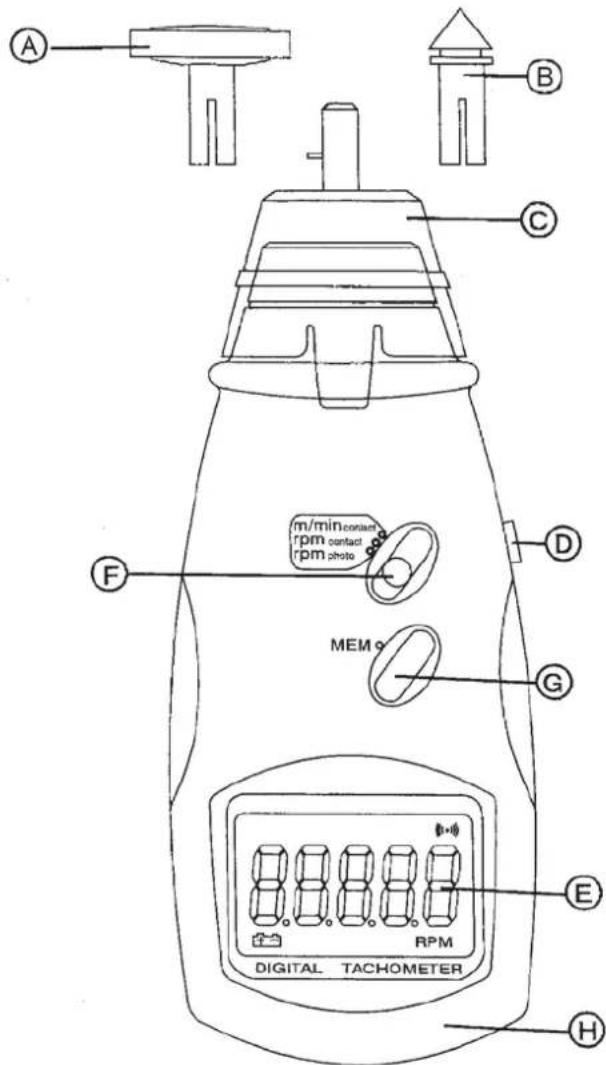
text_image
A B C D F m/min contact rpm contact rpm photo MEM G E RPM DIGITAL TACHOMETER HCaption
A. Surface speed wheel
B. RPM adapter
C. Contact measuring device
D. Measure button
E. Display window
F. Function switch
G. Memory button
H. Battery cover
Functional Description
| Measuring procedure for non-contact measurement | Slide the function switch to "RPM photo".Apply a reflective mark to the object being measured.Press the measure button and align the laser beam with the target.Verify the monitor indicator lights when the target aligns with the beam (about 1 or 2 seconds). |
| Reflective mark | Cut and peel adhesive tape provided into approximately 12 mm (0.5") squares and apply one square to each rotation shaft.The non-reflective area must always be greater than the reflective area.If the shaft is normally reflective, it must be paint covered with black paint or tape before applying the reflective tape.The shaft surface must be clean and smooth before applying the reflective tape. |
| very low RPM measurement | As it is easy to get high resolution and fast sampling time, we suggest the user to use more reflective square.Then divide the reading by the number of squares to obtain the real RPM. |
| Measuring procedure with contact measurement | |
| RPM measurement | Slide the switch function to "RPM contact".Install the proper tip on the RPM adapter.Press the measure button and lightly press the tip against the centre of the rotating shaft. Be sure to keep alignment straight. |
| Surface speed measurement | Slide the function switch to "m/min contact".Install the surface speed wheel.Press the "measure" button. |
| Memory button | |
| Before you release the measure button, a readout (last value, max. value, min. value) is automatically memorised.To obtain the value press the "mem" button :one time to display the last value, "LA" will appear by turntwo times to display the max. value, "UP" will appear by turnthree times to display the min. value, "dn" will appear by turn |
Technical characteristics
Specifications
Display 5 digits
Sampling Time 0.5 s
Detecting distance for
non-contact measurement 50 to 500 mm
Range select automatic
Operating temperature 0 °C to 50 °C
Relative humidity 80 % max. RH
Power consumption approx. 50 mA
Power supply 4 x 1.5 V battery
Weight 300 g
Dimensions 160 x 72 x 37 mm
Accuracy 0.05% + 1 dgt
| Range | Resolution | |
| no RPM contact | 2.5 – 99.999 RPM | 0.1 up to 999.9 RPM1 over |
| RPM Contact | 0.5 – 19.999 RPM | 0.1 up to 999.9 RPM1 over |
| Surface speed | 0.05 to 1,999.9 m/min | 0.01 up to 99.99 m / min0.1 over |
Supply
with the instrument
- Contact device
- Funnel (concave) tip
- Cone (convex) tip
- Reflective tapes
- 1 user's manual
- 4 batteries