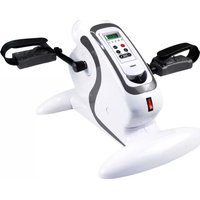
FW-18 - Exercise bike Fysic - Free user manual and instructions
Find the device manual for free FW-18 Fysic in PDF.



User questions about FW-18 Fysic
0 question about this device. Answer the ones you know or ask your own.
Ask a new question about this device
Download the instructions for your Exercise bike in PDF format for free! Find your manual FW-18 - Fysic and take your electronic device back in hand. On this page are published all the documents necessary for the use of your device. FW-18 by Fysic.
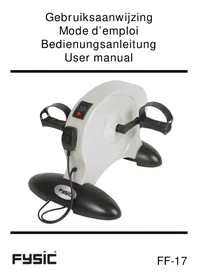
USER MANUAL FW-18 Fysic
natural_image
White and black fitness barometer device with digital display and control buttons (no visible text or symbols)INHOUDSOPGAVE
VEILIGHEIDSVOORSCHRIFTEN 7
WAARSCHUWING 8
DÉCLARATION DE CONFORMITÉ 18
SPÉCIFICATIONS 18
CONDITIONS DE GARANTIE 18
INHALTSVERZEICHNIS
SAFETY INSTRUCTIONS 25
WARNING 26
DISPOSAL OF THE DEVICE 26
TABLE OF COMPONENTS 26
ASSEMBLY 27
CONTROLS AND USAGE 28
IMPORTANT ADVICE DURING TRAINING 28
WARM-UP / COOL-DOWN 29
EXERCISES 30
DECLARATION OF CONFORMITY 30
SPECIFICATIONS 30
WARRANTY 30
SISÄLLYSLUETTELO
TURVALLISUUSOHJEET 31
VAROITUS 32
LAITTEEN HÄVITTÄMINEN 32
OSALUETTELO 32
KOKOAMINEN 33
SÄÄTIMET JA KÄYTTÖ 34
INNEHÅLLSFÖRTECKNING
SÄKERHETSANVISNINGAR 45
WARNING 46
KASSERA ENHETEN 46
FÖRTECKNING ÖVER KOMPONENTER 46
MONTERING 47
KONTROLLER OCH ANVÄNDNING 48
VIKTIGA RÅD UNDER TRÄNING 48
VÄRMA UPP/VARVA NED 49
ÖVNINGAR 50
FÖRSÄKRAN OM ÖVERSTÄMMELSE 50
SPECIFICATIONER 50
GARANTI 50
INDHOLDSFORTEGNELSE
SIKKERHEDSANVISNINGER 51
ADVARSEL 52
BORTSKAFFELSE AF APPARATET 52
INDHOLDSFORTEGNELSE 52
MONTERING 53
BETJENING OG BRUG 54
VIGTIGE RÅD UNDER TRÆNINGEN 54
OPVARMNING/NEDK∅LING 55
∅VELSER 56
OVERENSSTEMMELSESERKLÆRING 56
SPECIFICATIONER 56
GARANTI 56
The photos are as illustration. Subject to change.
natural_image
Product photo of a white fitness tracker with black buttons and a white computer mouse on a white surface (no text or symbols visible)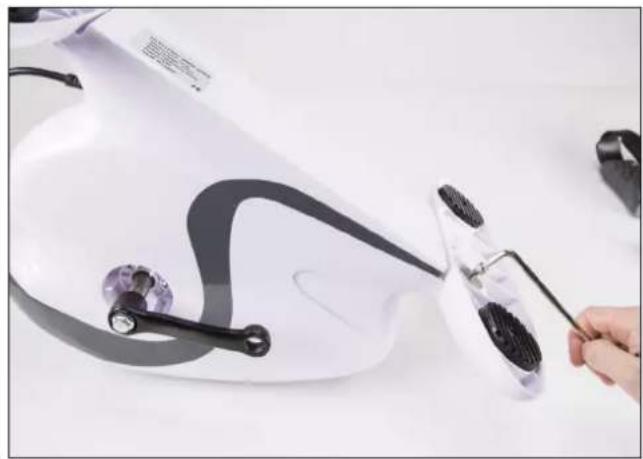
natural_image
Close-up of a white electric shaver with black adjustment knobs and a hand holding a tool, no visible text or symbols.Stap 2:
natural_image
Close-up of hands using a hairdryer to clean or adjust a white electric fan (no text or symbols visible)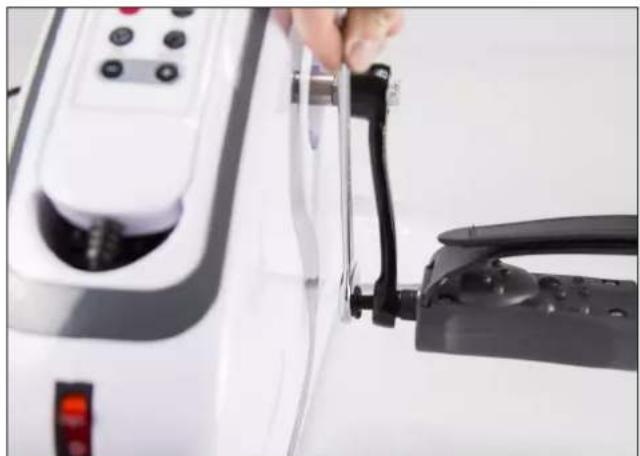
natural_image
Close-up of a hand holding a black clip attached to a white electric shaver, with no visible text or symbols.natural_image
Line drawing of a person in a relaxed pose, no text or symbols present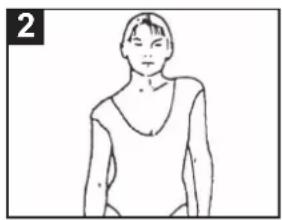
natural_image
Line drawing of a person wearing a V-neck top (no text or symbols)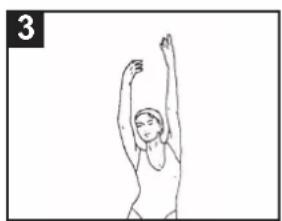
natural_image
Simple line drawing of a person performing a stretching exercise with arms raised (no text or symbols)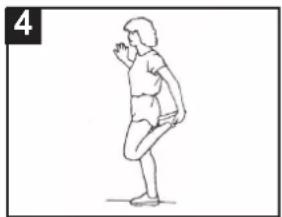
natural_image
Line drawing of a person in a standing pose, possibly dancing or performing a gesture (no text or symbols)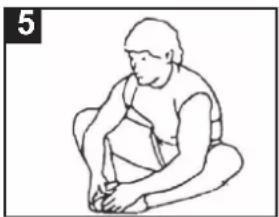
natural_image
Line drawing of a seated person in a chair, no text or symbols present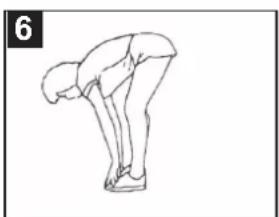
natural_image
Line drawing of a person in a bent posture, no text or symbols present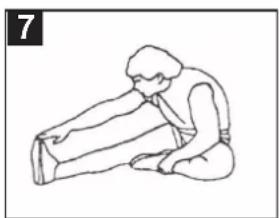
natural_image
Line drawing of a person performing a seated stretch or exercise (no text or symbols)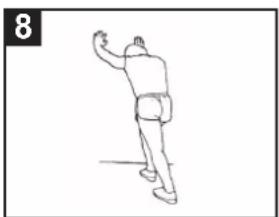
natural_image
Line drawing of a person in motion, possibly dancing or gesturing, with no text or symbols present.OEFENINGEN
natural_image
Person lying on a fitness mat with arms and legs, wearing white athletic shoes (no visible text or symbols)
natural_image
Woman using a medical pressure monitor on a patient's arm, with no visible text or symbols.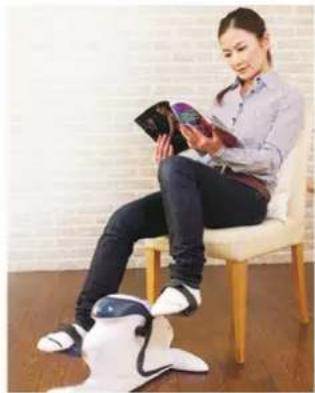
natural_image
Woman sitting on a chair using a smartphone and a robotic leg, with brick wall background (no visible text or symbols)VERKLARING VAN CONFORMITEIT
natural_image
Product photo of a white fitness tracker with black buttons and a white computer mouse on a white surface (no text or symbols visible)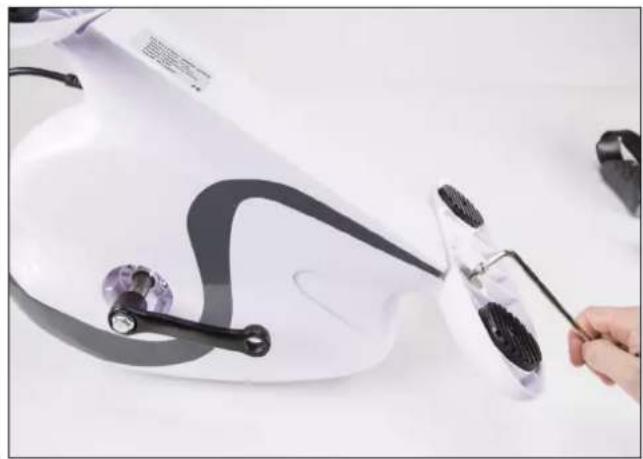
natural_image
Close-up of a white electric shaver with black adjustment knobs and a hand holding a tool, no visible text or symbols.Etape 2 :
natural_image
Close-up of hands using a hairdryer to clean or adjust a white electric fan (no text or symbols visible)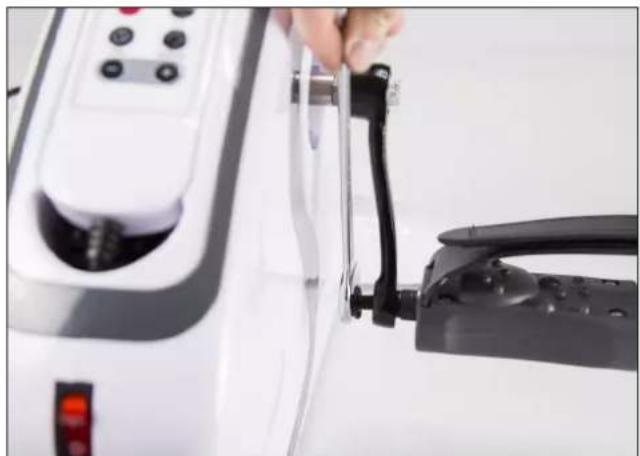
natural_image
Close-up of a hand holding a black clip attached to a white electric shock absorber device (no visible text or symbols)natural_image
Line drawing of a person viewed from the neck (no text or symbols)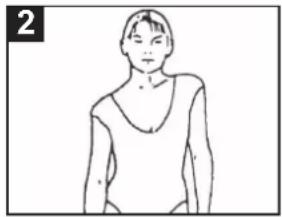
natural_image
Line drawing of a person wearing a V-neck top (no text or symbols)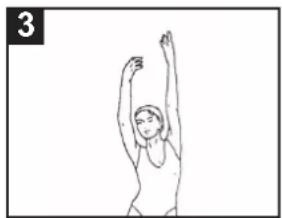
natural_image
Simple line drawing of a person performing a stretching or dance pose (no text or symbols)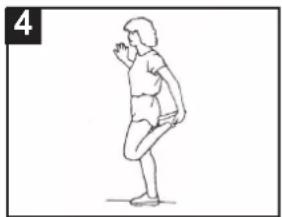
natural_image
Line drawing of a person in a standing pose, possibly dancing or performing a gesture (no text or symbols)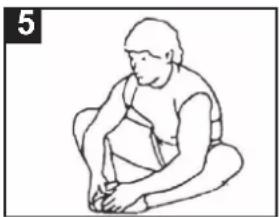
natural_image
Line drawing of a person sitting cross-legged, holding an object (no text or symbols)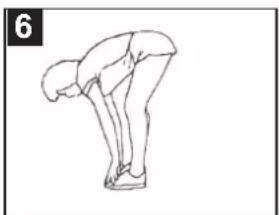
natural_image
Line drawing of a person in a bent posture, no text or symbols present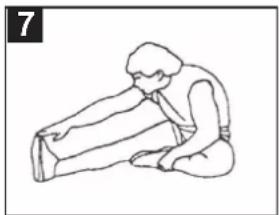
natural_image
Line drawing of a person kneeling and stretching their arm (no text or symbols)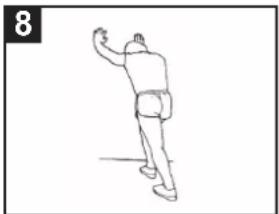
natural_image
Line drawing of a person in motion, possibly dancing or gesturing, with no visible text or symbolsEXERCICES
natural_image
Person performing a leg exercise using a resistance band machine (no text or symbols visible)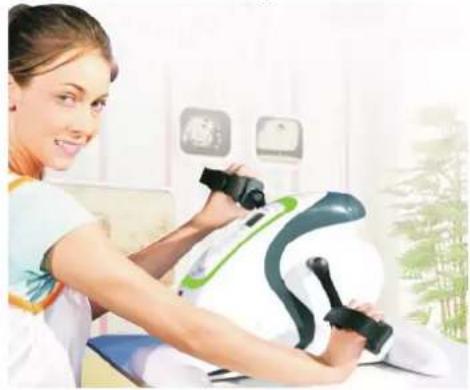
natural_image
Woman using a medical or rehabilitation device on a patient's arm, with no visible text or symbols.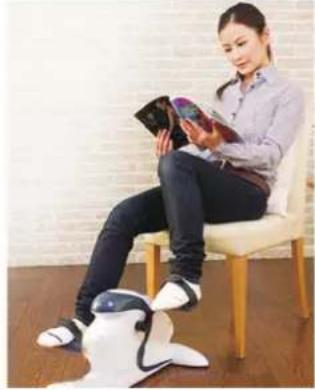
natural_image
Woman sitting on a chair reading a book, with a robotic arm visible in the foreground (no text or symbols)DÉCLARATION DE CONFORMITÉ
CONDITIONS DE GARANTIE
natural_image
Product photo of a white fitness tracker with black buttons and a white computer mouse on a white surface (no text or symbols visible)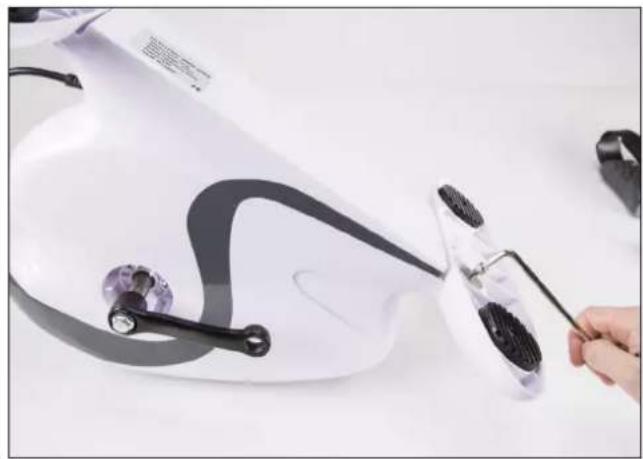
natural_image
Close-up of a white electric shaver with black adjustment knobs and a hand holding a tool, no visible text or symbols.Schritt 2:
natural_image
Close-up of hands using a hairdryer to clean or adjust a white electric fan (no text or symbols visible)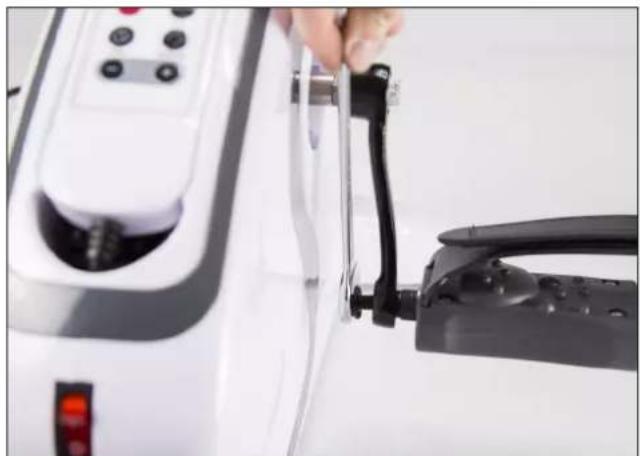
natural_image
Close-up of a hand holding a black clip attached to a white electric shock absorber device (no visible text or symbols)natural_image
Line drawing of a person viewed from the neck (no text or symbols)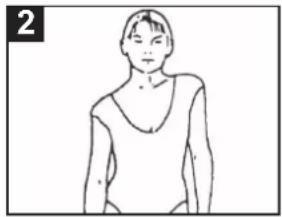
natural_image
Line drawing of a person wearing a V-neck top (no text or symbols)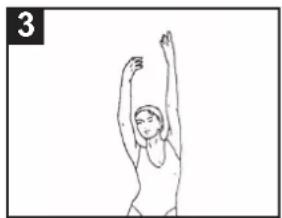
natural_image
Simple line drawing of a person performing a stretching or exercise pose (no text or symbols)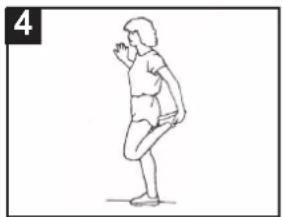
natural_image
Line drawing of a person in a standing pose, possibly dancing or performing a gesture (no text or symbols)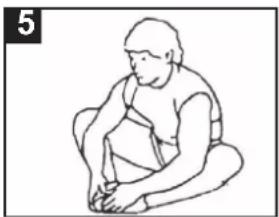
natural_image
Line drawing of a person sitting cross-legged, holding an object (no text or symbols)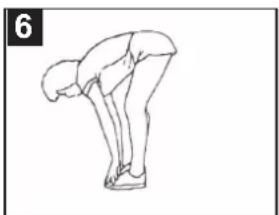
natural_image
Line drawing of a person in a bent posture, no text or symbols present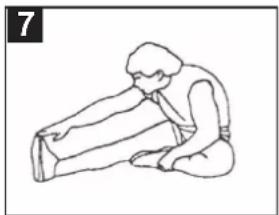
natural_image
Line drawing of a person kneeling and stretching their arm (no text or symbols)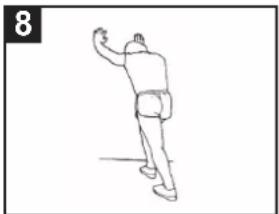
natural_image
Line drawing of a person in motion, possibly dancing or gesturing, with no visible text or symbolsÜBUNGEN
natural_image
Person lying on a mat with a fitness equipment, wearing white and black athletic shoes (no visible text or symbols)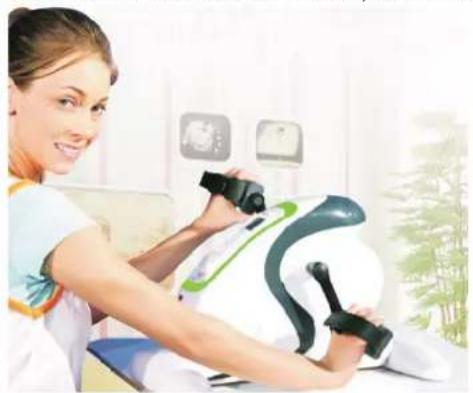
natural_image
Woman using a medical pressure monitor on a patient's torso, with no visible text or symbols.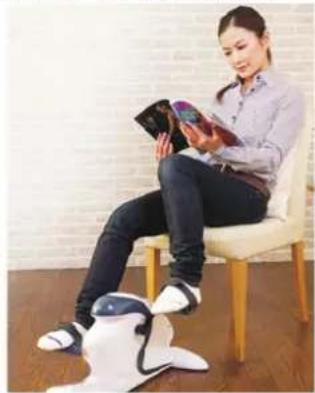
natural_image
Woman sitting on a chair using a handheld device, wearing a white humanoid robot (no visible text or symbols)-
This equipment is not a toy and may only operate for the purposes specified in this user manual. Read these instructions carefully before you operate the equipment for the first time.
-
Children are apt, in their enthusiasm, to operate the equipment in a manner for which it is not designed. If children receive permission to use this equipment, they should be under supervision and must be instructed to operate the equipment in the correct way. The equipment may not be used as a toy.
-
Always consult your doctor before you start exercises on this or any other workout equipment.
-
Always wear protective and comfortable clothes while using the workout equipment. Preferably wear sport or aerobic shoes.
-
If you suddenly feel unwell or any trouble occurs, you should immediately stop the exercise. You should also stop exercising if you feel pain or pressure on your joints.
-
Take care that the equipment is installed correctly before you start to train on it. Ensure that all screws, bolts and nuts are mounted and tightened correctly. Only use accessories recommended and provided by the importer.
-
Do not use damaged or broken equipment.
-
Pay attention to how your body reacts on the training. Dizziness is a sign you trained too intensively with the equipment. If you feel dizzy, lie down (on the ground if you are capable of doing so) and remain there until you feel better again.
-
Always place the equipment on a smooth and clean surface.
-
Only use this equipment for the purposes specified in this user manual.
-
Only use accessories recommended by the manufacturer.
-
Take care that no sharp or pointed items are in the direct surroundings of the workout equipment.
-
We suggest handicapped persons to use this equipment only iunder supervision of qualified personnel.
-
Allow the equipment to stop completely before leaving the device.
-
The maximum weight this equipment can carry is 120 kg.
-
Place the equipment a stable and flat surface. Select a placement where no air vent will be blocked to prevent any overheating.
-
Make sure all persons who use the Mini-Bike are informed about the details of it's operation.
-
Ensure that 1 meter space is left on each side of the equipment in order to train unhindered.
-
Do not turn around while you train on the equipment. Always keep your eyes forward while the equipment is used.
-
We suggest placing a skid-proof base, such as a rubber mat, under the workout equipment in order to avoid possible damage to the floor
-
The equipment must be checked regularly in order to avoid injuries. You should check regularly whether screws and nuts are well tightened, or if hair-cracks or sharp edges are present, which could lead to physical injuries.
-
Defective components should be renewed immediately. If this isn't possible the equipment should not be used anymore.
-
Avoid smoking near the training equipment.
-
Do not place the training equipment near an open fireplace or similar heat source.
-
Insert the power plug into a grounded wall socket. Ensure that the power plug is completely and firmly inserted into the wall socket.
-
Always remove the power plug from the wall socket if the device is not in use, if you are planning to clean it or when your are disassembling the device. Never leave the device unsupervised while it is plugged in. Always remove the power cord by the plug, never remove it from the socket by pulling it out by the cord.
-
Ensure the power cord if not jammed by any object and is not twisted or knotted. If you notice any damage on the power cord, do not use the training equipment.
WARNING
Always consult your physician before starting regular training exercises. A frequent and intensive training schedule should be approved by your doctor before starting. This is mostly valid for persons aged 35 or up or persons who have a medical history. Read the entire manual before starting to exercise. We do not take any responsibility for personal injury or physical discomforts that arise from using this device and cannot be held accountable as a result. Save this manual and read it well. Injury may be cause by incorrect or excessive use of this device. The maximum weight allowed to be placed on this device is 120 kg. This user manual is written to ease the assembly of this device and explain the proper use while avoiding strain. To familiarize yourself with the various separate elements of this equipment, we advise to study the table of components before starting assembly. Place all parts before you and remove all packing to verify you're not missing any parts. For assembly, please view the next page.
DISPOSAL OF THE DEVICE
Product packing can be reused or properly disposed so it can be recycled. We do advise to keep the packing in case you need to transport the device. If you note any transport damaged while unpacking the device, immediately consult the seller.
At the end of the product lifecycle, you should not throw this product into the normal household garba ge but bring the product to a collection point for the recycling of electrical and electronic equipments.
TABLE OF COMPONENTS
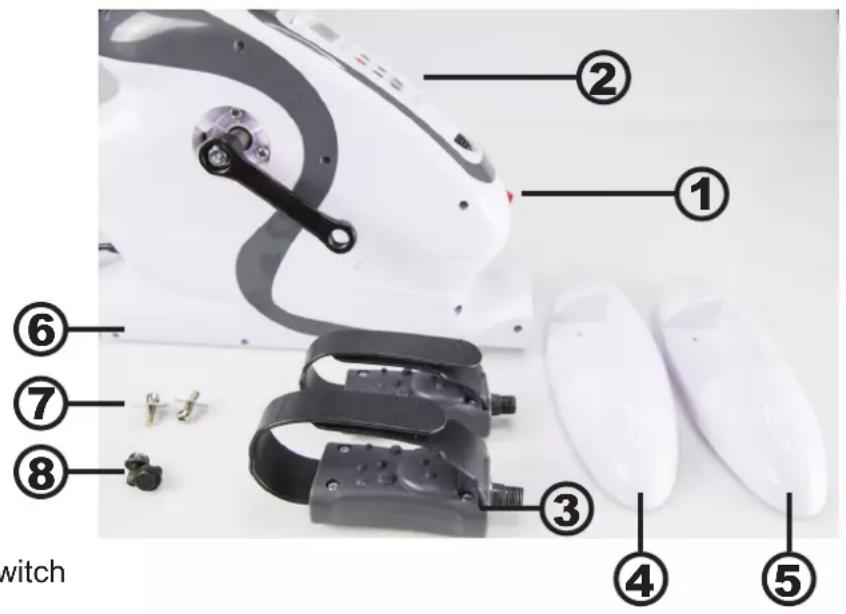
text_image
2 ① ② ③ ④ ⑤ 6 ⑦ ⑧ witch- On/Off-switch
- Controls
- Pedals
- Front support-foot
- Back support-foot
- Main unit
- Bolts for support-feet
- Bolts for pedals
- Wrenches
ASSEMBLY
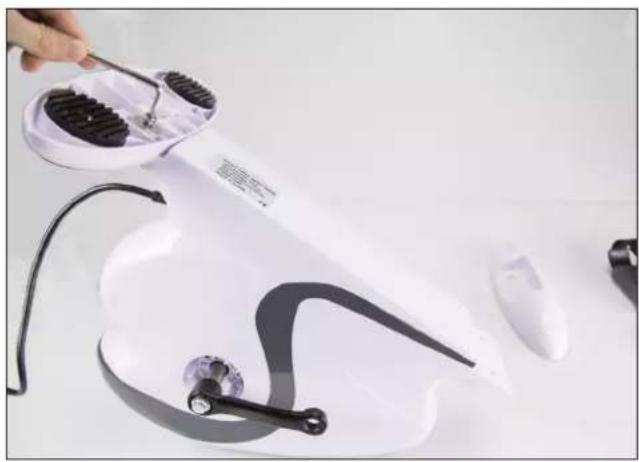
Step 1:
Mount the front(4) and back support-foot(5) to the main unit (6) as seen in the photo by using the Bolts().
natural_image
Product photo of a white fitness tracker with black buttons and a white computer mouse on a white surface (no text or symbols visible)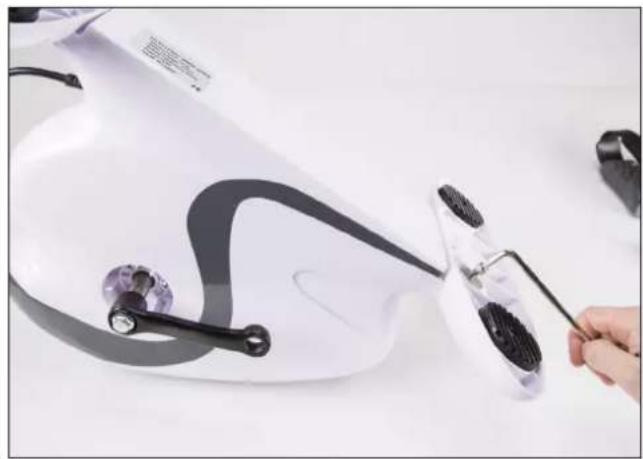
natural_image
Close-up of a white electric shaver with black adjustment knobs and a hand holding a tool, no visible text or symbols.Step 2:
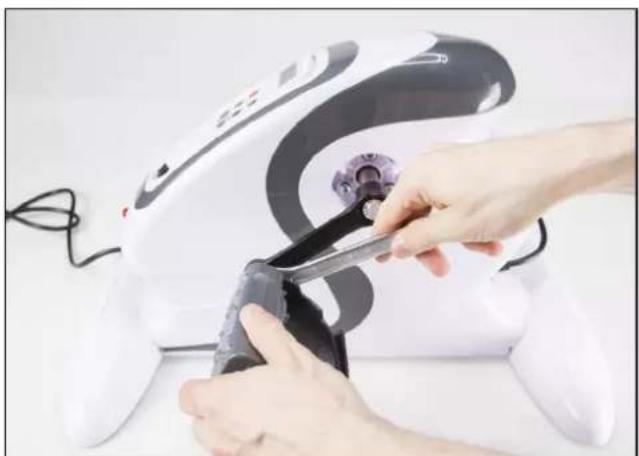
Mount the left and right pedals (3) as shown in the photo and use a wrench to tighten it's bolts.
natural_image
Close-up of hands using a hairdryer to clean or adjust a white electric fan (no text or symbols visible)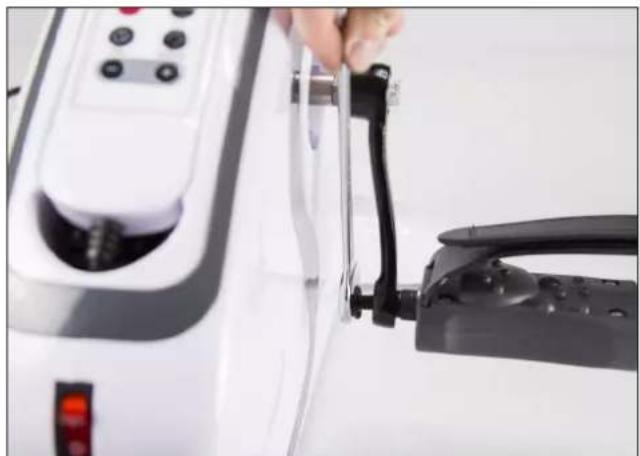
natural_image
Close-up of a hand holding a black clip attached to a white electric shock absorber device (no visible text or symbols)Now place the bolts on the other side of the pedal's bolts(8) and tighten these with a wrench as well.
CONTROLS AND USAGE
text_image
Speed Time Clock Cut Score Speed Time Clock Mode Time Reverse --
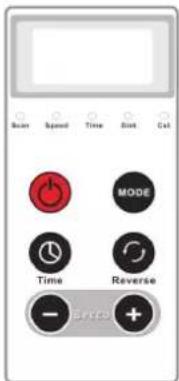
To switch on the device, press the on/off-switch (1) on the front of the device (6)
-
Put your feet on the pedals.
-
You can choose to start a preset program by pressing the Mode button first to switch between preset programs 1-5, after which you can press the ON-key on the control pad - or to set your own training program by pressing the ON-key directly.
-
The device will start to move at speed 1. If you do not input anything it will keep operational for 5 minutes by default.
-
With the - and + keys you can set a higher speed.
-
With the TIME-key you can raise the training time by a single minute - up to 15 minutes. If you press the button after it has been set to 15 minutes, the timer will be set to 1 minute.
The display will intermittently display the speed setting, the working time which is left, the distance which you would have covered and how much calories you've expended. Which value is shown is indicated by the small lights underneath the screen. By pressing the MODE-button during operation, you can switch between these shown values manually. If you cycle at a higher speed than the speed which is set, the expended calories and distance value will no longer be correct. You can only show these values while the device is in use.
-
It's possible to reverse the cycling direction by pressing the REVERSE-button, to train a different group of muscles. The device will pause for a few seconds and will then reverse the pedal rotation using the same speed as set.
-
Once the set time is over, the device will give a single beep and then pedal movement will stop
-
If you give counter-weight or put too much weight on the pedals, they will not be able to move. After a short while the device will stop working. Press the ON-key again to restart training. In this case we advise to raise the speed.
IMPORTANT ADVICE DURING TRAINING
-
Avoid excessive strain of your body. Do not train if you feel tired or exhausted. Start your training schedule at low speeds and short periods if you are not used to physical activity.
-
It is not recommended to eat 30 minutes before or after intensive training sessions.
-
During training, check if you breathe regularly and calmly. To avoid injury by strain, you should always stretch to warm up the muscle groups you are training before exercising, and cool down afterwards. Several such exercises are described on the next page.
-
Ensure you drink enough fluids during training. During physical duress it is advised to drink more than the usual daily recommendation of 2 litres.
-
Wear comfortable clothing while using this device, but avoid overly wide clothing as cloth could get stuck in the moving parts of this device.
WARM-UP/COOL-DOWN
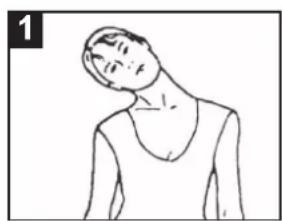
- Neck-exercise:
Move your head slowly to the right until you feel some tension in your neck. Slowly lower your head on your chest in a half-circle as you turn your head to the left until you feel the same tension. Repeat several times.
- Shoulder-exercise:
Raise your left and right shoulder intermittently. Repeat several times.
- Arm-exercise:
Intermittently stretch your left arm and right arm up to the ceiling, until you feel a comfortable tension in your left or right side.
- Thigh-exercise:
Support yourself on the wall by placing one hand against it. Reach down and behind you an use your other hand to pull your left -or right foot as close to your buttocks as possible. Hold this position for 30 seconds and repeat twice per leg.
- Inner thigh-exercise:
Sit on the float and place your feet in such a way that your knees point outwards. Pull your feet as much inward as possible, then slowly push your knees down toward the floor. If possible, hold this position for 30 to 40 seconds.
- Upper legs and arms-exercise:
Bend your body forward slowly and try to touch your feet with your hands. Reach as far to your toes as possible. If possible, hold this position for 20-30 seconds.
- Knee-exercise:
Sit on the floor and stretch your right leg. Bend your left leg and place your feet against your right thigh. Now, try to touch your right foot with your right hand. Of possible, hold this position for 20-30 seconds and repeat for your left leg.
- Calf-exercise:
Place both hands against the wall to support your entire body weight. Stretch your left leg backwards and try to hold it for 30-40 seconds. Now repeat the exercise for your right leg.
natural_image
Line drawing of a person in a relaxed pose, no text or symbols present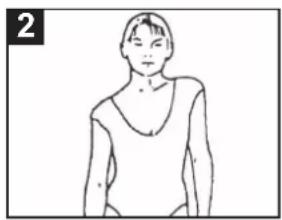
natural_image
Line drawing of a person wearing a V-neck top (no text or symbols)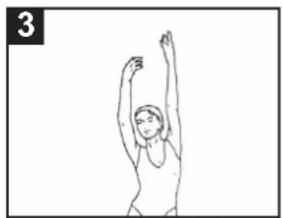
natural_image
Simple line drawing of a person performing a stretching or dance pose (no text or symbols)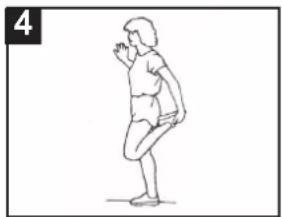
natural_image
Line drawing of a person in a standing pose, possibly dancing or performing a gesture (no text or symbols)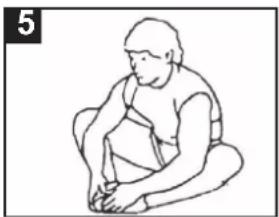
natural_image
Line drawing of a seated person in a chair, no text or symbols present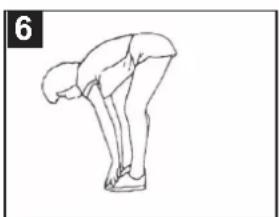
natural_image
Line drawing of a person in a bent posture, no text or symbols present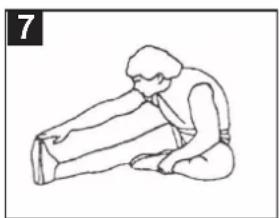
natural_image
Line drawing of a person performing a seated stretch or exercise (no text or symbols)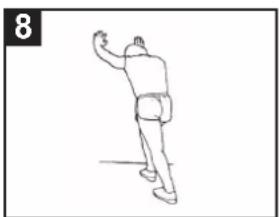
natural_image
Line drawing of a person in motion, possibly dancing or gesturing, with no text or symbols present.EXERCISES
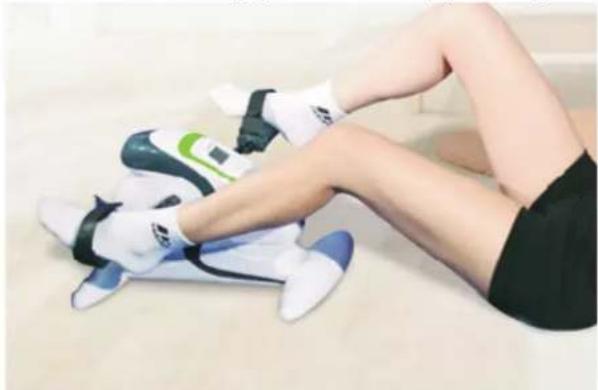
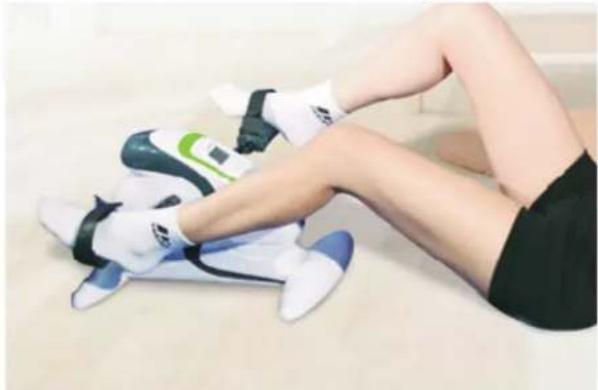
We recommend the following exercises using this device:
- Training your legs while lying on the floor on your back.
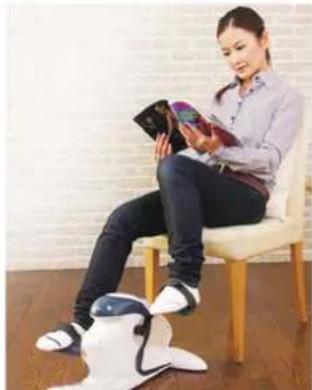
- Training your legs while sitting on a chair
- Training your arms by placing the device on a table.
natural_image
Person performing a leg exercise on a white exercise machine (no text or symbols visible)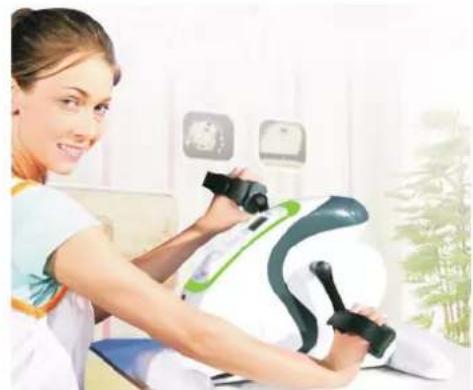
natural_image
Woman using a medical pressure monitor on a white and green device in a clinical setting (no visible text or symbols)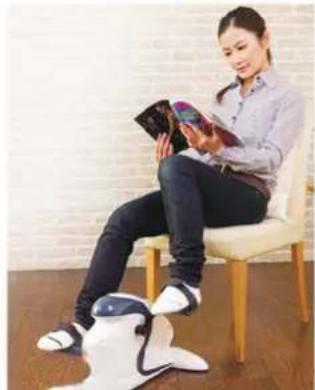
natural_image
Woman sitting on a chair reading a book, with a white robotic leg shown at the bottom (no text or symbols visible)DECLARATION OF CONFORMITY
This product complies with the essential protective requirements and objectives of EC R&TTE Directive 1999/5/EC. This declaration of conformity is available from our website (found on the back of this manual)
SPECIFICATIONS
Model number: Fysic FW-18
Voltage: 230V / 50Hz
Power: 70W
Weight: 5.5Kg
| Programms: P1 - speeds | Speed 1, 2, 3, 4, then 5 - after which the pedals will reverse using the same . 30 seconds per level. |
| speeds | P2 Speed-2, 3, 4, 5, then 6 - after which the pedals will reverse using the same . 15 seconds per level. |
| speeds | P3 Speed-3, 5, 7, 9, then 11 - after which the pedals will reverse using the same . 20 seconds per level. |
| speeds | P4 Speed-4, 6, 8, 10, then 12 - after which the pedals will reverse using the same . 20 seconds per level. |
| speeds | P5 Speed-5, 10, 5, then 10 - after which the pedals will reverse using the same . 30 seconds per level. |
WARRANTY
On this Fysic device, you have 24 months of factory warranty from the moment of purchase. We guarantee costless repair of any fault caused by material defect or faulty construction - to be judged by the importer.
HOW TO HANDLE: If you notice a defect, please thoroughly check this manual to ensure it is not caused by misoperation. If this does not help to solve any problem you may have, please contact the FYSIC service department.
THE WARRANTY IS VOID: By improper use, incorrect assembly, use of part not included in the original sales packing, neglect and defect caused by moisture, fire, flood, lightning strikes or natural disaster. By unauthorized changes and/or repairs by a third party. By incorrect transport of the device without proper packaging to our repair center or in case the package to our repair centre does not include any proof of purchase. Any further liability, especially for any consequent damage, is excluded.
TURVALLISUUSOHJEET
text_image
Labeled diagram of a robotic device with numbered parts including joints, sensors, and glovesnatural_image
Product photo of a white disposable swat with black filter bands and accessories, no visible text or symbols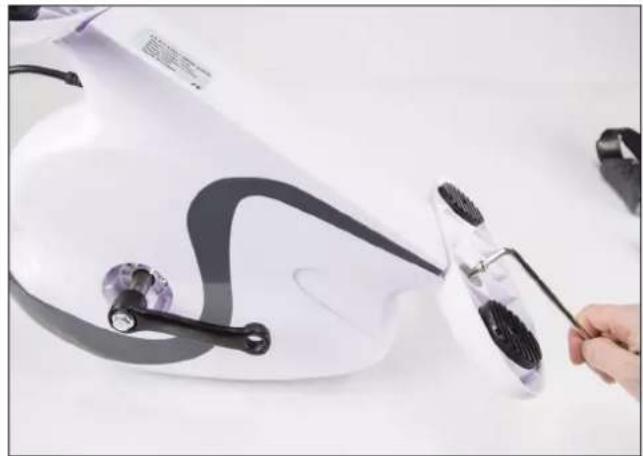
natural_image
Close-up of a white electric shaver with black cable and accessories being handled by a hand (no visible text or symbols)natural_image
Close-up of hands using a power tool to clean or adjust a white hair dryer (no text or symbols visible)
natural_image
Close-up of a hand inserting a black plastic clip into a white electric shock absorber device (no text or symbols visible)natural_image
Line drawing of a person viewed from the neck (no text or symbols)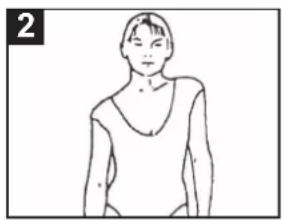
natural_image
Line drawing of a person wearing a V-neck top (no text or symbols)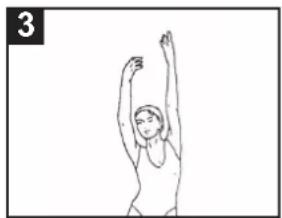
natural_image
Simple line drawing of a person performing a stretching or dance pose (no text or symbols)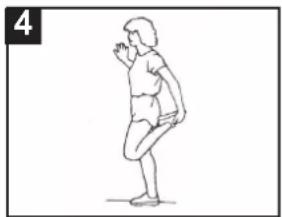
natural_image
Line drawing of a person in a standing pose, possibly dancing or performing a gesture (no text or symbols)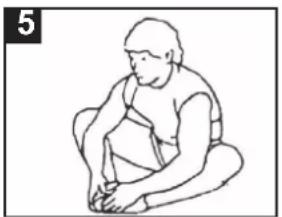
natural_image
Line drawing of a person sitting cross-legged, holding an object (no text or symbols)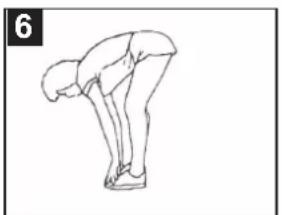
natural_image
Line drawing of a person bending forward with legs raised (no text or symbols)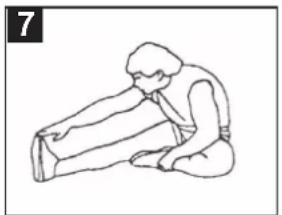
natural_image
Line drawing of a person kneeling and stretching their leg (no text or symbols)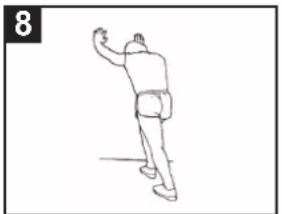
natural_image
Line drawing of a person in motion, possibly dancing or gesturing, with no visible text or symbolsHARJOITUKSET
natural_image
Person performing a leg exercise on a white exercise mat (no text or symbols visible)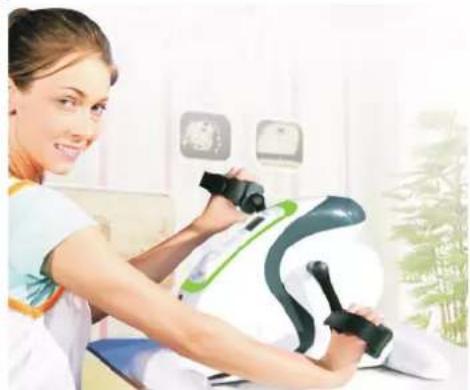
natural_image
Woman using a medical pressure monitor on a white and green device in a clinical setting (no visible text or symbols)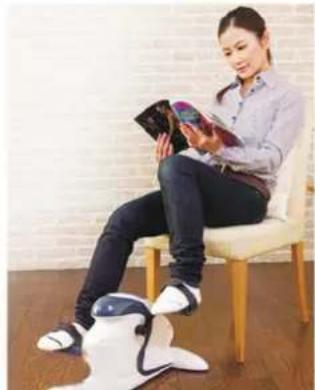
natural_image
Woman sitting on a chair reading a book, with a robotic leg shown in the foreground (no visible text or symbols)VAATIMUSTENMUKAISUUSVAKUUTUS
text_image
Labeled diagram of a robotic device with numbered parts including gripper, gripper base, and glovesnatural_image
Product photo of a white disposable swat with black filter bands and accessories, no visible text or symbols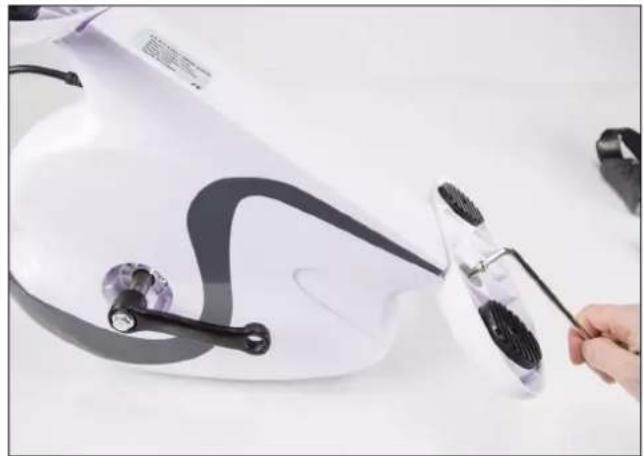
natural_image
Close-up of a white electric shaver with black cable and accessories being handled by a hand (no visible text or symbols)natural_image
Close-up of hands using a power tool to clean or install a white electric fan (no text or symbols visible)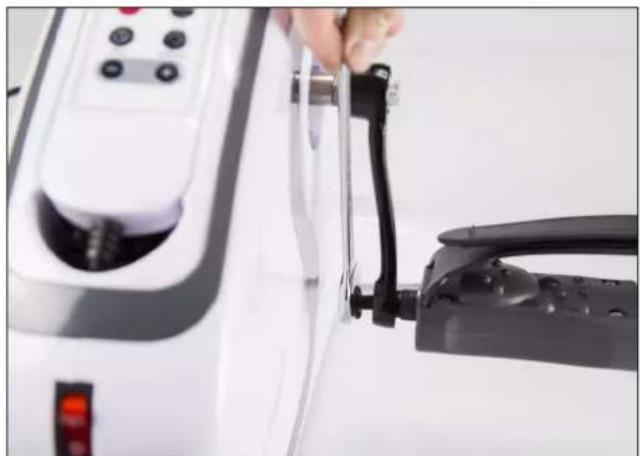
natural_image
Close-up of a hand inserting a black plastic clip into a white electric shaver (no text or symbols visible)natural_image
Line drawing of a person viewed from the neck (no text or symbols)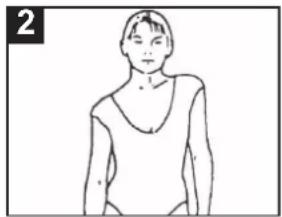
natural_image
Line drawing of a person wearing a V-neck top (no text or symbols)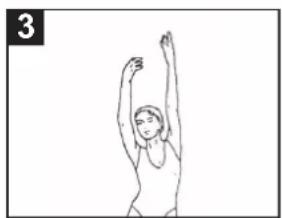
natural_image
Simple line drawing of a person performing a stretching or dance pose (no text or symbols)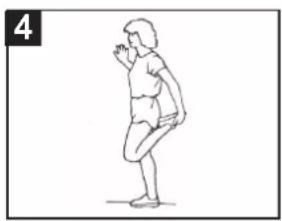
natural_image
Line drawing of a person in a standing pose, possibly dancing or performing a gesture (no text or symbols)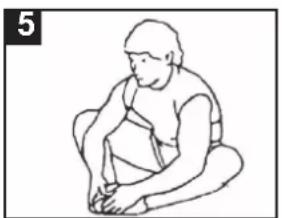
natural_image
Line drawing of a person sitting cross-legged, holding an object (no text or symbols)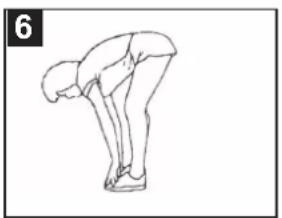
natural_image
Line drawing of a person bending forward with one leg raised (no text or symbols)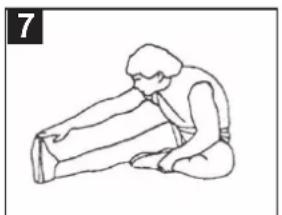
natural_image
Line drawing of a person performing a seated stretch or exercise (no text or symbols)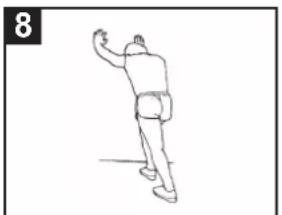
natural_image
Line drawing of a person in motion, possibly dancing or gesturing, with no visible text or symbols∅VELSER
Vi anbefaler følgende øvelser när du bruker denne enheten:
- Trene bena mens du ligger på ryggen på gulvet.
- Trene bena mens du sitter på en stol.
- Trene armene ved å plassere enheten på et bord.
natural_image
Person performing a leg exercise on a white exercise mat (no text or symbols visible)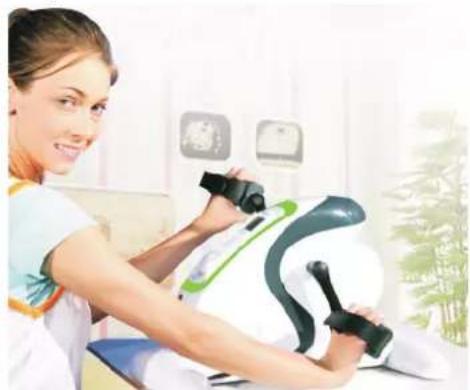
natural_image
Woman using a medical pressure monitor on a white and green device in a clinical setting (no visible text or symbols)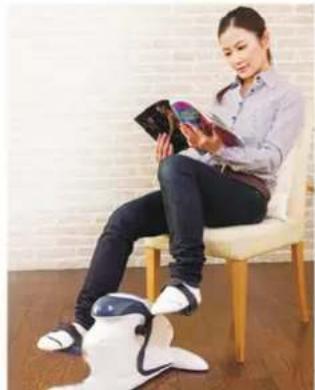
natural_image
Woman sitting on a chair reading a book, with a robotic leg shown in the foreground (no visible text or symbols)SAMSVARSERKLÆRING
text_image
Labeled diagram of a robotic device with numbered parts including handle, clamps, and accessoriesnatural_image
White and black fitness tracker with earbuds and accessories on a white surface (no text or symbols visible)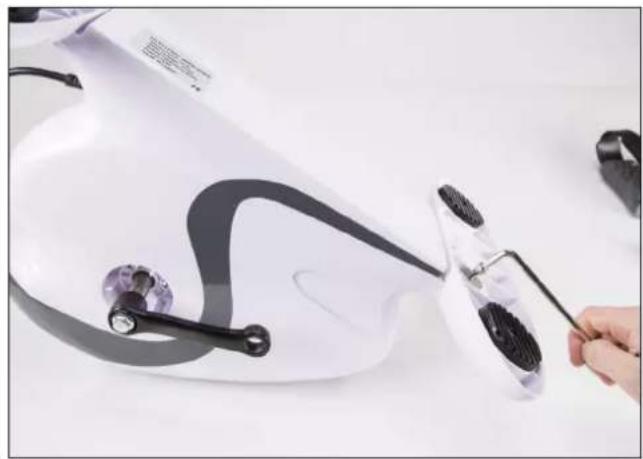
natural_image
Close-up of a white electric shaver with black adjustment knobs and a hand holding a cable, no visible text or symbols.Steg 2:
natural_image
Close-up of hands using a power tool to clean or install a white electric fan (no text or symbols visible)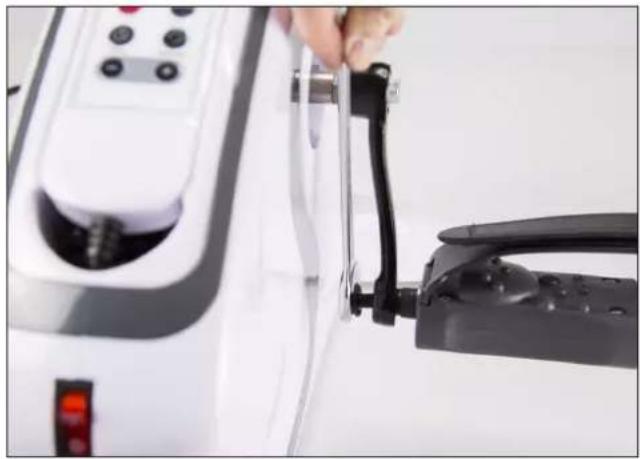
natural_image
Close-up of a hand holding a black plastic clip attached to a white electric vehicle charging station (no visible text or symbols)natural_image
Line drawing of a person viewed from the neck, showing anatomical features (no text or symbols)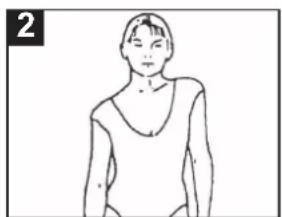
natural_image
Line drawing of a person wearing a V-neck top (no text or symbols)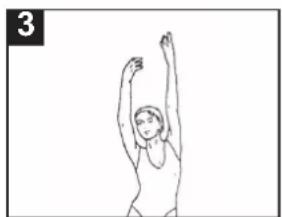
natural_image
Simple line drawing of a person performing a stretching or dance pose (no text or symbols)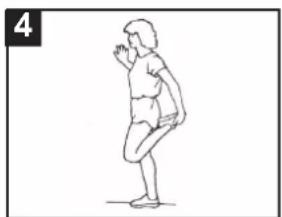
natural_image
Line drawing of a person in a standing pose, possibly performing a stretching or exercise (no text or symbols)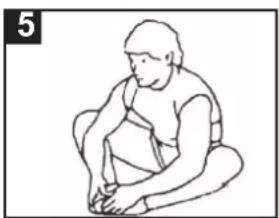
natural_image
Line drawing of a seated person in a chair, no text or symbols present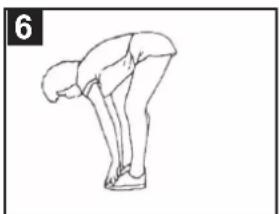
natural_image
Line drawing of a person in a bent posture, no text or symbols present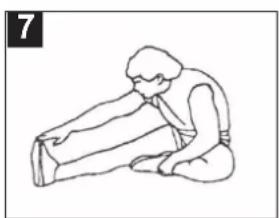
natural_image
Line drawing of a person performing a seated stretch or exercise (no text or symbols)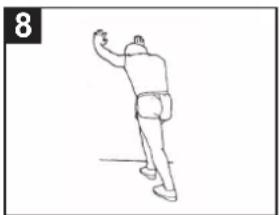
natural_image
Line drawing of a person in motion, possibly dancing or gesturing, with no visible text or symbolsÖVNINGAR
natural_image
Person performing a leg exercise on a white exercise mat, wearing athletic shoes and black-and-white laces (no visible text or symbols)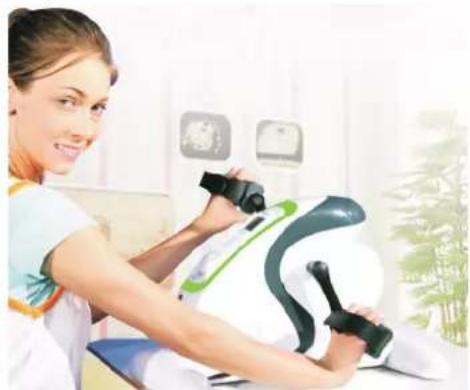
natural_image
Woman using a medical pressure monitor on a white and green device in a clinical setting (no visible text or symbols)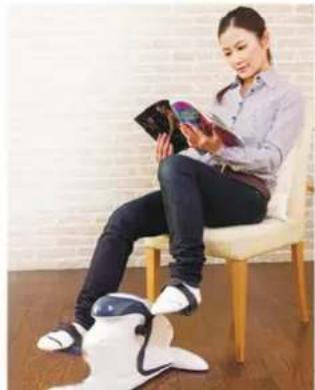
natural_image
Woman sitting on a chair reading a book, with a robotic leg shown in the foreground (no visible text or symbols)FÖRSÄKRAN OM ÖVERSTÄMMELSE
text_image
Labeled diagram of a robotic device with numbered parts including a mouse, clamps, and accessories.natural_image
Product photo showing a white fitness tracker with black buttons and a hand holding a tool, next to a white computer mouse and a curved object (no visible text or symbols)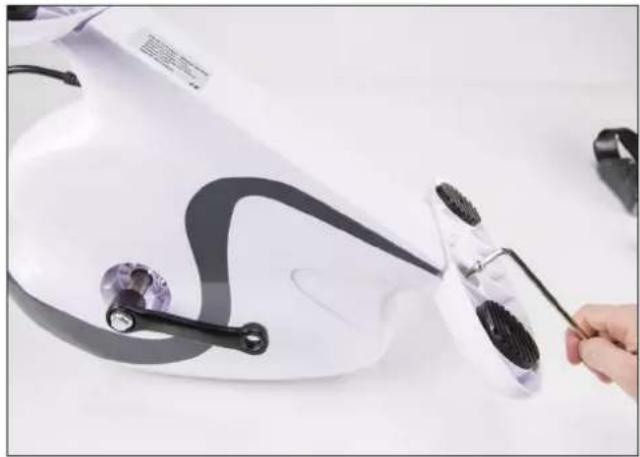
natural_image
Close-up of a white electric shaver with black adjustment knobs and a hand holding a cable, no visible text or symbols.Trin 2:
natural_image
Close-up of hands using a power tool to clean or adjust a white electric fan (no text or symbols visible)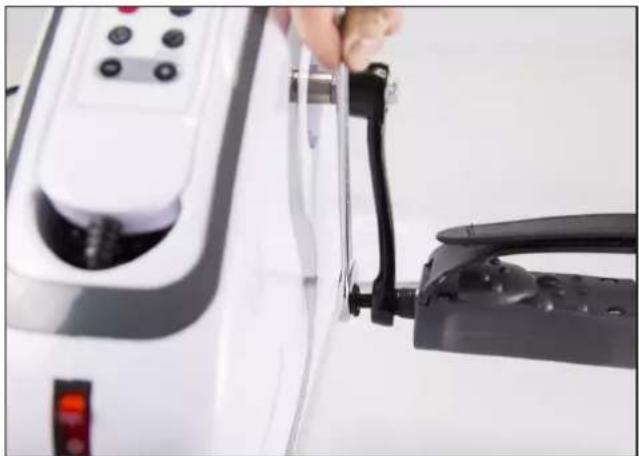
natural_image
Close-up of a hand inserting a black plastic clip into a white electric shock absorber device (no text or symbols visible)natural_image
Line drawing of a person viewed from the neck (no text or symbols)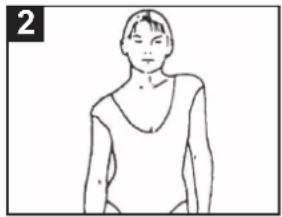
natural_image
Line drawing of a person wearing a V-neck top (no text or symbols)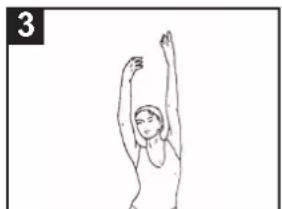
natural_image
Line drawing of a person performing a stretching exercise with arms raised (no text or symbols)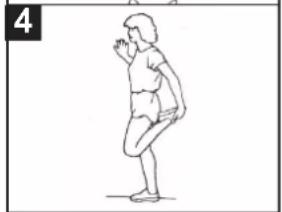
natural_image
Line drawing of a person in a squatting pose, no text or symbols present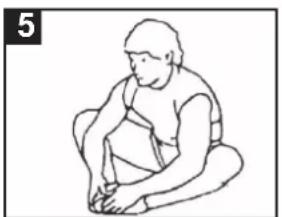
natural_image
Line drawing of a person sitting cross-legged, holding an object (no text or symbols)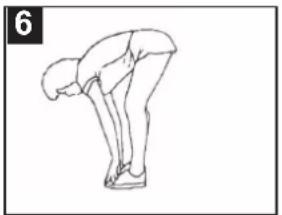
natural_image
Line drawing of a person bending forward with legs raised (no text or symbols)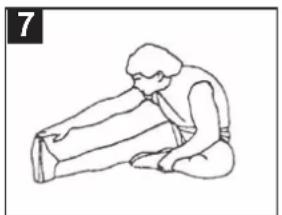
natural_image
Line drawing of a person sitting with hands on knees, no text or symbols present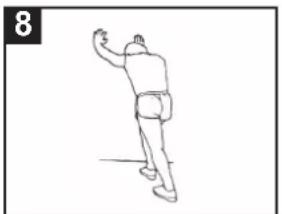
natural_image
Line drawing of a person in motion, possibly dancing or gesturing (no text or symbols)∅VELSER
natural_image
Person lying on a fitness mat with arms and legs, wearing white athletic shoes (no visible text or symbols)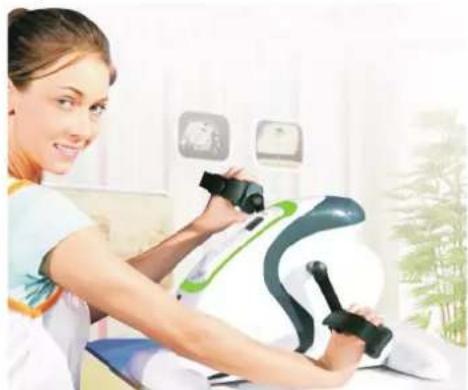
natural_image
Woman using a medical or rehabilitation device on a patient's arm, with no visible text or symbols.