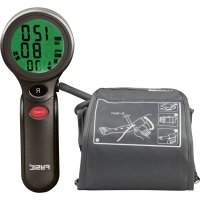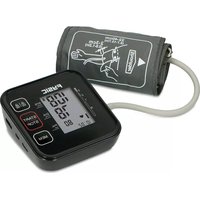
FB150 - Blood pressure monitor Fysic - Free user manual and instructions
Find the device manual for free FB150 Fysic in PDF.


| Brand | Fysic |
| Model | FB150 (B26) |
| Product type | Automatic upper arm blood pressure monitor |
| Dimensions (L x W x H) | 118 x 110 x 52 mm |
| Weight (with batteries) | 261.3 g |
| Display | Digital LCD screen 48 x 65 mm |
| Power supply | 4 AAA 1.5V batteries or 5V DC 1A power adapter (not included) |
| Measurement method | Oscillometric |
| Measurement range – Systolic pressure | 60 to 230 mmHg |
| Measurement range – Diastolic pressure | 40 to 130 mmHg |
| Measurement range – Pulse | 40 to 199 beats/min |
| Accuracy | Pressure: ±3 mmHg, Pulse: ±5% of reading |
| Memory | 2 x 120 measurements (users A and B) |
| WHO classification | 6 levels (optimal to severe) displayed |
| Irregular heartbeat detection | Yes |
| Auto-off | 60 seconds |
| Compatible cuff | Arm circumference 22 to 42 cm |
| Operating conditions | Temperature 5 to 40°C, humidity 15 to 93% RH |
| Storage conditions | Temperature -25 to 70°C, humidity ≤93% RH |
| Maintenance | Clean the device with a soft, dry cloth; cuff washable with soapy water (do not immerse) |
| Safety | Home use – does not replace medical advice. Avoid strong electromagnetic fields. |
| Warranty | 24 months against manufacturing defects |
| Included accessories | Main unit, cuff, user manual |
| Manufacturer | Shenzhen Jamr Technology Co., Ltd. |
Frequently Asked Questions - FB150 Fysic
User questions about FB150 Fysic
0 question about this device. Answer the ones you know or ask your own.
Ask a new question about this device
Download the instructions for your Blood pressure monitor in PDF format for free! Find your manual FB150 - Fysic and take your electronic device back in hand. On this page are published all the documents necessary for the use of your device. FB150 by Fysic.
USER MANUAL FB150 Fysic
text_image
Cuff Connector Port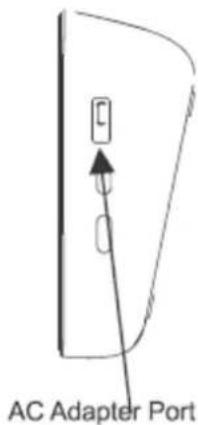
text_image
AC Adapter PortAfbeelding 2
| EN | NL |
| Cuff Connector Port | Aansluitpoort manchet |
| AC Adapter Port | AC-adapterpoort |
text_image
SET START/STOP STOP MEM LCD Display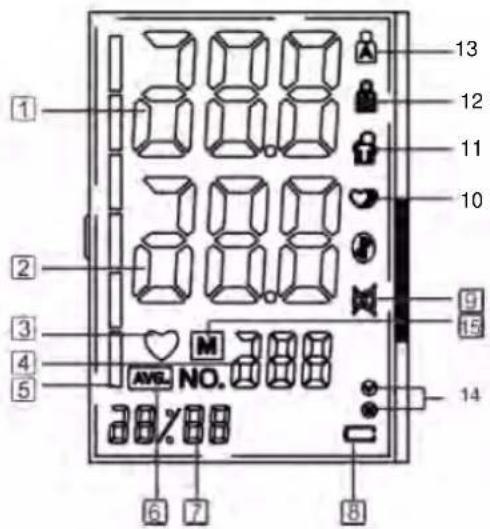
text_image
1 2 3 4 5 38.8 38.8 38.8 AVG. NO. 38.8 38%88 6 7 8 9 10 11 12 13Afbeelding 3
| EN NL | |
| SET INSTELLEN | |
| START/STOP | START/STOP |
| MEM | GEHEUGEN |
| LCD DISPLAY | LCD-SCHERM |
text_image
Medical procedure diagram showing steps from a device to a patient's arm and hand placement with arrows indicating motion.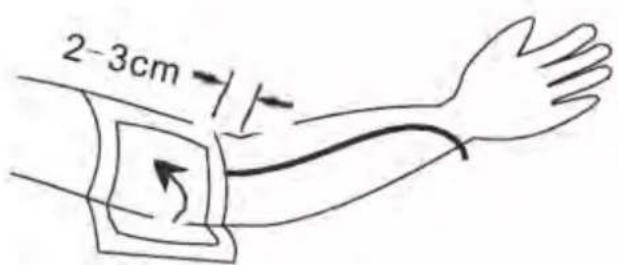
text_image
2-3cmAfbeelding 5
5.3 Meetprocedure
text_image
Please sit vertically and relax your body Height difference between the table and the chair 20-30cm Height to chair 20-35cm Upper arm is not covered or pressed by gusset Cuff and the heart are at the same level Relax the hand and palm is upwardsAfbeelding 6
A101-301, D101-201, Jamr Science & Technology Park, No. 2 Guiyuan Road,
Guixiang Community, Guanlan Street, Longhua District, Shenzhen 518100,
PEOPLE'S REPUBLIC OF CHINA
Shanghai International Holding Corp. GmbH (Europa)
Eiffestrasse 80, 20537 Hamburg, Duitsland. shholding@hotmail.com
Geïmporteerd door:
Commaxx B.V.
Wiebachstraat 37
6466 NG Kerkrade
The Netherlands
Versienummer: 1.3
FYSIC
text_image
Cuff Connector Port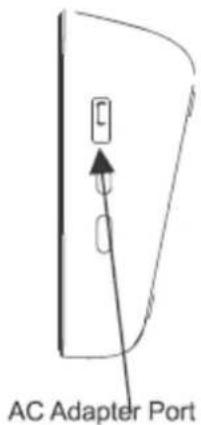
text_image
AC Adapter PortImage 02
text_image
SET START/STOP STOP MEM LCD Display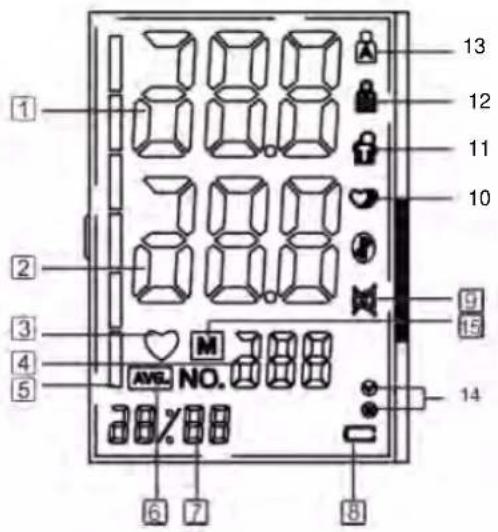
text_image
1 2 3 4 5 6 7 8 9 10 11 12 13 AVG. NO. AVG. NO. AVG. NO.Image 03
| EN FR | |
| SET RÉGLAGE | |
| START/STOP | MARCHE/ARRÊT |
| MEM | MEM |
| LCD DISPLAY | ÉCRAN LCD |
natural_image
Technical line drawing of a device casing with mounting holes and internal components (no text or symbols)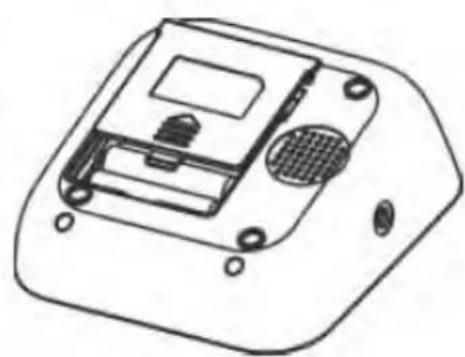
natural_image
Technical line drawing of a device casing with internal components and mounting holes (no text or symbols)Image 04
text_image
Medical procedure diagram showing blood pressure measurement steps with labeled components and directional arrows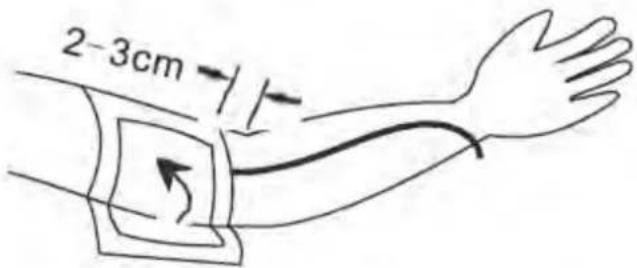
text_image
2-3cmImage 05
text_image
Please sit vertically and relax your body Height difference between the table and the chair 20-30cm Height to chair 20-35cm Upper arm is not covered or pressed by gussel Cuff and the heart are at the same level Relax the hand and palm is upwardsImage 06
A101-301, D101-201, Jamr Science & Technology Park, No. 2 Guiyuan Road,
Guixiang Community, Guanlan Street, Longhua District, Shenzhen 518100,
PEOPLE'S REPUBLIC OF CHINA
Shanghai International Holding Corp. GmbH (Europe)
Eiffestrasse 80, 20537 Hamburg, Allemagne. shholding@hotmail.com
Importé par :
Commaxx B.V.
Wiebachstraat 37
6466 NG Kerkrade
The Netherlands
text_image
Cuff Connector Port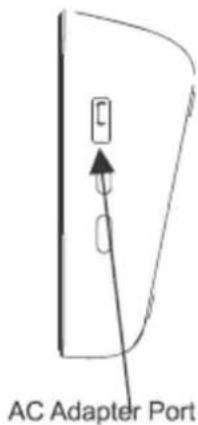
text_image
AC Adapter PortAbbildung 02
text_image
SET START/STOP MEM LCD Display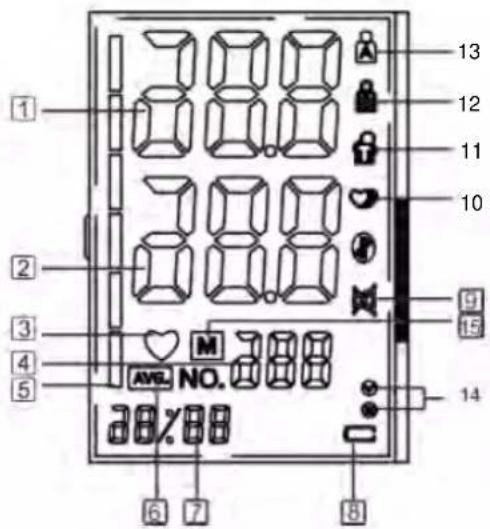
text_image
1 2 3 4 5 6 7 8 9 10 11 12 13 AVG. NO. AVG. NO.Abbildung 03
| EN DE | |
| SET Einstelltaste | |
| START/STOP | START/STOPP |
| MEM | Speichertaste MEM |
| LCD DISPLAY | LCD-DISPLAY |
natural_image
Technical line drawing of a device casing with mounting holes and internal components (no text or symbols)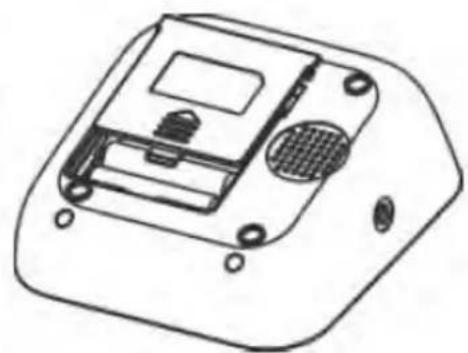
natural_image
Technical line drawing of a device casing with internal components and mounting holes (no text or symbols)Abbildung 04
text_image
Medical procedure diagram showing blood pressure measurement steps with labeled components and directional arrows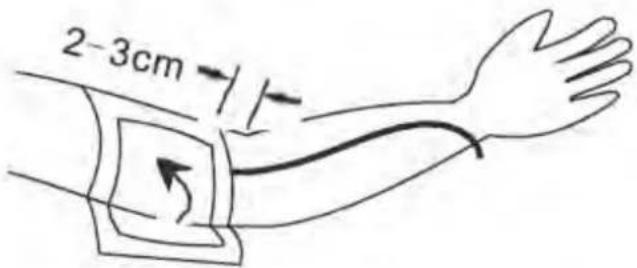
text_image
2-3cmAbbildung 05
5.3 Messverfahren
Siehe Abbildung 06.
text_image
Please sit vertically and relax your body Height difference between the table and the chair 20-30cm Height to chair 20-35cm Upper arm is not covered or pressed by gusset Cuff and the heart are at the same level Relax the hand and palm is upwardsAbbildung 06
A101-301, D101-201, Jamr Science & Technology Park, No. 2 Guiyuan Road,
Guixiang Community, Guanlan Street, Longhua District, Shenzhen 518100,
PEOPLE'S REPUBLIC OF CHINA
Shanghai International Holding Corp. GmbH (Europa)
Eiffestrasse 80, 20537 Hamburg, Deutschland. shholding@hotmail.com
Importiert durch:
Commaxx B.V.
Wiebachstraat 37
6466 NG Kerkrade
The Netherlands
Version Number: 1.3
FYSIC
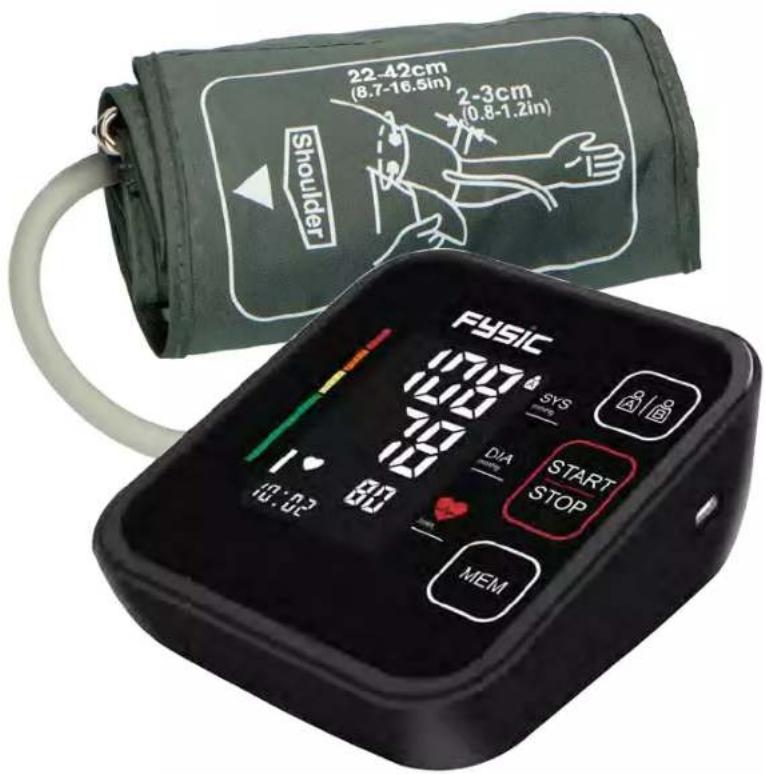
Fully Automatic Upper Arm
Blood Pressure Monitor
Model Number: B26 / FB150
USER'S MANUAL
text_image
22-42cm (8.7-16.5in) 2-3cm (0.8-1.2in) Shoulder FySiC SYS DIA START STOP MEMCONTENTS
1 Introduction and Intended Use....2
2 Important Information on Blood Pressure and its Measurement....3
3 Components of your blood pressure monitor .... 5
4 Using your Monitor for the First Time 6
5 Measurement Procedure 8
6 Care and Maintenance....14
7 Warranty/Service....14
8 Certifications 14
9 Technical Specifications 15
10 EMC Declaration....15
1 Introduction and Intended Use
It enables reliable measurement of systolic and diastolic blood pressure as well as pulse through the oscillometric method.
Before using, please read this instruction manual carefully and then keep it in a safe place.
1.1 Remember...
● Only a health-care professional is qualified to interpret blood pressure measurements.
● This device is NOT intended to replace regular medical checkups.
- Blood pressure readings obtained by this device should be verified before prescribing or making adjustments to any medications used to control hypertension. Under no circumstances should YOU alter the dosages of any drugs prescribed by your physician.
- This monitor is intended for use by adults only. Consult with a physician before using this instrument on a child.
- In cases of irregular heartbeat, measurements made with this instrument should only be evaluated after consultation with a physician.
- Host products, including accessories, shall be processed in accordance with local regulations after reaching the life cycle.
1.2 Warnings and Precautions

Warning: The use of other accessories other than those specified or provided by the equipment manufacturer may cause electromagnetic radiation to increase or decrease electromagnetic immunity resulting in operational failure
Warning: This system may fail to yield specified measurement accuracy if operated or stored in temperature or humidity conditions outside the limits stated in the specifications section of this manual.
Warning: The separate ac adapter which is intended to connect USB interface of Blood Pressure Monitor has not been evaluated according to IEC 60601-1. The safety of the product shall be reappraised when it power supply by a separate ac adapter.
Warning: The user must check that the equipment functions safely and see that it is in proper working condition before being used.
Warning: The device is not suitable for use in the presence of flammable anesthetic mixtures with air or with oxygen or nitrous oxide.
Warning: The patient is an intended operator, the functions of monitoring blood pressure and pulse rate can be safely used by patient. The routine clean and changing batteries can be performed by the patient.
Warning: This device can not be used together with hf surgical equipment.
Warning: Use of power adapters
- Adapter: input 100-240V, 50/60hz output DC 5V 1A
- Do not to position the device to make it difficult to operate the disconnect on device while using adaptor.
- Avoid usage in wet, moisture, high temperature, corrosive gas environments and in direct sunlight.
Warning: Too frequent measurements can cause injury to the PATIENT due to blood flow interference.
Warning: Don't place the cuff over wound part.
Warning: Pressurization of the CUFF can temporarily cause loss of function of simultaneously used monitoring EQUIPMENT on the same limb.
Caution: To avoid any possibility of accidental strangulation, keep this unit away from children and do not drape tubing around your neck.
Caution: To avoid damaging the device, keep this unit away from children and pets.
Caution: The standard material used for the bladder and tubing is latex-free.
Attention: Self-measurement means control, not diagnosis or treatment. Unusual values must always be discussed with a physician. Under no circumstances should you alter the dosages of any drugs prescribed by a physician.
Attention: The pulse display is not suitable for checking the frequency of heart pacemakers!
Attention: In cases of irregular heartbeat, measurements made with this instrument should only be evaluated after consultation with a physician.
Note: To obtain the greatest accuracy from your blood pressure instrument, it is recommended that the instrument be used within the specified temperature and the relative humidity, please see the Technical Specifications.
Note: The cuff is treated as the applied part. The user should contact the manufacturer for assistance, if needed, in setting up, using or maintaining the device.
Note: This device contains sensitive electronic components. Avoid strong electrical or electromagnetic fields in the direct vicinity of the device (e.g. mobile telephones, microwave ovens) during use. These can lead to erratic results.
Note: Do not attempt to service or repair this device yourself. Should a malfunction occur, refer to local distributor or the manufacturer.
2 Important Information on Blood Pressure and its Measurement
2.1 How does high or low blood pressure arise?
Your level of blood pressure is determined in the circulatory center of the brain and adjusts to a variety of situations through feedback from the nervous system. To adjust blood pressure, the strength and speed of the heart (Pulse), as well as the width of circulatory blood vessels is altered. Blood vessel width is controlled by fine muscles in the blood vessel walls.
Your level of arterial blood pressure changes periodically during heart activity: During the “blood ejection” (Systole) the value is highest (systolic blood pressure value). At the end of the heart’s “rest period” (Diastole) pressure is lowest (diastolic blood pressure value).
2.2 Which values are normal?
Please refer to the diagram below (Picture-01)
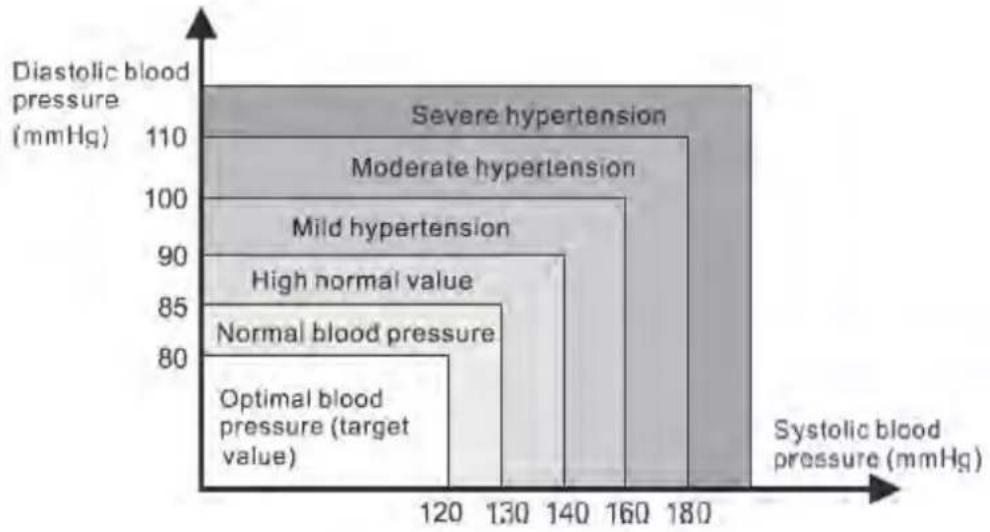
heatmap
| Diastolic blood pressure (mmHg) | Systolic blood pressure (mmHg) | Category | | ------------------------------- | ------------------------------ | ------------------------- | | 120 | 180 | Severe hypertension | | 130 | 160 | Moderate hypertension | | 140 | 140 | Mild hypertension | | 150 | 120 | High normal value | | 160 | 100 | Normal blood pressure | | 170 | 80 | Optimal blood pressure |Picture-01
There are six grids in the display of device. Please refer to the picture-01-01. Different grids represent different interval scales of WHO.
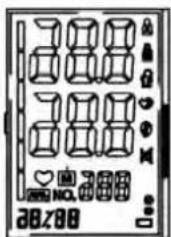
text_image
Cropped image of a card with stylized text and geometric shapes, possibly a card or electronic device.| Blood pressure value | WHO grids in device | WHO Classification |
| DIA<80 & SYS<120 | 1 | Optimal blood pressure |
| DIA<85 & SYS<130 | 2 | Normal blood pressure |
| DIA<90 & SYS<140 3 High normal value | ||
| DIA<100 & SYS<160 4 Mild hypertension | ||
| DIA<110 8Moderate hypertension | ||
| DIA>= 110 or SYS>= 180 6 Severe hypertension |
Picture-01-01
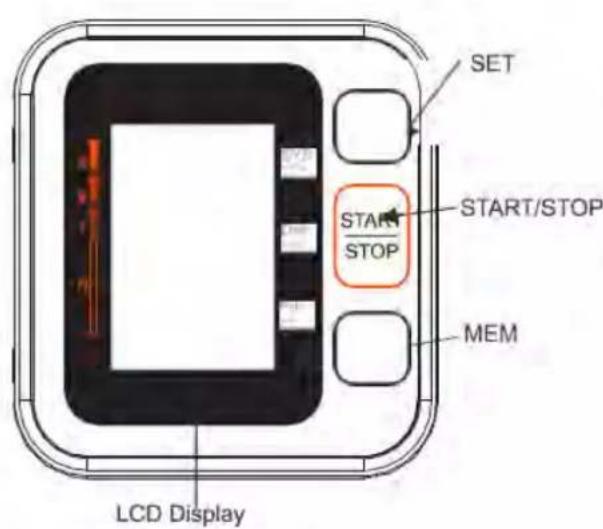
3 Components of your blood pressure monitor
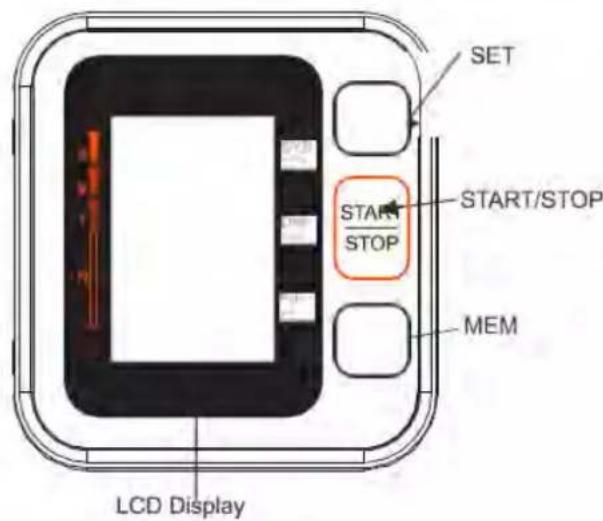
3.1 Measuring unit
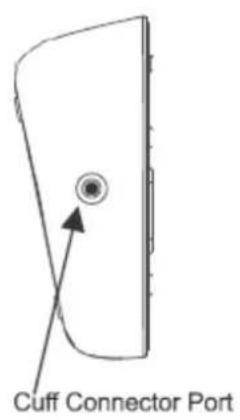
text_image
Cuff Connector Port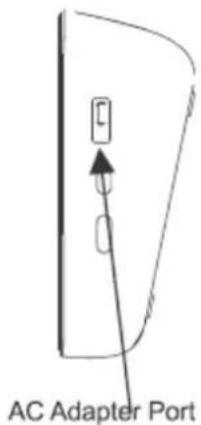
text_image
AC Adapter PortPicture-02
text_image
SET START/STOP MEM LCD Display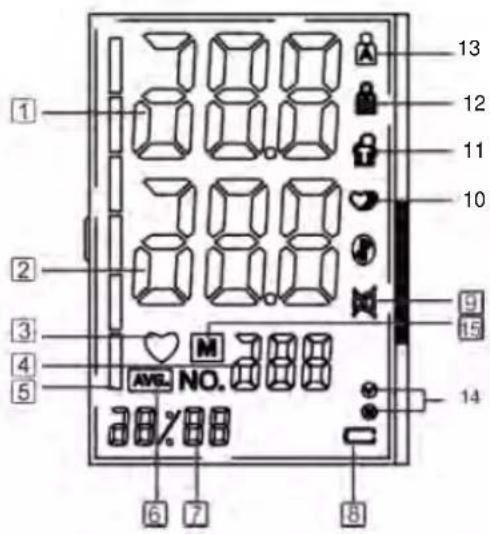
text_image
1 2 3 4 5 6 7 8 9 10 11 12 13 AVL. NO. 388 38%88Picture-03
3.2 The symbols on the LCD display
-
Systolic blood pressure
-
Diastolic blood pressure
-
Heartbeat symbol (Flashes during measurement)
-
Pulse display
-
WHO Function symbol
-
Average value symbol
-
Date/Time display 8. Battery low symbol
-
Mute symbol
-
Irregular heartbeat symbol
-
Movement error symbol 12. USER B
-
USER A 14. Cuff self-checking function
-
Memory symbol
3.3 Features B26 / FB150
-
Date/time display 2. Double users: 2 x 120 sets memory
-
Average value function
-
Irregular heartbeat checking
-
WHO function 6. Low battery display
-
External power adapter support
-
Auto power-off
-
Cuff self-checking function
4 Using your Monitor for the First Time
4.1 Activating the pre-installed batteries
Battery Installation
Use only 1.5V "AAA" alkaline batteries with this device.
-
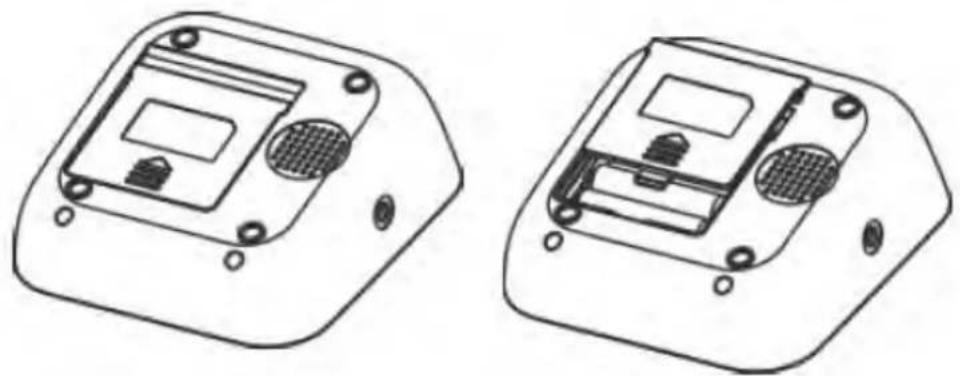
Press the hook on the bottom of the battery cover and lift the cover off in the direction of the arrow (Picture-04).
-
Install 4 "AAA" size batteries and make sure the + (positive) and - (negative) polarities match the polarities of the battery compartment, then close the battery cover. Make sure that the battery cover is securely in position.
natural_image
Technical line drawings of two electronic device modules with mounting holes and internal components (no text or symbols)Picture-04
Battery replacement
Low Battery Indicator
- When the Low Battery Indicator appears on the display, turn the monitor off and remove all the
batteries. Replace with 4 new batteries at the same time. Long-life alkaline batteries are recommended.
- To prevent the damage of monitor from leaked battery fluid, please take out of battery if the monitor unused in a long time (generally more than 3 months). If battery fluid should get in your eyes, immediately rinse with plenty of clean water. Contact a physician immediately.
- Dispose of the device, components and optional accessories according to applicable local regulations. Unlawful disposal may cause environmental pollution.
4.2 System Settings
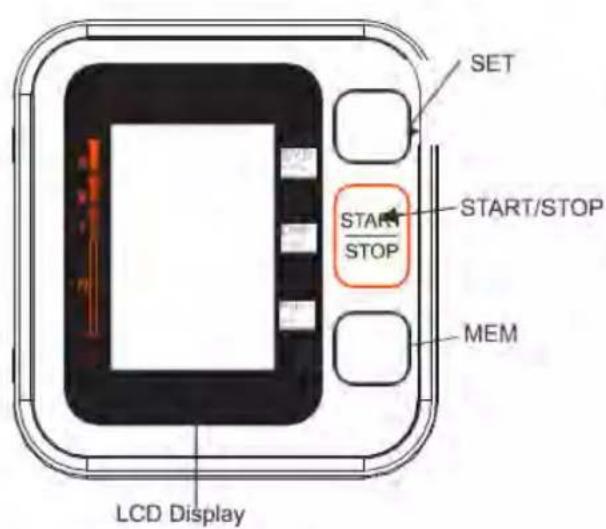
After you load the battery or connect power for the monitor, long press the SET button for more than 3s, and then you can start to set.
User setting:
With the device switched off, press the SET button for 1 second. The display will show A or B. By pressing the SET button, you can choose between user A or B. To confirm the user, press the START/STOP button. The display goes out. Press the START/STOP button again to start with the selected user.
Setting the Year:
When the year display is flashing, press the MEM button continuously and it will increase continuously by 1 until 2049, and then return the original year, once the year set is OK, press SET button to confirm.
Setting Month/Date:
Initial Month/Date is 1/01, when the Month display is flashing, press the MEM button, the month will increase by 1, press SET button to confirm, and do in the same way to set the date. Press SET button to confirm.
Setting Time:
When the hour display is flashing, press the MEM button, the hour will increase by 1, press SET button to confirm, and do in the same way to set the minute. Press SET button to confirm.
Record Delete:
When you checking the memory data, long press MEM button to delete existing user measurement data. Note:
If you decide to delete all the records, please keep the records in another way, in case you need it some days later. Take the battery out won't lead to a record missing.
4.3 Cuff tube connection
Insert the cuff tube into the opening on the left side of the monitor indicated by the drawing of a cuff.
5 Measurement Procedure
5.1 Before measurement:
- Avoid eating and smoking as well as all forms of exertion directly before measurement. These factors influence the measurement result. Find time to relax by sitting in an armchair in a quiet atmosphere for about ten minutes before taking a measurement.
- Remove any garment that fits closely to your upper arm.
● Always measure on the same arm (normally left).
5.2 Fitting the Cuff
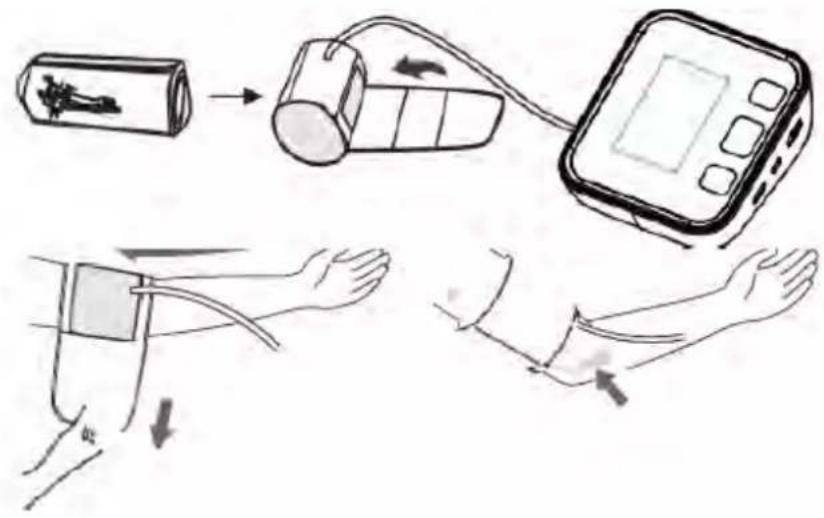
Please refer to picture-05
a) Wrap the cuff around your upper left arm. The rubber tube should be on the inside of your arm extending downward to your hand. Make certain the cuff lies approximately 2 to 3 ~cm above the elbow. Important! The on the edge of the cuff (Artery Mark) must lie over the artery which runs down the inner side of the arm.
b) To secure the cuff, wrap it around your arm and press the hook and loop closure together.
c) There should be little free space between your arm and the cuff. You should be able to fit 2 fingers between your arm and the cuff. Cuffs that don't fit properly result in false measurement values. Measure your arm circumference if you are not sure of proper fit.
d) Lay your arm on a table (palm upward) so the cuff is at the same height as your heart. Make sure the tube is not kinked.
text_image
Medical procedure diagram showing steps of blood pressure measurement with labeled components and directional arrows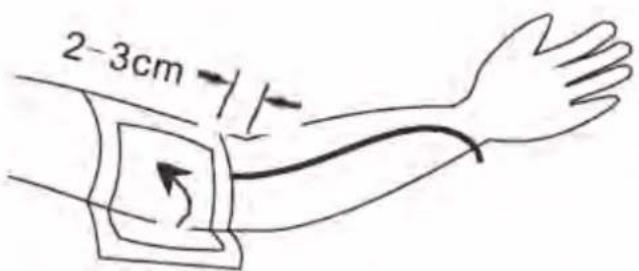
text_image
2-3cmPicture-05
5.3 Measure Procedure
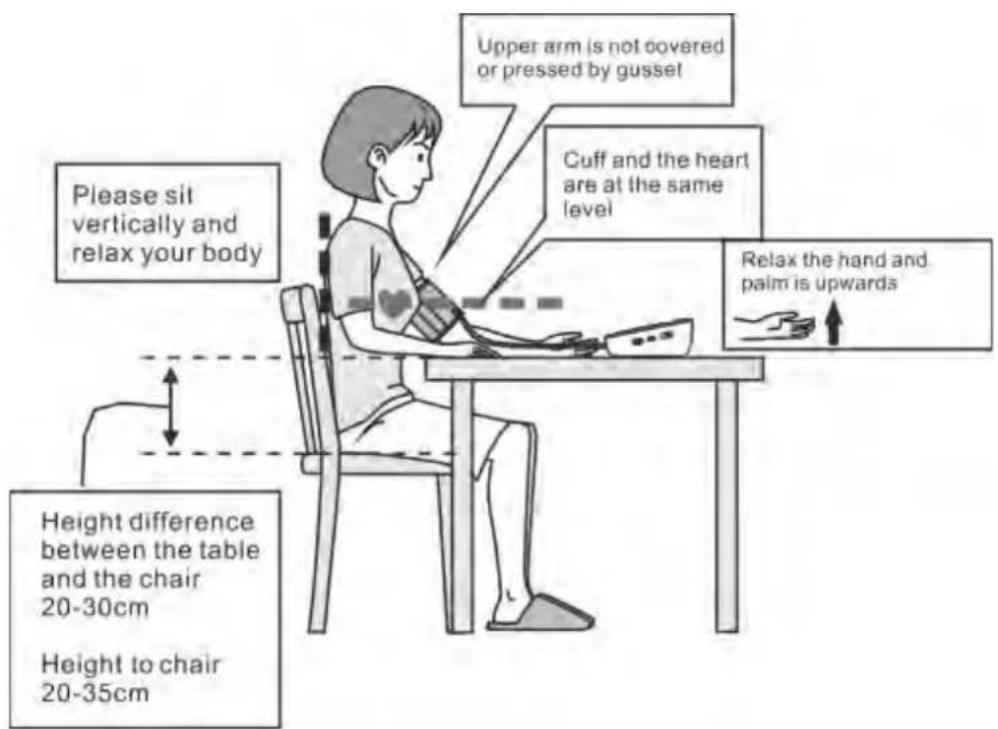
Refer to picture-06
- Sit comfortably in a chair with your feet flat on the floor.
- Select your User ID (A or B).
- Stretch your arm forward on the desk and keep relaxing, make sure the palm of hand is upturned. Make sure arm is in correct position, to avoid body movement. Sit still and do not talk or move during the measurement. After the cuff has been appropriately positioned on the arm and connected to the blood pressure monitor, the measurement can begin:
a) Press the START/STOP button. The pump begins to inflate the cuff. In the display, the increasing cuff pressure is continually displayed.
b) After automatically reaching an individual pressure, the pump stops and the pressure slowly falls. The cuff pressure is displayed during the measurement.
c) When the device has detected your pulse, the heart symbol in the display begins to blink.
d) When the measurement has been concluded, the measured systolic and diastolic blood pressure values, as well as the pulse will be displayed.
e) The measurement results are displayed until you switch the device off. If no button is pressed for 60 seconds, the device switches off automatically.
f) Cuff self-checking symbol ( )
The cuff correct symbol (☑) will be displayed if the cuff position is correct, otherwise the wrong symbol (☒) will be displayed. Please check again the cuff if the wrong symbol (☒) is displayed.
g) Movement error symbol ( )
The Movement Error Symbol (💡) is displayed if you move your body during the measurement. Please remove the cuff, and wait 2-3 minutes. Reapply the cuff and take another measurement.
NOTE:
Patient Position:
1) Comfortably seated 2) Legs uncrossed
3) Feet flat on the floor
4) Back and arm supported
5) Middle of the CUFF at the level of the right atrium of the heart
text_image
Please sit vertically and relax your body Height difference between the table and the chair 20-30cm Height to chair 20-35cm Upper arm is not covered or pressed by gusset Cuff and the heart are at the same level Relax the hand and palm is upwardsPicture-06
5.4 Irregular Heartbeat Detector
This symbol - indicates that certain pulse irregularities were detected during the measurement. In this case, the result may deviate from your normal basal blood pressure – repeat the measurement. Information for the physician on frequent appearance of the Irregular Heartbeat Symbol.
This instrument is an oscillometric blood pressure monitor device that also analyzes pulse frequency during measurement. The instrument is clinically tested.
If pulse irregularities occur during measurement, the irregular heartbeat symbol is displayed after the measurement. If the symbol appears more frequently (e.g. several times per week on measurements performed daily) or if it suddenly appears more often than usual, we recommend the patient to seek medical advice. The instrument does not replace a cardiac examination, but serves to detect pulse irregularities at an early stage.
5.5 Error Indicates
The following symbol will appear on the display when measuring abnormal
| SYMBOL | CAUSE | CORRECTION |
| No display appears | Weak battery or improper placement | Replace both batteries with new ones.Check the battery installation for proper placement of the battery polarities. |
| Er 1 Sensor abnormal | Check if the pump is working or not. If it is working, then the problem is sensor abnormal. Please send it to the local distributor. | |
| Er 2 | Monitor could not detect pulse wave or cannot calculate the blood pressure data | Check if the air releasing is too slow or not. If it is too slow, please check if there is any dust in the tube plug of the cuff and the cuff port in the device. If yes, please clean and start the measurement again. If no, please send the device back to the local distributor. |
| Er 3 | Measurement result is abnormal (SYS≤35mmHg, DIA≤23mmHg) | Occasionally-measure for one more time / Always - send it to local distributor |
| Er 4 | Too loose cuff or air leakage (Cannot inflate to 30mmHg within 15s) | Tie the cuff correctly and make sure the air plug is properly inserted in the unit |
| Er 5 The air tube is crimped | Correct it and make the measurement again | |
| Er 6 | The sensor is sensing great fluctuation in the pressure | Please keep quiet and don’t move |
| Er 7 | The pressure that the sensor sensing is over the limit | Please send back to the local distributor |
| Er 8 | The demarcation is incorrect or the device has not been demarcated | Please send back to the local distributor |
Trouble removal
| Problem Check Cause and solutions | ||
| No Power Whether battery has enough power | power | Replace new one |
| Whether polarity is correct | Installation for proper placement of the batteries polarities | |
| No Inflation Whether the plug is correctly inserted | correctly inserted | Insert into the air socket tightly |
| Whether the plug broken or leak | Change a new cuff | |
| Err and stop working Whether move the arm when inflate | move the arm when inflate | Keep the body calm |
| Whether the chatting icon when measured is on | Keep quite when measure | |
| Cuff leak | Whether the cuff wrap too loose | Wrap the cuff tightly |
| Whether the cuff broken | Change a new cuff | |
| Please contact the distributor if you can't solve the problem, do not disassemble the unit by yourself! | ||
SYMBOL DESCRIPTIONS
The following symbols may appear in this manual, on the Digital Blood Pressure Monitor B26 / FB150, or on its accessories. Some of the symbols represent standards and compliances associated with the Digital Blood Pressure Monitor B26 / FB150 and its use.
 | Authorized Representative in the European Community |
 | CE Mark: conforms to essential requirements of the Medical Device Directive 93/42/EEC. |
 | Date of manufacture. |
 | Manufacturer |
 | Specifies serial number |
 | Type BF applied part |
 | Direct current |
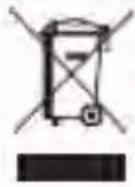 | DISPOSAL: Do not dispose this product as unsorted municipal waste. Collection of such waste separately for special treatment is necessary. |
 | Follow instructions for use |
 | Put up |
 | Fragile |
 | Afraid of the rain |
 | Fear of the sun |
 | Class II equipment |
 | Handle gently |
 | Temperature range |
| No Sterilize requirement | |
| Not category AP / APG equipment | |
| Mode of operation: continuous | |
5.6 Memory
Each unit stores 120 sets measurements for 2 users, totally 240 sets (User A and B).
Viewing the stored values
With the unit off, press the Memory button. The display first shows "A", then shows an average of all measurements stored in the unit. Please note: Measurements for each user are averaged and stored separately. Be certain that you are viewing the measurements for the correct user. Pressing the Memory button again displays the previous value. To view a particular stored memory, press and hold the Memory button to scroll to that stored reading.
5.7 Discontinuing a Measurement
If it is necessary to interrupt a blood pressure measurement for any reason (e.g the patient feels unwell), the Start/Stop button can be pressed at any time. The device then immediately lowers the cuff pressure automatically.
5.8 Using the AC Adapter
You may also operate this monitor using a CE approved AC adapter (output 5V DC1A with Micro connector).
a) Ensure that the AC adapter and cable are not damaged.
b) Plug the adapter cable into the AC adapter port on the right side of the blood pressure monitor.
c) Plug the adapter into your electrical outlet. When the AC adapter is connected, no battery current is consumed.
Note: No power is taken from the batteries while the AC adapter is connected to the monitor. If electrical power is interrupted, (e.g., by accidental removal of the AC adapter from the outlet) the monitor must be reset by removing the plug from the socket and reinserting the AC adapter connection.
6 Care and Maintenance
Wash hands after each time measurement.
If one device is used by different patients, wash hands before and after each use.
a) Do not expose the device either to extreme temperatures, humidity, dust or direct sunlight.
b) The cuff contains a sensitive air-tight bubble. Handle this cuff carefully and avoid all types of stress through twisting or buckling.
c) Clean the device with a soft, dry cloth. Do not use gas, thinners or similar solvents. Spots on the cuff can be removed carefully with a damp cloth and soapsuds. The cuff with bladder must not be washed in a dishwasher, clothes washer, or submerged in water.
d) Handle the tube carefully. Do not pull on it. Do not allow the tubing to kink and keep it away from sharp edges.
e) Do not drop the monitor or treat it roughly in any way. Avoid strong vibrations.
f) Never open the monitor! This invalidates the manufacturer's warranty.
g) Batteries and electronic instruments must be disposed of in accordance with the locally applicable regulations, not with domestic waste.
7 Warranty/Service
Your blood pressure monitor is guaranteed for 24 months against manufacturers" defects for the original purchaser only, from date of purchase. The warranty does not apply to damage caused by improper handling, accidents, professional use, not following the operating instructions or alterations made to the instrument by third parties.
Warranty only applies to the main device and its cuff. All other accessories are not covered by warranty. There are no user serviceable parts inside. Batteries or damage from old batteries is not covered by the warranty.
8 Certifications
Device standard:
This device is manufactured to meet the European blood pressure monitors: EN1060-3 / IEC 80601-2-30
/ ISO81060-1 / IEC60601-1-11 / IEC60601-1
Electromagnetic compatibility:
Device fulfills the stipulations of the International standard IEC60601-1-2
The declaration of conformity is available on:
http://DOC.hesdo.com/FB150-DOC.pdf
9 Technical Specifications
Model: B26 / FB150
Weight: 261.3g (Batteries included)
Display: 48*65mm【2.56"x1.89】_CD Digital Display
Size: 118 (W) x 110 (L) x 52 (H) mm 【4.65"(W)x4.33"(L)x2.05"(H)】
Accessories: 1×Main Device, 1×Cuff, 1×Users manual
Operating Conditions: Temperature: 5°C to 40°C; Humidity: 15% to 93% RH;
Storage And Shipping Conditions: Temperature: -25°C to 70°C; Humidity: ≤ 93% RH;
Atmospheric pressure range: 70kPa\~106kPa
Measuring method: Oscillometric Pressure sensor: Resistive
Measuring range: DIA: 40-130mmHg; SYS: 60-230mmHg Pulse: 40 to 199 per minute
Cuff pressure display range: <300mmHg
Memory: Automatically stores the last 120 measurements for 2 users (total 240)
Measuring resolution: 1 mmHg
Accuracy: Pressure within ± 3 mmHg / pulse ± 5 % of the reading Power source: a) 4*AAA batteries, 1.5 V
b) AC adapter INPUT: 100-240VAC 50/60HZ OUTPUT;5V DC 1A Accessories: Wide range rigid cuff 8.7" – 16.5" (22 - 42 cm)
Automatically power off: 60 seconds
Users: Adult
10 EMC Declaration
1) *This product needs special precautions regarding EMC and needs to be installed and put into service according to the EMC information provided, and this unit can be affected by portable and mobile RF communications equipment.
2) * Do not use a mobile phone or other devices that emit electromagnetic fields, near the unit. This may result in incorrect operation of the unit.
3) * Caution: This unit has been thoroughly tested and inspected to assure proper performance and operation!
4) * Caution: this machine should not be used adjacent to or stacked with other equipment and that if adjacent or stacked use is necessary, this machine should be observed to verify normal operation in the configuration in which it will be used
| Guidance and manufacture's declaration – electromagnetic immunity | |||
| The device is intended for use in the electromagnetic environment specified below. The customer or the user of device should assure that it is used in such an environment. | |||
| Immunity test | IEC 60601 test level | Compliance level | Electromagnetic environment - guidance |
| Electrostatic discharge (ESD) IEC 61000-4-2 | ±8 kV contact ±2 kV, ±4 kV, ±8 kV, ±15 kV air | ±8 kV contact ±2 kV, ±4 kV, ±8 kV, ±15 kV air | Floors should be wood, concrete or ceramic tile. If floor are covered with synthetic material, the relative humidity should be atleast 30%. |
| Electrical fast transient/burst IEC 61000-4-4 | ±2 kV for power supply lines ±1 kV for input/output lines | Not applicable | Mains power quality should be that of a typical commercial or hospital environment. |
| Surge IEC 61000-4-5 | ±1 kV line(s) to line(s) ±2 kV line(s) to earth | Not applicable | Mains power quality should be that of a typical commercial or hospital environment. |
| Voltage dips, short interruptions and voltage variations on power supply input lines IEC 61000-4-11 | 0 % UT; 0.5 cycle at 0°,45°,90°, 135°, 180°, 225°, 270°, 315° | Not applicable | Mains power quality should be that of a typical commercial or hospital environment. If the user of the device requires continued operation during power mains interruptions, it is recommended that the device be powered from an uninterruptible power supply or a battery. |
| 0 % UT; 1 cycle 70 % UT; 25/30 cycle 0% UT; 250/300 cycle | |||
| Power frequency (50Hz/60Hz) magnetic field IEC 61000-4-8 | 30 A/m 50/60Hz | 30 A/m 50/60Hz | Power frequency magnetic fields should be at levels characteristic of a typical location in a typical commercial or hospital environment. |
| NOTE UT is the a.c. mains voltage prior to application of the test level. | |||
| Guidance and manufacture's declaration – electromagnetic immunity | |||
| The device is intended for use in the electromagnetic environment specified below. The customer or the user of the device should assure that it is used in such an environment. | |||
| Immunity test | IEC 60601 test level | Compliance level | Electromagnetic environment - guidance |
| 3 Vrms150 kHz to 80 MHz 3 V RMS outside the ISM band, 6 V RMS in the ISM and amateur bands80% AM at 1kHz | Not applicable | Portable and mobile RF communications equipment should be used no closer to any part of the device, including cables, than the recommended separation distance calculated from the equation applicable to the frequency of the transmitter.Recommended separation distance | |
| Conducted RF IEC 61000-4-6 | |||
| d=0.35√pd=1.2√p | |||
| Radiated RFIEC 61000-4-3 | 10 V/m80 MHz to 2.7 GHz80% AM at 1kHz | 10 V/m80 MHz to 2.7 GHz80% AM at 1kHz | 80MHz to 800MHz:d=1.2√p800MHzto 2.7GHz:d=2.3√pWhere, P is the maximum output power rating of the transmitter in watts (W) according to the transmitter manufacturer and d is the recommended separation distance.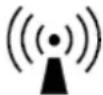 Field strengths from fixed RF transmitters, as determined by an electromagnetic site survey, should be less than the compliance level in each frequency range.Interference may occur in the vicinity of equipment marked with the following symbol: Field strengths from fixed RF transmitters, as determined by an electromagnetic site survey, should be less than the compliance level in each frequency range.Interference may occur in the vicinity of equipment marked with the following symbol: |
| NOTE 1 At 80 MHz and 800 MHz, the higher frequency range applies.NOTE 2 These guidelines may not apply in all situations. Electromagnetic propagation is affected by absorption and reflection from structures, objects and people. | |||
| A Field strengths from fixed transmitters, such as base stations for radio (cellular/cordless) telephones and land mobile radios, amateur radio, AM and FM radio broadcast and TV broadcast cannot be predicted theoretically with accuracy. To assess the electromagnetic environment due to fixed RF transmitters, an electromagnetic site survey should be considered. If the measured field strength in the location in which the device is used exceed s the applicable RF compliance level above, the device should be observed to verify normal operation. If abnormal performance is observed, additional measures may be necessary, such as re-orienting or relocating the device.B Over the frequency range 150 kHz to 80 MHz, field strengths should be less than 3 V/m. | |||
| Guidance and manufacture's declaration – electromagnetic emission | |||
| The device is intended for use in the electromagnetic environment specified below. The customer of the user of the device should assure that it is used in such an environment. | |||
| Emission test | Compliance | Electromagnetic environment – guidance | |
| RF emissionsCISPR 11 | Group 1 | The device use RF energy only for its internal function.Therefore, its RF emissions are very low and are not likely to cause any interference in nearby electronic equipment. | |
| RF emissionCISPR 11 | Class B | The device is suitable for use in all establishments, including domestic establishments other than domestic and those directly connected to the public low-voltage power supply network that supplies buildings used for domestic purposes. | |
| Harmonic emissions IEC61000-3-2 | Not applicable | ||
| Voltage fluctuations/flicker emissionsIEC 61000-3-3 | Not applicable | ||
| Recommended separation distances between portable and mobile RF communications equipment and the device | ||||||
| The device is intended for use in an electromagnetic environment in which radiated RF disturbances are controlled. The customer or the user of the device can help prevent electromagnetic interference by maintaining a minimum distance between portable and mobile RF communications equipment (transmitters) and the device as recommended below, according to the maximum output power of the communications equipment. | ||||||
| Rated maximum output power of transmitter (W) | Separation distance according to frequency of transmitter (m) | |||||
| 150 KHz to 80 MHz d = 1,2 | 80 MHz to 800 MHz d = 1,2 | 800 MHz to 2.7 GHz d = 2,3 | ||||
| 0.01 | 0.12 | 0.12 | 0.23 | |||
| 0.1 0.38 0.38 0.73 | ||||||
| 1 1.2 1.2 2.3 | ||||||
| 10 3.8 3.8 7.3 | ||||||
| 100 12 12 23 | ||||||
| For transmitters rated at a maximum output power not listed above, the recommended separation distance d in meters (m) can be estimated using the equation applicable to the frequency of the transmitter, where P is the maximum output power rating of the transmitter in watts (W) according to the transmitter manufacturer.NOTE 1 At 80 MHz and 800 MHz, the separation distance for the higher frequency range applies.NOTE 2 These guidelines may not apply in all situations. Electromagnetic propagation is affected by absorption and reflection from structures, objects and people. | ||||||
| Guidance and manufacturer's declaration - electromagnetic immunity | ||||||
| The device is intended for use in the electromagnetic environment specified below. The customer or the user of the device should assure that it is used in such an environment. | ||||||
| Test frequency (MHz) | Band^a) (MHz) | Service^a) | Modulation^a) | Maximum power (w) | Distance (m) | IMMUNITY TEST LEVEL (V/m) |
| 385 | 380-390 T | TETRA 400 | Pulse Modulationb) 18 Hz | 1.8 | 0.3 | 27 |
| 450 | 430-470 | GMRS 460, FRS 460 | FM^c)± 5 kHz deviation 1 kHz sine | 2 | 0.3 | 28 |
| 710 | 704-787 | LTE Band 13, 17 | Pulse Modulationb) 217 Hz | 0.2 | 0.3 | 9 |
| 745 | ||||||
| 780 | ||||||
| 810 | 800-960 | GSM 800/900, TETRA 800, iDEN 820, CDMA 850, LTE Band 5 | Pulse Modulationb) 18 Hz | 2 | 0.3 | 28 |
| 870 | ||||||
| 930 | ||||||
| 1720 | 1700-1990 | GSM 1800; CDMA 1900; GSM 1900; DECT; LTE Band 1,3 4,25;UMTS | Pulse Modulationb) 217 Hz | 2 | 0.3 | 28 |
| 1845 | ||||||
| 1970 | ||||||
| 2450 | 2400-2570 | Bluetooth, WLAN 802.11 b/g/n, RFID 2450, LTE Band 7 | Pulse Modulationb) 217 Hz | 2 | 0.3 | 28 |
| 5240 | 5100-5800 | WLAN 802.11 a/n | Pulse Modulationb) 217 Hz | 0.2 | 0.3 | 9 |
| 5500 | ||||||
| 5785 | ||||||
| NOTE If necessary to achieve the IMMUNITY TEST LEVEL, the distance between the transmitting antenna and the ME EQUIPMENT or ME SYSTEM may be reduced to 1 m. The 1 m test distance is permitted by IEC 61000-4-3. | ||||||
| a) For some services, only the uplink frequencies are included.b) The carrier shall be modulated using a 50% duty cycle square wave signal.c) As an alternative to FM modulation. 50% pulse modulation at 18 Hz may be used because while it does not represent actual modulation, it would be worst case. | ||||||
The MANUFACTURER should consider reducing the minimum separation distance, based on RISK MANAGEMENT, and using higher IMMUNITY TEST LEVELS that are appropriate for the reduced minimum separation distance. Minimum separation distances for higher IMMUNITY TEST LEVELS shall be calculated using the following equation:
$$ E = \frac {6}{d} \sqrt {P} $$
Where P is the maximum power in W, d is the minimum separation distance in m, and E is the IMMUNITY TEST LEVEL in V/m.


Shenzhen Jamr Technology Co., Ltd.
A101-301, D101-201, Jamr Science & Technology Park, No. 2 Guiyuan Road,
Guixiang Community, Guanlan Street, Longhua District, Shenzhen 518100,
PEOPLE'S REPUBLIC OF CHINA
Shanghai International Holding Corp. GmbH (Europe)
Eiffestrasse 80, 20537 Hamburg, Germany. shholding@hotmail.com
Imported by:
Commaxx BV,
Wiebachstraat 37
6466 NG Kerkrade
The Netherlands
Version Number: 1.3
FYSIC
Brazo completamente automático
text_image
Cropped image of a card slot machine interface showing various slot numbers and buttonstext_image
Cuff Connector Port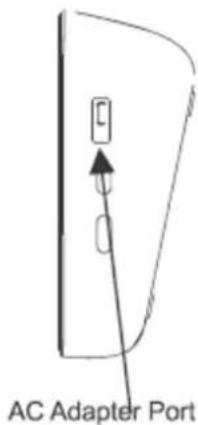
text_image
AC Adapter PortImagen-02
| EN | ES |
| Cuff Connector Port | Puerto conector del tensiómetro |
| AC Adapter Port | Puerto del adaptador CA |
text_image
SET START/STOP STOP MEM LCD Display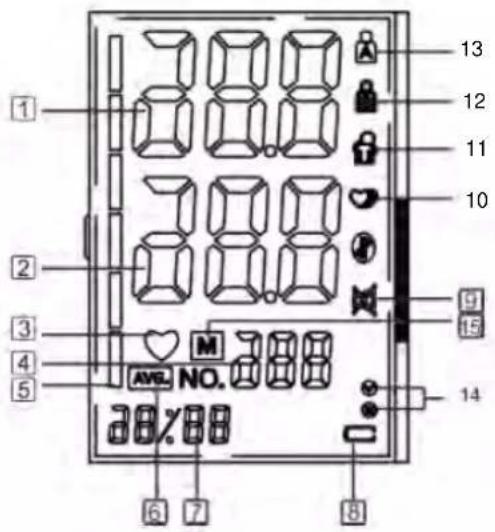
text_image
1 2 3 4 5 38.8 38.8 38.8 AVG. NO. 38.8 38X88 13 12 11 10 9 15 14 6 7 8Imagen-03
| EN ES | |
| SET CONFIGURAR | |
| START/STOP | INICIO/PARADA |
| MEM | MEMORIA |
| LCD DISPLAY | PANTALLA LCD |
natural_image
Technical line drawing of a device casing with mounting holes and internal components (no text or symbols)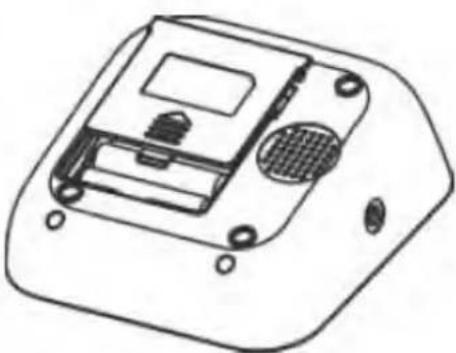
natural_image
Technical line drawing of a device casing with internal components and mounting holes (no text or symbols)Imagen-04
text_image
Medical procedure diagram showing steps of blood pressure measurement with labeled components and directional arrows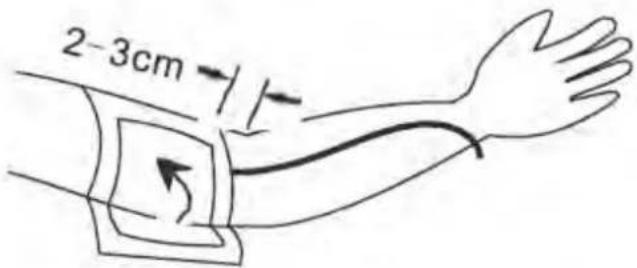
text_image
2-3cmImagen-05
text_image
Please sit vertically and relax your body Height difference between the table and the chair 20-30cm Height to chair 20-35cm Upper arm is not covered or pressed by gusset Cuff and the heart are at the same level Relax the hand and palm is upwardsImagen-06
A101-301, D101-201, Jamr Science & Technology Park, No. 2 Guiyuan Road,
Guixiang Community, Guanlan Street, Longhua District, Shenzhen 518100,
PEOPLE'S REPUBLIC OF CHINA
Shanghai International Holding Corp. GmbH (Europa)
Eiffestrasse 80, 20537 Hamburgo, Alemania. shholding@hotmail.com
Importado por:
Commaxx B.V.
Wiebachstraat 37
6466 NG Kerkrade
The Netherlands
text_image
Cuff Connector Port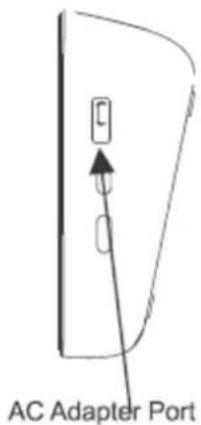
text_image
AC Adapter PortFigura 02
text_image
SET START/STOP STOP MEM LCD Display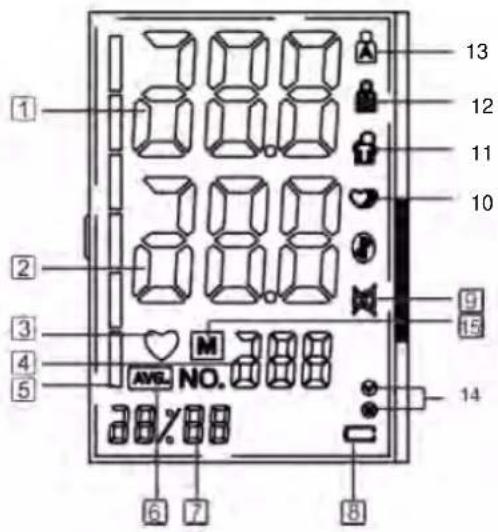
text_image
1 2 3 4 5 6 7 8 9 10 11 12 13 AVG. NO. AVG. NO. 388Figura 03
| EN IT | |
| SET IMPOSTA | |
| START/STOP | AVVIO/ARRESTO |
| MEM | MEM |
| LCD DISPLAY | DISPLAY LCD |
3.2 Icone sul display LCD
natural_image
Technical line drawing of a device casing with mounting holes and internal components (no text or symbols)
natural_image
Technical line drawing of a device casing with internal components and mounting holes (no text or symbols)Figura 04
text_image
Medical procedure diagram showing blood pressure measurement steps with labeled components and directional arrows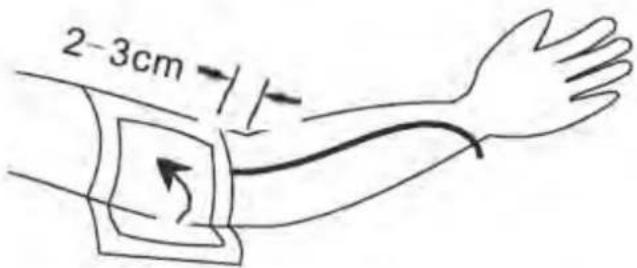
text_image
2-3cmFigura 05
text_image
Please sit vertically and relax your body Height difference between the table and the chair 20-30cm Height to chair 20-35cm Upper arm is not covered or pressed by gussel Cuff and the heart are at the same level Relax the hand and palm is upwardsFigura 06
A101-301, D101-201, Jamr Science & Technology Park, No. 2 Guiyuan Road,
Guixiang Community, Guanlan Street, Longhua District, Shenzhen 518100,
PEOPLE'S REPUBLIC OF CHINA
Shanghai International Holding Corp. GmbH (Europe)
Eiffestrasse 80, 20537 Amburgo, Germania. shholding@hotmail.com
Importato da:
Commaxx B.V.
Wiebachstraat 37
6466 NG Kerkrade
The Netherlands
natural_image
Technical line drawing of a device casing with mounting holes and internal components (no text or symbols)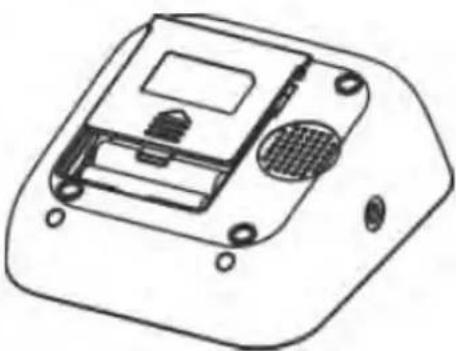
natural_image
Technical line drawing of a device casing with internal components and mounting holes (no text or symbols)Kuva-04
Pariston vaihto
text_image
Medical procedure diagram showing steps of blood pressure measurement with labeled components and directional arrows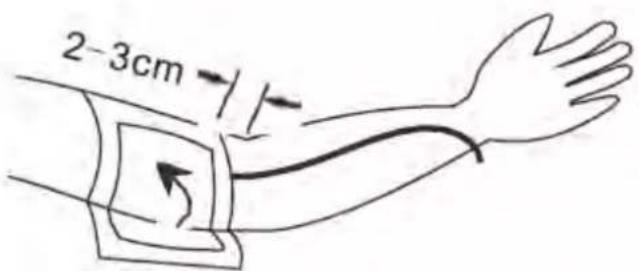
text_image
2-3cmKuva-05
A101-301, D101-201, Jamr Science & Technology Park, No. 2 Guiyuan Road,
Guixiang Community, Guanlan Street, Longhua District, Shenzhen 518100,
PEOPLE'S REPUBLIC OF CHINA
Shanghai International Holding Corp. GmbH (Eurooppa)
Eiffestrasse 80, 20537 Hamburg, Saksa. shholding@hotmail.com
Maahantuoja:
Commaxx BV,
Wiebachstraat 37
6466 NG Kerkrade
The Netherlands
Versionnumero: 1.3
FYSIC
Fullt automatisert for overamen
Blodtrykksmåler
Modellnummer: B26 / FB150
BRUKSANVISNING
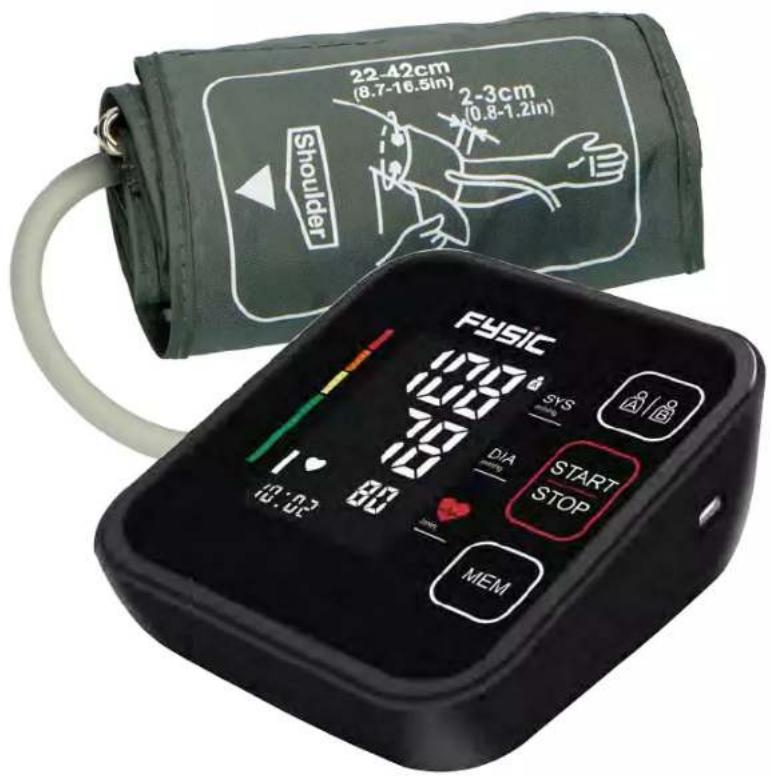
text_image
22-42cm (8.7-16.5in) 2-3cm (0.8-1.2in) Shoulder FySiC SYS DIA START STOP MEM 13:02 70 70 80 170 100 10 80INNHOLD
natural_image
Technical line drawing of a rectangular electronic device with mounting holes and internal components (no text or symbols)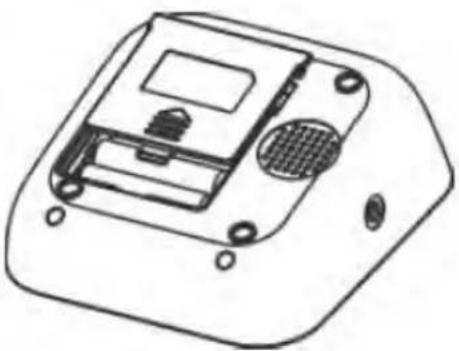
natural_image
Technical line drawing of a device casing with internal components and mounting holes (no text or symbols)Bilde-04
Bytte av batteri
Indikator for lavt batteri
4.2 Systeminnstillinger
text_image
Medical procedure diagram showing blood pressure measurement with device, device connected to patient's arm, and hand placement steps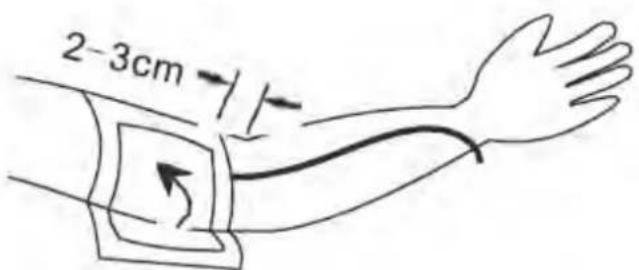
text_image
2-3cmBilde-05
5.3 Målingsprosedyre
Se bilde-06
A101-301, D101-201, Jamr Science & Technology Park, No. 2 Guiyuan Road,
Guixiang Community, Guanlan Street, Longhua District, Shenzhen 518100,
PEOPLE'S REPUBLIC OF CHINA
Shanghai International Holding Corp. GmbH (Europe)
Eiffestrasse 80, 20537 Hamburg, Germany. shholding@hotmail.com
Importør:
Commaxx BV
Wiebachstraat 37
6466 NG Kerkrade
Nederland
Versjonsnummer: 1.3
FYSIC®
FB150
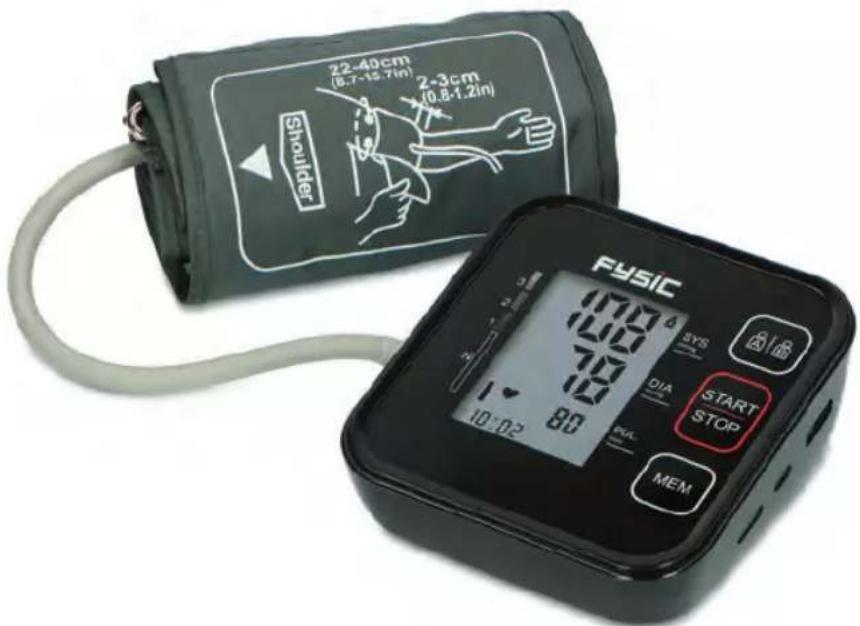
text_image
22-40cm (8.7-15.7in) 2-3cm (0.8-1.2in) Shoulder FYSIC SYS DIA START STOP MEM 10:02 80 100 70 12 PVL MEMDK Blodtryksmåler 2
INTRODUKTION OG TILSIGTET BRUG
text_image
Cropped image of a 3D electronic device panel with labeled buttons and icons, showing internal components and status indicators.natural_image
Simple line drawing of a door with a circular button and an arrow pointing to the center (no text or symbols)Stik til slange
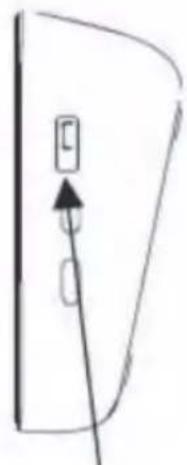
natural_image
Simple line drawing of a door with an arrow pointing to the left side (no text or symbols)natural_image
Two technical line drawings of a device housing with mounting holes and internal components (no text or symbols)Fig. 04
DK
text_image
Medical illustration showing blood pressure measurement steps: catheter, device, and forearm with hand placement arrows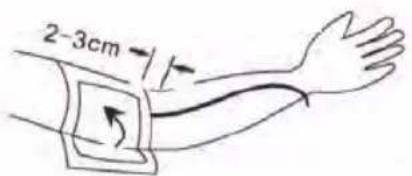
text_image
2-3cmFig. 05
Måleprocedure
Se fig. 06
A101-301, D101-201, Jamr Science & Technology Park, No. 2 Guiyuan Road, Guixiang Community, Guanlan Street, Longhua District, Shenzhen 518100, PRC
Shanghai International Holding Corp. GmbH (Europe)
Eiffestrasse 80, 20537
Hamburg, Germany.
shholding@hotmail.com
FYSIC
natural_image
Technical line drawing of a device casing with mounting holes and internal components (no text or symbols)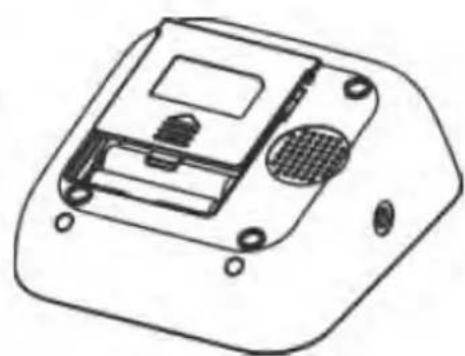
natural_image
Technical line drawing of a device casing with internal components and mounting holes (no text or symbols)Bild 04
Utbyte av batteri
text_image
Medical procedure diagram showing steps of blood pressure measurement with labeled components and directional arrows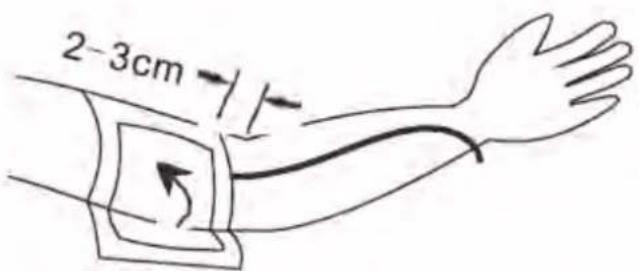
text_image
2-3cmBild 05
5.3 Mätningsprocedur
Se bild 06
A101-301, D101-201, Jamr Science & Technology Park, No. 2 Guiyuan Road,
Guixiang Community, Guanlan Street, Longhua District, Shenzhen 518100,
PEOPLE'S REPUBLIC OF CHINA
Shanghai International Holding Corp. GmbH (Europe)
Eiffestrasse 80, 20537 Hamburg, Tyskland. shholding@hotmail.com
Importerad av:
Commaxx BV
Wiebachstraat 37
6466 NG Kerkrade
The Netherlands
Versionsnummer: 1.3