18310007 - Slicer Gastronoma - Free user manual and instructions
Find the device manual for free 18310007 Gastronoma in PDF.


| Brand | Gastronoma |
| Model | 18310007 |
| Product type | Electric meat and bread slicer |
| Power supply | 230 V ~ 50 Hz |
| Cutting thickness | 0 to 20 mm, adjustable |
| Maximum operating time | 7 minutes, then 30 minutes cooling |
| Main components | Stainless steel blade, sliding carriage, food holder, thickness guide, catch tray |
| Safety | Very sharp blade, safety button, alignable thickness guide, anti-slip suction cups |
| Use | For boneless meat, bread, seedless fruits, vegetables (carrots, potatoes) |
| Cleaning | Hand-washable removable parts, detachable blade, do not put in dishwasher, wipe motor with damp cloth |
| Environmental information | Do not dispose with household waste, WEEE recycling |
| Warranty | Void if instructions not followed or modification |
| Model number | 18310007 |
| Country of origin | Denmark (importer Adexi A/S) |
Frequently Asked Questions - 18310007 Gastronoma
User questions about 18310007 Gastronoma
0 question about this device. Answer the ones you know or ask your own.
Ask a new question about this device
Download the instructions for your Slicer in PDF format for free! Find your manual 18310007 - Gastronoma and take your electronic device back in hand. On this page are published all the documents necessary for the use of your device. 18310007 by Gastronoma.
USER MANUAL 18310007 Gastronoma
text_image
Labeled diagram of a portable electronic device with numbered parts for identificationDK
BRUG
text_image
Labeled diagram of a portable electronic device with numbered parts for identificationNO
BRUK
text_image
Labeled diagram of a portable electronic device with numbered parts for identificationSE
ANVÄNDNING
text_image
Labeled diagram of a portable electronic device with numbered parts for identificationFI
KÄYTTÖ
To get the most out of your new meat/bread slicer, please read through these instructions before use. Take particular note of the safety precautions. We also recommend that you keep the instructions for future reference.
GENERAL SAFETY INSTRUCTIONS
- This appliance may only be used by children aged from 8 years and above and persons with reduced physical, sensory or mental capabilities or lack of experience and knowledge if they are supervised or have been given instructions concerning use of the appliance in a safe way and understand the hazards involved. Children must not play with the appliance. Cleaning and user maintenance must not be performed by children without supervision.
- Never leave unattended when in use. Keep an eye on any children in the vicinity of the appliance when it is in use. The appliance is not a toy.
- Incorrect use of this appliance may cause personal injury or damage the appliance.
- Use for the intended purpose only. The manufacturer is not responsible for any injury or damage resulting from incorrect use or handling (see also Warranty Terms).
- For domestic use only. Not for outdoor or commercial use.
- Remove all packaging and transport materials from the inside and outside of the appliance.
- Check that the appliance has no visible damage and that no parts are missing.
- Do not use with any cords other than that supplied.
-
Check that it is not possible to pull or trip over the cord or any extension cord.
-
The appliance must not be used together with a timer switch or a separate remote control system.
- Turn off the appliance and remove the plug from the socket when cleaning or when not in use.
- Avoid pulling the cord when removing the plug from the socket. Instead, hold the plug.
- Keep the cord and appliance away from heat sources, hot objects and naked flames.
- Ensure that the cord is fully extended.
- The cord must not be twisted or wound around the appliance.
- Check regularly that neither the cord nor plug is damaged and do not use the appliance if there is any damage, or if it has been dropped on the floor, dropped in water or damaged in any other way.
- If the appliance, cord or plug have been damaged, have the appliance inspected and if necessary repaired by an authorised repairer.
- Connect to 230 V, 50 Hz only. The warranty is not valid if the appliance is connected to incorrect voltage.
- Never try to repair the appliance yourself. Please contact the store where you bought the appliance for repairs under warranty.
- Unauthorised repairs or modifications will invalidate the warranty.
UK
SPECIAL SAFETY INSTRUCTIONS
- The blade is very sharp. Be careful when handling and cleaning the blade.
- For safety reasons, turn the thickness guide so that it is in line with the blade when the appliance is not in use.
- Do not tamper with the safety button.
• Always use the sliding table and the piece holder when slicing. - Meats should be boneless. Fruit should be free of seeds.
• The appliance must never run for more than 7 minutes. Allow the appliance to cool for around 30 minutes.
Before use
- Before using for the first time (or after prolonged storage without use), wash any parts that will come into contact with food.
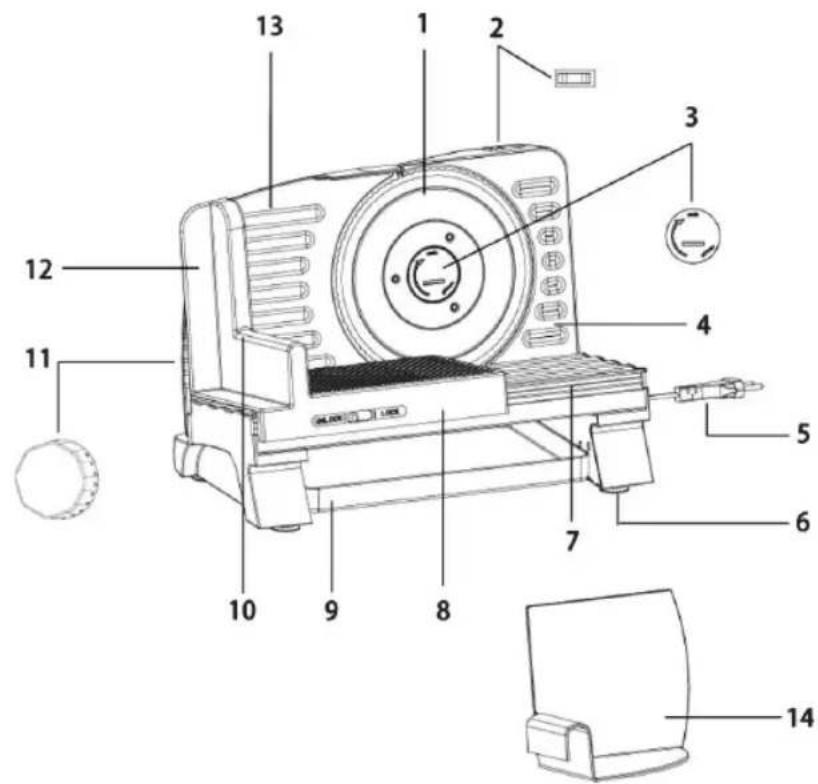
MAIN COMPONENTS
- Blade
- On/Off button
- Finger screw
- Casing
- Power cord and plug
- Suction feet
- Base plate
- Sliding table
- Collection tray
- Handle
- Sliding food guide
- Food shield
-
Piece holder
-
Dial for thickness adjustment
text_image
Labeled diagram of a portable electronic device with numbered parts for identificationUK
USE
- Place the appliance on a flat and dry surface.
- Apply downward pressure onto the appliance so that the suction feet (6) get a good grip.
- Position the appliance so that you can operate the on/off button with your left hand and the sliding table with your right hand. Plug the appliance into the mains.
- Pull the food shield (13) backward, as far as it can slide.
- Push the sliding table (8) back and forth a few times on the rail to ensure that it moves correctly.
- Place the food to be sliced on the sliding table. If the food is too large for the appliance, cut it into suitable pieces first. Put the food holder (14) onto the food guide handle (10) and adjust it until it holds the food firmly in place.
- Place the tray (9) behind the blade to collect the slices.
- Use the dial (11) to select the required slice thickness from 0-20 mm.
- Switch on the appliance using the on/off button (2). The blade starts rotating.
- Move the sliding table back and forth to slice the food. Always keep your right thumb on the right side of the piece holder (10) to avoid any contact with the blade.
• Always switch the appliance off using the on/off button when you have finished using it. - To slice meats wafer thin, chill thoroughly for 2-4 hours in freezer before slicing.
- When slicing warm boneless roasts, remove from oven and allow to stand for 15 to 20 minutes before slicing.
- Cold cuts keep longer and retain flavour if sliced as required.
TIP
- Foods with an uneven texture – like fish and thin steaks – are often difficult to slice.
- The appliance can also slice e.g. carrots or potatoes in thin slices for chips.
CLEANING
• Always switch the appliance off at the wall socket and unplug before cleaning.
- Unless clearly specified in the cleaning instructions below, please note that none of the parts of this appliance are dishwasher safe.
- Wash all removable parts in warm water with a little detergent.
- Pull the food guide (10) backward, as far as it can slide.
- Turn the finger screw (3) holding the blade in place clockwise, remove it and carefully lift off the blade. Clean the blade thoroughly in warm soapy water. Dry the blade with a tea towel or similar. Do not let the blade air dry.
- Clean the piece holder thoroughly in warm soapy water. Dry the piece holder with a tea towel or similar.
- Wipe the sliding feed table (8), the food guide handle (10) and the food shield (13) with a well-wrung cloth and some detergent.
- Do not wash the motor unit. Wipe the motor unit with a damp cloth.
- Never use abrasive detergents or solvents.
- Reassemble the appliance.
Please note: The finger screw (3) must be turned counterclockwise to secure the blade.
- Store the appliance in a dry and dust-free location.
UK
INFORMATION ON DISPOSAL AND RECYCLING OF THIS PRODUCT
Please note that this Adexi product is marked with this symbol:
This means that this product must not be disposed of along with ordinary household waste, as electrical and electronic waste must be disposed of separately.
According to the WEEE directive, every member state must ensure correct collection, recovery, handling and recycling of electrical and electronic waste. Private households in the EU can take used equipment to special recycling stations free of charge. In certain member states, used appliances can be returned to the retailer where they were bought on the condition you buy new products. Contact your retailer, distributor or the municipal authorities for further information on what to do with electrical and electronic waste.
WARRANTY TERMS
The warranty does not apply:
- if the above instructions have not been followed
- if the appliance has been interfered with
- if the appliance has been mishandled, subjected to rough treatment, or has suffered any other form of damage
- if the appliance is faulty due to faults in the electricity supply.
Due to the constant development of our products in terms of function and design, we reserve the right to make changes to the product without prior warning.
FREQUENTLY ASKED QUESTIONS
If you have any questions regarding the use of the appliance and cannot find the answer in this user guide, please try our website at www.adexi.eu.
You can also see contact details on our website if you need to contact us for technical questions, repairs, accessories or spare parts.
IMPORTER
Adexi A/S
Grenåvej 635A
DK-8541 Skødstrup
Denmark
www.adexi.eu
We cannot be held responsible for any printing errors.