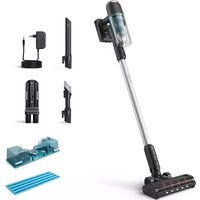
USER MANUAL 3000 Series XC3133 PHILIPS
* = 0-9, representing different colors
www.philips.com/support


English 5
Čeština 9
Crnogorski 14
Dansk 19
Deutsch 23
Eesti 29
Español 33
Français 38
Hrvatski 43
Italiano 48
Latviešu 53
Lietuviškai 58
Magyar 62
Nederlands 67
Norsk 72
Polski 77
Português 82
Română 87
Shqip 91
Slovenščina 96
Slovensky 101
Srpski 106
Suomi 110
Svenska 115
Türkçe 120
Ελληνικά 124
Български 130
Македонски 135
Українська 140


BOOKLET_FoldoutPage_A5_bl.pdf 1 01-05-20 09:39




-1
1_
-1
1
English
Read this important information carefully before you use the appliance and its accessories and save it for future reference. The accessories supplied may vary for different products.
Danger
- Never vacuum up water or any other liquid, flammable substances or ashes.
- Never immerse the appliance or the adapter in water or any other liquid, nor rinse it under the tap.
Warning
- Check if the voltage indicated on the adapter corresponds to the local mains voltage before you connect the appliance.
- Always check the appliance before you use it. Do not use the appliance or the adapter if it is damaged. Always replace a damaged part with one of the original type.
The adapter contains a transformer. Do not cut off the adapter to replace it with another plug, as this causes a hazardous situation.
- If the appliance is damaged, do not try to charge it.
This appliance can be used by children aged from 8 years and above and persons with reduced physical, sensory or mental capabilities or lack of experience and knowledge if they have been given supervision or instruction concerning use of the appliance in a safe way and understand the hazards involved. Children shall not play with the appliance. Cleaning and user maintenance shall not be made by children without supervision.
- The plug must be removed from the socket-outlet before cleaning or maintaining the appliance.
- Unplug the adapter if you are not going to use the appliance for some time.
- When storing the appliance for more than a month (without usage or charging), make sure that the battery is charged to at least 50%. Storing the appliance with an empty battery may lead to irreversible damage to the battery.
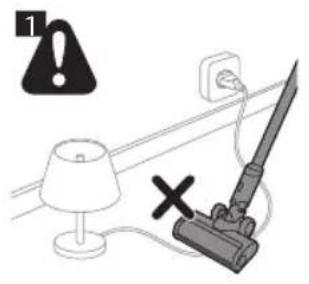
Do not let the motorized nozzle move over the mains cords of other appliances or other cables as this may cause a hazard (Fig. 1).
- Never immerse the appliance or the adapter in water or any other liquid, nor rinse it under the tap.
- Keep loose clothing, hair and body parts away from the motorized brushes.
- Do not cover or block the ventilation openings when the appliance is operating
- This vacuum cleaner is designed for household use only. Do not use this vacuum cleaner to vacuum up building waste, cement dust, ashes, fine sand, lime and similar substances. Never use the vacuum cleaner without any of the filters. This could damage the motor and shorten the life of the vacuum cleaner. Always clean all parts of the vacuum cleaner as shown in the user manual. Do not clean any parts with water and/or cleaning agents if this is not specifically shown in the user manual.
Take the appliance to an authorized Philips service center when you can no longer recharge it or when it runs out of power quickly.
Caution
- During charging, the adapter becomes warm to the touch. This is normal.
- Do not park the appliance against a wall or other object, it can drop and create an unsafe situation.
- Do not plug in, unplug or operate the appliance with wet hands.
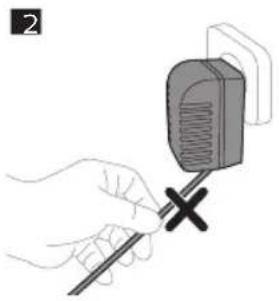
- Do not remove the adapter from the wall socket by pulling at the cord (Fig. 2). When you do not use the charging station for charging, always unplug the appliance by pulling the small plug out of the appliance and the adapter out of the wall socket.
- Always switch off the appliance after use and before you charge it.
- Never block the exhaust air openings at the back of the appliance during vacuuming.
- Do not clean the removable parts of the appliance in the dishwasher. These parts are not dishwasher-proof.
Do not clean the white material of the filter holder with a normal vacuum cleaner or a brush to avoid damage to the material.
- Always use the vacuum cleaner with the filter assembled.
- When you clean the washable sponge filter with water, make sure it is completely dry before you put it back into the filter holder and dust container. Do not dry the sponge filter in direct sunlight, on the radiator or in the tumble dryer. Do not clean the filter holder with water. This part is not washable.
- Replace the filter if it can no longer be cleaned properly or if it is damaged (see 'Ordering accessories').
- Never use any accessories or parts from other manufacturers or that Philips does not specifically recommend. If you use such accessories or parts, your warranty becomes invalid.
- Make sure that the appliance is installed with the charging station attached to the wall according to the instructions in the user manual.
- Be careful when you drill holes in the wall to attach the charging station, to avoid the risk of electric shock.
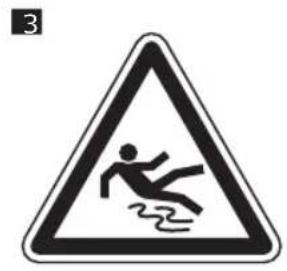
When this appliance is used with the water tank, it uses water to clean, the floor may remain wet and slippery for a while (Fig. 3).
To prevent damage, never put wax, oil, floor maintenance products or liquid floor cleaners that are not water-dilutable in the water tank.
- To prevent damage, never put ethereal oils or similar substances in the water tank or let the appliance pick them up.
- Do not clean the metal wetting strip with a sharp object, as this may damage the strip. Only clean the wetting strip by rinsing it under the tap. Replace the wetting strip when you can no longer clean it.
- Replace the wetting strip only with an original strip.
- To guarantee good cleaning results and proper functioning of the appliance and water tank, always use original Philips 3000 series cleaning pads.
- Clean the water tank according to the instructions. The water tank is not dishwasher-proof.
- After mopping the floors, do not store the appliance with the water tank attached on the charging station. If you do this, the wet mopping pad will touch the wall and this may damage the wall. Always remove the water tank before you store the appliance.
Battery safety instructions
- Only use this product for its intended purpose and follow the general and battery safety instructions as described in this user manual. Any misuse can cause electric shock, burns, fire and other hazards or injuries.
- Only charge the appliance with the adapter supplied. Only use JOD-S-320045GS supply unit. The corresponding adapter number can be found on the adapter.
- Use and store the appliance at a temperature between 0 °C and 35 °C.
- Charge the appliance or battery at a temperature between 10 °C and 35 °C.
- Do not expose the device to direct sunlight or to high temperatures (near hot stoves, in microwave ovens or on induction cookers). Batteries may explode if overheated.
- If the product becomes abnormally hot or smelly, changes color or if charging takes longer than usual, stop using and charging the product and contact Philips.
- Do not place products and their batteries in microwave ovens or on induction cookers.
- When you handle batteries, make sure that your hands, the product and the batteries are dry.
- To prevent batteries from heating up or releasing toxic or hazardous substances, do not modify, pierce or damage products and batteries and do not disassemble, short-circuit, overcharge or reverse charge batteries.
- To avoid accidental short-circuiting of batteries after removal, do not let battery terminals come into contact with metal objects (e.g. coins, hairpins, rings). Do not wrap batteries in aluminum foil. Tape battery terminals or put batteries in a plastic bag before you discard them.
- If batteries are damaged or leaking, avoid contact with the skin or eyes. If this occurs, immediately rinse well with water and seek medical care.
Electromagnetic fields (EMF)
This appliance complies with the applicable standards and regulations regarding exposure to electromagnetic fields.
Using the appliance
Usage restrictions
- Only use the water tank on hard floors with a water-resistant top coat (such as linoleum, enameled tiles and varnished parquet) and stone floors (such as marble). If your floor has not been treated to make it water-resistant, check with the manufacturer if you can use water to clean it. Do not use the water tank on hard floors of which the water-resistant top coat is damaged.
- Only use the water tank on linoleum floors that are properly affixed to prevent linoleum from being drawn into the mopping nozzle.
- Do not use the water tank to clean carpets.
- Do not move the appliance with water tank assembled sideways, as this leaves water traces. Only move forwards and backwards.
Note: The operating time depends on the power level used during cleaning.
Mopping pad and wetting strip
The appliance comes with three wetting strips and one microfiber mopping pad. With the water tank, wetting strip and microfiber mopping pad attached to the standard floor nozzle, you can clean hard floors.
Using liquid floor cleaner in the water tank
If you want to add a liquid floor cleaner to the water in the water tank, make sure that you use the Philips XV1792 floor cleaner. As the water tank has a capacity of 200 ml, you only have to add a few drops of liquid floor cleaner to the water.
- Always remove the battery and/or turn off the appliance before performing maintenance on the appliance.
Cleaning and emptying of the water tank
See also the instructions in the user manual.
To clean the water tank, mix one part vinegar with three parts water. Pour this mixture into the water tank and close the cap. Shake the water tank and put the water tank on a water-resistant surface. Leave the water-vinegar mixture in the water tank overnight. Then empty the water tank, rinse it thoroughly with fresh water, and use it normally again.
Caution: Water will leak from the water tank during cleaning, with and without the wetting strips.
To empty the water tank, hold the water tank over a sink, remove the cap and tilt the water tank to the side of the filling hole. Then turn the water tank over to let the water flow into the sink. To remove the remaining water from the water tank, turn the water tank on its long side with the filling hole pointing towards the sink. Then tilt the water tank forwards to let the remaining water flow out of the water tank.
Note: Always store the water tank with the cap removed from the filling hole.
Ordering accessories
To buy accessories or spare parts, visit www.philips.com/parts-and-accessories or go to your Philips dealer. You can also contact the Philips Consumer Care Center in your country.
Replacement
To buy accessories or spare parts, visit www.philips.com/parts-and-accessories or go to your Philips dealer. You can also contact the Philips Consumer Care Center in your country (see the international warranty leaflet for contact details).
Replacement parts and type numbers:
- Replacement wipe XV1630
- Replacement filter XV1631
- Tools (long crevice and 2-in-1 brush) XV1632
- Lithium-Ion battery pack 25.2 V XV1633
Replace the wipe and filter every 6 months to ensure maximum performance.
i Note: You can dispose of the old filter and the microfiber brushes with the normal household waste.
Warranty and support
Versuni offers a two-year warranty after purchase on this product. This warranty is not valid if a defect is due to incorrect use or poor maintenance. Our warranty does not affect your rights under law as a consumer. For more information or for invoking the warranty, please visit our website www.philips.com/support.
Recycling
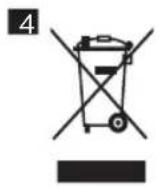
- This symbol means that electrical products and batteries shall not be disposed of with normal household waste (Fig. 4).
- Follow your country's rules for the separate collection of electrical products and batteries.
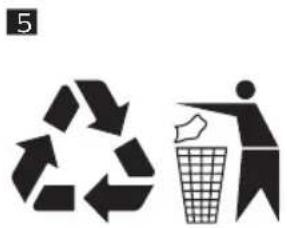
- This symbol means that it is necessary to check the recycling provisions of your local municipality (Fig. 5).
- For an explanation of the material symbols, see the separate enclosed leaflet.
Removal of rechargeable batteries
Remove rechargeable batteries from the product when you discard the product. Before removing the battery, make sure that the appliance is disconnected from the wall socket and that the battery is completely empty.
Take any necessary safety precautions when you dispose of batteries.
To remove the rechargeable battery, follow the instructions below.
1 Disconnect the appliance from the wall socket and let it run until the motor stops.
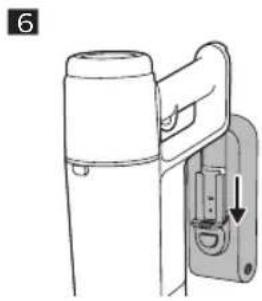
2 Press the unlock button and pull the battery out of the appliance (Fig. 6).
Operating time
Mode Operating time
| Using the handheld with Turbo-mode Up to 15 minutes |
| Using the handheld with Eco-mode Up to 60 minutes |
Error codes and their meaning
| LED signal on the appliance (or on the battery pack) | Meaning of the error Suggested solution |
| ●●●Flashes twice a second for 10 times. | The ambient temperature is too high or too low. | Move the appliance to a cooler or warmer room. Use and store the appliance at a temperature between 0 °C and 35 °C. Charge the appliance or battery at a temperature between 10 °C and 35 °C. |
| ●○●Flashes three times a second for 15 times. | The motor is jammed or damaged. Remove the battery (Fig. 6), wait 10 seconds, and then put the battery back. If this does not work, please take the appliance to a Philips service center or contact the Consumer Care Center. |
| ○●○Flashes twice a second for 10 times. | Foreign object is stuck in the nozzle. Make sure the appliance is switched off. Clean the nozzle according to the user manual by removing the tube from the main appliance. Remove the object in the nozzle and restart the appliance. |
| ●●○Flashes three times a second for 15 times. | There is a short circuit in the nozzle. Remove the nozzle, leave it aside for potential moisture to dry, and then put the nozzle back. If this does not work, please take the appliance to a Philips service center or contact the Consumer Care Center. |
| ○○●Flashes twice a second for 10 times. | A wrong adapter is used. Change to the supplied adapter. |
| ●○○Flashes four times a second for 20 times. | The battery is not charged. Charge the appliance and restart the appliance. If this does not work, please take the appliance to a Philips service center or contact the Consumer Care Center. |
Troubleshooting
This chapter summarizes the most common problems you could encounter with the appliance. If you are unable to solve the problem with the information below, visit www.philips.com/support for a list of frequently asked questions or contact the Consumer Care Center in your country.
Problem Possible cause Solution
| The appliance does not respond when the on/off button is pushed. | The battery is empty. To charge the battery, connect the appliance to the charging station or attach the handheld vacuum cleaner directly to the power plug of the adapter. |
| The temperature of the appliance is too hot or too cold. | Make sure the appliance is used at a temperature between 0 °C to 35 °C. |
| There is an over current in the appliance. Wait for 30 seconds before restarting the appliance. |
| | If you have checked the above and the appliance still does not charge, take it to a Philips service center or contact the Consumer Care Center. |
| The battery is charged and attached, but the appliance cannot be switched on. | The appliance is still connected to the adapter. | Remove the appliance from the adapter before restarting it. |
| | If you have checked the above and the appliance still does not charge, take it to a Philips service center or contact the Consumer Care Center. |
| The appliance is charging very slow. An external adapter or an adapter from other appliances is used. | Charge the appliance with the supplied adapter. |
| The charging station is not stable on the wall. | The screws holding the charging station are loose. | Tighten the screws. |
| The screws are not the right size. Mount the charging station with the supplied screws. |
Problem Possible cause Solution
| The charging station is not attached to a stable wall. | Check that the wall on which the charging station will be mounted is stable. |
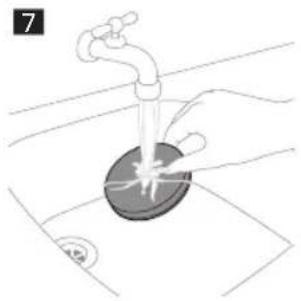
| The appliance has a lower suction power than usual. | The filter and the cyclone are dirty. Empty the dust bucket. Clean the filter and the cyclone (Fig. 7). Make sure the filter is washed at least once a month, when using the appliance regularly. Make sure hair and dirt stuck in the cyclone are removed. |
| The dust container is not attached properly to the appliance. | Make sure the dust container is attached properly. |
| The filter is old. You can buy new filters in the online Philips shop at www.philips.com/support or at your Philips dealer. |
| | If you have checked the above and the appliance still has a lower suction power than usual, take it to a Philips service center or contact the Consumer Care Center. |
| The nozzle or the full appliance shuts off during cleaning. | The motor of the appliance is damaged. Take the appliance to a Philips service center or contact the Consumer Care Center. |
| The brush roll is stuck or objects are stuck in the air flow channel. | Check the nozzle and air flow channel for stuck objects and remove any blocking object. Restart the appliance. |
| The filter and the cyclone are dirty. Empty the dust bucket. Clean the filter and the cyclone. Make sure the filter is washed at least once a month (Fig. 7) when using the appliance regularly. Make sure hair and dirt stuck in the cyclone are removed. |
| | If you have checked the above and the appliance still does not work, take it to a Philips service center or contact the Consumer Care Center. |
| Dust escapes from the appliance. The filter is dirty. Clean the filter. See also the quick start guide. |
| The filter is not present in the appliance. Make sure that the filter is in the appliance and assembled correctly. |
| Something is blocking the cyclone. Check the cyclone for stuck objects and remove any object blocking the cyclone. Also ensure all hair and dirt stuck in the cyclone are removed. |
| The dust container is not properly attached to the appliance. | Empty the dust container and attach the dust container correctly to the appliance. |
| The appliance is rotated or flipped when the power is off. | Keep the appliance upright when the power is off. |
| The appliance does not move smoothly across the floor when cleaning a carpet. | The wheels below the nozzle is polluted. Clean the pollution between the wheels. |
| The selected suction power has been too high. | Decrease the suction power. See also the user manual. |
| The brush does not turn anymore. | The brush is clogged with hair or dirt. | Clean the brush by hand or with a pair of scissors. Clean the hairs between the bearings. |
| The brush may stop turning when it encounters too much resistance. | Switch off the appliance and then switch it back on again. |
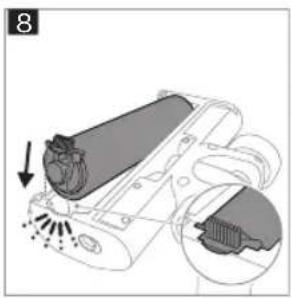
| The roller brush has not been assembled properly into the nozzle. | Follow the instructions in the cleaning chapter to install the roller brush into the nozzle properly (Fig. 8). |
| The motorized nozzle is overheated. Switch off the appliance and wait 15 minutes. Touch the upper housing of the nozzle to feel if it is still warm. If the nozzle is still warm, wait longer for the nozzle to cool down. Once the nozzle has cooled down, try switching the appliance back on. |
| The LEDs in the nozzle do not come on. The nozzle has not been attached to the tube or appliance properly. | Attach the nozzle to the appliance or handheld properly. |
| The appliance is not charging. The power plug is not connected properly to the appliance or battery. | Make sure that the power plug is connected properly to the appliance or the battery and that the adapter is inserted into the wall socket properly. |
| The power plug is not placed properly in the charging station. | Make sure the plug is fixed properly in the charging station. Check if the plug is angled and the charging station is holding the plug in place. |
Problem Possible cause Solution
| An adapter other than the supplied adapter is being used. | Make sure that you use the adapter supplied. |
| | If you have checked the above and the appliance still does not charge, take it to a Philips service center or contact the Consumer Care Center. |
| The appliance delivers static shocks. The appliance builds up static electricity.The lower the air humidity, the more state electricity is build up. | Discharge the appliance by frequently holding the tube against other metal objects in the room (for example the legs of a table or chair, etc.). Or raise the air humidity level in the room. |
| The dust and dirt that is vacuumed up is static. | Empty the dust container and clean the filter according to the instructions in the user manual. |
Using the water tank
Problem Possible cause Solution
| The water flow from the water tank is reduced. | Lime scale has build up in the wetting strip. Follow solution in the user manual to decalc. |
| The microfiber mopping pad is not placed correctly and blocks the wetting strip as a result. | Make sure that you place the mopping pad correctly. Check the user manual for proper placement. |
| The water tank is empty or nearly empty. Refill the water tank. |
| A microfiber mopping pad is used that is not supplied by Philips. | Only use an original Philips microfiber mopping pad. The mopping pads can be bought in the online Philips shop at www.philips.com/support or at your Philips dealer. |
| Too much water flows out of the water tank at a too high speed. | The water tank cap is not attached properly. | Check the cap and make sure it is fully and properly closed. |
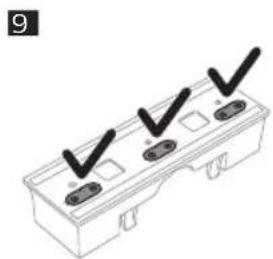
| The strips are not placed properly in the bottom of the water tank. | Check all three strips and make sure all of them are fit properly in the bottom plate of the water tank. Be aware of the direction of these strips (Fig. 9). |
| The floor dries with stripes. Too much liquid cleaner has been added to the water. | Use only a few drops of liquid cleaner or use a cleaner that foams less. |
| The microfiber mopping pad is not placed correctly. | Make sure that the mopping pad is placed correctly. Check the user manual for proper placement. |
| An incorrect mopping pad is used. Only use Philips XV1630 microfiber mopping pad for the 3000 series. The mopping pads can be bought in the online Philips shop at www.philips.com/support or at your Philips dealer. |
Čeština
Encomendar acessórios
PHILIPS and the Philips Shield Emblem are registered trademarks of Koninklijke Philips N.V. and are used under license.
This product has been manufactured by and is sold under the responsibility of Versuni Holding B.V., and Versuni Holding B.V. is the warrantor in relation to this product.
3000.111.3293.1 (06/2023)