HW-S66A - Soundbar SAMSUNG - Free user manual and instructions
Find the device manual for free HW-S66A SAMSUNG in PDF.


User questions about HW-S66A SAMSUNG
0 question about this device. Answer the ones you know or ask your own.
Ask a new question about this device
Download the instructions for your Soundbar in PDF format for free! Find your manual HW-S66A - SAMSUNG and take your electronic device back in hand. On this page are published all the documents necessary for the use of your device. HW-S66A by SAMSUNG.
USER MANUAL HW-S66A SAMSUNG
Thank you for purchasing this Samsung product.
To receive more complete service, please register
your product at www.samsung.com/register
SAFETY INFORMATION
SAFETY WARNINGS
TO REDUCE THE RISK OF ELECTRIC SHOCK, DO NOT REMOVE THE COVER (OR BACK).
NO USER-SERVICEABLE PARTS ARE INSIDE.
REFER SERVICING TO QUALIFIED SERVICE PERSONNEL.
Refer to the table below for an explanation of symbols which may be on your Samsung product.
 | CAUTIONRISK OF ELECTRIC SHOCK.DO NOT OPEN. |  |
 | This symbol indicates that high voltage is present inside. It is dangerous to make any kind of contact with any internal part of this product. | |
 | This symbol indicates that this product has included important literature concerning operation and maintenance. | |
 | Class II product: This symbol indicates that it does not require a safety connection to electrical earth (ground). If this symbol is not present on a product with a power cord, the product MUST have a reliable connection to protective earth (ground). | |
 | AC voltage: This symbol indicates that the rated voltage marked with the symbol is AC voltage. | |
 | DC voltage: This symbol indicates that the rated voltage marked with the symbol is DC voltage. | |
 | Caution, Consult instructions for use: This symbol instructs the user to consult the user manual for further safety related information. | |
CAUTION
WARNING
- To reduce the risk of fire or electric shock, do not expose this appliance to rain or moisture.
CAUTION
• TO PREVENT ELECTRIC SHOCK, MATCH WIDE BLADE OF PLUG TO WIDE SLOT, FULLY INSERT.
- This apparatus shall always be connected to a AC outlet with a protective grounding connection.
- To disconnect the apparatus from the mains, the plug must be pulled out from the mains socket, therefore the mains plug shall be readily operable.
- Do not expose this apparatus to dripping or splashing. Do not put objects filled with liquids, such as vases on the apparatus.
- To turn this apparatus off completely, you must pull the power plug out of the wall socket. Consequently, the power plug must be easily and readily accessible at all times.
PRECAUTIONS
- Ensure that the AC power supply in your house complies with the power requirements listed on the identification sticker located on the bottom of your product. Install your product horizontally, on a suitable base (furniture), with enough space around it for ventilation (7\~10 cm). Make sure the ventilation slots are not covered. Do not place the unit on amplifiers or other equipment which may become hot. This unit is designed for continuous use. To fully turn off the unit, disconnect the AC plug from the wall outlet. Unplug the unit if you intend to leave it unused for a long period of time.
- During thunderstorms, disconnect the AC plug from the wall outlet. Voltage peaks due to lightning could damage the unit.
- Do not expose the unit to direct sunlight or other heat sources. This could lead to overheating and cause the unit to malfunction.
-
Protect the product from moisture (i.e. vases), and excess heat (e.g. a fireplace) or equipment creating strong magnetic or electric fields. Unplug the power cable from the AC wall socket if the unit malfunctions. Your product is not intended for industrial use. It is for personal use only. Condensation may occur if your product has been stored in cold temperatures. If transporting the unit during the winter, wait approximately 2 hours until the unit has reached room temperature before using.
-
The battery used with this product contains chemicals that are harmful to the environment. Do not dispose of the battery in the general household trash. Do not expose the battery to excess heat, direct sunlight, or fire. Do not short circuit, disassemble, or overheat the battery.
CAUTION: Danger of explosion if the battery is replaced incorrectly. Replace only with the same or equivalent type.
Fabric cleaning
Remove any dirt or stain on the product surface immediately.
Removing and cleaning can be less effective for some substances or if left for a prolonged time.

CAUTION
- Use a vacuum cleaner or an adhesive lint roller to remove dust, handprints, and the likes.
- Some cleaning brushes may damage the product, depending on the materials they contain.
- Towels and cleaning clothes may leave lint or dirt on the product.
- Do not use a nail or other tools to scratch the dirt off. It may damage the fabric.
- To remove oil or liquid stains, use a clean white cloth moist with water. If the stain persists, wipe it with a mixture of water and neutral detergent (such as dishwashing soaps) and a cloth.
- A non-neutral detergent or cleaner may cause discolouration or fabric damage.
- After cleaning, use a dry cloth or hairdryer to dry the area.
- Do not use excessive force to avoid discolouration or fabric damage.
CONTENTS
01 Checking the Components 7
Inserting Batteries before using the Remote Control (AA batteries X 2) ____ 7
02 Product Overview 8
Top Panel of the Soundbar 8
Bottom Panel of the Soundbar 10
03 Using the Remote Control 11
How to Use the Remote Control ____ 11
Using the Hidden Buttons (Buttons with more than one function) ____ 14
Output specifications for the different sound effect modes ____ 14
Adjusting the Soundbar volume with a TV remote control 15
04 Connecting the Soundbar 16
Connecting Electrical Power 16
Connecting an SWA-9100S (Sold Separately), SWA-W500 (Sold Separately) to your Soundbar 16
05 Using a wired connection to the TV 17
Method 1. Connecting with HDMI ____ 17
Method 2. Connecting using an Optical Cable ____ 19
06 Using a wireless connection to the TV 20
Method 1. Connecting via Bluetooth ____ 20
Method 2. Connecting via Wi-Fi ____ 22
07 Connecting an External Device 23
Connecting using an Optical Cable 23
08 Connecting a Mobile Device 24
Method 1. Connecting via Bluetooth ____ 24
Method 2. Connecting via Wi-Fi (Wireless Network) ____ 27
Getting Started with Amazon Alexa (Built-in Alexa) ____ 28
Getting Started with Alexa on Amazon Product (Works with Alexa) 30
Using the Tap Sound ____ 32
09 Connecting To Apple AirPlay 2 33
10 Installing the Wall Mount 34
Installation Precautions 34
Wallmount Components 34
11 Installing the Soundbar in front of TV 36
12 Software Update 37
Auto Update 37
USB Update 37
Reset 38
13 Troubleshooting 39
14 Licence 41
15 Open Source Licence Notice 41
16 Important Notes About Service 42
17 Specifications and Guide 43
Specifications 43
01 CHECKING THE COMPONENTS
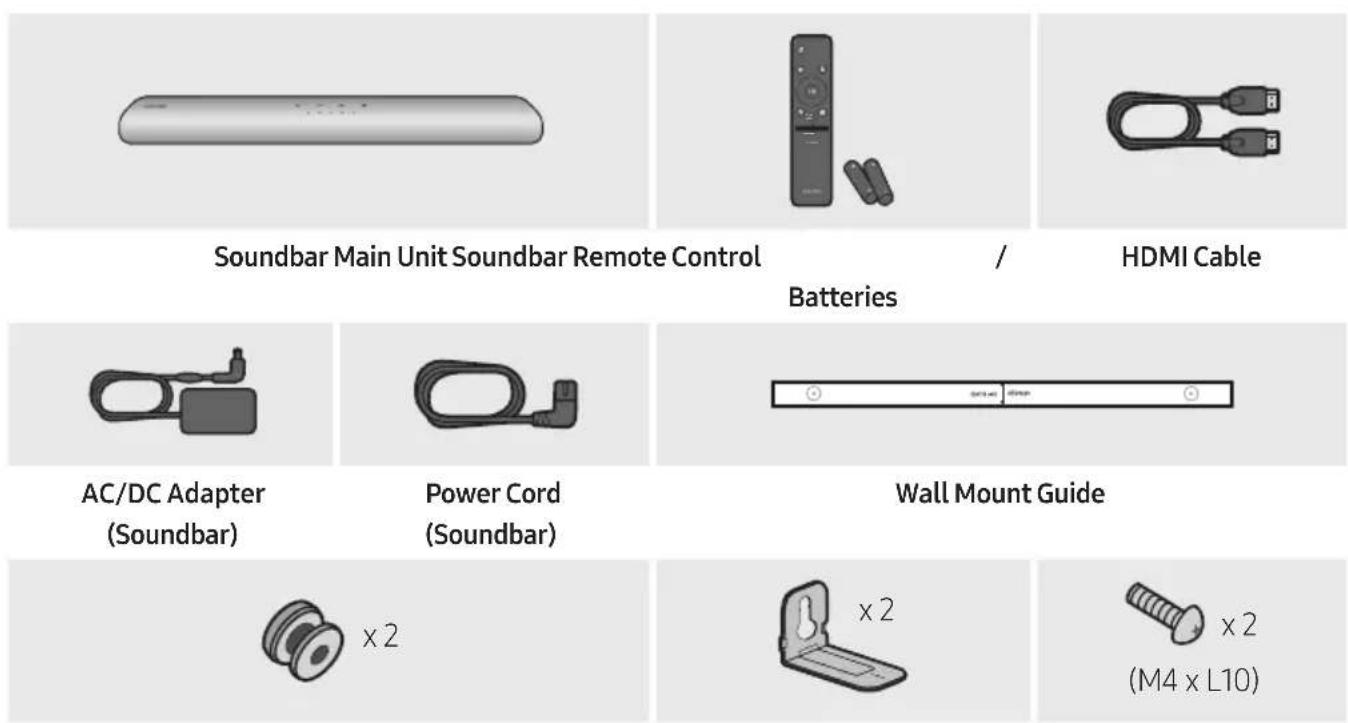
Holder-Screw Bracket-Wall Mount Screw
- For more information about the power supply and power consumption, refer to the label attached to the product. (Label: Bottom of the Soundbar Main Unit)
- To purchase additional components or optional cables, contact a Samsung Service Centre or Samsung Customer Care.
- For more information about the wallmount see page 34.
- Design, specifications, and App screen are subject to change without prior notice.
- The appearance of the accessories may differ slightly from the illustrations above.
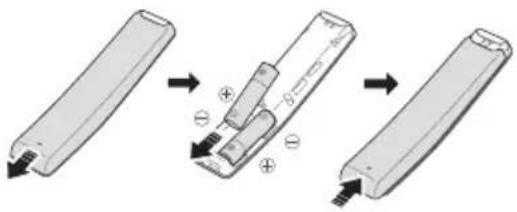
Inserting Batteries before using the Remote Control (AA batteries X 2)
Slide the back cover in the direction of the arrow until it is completely removed. Insert 2 AA batteries (1.5V) oriented so that their polarity is correct. Slide the back cover back into position.
02 PRODUCT OVERVIEW
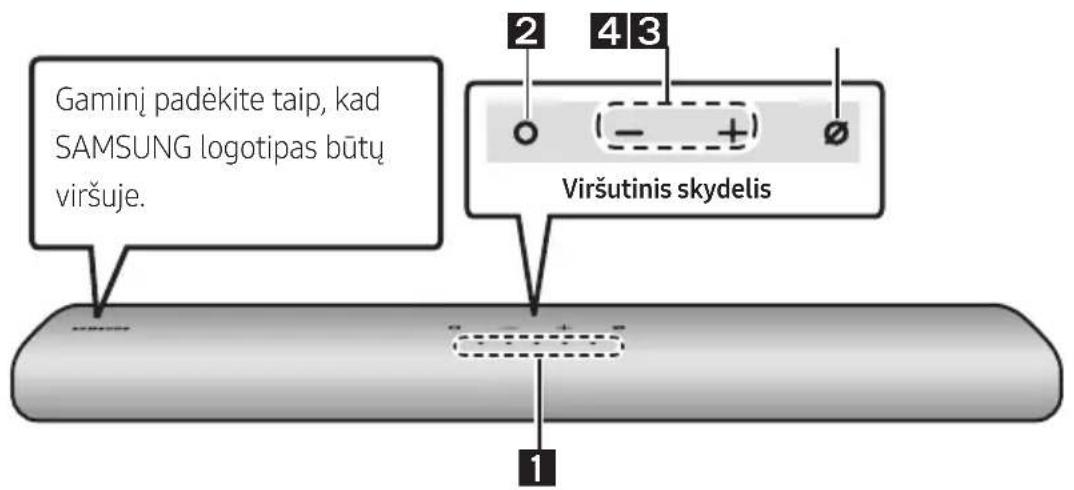
Top Panel of the Soundbar
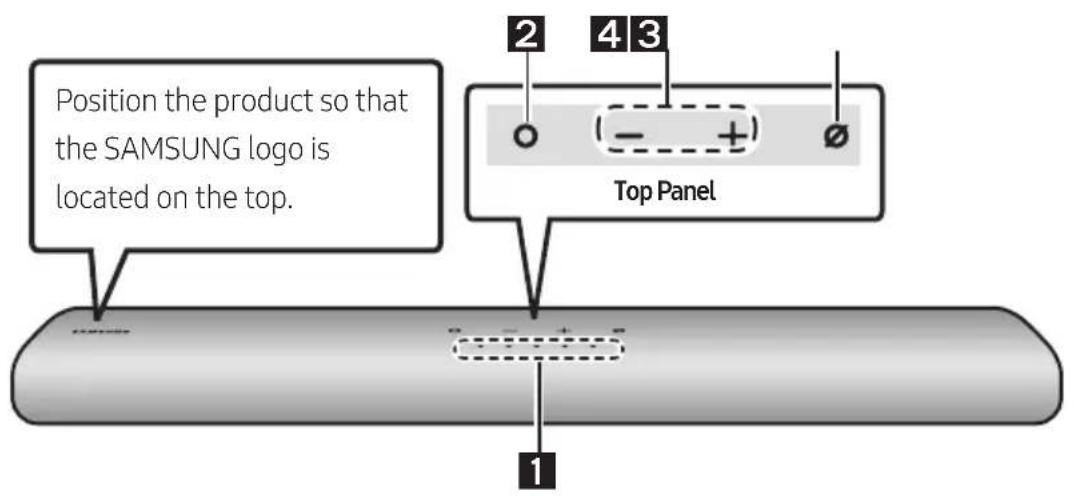
| 1 | LED indicator | The LED Indicator flashes, glows, or changes colour depending on the Soundbar's current mode or status. The colour of the LED indicator and the number of lights indicate the active mode as described below. | ||||
 White LED White LED |  White LED White LED |  Multicolour LED Multicolour LED |  White LED White LED | [WDSW]White LED | ||
| The Multicolour LED changes to White, Cyan, Green, Red, and Blue depending on the mode or status. | ||||||
| 2 | Multi Function Button | In standby mode, press the (Multi Function) button to turn on the Soundbar.Press the (Multi Function) button to change the mode. Each time you change the mode, the LED lights in white and then turns off. | ||||
| LEDIndicator | 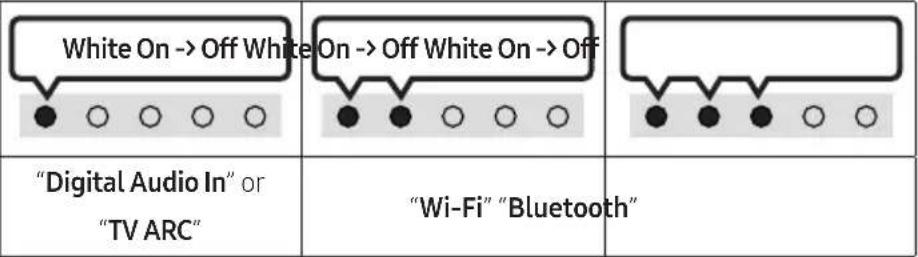 | |||||
| (HK3Z) | ||||||
| 3 | Volume Button | Press the (Volume) button to adjust the volume. | ||||
| 4 | Mic On/Off Button | Press the ∅ (Mic On/Off) button to turn the microphone on or off. When the microphone is off, the LED Indicator will light red.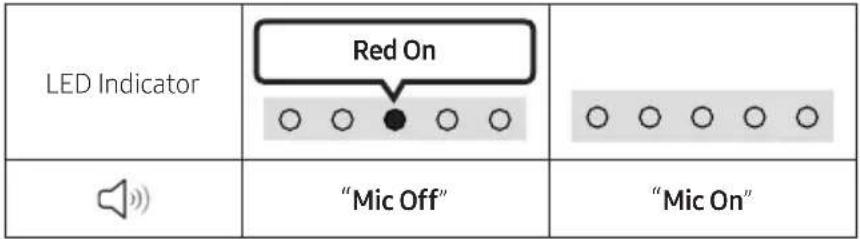 | ||||
- When you plug in the AC cord, the power button will begin working in 4 to 6 seconds.
- When you turn on this unit, there will be a 4 to 5 second delay before it produces sound.
- If you hear sounds from both the TV and Soundbar, go to the Settings menu for the TV audio and change the TV speaker to External Speaker.
- You can turn on and off audio feedback by using SmartThings app. To learn about using the SmartThings app, refer to "Method 2. Connecting via Wi-Fi (Wireless Network)".
Bottom Panel of the Soundbar
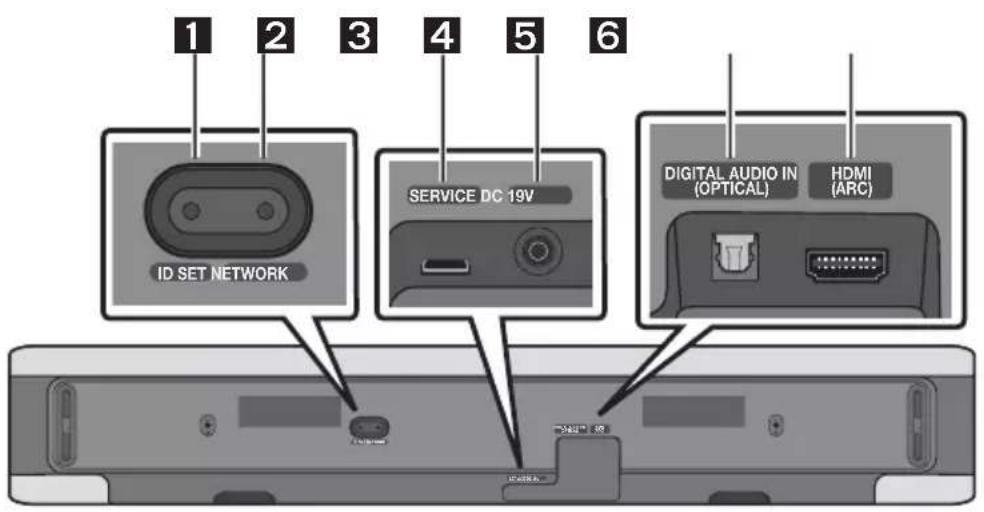
| 1 | ID SETPress to connect the Soundbar to Surround speakers and a subwoofer wirelessly. (The surround speaker, subwoofer are sold separately.) |
| 2 | NETWORKPress to connect to a wireless network (Wi-Fi) via theSmartThingsapp. |
| 3 | SERVICEConnect a USB storage device to upgrade the product's software. |
| 4 | DC 19V (Power Supply In)Connect the AC/DC power adapter. (See page 16) |
| 5 | DIGITAL AUDIO IN (OPTICAL)Connect to the digital (optical) output of an external device. (See page 23) |
| 6 | HDMI (ARC)Connect to the HDMI (ARC) port on a TV. (See page 17) |
- When disconnecting the power cable of the AC/DC power adapter from a wall outlet, pull the plug. Do not pull the cable.
- Do not connect this unit or other components to an AC outlet until all connections between components are complete.
03 USING THE REMOTE CONTROL
How to Use the Remote Control
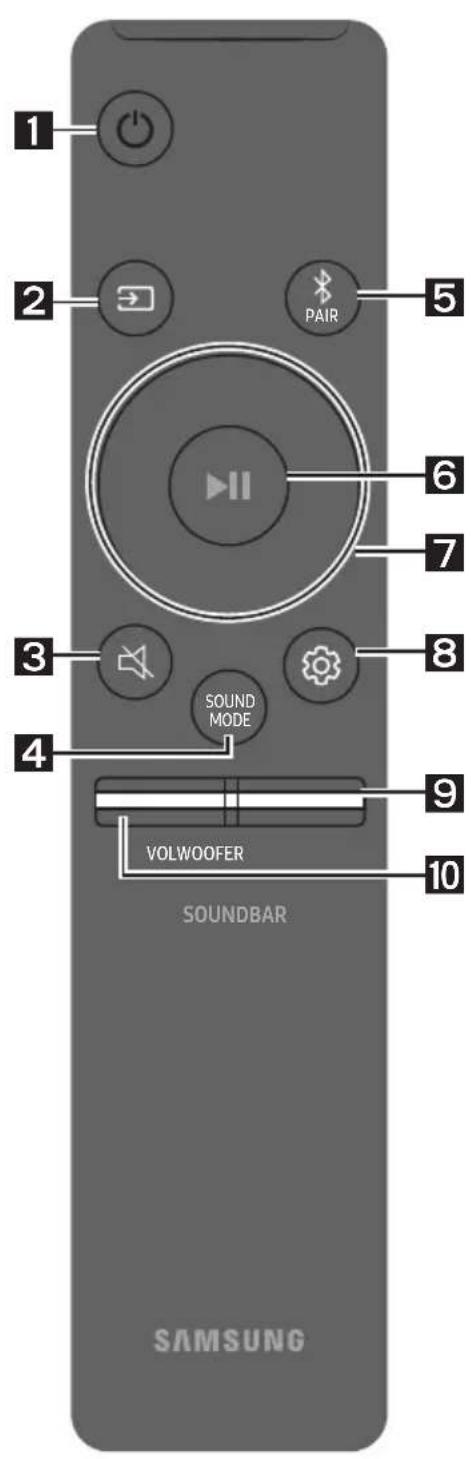
| 1 | Power Turns the Soundbar on and off. | ||
| LED Indicator | Cyan Blinks X1 On | Red Blinks X3 Off | |
| · Auto Power Down Function The unit turns off automatically in the following situations: - In "Digital Audio In" or "TV ARC" / "Wi-Fi" / "Bluetooth" mode if there is no audio signal for 18 minutes. | |||
| 2 | → (Source) Press to select a source connected to the Soundbar. · Audio Feedback On/Off You can turn on or off the Audio Feedback. Press and hold the → (Source) button on the remote control for 5 seconds while the Soundbar is off (Standby mode). | ||
| LED Indicator | Cyan Blinks X1 On | Red Blinks X1 Off | |
| 3 | → (Mute) Press the → (Mute) button to mute the sound. Press it again to unmute the sound. | ||
| LED Indicator | Blinks X Repeatly ○ ○ ○ ○ ● | ||
| 4 | SOUND MODEBy pressing the button, you can select the desired audio mode. Each time the mode changes, the Multicolour LED blinks in white. | |
| LEDIndicator | [G TXY] | |
| [SYTK] | "Standard" → "Music" → "Adaptive Sound" | |
| • StandardOutputs the original sound.• MusicProvides more natural and room filling sound for music content.• Adaptive SoundAnalyzes the content in real time and automatically provides the optimal sound field based on the characteristics of the content. | ||
| 5 | Bluetooth PAIRSwitch the Soundbar to Bluetooth pairing mode.When you press the button, the LED display changes as shown below.Until pairing is complete, the Multicolour LED changes as Red → Green → Blue in turn.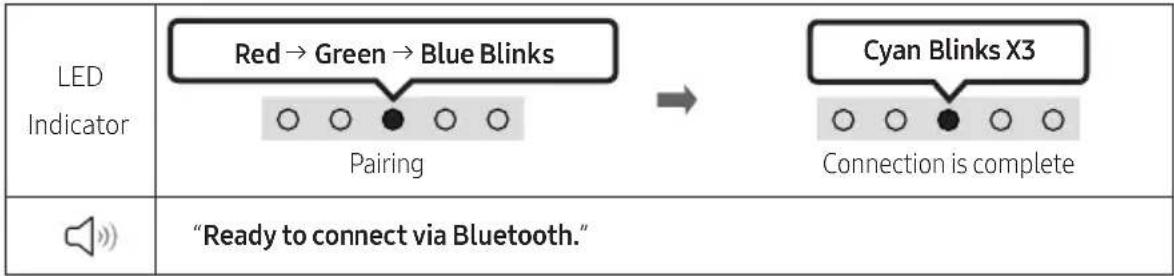 | |
| 6 | ▶II (Play / Pause)You can also play or pause music by pressing the button. | |
| 7 | Up/Down/Left/RightPress Up/Down/Left/Right on the button to select or set functions.Music SkipPress the Right button to select the next music file. Press the Left button to select the previous music file. | |
Bluetooth PAIR
| 8 | (Sound Control)By pressing the button, you can select the desired audio mode. The desired item can be adjusted using theUp/Downbuttons. Each time the mode changes, the Multicolour LED blinks in white.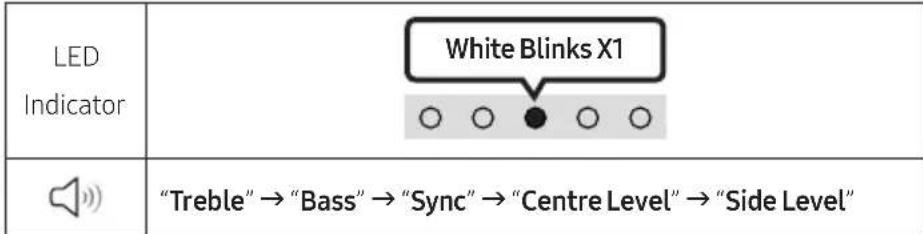 | ||
| -To control the volume of the treble or bass sound, select "Treble" or "Bass" in Sound Settings, and then adjust the volume between -6~+6 by using theUp/Downbuttons.-Press and hold the(Sound Control)button for about 5 seconds to adjust the sound for each frequency band. 150Hz, 300Hz, 600Hz, 1.2kHz, 2.5kHz, 5kHz, and 10kHz are selectable using theLeft/Rightbuttons and each can be adjusted to a setting between -6 to +6 using theUp/Downbuttons. (Make sure the Sound mode is set to "Standard".)-To control the volume of the each speaker select "Centre Level" or "Side Level" in Sound Settings, and then adjust the volume between -6~+6 by using theUp/Downbuttons.-If the video on the TV and audio from the Soundbar are not synchronised, select "Sync" in Sound Control, and then set the audio delay between 0~300 milliseconds by using theUp/Downbuttons.-% "Sync" is only supported for some functions.-If Surround Speakers are connected, select "Rear Level" and then use theUp/Downbuttons to adjust the volume within a -6 to +6 range. | |||
| [0x4z] | WOOFER (BASS) LEVELPush the button up or down to adjust the level of the woofer (bass) to -12 or between -6 to +6. To set the woofer (bass) volume level to 0 (Default), press the button. | ||
| [05x8] | VOLUMEPush the button up or down to adjust the volume. | ||
| LEDIndicator | White moves to right X1Volume Up | White moves to left X1Volume Down | |
- To control the volume of the treble or bass sound, select "Treble" or "Bass" in Sound Settings, and then adjust the volume between -6\~+6 by using the Up/Down buttons.
- Press and hold the 🎨 (Sound Control) button for about 5 seconds to adjust the sound for each frequency band. 150Hz, 300Hz, 600Hz, 1.2kHz, 2.5kHz, 5kHz, and 10kHz are selectable using the Left/Right buttons and each can be adjusted to a setting between -6 to +6 using the Up/Down buttons. (Make sure the Sound mode is set to "Standard".)
- To control the volume of the each speaker select "Centre Level" or "Side Level" in Sound Settings, and then adjust the volume between -6\~+6 by using the Up/Down buttons.
- If the video on the TV and audio from the Soundbar are not synchronised, select "Sync" in Sound Control, and then set the audio delay between 0\~300 milliseconds by using the Up/Down buttons.
- "Sync" is only supported for some functions.
- If Surround Speakers are connected, select "Rear Level" and then use the Up/Down buttons to adjust the volume within a -6 to +6 range.
WOOFER (BASS) LEVEL
VOLUME
| LED Indicator | 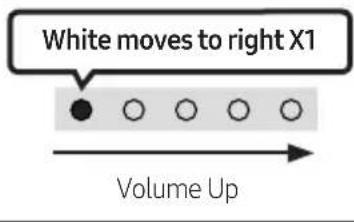 | 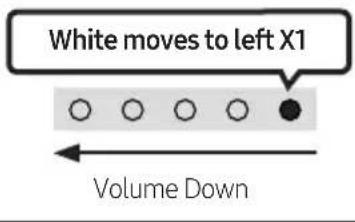 |
Using the Hidden Buttons (Buttons with more than one function)
| Hidden Button | Reference page | |
| Remote Control Button Function | ||
| WOOFER (Up) | TV remote control On/Off (Standby) | page 15 |
| Up ID SET | ||
| (Sound Control) | 7 Band EQ page 13 | |
| (Source) | Audio Feedback On/Off (Standby) page 11 | |
Output specifications for the different sound effect modes
| Effect Input | Output | ||
| With Subwoofer Only | With Subwoofer & Wireless Rear Speaker Kit | ||
| Standard | 2.0 ch 2.1 ch 2.1 ch | ||
| 5.1 ch 2.1 ch 5.1 ch | |||
| Music | 2.0 ch 5.1 ch 7.1 ch | ||
| 5.1 ch 5.1 ch 7.1 ch | |||
| Adaptive Sound | 2.0 ch 5.1 ch 7.1 ch | ||
| 5.1 ch 5.1 ch 7.1 ch | |||
- The Samsung Wireless Rear Speaker Kit, and Subwoofer can be purchased separately. To purchase a Kit or the Subwoofer, contact the vendor you purchased the Soundbar from.
Adjusting the Soundbar volume with a TV remote control
Adjust the Soundbar volume using the TV's remote control.
- This function can be used with IR remote controls only. Bluetooth remote controls (remote controls that require pairing) are not supported.
-
Set the TV speaker to External Speaker to use this function.
• Manufacturers supporting this function: VIZIO, LG, Sony, Sharp, PHILIPS, PANASONIC, TOSHIBA, Hisense, RCA -
Turn Off the Soundbar.
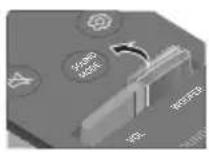
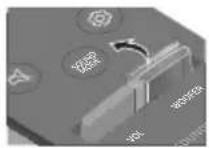
- Push up and hold the WOOFER button for 5 seconds.
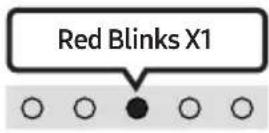
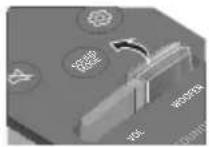
Each time you push the WOOFER button up and hold it for 5 seconds, the mode switches in the following order: "Off-TV Remote" (Default mode), "Samsung-TV Remote", "All-TV Remote".
The LED indicator status changes each time the mode is changed, as shown below.
| Remote Control Button LED Indicator Status | ||
  |  "Off-TV Remote"(Default mode) "Off-TV Remote"(Default mode) | Disable the TV remote control. |
  | 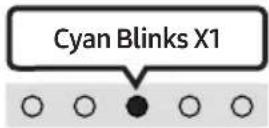 "Samsung-TV Remote" "Samsung-TV Remote" | Enable a Samsung TV's IR remote control. |
  | 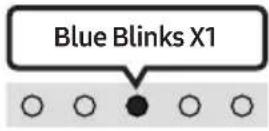 "All-TV Remote" "All-TV Remote" | Enable a third-party TV's IR remote control. |
04 CONNECTING THE SOUNDBAR
Connecting Electrical Power
Use the power components to connect the Soundbar to an electrical outlet in the following order:
- For more information about the required electrical power and power consumption, refer to the label attached to the product. (Label: Bottom of the Soundbar Main Unit)
- First connect the power cable to the AC/DC adapter. Connect the AC/DC adapter (with the power cable) to the Soundbar.
- Connect the power cord to a wall socket.
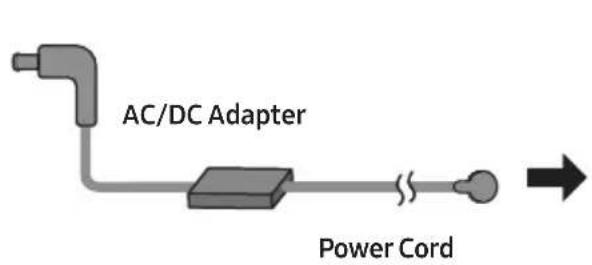
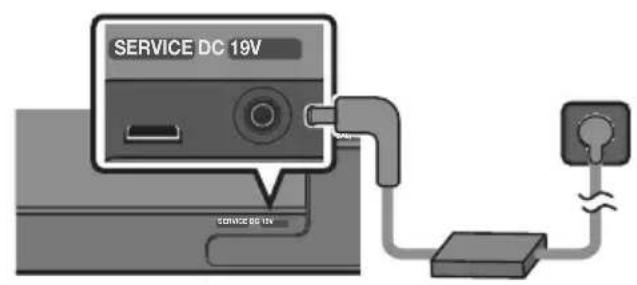
Bottom of the Soundbar Main Unit
NOTES
- If you unplug and reconnect the power cord when the product is turned on, the Soundbar turns on automatically.
- Make sure to rest the AC/DC Adapter flat on a table or the floor. If you place the AC/DC Adapter so that it is hanging with the AC cord input facing upwards, water or other foreign substances could enter the Adapter and cause the Adapter to malfunction.
Connecting an SWA-9100S (Sold Separately), SWA-W500 (Sold Separately) to your Soundbar
Expand to true wireless surround sound by connecting the Samsung Wireless Rear Speaker Kit (SWA-9100S, sold separately) and Wireless Subwoofer (SWA-W500, sold separately) to your Soundbar. For detailed information on connections, see the Samsung Wireless Rear Speaker Kit and Wireless Subwoofer manual.
05 USING A WIRED CONNECTION TO THE TV
Method 1. Connecting with HDMI

CAUTION
- When both the HDMI cable and optical cable are connected, the HDMI signal is received first.
- To connect the HDMI cable between the TV and Soundbar, be sure to connect the terminals marked ARC. Otherwise, the TV sound may not be output.
- The recommended cable is High Speed HDMI Cable with Ethernet.
Connecting the TV that supports HDMI ARC (Audio Return Channel)
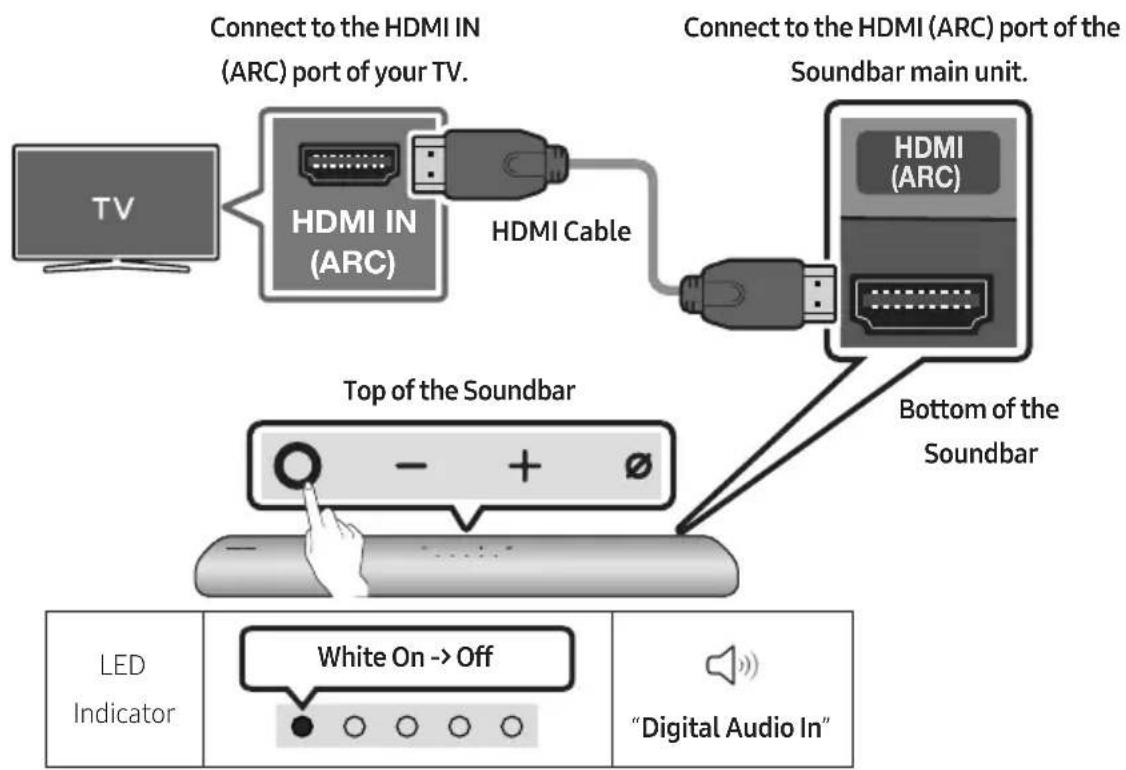
flowchart
graph TD
    A["TV"] --> B["HDMI IN (ARC)"]
    B --> C["HDMI Cable"]
    C --> D["Top of the Soundbar"]
    D --> E["Bottom of the Soundbar"]
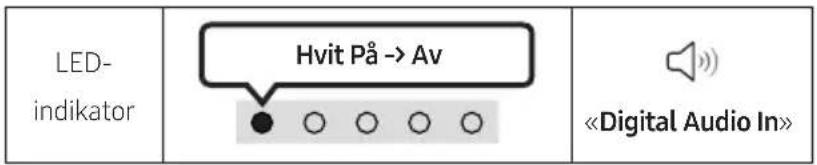
    F["LED Indicator"] --> G["White On --> Off"]
    H["Digital Audio In"] --> I["Power cord icon"]
- With the Soundbar and TV turned off, connect the HDMI cable as shown in the figure.
- Turn on the Soundbar and TV.
-
TV sound is output from the Soundbar.
-
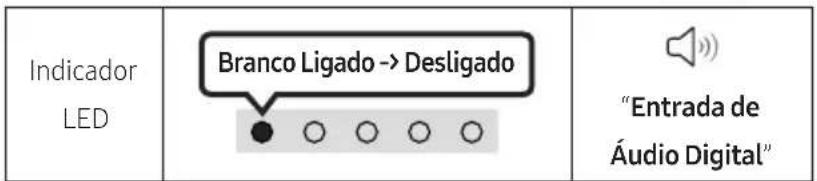
When the TV sound is not output, press the Ⓐ (Multi Function) button at the top of the Soundbar or the → (Source) button on the remote control to select the "Digital Audio In" mode.
- When the sound is not output, check the HDMI Cable connection again.
- Use the volume buttons on the TV's remote control to change the volume on the Soundbar.
NOTES
- When you connect the TV that supports the HDMI ARC (Audio Return Channel) to the Soundbar with an HDMI cable, you can transmit the digital video and audio data without connecting a separate optical cable.
- We recommend you use a coreless HDMI cable if possible. If you use a cored HDMI cable, use one whose diameter is less than 14 mm.
- This function is not available if the HDMI cable does not support ARC.
- When the audio in a broadcast is encoded in Dolby Digital and the “Digital Output Audio Format” on your TV is set to PCM, we recommend that you change the setting to Dolby Digital. When the setting on the TV is changed, you will experience better sound quality. (The TV menu may use different words for Dolby Digital and PCM depending on the TV manufacturer.)
Method 2. Connecting using an Optical Cable
Pre-connection Checklist
- When both the HDMI cable and optical cable are connected, the HDMI signal is received first.
- When you use an optical cable and the terminals have covers, be sure to remove the covers.

natural_image
Diagram showing a mechanical component before and after assembly, with no visible text or symbols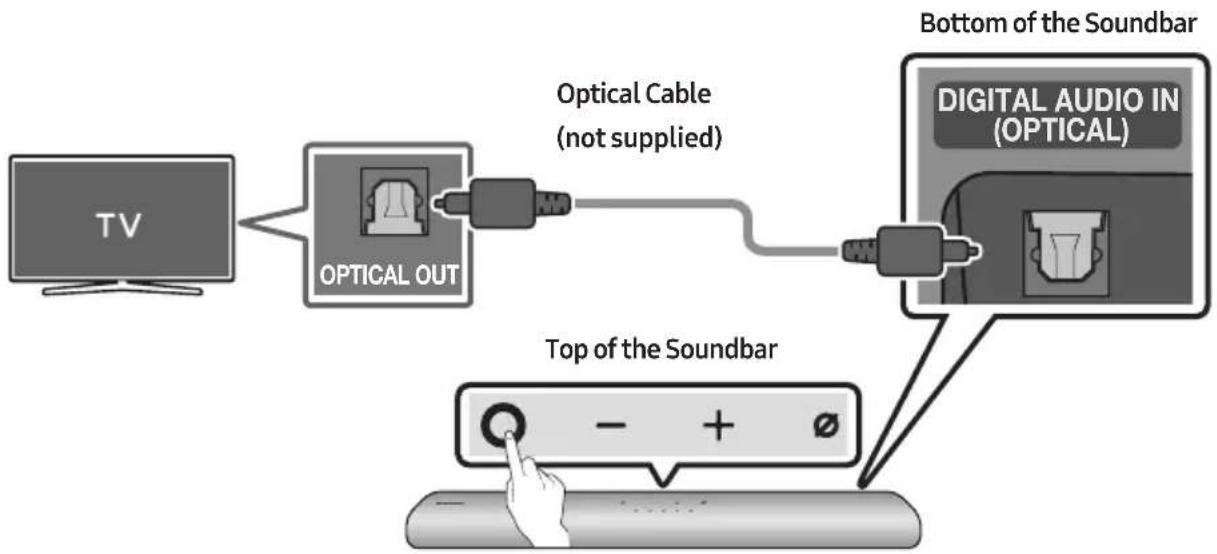
flowchart
graph TD
    A["TV"] --> B["OPTICAL OUT"]
    B --> C["Optical Cable (not supplied)"]
    C --> D["Digital Audio IN (OPTICAL)"]
    D --> E["Top of the Soundbar"]
    E --> F["Hand pointing at a button with minus/positive signs"]
- With the TV and Soundbar turned off, connect the DIGITAL AUDIO IN (OPTICAL) port on the Soundbar and the OPTICAL output port on the TV with the optical cable (not supplied), as shown in the figure.
- Turn on the Soundbar and TV.
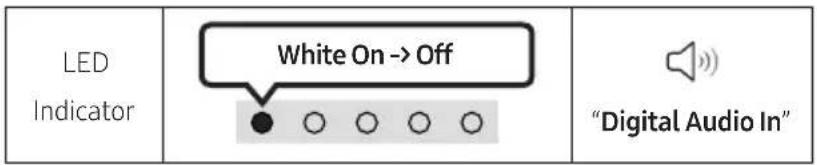
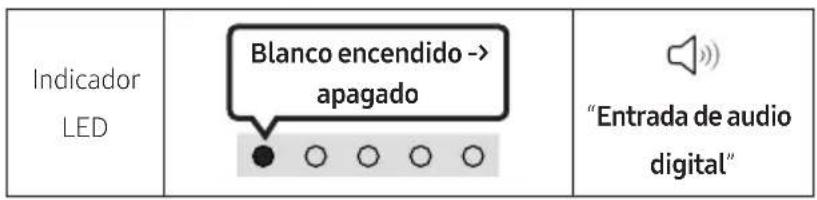
- Press the ⬆ (Multi Function) button at the top of the Soundbar or the ➞ (Source) button on the remote control and then select the "Digital Audio In" mode. Then the announcement, "Digital Audio In" is output.
- The TV sound is output from the Soundbar.
06 USING A WIRELESS CONNECTION TO THE TV
Method 1. Connecting via Bluetooth
When a Samsung TV is connected using Bluetooth, you can hear stereo sound without the hassle of cabling.
- Only one Samsung TV can be connected at a time.
- Samsung TV that supports Bluetooth can be connected. Check the specifications of your TV.
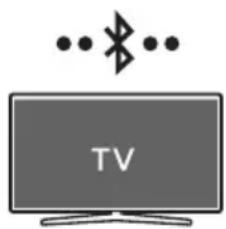
natural_image
Illustration of a TV with wireless signal icons above (no text or symbols on the TV itself)The initial connection
1.
| Bluetooth Pairing button LED | Indicator |
 ORWhen in “Bluetooth” mode ORWhen in “Bluetooth” mode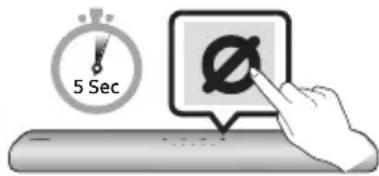 | 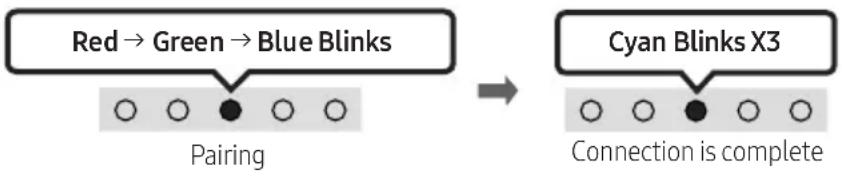 ·Until pairing is complete, the Multicolour LED changes as Red → Green → Blue in turn. ·Until pairing is complete, the Multicolour LED changes as Red → Green → Blue in turn. |
| “Ready to connect via Bluetooth.” |
- Select Bluetooth mode on the Samsung TV.
(e.g. Home (💡) → Settings (💡) → Sound → Sound Output → Bluetooth Speaker List → [AV] Samsung Soundbar S60A / [AV] Samsung Soundbar S61A (Bluetooth))
- Select "[AV] Samsung Soundbar S60A / [AV] Samsung Soundbar S61A" from the list on TV's screen.
An available Soundbar is indicated with "Need Pairing" or "Paired" on the TV's Bluetooth device list. To connect the Samsung TV to the Soundbar, select the message, and then establish a connection.
- You can now hear Samsung TV sound from the Soundbar.
- If there is a connection log between the Soundbar and Samsung TV, the Soundbar is automatically connected by changing its mode to "Bluetooth"
If the device fails to connect
- If you have an existing Soundbar (e.g., [AV] Samsung Soundbar S60A / [AV] Samsung Soundbar S61A) on the list of speakers on the Samsung TV, delete it.
- Then repeat steps 1 through 3.
Disconnecting the Soundbar from the Samsung TV
Press the ⬤ (Multi Function) button at the top of the Soundbar or the ➞ (Source) button on the remote control to select the mode other than "Bluetooth".
- Disconnecting takes time because the Samsung TV must receive a response from the Soundbar. (The time required may differ, depending on the Samsung TV model.)
Notes on Bluetooth connection
- Locate a new device within 1 m to connect via Bluetooth communication.
- If asked for a PIN code when connecting a Bluetooth device, enter <0000>.
- The Soundbar automatically turns off after 18 minutes in the Ready state.
-
The Soundbar may not perform Bluetooth search or connection correctly under the following circumstances:
-
If there is a strong electrical field around the Soundbar.
- If several Bluetooth devices are simultaneously paired with the Soundbar.
- If the Bluetooth device is turned off, not in place, or malfunctions.
- Electronic devices may cause radio interference. Devices that generate electromagnetic waves must be kept away from the Soundbar main unit - e.g., microwaves, wireless LAN devices, etc.
Method 2. Connecting via Wi-Fi
Pre-connection Checklist
• Wi-Fi connection is available only on Samsung TV.
- Check whether the wireless router (Wi-Fi) is turned on and the TV is connected to the router.
- The TV and Soundbar must be connected to the same wireless network (Wi-Fi).
- If your wireless router (Wi-Fi) uses a DFS channel, you will not be able to establish a Wi-Fi connection between the TV and Soundbar. Contact your Internet service provider for details.
- Because the menus may differ depending on the year of manufacture, refer to your TV manual.
- To connect the TV to the Soundbar via Wi-Fi, connect the Soundbar to the wireless router first. See page 27, for details on how to establish a Wi-Fi connection.
-
For more information about Wi-Fi connection to the Soundbar, see page 27, "Method 2. Connecting via Wi-Fi (Wireless Network)".
-
Change the input source of the TV by using the Audio menu to Soundbar.
• Samsung TVs released in 2017 or later
Home (☑) → Settings (☑) → Sound → Sound Output → [AV] Samsung Soundbar S60A / [AV] Samsung Soundbar S61A (Wi-Fi)
07 CONNECTING AN EXTERNAL DEVICE
Connecting using an Optical Cable
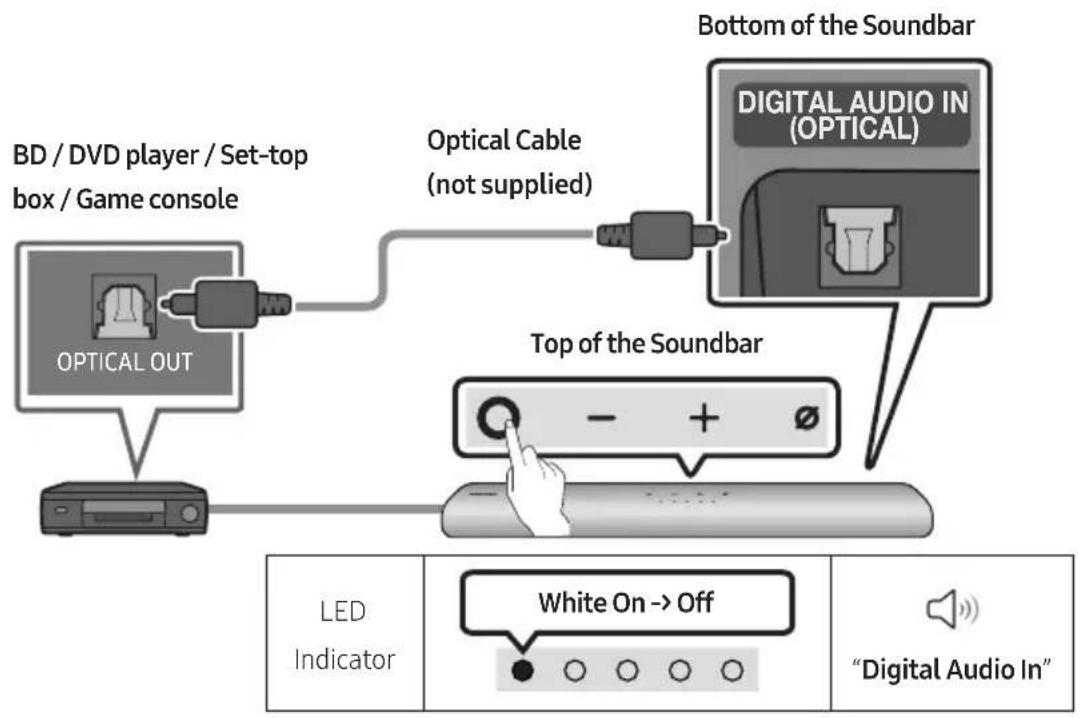
flowchart
graph TD
    A["Optical OUT"] --> B["BD / DVD player / Set-top box / Game console"]
    B --> C["Top of the Soundbar"]
    C --> D["Digital Audio In (OPTICAL)"]
    D --> E["Bottom of the Soundbar"]
    E --> F["White On --> Off"]
    F --> G["Digital Audio In"]
- With the external device and Soundbar turned off, connect the DIGITAL AUDIO IN (OPTICAL) port on the Soundbar and the OPTICAL output port on the external device with the optical cable (not supplied), as shown in the figure.
- Turn on the Soundbar and external device.
- Press the ⬆ (Multi Function) button at the top of the Soundbar or the ➕ (Source) button on the remote control and then select the "Digital Audio In" mode. Then the announcement, "Digital Audio In" is output.
- The external device sound is output from the Soundbar.
08 CONNECTING A MOBILE DEVICE
Method 1. Connecting via Bluetooth
When a mobile device is connected using Bluetooth, you can hear stereo sound without the hassle of cabling.
- When you connect a paired Bluetooth device with the Soundbar off, the Soundbar automatically turns on.
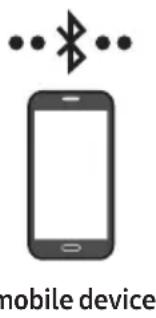
The initial connection
- When connecting to a new Bluetooth device, make sure the device is within 1 m distance.
1.
| Bluetooth Pairing button LED | Indicator |
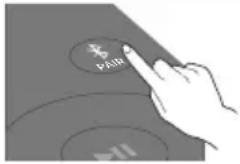 ORWhen in “Bluetooth” mode ORWhen in “Bluetooth” mode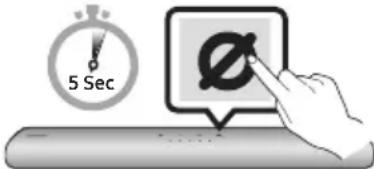 |  Pairing Connection is completeUntil pairing is complete, the Multicolour LED changes as Red → Green → Blue in turn. Pairing Connection is completeUntil pairing is complete, the Multicolour LED changes as Red → Green → Blue in turn. |
| “Ready to connect via Bluetooth.” |
- On your device, select "[AV] Samsung Soundbar S60A / [AV] Samsung Soundbar S61A" from the list that appears.
- Play music files from the device connected via Bluetooth through the Soundbar.
If the device fails to connect
- If you have an existing Soundbar (e.g., [AV] Samsung Soundbar S60A / [AV] Samsung Soundbar S61A) on the list of speakers on the Mobile device, delete it.
- Then repeat steps 1 and 2.
Notes on Bluetooth connection
- Locate a new device within 1 m to connect via Bluetooth communication.
- If asked for a PIN code when connecting a Bluetooth device, enter <0000>.
- The Soundbar automatically turns off after 18 minutes in the Ready state.
-
The Soundbar may not perform Bluetooth search or connection correctly under the following circumstances:
-
If there is a strong electrical field around the Soundbar.
- If several Bluetooth devices are simultaneously paired with the Soundbar.
- If the Bluetooth device is turned off, not in place, or malfunctions.
- Electronic devices may cause radio interference. Devices that generate electromagnetic waves must be kept away from the Soundbar main unit - e.g., microwaves, wireless LAN devices, etc.
• The Soundbar supports SBC data (44.1kHz, 48kHz).
- Connect only to a Bluetooth device that supports the A2DP (AV) function.
- You cannot connect the Soundbar to a Bluetooth device that supports only the HF (Hands Free) function.
- When connecting the Soundbar to a Bluetooth device, place them as close to each other as possible.
- The farther the Soundbar and Bluetooth device are from each other, the lower the sound quality will become.
The Bluetooth connection may break when the devices are out of the effective range.
- The Bluetooth connection may not function as intended in areas with poor reception.
- A Bluetooth device may experience noise or malfunction under in the following conditions:
- When the body is in contact with the signal transceiver on the Bluetooth device or Soundbar
- In corners or when there is an obstacle in proximity, such as a wall or partition, where electrical changes may occur.
- When exposed to radio interferences by other products operating on the same frequency ranges, such as medical equipment, microwave ovens, and wireless LAN devices.
-
Obstacles such as doors and walls may still impact the sound quality even when the devices are within the effective range.
-
Note that your Soundbar cannot be paired with other Bluetooth devices while using the Bluetooth option.
- This wireless device may cause electrical interference during operation.
Disconnecting the Bluetooth device from a Soundbar
You can disconnect a Bluetooth device from the Soundbar. For instructions, see the Bluetooth device's user manual.
• The Soundbar will be disconnected.
- If the Soundbar is disconnected from the Bluetooth device, the multicolour LED indicator on the Soundbar blinks "Red" three times.
Disconnecting the Soundbar from the Bluetooth device
Press the ⬆ (Multi Function) button at the top of the Soundbar or the ➞ (Source) button on the remote control to select the mode other than "Bluetooth".
- Disconnecting takes time because the Bluetooth device must receive a response from the Soundbar. (Disconnection time may differ, depending on the Bluetooth device)
- If the Soundbar is disconnected from the Bluetooth device, the multicolour LED indicator on the Soundbar blinks "Red" three times.
Method 2. Connecting via Wi-Fi (Wireless Network)
To connect a Soundbar to a mobile device via a wireless network (Wi-Fi), the SmartThings app is required.
The initial connection
- Install and launch the SmartThings app from your mobile device (smartphone or tablet).
- On the app, follow the screen instructions to add the Soundbar.
- The automatic pop-up (the second screenshot below) may not show on some devices. If the pop-up window does not appear, press “+” on the Home screen. The Soundbar is added to the app.
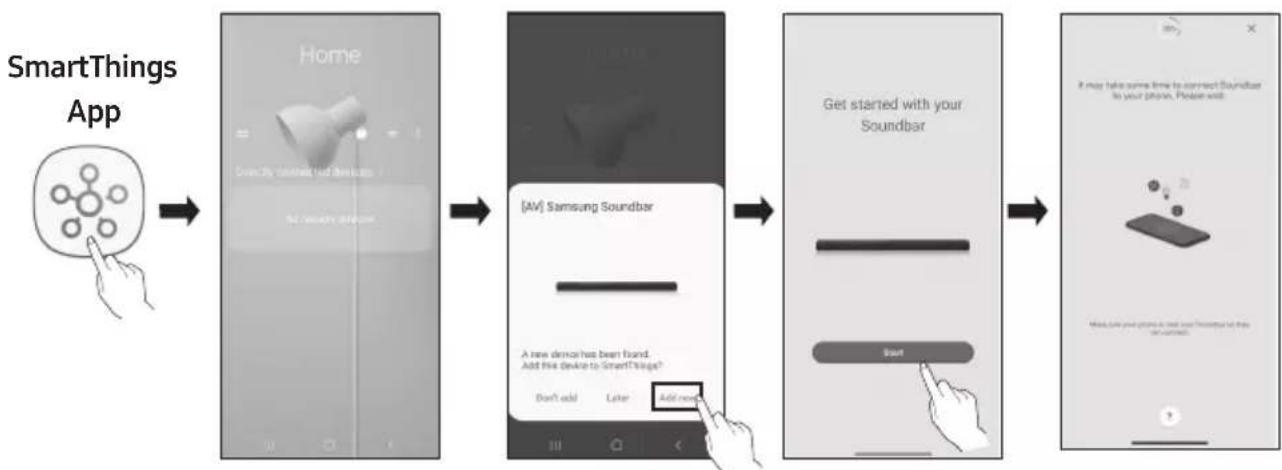
flowchart
graph LR
    A["SmartThings App"] --> B["Home"]
    B --> C["[AV"] Samsung Soundbar]
    C --> D["Get started with your Soundbar"]
    D --> E["Next Step"]
Launch App Add deviceAuto pop-up
Getting Started with Amazon Alexa (Built-in Alexa)
• Amazon Alexa is a service provided by Amazon.
- This function may not be supported depending on the model or geographical area.
- This function only supports some languages, and the supported functions may differ depending on the geographical area.
• For product specification or compatibility, refer to the Samsung website (www.samsung.com).
Using Alexa, you can play music, listen to news, see weather forecasts, and control home appliances. To use Amazon Alexa, an Amazon account is required to connect the Soundbar over the network.
- Install the SmartThings app on your mobile device and then launch it.
- Enter the Alexa account by following the instructions on the app and then log in the service.
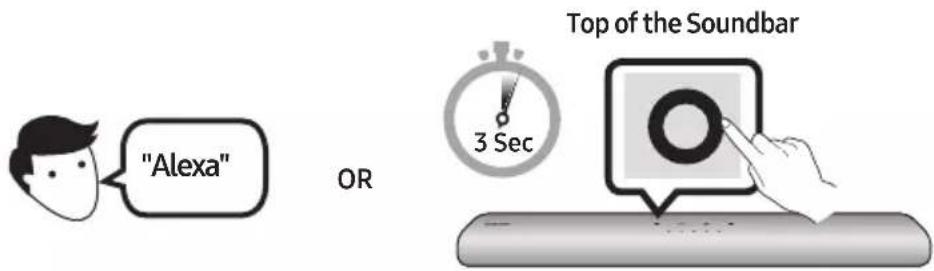
-
Call Alexa or press the Ⓐ (Multi Function) button on the Soundbar for 3 seconds to use the Alexa service.
-
Press the ⬆ (Multi Function) button for 3 seconds to call Alexa. Say with the button pressed to enable voice recognition.
- The LED indicator status on the Soundbar changes depending on the Alexa status. See page 31 for details.


| Things to try Example of what to say | |
| Volume control | "Alexa, turn up the volume." |
| "Alexa, turn down the volume" | |
| Listening to streaming content from Amazon Music | "Alexa, play some jazz music" |
| Playback control | "Alexa, play next song." |
| "Alexa, stop the music." | |
| "Alexa, what is this song?" | |
| Weather information "Alexa, what's the weather?" | |
| Timer scheduling "Alexa, set a timer for 10 minutes." | |
Getting Started with Alexa on Amazon Product (Works with Alexa)
- This function may not be supported depending on the model or geographical area.
- This function only supports some languages, and the supported functions may differ depending on the geographical area.
- For product specification or compatibility, refer to the Samsung website (www.samsung.com).
- This service is provided by Amazon and can be terminated at any time. Samsung does not assume responsibility for service availability.
• Amazon Alexapp screen is subject to change without prior notice.
Connect and use with an Amazon product (Amazon Echo)
Use an Amazon Echo product to control your Soundbar and enjoy music services provided by Amazon Echo. To use Amazon Alexa, an Amazon account is required to connect the Soundbar over the network.
- Install the SmartThings app on your mobile device and then launch it.
- Enter the Alexa account by following the instructions on the app and then log in the service.
Use voice commands to control the Soundbar
- The Amazon Echo service you can use with your Soundbar is limited to music. Other services provided by Amazon Echo, such as news and weather, can only be accessed through your Amazon Echo product.

Trigger + Command + Speaker name
* To use voice commands for the Soundbar named "Living room"
| Action Voice Command | |
| To set the volume level to 5 | "Alexa Set the volume to 5 on Living room" |
| To increase the volume level | "Alexa Volume up on Living room" |
| To mute the sound "Alexa Mute on Living room" | |
| To listen to a radio station named KISS FM | "Alexa Play Kiss FM on Living room" |
| To play the next song | "Alexa Next song on Living room" |
| To stop the audio | "Alexa Stop on Living room" |
| To turn the audio off "Alexa Turn off on Living room" |
Alexa indicator status
The LED indicator status on the Soundbar changes depending on the Alexa status, as shown below.
| Alexa status LED indicator on Soundbar | |
| Idle | 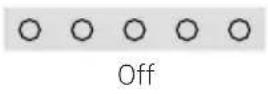 |
| Listening |  |
| Thinking |  |
| Speaking | |
| Timer Alarms and Reminders | 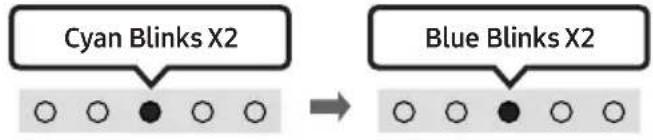 |
| Notification | 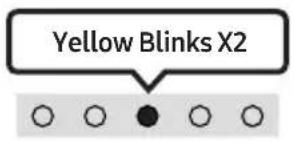 |
| Alexa service unavailable | 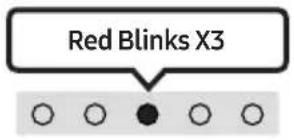 |
| Network disconnected | 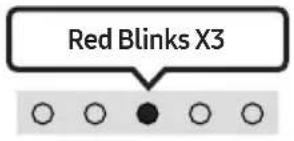 |
| Mic Off | 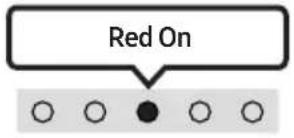 |
Using the Tap Sound
Tap the Soundbar with your mobile device to play audio from the mobile device through the Soundbar.
- This function may not be supported, depending on the mobile device.
- This function is only compatible with Samsung mobile devices with Android 8.1 or later.
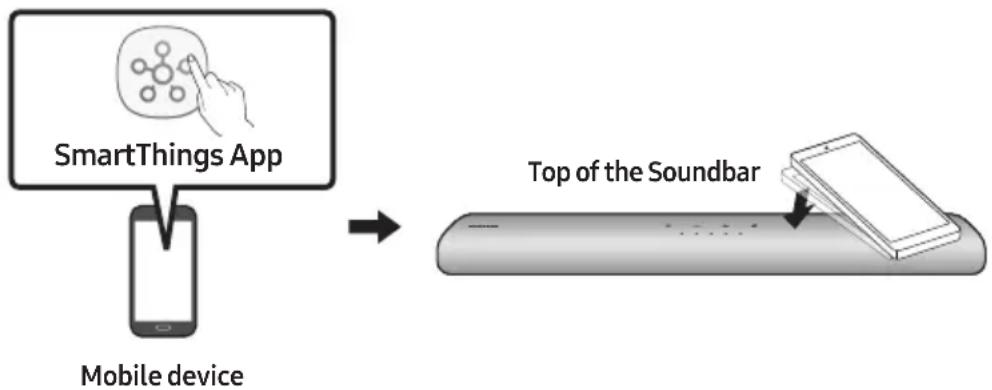
flowchart
graph LR
    A["SmartThings App"] --> B["Mobile device"]
    B --> C["Top of the Soundbar"]
-
Turn on the Tap Sound function on your mobile device.
-
For details on how to turn on the function, refer to "Enable the Tap Sound function" below.
- Tap the Soundbar with the mobile device. Select "Start now" in the displayed message window. A connection is established between the mobile device and Soundbar via Bluetooth.
-
Play audio from the mobile device through the Soundbar.
-
This function connects a mobile device to the Soundbar via Bluetooth by detecting vibration that occurs when the device touches the Soundbar.
- Make sure the mobile device does not tap a sharp corner of the Soundbar. The Soundbar or mobile device may become scratched or damaged.
- It is recommended that the mobile device be covered with a case. Lightly tap the wide area in the upper portion of the Soundbar, without using excessive force.
- To use this function, update the SmartThings app to the latest version.
The function may not be supported, depending on the app version.
Enable the Tap Sound function
Use the SmartThings app to turn on the Tap View, Tap Sound function.
- On the mobile device, run the SmartThings app.
- Select (≡→_) in the SmartThings app screen displayed on the mobile device.
- Set "Tap View, Tap Sound" to On to allow the function to work when a mobile device moves close to the Soundbar.
NOTES
- When the mobile device is in power-saving mode, the Tap Sound function does not work.
- The Tap Sound function may not work if there are devices near the Soundbar that cause radio interference such as electric devices. Make sure devices that may cause radio interference are placed at a sufficient distance away from the Soundbar.
09 CONNECTING TO APPLE AIRPLAY 2
- This feature may not be available in some countries.
Connect and use with an Apple product
- With AirPlay 2, you can control your home's audio system from your iPhone, iPad, HomePod, or Apple TV.
- This Samsung Soundbar supports AirPlay 2 and requires iOS 11.4 or later.
NOTE
- Confirm that the Soundbar is connected to Wi-Fi. (Refer to "Method 2. Connecting via Wi-Fi (Wireless Network)".)
10 INSTALLING THE WALL MOUNT
Installation Precautions
• Install on a vertical wall only.
- Do not install in a place with high temperature or humidity.
- Verify whether the wall is strong enough to support the product's weight. If not, reinforce the wall or choose another installation point.
• Purchase and use the fixing screws or anchors appropriate for the kind of wall you have (plaster board, iron board, wood, etc.). If possible, fix the support screws into wall studs.
• Purchase wall mounting screws according to the type and thickness of the wall you want to mount the Soundbar on.
- Diameter: M5
– Length: 35 mm or longer recommended.
- Connect cables from the unit to external devices before you install the Soundbar on the wall.
- Make sure the unit is turned off and unplugged from the power source before you install it. Otherwise, it may cause an electric shock.
Wallmount Components

Wall Mount Guide

x2

x 2
(M4 x L10)
Holder-Screw Screw
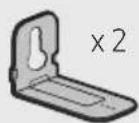
Bracket-Wall Mount
- Place the Wall Mount Guide against the wall surface.
• The Wall Mount Guide must be level.
- If your TV is mounted on the wall, install the Soundbar at least 5 cm below the TV.
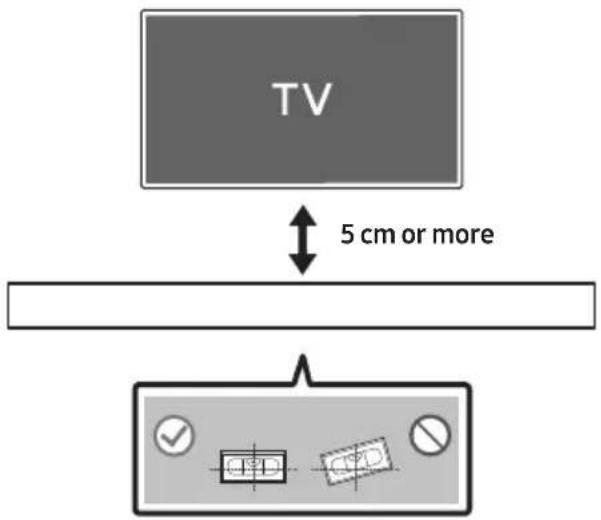
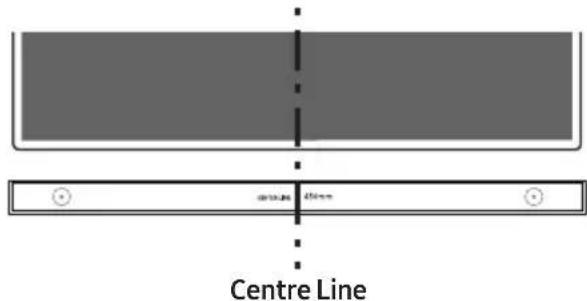
- Align the Wall Mount Guide's Centre Line with the centre of your TV (if you are mounting the Soundbar below your TV), and then fix the Wall Mount Guide to the wall using tape.
- If you are not mounting below a TV, place the Centre Line in the centre of the installation area.
- Use a pen to mark the positions of the holes and remove the Wall Mount Guide.
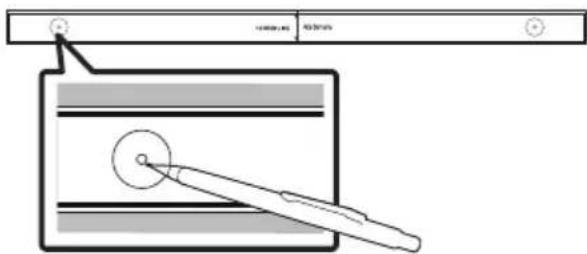
- Using an appropriately sized drill bit, drill a hole in the wall at each marking.
- If the markings do not correspond to the positions of studs, make sure you insert appropriate anchors into the holes before you insert the support screws. If you use anchors, make sure the holes you drill are large enough for the anchors you use.
- Push a screw (not supplied) through each Holder-Screw, and then screw each screw firmly into a support screw hole.
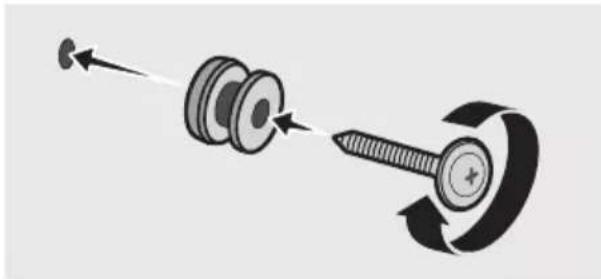
natural_image
Diagram showing a screw being inserted into a nut, with motion arrows indicating direction (no text or symbols)- Install the 2 Bracket-Wall Mounts in the correct orientation on the bottom of the Soundbar using 2 Screws.
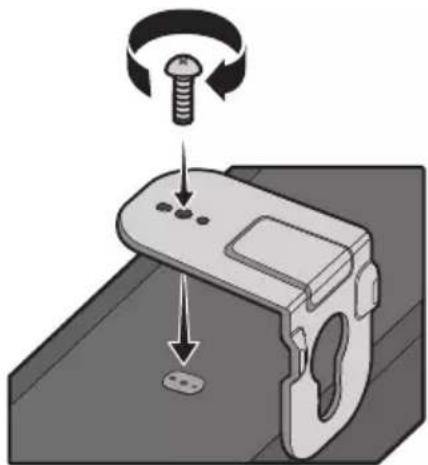
natural_image
Diagram of a mechanical device with a screw and adjustment knob, showing rotational motion (no text or symbols)- When assembling, make sure the hanger part of the Bracket-Wall Mounts are located behind the rear of the Soundbar.
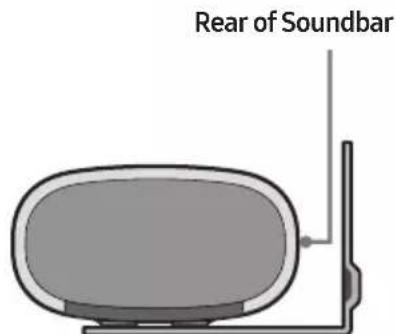
Right end of Soundbar
- Install the Soundbar with the attached Bracket-Wall Mounts by hanging the Bracket-Wall Mounts on the Holder-Screws on the wall.
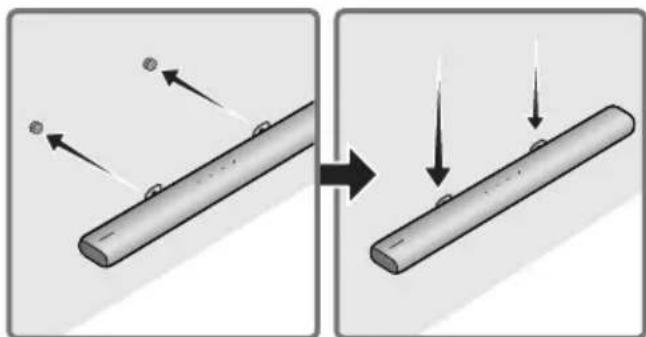
natural_image
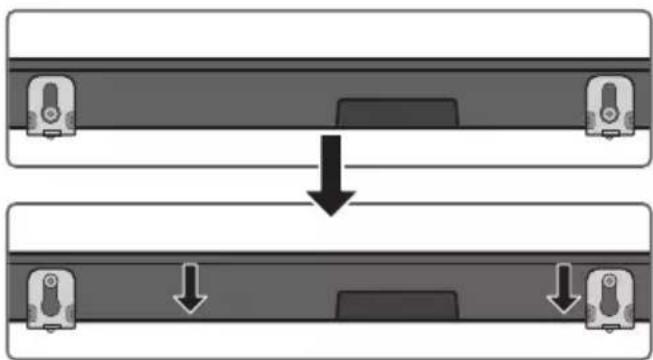
Diagram showing two stages of a cylindrical object with arrows indicating movement, no text or symbols present- Slide the Soundbar down as shown below so that the Bracket-Wall Mounts rest securely on the Holder-Screws.
- Insert the Holder-Screws into the wide (bottom) part of the Bracket-Wall Mounts, and then slide the Bracket-Wall Mounts down so that the Bracket-Wall Mounts rest securely on the Holder-Screws.
flowchart
graph TD
    A["Device with ports"] --> B["Single Port"]
    style A fill:#f9f,stroke:#333
    style B fill:#bbf,stroke:#333
11 INSTALLING THE SOUNDBAR IN FRONT OF TV
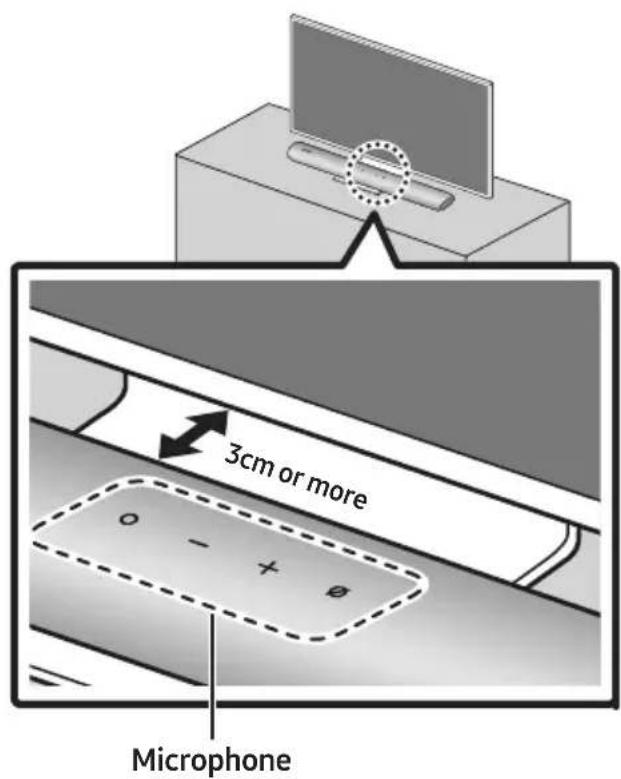
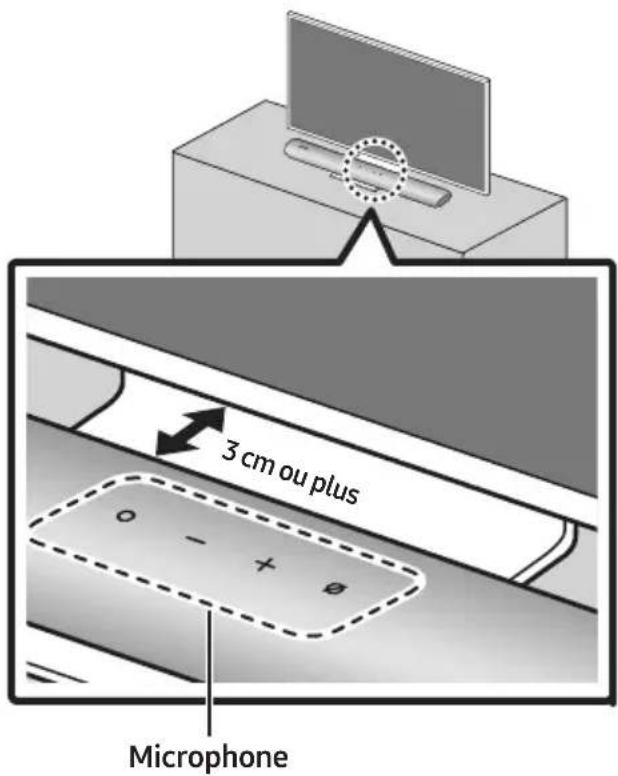
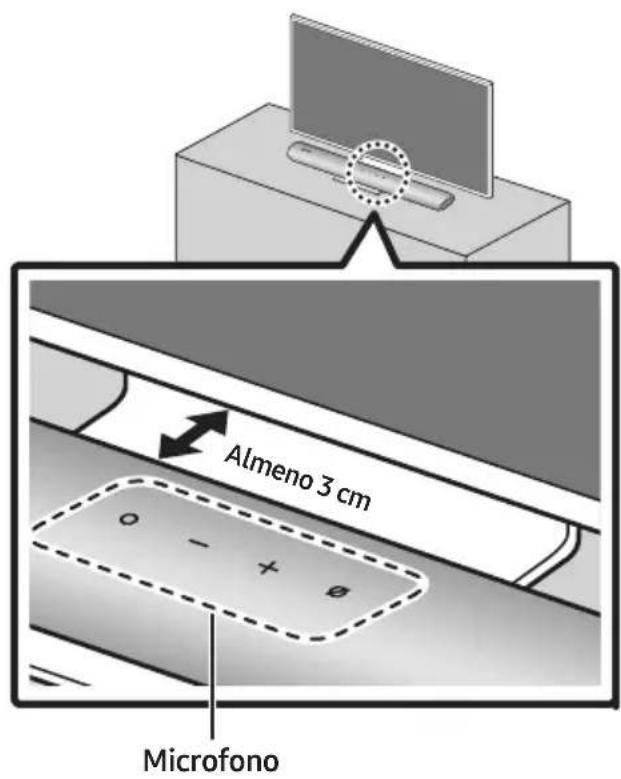
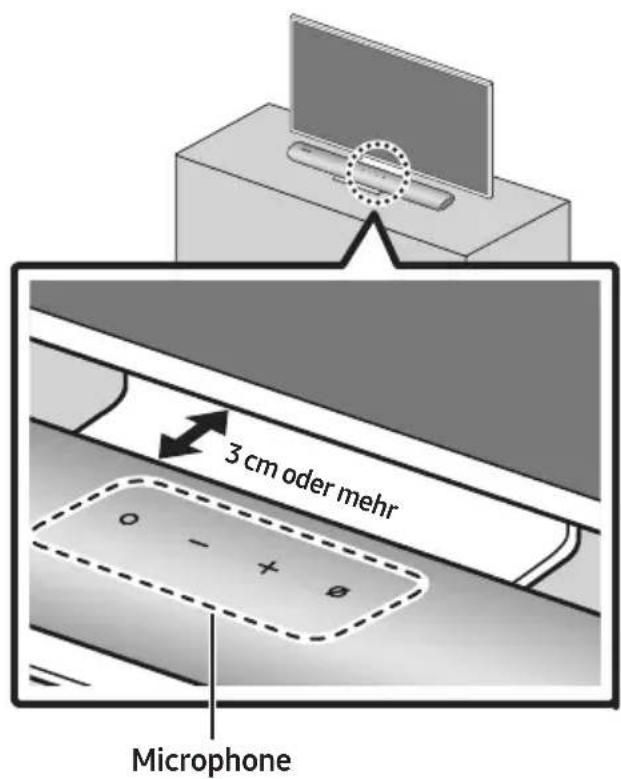
Installing the centre of the Soundbar to the centre of the TV as illustrated in the image.
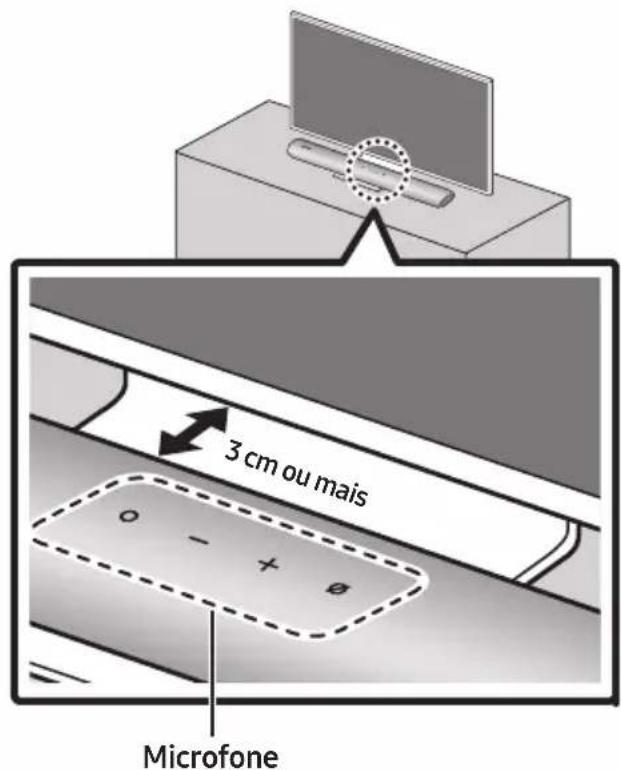
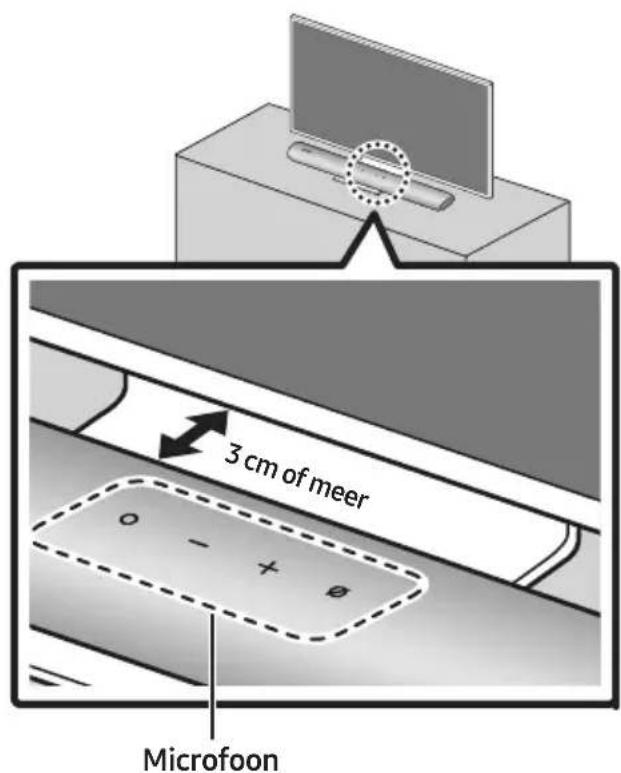
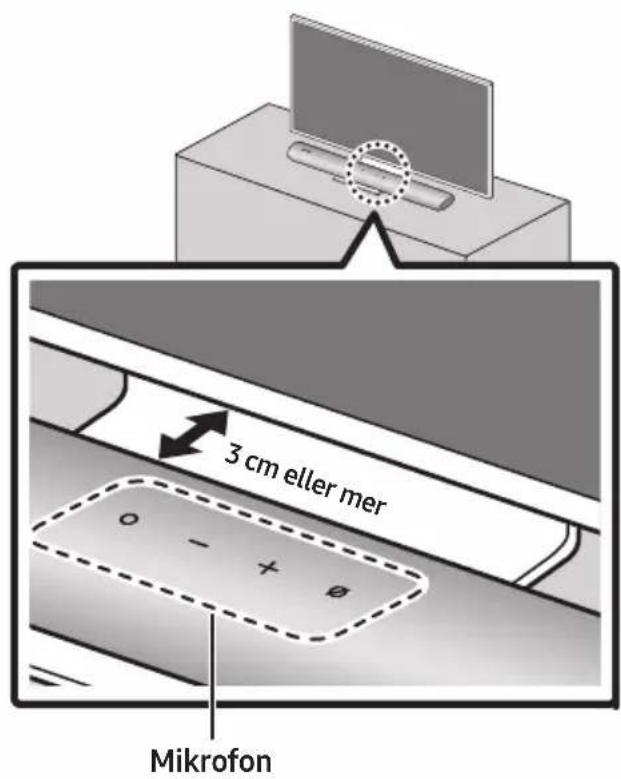
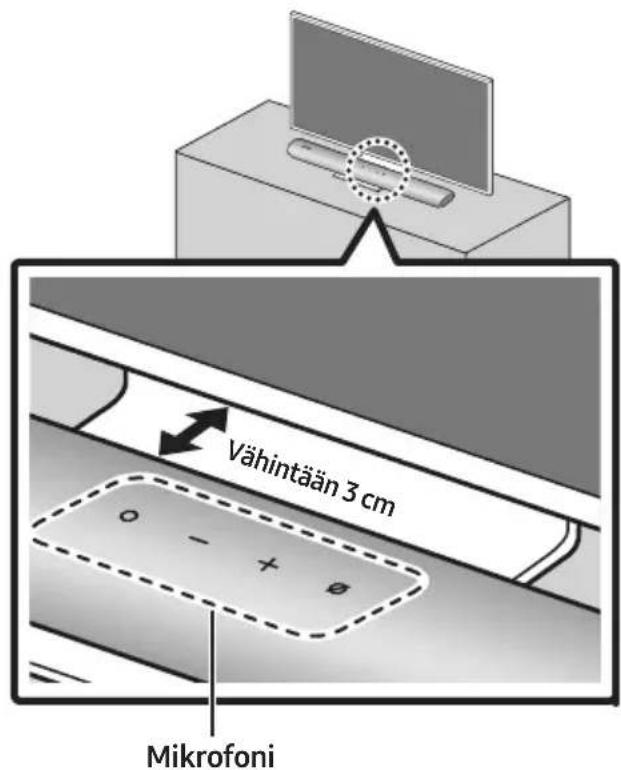
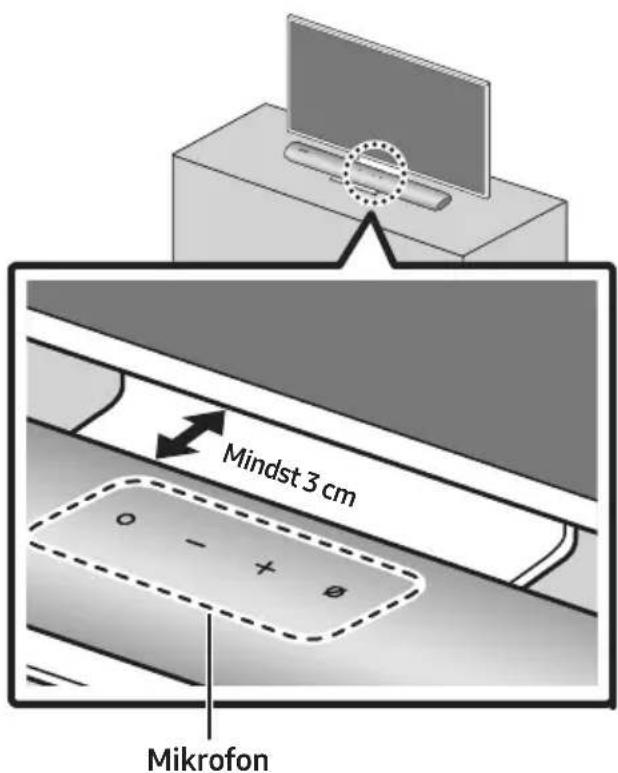
At this time, place the Soundbar at least 3cm away from the TV so that there is no interference with voice recognition.
NOTES
• Make sure the Soundbar is placed on a flat and solid surface.
• Insufficient gap from the TV may cause voice recognition and acoustic problems.
12 SOFTWARE UPDATE
Auto Update
When the Soundbar is connected to the Internet, software updates automatically occur even when the Soundbar is turned off.
- To use the Auto Update function, the Soundbar must be connected to the Internet. The Wi-Fi connection to the Soundbar will be terminated if the Soundbar's power cord is disconnected or the power is cut off. If the power is cut off, when the power comes back on or you reconnect the power cord, turn on the Soundbar, and then reconnect it to the Internet.
USB Update
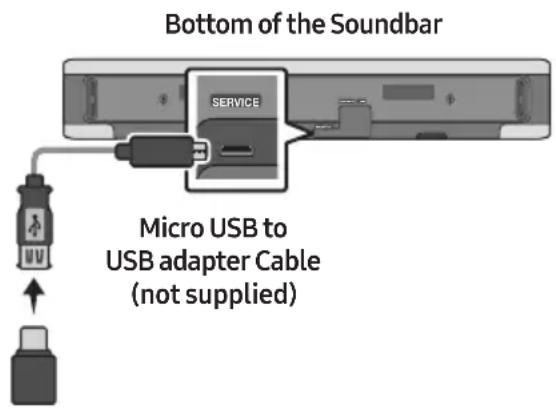
Samsung may offer updates for the Soundbar's system firmware in the future.
When an update is available, you can update the Soundbar by connecting the USB drive that contains the update firmware to the SERVICE port of the Soundbar.
- Go to (www.samsung.com) → search for the model name from the customer support menu option.
- For more information about update, refer to Upgrade Guide.
- Download the upgrade file (USB type).
- Unzip the file to create a folder with the file name.
- Store the created folder in a USB and then connect it to the Soundbar.
- Turn on the Soundbar. Then the product is updated within 3 minutes.
- During update, do not turn it off or remove the USB.
- If the yellow LED is on after the software update is completed, this means that an additional update is in progress. When this happens, don't turn off the power or remove the USB.
- If update does not proceed, reconnect the Soundbar power cord.
- When the latest version is installed, no update is performed.
- Depending on the USB type, update may not be supported.
Reset
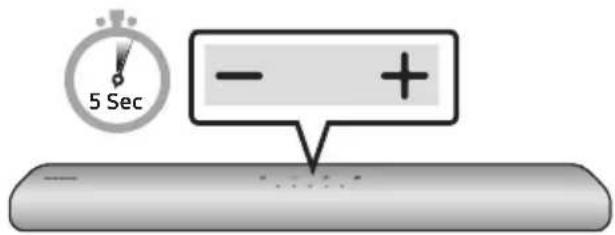
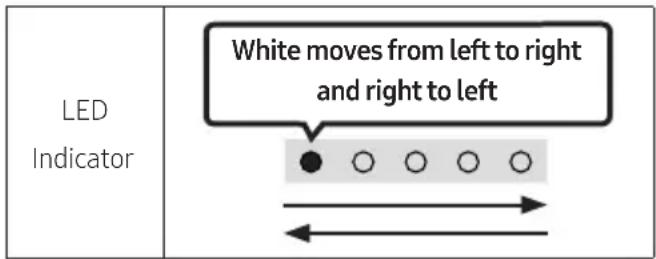
With the Soundbar on, press the - + (Volume) buttons on the body at the same time for at least 5 seconds. The LED display changes as shown below and then the Soundbar is reset.
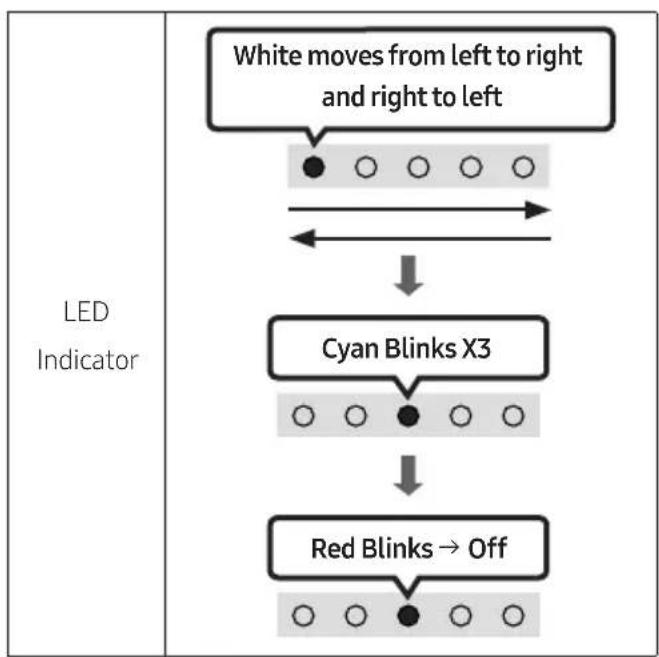
flowchart
graph TD
    A["White moves from left to right and right to left"] --> B["Cyan Blinks X3"]
    B --> C["Red Blinks → Off"]

CAUTION
- All the settings of the Soundbar are reset. Be sure to perform this only when a reset is required.
13 TROUBLESHOOTING
Refer to the instructions below if this product does not function properly.
Soundbar does not turn on.
→Check whether the power cord of the Soundbar is correctly inserted into the outlet.
Soundbar works erratically.
→After removing the power cord, insert it again.
→Remote the power cord from the external device and try again.
→If there is no signal, the Soundbar automatically turns off after a certain period of time. Turn on the power. (See page 11.)
In case the remote control does not work.
→Point the remote directly at the Soundbar.
→Replace the batteries with new ones.
The red LED indicator light on the soundbar stays on.
→The microphone is turned off. Turn on the microphone. (See page 9.)
The Soundbar does not output any sound.
→The volume of the Soundbar is too low or muted. Adjust the volume.
→When any external device (STB, Bluetooth device, mobile device, etc.) is connected, adjust the volume of the external device.
→For sound output of the TV, select Soundbar. (Samsung TV: Home ( Ⓜ → Settings ( ⏻ → Sound → Sound Output → Select Soundbar)
→The cable connection to the Soundbar may not be loose. Remove the cable and connect again.
→Remove the power cord completely, reconnect, and turn the power on.
→Reset the product and try again.
(See page 38.)
In case the TV is not connected via HDMI (ARC).
→Check whether the HDMI cable is correctly connected to the ARC terminal.
(See page 17)
→Connection may not be possible due to the connected external device (set-top box, game console, etc.). Directly connect the Soundbar.
→HDMI-CEC may not be activated on the TV. Turn on the CEC on the TV menu. (Samsung TV: Home (m)→ Settings ( ) General → External Device Manager → Anynet+ (HDMI-CEC) ON)
There is no sound in when connecting to the TV in HDMI (ARC) mode.
→Your device is unable to play the input signal. Change the TV's audio output to PCM or Dolby Digital.
(For a Samsung TV: Home (→ Settings (→ Sound → Expert Settings → Digital Output Audio Format)
The Soundbar will not connect via Bluetooth.
→When connecting a new device, switch to Bluetooth Pairing for connection. (Press the
* PAIR button on the remote control or press the ⏻ (Mic On/Off) button on the body for at least 5 seconds.)
→If the Soundbar is connected to another device, disconnect that device first to switch the device.
→Reconnect it after removing the Bluetooth speaker list on the device to connect.
(Samsung TV: Home ( Ⓜ → Settings ( ) 🌿
→ Sound → Sound Output → Bluetooth Speaker List)
→Remove and reconnect the power plug, then try again.
→Reset the product and try again.
(See page 38.)
The sound drops out when connected via Bluetooth.
→Some devices can cause radio interference if they are located too close to the Soundbar. e. g. microwaves, wireless routers, etc.
→If your device that is connected via Bluetooth moves too far away from the Soundbar, it may cause the sound to drop out. Move the device closer to the Soundbar.
→If a part of your body is in contact with the Bluetooth transceiver or the product is installed on metal furniture, the sound may drop out. Check the installation environment and conditions for use.
Unable to connect to Wi-Fi.
→Check whether your wireless router is on.
→Turn off the router, turn it back on, and then try again.
→The Soundbar will not connect if the wireless signal is too weak. Try moving the router closer to the Soundbar, or eliminating any obstacles that are between the Soundbar and the router, if possible.
→If your wireless router is new, you will need to reconfigure the speaker's network settings.
The Soundbar does not turn on automatically with the TV.
→When you turn off the Soundbar while watching TV, power synchronization with the TV is disabled. First turn off the TV.
14 LICENCE
DOLBY AUDIO
Manufactured under license from Dolby Laboratories. Dolby, Dolby Audio and the double-D symbol are trademarks of Dolby Laboratories Licensing Corporation.
dts.
For DTS patents, see http://patents.dts.com. Manufactured under license from DTS, Inc. (for companies headquartered in the U.S./Japan/Taiwan) or under license from DTS Licensing Limited (for all other companies). DTS, Digital Surround, and the DTS logo are registered trademarks or trademarks of DTS, Inc. in the United States and other countries. © 2020 DTS, Inc. ALL RIGHTS RESERVED.

The terms HDMI and HDMI High-Definition Multimedia Interface, and the HDMI Logo are trademarks or registered trademarks of HDMI Licensing Administrator, Inc. in the United States and other countries.

- Use your phone, tablet or computer as a remote control for Spotify. Go to spotify.com/connect to learn how
- The Spotify Software is subject to third party licences found here: https://www.spotify.com/connect/third-party-licenses.

• Apple, AirPlay, iPhone, iPad, HomePod, and Apple TV are trademarks of Apple Inc., registered in the U.S. and other countries.
- Use of the Works with Apple badge means that an accessory has been designed to work specifically with the technology identified in the badge and has been certified by the developer to meet Apple performance standards.
15 OPEN SOURCE LICENCE NOTICE
To send inquiries and requests for questions regarding open sources, contact Samsung Open Source (http://opensource.samsung.com)
16 IMPORTANT NOTES ABOUT SERVICE
- Figures and illustrations in this User Manual are provided for reference only and may differ from actual product appearance.
- An administration fee may be charged if either
(a) an engineer is called out at your request and there is no defect with the product (i.e. where the user manual has not been read).
(b) you bring the unit to a repair centre and there is no defect with the product (i.e. where the user manual has not been read).
- You will be informed of the administration fee amount before a technician visits.
17 SPECIFICATIONS AND GUIDE
Specifications
| Model Name HW-S60A / S61A | |
| Weight 3.0 kg | |
| Dimensions (W x H x D) 764.0 x 68.0 x 125.0 mm | |
| Operating Temperature Range +5°C to +35°C | |
| Operating Humidity Range 10% ~ 75% | |
| AMPLIFIERRated Output power (30W x 2) + (30W x 2) + (30W x 2) + 20W | |
| Supported play formats | LPCM 2ch, Dolby AudioTM(supporting Dolby® Digital), DTS |
| WIRELESS DEVICE OUTPUT POWERWi-Fi max transmitter power | 100mW at 2.4GHz – 2.4835GHz, 200mW at 5.15GHz – 5.25GHz, 100mW at 5.25GHz – 5.35GHz & 5.47GHz – 5.725GHz |
| WIRELESS DEVICE OUTPUT POWERBT max transmitter power | 100mW at 2.4GHz – 2.4835GHz |
NOTES
- Samsung Electronics Co., Ltd reserves the right to change the specifications without notice.
• Weight and dimensions are approximate.
Precaution : The Soundbar will restart automatically if you turn on/turn off Wi-Fi.
| Overall Standby Power Consumption (W) | 5.2W |
| Wi-Fi Port deactivation method | Press the ID SET button on the bottom panel of the Soundbar for 30 seconds to turn Wi-Fi On / Off. |
| Bluetooth Port deactivation method | Press the NETWORK button on the bottom panel of the Soundbar for 30 seconds to turn Bluetooth On / Off. |
Hereby, Samsung declares that this radio equipment is in compliance with Directive 2014/53/EU and the relevant UK statutory requirements.
The full text of the declaration of conformity is available at the following internet address:
http://www.samsung.com go to Support and enter the model name.
This equipment may be operated in all EU countries and in the UK.
The 5GHz WLAN(Wi-Fi or SRD) function of this equipment may only be operated indoors.
[Correct disposal of batteries in this product]
(Applicable in countries with separate collection systems)
This marking on the battery, manual or packaging indicates that the batteries in this product should not be disposed of with other household waste at the end of their working life. Where marked, the chemical symbols Hg, Cd or Pb indicate that the battery contains mercury, cadmium or lead above the reference levels in EC Directive 2006/66.
If batteries are not properly disposed of, these substances can cause harm to human health or the environment.
To protect natural resources and to promote material reuse, please separate batteries from other types of waste and recycle them through your local, free battery return system.
Correct Disposal of This Product
(Waste Electrical & Electronic Equipment)
(Applicable in countries with separate collection systems)
This marking on the product, accessories or literature indicates that the product and its electronic accessories (e.g. charger, headset, USB cable) should not be disposed of with other household waste at the end of their working life. To prevent possible harm to the environment or human health from uncontrolled waste disposal, please separate these items from other types of waste and recycle them responsibly to promote the sustainable reuse of material resources.
Household users should contact either the retailer where they purchased this product, or their local government office, for details of where and how they can take these items for environmentally safe recycling.
Business users should contact their supplier and check the terms and conditions of the purchase contract. This product and its electronic accessories should not be mixed with other commercial wastes for disposal.
For information on Samsung's environmental commitments and product specific regulatory obligations e.g. REACH, WEEE, Batteries, visit:
www.samsung.com/uk/aboutsamsung/sustainability/environment/our-commitment/data/
COMMISSION REGULATION (EU) 2019/1782
Ecodesign requirements for external power supplies :
www.samsung.com/global/ecodesign_component
INFORMATIONS RELATIVES À LA SÉCURITÉ
AVERTISSEMENTS
POUR ÉVITER LES RISQUES DE CHOC
ÉLECTRIQUE, NE DÉMONTEZ PAS LE CAPOT.
L'APPAREIL NE CONTIENT PAS DE PIÈCES
RÉPARABLES PAR L'UTILISATEUR ; S'ADRESSER À UN SERVICE APRÈS-VENTE QUALIFIÉ.
02 VUE D'ENSEMBLE DU PRODUIT
natural_image
Diagram showing a mechanical component before and after assembly, with no visible text or symbols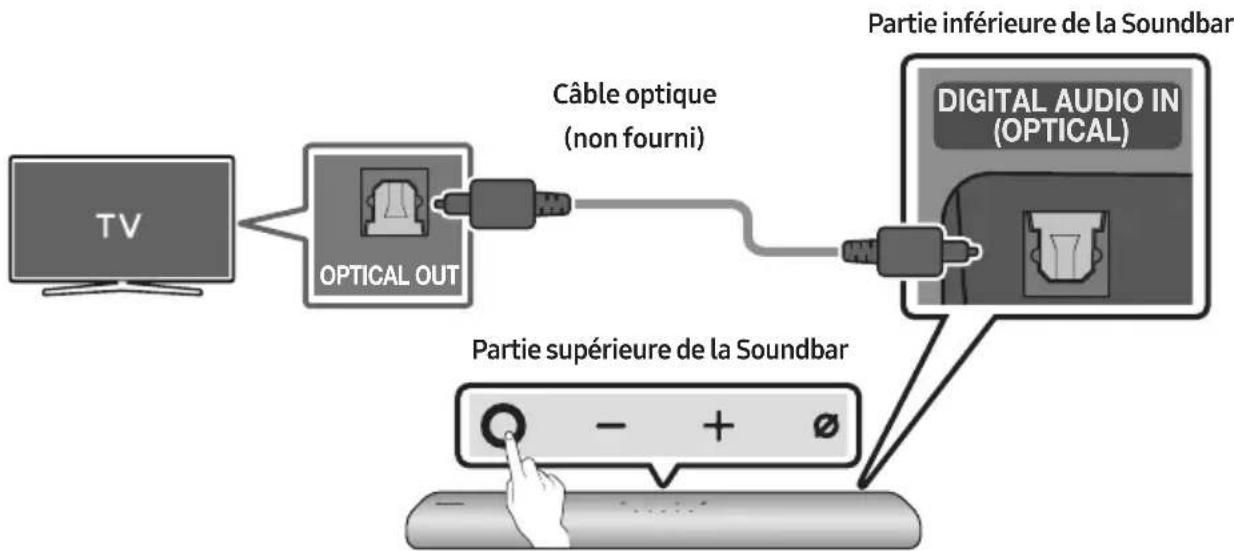
natural_image
Illustration of a TV with wireless signal icons above (no text or symbols on the TV itself)Connexion initiale
1.
09 CONNEXION À APPLE AIRPLAY 2
natural_image
Diagram showing a screw being inserted into a pinhole, with motion arrows indicating direction (no text or symbols)natural_image
Mechanical component diagram showing a screw being inserted into a housing, with no visible text or symbolsnatural_image
Diagram showing two stages of a cylindrical object with arrows indicating direction, no text or symbols presentflowchart
graph TD
    A["Device with two ports"] --> B["Device with one port"]
    B --> C["Device with one port"]
11 INSTALLATION
DE LA SOUNDBAR DEVANT LE TÉLÉVISEUR
Manufactured under license from Dolby Laboratories. Dolby, Dolby Audio and the double-D symbol are trademarks of Dolby Laboratories Licensing Corporation.
dts.
For DTS patents, see http://patents.dts.com. Manufactured under license from DTS, Inc. (for companies headquartered in the U.S./Japan/Taiwan) or under license from DTS Licensing Limited (for all other companies). DTS, Digital Surround, and the DTS logo are registered trademarks or trademarks of DTS, Inc. in the United States and other countries. © 2020 DTS, Inc. ALL RIGHTS RESERVED.

The terms HDMI and HDMI High-Definition Multimedia Interface, and the HDMI Logo are trademarks or registered trademarks of HDMI Licensing Administrator, Inc. in the United States and other countries.

Works with Apple AirPlay
• Apple, AirPlay, iPhone, iPad, HomePod, and Apple TV are trademarks of Apple Inc., registered in the U.S. and other countries.
- Use of the Works with Apple badge means that an accessory has been designed to work speci cally with the technology identi ed in the badge and has been certi ed by the developer to meet Apple performance standards.
15 AVIS DE LICENCE LIBRE
02 PANORAMICA DEL PRODOTTO
natural_image
Diagram showing a mechanical component before and after assembly, with no visible text or symbols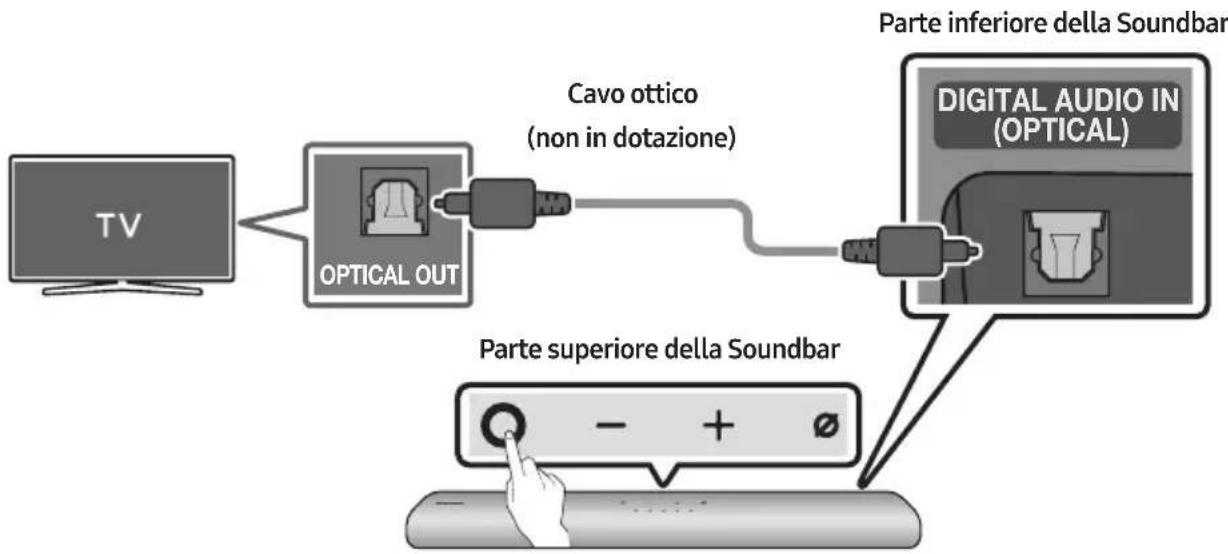
flowchart
graph LR
    TV["TV"] --> OpticalOut["OPTICAL OUT"]
    OpticalOut --> CavoOttico["Cavo ottico (non in dotazione)"]
    OpticalOut --> DigitalAudioIn["Digital Audio In (OPTICAL)"]
    DigitalAudioIn --> ParteSuperioreDPS["Parte superiore della Soundbar"]
    DigitalAudioIn --> ParteInferioreDPS["Parte inferiore della Soundbar"]
09 CONNESSIONE A APPLE AIRPLAY 2
natural_image
Diagram showing a screw being inserted into a pin, with motion arrows indicating direction (no text or symbols)natural_image
Diagram of a mechanical device with a screw and adjustment knob, showing rotational motion (no text or symbols)natural_image
Diagram showing two stages of a cylindrical object with arrows indicating motion, no text or symbols presentflowchart
graph TD
    A["Device with ports"] --> B["Device with port"]
    style A fill:#f9f,stroke:#333
    style B fill:#bbf,stroke:#333
11 INSTALLAZIONE DELLA SOUNDBAR DAVANTI ALLA TV
Manufactured under license from Dolby Laboratories. Dolby, Dolby Audio and the double-D symbol are trademarks of Dolby Laboratories Licensing Corporation.
dts.
For DTS patents, see http://patents.dts.com. Manufactured under license from DTS, Inc. (for companies headquartered in the U.S./Japan/Taiwan) or under license from DTS Licensing Limited (for all other companies). DTS, Digital Surround, and the DTS logo are registered trademarks or trademarks of DTS, Inc. in the United States and other countries. © 2020 DTS, Inc. ALL RIGHTS RESERVED.

The terms HDMI and HDMI High-Definition Multimedia Interface, and the HDMI Logo are trademarks or registered trademarks of HDMI Licensing Administrator, Inc. in the United States and other countries.

Works with Apple AirPlay
• Apple, AirPlay, iPhone, iPad, HomePod, and Apple TV are trademarks of Apple Inc., registered in the U.S. and other countries.
- Use of the Works with Apple badge means that an accessory has been designed to work specifically with the technology identified in the badge and has been certified by the developer to meet Apple performance standards.
15 AVVISO DI LICENZA OPEN SOURCE
http://www.samsung.com/it/aboutsamsung/sustainability/environment/our-commitment/data/
REGOLAMENTO (UE) 2019/1782 DELLA COMMISSIONE
natural_image
Three-step diagram showing a mechanical component before and after assembly, with no visible text or symbols.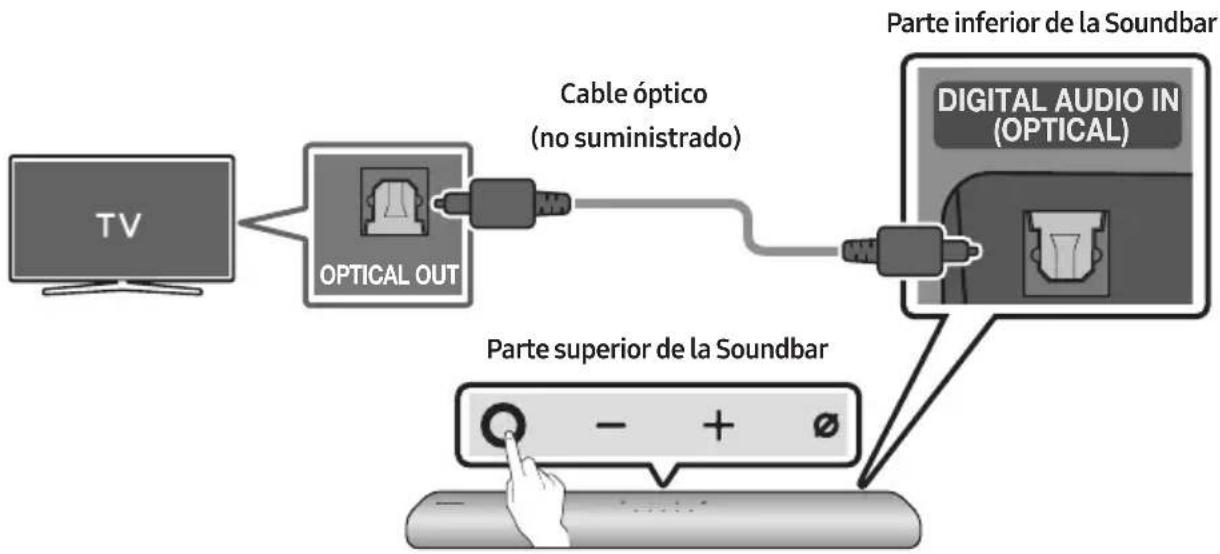
flowchart
graph TD
    A["TV"] --> B["OPTICAL OUT"]
    B --> C["Cable óptico (no suministrado)"]
    C --> D["Parte superior de la Soundbar"]
    D --> E["DIGITAL AUDIO IN (OPTICAL)"]
    E --> F["Parte inferior de la Soundbar"]
natural_image
Illustration of a flat-screen TV with wireless signal icons above (no text or symbols on screen)La conexión inicial
1.
natural_image
Diagram showing a screw being inserted into a pinhole, with arrows indicating direction (no text or symbols)natural_image
Diagram of a mechanical device with a screw and adjustment knob, showing no text or symbolsnatural_image
Diagram showing two stages of a cylindrical object with arrows indicating motion or force direction (no text or symbols present)Manufactured under license from Dolby Laboratories. Dolby, Dolby Audio and the double-D symbol are trademarks of Dolby Laboratories Licensing Corporation.
dts.
For DTS patents, see http://patents.dts.com. Manufactured under license from DTS, Inc. (for companies headquartered in the U.S./Japan/Taiwan) or under license from DTS Licensing Limited (for all other companies). DTS, Digital Surround, and the DTS logo are registered trademarks or trademarks of DTS, Inc. in the United States and other countries. © 2020 DTS, Inc. ALL RIGHTS RESERVED.

The terms HDMI and HDMI High-Definition Multimedia Interface, and the HDMI Logo are trademarks or registered trademarks of HDMI Licensing Administrator, Inc. in the United States and other countries.

Works with Apple AirPlay
• Apple, AirPlay, iPhone, iPad, HomePod, and Apple TV are trademarks of Apple Inc., registered in the U.S. and other countries.
- Use of the Works with Apple badge means that an accessory has been designed to work specifically with the technology identified in the badge and has been certified by the developer to meet Apple performance standards.
15 AVISO SOBRE LICENCIA DE CÓDIGO ABIERTO
www.samsung.com/uk/aboutsamsung/sustainability/environment/our-commitment/data/
natural_image
Three-step diagram showing a mechanical component before and after assembly, with no visible text or symbols.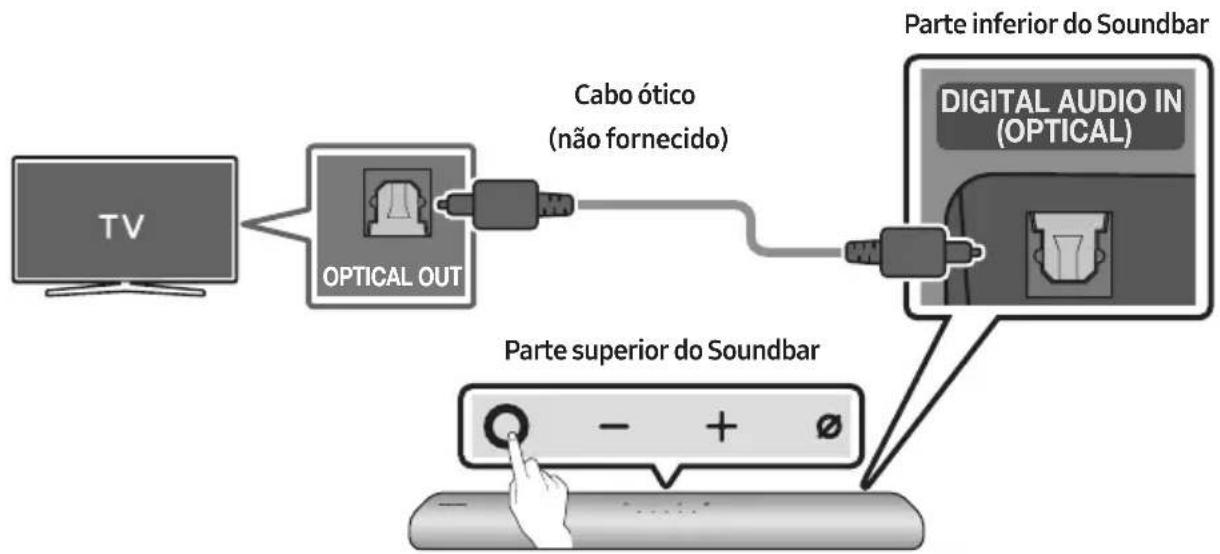
flowchart
graph LR
    A["TV"] --> B["OPTICAL OUT"]
    B --> C["Cabo ótico (não fornecido)"]
    C --> D["Parte inferior do Soundbar"]
    D --> E["DIGITAL AUDIO IN (OPTICAL)"]
    E --> F["Parte superior do Soundbar"]
    F --> G["- + ∅"]
09 LIGAR AO APPLE AIRPLAY 2
natural_image
Diagram showing a screw being inserted into a pin, with motion arrows indicating direction (no text or symbols)natural_image
Mechanical component diagram showing a screw being inserted into a housing with a button, no text or symbols presentnatural_image
Diagram showing two stages of a cylindrical object with arrows indicating motion, no text or symbols presentflowchart
graph TD
    A["Device with ports"] --> B["Single Port"]
    style A fill:#f9f,stroke:#333
    style B fill:#bbf,stroke:#333
11 INSTALAR O SOUNDBAR EM FRENTE AO TELEVISOR
Manufactured under license from Dolby Laboratories. Dolby, Dolby Audio and the double-D symbol are trademarks of Dolby Laboratories Licensing Corporation.
dts.
For DTS patents, see http://patents.dts.com. Manufactured under license from DTS, Inc. (for companies headquartered in the U.S./Japan/Taiwan) or under license from DTS Licensing Limited (for all other companies). DTS, Digital Surround, and the DTS logo are registered trademarks or trademarks of DTS, Inc. in the United States and other countries. © 2020 DTS, Inc. ALL RIGHTS RESERVED.

The terms HDMI and HDMI High-Definition Multimedia Interface, and the HDMI Logo are trademarks or registered trademarks of HDMI Licensing Administrator, Inc. in the United States and other countries.

Works with Apple AirPlay
• Apple, AirPlay, iPhone, iPad, HomePod, and Apple TV are trademarks of Apple Inc., registered in the U.S. and other countries.
- Use of the Works with Apple badge means that an accessory has been designed to work specifically with the technology identified in the badge and has been certified by the developer to meet Apple performance standards.
15 AVISO DE LICENÇA DE OPEN SOURCE
Para enviar perguntas e pedidos de esclarecimento relativamente a fontes abertas, contacte a Samsung Open Source por e-mail (http://opensource.samsung.com)
16 NOTA
IMPORTANTE SOBRE O SERVIÇO
www.samsung.com/uk/aboutsamsung/sustainability/environment/our-commitment/data/
02 PRODUCTOVERZICHT
natural_image
Diagram showing three stages of a mechanical component or assembly: before, after, and after (no text or symbols present)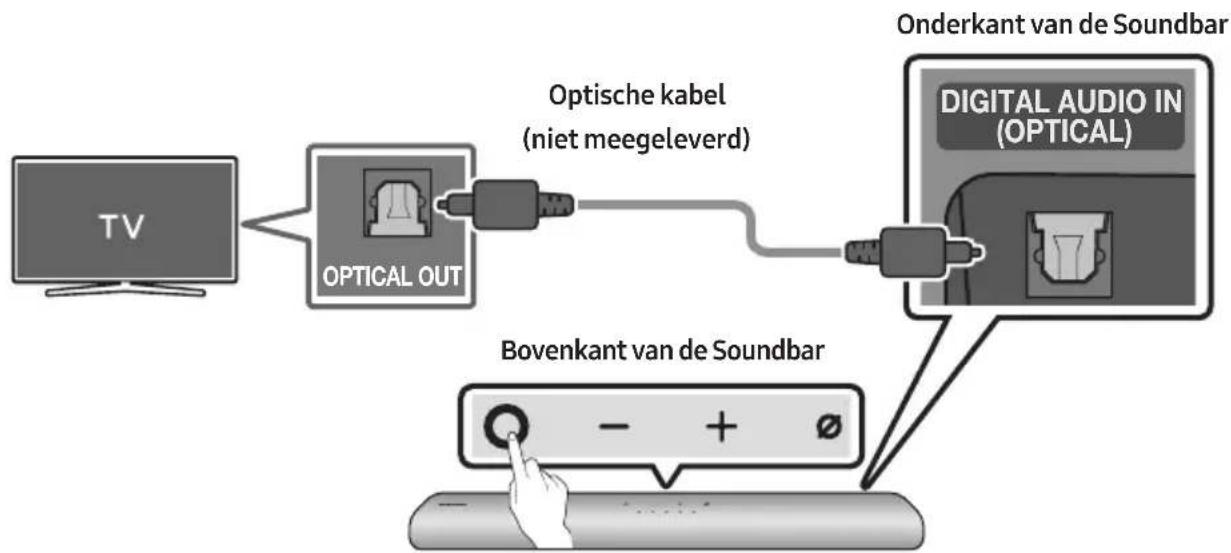
flowchart
graph TD
    A["TV"] --> B["OPTICAL OUT"]
    B --> C["Optische kabel (niet meegeleverd)"]
    C --> D["Digital Audio IN (OPTICAL)"]
    D --> E["Bovenkant van de Soundbar"]
    E --> F["Hand pointing at button - + Ø"]
    style A fill:#f9f,stroke:#333
    style B fill:#ccf,stroke:#333
    style C fill:#cfc,stroke:#333
    style D fill:#fcc,stroke:#333
    style E fill:#cff,stroke:#333
    style F fill:#ffc,stroke:#333
| Led-lampje | “Digital Audio In” |
• Samsung-tv's van 2017 of later
Start (☐) → Instellingen (☐) → Geluid → Geluidsuitvoer → [AV] Samsung Soundbar S60A / [AV] Samsung Soundbar S61A (Wi-Fi)
07 EEN EXTERN APPARAAT VERBINDEN
09 VERBINDEN MET APPLE AIRPLAY 2
natural_image
Diagram showing a screw being inserted into a pulley and then being inserted into a screw, with arrows indicating direction (no text or symbols)natural_image
Diagram of a mechanical device with a screw and adjustment knob, showing rotational motion (no text or symbols)natural_image
Diagram showing two stages of a cylindrical object with arrows indicating motion, no text or symbols presentflowchart
graph TD
    A["Device with sensor icon"] --> B["Device with sensor icon"]
    B --> C["Device with sensor icon"]
11 DE SOUNDBAR INSTALLEREN VOOR DE TV
13 PROBLEEMOPLOSSING
Manufactured under license from Dolby Laboratories. Dolby, Dolby Audio and the double-D symbol are trademarks of Dolby Laboratories Licensing Corporation.
dts.
For DTS patents, see http://patents.dts.com. Manufactured under license from DTS, Inc. (for companies headquartered in the U.S./Japan/Taiwan) or under license from DTS Licensing Limited (for all other companies). DTS, Digital Surround, and the DTS logo are registered trademarks or trademarks of DTS, Inc. in the United States and other countries. © 2020 DTS, Inc. ALL RIGHTS RESERVED.

The terms HDMI and HDMI High-Definition Multimedia Interface, and the HDMI Logo are trademarks or registered trademarks of HDMI Licensing Administrator, Inc. in the United States and other countries.

Works with Apple AirPlay
• Apple, AirPlay, iPhone, iPad, HomePod, and Apple TV are trademarks of Apple Inc., registered in the U.S. and other countries.
- Use of the Works with Apple badge means that an accessory has been designed to work specifically with the technology identified in the badge and has been certified by the developer to meet Apple performance standards.
15 KENNISGEVING OPEN SOURCE- LICENTIE
www.samsung.com/uk/aboutsamsung/sustainability/environment/our-commitment/data/
VERORDENING (EU) 2019/1782 VAN DE COMMISSIE
02 PRODUKTÜBERSICHT
natural_image
Diagram showing a mechanical component before and after assembly, with no visible text or symbols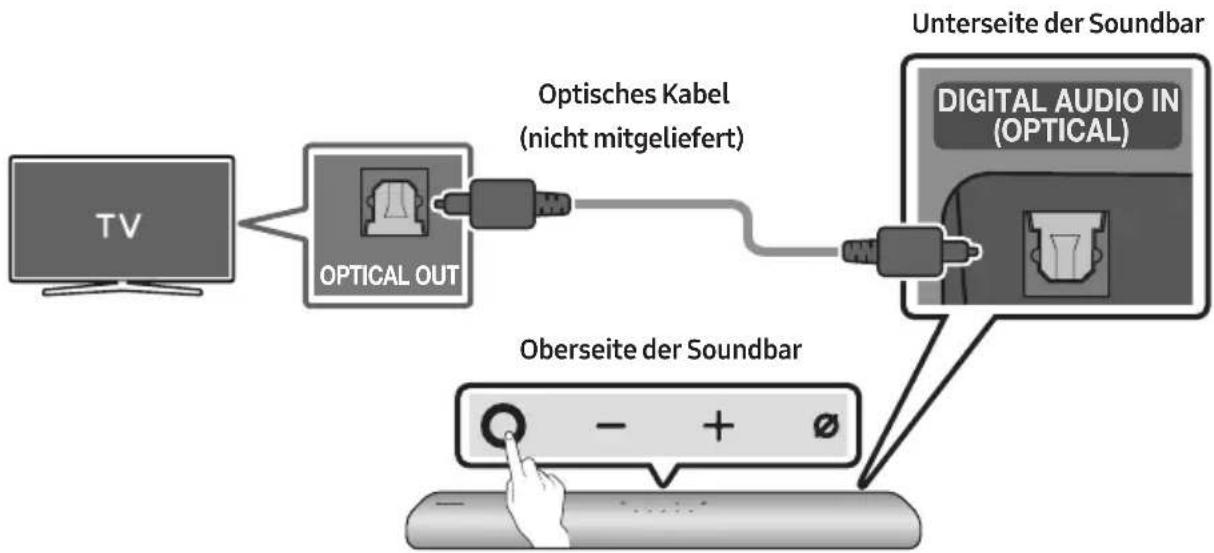
natural_image
Diagram showing a screw being inserted into a nut, with arrows indicating direction (no text or symbols)natural_image
Diagram of a mechanical device with a screw and adjustment knob, showing rotational motion (no text or symbols)natural_image
Diagram showing two stages of a cylindrical object with arrows indicating motion, no text or symbols presentflowchart
graph TD
    A["Device with ports"] --> B["Device with port"]
    style A fill:#f9f,stroke:#333
    style B fill:#bbf,stroke:#333
11 INSTALLIEREN DER SOUNDBAR VOR DEM FERNSEHER
Manufactured under license from Dolby Laboratories. Dolby, Dolby Audio and the double-D symbol are trademarks of Dolby Laboratories Licensing Corporation.
dts.
For DTS patents, see http://patents.dts.com. Manufactured under license from DTS, Inc. (for companies headquartered in the U.S./Japan/Taiwan) or under license from DTS Licensing Limited (for all other companies). DTS, Digital Surround, and the DTS logo are registered trademarks or trademarks of DTS, Inc. in the United States and other countries. © 2020 DTS, Inc. ALL RIGHTS RESERVED.

The terms HDMI and HDMI High-Definition Multimedia Interface, and the HDMI Logo are trademarks or registered trademarks of HDMI Licensing Administrator, Inc. in the United States and other countries.

Works with Apple AirPlay
• Apple, AirPlay, iPhone, iPad, HomePod, and Apple TV are trademarks of Apple Inc., registered in the U.S. and other countries.
- Use of the Works with Apple badge means that an accessory has been designed to work specifically with the technology identified in the badge and has been certified by the developer to meet Apple performance standards.
15 BEKANNTMACHUNG ZU OPEN SOURCE LIZENZEN
www.samsung.com/uk/aboutsamsung/sustainability/environment/our-commitment/data/
VERORDNUNG (EU) 2019/1782 DER KOMMISSION
INNEHÅLLSFÖRTECKNING
01 Kontrollera komponenterna 7
02 PRODUKTÖVERSIKT
natural_image
Three-step diagram showing a mechanical component before and after assembly, with no visible text or symbols.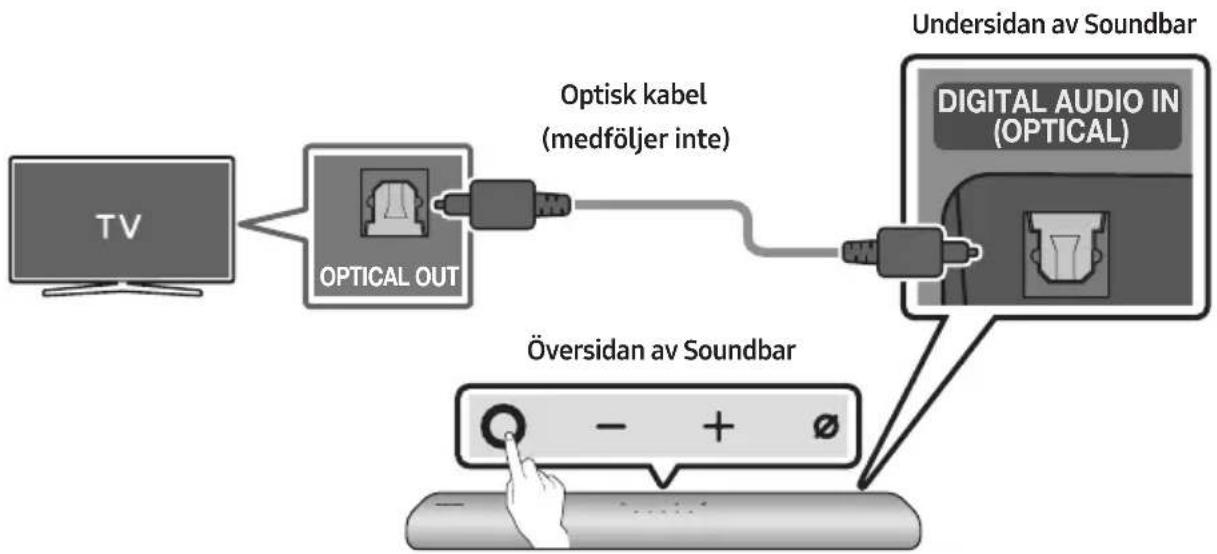
flowchart
graph LR
    TV["TV"] --> OpticalOut["Optical OUT"]
    OpticalOut --> OptiskKabel["Optisk kabel (medföljer inte)"]
    OptiskKabel --> DigitalAudio["Digital Audio in (OPTICAL)"]
    DigitalAudio --> UndersidanavSoundbar["Undersidan av Soundbar"]
    DigitalAudio --> OversidanavSoundbar["Översidan av Soundbar"]
    OversidanavSoundbar --> HandIcon["Hand icon"]
| LED-indikator | "Digital Audio In" |
natural_image
Illustration of a TV with wireless signal icons above (no text or symbols on the TV itself)09 ANSLUTA TILL APPLE AIRPLAY 2
natural_image
Diagram showing a screw being inserted into a pin, with arrows indicating direction (no text or symbols)natural_image
Diagram of a mechanical device with a screw and adjustment knob, showing motion direction (no text or symbols)natural_image
Diagram showing two stages of a cylindrical object with arrows indicating motion, no text or symbols presentflowchart
graph TD
    A["Two rectangular blocks"] --> B["Downward arrow"]
    B --> C["Two rectangular blocks with downward arrows"]
11 INSTALLERA SOUNDBAR FRAMFÖR TV:N
Manufactured under license from Dolby Laboratories. Dolby, Dolby Audio and the double-D symbol are trademarks of Dolby Laboratories Licensing Corporation.
dts.
For DTS patents, see http://patents.dts.com. Manufactured under license from DTS, Inc. (for companies headquartered in the U.S./Japan/Taiwan) or under license from DTS Licensing Limited (for all other companies). DTS, Digital Surround, and the DTS logo are registered trademarks or trademarks of DTS, Inc. in the United States and other countries. © 2020 DTS, Inc. ALL RIGHTS RESERVED.

The terms HDMI and HDMI High-Definition Multimedia Interface, and the HDMI Logo are trademarks or registered trademarks of HDMI Licensing Administrator, Inc. in the United States and other countries.

Works with Apple AirPlay
• Apple, AirPlay, iPhone, iPad, HomePod, and Apple TV are trademarks of Apple Inc., registered in the U.S. and other countries.
- Use of the Works with Apple badge means that an accessory has been designed to work specifically with the technology identified in the badge and has been certified by the developer to meet Apple performance standards.
15 LICENSMEDDELANDE FÖR OPEN SOURCE
www.samsung.com/uk/aboutsamsung/sustainability/environment/our-commitment/data/
KOMMISSIONENS FÖRORDNING (EU) 2019/1782
02 PRODUKTOVERSIKT
9 WOOFER (BASS)-NIVA
10 VOLUM
| LED-indikator | 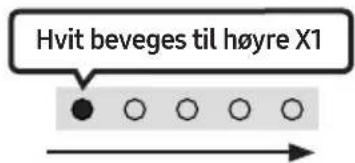 Volum opp Volum opp | 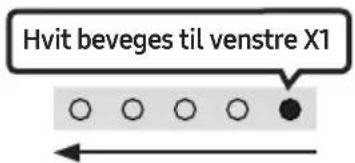 Volum ned Volum ned |
natural_image
Diagram showing a mechanical component before and after assembly, with no visible text or symbols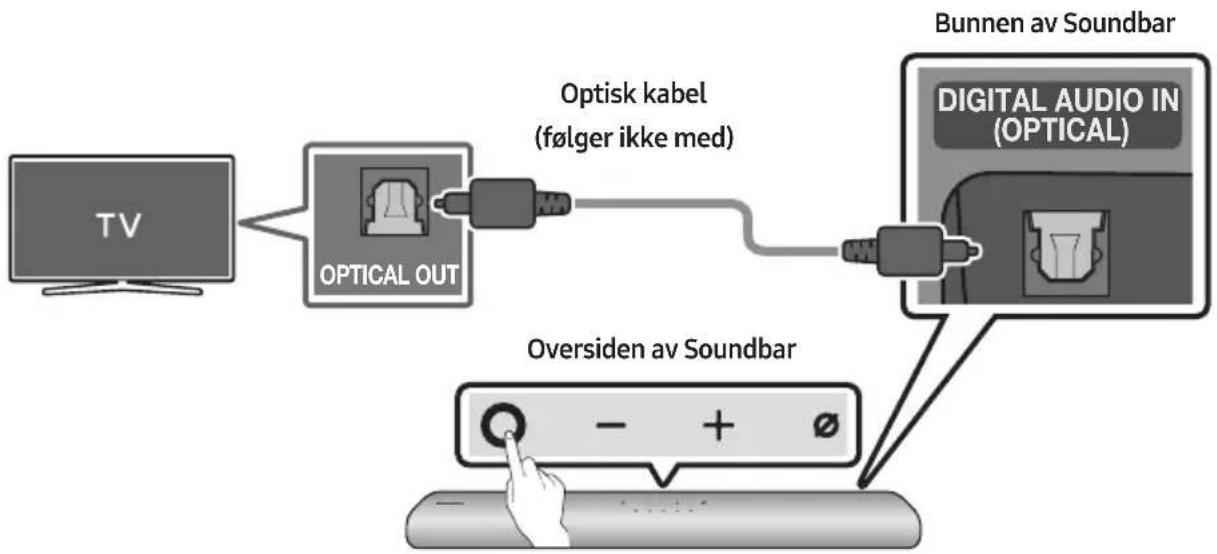
flowchart
graph LR
    TV["TV"] --> OpticalOut["Optical OUT"]
    OpticalOut --> Optiskkabel["Optisk kabel (følger ikke med)"]
    Optiskkabel --> DigitalAudioIn["Digital Audio In (OPTICAL)"]
    DigitalAudioIn --> BunnenavSoundbar["Bunnen av Soundbar"]
    BunnenavSoundbar --> OversidenavSoundbar["Oversiden av Soundbar"]
    OversidenavSoundbar --> Hand pointingHand
Alexa-indikatorstatus
LED-indikatorstatusen på Soundbar endres avhengig av Alexa-statusen, som vist nedenfor.
09 KOBLE TIL APPLE AIRPLAY 2
natural_image
Diagram showing a screw being inserted into a pin, with motion arrows indicating direction (no text or symbols)natural_image
Diagram of a mechanical device with a screw and adjustment knob, showing rotational motion (no text or symbols)natural_image
Diagram showing two stages of a cylindrical object with arrows indicating movement, no text or symbols presentManufactured under license from Dolby Laboratories. Dolby, Dolby Audio and the double-D symbol are trademarks of Dolby Laboratories Licensing Corporation.
dts.
For DTS patents, see http://patents.dts.com. Manufactured under license from DTS, Inc. (for companies headquartered in the U.S./Japan/Taiwan) or under license from DTS Licensing Limited (for all other companies). DTS, Digital Surround, and the DTS logo are registered trademarks or trademarks of DTS, Inc. in the United States and other countries. © 2020 DTS, Inc. ALL RIGHTS RESERVED.

The terms HDMI and HDMI High-Definition Multimedia Interface, and the HDMI Logo are trademarks or registered trademarks of HDMI Licensing Administrator, Inc. in the United States and other countries.

Works with Apple AirPlay
• Apple, AirPlay, iPhone, iPad, HomePod, and Apple TV are trademarks of Apple Inc., registered in the U.S. and other countries.
- Use of the Works with Apple badge means that an accessory has been designed to work specifically with the technology identified in the badge and has been certified by the developer to meet Apple performance standards.
15 LISENSMERKNADER OM ÅPEN KILDEKODE
www.samsung.com/uk/aboutsamsung/sustainability/environment/our-commitment/data/
KOMMISJONSFORORDNING (EU) 2019/1782
02 TUOTTEEN YLEISKATSAUS
natural_image
Three-step diagram showing a mechanical component before and after assembly, with no visible text or symbols.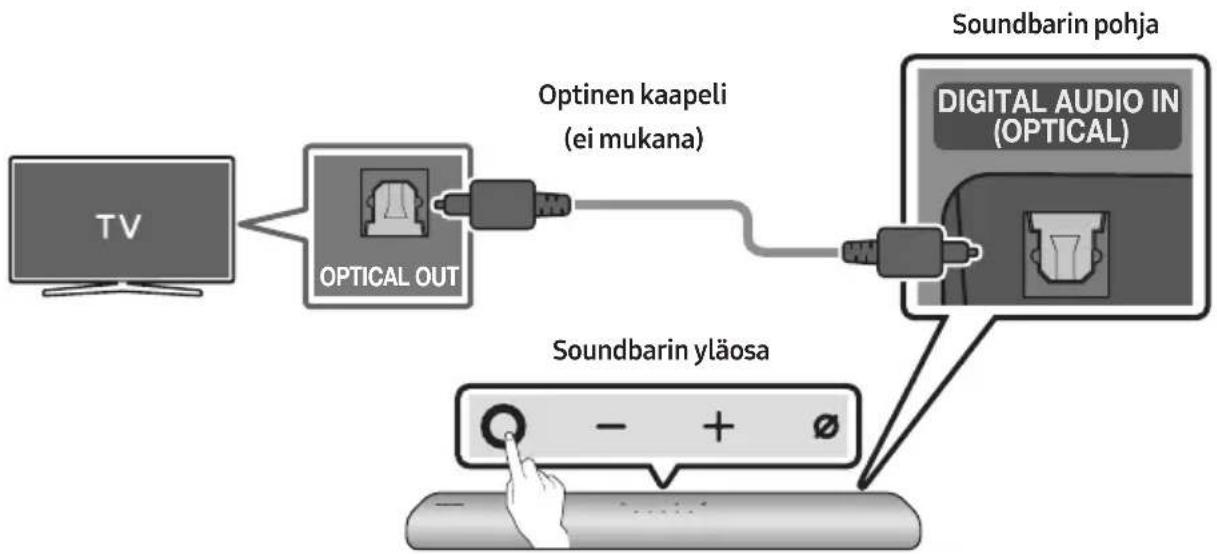
flowchart
graph LR
    TV["TV"] --> OpticalOut["OPTICAL OUT"]
    OpticalOut --> OptinenKaapeli["Optinen kaapeli (ei mukana)"]
    OptinenKaapeli --> DigitalAudioIn["Digital Audio In (OPTICAL)"]
    DigitalAudioIn --> SoundbarinPohja["Soundbarin pohja"]
    SoundbarinPohja --> SoundbarinYläosa["Soundbarin yläosa"]
    SoundbarinYläosa --> Display["Display: - + ∅"]

natural_image
Illustration of a TV with wireless signal icons above it (no text or symbols on the TV itself)Ensimmäinen yhteys
1.
09 YHTEYDEN MUODOSTAMINEN APPLE AIRPLAY 2:EEN
natural_image
Diagram showing a screw being inserted into a pin, with arrows indicating direction (no text or symbols)natural_image
Diagram showing a screw being inserted into a device with a circular arrow indicating rotation (no text or symbols present)natural_image
Diagram showing a cylindrical object being processed into a rectangular tube, with arrows indicating motion direction (no text or symbols present)flowchart
graph TD
    A["Two rectangular blocks"] --> B["Downward arrow"]
    B --> C["Two rectangular blocks with downward arrows"]
11 SOUNDBAR- LAITTEEN ASENTAMINEN TELEVISION ETEEN
Manufactured under license from Dolby Laboratories. Dolby, Dolby Audio and the double-D symbol are trademarks of Dolby Laboratories Licensing Corporation.
dts.
For DTS patents, see http://patents.dts.com. Manufactured under license from DTS, Inc. (for companies headquartered in the U.S./Japan/Taiwan) or under license from DTS Licensing Limited (for all other companies). DTS, Digital Surround, and the DTS logo are registered trademarks or trademarks of DTS, Inc. in the United States and other countries. © 2020 DTS, Inc. ALL RIGHTS RESERVED.

The terms HDMI and HDMI High-Definition Multimedia Interface, and the HDMI Logo are trademarks or registered trademarks of HDMI Licensing Administrator, Inc. in the United States and other countries.

Works with Apple AirPlay
• Apple, AirPlay, iPhone, iPad, HomePod, and Apple TV are trademarks of Apple Inc., registered in the U.S. and other countries.
- Use of the Works with Apple badge means that an accessory has been designed to work specifically with the technology identified in the badge and has been certified by the developer to meet Apple performance standards.
15 AVOIMEN LÄHDEKIELEN LISENSSI- ILMOITUS
www.samsung.com/uk/aboutsamsung/sustainability/environment/our-commitment/data/
KOMISSION ASETUS (EU) 2019/1782
02 PRODUKTOVERSIGT
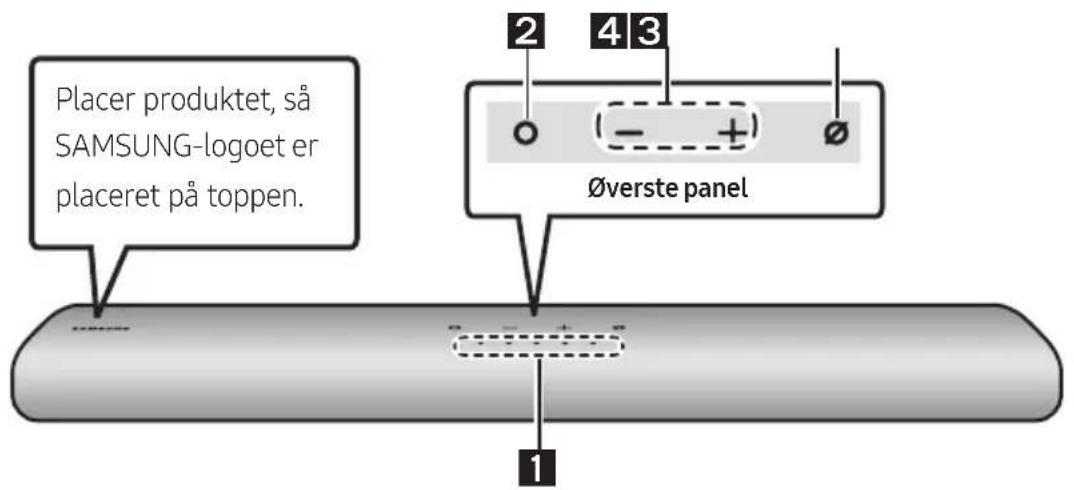
Soundbarens øverste panel
natural_image
Diagram showing a mechanical component before and after assembly, with no visible text or symbols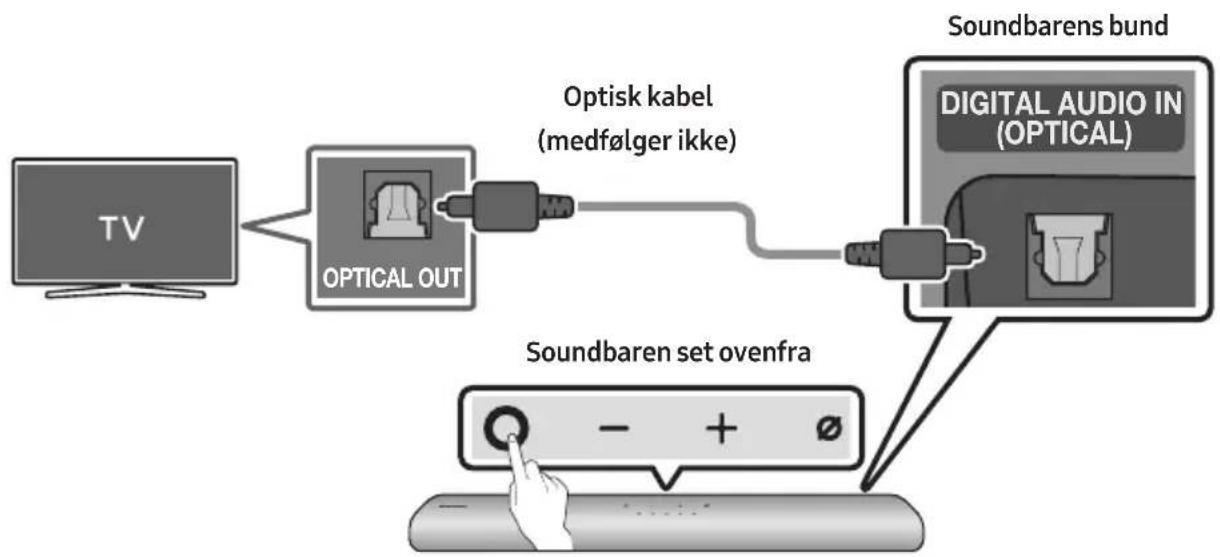
flowchart
graph LR
    TV["TV"] --> OpticalOut["Optical OUT"]
    OpticalOut --> OptiskLabel["Optisk kabel (medfølger ikke)"]
    OptiskLabel --> SoundbarenSetOvenfra["Soundbaren set ovenfra"]
    SoundbarenSetOvenfra --> SoundbarenBand["Soundbaren band"]
    SoundbarenBand --> DigitalAudioIn["Digital Audio In (OPTICAL)"]
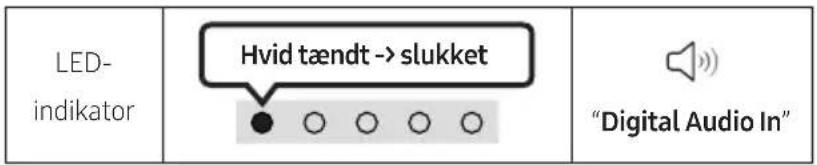
Alexa-indikatorstatus
natural_image
Diagram showing a screw being inserted into a pinhole, with arrows indicating direction (no text or symbols)natural_image
Diagram of a mechanical device with screw and adjustment knob, showing rotational motion (no text or symbols)natural_image
Diagram showing a cylindrical object being processed into a rectangular tube, with arrows indicating motion direction (no text or symbols present)flowchart
graph TD
    A["Device with ports"] --> B["Single Port"]
    style A fill:#f9f,stroke:#333
    style B fill:#bbf,stroke:#333
11 INSTALLATION
AF SOUNDBAR FORAN TV
Manufactured under license from Dolby Laboratories. Dolby, Dolby Audio and the double-D symbol are trademarks of Dolby Laboratories Licensing Corporation.
dts.
For DTS patents, see http://patents.dts.com. Manufactured under license from DTS, Inc. (for companies headquartered in the U.S./Japan/Taiwan) or under license from DTS Licensing Limited (for all other companies). DTS, Digital Surround, and the DTS logo are registered trademarks or trademarks of DTS, Inc. in the United States and other countries. © 2020 DTS, Inc. ALL RIGHTS RESERVED.

The terms HDMI and HDMI High-Definition Multimedia Interface, and the HDMI Logo are trademarks or registered trademarks of HDMI Licensing Administrator, Inc. in the United States and other countries.

- Brug din telefon, tablet eller computer som fjernbetjening til Spotify. Gå til spotify.com/connect for at finde ud af, hvordan du gør
- Spotify-softwaren er underlagt tredjepartslicenser. Få mere at vide her: https://www.spotify.com/connect/third-party-licenses.
Works with Apple AirPlay
• Apple, AirPlay, iPhone, iPad, HomePod, and Apple TV are trademarks of Apple Inc., registered in the U.S. and other countries.
- Use of the Works with Apple badge means that an accessory has been designed to work specifically with the technology identified in the badge and has been certified by the developer to meet Apple performance standards.
15 BEMAERKNING VEDR. OPEN SOURCE-LICENS
www.samsung.com/uk/aboutsamsung/sustainability/environment/our-commitment/data/
KOMMISSIONENS FORORDNING (EU) 2019/1782
02 PREZENTAREA GENERALĂ A PRODUSULUI
natural_image
Diagram showing a mechanical component before and after assembly, with no visible text or symbols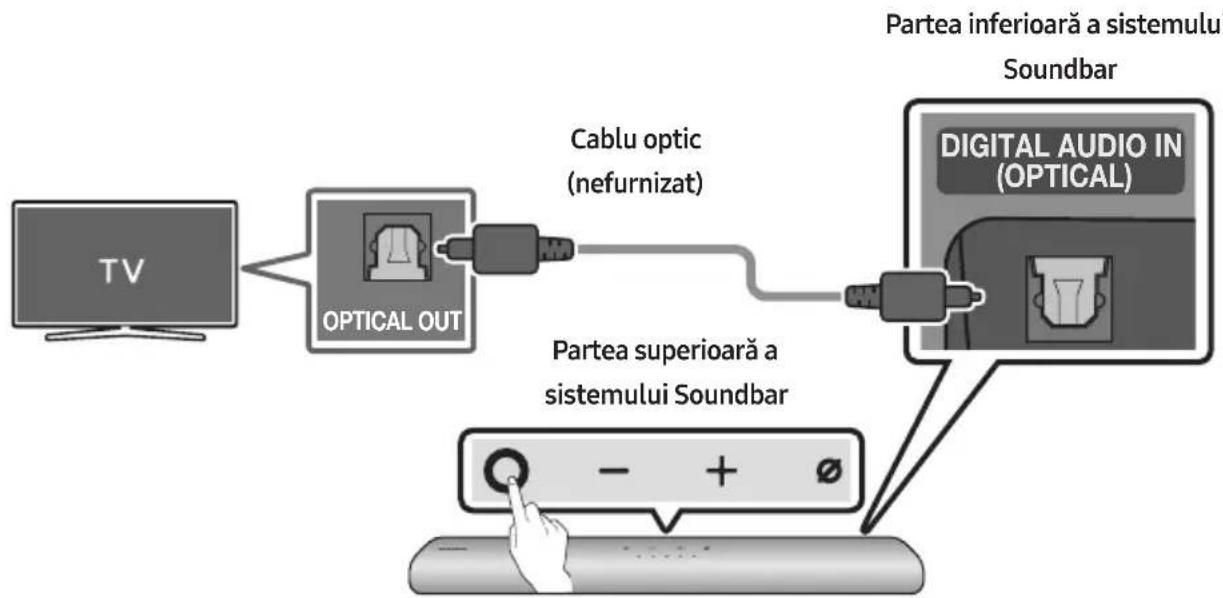
flowchart
graph LR
    TV["TV"] --> OpticalOut["OPTICAL OUT"]
    OpticalOut --> CableOptic["Cable optic (nefurnizat)"]
    CableOptic --> DigitalAudioDigital["DIGITAL AUDIO IN (OPTICAL)"]
    DigitalAudioDigital --> ParteaSuperioraSistemuluiSoundbar["Partea superioară a sistemului Soundbar"]
    ParteaSuperioraSistemuluiSoundbar --> Control["Control knob"]
    Control --> Display["Display button"]
    DigitalAudioDigital --> Soundbar["Soundbar"]
    Soundbar --> ParteaInferioarăSistemuluiSoundbar["Partea inferioară a sistemului Soundbar"]
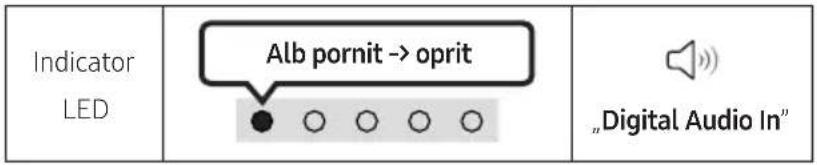
09 CONECTAREA LA APPLE AIRPLAY 2
natural_image
Diagram showing a screw being inserted into a pin, with motion arrows indicating direction (no text or symbols)natural_image
Mechanical component diagram showing a screw being inserted into a housing with a button, no text or symbols presentnatural_image
Diagram showing two stages of a cylindrical object with arrows indicating direction, no text or symbols presentflowchart
graph TD
    A["Two rectangular blocks"] --> B["Downward arrow"]
    B --> C["Two rectangular blocks with downward arrows"]
11 INSTALAREA SISTEMULUI SOUNDBAR ÎN FAȚA TELEVIZORULUI
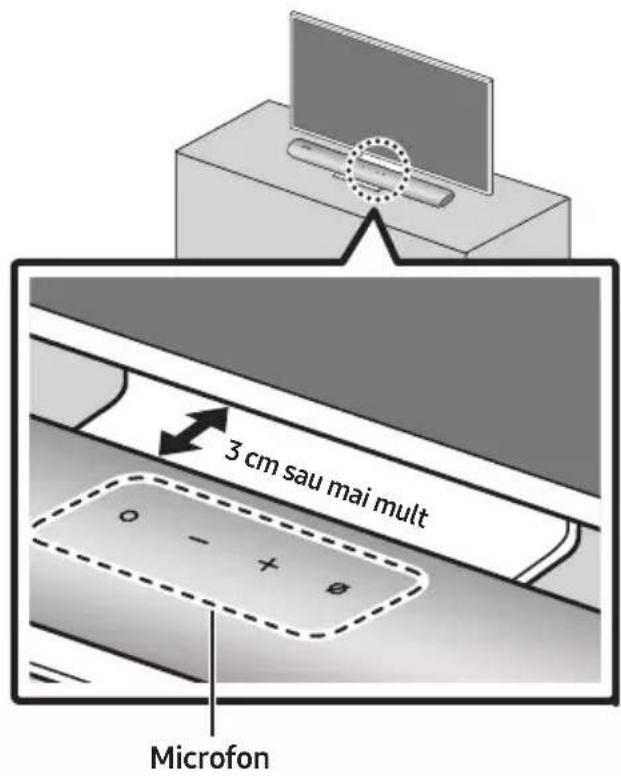
Manufactured under license from Dolby Laboratories. Dolby, Dolby Audio and the double-D symbol are trademarks of Dolby Laboratories Licensing Corporation.
dts.
For DTS patents, see http://patents.dts.com. Manufactured under license from DTS, Inc. (for companies headquartered in the U.S./Japan/Taiwan) or under license from DTS Licensing Limited (for all other companies). DTS, Digital Surround, and the DTS logo are registered trademarks or trademarks of DTS, Inc. in the United States and other countries. © 2020 DTS, Inc. ALL RIGHTS RESERVED.

The terms HDMI and HDMI High-Definition Multimedia Interface, and the HDMI Logo are trademarks or registered trademarks of HDMI Licensing Administrator, Inc. in the United States and other countries.

Works with Apple AirPlay
• Apple, AirPlay, iPhone, iPad, HomePod, and Apple TV are trademarks of Apple Inc., registered in the U.S. and other countries.
- Use of the Works with Apple badge means that an accessory has been designed to work specifically with the technology identified in the badge and has been certified by the developer to meet Apple performance standards.
15 NOTIFICARE DE LICENȚĂ OPEN SOURCE
www.samsung.com/uk/aboutsamsung/sustainability/environment/our-commitment/data/
REGULAMENTUL (UE) 2019/1782 AL COMISIEI
02 ОПИСАНИЕ НА ПРОДУКТА
natural_image
Diagram showing a mechanical component before and after assembly, with no visible text or symbols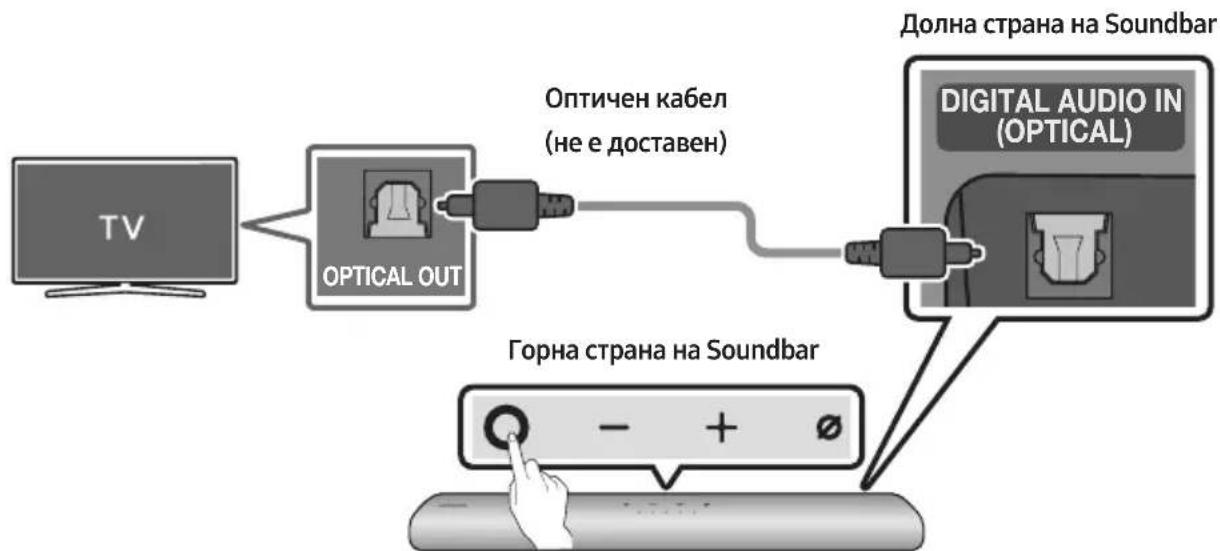
flowchart
graph LR
    TV["TV"] --> OpticalOut["OPTICAL OUT"]
    OpticalOut --> OpticenKabel["Opticen Kabel (не е доставен)"]
    OpticenKabel --> DigitalAudioIn["Digital Audio In (Optical)"]
    DigitalAudioIn --> DigitalAudioIn
    DigitalAudioIn --> DigitalAudioIn
    DigitalAudioIn --> DigitalAudioIn
    DigitalAudioIn --> DigitalAudioIn
    DigitalAudioIn --> DigitalAudioIn
    DigitalAudioIn --> DigitalAudioIn
    DigitalAudioIn --> DigitalAudioIn
    DigitalAudioIn --> DigitalAudioIn
    DigitalAudioIn --> DigitalAudioIn
    DigitalAudioIn --> DigitalAudioIn
    DigitalAudioIn --> DigitalAudioIn
    DigitalAudioIn --> DigitalAudioIn

natural_image
Diagram showing a screw being inserted into a pinhole, with arrows indicating direction (no text or symbols)natural_image
Diagram of a mechanical device with a screw and adjustment knob, showing rotational motion (no text or symbols)natural_image
Diagram showing a cylindrical object being processed into a rectangular tube, with arrows indicating motion direction (no text or symbols present)flowchart
graph TD
    A["Device with two ports"] --> B["Device with one port"]
    B --> C["Device with one port"]
11 ИНСТАЛИРАНЕ НА SOUNDBAR ПРЕД ТЕЛЕВИЗОР
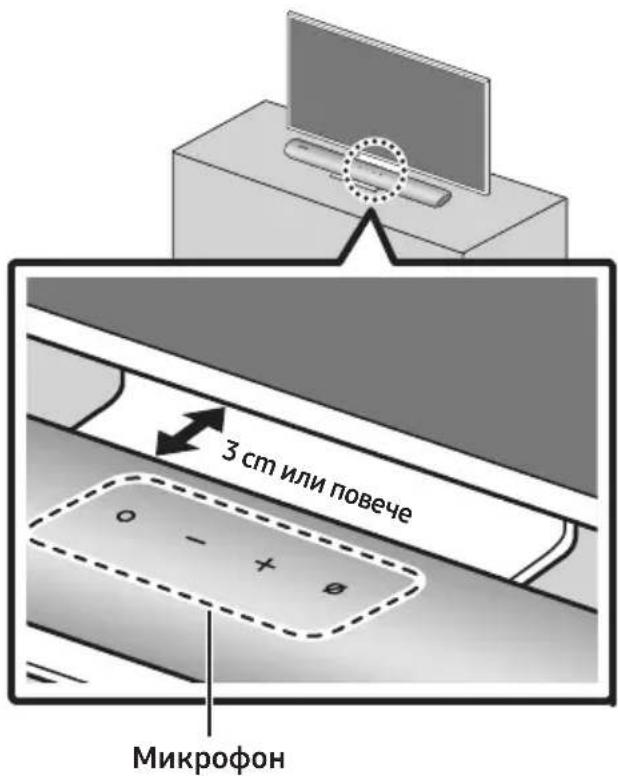
Manufactured under license from Dolby Laboratories. Dolby, Dolby Audio and the double-D symbol are trademarks of Dolby Laboratories Licensing Corporation.
dts.
For DTS patents, see http://patents.dts.com. Manufactured under license from DTS, Inc. (for companies headquartered in the U.S./Japan/Taiwan) or under license from DTS Licensing Limited (for all other companies). DTS, Digital Surround, and the DTS logo are registered trademarks or trademarks of DTS, Inc. in the United States and other countries. © 2020 DTS, Inc. ALL RIGHTS RESERVED.

The terms HDMI and HDMI High-Definition Multimedia Interface, and the HDMI Logo are trademarks or registered trademarks of HDMI Licensing Administrator, Inc. in the United States and other countries.

Works with Apple AirPlay
- Apple, AirPlay, iPhone, iPad, HomePod, and Apple TV are trademarks of Apple Inc., registered in the U.S. and other countries. - Use of the Works with Apple badge means that an accessory has been designed to work specifically with the technology identified in the badge and has been certified by the developer to meet Apple performance standards.
15 БЕЛЕЖКА ЗА ЛИЦЕНЗА ЗА ОТВОРЕН КОД
02 INFORMACJE O PRODUKCIE
Górny panel listwy Soundbar

natural_image
Three-step diagram showing a mechanical component before and after processing, with no visible text or symbols.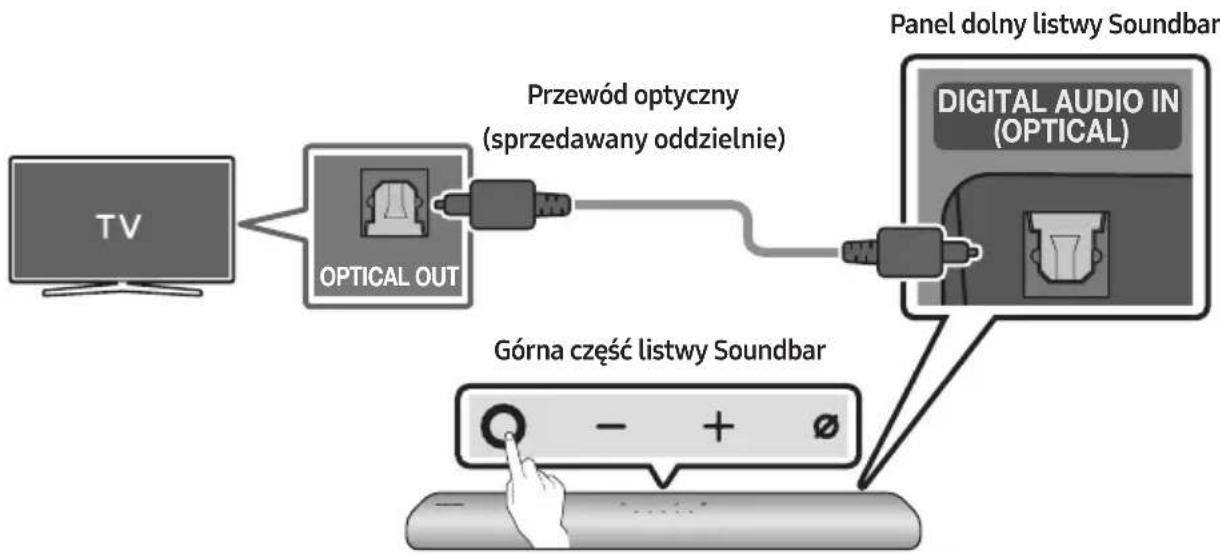
natural_image
Diagram showing a screw being inserted into a nut, with motion arrows indicating direction (no text or symbols)natural_image
Diagram of a mechanical device with a screw and adjustment knob, showing rotational motion (no text or symbols)natural_image
Diagram showing a cylindrical object being processed into a rectangular tube, with arrows indicating motion direction (no text or symbols present)Manufactured under license from Dolby Laboratories. Dolby, Dolby Audio and the double-D symbol are trademarks of Dolby Laboratories Licensing Corporation.
dts.
For DTS patents, see http://patents.dts.com. Manufactured under license from DTS, Inc. (for companies headquartered in the U.S./Japan/Taiwan) or under license from DTS Licensing Limited (for all other companies). DTS, Digital Surround, and the DTS logo are registered trademarks or trademarks of DTS, Inc. in the United States and other countries. © 2020 DTS, Inc. ALL RIGHTS RESERVED.

The terms HDMI and HDMI High-Definition Multimedia Interface, and the HDMI Logo are trademarks or registered trademarks of HDMI Licensing Administrator, Inc. in the United States and other countries.

Works with Apple AirPlay
• Apple, AirPlay, iPhone, iPad, HomePod, and Apple TV are trademarks of Apple Inc., registered in the U.S. and other countries.
- Use of the Works with Apple badge means that an accessory has been designed to work specifically with the technology identified in the badge and has been certified by the developer to meet Apple performance standards.
15 INFORMACJA O LICENCJI OPEN SOURCE
www.samsung.com/uk/aboutsamsung/sustainability/environment/our-commitment/data/
ROZPORZĄDZENIE KOMISJI (UE) 2019/1782
02 PŘEHLED PRODUKTU
natural_image
Diagram showing a mechanical component before and after assembly, with no visible text or symbols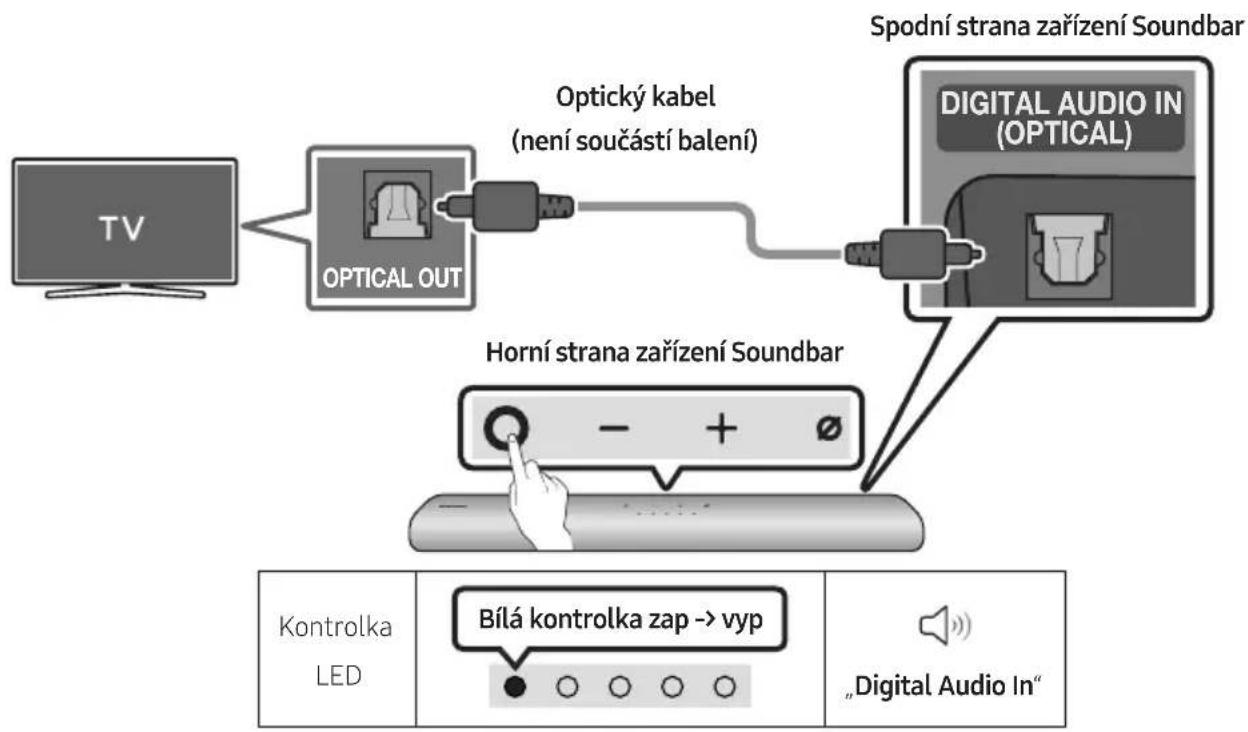
flowchart
graph LR
    A["Aplikace SmartThings"] --> B["Home Screen"]
    B --> C{Decision: 1. Click to avoid devices?}
    C -->|Yes| D["Add device to screen"]
    C -->|No| E["Add device to screen"]
    D --> F["Get started with your Soundbar"]
    F --> G["Start"]
    G --> H["Next step to send phone to screen"]
09 PŘIPOJENÍ K APPLE AIRPLAY 2
natural_image
Diagram showing a screw being inserted into a pinhole, with arrows indicating direction (no text or symbols)natural_image
Diagram of a mechanical device with a screw and adjustment knob, showing rotational motion (no text or symbols)natural_image
Diagram showing two stages of a cylindrical object with arrows indicating motion or force direction (no text or symbols present)flowchart
graph TD
    A["Two rectangular blocks"] --> B["Downward arrow"]
    B --> C["Two rectangular blocks with downward arrows"]
11 INSTALACE ZAŘÍZENÍ SOUNDBAR PŘED TELEVIZOREM
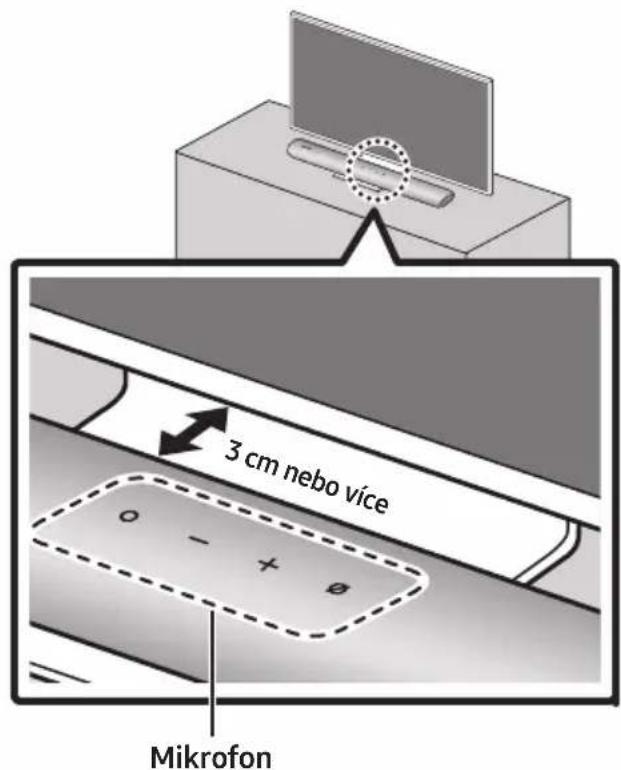
Manufactured under license from Dolby Laboratories. Dolby, Dolby Audio and the double-D symbol are trademarks of Dolby Laboratories Licensing Corporation.
dts.
For DTS patents, see http://patents.dts.com. Manufactured under license from DTS, Inc. (for companies headquartered in the U.S./Japan/Taiwan) or under license from DTS Licensing Limited (for all other companies). DTS, Digital Surround, and the DTS logo are registered trademarks or trademarks of DTS, Inc. in the United States and other countries. © 2020 DTS, Inc. ALL RIGHTS RESERVED.

The terms HDMI and HDMI High-Definition Multimedia Interface, and the HDMI Logo are trademarks or registered trademarks of HDMI Licensing Administrator, Inc. in the United States and other countries.

Works with Apple AirPlay
• Apple, AirPlay, iPhone, iPad, HomePod, and Apple TV are trademarks of Apple Inc., registered in the U.S. and other countries.
- Use of the Works with Apple badge means that an accessory has been designed to work specifically with the technology identified in the badge and has been certified by the developer to meet Apple performance standards.
15 POZNÁMKA K LICENCI OTEVŘENÉHO SOFTWARU
02 PREHL'AD PRODUKTU
Horný panel zariadenia Soundbar
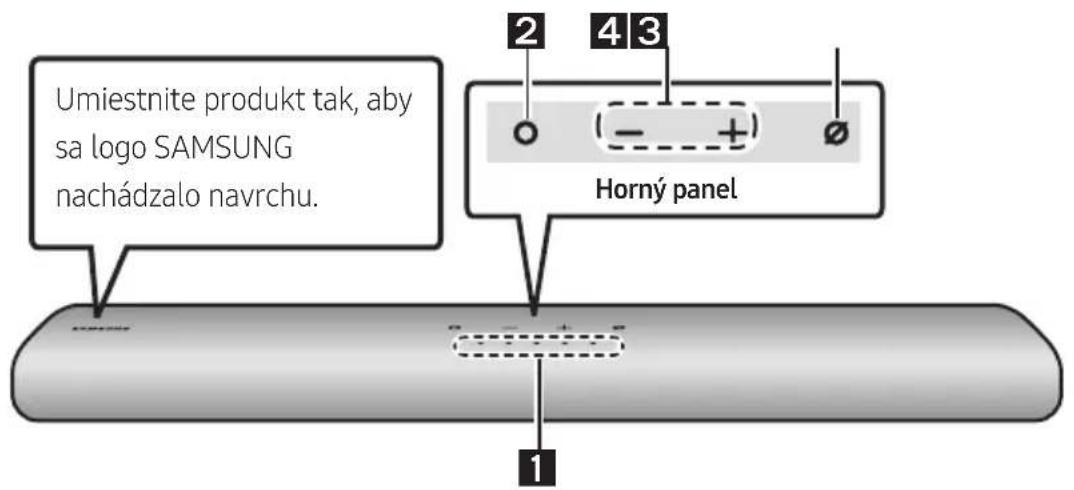
HLASITOST WOOFERA (BASOVÉHO REPRODUKTORA)
HLASITOST
natural_image
Three-step diagram showing a mechanical component before and after assembly, with no visible text or symbols.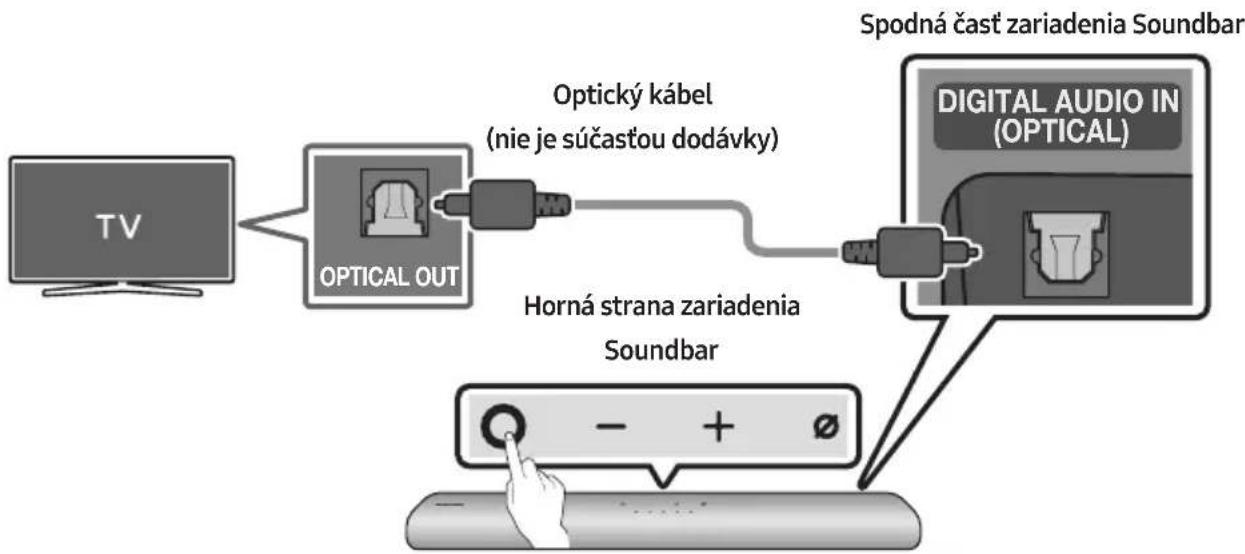
flowchart
graph TD
    A["TV"] --> B["OPTICAL OUT"]
    B --> C["Optický kábel (nie je súčastou dodávky)"]
    C --> D["Horná strana zariadenia Soundbar"]
    D --> E["Digital Audio IN (OPTICAL)"]
    E --> F["Spodná časť zariadenia Soundbar"]
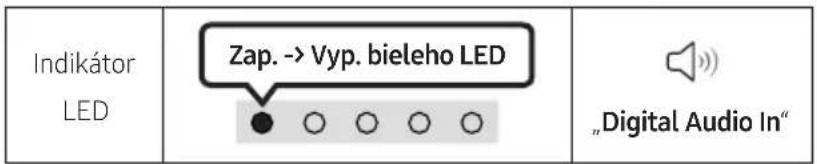
natural_image
Illustration of a flat-screen TV with wireless signal icons above (no text or symbols on screen)Prvotné pripojenie
1.
09 PRIPOJENIE K APPLE AIRPLAY 2
natural_image
Diagram showing a screw being inserted into a pin, with motion arrows indicating direction (no text or symbols)natural_image
Mechanical component diagram showing a screw being inserted into a housing with a button, no text or symbols presentnatural_image
Diagram showing two stages of a cylindrical object with arrows indicating motion, no text or symbols presentManufactured under license from Dolby Laboratories. Dolby, Dolby Audio and the double-D symbol are trademarks of Dolby Laboratories Licensing Corporation.
dts.
For DTS patents, see http://patents.dts.com. Manufactured under license from DTS, Inc. (for companies headquartered in the U.S./Japan/Taiwan) or under license from DTS Licensing Limited (for all other companies). DTS, Digital Surround, and the DTS logo are registered trademarks or trademarks of DTS, Inc. in the United States and other countries. © 2020 DTS, Inc. ALL RIGHTS RESERVED.

The terms HDMI and HDMI High-Definition Multimedia Interface, and the HDMI Logo are trademarks or registered trademarks of HDMI Licensing Administrator, Inc. in the United States and other countries.

Works with Apple AirPlay
- Apple, AirPlay, iPhone, iPad, HomePod, and Apple TV are trademarks of Apple Inc., registered in the U.S. and other countries. - Use of the Works with Apple badge means that an accessory has been designed to work specifically with the technology identified in the badge and has been certified by the developer to meet Apple performance standards.
15 POZNÁMKA K LICENCII S OTVORENÝM ZDROJOVÝM KÓDOM
02 A TERMÉK ÁTTEKINTÉSE
WOOFER (BASSZUS) SZINT
HANGERÓ
natural_image
Diagram showing three stages of a mechanical component: before, after, and after (no text or symbols)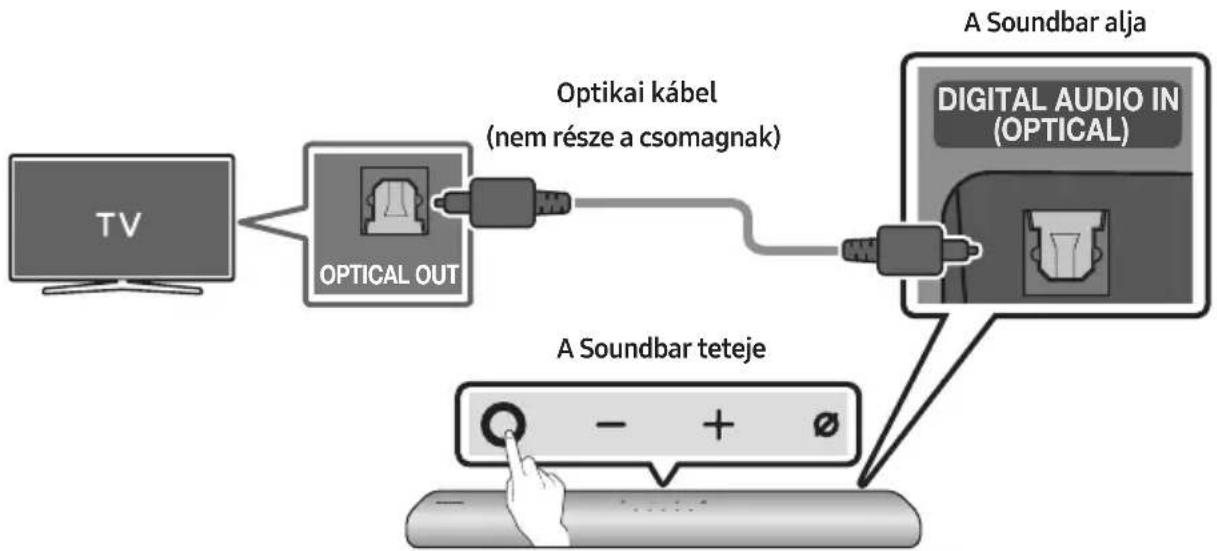
flowchart
graph LR
    TV["TV"] --> OpticalOut["Optical OUT"]
    OpticalOut --> Optikaikábel["Optikai kábel (nem része a csomagnak)"]
    Optikaikábel --> DigitalAudioIn["Digital Audio In (OPTICAL)"]
    DigitalAudioIn --> SoundbarTeteje["A Soundbar teteje"]
    SoundbarTeteje --> ASoundbaralja["A Soundbar alja"]
09 CSATLAKOZTATÁS AZ APPLE AIRPLAY 2-ESHEZ
natural_image
Diagram showing a screw being inserted into a pin, with motion arrows indicating direction (no text or symbols)natural_image
Diagram of a mechanical device with a screw and adjustment knob, showing rotational motion (no text or symbols)natural_image
Diagram showing two stages of a cylindrical object with arrows indicating movement, no text or symbols presentnatural_image
Diagram showing a device being processed into two sequential parts, with arrows indicating process flow (no text or symbols)11 A SOUNDBAR TELEPÍTÉSE A TV ELŐTT
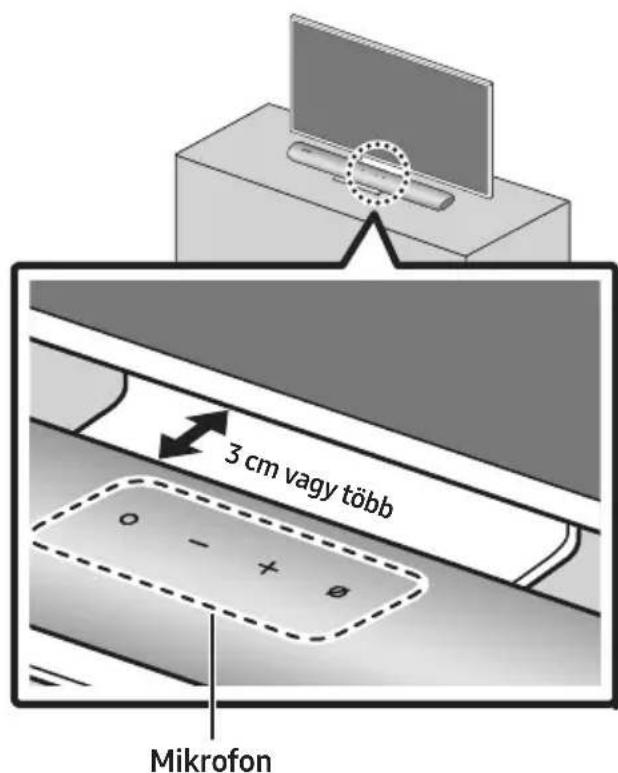
Manufactured under license from Dolby Laboratories. Dolby, Dolby Audio and the double-D symbol are trademarks of Dolby Laboratories Licensing Corporation.
dts.
For DTS patents, see http://patents.dts.com. Manufactured under license from DTS, Inc. (for companies headquartered in the U.S./Japan/Taiwan) or under license from DTS Licensing Limited (for all other companies). DTS, Digital Surround, and the DTS logo are registered trademarks or trademarks of DTS, Inc. in the United States and other countries. © 2020 DTS, Inc. ALL RIGHTS RESERVED.

The terms HDMI and HDMI High-Definition Multimedia Interface, and the HDMI Logo are trademarks or registered trademarks of HDMI Licensing Administrator, Inc. in the United States and other countries.

Works with Apple AirPlay
• Apple, AirPlay, iPhone, iPad, HomePod, and Apple TV are trademarks of Apple Inc., registered in the U.S. and other countries.
- Use of the Works with Apple badge means that an accessory has been designed to work specifically with the technology identified in the badge and has been certified by the developer to meet Apple performance standards.
15 NYÍLT FORRÁSKÓDÚ LICENC MEGJEGYZÉS
02 PRIKAZ PROIZVODA
Gornja ploča Soundbar sustava
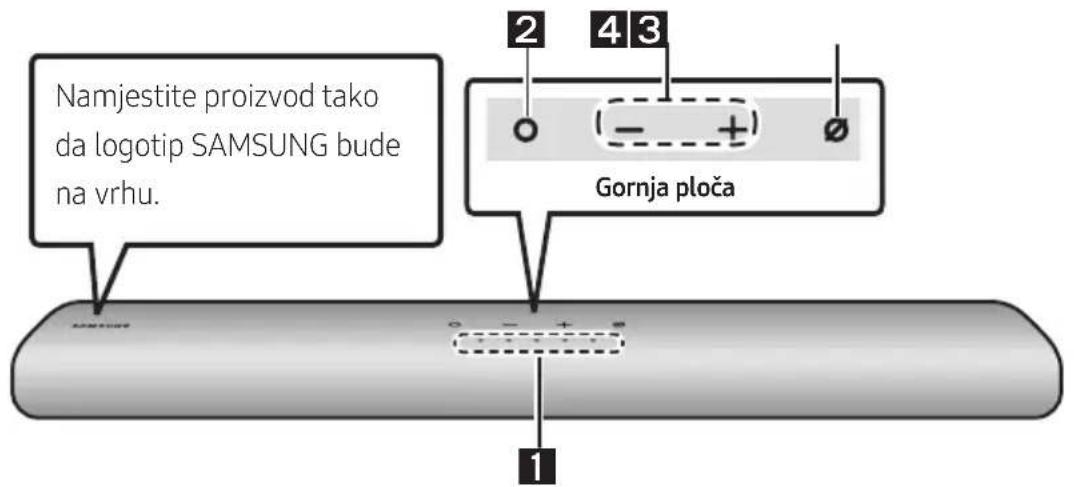
Podnožje glavne jedinice Soundbar
NAPOMENE
natural_image
Diagram showing a mechanical component before and after assembly, with no visible text or symbols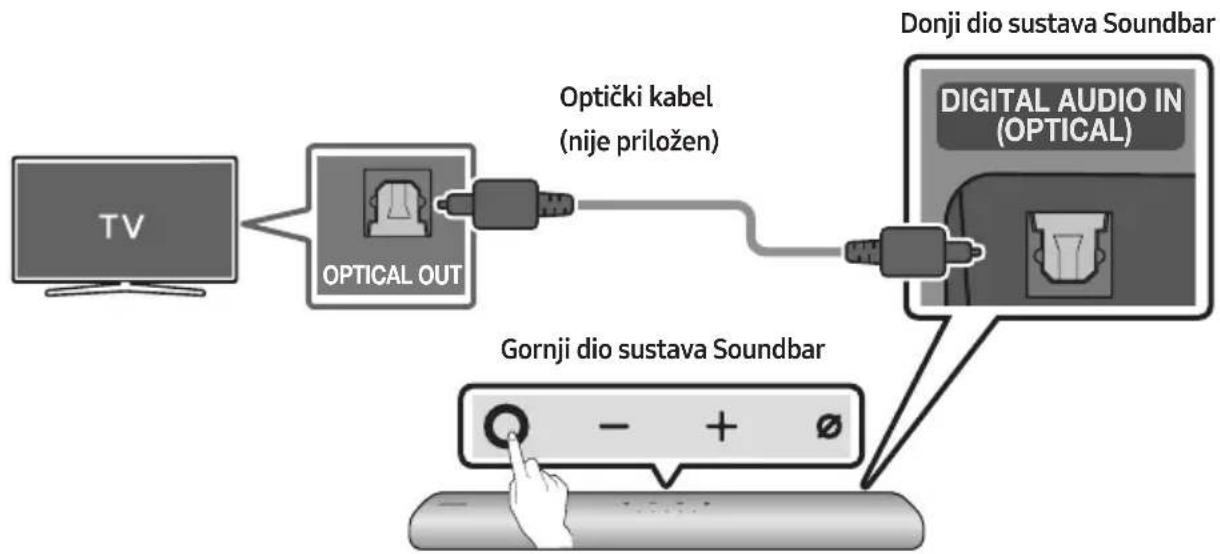
flowchart
graph TD
    A["TV"] --> B["OPTICAL OUT"]
    B --> C["Optički kabel (nije priložen)"]
    C --> D["DONJI dio sustava Soundbar"]
    D --> E["Digital Audio IN (OPTICAL)"]
    E --> F["Gornji dio sustava Soundbar"]
    F --> G["- + ∅"]
| LEDindikator |
- Kad su televizor i Soundbar isključeni, povežite ulaz DIGITAL AUDIO IN (OPTICAL) na sustavu Soundbar i izlazni priključak OPTICAL na televizoru s pomoću optičkog kabela (nije priložen), kao što je prikazano na slici.
- Uključite Soundbar i televizor.
- Pritisnite gumb 📍 (Višenamjenski) na vrhu Soundbar sustava ili gumb ➞ (Izvor) na daljinskom upravljaču i zatim odaberite način rada „Digital Audio In”. Zatim se reproducira obavijest „Digital Audio In”.
- Zvuk televizora se čuje iz Soundbar sustava.
06 BEŽIČNO POVEZIVANJE S TELEVIZOROM
Metoda 1 Povezivanje putem Bluetooth veze
Kad je Samsung TV povezan putem Bluetooth veze, možete čuti stereo zvuk bez prethodnog mučenja s kabelima.
- Istodobno se može spojiti samo jedan Samsung TV.
- Može se povezati Samsung TV koji podržava Bluetooth. Provjerite specifikacije svojeg televizora.
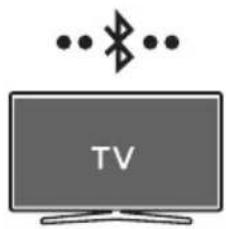
natural_image
Illustration of a TV with wireless signal icons above it (no text or symbols on the TV itself)Početno povezivanje
1.
| Gumb za uparivanje Bluetooth uređaja | LED indikator |
| ILI Kad je u načinu rada „Bluetooth“ | Treperi u sljedećim bojama: Crveno → Zeleno → Plavo Uparivanje Dok se uparivanje ne završi, višebojna LED lampica naizmjenice se mijenja u Crveno → Zeleno → Plavo. „Ready to connect via Bluetooth.“ |
| 5 Sec 5 Sec 5 Sec 5 Sec 5 Sec 5 Sec 5 Sec 5 Sec 5 Sec 5 Sec 5 Sec 5 Sec 5 Sec 5 Sec 5 Sec 5 Sec 5 Sec 5 Sec 5 Sec 5 Sec 5 Sec 5 Sec 5 Sec 5 Sec 5 Sec 5 Sec 5 Sec 5 Sec 5 Sec 5 Sec 5 Sec 5 Sec 5 Sec 5 Sec 10 Sec 10 Sec 10 Sec 10 Sec 10 Sec 10 Sec 10 Sec 10 Sec 10 Sec 10 Sec 10 Sec 10 Sec 10 Sec 10 Sec 10 Sec 10 Sec 10 Sec 10 Sec 10 Sec 10 Sec 10 Sec 10 Sec 10 Sec 10 Sec 10 Sec 12 Sec 12 Sec 12 Sec 12 Sec 12 Sec 12 Sec 12 Sec 12 Sec 12 Sec 12 Sec 12 Sec 12 Sec 12 Sec 12 Sec 12 Sec 12 Sec 12 Sec 12 Sec 12 Sec 12 Sec 12 Sec 12 Sec 12 Sec 12 Sec 12 Sec 14 Sec 14 Sec 14 Sec 14 Sec 14 Sec 14 Sec 14 Sec 14 Sec 14 Sec 14 Sec 14 Sec 14 Sec 14 Sec 14 Sec 14 Sec 14 Sec 14 Sec 14 Sec 14 Sec 14 Sec 14 Sec 14 Sec 14 Sec 14 Sec 14 Sec 16 Sec 16 Sec 16 Sec 16 Sec 16 Sec 16 Sec 16 Sec 16 Sec 16 Sec 16 Sec 16 Sec 16 Sec 16 Sec 16 Sec 16 Sec "Ready to connect via Bluetooth." |
- Odaberite način rada Bluetooth na Samsung TV-u.
(Npr. Početna (☐) → Postavke (☐) → Zvuk → Izlaz zvuka → Popis Bluetooth zvučnika → [AV] Samsung Soundbar S60A / [AV] Samsung Soundbar S61A (Bluetooth))
- Odaberite „[AV] Samsung Soundbar S60A / [AV] Samsung Soundbar S61A” s popisa na zaslonu televizora.
Dostupni sustav Soundbar označen je s „Potrebno je uparivanje” ili „Upareno je” na popisu Bluetooth uređaja televizora. Za povezivanje Samsung TV-a sa sustavom Soundbar odaberite poruku i uspostavite vezu.
- Sada možete čuti zvuk sa Samsung TV-a na sustavu Soundbar.
- Ako postoji zapisnik povezivanja između Soundbar sustava i Samsung televizora, Soundbar sustav automatski se povezuje mijenjanjem načina rada „Bluetooth.”
- Poravnajte Središnja linija vodič za zidni nosač sa sredinom televizora (ako montirate Soundbar ispod televizora), a zatim trakom pričvrstite Vodič za zidni nosač na zid.
- Ako ne postavljate ispod televizora, postavite Središnju liniju u sredinu područja za postavljanje.
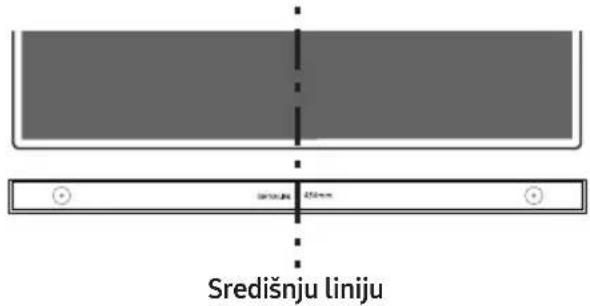
- Olovkom označite položaje rupa i uklonite Vodič za zidni nosač.
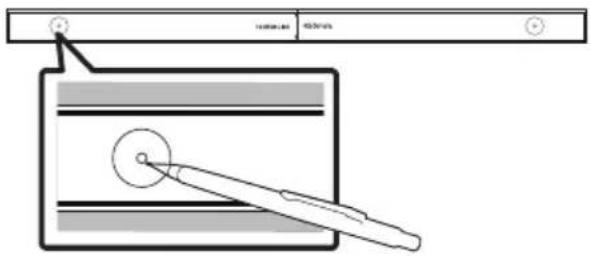
natural_image
Diagram showing a screw being inserted into a nut, with arrows indicating direction (no text or symbols)natural_image
Diagram of a mechanical device with a screw and adjustment knob, showing rotational motion (no text or symbols)natural_image
Diagram showing two stages of a cylindrical object with arrows indicating motion, no text or symbols presentflowchart
graph TD
    A["Top Panel"] --> B["Down Arrow"]
    B --> C["Bottom Panel"]
11 POSTAVLJANJE SOUNDBAR SUSTAVA ISPRED TELEVIZORA
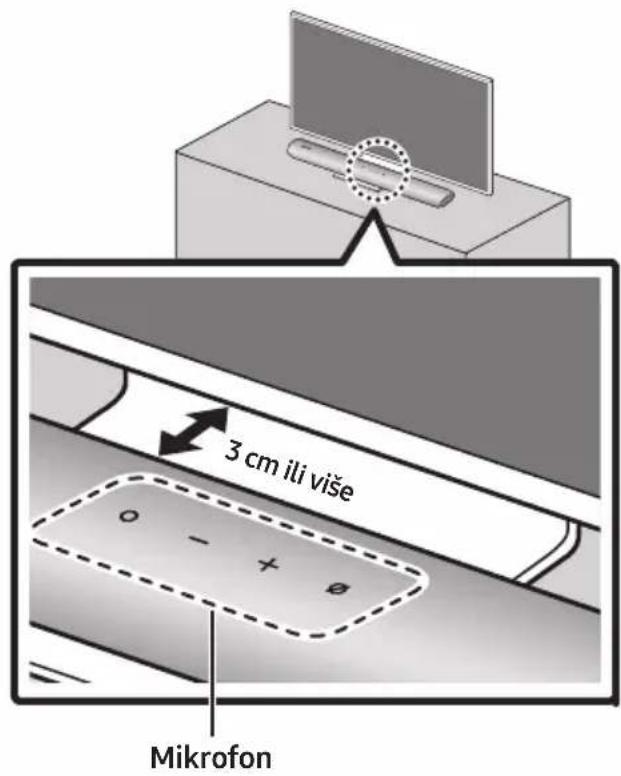
Manufactured under license from Dolby Laboratories. Dolby, Dolby Audio and the double-D symbol are trademarks of Dolby Laboratories Licensing Corporation.
dts.
For DTS patents, see http://patents.dts.com. Manufactured under license from DTS, Inc. (for companies headquartered in the U.S./Japan/Taiwan) or under license from DTS Licensing Limited (for all other companies). DTS, Digital Surround, and the DTS logo are registered trademarks or trademarks of DTS, Inc. in the United States and other countries. © 2020 DTS, Inc. ALL RIGHTS RESERVED.

The terms HDMI and HDMI High-Definition Multimedia Interface, and the HDMI Logo are trademarks or registered trademarks of HDMI Licensing Administrator, Inc. in the United States and other countries.

Works with Apple AirPlay
• Apple, AirPlay, iPhone, iPad, HomePod, and Apple TV are trademarks of Apple Inc., registered in the U.S. and other countries.
- Use of the Works with Apple badge means that an accessory has been designed to work specifically with the technology identified in the badge and has been certified by the developer to meet Apple performance standards.
15 OBAVIJEST O LICENCI ZA UPORABU SOFTVERA OTVORENOG KODA
Želite li poslati upite i zahtjeve u vezi sa softverom otvorenog koda, obratite se grupi Samsung Open Source (http://opensource.samsung.com)
16 VAŽNA NAPOMENA VEZANA UZ SERVIS
- Slike u ovom korisničkom priručniku služe kao samo kao referenca i mogu se razlikovati od stvarnog izgleda proizvoda.
- Moguća je naplata administrativne pristojbe u slučaju
www.samsung.com/uk/aboutsamsung/sustainability/environment/our-commitment/data/
UREDBA KOMISIJE (EU) 2019/1782
02 PREGLED PROIZVODA
Gornji panel Soundbar uređaja
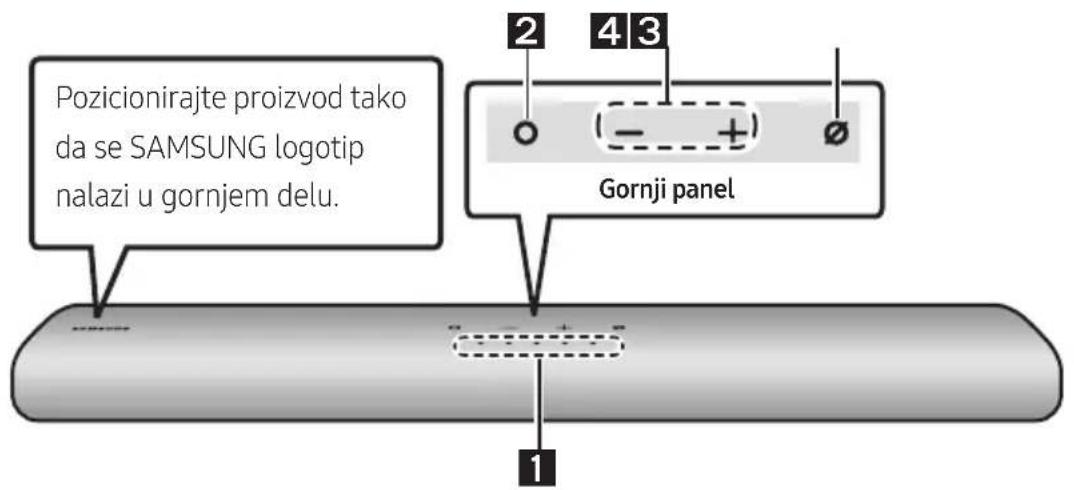
| 1 | LED indikator | LED indikator treperi, svetli ili menja boju u zavisnosti od trenutnog režima ili statusa Soundbar uređaja. Boja LED indikatora i broj lampica ukazuju na režim koji je aktivan, kao što je opisano u nastavku. | ||||
 Bela LEDlampica Bela LEDlampica |  Bela LEDlampica Bela LEDlampica |  Višebojna LEDlampica Višebojna LEDlampica |  Bela LEDlampica Bela LEDlampica |  Bela LEDlampica Bela LEDlampica | ||
| U zavisnosti od režima ili statusa, višebojna LED lampica menja sledeće boje: Bela, Svetloplava, Zelena, Crvena i Plava. | ||||||
| 2 | Multifunkcionalno dugme | U režimu pripravnosti, pritisnite dugme (Multifunkcionalno) da biste uključili Soundbar zvučnik.Pritisnite dugme (Multifunkcionalno) da biste promenili režim. Svaki put kada promenite režim, LED lampica zasvetli u beloj boji, a zatim se isključi.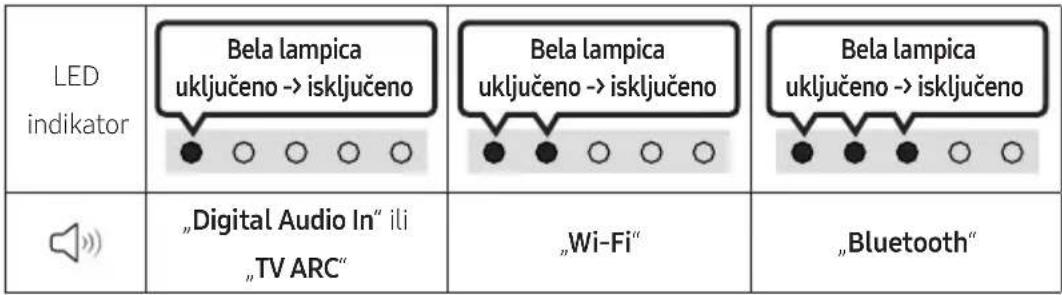 | ||||
| 3 | Dugme jačina zvuka | Pritisnite dugme - + (Jačina zvuka) da biste podesili jačinu zvuka. | ||||
| 4 | Dugme za uključivanje/isključivanje mikrofona | Pritisnite dugme (Uključivanje/isključivanje mikrofona) da biste uključili ili isključili mikrofon. Kada se mikrofon isključi, LED indikator svetleće u crvenoj boji.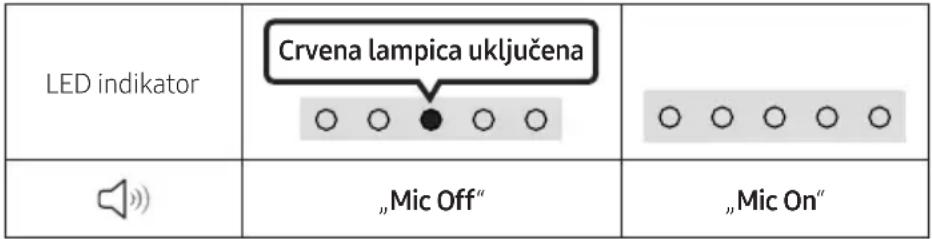 | ||||
natural_image
Diagram showing a mechanical component before and after assembly, with no visible text or symbols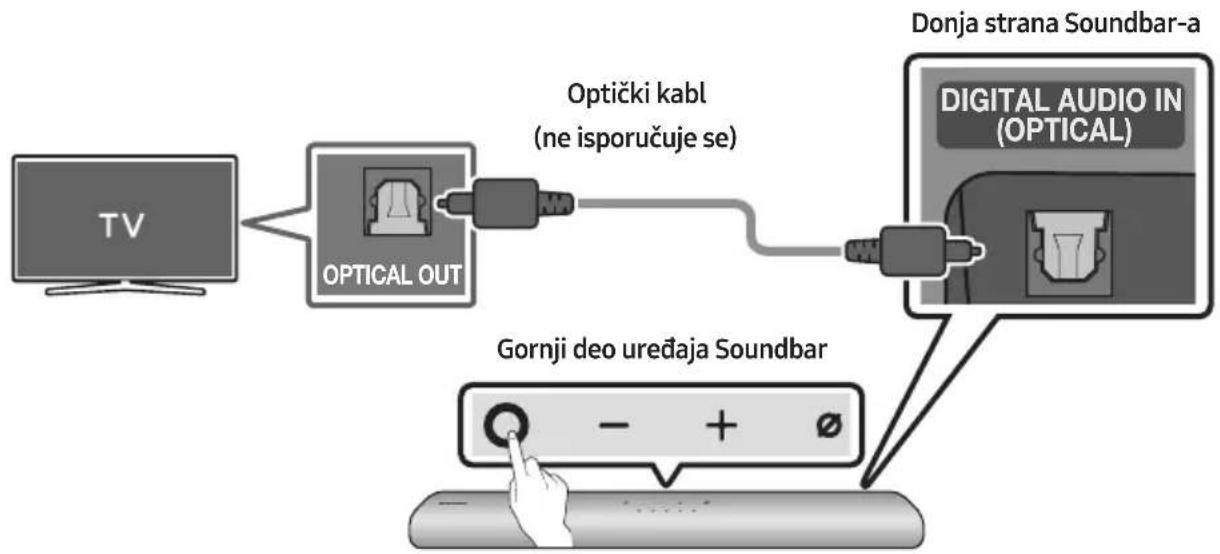
flowchart
graph TD
    A["TV"] --> B["OPTICAL OUT"]
    B --> C["Optički kabl (ne isporučuje se)"]
    C --> D["DONJA strana Soundbar-a"]
    D --> E["DIGITAL AUDIO IN (OPTICAL)"]
    E --> F["Gornji deo uređaja Soundbar"]
    F --> G["- + ∅"]

- Kada su TV i Soundbar isključeni, optičkim kablom (ne isporučuje se) povežite DIGITAL AUDIO IN (OPTICAL) port Soundbar-a i OPTICAL izlazni port TV-a, na način prikazan na slici.
- Uključite Soundbar i TV.
- Na vrhu Soundbar uređaja pritisnite dugme 📍 (Multifunkcionalno) ili dugme ➞ (Izvor), a zatim izaberite režim „Digital Audio In“. Tada će se čuti najava, „Digital Audio In“.
- Soundbar uređaj emituje zvuk sa televizora.
06 KORIŠĆENJE BEŽIČNE VEZE SA TV-OM
Metod br. 1. Povezivanje putem Bluetooth veze
Kada se Samsung TV poveže putem Bluetooth veze, možete dobiti stereo zvuk bez petljanja sa kablovima.
- Istovremeno može biti povezan samo jedan Samsung TV.
- Može se povezati Samsung TV koji podržava Bluetooth povezivanje. Proverite specifikacije svog TV-a.
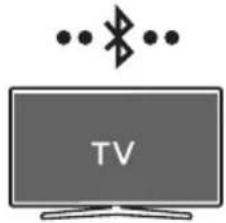
Početno povezivanje
1.
| Dugme za uparivanje pomoću Bluetooth veze | LED indikator |
| Treperi lampica crvena → zelena → plava Uparivanje Svetloplava lampica treperi X3 Povezivanje za završeno • Dok se uparivanje ne završi, višebojna LED lampica naizmenično menja boje: Crvena → Zelena → Plava | |
| "Ready to connect via Bluetooth." |
- Na Samsung TV-u izaberite režim Bluetooth.
(npr. Početna (☐) → Podešavanja (☐) → Zvuk → Izlaz zvuka → Lista Bluetooth zvučnika → [AV] Samsung Soundbar S60A / [AV] Samsung Soundbar S61A (Bluetooth))
-
Izaberite „[AV] Samsung Soundbar S60A / [AV] Samsung Soundbar S61A“ sa liste na ekranu TV-a. Dostupan Soundbar je označen sa „Uparivanje neophodno“ ili „Upareno“ na listi Bluetooth uređaja TV-a. Da biste povezali Samsung TV i Soundbar, izaberite poruku, pa zatim uspostavite vezu.
-
Sada sa Soundbar-a možete da čujete zvuk Samsung TV-a.
natural_image
Diagram showing a screw being inserted into a nut, with arrows indicating direction (no text or symbols)- Montirajte 2 Nosača za montažu na zid u odgovarajućoj orijentaciji na dnu uređaja Soundbar, pomoću 2 Zavrtnja.
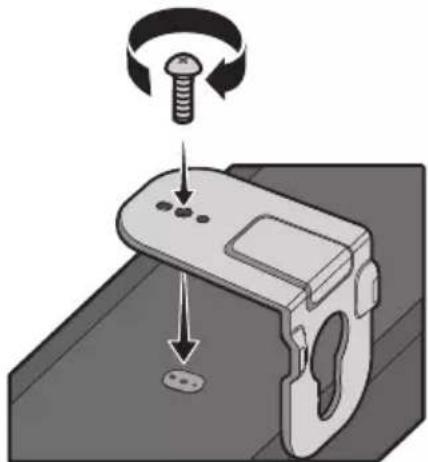
natural_image
Diagram of a mechanical device with a screw and adjustment knob, showing rotational motion (no text or symbols)- Prilikom sklapanja noseći delovi Nosač za montažu na zid treba da se nalaze sa zadnje strane uređaja Soundbar.
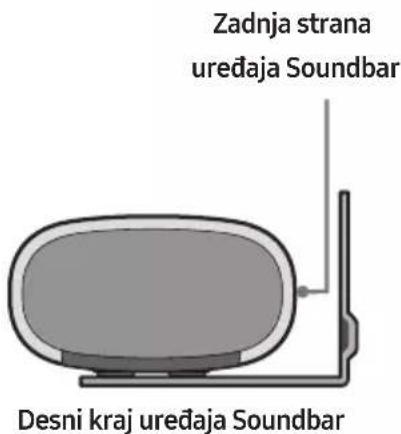
- Postavite uređaj Soundbar sa pričvršćenim Nosač za montažu na zid tako što ćete okačiti Nosač za montažu na zid na Zavrtanj držača na zidu.
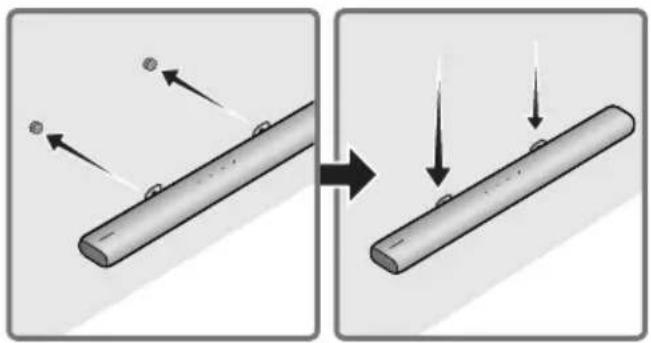
natural_image
Diagram showing two stages of a cylindrical object with arrows indicating motion, no text or symbols presentManufactured under license from Dolby Laboratories. Dolby, Dolby Audio and the double-D symbol are trademarks of Dolby Laboratories Licensing Corporation.
dts.
For DTS patents, see http://patents.dts.com. Manufactured under license from DTS, Inc. (for companies headquartered in the U.S./Japan/Taiwan) or under license from DTS Licensing Limited (for all other companies). DTS, Digital Surround, and the DTS logo are registered trademarks or trademarks of DTS, Inc. in the United States and other countries. © 2020 DTS, Inc. ALL RIGHTS RESERVED.

The terms HDMI and HDMI High-Definition Multimedia Interface, and the HDMI Logo are trademarks or registered trademarks of HDMI Licensing Administrator, Inc. in the United States and other countries.

Works with Apple AirPlay
• Apple, AirPlay, iPhone, iPad, HomePod, and Apple TV are trademarks of Apple Inc., registered in the U.S. and other countries.
- Use of the Works with Apple badge means that an accessory has been designed to work specifically with the technology identified in the badge and has been certified by the developer to meet Apple performance standards.
15 OBAVEŠTENJE O LICENCI OTVORENOG IZVORNOG KODA
Da biste poslali pitanja i zahteve u vezi sa softverom otvorenog koda obratite se grupi Samsung Open Source (http://opensource.samsung.com)
16 VAŽNA
NAPOMENA O SERVISIRANJU
www.samsung.com/uk/aboutsamsung/sustainability/environment/our-commitment/data/
VARNOSTNI PODATKI
VARNOSTNA OPOZORILA
ZARADI NEVARNOSTI ELEKTRIČNEGA UDARA NE ODPIRAJTE ZADNJEGA (HRBTNEGA) POKROVA.
NAPRAVA NIMA DELOV, KI BI JIH LAHKO POPRAVIL UPORABNIK. SERVIS NAJ OPRAVI USTREZNO USPOSOBLJENA OSEBA.
02 PREGLED IZDELKA
natural_image
Diagram showing a mechanical component before and after assembly, with no visible text or symbols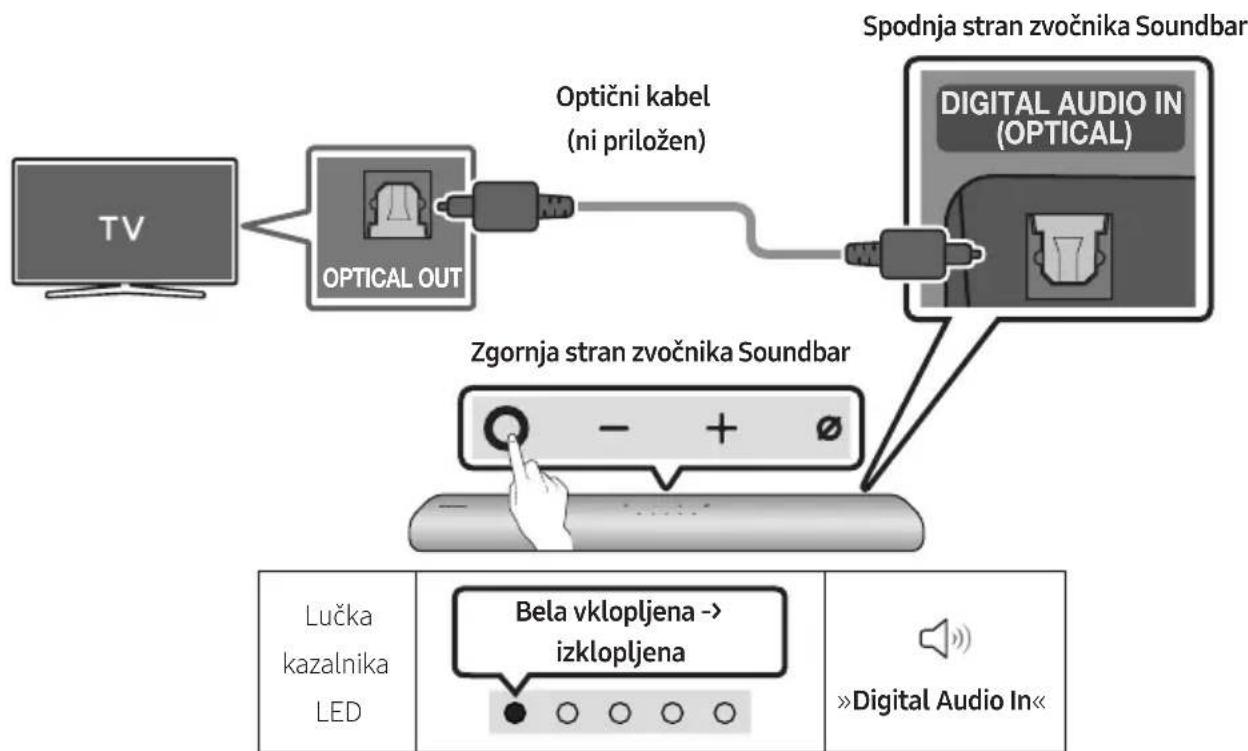
flowchart
graph TD
    A["TV"] --> B["OPTICAL OUT"]
    B --> C["Optični kabel (ni priložen)"]
    C --> D["Zgornja stran zvočnika Soundbar"]
    D --> E["Spodnja stran zvočnika Soundbar"]
    E --> F["DIGITAL AUDIO IN (OPTICAL)"]
    F --> G["Bela vklopljena --> izklopljena"]
    G --> H["Lučka kazalnika LED"]
    G --> I["»Digital Audio In«"]
natural_image
Diagram showing a screw being inserted into a pin, with arrows indicating direction (no text or symbols)- Na spodnji del zvočnika Soundbar z dvema Vijakoma (2) pravilno namestite Stenska nosilca (2).
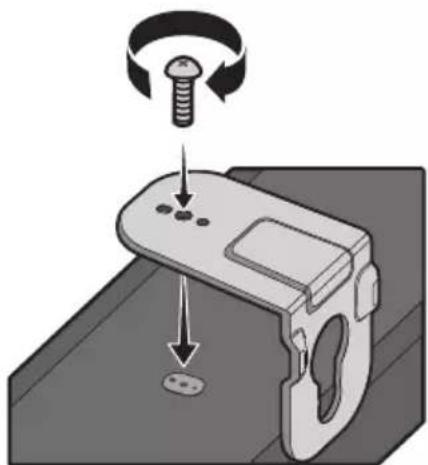
natural_image
Diagram of a mechanical device with a screw and adjustment knob, showing rotational motion (no text or symbols)natural_image
Diagram showing two stages of a cylindrical object with arrows indicating motion, no text or symbols present- Zvočnik Soundbar potisnite navzdol, kot je prikazano spodaj, da Stenska nosilca varno namestite na Vijake nosilca.
- Vstavite Vijake nosilca v široki (spodnji) del Stenskih nosilcev in nato potisnite Stenska nosilca navzdol, da Stenska nosilca varno namestite na Vijake nosilca.
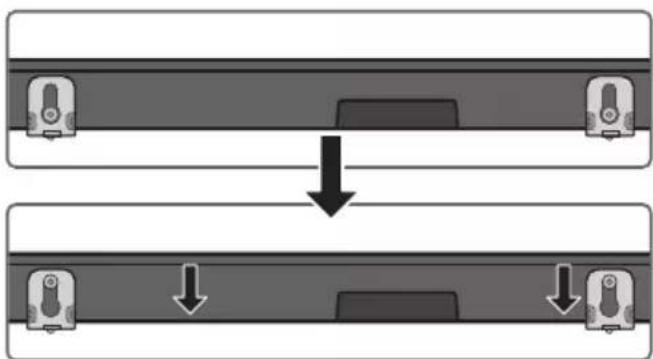
natural_image
Diagram showing a mechanical component before and after assembly, with no visible text or symbols11 NAMESTITEV ZVOČNIKA SOUNDBAR PRED TELEVIZOR
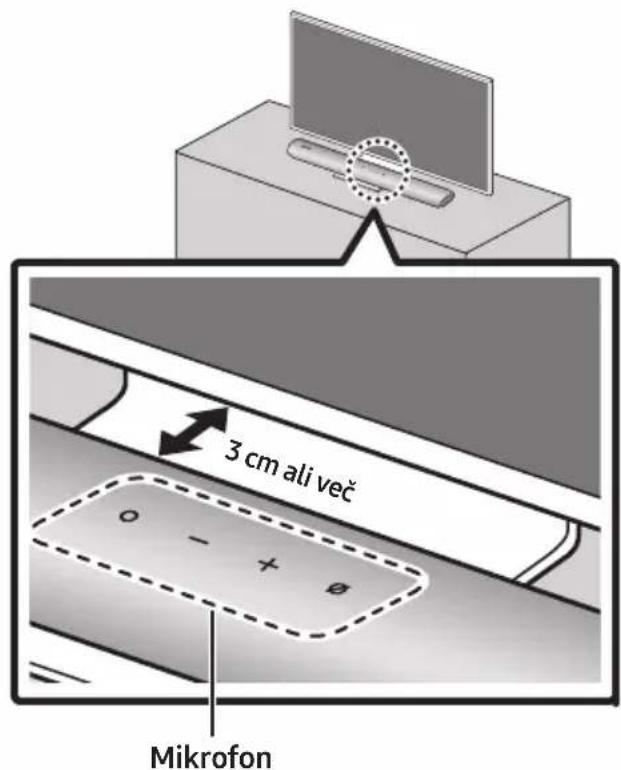
Manufactured under license from Dolby Laboratories. Dolby, Dolby Audio and the double-D symbol are trademarks of Dolby Laboratories Licensing Corporation.
dts.
For DTS patents, see http://patents.dts.com. Manufactured under license from DTS, Inc. (for companies headquartered in the U.S./Japan/Taiwan) or under license from DTS Licensing Limited (for all other companies). DTS, Digital Surround, and the DTS logo are registered trademarks or trademarks of DTS, Inc. in the United States and other countries. © 2020 DTS, Inc. ALL RIGHTS RESERVED.

The terms HDMI and HDMI High-Definition Multimedia Interface, and the HDMI Logo are trademarks or registered trademarks of HDMI Licensing Administrator, Inc. in the United States and other countries.

Works with Apple AirPlay
- Apple, AirPlay, iPhone, iPad, HomePod, and Apple TV are trademarks of Apple Inc., registered in the U.S. and other countries. - Use of the Works with Apple badge means that an accessory has been designed to work specifically with the technology identified in the badge and has been certified by the developer to meet Apple performance standards.
15 OBVESTILO O ODPRTOKODNIH LICENCAH
www.samsung.com/uk/aboutsamsung/sustainability/environment/our-commitment/data/
UREDBA KOMISIJE (EU) 2019/1782
natural_image
Diagram showing a mechanical component before and after assembly, with no visible text or symbols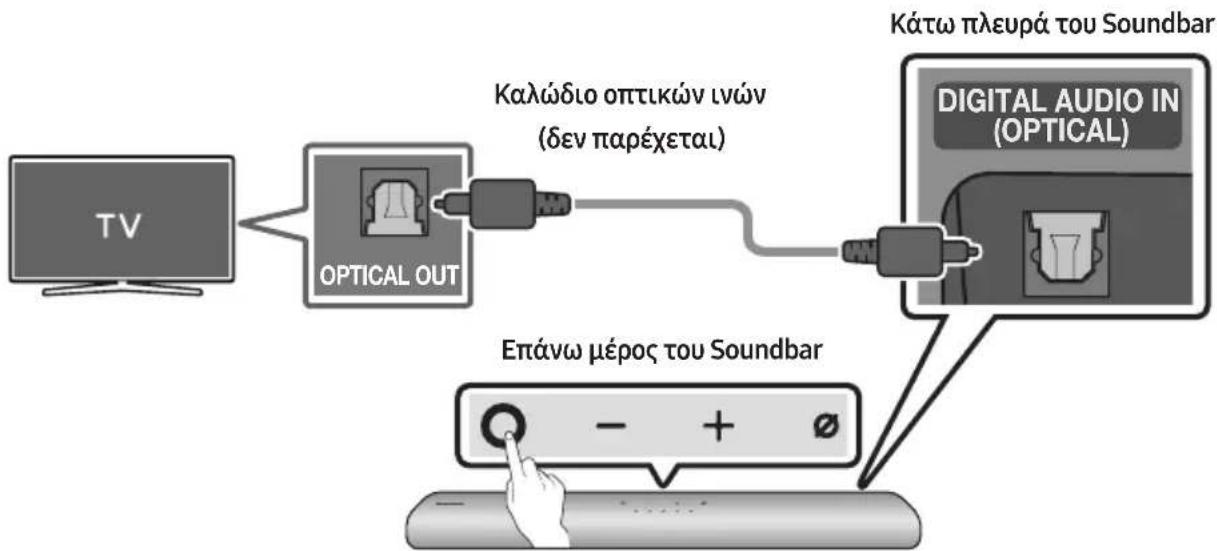
natural_image
Illustration of a flat-screen TV with wireless signal icons above (no text or symbols on screen)Αρχική σύνδεση
1.
natural_image
Diagram showing a screw being inserted into a pin, with motion arrows indicating direction (no text or symbols)natural_image
Diagram of a mechanical device with a screw and adjustment knob, showing rotational motion (no text or symbols)natural_image
Diagram showing two stages of a cylindrical object with arrows indicating motion, no text or symbols presentManufactured under license from Dolby Laboratories. Dolby, Dolby Audio and the double-D symbol are trademarks of Dolby Laboratories Licensing Corporation.
dts.
For DTS patents, see http://patents.dts.com. Manufactured under license from DTS, Inc. (for companies headquartered in the U.S./Japan/Taiwan) or under license from DTS Licensing Limited (for all other companies). DTS, Digital Surround, and the DTS logo are registered trademarks or trademarks of DTS, Inc. in the United States and other countries. © 2020 DTS, Inc. ALL RIGHTS RESERVED.
HDMI ^TM
HIGH-OFFRATION MULTIMEDIA INTERFACE
The terms HDMI and HDMI High-Definition Multimedia Interface, and the HDMI Logo are trademarks or registered trademarks of HDMI Licensing Administrator, Inc. in the United States and other countries.

• Apple, AirPlay, iPhone, iPad, HomePod, and Apple TV are trademarks of Apple Inc., registered in the U.S. and other countries.
- Use of the Works with Apple badge means that an accessory has been designed to work specifically with the technology identified in the badge and has been certified by the developer to meet Apple performance standards.
02 PRODUKTA PÄRSKATS
WOOFER (BASA) LİMENIS
SKALUMS
"Off-TV Remote" (noklusējuma režīms), "Samsung-TV Remote", "All-TV Remote".
natural_image
Three-step diagram showing a mechanical component before and after assembly, with no visible text or symbols.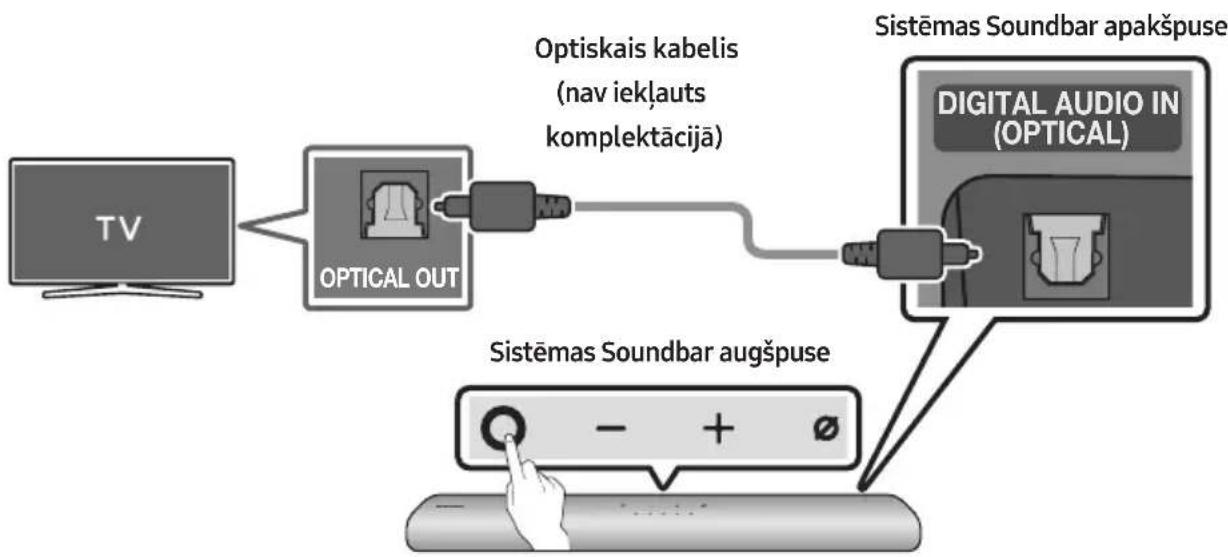
flowchart
graph LR
    TV["TV"] --> OpticalOut["Optical OUT"]
    OpticalOut --> Optiskaiskabelis["Optiskais kabelis (nav iekļauts komplektācijā)"]
    Optiskaiskabelis --> DigitalAudioIn["Digital Audio In (OPTICAL)"]
    DigitalAudioIn --> SistemasSoundbarapakspuse["Sistemas Soundbar apakspuse"]
    SistemasSoundbaraugspuse --> SistemasSoundbaraugspuse
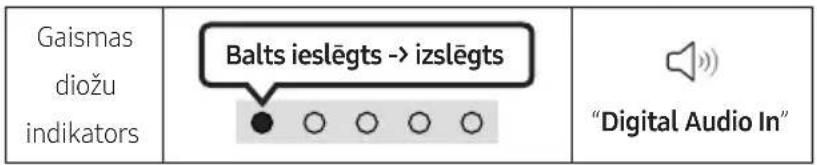
natural_image
Illustration of a flat-screen TV with wireless signal icons above (no text or symbols on screen)natural_image
Diagram showing a screw being inserted into a pinhole, with arrows indicating direction (no text or symbols)natural_image
Diagram of a mechanical device with screw and adjustment knob, showing motion direction (no text or symbols)natural_image
Diagram showing two stages of a cylindrical object with arrows indicating motion, no text or symbols presentflowchart
graph TD
    A["Two rectangular blocks with central blocks"] --> B["Downward arrow"]
    B --> C["Two rectangular blocks with downward arrows"]
11 SISTĒMAS SOUNDBAR UZSTĀDĪŠANA TELEVIZORA PRIEKŠĀ
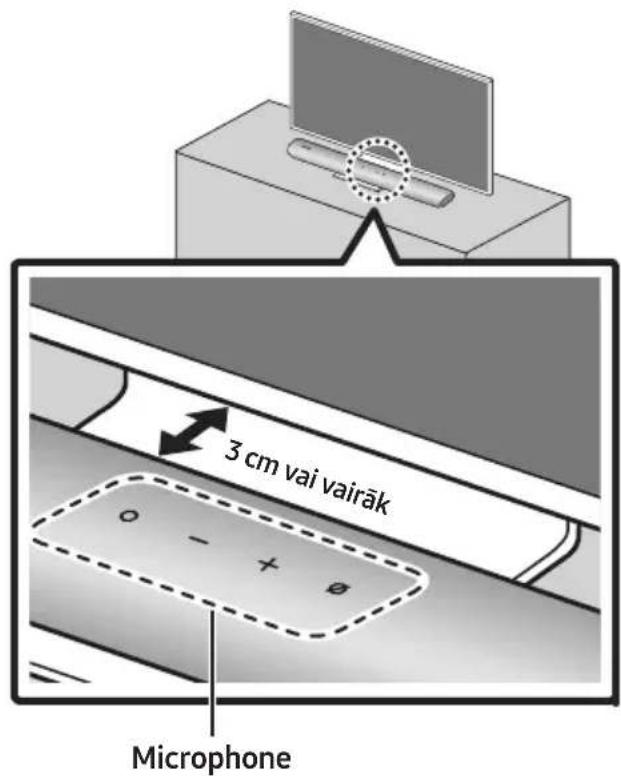
13 PROBLÉMU NOVĚRŠANA
Manufactured under license from Dolby Laboratories. Dolby, Dolby Audio and the double-D symbol are trademarks of Dolby Laboratories Licensing Corporation.
dts.
For DTS patents, see http://patents.dts.com. Manufactured under license from DTS, Inc. (for companies headquartered in the U.S./Japan/Taiwan) or under license from DTS Licensing Limited (for all other companies). DTS, Digital Surround, and the DTS logo are registered trademarks or trademarks of DTS, Inc. in the United States and other countries. © 2020 DTS, Inc. ALL RIGHTS RESERVED.

The terms HDMI and HDMI High-Definition Multimedia Interface, and the HDMI Logo are trademarks or registered trademarks of HDMI Licensing Administrator, Inc. in the United States and other countries.

Works with Apple AirPlay
• Apple, AirPlay, iPhone, iPad, HomePod, and Apple TV are trademarks of Apple Inc., registered in the U.S. and other countries.
- Use of the Works with Apple badge means that an accessory has been designed to work specifically with the technology identified in the badge and has been certified by the developer to meet Apple performance standards.
15 PAZIÑOJUMS PAR ATVÉRTÃ PIRMKODA LICENCI
02 TOOTE ÜLEVAADE
Soundbari pealmine paneel
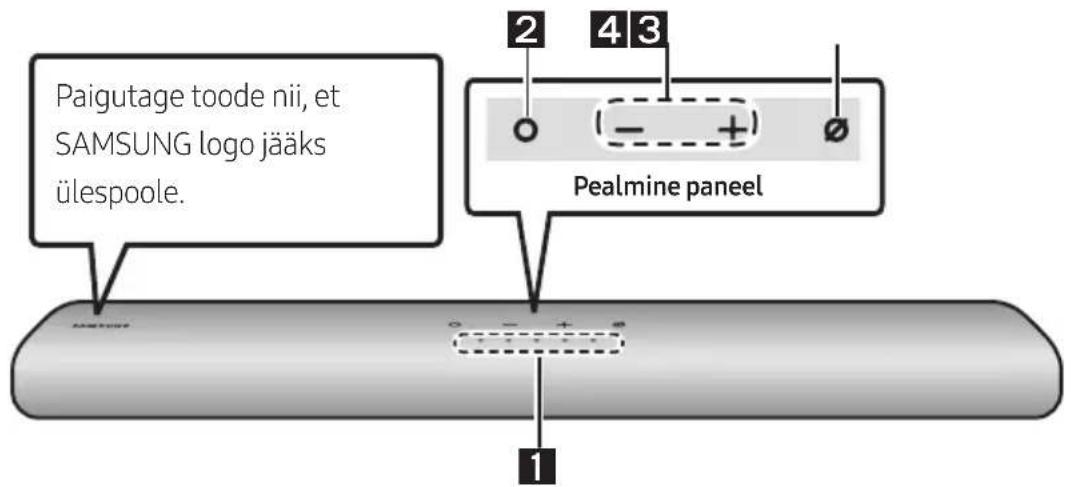
natural_image
Three-step diagram showing a mechanical component before and after assembly, with no visible text or symbols.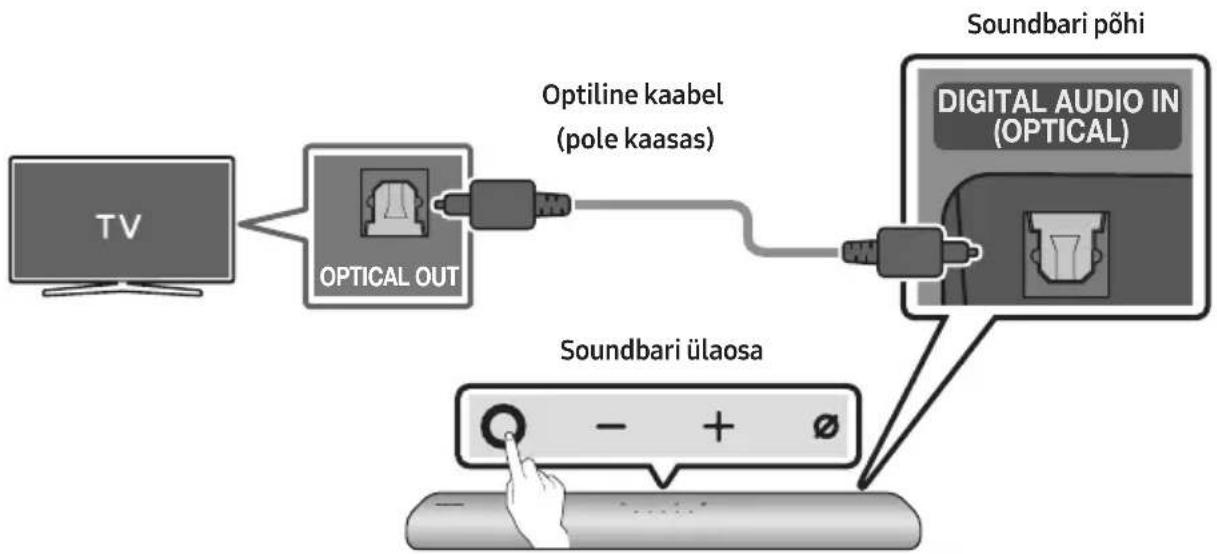
flowchart
graph LR
    TV["TV"] --> OpticalOut["Optical OUT"]
    OpticalOut --> OptilineKaabel["Optiline kaabel (pole kaasas)"]
    OptilineKaabel --> DigitalAudioIn["Digital Audio In (OPTICAL)"]
    DigitalAudioIn --> SoundbariÜlaosa["Soundbari ülaosa"]
    SoundbariÜlaosa --> HandIcon["Hand icon"]

natural_image
Illustration of a TV with wireless signal icons above it (no text or symbols on the TV itself)Esmane ühendus
1.
09 ÜHENDAMINE APPLE AIRPLAY 2-GA
natural_image
Diagram showing a screw being inserted into a nut, with arrows indicating direction (no text or symbols)natural_image
Diagram of a mechanical device with a screw and adjustment knob, showing rotational motion (no text or symbols)- Kokkupanekul veenduge, et Seinakinnituskronstein riputusosad jääksid Soundbari taha.
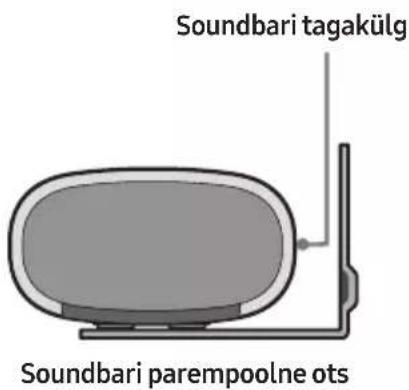
- Paigaldage Soundbar koos selle külge kinnitatud Seinakinnituskronstein, riputades Seinakinnituskronstein seinal olevatele Hoidikkruvi.
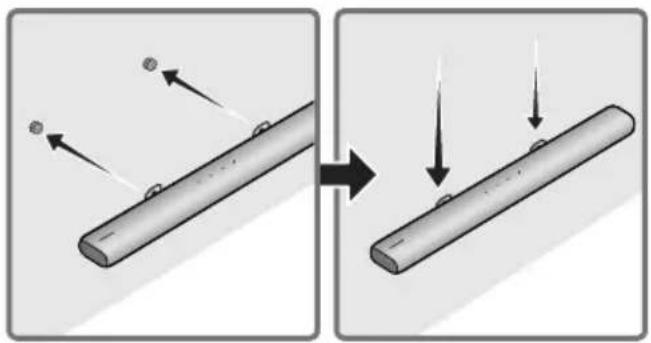
natural_image
Diagram showing two stages of a cylindrical object with arrows indicating motion, no text or symbols present- Libistage Soundbari alla, nagu on allpool näidatud, nii et Seinakinnituskronstein toetuksid Hoidikkruvi.
- Sisestage Hoidikkruvi Seinakinnituskronstein laia (alumisse) ossa ja seejärel libistage Seinakinnituskronstein allapoole, nii et Seinakinnituskronstein toetuksid kindlalt Hoidikkruvi.

flowchart
graph TD
    A["Top View"] --> B["Down Arrow"]
    B --> C["Bottom View"]
    style A fill:#f9f,stroke:#333
    style C fill:#bbf,stroke:#333
11 SOUNDBARI PAIGALDAMINE TELERI ETTE
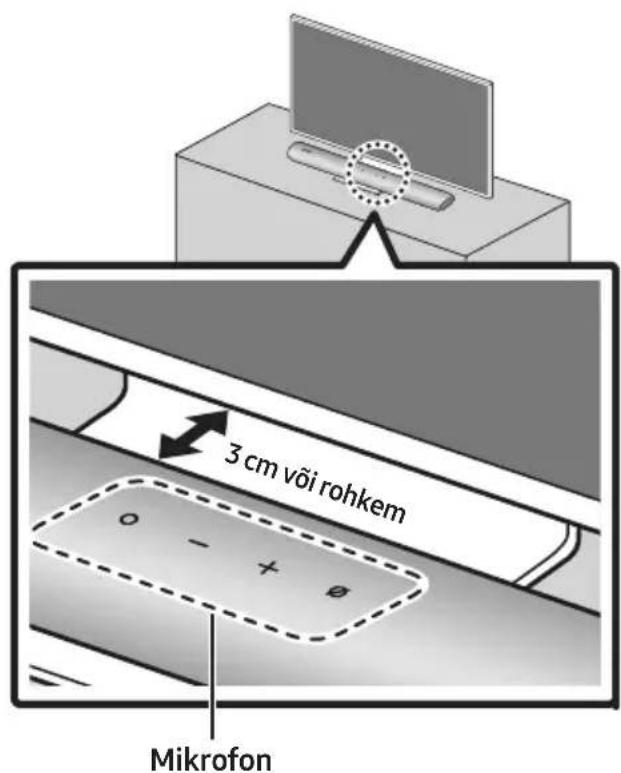
Manufactured under license from Dolby Laboratories. Dolby, Dolby Audio and the double-D symbol are trademarks of Dolby Laboratories Licensing Corporation.
dts.
For DTS patents, see http://patents.dts.com. Manufactured under license from DTS, Inc. (for companies headquartered in the U.S./Japan/Taiwan) or under license from DTS Licensing Limited (for all other companies). DTS, Digital Surround, and the DTS logo are registered trademarks or trademarks of DTS, Inc. in the United States and other countries. © 2020 DTS, Inc. ALL RIGHTS RESERVED.

The terms HDMI and HDMI High-Definition Multimedia Interface, and the HDMI Logo are trademarks or registered trademarks of HDMI Licensing Administrator, Inc. in the United States and other countries.

Works with Apple AirPlay
• Apple, AirPlay, iPhone, iPad, HomePod, and Apple TV are trademarks of Apple Inc., registered in the U.S. and other countries.
- Use of the Works with Apple badge means that an accessory has been designed to work specifically with the technology identified in the badge and has been certified by the developer to meet Apple performance standards.
15 AVATUD LÄHTEKOODI LITSENTSI TEATIS
www.samsung.com/ee/aboutsamsung/sustainability/environment/our-commitment/data/
KOMISJONI MÄÄRUS (EL) 2019/1782
02 GAMINIO APŽVALGA
Viršutinis „Soundbar“ skydelis