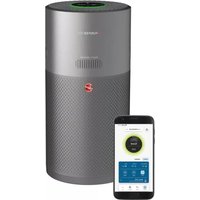
HHP55CA011 - Air purifier CANDY - Free user manual and instructions
Find the device manual for free HHP55CA011 CANDY in PDF.



| Product Type | Air purifier with diffuser and CO alert |
| Brand | Candy |
| Model | HHP55CA011 |
| Sensors | PM10, PM2.5, VOCs (gas), temperature, humidity, CO |
| Air quality indicator | LED ring: green, yellow, orange, red |
| Purification modes | Auto, Max, Night, Pollen allergies (via app) |
| Diffuser function | H-Essence oils or H-Biotics probiotics, 4 settings (Soft, Medium, Custom, H-Biotics) |
| Connectivity | Wi-Fi 802.11 b/g/n, Bluetooth 4.2, compatible with hOn app, Hey Google, Amazon Alexa |
| Display | Digital screen with PM10, PM2.5, gas, temperature, humidity, filter status |
| Parental control | Child Lock (3-second lock) |
| Lighting | Light control: On, Dim, Off |
| Carbon monoxide alert | Integrated sensor, audible and visual alarm, 7-year lifespan |
| Filter | Filter set with pre-filter, replacement recommended based on usage |
| Filter maintenance | Clean outer layer with vacuum cleaner; replace if alerted |
| Diffuser maintenance | Clean with soft dry cloth after use |
| Power supply | 220-240 V ~ 50 Hz (check label) |
| Required clearance | 20 cm behind and sides, 30 cm above |
| Operating temperature | 0°C to +40°C |
| Operating humidity | 15 – 90% RH |
| Storage | Cool dry place, cord stored, filter dry |
| Warranty | According to country conditions, invoice required |
| Spare parts | Hoover filters and consumables available from retailer |
Frequently Asked Questions - HHP55CA011 CANDY
User questions about HHP55CA011 CANDY
0 question about this device. Answer the ones you know or ask your own.
Ask a new question about this device
Download the instructions for your Air purifier in PDF format for free! Find your manual HHP55CA011 - CANDY and take your electronic device back in hand. On this page are published all the documents necessary for the use of your device. HHP55CA011 by CANDY.
USER MANUAL HHP55CA011 CANDY
natural_image
White and gray multi-sensor air purifier device with visible brand logo (no text or symbols on body)GENERAL SAFETY WARNINGS
This appliance should only be used for private household use, as described in this user guide. Please ensure that this guide is fully understood before operating the appliance and keep for future reference.
Check if the voltage and ratings indicated on the label of the appliance correspond to the local power voltage before you connect the appliance.
If the power cord is damaged stop using the appliance immediately. To avoid a safety hazard, an authorized HOOVER service engineer must replace the power cord.
Do not remove the plug by pulling the power cord.
Lay the supply cord so nobody will step on or trip over it.
Always switch off and unplug the appliance before moving or cleaning the appliance or any maintenance task.
This appliance can be used by children aged from 8 years and above and persons with reduced physical, sensory or mental capabilities or lack of experience and knowledge if they have been given supervision or instruction concerning use of the appliance in a safe way and understand the hazards involved. Children shall not play with the appliance.
Cleaning and user maintenance shall not be made by children without supervision.
The appliance does not remove carbon monoxide (CO) or radon (Rn). It cannot be used as safety device in case of accidents with combustion processes and hazardous chemicals.
Do not continue to use your appliance if it appears faulty.
Do not block the air inlet or air outlet.
Do not insert your fingers or objects into the air outlet or the air inlet to prevent physical injury or malfunctioning of the appliance.
Do not clean the appliance with water, any other liquid, or a (flammable) detergent, nor let them enter the appliance to avoid electric shock and/or a fire hazard.
Do not spray any flammable materials such as insecticides or fragrance around the appliance.
This appliance is not a substitute for proper ventilation, regular vacuum cleaning, or use of an extractor hood or fan while cooking.
Use only consumables, filters or spares recommended or supplied by HOOVER.
Make sure the filter is properly installed before you switch on the appliance.
Avoid knocking against the appliance (the air inlet and outlet in particular) with hard objects.
Keep the product dry.
Never tilt or empty the product during operation.
When the appliance is not used for a long time, bacteria may grow on the filters. Check the filters after a long period of disuse. If the filters are very dirty, replace them.
HOOVER service: To ensure the continued safe and efficient operation of this appliance we recommend that any servicing or repairs are only carried out by an authorized HOOVER service engineer.
USING ENVIRONMENT
Place and use the product only on a dry, stable, level horizontal surface, so that tipping over is excluded.
Leave at least 20cm free space behind and on both sides of the appliance and leave at least 30cm free space above the appliance.
To prevent interference, place the appliance at least 2m away from electrical appliances that use airborne radio waves such as TVs, radios, and radio-controlled clocks.
Do not place anything on top of the appliance.
Do not use this appliance when you have used indoor smoke-type insect repellents or in places with oily residues, burning incense, or chemical fumes.
Do not place the appliance in any of the following locations:
- On hot surfaces, near hot surfaces, open fire or in direct sunlight, near gas appliances, heating devices or fireplaces;
- Next to or directly above heaters or air conditioning vents, doors, windows, extractor fans, cookers or anywhere that it would be affected by draughts;
- In a bathroom or other areas where the product may be exposed to water splashes, dripping or condensation (e.g. directly below an air conditioner or above an electric kettle);
- In an enclosed space (e.g. in or below a cupboard);
- In an area where the temperature could drop below -20^ or rise above 50^ ;
- In a room with major temperature changes, in wet surroundings or in surroundings with high ambient temperatures or high humidity, such as the bathroom, toilet, or kitchen;
- Where it would be obstructed, e.g. by curtains or furniture;
- Where dirt or dust could block the sensor.
CO MONITOR SAFETY INSTRUCTIONS
If CO alarm is activated, you should open all windows and doors (if safe to do so). Turn off all fuel burning appliances if possible and then evacuate the property leaving the windows and doors open. Get immediate medical help for anyone suffering the effects of carbon monoxide poisoning. Do not re-enter the property until the alarm stops. The alarm will stop once the CO has cleared. Do not use fuel burning appliances again until the CO source has been located and rectified by a qualified technician.
Avoid using paint, thinners, solvent fumes, air fresheners, aerosol sprays or chemical cleaners near the appliance. This may affect functioning of CO monitor.
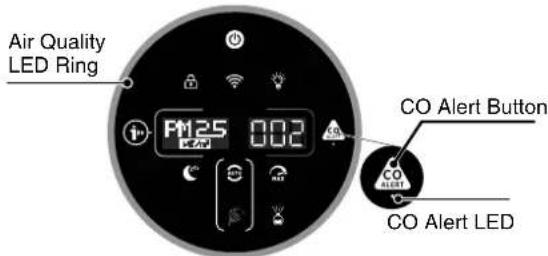
To activate the CO monitor, connect the plug to a socket outlet. The CO Alert LED will display green. When the CO monitor detects unsafe level of CO, the CO alarm will ring loudly and the CO Alert button and Air Quality LED Ring will blink in red color. The alarm will continue to ring until the detected CO reduces to a safe level.
Touch CO Alert Button for 3 seconds to test the CO Alarm function and the alarm will ring loudly for 5 seconds. Test the alarm monthly and after prolonged absence from the building (e.g. holidays). If the alarm fails to ring after touching the CO Alert Button for 3 seconds, please contact the Hoover customer care center to arrange a qualified technician to repair the fault.
If the display indicates that the CO sensor is faulty or end of life has been reached, please contact the Hoover customer care center to arrange a qualified technician to replace the CO sensor. The expected lifetime of the CO sensor is 7 years and must be replaced after this time. Do not allow small children to press the CO Alert button for 3 seconds as they could be subject to excessive noise when the alarm rings.
Operating Humidity: 15 – 90% RH
Operating Temperature: 0°C to +40°C
Carbon Monoxide affects the body by starving (suffocating) critical organs of oxygen.
When CO is inhaled it attaches to the hemoglobin in the blood that normally carries oxygen throughout the body. CO permanently displaces the ability for oxygen molecules to attach to the hemoglobin, thus reducing oxygen to vital organs. The concentration level and time exposed to CO can vary its effects on the body, but experts agree even low levels of carbon monoxide exposure over prolonged periods can have serious and lasting affects to anyone's overall health.
WARNING: THE CO ALARM IS DESIGNED TO PROTECT INDIVIDUALS FROM THE ACUTE EFFECTS OF CARBON MONOXIDE EXPOSURE OR PREVENT THE CHRONIC EFFECTS OF CARBON MONOXIDE EXPOSURE. IT WILL NOT FULLY SAFEGUARD INDIVIDUALS WITH SPECIFIC MEDICAL CONDITIONS. IF IN DOUBT CONSULT A MEDICAL PRACTITIONER.
The CO Monitor function is not to be used as, nor implied to be used as a substitute for an EN 50291-1, UL-2034, CSA-6.19 or any other recognized standard certified carbon monoxide alarm where Local or Regional Codes or legislation mandate their use. The CO Monitor function is a supplemental carbon monoxide monitoring device only. Use of this device is at the user's discretion and implies the understanding and acceptance of its limitations to adhere to codes or legislation where applicable.
This appliance should not be used as a substitute for proper installation, use and maintenance of fuel burning appliances including appropriate ventilation and exhaust systems.
The CO monitor mobile and tablet notifications require a functional Wi-Fi connection to operate. They are not a substitute for a third-party emergency monitoring service.
DIFFUSER SAFETY INSTRUCTIONS
Use only aroma oil recommended or supplied by HOOVER.
Avoid using stand-alone humidifier next to the air purifier when using Diffuser function of H-Essence.
Wipe any spillage of H-Essence immediately. Make sure to clean every corner of the product that had contact with H-Essence.
The Environment
This appliance is marked according to the European directive 2012/19/EU on Waste Electrical and Electronic Equipment (WEEE). By ensuring this product is disposed of correctly, you will help prevent potential negative consequences for the environment and human health, which could otherwise be caused by inappropriate waste handling of this product.
The symbol on this appliance indicates that this appliance may not be treated as household waste. Instead it must be handed over to the applicable collection point for the recycling of electrical and electronic equipment. Disposal must be carried out in accordance with local environmental regulations for waste disposal. For more detailed information about treatment, recovery and recycling of this appliance, please contact your local city office, your household and waste disposal service or the shop where you purchased the appliance.
Wireless Parameters for Pairing
| Technology Wi-Fi Bluetooth | ||
| Standard IEEE 802.11 | b/g/n Bluetooth v4.2,BLE | |
| Frequency Band(s) (MHz) 2401~2483 2402~2480 | ||
| Maximum Power (mW) 100 | 10 | |
| Maximum RF power transmitted In the frequency band | 18.9 dBm | |
Hereby, Candy Hoover Group Srl declares that the radio equipment is in compliance with Directive 2014/53/EU. The full text of the EU declaration of conformity is available at the following internet address: www.candy-group.com
CANDY HOOVER GROUP S.r.l. Via Privata Eden Fumagalli, 20861 Brugherio (MB) Italy
- GETTING TO KNOW YOUR H-PURIFIER

| 1 | Control Panel / Display |
| 2 | Air Outlet |
| 3 | Product Carry Handle |
| 4 | Filter Assembly |
| 5 | Air Inlet Cover Handle |
| 6 | Filter Release Switch |
| 7 Air | Inlet Cover |
| 8 Diffuser Window | |
| 9 Diffuser Cover | |
| 10 Diffuser Outlet | |
| 11 Diffuser Unit | |
| 12 H | Essence Bottle (Green) |
| 13 H | Biotics Bottle (Brown) |
| 14 | Power Cord & Plug |
| 15 | Storage Hook |
| 16 | Transportation Location |

| 14 | Air Quality LED Ring |
| 15 | Power Button |
| 16 | Child Lock Button |
| 17 | Digital Display |
| 18 | Information Button |
| 19 | Sleep Mode Button |
| 20 | Auto Mode Button |
| 21 | Pollen Allergy Circle Lamp |
| 22 | Pollen Allergy Lamp |
| 23 | Diffuser Button |
| 24 | Max Mode Button |
| 25 | CO Alert Button & LED |
| 26 | Light Control Button |
| 27 | Wi-Fi Button |
1.1 MULTI SENSOR SYSTEM
Thanks to the Multi Sensor System your product will continuously monitor the indoor air condition in terms of PM10, PM2.5 and Volatile Organic Compounds (GAS).
Each time you switch your product on, the Multi Sensor System will start analyzing the indoor air quality and the Air Quality LED Ring will illuminate with different colors representing real time air quality conditions.
| Air Quality LED Ring Color | Indoor Air Quality | PM 10 value* μg/m3 | PM 2.5 value μg/m3 | GAS VOC Level |
| GREEN Excellent 0-50 0-25 L1 | ||||
| YELLOW Satisfactory 50-80 25-50 L2 | ||||
| ORANGE Poor 80-160 50-100 L3 | ||||
| RED Very poor ≥ 160 ≥ 100 L4 |
* In Pollen Allergy mode, PM 10 values that trigger the air quality level will be lower to minimize the risk for allergic people.
1.2 CARBON MONOXIDE (CO) ALERT
H-Purifier is equipped with an alert system that will constantly monitor the indoor air for Carbon Monoxide (CO).
When the Carbon Monoxide alarm is activated, the AIR Quality LED Ring, Infomation & CO Alert button will flash red simultaneously and an audible alarm will sound. The alarm will remain in operation until the Carbon Monoxide (CO) concentration has reduced to below 50 ppm unless silenced manually by pressing the CO Alert Button for 3 seconds.
The CO Alert LED shows the working condition of the CO sensor. It appears in green color when the CO sensor is in normal condition, in yellow color when the sensor is malfunctioning or exceeds its working life and in red color when CO alert is activated.
You can test if the alarm is working properly by pressing the CO Alert Button for 3 seconds, a loud buzzer sound will last for 5 seconds if the alarm works properly.
2. PREPARING YOUR H-PURIFIER
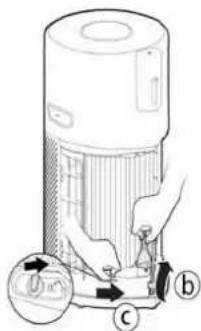
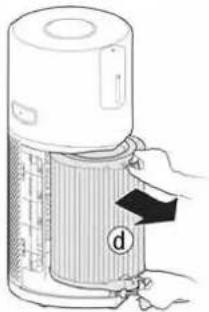
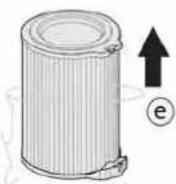
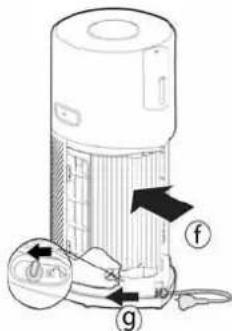
2.1 INSTALL THE FILTER [Fig. 1]
Before using your H-Purifier product you will need to remove the Filter from its protective packaging:
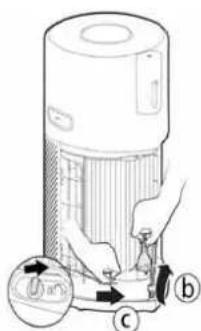
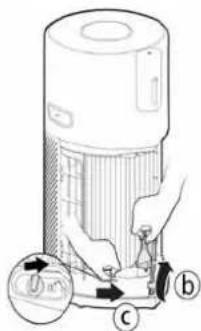
- Remove the Air Inlet Cover from your product, grip the two Air Inlet Cover Handles and pull from the product. [Fig. 1a]
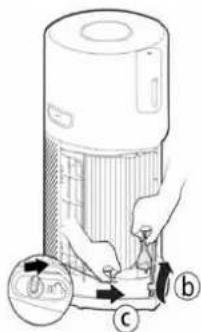
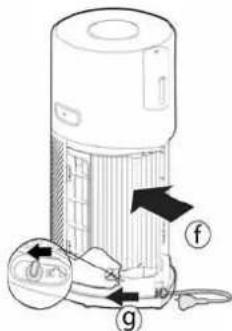
- Remove the plug from the Transportation Location and release the cord from the Storage Hook. [Fig. 1b]
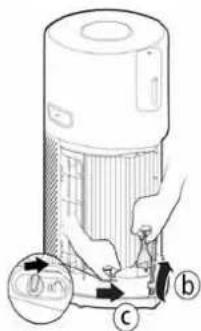
- Unlock the Filter Release Switch. [Fig. 1c]
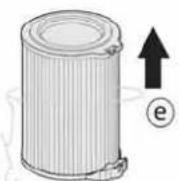
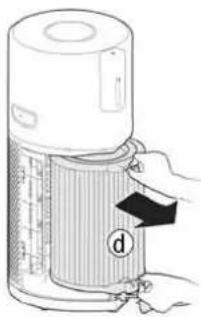
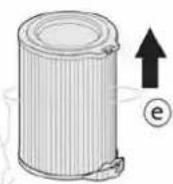
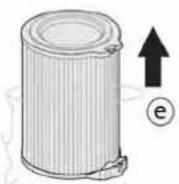
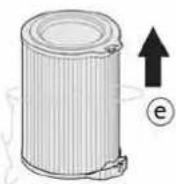
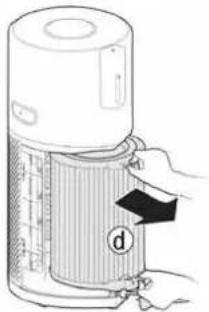
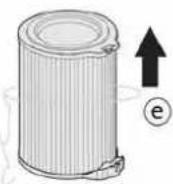
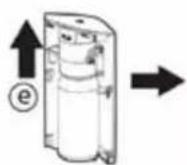
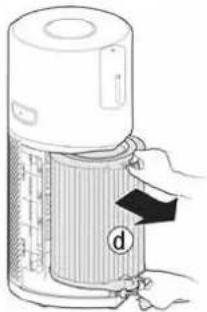
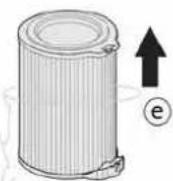
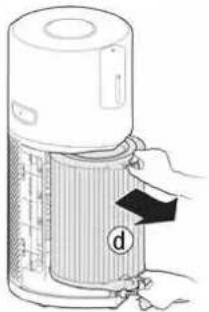
- Remove the Filter from your product and remove the outer packaging. [Fig. 1d,e]
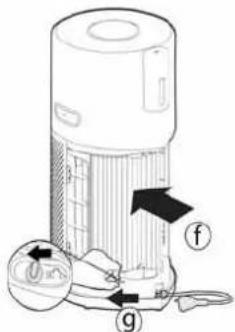
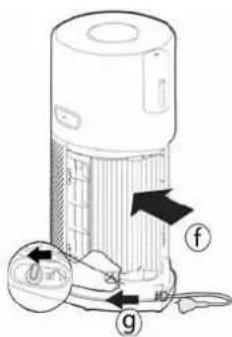
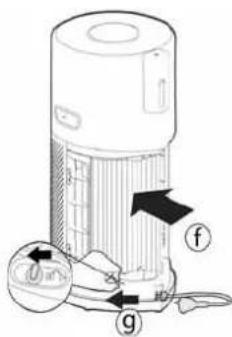
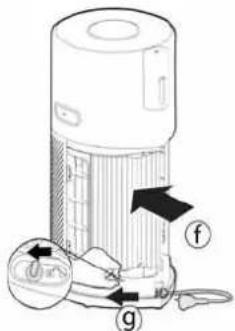
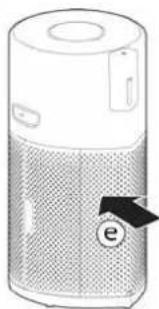
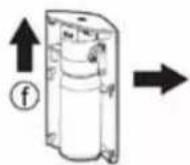
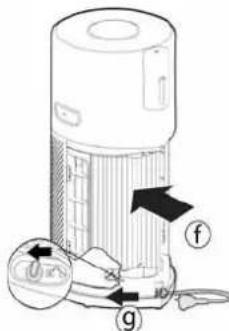
• Refit the Filter into your product. [Fig. 1f] - Lock the Filter Release Switch. [Fig. 1g]
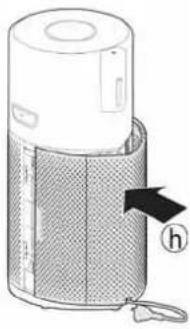
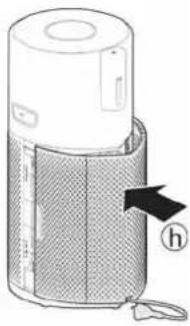
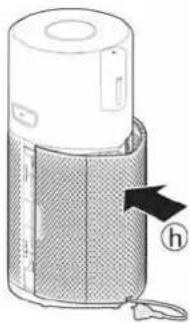
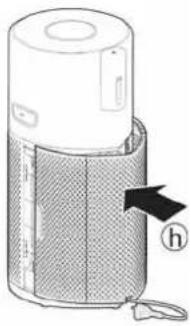
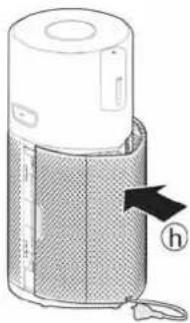
- Refit the Air Inlet Cover to your product. [Fig. 1h]
![CANDY HHP55CA011 - INSTALL THE FILTER [Fig. 1] - 1](/content/2026/04/652599/images/260a75062214bbc537d5d8fe063f6db737a14e84d2ee8222fbe52d647ee8e762.jpg)
natural_image
Diagram of a device with a handle and labeled component 'a' (no text or symbols beyond label)

![CANDY HHP55CA011 - INSTALL THE FILTER [Fig. 1] - 4](/content/2026/04/652599/images/54c4d6d6e708c7894b5e83f5f2970a4efd8d1445f25d59ae761eb19f3d14f408.jpg)

![CANDY HHP55CA011 - INSTALL THE FILTER [Fig. 1] - 6](/content/2026/04/652599/images/eab7c45951715f3939ed1e8bb2844d820ea6207a553edd60917ecd0739ce21aa.jpg)
natural_image
Illustration of a portable electronic device with mesh cover and label 'h' (no text or symbols on the device itself)Fig. 1
2.2 INSTALL THE DIFFUSER BOTTLE [Fig. 2]
To prepare your H-Purifier product for the Diffuser function:
- Remove the Diffuser Cover from the product. [Fig. 2a]
- Remove the Diffuser Unit from the Diffuser Cover. [Fig. 2b]
- Remove the bottle of H-Essence or H-Biotics from the packaging and remove the cap. [Fig. 2c]
- Preserve the cap for future storage use.
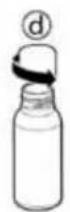
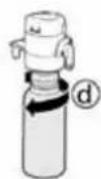
- Tightly screw the bottle on the Diffuser unit. [Fig. 2d]
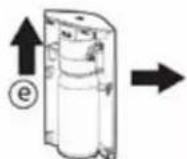
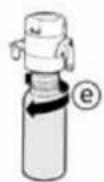
- Refit the Diffuser Unit into the Diffuser Cover. [Fig. 2e]
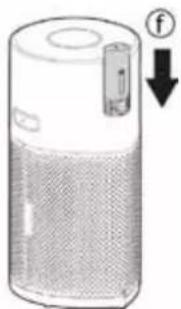
• Refit the Diffuser Cover into the product. [Fig. 2f]
![CANDY HHP55CA011 - INSTALL THE DIFFUSER BOTTLE [Fig. 2] - 1](/content/2026/04/652599/images/c39db61be23833f810e273e24bfb1dfc380666d5a22c003b2cb18775faa8d4f4.jpg)
natural_image
Diagram of a cylindrical device with a label 'a' and an arrow pointing upward (no text or symbols on the device itself)![CANDY HHP55CA011 - INSTALL THE DIFFUSER BOTTLE [Fig. 2] - 2](/content/2026/04/652599/images/9ba9e042437337f9bba69270a52caab8756837dfa7712b407bb2568825dcfec2.jpg)
![CANDY HHP55CA011 - INSTALL THE DIFFUSER BOTTLE [Fig. 2] - 3](/content/2026/04/652599/images/93d653edbe8d1663bb00a925ec5989d11155568e5a9146bdf56ef29c60745815.jpg)
![CANDY HHP55CA011 - INSTALL THE DIFFUSER BOTTLE [Fig. 2] - 4](/content/2026/04/652599/images/335df36f02bb7152485e4378ee8119ffac434242f0d67a16cc78609f4461412e.jpg)
![CANDY HHP55CA011 - INSTALL THE DIFFUSER BOTTLE [Fig. 2] - 5](/content/2026/04/652599/images/104b4c612dfcf908a609fefebdfad90fd6ea7548e7007e1be8b501d37eaf3f38.jpg)
![CANDY HHP55CA011 - INSTALL THE DIFFUSER BOTTLE [Fig. 2] - 6](/content/2026/04/652599/images/0d2cc5e086247a877da4e688621a74a88fe130a603549270fbeb38ee44c52a5f.jpg)
![CANDY HHP55CA011 - INSTALL THE DIFFUSER BOTTLE [Fig. 2] - 7](/content/2026/04/652599/images/f78f36d088df50a8e4f632f1b5963f444918c098f47b748c320fd29d134dfba2.jpg)
natural_image
Illustration of a cylindrical electronic device with a speaker grille and a battery icon, showing no text or symbols.Fig. 2
3. USING YOUR H-PURIFIER
3.1 SWITCH ON THE PRODUCT [Fig. 4]:
Pull out the power cord from the cord reel and plug into a power supply.
All lights on the Control Panel / Display will fully illuminate for approximately 1 second to indicate a successful plug in.
The POWER button will be dimly lit and the CO Alert LED will be ON to indicate that the dedicated sensor has started working to monitor the indoor Carbon Monoxide level.
To switch on your product, press the POWER button on the display.
The Air Quality LED Ring will illuminate through all colours in sequence whilst the sensors are analysing the realtime air quality condition. After a few seconds, the Air Quality LED ring will select the appropriate colour for the air quality at that time.
Your H-Purifier product will immediately enter AUTO MODE and begin to purify the indoor air.
The AUTO MODE button, INFORMATION button, LIGHT CONTROL button and PM10 information on the Display will illuminate.
3.2 CONNECT YOUR H-PURIFIER:
In order to access all the H-Purifiers functions from anywhere, it is suggested to download the hOn App. You will be able to control your product in the most efficient way.
Instructions:
- Download the hOn application from the Apple App Store, Google Play or Huawei App Gallery. You can also download it by scanning the QR code in [Fig. 5]
- Open the APP, create an account with your e-mail and a password.
- Confirm and log into the hOn App.
- Ensure your mobile device is connected to Wi-Fi.
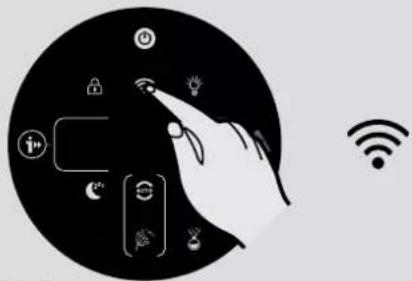
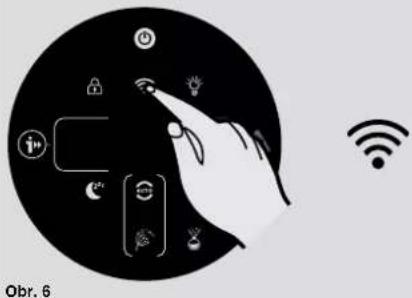
- Ensure your H-Purifier is switched on. Press and hold the Wi-Fi button on the display for 5 seconds, there will be an audible beep and the Wi-Fi button will start flashing to indicate it is waiting for a connection. [Fig. 6]
- Follow the in app instructions to connect your mobile device to your product.
- When successfully paired, the Wi-Fi button on the product will remain illuminated.
- To reset the Wi-Fi, press & hold the Wi-Fi button for 5 Secs.
H-Purifier also works with Hey Google and Amazon Alexa.
3.3 DISCOVER ALL THE FUNCTIONS
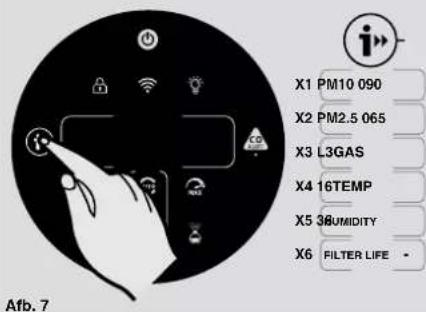
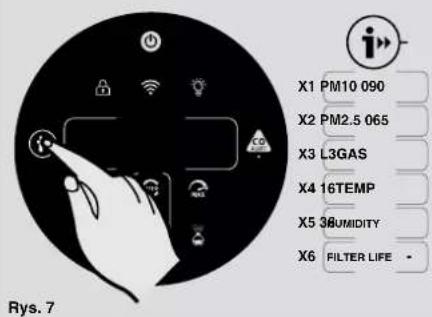
INFORMATION Function [Fig. 7]:
There are 6 different data sets available to monitor:
PM10, PM2.5, GAS, Temperature, Humidity, and Filter Status.
To monitor each value simply press consecutively the INFORMATION button.
By default the display will show the PM10 data, the machine will remember user's last selection and maintain this selection the next time the product is switched on.
The GAS data will show a spinning cursor during the first 3 minutes after product is switched on, while the GAS sensor is performing a calibration cycle.
More info on PM 2.5, PM 10 and GAS:
PM indicates fine particles (not visible to the human eye) deriving mainly from outdoor pollution such as vehicles and industrial emissions and potentially dangerous to our health in case of prolonged exposure.
PM 10 have a size up to 10 m and are capable of penetrating the upper respiratory tract (nose, trachea, pharynx).
PM 2.5 have a size up to 2.5 m and given their small dimension, they can reach our lungs, thus penetrating deeper into our body.
GAS VOC (volatile organic compounds) are volatile chemical compounds with the ability to evaporate easily in the air at room temperature. Deodorants, detergents, glues, adhesives, cosmetics, formaldehyde are just some of the VOCs that could be present in our homes but potentially harmful to our health in case of prolonged exposure.
MODE Functions:
There are 3 available air purifying modes: AUTO MODE, MAX MODE & SLEEP MODE.
Auto mode is the default setting for your product when switched on, all modes can be selected manually by pressing the related button on the display.
POLLEN ALLERGY mode can only be activated via the hOn app.
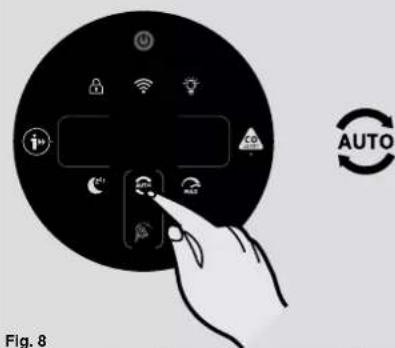
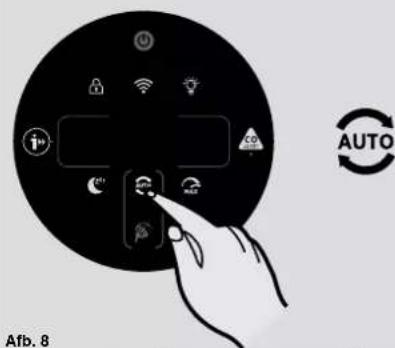
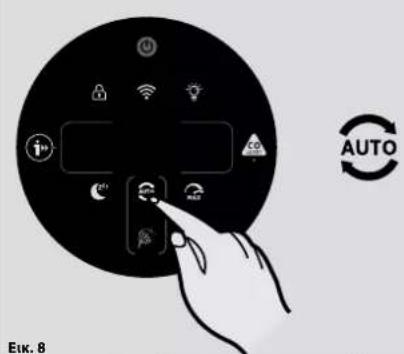
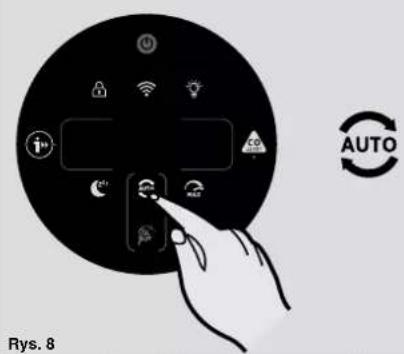
AUTO MODE [Fig. 8]:
This is the default mode of your H-Purifier product when first switched on. In Auto Mode, the H-Purifier automatically adjust its fan speed to the actual indoor air quality level to always guarantee an optimal air purification.
This is the recommended setting for your product.
In AUTO mode, after 30 minutes of excellent air quality, your product will enter an ECO mode (Stand-by function) by pausing the purifying function (fan), the Multi Sensor System will continue to analyse the indoor air and automatically switch on the purifying function when required.

![CANDY HHP55CA011 - AUTO MODE [Fig. 8]: - 2](/content/2026/04/652599/images/ee098b963ac5a18e205e80380086d99473007f011f8019ee73b3dd5001f8fa4b.jpg)
natural_image
Illustration of a white air purifier with a plug inserted into a wall socket (no text or symbols)Fig. 4

Fig. 5
![CANDY HHP55CA011 - AUTO MODE [Fig. 8]: - 4](/content/2026/04/652599/images/4b3a5314c62ecc8bcafdd0c2d367a35c4e4075eae017ebaa3fac1cd042187d28.jpg)
natural_image
Illustration of a hand interacting with a device icon set in a circle, next to a Wi-Fi symbol (no text or labels)Fig. 6

Fig. 7
GB
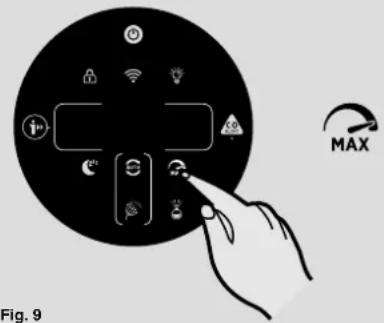
Fig. 9
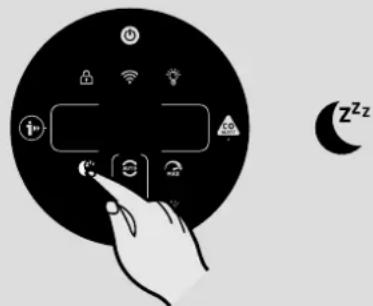
Fig. 10

Fig. 11

Fig. 12

natural_image
Icon showing a hand interacting with a digital interface, accompanied by a padlock symbol (no text or labels)Fig. 13

Fig. 14
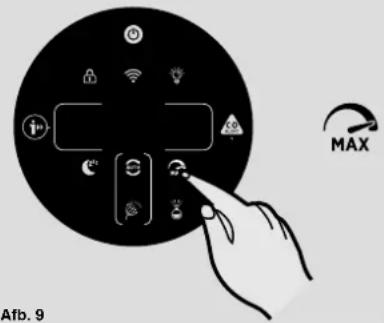
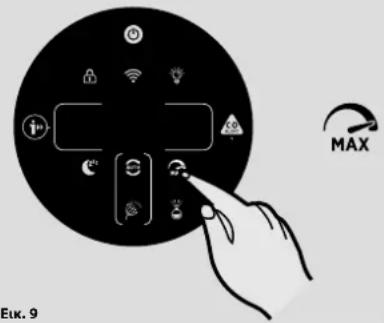
MAX MODE [Fig. 9]:
Press the MAX mode button on the display to activate air purifying at maximum power setting. To exit MAX mode simply select AUTO mode or SLEEP mode.
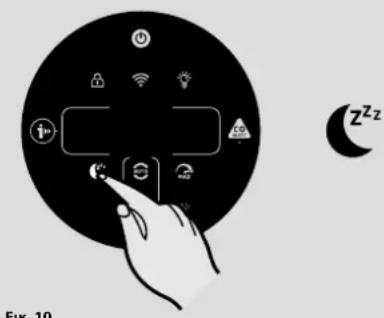
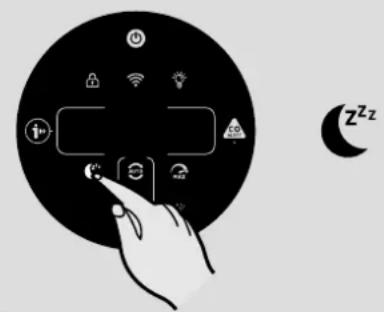
SLEEP MODE [Fig. 10]:
Press the SLEEP mode button to activate air purifying at the lowest silent power setting. The SLEEP mode button will be dimly lit and all other display lights will be off. This can be modified by pressing the LIGHT CONTROL button.
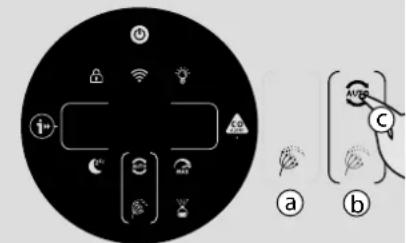
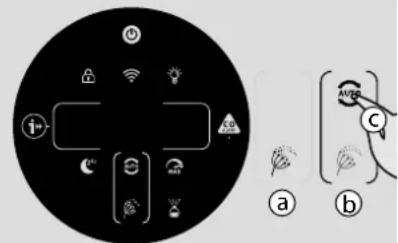
POLLEN ALLERGY MODE: [Fig. 11]
The Pollen Allergy mode can only be activated via the hOn APP. You will first be required to activate and register a profile in the app, in order to create your Pollen Allergy Profile.
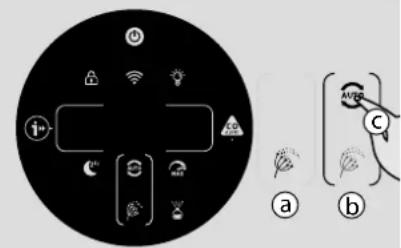
The Pollen Allergy mode works only when AUTO MODE is selected. [Fig. 11c]
In Pollen Allergy mode, the appliance continuously receives real time data from the APP about
the monitored pollen concentration outdoor, and works automatically to maximize pollen capturing performance.
Once pollens are captured, they are inactivated to help alleviate allergic symptoms.
When Pollen Allergy mode is activated in the App, there are 2 possible notification lamps on the product display:
- The Pollen Allergy Lamp is WHITE [Fig. 11a]: The appliance and the App are monitoring the presence of pollens outdoor and there is no risk.
- The Pollen Allergy Lamp turns YELLOW and the Pollen Allergy Circle lamp is WHITE [Fig. 11b]: The appliance and the APP have detected risk.
If the product is manually put into SLEEP mode or MAX mode whilst Pollen Allergy mode is activated, the Pollen Allergy mode will stop.
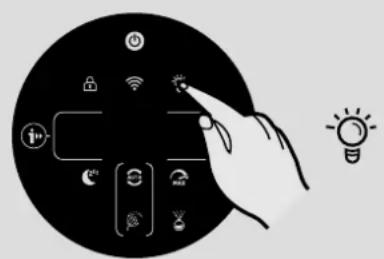
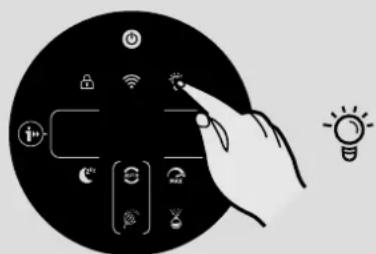
LIGHT CONTROL Function: [Fig. 12]
There are 3 settings available for the display lighting: On, Dim & Off.
To adjust the brightness of the display simply press the LIGHT CONTROL button on the display to cycle through the 3 available options. ON is the default setting.
If OFF is selected, any other button will need to be pressed twice to activate, after one press, the lights will become DIM, on second press the action will be activated.
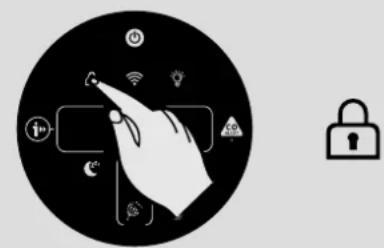
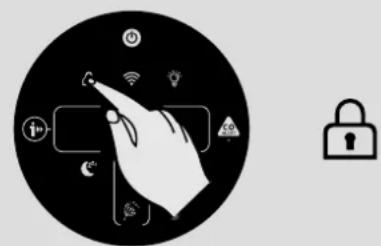
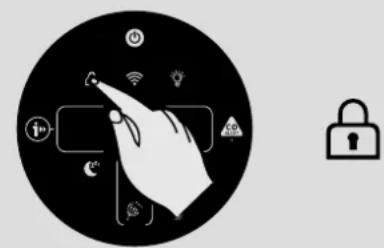
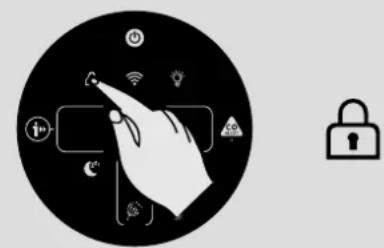
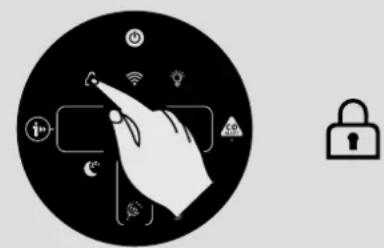
CHILD LOCK Function: [Fig. 13]
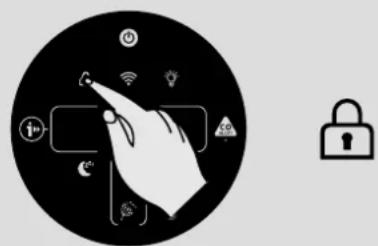
Press and hold the CHILD LOCK button for 3 seconds to activate this function, an audible sound will be heard when it has been activated and the CHILD LOCK button will remain illuminated. No other buttons will work when activated.
To exit, simply press and hold the CHILD LOCK button for 3 seconds, an audible sound will be heard confirm it is off and the button will no longer be illuminated.
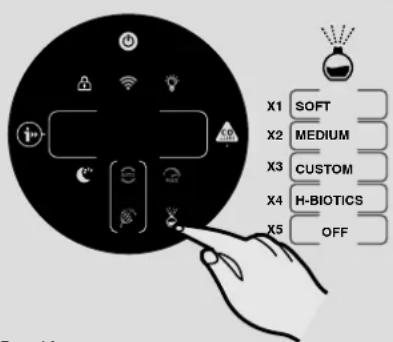
DIFFUSER Function: [Fig. 14]
The diffuser spreads into the air of the room H-Essence or H-Biotics. H-Essence is the Hoover collection of essential oils to release into the air enjoyable fragrances.
H-Biotics is a natural blend based on probiotics that keeps the room bio-hygenized by inhibiting the growth of microorganisms such as bacteria or microbes.
There are 4 different settings for the DIFFUSER function: SOFT, MEDIUM, CUSTOM & H-BIOTICS. To activate this function simply press the Diffuser button on the Display, the default setting for this function is SOFT, to select any of the other settings simply consecutively press the button to change to the desired selection. The button will illuminate white when switched on.
It is recommended to use SOFT & MEDIUM settings for H-Essence.
CUSTOM setting can only be created on the hOn app.
When using H-Biotics, the setting MUST be on H-Biotics. Once user activates H-Biotics using the APP, this will give an alert of “ACTIVATE H-BIOTICS” after 120 hours to ensure the use of H-Biotics every 5 days.
When using H-Essence in certain settings or room environment, the GAS VOC level may change due to the detection of the fragrances. The Diffuser Function only works when the Air Quality LED Ring is on green color, it will pause when the LED Ring is not green and continue working when it gets back to green.
The Diffuser function can only be used in AUTO & MAX modes and cannot be used in SLEEP mode.
When activating the Diffuser function in AUTO mode, the main fan will work with a specific speed to help to spread the H-Essence or the H-Biotics into the room.
| Setting Diffusing | Timing Cycle max duration | |
| SOFT for 10 sec | every 5 min 6 hours | |
| MEDIUM for 90 sec | every 3.5 min 6 hours | |
| CUSTOM User Defined | 6 hours | |
| H-BIOTICS for 2 min | every 4 min 6 hours |
4. MAINTAINING YOUR H-PURIFIER
4.1 FILTER MAINTENANCE
Your H-Purifier will monitor the condition of your filter. A CLEAN FILTER or REPLACE FILTER alert will blink on the left side of the display indicating action is required to clean or change the filter.
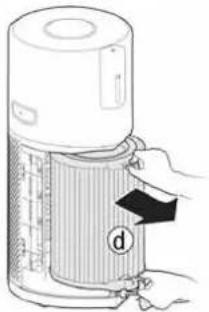
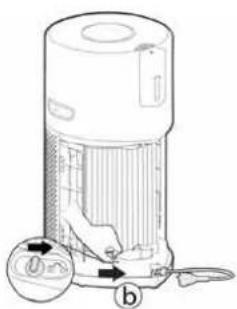
Cleaning / Replacing the Filter: [Fig. 15]
- Remove the Air Inlet Cover from your product. [Fig. 15a]
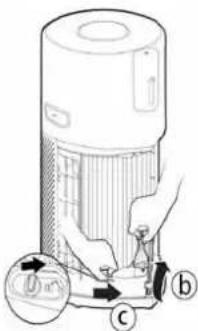
- Unlock the Filter Release Switch. [Fig. 15b]
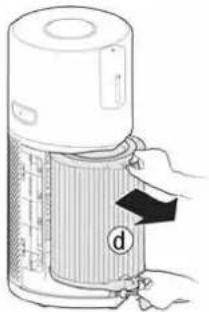
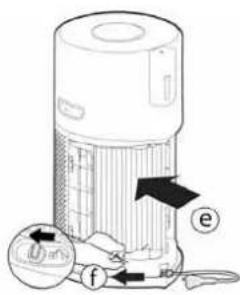
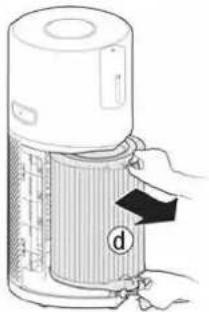
- Remove the Filter from your product. [Fig. 15c]
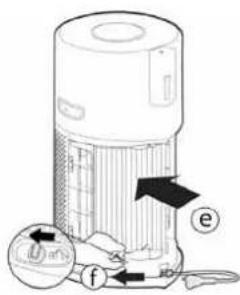
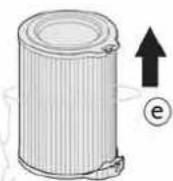
• Use a Vacuum Cleaner to clean the external layer of the Filter or Replace with a NEW filter. [Fig. 15d] - Refit the Filter into the product. [Fig. 15e]
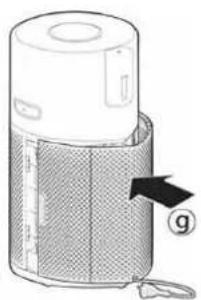
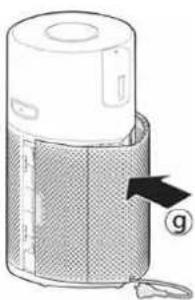
- Lock the Filter Release Switch. [Fig. 15f]
• Refit the Air Inlet Cover to your product. [Fig. 15g] - Plug in your appliance to the power supply and switch on.
- Press the INFORMATION button to reset the Cleaning/Replacing alert by holding the button for 3 secs, an audible alert will be heard to indicate a successful reset. [Fig. 7]

Fig. 15
4.2 DIFFUSER MAINTENANCE
After each use of the Diffuser function, use a dry soft cloth to clean any residue from the product surfaces.
Diffuser Bottle Replacement: [Fig. 16]
The volume of liquid in the bottle can be checked through the Diffuser Window, when required the bottle should be replaced.
- Remove the diffuser cover from the product. [Fig. 16a]
- Remove the Diffuser Unit & Bottle from the diffuser cover. [Fig. 16b]
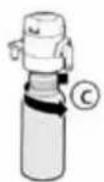
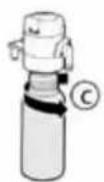
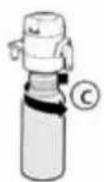
- Unscrew & remove the empty bottle. [Fig. 16c]
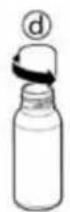
- Remove the new bottle of H-Essence or H-Biotics from the packaging and remove the cap. [Fig. 16d]
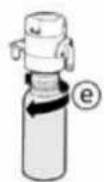
- Tightly screw the new bottle onto the diffuser unit. [Fig. 16e]
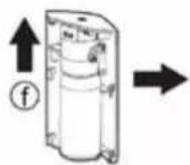
- Refit the diffuser unit into the diffuser cover. [Fig. 16f]
- Refit the Diffuser cover into the H-Purifier. [Fig. 16g]
![CANDY HHP55CA011 - Diffuser Bottle Replacement: [Fig. 16] - 1](/content/2026/04/652599/images/34588a9f7906fd14eee1a82dffe38d55188566d6edaa51c4780955dc1706ad9a.jpg)
flowchart
graph LR
    A["Water Heater Device"] --> B["Adder"]
    B --> C["Transfer to Bottle"]
    C --> D["Adjustment to Bottle"]
    D --> E["Product with Top Cover"]
    E --> F["Final Product"]
Fig. 16
5. STORAGE OF YOUR H-PURIFIER
- Switch off the H-Purifier and unplug the power cord.
- Clean all the internal and external surfaces of the H-Purifier and the external layer of the Filter.
- Remove the bottle from the diffuser. Refit the original cap onto the bottle and store it to protect from direct light. Clean the surfaces of diffuser unit and Diffuser Cover. Make sure there is no residual of H-Essence or H-Biotics on any surface of the H-Purifier.
- Ensure all components are dry.
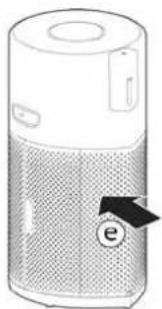
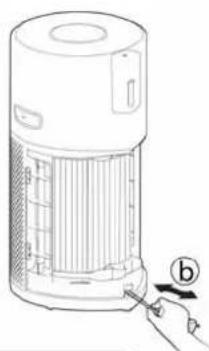
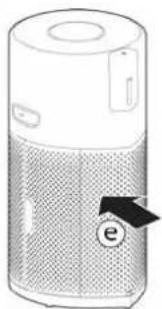
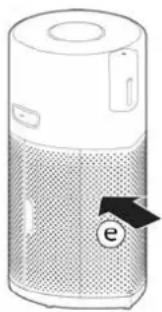
- Remove the Air Inlet Cover [Fig. 17a], reel in the power cord by pulling on the cord [Fig. 17b], fit the cord into the Storage Hook and fit the plug into the Transportation Location. [Fig. 17c,d] Refit the Air Inlet Cover [Fig. 17e]
- Store the H-Purifier in a cool dry place.

natural_image
Illustration of a hand inserting a device into a mesh chamber (no text or symbols)
natural_image
Line drawing of a portable air purifier with a hand inserting a plug into it (no text or symbols)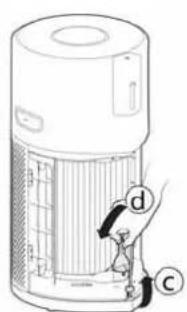
natural_image
Illustration of a cylindrical electronic device with a mesh grille and labeled component 'e' (no text or symbols beyond the label)Fig. 17
6. ALERTS & SOLUTIONS
The following codes may appear during use. [Fig. 18]

Fig. 18
| Alert | Alert Description Solution | ||
| Alert on product Alert in APP | |||
| “CLEAN FILTER” | Pre-Filter cleaning Alert | Suggest to clean the external layer of the Filter. | 1. Clean the external layer of the Filter.2. Reset the alert by holding INFORMATION button for 3 secs.Refer to 4.1 FILTER MAINTENANCE |
| “REPLACE FILTER” | Filter replacement Alert | Suggest to replace the Filter. | 1. Replace the Filter.2. Reset the alert by holding INFORMATION button for 3 secs.Refer to 4.1 FILTER MAINTENANCE |
| “FILTER MISSING” | Error: an error occurred with the air purifier, please check possible solutions | Filter is not in position or is not correctly locked | 1. If filter is not present, put it back.2. If filter is in position, check whether the Filter Release Switch is on LOCK status.Refer to 2.1 INSTALL THE FILTER |
| “PM SENSOR ERROR” / | PM sensor malfunctioning | PM sensor failure or sensor wire has not been connected well, please call service center to fix. | |
| CO Alert LED is yellow | Error: an error occurred with the air purifier, please check possible solutions | CO sensor malfunctioning or CO sensor exceeds its working life. | Call service center to fix. |
| / | Error: an error occurred with the air purifier, please check possible solutions | Motor failure | Motor failure or motor wire has not been connected well, please call service center to fix. |
| “TEMP. & HUMI. SENSOR ERROR” | / | Temperature and humidity sensor malfunctioning | Temperature and humidity sensor failure or sensor wire has not been connected well, please call service center to fix. |
| “PAUSE” | / | Diffuser working will pause when Air Quality LED Ring is not green. | No need action. Diffuser working will resume when Air Quality LED Ring is green. |
ATTENTION: If any of these failures persist, contact your local Hoover representative. DO NOT try to disassemble the H-Purifier by yourself.
7. TROUBLESHOOTING
The following is a list of commonly encountered problems and solutions.
If any of these problems persist contact your local Hoover representative.
| The Fan does not work (Control Panel / Display Lights on) | Check the alert showing on the display or in the app. If there is, refer to6.ALERTS AND SOLUTIONS.Check if there are any obstructions in the fan. If there is, first unplug the product, and clear them, or call service center to clear.Check if the H-Purifier is switched on.Check if the Filter is correctly installed and in locked status.Check if the H-Purifier is in a completely vertical position and not leaning.The H-Purifier may be in the ECO mode. You could press Sleep Mode Button or Max Mode Button to exit the ECO mode. Refer to3.USING YOUR H-PURIFIER – AUTO MODE. |
| The Fan does not work (Control Panel / Display Lights off) | Check if the H-Purifier is plugged in and switched on.Check the alert showing in the app. If there is, refer to6.ALERTS AND SOLUTIONS. |
| No lights on Control Panel / Display (Fan working) | In Sleep Mode, the default lights setting is off. You could press the Light Control Button to turn on the lights.The lights may be switched off. Press the Light Control Button to turn on the lights. Refer to3.USING YOUR H-PURIFIER – SLEEP MODE / LIGHT CONTROL Function. |
| Buttons on the Control Panel do not operate | Child Lock may be activated. You could press and hold the CHILD LOCK button for 3 seconds to exit.Refer to3.USING YOUR H-PURIFIER – CHILD LOCK Function. |
| Air flow is weak | Check if the protective packaging has been removed from the filter.Check if there are any obstructions in the Air Inlet Cover or Air Outlet.Remove the Air Inlet Cover and check the Filter condition. Clean the external layer or replace the Filter if needed. You could check the Filter Life status in Display by pressing Information Button.Check if the H-Purifier is in Sleep Mode. The Fan operates at reduced power in this mode. |
| H-Purifier is operating loudly | Check if there are any obstructions in the H-Purifier.Check if the H-Purifier is running in Max Mode. The Fan operates at maximum power in this mode. |
| H-Purifier operates loudly suddenly | Check if the H-Purifier is running in Auto Mode and the Air Quality LED Ring is not green. In Auto Mode, the H-Purifier automatically adjust its fan speed to the actual indoor air quality level. Refer to3.USING YOUR H-PURIFIER – AUTO MODE. |
| H-Purifier makes a loud buzzer sound all of a sudden | The testing function of CO Alert button is activated by mis-operation. The sound will automatically stop after 5 seconds. Refer to1.2 CARBON MONOXIDE (CO) ALERT |
IMPORTANT INFORMATION
Hoover Spares and Consumables
Always replace parts with genuine Hoover spares. These are available from your local Hoover dealer or direct from Hoover. When ordering parts always quote your model number.
Quality
Hoover's factories have been independently assessed for quality. Our products are made using a quality system which meets the requirements of ISO 9001.
Your Guarantee
The guarantee conditions for this appliance are as defined by our representative in the country in which it is sold. Details regarding these conditions can be obtained from the dealer from whom the appliance was purchased. The bill of sale or receipt must be produced when making any claim under the terms of this guarantee.
Subject to change without notice.
CONSIGNES GÉNÉRALES DE SÉCURITÉ

natural_image
Illustration of a portable air conditioner unit with mesh cover and label 'h' (no text or symbols on device)Fig. 1
2.2 MONTEZ LA BOUTEILLE DU DIFFUSEUR [Fig. 2]
natural_image
Illustration of a cylindrical device with a label 'a' and an arrow pointing upward (no text or symbols on the device itself)![CANDY HHP55CA011 - MONTEZ LA BOUTEILLE DU DIFFUSEUR [Fig. 2] - 1](/content/2026/04/652599/images/ef0da67cf421527b9054b3f4171bc60f969c6ea32a6ec011084c72b464bce6fb.jpg)
![CANDY HHP55CA011 - MONTEZ LA BOUTEILLE DU DIFFUSEUR [Fig. 2] - 2](/content/2026/04/652599/images/7cca961b3cb6d7a49dd888e6b367de273b27ccf23ae48f339c4d6abc0eadeedb.jpg)
![CANDY HHP55CA011 - MONTEZ LA BOUTEILLE DU DIFFUSEUR [Fig. 2] - 3](/content/2026/04/652599/images/391a48c92222f00fa6b178611a305fca8ce9d2d61f9c7b97a5221db05113b4c8.jpg)
![CANDY HHP55CA011 - MONTEZ LA BOUTEILLE DU DIFFUSEUR [Fig. 2] - 4](/content/2026/04/652599/images/6a11c52ab4c41f9ec7dfb89dac987b9cb0ae63b79b23da5840de25bdf68fc32a.jpg)
![CANDY HHP55CA011 - MONTEZ LA BOUTEILLE DU DIFFUSEUR [Fig. 2] - 5](/content/2026/04/652599/images/4eb3695630dad8ad6f4153723af9255b31d64de6b9bdc51d5a89491e18f2c5e2.jpg)
natural_image
Illustration of a cylindrical electronic device with a speaker grille and a button labeled 'f' (no text or symbols on the device itself)Fig. 2
3. UTILISATION DE VOTRE H-PURIFIER
3.1 ALLUMER L'APPAREIL [Fig. 4]:
natural_image
Illustration of a large air purifier connected to a wall-mounted power outlet (no text or symbols visible)Fig. 4

Fig. 5
![CANDY HHP55CA011 - ALLUMER L'APPAREIL [Fig. 4]: - 2](/content/2026/04/652599/images/5949c343d824b7aa229f19adfc51c26fd546ee2b4c0d33e6a28645dd858bfba1.jpg)
natural_image
Illustration of a hand interacting with smart home devices and wireless signals (no text or symbols)Fig. 6

Fig. 7

FR
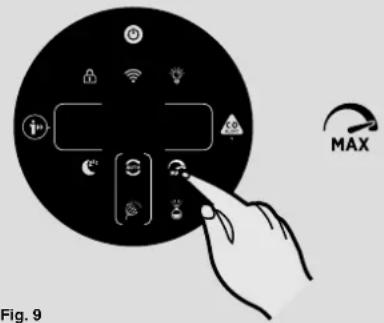
Fig. 9
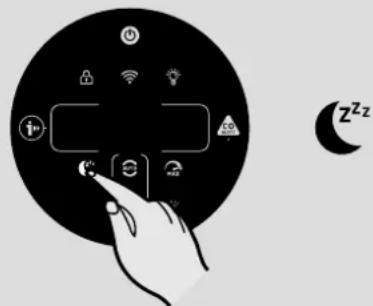
Fig. 10
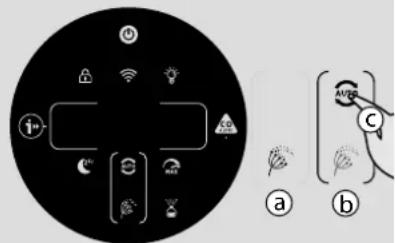
Fig. 11

Fig. 12
natural_image
Icon showing a hand interacting with a digital interface, accompanied by a padlock symbol (no text or labels)Fig. 13

Fig. 14
MODE MAX [Fig. 9]:
natural_image
Illustration of a hand inserting a textured bag labeled 'a' into a cylindrical device (no text or symbols on the device itself)![CANDY HHP55CA011 - MODE MAX [Fig. 9]: - 1](/content/2026/04/652599/images/d274dce0689b410e58bf4b0ed1902a399fcd38054c5db87b1e7a6951e88f55ed.jpg)
natural_image
Line drawing of a portable air purifier with a hand inserting a button to the lid (no text or symbols)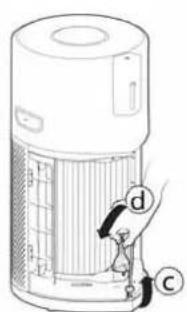
![CANDY HHP55CA011 - MODE MAX [Fig. 9]: - 3](/content/2026/04/652599/images/5fd244f8d9c90e87a2bed1ffdfb535d634e0c84b72c9b20b908780d43a4d49cf.jpg)
natural_image
Illustration of a cylindrical electronic device with a mesh grille and a labeled arrow pointing to the 'e' button (no text or symbols on the device itself)Fig. 17
Fig. 18


![CANDY HHP55CA011 - MODE MAX [Fig. 9]: - 6](/content/2026/04/652599/images/54bfa9a083bd19a3f2383d249c04fb0ffd43f5b095624720f0c74702003f28b9.jpg)
![CANDY HHP55CA011 - MODE MAX [Fig. 9]: - 8](/content/2026/04/652599/images/bd13aaf579cb3021ef23a3e4bea8672149516f2473c0cb5e92be4ed62f239f12.jpg)
natural_image
Illustration of a portable air conditioner unit with a mesh cover and label 'h' (no text or symbols on the device itself)Abb. 1
2.2 BEFESTIGEN SIE DIE DIFFUSORFLASCHE [Abb. 2]
natural_image
Illustration of a cylindrical device with a lid and internal structure, labeled with an arrow and circled 'a' (no text or symbols on the device itself)![CANDY HHP55CA011 - BEFESTIGEN SIE DIE DIFFUSORFLASCHE [Abb. 2] - 1](/content/2026/04/652599/images/08e988fe85004e55687de01802e64f1f0d6359badfd9bd829c9da875da1ea12b.jpg)
![CANDY HHP55CA011 - BEFESTIGEN SIE DIE DIFFUSORFLASCHE [Abb. 2] - 2](/content/2026/04/652599/images/923191d80be5e0f73e711ba1eef54cb4afb4d021c780c341b537ffeac1749d1c.jpg)
![CANDY HHP55CA011 - BEFESTIGEN SIE DIE DIFFUSORFLASCHE [Abb. 2] - 3](/content/2026/04/652599/images/7b9159f07de275ceed892517699a0893e4d94e33b1b2ef4cb2fa5af097865be9.jpg)
![CANDY HHP55CA011 - BEFESTIGEN SIE DIE DIFFUSORFLASCHE [Abb. 2] - 4](/content/2026/04/652599/images/b6417ea9010e8553fb9cf86499a601c46b3c6b65634ac7481cf554f6e4ff54ff.jpg)
![CANDY HHP55CA011 - BEFESTIGEN SIE DIE DIFFUSORFLASCHE [Abb. 2] - 5](/content/2026/04/652599/images/f92e33cdc8eaceb5135e0484e66f7f413a7ece6077225bb929d4de0acc83cfbd.jpg)
natural_image
Illustration of a cylindrical electronic device with a grid pattern and a labeled arrow (no text or symbols on the device itself)Abb. 2
3. GEBRAUCH IHRES H-LUFTREINIGERS
3.1 EINSCHALTEN DES GERÄTS [Abb. 4]:
natural_image
Illustration of a white air purifier with a plug inserted into a wall socket (no text or symbols)Abb. 4

Abb. 5

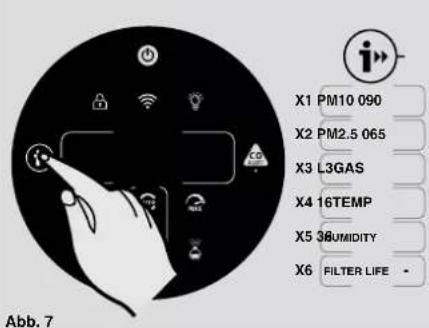
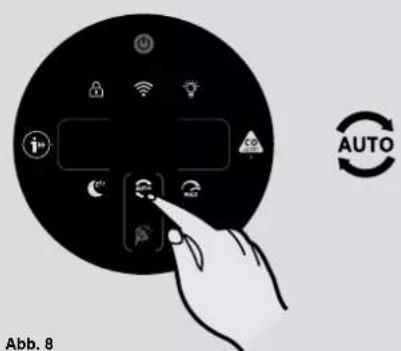


Abb. 10
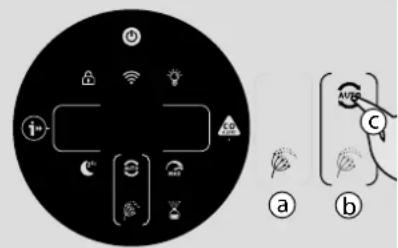
Abb. 11

Abb. 12
![CANDY HHP55CA011 - EINSCHALTEN DES GERÄTS [Abb. 4]: - 9](/content/2026/04/652599/images/001c0832d9ca84d1ebf0edc7a859989a97b222251b9cd7cda19587914a8fc252.jpg)
natural_image
Icon showing a hand interacting with smart devices and a padlock symbol (no text or labels)Abb. 13
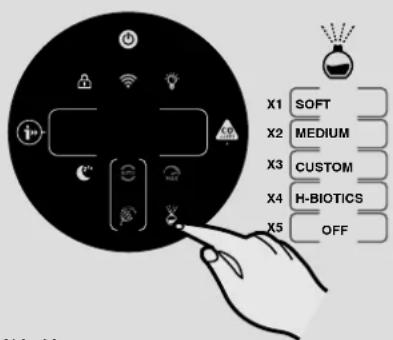
Abb. 14
MAXIMALE LEISTUNG [Abb. 9]:
natural_image
Diagram of a device with a textured cover and labeled component 'a' (no text or symbols beyond label)Abb. 17
![CANDY HHP55CA011 - MAXIMALE LEISTUNG [Abb. 9]: - 1](/content/2026/04/652599/images/c7cddbda910e89c78996fa018a2d684d65c773b4b66f937b30e5c6b935d0b3bc.jpg)
natural_image
Line drawing of a portable air purifier with a hand inserting a plug into the housing (no text or symbols)
![CANDY HHP55CA011 - MAXIMALE LEISTUNG [Abb. 9]: - 3](/content/2026/04/652599/images/faf833c9ec50b93515233062acef285a3c8fb1b327d5d9a7b9cebddd7b9024ae.jpg)
natural_image
Illustration of a cylindrical electronic device with a perforated lid and labeled component 'e' (no text or symbols beyond the label)Fig. 1
2.2 INSTALLARE LA BOCCETTA DEL DIFFUSORE [Fig. 2]
flowchart
graph LR
    A["Water Heater"] --> B["Reactor with Bottle"]
    B --> C["Reactor with Bagasse"]
    C --> D["Reactor with Bagasse"]
    D --> E["Reactor with Bagasse"]
    E --> F["Final Water Heater"]
Fig. 2
3. USO DI H-PURIFIER
3.1 ACCENDERE L'APPARECCHIO [Fig. 4]:
natural_image
Illustration of a large air purifier connected to a wall-mounted power outlet (no text or symbols visible)Fig. 4

Fig. 5
![CANDY HHP55CA011 - ACCENDERE L'APPARECCHIO [Fig. 4]: - 2](/content/2026/04/652599/images/a06781380d0cfc7d505c4f85cfce4adac3b738aa7fce6e4dc46b2cffbaed3a6c.jpg)
natural_image
Illustration of a hand interacting with smartphones and wireless signals, no text or symbols presentFig. 6
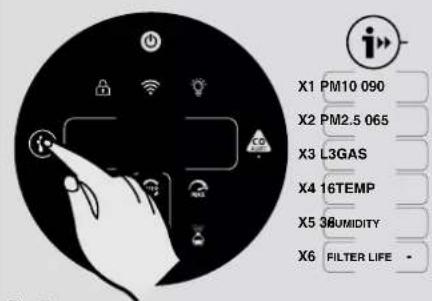
Fig. 7

IT
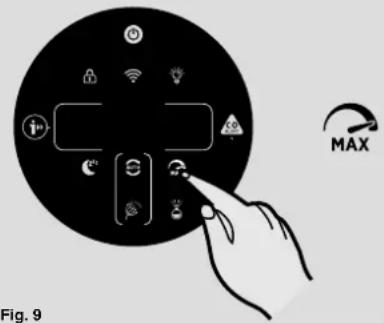
Fig. 9

Fig. 10

Fig. 11
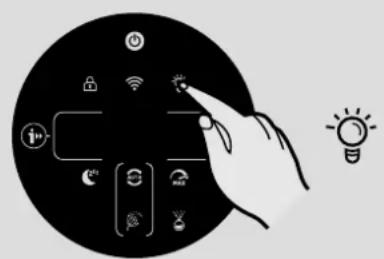
Fig. 12
natural_image
Black circular icon with white hand pointing at a smart device and a padlock symbol (no text or labels)Fig. 13
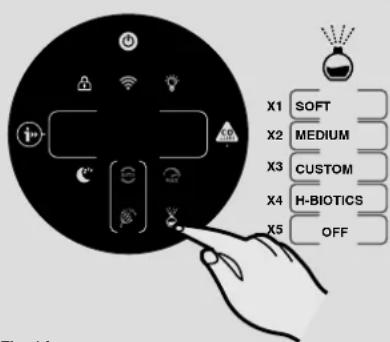
Fig. 14
MODALITÀ MAX [Fig. 9]:
flowchart
graph LR
    A["Water Heater"] --> B["Adder"]
    B --> C["Transfer to Bottle"]
    C --> D["Adder with Button"]
    D --> E["Adder with Button"]
    E --> F["Adder with Button"]
    F --> G["Final Product"]
Fig. 16
natural_image
Illustration of a hand inserting a component into a device casing (no text or symbols visible)![CANDY HHP55CA011 - MODALITÀ MAX [Fig. 9]: - 1](/content/2026/04/652599/images/1aa54a859c20a21a25f7e00393f96d6ef3a0e47d83407d44885a7002a799aa44.jpg)
natural_image
Line drawing of a portable air conditioner unit with a hand inserting a plug into the base (no text or symbols)
![CANDY HHP55CA011 - MODALITÀ MAX [Fig. 9]: - 3](/content/2026/04/652599/images/36124fda9271ff3ce7a8e8ace34670361ff208ac20ebe9b1f041db81140a0d0c.jpg)
natural_image
Illustration of a cylindrical electronic device with a mesh grille and a labeled arrow pointing to the 'e' (no text or symbols on the device itself)Fig. 17
6. AVVISI & SOLUZIONI
Fig. 18
ALGEMENE VEILIGHEIDSWAARSCHUWINGEN
1.2 WAARSCHUWING KOOLMONOXIDE (CO)

natural_image
Illustration of a portable electronic device with a mesh cover and labeled component 'h' (no text or symbols on the device itself)Afb. 1
2.2 INSTALLEER DE DIFFUSERFLES [Afb. 2]
natural_image
Illustration of a cylindrical device with a lid and a label 'a' indicating upward motion (no text or symbols on the device itself)![CANDY HHP55CA011 - INSTALLEER DE DIFFUSERFLES [Afb. 2] - 1](/content/2026/04/652599/images/9b70468058da67d8d2093cdfb0b6630d8fee782929cbce3435d8421b01254deb.jpg)
![CANDY HHP55CA011 - INSTALLEER DE DIFFUSERFLES [Afb. 2] - 2](/content/2026/04/652599/images/b79e05d65f5b114b4e81cb811a8194e9977d842174ec72e38dc4d7999906f8fe.jpg)
![CANDY HHP55CA011 - INSTALLEER DE DIFFUSERFLES [Afb. 2] - 3](/content/2026/04/652599/images/db478e89468dfe76dcb7775489dcee01935721ae893882a4b049c74bb5b7ea01.jpg)
![CANDY HHP55CA011 - INSTALLEER DE DIFFUSERFLES [Afb. 2] - 4](/content/2026/04/652599/images/788e0ba4a7fe42908598af586cb9ac940bb422973cc2ecdab737a6c212254f60.jpg)
![CANDY HHP55CA011 - INSTALLEER DE DIFFUSERFLES [Afb. 2] - 5](/content/2026/04/652599/images/287f953322afdfde050c3cc16d0f6b47300f419613502af844c3896b5e37954b.jpg)
natural_image
Illustration of a cylindrical device with a mesh grille and a small inset component, showing a downward arrow labeled 'f' (no text or symbols on the device itself)Afb. 2
3. UW H-PURIFIER GEBRUIKEN
3.1 HET PRODUCT INSCHAKELEN [Afb. 4]:
natural_image
Illustration of a large air purifier connected to a wall-mounted power outlet (no text or symbols visible)Afb. 4

Afb. 5

NL

Afb. 11

Afb. 12
natural_image
Icon showing a hand interacting with smart devices and a padlock symbol (no text or labels)Afb. 13

Afb. 14
MODUS MAX [Afb. 9]:
natural_image
Diagram of a hand inserting a textured device into a cylindrical container labeled 'a', with no visible text or symbols.Afb. 17
![CANDY HHP55CA011 - MODUS MAX [Afb. 9]: - 1](/content/2026/04/652599/images/43feecb043e9a7e2dc8a95ff96730b9c437bf1be1ba41b02e9e44f55cd858f87.jpg)
natural_image
Line drawing of a cylindrical device with internal structure and a hand inserting a button labeled 'b' (no text or symbols on the device itself)
![CANDY HHP55CA011 - MODUS MAX [Afb. 9]: - 3](/content/2026/04/652599/images/982cf773971e297de5f17dc1ba91f13df8073fb96ea71e52b48c0d3765b03bd6.jpg)
natural_image
Illustration of a cylindrical electronic device with a textured surface and an arrow labeled 'e' pointing to its side (no text or symbols on the device itself)6. WAARSCHUWINGEN & OPLOSSINGEN

natural_image
Illustration of a portable electronic device with mesh cover and handle, no visible text or symbolsFig. 1
2.2 INSTALAR O FRASCO DIFUSOR [Fig. 2]
natural_image
Illustration of a cylindrical electronic device with a speaker and indicator light, labeled (a) with an upward arrow (no text or symbols on the device itself)![CANDY HHP55CA011 - INSTALAR O FRASCO DIFUSOR [Fig. 2] - 1](/content/2026/04/652599/images/13fa2ac4f0dafce25f23f74468c821ebaa0ac72462c549d1c244a9e188ceae19.jpg)
![CANDY HHP55CA011 - INSTALAR O FRASCO DIFUSOR [Fig. 2] - 2](/content/2026/04/652599/images/63c913083533873cd97842bdb322ad0517be53afcb6d52f6b7adfcb64c4caccb.jpg)
![CANDY HHP55CA011 - INSTALAR O FRASCO DIFUSOR [Fig. 2] - 3](/content/2026/04/652599/images/bc3c4d51c286e5822253c544a0171ddd7912d629c44cf1ab055c6c0fca7abfb1.jpg)
![CANDY HHP55CA011 - INSTALAR O FRASCO DIFUSOR [Fig. 2] - 4](/content/2026/04/652599/images/80cd8a8d83f1990414d857485480c0bd0c3094aefad09d54564ade32b3b7c35f.jpg)
![CANDY HHP55CA011 - INSTALAR O FRASCO DIFUSOR [Fig. 2] - 5](/content/2026/04/652599/images/b1080444043ebc2637bd71263706ff14966f6fd69f3ad3cd86bd0802ebbb7e54.jpg)
natural_image
Illustration of a cylindrical electronic device with a speaker grille and a battery icon, showing no text or symbols.Fig. 2
3. UTILIZAR O SEU H-PURIFIER
3.1 LIGAR O PRODUTO [Fig. 4]:
natural_image
Illustration of a white air purifier with a plug inserted into a wall socket (no text or symbols)Fig. 4

Fig. 5
![CANDY HHP55CA011 - LIGAR O PRODUTO [Fig. 4]: - 2](/content/2026/04/652599/images/af9a0831b55fb91695442853725feced56e9d47ce15ce04041d897aabfef2407.jpg)
natural_image
Illustration of a hand interacting with a device icon, next to a Wi-Fi symbol (no text or labels)Fig. 6
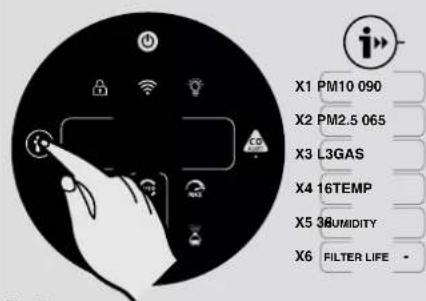
Fig. 7

PT
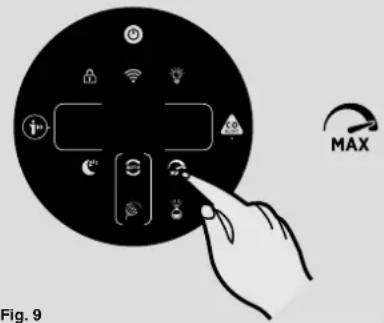
Fig. 9
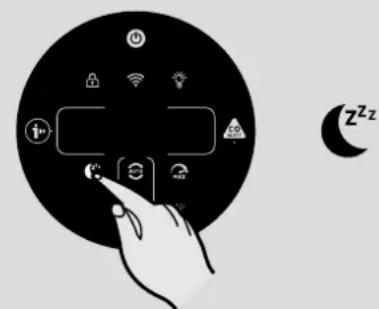
Fig. 10
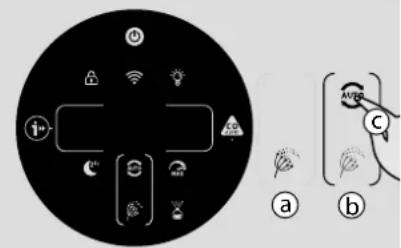
Fig. 11

Fig. 12
natural_image
Black circular icon with white hand pointing at a smart device and a padlock symbol (no text or labels)Fig. 13
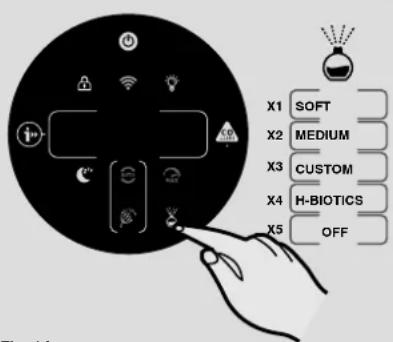
Fig. 14
MODO MÁX [Fig. 9]:
natural_image
Diagram of a device with a handle inserted into a mesh chamber, showing internal structure and no text or symbols.![CANDY HHP55CA011 - MODO MÁX [Fig. 9]: - 1](/content/2026/04/652599/images/ad80910b20e5a5b34c39883a3ee9afb3c72c1e4c17aa8505bd4e3efac9e51693.jpg)
natural_image
Diagram of a cylindrical device with internal structure and a hand inserting a button labeled 'b' (no text or symbols on the device itself)
![CANDY HHP55CA011 - MODO MÁX [Fig. 9]: - 3](/content/2026/04/652599/images/1d034a172e23220df87c67bdd585b654342aaa4b49e47d7dbc7c9927685e8ff4.jpg)
natural_image
Illustration of a cylindrical electronic device with a perforated grille and labeled component 'e' (no text or symbols beyond the label)Fig. 17
6. ALERTAS E SOLUÇÕES


natural_image
Illustration of a portable air purifier with mesh cover and label 'h' (no text or symbols on the device itself)Fig. 1
2.2 INSTALE LA BOTELLA DEL DIFUSOR [Fig. 2]
natural_image
Illustration of a cylindrical device with a label 'a' and an arrow pointing upward (no text or symbols on the device itself)![CANDY HHP55CA011 - INSTALE LA BOTELLA DEL DIFUSOR [Fig. 2] - 1](/content/2026/04/652599/images/45a0b67e5f906a9d9bf196b9d998977e81eb94f5bfcd97546c2f98dcb21b0b0d.jpg)
![CANDY HHP55CA011 - INSTALE LA BOTELLA DEL DIFUSOR [Fig. 2] - 2](/content/2026/04/652599/images/27a6834b057481c9051662999005b622c669a5730f19202ca0058aa613de08e5.jpg)
![CANDY HHP55CA011 - INSTALE LA BOTELLA DEL DIFUSOR [Fig. 2] - 3](/content/2026/04/652599/images/e0289c7171e8a6278e9761cfaad15222d4f8721afb9cc126f14ebebe43ba1ff8.jpg)
![CANDY HHP55CA011 - INSTALE LA BOTELLA DEL DIFUSOR [Fig. 2] - 4](/content/2026/04/652599/images/95b4b5a4f292d9918d4ce7e14d74fef9da7e251889c401dc067d033a9aef239e.jpg)
![CANDY HHP55CA011 - INSTALE LA BOTELLA DEL DIFUSOR [Fig. 2] - 5](/content/2026/04/652599/images/a031acde97a869b433d5b7f119ac00e7f371bf3a9a5778ca6d92ce10cd65cfec.jpg)
natural_image
Illustration of a cylindrical electronic device with a speaker grille and a battery, showing a downward arrow labeled 'f' (no text or symbols on the device itself)Fig. 2
3. USANDO SU H-PURIFIER
3.1 ENCENDIDO DEL PRODUCTO [Fig. 4]:
natural_image
Illustration of a large air purifier connected to a wall-mounted power outlet (no text or symbols visible)Fig. 4

Fig. 5
![CANDY HHP55CA011 - ENCENDIDO DEL PRODUCTO [Fig. 4]: - 2](/content/2026/04/652599/images/f156a8cdc4d96916757e70947b743168ffc2a181f0151f8e63c87153f5ba1700.jpg)
natural_image
Illustration of a hand interacting with smart home devices and wireless signals (no text or symbols)Fig. 6
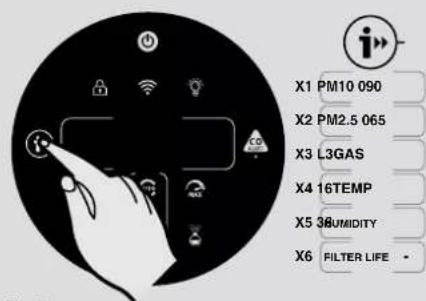
Fig. 7


Fig. 9
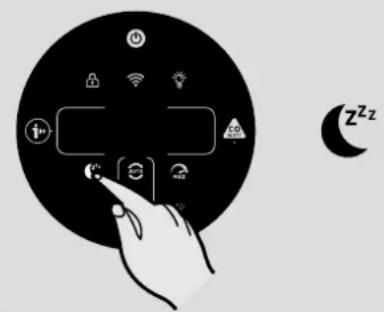
Fig. 10

Fig. 11
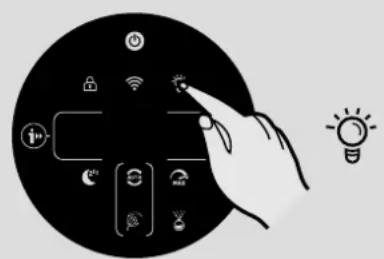
Fig. 12
![CANDY HHP55CA011 - ENCENDIDO DEL PRODUCTO [Fig. 4]: - 9](/content/2026/04/652599/images/8673a088b5a7c254b91742bcf78775282fd779a80a02626a6d80cae1c7f26d8e.jpg)
natural_image
Black circular icon with white hand pointing at a smart device and a padlock symbol (no text or labels)Fig. 13

Fig. 14
MODO MÁXIMO [Fig. 9]:
![CANDY HHP55CA011 - MODO MÁXIMO [Fig. 9]: - 1](/content/2026/04/652599/images/971935f4486cdb3d0d1c60e91d19417b7d909359445a6d4df998420338677ebb.jpg)
natural_image
Diagram of a cylindrical device with internal components and a labeled component (b), no readable text or symbols present.![CANDY HHP55CA011 - MODO MÁXIMO [Fig. 9]: - 2](/content/2026/04/652599/images/891d9b29e96f9f8542b5711029f4a887689cf25952385a0f1052d76aeea89425.jpg)
natural_image
Illustration of a hand inserting a component into a cylindrical device (no text or symbols visible)![CANDY HHP55CA011 - MODO MÁXIMO [Fig. 9]: - 3](/content/2026/04/652599/images/06c5ff0c72aa4d1ef48ead3131d7bd55378922588fbf37c1226ec31811607eae.jpg)

![CANDY HHP55CA011 - MODO MÁXIMO [Fig. 9]: - 5](/content/2026/04/652599/images/627c4c4ee11fda56d212e4c8772411fefa5253207e99072f5b34164111aa7fb2.jpg)
natural_image
Illustration of a cylindrical device with a mesh cover and a label 'g' pointing to it, no text or symbols present.Fig. 15
4.2 MANTENIMIENTO DEL DIFUSOR
natural_image
Illustration of a cylindrical electronic device with a speaker grille and a label pointing to the right (no text or symbols on the device itself)


natural_image
Diagram of a cylindrical device with a speaker grille and a labeled arrow indicating downward motion (no text or symbols present)Fig. 16
5. ALMACENAMIENTO DE SU H-PURIFIER
natural_image
Illustration of a hand inserting a textured device into a cylindrical device (no text or symbols visible)
natural_image
Line drawing of a portable air purifier with a hand inserting a plug into the base (no text or symbols)

natural_image
Illustration of a cylindrical electronic device with a textured surface and a labeled arrow pointing to the 'e' (no text or symbols on the device itself)Fig. 17
6. ALERTAS Y SOLUCIONES
Fig. 18
natural_image
Diagram of a device with a labeled component 'a' and an arrow indicating direction (no text or symbols present)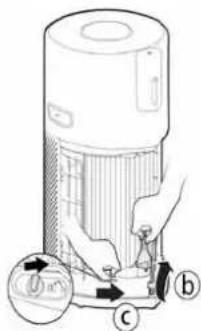



natural_image
Diagram of a portable electronic device with mesh cover and labeled component 'h' (no text or symbols on device itself)Fig. 1
2.2 MONTER DIFFUSORFLASKEN [Fig. 2]
natural_image
Illustration of a cylindrical device with a label 'a' and an arrow pointing upward (no text or symbols on the device itself)![CANDY HHP55CA011 - MONTER DIFFUSORFLASKEN [Fig. 2] - 1](/content/2026/04/652599/images/022153ecf424971494423912f852c4d24e8856c2b299d7e648300483f5b75642.jpg)
![CANDY HHP55CA011 - MONTER DIFFUSORFLASKEN [Fig. 2] - 2](/content/2026/04/652599/images/ca9e3aaac88c9dccef1b2c725693dd8ae0358a16ccfae9970b15f1ae597fccab.jpg)
![CANDY HHP55CA011 - MONTER DIFFUSORFLASKEN [Fig. 2] - 3](/content/2026/04/652599/images/a25b1285f8dc2a341e780b320643853141696a4d259515dcc4900f9e0e24ef00.jpg)
![CANDY HHP55CA011 - MONTER DIFFUSORFLASKEN [Fig. 2] - 4](/content/2026/04/652599/images/bab40a9445a428d1a1e15a1cb2a65988d8f6c9782a74ee888807fe312117d2fa.jpg)
![CANDY HHP55CA011 - MONTER DIFFUSORFLASKEN [Fig. 2] - 5](/content/2026/04/652599/images/7a210c3469179f27e3f6998bde5d8a324e5193027435c2536b09e4ecd6f4a721.jpg)
natural_image
Illustration of a cylindrical electronic device with a speaker grille and a battery icon, showing a downward arrow labeled 'f' (no text or symbols on the device itself)Fig. 2
3. BRUG AF DIN H-PURIFIER
3.1 TÆND FOR PRODUKTET [Fig. 4]:
natural_image
Illustration of a large air purifier with a plug inserted into it, connected to a wall-mounted power outlet (no text or symbols visible)Fig. 4

Fig. 5
![CANDY HHP55CA011 - TÆND FOR PRODUKTET [Fig. 4]: - 2](/content/2026/04/652599/images/f9bd5f0b8a11c7d671b6c2937eb79efacd11c4bbc777d10c7406f70fd29fe728.jpg)
natural_image
Illustration of a hand interacting with a device, surrounded by icons and a Wi-Fi symbol (no text or labels)Fig. 6

Fig. 7

DK

Fig. 9
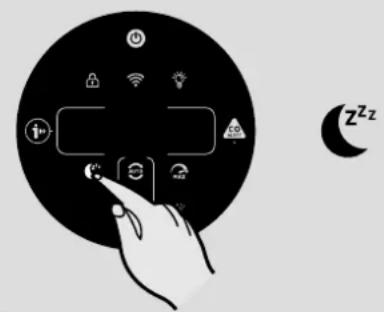
Fig. 10

Fig. 11
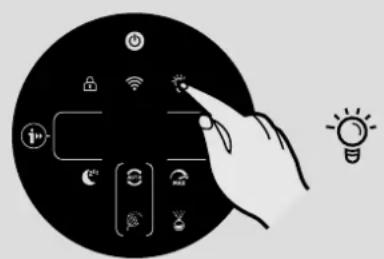
Fig. 12
natural_image
Black circular icon with white hand pointing at a smart device and a padlock symbol (no text or labels)Fig. 13
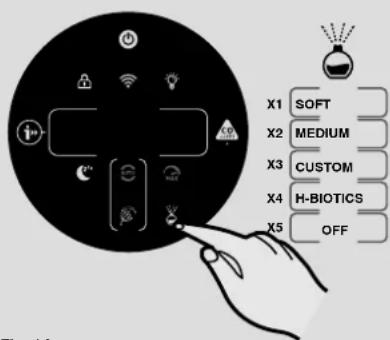
Fig. 14
MAKS. TILSTAND [Fig. 9]:
natural_image
Illustration of a hand inserting a textured cover into a cylindrical device (no text or symbols visible)![CANDY HHP55CA011 - MAKS. TILSTAND [Fig. 9]: - 1](/content/2026/04/652599/images/84f17e2e1d557ce36f26de433069d071aa6c421650f2e0dfe91599c4f1a0c7af.jpg)
natural_image
Line drawing of a portable air purifier with a hand inserting a plug into the housing (no text or symbols)
![CANDY HHP55CA011 - MAKS. TILSTAND [Fig. 9]: - 3](/content/2026/04/652599/images/b05372a706ad795a638faaff8444465326c4f2ca48ff489171c68a1ea5de64d2.jpg)
natural_image
Illustration of a cylindrical electronic device with a mesh grille and a labeled arrow pointing to the 'e' button (no text or symbols on the device itself)Fig. 17
Fig. 18
| 1 Kontrollpanel / Skjerm | |
| 2 Luftuttak | |
| 3 Produktbærehåndtak | |
| 4 Filtersamling | |
| 5 | Dekselhåndtak for luftinntak |
| 6 Filterutløsningsknapp | |
| 7 Luftinntaksdeksel |
| 8 Diffuservindu |
| 9 Diffuserdeksel |
| 10 Diffuseruttak |
| 11 Diffuserenhet |
| 12 H-Essence-flaske |
| 13 H-Biotics-flaske |
| 14 Strømkabel og -støpsel |
| 15 Lagringskrok |
| 16 Transportplassering |

| 14 Luftkvalitet LED Ring | |
| 15 Av/på-knapp | |
| 16 Barnesikringsknapp | |
| 17 Digitalt display | |
| 18 Informasjonsknapp | |
| 19 Sovemodusknapp | |
| 20 Automodusknapp | |
| 21 Pollenallergi-sirkellampe | |
| 22 Pollenallergilampe | |
| 23 Diffuserknapp | |
| 24 Maksmodusknapp | |
| 25 CO Alert-knapp og LED | |
| 26 Lyskontrollknapp | |
| 27 Wi-Fi knapp |
1.1 MULTI SENSOR SYSTEM



natural_image
Illustration of a portable air purifier with mesh cover and label h (no text or symbols on the device itself)Fig. 1
2.2 MONTER DIFFUSERFLASKEN [Fig. 2]
natural_image
Diagram of a cylindrical device with a label 'a' and an arrow indicating upward motion (no text or symbols on the device itself)![CANDY HHP55CA011 - MONTER DIFFUSERFLASKEN [Fig. 2] - 1](/content/2026/04/652599/images/1dff60c79fe279032839b693527ee43acfb651ac26ff1f1aa9ff7cd549d6ffec.jpg)
![CANDY HHP55CA011 - MONTER DIFFUSERFLASKEN [Fig. 2] - 2](/content/2026/04/652599/images/111146ecd2e72f9ee4eec711fb0a11721df0aa8e180339b8f08946262f7fe13b.jpg)
![CANDY HHP55CA011 - MONTER DIFFUSERFLASKEN [Fig. 2] - 3](/content/2026/04/652599/images/bc88b733dde9c54a7d7695080ca094eacdc64f71a3e4d79bc3427ecad65cefbb.jpg)
![CANDY HHP55CA011 - MONTER DIFFUSERFLASKEN [Fig. 2] - 4](/content/2026/04/652599/images/8d04f6eb95d2c943b2f497df19d90916c5109452101f7688c81cb166933be8cd.jpg)
![CANDY HHP55CA011 - MONTER DIFFUSERFLASKEN [Fig. 2] - 5](/content/2026/04/652599/images/4beb6008f3e670bced4f842b19e73b519a71c504f688c150493985494a97a8cd.jpg)
natural_image
Illustration of a cylindrical electronic device with a speaker grille and a battery icon, showing internal structure and a downward arrow labeled 'f' (no text or symbols on the device itself)Fig. 2
3. BRUK AV H-PURIFIER
3.1 SLÅ PÅ PRODUKTET [Fig. 4]:
natural_image
Illustration of a large air purifier with a plug inserted into a wall socket (no text or symbols visible)Fig. 4

Fig. 5
![CANDY HHP55CA011 - SLÅ PÅ PRODUKTET [Fig. 4]: - 2](/content/2026/04/652599/images/a49fba1656dec74141af051541dabaa2c6e92e0217e5decd483b47581521efc2.jpg)
natural_image
Illustration of a hand interacting with a black circular device displaying smart icons (no text or symbols)Fig. 6
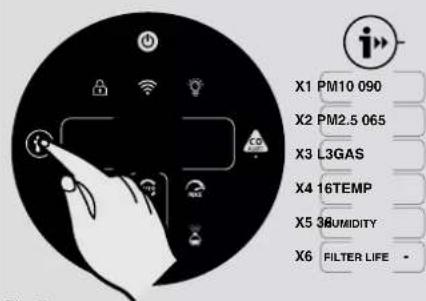
Fig. 7

NO

Fig. 9

Fig. 10

Fig. 11
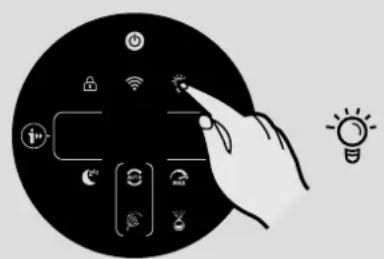
Fig. 12
natural_image
Black circular icon with white hand pointing at a smart device and a padlock symbol (no text or labels)Fig. 13
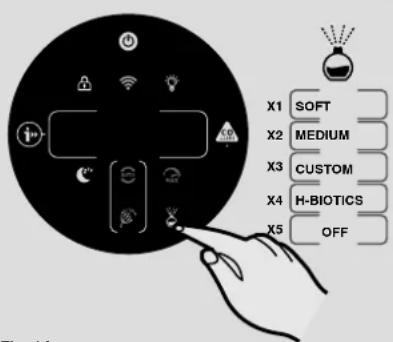
Fig. 14
MAKSMODUS [Fig. 9]:
Trykk på MAKS-modusknappen på displayet for å aktivere den kraftigste luftrensingsinnstillingen. Du kan avslutte MAKS-modus ved å velge AUTO-modus eller SOVE-modus.
SOVEMODUS [Fig. 10]:
4.1 FILTERVEDLIKEHOLD
H-Purifier overvåker tilstanden på filteret. En varsel om «RENS ELLER BYTT FILTER» dukker opp på venstre side av displayet, og en lampe blinker for å indikere at filteret må renses eller byttes ut.
Rense/Bytte filter: [Fig. 15]
4.2 VEDLIKEHOLD AV DIFFUSER
natural_image
Illustration of a hand inserting a textured device into a cylindrical container (no text or symbols visible)
natural_image
Line drawing of a portable air purifier with a hand inserting a plug into the base (no text or symbols)

natural_image
Illustration of a cylindrical electronic device with a perforated lid and labeled 'e' (no text or symbols on the device itself)Fig. 17
6. VARSLINGER OG L∅SNINGER
Fig. 18
natural_image
Diagram of a device with a labeled component 'a' and an arrow indicating direction (no text or symbols present)


natural_image
Illustration of a portable air conditioner unit with mesh cover and label h (no text or symbols on device)Fig. 1
2.2 MONTERA DIFFUSERFLASKAN [Fig. 2]
natural_image
Illustration of a cylindrical device with a lid and internal structure, labeled with an arrow and circled 'a' (no text or symbols on the device itself)![CANDY HHP55CA011 - MONTERA DIFFUSERFLASKAN [Fig. 2] - 1](/content/2026/04/652599/images/fb97886acc473dd3bce0001f65950784c26957cf9fa5a50d3988165e90f5a4db.jpg)
![CANDY HHP55CA011 - MONTERA DIFFUSERFLASKAN [Fig. 2] - 2](/content/2026/04/652599/images/856e72ab8f815b4ab2b4e0796b55460713667f93fecc0753e1feaba394112535.jpg)
![CANDY HHP55CA011 - MONTERA DIFFUSERFLASKAN [Fig. 2] - 3](/content/2026/04/652599/images/230b42437c02f0fa8d184ddcde75c60176bb21d474e866f54b9a5850dcc1eb59.jpg)
![CANDY HHP55CA011 - MONTERA DIFFUSERFLASKAN [Fig. 2] - 4](/content/2026/04/652599/images/b8dc25dd1e9db9bdb90e8b6905e6b768439b5dd444ec9a902eea0a949109c310.jpg)
![CANDY HHP55CA011 - MONTERA DIFFUSERFLASKAN [Fig. 2] - 5](/content/2026/04/652599/images/f7bfb0b87b9a89a4fcd6623c255baf5c252836b86f006494b8be33bcde52e735.jpg)
natural_image
Illustration of a cylindrical device with a mesh grille and a small rectangular component, showing a downward arrow labeled 'f' (no text or symbols on the device itself)Fig. 2
natural_image
Illustration of a white air purifier with a plug inserted into a wall socket (no text or symbols)
![CANDY HHP55CA011 - MONTERA DIFFUSERFLASKAN [Fig. 2] - 7](/content/2026/04/652599/images/c53e360eb6c30d34c0a33d7d1426f19ebcab84345cbc026669c136705cd0baa0.jpg)
natural_image
Illustration of a hand interacting with smart home devices and wireless signals (no text or symbols)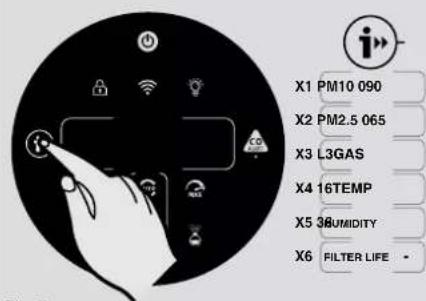
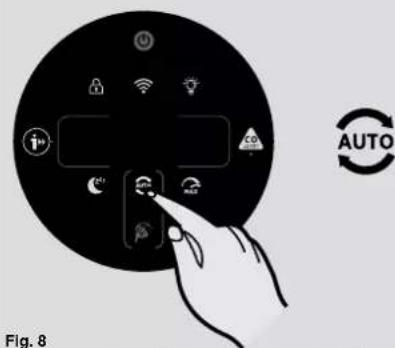

Fig. 9

Fig. 10
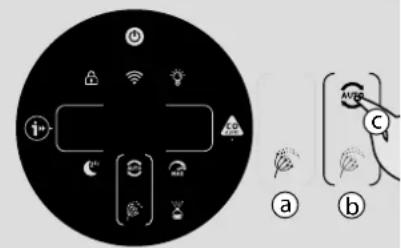
Fig. 11

Fig. 12
![CANDY HHP55CA011 - MONTERA DIFFUSERFLASKAN [Fig. 2] - 14](/content/2026/04/652599/images/80e397b2e91886ac9d74838d0545f766807e3803267ad96d6035097f76ec2750.jpg)
natural_image
Black circular icon with a hand interacting with smart devices and a padlock symbol (no text or labels)Fig. 13

Fig. 14
MAXLÄGE [Fig. 9]:
natural_image
Illustration of a hand inserting a device into a textured container labeled 'a', with no visible text or symbols.![CANDY HHP55CA011 - MAXLÄGE [Fig. 9]: - 1](/content/2026/04/652599/images/11ad84783f2e064aacfa85f50470acdf5f02ff77430a69fc81e9f3a78b33b2ad.jpg)
natural_image
Line drawing of a portable air conditioner unit with a hand inserting a button labeled 'b' (no text or symbols on the device itself)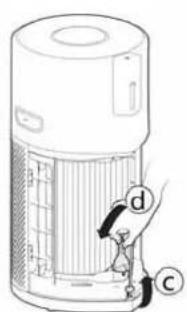
![CANDY HHP55CA011 - MAXLÄGE [Fig. 9]: - 3](/content/2026/04/652599/images/0fd77bf36b9f72b2913d4a3aa09e71d77657bd53bc3384d53089a3e9f169e67f.jpg)
natural_image
Illustration of a cylindrical electronic device with a textured surface and a labeled arrow pointing to the 'e' button (no text or symbols on the device itself)Fig. 17
6. VARNINGAR OCH LÖSNINGAR
Fig. 18


natural_image
Illustration of a portable electronic device with mesh cover and labeled component (h), no text or symbols present.Kuva 1
2.2 ASENNA DIFFUUSORIPULLO [Kuva 2]
flowchart
graph LR
    A["Kuva 2"] --> B["Step a: Base with lid"]
    B --> C["Step b: Inside box with switch"]
    C --> D["Step c: Bottle with strap"]
    D --> E["Step d: Bottle with strap"]
    E --> F["Step e: Inside box with strap"]
    F --> G["Step f: Final container with lid"]
3. H-PURIFIERIN KÄYTTÖ
natural_image
Diagram of a device with a handle and label 'a' (no text or symbols on the device itself)Kuva 17

natural_image
Diagram of a portable air purifier with a hand inserting a button labeled 'b' (no text or symbols on the device itself)
natural_image
Illustration of a cylindrical electronic device with a mesh grille and labeled component 'e' (no text or symbols beyond the label)6. HÄLYTYKSET JA KORJAUSTOIMET
Kuva 18



natural_image
Illustration of a portable electronic device with a mesh cover and labeled component 'h' (no text or symbols on the device itself)Рис. 1
natural_image
Illustration of a cylindrical electronic device with a label 'a' and an arrow pointing upward (no text or symbols on the device itself)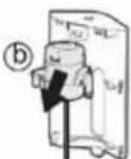


natural_image
Illustration of a cylindrical device with a speaker grille and a battery, showing a downward arrow labeled 'f' (no text or symbols on the device itself)Рис. 2
natural_image
Illustration of a large air purifier with a plug inserted into it, connected to a wall socket (no text or symbols visible)Рис. 4

Рис. 5
natural_image
Illustration of a hand interacting with smart home devices and wireless signals (no text or symbols)Рис. 6
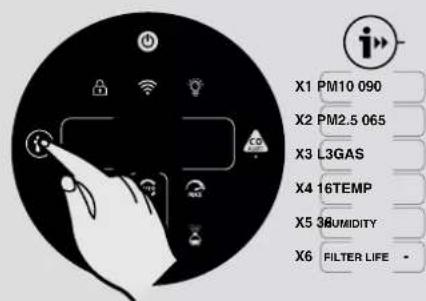
Рис. 7

RU

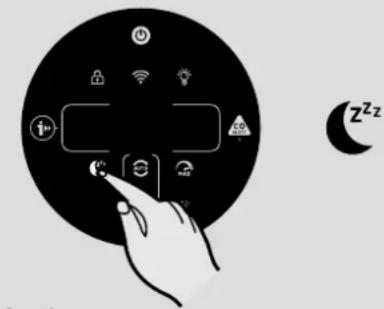
Рис. 10

Рис. 11
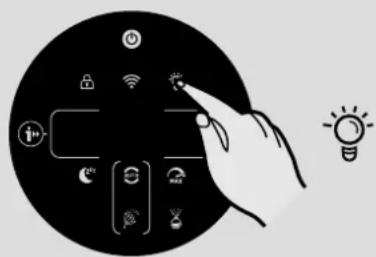
Рис. 12

natural_image
Icon showing a hand interacting with smart devices including Wi-Fi, LED, and lock (no text or symbols)Рис. 13
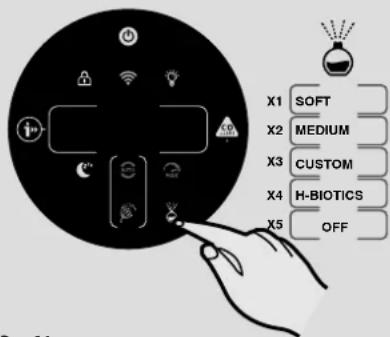
Рис. 14
natural_image
Diagram of a cylindrical device with internal components and a labeled component (b), no readable text or symbols present.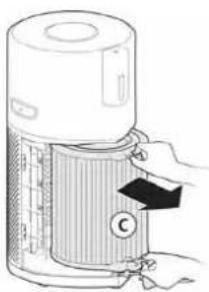
natural_image
Illustration of a hand inserting a filter into a cylindrical device (no text or symbols visible)
natural_image
Illustration of a cylindrical device with a mesh cover and a paperclip, showing internal components (no text or symbols)Рис. 15
4.2 ОБСЛУЖИВАНИЕ ДИФФУЗОРА
natural_image
Illustration of a cylindrical device with a speaker grille and a label 'a' pointing upward (no text or symbols on the device itself)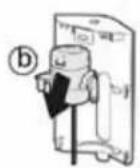


natural_image
Illustration of a cylindrical electronic device with a speaker grille and a labeled arrow indicating downward motion (no text or symbols on the device itself)Рис. 16
5. ХРАНЕНИЕ Н-PURIFIER
natural_image
Diagram of a hand inserting a textured bag labeled 'a' into a cylindrical device (no text or symbols on the device itself)Рис. 17
natural_image
Line drawing of a cylindrical device with internal structure and a hand inserting a button labeled 'b' (no text or symbols on the device itself)
natural_image
Illustration of a cylindrical electronic device with a perforated surface and a labeled arrow pointing to the 'e' (no text or symbols on the device itself)Рис. 18
natural_image
Diagram of a device with a handle and labeled part (a), showing internal structure without any text or symbols.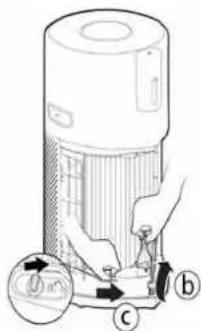


natural_image
Diagram of a portable air conditioner unit with mesh insulation and a label 'h' pointing to its side (no text or symbols on the device itself)Eik. 1
natural_image
Diagram of a cylindrical device with a vertical slot and an arrow indicating upward motion (no text or symbols)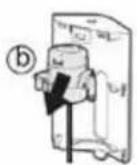


natural_image
Illustration of a cylindrical device with a mesh base and a small top component, showing a downward arrow labeled 'f' (no text or symbols on the device itself)Eik. 2
natural_image
Illustration of a white air purifier with a plug inserted into a wall socket (no text or symbols)Eik. 4

Eik.5


GR

Eik. 11

Eik. 12

natural_image
Black circular icon with white hand pointing at a smart device and a padlock symbol (no text or labels)Eik. 13


natural_image
Diagram of a cylindrical device with internal components and a labeled component (b), no readable text or symbols present.
natural_image
Illustration of a hand inserting a component into a cylindrical device (no text or symbols visible)
natural_image
Illustration of a cylindrical device with a mesh cover and a paperclip, showing internal components (no text or symbols)Eik. 15
natural_image
Illustration of a cylindrical electronic device with a speaker grille and a label pointing to the right (no text or symbols on the device itself)


natural_image
Illustration of a cylindrical electronic device with a speaker grille and a labeled arrow (no text or symbols on the device itself)Eik. 16
natural_image
Diagram of a device with a handle and label 'a' (no text or symbols on the device itself)Eik. 17

natural_image
Line drawing of a cylindrical device with internal components and a hand inserting a button labeled 'b' (no text or symbols on the device itself)

natural_image
Illustration of a cylindrical electronic device with a textured surface and a labeled arrow pointing to the 'e' (no text or symbols on the device itself)Eik. 18
1.2 ALARM TLENKU WĘGLA (CO)

natural_image
Illustration of a portable electronic device with a mesh cover and handle, showing no text or symbols.Rys. 1
2.2 WKŁADANIE BUTELKI Z DYFUZOREM [Rys. 2]
natural_image
Illustration of a cylindrical device with a speaker and a label (a) indicating upward motion, no readable text or symbols present.![CANDY HHP55CA011 - WKŁADANIE BUTELKI Z DYFUZOREM [Rys. 2] - 1](/content/2026/04/652599/images/812b051e0488db08e47db3675ad3dc469bf20c1be3f7da57fe5dd8a147bd8609.jpg)
![CANDY HHP55CA011 - WKŁADANIE BUTELKI Z DYFUZOREM [Rys. 2] - 2](/content/2026/04/652599/images/f7d807dd620875a4eea4ea72a0c9a487da17ef13fcd412d20c1300ff63d896f8.jpg)
![CANDY HHP55CA011 - WKŁADANIE BUTELKI Z DYFUZOREM [Rys. 2] - 3](/content/2026/04/652599/images/68ca1e0d133a57266063b411a9ac54dfca0245c217e47b0eaf7a6ea7f149789c.jpg)
![CANDY HHP55CA011 - WKŁADANIE BUTELKI Z DYFUZOREM [Rys. 2] - 4](/content/2026/04/652599/images/3787434de83d43db21fac245c110a1864c38cbc5ecee2228628c879c3e0aa1bc.jpg)
![CANDY HHP55CA011 - WKŁADANIE BUTELKI Z DYFUZOREM [Rys. 2] - 5](/content/2026/04/652599/images/8f1f0c4d51d44a75d2a34a3645eaeb6dd8c29bc1fc9a79e0ad1e66d3d839188e.jpg)
natural_image
Illustration of a cylindrical device with a speaker grille and battery, showing a downward arrow labeled 'f' (no text or symbols on the device itself)Rys. 2
3. UŻYTKOWANIE URZĄDZENIA H-PURIFIER
3.1 WŁĄCZANIE URZĄDZENIA [Rys. 4]:
natural_image
Illustration of a large air purifier connected to a wall-mounted power outlet (no text or symbols visible)Rys. 4

Rys. 5

PL

Rys. 9
Rys. 10
Rys. 11
Rys. 12

natural_image
Black circular icon with white hand pointing at a smart device and a padlock symbol (no text or labels)Rys. 13
Rys. 14
TRYB MAKSYMALNY [Rys. 9]:
Rys. 15
4.2 KONSERWACJA DYFUZORA
natural_image
Illustration of a hand inserting a textured cover into a cylindrical device (no text or symbols)
natural_image
Line drawing of a portable air purifier with a hand inserting a plug into the housing (no text or symbols)
natural_image
Illustration of a cylindrical electronic device with a mesh grille and a labeled arrow pointing to the 'e' button (no text or symbols on the device itself)Rys. 17
6. ALARMY I ROZWIAZANIA
Rys. 18
2.1 INSTALACE FILTRU [Obr. 1]
![CANDY HHP55CA011 - INSTALACE FILTRU [Obr. 1] - 3](/content/2026/04/652599/images/910111d6b37cbfdac5eeeccb2f73ac45924462d18f8a8ede94fad94d92412f48.jpg)

![CANDY HHP55CA011 - INSTALACE FILTRU [Obr. 1] - 5](/content/2026/04/652599/images/a28048e6ea84d754a886a1e42091ce870f5a35a24303852b156153efdc4ca430.jpg)
natural_image
Illustration of a portable electronic device with mesh cover and label 'h' (no text or symbols on the device itself)Obr. 1
2.2 INSTALACE LAHVIČKY DIFUZÉRU [Obr. 2]
natural_image
Illustration of a cylindrical device with a label 'a' and an arrow pointing upward (no text or symbols on the device itself)![CANDY HHP55CA011 - INSTALACE LAHVIČKY DIFUZÉRU [Obr. 2] - 1](/content/2026/04/652599/images/ae49ddebf82d2d7e5412a45ac5b70906104654d0c4d0003c5e00dc48004c2071.jpg)
![CANDY HHP55CA011 - INSTALACE LAHVIČKY DIFUZÉRU [Obr. 2] - 2](/content/2026/04/652599/images/af7336465815d3ad311cde0adf90b7f4210beb56e08856eac193d17bf7ab17f5.jpg)
![CANDY HHP55CA011 - INSTALACE LAHVIČKY DIFUZÉRU [Obr. 2] - 3](/content/2026/04/652599/images/faf7552179f3c4eafbd1e371404ed947c3696296bbe0f112fe291376ca6430c4.jpg)
![CANDY HHP55CA011 - INSTALACE LAHVIČKY DIFUZÉRU [Obr. 2] - 4](/content/2026/04/652599/images/c8cae33673cf6d999c55950257f321d420f9b6f60f69ab2587ea86b9150fc193.jpg)
![CANDY HHP55CA011 - INSTALACE LAHVIČKY DIFUZÉRU [Obr. 2] - 5](/content/2026/04/652599/images/e67d435421dee6a8c423dc48cc82739dee2d3112a1050bb5d36a3f70a5f7e25c.jpg)
natural_image
Illustration of a cylindrical device with a speaker grille and a small inset component, showing a downward arrow labeled 'f' (no text or symbols on the device itself)Obr. 2
3. POUŽITÍ H-PURIFIERU
3.1 ZAPNUTÍ VÝROBKU [Obr. 4]:

Obr. 10
Obr. 11
Obr. 12
![CANDY HHP55CA011 - ZAPNUTÍ VÝROBKU [Obr. 4]: - 4](/content/2026/04/652599/images/704bd68c5e372f63b0015dbaaaf00986201fbc18064db7dfa162b95c6bd6b50b.jpg)
natural_image
Icon showing a hand interacting with a touchscreen interface and a padlock symbol (no text or labels)Obr. 13

Obr. 14
MAXIMÁLNÍ REŽIM [Obr. 9]:
natural_image
Diagram of a hand inserting a device into a mesh chamber (no text or symbols)![CANDY HHP55CA011 - MAXIMÁLNÍ REŽIM [Obr. 9]: - 1](/content/2026/04/652599/images/17a56b52a9c4dfc212ccd01e7dc141b71c6bd3ca534734da5cb5a012711114bf.jpg)
natural_image
Diagram of a cylindrical device with internal structure and a hand inserting a button labeled 'b' (no text or symbols on the device itself)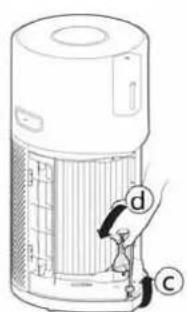
![CANDY HHP55CA011 - MAXIMÁLNÍ REŽIM [Obr. 9]: - 3](/content/2026/04/652599/images/d9efd090552195260943cd37b64d63e2aeac1eed290641801eea291d18d1092b.jpg)
natural_image
Illustration of a cylindrical electronic device with a mesh grille and labeled component 'e' (no text or symbols beyond the label)Obr. 17
6. VÝSTRAHY & ŘEŠENÍ
Obr. 18


natural_image
Illustration of a cylindrical device with mesh cover and labeled component 'h' (no text or symbols on the device itself)Obr. 1
2.2 UMIESTNENIE FL'AŠTIČKY DIFUZÉRA [Obr. 2]
Príprava H-Purifier čističky vzduchu k funkcii difuzéra:
• Odstráňte kryt difuzéra z výrobku. [Obr. 2a]
• Vyberte jednotku difuzéra z krytu difuzéra. [Obr. 2b]
• Vyberte fl'aštičku H-Essence alebo H-Biotics z obalu a odstráňte uzáver. [Obr. 2c]
• Uzáver si uschovajte pre budúce použitie počas uskladnenia.
• Fl'aštičku pevne priskrutkujte k jednotke difuzéra. [Obr. 2d]
• Vrát'te jednotku difuzéra do krytu difuzéra. [Obr. 2e]
• Nasad'te spät kryt difuzéra do vašej čističky vzduchu. [Obr. 2f]
![CANDY HHP55CA011 - UMIESTNENIE FL'AŠTIČKY DIFUZÉRA [Obr. 2] - 1](/content/2026/04/652599/images/7ac207afa41e880675002c5f8b50d81dbff28d27feeb04272b034d429789ad53.jpg)
natural_image
Illustration of a cylindrical device with a speaker grille and a vertical sensor, showing an upward arrow labeled 'a' (no text or symbols on the device itself)![CANDY HHP55CA011 - UMIESTNENIE FL'AŠTIČKY DIFUZÉRA [Obr. 2] - 2](/content/2026/04/652599/images/2dce76b1d61bd9c2b01f551b263a8c1beec8d1752248d4d40a9d9fcb1ac8b71d.jpg)
![CANDY HHP55CA011 - UMIESTNENIE FL'AŠTIČKY DIFUZÉRA [Obr. 2] - 3](/content/2026/04/652599/images/e1a445cb518254afc91d19c36de82ca1f7b9631612e03ca3f9ac1367ba413372.jpg)
![CANDY HHP55CA011 - UMIESTNENIE FL'AŠTIČKY DIFUZÉRA [Obr. 2] - 4](/content/2026/04/652599/images/9ab9d5dfc4b033d4c9efe71f424c8efc9a3ff85b6ae7c750de9cb404b7bdd489.jpg)
![CANDY HHP55CA011 - UMIESTNENIE FL'AŠTIČKY DIFUZÉRA [Obr. 2] - 5](/content/2026/04/652599/images/f10c741fbd9b74964c2ce58d964f45276dd58408edd613f4028be3591237c183.jpg)
![CANDY HHP55CA011 - UMIESTNENIE FL'AŠTIČKY DIFUZÉRA [Obr. 2] - 6](/content/2026/04/652599/images/bc2c91e357d6d2ad8e09f946549db8fcc136da1321e267eb1ba194fd1320d5ee.jpg)
natural_image
Illustration of a cylindrical device with a speaker grille and a button labeled 'f' (no text or symbols on the device itself)Obr. 2
3. POUŽÍVANIE VÁŠHO H-PURIFIERU
3.1 ZAPNUTIE VÝROBKU [Obr. 4]:
natural_image
Illustration of a clean air purifier with a plug inserted into the air outlet (no text or symbols visible)Obr. 4

Obr. 5


Obr. 10

Obr. 11

Obr. 12
![CANDY HHP55CA011 - ZAPNUTIE VÝROBKU [Obr. 4]: - 9](/content/2026/04/652599/images/bcfbe7d7386ea9c8f33648594209622e3f9e116b010f29f7f036ab50723ba9e8.jpg)
natural_image
Icon showing a hand interacting with a touchscreen interface and a padlock symbol (no text or labels)Obr. 13

Obr. 14
MAXIMÁLNY REŽIM [Obr. 9]:
flowchart
graph LR
    A["Water Heater"] --> B["Adder"]
    B --> C["Transfer to Bottle"]
    C --> D["Adder with Bag"]
    D --> E["Adder with Bag"]
    E --> F["Adder with Bag"]
    F --> G["Final Product"]
Obr. 16
5. SKLADOVANIE VÁŠHO H-PURIFIERU
natural_image
Diagram of a hand inserting a device into a mesh chamber (no text or symbols)
natural_image
Diagram of a cylindrical device with internal structure and a hand inserting a button labeled 'b' (no text or symbols on the device itself)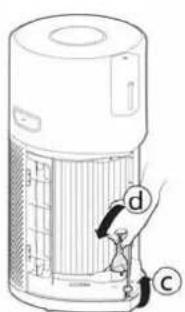

natural_image
Illustration of a cylindrical electronic device with a perforated grille and a labeled arrow pointing to the 'e' button (no text or symbols on the device itself)Obr. 17
6. VÝSTRAHY A RIEŠENIA
Obr. 18


[Şek. 1a]


natural_image
Diagram of a portable air conditioner unit with mesh insulation and a labeled component (h), no text or symbols present.Şek. 1
2.2 DIFÜZÖR ŞİŞESINI TAKIN [Şek. 2]
natural_image
Illustration of a cylindrical device with a label 'a' and an upward arrow, no readable text or symbols present.![CANDY HHP55CA011 - DIFÜZÖR ŞİŞESINI TAKIN [Şek. 2] - 1](/content/2026/04/652599/images/ace2ceebb39954805d32ef6c1476617b038554a131bd0cee8606b9550788c958.jpg)
![CANDY HHP55CA011 - DIFÜZÖR ŞİŞESINI TAKIN [Şek. 2] - 2](/content/2026/04/652599/images/a04a64b53c53f16e2d39076815249a1dfa765ba4dea0ad0d91c79050ca9fc6da.jpg)
![CANDY HHP55CA011 - DIFÜZÖR ŞİŞESINI TAKIN [Şek. 2] - 3](/content/2026/04/652599/images/09c98bcdb266f5bca6f7daf9b3f3438305dbcb83d04c45e74a492c7a7f14576f.jpg)
![CANDY HHP55CA011 - DIFÜZÖR ŞİŞESINI TAKIN [Şek. 2] - 4](/content/2026/04/652599/images/ee0cd2406fb45e1cf324189c58401ed56db0675a15a1613013b2ce3f50e7e470.jpg)
![CANDY HHP55CA011 - DIFÜZÖR ŞİŞESINI TAKIN [Şek. 2] - 5](/content/2026/04/652599/images/700c857cc6784c3c5f789c74da82555af9c60201bac5711b01e944a218cda46d.jpg)
natural_image
Illustration of a cylindrical device with a speaker grille and battery, showing a downward arrow labeled 'f' (no text or symbols on the device itself)Şek. 2
3. H-PURIFIER CİHAZINIZIN KULLANIMI
3.1 ÜRÜNÜ AÇIN [Şek. 4]:
Şek. 10
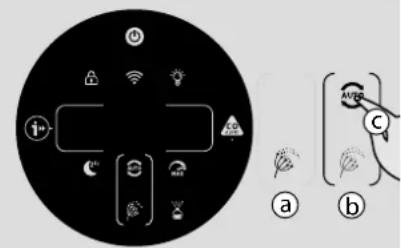
Şek. 11

Şek. 12
![CANDY HHP55CA011 - ÜRÜNÜ AÇIN [Şek. 4]: - 3](/content/2026/04/652599/images/5d843acafa716d1fbc29999faa650188a3fcf418bd75bfdd49244cc2ac99e79f.jpg)
natural_image
Black circular icon with white hand pointing at a smart device and a padlock symbol (no text or labels)Şek. 13
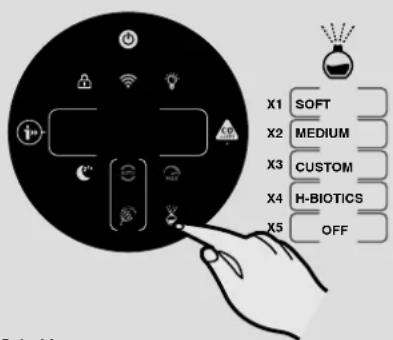
Şek. 14
MAKS MODU [Şek. 9]:
flowchart
graph LR
    A["Water Heater"] --> B["Adder"]
    B --> C["Transfer to Bottle"]
    C --> D["Adder with Bag"]
    D --> E["Adder with Bag"]
    E --> F["Adder with Bag"]
    F --> G["Final Product"]
Şek. 16
5. H-PURIFIER CİHAZINIZIN SAKLANMASI
natural_image
Illustration of a hand inserting a device into a mesh chamber (no text or symbols)Şek. 17
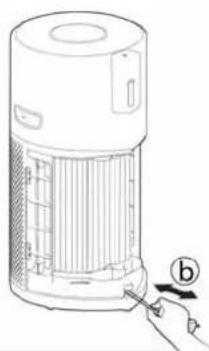
natural_image
Line drawing of a portable air purifier with a hand inserting a button to the lid (no text or symbols)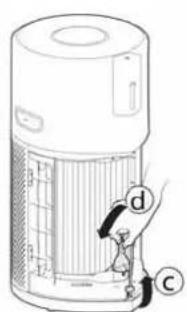
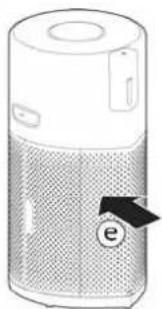
natural_image
Illustration of a cylindrical electronic device with a label 'e' pointing to its side panel (no text or symbols on the device itself)6. UYARILAR VE ÇÖZÜMLER
Şek. 18
- GENERAL SAFETY WARNINGS
- USING ENVIRONMENT
- CO MONITOR SAFETY INSTRUCTIONS
- DIFFUSER SAFETY INSTRUCTIONS
- The Environment
- MULTI SENSOR SYSTEM
- CARBON MONOXIDE (CO) ALERT
- PREPARING YOUR H-PURIFIER
- INSTALL THE FILTER [Fig. 1]
- INSTALL THE DIFFUSER BOTTLE [Fig. 2]
- USING YOUR H-PURIFIER
- SWITCH ON THE PRODUCT [Fig. 4]:
- CONNECT YOUR H-PURIFIER:
- Instructions:
- DISCOVER ALL THE FUNCTIONS
- INFORMATION Function [Fig. 7]:
- More info on PM 2.5, PM 10 and GAS:
- MODE Functions:
- AUTO MODE [Fig. 8]:
- GB
- MAX MODE [Fig. 9]:
- SLEEP MODE [Fig. 10]:
- POLLEN ALLERGY MODE: [Fig. 11]
- LIGHT CONTROL Function: [Fig. 12]
- CHILD LOCK Function: [Fig. 13]
- DIFFUSER Function: [Fig. 14]
- MAINTAINING YOUR H-PURIFIER
- FILTER MAINTENANCE
- Cleaning / Replacing the Filter: [Fig. 15]
- DIFFUSER MAINTENANCE
- Diffuser Bottle Replacement: [Fig. 16]
- STORAGE OF YOUR H-PURIFIER
- ALERTS & SOLUTIONS
- TROUBLESHOOTING
- IMPORTANT INFORMATION
- Hoover Spares and Consumables
- Quality
- Your Guarantee
- CONSIGNES GÉNÉRALES DE SÉCURITÉ
- MONTEZ LA BOUTEILLE DU DIFFUSEUR [Fig. 2]
- UTILISATION DE VOTRE H-PURIFIER
- ALLUMER L'APPAREIL [Fig. 4]:
- FR
- MODE MAX [Fig. 9]:
- BEFESTIGEN SIE DIE DIFFUSORFLASCHE [Abb. 2]
- GEBRAUCH IHRES H-LUFTREINIGERS
- EINSCHALTEN DES GERÄTS [Abb. 4]:
- MAXIMALE LEISTUNG [Abb. 9]:
- INSTALLARE LA BOCCETTA DEL DIFFUSORE [Fig. 2]
- USO DI H-PURIFIER
- ACCENDERE L'APPARECCHIO [Fig. 4]:
- IT
- MODALITÀ MAX [Fig. 9]:
- AVVISI & SOLUZIONI
- ALGEMENE VEILIGHEIDSWAARSCHUWINGEN
- WAARSCHUWING KOOLMONOXIDE (CO)
- INSTALLEER DE DIFFUSERFLES [Afb. 2]
- UW H-PURIFIER GEBRUIKEN
- HET PRODUCT INSCHAKELEN [Afb. 4]:
- NL
- MODUS MAX [Afb. 9]:
- WAARSCHUWINGEN & OPLOSSINGEN
- INSTALAR O FRASCO DIFUSOR [Fig. 2]
- UTILIZAR O SEU H-PURIFIER
- LIGAR O PRODUTO [Fig. 4]:
- PT
- MODO MÁX [Fig. 9]:
- ALERTAS E SOLUÇÕES
- INSTALE LA BOTELLA DEL DIFUSOR [Fig. 2]
- USANDO SU H-PURIFIER
- ENCENDIDO DEL PRODUCTO [Fig. 4]:
- MODO MÁXIMO [Fig. 9]:
- MANTENIMIENTO DEL DIFUSOR
- ALMACENAMIENTO DE SU H-PURIFIER
- ALERTAS Y SOLUCIONES
- MONTER DIFFUSORFLASKEN [Fig. 2]
- BRUG AF DIN H-PURIFIER
- TÆND FOR PRODUKTET [Fig. 4]:
- DK
- MAKS. TILSTAND [Fig. 9]:
- MONTER DIFFUSERFLASKEN [Fig. 2]
- BRUK AV H-PURIFIER
- SLÅ PÅ PRODUKTET [Fig. 4]:
- NO
- MAKSMODUS [Fig. 9]:
- SOVEMODUS [Fig. 10]:
- FILTERVEDLIKEHOLD
- Rense/Bytte filter: [Fig. 15]
- VEDLIKEHOLD AV DIFFUSER
- VARSLINGER OG L∅SNINGER
- MONTERA DIFFUSERFLASKAN [Fig. 2]
- MAXLÄGE [Fig. 9]:
- VARNINGAR OCH LÖSNINGAR
- Kuva 1
- ASENNA DIFFUUSORIPULLO [Kuva 2]
- H-PURIFIERIN KÄYTTÖ
- HÄLYTYKSET JA KORJAUSTOIMET
- RU
- ОБСЛУЖИВАНИЕ ДИФФУЗОРА
- ХРАНЕНИЕ Н-PURIFIER
- GR
- ALARM TLENKU WĘGLA (CO)
- WKŁADANIE BUTELKI Z DYFUZOREM [Rys. 2]
- UŻYTKOWANIE URZĄDZENIA H-PURIFIER
- WŁĄCZANIE URZĄDZENIA [Rys. 4]:
- PL
- TRYB MAKSYMALNY [Rys. 9]:
- KONSERWACJA DYFUZORA
- ALARMY I ROZWIAZANIA
- INSTALACE FILTRU [Obr. 1]
- INSTALACE LAHVIČKY DIFUZÉRU [Obr. 2]
- POUŽITÍ H-PURIFIERU
- ZAPNUTÍ VÝROBKU [Obr. 4]:
- MAXIMÁLNÍ REŽIM [Obr. 9]:
- VÝSTRAHY & ŘEŠENÍ
- UMIESTNENIE FL'AŠTIČKY DIFUZÉRA [Obr. 2]
- POUŽÍVANIE VÁŠHO H-PURIFIERU
- ZAPNUTIE VÝROBKU [Obr. 4]:
- MAXIMÁLNY REŽIM [Obr. 9]:
- SKLADOVANIE VÁŠHO H-PURIFIERU
- VÝSTRAHY A RIEŠENIA
- DIFÜZÖR ŞİŞESINI TAKIN [Şek. 2]
- H-PURIFIER CİHAZINIZIN KULLANIMI
- ÜRÜNÜ AÇIN [Şek. 4]:
- MAKS MODU [Şek. 9]:
- H-PURIFIER CİHAZINIZIN SAKLANMASI
- UYARILAR VE ÇÖZÜMLER
Brand : CANDY
Model : HHP55CA011
Category : Air purifier