CR 7745 - Heating CAMRY - Free user manual and instructions
Find the device manual for free CR 7745 CAMRY in PDF.



User questions about CR 7745 CAMRY
0 question about this device. Answer the ones you know or ask your own.
Ask a new question about this device
Download the instructions for your Heating in PDF format for free! Find your manual CR 7745 - CAMRY and take your electronic device back in hand. On this page are published all the documents necessary for the use of your device. CR 7745 by CAMRY.
USER MANUAL CR 7745 CAMRY
natural_image
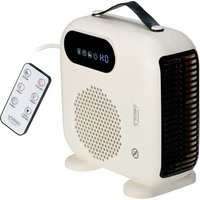
Exterior view of a modern electric heating fan with digital display and control panel (no text or symbols visible)
natural_image
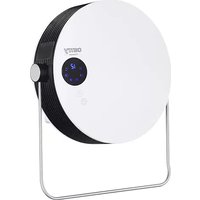
Black handheld electric heater with digital display and control panel (no text or symbols visible)CR 7745
SAFETY CONDITIONS IMPORTANT INSTRUCTIONS ON SAFETY OF USE PLEASE READ CAREFULLY AND KEEP FOR FUTURE REFERENCE
The warranty conditions are different, if the device is used for commercial purpose."
-
Before using the product please read carefully and always comply with the following instructions. The manufacturer is not responsible for any damages due to any misuse.
-
The product is only to be used indoors. Do not use the product for any purpose that is not compatible with its application.
-
The applicable voltage is 220-240V, \~50Hz. For safety reasons it is not appropriate to connect multiple devices to one power outlet.
-
Please be cautious when using around children. Do not let the children to play with the product. Do not let children or people who do not know the device to use it without supervision.
-
WARNING: This device may be used by children over 8 years of age and persons with reduced physical, sensory or mental capabilities, or persons without experience or knowledge of the device, only under the supervision of a person responsible for their safety, or if they were instructed on the safe use of the device and are aware of the dangers associated with its operation. Children should not play with the device. Cleaning and maintenance of the device should not be carried out by children, unless they are over 8 years of age and these activities are carried out under supervision.
-
After you are finished using the product always remember to gently remove the plug from the power outlet holding the outlet with your hand. Never pull the power cable!!!
-
Never put the power cable, the plug or the whole device into the water. Never expose the product to the atmospheric conditions such as direct sun light or rain, etc.. Never use the product in humid conditions.
-
Periodically check the power cable condition. If the power cable is damaged the product should be turned to a professional service location to be replaced in order to avoid hazardous situations.
-
Never use the product with a damaged power cable or if it was dropped or damaged in any other way or if it does not work properly. Do not try to repair the defected product yourself because it can lead to electric shock. Always turn the damaged device to a professional service location in order to repair it. All the repairs can be done only by authorized service professionals. The repair that was done incorrectly can cause hazardous situations for the user.
-
Never put the product on or close to the hot or warm surfaces or the kitchen appliances like the electric oven or gas burner.
-
Never use the product close to combustibles.
12.Do not let cord hang over edge of counter or touch hot surfaces.
-
Never leave the product connected to the power source without supervision. Even when use is interrupted for a short time, turn it off from the network, unplug the power.
-
In order to provide additional protection, it is recommended to install residue current device (RCD) in the power circuit, with residual current rating not more than 30 mA. Contact professional electrician in this matter.

-
Never use this device close to water, e.g.: Under shower, in bathtub, or above sink filled with water.
-
If using the device in bathroom after use remove the power plug from the socket, because water proximity presents risk, even if the device is turned off.
-
Do not allow the device or power adaptor to wet. If the device falls into water, immediately remove the power plug or power adaptor from the socket. If the device is powered, do not put hands in the water. Have the device checked by the qualified electrician before using it again.
-
Do not touch the device or power adaptor with wet hands.
-
Place the fan heater only on flat, stable surface
- Always turn the fan heater off and set the thermostat dial to minimum before removing the power plug from the socket.
- Never use the fan heater in high humidity rooms – bathroom, shower room, swimming pools etc. The humidity can cause short circuit, and effect in damaging the device.
- The operating fan heater needs to be under supervision and in sight all the time. If you are leaving the room with the fan heater, always turn the fan heater off. If the fan heater is not used, the power plug has to be removed from the power outlet.
- Do not connect the fan heater to the automatic switching device, for example temperature controlling device or time switch.
- Flammable materials, for example furniture, bedclothes, paper, clothes, curtains should be kept at least one meter from the fan heater.
- Do not cover the device or put any objects on it while it is operating. Do not use the device to dry clothes.
- The power cord should not be placed above the fan heater, and it should not touch or be placed near hot surfaces of the fan heater. Do not place the fan heater directly under the power outlet.
- The heating surfaces can heat to a temperature of 60 °C or higher. The fan heater should be in a place that children and animals do not have access to.
- The device is not intended to be installed or used in vehicles.
- Some parts inside the device can be hot or cause sparking. Do not use the fan heater in places, where gasoline, paints or other flammable materials are used or stored.
- Do not use this heater in the immediate vicinity of a bathtub, shower or swimming pool
- Do not use this heater if it has been dropped
- Do not use if there are visible signs of damage to the heater.
- Use the heater on a level and stable surface or attach it to the wall, if provided for by the manufacturer
WARNING: Do not use this heater in small rooms where there are people who are unable to leave them by themselves, unless constant supervision is ensured.
WARNING: To reduce the risk of fire, keep textiles, curtains or other flammable materials at least 1 m away from the heater air outlet.
BEFORE FIRST USE:
- After removing the packaging, make sure that the device is in good condition.
- The packaging materials may contain plastic, nails etc., which may be hazardous and therefore should not be left within the reach of children.
3.. This device should only be placed on a firm level surface and a minimum 100cm distance from walls or any other objects. It is a way to optimize air flow, avoid placing the device in corners and small spaces.
WARNING: Do not cover or restrict airflow to the inlet or exhaust grilles in any manner as the device may overheat and become a fire risk.
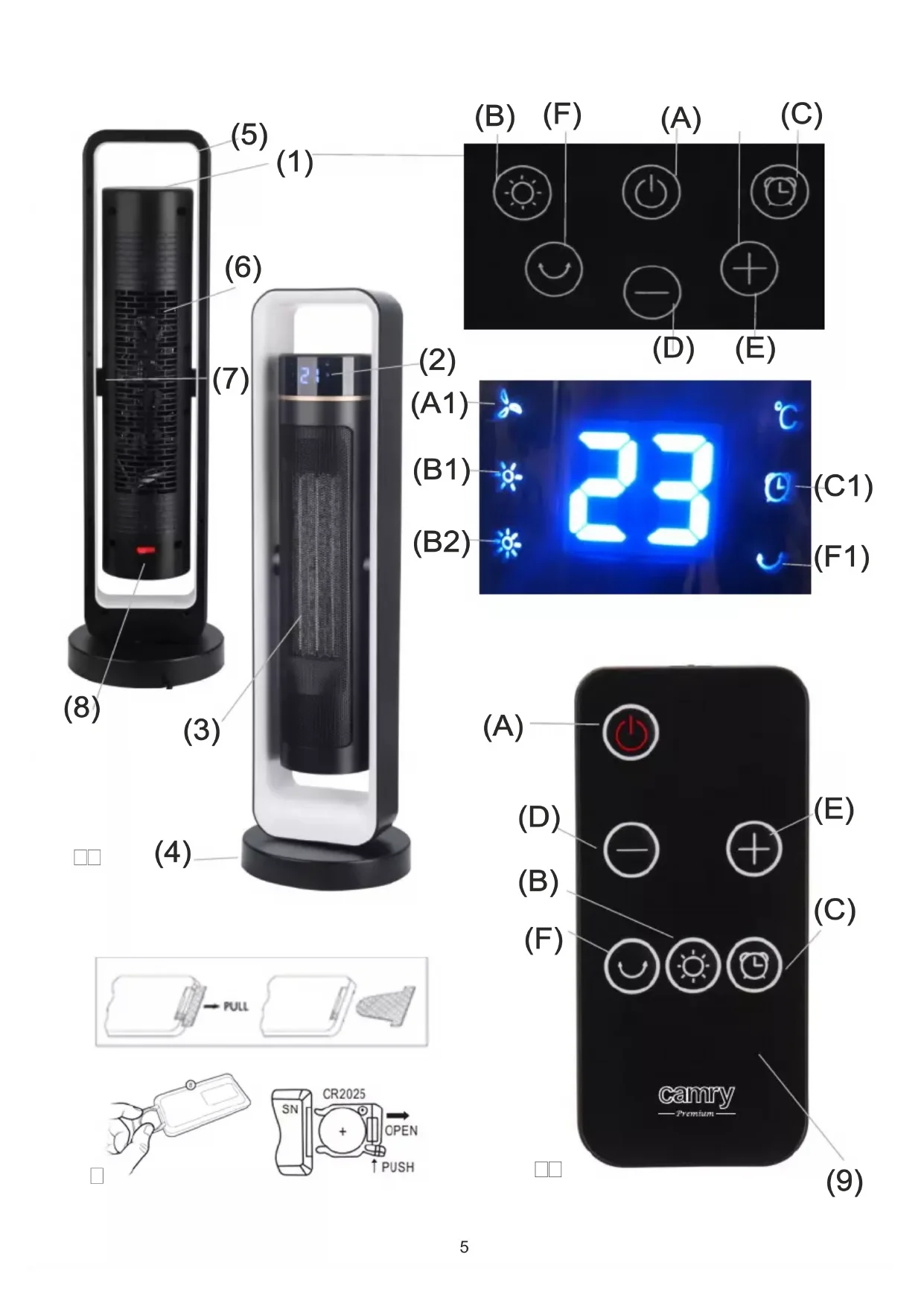
Product description: fan heater CR7745
-
Control panel
-
Display panel
-
Air outlet grid
-
Base
-
Handle
-
Air inlet grid (on the back)
-
Pitch angle fixing
-
Power switch
-
Remote control
Control panel (1) / Remote control (9) buttons description:
A. Standby mode button
B. Heating level button
C. Timer button
D. Temperature decrease button
E. Temperature increase button
F. Oscillation button
Display panel (2) icons description:
A1. Cool air airflow icon
B1. Warm air heating icon
B1. + B2. Hot air heating icons
C1. Timer icon
F1. Oscillation function icon
G. Temperature icon
USAGE
- Ensure the power switch (8) is off. Insert the plug into a suitable power outlet and turn the power supply on by pressing to position I the power switch (8) located at the back of the device. The device is in standby mode.
- Press button (A) on the control panel (1) that will respond to your touch, and the LED display (2) shows the room temperature (G). The cool air is flowing and fan icon (A1) is shown too.
-
Press button (B) to control temperature of heating:
-
Once, to get warm airflow, the icon (B1) will be illuminated up.
- Twice, to get hot airflow, both of sun (B1 and B2) will be illuminated up.
- Third time, to come back to cool airflow.
- Press button (C) repeatedly to set a period after which the device will turn itself off. Time range from 0 to 12 hours. When timer function is active the icon (C1) is illuminated up on the display panel (2).
- Press button (D) or (E) to control required room temperature. Temperature setting from 10 to 35 degree of Celsius. Press button (E) to increase the desired temperature and button (D) to decrease the desired temperature. The temperature icon (G) indicates the current room temperature, e.g. 21 degrees Celsius. After selecting the desired temperature in the room, e.g. 25 degrees Celsius, the display will flash four times remembering the target temperature of 25 degrees Celsius, and then return to showing the current ambient temperature, i.e. 21 degrees Celsius, which will increase to 25 degrees over time.
The device control room temperature automatically according to below principle:
- when the room temperature lower 4 degree of Celsius than the settled temperature on the device, it's hot air heating power,
- when the room temperature lower 2 degree of Celsius than the settled temperature on the device, it's warm air heating power,
- if room temperature reach the setting temperature, the heating stop, the fan is permanently flowing cool air until the room temperature lower than the setting temperature by 2 degree of Celsius. If it occurs the device automatically return to warm air heating power,
-
if room temperature lower 4 degree of Celsius than the settled temperature on the device, it's automatically return to hot air heating.
-
Press button (F) to active oscillation function, the icon (F1) will be illuminated up at display panel (2), the device will swing the left side and the right side in range of angle 60 degree. Press it again to cancel the oscillation function.
-
Press button (A) again, the icon (A1) is blinking the device will working 30-60 seconds with cool airflow to cool down inside components before shutting down to standby. Such design protects the device lifetime.
- Operation by remote control (9) is same as operation by button pressing on the control panel (1).
BATTERY ECHANGE PROCEDURE
Follow the instructions of use and the recycle rules given on the battery packaging. The procedure of battery replacement is described below – look at figure 3.
- Open the battery compartment by sliding the cover down.
- Insert the battery into the compartment. The remote control requires 1 CR2025 3V lithium battery.
- Close the battery compartment.
SAFERTY PROTECTION
- OVERHEAT PROTECTION: This device is fitted with a safety overheat protection device. If overheating occurs, ensure the power switch (8) is off and turn off the power supply. Unplug the device and let it cool down for 30 minutes. If something is obstructing grids (3 and 6), ensure the object is removed. After 30 minutes has passed, turn the device on again as described above. It should operate normally.
- TIP-OVER SWITCH: The device will only work on a firm stable surface. If the device is not 100% stable, vertical position, the unit will switch off until placed in the correct position. This is to prevent the risk of fire if the device is tipped over unpredictably.
CLEARING AND MAINTENANCE
- Before cleaning switch off the main power switch (8), plug out the device and let the device to cool down.
- A common cause of overheating is deposits of dust or fluff in the appliance. Ensure these deposits are removed regularly by unplugging the device and vacuum-cleaning air inlets (6) and air outlets (3), where available.
- Do not use abrasive cleaning products on this device. Clean with a damp cloth (not wet) rinsed in hot soapy water only.
- For seasonal storage place the device in dry place, protected against the dust and the sunlight.
TECHNICAL DATE:
Power: 2200W
Power supply: 220-240V \~50Hz
Battery: 1 x CR2025 (3V) lithium battery included

To protect your environment: please separate carton boxes and plastic bags and dispose them in corresponding waste bins. Used appliance should be delivered to the dedicated collecting points due to hazarsous components, which may effect the environment. Do not dispose this appliance in the common waste bin.
DEUTSCH
G. Ikona temperature
UPOTREBA
- Provjerite je li prekidač za napajanje (8) isključen. Utaknite utikač u odgovarajuću utičnicu i uključite napajanje pritiskom na prekidač za napajanje (8) koji se nalazi na stražnjoj strani uređaja u položaj I. Uređaj je u stanju pripravnosti.
- Pritisnite dugme (A) na kontrolnoj tabli (1) koje će reagovati na vaš dodir, a LED displej (2) prikazuje sobnu temperaturu (G). Hladan vazduh struji, a prikazana je i ikona ventilatora (A1).
-
Pritisnite dugme (B) da kontrolišete temperaturu grejanja:
-
Jednom, da biste dobili topli vazduh, ikona (B1) će biti upaljena.
- Dva puta, za dobijanje toplog vazduha, oba sunca (B1 i B2) će biti osvetljena.
- Treći put, da se vratim na hladan vazduh.
-
Pritiskajte dugme (C) više puta da postavite period nakon kojeg će se uređaj sam isključiti. Vremenski raspon od 0 do 12 sati. Kada je funkcija tajmera aktivna, ikona (C1) svijetli gore na displeju (2).
-
Pritisnite dugme (D) ili (E) da kontrolišete potrebnu temperaturu prostorije. Podešavanje temperature od 10 do 35 stepeni Celzijusa. Pritisnite dugme (E) da povećate željenu temperaturu i dugme (D) da smanjite željenu temperaturu. Ikona temperature (G) označava trenutnu temperaturu prostorije, npr. 21 stepen Celzijusa. Nakon odabira željene temperature u prostoriji, npr. 25 stepeni Celzijusa, displej će treptati četiri puta pamteći ciljnu temperaturu od 25 stepeni Celzijusa, a zatim se vratiti na prikaz trenutne temperature okoline, odnosno 21 stepen Celzijusa, koja će se povećati na 25 stepeni. prekovremeno.
G. Ikona temperature
UPORABA
natural_image
Abstract geometric symbol with a star-like shape inside a circle (no text or symbols)
INNAN FÖRSTA ANVÄNDNING:
A. Valmiustilan painike
B. Lämmitystason painike
C. Ajastinpainike
F. Oscillation-painike
". Domestic should be asked to attend the business in the United States.
.-aged حجرةprobability.
حماية السلام