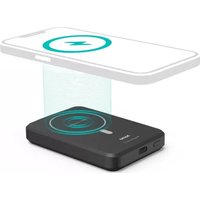
MagPower4 201695 - Power bank HAMA - Free user manual and instructions
Find the device manual for free MagPower4 201695 HAMA in PDF.



| Product type | External battery with wireless charging |
| Brand | Hama |
| Model | MagPower4 201695 |
| Battery capacity (type) | 5000 mAh / 18,5 Wh |
| Battery capacity (min) | 4995 mAh / 18,48 Wh |
| Usable capacity (at 5V/2A) | 3266 mAh |
| Battery type | Li-Po 3,7 V |
| USB-C input | 5 V 2 A / 9 V 1,5 A |
| USB-C output | 5 V 2 A / 9 V 1,5 A / 12 V 1,1 A |
| Induction output | 10 W max |
| Total output | 5 V 2 A |
| Wireless charging | Yes, MagSafe compatible |
| Capacity indicator | 4 LEDs (25% per LED) |
| Package contents | PowerPack, USB-C cable, instruction manual |
| Recommended power supply | Suitable USB charger (not included) |
| Care and cleaning | Slightly damp lint-free cloth, avoid harsh detergents |
| Safety | Protection against overheating, overcharging, short circuit; do not open, do not dispose of in fire |
| Recycling | Built-in battery, dispose of according to local regulations |
| Operating temperature | Avoid extreme temperatures and very low atmospheric pressure |
| Prolonged storage | Recharge at least every three months |
Frequently Asked Questions - MagPower4 201695 HAMA
User questions about MagPower4 201695 HAMA
0 question about this device. Answer the ones you know or ask your own.
Ask a new question about this device
Download the instructions for your Power bank in PDF format for free! Find your manual MagPower4 201695 - HAMA and take your electronic device back in hand. On this page are published all the documents necessary for the use of your device. MagPower4 201695 by HAMA.
USER MANUAL MagPower4 201695 HAMA
Thankyouforchoosinga H amaproduct.
Take your time and read the following instructions and information completely. Please keep these instructions in a safe place for future reference. If you sell the device, please pass these operating instructions ontothenewowner.
1.Explanationof warningsymbolsandnotes
Warning

This symbol is used to indicate safety instructions or to draw your attention to specific hazards andrisks.
Note

This symbolis used to indicate additional information or important notes.
2.Packagecontents
- "MagPower5"powerpack
U SB-Cchargingcable - T heseoperatinginstructions
3.Safetyinstructions
- Protect the product from dirt, moisture and overheating and use it in dry environments only.
- As with all electrical products, this device should be kept out of the reach of children.
- Do not drop the product and do not expose it to any major shocks.
- Do not operate the product outside the power limits given in the specifications.
- Do not open the device or continue to operate it if it becomes damaged.
- Dispose of packaging material immediately in accordance with the locally applicable regulations.
- The battery is permanently installed and cannot be removed; dispose of the product as a whole in accordance with the statutory regulations.
- Do not modify the product in any way. Doing so voids the warranty.
- D o n otincineratethebatteryortheproduct.
- Do not tamper with or damage/heat/disassemble the batteries/rechargeable batteries.
- Do not use the product in the immediate vicinity of heaters, other heat sources or in direct sunlight.
- Do not use the product in areas in which electronic products are not permitted.
- Do not attempt to service or repair the product yourself. Leave any and all service work to qualified experts.
Warning- m a g n e t s


- People with pacemakers should keep away from the magnets. The magnets can negatively affect the function of the pacemaker.
- Do not place any bank or similar cards with magnetic strips or magnetically sensitive objects on the product. The data on the cards could be damaged or completely deleted.
Warning

Ensure that there are no metal parts (e.g. metal plate for magnetic holders) on the back of your device. Metal heats up significantly in the field of an induction charger and can damage your device and/or the power pack.
4. Operation
Note- S witchingon/ o f f

- Press the button on the power pack to switch this on, to determine the power pack's current capacity and startthewirelessfunction.
- The power pack switches itself off after around 40 seconds of non-use. Press the Power button twice to switch the power pack off manually. When the power pack switches off, the LED display also goes out.
4.1.ChargingtheMagPower5
- Start the power pack charging process by connecting the enclosed USB-C cable to the USB-C input on the Power Pack (IN 5 V / 2 A or 9 V / 1.5 A) and to a suitable USB-C charger. To do this, consult the operating instructions for the USB charger you are using.
- The charging process begins and ends automatically.
- Fully charge the power pack once before using it for the first time.
Note-capacity

- Duringthepowerpackchargingprocess, the capacity is displayed constantly.
Each LED (4) corresponds to 25% of the capacity. The permanent illumination of an LED indicates that the capacity has already been reached. If three LEDs light up and the fourth one flashes, the powerpack is at least 75% charged.
If all four LEDs (4) light up, the full capacity is available.
Warning - rechargeable battery

- Do not charge the power pack via your PC or notebook. The charging currents can damage the USBportonthePCornotepad book.
- Only use suitable charging devices or USB ports to charge the product.
- Do not use defective chargers or USB ports and do not attempt to repair them.
- Do not overcharge the product or allow the battery to completely discharge.
- Avoid storing, charging and using in extreme temperatures and at extremely low atmospheric pressures(suchasathighaltitudes).
- When stored over a long period of time, batteries should be charged regularly (at least every three m onths).
4.2.Chargingdevices
4.2.1. Wireless charging with the induction charging zone:
-firstswitchthepowerpackonusingthePowerbutton(3).
- The blue function LED (2) briefly signals that the power pack is ready and then switches off
- Place your device with its back on the inductive charging zone (B).
- The "MagPower 5" power pack is compatible with Apple MagSafe technology. The correct alignment and fixation of the device takes place automatically thanks to the magnets integrated into the power pack and the iPhone.
- All other smartphones that support the inductive charging function should also be placed on the induction charging zone (B). In this case, however, the automatic central fixing of the device does not take place.
- The charging process begins as soon as an effective induction field has been established. The status LED (2) lights up blue. The current charge status is displayed on your device.
- If no induction connection can be established, change the position of your device if necessary (B). (For all smartphones that do not feature MagSafe technology)
If your device's battery is fully charged, the status LED (2) goes out once when you remove the device.
- Remove your device from the power pack's induction charging zone and switch it off by pressing the Powerbuttontwiceinquicksuccession. The LEDs(4)goout.

Note
The powerpack can be charged and the inductive charging function uses simultaneously. The Power button (3) is inactive in this situation. The wireless charging function starts automatically when the smartphone is placed in position.
4.2.2. Charging via the power pack's USB-C output:
- connect the enclosed USB-C charging cable to the USB-C port on the power pack (OUT 5V/2A, 9V/1.5A, 12V/1.1A) and with the USB-C port on your device (mobile phone, smartphone, etc.).
- In certain circumstances, the enclosed charging / connecting cable may not match the USB port on your device. In this case, use the USB cable that came with your device.
- The charging process begins automatically. During the charging process, the LEDs (4) the power pack's remaining available c opacity.
T hecurrentbatterychargestatusofyourdeviceisindicatedonthis. - Terminate the charging process and switch the power pack off by pressing the power button twice inquicksuccession.ThestatusLEDsqoout.
- In the event that no device is connected, the power pack switches itself off automatically.
Warning- c onnectingdevices

- Before connecting a device, check whether it can be adequately supplied with the power pack's currentdelivery.
- Ensure that the total current consumption of the connected device does not exceed 2000mA .
- N otetheinstructionsinyourdevice'soperatingsmanual.
- You must obey the instructions and safety notes contained therein regarding the supply of powertoyourdevices.
- Please do not charge simultaneously using the wireless charging and USB-C charging options. Doing so may in certain circumstances overload the power pack.
Note- o optimisedcharging

Optimised chargingmeansthat the powerpack recognises the connected device, supplies it with the ideal current strength and therefore reduces the charging time to a minimum. Note that the power pack's maximum current delivery is 2000mA .
5.Careandmaintenance
Only clean this product using a lint-free, slightly damp cloth and do not use any harsh cleaners.
6.Warranty disclaimer
Hama GmbH & Co KG assumes no liability and provides no warranty for damage resulting from improper installation/mounting, improper use of the product or from failure to observe the operating instructionsand/or safety n otes.
7. Technical data
| USB-Cinput5 V 2 A, 9 V 1.5A | --- |
| USB-Coutput5V | ---2 A, 9 V-4.5A,12V1.1A-- |
| Inductionoutput10W ( max.) | |
| Totaloutput5V | ---2 A |
| Batterytype3.7V/Li-Po | |
| Min.capacity4995mAh/ 1 8.48Wh | |
| Typ.capacity5000mAh/ 1 8.5Wh | |
| Usablecapacity*3266mAh @ 5 V | ---2 A |
- The usable capacity is the capacity that can be drawn from the output sockets, measured at 5V output voltage and a draw current of 2A.
8.Declaration of conformity

Hama GmbH & Co KG hereby declares that the radio equipment type [00201585,
00201695] is in compliance with Directive 2014/53/EU. The full text of the EU declaration of conformityisavailableat thefollowingInternetaddress:
www.hama.com->00201585, 00201695->Downloads.
| Frequency band(s) | 110 kHz – 205 kHz |
| Maximum radio-frequency power transmitted | 1.24 dBμA/m at 3 m |
www.hama.com->00201585,00201695->Downloads.
| Bandedifrequency | 110kHz- 2 05kHz |
| Massima potenza a radiofrequenza trasmessa | 1.24 dBμA/m at 3 m |
www.hama.com->00201585,00201695->Downloads.
Frekvenciasav(ok)110kHz-2 05kHz
Maximalis sugarzott jelerosseg
1.24 dBuA/m 3 m-en
www.hama.com->00201585,00201695->Downloads.
| Banda (benzile) de frecventa | 110 kHz – 205 kHz |
| Putereamaximă1.24dBμA/mla3m |
Dekujeme,zejestesivybralivyrobekHama!
www.hama.com->00201585,00201695->Downloads.
www.hama.com->00201585,00201695->Downloads.
www.hama.com->00201585,00201695->Downloads.
Frekvensband110kHz-205kHz
Max.sandareffekt1.24dBa/mpa 3 ma vstand
БларпьмвасTo,ТовыббралнрдHTama!
Ipeep nCnoJIb3OBaHnEM BHNMaTeIbHO npOHTne CNeIyUoIe IHCTpyKuIN yKa3aHnY. XpaHnte DaHHoe pyKOBOdCTBO NO 3KcPnyatauB HAnExHOM MeCTe, YTO6bl B Clyae Heo6XoIMOCtN y Bac Bcerda 6bl Doctyn K Hemy. Pp nPoJaxe yCTpoiCTBa nepeaIte pyKOBOdCTBO HOBOMy BlaJeIbCy.
1.ПОЯСЕнякпрдурпждаюшмЗнakamиУКаЗаняМ
PpeynpeKdHne

NcnoIb3yeTcraIyO603HaueHnayKa3aHnIOTexHnke6e3oNaCHOCTnnIINJaakceHTnpOBaHnBHNMaHnHaOC6bIXoNaCHOCTaXn p NCKax.

Yka3aHne
IcnoJIb3yeTcayIJaONOpHHTeNbHorOoo60HaueHnIHΦOpMaunuINBaXhByxka3aHn.
2.KomJIeKToCTaBKn
PpeynpeKdEHNe—MaHnTbI


Praom C MaHHTaMn He DoJXbI HaxOuTbcra IIOu, npmehnoiue KapIOCTmMyIaTOpbI. MaHHTbIMORYTOTpuataJIbHOBJIaRbHaapa6OtyKapDIOCTmMyIaTOPOB.
He KlaIte Ha 3eJeN6aHKnOBCKne n aHaIOnuHbIe KapTbIC MaHHTHOJ NOLOCo, a TaKxe yBCTBnTEJIbHbIe K MaHHTHomy NOpIIO npEIMTe. 3TO MOKeT pINBeCt N NOBpeXdEHNO KapT IInydaJIeHNIOCOxpaHEHHOHAnHXNHΦOpMaUIN.
PpeynpexkdeHne

Y6eHNTecb, yTo Ha o6paTHo CTOpOHe BaWero OKOHeUHO yCTpoiCTBa Het MeTALnuecknx 3JIeMeHTOB (HaNPIMep, MetaLInuecko PnactINbI IJMaHHTHO epXaTeJI). MetaII ouehb CInbHO HArpeBaetcB nOJe INHyKUHOHHO 3apAnHO OBaCTN mOxET NOBpeHtB NCTOuHNK nITAHNI.
4.3Kcnnyataua

Yka3aHHe-BKJIIOUeHHe/BbIKIIOUeHHe
Haxmnte KhoNky Ha nctOuynke nHTaHn, yTO6bI BkIIOuNTb eRO, y3HaTb TeKyuO emKOCTb 3anyCTnTB6ecnpoBOdHyOyHKUIO.
- Pn HncNoB3OBaHHN NCTOCHNK NITAHNA CAMOCToTeNbHO OTKIOHcyepe3 40 cekyH. YTO6bI BbIKIOHTb NCTOCHNK NITAHNA BpyHyIO, DBaXDbI HaxMnte KONky Power. Pn OTKIOUHeHHNCTOCHNKaIIHTAHNA TAKKeRacHETCBToIDNOIDhINHINKATOp.
4.1.ZapkAnToHkAnTaHnMagPower5
3anyctte npoecc 3aprakn nctouhka nntahna, noCoeHHNB npuJaraemb kabe USB-C Ka pa3bemy USB-C nctouhka nntahna (IN 5 B/2 A nn 9 B/1,5 A) n K noxOJeMy 3apAnHomy USB-yctpoiCTby. Co6IIOaTe pykoBocTBo no ekcnlyataunncnoJb3yeMoro 3apAnHoro USB-yctpoiCTba.
-ПрочьсЗарядкн НачиНаeТСИЗakанчиВаeTСАВТOMATИЧЕСК.
-ПepeДпрВьIMпprimeHHeHMeOДинра3ПОЛHOCtБIO3ApЯДИТСTOHKNITAHIA.

Yka3aHHe:emKoCTb
B npoucece 3apdkn nctouhka nntaHn 3haueHne emkoctn oTo6paXaetcnoCToHHNO.
Kaxdbn CBeToIOoD (4) COOTBETCTByeT EMKOCTN 25%. NocToHHoe CBeueHne CBeToIOoDa cnHaUN3npyET O TOM, YTO EMKOCTb DOCTINHTa. Ecnn TpN CBeToIOoDA rOpT, a YeTBepTbIM CBeToIOoM MInAet, IVTOUHNK 3apJxhen He MeHee Yem Ha 75%.
- EcJn ropT Bce Yetbipe CBeToDInoDa (4), DocTHrHyTa NOJIHaa EMKOCTb.
PpeynpexkdeHne:akKymyIaTOp

He 3apjkaTe nctouHnK nHTaanHuepe3 KOMnbIOTep nn HooTyk. ToKn 3apJkn MoryT nobpeuTbnpotUSBKOMnbIOTepaunHooTy6yka.
-Дязардки ИсплььутToько пдхлгше зардны ectpoicTba nln USB-pa3beMbI.
He nCnoB3yIe HeNCnPaBHbIe 3apAaHbIe yCTpoiCTBa IIN USB-pa3BeMbI Hne NtTaNTecb nx peMOHTnpoBaTb.
He donyckaTe n36bItoHOn 3apJkn n rny6oko pa3pJkn n3deJIna.
- He xpaHnte, He 3apJkaIte n He nCnoJIb3yIte yCTpoIcTBO npn OueHb Hn3Knx I OueHb BbICOKnx TEMpepatpax n OueHb Hn3KOM aTMocΦepHom dAbJeHN (HaNPmEp, Ha 6OJIbux X BicOTax).
- Ppi dIInTeJbHom xpaHenn peYyIepHO 3apXaIte I3JeJIne (He pexe oDHoro pa3a B KBaptan).
4.2.3apraKa OKOHeuHbIX yCTpoIcTB
4.2.1. BeçnpoBóDná 3apǎkα C nOMOùbI O NHydúKuOnHòn 3apáHòn o6laCTn:
- ChaJaJIaBKLJIIOHTeNCTOCHNKIIITAHHJHAAKATNeHMKHONKNPower(3).
CnHnCBETOIOIOfYHKUHOHPOBaHn(2)KopoTko yKa3bIbAeT Ha rTOBHOCTb NCTOCHKA nITaHn Kpa6oTe H 3aTEM rachet.
-ПолoxиTe okoheHoe yctpoiCTBO Ha nHykCIOHOHyO 3apAHyO 6bIacTb (B) 6paTHoN CTopoHOH. - Ictouhik nHTaHn "MagPower 5" coBmecTm C texHoIornei Apple MagSafe. Ppi ETom npabNbHOeBBipabHBaHnei IKcaUNKOHeHOrOyCTpoiCTBaOcyueCTBJIaETcA BtOMaTnueckn NocpeDCTBOM MaHHTOB, BCTpoEHbIX B ICTOuyHke nITaHn, a TaKxe B iPhone.
Bb taKxe moXeTe noIOXntb Ha INdyKUHOHHy 3apAHyO oBlaCTb (B) IIO6bIe dpYrne cMapTfoHbI, NOdEpxINBaIOUne OyHKUIO INdyKTHBHO 3apAKn. B 3tOM cIyuae abTomatuecka ueHTpaJIbHa aKcaun OKOHeuHOro yctpOCTBa He Tpe6yETc.
- Ipouecc 3aprAnKn NaHnaeTcra TOrda, KOrda yCTaHObIeHO aKTINBHO e INyKUHOHoe noJe. CBeToIOJNbI HnDnKATOp COCTOAHNIA (2) rOpNT cHnIM. TekyuIyPOBeHb 3apra Da Yka3aH Ha BaWeMOKoHeuHOMyCTpOInCTBe.
- Ecln INdykUHOHoe coeDInHeHne He yCTaHaBnBAeTcM, MoXHo N3MeHnTb NIOJoxEHNe OKOHeuHOyCTpOncBa (B). (Дя BCex cMaprfoHOB, He nOpIepKnBaIOx TexHOJOrnIO MagSafe)
- EcInn akKymyIaTOp OKOHeUHO yCTpoIcTBa NOnHocTbIO 3apJxKeH, CBeToDnOd COCToHnIa (2) rachETTOJIbKOIpOCJeOTCOeINHeHHroKOHeUHOYcTpoIcTBa.
- Y6epnteOKHeUHOeyCTpOINCTBOUNHdyKUnOHNo3aprAnHO6JnactNtncToHNKaNTaHnONTKIIOHTe NCTOuHnK nTahn, Haxab KhoNky Power Iba pa3a. CBeTOINOHBie INHnKaTOpbICoTcHn(4)NOrachyT.
Yka3aHne

Bo3MOxHa OJHOBpeMeHHa 3apJaNcTOUHnKa NITAHnI INCNoJIb3OBaHne FyHKuIN HNyKTInBHOJ 3apJKn. KhoNka Power (3) aKTHBaH. FyHKuIN 6eCnpOBoHOn 3apJKn 3aNyckaETcABTOMaTUnCeKN pR yKlaDbIBaHm CMapTfoHa.
4.2.2.3apka uepe3 BbIXoD USB-C nCTOuHnKa nHTaHn:
- Порклочпглараemь зapаднь ka6eNB USB-C к pa3bemy USB-C nctouнka пntahna (OUT 5 B/2 A, 9 B/1,5 A, 12 B/1,1 A) и к pa3bemy USB-C okoheuHoro yctpoiCTBa (MO6nIbHbI Telefoh, cMapTfoHи T.Д.).
- Ppi onpeJeHbix 06ctOteJIbCTBax npJlaTaembl 3apJHbI/CoeHNHTeJIbHbI Ka6JIb MoKet He pOxOInTb K pa3bemy USB OKoHeuHoro yCTpoiCTBa. IcNoJIb3yInTe USB-Ka6JIb OKoHeuHoro yCTpoiCTBa.
- Ppoecc 3apnKn NaHHeTcA BToMaTHueeckn. B npoece 3apnKn CBeToOnOdbI (4) oTo6paKaIOCTabWUOCaEMKOCTbNCTOHHKaPNTAHNA.
- Tekyuzi cTayc 3apJkN aKKymjIaTopa BaJero OKoHeHoro yCTpoJCTBa OTo6paXaETcHa OKOHeHOMyCTpoJCTBe.
3aBepuTe npouec3apRKn N BbIKIIOUte nCTOCHN PntAHn, Haxab KONky Power da pa3a. CBeToIOIOBCOCTOHNrAChyT. - Ecln OkohueHoe yctpoCTBO He NIOcOeINHeHO, INTOUHNK NITaHNAOTKJIIOuAeTcABOTMaTNUeCKN.
PpeynpexdHne:noKIOueHneOKeHbIxycPoIcTB

- Ipeen TEM KAK NOKJIIOHTb OKOHeuHoe yCTPOIcTBO, pOBepbTe, COOTBeTCTByeT JIN eMy BbIXoTOKaNCTOCHIKANITAHIN.
- Y6eIntecb, yTo o6uee noTppe6JIeHne ToKa nOdkJIIOUeHHOro OKOHeuHOro yCTpOJCTBa He npEByIshaer2000Ma.
CneyuTe yka3aHnM B pykoBOcTBe no 3KcnIyatauN OKOHeHOrO yctpoiCTBa. - PpNBeHbIe Tam yka3aHn I npaBnJa TexHKn 6e3onacHoctn npn o6ecneHn 3NeKtpoNtAHn BAwhx yCTpoNCTB 083aTeJbHbI K CO6JIIOdeHIO.
- He 3apjaKeTe OndHOBpeMeHHo IBa yCTpoiCtBa nOcpeIcTBOM USB-C i 6ecnpoBOHOH 3apAkn. 3TOMOKeTBbI3BaTbNepeRpy3KynCTOuHNkAnITAHn.
Yka3aHHe:ONTNMn3npoBaHHa3apJaKa

Оптимиюванha 3арядka 03начaeТ, чTO ИСТОЧИК ПИТАнг пасноЗ haET NOДКЛЮУЕНHO OKOHeHoe yCTpoIcTBO, NOДaEТ TOK ONТIMаЛьнOH CINblI N Tem CambIM COKpaUaet BpeMЯ 3арядк IDO MUNHmMyMa. YHTITE, ChTO MaKcIMaJIbHbI BBIXOD TOKa INCTOCHИKA ПИТАнг COCTABJIeT 2000MA.
5.TexHueckoeo6cnyKuBaHHneu y xOa
OuHuaTe n3dJIe NToBko CnOMoUbO CJIerKa BnaXHo 6e3BOpcoBo CaΦeTK; He nCnoJb3yIte arpeccNBbIeYnCTaUneCpeDCTBa.
6.NcklHueHeHneOTBeCTBeHHOCTM
Hama GmbH & Co. KG He HeceT OTBETCTBEHHOCn 3a NOBpeXdEHH, BO3NkUne B pe3yNbTaTe HeHaJIeXaIeYcTaHOBKn, MOHTaKa N HeHaJIeXaIeero NCIOJIb3OBAHnN I3DeIIN NII Hec6JIIODeEHnYrTe6oBaHnIpyKOBODCTBaNO3KcNlyaTaUIN/NIINyKa3AHINOTExHnke 6e3OnacHOCTn.
7.TexHnuecknHexapakTepncTNKu
www.hama.com->00201585,00201695->Downloads.
Диana3OH/Dиana3OHyacToT110-205K
MaKcImaJIbHaN I3IyuaeMaM MoUHOCtB
1.24ДБМКА/MприЗМ
BlaroDapmBn,ueTeu36paJInpOdykTHaHama!
OTdene Te BpeMe n npouTe n3aJIO CneBaunTe HnCTpyKcnn N yka3aHna. CneT ToBA 3ana3e ToBa pkoBOOCTBO 3a ekCnloatauaHa cngypHO MxCTO, 3a da MoXeTe da npabnte cnpabKn B Hrro npn Hykda.AKO npoAnTe ypeDa, npedAte TOBa pkoBOOCTBO 3a ekCnloatauaHa HOBn CO6CTBeHnK.
1.06acheHHe Ha npedynpeDnteHNn CmBOLN u yka3aHna
PpeynpeKdHne

I3noJ3Ba ce, 3a da o6o3Haayaba yka3aHne 3a 6e3oNaCHOCT IJIIN 3a da HAcOuB BHIMaHNeTO KbM KOHKpeTHN ONaCHOCT IN PnCKOBe.
Yka3aHne

I3noJ3Ba ce, 3a da o6o3Haayaba DonbHnTeJHa nHOpMaun JIn Baxn yKa3AHn.
2.CbIbpxKaHneHaonakOBkata
- PowerPack"MagPower5"
- USB-Cka6e3a3apexkdahe.
-Товарьководстбоаексл�атуян
3.Yka3aHn83a6e30nacHOCT
- Na3eTe npOyKTA OT 3aMbpcBaHe, Bnara n ppepRbAne I ro n3noJ3BaIte cMo B cyxa cpea.
- Поббнога BCИЧК eЛeКТрИчЕСК nproDyKTn, T03n npOdyKT He 6иBa Дa nonaДaВ pБцeTe Ha deca!
He no3BolraBaeHa npOdykTa da naDa n He ro n3naRaTe Ha cnJHn Bn6paun.
He n3noI3BaIte npOyKta n3BbH HeROBIne rpaHnCi Ha MoUHocTt, NOCOueHN B TexHnueCKnTe daHHN.
He oTbapnTe npOykTa n npn noBpeDa He npOdbJxBaBnTe da rO n3nON3BaTe. - IV3xBpJIe Te onaKOBbUHnMaTePnaJI BeIHaRa CbIaCHO DeIcTBaIuTe Ha MЯCTO pa3IopeI6N 3a I3XBpJIrHeHaOTnIbIu.
- BaTePnIa e HEnoDnBnKHO BrpaIeHa n He MoKe Ia ce Mxa, IN3XBbPJIeTe npOyKTa KaTo cIaIO cnopeI3aKoHOBnTEpa3nopeI6n.
He npabete npomeHb ypeHa. TaKa 3aRy6nte npabo Ha BcKaKbI rapaHIOHHn ppeHcHm. - HexbpynTe 6aTeepnTa nn npOyKta BOrbH.
He npomehnyTe n/nn He neΦopMnpaTe/HarpaBaNrTe/pa3rno6BaNrTe akyMynaTOpHnTe 6aTePn/ 6aTepeHnTe. - He n3no13BaIte npOykTa B HenocpeIcTBHea 6JI3oCT Do OTOnJIInTeJHn ypeiN, dpyrN n3TOHHuHaTOnJIInHaJIInHaIupeKTHacNbHueBaCBeJIInHa.
He n3no3BaIte npOdykTa B 30Hn, B KOnTo He ca pa3peWeHH eJEnKtpoHN npOdykTN.
He ce onntbaiTe camn da o6cnykBaTe nIpeMOHTnpaTe npOyKta. OctabeTe BcKaKaBaTexHueckaoOpDpBxKkaHaKOMneTeHTHInTecneuaJIInCTn.
PpeynpexdHne-MarHHTN


- Лица сбс сьрд Equн CTIMyIaTOpn Tp6Ba Да StOуТ ДалeЧ OT MaHHTte. МaHHTte Morat Да hapyuataФункцЯТаHacbPdEquHnAcTIMyIaTOp.
He 3apejdaite EC nIIN dpyrn noo6Hn KapTu C MaHHTHa JeHTa, KaKTo N yBCTBNTeHN Ha MaHHTHO DeiCTBne npedMeTn Bbpxy npOdykTA. DaHHITE OT KApTaT a MoRat da 6bDat Nobpehennnn3TpNTn.
PpeynpexkdeHne

YBepTe ce, ye no Tbp6a Ha BaWeTo KpaHNo yCTpoiCTBO HMa MeTaNn IpeMEn (HaPnPmep MetaHa nloa 3a MaHnTeH nbpxa).MeTaNbT ce HaPpBa MHO rCJHo B NOJeTO Ha yCTpoiCTBO TO 3a INNyKcUOnHO 3apExdane H MoKe Da NOBpeDN KpaHnO To Bn yCTpoiCTBO N/nn PowerPack.
4.PexmHapa6oTa

Yka3aHHe-BKJIIOUBaHe/NU3KJIIOUBaHe
- Hatnche 6ytoHa Ha Power Pack, 3a da ro BknoHte, 3a da pa36peTe Tekuun KaanTet Ha Power Pack n 3a da cTnupate yHKuaTa Wireless.
- Пи HeakTNBHOCT Power Pack ce n3KJIIOUba cAmOCToTeJIHcNeI OkJIo 40 cekyHdN. HATnCHete 6yToHa Power IBa nbTn, 3a da n3KJIIOUHTe Power Pack pbuHo. Ako Power Pack ce n3KJIIOuH, n3racBaanLEDnHnkaunraTa.
4.1.3apexkaheHaMagPower5
- CstaptnpaIte npoceca Ha 3apejdahe Ha Power Pack, KaTO cbbpXeTe npnIOxEHnKa6eJ USB-C KbM USB-C Bpb3kata Ha Power Pack (IN 5V/2A nnCbOTBETHO 9V/1.5A) n KbM noDxoJaIO USB 3apJHNO yCTpoiCTBO. 3a ueJIta cna3BaIte nHCTpyKUraTa 3a o6cnyXbaHe Ha n3noJ3BaHOTO USB3apJHNOyCTpoiCTBO.
- Ppocecbt Ha 3apejdahe cTapTnpa n 3abpbwBa aBtOMaTHUHO.
- Ппдп nbрва淘汰уnotpe6а nbрBOHauJIHо 3apeTe HanblHo Power Pack.

Yka3aHne-KanaunTeT
- ПО ВЕME на поцета на зараздени на Power Pack Kanauitebт ce nokazba noctoHNO.
- BCEKn CBETOJNOI (4) CbOTBETCTBa Ha 25% OT KanaUHTa. Ako IaJeH CBETOJNOI CBETN NOCTOJHHO, TOBA NOKa3Ba Beue IOCTINHAT KanaUHT. Ako CBETHaT TpN CBETOJNOJa, a YETBbPTnT Mira, Power Pack e 3apeJeH Do MNH. 75%.
AkoCBETIuYeTnpTE CBETOIOda(4),eHaJIyEnPbJHnT KanaNTeT.
PpeynpexkdeHne-BeTepe

He 3apekdaTe Power Pack ype3 KOMNIObpa NIn HOY6yka cn. 3apnHnte TOKOBe MOrat da nobpeIaTUSBnoptaHaKOMNIObpaNInHaHOY6yka.
- 3a 3apejdahe n3noJ3BaIte caMo noJxOJaUe 3apAInu yctpoiCTba uIN USB n3BOuN.
- IIO npnHnI He n3noJ3BaIte nepeKTHn 3apAaHn ycTpoiCTBa nn USB n3BODn Hce onNTBaTeDaIINonpaBATE.
He no3B0JIaIe npOyKta da ce 3apeXda NOBeue OT Heo6xoIMOTO nIN da ce pa3peXda HnblHO.
- 13684BaTe CbXpaHeHne, 3apeXdaHne H3noJI3BaHne npEekTpeMHn TemnepaTpyn H3KJIIOHTeJIHO HNCO HaJIraHne HA Bb3dyxa (KaTO HApPmEp HrOJemn BvCOuHN)
- Ppi no-npOdbJIxKntJHo cIbXpaHeHne I03apExKaITe nepIOOnuHO (noHe BeHNbX Ha TpN Meceua).
4.2.3apekdaheNaekpaHnyucTroponCTBa
4.2.1.6e3knH03apeKdaHeCbC3OHaTa3aHnHyKcNoHHo3apeKdaHe:
- Пьрв Вклоче Power Pack ot 6утона Power (3).
CINHnT CBeToDnO 3aФyHKuY (2) CnHnIIm3npa 3a KpaTko rotOBHOCTTa Ha Power Pack n n3racBa - NocTaBete yCtpoNCTBOTo Cn C rBp6a HAnOly Bbpxy 30HaTAta 3a INHnyKcIOHO 3apeXdaHe (B).
- Power Pack „MagPower 5" e cbbmecTtM C TexHIOrna MagSafe Ha Apple. Ipn TOBa npaBnHTo peYIpaHe n fIKcnpaHe Ha yCTpoiCTBOTo Ce N3BbPbBaT aBTOMaTHUHO OT INTerpnpaHHTeBPowerPackniPhonemarHHTn.
MoJr, nOCTaBeTc BcUKN Dpyu CMapTfoHn, KOnTO NOIbpxaT cyHKunraTa 3a INNyKUnHO 3apeXdaHe, Cbso TaKa Bbpxy 3oHaTa 3a INdyKUnHO 3apeXdaHe (B). Tyk OTpada Heo6xOIMOCCTTA OT ABOTMaTHO, ZENTpaJIHO qKcnpaHe Ha yCTpoiCTBOTo.
- Ipouecbt Ha 3apejdahe 3anoyba, Korato 6bnde c63daedeHO nHnykuohno Hone. CBeToIOIOBT 3a ctaTyc (2) CBETN B CnHbO. AktyaIHHrT cTaTyc Ha 3apejdahe ce noka3Ba Ha BaWeto KpaHoo yCTpOietBO.
- Ako He Moxe Ia Ce yCTaHOBn INIyKUIOHHa Bpb3ka, npu HxJa pPomeHeTe P03NcIra Ha BaWeTo yCTpOJIcTBo (B). (PpN BCNUK CMapTfoHn, KOnTO He npNTexBaT TexHOJOrnTa MagSafe)
Korato 6aTePnTa Ha BaWeTo KpaHNo yCTpoNCTBO e HAnbIHO 3apeJeHa, CBeTOIOJbT 3a CTaTyc (2) n3racBa eDba CneI KaTo OTCTpaHIne KpaHNOyCTPONCTBO.
B3emete KpaHOTo Cn yCTPOIcTBO OT 30HaTa 3a INyKUHOHHO 3apExJaHe Ha Power Pack nN3KJIIOHTe CbUIN, KaTO HATNCHE Te 6yToHa POwer IBa NtN PocJeIOBaTeJIHO 3a KpaTKO. CBetOnIOInTe(4)YrAcBAT.
Yka3aHne

EINHOBpeMeHHOTaApExJaHe Ha Power Pack n 3nIOJI3BaHeTo Ha INHyKUHOHOTo 3apexJaHe e Bb3MOxHo. Ipn TOBa 6yTOHbT Power (3) e DeakTNBupaH. Be3XuHaTa yHKun3a 3apexJaHe CTAPtIpaABTomTuHOpnIOCTaBHeHaCMapTfoHa.
4.2.2.3apexkaHenpe3USB-Cn3BodaHaPowerPack:
- CBbpxeTe npnloxehna Ka6eI 3a 3apeXdahe USB-C c USB-C n3bOda Ha Power Pack (OUT 5V/2A, 9V/1,5A, 12V/1,1A) n C USB-C n3bOda Ha BaWeTo KpaInHO yctpOietBO (MO6nJIen TeIeΦoH, cMapTΦoH n dp.).
- Пи onpeJeHn o6ToTeJIcTBA npInIoXeHnT 3apJeH/cBbP3BaU KabeI He e nOxOJaU 3a USB n3BOJa OT cTpaHa Ha KpaHOTo yCTpoiCTBO. Toraba n3NoJ3BaIte USB Ka6eJa Ha KpaHOTo yCTpoiCTBO.
- Пюцьт На зарекданесторуавTomатино. Ровпсима на зарекданe CBETODINODITE (4) рOKАЗВAT BCE OОЕ habлчникацитet Ha Power Pack.
- Tekyunt CTatyc Ha 3apejdahe Ha akymylatophata 6atepna Ha BaueTo KpaHOn yctpoNCTBO ce noka3BaHaHero.
3aBbPseTe npoeca Ha 3apeKdahe n N3KJIIOHete Power Pack, KaTO HATNCHE Te DBA nTINocJeIOBaTeNHO3aKpaTko6yToHaPower.CBeToNDIOHTe3actatycracBat.
B CnyaH Ye He cBbp3aHo KpaHNo yCTpoNcTBO, Power Pack ce n3KIOUba ABTomaTHNO.
PpeynpeKdHne-Cbbp3BaHeHaKaPaHnycTpoCTBa

- Прази CBbp3BaHe Na Дадену Краино устpoиТВО поверете далу ТО може да 6ьдзaxpaHeNo DoCTaTbUH O CИЗXDнЯ TOK Ha Power Pack.
- YBepTe ce, ye He ce npeBnShaBa o6uata KOHCymaun Ha TOK OT 2000 mA Ha Cbbp3aHOTo KpaHNO y CTpoNCTBO.
Cb6IIOdaBaIte yka3aHnraTBA pBkoBOcTBo 3a ekcnloataun Ha BaJeTo ycTpoiCTBO. - Henpemehno Cb6JIOdaBaIte NocOeHInTe TaM DaHHN uYka3aHn 3a 6e3oNaCHOCT3a eNeKtpo3axpaHbAHeBaUnTeyctpoiCTBa.
- MoJIa, He 3apeXdaIte eHOBpeMeHHO ype3 IbTe OnCIN 3a 3apeXdaHe - 6e3xuH0 3apeXdaHe n USB-C. B pe3yIITat Ha ToBa Power Pack MoKe da 6bIe npTeobapeH.
Yka3aHHe-OnTmMn3npaHo 3 apexKaHaHe

6.N3KlHouBaHeHaOtroBOPHOCT
Hama GmbH & Co KG He noema otrobohopocnt nI rapaunca 3a nobpeNi, KOITo ca pezytat OT He npabnHa nHctanaqna, MOHTax N ynoTpe6a Ha npOdykTa nIi OT He cna3BaHe Na bKOBODCTBOTO 3aekcnloatauyn/nnHayka3aHnraTaa360nacHOCT.
7.TexHnuecknDaHHn
| USB-C Bxoid | 5V - 2A, 9V - 1.5A |
| USB-Cn3Bovd5V | -2A, 9V-4.5A,12V1.1A- |
| Индунцюн En3xoid | 10 W (maк.) |
| I3xodobu5V | -2A |
| Tinbatepna3,7V/Li-Po | |
| MIn. kanaqtet | 4995 mAh/18,48Wh |
| Tin. kanaqtet | 5000 mAh/18,5Wh |
| Полеенданцпт* | 3 -2A 266mAh@ 5V |
www.hama.com->00201585,00201695->Downloads.
| Чебта лесда/чебтон лесда | 110 kHz - 205 kHz |
| Мakсимална мельчавелна мошноct | 1.24 dBμA/M на 3 m |
ZaeeuxayapiotououeouenieEateevanpoiovntcHama!
Apixka, aphiwote liyo xpovo yia va diaabaote tic napakatw odnyiec kal unodeiEic. Tn ouvexia, pfalaTe to eyyepidio odnyiwv oae aopalc espeoc yia eavpiaot. Eav dwoet tn ouakeun o ae alo atofo, 0a npenei va npadawote to eyyepidio odnyiwv otov vdoiknttn.
www.hama.com->00201585,00201695->Downloads.
www.hama.com->00201585,00201695->Downloads.

- 1.Explanationof warningsymbolsandnotes
- Warning
- Note
- 2.Packagecontents
- 3.Safetyinstructions
- Warning- m a g n e t s
- Operation
- Note- S witchingon/ o f f
- 4.1.ChargingtheMagPower5
- Note-capacity
- Warning - rechargeable battery
- 4.2.Chargingdevices
- Wireless charging with the induction charging zone:
- Charging via the power pack's USB-C output:
- Warning- c onnectingdevices
- Note- o optimisedcharging
- 5.Careandmaintenance
- 6.Warranty disclaimer
- Technical data
- 8.Declaration of conformity
- 1.ПОЯСЕнякпрдурпждаюшмЗнakamиУКаЗаняМ
- PpeynpeKdHne
- Yka3aHne
- 2.KomJIeKToCTaBKn
- PpeynpeKdEHNe—MaHnTbI
- PpeynpexkdeHne
- 4.3Kcnnyataua
- Yka3aHHe-BKJIIOUeHHe/BbIKIIOUeHHe
- 4.1.ZapkAnToHkAnTaHnMagPower5
- Yka3aHHe:emKoCTb
- PpeynpexkdeHne:akKymyIaTOp
- 4.2.3apraKa OKOHeuHbIX yCTpoIcTB
- BeçnpoBóDná 3apǎkα C nOMOùbI O NHydúKuOnHòn 3apáHòn o6laCTn:
- 4.2.2.3apka uepe3 BbIXoD USB-C nCTOuHnKa nHTaHn:
- PpeynpexdHne:noKIOueHneOKeHbIxycPoIcTB
- Yka3aHHe:ONTNMn3npoBaHHa3apJaKa
- 5.TexHueckoeo6cnyKuBaHHneu y xOa
- 6.NcklHueHeHneOTBeCTBeHHOCTM
- 7.TexHnuecknHexapakTepncTNKu
- 1.06acheHHe Ha npedynpeDnteHNn CmBOLN u yka3aHna
- 2.CbIbpxKaHneHaonakOBkata
- 3.Yka3aHn83a6e30nacHOCT
- PpeynpexdHne-MarHHTN
- 4.PexmHapa6oTa
- Yka3aHHe-BKJIIOUBaHe/NU3KJIIOUBaHe
- 4.1.3apexkaheHaMagPower5
- Yka3aHne-KanaunTeT
- PpeynpexkdeHne-BeTepe
- 4.2.3apekdaheNaekpaHnyucTroponCTBa
- 4.2.1.6e3knH03apeKdaHeCbC3OHaTa3aHnHyKcNoHHo3apeKdaHe:
- 4.2.2.3apexkaHenpe3USB-Cn3BodaHaPowerPack:
- PpeynpeKdHne-Cbbp3BaHeHaKaPaHnycTpoCTBa
- Yka3aHHe-OnTmMn3npaHo 3 apexKaHaHe
- 6.N3KlHouBaHeHaOtroBOPHOCT
- 7.TexHnuecknDaHHn
Brand : HAMA
Model : MagPower4 201695
Category : Power bank