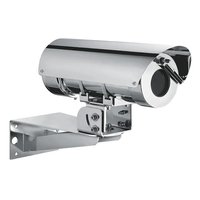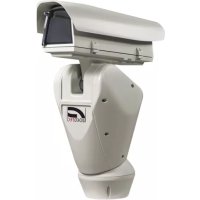
NXPTZT SERIES2 - Surveillance Camera Videotec - Free user manual and instructions
Find the device manual for free NXPTZT SERIES2 Videotec in PDF.


User questions about NXPTZT SERIES2 Videotec
0 question about this device. Answer the ones you know or ask your own.
Ask a new question about this device
Download the instructions for your Surveillance Camera in PDF format for free! Find your manual NXPTZT SERIES2 - Videotec and take your electronic device back in hand. On this page are published all the documents necessary for the use of your device. NXPTZT SERIES2 by Videotec.
USER MANUAL NXPTZT SERIES2 Videotec
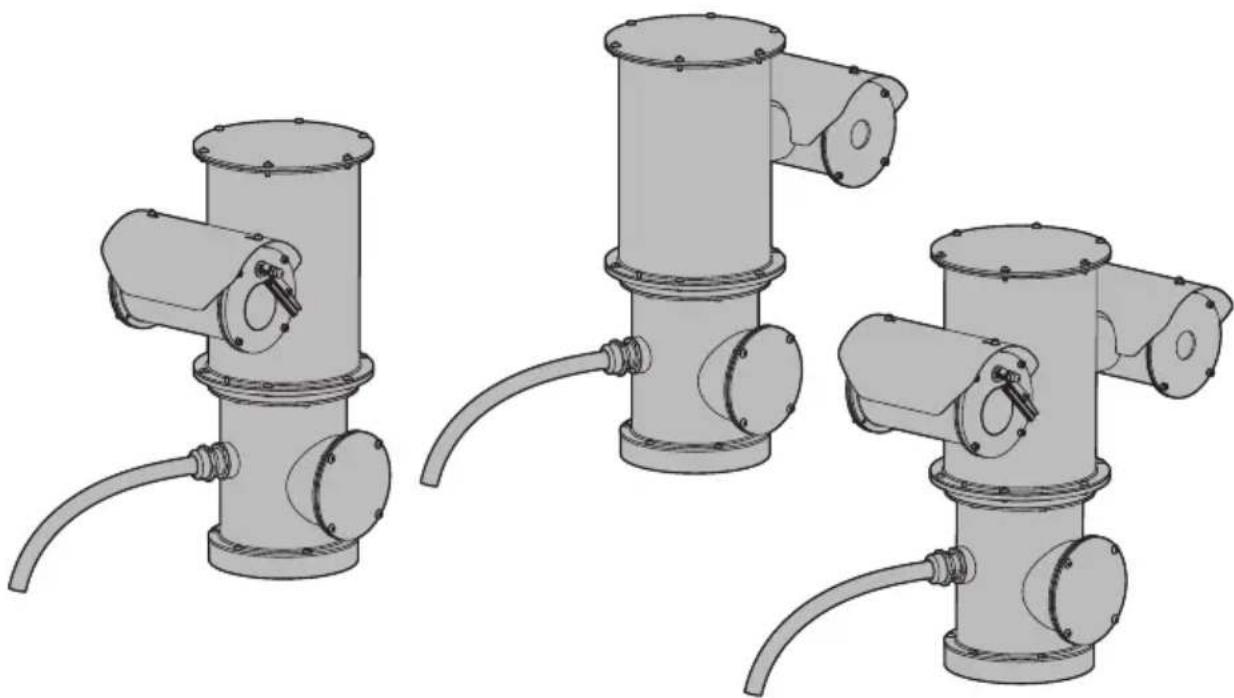
NXPTZ SERIES2 (NXPTZHD) NXPTZR SERIES2 (NXPTZR) NXPTZT SERIES2 (NXPTZT)
PTZ single or dual camera for marine onshore/offshore or industrial applications
natural_image
Three identical mechanical device configurations shown in 3D rendering, each with a cylindrical component and connected tubing (no text or symbols visible)EN English - Instruction manual
IT Italiano - Manuale di istruzioni
FR Français - Manuel d'instructions
DE Deutsch - Bedienungsanleitung
RU Русский - Руководство по эксплуатации
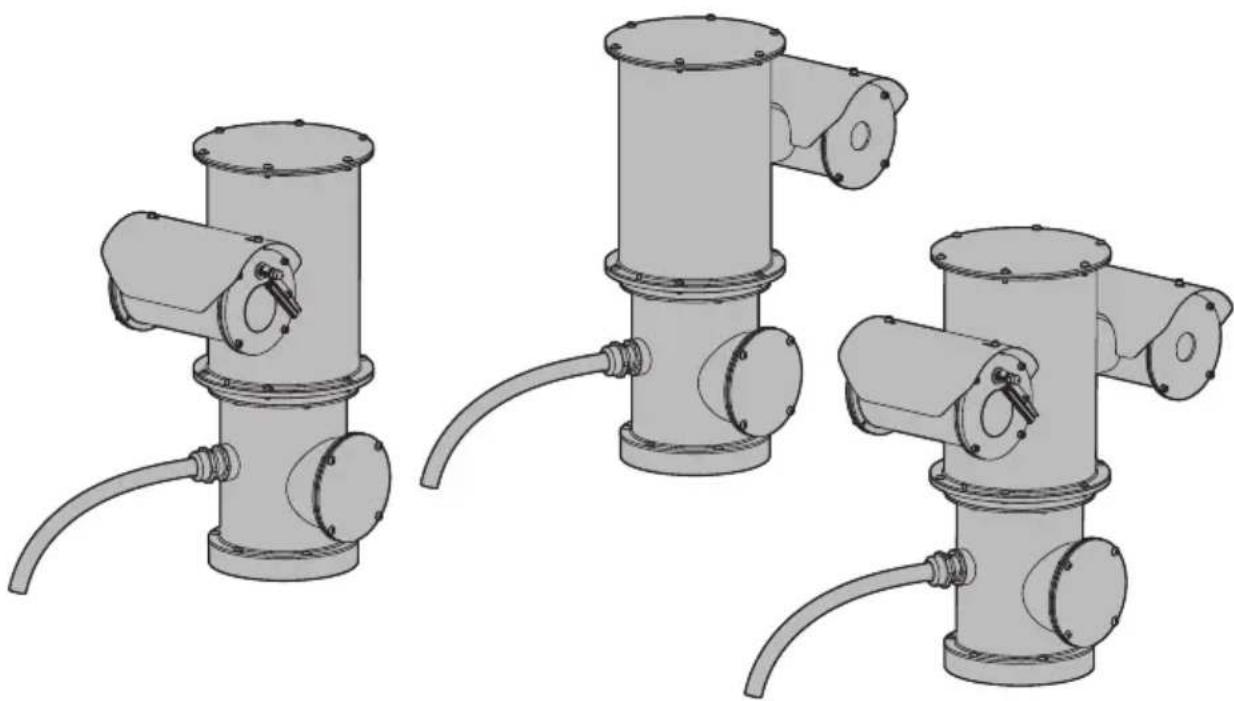
NXPTZ SERIES2 (NXPTZHD) NXPTZR SERIES2 (NXPTZR) NXPTZT SERIES2 (NXPTZT)
PTZ single or dual camera for marine onshore/offshore or industrial applications
natural_image
Three identical mechanical device configurations shown in 3D rendering, each with a cylindrical component and connected tubing (no text or symbols visible)Contents
1 About this manual....7
1.1 Typographical conventions 7
2 Notes on copyright and information on trademarks....7
3 Safety rules ....7
4 Identification 10
4.1 Product description and type designation....10
4.2 Product marking 10
4.2.1 Checking the markings....10
5 Versions....11
5.1 Day/Night camera 11
5.2 Radiometric thermal camera.... 11
5.3 Dual Vision with Day/Night and radiometric thermal camera.... 11
5.4 Model identification....12
6 Preparing the product for use....14
6.1 Safety precautions before use....14
6.2 Unpacking 14
6.3 Contents 14
6.4 Safely disposing of packaging material....14
6.5 Preparatory work before installation 15
6.5.1 Fixing to parapet or ceiling mount....15
6.5.2 Fixing with wall mount bracket....16
6.5.3 Fixing the unit to the pole mount adapter or corner mount adapter....16
6.5.3.1 Fixing with pole mount.... 16
6.5.3.2 Fixing with corner adapter....17
6.5.4 Sunshield mounting 17
7 Installation....18
7.1 Range of use 18
7.2 Methods of installation 18
7.3 Connecting the power supply....19
7.4 Ethernet cable connection 19
7.5 Alarms and relays connections 20
7.5.1 Connecting an alarm with dry contact....20
7.5.2 Relay connection....20
7.5.3 Washing system connection....20
8 Switching on 21
8.1 First start-up 21
9 Configuration....21
9.1 Default IP address....21
9.2 Web interface....21
9.2.1 First access to the web pages 21
10 Accessories and Supports....22
10.1 Washer....22
10.2 Parapet or ceiling mounting bracket 22
10.3 Wall mount bracket....22
10.4 Corner mount adaptor....23
10.5 Pole mount adaptor....23
10.6 Adaptor for connection of fiber optics....23
11 Instructions for normal operation 24
12 Maintenance 24
12.1 Routine maintenance 24
12.1.1 Inspecting the cables....24
12.2 Extraordinary maintenance 25
12.2.1 Fuses replacement....25
12.2.2 Factory Default....25
13 Cleaning 26
13.1 Cleaning the window....26
13.2 Cleaning the product 26
14 Information on disposal and recycling 26
15 Troubleshooting....26
16 Technical data....27
16.1 NXPTZ SERIES2 (NXPTZHD) 27
16.1.1 Mechanical 27
16.1.2 Housing's window....27
16.1.3 Electrical 27
16.1.4 Network 27
16.1.5 Cybersecurity....27
16.1.6 Video 27
16.1.7 I/O interface....27
16.1.8 Cameras ....28
16.1.9 Environment....29
16.1.10 Certifications....29
16.1.11 Certifications - Marine applications....29
16.2 NXPTZR SERIES2 (NXPTZR) 29
16.2.1 Mechanical 29
16.2.2 Housing's window....29
16.2.3 Electrical....30
16.2.4 Network....30
16.2.5 Cybersecurity 30
16.2.6 Video....30
16.2.7 I/O interface 30
16.2.8 Cameras....31
16.2.9 Environment 31
16.2.10 Certifications 31
16.2.11 Certifications - Marine applications....31
16.3 NXPTZT SERIES2 (NXPTZT) 31
16.3.1 Mechanical 31
16.3.2 Housing's window 31
16.3.3 Electrical....32
16.3.4 Network....32
16.3.5 Cybersecurity 32
16.3.6 Video....32
16.3.7 I/O interface 33
16.3.8 Cameras....33
16.3.9 Environment 34
16.3.10 Certifications 34
16.3.11 Certifications - Marine applications....34
16.4 Thermal cameras....35
17 Technical drawings....37
1 About this manual
Read all the documentation supplied carefully before installing and using this product. Keep the manual in a convenient place for future reference.
1.1 Typographical conventions

DANGER!
High level hazard.
Risk of electric shock. Disconnect the power supply before proceeding with any operation, unless indicated otherwise.

DANGER!
Mechanical hazard.
Risk of crushing or shearing.

CAUTION!
Medium level hazard.
This operation is very important for the system to function properly. Please read the procedure described very carefully and carry it out as instructed.

INFO
Description of system specifications.
We recommend reading this part carefully in order to understand the subsequent stages.
2 Notes on copyright and information on trademarks
The mentioned names of products or companies are trademarks or registered trademarks.
ONVIF ^® is a trademark of Onvif, Inc.
3 Safety rules

CAUTION! The electrical system to which the unit is connected must be equipped with a 20A max automatic bipolar circuit breaker. The minimum distance between the circuit breaker contacts must be 3mm (0.1in). The circuit breaker must be provided with protection against the fault current towards the ground (differential) and the overcurrent (magnetothermal).

A power disconnect device must be included in the electrical installation, and it must be very quickly recognizable and operated if needed.

CAUTION! Hazardous moving parts. Keep fingers and other body parts away.

CAUTION! Device installation and maintaining must be performed by specialist technical staff only.

CAUTION! TNV-1 installation type. The installation is type TNV-1, do not connect it to SELV circuits.

If it is necessary to transport the device, this should be done with great care. Abrupt stops, bumps and violent impact could damage the unit or injure the user.
- The manufacturer declines all responsibility for any damage caused by an improper use of the appliances mentioned in this manual. Furthermore, the manufacturer reserves the right to modify its contents without any prior notice. The documentation contained in this manual has been collected and verified with great care. The manufacturer, however, cannot take any liability for its use. The same thing can be said for any person or company involved in the creation and production of this manual.
- Before starting any operation, make sure the power supply is disconnected.
- Be careful not to use cables that seem worn or old.
- Never, under any circumstances, make any changes or connections that are not shown in this handbook. Improper use of the appliance can cause serious hazards, risking the safety of personnel and of the installation.
- Use only original spare parts. Non-original spare parts could cause fire, electrical discharge or other hazards.
- Before proceeding with installation, check the supplied material to make sure it corresponds to the order specification by examining the identification labels (4.2 Product marking, page 10).
- This device was designed to be permanently secured and connected on a building or on a suitable structure. The device must be permanently secured and connected before any operation.
- A power disconnect device must be included in the electrical installation, and it must be very quickly recognizable and operated if needed.
-
This is a Class A product. In a domestic environment this product may cause radio interference. In this case the user may be required to take adequate measures.
-
For products marked UL, powered at 24Vac, use a UL listed TNV/ES1 isolation transformer, compliant with IEC/UL 60950-1 and IEC/UL 62368-1.
-
Installation category (also called Overvoltage Category) specifies the level of mains voltage surges that the equipment will be subjected to. The category depends upon the location of the equipment, and on any surge voltage protection provided. Equipment in an industrial environment, directly connected to major feeders/short branch circuits, is subjected to Installation Category III. If this is the case, a reduction to Installation Category II is required. This can be achieved by use of an insulating transformer with an earthed screen between primary and secondary windings, or by fitting UL listed Surge Protective Devices (SPDs) from live to neutral and from neutral to earth. Listed SPDs shall be designed for repeated limiting of transient voltage surges and the following rated operation conditions: Type 2 (SPDs permanently connected to the power network and intended for installation on the load side of the service equipment); Nominal Discharge Current (In) 20kA min. For example: FERRAZ SHAWMUT, STT2240SPG-CN, STT2BL240SPG-CN rated 120Vac/240Vac, (In=20kA). Maximum distance between installation and reduction is 5m.
-
The equipment is intended for installation in a Restricted Access Area by specialist technical staff.
- To comply with the main supply voltage dips and short interruption requirements, use a suitable Uninterruptible Power Supply (UPS) to power the unit.
- The safety earthing system must be carried out according to local installation dispositions.
- The separate protective earthing terminal provided on this product shall be permanently connected to earth.
- For continued protection against risk of fire, replace only with same type and rating of fuse. Fuses must be replaced only by service personnel.
- Connect the device to a power source corresponding to the indications given on the marking label. Before proceeding with installation make sure that the power line is properly isolated. The supply voltage should never exceed the limit (±10%).
-
The appliance includes moving parts. Make sure that the unit is positioned where it is inaccessible under normal operating conditions. Attach the warning label supplied with the appliance, placing it near the unit so that it can be seen easily.
-
Attach the Dangerous Moving Parts label near the device. (Fig. 5, page 14).
- Do not use the appliance in the presence of flammable substances.
- Only skilled personnel should carry out maintenance on the device. When carrying out maintenance, the operator is exposed to the risk of electrocution and other hazards.
- Use only the accessories indicated by the manufacturer. Any change that is not expressly approved by the manufacturer will invalidate the warranty.
- Before connecting all the cables make sure the device is properly connected to the earth circuit.
- If the device has to be removed from the installation, always disconnect the earth cable last.
• Take all necessary precautions to prevent the apparatus from being damaged by electrostatic discharge. - Handle the unit with great care, high mechanical stress could damage it.
- Make especially sure that the power supply line is insulated at a sufficient distance from all the other cables, including lightning protection devices.
4 Identification
4.1 Product description and type designation
PTZ single or dual camera for marine onshore/offshore or industrial applications.
The NXPTZ SERIES2 is resistant to rust and corrosion and does not require maintenance thanks to the absolute precision of the construction process and the solid AISI 316L stainless steel construction with micro-shot and electropolished surfaces.
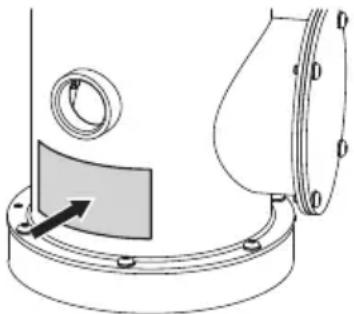
4.2 Product marking

The product has a label compliant with CE marking.
natural_image
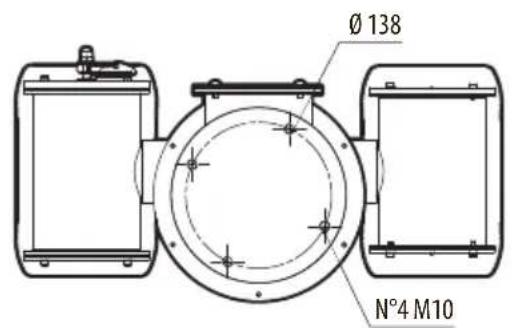
Technical diagram of a mechanical component with a circular housing and a rectangular plate, showing alignment lines (no text or symbols)Fig. 1
The label shows:
- Model identification code.
• Supply voltage (Volt). - Frequency (Hertz).
- Current consumption (Ampere).
- Protection degree (IP).
- Serial number.
4.2.1 Checking the markings
Before proceeding further with installation, make sure the material supplied corresponds to the order specification by examining the marking labels.
Never, under any circumstances, make any changes or connections that are not shown in this handbook. Improper use of the appliance can cause serious hazards, risking the safety of personnel and of the installation.
For more information regarding versions and product coding, please consult the relative chapter (5 Versions, page 11).
5 Versions
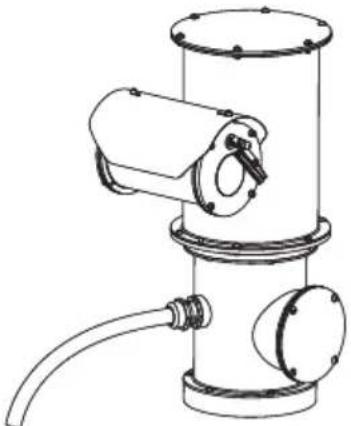
5.1 Day/Night camera
The Day/Night camera version of the product is equipped with a SONY camera or a camera with DELUX technology.
natural_image
Technical line drawing of a mechanical device with cylindrical components and a coiled pipe (no text or symbols)Fig. 2 NXPTZ SERIES2 (NXPTZHD).
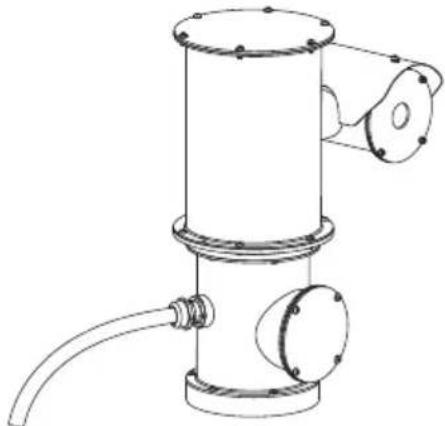
5.2 Radiometric thermal camera
The radiometric thermal camera version of the product is equipped with a heat sensitive camera with radiometric or advanced radiometric functions.
natural_image
Technical line drawing of a mechanical device with cylindrical body, flange, and pipe (no text or symbols)Fig. 3 NXPTZR SERIES2 (NXPTZR).
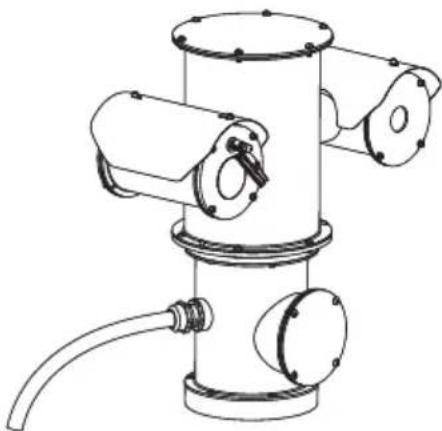
5.3 Dual Vision with Day/Night and radiometric thermal camera
The dual vision version of the product is equipped with a SONY Day/Night camera and a thermal camera with radiometric or advanced radiometric functions.
natural_image
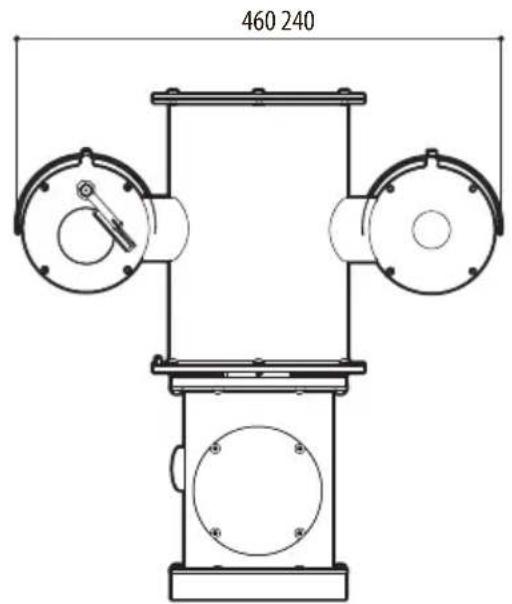
Technical line drawing of a mechanical device with cylindrical components and a coiled cable (no text or symbols)Fig. 4 NXPTZT SERIES2 (NXPTZT).
5.4 Model identification
EN - English - Instruction manual

| NXPTZ SERIES2 - CONFIGURATION OPTIONS | |||||
| Voltage Camera | Options Revision | ||||
| NXPTZHD | 1 230Vac | 1 Super Low-Light Day/Night 30X zoom, Full HD camera | VW0Z0 0 Without integrated video analytics (without VIDEOTEC ANALYTICS) | C Complies with ONVIF, Profile Q, Profile S and Profile T | |
| 2 24Vac 2 SONY FCB-EV7520 camera, FULL HD 1080p, 30x | V With integrated video analytics (VIDEOTEC ANALYTICS) | J Complies with ONVIF, Profile S and Profile T | |||
| 3 120Vac | |||||
Tab. 1 NXPTZ SERIES2 (NXPTZHD).
| NXPTZR SERIES2 - CONFIGURATION OPTIONS | ||||||
| Voltage | Thermal Camera | Options | Revision | Frequency | ||
| NXPTZR | 1 230Vac | Y 6.5° HFOV, Thermal camera 50mm (1.97in), 336x256 | 0 Thermal camera with radiometric functions | 0Z00 | C Complies with ONVIF, Profile Q, Profile S and Profile T | - 7.5Hz |
| 2 24Vac | A 9.3° HFOV, Thermal camera 35mm, 336x256 | R Thermal camera with advanced radiometric functions | J Complies with ONVIF, Profile S and Profile T | H 30Hz | ||
| 3 120Vac | B 13° HFOV, Thermal camera 25mm, 336x256 | |||||
| V 17° HFOV, Thermal camera 19mm, 336x256 | ||||||
| F 25° HFOV, Thermal camera 13mm, 336x256 | ||||||
| C 35° HFOV, Thermal camera 9mm, 336x256 | ||||||
| W 12.4° HFOV, Thermal camera 50mm (1.97in), 640x512 | ||||||
| D 18° HFOV, Thermal camera 35mm, 640x512 | ||||||
| E 25° HFOV, Thermal camera 25mm, 640x512 | ||||||
| U 32° HFOV, Thermal camera 19mm, 640x512 | ||||||
| G 45° HFOV, Thermal camera 13mm, 640x512 | ||||||
| H 69° HFOV, Thermal camera 9mm, 640x512 | ||||||
Tab. 2 NXPTZR SERIES2 (NXPTZR).
| NXPTZT SERIES2 - CONFIGURATION OPTIONS | |||||||
| Voltage Day/ Night camera Thermal camera Options | Revision Frequency | ||||||
| NXPTZT | 1 230Vac | 2 SONY FCB-EV7520 camera, FULL HD 1080p, 30x | Y 6.5° HFOV, Thermal camera 50mm, 336x256 | W Thermal camera with radiometric functions | 0Z00 C | Complies with ONVIF, Profile Q, Profile S and Profile T | - 75Hz |
| 2 24Vac | A 9.3° HFOV, Thermal camera 35mm, 336x256 | R Thermal camera with advanced radiometric functions | J Complies with ONVIF, Profile S and Profile T | H 30Hz | |||
| 3 120Vac | B 13° HFOV, Thermal camera 25mm, 336x256 | ||||||
| V 17° HFOV, Thermal camera 19mm, 336x256 | |||||||
| F 25° HFOV, Thermal camera 13mm, 336x256 | |||||||
| C 35° HFOV, Thermal camera 9mm, 336x256 | |||||||
| W 12.4° HFOV, Thermal camera 50mm, 640x512 | |||||||
| D 18° HFOV, Thermal camera 35mm, 640x512 | |||||||
| E 25° HFOV, Thermal camera 25mm, 640x512 | |||||||
| U 32° HFOV, Thermal camera 19mm, 640x512 | |||||||
| G 45° HFOV, Thermal camera 13mm, 640x512 | |||||||
| H 69° HFOV, Thermal camera 9mm, 640x512 | |||||||
Tab. 3 NXPTZT SERIES2 (NXPTZT).
6 Preparing the product for use

Any change that is not expressly approved by the manufacturer will invalidate the warranty.
6.1 Safety precautions before use

The appliance includes moving parts. Make sure that the unit is positioned where it is inaccessible under normal operating conditions. Attach the warning label supplied with the appliance, placing it near the unit so that it can be seen easily.
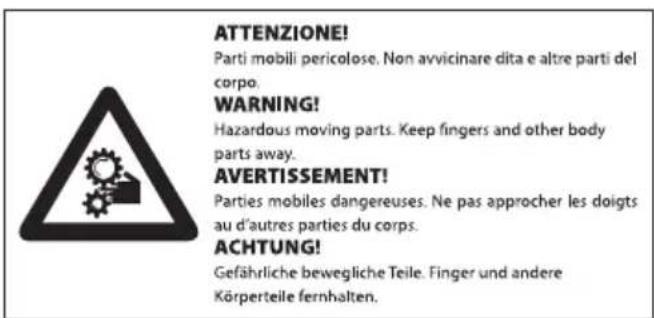
Fig. 5
6.2 Unpacking
When the product is delivered, make sure that the package is intact and that there are no signs that it has been dropped or scratched.
If there are obvious signs of damage, contact the supplier immediately.
When returning a faulty product we recommend using the original packaging for shipping.
Keep the packaging in case you need to send the product for repairs.
6.3 Contents
Check the contents to make sure they correspond with the list of materials as below:
- Positioning unit
- Sunshield (2 sunshields in the double camera version)
- Bolts and screws
- Wash system kit
- Label (CAUTION: Hazardous moving parts)
- Allen wrench
- Instruction manual
6.4 Safely disposing of packaging material
The packaging material can all be recycled. The installer technician will be responsible for separating the material for disposal, and in any case for compliance with the legislation in force where the device is to be used.
6.5 Preparatory work before installation

CAUTION! Device installation and maintaining must be performed by specialist technical staff only.

Use appropriate tools for the installation. The particular nature of the site where the device is to be installed may mean special tools are required for installation.

Choose an installation surface that is strong enough to sustain the weight of the device, also bearing in mind particular environmental aspects, such as exposure to strong winds.

It should be installed so that no one can be hit by moving parts. It should be installed so that moving parts cannot hit other objects and create hazardous situations.

Make sure the product is to be secured to building before operation.

For technical services, consult only and exclusively authorized technicians.

Since the user is responsible for choosing the surface to which the unit is to be anchored, we do not supply the fixing devices for attaching the unit firmly to the particular surface. The installer is responsible for choosing fixing devices suitable for the specific purpose on hand.
It is possible to install the unit with several brackets.
We strongly recommend using only approved brackets and accessories during installation.
6.5.1 Fixing to parapet or ceiling mount

For ceiling assembly, the Ceiling Assembly mode must be enabled using the web interface (Web Interface manual, Motion Parameters Page).
Fix the adaptor (01) to the bottom of the unit using the 4 flat countersunk screws (02) with hexagonal socket M10x20mm in stainless steel (A4 class 70) supplied.
Make sure the thread are free of dirt and debris.
Apply a generous amount of thread locking compound (Loctite 270) into the threaded holes in the base of the device.

Pay attention to the fixing. Tightening torque: 35Nm.
The thread compound must cure for one hour, allow for this period prior to completing the installation.
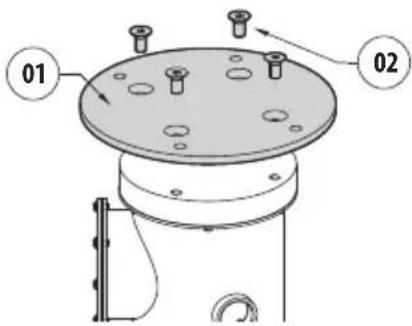
Fig. 6
Use the external holes in the adapter to fix the assembled unit to the parapet or to the ceiling. Use screws that can bear at least 4 times the weight of the unit.
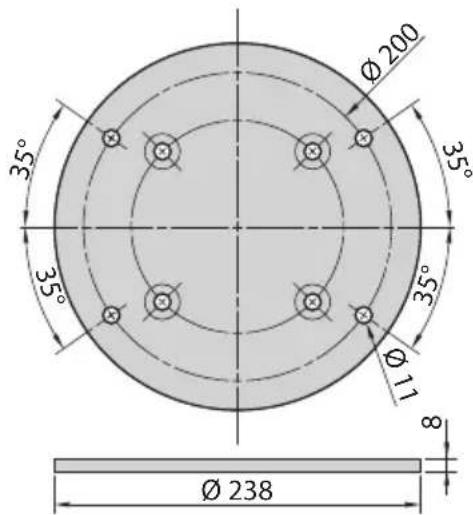
Fig. 7
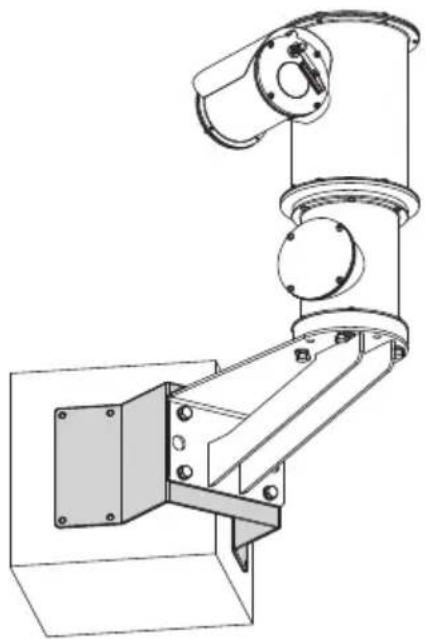
6.5.2 Fixing with wall mount bracket
The bracket can be fixed to the vertical wall. Use screws and wall fixing devices that can bear at least four times the weight of the unit.
Fasten the device to the bracket by using 4 flat washers, 4 serrated stainless steel washers and 4 stainless steel hex head screws (A4 class 70) M10x20mm supplied.
Make sure the thread are free of dirt and debris.
Apply a generous amount of thread locking compound (Loctite 270) on the 4 screws.
Tighten the screws.

Pay attention to the fixing. Tightening torque: 35Nm.
The thread compound must cure for one hour, allow for this period prior to completing the installation.
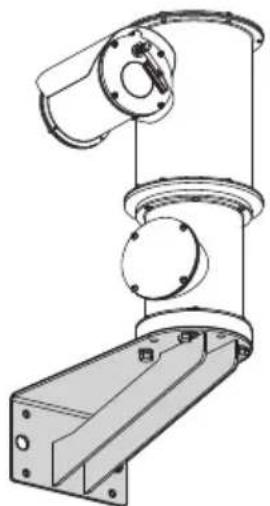
natural_image
Technical line drawing of a mechanical assembly with cylindrical components and mounting base (no text or symbols)Fig. 8
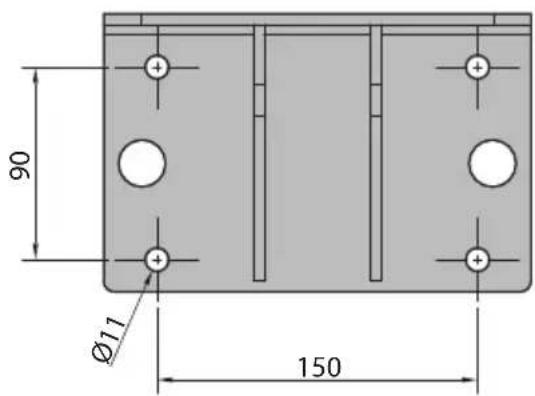
Fig. 9
6.5.3 Fixing the unit to the pole mount adapter or corner mount adapter
To install the product on a pole or at a wall corner, first of all fix the unit to the wall bracket (6.5.2 Fixing with wall mount bracket, page 16).
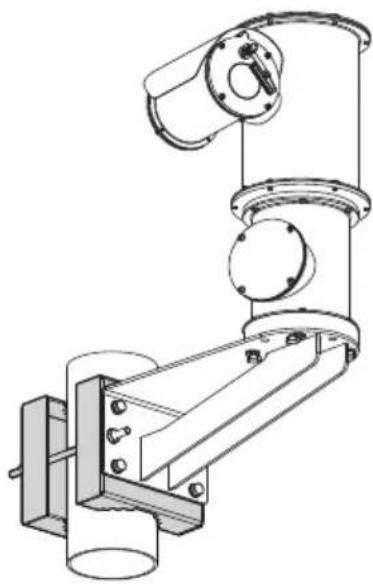
6.5.3.1 Fixing with pole mount
To fix the wall support bracket to the pole sling, use the 4 flat washers, the 4 grower washers in stainless steel and the 4 hexagonal head screws in stainless steel (A4 class 70) M10x30mm supplied.
Make sure the thread are free of dirt and debris.
Apply a generous amount of threadlocker (Loctite 270) on the 4 threaded holes on the pole mount adapter.
Tighten the screws.

Pay attention to the fixing. Tightening torque: 35Nm.
The thread compound must cure for one hour, allow for this period prior to completing the installation.
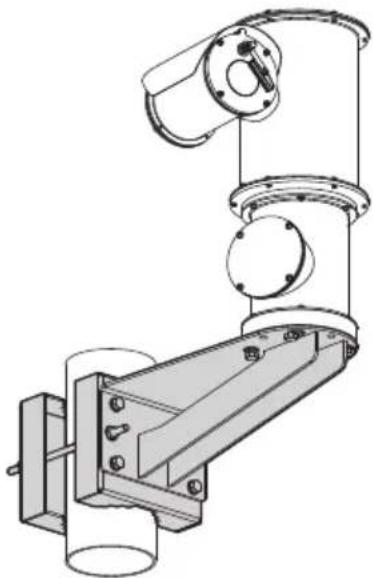
natural_image
Technical line drawing of a mechanical assembly with no visible text or symbolsFig. 10
6.5.3.2 Fixing with corner adapter
To fix the wall support bracket to the corner adaptor module, use the 4 flat washers, the 4 grower washers in stainless steel and the 4 hexagonal head screws in stainless steel (A4 class 70) M10x30mm supplied.
Make sure the thread are free of dirt and debris.
Apply a generous amount of threadlocker (Loctite 270) on the 4 threaded holes on the corner module.
Tighten the screws.

Pay attention to the fixing. Tightening torque: 35Nm.
The thread compound must cure for one hour, allow for this period prior to completing the installation.
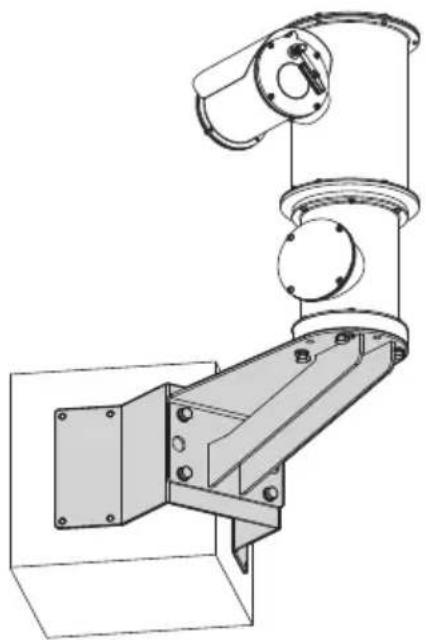
natural_image
Technical line drawing of a mechanical assembly with mounting bracket and cylindrical components (no text or symbols)Fig. 11
6.5.4 Sunshield mounting
You can fix the sunshield to the housing using the screws supplied.
Apply a generous amount of thread locking compound (Loctite 270) into the threaded holes in the base of the device.

Pay attention to the fixing. Tightening torque: 2Nm.
The thread compound must cure for one hour, allow for this period prior to completing the installation.
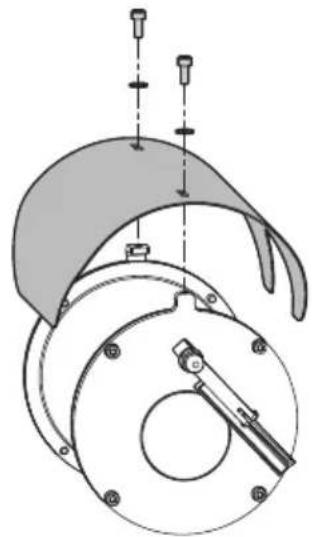
natural_image
Technical diagram of a mechanical assembly with no visible text or symbolsFig. 12
7 Installation

CAUTION! Device installation and maintaining must be performed by specialist technical staff only.

Before starting any operation, make sure the power supply is disconnected.

At start up the system makes some automatic calibration movements: do not stand near the device when it is powered.

VIDEOTEC strongly recommend to test the device configuration and performance before putting it in the final installation site.

The product is equipped with a multicore cable that allows connections to be made.
7.1 Range of use
Installation temperature: from -40°C (-40°F) up to +65°C (149°F).
Operating temperature: from -40^ ( -40^ ) up to +65^ ( 149^ ).
7.2 Methods of installation
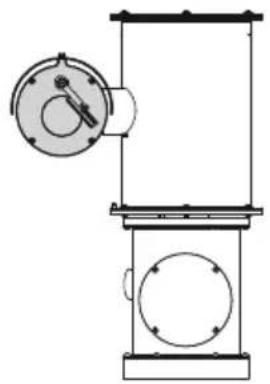
The system can be installed only in a standard or inverted position (ceiling mount). When installed for inverted operation, the camera orientation and controller functions are reconfigured for normal operation through the system's software.
Hardware adjustment is not required for inverted operation.
natural_image
Technical line drawing of a mechanical device with circular components and a central dial (no text or symbols)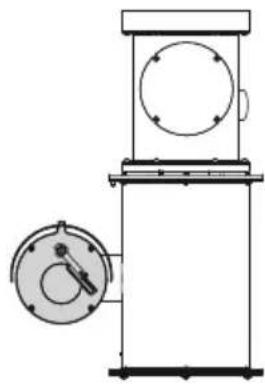
natural_image
Technical line drawing of a mechanical device with a circular component and a circular housing (no text or symbols)Fig. 13
7.3 Connecting the power supply

Electrical connections must be performed with the power supply disconnected and the circuit-breaker open.

When commencing installation make sure that the specifications for the power supply for the installation correspond with those required by the device.

Check that the power supply socket and cable are adequately dimensioned.
Depending on the version, the device can be provided with different power supply voltages. The power supply voltage is indicated on the product identification label (4.2 Product marking, page 10).
The multicore cable has the power and earthing cables inside.
Carry out the connections as described in the table.
| CONNECTING THE POWER SUPPLY | |
| Cable colour Description | |
| Power supply 24Vac | |
| Black 2 (N) Neutral | |
| Black 1 (L) Phase | |
| Yellow/Green Safety earth | |
| Power supply 230Vac | |
| Black 2 (N) Neutral | |
| Black 1 (L) Phase | |
| Yellow/Green Safety earth | |
| Power supply 120Vac | |
| Black 2 (N) Neutral | |
| Black 1 (L) Phase | |
| Yellow/Green Safety earth | |
Tab. 4
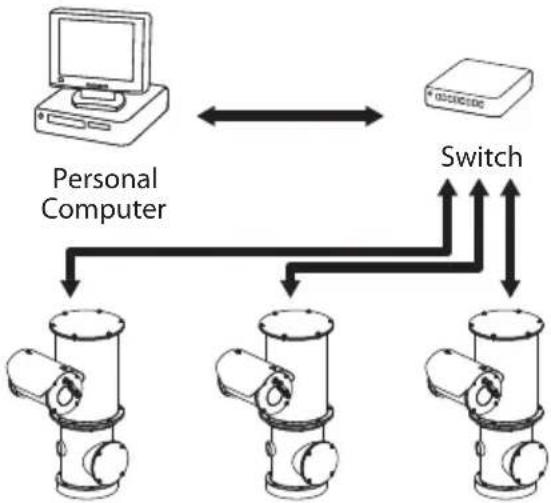
7.4 Ethernet cable connection

The Ethernet cable shield on the operator side must always be earthed via the connector.
Use a shielded RJ45 connector for the crimping of the Ethernet cable.
Carry out the connections as described in the table (according to the standard specifications: TIA/EIA-568-B).
| CONNECTION OF THE ETHERNET CABLE | |
| Pin number Cable colour | |
| 1 Orange-White | |
| 2 Orange | |
| 3 Green-White | |
| 4 Blue | |
| 5 Blue-White | |
| 6 Green | |
| 7 Brown-White | |
| 8 Brown | |
Tab. 5
The example below shows a typical installation.
flowchart
graph TD
    A["Computer"] <--> B["Switch"]
    C["Personal Computer"] --> D["Device 1"]
    C --> E["Device 2"]
    C --> F["Device 3"]
    C --> G["Device 4"]
    style A fill:#f9f,stroke:#333
    style B fill:#ccf,stroke:#333
    style C fill:#cfc,stroke:#333
    style D fill:#fcc,stroke:#333
    style E fill:#fcc,stroke:#333
    style F fill:#fcc,stroke:#333
    style G fill:#fcc,stroke:#333
Fig. 14
7.5 Alarms and relays connections
The unit is equipped with the alarms and relays indicated in the table.
ALARMS AND RELAYS CONNECTIONS
| Cable colour Description | |
| Red-Blue Relay 1, A | |
| Grey-Pink Relay 1, B | |
| Brown-Green Relay 2, A | |
| White-Green Relay 2, B | |
| Green Common alarm, COM | |
| Brown Alarm 1 (dry contact), AL1 | |
| White-Yellow Reset input power supply | |
| Black Reset input | |
Tab. 6

Electrically disconnect all the cables not connected and not listed on the table because they have no function.
7.5.1 Connecting an alarm with dry contact
For a dry contact alarm (alarm AL1), implement the connection as shown in the figure.
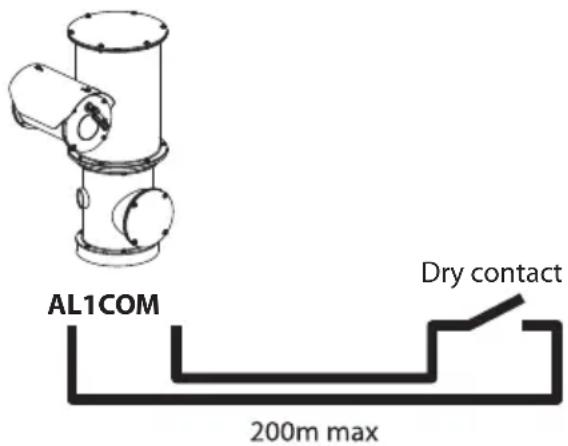
Fig. 15
The dry contact alarm can be NO (normally open) or NC (normally closed).
For further information refer to the relative chapter (Web Interface manual, Digital I/O Page).

All alarms have a reach of 200m (656ft) max, which can be obtained using a shielded cable with a minimum section of 0.25mm^2 (23AWG).
7.5.2 Relay connection

The relay can be used with the specifications outlined below. Working voltage: up to 30Vac or 60Vdc. Current: 1A max. Use suitable cable sections with the following characteristics: from 0.25mm ^2 (23AWG) up to 1.5mm ^2 (15AWG).
Due to the absence of polarity, both terminals of the same relay can be connected either to alternating or direct current voltages.
7.5.3 Washing system connection

For further details on configuration and use, refer to the relative manual.
When the washing system is enabled, the relay 2 report the pump activation (7.5 Alarms and relays connections, page 20).
About the configuration please refer to the relative manual (9.2 Web interface, page 21).
8 Switching on

The automatic pre-heating (De-Ice) process could be started whenever the device is switched on and the ambient temperature is below 0^ C (+32°F). The procedure is necessary to guarantee correct operation of the devices even at low temperatures. The duration ranges depending on environmental conditions (from 60 minutes up to 120 minutes).
The unit is switched on by connecting the power supply.
To switch off the unit disconnect the power.
8.1 First start-up

Ensure the unit and the other components of the system are appropriately closed to prevent contact with live parts.

Make sure that all parts are fastened down firmly and safely.
9 Configuration
9.1 Default IP address

The unit is configured to obtain an IP address from a DHCP server.
The IP address acquired via DHCP is visible in the DHCP server log file.
If the DHCP server is not available, the unit automatically configures itself with a self-generated IP address in the 169.254.x.x/16 subnet. Configuring the IP address of the PC as belonging to the same subnet (example: IP address: 169.254.1.1, subnet mask: 255.255.0.0).
Use an ONVIF compliant VMS or a network sniffer to find the IP address of the device (IP scan utility).
9.2 Web interface

Browsers supported (the latest version): Microsoft Edge, Google Chrome, Mozilla Firefox.
9.2.1 First access to the web pages
The first operation in configuring the device consists in connecting to the web interface.
To access the web interface of the product, simply use a browser to connect to address: http://IP address.
On first access, the Home page will be displayed.
To configure the web interface, consult the manual relating to the firmware version installed, available on the product web page of the website www.videotec.com.
10 Accessories and Supports

For further details on configuration and use, refer to the manual of the relevant accessory or support.
10.1 Washer
The product can be equipped with an external pump that provides water to clean the glass.
To complete the installation of the washer use the kit supplied.
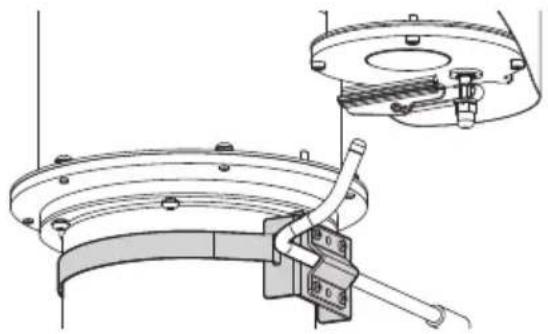
natural_image
Technical line drawing of a mechanical assembly with no visible text or symbolsFig. 16

For further information refer to the relative chapter (9.2 Web interface, page 21).
10.2 Parapet or ceiling mounting bracket
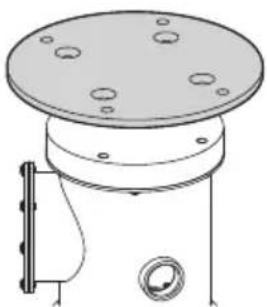
natural_image
Technical line drawing of a mechanical component with circular holes and a side-mounted knob (no text or symbols)Fig. 17 NXPTZTW.
10.3 Wall mount bracket
Wall mount bracket.
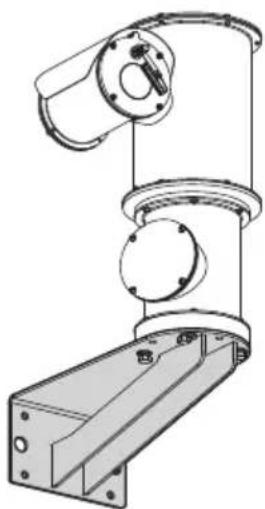
natural_image
Technical line drawing of a mechanical assembly with no visible text or symbolsFig. 18 NXPTZWB.
10.4 Corner mount adaptor
Corner mount adaptor.
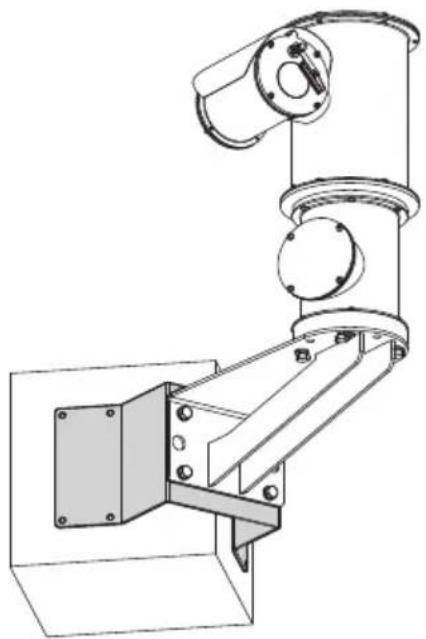
natural_image
Technical line drawing of a mechanical device with mounting bracket and cylindrical component (no text or symbols)Fig. 19 NXPTZCW.
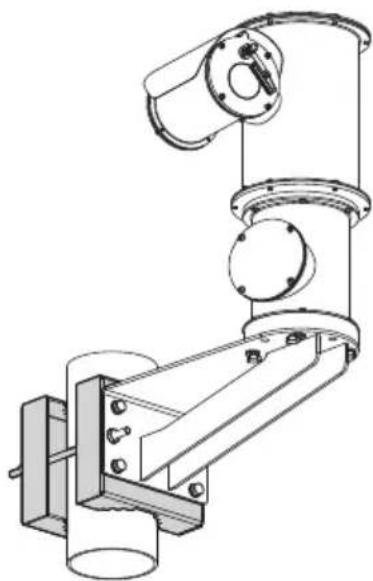
10.5 Pole mount adaptor
Pole mount adaptor.
natural_image
Technical line drawing of a mechanical robotic arm assembly (no text or symbols)Fig. 20 NXPTZCOL.
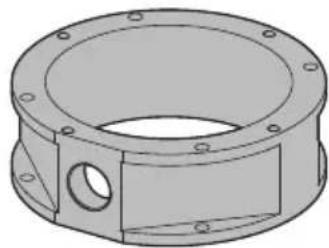
10.6 Adaptor for connection of fiber optics
Adaptor for connection of fiber optics.
natural_image
Technical drawing of a mechanical flange component (no text or symbols)Fig. 21 NXPTZ S FP.
11 Instructions for normal operation

Do not use the wiper if the ambient temperature is under 0^ C or if there is ice.

If it is left on, the wiper automatically disables itself.
The device control can be performed through different modes:
- Through the user's controls of the web interface (9.2 Web interface, page 21).
- Through Video Management Software (VMS) that supports the ONVIF protocol. In this case the special controls are implemented using the auxiliary commands of the ONVIF protocol.
- Through PTZ Assistant software (the PTZ Assistant software is available to download on the product web page of the website: www.videotec.com).
12 Maintenance

Before doing any technical work on the device, disconnect the power supply.

CAUTION! Device installation and maintaining must be performed by specialist technical staff only.

The manufacturer declines all liability for damage to any of the apparatus mentioned in this handbook, when resulting from tampering, use of non-original spare parts, installation, maintenance and repairs performed by non-authorised, non-skilled personnel.

For damage to any parts, repair or replacement must be done by, or under supervision of VIDEOTEC.

Whenever replacing the parts as indicated, always use VIDEOTEC original spare parts and meticulously follow the maintenance instructions supplied with every spare parts kit.

For all maintenance interventions, we recommend you return the product to the laboratory that will perform all required operations.
When contacting VIDEOTEC for assistance please provide the serial number and the identification code of the model.
12.1 Routine maintenance
12.1.1 Inspecting the cables
The cables should not show signs of damage or wear, which could generate hazardous situations. In this case extraordinary maintenance is necessary.
12.2 Extraordinary maintenance
12.2.1 Fuses replacement

Maintenance must be performed with the power supply disconnected and the circuit-breaker open.

CAUTION! For continued protection against risk of fire, replace only with same type and rating of fuse. Fuses must be replaced only by service personnel.
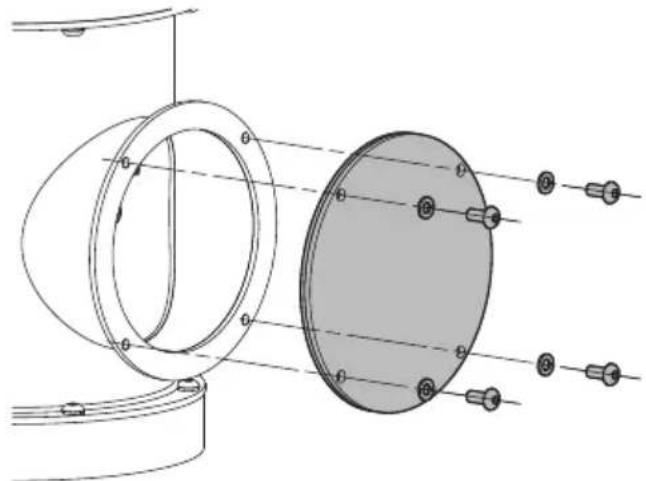
If necessary, the connector board's fuses can be replaced inside the connection compartment.
Unscrew the screws and remove the cover.
natural_image
Technical diagram of a mechanical assembly with circular components and labeled parts (no text or symbols present)Fig. 22
The new fuses must comply with the directions given in the table.
| FUSES REPLACEMENT | ||
| Supply voltage Fuse | (F1) Fuse (F2) | |
| 24Vac, 50/60Hz T 4A H | 250V 5x20 T 4A H 250V 5x20 | |
| 120Vac, 50/60Hz T 2A | H 250V 5x20 T 4A H 250V 5x20 | |
| 230Vac, 50/60Hz T 2A | H 250V 5x20 T 4A H 250V 5x20 | |
Tab. 7
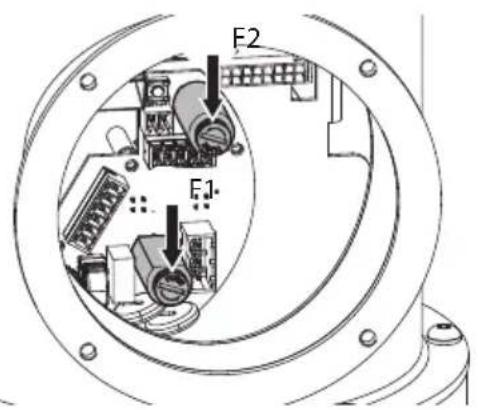
Fig. 23
At the end of the operations close the product.

Pay attention to the fixing. Tightening torque: 1.5Nm (±0.2Nm).
12.2.2 Factory Default

If the access password is no longer available, follow the procedure to reset to default factory settings.
To restore the factory settings relative to the network, user access and camera configuration follow this procedure:
- Switch off the unit.
- Use a clean contact to connect the reset (black cable) signal and the relative power supply (white-yellow cable).
- Power the unit.
- Wait for 2 minutes.
- Switch off the unit.
- Open the contact between the reset and the relevant power supply.
- Power the unit.

Once the factory default procedure has finished, you need to configure the unit as described in chapter: 9.1 Default IP address, page 21.
13 Cleaning

Frequency will depend on the type of environment in which the product is used.
13.1 Cleaning the window

Avoid ethyl alcohol, solvents, hydrogenated hydrocarbide, strong acid and alkali. Such products may irreparably damage the surface.
We recommend using a soft cloth with neutral soap diluted with water or specific products to clean the lenses.
13.2 Cleaning the product
The device should be cleaned using a damp cloth; compressed air must not be used.
14 Information on disposal and recycling
The European Directive 2012/19/EU on Waste Electrical and Electronic Equipment (WEEE) mandates that these devices should not be disposed of in the normal flow of municipal solid waste, but they should be collected separately in order to optimize the recovery stream and recycling of the materials that they contain and to reduce the impact on human health and the environment due to the presence of potentially hazardous substances.
The symbol of the crossed out bin is marked on all products to remember this.
The waste may be delivered to appropriate collection centers, or may be delivered free of charge to the distributor where you purchased the equipment at the time of purchase of a new equivalent or without obligation to a new purchase for equipment with size smaller than 25cm (9.8in). For more information on proper disposal of these devices, you can contact the responsible public service.
15 Troubleshooting

Contact an authorised support centre if the problems persist or you have any other issues that are not described here.
PROBLEM The product does not turn on.
CAUSE Wiring error, blown fuse.
SOLUTION Make sure the connections are correct. Check the continuity of the fuses and replace them with the indicated models should they fail.
PROBLEM The shooting area do not correspond to the selected preset position.
CAUSE Loss of absolute position reference point.
SOLUTION Run the device calibration procedure or reset the unit by rebooting it.
PROBLEM The device does not move during the start-up phase.
CAUSE The ambient temperature is too low.
SOLUTION Wait until the end of the pre-heating procedure. The following message is displayed on the web page: De-Ice procedure in progress.
16 Technical data
16.1 NXPTZ SERIES2 (NXPTZHD)
16.1.1 Mechanical
Zero backlash
Pre-wired multipolar cable (3m (9.8ft), different lengths are available on request)
Horizontal rotation: 360°, continuous rotation
Vertical rotation: from -90^ up to +90^
Horizontal speed (variable): from 0.1°/s up to 100°/s
Tilt speed (variable): from 0.1°/s up to 100°/s
Accuracy of preset positions: 0.02°
Integrated wiper
Unit weight: 22kg (44lb)
16.1.2 Housing's window
Extra clear glass window
- Thick: 5mm (0.2in)
16.1.3 Electrical
Supply voltage/Current consumption:
• 230Vac ±10%, 0.5A max, 50/60Hz
• 120Vac ±10%, 1A max, 50/60Hz
• 24Vac ±10%, 5A max, 50/60Hz
Power consumption:
- 120W max
• 30W, P&T static, heating switched off
16.1.4 Network
RJ45 port
- Ethernet connection: 10BASE-T/100BASE-T
Slot SFP (SMALL FORM FACTOR PLUGGABLE)
- Ethernet connection:100BASE-FX
• Supply voltage: 3.3V
• Standard: MSA compliant
The SFP module (not supplied by VIDEOTEC) must meet the following requirements:
- Laser: Class 1, complies with EN60825-1
• Certification: UL/IEC 60950-1 or UL/IEC 62368-1
16.1.5 Cybersecurity
Digitally signed firmware
Password restricted access (HTTP digest)
Support of various user access levels
Control of accesses IEEE 802.1X
HTTPS cryptography using TLS1.0, TLS1.1, TLS1.2 and TLS1.3
Centralised certificate management
Complies with ONVIF Security Service specifications
16.1.6 Video
Video encoder
- Communication protocol: ONVIF, Profile Q, Profile S and Profile T
• Device configuration: TCP/IPv4-IPv6, UDP/IPv4-IPv6, HTTP, HTTPS, NTP, DHCP, WS-DISCOVERY, DSCP, IGMP (Multicast), SOAP, DNS - Streaming: RTSP, RTCP, RTP/IPv4-IPv6, HTTP, Multicast
• Video compression: H.264/AVC, MJPEG, MPEG4, snapshot JPEG
• 3 independent video streams Full HD
• Image resolution: from 320x180pixel up to 1920x1080pixel in 8 steps - Selectable frame rate from 1 to 60 images per second (fps)
- Web Server
- Directional OSD (maximum 4 settable areas)
- Motion Detection
• Video analytics: VIDEOTEC ANALYTICS (optional) - QoS: Differentiated DSCPs for streaming and device management
• SNMP and NTCIP protocols
16.1.7 I/O interface
I/O alarm board:
- Alarm inputs: 1
- Relay outputs: 1+1 (1 relay reserved for washer pump and one configurable, 1A, 30Vac/60Vdc max)
Input for remote reset: 1
16.1.8 Cameras
SONY FCB-EV7520 Day/Night Full HD 30x
Resolution: Full HD 1080p (1920x1080)
Image Sensor: 1/2.8" Exmor™ R CMOS sensor
Effective Pixels: approx. 2.13 Megapixels
Minimum Illumination:
• Colour: 0.0013lx (50 IRE, High sensitivity on)
• B/W: 0.0008lx (30 IRE, High sensitivity on)
Focal length: from 4.3mm (wide) up to 129mm (tele)
Zoom:
• 30x
• 36x, with Stable Zoom enabled
Digital Zoom: 12x
Iris: from F1.6 up to F14 (Auto, Manual)
Horizontal Viewing Angle: from 63.7° (wide end) up to 2.3° (tele end)
Vertical Viewing Angle: from 38.5° (wide end) up to 1.3° (tele end)
Shutter speed: from 1/1s up to 1/10000s (Auto, Manual)
White balance: Auto, Auto Tracing, Indoor, Outdoor, Manual, Outdoor Auto, Sodium Lamp (Fix/Auto/Outdoor Auto)
Gain: from 0dB up to 50.0dB (Auto, Manual)
Wide Dynamic Range: 120dB
Focus System: Auto (PTZ Trigger, Full Auto), Manual
Picture Effects: E-flip
Noise removal (2D, 3D): Off, On (from level 1 up to level 5)
Exposure Control: Auto, Manual, Priority (Shutter priority, Iris priority, Brightness priority)
De-fog: Off, Low, Mid, High
Dynamic masking of privacy zones (PTZ): maximum 24 masks settable, maximum 8 simultaneously displayable
Privacy zones masking (cameras): maximum 8 settable masks
Indoor Flicker Reduction
Gain Limit: from 10.7dB up to 50dB
High sensitivity: On/Off
Backlight Compensation: On/Off
Auto Slowshutter: On/Off
Exposure compensation: Off, On (from -10.5dB up to +10.5dB)
Sharpness: from level 0 up to level 15
High Light Compensation (HLC): Off, Low, Mid, High, Masking Level (Off, On, from level 1 up to level 15)
Digital image stabilization: On/Off
Day/Night Full HD 30x DELUX
Resolution: Full HD 1080p (1920x1080)
Image Sensor: 1/2.8" Exmor™ R CMOS sensor
Effective Pixels: approx. 2.38 Megapixels
Minimum Illumination:
• Colour: 0.006lx (F1.6, 30 IRE)
• B/W: 0.0006lx (F1.6, 30 IRE)
Focal length: from 4.5mm (wide) up to 135mm (tele)
Zoom: 30x (480x with digital zoom)
Iris: from F1.6 up to F9.6 (Auto, Manual)
Horizontal Viewing Angle: from 61.60° (wide end) up to 2.50° (tele end)
Vertical Viewing Angle: from 37.07^ (wide end) up to 1.44^ (tele end)
Shutter speed: from 1/1s up to 1/10000s (Auto, Manual)
White balance: Auto, Manual
Gain: from 0dB up to 100dB (Auto, Manual)
Wide Dynamic Range: 120dB
Focus System: Auto, Manual, Trigger
Picture Effects: E-flip, Colour enhancement
Noise removal: 2D (3 levels), 3D (3 levels)
Exposure Control: Auto, Manual, Priority (Iris Priority, Shutter Priority), Brightness, Custom
De-fog: On/Off
Privacy zones masking: maximum 8 settable masks
Indoor Flicker Reduction
Auto Slowshutter: Off, On (from 1/30s up to 1/1s)
Exposure compensation: Off, On (from level 0 up to level 14)
Sharpness: from level 0 up to level 3
16.1.9 Environment
For indoors and outdoors installation
Operating temperature
- Continuous working: from -40^ (-40°F) up to +65^ (149°F)
- Temperature test complies with NEMA-TS 2-2003 (R2008) par. 2.1.5.1, test profile fig. 2-1 (from -34°C (-29.2°F) to +74°C (165.2°F)) (not valid for versions with VIDEOTEC ANALYTICS)
- De-icing function intervention (cold start): from -40^ (-40°F) up to -10^ (14°F)
Relative humidity: from 5% up to 95%
16.1.10 Certifications
Electrical safety (CE): EN60950-1, IEC60950-1, EN62368-1, IEC62368-1
Electromagnetic compatibility (CE): EN50130-4, EN55032 (Class A), EN61000-6-4, EN61000-3-2, EN61000-3-3
Outdoor installation (CE): EN60950-22, ICE60950-22
IP protection degree (EN/IEC60529): IP66, IP67, IP68, IP69
UL certification (UL60950-1, CAN/CSA C22.2 No. 60950-1-07, UL62368-1, CAN/CSA C22.2 No. 62368-1-14): cULus Listed (only for 24Vac version)
Electromagnetic compatibility (North America): FCC part 15 (Class A), ICES-003 (Class A)
Level of protection Type (UL50E): 4X (only for 24Vac version)
EAC certification
RoHS (CE): EN IEC 63000
Waste Electrical and Electronic Equipment (WEEE), Directive 2012/19/EU
16.1.11 Certifications - Marine applications
Lloyd's Register Marine Type Approval certification (the 24Vac and 120Vac versions require a filter accessory FM1010):
- Test Specification Number 1 (ENV1, ENV2, ENV3, ENV5)
Electromagnetic compatibility: EN60945
Salty fog resistance: EN60068-2-52
Tested at 70^ C ( 158^ F) for 16 hours in compliance with EN60068-2-2
16.2 NXPTZR SERIES2 (NXPTZR)
16.2.1 Mechanical
Zero backlash
Pre-wired multipolar cable (3m (9.8ft), different lengths are available on request)
Horizontal rotation: 360°, continuous rotation
Vertical rotation: from -90° up to +90°
Horizontal speed (variable): from 0.1°/s up to 100°/s
Tilt speed (variable): from 0.1°/s up to 100°/s
Accuracy of preset positions: 0.02°
Unit weight: 22kg (44lb)
16.2.2 Housing's window
Germanium window (9mm, 13mm, 19mm, 25mm, 35mm lenses)
- Thick: 1.5mm (0.06in)
- External treatment: antiscratch (Hard Carbon Coating - DLC)
- Internal treatment: antireflection
• Spectral range: from 7.5μm up to 14μm
• Medium transmittance (from 7.5μm up to 11.5μm): 91.2%
• Medium transmittance (from 11.5μm up to 14μm): 80.9%
Germanium window (50mm lens)
- Thick: 2mm (0.08in)
- External treatment: antiscratch (Hard Carbon Coating - DLC)
- Internal treatment: antireflection
• Spectral range: from 7.5μm up to 14μm
• Medium transmittance (from 7.5μm up to 11.5μm): 90%
• Medium transmittance (from 11.5μm up to 14μm): 77%
16.2.3 Electrical
Supply voltage/Current consumption:
• 230Vac ±10%, 0.5A max, 50/60Hz
• 120Vac ±10%, 1A max, 50/60Hz
• 24Vac ±10%, 5A max, 50/60Hz
Power consumption:
- 120W max
• 30W, P&T static, heating switched off
16.2.4 Network
RJ45 port
- Ethernet connection: 10BASE-T/100BASE-T
Slot SFP (SMALL FORM FACTOR PLUGGABLE)
- Ethernet connection:100BASE-FX
• Supply voltage: 3.3V
• Standard: MSA compliant
The SFP module (not supplied by VIDEOTEC) must meet the following requirements:
- Laser: Class 1, complies with EN60825-1
• Certification: UL/IEC 60950-1 or UL/IEC 62368-1
16.2.5 Cybersecurity
Digitally signed firmware
Password restricted access (HTTP digest)
Support of various user access levels
Control of accesses IEEE 802.1X
HTTPS cryptography using TLS1.0, TLS1.1, TLS1.2 and TLS1.3
Centralised certificate management
Complies with ONVIF Security Service specifications
16.2.6 Video
Video encoder
- Communication protocol: ONVIF, Profile Q, Profile S and Profile T, ONVIF Thermal Service
- Device configuration: TCP/IPv4-IPv6, UDP/IPv4-IPv6, HTTP, HTTPS, NTP, DHCP, WSDISCOVERY, DSCP, IGMP (Multicast), SOAP, DNS
- Streaming: RTSP, RTCP, RTP/IPv4-IPv6, HTTP, Multicast
• Video compression: H.264/AVC, MJPEG, MPEG4, snapshot JPEG
• 3 independent video streams - Image resolution: from 160x120pixel up to 720x480pixel in 5 steps
- Selectable frame rate from 1 to 30 images per second (fps)
- Web Server
- Directional OSD (maximum 4 settable areas)
- Motion Detection
- QoS: Differentiated DSCPs for streaming and device management
• SNMP and NTCIP protocols
16.2.7 I/O interface
I/O alarm board:
- Alarm inputs: 1
- Relay outputs: 1+1 (1 relay reserved for washer pump and one configurable, 1A, 30Vac/60Vdc max)
Input for remote reset: 1
16.2.8 Cameras
Please refer to the relevant table (16.4 Thermal cameras, page 35).
16.2.9 Environment
For indoors and outdoors installation
Operating temperature
- Continuous working: from -40^ (-40°F) up to +65^ (149°F)
- Temperature test complies with NEMA-TS 2-2003 (R2008) par. 2.1.5.1, test profile fig. 2-1 (from -34°C (-29.2°F) to +74°C (165.2°F))
- De-icing function intervention (cold start): from -40^ (-40°F) up to -10^ (14°F)
Relative humidity: from 5% up to 95%
16.2.10 Certifications
Electrical safety (CE): EN60950-1, IEC60950-1, EN62368-1, IEC62368-1
Electromagnetic compatibility (CE): EN61000-6-4, EN61000-3-2, EN61000-3-3, EN50130-4, EN55032 (Class A)
Outdoor installation (CE): EN60950-22, ICE60950-22
IP protection degree (EN/IEC60529): IP66, IP67, IP68, IP69
UL certification (UL60950-1, CAN/CSA C22.2 No. 60950-1-07, UL62368-1, CAN/CSA C22.2 No. 62368-1-14): cULus Listed (only for 24Vac version)
Electromagnetic compatibility (North America): FCC part 15 (Class A), ICES-003 (Class A)
Level of protection Type (UL50E): 4X (only for 24Vac version)
EAC certification
RoHS (CE): EN IEC 63000
Waste Electrical and Electronic Equipment (WEEE), Directive 2012/19/EU
16.2.11 Certifications - Marine applications
Lloyd's Register Marine Type Approval certification (the 24Vac and 120Vac versions require a filter accessory FM1010):
- Test Specification Number 1 (ENV1, ENV2, ENV3, ENV5)
Electromagnetic compatibility: EN60945
Salty fog resistance: EN60068-2-52
Tested at 70^ C ( 158^ F) for 16 hours in compliance with EN60068-2-2
16.3 NXPTZT SERIES2 (NXPTZT)
16.3.1 Mechanical
Zero backlash
Pre-wired multipolar cable (3m (9.8ft), different lengths are available on request)
Horizontal rotation: 360^ , continuous rotation
Vertical rotation: from -90^ up to +90^
Horizontal speed (variable): from 0.1°/s up to 100°/s
Tilt speed (variable): from 0.1°/s up to 100°/s
Accuracy of preset positions: 0.02°
Integrated wiper
Unit weight: 24kg (53lb)
16.3.2 Housing's window
Extra clear glass window
- Thick: 5mm (0.2in)
Germanium window (9mm, 13mm, 19mm, 25mm, 35mm lenses)
- Thick: 1.5mm (0.06in)
- External treatment: antiscratch (Hard Carbon Coating - DLC)
- Internal treatment: antireflection
- Spectral range: from 7.5μm up to 14μm
• Medium transmittance (from 7.5μm up to 11.5μm): 91.2%
• Medium transmittance (from 11.5μm up to 14μm): 80.9%
Germanium window (50mm lens)
- Thick: 2mm (0.08in)
- External treatment: antiscratch (Hard Carbon Coating - DLC)
- Internal treatment: antireflection
- Spectral range: from 7.5μm up to 14μm
- Medium transmittance (from 7.5μm up to 11.5μm): 90%
- Medium transmittance (from 11.5μm up to 14μm): 77%
16.3.3 Electrical
Supply voltage/Current consumption:
• 230Vac ±10%, 0.5A max, 50/60Hz
• 120Vac ±10%, 1A max, 50/60Hz
• 24Vac ±10%, 5A max, 50/60Hz
Power consumption:
- 120W max
• 30W, P&T static, heating switched off
16.3.4 Network
RJ45 port
- Ethernet connection: 10BASE-T/100BASE-T
Slot SFP (SMALL FORM FACTOR PLUGGABLE)
- Ethernet connection:100BASE-FX
• Supply voltage: 3.3V
• Standard: MSA compliant
The SFP module (not supplied by VIDEOTEC) must meet the following requirements:
- Laser: Class 1, complies with EN60825-1
• Certification: UL/IEC 60950-1 or UL/IEC 62368-1
16.3.5 Cybersecurity
Digitally signed firmware
Password restricted access (HTTP digest)
Support of various user access levels
Control of accesses IEEE 802.1X
HTTPS cryptography using TLS1.0, TLS1.1, TLS1.2 and TLS1.3
Centralised certificate management
Complies with ONVIF Security Service specifications
16.3.6 Video
Day/Night camera
Video encoder
- Communication protocol: ONVIF, Profile Q, Profile S and Profile T
- Device configuration: TCP/IPv4-IPv6, UDP/IPv4-IPv6, HTTP, HTTPS, NTP, DHCP, WS-DISCOVERY, DSCP, IGMP (Multicast), SOAP, DNS
- Streaming: RTSP, RTCP, RTP/IPv4-IPv6, HTTP, Multicast
• Video compression: H.264/AVC, MJPEG, MPEG4, snapshot JPEG
• 3 independent video streams Full HD - Image resolution: from 320x180pixel up to 1920x1080pixel in 8 steps
- Selectable frame rate from 1 to 60 images per second (fps)
- Web Server
- Directional OSD (maximum 4 settable areas)
- Motion Detection
- QoS: Differentiated DSCPs for streaming and device management
• SNMP and NTCIP protocols
Thermal Camera
Video encoder
- Communication protocol: ONVIF, Profile Q, Profile S and Profile T, ONVIF Thermal Service
• Device configuration: TCP/IPv4-IPv6, UDP/IPv4-IPv6, HTTP, HTTPS, NTP, DHCP, WSDISCOVERY, DSCP, IGMP (Multicast), SOAP, DNS - Streaming: RTSP, RTCP, RTP/IPv4-IPv6, HTTP, Multicast
• Video compression: H.264/AVC, MJPEG, MPEG4, snapshot JPEG
• 3 independent video streams
• Image resolution: from 160x120pixel up to 720x480pixel in 5 steps - Selectable frame rate from 1 to 30 images per second (fps)
- Web Server
- Directional OSD (maximum 4 settable areas)
- Motion Detection
- QoS: Differentiated DSCPs for streaming and device management
• SNMP and NTCIP protocols
16.3.7 I/O interface
I/O alarm board:
- Alarm inputs: 1
- Relay outputs: 1+1 (1 relay reserved for washer pump and one configurable, 1A, 30Vac/60Vdc max)
Input for remote reset: 1
16.3.8 Cameras
SONY FCB-EV7520 Day/Night Full HD 30x
Resolution: Full HD 1080p (1920x1080)
Image Sensor: 1/2.8" Exmor™ R CMOS sensor
Effective Pixels: approx. 2.13 Megapixels
Minimum Illumination:
• Colour: 0.0013lx (50 IRE, High sensitivity on)
• B/W: 0.0008lx (30 IRE, High sensitivity on)
Focal length: from 4.3mm (wide) up to 129mm (tele)
Exposure compensation: Off, On (from -10.5dB up to +10.5dB)
Sharpness: from level 0 up to level 15
High Light Compensation (HLC): Off, Low, Mid, High, Masking Level (Off, On, from level 1 up to level 15)
Digital image stabilization: On/Off
Zoom:
· 30x
- 36x, with Stable Zoom enabled
Digital Zoom: 12x
Iris: from F1.6 up to F14 (Auto, Manual)
Horizontal Viewing Angle: from 63.7° (wide end) up to 2.3° (tele end)
Vertical Viewing Angle: from 38.5° (wide end) up to 1.3° (tele end)
Shutter speed: from 1/1s up to 1/10000s (Auto, Manual)
White balance: Auto, Auto Tracing, Indoor, Outdoor, Manual, Outdoor Auto, Sodium Lamp (Fix/Auto/Outdoor Auto)
Gain: from 0dB up to 50.0dB (Auto, Manual)
Wide Dynamic Range: 120dB
Focus System: Auto (PTZ Trigger, Full Auto), Manual
Picture Effects: E-flip
Noise removal (2D, 3D): Off, On (from level 1 up to level 5)
Exposure Control: Auto, Manual, Priority (Shutter priority, Iris priority, Brightness priority)
De-fog: Off, Low, Mid, High
Dynamic masking of privacy zones (PTZ): maximum 24 masks settable, maximum 8 simultaneously displayable
Privacy zones masking (cameras): maximum 8 settable masks
Indoor Flicker Reduction
Gain Limit: from 10.7dB up to 50dB
High sensitivity: On/Off
Backlight Compensation: On/Off
Auto Slowshutter: On/Off
Exposure compensation: Off, On (from -10.5dB up to +10.5dB)
Sharpness: from level 0 up to level 15
High Light Compensation (HLC): Off, Low, Mid, High, Masking Level (Off, On, from level 1 up to level 15)
Digital image stabilization: On/Off
Thermal cameras
Please refer to the relevant table (16.4 Thermal cameras, page 35).
16.3.9 Environment
For indoors and outdoors installation
Operating temperature
- Continuous working: from -40^ (-40°F) up to +65^ (149°F)
- Temperature test complies with NEMA-TS 2-2003 (R2008) par. 2.1.5.1, test profile fig. 2-1 (from -34°C (-29.2°F) to +74°C (165.2°F))
- De-icing function intervention (cold start): from -40^ (-40°F) up to -10^ (14°F)
Relative humidity: from 5% up to 95%
16.3.10 Certifications
Electrical safety (CE): EN60950-1, IEC60950-1, EN62368-1, IEC62368-1
Electromagnetic compatibility (CE): EN61000-6-4, EN61000-3-2, EN61000-3-3, EN50130-4, EN55032 (Class A)
Outdoor installation (CE): EN60950-22, ICE60950-22
IP protection degree (EN/IEC60529): IP66, IP67, IP68, IP69
UL certification (UL60950-1, CAN/CSA C22.2 No. 60950-1-07, UL62368-1, CAN/CSA C22.2 No. 62368-1-14): cULus Listed (only for 24Vac version)
Electromagnetic compatibility (North America): FCC part 15 (Class A), ICES-003 (Class A)
Level of protection Type (UL50E): 4X (only for 24Vac version)
EAC certification
Restriction of Hazardous Substances (RoHS), Directive 2011/65/EU: EN50581
Waste Electrical and Electronic Equipment (WEEE), Directive 2012/19/EU
16.3.11 Certifications - Marine applications
Lloyd's Register Marine Type Approval certification (the 24Vac and 120Vac versions require a filter accessory FM1010):
- Test Specification Number 1 (ENV1, ENV2, ENV3, ENV5)
Electromagnetic compatibility: EN60945
Salty fog resistance: EN60068-2-52
Tested at 70°C (158°F) for 16 hours in compliance with EN60068-2-2
16.4 Thermal cameras
THERMAL CAMERAS (RESOLUTION 336X256)
| Lens | 9mm | 13mm | 19mm | 25mm | 35mm | 50mm |
| VOx microbolometer sensor not cooled | √ √ √ √ | √ √ | ||||
| Interpolated resolution 720x480 720x480 720x480 720x480 720x480 720x480 720x480 720x480 720x480 720x480 720x480 720x480 720x480 72 | 20x480 720x480 | |||||
| Pixel dimensions 17μm 17μm 17μm 17μm 17μm | 17μm | |||||
| Spectral response - long wave infrared (LWIR) | from 7.5μm to 13.5μm | from 7.5μm to 13.5μm | from 7.5μm to 13.5μm | from 7.5μm to 13.5μm | from 7.5μm to 13.5μm | from 7.5μm to 13.5μm |
| Internal shutter (only for sensor compensation) | Video stop <1s | Video stop <1s | Video stop <1s | Video stop <1s | Video stop <1s | Video stop <1s |
| Digital Detail Enhancement (DDE) | √ √ √ √ | √ √ | ||||
| Digital Zoom | 2x, 4x | 2x, 4x | 2x, 4x | 2x, 4x | 2x, 4x | 2x, 4x |
| Image updating frequency | 7.5fps | 7.5fps | 7.5fps | 7.5fps | 7.5fps | 7.5fps |
| Image updating high frequency | 30fps | 30fps | 30fps | 30fps | 30fps | 30fps |
| Scene range (High Gain) | -40°C ÷ +160°C (-40°F ÷ +320°F) | -40°C ÷ +160°C (-40°F ÷ +320°F) | -40°C ÷ +160°C (-40°F ÷ +320°F) | -40°C ÷ +160°C (-40°F ÷ +320°F) | -40°C ÷ +160°C (-40°F ÷ +320°F) | - 40°C ÷ +160°C (-40°F ÷ +320°F) |
| Scene range (Low Gain) | -40°C ÷ +550°C (-40°F ÷ +1022°F) | -40°C ÷ +550°C (-40°F ÷ +1022°F) | -40°C ÷ +550°C (-40°F ÷ +1022°F) | -40°C ÷ +550°C (-40°F ÷ +1022°F) | -40°C ÷ +550°C (-40°F ÷ +1022°F) | -40°C ÷ +550°C (-40°F ÷ +1022°F) |
| Horizontal field of view (HFOV) | 35° | 25° | 17° | 13° | 9.3° | 6.5° |
| Vertical field of view (VFOV) | 27° | 19° | 13° | 10° | 7.1° | 5° |
| f-number | f/1.25 | f/1.25 | f/1.25 | f/1.1 | f/1.2 | f/1.2 |
| Thermal sensitivity (NETD), thermal camera with radiometric functions | <50mK at f/1.0 | <50mK at f/1.0 | <50mK at f/1.0 | <50mK at f/1.0 | <50mK at f/1.0 | <50mK at f/1.0 |
| Thermal sensitivity (NETD), thermal camera with advanced radiometric functions | <30mK at f/1.0 | <30mK at f/1.0 | <30mK at f/1.0 | <30mK at f/1.0 | <30mK at f/1.0 | <30mK at f/1.0 |
| Person (detection / recognition / identification) | 285m / 71m / 36m (935ft / 233ft / 118ft) | 440m / 112m / 56m (1443ft / 2368ft / 183ft) | 640m / 160m / 80m (2099ft / 524ft / 262ft) | 930m / 230m / 116m (3051ft / 754ft / 380ft) | 1280m / 320m / 160m (4199ft / 1050ft / 525ft) | 1700m / 430m / 215m (5577ft / 1410ft / 715ft) |
| Car (detection / recognition / identification) | 880m / 220m / 108m (2887ft / 722ft / 354ft) | 1340m / 340m / 170m (4396ft / 1115ft / 557ft) | 1950m / 500m / 250m (6397ft/ 1640ft/ 820ft) | 2800m / 710m / 360m (9186ft / 2329ft / 1181ft) | 3850m / 950m / 295m (12631ft / 3116ft / 967ft) | 5100m / 1320m / 660m (16732ft / 4330ft / 2165ft) |
Radiometric analysis does not affect camera performance.
THERMAL CAMERAS (RESOLUTION 640X512)
| Lens | 9mm | 13mm | 19mm | 25mm | 35mm | 50mm |
| VOx microbolometer sensor not cooled | √ √ √ √ | √ √ | ||||
| Interpolated resolution 720x480 720x480 720x480 720x480 720x480 720x480 720x480 720x480 720x480 720x480 720x480 720x480 720x480 72 | 20x480 720x480 | |||||
| Pixel dimensions 17μm 17μm 17μm 17μm 17μm | 17μm | |||||
| Spectral response - long wave infrared (LWIR) | from 7.5μm to 13.5μm | from 7.5μm to 13.5μm | from 7.5μm to 13.5μm | from 7.5μm to 13.5μm | from 7.5μm to 13.5μm | from 7.5μm to 13.5μm |
| Internal shutter (only for sensor compensation) | Video stop <1s | Video stop <1s | Video stop <1s | Video stop <1s | Video stop <1s | Video stop <1s |
| Digital Detail Enhancement (DDE) | √ √ √ √ | √ √ | ||||
| Digital Zoom 2x, 4x, 8x 2x, 4x, 8x 2x, 4x, 8x 2x, 4x, 8x 2x, 4x, 8x 2x, 4x, 8x 2x, 4x, 8x 2x, 4x, 8x 2x, 4x, 8x 2x, 4x, 8x | 2x, 4x, 8x | |||||
| Image updating frequency | 7.5fps | 7.5fps | 7.5fps | 7.5fps | 7.5fps | 7.5fps |
| Image updating high frequency | 30fps | 30fps | 30fps | 30fps | 30fps | 30fps |
| Scene range (High Gain) | -40°C ÷ +160°C (-40°F ÷ +320°F) | -40°C ÷ +160°C (-40°F ÷ +320°F) | -40°C ÷ +160°C (-40°F ÷ +320°F) | -40°C ÷ +160°C (-40°F ÷ +320°F) | -40°C ÷ +160°C (-40°F ÷ +320°F) | -160°C ÷ +160°C (-40°F ÷ +320°F) |
| Scene range (Low Gain) | -40°C ÷ +550°C (-40°F ÷ +1022°F) | -40°C ÷ +550°C (-40°F ÷ +1022°F) | -40°C ÷ +550°C (-40°F ÷ +1022°F) | -40°C ÷ +550°C (-40°F ÷ +1022°F) | -40°C ÷ +550°C (-40°F ÷ +1022°F) | -40°C ÷ +550°C (-40°F ÷ +1022°F) |
| Horizontal field of view (HFOV) | 69° | 45° | 32° | 25° | 18° | 12.4° |
| Vertical field of view (VFOV) | 56° | 37° | 26° | 20° | 14° | 9.9° |
| f-number | f/1.4 | f/1.25 | f/1.25 | f/1.1 | f/1.2 | f/1.2 |
| Thermal sensitivity (NETD), thermal camera with radiometric functions | <50mK at f/1.0 | <50mK at f/1.0 | <50mK at f/1.0 | <50mK at f/1.0 | <50mK at f/1.0 | <50mK at f/1.0 |
| Thermal sensitivity (NETD), thermal camera with advanced radiometric functions | <30mK at f/1.0 | <30mK at f/1.0 | <30mK at f/1.0 | <30mK at f/1.0 | <30mK at f/1.0 | <30mK at f/1.0 |
| Person (detection / recognition / identification) | 250m / 63m / 31m (820ft / 207ft / 102ft) | 390m / 95m / 47m (1280ft / 312ft / 154ft) | 570m / 144m / 72m (1870 / 472 / 236ft) | 820m / 210m / 104m (2690ft / 689ft / 341ft) | 1140m / 280m / 142m (3740ft / 919ft / 466ft) | 1500m / 380m / 190m (4921ft / 1247ft / 623ft) |
| Car (detection / recognition / identification) | 720m / 175m /88m (2362 / 574 / 289ft) | 1080m / 275m / 140m (3543ft / 902ft / 459ft) | 1550m / 400m / 200m (5085ft / 1312ft / 656ft) | 2200m / 580m / 290m (7218ft / 1903ft / 951ft) | 3000m / 800m / 200m (9843ft / 2625ft / 656ft) | 3900m / 1060m / 540m (12795ft / 3478ft / 1772) |
Radiometric analysis does not affect camera performance.
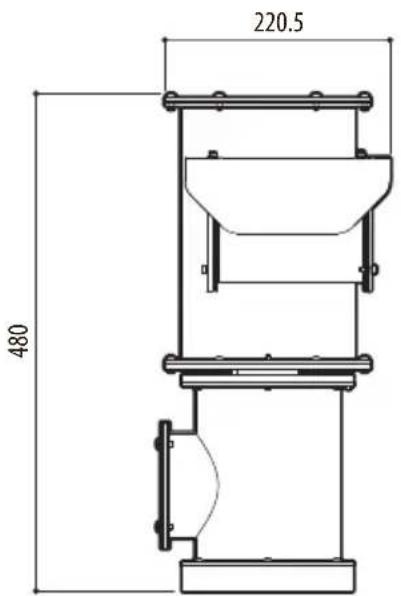
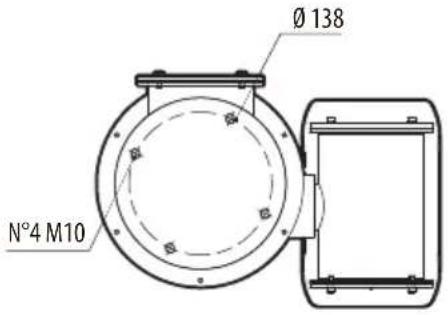
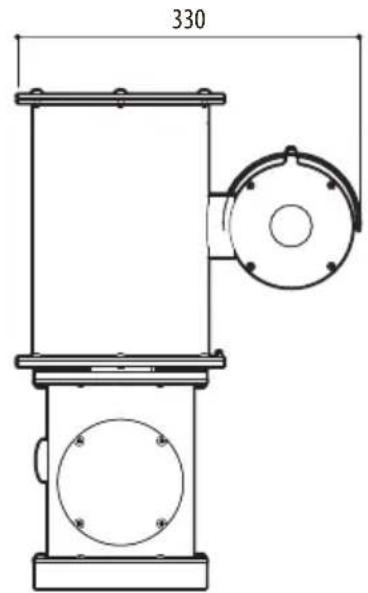
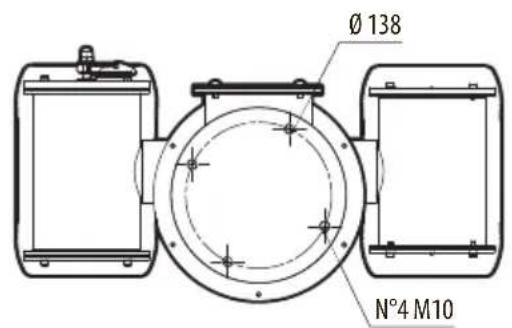
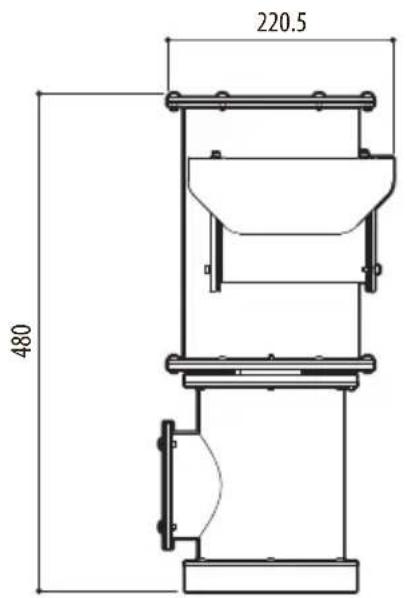
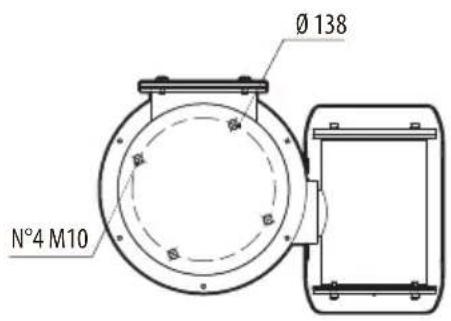
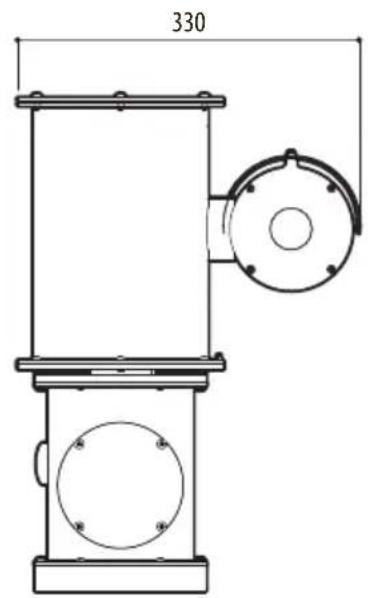
17 Technical drawings

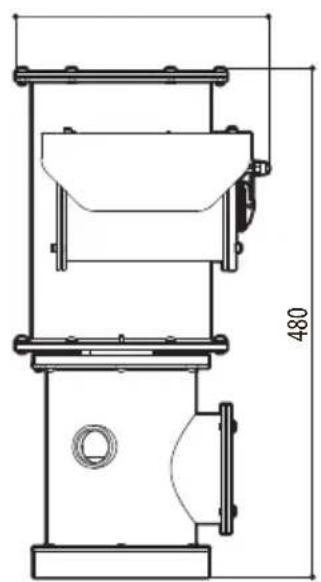
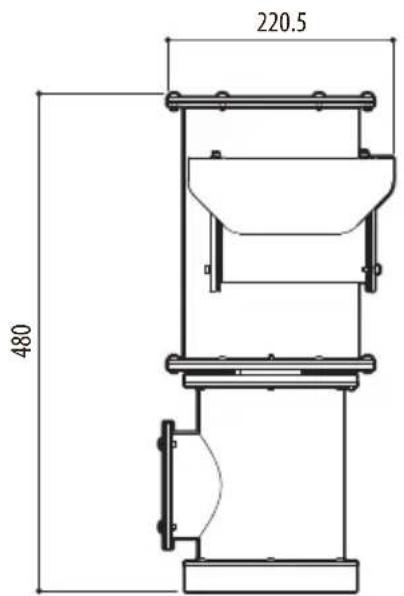
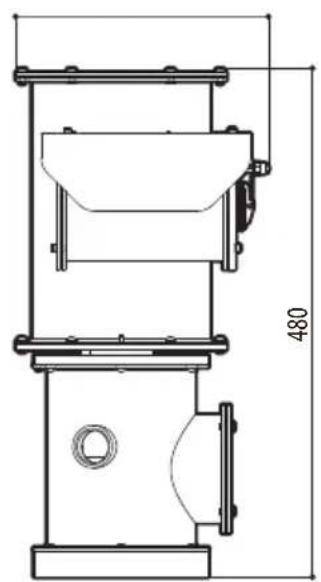
The indicated measurements are expressed in millimetres.
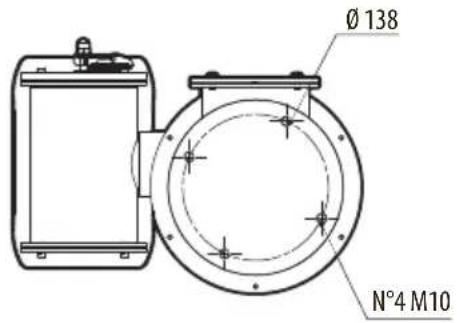
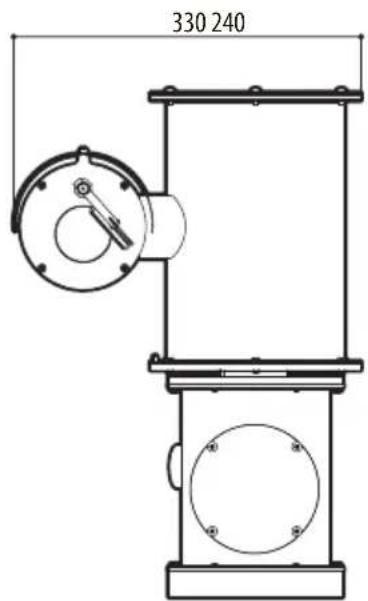
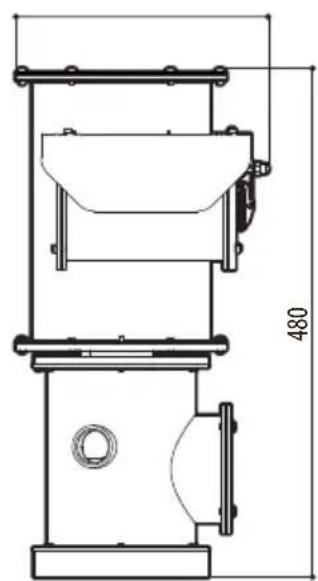
natural_image
Technical line drawing of a mechanical device with dimension标注 (no text or symbols)Fig. 24 NXPTZ SERIES2 (NXPTZHD).
EN - English - Instruction manual
natural_image
Technical line drawing of a mechanical device with a circular component and a cylindrical housing (no text or symbols)Fig. 25 NXPTZR SERIES2 (NXPTZR).
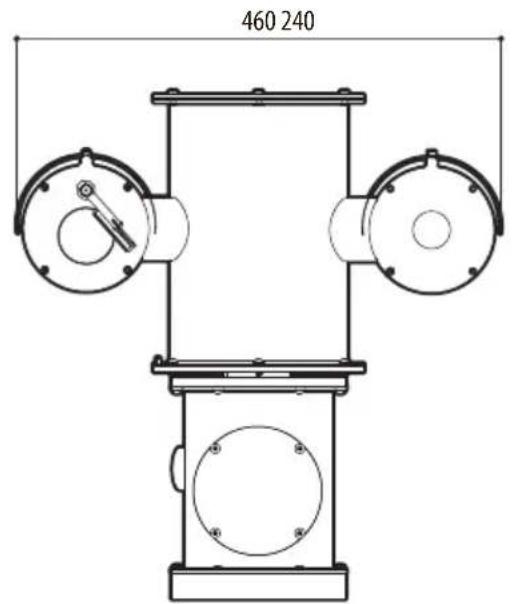
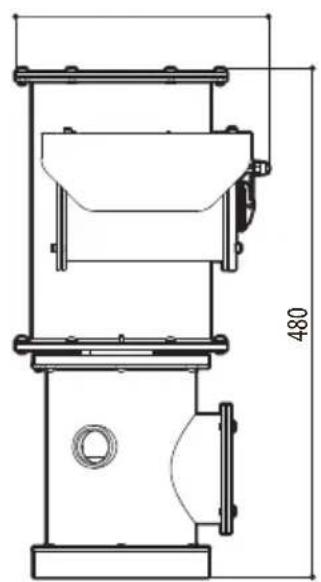
natural_image
Technical line drawing of a mechanical device with dimension标注 (no text or symbols)Fig. 26 NXPTZT SERIES2 (NXPTZT).
NXPTZ SERIES2 (NXPTZHD) NXPTZR SERIES2 (NXPTZR) NXPTZT SERIES2 (NXPTZT)
natural_image
Three identical mechanical device configurations shown in 3D rendering, each with a cylindrical component and connected tubing (no text or symbols visible)Sommario
5.1 Telecamera Day/Night 11
5.2 Telecamera termica radiometrica....11
5.3 Dual Vision con telecamera Day/Night e telecamera termica radiometrica 11
natural_image
Technical diagram of a mechanical component with a circular housing and a rectangular plate, showing alignment arrows (no text or symbols)Fig. 1
5.1 Telecamera Day/Night
natural_image
Technical line drawing of a mechanical device with cylindrical components and a coiled cable (no text or symbols)Fig. 2 NXPTZ SERIES2 (NXPTZHD).
5.2 Telecamera termica radiometrica
natural_image
Technical line drawing of a mechanical device with cylindrical body, flange, and pipe (no text or symbols)Fig. 3 NXPTZR SERIES2 (NXPTZR).
5.3 Dual Vision con telecamera Day/Night e telecamera termica radiometrica
natural_image
Technical line drawing of a mechanical device with cylindrical components and a coiled cable (no text or symbols)Fig. 4 NXPTZT SERIES2 (NXPTZT).
natural_image
Technical line drawing of a mechanical assembly with cylindrical components and mounting base (no text or symbols)Fig. 8
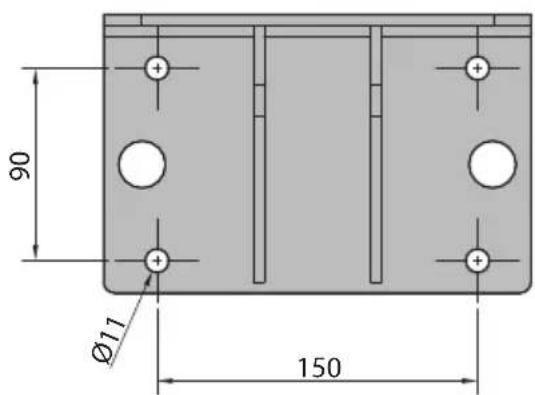
Fig. 9
natural_image
Technical line drawing of a mechanical robotic arm assembly (no text or symbols)Fig. 10
natural_image
Technical line drawing of a mechanical device with mounting bracket and cylindrical components (no text or symbols)Fig. 11
natural_image
Technical diagram of a mechanical assembly with no visible text or symbolsFig. 12
7 Installazione

natural_image
Pure technical diagram of a mechanical device with no text, numbers, or symbols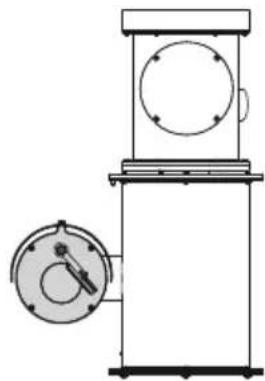
natural_image
Technical line drawing of a mechanical device with a circular component and a circular housing (no text or symbols)Fig. 13
natural_image
Technical line drawing of a mechanical assembly with flanged components and a clamp (no text or symbols)Fig. 16

natural_image
Technical line drawing of a mechanical component with circular holes and a side-mounted valve (no text or symbols)Fig. 17 NXPTZTW.
natural_image
Technical line drawing of a mechanical assembly with no visible text or symbolsFig. 18 NXPTZWB.
natural_image
Technical line drawing of a mechanical device with mounting bracket and cylindrical component (no text or symbols)Fig. 19 NXPTZCW.
10.5 Collare da palo
natural_image
Technical line drawing of a mechanical robotic arm assembly (no text or symbols)Fig. 20 NXPTZCOL.
natural_image
Technical drawing of a mechanical flange component (no text or symbols)Fig. 21 NXPT ZSFP.
natural_image
Technical diagram of a mechanical assembly with circular components and labeled parts (no readable text or symbols)Fig. 22
16.1.5 Cybersecurity
Firmware firmato digitalmente
• Colore: 0.0013lx (50 IRE, High sensitivity on)
• B/W: 0.0008lx (30 IRE, High sensitivity on)
Indoor Flicker Reduction
High sensitivity: On/Off
Auto Slowshutter: On/Off
Indoor Flicker Reduction
Auto Slowshutter: Off, On (da 1/30s fino a 1/1s)
16.2.5 Cybersecurity
Firmware firmato digitalmente
16.2.7 Interfaccia I/O
Scheda allarme I/O:
16.3.5 Cybersecurity
Firmware firmato digitalmente
Telecamera Day/Night
Encoder video
Indoor Flicker Reduction
High sensitivity: On/Off
Auto Slowshutter: On/Off
natural_image
Technical line drawing of a mechanical device with dimension标注 (no text or symbols)Fig. 24 NXPTZ SERIES2 (NXPTZHD).
natural_image
Technical line drawing of a mechanical device with a circular component and a cylindrical housing (no text or symbols)Fig. 25 NXPTZR SERIES2 (NXPTZR).
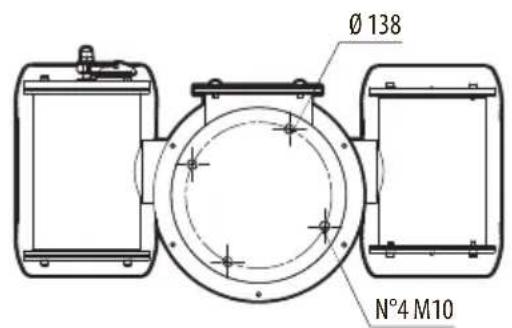
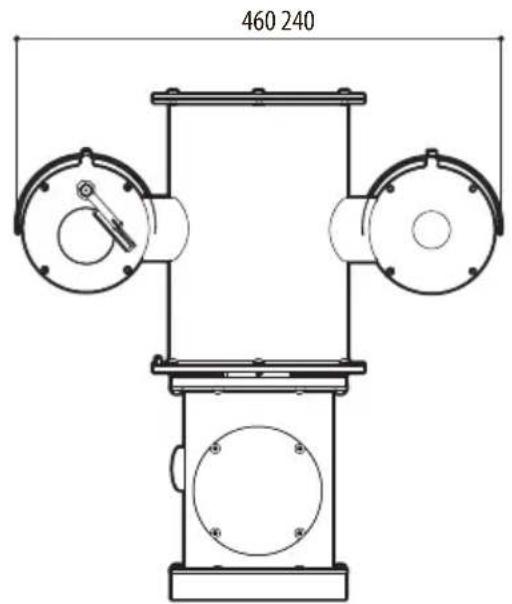
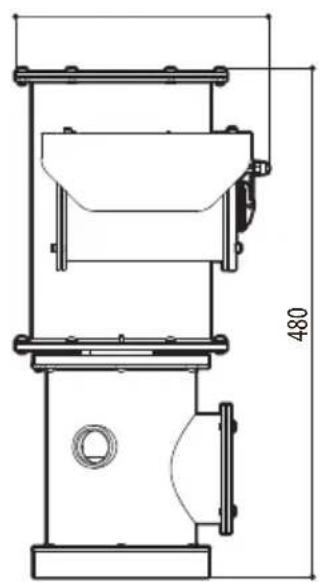
natural_image
Technical line drawing of a mechanical device with dimension标注 (no text or symbols)Fig. 26 NXPTZT SERIES2 (NXPTZT).
NXPTZ SERIES2 (NXPTZHD) NXPTZR SERIES2 (NXPTZR) NXPTZT SERIES2 (NXPTZT)
natural_image
Three identical mechanical device configurations shown in 3D rendering, each with a cylindrical component and connected tubing (no text or symbols visible)Sommaire
7 Installation....18
natural_image
Technical diagram of a mechanical assembly with a circular component and a rectangular block, showing no text or symbols.Fig. 1
natural_image
Technical line drawing of a mechanical device with cylindrical components and a coiled cable (no text or symbols)Fig. 2 NXPTZ SERIES2 (NXPTZHD).
natural_image
Technical line drawing of a mechanical device with cylindrical body, flange, and pipe (no text or symbols)Fig. 3 NXPTZR SERIES2 (NXPTZR).
natural_image
Technical line drawing of a mechanical device with cylindrical components and a coiled cable (no text or symbols)Fig. 4 NXPTZT SERIES2 (NXPTZT).
natural_image
Technical line drawing of a mechanical assembly with cylindrical components and mounting base (no text or symbols)Fig. 8
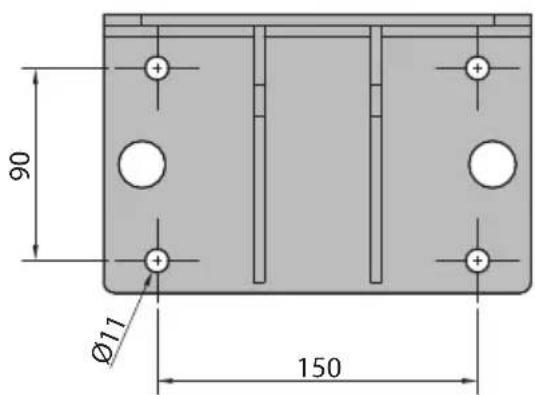
Fig. 9
natural_image
Technical line drawing of a mechanical robotic arm assembly (no text or symbols)Fig. 10
natural_image
Technical line drawing of a mechanical device with mounting bracket and cylindrical components (no text or symbols)Fig. 11
natural_image
Technical diagram of a mechanical assembly with no visible text or symbolsFig. 12
7 Installation

natural_image
Pure technical diagram of a mechanical device with no text, numbers, or symbols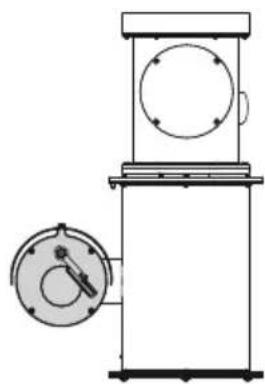
natural_image
Technical line drawing of a mechanical device with a circular component and a circular housing (no text or symbols)Fig. 13
Fig. 15
natural_image
Technical line drawing of a mechanical assembly with no visible text or symbolsFig. 16

natural_image
Technical line drawing of a mechanical component with circular features and a central knob (no text or symbols)Fig. 17 NXPTZTW.
10.3 Support fixation murale
natural_image
Technical line drawing of a mechanical assembly with no visible text or symbolsFig. 18 NXPTZWB.
natural_image
Technical line drawing of a mechanical device with mounting bracket and cylindrical component (no text or symbols)Fig. 19 NXPTZCW.
natural_image
Technical line drawing of a mechanical robotic arm assembly (no text or symbols)Fig. 20 NXPTZCOL.
natural_image
Technical drawing of a mechanical flange component (no text or symbols)Fig. 21 NXPT ZSFP.
natural_image
Technical diagram of a mechanical assembly with circular components and labeled parts (no readable text or symbols)Fig. 22
16.1.5 Cybersecurity
Indoor Flicker Reduction
High sensitivity: On/Off
Compensation Backlight: On/Off
Auto Slowshutter: On/Off
Indoor Flicker Reduction
Waste Electrical and Electronic Equipment (WEEE), Directive 2012/19/EU
16.1.11 Certifications - Applications marines
16.2.5 Cybersecurity
Waste Electrical and Electronic Equipment (WEEE), Directive 2012/19/EU
16.2.11 Certifications - Applications marines
16.3.5 Cybersecurity
Indoor Flicker Reduction
High sensitivity: On/Off
Compensation Backlight: On/Off
Auto Slowshutter: On/Off
Restriction of Hazardous Substances (RoHS), Directive 2011/65/EU: EN50581
Waste Electrical and Electronic Equipment (WEEE), Directive 2012/19/EU
16.3.11 Certifications - Applications marines
natural_image
Technical line drawing of a mechanical device with dimension标注 (no text or symbols)Fig. 24 NXPTZ SERIES2 (NXPTZHD).
natural_image
Technical line drawing of a mechanical device with a cylindrical component and circular base (no text or symbols)Fig. 25 NXPTZR SERIES2 (NXPTZR).
natural_image
Technical line drawing of a mechanical device with dimension标注 (no text or symbols)Fig. 26 NXPTZT SERIES2 (NXPTZT).
NXPTZ SERIES2 (NXPTZHD) NXPTZR SERIES2 (NXPTZR) NXPTZT SERIES2 (NXPTZT)
natural_image
Three identical mechanical device configurations shown in 3D rendering, each with a cylindrical component and connected tubing (no text or symbols visible)Inhaltsverzeichnis
1 Allgemeines....7
7 Installation....18
7.1 Benutzerfeld 18
7.2 Installationsmethoden 18
natural_image
Technical diagram of a mechanical component with a circular housing and a rectangular plate, showing alignment arrows (no text or symbols)Abb. 1
natural_image
Technical line drawing of a mechanical device with cylindrical components and a coiled cable (no text or symbols)Abb. 2 NXPTZ SERIES2 (NXPTZHD).
natural_image
Technical line drawing of a mechanical device with cylindrical body, flange, and pipe (no text or symbols)Abb. 3 NXPTZR SERIES2 (NXPTZR).
natural_image
Technical line drawing of a mechanical device with cylindrical components and a coiled pipe (no text or symbols)Abb. 4 NXPTZT SERIES2 (NXPTZT).
Hazardous moving parts. Keep fingers and other body
parts away.
AVERTISSEMENT!
natural_image
Technical line drawing of a mechanical assembly with cylindrical components and mounting base (no text or symbols)Abb. 8
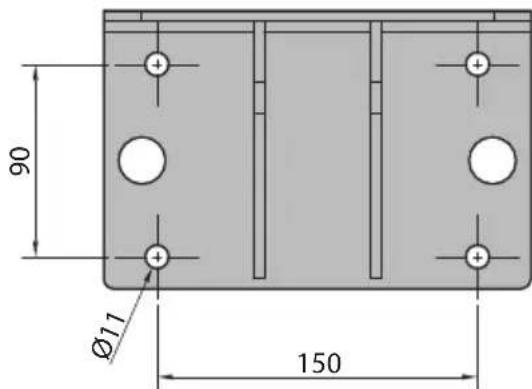
Abb. 9
natural_image
Technical line drawing of a mechanical assembly with no visible text or symbolsAbb. 10
natural_image
Technical line drawing of a mechanical device with mounting bracket and cylindrical component (no text or symbols)Abb. 11
natural_image
Technical diagram of a mechanical assembly with mounting holes and a central component (no text or labels)Abb. 12
7 Installation

natural_image
Pure technical diagram of a mechanical device with no text, numbers, or symbols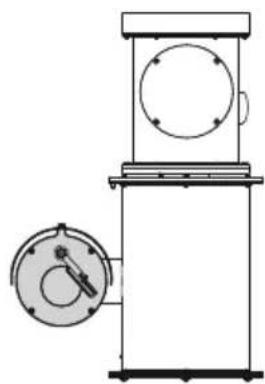
natural_image
Technical line drawing of a mechanical device with a circular component and a circular housing (no text or symbols)Abb. 13
natural_image
Technical line drawing of a mechanical assembly with no visible text or symbolsAbb. 16

natural_image
Technical line drawing of a mechanical component with circular features and a side-mounted knob (no text or symbols)Abb. 17 NXPTZTW.
10.3 Wandhalterung
natural_image
Technical line drawing of a mechanical assembly with no visible text or symbolsAbb. 18 NXPTZWB.
10.4 Winkeladaptermodul
Eckmontage-Adapter.
natural_image
Technical line drawing of a mechanical device with mounting bracket and cylindrical component (no text or symbols)Abb. 19 NXPTZCW.
10.5 Massive Mastschelle
Mastmontage-Adapter.
natural_image
Technical line drawing of a mechanical robotic arm assembly (no text or symbols)Abb. 20 NXPTZCOL.
natural_image
Technical drawing of a mechanical flange component (no text or symbols)Abb. 21 NXP T Z SFP.
natural_image
Technical diagram of a mechanical assembly with circular components and labeled parts (no readable text or symbols)Abb. 22
16.1.5 Cybersecurity
Indoor Flicker Reduction
High sensitivity: On/Off
Backlight-Kompensation: On/Off
Auto Slowshutter: On/Off
Indoor Flicker Reduction
16.2.5 Cybersecurity
16.3.5 Cybersecurity
Indoor Flicker Reduction
High sensitivity: On/Off
Backlight-Kompensation: On/Off
Auto Slowshutter: On/Off
natural_image
Technical line drawing of a mechanical device with dimension标注 (no text or symbols)Abb. 24 NXPTZ SERIES2 (NXPTZHD).
The Ground Truth image displays a single, solid horizontal line. According to Rule 2 (UNDERSCORE & LINE RULES), this is a stylistic or background line, not a placeholder underscore. Therefore, the OCR result must ignore it and output nothing or only meaningful text. The provided OCR content is "____", which consists of four underscores. This is an incorrect interpretation of the line as a placeholder, violating the rule that stylistic lines must be ignored. The OCR has hallucinated underscores where none should exist based on the GT's visual context. Hence, the OCR result is inconsistent with the Ground Truth.
DE - Deutsch - Bedienungsanleitung
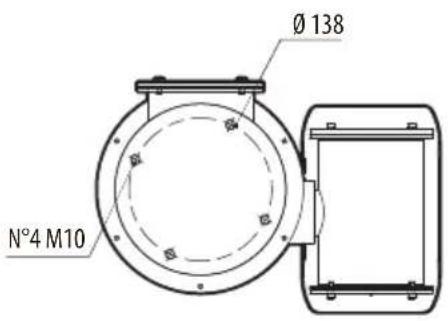
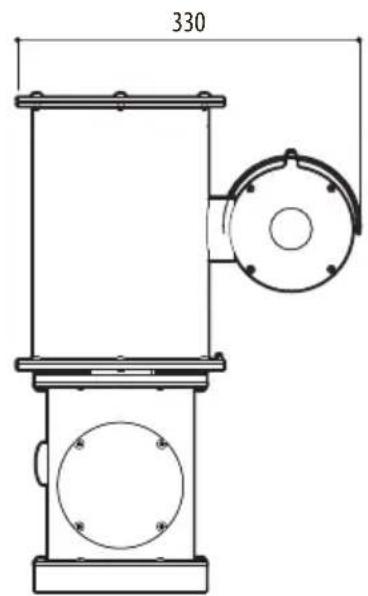
natural_image
Technical line drawing of a mechanical device with circular components and a central housing (no text or symbols)Abb. 25 NXPTZR SERIES2 (NXPTZR).
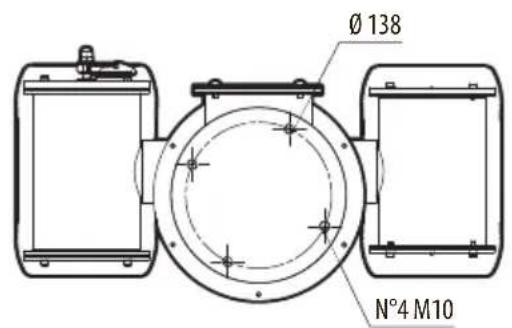
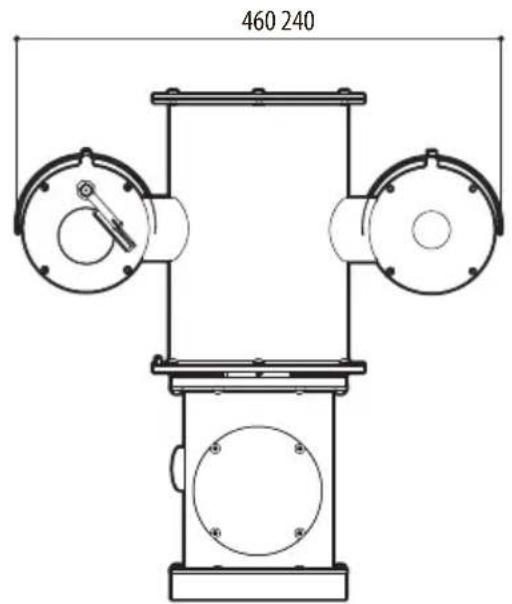
natural_image
Technical line drawing of a mechanical device with dimension标注 (no text or symbols)Abb. 26 NXPTZT SERIES2 (NXPTZT).
NXPTZ SERIES2 (NXPTZHD) NXPTZR SERIES2 (NXPTZR) NXPTZT SERIES2 (NXPTZT)
natural_image
Three identical mechanical device configurations shown in 3D rendering, each with a cylindrical component and connected tubing (no text or symbols visible)16.2.5 Cybersecurity ....30
16.2.6 Видео ....30
natural_image
Technical diagram of a mechanical assembly with a circular component and a rectangular block, showing no text or symbols.Рис. 1
5.1 Kamepa Day/Night
natural_image
Technical line drawing of a mechanical device with cylindrical body, flange, and attached pipe (no text or symbols)Рис. 2 NXPTZ SERIES2 (NXPTZHD).
natural_image
Technical line drawing of a mechanical device with cylindrical body, flange, and pipe (no text or symbols)Рис. 3 NXPTZR SERIES2 (NXPTZR).
natural_image
Technical line drawing of a mechanical device with cylindrical components and a coiled cable (no text or symbols)Рис. 4 NXPTZT SERIES2 (NXPTZT).
Hazardous moving parts. Keep fingers and other body parts away.
AVERTISSEMENT!
natural_image
Technical line drawing of a mechanical assembly with cylindrical components and mounting base (no text or symbols)Рис. 8
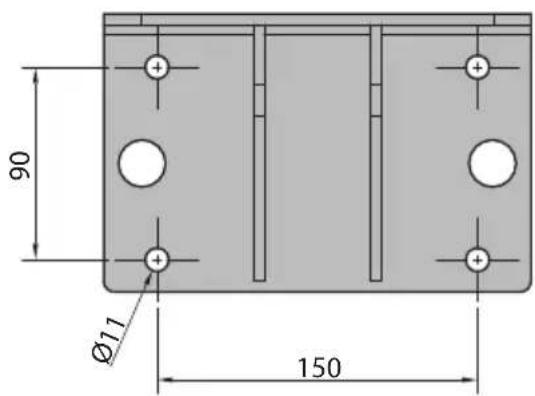
Рис. 9
natural_image
Technical line drawing of a mechanical assembly with no visible text or symbolsРис. 10
natural_image
Technical line drawing of a mechanical assembly with mounting bracket and cylindrical component (no text or symbols)Рис. 11
natural_image
Technical diagram of a mechanical assembly with no visible text or symbolsРис. 12
7 Монтаж

natural_image
Technical line drawing of a mechanical device with circular components and a dial indicator (no text or symbols)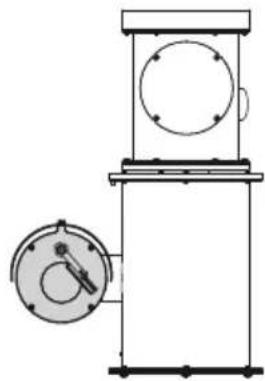
natural_image
Technical line drawing of a mechanical device with a circular component and a circular dial (no text or symbols)Рис. 13
natural_image
Technical line drawing of a mechanical assembly with flanged components and a coiled spring (no text or symbols)Рис. 16

natural_image
Technical line drawing of a mechanical component with circular features and a dial indicator (no text or symbols)Рис. 17 NXPTZTW.
natural_image
Technical line drawing of a mechanical assembly with cylindrical components and mounting base (no text or symbols)Рис. 18 NXPTZWB.
natural_image
Technical line drawing of a mechanical device with mounting bracket and cylindrical component (no text or symbols)Рис. 19 NXPTZCW.
natural_image
Technical line drawing of a mechanical robotic arm with mounting flanges and joints (no text or symbols)Рис. 20 NXPTZCOL.
natural_image
Technical drawing of a mechanical flange component (no text or symbols)Рис. 21 NXPT Z SFP.
natural_image
Technical diagram of a mechanical assembly with circular components and labeled parts (no text or symbols present)Рис. 22
16.1.5 Cybersecurity
Indoor Flicker Reduction
Indoor Flicker Reduction
16.2.5 Cybersecurity
16.3.5 Cybersecurity
Indoor Flicker Reduction
natural_image
Technical line drawing of a mechanical device with dimension标注 (no text or symbols)Рис. 24 NXPTZ SERIES2 (NXPTZHD).
natural_image
Technical line drawing of a mechanical device with a circular component and a cylindrical housing (no text or symbols)Рис. 25 NXPTZR SERIES2 (NXPTZR).
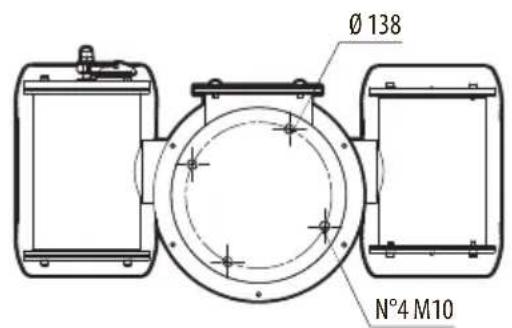
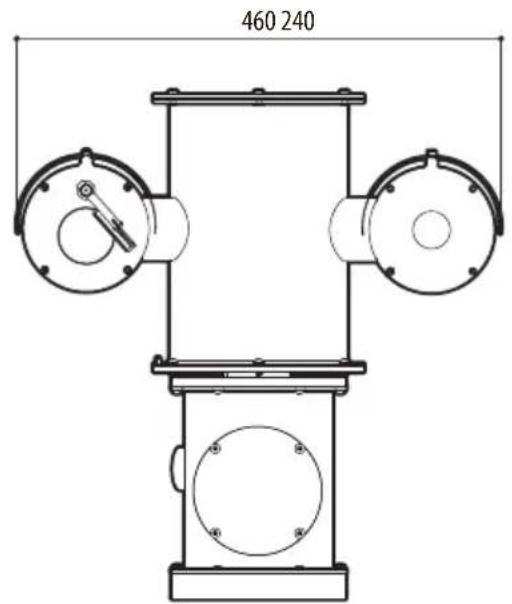
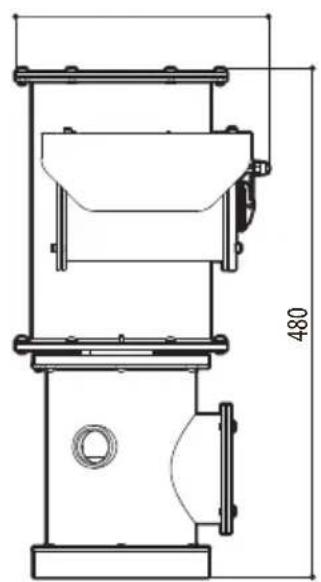
natural_image
Technical line drawing of a mechanical device with dimension标注 (no text or symbols present)Рис. 26 NXPTZT SERIES2 (NXPTZT).


Headquarters Italy VIDEOTEC s.r.l.
Via Friuli, 6 - I-36015 Schio (VI) - Italy
Tel. +39 0445 697411 - Fax +39 0445 697414
Email: info@videotec.com
www.videotec.com