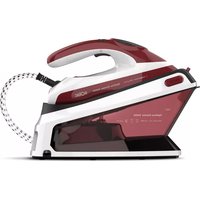
Optima Center 2400 CPB6050 - Iron SOLAC - Free user manual and instructions
Find the device manual for free Optima Center 2400 CPB6050 SOLAC in PDF.



| Product type | Steam generator |
| Brand | Solac |
| Model | Optima Center 2400 CPB6050 |
| Color | White and blue (estimated) |
| Water tank capacity | 1.5 L (estimated) |
| Power | 2400 W |
| Supply voltage | 220-240 V ~ 50/60 Hz |
| Soleplate | Non-stick soleplate suitable for all fabrics |
| Ironing functions | Dry ironing, steam, steam burst, vertical ironing |
| Temperature settings | 3 levels: synthetic, silk/wool, cotton |
| Display | LED screen |
| Anti-scale system | Integrated resin filter |
| Auto shut-off | Yes, after 8 minutes of inactivity |
| Thermal protection | Yes, safety device against overheating |
| Cord length | 2 m (estimated) |
| Storage compartment | For the cord and steam tube |
| Maintenance | Self-cleaning, regular descaling, soleplate cleaning |
| Recommended water type | Tap water, preferably distilled if hard water |
| Warranty | Complies with current legislation |
| Included accessories | Measuring cup, funnel |
Frequently Asked Questions - Optima Center 2400 CPB6050 SOLAC
User questions about Optima Center 2400 CPB6050 SOLAC
0 question about this device. Answer the ones you know or ask your own.
Ask a new question about this device
Download the instructions for your Iron in PDF format for free! Find your manual Optima Center 2400 CPB6050 - SOLAC and take your electronic device back in hand. On this page are published all the documents necessary for the use of your device. Optima Center 2400 CPB6050 by SOLAC.
USER MANUAL Optima Center 2400 CPB6050 SOLAC
- If the model of your appliance does not have the accessories described above, they can also be bought separately from the Technical Assistance Service.
USE AND CARE:
- Fully extend the appliance's power cable before each use.
- Before using the iron, do a self-cleaning cycle following the corresponding instructions
- Do not use the appliance if its accessories are not properly fitted.
- Do not switch the appliance on without water.
- Do not use the appliance if the on/off switch does not work.
- Do not use the appliance if it is tipped up and do not turn it over.
- Do not use the unit if any of the start/stop devices do not work.
- Disconnect the appliance from the mains when not in use and before undertaking any cleaning task.
- Store this appliance out of reach of children and/or persons with physical, sensory or reduced mental or lack of experience and knowledge.
- Do not store or transport the appliance if it is still hot.
-
Keeping the iron in its housing support at maximum temperature for too long time, may cause its colour change, which will not affect the correct working order of the appliance.
-
For a correct operation, keep the soleplate in proper conditions does not operate over metal objects (ironing board metal parts, buttons, zips etc.).
- Only use water with the appliance.
- Check that the safety cap screwed on tightly before switching on the appliance.
- Before each use, make sure that the product valve/s are not blocked.
- Check that the lid is closed properly before starting the appliance.
- Never leave the appliance connected and unattended if is not in use. This saves energy and prolongs the life of the appliance.
- Do not use the appliance on any part of the body of a person or animal.
INSTRUCTIONS FOR USE
BEFORE USE:
- Make sure that all products' packaging has been removed.
- Some parts of the appliance have been lightly greased. Consequently, the first time the appliance is used a light smoke may be detected. After a short time, this smoke will disappear.
- Prepare the appliance according to the function you wish to use:
FILLING WITH WATER:
- You must fill the water compartment before turning on the appliance.
NOTE: It is advisable to use distilled water, especially if the water in your area contains clay or if it is "hard" (containing lime or magnesium). - Open water inlet lid.
- Fill the compartment with cold water.
- Fill the deposit taking care to observe the MAX level.
- Pour in water using the measuring cup and funnel supplied.
- Close the lid.
USE:
- Extend the cable completely before plugging it in.
EN
- Connect the appliance to the mains.
- Press both "PUSH" buttons to release the appliance, after using, press lock button to fix the appliance.
- Connect the appliance to the mains, LED display light up with GREEN color.
- Press ON/OFF button (1), product start pre-heating, & on LED display light up with RED color.
- Press temperature button (3), select desired temperature.
- Press steam regulator button (2), select desired steam control.
NOTE:
- *At temperature dot ● it can not select steam control.
- *At temperature dot ● ● it can only select steam control (2)
- It takes about 40irc for heating process, after that, it is fully ready to iron.
- It is normal to hear a pumping sound as the water is pumped into the steam station.
- Do not use temperatures higher than those indicated on the garments to be treated.
- Temperature for synthetic fibres (Polyester, Nylon...)
- Temperature for silk, wool.
- Temperature for cotton & linen
- If garment has various kinds of fibres, select the temperature for the fibre that requires the lowest temperature. (For example, select the temperature for polyester for an article made out of 60% polyester and 40% cotton).
DRY IRONING:
- The appliance has an option to dry ironing (without steam). To use this option the temperature at dot 1
CONTINUOUS STEAM IRONING
- It is possible to iron with continuous steam whenever the tank is filled with water and the adequate temperature is selected.
- Select the temperature at or .
-
Select the desired steam regulator.
-
Press and hold steam button to release the continuous steam.
- CAUTION: This function can not work under lower temperature dot .
BURST STEAM
- The burst steam feature provides additional steam for removing stubborn wrinkles.
- Select the temperature at
- Select the steam at (2).
- Move the iron in a top to bottom direction while double click steam button to release the burst steam.
VERTICAL STEAMING:
-
It is possible to iron hanging curtains, items of clothing on his hanger, etc. To do so, follow the instructions:
-
Select the maximum temperature.
-
Pass the iron from top to bottom by pressing the steam control with the material.
-
IMPORTANT: for cotton and linen, its recommended to put the iron base in contact with the material. For other more delicated fibres, it's recommended to keep the iron base at some centimetres of distance.
AUTO SHUT OFF FUNCTION
- While the appliance does not have any operation, the appliance can be auto shut off after 8 mins., keep twinkling. Presing ON/OFF button (1), it can reset.
ANTI-CALC SYSTEM
- A special resin filter at the bottom of the water tank softens the water and prevents scale build-up in the plate.
- Do not use chemical additives, scented substances or decalcifiers. Failure to comply with the above-mentioned regulations leads to the loss of guarantee.
ONCE YOU HAVE FINISHED USING THE APPLIANCE
- Press button (1) ON/OFF during 3 seconds.
- Disconnect the appliance from the mains, empty the water tank (do it after each use) and let it cool before undertaking any cleaning task.
EN
- Put the pipe and power cord into the storage cabinet.
SAFETY THERMAL PROTECTOR:
- The appliance has a safety device, which protects the appliance from overheating.
CLEANING
- Disconnect the appliance from the mains and allow it to cool before undertaking any cleaning task.
- Clean the equipment with a damp cloth with a few drops of washing-up liquid and then dry.
- Do not use solvents, or products with an acid or base pH such as bleach, or abrasive products, for cleaning the appliance.
- Never submerge the appliance in water or any other liquid or place it under running water.
SELF CLEANING
- Fill the water tank to Max level.
- Connect the appliance to the mains, place the iron horizontally over the sink.
- Press ON/OFF button (1), product start pre-heating.
After heating 30 press and hold steam regulator button (2) on LED display light up with GREEN color, the appliance starts self cleaning function, gently rock the iron backwards and forwards. - Self cleaning function can stop automatically after 1 mins., or press steam regulator button (2) again, it can stop working.
After self cleaning, dry heat (no steam) the appliance for a while to dry the water in soleplate, rub the soleplate with a damp cotton cloth folded several times. (Never use scouring pads or chemicals) - Repeat the self-cleaning process at least twice.
- NOTICE: We recommend performing the process once a month to prolong the service life of the ironing system. If the water in your area is very hard or you notice limescale coming out through the soleplate during ironing, use this function
HOW TO DEAL WITH LIME SCALE INCRUSTATIONS:
- For the appliance to work correctly it should be kept free of limescale or magnesium incrustations caused by the use of hard water.
-
To avoid this kind of problem it is advisable to use distilled water.
However, if it is not possible to use the kind of water recommended above, you should periodically remove the limescale from the appliance: -
Every 6 weeks if the water is "very hard".
- Every 12 weeks if the water is "hard".
To do so, we recommend the use of the specific product for this kind of appliance, which can be found in specialised shops and authorised technical services.
- A specific anti-lime scale product should be used on this kind of product.
- Homemade solutions are not recommended in the decaling of this appliance, such as the use of vinegar.
FRANÇAIS FR
DESCRIPTION
(1)FFO/NO jj jde jzao
gol 100 j 100 100 100 100 100
AR
#
jglg jiaew po joe jgi de jglal pao
pUduuUydd
JooWu aIgU
auii jao aaiii gaiill 1g ooo aillj no sli
jai jui iue uui uli jiaoi oji jao ci jai
130 28
.15
pIaJI UgUbbl aIbgl IaIgJlauJI sluJe
14 6
jIgJJI JIeJU JIe IJI bI JIeJI JIO JO JU
ab1j5iäolgcbzao clo Jooio joooiobj o:do
1
(ggaiae gpaunll 5 (sGyssJ)
.1061 d 42 a 42 g e 106
.0J11111111111
XAM gsiu61 oIeJoo joljol
Jolal gaoJIg Jolal UgS OUsLw cIbI C
a1b1 a2c2 aog 1b2
:Joo:
. gllab1 jll 3 aill 20g.(4)jll aaii jjj daiol
ab = 10
.1jai jai jai jai jai y .jai jai aao abaa iia
.1jaii 30
jolw wuog.aa. 1g no nlll aao
SΔS = ( l02 + l12 + l22)
jIi Iaoo 1001 6o oio laos ofo elow
gba/daaba 3a2ab61 aoojol ool jol jol
1.420 105611061
.(..yliu,)aclibwA aWwO
.
aalddjgddg
1. g
louljA
olgsl oosB
aBbIeWg
jD
1jjdiagao E
FFO/NO-1
j1b2 = p1b2a - j - 4
dd = 1
DEL. Δ Δ ΔF
Jia pIbG
H
1,2,3,4 up 1,2,3,4 up 1,2,3,4
LgUgSJ
K
jS. oXe i 0g5i6i ciAoi6i jIb sN Ss b
aaiil aill clls jfo Jaaia Jka Jla
:duai1g puiu
jU U JU JU JU JU JU JU JU JU JU
Ei. 1111110000000000000000000000000
auiuib1 iolulxil
This product enjoys the recognition and protection of the legal guarantee in accordance with current legislation. To enforce your rights or interests you must go to any of our official technical assistance services.
You can find the closest one by accessing the following web link: http://solac.com
You can also request related information by contacting us by phone.
You can download this instruction manual and its updates at http://solac.com
DE) GARANTIE UND TECHNISCHER SERVICE
Big distribution society
4 Rue 13 Lot Smara, Oulfa,
Casablanca
(+212)522894021
ME) MONTENEGRO - EUROPE
Rastovac bb, 81400
Niksic
+38240217055
Unit 25 & 26, San Croy Office Park, Die Agora
Road, Croydon, Kempton Park, 1619
Johannesburg
(+27) 0113925652
1
1
一
一
solac
www.solac.com
20/10/2021

- USE AND CARE:
- INSTRUCTIONS FOR USE
- BEFORE USE:
- FILLING WITH WATER:
- USE:
- EN
- NOTE:
- DRY IRONING:
- CONTINUOUS STEAM IRONING
- BURST STEAM
- VERTICAL STEAMING:
- AUTO SHUT OFF FUNCTION
- ANTI-CALC SYSTEM
- ONCE YOU HAVE FINISHED USING THE APPLIANCE
- SAFETY THERMAL PROTECTOR:
- CLEANING
- SELF CLEANING
- HOW TO DEAL WITH LIME SCALE INCRUSTATIONS:
- FRANÇAIS FR
- DESCRIPTION
- AR
- #
- JooWu aIgU
- pIaJI UgUbbl aIbgl IaIgJlauJI sluJe
- 6
- :Joo:
- ab = 10
- g
- :duai1g puiu
- DE) GARANTIE UND TECHNISCHER SERVICE
- ME) MONTENEGRO - EUROPE
- solac
Brand : SOLAC
Model : Optima Center 2400 CPB6050
Category : Iron