
Smart Camera C300 - Surveillance Camera Xiaomi - Free user manual and instructions
Find the device manual for free Smart Camera C300 Xiaomi in PDF.



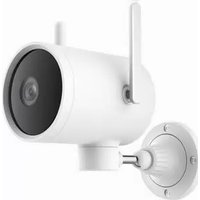
| Product Type | Indoor Surveillance Camera |
| Brand | Xiaomi |
| Model | Smart Camera C300 (XMC01) |
| Dimensions | 115 × 78 × 78 mm |
| Net Weight | 335 g |
| Power Supply | 5 V ⎓ 2 A, micro-USB port |
| Video Resolution | 2304 × 1296 (3 MP) |
| Video Codec | H.265 |
| Night Vision | Yes, built-in infrared, automatic switching |
| Storage | microSD card up to 256 GB (not included) or optional cloud |
| Wireless Connectivity | Wi-Fi IEEE 802.11 b/g/n, 2.4 GHz |
| Aperture | F1.4 |
| Operating Temperature | -10 °C to 40 °C |
| Main Functions | Real-time surveillance, human motion detection, home monitoring assistant, night vision, playback, device sharing, two-way calls |
| Mounting | On horizontal surface or wall (mounting kit included) |
| Package Contents | Camera, micro-USB cable, wall mounting kit, user manual, warranty notice |
| Maintenance and Cleaning | Clean the lens with a soft cloth; avoid humidity and extreme temperatures; do not block ventilation openings |
| Safety | Do not expose to water; maintain at least 20 cm distance between antenna and body; secure firmly when wall mounting |
| Spare Parts and Repairability | Micro-USB cable, wall mounting kit; no user-serviceable parts; prefer donation or recycling |
| General Information | Compliant with WEEE directive (2012/19/EU) and RED directive (2014/53/EU); manual available in multiple languages |
Frequently Asked Questions - Smart Camera C300 Xiaomi
User questions about Smart Camera C300 Xiaomi
0 question about this device. Answer the ones you know or ask your own.
Ask a new question about this device
Download the instructions for your Surveillance Camera in PDF format for free! Find your manual Smart Camera C300 - Xiaomi and take your electronic device back in hand. On this page are published all the documents necessary for the use of your device. Smart Camera C300 by Xiaomi.
USER MANUAL Smart Camera C300 Xiaomi
xiaomi Smart Camera C300 User Manual · 1
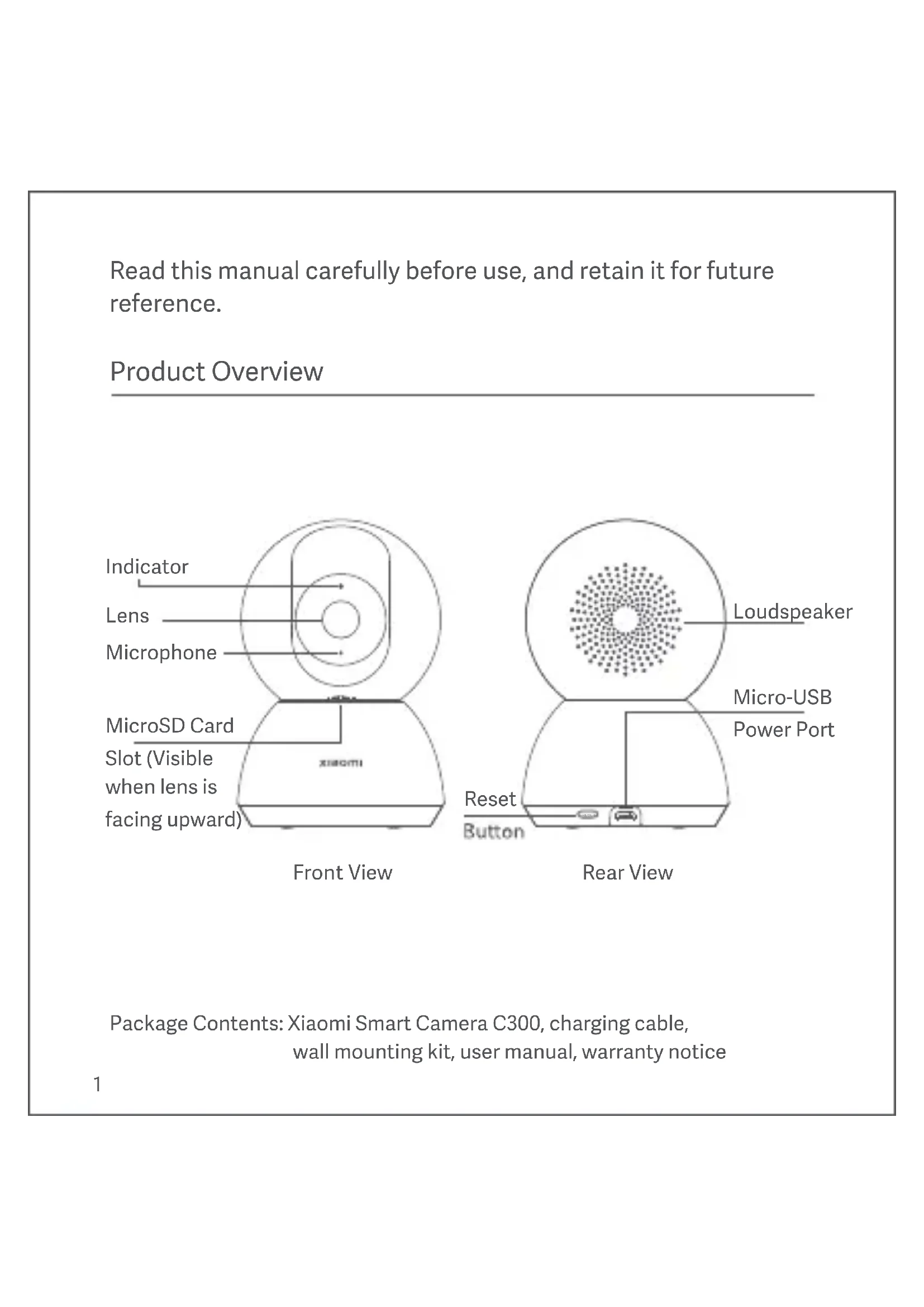
Read this manual carefully before use, and retain it for future reference.
Product Overview
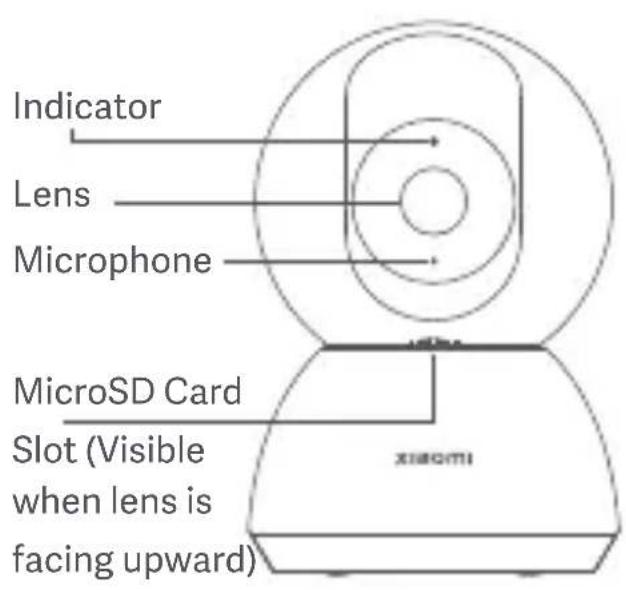
Front View
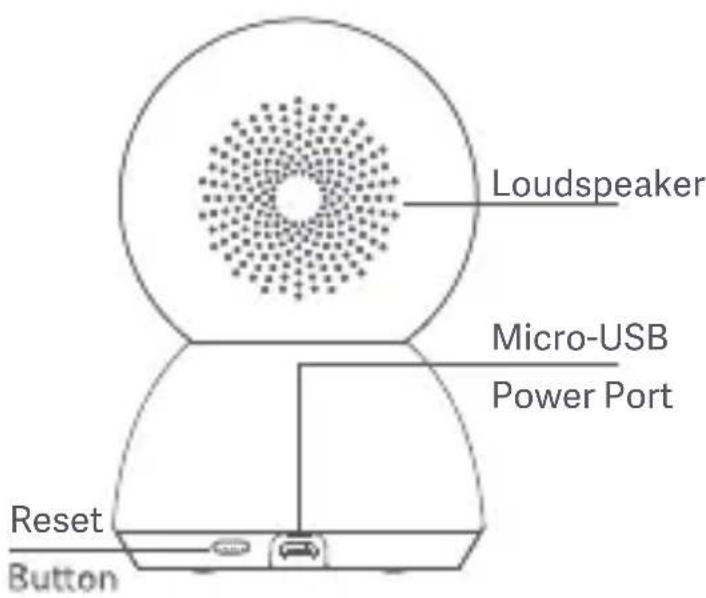
Rear View
Package Contents: Xiaomi Smart Camera C300, charging cable, wall mounting kit, user manual, warranty notice
Installation
You can place the Xiaomi Smart Camera C300 on horizontal surfaces, such as desks, dining tables, and coffee tables. You can also mount it on a wall.
Mounting the camera on a wall:
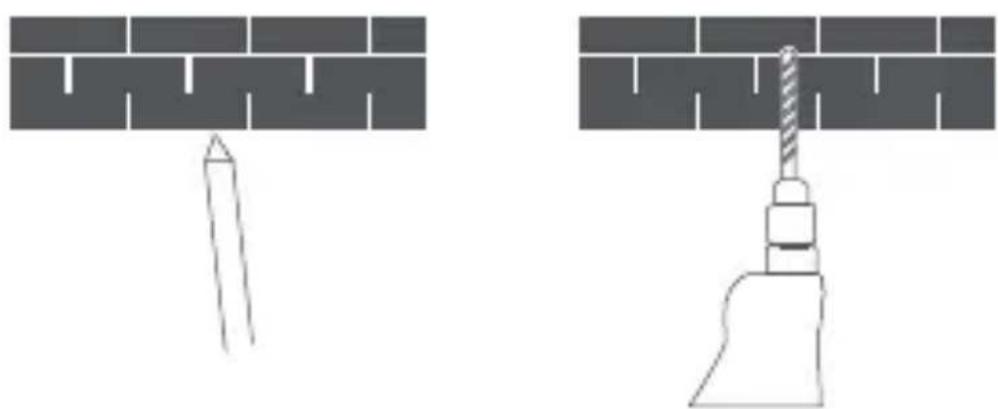
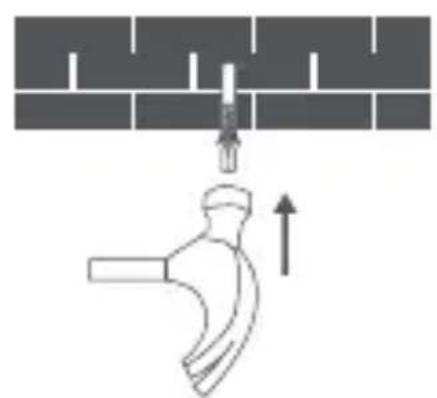
- First use a pencil to mark the positions for the base mounting holes on the wall, then drill two holes at the marked positions. The diameter of each hole is approximately 6 ~mm , and the depth is approximately 30 ~mm .
natural_image
Two technical diagrams showing a tool inserted into a brick wall and a screw being inserted, with no text or symbols present.- Insert a plastic wall plug into each drilled hole.
natural_image
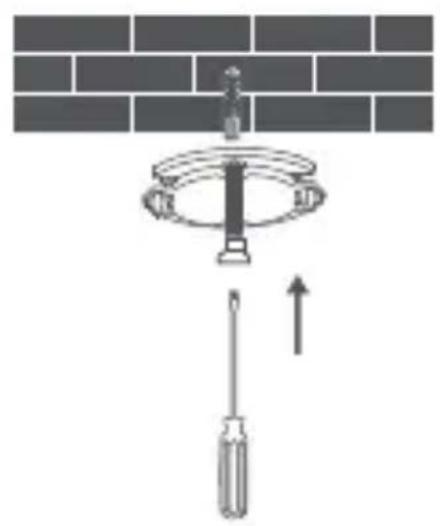
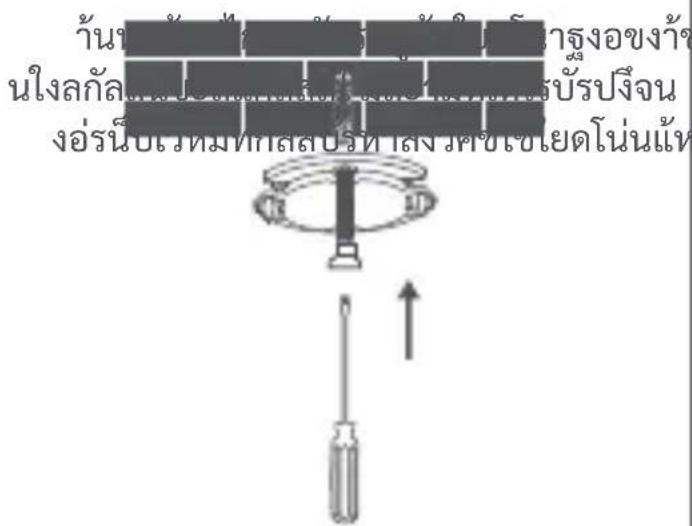
Diagram showing a pipe being inserted into a pipe with an upward arrow indicating flow direction (no text or symbols)- Place the side of the base with arrows facing forward, and then align the holes. Insert the screws and then tighten them into the wall plugs with a Phillips head screwdriver.
natural_image
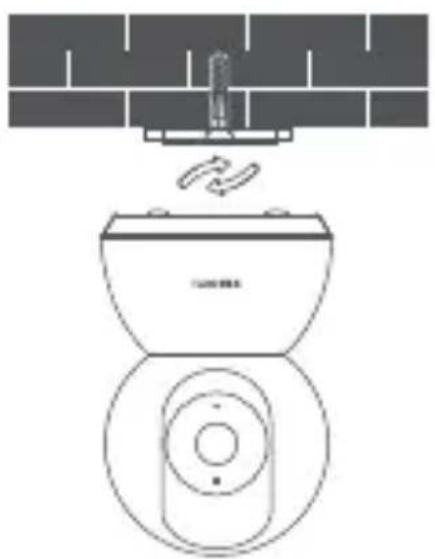
Diagram showing a screwdriver inserted into a circular component above a brick wall, with an upward arrow indicating motion (no text or symbols)- Align the grooves on the bottom of the camera with the raised part on the base, and then turn it clockwise until it locks into place.
natural_image
Line drawing of a toilet with a drain and fan, no text or symbols present
Note:
The wall must be able to support at least three times the total weight of the camera.

Warning:
To prevent possible injury, the camera must be securely fixed to the ceiling or wall according to the installation instructions.
How to Use
• Installing a microSD card
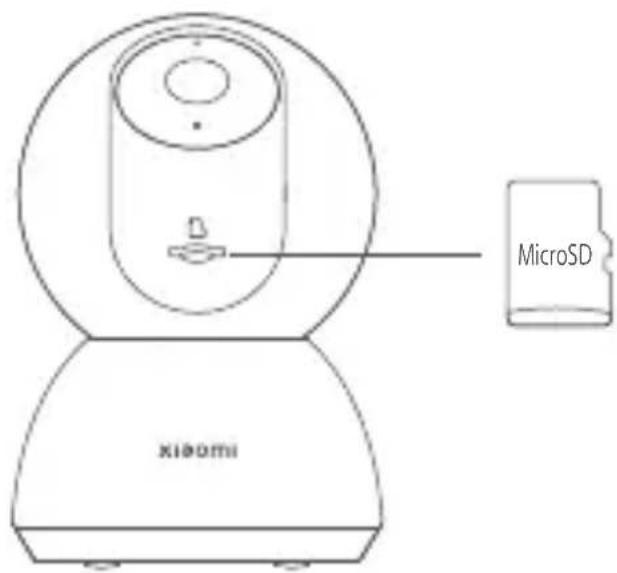
Make sure the camera is turned off. Push the lens upward to reveal the microSD card slot. Insert the microSD card into the card slot with its contact points facing downward.
Note: Disconnect the camera from the power before installing or removing a microSD card. Please use a genuine microSD card manufactured by a qualified supplier. (The microSD card needs to be purchased separately. The maximum supported capacity is 256 GB). It is recommended to use a microSD card with a reading/writing speed of no less than U1/Class 10.
Attention:
When inserting a MicroSD card, press the bottom of the card until a "click" sound is heard to make sure it's in place.
• Turning on the camera
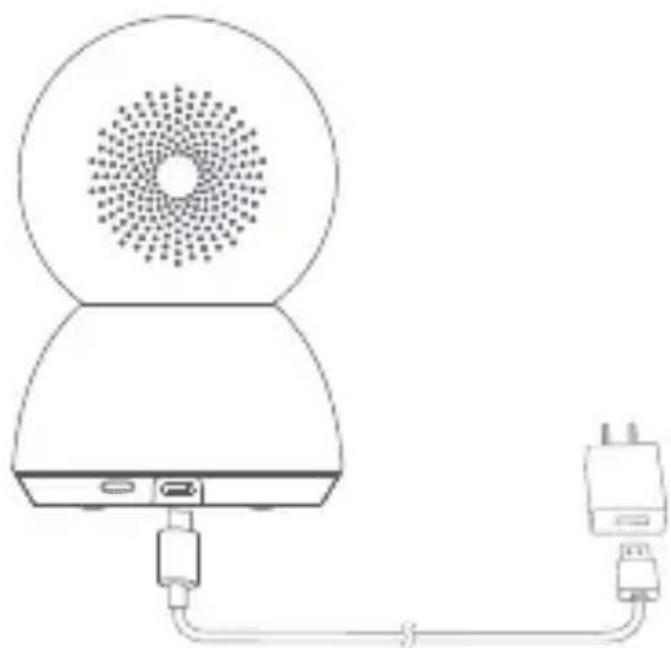
Plug the charging cable into Micro-USB power port on the back, the camera automatically turns on, and the indicator quickly blinks orange.
natural_image
Line drawing of a device with a speaker emitting sound waves, connected to an external power outlet (no text or symbols)Note: When the camera is working, do not turn the lens of the camera nor force it to rotate. If the positioning of the lens is inaccurate, please calibrate it in the Xiaomi Home app.
- Indicator
Blue: Connected successfully/Working properly
Blinking blue: Network error
Quickly blinking orange: To be connected
Slowly blinking orange: Updating
Connecting with the Xiaomi Home App
This product works with the Xiaomi Home app. Use the Xiaomi Home app to
control your device, and to interact with other smart home devices.
Scan the QR code to download and install the app.
You will be directed to the connection setup page if the app is installed already. Or search for "Xiaomi Home" in the app store to download and install it.
Open the Xiaomi Home app, tap "+" on the upper right, and then follow the instructions to add your device.

7E1C4FFB
Note: The version of the app might have been updated, please follow the instructions based on the current app version.
Make sure the camera turns on and the network connection is stable during connecting. The indicator is quickly blinking orange when waiting for a connection, and turns into blue once the camera is successfully connected.
• Restoring factory settings
If the network connection or the Xiaomi Account that the camera is paired with has been changed, you need to restore the factory settings. Press and hold the reset button for about three seconds. Once the indicator starts quickly blinking orange, the factory settings have been restored successfully. Then you can reconnect the camera with the app.
Note: Restoring factory settings will not delete the content on the microSD card.
Real-time Surveillance
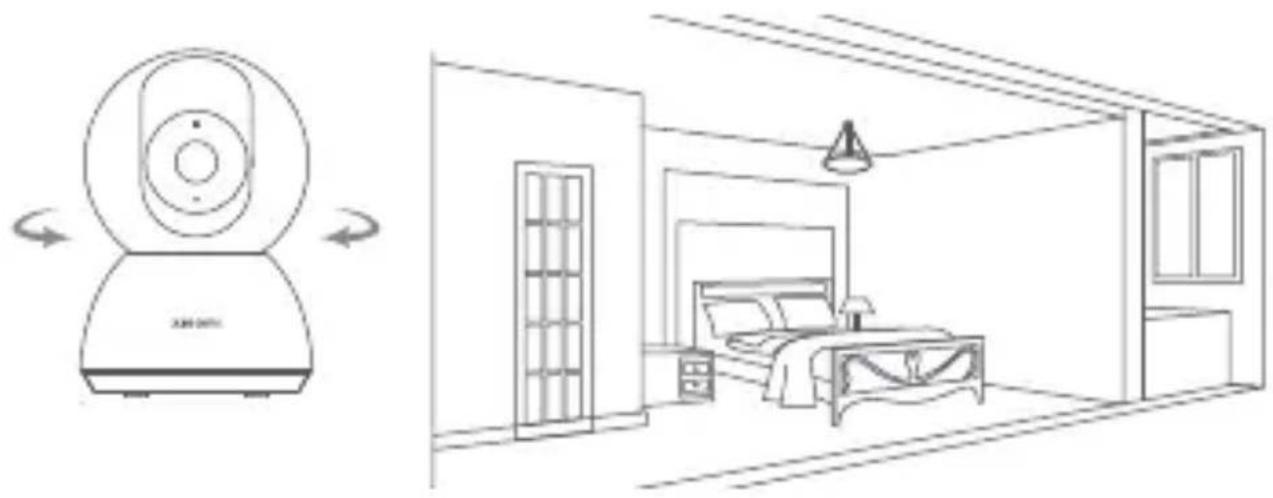
In the app, you can view the real-time surveillance, adjust the sharpness of the image, adjust the horizontal and vertical angles, capture and record, and make calls.
Infrared Night Vision
As the ambient light dims, the camera can automatically switch to night vision mode. With the built-in infrared lights, it can clearly capture video in the dark.
Playback
- The playback feature of the camera is only available when a compatible microSD card is installed or the cloud storage service is purchased.
- Tap the playback button in the plugin of the Xiaomi Home app, then drag the timeline to select the time period you want to playback. Variable speed playback is supported.
Home Surveillance Assistant
- When the home surveillance assistant is enabled, the camera will record videos if it detects human movement and changes in real-time within its surveilled area. Then you will get the app push notification. (Human movement detection can be enabled after the cloud storage service is purchased and activated.)
- You can enable or disable the home surveillance assistant in the Xiaomi Home app.
- You can set 24-hour, daytime, nighttime, custom period surveillance, alert sensitivity and alert time intervals, etc.
natural_image
Line drawing of a room interior with a robot and a bedroom, showing no text or symbols.Video Sharing
In the app, you can select the device sharing option in the settings menu to share the camera with others. Users you share the camera with need to download the app and sign in with their Xiaomi Account.
Note:
Illustrations of product, accessories, and user interface in the user manual are for reference purposes only. Actual product and functions may vary due to product enhancements.
Do not cover the vent, this device is not intended to be used on soft supports.
The marking information is located at the bottom of device.
=The symbol indicates DC voltage.
Cautions
- The operating temperature range for this camera is between -10^ and 40^ . Do not use the camera in environments with temperatures above or below the specified range.
- The camera is a precision electronic product. In order to ensure its normal operation, do not install the camera in environments with high humidity levels nor allow water to get into it.
- To improve the camera's performance, do not place its lens facing or next to a reflective surface, such as glass windows or white walls, as this will cause the image to appear overly bright in areas close to the camera and darker in areas further away, or cause the camera to produce white images.
• Make sure the camera is installed in an area with a strong Wi-Fi signal. Do not place the camera near the objects that may affect its Wi-Fi signal, such as metal objects, microwave ovens. - Under normal use of condition, this equipment should be kept a separation distance of at least 20 cm between the antenna and the body of the user.
WEEE Information
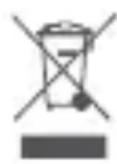
All products bearing this symbol are waste electrical and electronic equipment (WEEE as in directive 2012/19/EU) which should not be mixed with unsorted household waste. Instead, you should protect human health and the environment by handing over your waste equipment to a designated collection point for the recycling of waste electrical and electronic equipment, appointed by the government or local authorities. Correct disposal and recycling will help prevent potential negative consequences to the environment and human health. Please contact the installer or local authorities for more information about the location as well as terms and conditions of such collection points.
EU Declaration of Conformity

Hereby, Xiaomi Communications Co., Ltd. declares that the radio equipment type Xiaomi Smart Camera C300 is in compliance with Directive 2014/53/EU. The full text of the EU declaration of conformity is available at the following internet address:
http://www.mi.com/global/service/support/declaration.html
For detailed e-manual, please go to www.mi.com/global/support/user-guide
Specifications
Name: Xiaomi Smart Camera C300
Model: XMC01
Item Dimensions: 115 × 78 × 78 mm
Aperture: F1.4
Operating Temperature: -10°C to 40°C
Storage: MicroSD card (up to 256 GB)
Wireless Connectivity: Wi-Fi IEEE 802.11 b/g/n 2.4 GHz
Wi-Fi Operation Frequency: 2412–2472 MHz
Wi-Fi Maximum Output Power: <20 dBm
Net Weight: 335 g
Input: 5 V =2 A
Resolution: 2304 × 1296
Video Codec: H.265
Please use a compatible and qualified adapter with an output of 5 V---2 A to power the product.
Manufactured by: Xiaomi Communications Co., Ltd.
Address: #019, 9th Floor, Building 6, 33 Xi'erqi Middle Road, Haidian District, Beijing, China
For further information, please go to www.mi.com
User Manual Version: V1.0
natural_image
Two diagrams showing brick wall construction: one with a tool, the other with a screw and base (no text or symbols)natural_image
Diagram showing a pipe with a valve inserted into a brick wall, with an upward arrow indicating flow direction (no text or symbols)natural_image
Diagram showing a screwdriver inserted into a circular component above a brick wall, with an upward arrow indicating motion (no text or symbols)natural_image
Line drawing of a toilet with a drain and fan, no text or symbols present
Hinweis:
natural_image
Line drawing of a device with a speaker emitting sound waves, connected to an external power outlet (no text or symbols)7E1C4FFB
natural_image
Line drawing of a room interior with a robot and a bedroom (no text or symbols)Video-Freigabe
Adresse: #019, 9th Floor, Building 6, 33 Xi'erqi Middle Road, Haidian District, Beijing, China
natural_image
Two technical diagrams showing a tool inserted into a brick wall and a drill bit inserted into a tool, both without any text or symbols.natural_image
Diagram showing a pipe with a valve inserted into a brick wall, with an upward arrow indicating flow direction (no text or symbols)natural_image
Diagram showing a screwdriver inserted into a circular component above a brick wall, with an upward arrow indicating motion (no text or symbols)natural_image
Line drawing of a toilet with a drain and fan, no text or symbols present
Remarque :
natural_image
Line drawing of a device with a speaker emitting sound waves, connected to a plug via cable (no text or symbols)7E1C4FFB
natural_image
Line drawing of a room interior with a robot and a bedroom, showing no text or symbols.Partage de vidéo
natural_image
Abstract icon of a person walking with circular arrows, symbolizing waste or recycling (no text)FR
Fabricant: Xiaomi Communications Co., Ltd.
Adresse: #019, 9th Floor, Building 6, 33 Xi'erqi Middle Road, Haidian District, Beijing, China
natural_image
Two technical diagrams showing brick wall and tool installation (no text or symbols)natural_image
Diagram showing a pipe with a valve inserted into a brick wall, with an upward arrow indicating flow direction (no text or symbols)natural_image
Diagram showing a screwdriver inserted into a circular component above a brick wall, with an upward arrow indicating motion (no text or symbols)natural_image
Line drawing of a toilet with a drain and fan, no text or symbols present
Nota:
natural_image
Line drawing of a device with a speaker emitting sound waves, connected to an external power outlet (no text or symbols)7E1C4FFB
natural_image
Line drawing of a room interior with a digital camera icon and a bedroom view showing a bed, lamp, and wall (no text or symbols)Compartir video
Dirección: #019, 9th Floor, Building 6, 33 Xi'erqi Middle Road, Haidian District, Beijing, China
natural_image
Simple line drawing of a brick wall with a triangular base and diagonal lines, no text or symbols present.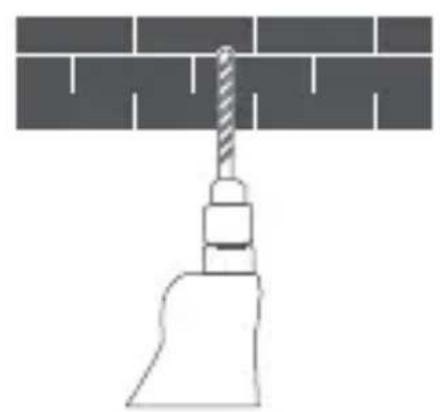
natural_image
Diagram of a screw fastening tool against a brick wall (no text or symbols)natural_image
Diagram showing a pipe with a valve inserted into a brick wall, with an upward arrow indicating flow direction (no text or symbols)natural_image
Diagram showing a screwdriver inserted into a circular component above a brick wall, with an upward arrow indicating motion (no text or symbols)natural_image
Line drawing of a toilet with a drain and fan, no text or symbols present
Nota:
natural_image
Line drawing of a device with a speaker emitting sound waves, connected to an external power outlet (no text or symbols)7E1C4FFB
natural_image
Line drawing of a room interior with a robot and a bedroom (no text or symbols)Condivisione video
Indirizzo: #019, 9th Floor, Building 6, 33 Xi'erqi Middle Road, Haidian District, Beijing, China
natural_image
Simple line drawing of a brick wall with a triangular support at the base (no text or symbols)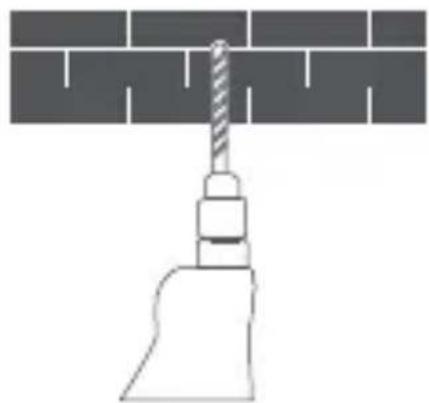
natural_image
Diagram of a screw fastening tool against a brick wall (no text or symbols)natural_image
Diagram showing a pipe with a valve inserted into a brick wall, with an upward arrow indicating flow direction (no text or symbols)natural_image
Diagram showing a screwdriver inserted into a circular component above a brick wall, with an upward arrow indicating motion (no text or symbols)natural_image
Line drawing of a toilet with a drain and fan, no text or symbols present
Примечание.
natural_image
Line drawing of a device with a speaker emitting sound waves, connected to an external power outlet (no text or symbols)7E1C4FFB
natural_image
Line drawing of a room interior with a robot and a bedroom, showing no text or symbols.Обмен видео
http://www.mi.com/global/service/support/declaration.html
Адрес: #019, 9th Floor, Building 6, 33 Xi'erqi Middle Road, Haidian District, Beijing, China
natural_image
Simple line drawing of a brick wall with a triangular base and diagonal lines (no text or symbols)
natural_image
Diagram of a screw being inserted into a brick wall (no text or symbols)natural_image
Diagram showing a pipe with a valve inserted into a brick wall, with an upward arrow indicating flow direction (no text or symbols)natural_image
Diagram showing a screwdriver inserted into a circular component above a brick wall, with an upward arrow indicating motion (no text or symbols)natural_image
Line drawing of a toilet with a drain and fan, no text or symbols present△ 안내:
natural_image
Line drawing of a device with a speaker emitting sound waves, connected to an external power outlet (no text or symbols)7E1C4FFB
natural_image
Line drawing of a room interior with a robot and a bedroom (no text or symbols)비디오 공유
http://www.mi.com/global/service/support/declaration.html에서
확인할 수 있습니다.
natural_image
Two technical diagrams showing a tool inserted into a brick wall and a screw being inserted, with no text or symbols present.natural_image
Diagram showing a pipe with a valve inserted into a brick wall, with an upward arrow indicating flow direction (no text or symbols)natural_image
Diagram showing a screwdriver inserted into a circular component above a brick wall, with an upward arrow indicating motion (no text or symbols)natural_image
Line drawing of a toilet with a drain and fan, no text or symbols present
Uwaga:
natural_image
Line drawing of a device with a speaker emitting sound waves, connected to an external power outlet (no text or symbols)7E1C4FFB
natural_image
Line drawing of a room interior with a digital camera and a bedroom view (no text or symbols)Udostępnianie wideo
http://www.mi.com/global/service/support/declaration.html
Producent: Xiaomi Communications Co., Ltd.
Adres: #019, 9th Floor, Building 6, 33 Xi'erqi Middle Road, Haidian District, Beijing, China
natural_image
Simple line drawing of a brick wall with a triangular base (no text or symbols)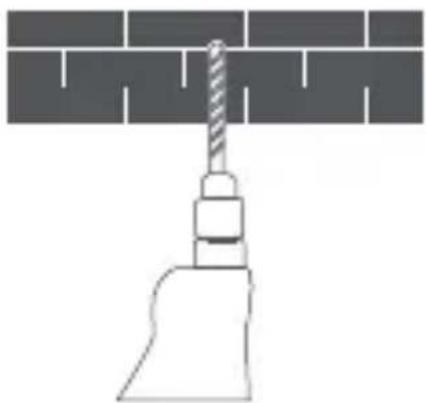
natural_image
Diagram of a screw fastening tool against a brick wall (no text or symbols)ลปสไ.2
natural_image
Diagram showing a pipe with a valve inserted into a channel, with an upward arrow indicating flow direction (no text or symbols)จากนี้
ปลี
ภาษาท
The image contains a stylized, abstract symbol resembling a bird or a cat with a curved line above it. There is no textual content to extract.
natural_image
Line drawing of a device with a speaker emitting sound waves, connected to an external power outlet (no text or symbols)7E1C4FFB
natural_image
Line drawing of a room interior with a digital camera and a bedroom view (no text or symbols)อ์ไดิว์รชแรก

ผลิตโดย: Xiaomi Communications Co., Ltd.
ที่อยู่: #019, 9th Floor, Building 6, 33 Xi'erqi Middle Road, Haidian District, Beijing, China
ฯฟลูมอัชนิรหา่อ
natural_image
Two technical diagrams showing a tool inserted into a brick wall and a screw being inserted, with no text or symbols present.natural_image
Diagram showing a pipe with a valve inserted into a brick wall, with an upward arrow indicating flow direction (no text or symbols)natural_image
Diagram showing a screwdriver inserted into a circular component above a brick wall, with an upward arrow indicating motion (no text or symbols)natural_image
Line drawing of a toilet with a drain and fan, no text or symbols present
Not:
natural_image
Line drawing of a device with a speaker emitting sound waves, connected to an external power outlet (no text or symbols)7E1C4FFB
natural_image
Line drawing of a room interior with a robot and a bedroom, showing no text or symbols.Video Paylaşımı
http://www.mi.com/global/service/support/declaration.html
Adres: #019, 9th Floor, Building 6, 33 Xi'erqi Middle Road, Haidian District, Beijing, China
natural_image
Two technical diagrams showing a tool inserted into a brick wall and a drill bit inserted into a tool, both without any text or symbols.natural_image
Diagram of a pipe valve with a valve inserted into a brick wall, showing fluid flow direction (no text or labels)natural_image
Diagram showing a screwdriver inserted into a circular component above a brick wall, with an upward arrow indicating motion (no text or symbols)natural_image
Line drawing of a toilet with a drain and fan, no text or symbols present
Nota:
Atenção:
natural_image
Line drawing of a device with a speaker emitting sound waves, connected to an external power outlet (no text or symbols)7E1C4FFB
natural_image
Line drawing of a room interior with a robot and a bedroom (no text or symbols)Partilha de vídeo
http://www.mi.com/global/service/support/declaration.html
Morada: #019, 9th Floor, Building 6, 33 Xi'erqi Middle Road, Haidian District, Beijing, China
natural_image
Simple line drawing of a brick wall with a triangular base and diagonal lines (no text or symbols)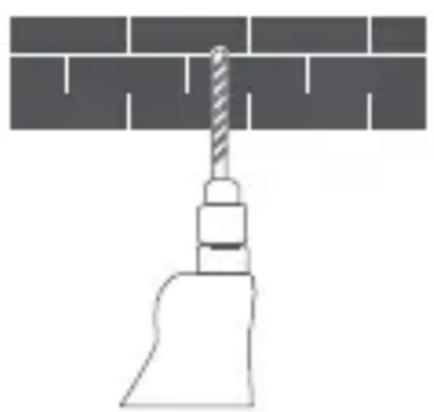
natural_image
Diagram of a screw fastening tool against a brick wall (no text or symbols)natural_image
Diagram showing a pipe being inserted into a brick wall, with an arrow indicating upward movement (no text or symbols)natural_image
Diagram showing a screwdriver inserted into a circular component above a brick wall, with an upward arrow indicating motion (no text or symbols)natural_image
Diagram of a toilet with a drain and fan, showing airflow or ventilation (no text or symbols)注意:
natural_image
Line drawing of a device with a speaker emitting sound waves, connected to an external power outlet (no text or symbols)7E1C4FFB
natural_image
Line drawing of a room interior with a robot and a bedroom, showing no text or symbols.動画共有
https://www.mi.com/jp
製造元:Xiaomi Communications Co., Ltd.
所在地:#019, 9th Floor, Building 6, 33 Xi'erqi Middle Road, Haidian District, Beijing, China
natural_image
Simple line drawing of a screw being inserted into a brick wall (no text or symbols)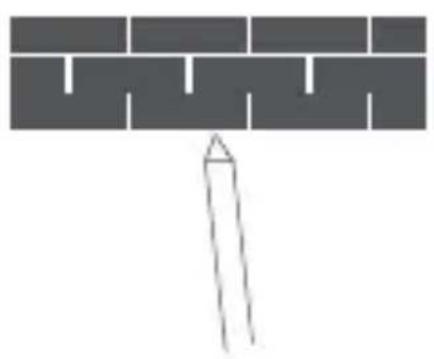
natural_image
Simple line drawing of a brick wall with a triangular base and diagonal lines (no text or symbols)natural_image
Diagram showing a pipe with a valve inserted into a brick wall, with an upward arrow indicating flow direction (no text or symbols)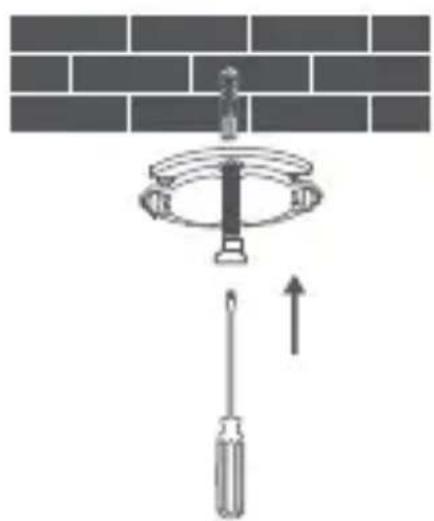
natural_image
Diagram showing a screwdriver inserted into a circular ring component above a brick wall, with an upward arrow indicating motion (no text or symbols)natural_image
Line drawing of a toilet with a showerhead above it, showing internal components and exhaust airflow (no text or symbols)natural_image
Line drawing of a device with a speaker emitting sound waves, connected to an external power outlet (no text or symbols)7E1C4FFB
natural_image
Line drawing of a room interior with a robot and a bedroom, showing no text or symbols.مشاركة الفيديو
http://www.mi.com/global/service/support/declaration.html
019, 9th Floor, Building 6, 33 Xi'erqi Middle Road, Haidian District, :العنوان
Beijing, China
natural_image
Two technical diagrams showing brick wall and tool installation (no text or symbols)natural_image
Diagram of a pipe valve with an upward arrow indicating flow or movement (no text or symbols)natural_image
Diagram showing a screwdriver inserted into a circular component above a brick wall, with an upward arrow indicating motion (no text or symbols)natural_image
Line drawing of a toilet with a drain and fan, no text or symbols present
Catatan:
natural_image
Line drawing of a device with a speaker emitting sound waves, connected to an external power outlet (no text or symbols)7E1C4FFB
natural_image
Line drawing of a room interior with a robot and a bedroom, showing no text or symbols.Berbagi Video
http://www.mi.com/global/service/support/declaration.html
87250/SDPPI/2022
9003
IMKG.3089.12.2022
Alamat: #019, 9th Floor, Building 6, 33 Xi'erqi Middle Road, Haidian District,
Beijing, China
natural_image
Simple line drawing of a brick wall with a pointed tip at the base (no text or symbols)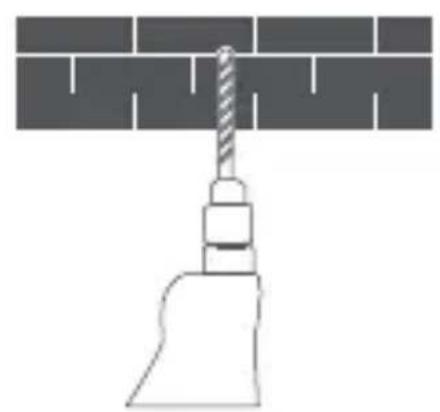
natural_image
Diagram of a screw fastening tool against a brick wall (no text or symbols)natural_image
Diagram of a pipe valve with a downward force and upward arrow, no text or symbols present
Примітка:
natural_image
Line drawing of a device with a speaker emitting sound waves, connected to an external power outlet (no text or symbols)7E1C4FFB
natural_image
Line drawing of a room interior with a remote control unit and a bedroom view (no text or symbols)Адреса: #019, 9th Floor, Building 6, 33 Xi'erqi Middle Road, Haidian District,
Beijing, China
natural_image
Two technical diagrams showing a tool inserted into a brick wall, with no text or symbols present.natural_image
Diagram showing a pipe being inserted into a container with an upward arrow indicating flow direction (no text or symbols)natural_image
Diagram showing a screwdriver inserted into a circular component above a brick wall, with an upward arrow indicating motion (no text or symbols)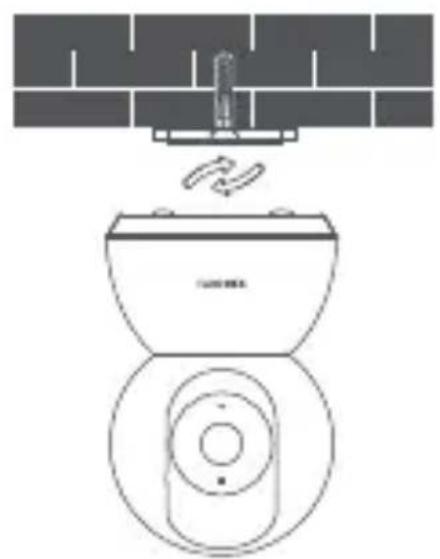
natural_image
Line drawing of a toilet with a drain and exhaust pipe above it, no text or symbols present
Poznámka:
natural_image
Line drawing of a device with a speaker emitting sound waves, connected to an external power outlet (no text or symbols)7E1C4FFB
natural_image
Line drawing of a room interior with a robot and a bedroom, showing no text or symbols.Sdílení videa
http://www.mi.com/global/service/support/declaration.html
Adresa: #019, 9th Floor, Building 6, 33 Xi'erqi Middle Road, Haidian District,
Beijing, China
natural_image
Two technical diagrams showing a tool inserted into a brick wall, with no text or symbols present.natural_image
Diagram showing a pipe with a valve inserted into a brick wall, with an upward arrow indicating flow direction (no text or symbols)
Nota:
natural_image
Line drawing of a device with a speaker emitting sound waves, connected to an external power outlet (no text or symbols)7E1C4FFB
natural_image
Line drawing of a room interior with a robot and a bedroom, showing no text or symbols.Compartir videos
Dirección: #019, 9th Floor, Building 6, 33 Xi'erqi Middle Road, Haidian
District, Beijing, China

- Product Overview
- Installation
- Note:
- Warning:
- How to Use
- Attention:
- Connecting with the Xiaomi Home App
- Real-time Surveillance
- Infrared Night Vision
- Playback
- Home Surveillance Assistant
- Video Sharing
- Cautions
- WEEE Information
- EU Declaration of Conformity
- Specifications
- Video-Freigabe
- Remarque :
- Partage de vidéo
- FR
- Nota:
- Compartir video
- Condivisione video
- Обмен видео
- 비디오 공유
- Udostępnianie wideo
- อ์ไดิว์รชแรก
- Video Paylaşımı
- Atenção:
- Partilha de vídeo
- 動画共有
- 019, 9th Floor, Building 6, 33 Xi'erqi Middle Road, Haidian District, :العنوان
- Berbagi Video
- Sdílení videa
- Compartir videos
Brand : Xiaomi
Model : Smart Camera C300
Category : Surveillance Camera