Pixma G3420 - Printer CANON - Free user manual and instructions
Find the device manual for free Pixma G3420 CANON in PDF.


User questions about Pixma G3420 CANON
0 question about this device. Answer the ones you know or ask your own.
Ask a new question about this device
Download the instructions for your Printer in PDF format for free! Find your manual Pixma G3420 - CANON and take your electronic device back in hand. On this page are published all the documents necessary for the use of your device. Pixma G3420 by CANON.
USER MANUAL Pixma G3420 CANON
text_image
https://ij.start.canonRead Safety and Important Information (addendum) first.
natural_image
Icon showing a printer with a paper airplane and a document, symbolizing file transfer or sync (no text present)Installing the Printer...... page 1
natural_image
Two white icons: a laptop and a smartphone, on a solid red background (no text or symbols)Connecting to a Computer, Smartphone or Tablet...... page 4
natural_image
Line drawing of a printer with hands holding it (no text or symbols)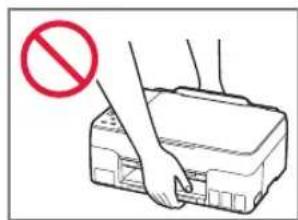
text_image
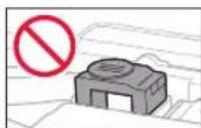
Diagram showing a hand pressing a printer with a red prohibition symbol indicating no usage or prohibition.
Instructional Videos
Vídeos instructivos
text_image
3.XXXXXXXXXXXXXXSetting Up the Printer
1. Box Contents
- Print Heads
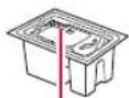
©
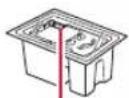
B
- Ink Bottles
Power Cord - Setup CD-ROM
• Safety and Important Information - Getting Started (this manual)
2. Removing Packing Materials

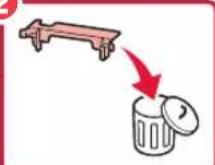
1 Remove and dispose of any packing materials and orange tape.
2 Open the scanning unit / cover, remove and dispose of the orange tape and protective material inside.
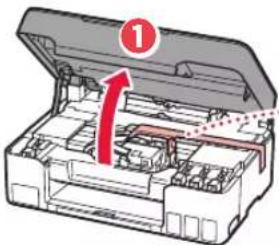
text_image
Diagram of a printer internal structure with labeled parts and directional arrow indicating flow or movement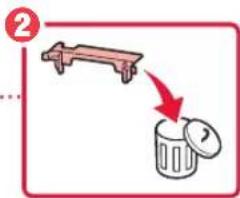
text_image
Diagram showing a trash bin with a handle and a red arrow indicating removal or disposal.3. Installing the Print Heads
1 Open the print head locking cover.
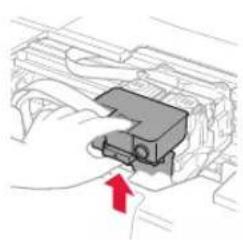
natural_image
Diagram of a car engine bay with a red arrow indicating a component (no text or symbols present)▶
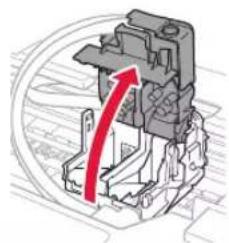
natural_image
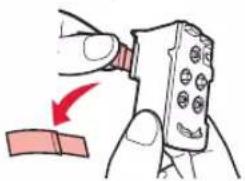
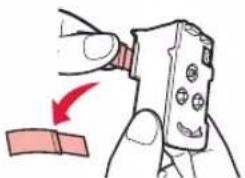
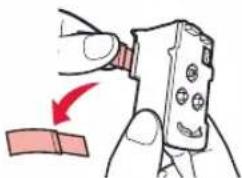
Mechanical assembly diagram showing a red arrow indicating direction, no text or symbols present2 Take out each print head from the package and remove the label.
©
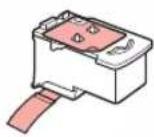
▶
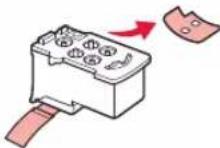
B
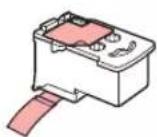
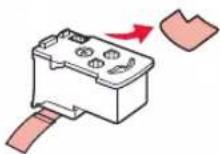
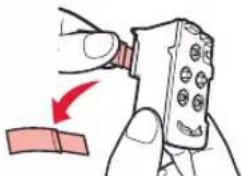
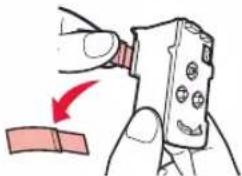
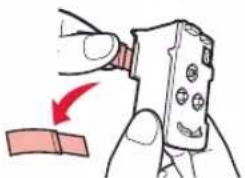
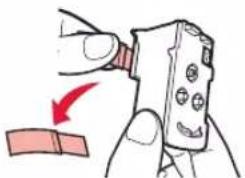
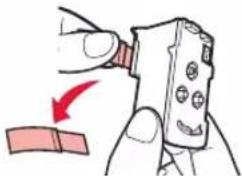
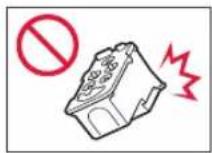
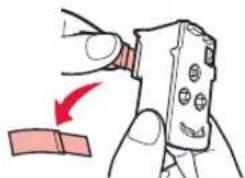
3 Remove the protective tape.
©
natural_image
Illustration of a hand holding a remote control with a red arrow indicating direction (no text or symbols)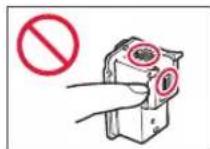
B
natural_image
Illustration of a hand holding a handheld device with a red arrow indicating motion (no text or symbols)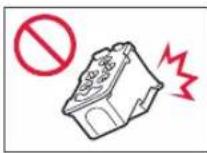
4 Insert the C (color) print head on the left and the B (black) print head on the right.
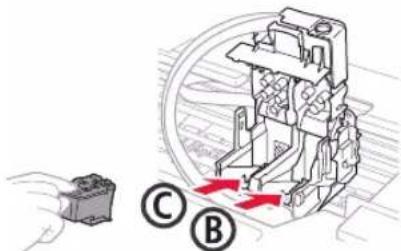
text_image
Technical diagram showing a mechanical assembly with labeled parts C and B, and a hand holding a component.5 Close the print head locking cover and press down until it clicks.
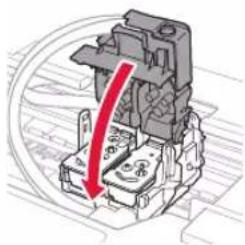
natural_image
Mechanical component diagram showing a red arrow pointing to a housing or fixture (no text or symbols present)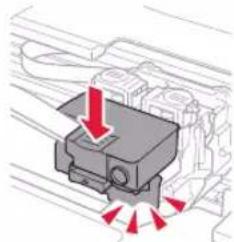
natural_image
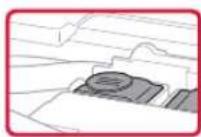
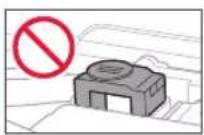
Mechanical component diagram showing a presser or connector with red arrows indicating force or movement (no text or symbols present)6 Press down both joint buttons completely until they click.
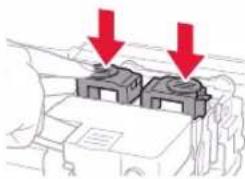
natural_image
Diagram showing two gray blocks on a vehicle roof with red arrows pointing downward (no text or symbols)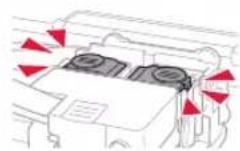
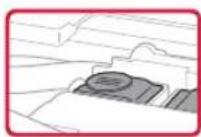
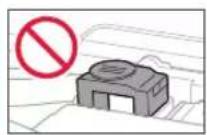
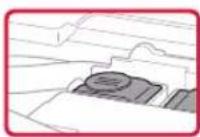
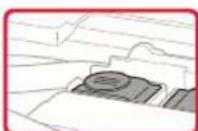
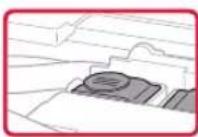
Check!
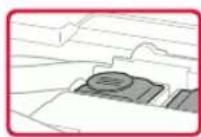
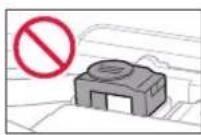
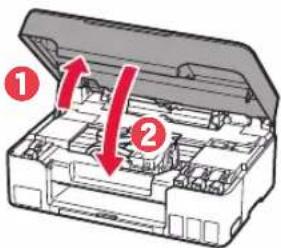
7 Close the scanning unit / cover.
- Open the scanning unit / cover fully and then close it.
text_image
Diagram of a mechanical device with labeled parts and directional arrows indicating movement or force
Caution
Watch your fingers.
Setting Up the Printer
4. Turning on the Printer
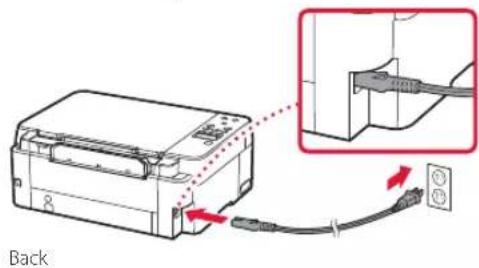
1 Connect the power cord.
text_image
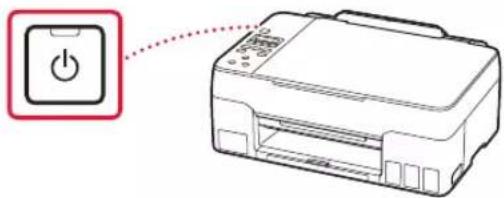
Back2 Press the ON button.
text_image
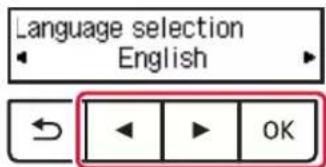
Diagram showing a printer with a power button icon connected to a paper airplane, indicating print operation or connection.3 When the following screen appears, use the ◀ and ▶ buttons to select a language, and then press the OK button.
text_image
Language selection English OKImportant
If an error appears on the screen, see "If an error message (support code) appears on the screen" on page 3 and follow the instructions.
5. Pouring Ink
Important
This product requires careful handling of ink. Ink may splatter when the ink tanks are filled with ink. If ink gets on your clothes or belongings, it may not come off.
1 Open the scanning unit / cover.
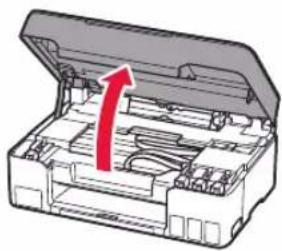
natural_image
3D diagram of an open industrial machine casing with a red arrow indicating a component (no text or symbols present)2 Open the tank cap on the left of the printer.
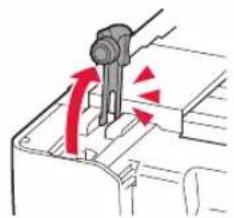
natural_image
Diagram of a mechanical component with red arrows indicating motion or force direction (no text or symbols)3 Hold the ink bottle upright and gently twist the bottle cap to remove.
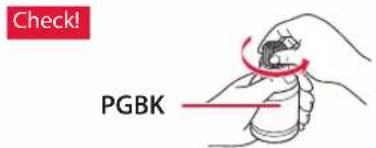
text_image
Check! PGBK4 Align the nozzle of the ink bottle with the inlet.
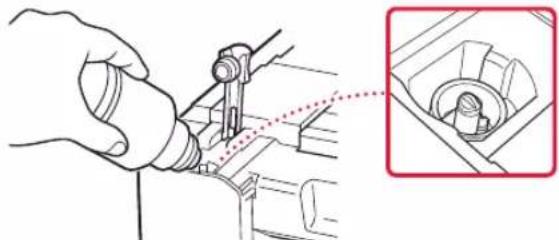
natural_image
Illustration of a hand using a tool to adjust or install a mechanical component, with an inset magnified view showing a close-up detail (no text or symbols present)5 Slowly stand the ink bottle upside down and push down to pour the ink.
- If the ink does not pour, gently remove the ink bottle and try again.
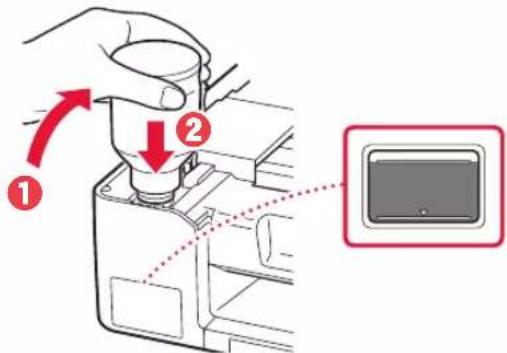
text_image
Diagram showing a hand pressing a device into a container with labeled arrows and a close-up of the screen.6 Gently remove the ink bottle from the inlet.
- Be careful not to spill the ink.
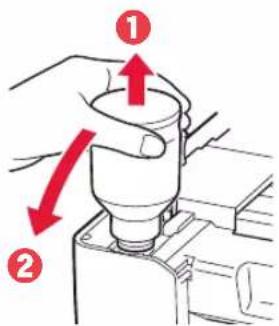
text_image
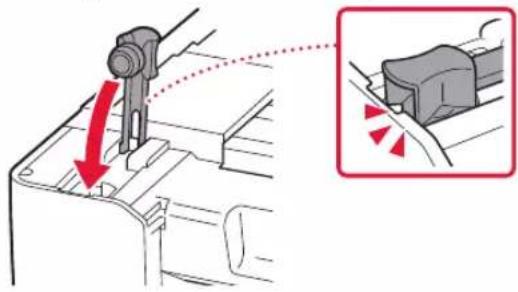
Diagram showing a hand operating a mechanical component with red arrows indicating direction of movement or force, labeled ① and ②.7 Replace the tank cap securely.
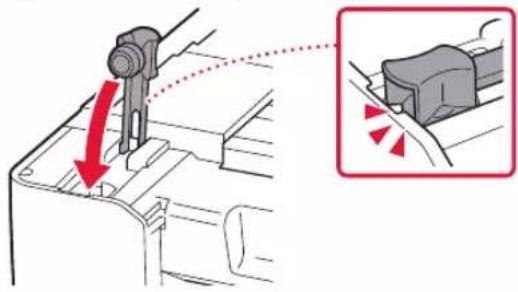
text_image
Technical diagram showing a mechanical component being inserted into a housing, with red arrows indicating direction and magnified detail view.8 Repeat steps 2 through 7 to pour all ink into the corresponding ink tanks on the right.
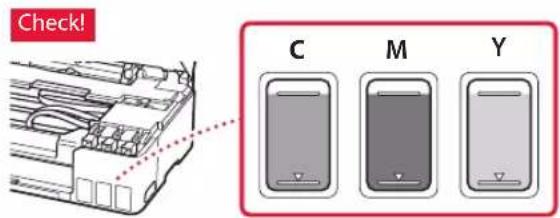
text_image
Check! C M Y9 Close the scanning unit / cover.
- Open the scanning unit / cover fully and then close it.

text_image
Diagram of a mechanical device with numbered parts and red arrows indicating directional movement or forceCaution
Watch your fingers.
10 When the following screen appears, use the ◀ and ▶ buttons to select Yes, and then press the OK button.
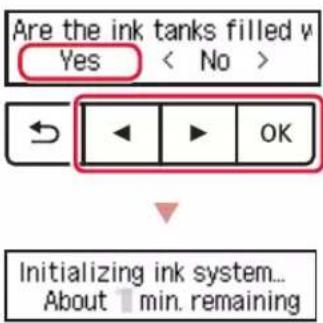
text_image
Are the ink tanks filled v Yes < No > ← ▶ OK Initializing ink system... About 1 min. remaining- Please wait momentarily until the following screen appears. Follow the on-screen instructions, and then press the OK button.
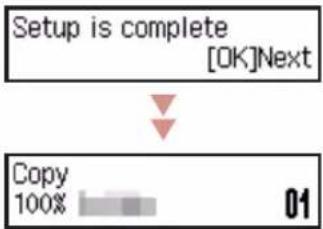
flowchart
graph TD
    A["Setup is complete\n[OK"]Next] --> B["Copy\n100%"]
    B --> C["01"]
If you will use the printer without connecting any other devices, setup is now complete.
Select the connection method that best matches how you will use the printer.
• To use the printer without connecting to any other devices
→ Setup is now complete.
• To use the printer connecting to a computer or smartphone
→ Proceed to the next page.

If an error message (support code) appears on the screen

text_image
Protective material rema Support code 1890 — Support codeCheck the support code, and then follow the instructions if the displayed code is written below.
1890
Protective material remaining.
→"2. Removing Packing Materials" on page 1
1470
Print heads are not installed correctly.
→ "3. Installing the Print Heads" on page 1
1471
Print heads cannot be recognized.
→ "3. Installing the Print Heads" on page 1
5200
Ink system preparation was not completed successfully. Press the ON button to restart the printer, and then see "5. Pouring Ink" on page 2.
For all other cases, refer to the Online Manual.
Setting Up the Printer
What device are you connecting?
Computer Smartphone

Computer and smartphone

6-a
Connecting to a Computer
If you are using multiple computers, perform these steps on each computer.
1 Access the Canon website from your computer.

https://ij.start.canon
2 Select Set Up.
3 Enter your printer's model name and click Go.
4 Click Start.
5 Click (B) Connecting to a Computer/Smartphone.
• The following steps are for Windows users.
7 Run the downloaded file.
6 Click Download.
- Follow the on-screen instructions.
• This may take some time.
• To connect to a smartphone as well, see "6-b. Connecting to a Smartphone" on page 5.

Using the Setup CD-ROM
Double click EasySetup.exe in the CD-ROM, and then continue from step 3. If you do not have an internet connection, open the win folder in the CD-ROM and double click SETUP.exe. This will install the printer driver.
6-b
Connecting to a Smartphone
If you are using multiple smartphones, perform these steps on each smartphone.

1 Install the "Canon PRINT Inkjet/SELPHY" app on your smartphone.
• Search for "Canon PRINT" in App Store, or Google Play.
- Access the Canon website to download the app.

2 Open your smartphone's Wi-Fi settings. Check that the network name (SSID) that starts with "Canon_ij_" appears.
(Example of iOS screen)
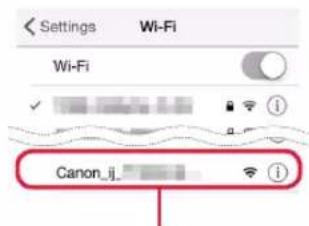
text_image
Settings Wi-Fi Wi-Fi Canon_ij_The network name (SSID) that starts with "Canon_ij_"
- If "Canon_ij_" appears - Proceed to step 3.
- If "Canon_ij_" does not appear - Proceed to step
3 Tap the network name (SSID) that starts with "Canon_ij_".
4 Open the installed app, and follow the on-screen instructions in the app to add your printer.
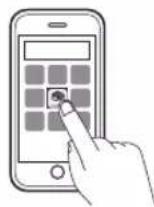
Once you have added your printer, you can print from your smartphone.
To print photos, see "Loading Paper" on page 6.
Loading Paper
1 Extend the paper support.
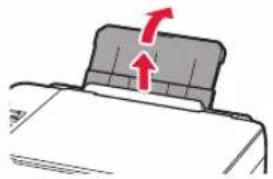
natural_image
Diagram of a mechanical component with a red arrow indicating upward motion (no text or symbols)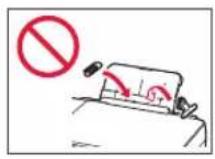
2 Open the feed slot cover and slide the right-hand side paper guide to the far right.
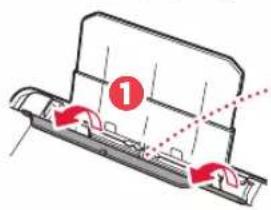
text_image
Diagram showing a mechanical component with red arrows indicating motion or force direction, labeled with number 1.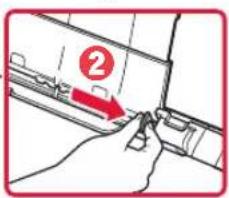
text_image
Diagram showing a hand holding a device with a numbered label '2' pointing to a component, likely indicating a step or section.3 Load several sheets of paper with the print side facing up and slide the side paper guide against the edge of the paper stack.
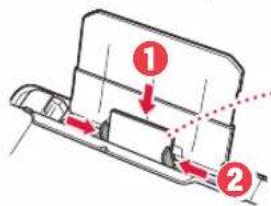
text_image
Diagram showing two labeled parts (1 and 2) with arrows indicating movement or force, likely illustrating a mechanical or electrical assembly.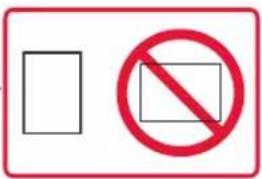
text_image
Two symbolic signs: a blank rectangle and a red prohibition symbol with a circle.4 Close the feed slot cover.
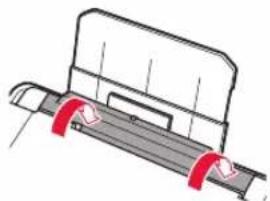
natural_image
Technical line drawing of a mechanical component with red clamps (no text or symbols)5 When Save the rear tray paper information appears on the printer's screen, press the OK button.
6 Select the paper size and type, and press the OK button.
7 Extend the paper output tray.
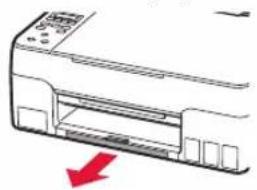
natural_image
Diagram of a printer front panel with a red arrow indicating compression or disassembly (no text or symbols present)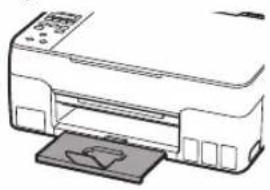
natural_image
Line drawing of a printer with a paper clip inserted (no text or symbols)Transporting Your Printer
When relocating the printer, check the following. Refer to the Online Manual for details.
Check that both joint buttons are pressed down completely to avoid ink leaks.
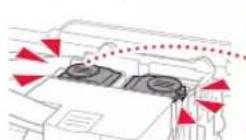
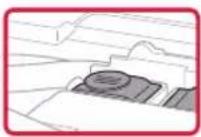
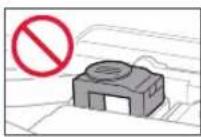
Check that the position of the ink valve lever is closed.

natural_image
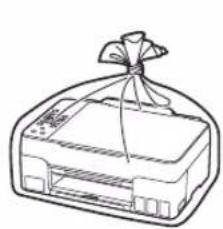
Diagram of a car under load with red curved arrows indicating motion (no text or symbols)Pack the printer in a plastic bag in case ink leaks.
- Pack the printer in a sturdy box so that it is placed with its bottom facing down, using sufficient protective material to ensure safe transport.
- Do not tilt the printer. Ink may leak.
- Please handle with care and ensure the box remains flat and NOT turned upside down or on its side, as the printer may be damaged and ink in the printer may leak.
- When a shipping agent is handling transport of the printer, have its box marked "THIS SIDE UP" to keep the printer with its bottom facing down. Mark also with "FRAGILE" or "HANDLE WITH CARE".
natural_image
Line drawing of a printer with a ribbon tied around it (no text or symbols)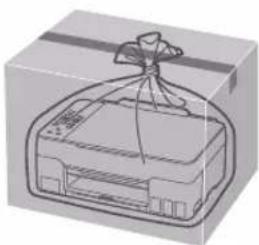
natural_image
Illustration of a gift box with a ribbon tied to the top (no text or symbols)text_image
Diagram of a printer internal structure with labeled parts and directional arrow indicating flow or movement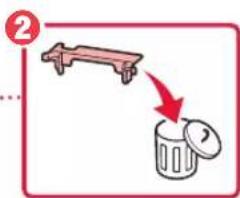
text_image
Diagram showing a lever lifting a trash bin with a red arrow indicating the process.natural_image
Diagram of a mechanical component with a red arrow indicating direction (no text or symbols present)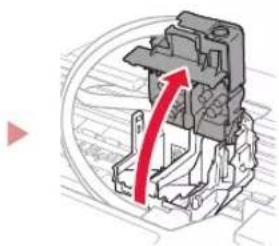
natural_image
Mechanical assembly diagram showing a red arrow indicating rotational motion (no text or symbols present)text_image
Diagram showing two steps (C and B) of a battery pack being inserted, with arrows indicating process direction.3 Retire la cinta protectora.
©
natural_image
Illustration of a hand holding a remote control with a red arrow indicating direction (no text or symbols)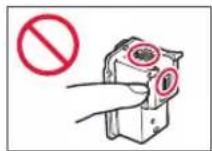
B
natural_image
Illustration of a hand holding a handheld device with a red arrow indicating motion (no text or symbols)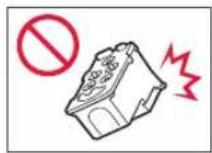
text_image
Technical diagram showing a mechanical assembly with labeled parts C and B, including directional arrows indicating movement or flow.natural_image
Mechanical component diagram showing a red downward arrow indicating a specific assembly or motion (no text or symbols present)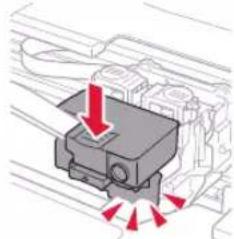
natural_image
Mechanical component diagram showing a presser with red directional arrows indicating motion (no text or symbols)natural_image
Diagram showing two gray blocks with downward arrows indicating a process or movement (no text or symbols present)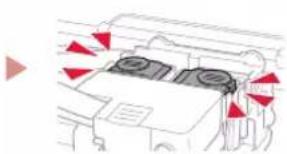
natural_image
Diagram of a vehicle interior with red directional arrows indicating movement or force (no text or symbols)¡Comprobar!
text_image
Diagram of a mechanical device with numbered parts and red arrows indicating directional movement or assembly.Precaución
text_image
Diagram showing a power button icon connected to a printer, with Chinese text labels and a red arrow pointing to the icon.text_image
Language selection English OKImportante
natural_image
3D diagram of an open industrial machine casing with a red upward arrow indicating internal components (no text or symbols)natural_image
Diagram of a mechanical component with red arrows indicating motion or force direction (no text or symbols)natural_image
Illustration of a hand using a tool to adjust or install a mechanical component, with an inset showing a close-up of the component (no text or symbols present)text_image
Diagram showing a hand operating a device with labeled parts and directional arrows, including a highlighted screen icon.text_image
Diagram showing a hand holding a cylindrical component with red arrows indicating direction, labeled with numbers 1 and 2.text_image
Diagram showing mechanical assembly with red arrows indicating direction of motion, including a magnified inset highlighting the component's rotation.text_image
Diagram showing a computer interface with three labeled devices (C, M, Y) and a red warning label '¡Comprobar!'text_image
Diagram of a mechanical device with labeled parts and directional arrows indicating movement or forcePrecaución
text_image
Are the ink tanks filled v Yes < No > ← ▶ OK Initializing ink system... About 1 min. remainingflowchart
graph TD
    A["Setup is complete [OK"]Next] --> B["Copy 100%"]
    B --> C["01"]
text_image
Protective material rema Support code 1890 Código asist. (Support code)natural_image
Diagram of a printer with a paper lid and arrow indicating rotation (no text or symbols)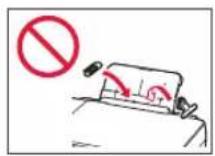
text_image
Diagram showing a mechanical component with red arrows indicating motion or force direction, labeled with number 1.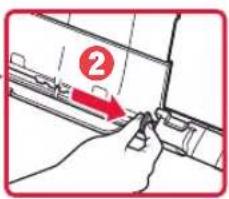
text_image
Diagram showing a hand holding a tool with a numbered label '2' pointing to a component, likely indicating step 2 of a process or procedure.text_image
Diagram showing two labeled parts (1 and 2) with arrows indicating movement or force, likely illustrating a mechanical or electrical assembly.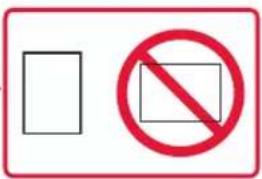
text_image
Two symbolic signs: a blank rectangle and a red prohibition symbol with a circle.natural_image
Technical line drawing of a mechanical component with red clamps (no text or symbols)natural_image
Diagram of a printer front panel with a red arrow indicating compression or disassembly (no text or symbols present)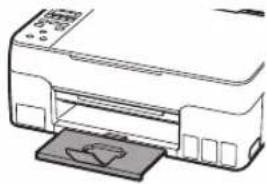
natural_image
Line drawing of a printer with a paper clip inserted (no text or symbols)text_image
Diagram illustrating fire resistance warning and safety symbols, showing fire damage and no fire symbol in three scenarios.natural_image
Diagram of a car with a red curved arrow indicating motion or change, no text or symbols presentnatural_image
Illustration of a gift box being placed on a cardboard box, showing the same shape and packaging (no text or symbols)Configurando a impressora
text_image
Diagram of a printer or printer with labeled parts and an arrow indicating a process step, marked with number 1.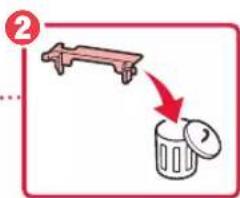
text_image
Diagram showing a lever lifting a trash bin with a red arrow indicating the process.natural_image
Diagram of a mechanical component with a red arrow indicating direction (no text or symbols present)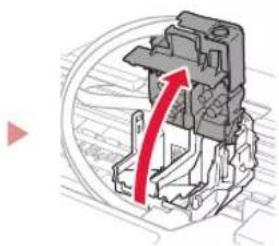
natural_image
Mechanical component diagram showing a red curved arrow indicating motion or force direction (no text or symbols present)natural_image
Illustration of a hand holding a remote control with a red arrow indicating direction (no text or symbols)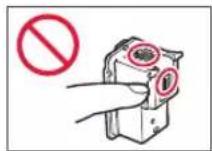
B
natural_image
Illustration of a hand holding a device with a red arrow indicating direction (no text or symbols)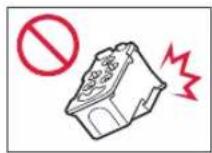
text_image
Technical diagram showing a mechanical assembly with labeled parts C and B, and a hand holding a component.natural_image
Mechanical component diagram showing a red downward arrow indicating force or direction (no text or symbols present)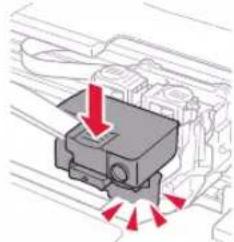
natural_image
Diagram of a mechanical component with red arrows indicating direction (no text or symbols)natural_image
Diagram showing two gray blocks on a surface with red arrows pointing downward (no text or symbols)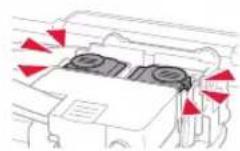
Verificar!
text_image
Diagram of a mechanical device with numbered parts and red arrows indicating directional movement or assembly.Cuidado
text_image
Diagram showing a printer connected to a cable with an attached plug, highlighting a detail view of the cable being inserted.Parte traseira
text_image
Diagram showing a printer with a power button icon connected to a paper airplane, indicating print operation or connection.text_image
Language selection English OKImportante
natural_image
3D diagram of an open industrial machine casing with a red upward arrow indicating internal components (no text or symbols)natural_image
Diagram of a mechanical component with red arrows indicating motion or force direction (no text or symbols)natural_image
Illustration of a hand using a tool to adjust or install a mechanical component, with an inset showing a close-up of the component (no text or symbols present)text_image
Diagram showing a hand operating a device with labeled parts and directional arrows, including a zoomed-in view of the screen.6 Remova lentamente a garrafa de tinta da entrada.
text_image
Diagram showing a hand holding a cylindrical component with red arrows indicating direction, labeled with numbers ① and ②.7 Recoloque firmemente a tampa do cartucho.
text_image
Technical diagram showing mechanical assembly with red arrows indicating direction of movement, accompanied by a magnified inset highlighting the component's rotation.text_image
Verificar! C M Ytext_image
Diagram of a mechanical device with numbered parts and red arrows indicating directional movement or forceCuidado
text_image
Are the ink tanks filled v Yes < No >Initializing ink system... About 1 min. remaining
flowchart
graph TD
    A["Setup is complete\n[OK"]Next] --> B["Copy\n100%"]
    B --> C["01"]
natural_image
Simple line drawing of a smartphone with a blank screen, enclosed in a rounded rectangle (no text or symbols)6-a
text_image
Diagram showing a bed with a seatbelt and a stop sign, indicating no change or absence of motion.text_image
Diagram showing two steps of a mechanical assembly or disassembly process, labeled ① and ② with arrows indicating movement.text_image
Diagram showing a vehicle collision with numbered arrows and a prohibition symbol indicating no collision.natural_image
Technical line drawing of a mechanical component with red clamps (no text or symbols)natural_image
Two line drawings of a printer with a red arrow indicating compression or disassembly (no text or symbols present)Transportando a Impressora
text_image
Diagram illustrating three different states of a device with directional arrows and a prohibition symbol, likely indicating movement or restriction.natural_image
Diagram showing a car with a red curved arrow indicating motion or change, no text or symbols presentnatural_image
Illustration of a gift box being wrapped in a bag, showing front and side views (no text or symbols)Configuration de l'imprimante
text_image
Diagram of an open industrial machine with a red arrow indicating a component or process, labeled with number 1.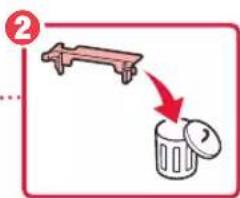
text_image
Diagram showing a lever lifting a trash bin with a red arrow indicating the process.natural_image
Diagram of a hand holding a mechanical component with a red arrow indicating direction (no text or symbols present)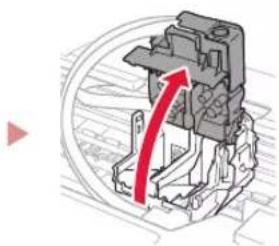
natural_image
Mechanical assembly diagram showing a red arrow indicating rotational motion (no text or symbols present)natural_image
Illustration of a hand holding a remote control with a red arrow indicating direction (no text or symbols)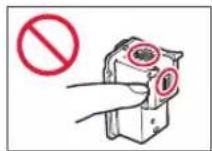
B
natural_image
Illustration of a hand holding a device with a red arrow indicating direction (no text or symbols)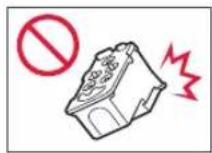
text_image
Technical diagram showing a mechanical assembly with labeled parts C and B, and a hand holding a component.natural_image
Mechanical component diagram showing a red arrow pointing to a housing or assembly (no text or symbols present)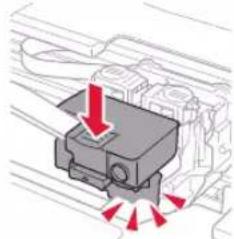
natural_image
Diagram of a mechanical component with red arrows indicating direction, no text or symbols presentnatural_image
Diagram showing two blocks on a vehicle with red arrows indicating downward motion (no text or symbols)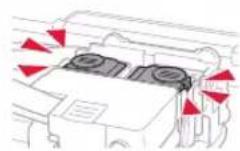
Vérifiez!
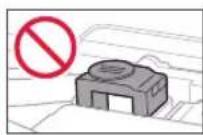
text_image
Diagram of a mechanical device with numbered parts and red arrows indicating directional movement or forceAttention
text_image
Diagram showing a printer with a power button icon connected to a paper airplane, indicating a connection or operation.text_image
Language selection English OKImportant
natural_image
3D diagram of an open mechanical device with a red arrow indicating upward motion (no text or symbols)natural_image
Diagram of a mechanical component with red arrows indicating motion or force direction (no text or symbols)natural_image
Illustration of a hand using a tool to adjust or install a mechanical component, with an inset showing a close-up of the component (no text or symbols present)text_image
Diagram showing a hand operating a device with labeled parts and directional arrows, including a screen preview inset.text_image
Diagram showing a hand holding a cylindrical component with red arrows indicating direction, labeled with numbers ① and ②.text_image
Technical diagram showing mechanical assembly with red arrows indicating motion or force direction, alongside a magnified inset of a component.text_image
Diagram of a mechanical device with numbered parts and red arrows indicating directional movement or forceAttention
natural_image
Diagram of a printer with a paper stack and red arrows indicating motion (no text or symbols)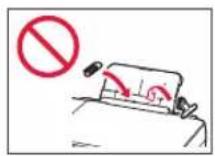
text_image
Diagram showing a mechanical component with red arrows indicating motion or force direction, labeled with number 1.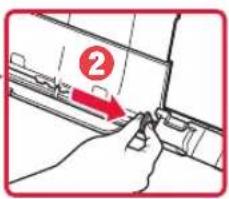
text_image
Diagram showing a hand holding a tool with a numbered label '2' pointing to a component, likely indicating step 2 of a process or procedure.text_image
Diagram showing two labeled parts (1 and 2) with arrows indicating movement or force, likely illustrating a mechanical or electrical assembly.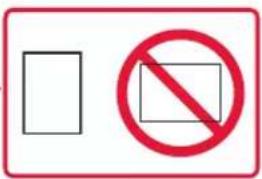
text_image
Two symbolic signs: a blank rectangle and a red prohibition symbol with a circle.natural_image
Technical line drawing of a mechanical component with red clamps (no text or symbols)natural_image
Two line drawings of a printer with a red arrow indicating compression or disassembly (no text or symbols present)text_image
Diagram illustrating fire resistance warning and safety instructions for a vehicle, with red arrows indicating fire damage and a prohibition symbol.natural_image
Diagram of a car interior with a red curved arrow indicating motion or movement (no text or symbols)natural_image
Two wireframe diagrams showing a gift box and its packaging, no text or symbols present.Настройка принтера
text_image
Diagram of a printer with labeled parts and an upward arrow indicating process flow or movement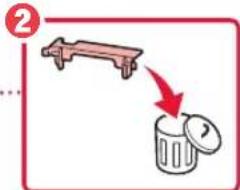
text_image
Diagram showing a lever lifting a trash bin with a red arrow indicating the process.natural_image
Hand inserting a small component into a vehicle chassis (no text or symbols visible)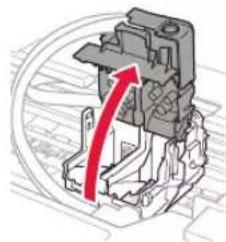
natural_image
Mechanical assembly diagram showing a red arrow indicating rotational motion (no text or symbols present)natural_image
Illustration of a hand holding a remote control device with a red arrow indicating the cable (no text or symbols present)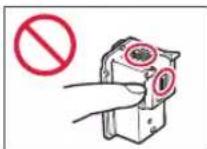
B
natural_image
Illustration of a hand holding a handheld device with a red arrow indicating motion (no text or symbols)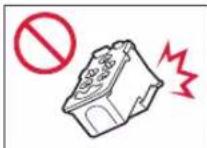
text_image
Technical diagram showing a mechanical component with labeled parts C and B, including directional arrows indicating movement or flow.natural_image
Mechanical component diagram showing a red arrow pointing to a section of a housing or enclosure (no text or symbols present)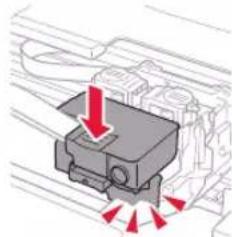
natural_image
Diagram of a mechanical component with red arrows indicating force or direction (no text or symbols)natural_image
Diagram showing two car blocks with red arrows pointing downward, no text or symbols present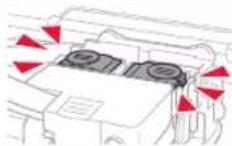
Проверка!
text_image
Diagram of a mechanical device with numbered parts and red arrows indicating directional movement or force
Осторожно!
Берегите пальцы.
Настройка принтера
text_image
Diagram showing a printer with a power button icon and a dotted line indicating connection to the printer's output.text_image
Language selection English OKВнимание!
natural_image
3D diagram of an open mechanical device with a red arrow indicating upward motion (no text or symbols)natural_image
Mechanical assembly diagram showing a turning tool interacting with a base plate (no text or symbols)natural_image
Illustration of a hand using a tool to adjust or install a mechanical component, with an inset showing a close-up of the component (no text or symbols present)text_image
Diagram showing a hand pressing a device into a container with labeled arrows and a close-up of the screen.text_image
Diagram showing a hand holding a mechanical component with red arrows indicating direction of movement or force, labeled ① and ②.text_image
Technical diagram showing mechanical assembly with red arrows indicating direction and magnified detail viewtext_image
Diagram of a mechanical device with numbered parts and red arrows indicating directional movement or forcetext_image
Are the ink tanks filled v Yes < No > ← ▶ OKInitializing ink system... About 1 min. remaining
flowchart
graph TD
    A["Setup is complete [OK"]Next] --> B["Copy 100%"]
    B --> C["01"]
natural_image
Diagram of a printer with a paper stack and red arrows indicating motion (no text or symbols)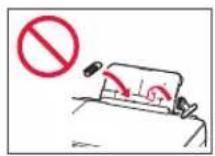
text_image
Diagram showing a mechanical component with red arrows indicating motion or force, labeled with number 1
text_image
Diagram showing a hand holding a tool with a numbered label '2' pointing to a component, likely indicating step 2 of a process or procedure.text_image
Diagram showing two labeled parts (1 and 2) with arrows indicating movement or force, likely illustrating a mechanical or electrical assembly.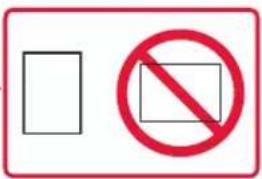
text_image
Two symbolic signs: a rectangle and a prohibition symbol with a crossed-out rectangle.natural_image
Technical line drawing of a mechanical component with red ring fasteners (no text or symbols)natural_image
Diagram of a printer front panel with a red arrow indicating compression or disassembly (no text or symbols present)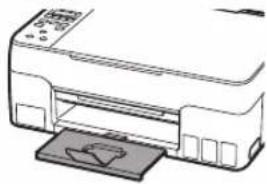
natural_image
Line drawing of a printer with a paper clip inserted (no text or symbols)natural_image
Diagram showing a car with a red curved arrow indicating motion or change, no text or symbols presentnatural_image
Line drawing of a rectangular device with a ribbon tied around it, no text or symbols present.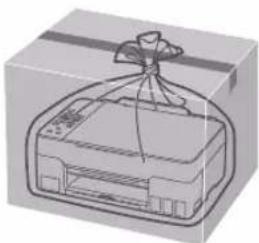
natural_image
Illustration of a gift box with a ribbon, no text or symbols presenttext_image
Diagram of an open industrial machine with labeled component and red arrow indicating flow or movement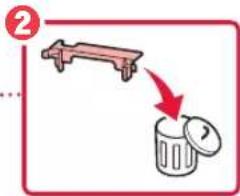
text_image
Diagram showing a lever lifting a trash bin with a red arrow indicating the process.natural_image
Hand holding a small electronic component with a red arrow indicating direction (no text or symbols visible)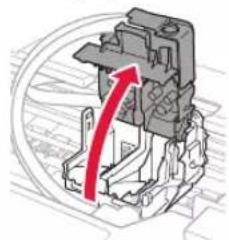
natural_image
Mechanical assembly diagram showing a red arrow indicating direction (no text or symbols present)natural_image
Diagram of a device with red arrows indicating direction, no text or symbols presentnatural_image
Illustration of a hand holding a remote control device with a red arrow indicating motion (no text or symbols)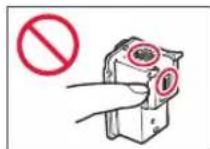
B
natural_image
Illustration of a hand holding a handheld device with a red arrow indicating motion (no text or symbols)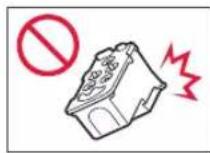
text_image
Technical diagram showing a mechanical assembly with labeled parts C and B, and a hand holding a component.natural_image
Mechanical component diagram showing a red arrow pointing to a section of a housing or enclosure (no text or symbols present)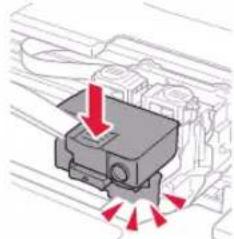
natural_image
Diagram of a mechanical component with red arrows indicating direction, no text or symbols presentnatural_image
Diagram showing two gray blocks with red arrows pointing downward, no text or symbols present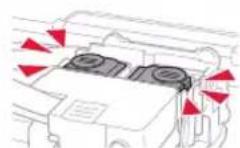
Перевірте!
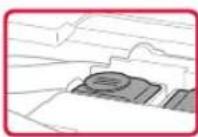
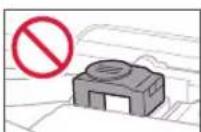
text_image
Diagram of a mechanical device with labeled parts and directional arrows indicating movement or force⚠️Увага!
Бережіть пальці.
text_image
Diagram showing a printer connected to a cable with an attached plug, highlighting a detail view of the cable's internal structure.Задня сторона
text_image
Diagram showing a printer icon with a power button and a dotted line indicating connection to the printer.text_image
Language selection English OKВажливо
natural_image
Diagram of an open industrial machine with a red upward arrow indicating internal components (no text or symbols)natural_image
Diagram of a mechanical component with red arrows indicating motion or force direction (no text or symbols)natural_image
Illustration of a hand using a tool to adjust or install a mechanical component, with an inset showing a close-up of the component (no text or symbols present)text_image
Diagram showing a hand pressing a device into a container with labeled arrows and a close-up of the screen.text_image
Diagram showing a hand operating a mechanical component with red arrows indicating direction of movement or force, labeled ① and ②.text_image
Technical diagram showing mechanical assembly with red arrows indicating motion or force direction, alongside a magnified inset of a component detail.text_image
Diagram of a mechanical device with numbered parts and red arrows indicating motion or assembly⚠️ Увага!
Бережіть пальці.
text_image
Initializing ink system... About 1 min. remainingflowchart
graph TD
    A["Setup is complete [OK"]Next] --> B["Copy 100%"]
    B --> C["01"]
natural_image
Diagram of a printer with a paper roll and red arrows indicating motion (no text or symbols)
text_image
Diagram showing a mechanical component with red arrows indicating motion or force, labeled with number 1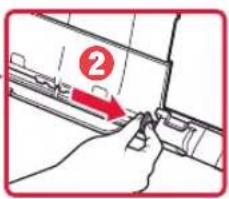
text_image
Diagram showing a hand holding a tool with a numbered label '2' pointing to a component, likely indicating step 2 of a process or procedure.text_image
Diagram showing two labeled parts (1 and 2) with arrows indicating movement or force, likely illustrating a mechanical or electrical component assembly.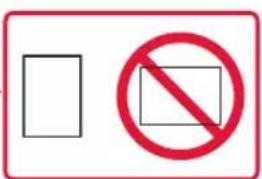
text_image
Two symbolic signs: a rectangle and a prohibition symbol with a circle, both enclosed in red border.natural_image
Technical line drawing of a mechanical component with red clamps (no text or symbols)natural_image
Two line drawings of a printer with a red arrow indicating compression or disassembly (no text or symbols present)natural_image
Diagram of a car wheel with a red curved arrow indicating motion (no text or symbols)natural_image
Illustration of a gift box with a ribbon, shown before and after (no text or symbols)تحميل الورق
natural_image
Pure mechanical component diagram without any text, numbers, or symbolsSave the rear tray paper information 5 عند ظلهور
natural_image
Diagram of a printer with a paper lid and arrow indicating compression or shift (no text or symbols)text_image
Diagram showing a hand pressing a component with a numbered label '2' pointing to the part.text_image
Diagram showing two labeled parts with arrows indicating movement or force, likely illustrating a mechanical or electrical process.
text_image
Two symbolic signs: a blank rectangle and a red prohibition symbol with a circle.natural_image
Diagram of a car with a red curved arrow indicating motion or force, no text or symbols present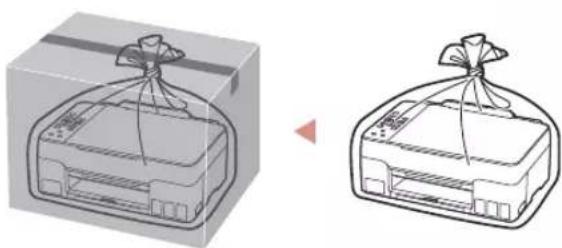
natural_image
Illustration of a gift box with a ribbon, shown from an angle (no text or symbols)
الاتصال بهاتف ذكي
Protective material rema
Support code 1890 Support code
text_image
Technical diagram showing mechanical assembly with red arrows indicating motion or force direction, alongside a close-up of a component detail.Initializing ink system...
About 1 min. remaining
natural_image
Diagram of a mechanical component with red arrows indicating motion or force direction (no text or symbols)natural_image
Illustration of a hand using a tool to adjust or install a mechanical component, with an inset showing a close-up of the component (no text or symbols present)4
text_image
Diagram showing a hand operating a device with labeled parts and directional arrows, including a zoomed-in view of the screen.text_image
Diagram showing a hand holding a cylindrical component with red arrows indicating direction, labeled with numbers 1 and 2.
- تشغيل الطبعة
text_image
Language selection English OKهام
natural_image
3D diagram of an open industrial machine casing with a red arrow indicating a component (no text or symbols present)natural_image
Illustration of a hand holding a remote control device with a red arrow indicating motion (no text or symbols)©
natural_image
Illustration of a hand holding a remote control device with a red arrow indicating motion (no text or symbols)B
text_image
Technical diagram showing a mechanical assembly with labeled parts C and B, and a hand holding a component.natural_image
Diagram of a mechanical component with red arrows indicating force or direction (no text or symbols)
natural_image
Mechanical component diagram showing a red downward arrow indicating force or direction (no text or symbols present)natural_image
Diagram of a vehicle engine compartment with red directional arrows indicating airflow or movement (no text or symbols)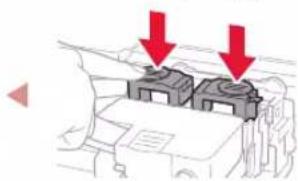
natural_image
Diagram showing two gray blocks on a vehicle chassis with red arrows pointing to them, no text or symbols present.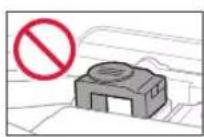
تحق!
text_image
Diagram of a mechanical device with numbered parts and red arrows indicating directional movement or force1. محتويات العليا
زجاجات الحبر
specialist الطاقة
text_image
Diagram of a printer or printer with labeled parts and an upward arrow indicating motion or movement.2


natural_image
Mechanical component diagram showing a red curved arrow indicating motion or force direction (no text or symbols present)
natural_image
Diagram of a mechanical component with a red arrow indicating direction (no text or symbols present)- Windows is a trademark or registered trademark of Microsoft Corporation in the U.S. and/or other countries.
- App Store is a trademark of Apple Inc., registered in the U.S. and other countries.
• Google Play is a registered trademark of Google LLC.