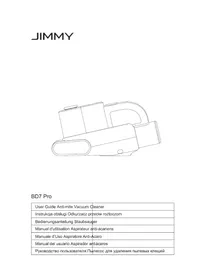
BD7 Pro - Vacuum Cleaner JIMMY - Free user manual and instructions
Find the device manual for free BD7 Pro JIMMY in PDF.
Questions des utilisateurs sur BD7 Pro JIMMY
0 question sur cet appareil. Repondez a celles que vous connaissez ou posez la votre.
Poser une nouvelle question sur cet appareil
Download the instructions for your Vacuum Cleaner in PDF format for free! Find your manual BD7 Pro - JIMMY and take your electronic device back in hand. On this page are published all the documents necessary for the use of your device. BD7 Pro by JIMMY.

USER MANUAL BD7 Pro JIMMY
WARNING: For the purposes of recharging the battery, only use the detachable supply
unit<ZD024M342060EU or ZD24W342060EU > provided with this appliance.
WARNING: Do not touch the rotating parts. Remove any items (hair, uff etc.) that might block
the brushes and wheels. This appliance contains batteries that are only replaceable by skilled persons. The appliance is only to be used with the power supply unit provided with the appliance. Please read this instruction manual carefully before use, properly save and store it for future use. The product design and spec in the manual may slightly vary from the actual product.Please take physical product shall prevail. This product is an electric appliance. Do not let the product run alone without supervision
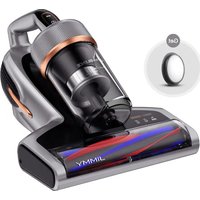
If the product is long idled, turn off power, remove battery and store battery properly. Unplug the the power cord ply.Keep hands dry when unplugging the power plug to avoid electric shock. Cut off power when machine is under cleaning, repairing or is not used. Do not let the power cord pass through sharp objects, and avoid dragging the power cord to move the machine to avoid damaging the power cord. Do not use product to pick up heating objects such as carbon and cigarette butts, sharp objects such as broken glass, corrosive liquids, ammable and explosive substances such as gasoline and alcohol, otherwise it may damage the product or cause re, thus causing personal injury and other accidents. Do not use this machine to pick up water or wet dust, and avoid the machine from being exposed to rain, water or being used in wet places (such as bathrooms, washrooms, laundry rooms, etc.) to avoid failure. Avoid the product approaching heating appliances or being exposed to the sun to avoid re. Do not let children play with or operate the product to avoid accidents. Avoid product running for a long time when the suction port is blocked to avoid damage. The product is equipped with UV-C light.Do not view the bottom of the machine when the power is turned on to prevent UV rays from causing harm to human body. Please do not let UV-C light shine on plants to avoid damaging them. Do not concentrate UV-C light in one place for continuous use, which may cause damage to the cleaned objects. Do not sit on the product to avoid damage.3 Do not remove brushroll when machine is powered on or running to avoid damage. When storing the machine for a long time, ensure that the battery is fully charged before storage and charge the machine at least every three months. Use a dry cloth to clean the machine. Liquids like gasoline, alcohol, lacquer thinner will cause crack or colour fading and cannot be used. Discarded machine contains batteries. They should be recycled safely. Do not discard them randomly. Products Installation Parts Name Mode Button On/Off Button LED screen Charging socket Brushroll cover latch Brushroll cover Brushroll UV light Ultrasonic generator Mini Brush Charger HEPA lter Battery pack4 Packing List Anti-mite vacuum cleaner Adapter Battery pack Cleaning brush HEPA lter User manual
Battery pack removal and assembly Press and hold the release latch of the battery pack, and take out the battery pack in the direction indicated by the arrow. Assemble battery pack into mainbody in opposite sequence. (Figure
1. When using this product for the rst time, the battery power of the vacuum cleaner may not be full. Need to
use charger to fully charge the battery before using.
2. When using the anti-mite vacuum cleaner for the rst three times, please charge up to 12 hour each time.
When the power of the vacuum cleaner is insufficient, please charge the vacuum cleaner in time; When the voltage is too low, in order to protect the battery, it will automatically power off, and the vacuum cleaner must be charged at this time. Plug the adapter plug into the AC power socket to start charging. The LED screen of the display screen is "red" when the product is charging. When the power display icon on LED screen turns to "white", the vacuum cleaner has been fully charged. Please pull the plug out of the AC socket in time. Use of the Product Vacuum mode Power mode Brushroll blockage indicator Tap mode Negative ions display Battery power display Dust level display UV model
release latch5 Function description Vacuum+Tap+UV Mode After power on, the anti-mite vacuum cleaner starts with Vacuum +Tap +UV mode by default, product power is in normal mode, the corresponding indicator light will be on, and the machine will start vacuuming function, brushroll tapping function, the UV-C light dust mite-removal function and the negative ion function; Press the mode button to switch to turbo mode. Vacuum+UV mode When product is in Vacuum+Tap+UV mode, keep pressing mode button for 3 seconds to change to Vacuum+UV mode. Corresponding indicator will be one and product will start vacuuming, UV-C light dust removal and negative ions function. Press mode button in this status, product will switch to Turbo mode. Dust level display When the cleaned surface is in a clean state, the dust level bar is blue. When the cleaned surface is slightly dirty, the dust level bar is orange. When it is in a dirty state, the dust concentration bar is red. As the dust level decreases, the dust level bar slowly changes from red to orange to blue. Battery power display The battery power display is in the form of light band, which is divided into five grids, each representing 20% of the power; When the power is 100% during the discharge process, the ve indicator lights are cold white, and the corresponding indicator lights are off for every 20% of the power consumption. When the power is 10% left, the indicator lights are red to remind charging; During the charging process, the red light will light up and ash when the power is ≤ 10%, and the cell will turn into a cold white light and start ashing when the power is greater than 10%; When the power reaches 20%, the next grid light will turn on cold white with ashing. When the power reaches 40%, the next grid light will jump to the next grid light after every 20% of the power is fully charged. When battery power is full, the ve grids are fully lled with cold white light. Brushroll blockage indicator This indicator ashes when the brushroll is blocked
Cleaning and maintenance Note:
1. HEPA lter is available for sale at JIMMY distributor.
2. It is recommended to clean the dust cup in time after each use. When there is too much dust to cause
HEPA blockage, it needs to be cleaned in time or replaced if necessary. Cleaning of dust cup Turn off the product, remove the dust cup according to the instruction on the dust cup; Align the dust cup with the garbage can, press the bottom cover release button, open the bottom cover, and pour out the garbage. Hold the dust cup with one hand and pull out the lter assembly with6 the other hand. (Figures 2, 3) HEPA lter cleaning Turn HEPA bottom cover clockwise; Take out the HEPA assembly downward, tap the HEPA assembly downward to clean the dust, or use a brush to clean the dust and other debris on the HEPA assembly. After cleaning the dust cup and HEPA assembly, put the HEPA into the lter assembly and then rotate it anticlockwise to fix it. After the "click" sound is heard when rotating, and the HEPA is assembled in place without loosening.(Figures 4, 5) Note:
1. Do not miss HEPA lter!
2. If too much dust is accumulated in the dust cup, clean
the dust cup and filter assembly with water, and wipe them with dry cloth. Pay attention that HEPA lter need to be washed as less as possible. Clean the dust and foreign matters on HEPA filter by tapping, and ensure that the dust cup and lter assembly are completely dry before installation. Brushroll cleaning and assembly Note: When cleaning the brushroll, be sure to disconnect the power supply to prevent the brushroll from starting by mistake and cause human injury. Turn off the machine, push the brushroll cover latch. Turn it from the closed state to the open state, and then remove brushroll cover and take out brushroll. Clean brushroll with cleaning brush. (Fig.6) After cleaning the brushroll, install the brushroll and brushroll cover back to mainbody in turn, and lock the brushroll latch. Dust sensor cleaning Dust sensor is installed inside of air inlet. Use mini brush to clean inner wall of air inlet to avoid too much dust accumulating on dust sensor and cause abnormal display of dust level.(Figures 7) Maintenance and Storage Please clean dust cup and lter after each use for further use. It is recommended to replace a lter after 30-50 hours of working time(depending on specic situation) for better use. Any paper, lead glass, plastic will greatly affect the effect of UV light. Please wipe and clean the UV tube regularly for better use. Do Not touch the UV tube as dirt will affect UV light effect.
Bottom cover release button HEPA lter Filer assembly
Air inlet Brushroll cover Brushroll7 Put the machine in cool and dry place if the machine is to be idled. Do Not leave it in direct sunlight or humid environment. Trouble Shooting Please check the following trouble points before go to the maintenance department. Problems Possible Reasons Solution Product does not turn on Battery pack not properly assembled Reassemble battery pack Battery pack has no power Charge the product On/off switch is not pressed down Press down on/off switch Weak suction Air inlet blocked Clean air inlet HEPA blocked Clean dust cup and HEPA Cyclone blocked Clean cyclone UV light does not work Machine tilt and micro switch left cleaning surface Machine tilting degree cannot ex- ceed 30 degree UV light defect Contact after service to replace UV light Machine stop working suddenly Dust cup full Stop using the product and clean blockage and use the machine af- ter 2 hours Machine air inlet blocked HEPA blocked Brushroll stop working suddenly Brushroll entangled Take out brushroll, clean it and re- assemble Belt loose or broken Contact after service to replace belt No sufcient working time after charging Battery not fully charged Fully charge battery according to instruction manual Battery aged Purchase and replace battery Note: If there are other faults, special tools must be used, please contact after sales service for guidance.8 Product Specications Technical Parameter Model No BD7 Pro Rated voltage 28.8V Rated power 250W Charger rated input 100-240V~ 50-60Hz 0.8A Charger rated output 34.2V 600mA Battery capacity 2000mAh Charge time 3-4h Circuit Diagram UV Light PCB Micro switch Ultrasonic wave activator Negative ions activator Vacuum motor Brushroll motor Charger Lithium battery Lithium battery PCB Control PCB On/off switch Dust sensor Transfer PCB
EasyManual