WB63 - Vacuum Cleaner JIMMY - Free user manual and instructions
Find the device manual for free WB63 JIMMY in PDF.


User questions about WB63 JIMMY
0 question about this device. Answer the ones you know or ask your own.
Ask a new question about this device
Download the instructions for your Vacuum Cleaner in PDF format for free! Find your manual WB63 - JIMMY and take your electronic device back in hand. On this page are published all the documents necessary for the use of your device. WB63 by JIMMY.
USER MANUAL WB63 JIMMY
natural_image
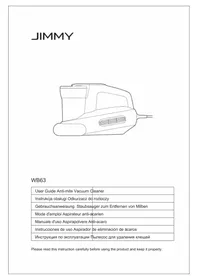
Line drawing of a handheld electric shaver device with no text or symbolsWB63
| User Guide Anti-mite Vacuum Cleaner | |
| Instrukcja obsługi Odkurzacz do roztoczy | |
| Gebrauchsanweisung Staubsauger zum Entfernen von Milben | |
| Mode d'emploi Aspirateur anti-acarien | |
| Manuale d'uso Aspirapolvere Anti-acaro | |
| Instrucciones de uso Aspirador de eliminación de ácaros | |
| Инструкция по эксплуатации Пылесос для удаления клещей |
Please read this instruction carefully before using the product and keep it properly.
| >100% |
Contents
English....2
Polski 11
Deutsch 20
Français....29
Italiano 38
Español.... 47
Русский язык 56
Safety Notes
- Please read this instruction manual carefully before use and keep it properly for future use.
- The product design and spec in the manual may slightly vary from the actual product. Please take physical product shall prevail.
- Never leave the machine working without supervision.
- Please turn off the power switch and unplug the power cord if the machine is to be idled. Do Not unplug the power cord with humid hand in case of electric shock.
- Cut off power when machine is under cleaning, repairing or is not used.
- Keep the power cord away from sharp objects and do not drag the cord to move the machine in case of cord damage.
- For safety reasons, please do not use the product to clean hot objects such as carbon, cigarette butts, sharp objects such as broken glass, corrosive liquids, flammable and explosive materials such as gasoline and alcohol. Otherwise it may cause product damage or fire.
08.Do not use this machine to pick up water or wet dust, and avoid the machine from being exposed to rain, water or being used in wet places (such as bathrooms, washrooms, laundry rooms, etc.) to avoid failure. - Avoid the product approaching heating appliances or being exposed to the sun to avoid fire.
- Do not let children play with or operate the product to avoid accidents.
- Avoid product running for a long time when the suction port is blocked to avoid damage.
- The product is equipped with UV light. Do not view the bottom of the machine when the power is turned on to prevent UV rays from causing harm to human body.
- Please do not let UV light shine on plants to avoid damaging them. Do not concentrate UV light in one place for continuous use, which may cause damage to the cleaned objects.
- Do not sit on the product to avoid damage.
15.Do not remove brushroll when machine is powered on or running to avoid damage. - This product can only use for cleaning of textiles such as mattresses, blankets, pillows, sofas, etc.
- Do not use this product on silk products.
- If there is damage on power cord, to avoid danger, it should be replaced or repaired by manufacturer, repairing agency or professional person.
Product Installation
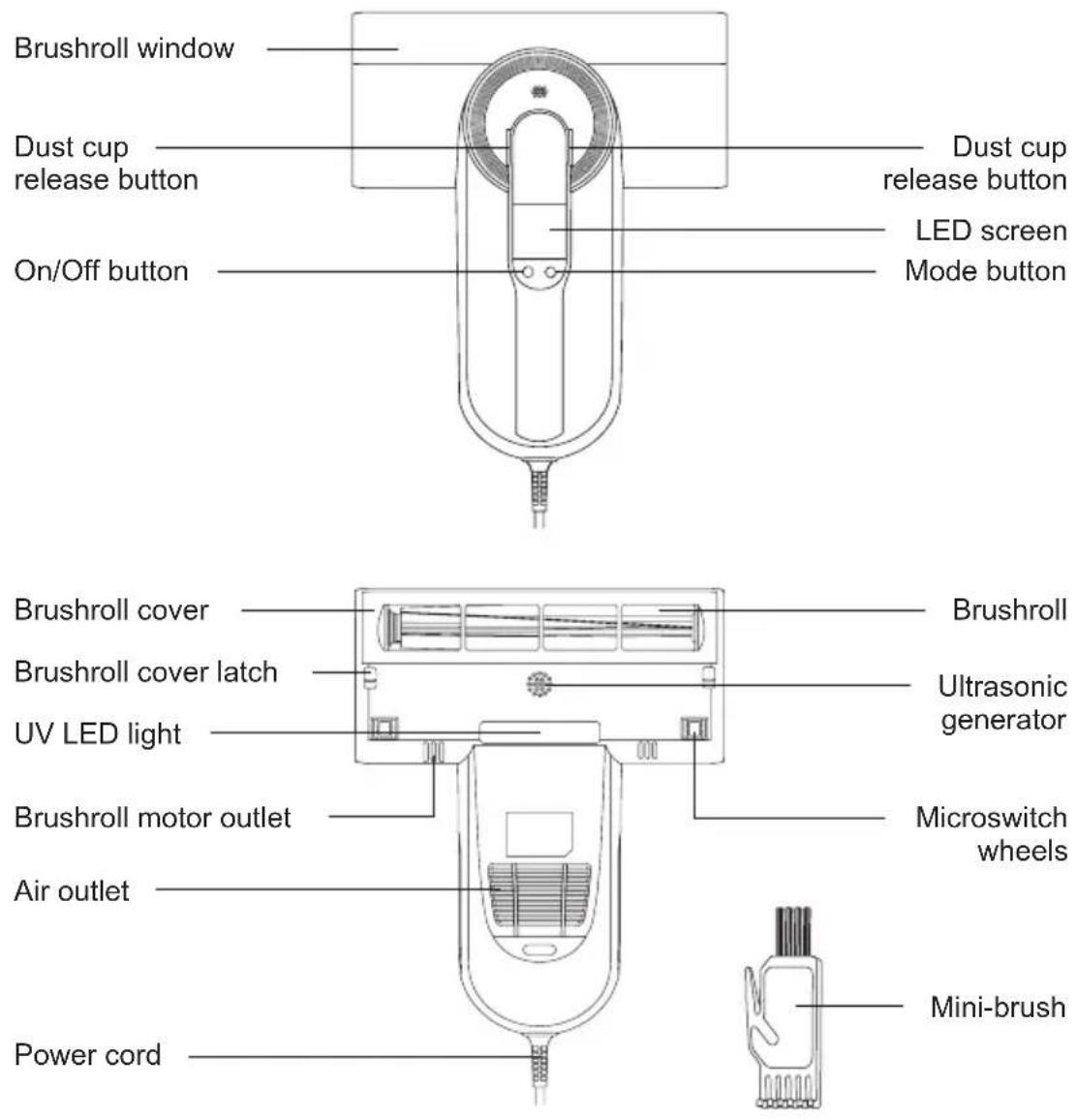
Part Name
text_image
Brushroll window Dust cup release button On/Off button Dust cup release button LED screen Mode button Brushroll cover Brushroll cover latch UV LED light Brushroll motor outlet Air outlet Power cord Brushroll Ultrasonic generator Microswitch wheels Mini-brushPacking List
| Part name | Anti-miteVacuum Cleaner | MIF filter Mini-brush User manual | ||
| Quantity 1 1 | 1 1 | |||
Use of the Product
Function description
text_image
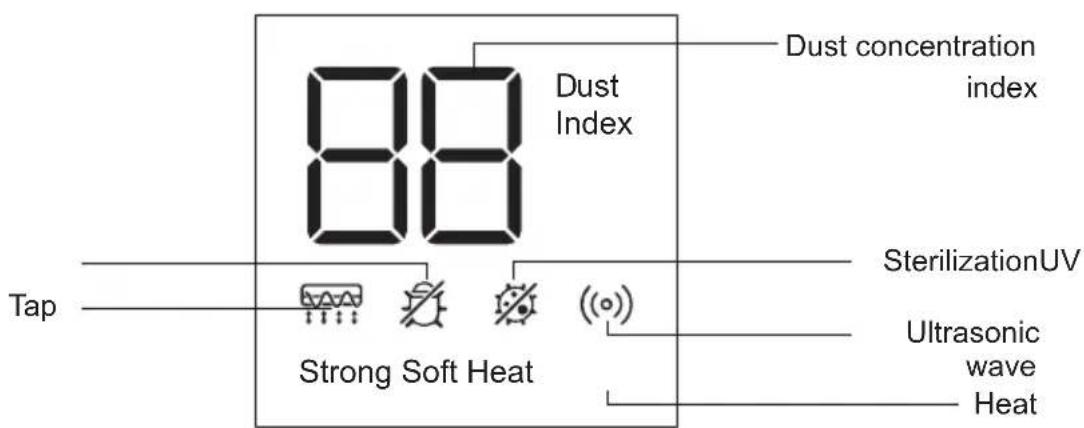
Dust concentration index 88 Dust Index Tape Strong Soft Heat SterilizationUV Ultrasonic wave Heat- Dust concentration index display (display range 0-99): When the cleaning surface has less dust, the dust index shows from 0 to 30. When the cleaning surface has medium dust, the dust index shows from 31 to 60. When the cleaning surface has much dust, the dust index shows from 61 to 99. The dust index varies according to dust concentration. The dust index value increase when dust concentration increases.
- The indicator of Tap, UV, Sterilization, Ultrasonic wave, heat will be stay light on after turning on the machine.
- Insert the plug into the socket, press on/off button, the machine is in strong mode by default and strong indicator lights up. Press the mode button to switch the soft mode and soft indicator lights up, strong indicator lights off. Press the mode button again to switch back to strong mode.
- Press the on/off button again when turned on, the machine stops working and all the indicators light off.
Note:
- When the dust over the Max line, please clean the dust cup and MIF filter in time.
- For safety reasons, the UV light only works when two micro switches are pressed simultaneously. Otherwise, the UV light will automatically turn off.
- The product is equipped with UV light. Do not view the bottom of the machine, shine on plants when the power is turned on to prevent UV rays from causing harm to human body or other objects.
Cleaning and Maintenance
Note:
- MIF filter is available for sale at JIMMY distributor.
- It is recommended to clean the dust cup in time after each use. When there is too much dust to cause MIF blockage, it needs to be cleaned in time or replaced if necessary.
Dust Cup Cleaning
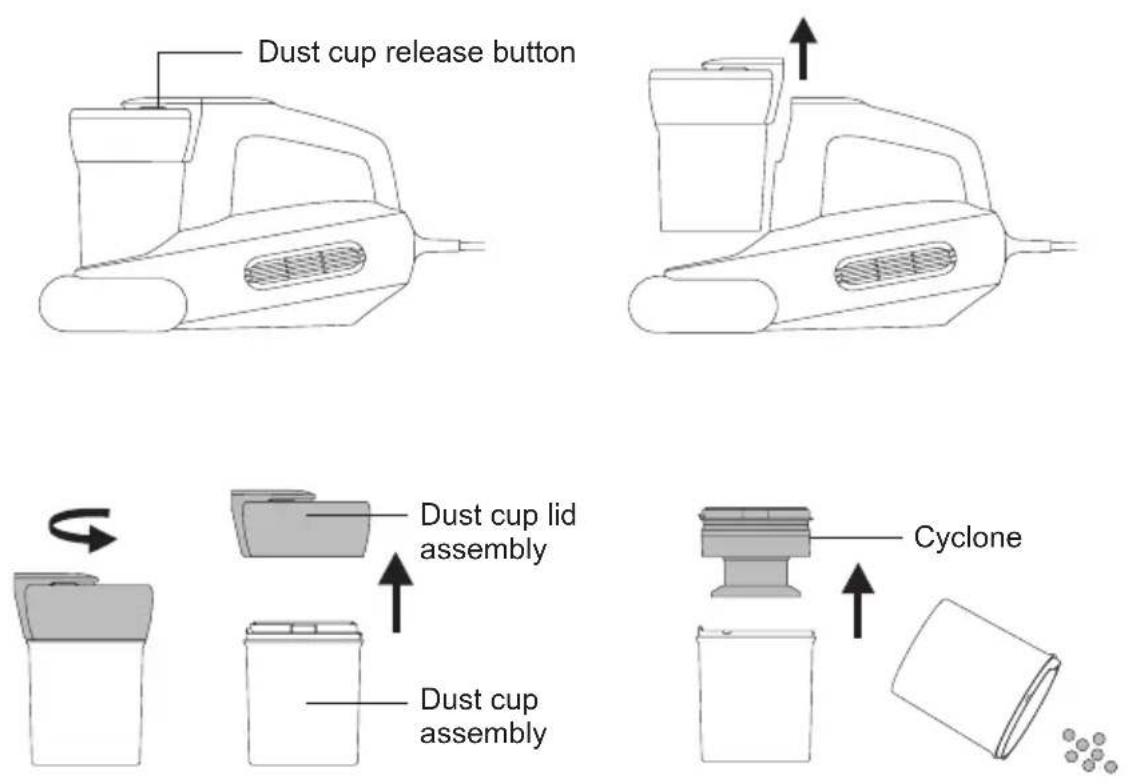
- Turn off the machine and unplug the power cord. Then press the release button and lift upward.
- Hold the dust cup and dust cup lid separately, twist dust cup lid according to the arrow instruction on dust cup, lift up and remove it from dust cup to clean.
MIF Filter and Cyclone Cleaning
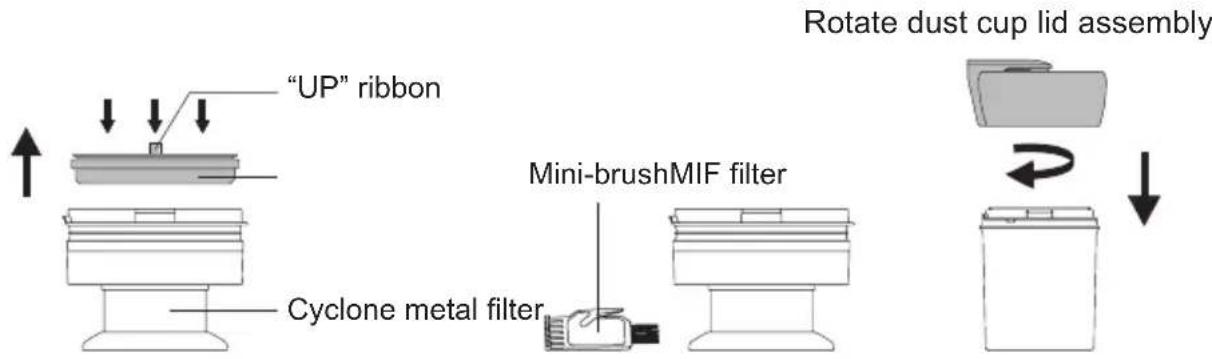
- Hold the cyclone in one hand, pinch the "UP" logo with the other hand, and take out filter. Do Not tap the filter in reverse side in case of filter clog. Clean the cyclone metal filter and plastic parts with the attached mini brush.
- After cleaning dust cup, MIF filter and cyclone, assemble in reverse order. Rotate the dust cup lid assembly into the dust cup. After hearing a "click" and the mark is aligned with the lock position that is assembled in place.
flowchart
graph TD
    A[""UP" ribbon"] --> B["Adder"]
    B --> C["Cyclone metal filter"]
    C --> D["Mini-brush MIF filter"]
    D --> E["Rotate dust cup lid assembly"]
    E --> F["Final Assembly"]
Note:
1.Do Not miss the MIF filter!
- If too much dust is accumulated in the dust cup, clean the dust cup and filter assembly with water, and wipe them with dry cloth. Pay attention that MIF filter need to be washed as less as possible. Clean the dust and foreign matters on MIF filter by tapping, and ensure that the dust cup and filter assembly are completely dry before installation.
Brushroll Cleaning and Installation
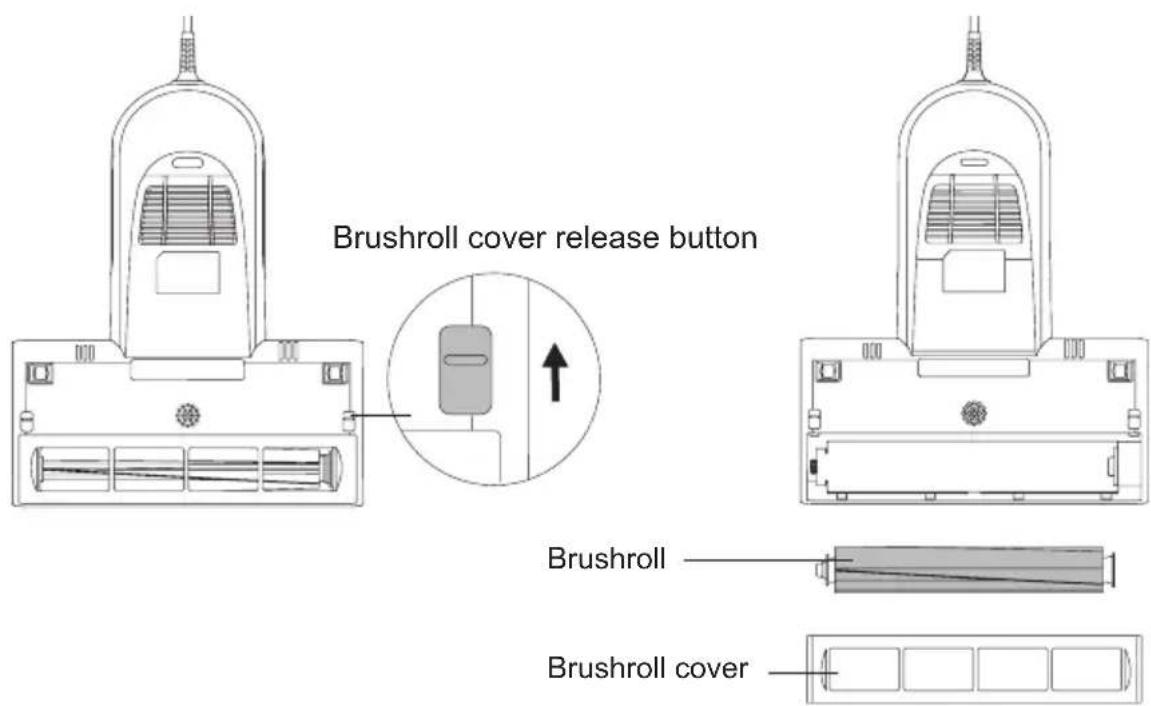
- Turn off the machine, unplug the power supply, push the brushroll cover latch. Turn it from the closed state to the open state, and then remove brushroll cover and take out brushroll. Clean brushroll with cleaning brush.
text_image
Brushroll cover release button Brushroll Brushroll cover- After cleaning the brushroll, install the brushroll and brushroll cover back to mainbody in turn, and lock the brushroll latch.
Note: for safety reasons, please turn off the machine and unplug power cord before cleaning brushroll.
Maintenance and Storage
- Please clean dust cup and filter after each use for further use. It is recommended to clean immediately when there is too much dust in dust cup.
- It is recommended to replace a filter after 30-50 hours of working time (depending on specific situation) for better use.
- Any paper, lead glass, plastic will greatly affect the effect of UV light. Dust or stain on UV light cover will affect the effect of UV light. Please wipe and clean the UV light cover regularly for better use.
- Do not touch the UV light cover as dirt will affect UV light effect.
- Put the machine in cool and dry place if the machine is to be idled. Do Not leave it in direct sunlight or humid environment.
Trouble Shooting
Please check the following trouble points before go to the maintenance department.
Note: If fault remains after adopting the following solutions, contact after sale service or local distributor immediately.
| Problems Possible | Reasons Solutions | |
| Product does not turn on | Power cord is not firmly inserted | Insert the power cord firmly |
| No power on socket Check the socket | ||
| On/off button is not pressed down | Press the On/Off button | |
| Weak suction | Air inlet blocked Clean up suction port | |
| MIF filter blocked Clean up the dust cup and filter | ||
| Cyclone blocked Clean cyclone | ||
| UV light does not work | Micros witch damaged | Contact after-sale service to replace micro switch |
| Machine tilt and micro switch left cleaning surface or micro switch wheels stuck prevent UV lamps from triggering | Contact after-sale service to replace micro switch wheels | |
| UV light damage | Contact after-sale service to replace UV light | |
| Machine stop working suddenly | Dust cup full | Stop using the product and clean blockage and use the machine after 2 hours |
| Suction port clogged | ||
| Filter blocked | ||
| Brushroll stop working suddenly | Brushroll entangled | Take out brushroll, clean it and reassemble |
| Belt loose or broken Contact | after service to replace belt | |
Product Specification
Technical parameter
| Model No WB63 | |
| Rated Voltage 220-240V~ | |
| Rated Frequency 50-60Hz | |
| Rated Power 600W |
Circuit Diagram
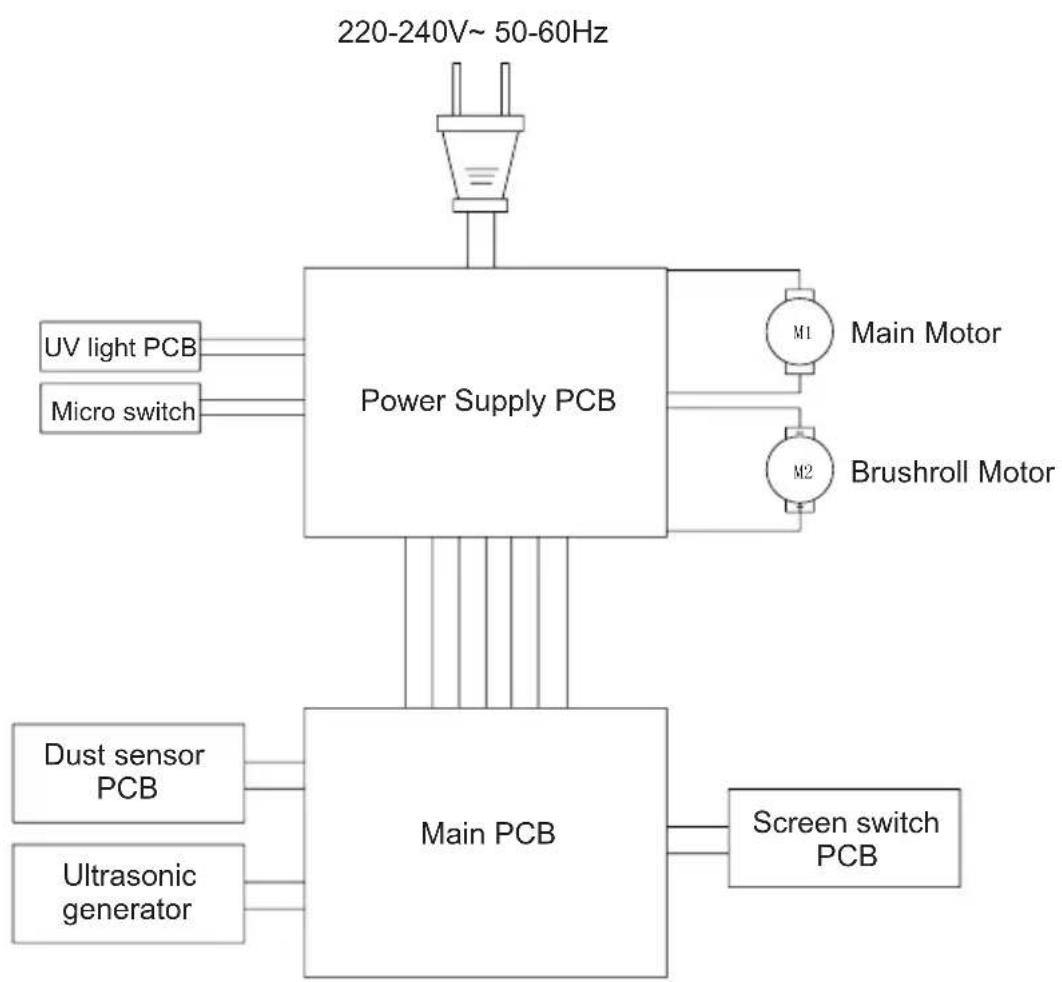
flowchart
graph TD
    A["220-240V~ 50-60Hz"] --> B["Power Supply PCB"]
    B --> C["M1 Main Motor"]
    B --> D["M2 Brushroll Motor"]
    B --> E["Dust sensor PCB"]
    B --> F["Ultrasonic generator"]
    B --> G["Main PCB"]
    G --> H["Screen switch PCB"]
    B --> I["UV light PCB"]
    B --> J["Micro switch"]
Manufacturer Information
| Manufacturer | Kingclean Electric Co., Ltd |
| Address | No.1 Xiangyang Road, Suzhou New District, Jiangsu Province 215009, China |
CE
Disposal
The machine, accessories and packaging should be sorted for environmental-friendly recycling.
Do not dispose of the machine into household waste!
Only for EC countries:
According to the European Guideline 2012/19/EU, machine that are no longer usable, and according to the European Guideline 2006/66/EC, defective or used battery packs/batteries, must be collected separately and disposed of in an environmentally correct manner.
Subject to change without notice
Warranty Information:
This product enjoys one year warranty from the date of purchase.
Excluded from the guarantee is normal wear, commercial use, alterations to the appliance as purchased, cleaning activities, consequences of improper use or damage by the purchaser or a third person, damage that can be attributed to external circumstances.
| Producent | Kingclean Electric Co., Ltd |
| Adres | No.1 Xiangyang road, Suzhou New District,Jiangsu province, 215009, China |
CE
Utylizacja
| Fabricant | Kingclean Electric Co., Ltd |
| Adresse | No.1 Xiangyang road, Suzhou New District,Jiangsu province, 215009, China |
CE
Mise au rebut
natural_image
Line drawing of a hand washing machine with an upward arrow indicating motion (no text or symbols)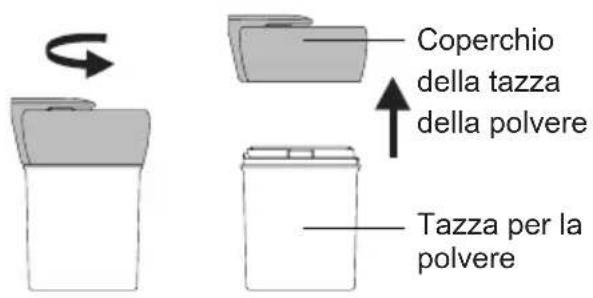
| Produttore | Kingclean Electric Co., Ltd |
| Indirizzo | No.1 Xiangyang Road, Suzhou New District, Jiangsu Province 215009, China |
CE
Disposizioni
natural_image
Line drawing of a portable electric shaver with a side panel and upward arrow (no text or symbols)
natural_image
Simple line drawing of a trash bin with an arrow indicating rotation (no text or symbols)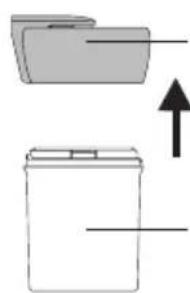
natural_image
Simple line drawing of two stacked folders with an upward arrow indicating growth (no text or symbols)flowchart
graph TD
    A["Folder"] -->|Rotation Arrow| B["Recycle Bin"]