KK 3786 - Oven CLATRONIC - Free user manual and instructions
Find the device manual for free KK 3786 CLATRONIC in PDF.



| Brand | Clatronic |
| Model | KK 3786 |
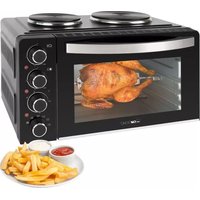
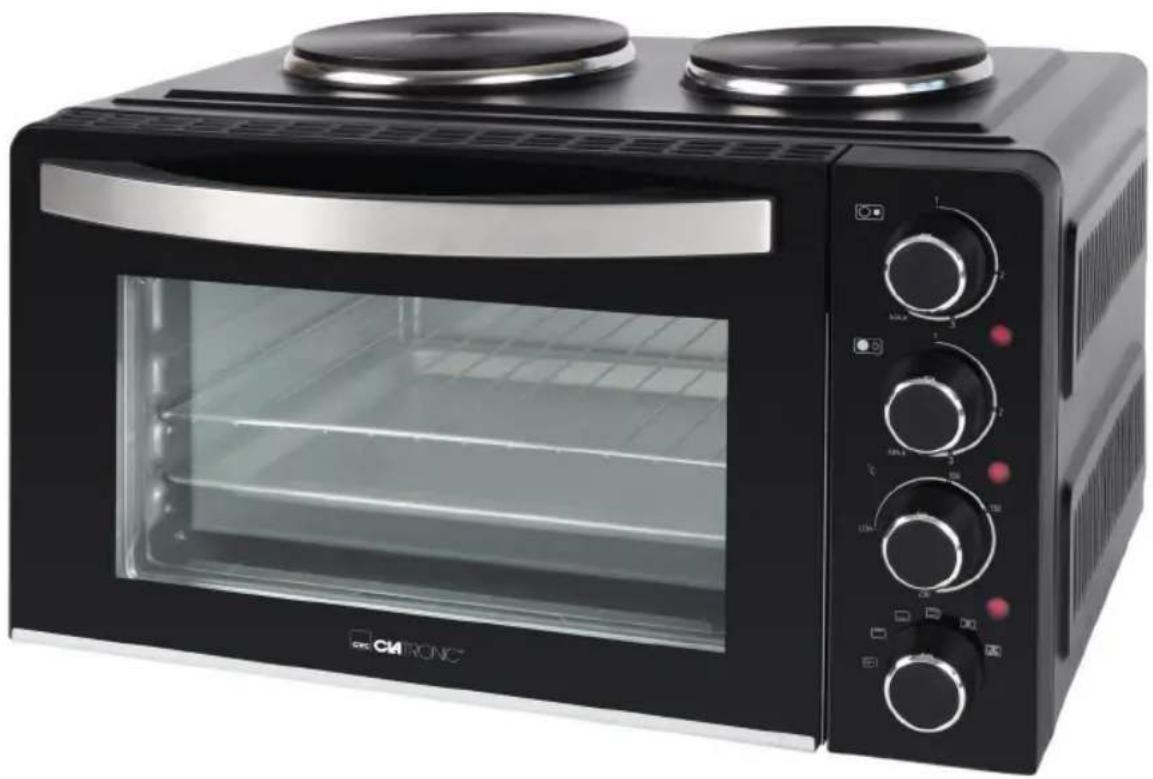
| Product type | Tabletop oven with two hotplates |
| Net weight | Approximately 10.2 kg |
| Power supply | 220-240 V~, 50/60 Hz |
| Total power | 3100 W |
| Small hotplate power | 600 W |
| Large hotplate power | 1000 W |
| Upper oven power | 800 W |
| Lower oven power | 700 W |
| Oven functions | Upper heat, lower heat, upper and lower heat, upper and lower heat with convection, upper heat with rotisserie and convection |
| Oven temperature setting | From Low to 230 °C |
| Hotplates | Two hotplates: one large (1000 W) and one small (600 W) with heat indicators |
| Door | Tempered safety glass |
| Included accessories | Grill, oven tray/drip tray, crumb tray, rotisserie with forks, two removal tools |
| Care and cleaning | Unplug and allow to cool before cleaning. Hotplates: damp cloth. Accessories: soapy water. Interior: damp cloth and mild detergent. Do not immerse, no abrasive products. |
| Safety | Do not use plastic, cardboard or glass containers. Minimum clearance of 12 cm around the oven. Do not use under wall cabinets. Keep cord away from hot parts. |
| Protection class | I (grounded) |
| Disposal | Take to a recycling center or store. Do not dispose of with household waste. |
Frequently Asked Questions - KK 3786 CLATRONIC
User questions about KK 3786 CLATRONIC
0 question about this device. Answer the ones you know or ask your own.
Ask a new question about this device
Download the instructions for your Oven in PDF format for free! Find your manual KK 3786 - CLATRONIC and take your electronic device back in hand. On this page are published all the documents necessary for the use of your device. KK 3786 by CLATRONIC.
USER MANUAL KK 3786 CLATRONIC
Mini kitchen • Kitchenette • Mini-cuisine
Cocina pequeña • Minicucina • Mini kuchenka
Minikonyha • Малогабаритная электроплита • مینی کیتشن
natural_image
Black CRK RONC toaster oven with two top ovens and control knobs (no visible text or symbols)Bedienungsanleitung......Seite 4
Instruction Manual...... Page 9
Gebruiksaanwijzing....Pagina 13
Mode d'emploi.... Page 18
Manual de instrucciones ...... Página 23
Istruzioni per l'uso....Pagina 28
Instrukcja obsługi......Strona 33
Használati utasítás .... Oldal 38
Руководство по эксплуатации ...... стр. 42
50 صفحة دليل التعليمات
text_image
Labeled diagram of a microwave oven with numbered parts for identification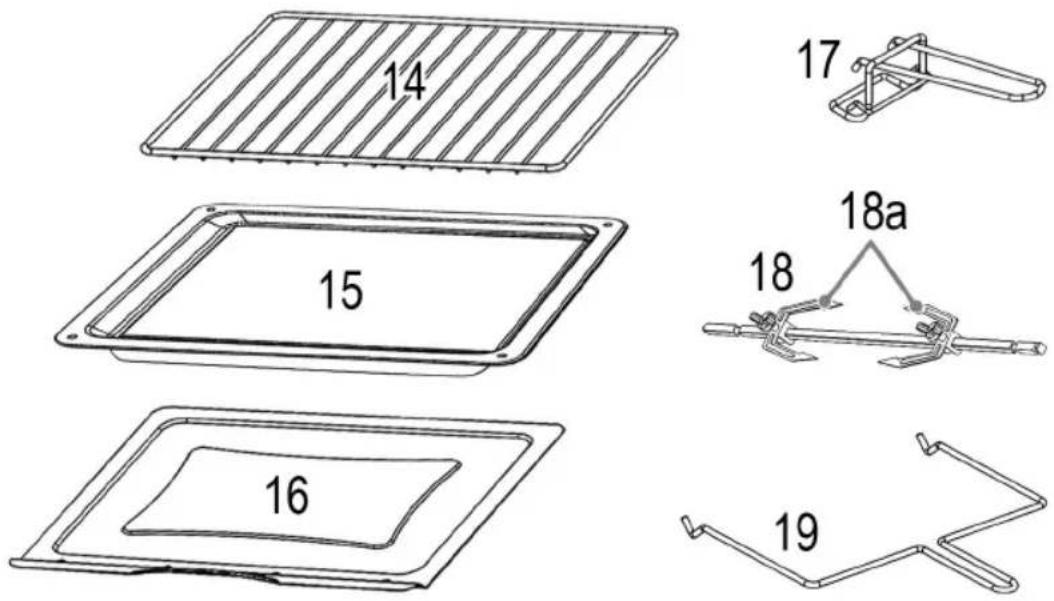
text_image
14 15 16 17 18 18a 18 19WICHTIG:
text_image
Illustration showing three cooking pots with different symbols indicating absence or prohibition, and a green checkmark.natural_image
Diagram of two identical mechanical components connected by a rod, with no visible text or symbols.text_image
Diagram showing a device with labeled parts and directional arrows, likely illustrating a process or control mechanism.Be sure to read the separately enclosed safety instructions first.
Instruction Manual
Thank you for choosing our product. We hope you will enjoy using the appliance.
Read the instruction manual and the separately enclosed safety instructions very carefully before using this appliance. Keep these documents, including the warranty certificate, receipt and, if possible, the box with the inner packaging in a safe place. If you pass the appliance on to a third party, always include all the relevant documents.
Symbols in this Instruction Manual
Important information for your safety is specially marked. It is essential to comply with these instructions in order to avoid accidents and prevent damage to the appliance:

WARNING:
This warns you of dangers to your health and indicates possible injury risks.

CAUTION:
This refers to possible hazards to the appliance or other objects.
Content
Overview of the Components....3
Unpacking the Appliance....9
Overview of the Components / Scope of Delivery......9
Warnings for the Use of the Appliance 9
Notes for Use....10
Symbolic Cooking Plates 10
Symbolic Oven....10
Electrical Connected Load....10
Electric Connection....10
Prior to Initial Use....10
Cookware 10
Oven....11
Removal Tools (17 and 19).... 11
Operation 11
Using the Cooking Plates....11
Using the Oven 11
Rotary Spit....11
End of Use....11
Cleaning....12
Cooking Plates 12
Crumb Tray, Baking Tray, Grill Rack, Rotary Spit, Spit Forks 12
Interior of the Oven 12
Housing 12
Storage....12
Technical Data....12
Disposal 12
Meaning of the "Dustbin" Symbol 12
Unpacking the Appliance
- Remove the appliance from its packaging.
-
Remove all packaging material, such as foils, filling material, cable ties and cardboard packaging.
-
Check the scope of delivery for completeness.
-
If the contents of the packaging are incomplete or if damage can be detected, do not operate the appliance. Return it to the dealer immediately.
-
Remove any existing stickers from the appliance.
-
There may still be dust or production residues on the appliance. We recommend that you clean the appliance as described under "Cleaning".
Overview of the Components / Scope of Delivery
1 Cooking plate, big
2 Cooking plate, small
3 Controller small cooking plate
4 Heating control lamp (small cooking plate)
5 Controller big cooking plate
6 Heating control lamp (big cooking plate)
7 Oven temperature controller
8 Operation control lamp
9 Oven function switch
10 Heating element
11 Glass door
12 Door handle
13 Hanging fixture for rotary spit
14 Grill rack
15 Baking tray / drip pan
16 Crumb tray
17 Removal tool for grill rack and baking tray
18 Rotary spit
18a Spit forks
19 Removal tool for rotary spit
Warnings for the Use of the Appliance
WARNING:
- Danger of burns! Only touch the appliance by the handle and the switches.

WARNING:
- Also, when using the removal tools for the baking tray or the rotating spit, protect yourself from the heat by wearing gloves or oven mitts.
- Danger of fire! Never use containers made from plastic, cardboard, paper, or similar.

CAUTION:
Do not use roasting bags or glass containers. These may burst.
- Place the appliance on a flat, heat-resistant surface!
- Keep sufficient distance to highly flammable objects such as furniture, curtains, etc.! Never place the appliance inside a cabinet!
• Install the appliance with its back panel facing the wall. - When using the oven, leave at least 12 cm of space on all sides of the appliance to allow sufficient air circulation.
- Due to rising heat and vapours do not place the appliance under wall cupboards.
- Ensure that the mains cord does not touch hot parts of the appliance during operation.
• Always operate the appliance under supervision. Very dry bread can catch fire inside the appliance! - Do not place any objects on the appliance during use that you do not need for cooking.
- This appliance has a door made of tempered safety glass. The glass is stronger than ordinary glass and more resistant to breakage. Avoid scratches on the door surface. If the door glass has a scratch or a notch, contact our service or a professional.
- Do not store any materials other than the accessories recommended by the manufacturer in this oven when it is not in use.
Notes for Use
Symbolic Cooking Plates
Controller (3)
Controller (5)

Small cooking plate

Big cooking plate
Symbolic Oven
Controller (7) °COven temperature
Function switch (9) Oven function

Off

Top heat

Bottom heat

Top- and bottom heat

Top- and bottom heat with convection

Top heat with rotary spit and convection
Electrical Connected Load
- The appliance is intended for a maximum power intake of 3100 W. This connected load recommends a separate input lead secured with a 16 amp protected switch.
- Do not use any multiple sockets, as this appliance is too powerful.
- Caution, overload: If you use extension leads, these should have a cable cross-section of at least 1.5 ~mm^2 . Cables with a smaller cable cross-section can overheat.
- Make sure that the cable is laid in such a way that it cannot be pulled or tripped over.
Electric Connection
- Turn all controls counter-clockwise as far as they will go. Set the function switch to the OFF position.
- Check whether the mains voltage that you want to use, corresponds with that of the appliance. You will find the information about it on the rating plate.
- Connect the mains plug to a properly installed shock-proof socket only.
Prior to Initial Use
There is a protective layer on the cooking plates and the heating elements that burns when the appliance heats up. This may cause smoke and odours to develop when the appliance is used, but these will disappear after a few uses. This is not a defect.
- You can minimise smoke development by wiping the cooking plates and heating elements with a slightly damp cloth before using them for the first time.
- Do not use cleaning agents!
- Then wipe it with a dry cloth.
- Only switch on the appliance when it is in a completely dry state.
• Always ensure adequate ventilation. - Use the appliance separately for several minutes before using it for the first time to allow the protective layers to remove.
- Turn on both cooking plates without using any cookware. Turn the controllers ☐ and ☑ MAX.
- Then operate the oven without accessories and without cooking food. Turn the °C controller to 230 °C. Set the function switch to ☐
Cookware
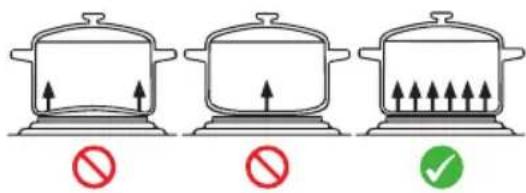
- Only use cooking pots with a flat footing in order to optimize the use of energy.
text_image
Illustration showing three cooking pots with upward arrows and a checkmark indicating absence or prohibition.- The pot should never be smaller than the cooking plate. This would cause a loss of energy. In the worst case the cooking plate might become distorted.
Oven
- Always slide the crumb tray under the bottom heating element.
- We recommend to preheat the oven for approx. 10 – 15 minutes.
- Save energy by using the switch settings with convection. In doing so, the heated air is distributed quicker and evenly via the fan inside the oven.
- Always use the inserted drip pan when grilling or roasting. This prevents grease from dripping onto the bottom heating element.
- There is no timer on this oven. You must control the cooking time yourself.
- Your oven offers you a number of settings. According to your recipe, choose a temperature.
Here are a Few Examples of How You Can Use the Functions:
- Top heat:
For grilling or gratinating casserole. - Top heat with rotary spit and convection: Poultry and large joints of meat are cooked evenly.
- Top- and bottom heat with convection: E. g. for pizza, pastries etc.
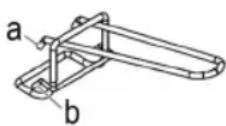
Removal Tools (17 and 19)
a) To remove the baking tray
b) To remove the grill rack
If you want to remove the rotary spit, use the removal tool (19).
Operation
- You can operate the cooking plates and the oven separately or in combination.
- When using both cooking plates and the oven at the same time, the cooking time may be slightly longer than when used without the oven. This is due to technical reasons and is not a defect.
Using the Cooking Plates
- Turn the controller ☐ and / or ☑ to the right until the associated heating control lamp switches on.
- Select a setting between 1 and MAX. The associated heating control lamp goes out when the plate has reached the temperature.
Using the Oven
- Use the °C controller to select a temperature between LOW (low) and 230 °C.
- Select your desired oven function with the oven function switch. The control lamp (8) shows you that the oven is in use.
Rotary Spit
Do not select a roast which is too large. The food being grilled must be far enough away from the internal walls and the heating elements and must not touch them.
- Insert the baking tray / drip pan into the bottom guide ridge of the oven.
- Rub edible oil on to the rotary spit and spit forks.
- Poultry has to be dressed before grilling. To do so, tie the wings and the legs closely to the body using kitchen yarn.

natural_image
Diagram of a mechanical or electrical component with two connected components and a central body (no text or symbols)-
Place the dressed poultry or the piece of roast meat carefully on to the rotary spit. Push the spit forks on to the rotary spit and use them to fix the roast meat in place. Tighten the spit forks by means of the screws.
-
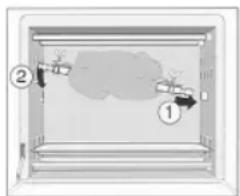
Place the prepared rotary spit in the oven with the help of the removal tool. Put the end of the rotary spit without the notch into the motor on the right side of the oven first. Then hook the other end of the rotary spit into the hanger on the left hand side
text_image
Diagram showing a device with labeled parts and directional arrows, likely illustrating a process or control mechanism.- Select a temperature and the function ☐. The rotary spit begins to turn. Make sure that the roast piece can rotate freely.
- When the meat is cooked remove the rotary spit using the handle.
End of Use
- Turn all controls counterclockwise as far as they will go. Set the function switch to the OFF position.
- Then disconnect the mains plug from the socket.
Cleaning

WARNING:
• Always disconnect the mains plug from the socket before cleaning.
- Wait until the appliance has cooled down.
- Never immerse the appliance in water. It could result in an electric shock or fire.

CAUTION:
- Do not use any wire brush or other abrasive objects.
- Do not use any acidic or abrasive detergents.
Cooking Plates
- Clean the cooking plates with a damp cloth.
- Use a dishwashing agent in case of heavy staining.
Crumb Tray, Baking Tray, Grill Rack, Rotary Spit, Spit Forks
- Below the heating elements there is a crumb tray. Pull it out forwards to remove it.
- Clean all accessories in hot rinsing water with a little washing-up liquid. Dry the parts well after that.
Interior of the Oven
Keep the interior of the oven clean.
- Remove splashes and food remains on the oven wall with a damp cloth together with some detergent.
- Wipe dry with a dry towel.
- Put the crumb tray and other accessories back.
Housing
Clean the housing after use with a slightly damp cloth.
Storage
- Clean the appliance as described and let it completely dry.
• We recommend storing the appliance in the original packaging if you do not want to use it for long periods of time.
• Always store the appliance out of the reach of children in a well-ventilated and dry place.
Technical Data
Model:....KK 3786 Power supply:.....220 - 240 V\~, 50 / 60 Hz
Power consumption:
Overall capacity: 3100 W Small cooking plate: 600 W Big cooking plate: 1000 W Bottom heat oven: 700 W Top heat oven: 800 W
Protection class:....I Net weight:..... approx. 10.2kg
The right to make technical and design modifications in the course of continuous product development remains reserved.
This appliance has been tested according to all applicable, current CE directives and built according to the latest safety regulations.
Disposal
Meaning of the "Dustbin" Symbol

Protect our environment: do not dispose of electrical equipment in the domestic waste. Please return any electrical equipment that you will no longer use to the collection points provided for their disposal.
This helps avoid the potential effects of incorrect disposal on the environment and human health.
This will contribute to the recycling and other forms of re-utilisation of electrical and electronic equipment.
Information concerning where the equipment can be disposed of can be obtained from your local authority. Your dealer and contractual partner is also obliged to take back the old appliance free of charge.
BELANGRIJK:
text_image
Illustration showing three cooking pots with upward arrows and a red prohibition sign, one marked with a checkmark.natural_image
Diagram of a mechanical or electrical device with two sensors and a central body, no text or symbols present.text_image
Diagram showing a device with labeled parts and directional arrows, likely illustrating a process or system.text_image
Illustration showing three cooking pots with upward arrows and a red prohibition sign, followed by a green checkmark.natural_image
Diagram of a mechanical or electrical setup with two identical components connected by a rod, against a gray background (no text or symbols)text_image
Diagram showing a device with labeled parts and directional arrows, likely illustrating a process or control mechanism.text_image
Illustration showing three cooking pots with upward arrows and a prohibition sign, indicating absence or allowed conditions.natural_image
Diagram of a mechanical or electrical component with two vertical sensors and a central body, no text or symbols present.text_image
Diagram showing a device with labeled parts and directional arrows, likely illustrating a process or control mechanism.natural_image
Diagram of a mechanical or electrical component with two vertical sensors and a central body, no text or symbols present.text_image
Diagram showing a device with labeled parts and directional arrows, likely illustrating a process or control mechanism.text_image
Illustration showing three cooking pots with upward arrows and a red prohibition sign, plus a green checkmark.natural_image
Diagram of a mechanical or electrical component with two sensors and a central body, no text or symbols present.text_image
Diagram showing a device with labeled parts and directional arrows, likely illustrating a process or system.CTC Clatronic Sp. z o.o
Ul. Brzeska 1
45-960 Opole