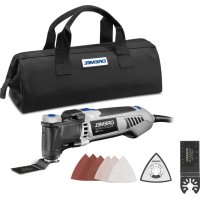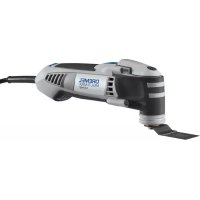
MultiMax MM40 - Electric multifunction tool DREMEL - Free user manual and instructions
Find the device manual for free MultiMax MM40 DREMEL in PDF.


| Product type | Oscillating electric multi-tool |
| Brand | Dremel |
| Model | MultiMax MM40 |
| Weight | 1.46 kg |
| Power supply | Mains with cord, 220-240 V ~50/60 Hz |
| No-load oscillation frequency | 10,000 – 21,000 osc/min |
| Oscillation angle | 1.5° (left/right) |
| Speed control | Yes, 10 positions (continuous adjustment) |
| Accessory change system | Quick Lock™ tool-free |
| Main functions | Sanding, sawing, scraping, grout removal, plunge cutting |
| Sound pressure level (EN60745) | 78 dB(A) |
| Sound power level (EN60745) | 89 dB(A) |
| Hand-arm vibration (EN60745) | 5.2 m/s² (uncertainty K=1.5 m/s²) |
| Dust extraction | Yes, vacuum adapter |
| Compatible accessories | Velcro sanding pads, saw blades, scrapers, spatulas, grout removal tips |
| Maintenance | Cleaning with compressed air; do not use aggressive solvents |
| Repairability | Refer to a Dremel service center; no user-serviceable parts |
| Warranty | In accordance with applicable legal regulations (excluding normal wear, overloading, or improper use) |
Frequently Asked Questions - MultiMax MM40 DREMEL
User questions about MultiMax MM40 DREMEL
0 question about this device. Answer the ones you know or ask your own.
Ask a new question about this device
Download the instructions for your Electric multifunction tool in PDF format for free! Find your manual MultiMax MM40 - DREMEL and take your electronic device back in hand. On this page are published all the documents necessary for the use of your device. MultiMax MM40 by DREMEL.
USER MANUAL MultiMax MM40 DREMEL
CE DECLARATION OF CONFORMITY We declare under our sole responsibility that this product is in conformity with the following standards or standardized documents: EN60745, EN55014, in accordance with the provisions of the directives 2006/95/EC, 2004/108/EC, 2006/42/EC.
NOISE/VIBRATION Measured in accordance with EN60745 the sound pressure level of this tool is 78 dB(A) and the sound power level 89 dB(A) (standard deviation: 4 dB), and the vibration 5.2m / s^2 (hand-arm method, uncertainty K = 1.5m / s^2 ).
NOTE: The declared vibration total value has been measured in accordance with a standard test method and may be used for comparing one tool with another. It may also be used in a preliminary assessment of exposure.
WARNING The vibration emission during actual use of the power tool can differ from the declared total value depending on the ways in which you use the tool. Make an estimation of the exposure in the actual conditions of use and identify the safety measures for personal protection accordingly (taking account of all parts of the operating cycle such as the times when the tool is switched off and when it is running idle in addition to the trigger time).
Technical file at: SKIL Europe BV (PT-SEU/PJE), 4825 BD Breda, NL.
DE
EC/42/EC 2006/108/EC 2004
s6075 EN60745 jyj yj
(1)89 78
(20 1.5 6
y
y
a a
1
1
()
()
- SKIL Europe BV (PT-SEU/PJE), 4825 BD Breda, NL
0

12
Skil Europe B.V. A.v.d. Kloot
USED SYMBOLS

READ THESE INSTRUCTIONS

USE EYE PROTECTION

USE HEARING PROTECTION

DOUBLE INSULATION (NO EARTH WIRE REQUIRED)

DO NOT DISPOSE OF ELECTRIC TOOLS, ACCESSORIES AND PACKAGING TOGETHER WITH HOUSEHOLD WASTE MATERIAL
GENERAL POWER TOOL SAFETYWARNINGS

WARNING
READ ALL SAFETY WARNINGS AND ALL INSTRUCTIONS.
Failure to follow the warnings and instructions may result in electric shock, fire and/or serious injury.
Save all warnings and instructions for future reference.
The term "power tool" in the warnings refers to your mains-operated (corded) power tool or battery-operated (cordless) power tool.
WORK AREA SAFETY
a. Keep work area clean and well lit. Cluttered and dark areas invite accidents.
b. Do not operate power tools in explosive atmospheres, such as in the presence of flammable liquids, gases or dust. Power tools create sparks which may ignite the dust or fumes.
c. Keep children and bystanders away while operating a power tool. Distractions can cause you to lose control.
ELECTRICAL SAFETY
a. Power tool plug must match the outlet. Never modify the plug in any way. Do not use any adapter plugs with earthed (grounded) power tools. Unmodified plugs and matching outlets will reduce risk of electric shock.
b. Avoid body contact with earthed or grounded surfaces such as pipes, radiators, ranges and refrigerators. There is an increased risk of electric shock if your body is earthed or grounded.
c. Do not expose power tools to rain or wet conditions. Water entering a power tool will increase the risk of electric shock.
d. Do not abuse the cord. Never use the cord for carrying,
pulling or unplugging the power tool. Keep cord away from heat, oil, sharp edges or moving parts. Damaged or entangled cords increase the risk of electric shock.
e. When operating a power tool outdoors, use an extension cord suitable for outdoor use. Use of a cord suitable for outdoor use reduces the risk of electric shock.
f. If operating a power tool in a damp location is unavoidable, use an earth leakage circuit breaker (ELCB) protected supply. Use of an earth leakage circuit breaker reduces the risk of electric shock.
PERSONAL SAFETY
a. Stay alert, watch what you are doing and use common sense when operating a power tool. Do not use a power tool while you are tired or under the influence of drugs, alcohol or medication. A moment of inattention while operating power tools may result in serious personal injury.
b. Use personal protective equipment. Always wear eye protection. Protective equipment such as dust mask, nonskid safety shoes, hard hat, or hearing protection used for appropriate conditions will reduce personal injuries.
c. Prevent unintentional starting. Ensure the switch is in the off-position before connecting to power source and/or battery pack, picking up or carrying the tool. Carrying power tools with your finger on the switch or energising power tools that have the switch on invites accidents.
d. Remove any adjusting key or wrench before turning the power tool on. A wrench or a key left attached to a rotating part of the power tool may result in personal injury.
e. Do not overreach. Keep proper footing and balance at all times. This enables better control of the power tool in unexpected situations.
f. Dress properly. Do not wear loose clothing or jewellery. Keep your hair, clothing and gloves away from moving parts. Loose clothes, jewellery or long hair can be caught in moving parts.
g. If devices are provided for the connection of dust extraction and collection facilities, ensure these are connected and properly used. Use of these devices can reduce dust related hazards.
POWER TOOL USE AND CARE
a. Do not force the power tool. Use the correct power tool for your application. The correct power tool will do the job better and safer at the rate for which it was designed.
b. Do not use the power tool if the switch does not turn it on and off. Any power tool that cannot be controlled with the switch is dangerous and must be repaired.
c. Disconnect the plug from the power source and/or the battery pack from the power tool before making any adjustments, changing accessories, or storing power tools. Such preventive safety measures reduce the risk of starting the power tool accidentally.
d. Store idle power tools out of the reach of children and do not allow persons unfamiliar with the power tool or these instructions to operate the power tool. Power tools are dangerous in the hands of untrained users.
e. Maintain power tools. Check for misalignment or binding
of moving parts, breakage of parts and any other condition that may affect the power tools operation. If damaged, have the power tool repaired before use. Many accidents are caused by poorly maintained power tools.
f. Keep cutting tools sharp and clean. Properly maintained cutting tools with sharp cutting edges are less likely to bind and are easier to control.
g. Use the power tool, accessories and tool bits etc., in accordance with these instructions, taking into account the working conditions and the work to be performed. Use of the power tool for operations different from those intended could result in a hazardous situation.
BATTERY TOOL USE AND CARE
a. Recharge only with the charger specified by the manufacturer. A charger that is suitable for one type of battery pack may create a risk of fire when used with another battery pack.
b. Use power tools only with specifically designated battery packs. Use of any other battery packs may create a risk of injury and fire.
c. When battery pack is not in use, keep it away from other metal objects like paper clips, coins, keys, nails, screws, or other small metal objects that can make a connection from one terminal to another. Shorting the battery terminals together may cause burns or a fire.
d. Under abusive conditions, liquid may be ejected from the battery; avoid contact. If contact accidentally occurs, flush with water. If liquid contacts eyes, additionally seek medical help. Liquid ejected from the battery may cause irritation or burns.
SERVICE
a. Have your power tool serviced by a qualified repair person using only identical replacement parts. This will ensure that the safety of the power tool is maintained.
MACHINE-SPECIFIC SAFETY WARNINGS
a. Use the machine only for dry sanding. Penetration of water into the machine increases the risk of an electric shock.
b. Keep hands away from the sawing range. Do not reach under the workpiece. Contact with the saw blade can lead to injuries.
c. Use suitable detectors to determine if utility lines are hidden in the work area or call the local utility company for assistance. Contact with electric lines can lead to fire and electric shock. Damaging a gas line can lead to explosion. Penetrating a water line causes property damage or may cause an electric shock.
d. When working with the machine, always hold it firmly with both hands and provide for a secure stance. The power tool is guided more secure with both hands.
e. Secure the workpiece. A workpiece clamped with clamping devices or in a vice is held more secure than by hand.
f. Keep your workplace clean. Blends of materials are
particularly dangerous. Dust from light alloys can burn or explode.
g. Avoid unintentional switching on. Ensure the On/Off switch is in the off position before inserting battery pack. Carrying the power tool with your finger on the On/Off switch or inserting the battery pack into power tools that have the switch on invites accidents.
h. Wear protective gloves when changing application tools/ accessories. Application tools/accessories become hot after prolonged usage.
i. Do not scrape wetted materials (e.g. wallpaper) or on moist surfaces. Penetration of water into the machine increases the risk of an electric shock.
j. Do not treat the surface to be worked with solvent-containing fluids. Materials being warmed up by the scraping can cause toxic vapours to develop.
k. Exercise extreme caution when handling the scraper. The accessory is very sharp; danger of injury.
WARNING
DO NOT WORK WITH MATERIALS CONTAINING ASBESTOS (ASBESTOS IS
The machine, accessories and packaging should be sorted for environmental-friendly recycling.
ONLY FOR EUROPEAN COUNTRIES

Do not dispose of power tools into household waste! According the European Guideline 2002/96/EC for Waste Electrical and Electronic Equipment and its implementation into national right, power tools that are no longer usable must be collected separately and disposed of in an environmentally correct manner.
SPECIFICATIONS
GENERAL SPECIFICATIONS
Dremel Multi-Max Cored Oscillating Multi-Tool Model MM20
Voltage Rating: 220V-240V 50/60Hz
Wattage Rating: 250W
No Load Speed: n(o) 10000-21000 min-1
Oscillation Angle, left/right: 1,5^
Weight: 1.35kg
Model MM40
Voltage Rating: 220V-240V 50/60Hz
Wattage Rating: 270W
No Load Speed: n(o) 10000-21000 min-1
Oscillation Angle, left/right: 1,5^
Weight: 1.46kg
EXTENSION CORDS
Use completely unrolled and safe extension cords with a capacity of 5 Amps.
ASSEMBLY

WARNING
ALWAYS TURN OFF THE TOOL BEFORE CHANGING ACCESSORIES, CHANGING
COLLETS, OR SERVICING THE TOOL AND REMOVE BATTERY PACK.
GENERAL
This Dremel Multi-Max Tool is intended for dry sanding of surfaces, corners, edges, for scraping, for sawing soft metals, wood and plastic components, and for grout removal using the applicable tools and accessories recommended by Dremel.
PICTURE 1
A. On/Off switch
B. Variable speed control dial
C. Power cord
D. Ventilation openings
E. Blade washer
F. Accessory holder
G. Accessory
H. Clamping screw
PICTURE 2
A. Quick Lock™ lever
B. On/Off switch
C. Variable speed control dial
D. Power cord
E. Ventilation openings
F. Accessory holder
G. Accessory
H. Clamping flange
INSTALLING AND REMOVING ACCESSORIES
NOTE: Be sure to read the instructions supplied with your Dremel accessory for further information on its use.
Use only Dremel tested, high performance accessories.
Dremel cutting, scraper blades have a Quick-Fit slot which allows for faster accessory removal compared with other conventional oscillating tool systems.
Model MM20
- Loosen the clamping screw using the hex key provided just enough so you can slide the accessory between the accessory holder and the blade washer (Picture 3).
PICTURE 3
A. Accessory holder
B. Clamping screw
C. Hex key
D. Blade washer
E. Accessory
F. Accessory
G. Washer with bevel up
- Clean accessory holder, accessory and the clamping screw with a clean cloth.
- Place the accessory onto the accessory holder making sure the accessory engages all pins in the holder and the accessory is flush against the accessory holder.
- Securely tighten the clamping screw with the hex provided (Picture 4).
PICTURE 4
A. Clamping screw
B. Hex key
NOTE: Some accessories, such as scrapers or blades, may be mounted either straight on the tool, or at an angle to enhance usability (Picture 5).
PICTURE 5
INSTALLING AND REMOVING ACCESSORIES WITH QUICK LOCK™ ACCESSORY CHANGE
Model MM40
The Dremel Multi-Max MM40 includes an integrated accessory change mechanism. The Quick Lock™ accessory interface allows you to install and remove accessories without the need of a wrench or hex key. You will also no longer need to worry about losing a clamping screw & washer as these parts are no longer used in the MM40 version of the Multi-Max.
- To install an accessory using the Quick LockTM feature, hold tool upside down to prevent the blade from falling off the accessory holder when installing and removing accessories.
- Turn the Quick LockTM lever on the top on the tool counterclockwise to unlock the clamping mechanism (Picture 6). The lever needs to be fully engaged to unlock the clamping mechanism.
PICTURE 6
A. Open
B. Close
- Clean accessory holder, accessory and the clamping flange with a clean cloth.
- Place the accessory onto the accessory holder making sure the accessory engages all pins in the holder and the accessory is flush against the accessory holder (Picture 7 & Picture 8).

WARNING
TO AVOID PINCHING, FIRMLY HOLD QUICK LOCK LEVER WHEN FASTENING
ACCESSORY. AVOID PLACING HANDS OR FINGERS BETWEEN LEVER AND TOOL BODY.
PICTURE 7
A. Clamping flange
B. Accessory holder
- Turn the Quick LockTM lever on the top of the tool in a clockwise motion, to the closed position, to securely lock the accessory in place (Picture 6).
- To remove an accessory, simply unlock the clamping mechanism by turning the Quick LockTM lever counterclockwise as described above (Picture 6).
- Lift up on the accessory bracket to take it off the pins. (Note: be careful, blade may be hot.)
NOTE: Some accessories, such as scrapers or blades, may be mounted either straight on the tool, or at an angle to increase usability (Picture 5). In order to do this with the Quick LockTM interface, place the accessory onto the accessory holder making sure the accessory engages all pins in the holder and the accessory is flush against the accessory holder. Securely lock the accessory in place as described previously (Picture 6).
INSTALLING AND REMOVING SANDING SHEETS
Your backing pad uses hook-and-loop backed accessories, which firmly grip the backing pad when applied with moderate pressure.
- Align the sanding sheet and press it onto the sanding plate by hand.
- Firmly press the power tool with the sanding sheet against a flat surface and briefly switch the power tool on. This will promote good adhesion and helps to prevent premature wear.
- To change, merely peel off the old sanding sheet, remove dust from the backing pad if necessary, and press the new sanding sheet in place.
After considerable service the backing pad surface will become worn, and the backing pad must be replaced when it no longer offers a firm grip. If you are experiencing premature wear out of the backing pad facing, decrease the amount of pressure you are applying during operation of the tool.
For maximum use of abrasive, rotate pad 120 degrees when tip of abrasive becomes worn.
DUST EXTRACTION
Your tool can be equipped with a dust port with adaptor for dust extraction (Picture 9). To use this feature, attach the dust port to the tool (A) and attach vacuum cleaner to the adapter (B).
USE
GETTING STARTED
The first step in learning to use the tool is to get the "feel" of it.
Hold it in your hand and feel its weight and balance (Picture 10). Depending on the application, you will need to adjust your hand position to achieve optimum comfort and control.
When holding the tool, do not cover the air vents with your hand.
Blocking the air vents could cause the motor to overheat.
PICTURE 10
IMPORTANT! Practice on scrap material first to see how the tool's high-speed action performs. Keep in mind that your tool will perform best by allowing the speed, along with the correct accessory, do the work for you. Be careful not to apply too much pressure.
Instead, lower the oscillating accessory lightly to the work surface and allow it to touch the point at which you want to begin.
Concentrate on guiding the tool over the work using very little pressure from your hand. Allow the accessory to do the work.
Usually it is better to make a series of passes with the tool rather than to do the entire job with one pass. To make a cut, for example, pass the tool back and forth over the work. Cut a little material on each pass until you reach the desired depth.
Slide "ON/OFF" switch
The tool is switched "ON" by the slide switch located on the topside of the motor housing (Picture 1 & 2).
TO TURN THE TOOL "ON", slide the switch button forward.
TO TURN THE TOOL "OFF", slide the switch button backward.
Variable speed control dial
This tool is equipped with a variable speed control dial (Picture 11). The speed may be controlled during operation by presetting the dial in any one of ten positions.
To achieve the best results when working with different materials, set the variable speed control to suit the job (See Speed Chart). To select the right speed for the accessory in use, practice with scrap material first.
PICTURE 11
A. Variable speed slide switch
Speed Chart, see Front Matter.
Addendum below:
| Accessory App | Application |
| MM11 | Sanding surfaces close to edges, in corners or hard to reach areas. Depending on the sanding sheet for, e.g., sanding wood, paint, varnish, thinset and cement. |
| MM70W | For detail sanding. |
| MM70P | For sanding primer and removing brush strokes, drops of paint and paint run. |
| Accessory Application | |
| MM411 | Smaller cuts and flush cuts. Example: Cut-outs in furniture for cable connections. |
| MM470 | Cutting and deep flush cuts; also for sawing close to edges, in corners and hard to reach areas. Example: Flush cutting door jamb or window sill, for flooring or tile installation. |
| MM422 | Smaller cuts and plunge cuts. Example: Sawing off water pipes (copper) or cable ducts flush against walls, floors or ceilings. |
| MM450 | Cutting in existing trim or flooring. Cutting close to edges in corners or hard to reach areas. Examples: Installing floor vent or repairing damaged wood flooring. |
| MM501 | Removing grout from between wall or floor tiles. Example: Removing grout joints between wall tiles for repair work. |
| MM600 | Remove vinyl flooring and bonded carpeting. Example: On stairs/steps or other small/medium sized surfaces. Scraping off old coats of varnish/paint or other adhesive. |
| MM900 | Removing thinset or cement. Example: Grinding away thinset after tile removal. Removing paint or oil stains from cement. |
| Switch Setting Speed | Range/min (OPM) |
| 2 10,000-11,000 | |
| 4 11,000-13,000 | |
| 6 13,000-16,000 | |
| 8 16,000-19,000 | |
| 10 19,000-21,000 |
Operating Principle
Due to the oscillating drive the application tool/accessory swings up to 21000 times per minute for 3.0^ . This allows for precise work in narrow spaces.
Sawing
- Use undamaged faultless saw blades only. Deformed, blunt saw blades or saw blades that are otherwise damaged can break.
- When sawing light building materials, observe the statutory provisions and the recommendations of the material suppliers.
- Plunge cuts may only be applied to soft materials, such as wood, gypsum plaster boards, etc.!
Before sawing with HCS saw blades in wood, particle board, building materials, etc., check these for foreign objects such as nails, screws, or similar. If required, remove foreign objects or use BIM saw blades.
Separating
Note: When separating wall tiles take into consideration that the application tools/accessories wear heavily when used for longer periods of time.
Scraping
For scraping, select a high oscillation rate.
Work on a soft surface (e.g. wood) at a flat ange, and apply only light pressure. Otherwise the scraper can cut into the surface.
MAINTENANCE
Preventive maintenance performed by unauthorized personnel may result in misplacing of internal wiring and components which could cause serious hazard. We recommend that all tool service be performed by a Dremel Service Facility. To avoid injury from unexpected starting or electrical shock, always remove plug from wall outlet before performing service or cleaning.
CLEANING

WARNING
TO AVOID ACCIDENTS, ALWAYS DISCONNECT THE TOOL AND/OR
CHARGER FROM THE POWER SUPPLY BEFORE CLEANING. The tool can be cleaned most effectively with compressed dry air. Always wear safety goggles when cleaning tools with compressed air.
Ventilation openings and switch levers must be kept clean and free of foreign matter. Do not attempt to clean the tool by inserting pointed objects through an opening.

WARNING
CERTAIN CLEANING AGENTS AND SOLVENTS DAMAGE PLASTIC PARTS.
Some of these are: gasoline, carbon tetrachloride, chlorinated cleaning solvents, ammonia and household detergents that contain ammonia.
SERVICE AND WARRANTY

WARNING
NO USER SERVICEABLE PARTS INSIDE.
Preventive maintenance performed by
unauthorized personnel may result in incorrect connection of internal wiring and components which could cause serious hazard. We recommend that all tool service be performed by a Dremel Service Centre. SERVICEMEN: Disconnect the tool and/or charger from the power source before servicing.
This DREMEL product is guaranteed in accordance with statutory/ country-specific regulations; damage due to normal wear and tear, overload or improper handling are excluded from the warranty.
In case of a complaint, send the undismantled tool or charger and proof of purchase to your dealer.
CONTACT DREMEL
For more information on the Dremel product range, support and hotline, go to www.dremel.com.
LESEN SIE DIESE ANWEISUNGEN

TRAGEN SIE AUGENSCHUTZ

TRAGEN SIE GEHÖRSCHUTZ

links/rechts: 1,5^
Gewicht: 1,46 kg
VERLÄNGERUNGSKABEL
SOLO PER I PAESI EUROPEI

LEES ALLE VEILIGHEIDSWAARSCHUWINGEN EN ALLE
INSTRUCTIONS.
BEWERK GEEN ASBESTHOUDEND MATERIALAAL (ASBEST GELDT ALS
KANKERVERWEKKEND).
A LET OP
TREF VEILIGHEIDSMAATREGELEN WANNEER ER BII WERKZAAMHEDEDEN
STOFFEN KUNNEN ONTSTAAN DIE SCHADELIJK VOOR DE GEZONDHEID, BRANDBAAR OF EXPLOSIEF ZIJN (SOMMIGE SOORTEN STOF GELDEN ALS KANKERVERWEKKEND); DRAAG EEN STOFMASKER EN GEBRUIK EEN AFZUIGING VOOR STOF EN SPANEN ALS DEZE KAN WORDEN AANGESLOTEN.
MILIEU
AFVALVERWIJDERING
Nominel effect: 250 W
Omdrejningstal, ubelastet: a(o) 10000-21000 min-1
Oscilleringsvinkel, venstre/hjre: 1,5^
Vægt: 1,35 kg
Model MM40
Nominal spanding: 220V - 240V 50 / 60Hz
Nominel effect: 270 W
Omdrejningstal, ubelastet: a(o) 10000-21000 min-1
Oscilleringsvinkel, venstre/hjre: 1,5°
Vaegt: 1,46 kg
FORLÄNGERLEDNINGER
SLUK ALTID FOR MASKINEN FOr DER UDSKIFTES TILBEHOR,
SPENDESTÄNGER, ELLER DER FORETAGES VEDLIGEHOLDELSE AF MASKINEN OG FJERN BATTERIET.
GENERELT
SIKKERHET I ARBEIDSOMRÄDET
BRUK OG VEDLIKEHOLD AV ELEKTROVERKTØYET
ADVARSEL IKKE BEARBEID MATERIALA SECINNEHOLDER ASBEST (ASBEST ER
KREFTFREMKALLYLENDE).
ADVARSEL
TA NODVENDIGE FORHOLDSREGLER
DERSOM HELSESKADELIG, BRENNBART
ELLER EKSPLOSIVT STØV KAN OPPSTA UNDER ARBEIDET (ENKELTE STØVTYPER ER KREFTFREMKALLENE). BRUK EN STØVMASKE SAMT ET STØV-/SPONAVSUG, HVIS DETTE KAN KOBLES TIL.
MILJØ
AVHENDING
ELLER VEDLIKEHOLDER VERKTØYET OG FJERN
BATTERIPAKKEN.
GENERELT
A. Glidebryter for variable hastigheter
Hastigetstabell, se innedende sider.
Tillegg nedenfor:
YLEISET TEKNISET TIEDOT
LUGEGE NEED JUHISED LABI

KASUTAGE SILMAKAITSMEID

KASUTAGE KUULMISKAITSEVAHENDEID

TOPELTISOLATSIOON (MAANDUSJUHET POLE VAJA)

ELEKTRITOÖRISTADE, TARVIKUTE
JA PAKENDITE KÄITLEMINE KOOS
MAJAPIDAMISJAATMETEGA ON KEELATUD
ELEKTRILISE TÖÖRIISTA ÜLDISED OHUTUSHOIATUSED

ETTEVAATUST
LUGEGE TÄHELEPANELIKULT
LÄBI KÖIK OHUTUSJUHISED JA
HOIATUSED.
UKSNES ELI LIJKMESRIIKIDELE

Kaabitsaga toottlemine
Kaabitsaga toöttlemisel valige körge vönkesagedus.
Aill Aai 8i 8i 8i 8i 8i 8i
1
jai jiall chilil g aill lal
J 1
aill gai gai liis lai aiaia ayj yj jao jaii
2002/96/EC
a 1
C
ale cldalgo
Dremel Multi-Max MM20 1
j7.10.~JgY. 1
190
n(o)
421,0
1.50
1 1
jill s
jusillieieiee
jJyJzJzJzJzJz
:
i 1
a 1
J
m = 311
ai a ai 的最小值为 k .
a aaa aaa aaa aaa aaa aaa aaa
i
g jalil jilj Jlai jn kill gda jdall
aal l aiee
()
3 1
1
y
1/1j 1
(0)/1
0
gala yaiy aliy galiy caial
QUICK LOCK™
MM40
Dremel MM40 Multi-Max sl
S Jn 2000 Quick LockTM gaoaagaaal all
a 1
gaii 1
.Multi-Max MM40
Quick LockTM
aallll j yj 5y jie gall llae jll all
QUICK LOCKTM
e 1
7.5
1
glc
a aalaae aee
i
gall jn jns Jn nn nnnn nn nnnn nn nnnnnn nn nnnnnn nn nnnnnn nn nnnnnn nn nnnnnn nn nnnnnn nn nnnnnn nn nnnnnn nn nnnnnn nn nnnnnn nn nnnnnn nn nnnnnn nn nnnnnn nn nnnnnn nn nnnnnn nn nnnnnn nn nnnnnn nn nnnnnn nn nnnnnn nn nnnnnn nn nannnnn nn nannnnn nn nannnnn nn nannnnn nn nannnnn nn nannnnn nn nannnnn nn nannnnn nn nannnnn nn nannnnn nn nannnnn nn nannnnn nn nannnnn nn nannnnn nn nannnnn nn nannnnn nn nannnnn nn nannnnn nn nannnnn nn nannnnn nn nennnnn nn nannnnn nn nannnnn nn nannnnn nn nannnnn nn nannnnn nn nannnnn nn
V oJoual) Jolal Jolal Jolal Jolal Jolal Jolal
( 0, ) small
MM40
j7.10.~cglgrr.
1yV·:jill 2
n(o)
10:Jy/2j
1.27
gbiil
yao 0 aenai iai siaaa ai jgbi dlaai piai
#
j 1
Aa aaa aag aag aag aag aag
2 A
Aolc Cilal go
Dremel Multi-Max
ailll jlll l 1
1 1 1 1 1 1 1 1 1 1 1 1 1 1 1 1 1 1
.Dremel
1
JyVJz
ailll 1
A
S OBC = S COD + S BOC - S BOC
jall Jol
j = 1,
中
yj
Quick LockTM
1
aIbI 1
A
jolal jol .
jala .j
中
y
Dremel jaoa aaii 10
AolisslJgclalllj jall
L 1
a 1 a a a a a a a a a a a a a a a a a a a a a a a a a a a a a a a a a a a a
1j 1i 1i 1i 1i
a 1
laaiIg laia
i 1
y 1
Aaal Aai jll DREML 1n aai p 1
y 1
| MM411 | |
| MM470 | |
| MM422 | |
| MM450 | |
| MM501 | |
| MM600 | |
| MM900 |
| (###) | ### |
j
1 1
y
aaii i jaii jaii jaii jaii jaii jaii jaii
·
·
1111111111111111111