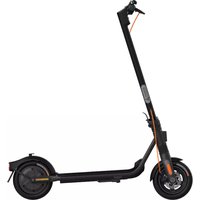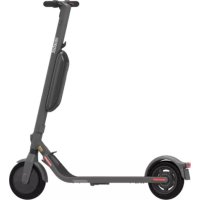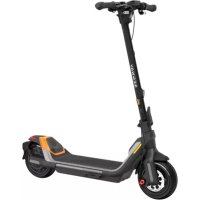
Ninebot KickScooter GT1E - Scooter SEGWAY - Free user manual and instructions
Find the device manual for free Ninebot KickScooter GT1E SEGWAY in PDF.

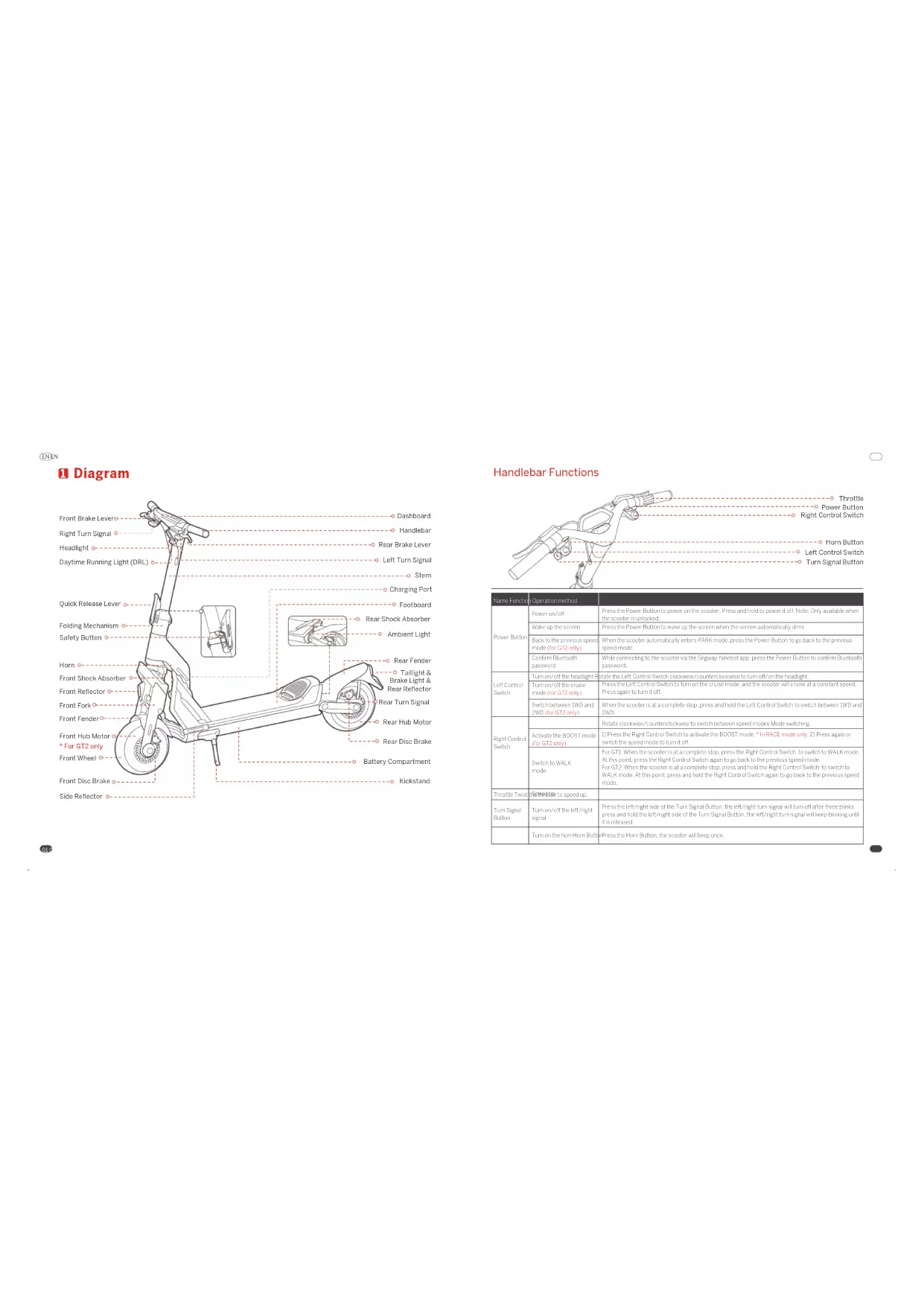


| Product type | Electric scooter |
| Brand | Segway |
| Model | Ninebot KickScooter GT1E |
| Dimensions (unfolded) | Approximately 1485 × 466 × 1300 mm |
| Dimensions (folded) | Approximately 1485 × 466 × 800 mm |
| Net weight | Approximately 45.4 kg |
| Battery | Li-ion 60.1 V / 20 Ah (1200 Wh) |
| Charger | MTW806007NCF, 100-240 V, 58.8 V / 0.6 kW |
| Charging time (single) | Approximately 12 h |
| Charging time (dual) | Approximately 6 h |
| Motor | Front hub, 0.5 kW (nominal) / 1.5 kW (max) |
| Maximum speed | 25 km/h |
| Theoretical range | 75 km |
| Maximum slope | 55% |
| Maximum rider weight | 100 kg |
| Tires | Tubeless self-sealing tires, pressure 32 psi |
| Suspension | Adjustable front and rear shock absorbers |
| Brakes | Front and rear disc brakes |
| Speed modes | WALK, PARK, ECO, SPORT, RACE |
| Connectivity | Bluetooth (Segway-Ninebot app) |
| Operating temperature | 10 to 40 °C |
| Storage temperature | -20 to 45 °C |
| Protection rating | IPX4 |
Frequently Asked Questions - Ninebot KickScooter GT1E SEGWAY
User questions about Ninebot KickScooter GT1E SEGWAY
0 question about this device. Answer the ones you know or ask your own.
Ask a new question about this device
Download the instructions for your Scooter in PDF format for free! Find your manual Ninebot KickScooter GT1E - SEGWAY and take your electronic device back in hand. On this page are published all the documents necessary for the use of your device. Ninebot KickScooter GT1E by SEGWAY.
USER MANUAL Ninebot KickScooter GT1E SEGWAY
natural_image
Line drawing of a modern electric scooter with two wheels and front-mounted sensors (no text or symbols)SEGWAY GT
Product Manila
Original Instructions
ENIN
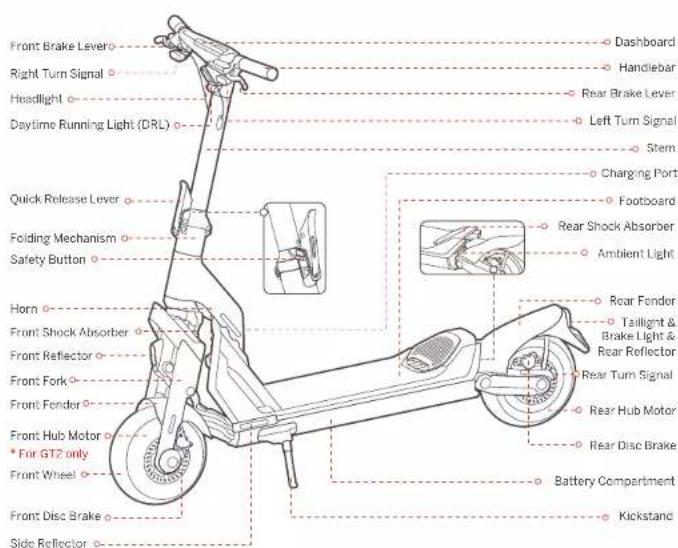
1 Diagram
text_image
Front Brake Levero Right Turn Signal Headlight Daytime Running Light (DRL) Quick Release Lever Folding Mechanism Safety Button Horn Front Shock Absorber Front Reflector Front Fork Front Fender Front Hub Motor * For GT2 only Front Wheel Front Disc Brake Side Reflector Dashboard Handlebar Rear Brake Lever Left Turn Signal Stem Charging Port Footboard Rear Shock Absorber Ambient Light Rear Fender Taillight & Brake Light & Rear Reflector Rear Turn Signal Rear Hub Motor Rear Disc Brake Battery Compartment Kickstand0
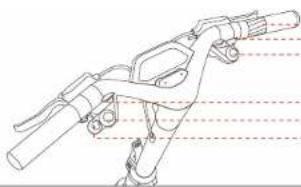
Handlebar Functions
natural_image
Technical line drawing of a mechanical device with no visible text or symbolsO
Throttle
--- Power Button Right Control Switch
Hom Button
Left Control Switch
Turn Signal Button
| Name/关键词 | Operation method | |
| Power Button | Power button | Press the Power button to power on the scooter... press and hold to power to off. Note Only available when one scooter is unlocked. |
| Wake to the scooter | Press the Power Button in wake up the screen when the communication drinks. | |
| Back to the previous speed mode (for GT2 only) | When the scooter is normally enters PARK mode, press the Power Button to go back as the previous speed mode. | |
| Confirm Bluetooth password | While connecting to the scooter via the Bography-line based, press the Power Button to confirm bluestco password. | |
| Left Control Switch | Anion/alt the headgtrid | Obate the Left Control System switches/separate clockwise to turn all in the headgtrid. |
| Turn-off/alt pump mode (for GT2 only) | Press the Left Control Switch to turn the cruise mode and the scooter will cruise at a constant speed. Pass again to turn off. | |
| Switch between DVD and 2WD (for GT2 only) | When the scooter is all a complete stop, press and hold the Left Control Switch to switch between DVD and 2WD. | |
| Right Control Switch | Rotate clockwise/counterndrowsy to switch between speed modes. Made welcoming. | |
| Activate the BOOT mode (for GT2 only) | It: Press the Right Control Switch to activate the BOOT mode. * In RACT mode only, 2) Print again or switch the speed mode to turn off. | |
| Switch to WALK mode | For GT2: When the scooter is all a complete stop, press the Right Control Switch to switch to WALK mode. At this point, press the Right Control Switch againing to get back for the previous speed mode. For GT2: When the scooter is at a constant stop, press and hold the Right Control Switch to switch to WALK mode. At this point, press and hold the right Control Switch againing to go back to the previous speed mode. | |
| Trottle Twist | Lift/minute to speed up | |
| Turn Signal Button | Turn-off/alt the left/right signal | Press the left/right side of the Turn Signal Button, the left/right signal posted Turn-off after three breaks, press and hold the left/right side of the Turn Signal Button, the left/right signal will drop/barking until it is released. |
| Turn on the left turn Button | Press the Left Button, the scooter will bounce once. |
ENIN
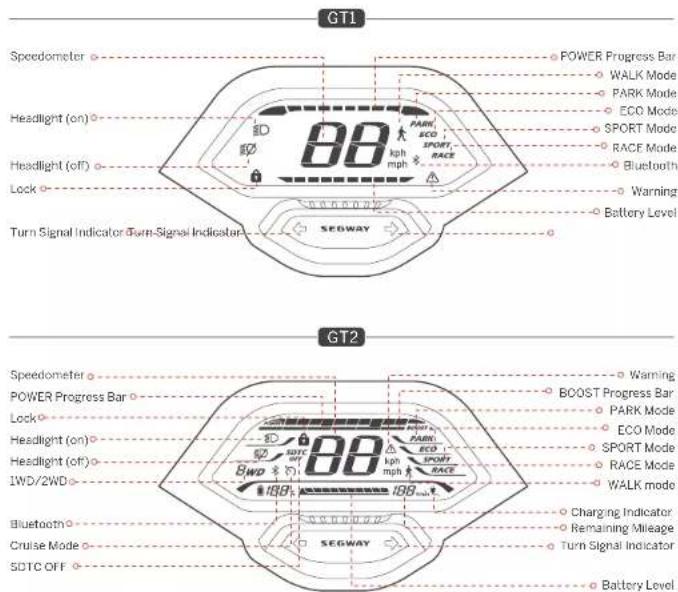
Dashboard
text_image
GT1 Speedometer ○ POWER Progress Bar ○ WALK Mode ○ PARK Mode Headlight (on) ○ ECO Mode ○ SPORT Mode ○ RACE Mode Headlight (off) ○ Bluetooth ○ Warning ○ Battery Level Lock ○ Turn Signal Indicator Turn-Signal Indicator SEGWAY GT2 Speedometer ○ Warning POWER Progress Bar ○ BOOST Progress Bar ○ PARK Mode ○ ECO Mode Headlight (on) ○ SPORT Mode ○ RACE Mode Headlight (off) ○ WALK mode IWD/2WD ○ 8WD ○ 188° 188° Bluetooth ○ Charging Indicator Cruise Mode ○ Remaining Mileage SDTC OFF ○ Turn Signal Indicator SEGWAY ○ Battery Level03
| Symbol | Name Description | Meaning | |
| POWER | POWER Progress Dot | The symbol displays the motor output power of the scooter. | |
| BB | Speedometer | The symbol excels the current space of the scooter. | |
| SOTC OFF | SOTC20H (11/25) | The surfboard indicates that the SOTC Regway Pyramid Tractor County feature is off | 1) With two wheel drives, SOTC feature is auto-on in main RACE modes. Note: this feature helps skew and wheel slapping and transfer stable when accelerating. 2) With one wheel drive SOTC feature is taken off in RACE mode. |
| Cruise Mode (C'2) | The symbol indicates that the Cruise mode is activated. | 1) In BCO, SPOT or WOC mode press to Fort Control Switch to turn on the cruise mode when the scooter is 3 limit (3 km/h). Once turned on the scooter will increase at the current rates. 2) Turn off the cruise mode with the following remote. Method 2: Does the travel or sequence take over. Method 2: Focus that off Control Switch. Method 4: Stop the speed mode. △ 100 VOT turn or the cruise mode in camolly environment, had weather or superioric road conditions. Service's danger or injury may occur. | |
| Lock | When the front falls-up it meets the scooter is closed. | When the scooter is locked via the Segway Network app: 1) The scooter will do track more seconds, or this point press the Power Bitron to wake in the room. 2) The scooter will sound the alarm with flashing lights when it is moved for 3 seconds. 3) The scooter will keep keeping which has moved to 10 seconds, and if the scooter's move again to the 10 seconds, the beep or knot stop. When the scooter is unlocked it and automatically power off if there is no operation within 10 minutes. Note: Enable/Disable. It is because via the Segway Network app. | |
| 8WD | 190V200(012) | The fan. Will indicate that the scooter is into one wheel driver mode. The fan 2WD indicates that the scooter is in the two-wheel driver mode. | |
| 1001 | Battery Lever (GT2) | The symbol displays the remaining battery cover in battery percentage and battery bar. | |
| Battery Lever (GT-1) | The symbol olishes the remaining battery cover in battery car. | ||
| BOOST | ROAST Progress Rev(GT2) | The symbol displays the remaining vehicle on a stationary time of the 800% mode. | 1) Press the Hip Control Switch to activate the 800S mode. "In RACE mode only. 2) Twist the track to an electric faster. 3) Press the Hip Control Switch appear or switch the speed mode to turn it off. △ When the 800S mode is activated, the scooter will communicate faster. 100 VOT apply this feature in complete environments, bad weather or undesirable road conditions. Serious danger or injury may occur. |
| Bluecool | The symbol indicates that, the scooter is connected to the Segway Network app. | ||
| Warning | The symbol indicates that the scooter has detected an error. The error code will display on the second. See page 8 for possible causes and solutions. | ||
| 188min | Remaining Mirage | The symbol indicates the remaining mileage of the scooter. | |
| Charging indicator | The symbol indicates that the scooter is charging. | ||
O
04
ENIN
Speed Modes Introduction
| Mode/mode | G71(Speed/mm) | G72(Speed/mm) | Enabling methods |
| (WALK) | 3.7 mph(4 km/h) | 3.7 mph(6 km/h) | D/When the scooter is at a complete stop, please the Right Control Switch.21 for GT2 press the Right Control Switch For GT2 press and hold the Right Control SwitchNote, in this mode, both the Ultra style to walk with the scooter at a low speed. |
| PARK | Orbit(5 km/h) | Orbit(0 km/h) | Diffocate the Right Control Switch.21 for GT2. When the scooter is ECO SPORT, or RACE mode, it will also actually enter PARK mode in the following circumstances:Park or stop for more than 6 seconds after landingPark or stop for more than 20 seconds when not riding.*All lines point press the Power Edition to get back to the previous mode. |
| ECO | 15.6 mph(25 km/h) | 24.9 mph(40 km/h) | Rollerone Right Control Switch |
| SPORT | 15.6 mph(25 km/h) | 24.6 mph(20 km/h) | Rollerone Right Control Switch |
| RACE | 15.6 mph(25 km/h) | 24.5 mph(20 km/h) | Rollerone Right Control Switch |
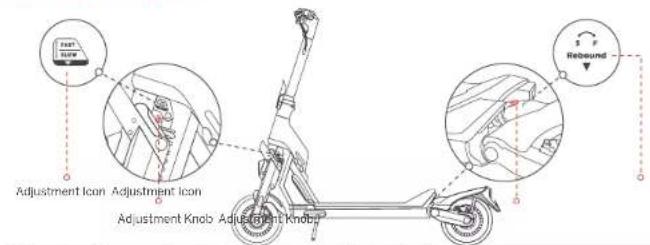
Damper Adjustment
text_image
Adjustment Icon Adjustment Icon Adjustment Knob Adjustment Knob ReboundS (Slow rebound): Increase rebound resistance by rotating the Adjustment Knob clockwise. F (Fast rebound): Decrease rebound resistance by rotating the Adjustment Knob counter clockwise Note: The damper is set to the default position before leaving the factory. Please follow the steps above to adjust it according to your riding help.
Specifications
| Rear Parameter | |||
| Product | Name | Sagway Super-Spanroster GTI | Sagway Super-Scamco (ST) |
| Model | GT I | 972P | |
| Length × Width × Height | Approx. 58.5 × 25.6 × 50.5m (485 × 626 × 1304 mm) | ||
| Follow Length × Width × Height | Approx. 58.5 × 25.6 × 33.5 m (1425 × 656 × 5600 mm) | ||
| Net Weight | Approx. 47.6 kg (200 lbs) | Approx. 52.6 kg (11⁄2 lb) | |
| Power | Max. Payload | 150 kg (331 lbs) | |
| Recommended Apa | 17-60 years old | ||
| Required Height | 3.1" BPa (120, 200 cm) | ||
| Machine | Wheelbase | 4x2 in (114/2 mm) | |
| Ground Clearance | 5.5 in (40 mm) | ||
| Drive System | 1WD (One-wheel drive) | PWP (Ten wheel miles) | |
| Max. Speed | Approx. 15.5 m/s (25 km/h) | Approx. 41.5 m/s (70 km/h) | |
| Technical Range* | Approx. 48.5 miles (70 km) | Approx. 95.5 miles (90 km) | |
| Typical Range | N/A | Approx. 37.3 miles (50 km) | |
| Max. Slope | Approx. 25% | Approx. 30% | |
| Transverse Terrain | Aschalt/Eat pavement; obstacles < 1.5 m (3 cm); gap < 1.5 m (3 cm) | ||
| Operating Temperature | (5 to 40°C) (14 to 104°C) | ||
| Size: Temperature | (1 to 40°C) / (7 to 12°F) | ||
| IP Rating | IP×4 | ||
| Duration of Charging (singing) | Approx. 1°F | Approx. 15 h | |
| Duration of Charging (due) ° | Approx. 8 ft | Approx. 6 ft | |
| Battery | Model | NOA75020A | NOA75020A |
| Nominal Voltage | 50.4V= | ||
| Max. Charging Voltage | 58.5 V= | ||
| Nominal Energy | 1000 Wh | 1512 Wh | |
| Nominal Capacity | 20 Ah | 30 Ah | |
| Charging Address Temperature | 0 to 40°C (8 to 104°F) | ||
| Battery Management System | Over-rating, short circuit, over current, over discharge and over-charge protection | ||
| Motor | Motor Type | Air codes: Inductor | |
| Nominal Power | 0.5 kW, 500 W | 15 kW/2, 1000 W/2 | |
| Max. Power | 1.5 kW, 1500 W | 3 kW/2, 3000 W/2 | |
05
O
05
ENEN
| Item Parameter | ||
| Charper | Maxel | NEW8809020DD |
| Input Voltage | 100-245V | |
| Max. Output Voltage | 56.8 Vrms | |
| Output Power* | 0.1 kW, 116.5 kW | |
| Power Corpus | 57.8 V=2.0A | |
| Tire | Typic | 11 min Self-releasing sublease fires |
| Tire Pressure | 32 psi | |
| Material | Rubber | |
| Others | Speed Mode | WA, K mode, PARK mode, DCO mode, SPORT mode and RACF mode |
| Superpass System | Front and rear spring subs session | |
| Front and rear adjustable damper | ||
| Drake System | Front & Rear disc brackets | |
| Bluetooth | Frequency Band(s) | 2.4000-2.4830 GHz |
| Max. In Power | 20 m3 |
[1] Theoretical Range lesions while riding with a full battery, 75 kg (135 lbs) load, 25°C (77°F), at the spool of 12.4 mph (20 km/s) or average on pavement
[2]: Typical range tested while rising with a full battery, 75 kg (106 lbs) each, 25°C (7/°C), at the speed of 24.9 mol (10 km/h) or average on pavement.
* Some of the factors that affect range-malance speed, number of solar and slope, ambient temperature are, etc.
[3]. Single charging rate input current up to 7 Amps when charging with single charger.
Dual charging-rated input current up to 4 Amps when charging with two chargers specified by the manufacturer.
Common Failures and Solutions
| Error code | Passable causes Solution | |
| 0 | Throttle abnormality | Please contact after sales service or an authorized dealer. |
| 1 | Dashboard communication failure | |
| 2 | Battery communication failure | |
| 3 | Turn signals abnormality | |
| 4 | Headlight abnormality | |
| 5 | Water detection in stem top | |
| 6 | Over-voltage protection of motor controller | |
| 7 | Under-voltage protection of battery/motor controller | Please try to charge the scooter. |
| 8 | High scooter temperature | Please try to apply heat dissipation for the scooter. |
| 9 | High battery temperature | Please try to apply heat dissipation for the scooter. |
| 10 | Low battery temperature | Please try to warm up the scooter. |
| 11 | High front drive wheel temperature | Please try to apply heat dissipation for the front drive wheel. |
| 12 | Front drive wheel stall | Please restart the scooter and try again. |
| 13 | Front drive wheel current sensor error | Please contact after sales service or an authorized dealer. |
| 14 | Front-drive wheel over-current | Please restart the scooter and try again. |
| 15 | Front-drive wheel motor phase failure | Please contact after sales service or an authorized dealer. |
| 16 | High rear drive wheel temperature | Please try to apply heat dissipation for the rear drive wheel. |
| 17 | Rear drive wheel stall | Please restart the scooter and try again. |
| 18 | Rear drive wheel current sensor error | Please contact after sales service or an authorized dealer. |
| 19 | Rear drive wheelover current | Please restart the scooter and try again. |
| 20 | Rear-drive-wheel motor phase failure | Please contact after sales service or an authorized dealer. |
| 21 | Rear motor hall sensor error | |
| 22 | Front motor hall sensor error |
EN EN
Certifications
This product is certified to ANSI/CAN/UL-22/2 by CSA Group.
The battery complies with UV/DOT 38.3
The battery complies with AN31/CAN/U-227
European Union Compliance Statement
Information on Disposal for Users of Waste Electrical & Electronic Equipment

This symbol on the product or its packaging indicates that used electrical and electronic products should not be mixed with unsorted municipal waste. For proper treatment, it is your responsibility to dispose of your waste equipment by a ranging to return it to designated collection points.
Discosing of this product correctly will help save valuable resources and prevent any potential negative effects on human health and the environment, which could otherwise arise from inappropriate waste handling.
Penalties may be applicable for incorrect disposal of this waste, in accordance with your national legislation. Please contact your local authority for further details of your nearest designated collection point.
Battery recycling information for Users

This symbol means that batteries and accumulators, at their end of life, should not be mixed with unsortec municipal waste. Your particular is an important part of the effort to minimize the impact of batteries and accumulators on the environment and on human health. For proper recycling you can return this product or the batteries or accumulators it contains to your supplier or to a designated collection point.
Disposing of this product correctly will help save valuable resources and prevent any potential negative effects on human health and the environment, which could otherwise arise from inappropriate waste handling.
Penalties may be applicable for incorrect disposal of this waste, in accordance with your national legislation, there are separate collection systems for used galleries and accumulators.
Please, dispose of batteries and accumulators correctly at your local community waste collection/recycling center.
Radio Equipment Directive
Ninebot (Changzhou) Tech Co., Ltd. hereby declares that the product listed in this section comply with the essential requirements and other relevant provisions of the Radio Equipment Directive 2014/53/EU.
Restriction of the use of certain hazardous substances (RoHS) Directive
Nimobol (Changzhou) Tech Co., Ltd. hereby declares the whole product including parts (cables, cords, and so on) meets the requirements of RoHS Directive 2017/65/EU and amendment Commission Delegated Directive (EU) 2015/883 on the restriction of the use of certain hazardous substances in electrical and electronic equipment ("RoHS recast" or "RoHS 2.0").
Machinery Directive
Minobol (Changzhou) Tech Co., Ltd. hereby declares that the product listed in this section comply with the essential requirements and other re-even provisions of the Machinery Direct, as 2006/7/2/LC.
CE
LU Authors and Representative
Sogay-Ninobe, EML?
Dynamostast 7. 014 BN Amsterdam. The Netherlands.
Ninehot (Changzhou) Tech Co. Ltd. hereby declares that the product model GTIF, GT2P comply with the essential requirements and other re-variant provisions of the Bao Equipment Directive 20.4/63/CU, the machinery directive 2006/42/EC and the Roll IS Directive 2011/65/CU and armament Commission on Dislegated Directive 2015/853 The declaration of conformity can be viewed at the following address: http://e.m-segway.com/support/instructions
UK Compliance Statement
Radio Equipment Regulations 2017
Ninobol (Changzhou) Tech Co., Ltd. hereby declares that the product listed in this section company with the essential requirements and other relevant provisions of Radio Equipment Regulations 2017.
The Restriction of the Use of Certain Hazardous Substances in Electrical and Electronic Equipment Regulations 2012
Ninebot (Changzhou) Tech Co., Ltd. hereby declares the whole product including parts (cables, cords, and so on) meets the requirements of The Restriction of the Use of Certain Hazardous Substances in Electrical and Electronic Equipment Regulations 2012.
EN EN
Supply of Machinery (Safety) Regulations 2008
Ninebot (Changzhou) Tech Co., Ltd. hereby declares that the product listed in this section comply with the essential requirements and other relevant provisions of The Safety of Supply of Machinery (Safety) Regulations, 2008.
UKCA
UK Authorised Representative:
UKCA Experts Ltd
Dept 302, 43 Ovston Road Gardcroft, Doncaster, DNG SDA, United Kingdom
Ninebot (Changzhou) Tech Co., Ltd. hereby declares that the product model GTIE, G-2* comply with the essential requirements and other relevant provisions of the Radio Equipment Regulations 2017, Supply of Machinery (Safety) Regulations 2008 and the Restriction of the Use of Certain Hazardous Substances in Electrical and Electronic Equipment Regulations 2017.
The declaration of conformity can be viewed at the following address: www.segway.com

Trademark
Segway, Segway CT, Segway Nineoot and the Rider Design are the trademarks of Segway Inc., Android is the trademark of Google Inc., App Store is a service mark of Apple Inc. The respective owners reserve the rights of their trademarks and copyrights, etc. referred to in this manuscript.
We have attempted to include descriptions and instructions for the functions of the SuperScoter at the time of printing. However, due to constant improvement of product features and changes of design, your SuperScoter may differ slightly from the one shown in this document. Scan the QR Code on the cover of this manual, or visit the App e app Store (OS) or the Google Play Store (Android) to download and install the Sogway-Nimbus. App: Please note that there are multiple Sogway and Nirobot models with different functionals, and some of the functions mentioned here may not be applicable to your unit. The manufacturer reserves the right to change the design and functionality of the SuperScoter product and documentation without prior notice.
© 2022 Ninscot (Beijing) Tech Co. Ltd. Rights reserved.
(※ The Segway-NircoBot App can support Super Scooter with built-in Bluetooth)
11
O
12

1
Scan the QR code to download the Segway-Ninebot app

SEGWAY
natural_image
Line drawing of a modern electric scooter with visible wheels and suspension (no text or symbols)The manufacturer reserves the right to make changes to the product, release firmware updates, and update this manual at any time.
Visit www.segway.com or check the Segway-Ninebol app to download the latest user materials. You must install the app, activate your scooter, and obtain the latest updates and safety instructions.
The pictures shown are for illustration purposes only. The actual product may vary
SEGWAY GT
Manuel du produit
Ce product:est. cerulé ANSI/CAN/UL-22/2 by CSA Group
Amsterdam, Ice Netherlands
natural_image
Line drawing of a modern electric scooter with two wheels and a side-mounted seat (no text or symbols)Amsterdam, the Netherlands
natural_image
Line drawing of a modern electric scooter with two wheels and a side-mounted seat (no text or symbols)SEGWAY GT
natural_image
Technical line drawing of a mechanical device with no visible text or symbolsAcceleratore
DN Amsterdam, The Netherlands
natural_image
Line drawing of an electric scooter with extended body and wheels (no text or symbols)natural_image
Technical line drawing of a mechanical device with no visible text or symbolsAcelerador
Botón de encendido
Amsterdam, The Netherlands
natural_image
Line drawing of a modern electric scooter with two wheels and a handle (no text or symbols)Sequence Number EMEA, Dynamics trial 7, 1014 EN
Amsterdam, The Netherlands