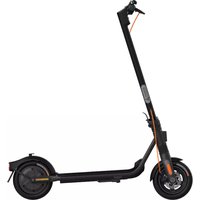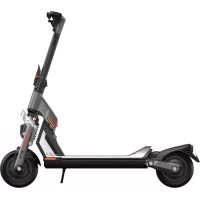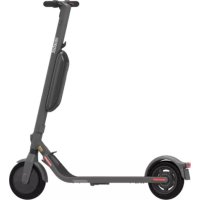
Ninebot KickScooter P65I - Scooter SEGWAY - Free user manual and instructions
Find the device manual for free Ninebot KickScooter P65I SEGWAY in PDF.



User questions about Ninebot KickScooter P65I SEGWAY
0 question about this device. Answer the ones you know or ask your own.
Ask a new question about this device
Download the instructions for your Scooter in PDF format for free! Find your manual Ninebot KickScooter P65I - SEGWAY and take your electronic device back in hand. On this page are published all the documents necessary for the use of your device. Ninebot KickScooter P65I by SEGWAY.
USER MANUAL Ninebot KickScooter P65I SEGWAY
EN The pictures show are for illustration purposes only. The actual product may vary
- Diagram and Functions 01
- Specifications 05
- Common Failures 07
- Certifications 08
- Trademark 10
1 Diagram and Functions
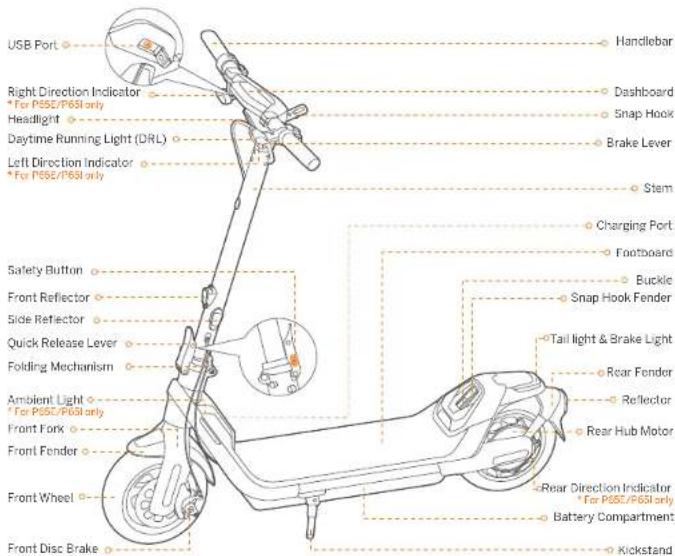
text_image
USB Port Right Direction Indicator *For PSSE/P65I only Headlight Daytime Running Light (DRL) Left Direction Indicator *For PSSE/P65I only Safety Button Front Reflector Side Reflector Quick Release Lever Folding Mechanism Ambient Light *For PSSE/P65I only Front Fork Front Fender Front Wheel Front Disc Brake Handlebar Dashboard Snap Hook Brake Lever Stem Charging Port Footboard Buckle Snap Hook Fender Tail light & Brake Light Rear Fender Reflector Rear Hub Motor Rear Direction Indicator *For PSSE/P65I only Battery Compartment KickstandO
01
EN EN
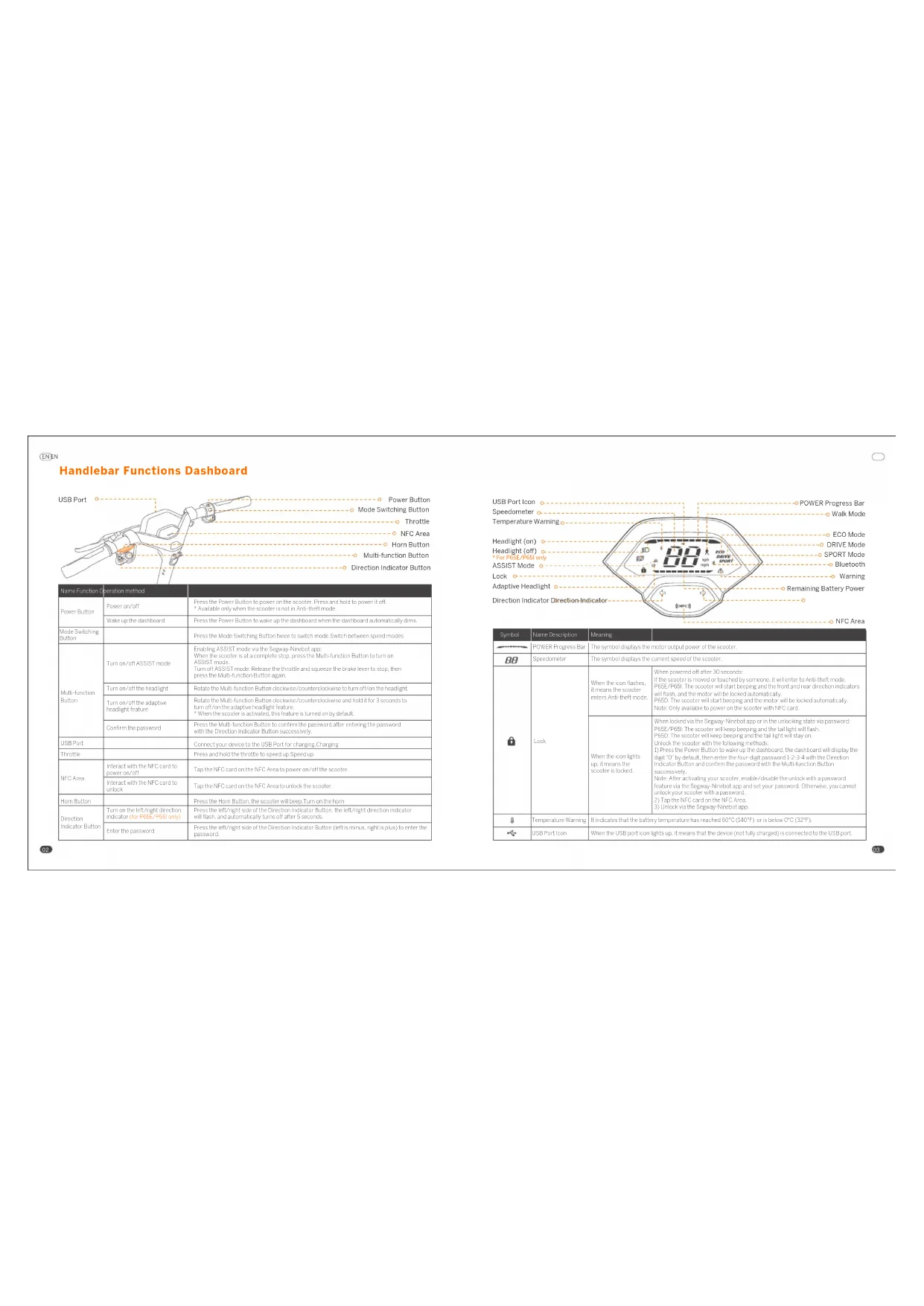
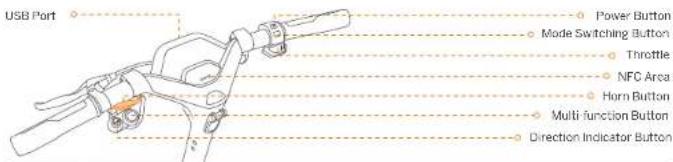
Handlebar Functions Dashboard
text_image
USB Port Power Button Mode Switching Button Throttle NFC Area Horn Button Multi function Button Direction Indicator Button| Name of Function Operation Method | ||
| Power Button | Power convert | Press the "Power Button" to power on the socket. Press and hold to power it on. * Available only when the socket is not in account, mode. |
| Wake up the clock board | Press the "Power Button" to wake up the keyboard when the clock board automatically dm's. | |
| Mode Switching Button | Press the "User Switching Button" twice to switch mode Switch between speed modes | |
| Multi-function Button | Turn-off/ASSIST mode | Exploring ASSIST mode via the Segener-Nietyl-coop. When the socket is a complete stop press the Multi-function Button to turn-off ASSIST mode. Turn-off ASSIST mode: Release the timing and square the brake level to stop, then press the Multi-function Button again. |
| Turn-off/the headlight | Rotate the Multi-function button close-on/counter clockwise to turn-off on the headlight. | |
| Turn-off/the adaptive headlight feature | Rotate the Multi-function button close-on/counter clockwise and hold for 5 seconds to turn-off on the adaptive headlight feature. * When the socket is read-on, this feature is turned on by default. | |
| Control the password | Press the Multi-function Button to turn-off the password after entering the password within the Direction Indicator Button successfully. | |
| USB Font | Connect your device to the USB Plant to charging Charging. | |
| Stroke | Press and hold the stroke to be saved up. | |
| MFC Area | Interact with the NFC card to power slot | Tap free NFC card on the NFC Area. In power on/off the socket. |
| Interact with the NFC card to unlock | Tap free NFC card on the NFC Area to关闭 the socket. | |
| Hunt Button | Press the Hunt Button the socket to keep Turn or the turn. | |
| Direction Indicator Button | Turn on the left/right direction indicator the AFC/Right/Right | Press the right/right side of the Direction Indicator Button, the left/right direction indicator will then, and automatically turn off after a season. |
| Enter the password | Press the left/right side of the Direction Indicator Button (left, as minus, right, top) to enter the password. | |
02
text_image
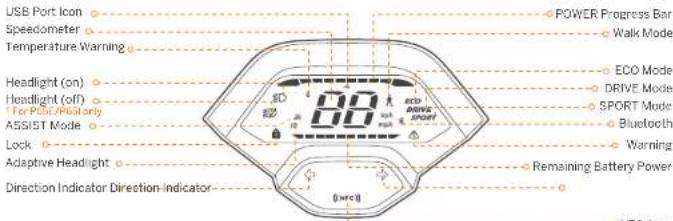
USB Port Icon Speedometer Temperature Warning Headlight (on) Headlight (off) For PSIC/Phot-only ASSIST Mode Lock Adaptive Headlight Direction Indicator Direction-Indicator POWER Progress Bar Walk Mode ECO Mode DRIVE Mode SPORT Mode Bluetooth Warning Remaining Battery Power| Symbol | Name Description | Warning | |
| POWER Progress Bar | The symbol displays the more outabal power of the scooter. | ||
| BB | Speedometer | The symbol displays the current speed of the scooter. | |
| Lock | When the controller is means the scooter enters Anti-melt mode. | When power is on other so soon: If the scooter is known as touched by someone it will listen to Anti-theft mode, *62#/1955. The scooter will start bending and the front and rear direction indicators will turn and monitor the backled automatically. *65d. The scooter will start ceeping and the motor will be locked automatic at only. Note: Only available to power on the scooter with NFC card. | |
| When the controls do, I means the scooter locked. | When looked up at the gateway. None start up on in the unlocking store via password of R637/P65. The scooter will keep stamping and the full light will flash. *66d. If the scooter will keep ringing and the calling well stays on. Unlock the receiver with the following methods: 1) Press the Power Button, before up the dashboard, the backboard will display the digit of default, then press the four digit passwords. 1, 2, 3, 4 with the Direction Indicator Button and down the password within the Multi-atom Button excessively. Note: All to act leading your scooter, enable/disable the unlock will be pressed together with the Regency Ninja app and serve your password. Otherwise, you cannot alter your answer with a password. 2) Take the MCI card on the MCI Arm. 3) Use one on the Regency Ninja app. | ||
| Temperature Warning | 5 indicates that the battery temperature has reached 60°C (340°F) or is below 90°C (32°F). | ||
| USB Post icon | When the disc post can give us, if means that the doctor (or fully charged) is connected to the USB card. |
O
03
LN LN
| Symbol Member/Grace pin | |||
| # | Bluetooth | * indicates that the scooter is connected to the Gateway. Kindle app. | |
| △ | Warning | The symbol indicates that the scooter has defended an error. The error case will display on the keyboard. Please call for, the other sales serve for a train. | |
| -------- | Remaining battery power | The symbol displays the remaining battery power in battery bus. | |
| # | Adaptive Headlight | When the iron flashes, it means the Ruler or highlighted feature is turned on. | When the feature is turned on, the headlight will work automatically to adjust to a variety of situations and conditions and help illuminate the way. |
Speed Modes Introduction
| Mode/mode | P65C(Sport limit) | P65D(Sport min.) | P65S(Start time) | Switching methods |
| (Walk) | 3~5 km/h(1.9~3.7 mph) | 3~5 km/h(1.9~3.7 mph) | 3~5 km/h(1.5~3.7 mph) | Fixed/Double Walk mode via the Regway Machine app.P65C/P65B: The headgrip in always on and flat high will keep flashing in Walk mode.P65C: The headlight and flat light are always on. |
| (ASSIST) | 3~5 km/h(10.3~37 mph) | 3~5 km/h(10.3~37 mph) | 3~5 km/h(10.3~37 mph) | Enacting ASSIST mode via the Regway Machine app.When the scooter in all a corner setup, press the Multi-function button to turn on ASSIST mode.Note: When turned on the scooter will be open side and the front and rear direct uniplicators will flashonce.Turn all ASSIST mode:Release the durable and secure the brake lever to stop, then press the Multi-function button again |
| ECO | 11.2 mph(18 km/h) | 11.2 mph(18 km/h) | 11.2 mph(18 km/h) | Press the Mode Switching Button voice. |
| DRIVE | 1.4 mph(20 km/h) | 12.4 mph(20 km/h) | 12.4 mph(20 km/h) | Press the Mode Switching Button voice. |
| SPORT | 1.5 mph(21.5 km/h) | 12.4 mph(21.4 km/h) | 12.4 mph(20.4 km/h) | Press the Mode Switching Button voice. |
2 Specifications
| Item Parameter | ||||
| Product | Name | Seaway KinkScaster | ||
| Model | *65E | Pilot | Pilot | |
| Length × Width × Height | Approx. 180 × 634 × 124 mm (25.9 × 25 × 47.5 m) | |||
| Length × Width × Height | Approx. 1910 × 634 × 567 mm (46.9 × 25 × 275.5 m) | |||
| Net Weight | Approx. 24kg (10 L / km) | Approx. 27.5 kg (50.6 km) | ||
| Fitter | Max. Payload | 120 kg (265 lbs) | ||
| Recommended Age | 12-50 years old | |||
| Required Height | 150-200 cm (32" - 816") | |||
| Machine | Wheelbase | 903 mm (35.5 m) | ||
| Ground Clearance | Almm (≥1.4 m) | |||
| Max. Speed | Approx. 20km/h (≤ 5 mph) | Approx. 20 km/h (2.4 mph) | ||
| Typical lengtha | Approx. 40km (70.4 miles) | |||
| Max. Slope | Approx. 22% | |||
| Transverse Terrain | Tapey lines, parks, comprises and more of the flat roads conditions are typical Belgian roads | |||
| Controlling Temperature | 10 to 40°C (14 to 104°F) | |||
| Storage Temperature | 10 to 50°C (14 to 120°F) | |||
| IP Rating | PAX | |||
| Duration of Charging angle | Approx. 4h | |||
| Battery | Model | NCAF48(13A)/NCAF48120 | ||
| Nominal Voltage | 45.8V = | |||
| Max. Charging Voltage | 61.6V = | |||
| Nominal Energy | 361 Wh | |||
| Nominal Capacity | 12Ah | |||
| Charging Ambient Temperature | 0.1kw/50°C (32 is 11.3°F) | |||
| Battery Management System | Over-heating, short circuit, over-current, over-osn-chaps and over-charge protection | |||
| Motor | Meter Type | Brushless DC (3" DC) motor | ||
| Nominal Power | 0.5 kW 500W | |||
| Charge | Input Voltage | 100 - 240 V; 50 - 60 L/s; 20 A MAX | ||
| Max. Output Voltage | 54.6V = | |||
| Rated Output | 53.5 V max | |||
| Output Power | 0.36kW 160W | |||
LN LN
| Item Parameters | ||
| Charger | Lyce Built-in | |
| Micro NV8V940508000 | ||
| Tire | Lyce | 10.6 inch Seat sealing tubless arcs |
| Tile Pressure | 30~45 ps | |
| Material | Rubber* | |
| Others | Speed Modems | Walk mode, ASS ST mode, ECO mode, DRIVE mode and SPORT mode |
| Trake System | Tile mode & Tech carcase |
[1] Typical Range tested while riding with a full battery, 165 lbs (75 kg) load, 7°F (25°C), at the speed of 9.3 mph (16 km/h) on average on pavement
(Some of the factors that affect range include speed, number of starts and stops, ambient temperature, etc.

Common Failures
| Error code | Possible causes |
| 10 | OLE Bluetooth communication error |
| 11 | Motor 1A phrase current sampling failure. |
| 12 | Motor 1B phrase current sampling failure. |
| 13 | Motor 1C phrase current sampling failure. |
| 14 | Throttle Hall sensor abnormality |
| 15 | Brake Hall sensor abnormality |
| 16 | Hall sensor abnormality |
| 21 | EMS communication error |
| 22 | EMS password error |
| 23 | EMS default serial number |
| 24 | System voltage detection abnormality |
| 26 | Flash storage error |
| 27 | Control board password error |
| 28 | Motor MOS driver copper bridge short circuit |
| 29 | Motor MOS driver lower bridge error |
| 30 | Program skip error |
| 35 | Vehicle default serial number |
| 38 | Battery temperature sensor error |
| 41 | Direction indicators abnormality |
| 42 | Headlight abnormality |
| 45 | Abnormal bus current op-temp circuit |
EN EN
Certifications
This product is certified to ANSI/CAN/UL-22/2 by UV Rheinland.
The battery complies with CWDOT 38.3
The battery complies with ANSI/CAN/UL-227
European Union Compliance Statement
Information on Disposal for Users of Waste Electrical & Electronic Equipment

This symbol on the product or on its packaging indicates that used electrical and electronic products should not be mixed with unsorted municipal waste. For proper treatment, it is your responsibility to dispose of your waste equipment by arranging to return it to designated collection points.
Disposing of this product correctly will help save valuable resources and prevent any potential negative effects on human health and the environment, which could otherwise arise from inappropriate waste handling.
Penalties may be applicable for incorrect disposal of this waste, in accordance with your national legislation.
Please contact your local authority for further details of your nearest designated collection point.
Battery recycling information for the European Union

This symbol means that batteries and accumulators at their end-of-life, should not be mixed with unsorted municipal waste. Your participation is an important part of the effort to minimize the impact of batteries and accumulators on the environment and on human health. For proper recycling you can return this product or the batteries or accumulators it contains to your supplier or to a designated collection point.
Disposing of this product correctly will help save valuable resources and prevent any potential negative effects on human health and the environment, which could otherwise arise from inappropriate waste handling.
Penalties may be applicable for incorrect disposal of this waste, in accordance with your national legislation. There are separate collection systems for used batteries and accumulators.
Please, dispose of batteries and accumulators correctly at your local community waste collection/recycling center
Radio Equipment Directive
Ninebot (Changzhou) Tech Co., Ltd. hereby declares that the product listed in this section comply with the essential requirements and other re-even provisions of the Rac e Equipment Directive 2024/63/LU.
Restriction of the use of certain hazardous substances (RoHS) Directive
Ninehot (Changmout) Tech Co., Ltd. hereby declared the whole product including parts (cables, cords, and so on) meets the requirements of RoHS Directive 2017/65/FU and amendment Commission Delegated Directive (FU) 2015/663 on the restriction of the use of certain hazardous substances in electrical and electronic equipment ("RoHS recast" or "RoHS 2.0").
Machinery Directive
Ninebol (Changzhou) Tech Co., Ltd. hereby declares that the product listed in this section comply with the essential requirements and other relevant provisions of the Machinery Directive 2006/12/EC.
CE
LD Authorised Representative
Segway-Ninebot Europe
Dynamosial / 1014 EN Amsterdam, The Netherlands.
Nincourt (Changzhou) Tech Co., Ltd. hereby declares that the product model P55C, P55D, P65I comply with the essential requirements and other relevant provisions of the Radio Equipment Directive 2014/53/FLU, the machinery directive 2006/42/FC, and the RoHS Directive 2011/65/FU and amendment Commission Delegated Directive (FU) 2015/863.
The declaration of conformity can be viewed at the following address. http://cu-en.segway.com/support-instructions
UK Compliance Statement
Radio Equipment Regulations 2017
Ninebot (Changzhou) Tech Co., Ltd, hereby declares that the product listed in this section comply with the essential requirements and other relevant provisions of Radio Equipment. Regulations 2017
The Restriction of the Use of Certain Hazardous Substances in Electrical and Electronic Equipment Regulations 2012. Ninseport (Changzhou) Tech Co., Ltd. hereby declares the whole product including parts (cables, cords, and so on) meet the requirements of The Restriction of the Use of Certain Hazardous Substances in Electrical and Electronic Equipment Regulations 2012.
EN
Supply of Machinery (Safety) Regulations 2008
Ninebot (Changzhou) Tech Co., Ltd. hereby declares that the product listed in this section comply with the essential requirements and other relevant provisions of The Safety of Supply of Machinery (Safety) Regulations 2008.

UK Authorised Representative:
UKCA Experts Ltd.
Dept 302, 43 Dwston Road, Carcroft, Doncaster, DND & DA, United Kingdom
Nimbel (Changzhou) Tech Co., Ltd. hereby declares that the product, model, PBB complexs with the essential requirements and other relevant provisions of the Radio Equipment Regulations 2017, Supply of Machinery (Safety) Regulations, 2008 and the Restriction of the Use of Certain Hazardous Substances in Electrical and Electronic Equipment Regulations 2012.
The declaration of conformity can be viewed at the following address: www.segway.com
| Bluetooth | Frequency Bands(s) | 2.4000 - 2.4835GHz |
| Max. RF Power | 70 mW |

Trademark
Segway and the Rider Design are the trademarks of Segway Inc. Android is the trademark of Google Inc. Apo Shore is a service mark of Apple Inc. The respective owners reserve the rights of their trademarks and copyrights, etc. referred to in this manuscript.
We have attempted to include descriptions and instructions for all the functions of the KickScooter at the time of printing. However, due to constant improvement of product features and changes of design, your KickScooter may differ slightly from the one shown in this document. Will the Apple App Store (iOS) or the Goog e Play Store (Android) to download and install the Segway Ninebot App. Please note that there are multiple Segway and Ninebot models with different functions, and some of the functions mentioned herein may not be applicable to your unit. The manufacturer reserves the right to change the design and functionality of the KickScooter product and documentation without prior notice. (※ The Sixway-Nimbot App can support KickScooter with built-in Bluetooth)
© 2022 Nineoot (Beijing) Tech Co. Ltd. A rights reserved.
10
FR
Table des matières
Amsterdam, The Netherlands
Amsterdam, The Netherlands
BNAmsterdam, The Netherlands
Amsterdam, The Netherlands.
| Best Parameter | ||
| 1.000000 | Type | 200000 |
| Model | M8951000000 | |
| 100000 | Outcome | 10.5-10.75% of 100% of 100% of 100% of 100% of 100% of 100% of 100% of 100% of 100% of 100% of 100% of 100% of 100% of 100% of 100% of 100% of 100% of 30 |
| Disease rate (mm/min) | 40.45 psi | |
| Vaccine | Nanha | |
| 100 | Tyrb production | Tyrb spontaneous Tyrb A6957, Tyrb E20, Tyrb S9087, Tyrb BACE |
| Treatment | Hemate, Le zony, Hemate, Stelkary |
Sequence Nineout Europe, Dynamostreal 7, 1014 BN
Amsterdam, The Netherlands
Segway-Ninebot Europe
Radio Equipment Regulations 2017
De Restrictions of the Use of Certain Hazardous Substances in Electrical and Electronic Equipment Regulations 2012
NL NL
Ninebot (Changzhou) Tech Co., Ltd. verlaart Ferbieta The gehele product, inclusif oncendelen (kabels, anseren ondorgelli ke) voldoen aan de disen van de Restriction of the Use of Certain Hazardous Substances in Electrical and Electronic Equipment Regulations 2012.