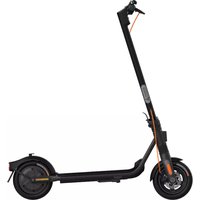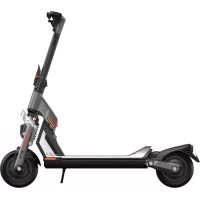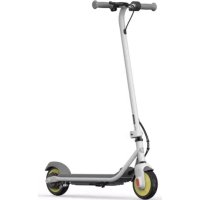
Ninebot GT1 - Scooter SEGWAY - Free user manual and instructions
Find the device manual for free Ninebot GT1 SEGWAY in PDF.



| Product Type | Electric Scooter |
| Brand | Segway |
| Model | Ninebot GT1 |
| Dimensions (unfolded) | Approximately 1485 × 656 × 1308 mm |
| Dimensions (folded) | Approximately 1485 × 656 × 860 mm |
| Net Weight | Approximately 47.6 kg |
| Maximum Rider Weight | 150 kg |
| Battery | Lithium-ion, 1008 Wh, 20 Ah |
| Nominal Voltage | N/A+9020A (according to source) |
| Range (technical) | Approximately 70 km |
| Range (average) | Approximately 40 km |
| Maximum Speed | 60 km/h (RACE mode) |
| Motor | Air-cooled hub motor, 1400 W nominal, 3000 W max |
| Charging Time (single) | Approximately 15 h |
| Charging Time (dual) | Approximately 8 h |
| Tires | Self-sealing tubeless, recommended pressure 35 psi |
| Braking System | Front and rear shock absorber |
| Protection | IPX4 |
| Speed Modes | PARK, ECO, SPORT, RACE |
| Associated App | Segway Ninebot (iOS/Android) |
| Storage Temperature | -20 °C to 45 °C |
| Charging Temperature | 0 °C to 40 °C |
| Maintenance and Cleaning | Clean with a damp cloth, do not use high-pressure water jet |
| Safety | Use a helmet, obey local regulations |
| Spare Parts and Repairability | Contact Segway customer service or an authorized dealer |
| General Information | Certified FCC, IC, compliant with UN/DOT 38.3 standard |
Frequently Asked Questions - Ninebot GT1 SEGWAY
User questions about Ninebot GT1 SEGWAY
0 question about this device. Answer the ones you know or ask your own.
Ask a new question about this device
Download the instructions for your Scooter in PDF format for free! Find your manual Ninebot GT1 - SEGWAY and take your electronic device back in hand. On this page are published all the documents necessary for the use of your device. Ninebot GT1 by SEGWAY.
USER MANUAL Ninebot GT1 SEGWAY
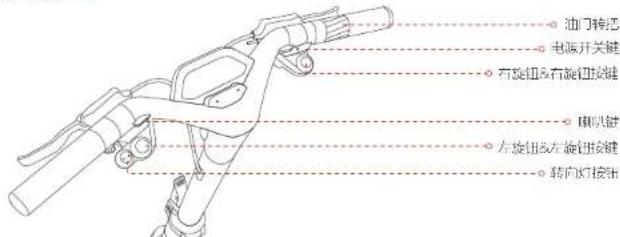
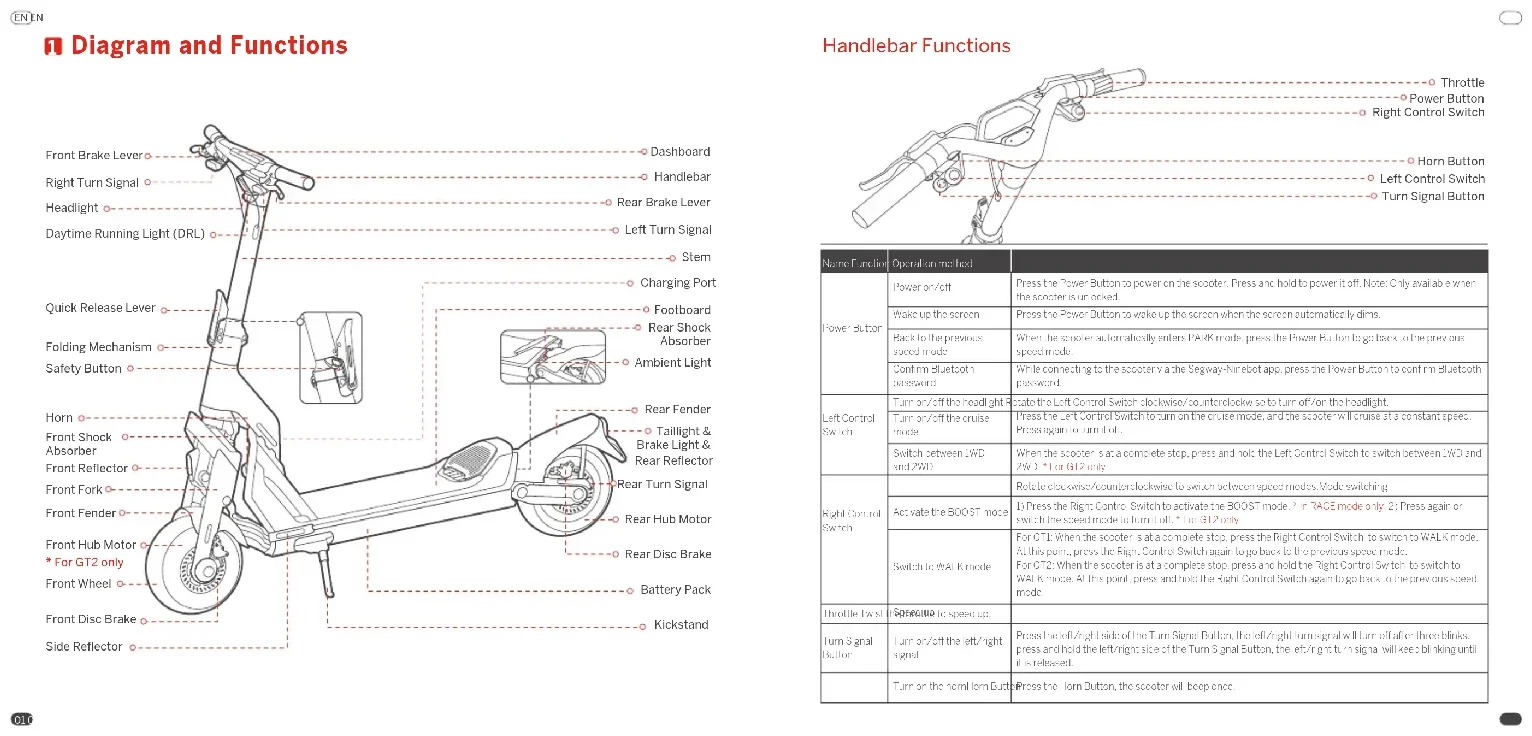
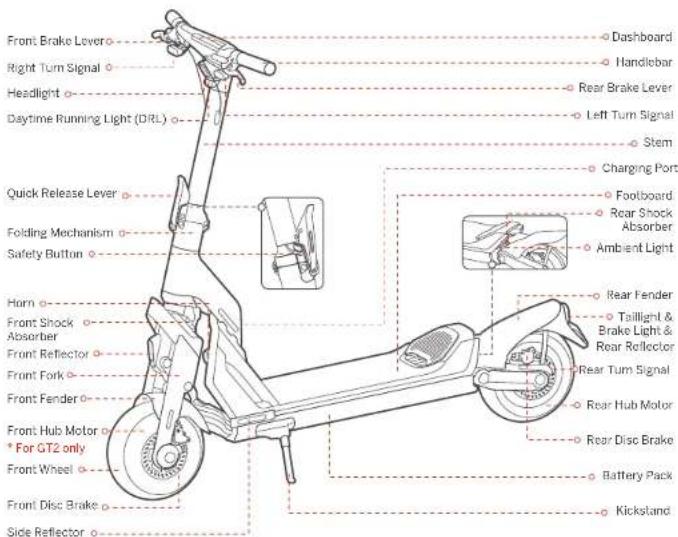
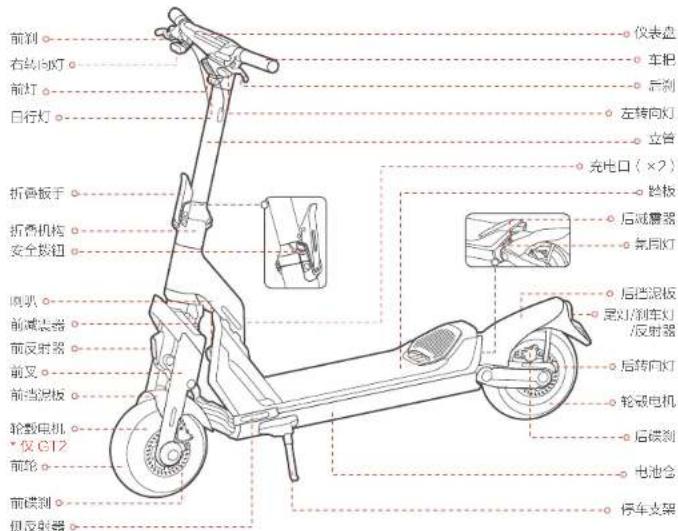
Diagram and Functions
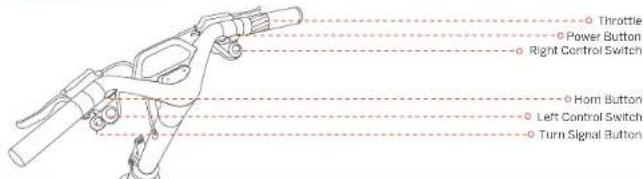
Handlebar Functions
| Name of feature | Operation method | |
| Power Button | Power on/off | Press the Power Switch to power on the scotier. Press and hold to power off. Nortc only available when the sensor is unconnected. |
| Wake up the screen | Press the Power button to wake up the screen when the screen automatically spins. | |
| Track to the previous speed mode | When the accelerometer automatically enters PARK mode, press the Power button to go back to the previous speed mode. | |
| Commune Bluetooth password | Write connecting to the accelerometer via the Sequence Number port, press the Power button to comunete connected password. | |
| I/O Control Switch | Turn-on/off the haptic input | Press the Lock Control Switch to switch between accelerometer sensors to turn off the I/O light. |
| Turn-off the aner mode | Press the Lock Control Switch to turn off the sunruler and the accelerometer will switch the accelerometer speed. Press again for turn off. | |
| Screw between IWD and 2WD | When the steering is at a complete stop, press and hold the Lock Control Switch to switch between IWD and 2WD. For OT2 only. | |
| Rapid Control Switch | Adjustable BCDOT-mouse | Rotate screw/rotors/receptors to switch between speed modes. Mode switching. |
| Switch to WALK mode | For OT2 When the steering is at a complete stop, press the Right Control Switch to switch to WALK mode. At this point, press the Right Control Switch again to go back to the previous speed modes. For OT2 When the steering is at a complete stop, press and hold the Right Control Switch to switch to WALK mode. Altomaintain, press and hold the Right Control Switch against go back to previous speed mode. | |
| Throttle Fan | Bolted to stop-up | |
| Turn-Signa Button | Turn-on/off the Intermotor signal | Press the Intermotor switch of the Turn Signa Button, the Intermotor signal is turned off after three pulses, press and hold the Intermotor signal of the Turn Signal Button, the Intermotor signal will re睁开 braking until it increases. |
| Turn-on the horn-Horn Button | Press the Horn Button, the scotier will be open once. |
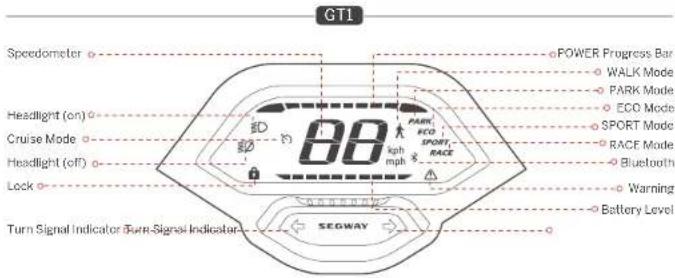
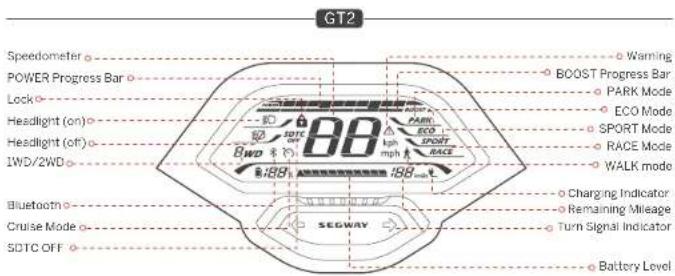
| Symbol | Name/Deseription | Meaning | |
| POWER | POWER Progress Bar | The symbol indicates the motor output power of the scodier. | |
| BB | Speardometer | The symbol indicates the current speed of the scodier. | |
| SDTC OP | SDTCCP (01/2) | The symbol indicates that the SDTC (Seegway Dynamics, Track on Conduy feature is off) | 1 With low speed drop, SDTC feature is unable to run RACF mode. Note: this feature helps prevent wheel slipage and transfer stability when accelerating. 2 With one corner drive, SDTC feature is able to run RACF mode. |
| Cruise Mode | Cruise Mode | The symbol indicates that the Cruise Mode is activated | 3 In ECO, SPOON or WIRE mode, press the Escalator switch to turn on the cruise mode when the speed is ≤ 21 mph (5km/h), Once turned on the scodier will be able at the current speed. 4 Turn off the cruise mode with the following commands: Method 1: Press the throttle or squeeze brake ever. Method 2: Press the left Control Shift. Method 3: Press the speed switch. 5 ON/Off turn on the cruise mode immediately preenormous, head weather or inconsiderable road conditions. Serious danger or injury may occur. |
| Lock | Lock | When the door fails up, it means the scodier is closed. | When the scodier is locked via the Seegay Nervech tool: 1) The scodier will go outside of the vehicle, or the point, press the Power Button to make it open. 2) The scodier will sound the alarm with having lights when it is moved for 3 seconds. 3) The scodier will stop before when it is moved for 10 seconds, and if the scodier is released again within 10 seconds, the booper is stop. When the scodier is unlocked it will automatically power all if there is no operation within 10 minutes. Note: Editable/Enable if inuse via the SeegayNervech tool. |
| BWD | W/P/20000012 | The icon. W/D indicates that the scodier is in the one which w/o driven inside. The scodier. W/D indicates that the scodier is in the two wheeled drive inside. | |
| BHB | Battery Level (0/2) | The symbol displays the remaining battery power in后备 percentage and battery tax. | |
| - | Battery Level (0/1) | The symbol displays the remaining battery power in后备 car. | |
| BOOST | BOOST Progress Bar | This symbol indicates the remaining acceleration time of the BOCB mode. | If Press the Right Control Switch to activate the BOCB mode. In RACF mode only. If Twist the Right Control switch to operate the BOCB mode. If Press the Right Control switch again or set on the speed mode to turn it off. When the BOCB mode is activated, the scodier will associate faster (bocbot) Apply this feature in complete environment. Red weather or undesirable road conditions. Serious danger or injury may occur. |
| Bluecolor | The symbol indicates that the scodier is connected to the Seegay Nervech tool. | ||
| Warning | The symbol indicates that the scodier has exceeded an error. The other code will display on the DS车载 Seepage bar for possible causes and solutions. | ||
| BBG | Removing Mirrors | The symbol indicates the remaining mileage of the scodier. | |
| Changing indicator | The symbol indicates that the scodier is changing. | ||
Speed Modes Introduction
| Mode/mode | ST1 Speed (mm) | ST2 Speed (beats/min) | Resulting mode |
| WALK | 37 mph (40 km/h) | 37 mph (40 km/h) | 1) When the speed is at least one second, violate the High Control Switch 2) or ST1 preemulate the Right Control Switch for ST2 preemption and hold in the Right Control Switch. Note: In this mode, hold the制动 signals off with the accelerator at all speeds. |
| PARK | 0 mph (15 km/h) | 0 mph (15 km/h) | 1) Monitor the High Control Switch. Note: When the speed is in ECOO SHORT or RACE mode, use exhaust normally under PARK mode in the following conditions: 1) Park on stop for more than 5 seconds after riding; 2) Park stop for more than 20 seconds when not riding. *All times quit unless the "proud"驾驶员 stops us before we can move. |
| ECO | 24.9 mph (40 km/h) | 24.9 mph (40 km/h) | 1) Monitor the High Control Switch. |
| SPORT | 37.3 mph (60 km/h) | 43.8 mph (70 km/h) | Release the Right Control Switch. |
| RACE | 37.3 mph (60 km/h) | 43.8 mph (70 km/h) | Release the Right Control Switch. |
Damper Adjustment
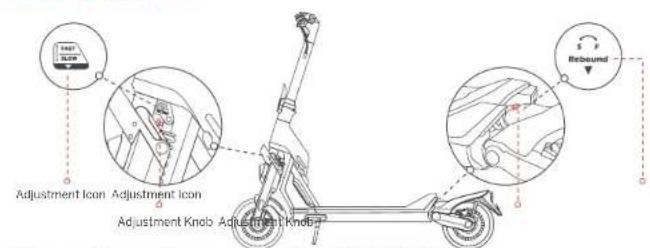
S (Slow reoound) Increase reocund resistance by rotating the Adjustment Knob clockwise. Fost (reohne) Decrease reohund resistance by rotating the Adjustment Knob counterclockwise. Note: The damper is set to the default position before leaving the factory. Please follow the steps above to adjust it according to your riding needs.
Specifications
| Item Parameter | |||
| Product | Name | Segway Summer Solder GTI | Segway SuperScoozer GT2 |
| Model | CTLP | CTLP | |
| Length × Width × Height | Approx. 585×25.5×61.5in (475×65×130mm) | ||
| Policed Length × Width × Height | Approx. 585×25.5×38.5in (475×65×380mm) | ||
| Hot Weight | Approx. 47.6kg (25lb) | Approx. 52.6kg (11.6 lb) | |
| Ruler | Max-刃镗 | 150 kg (88.8 lb) | |
| Recommended Age | 16-60 years old | ||
| Recovery Ratchet | 91% (61% (100%)) | ||
| Machine | Wristbase | 45.2 in (47 mm) | |
| Ground Clearance | 5.5 in (140 mm) | ||
| Drive System | WD (One-wheel drive) | 2WD (Two-standard drive) | |
| Max Speed | Approx. 37.3 mph (50 km/h) | Approx. 45.5 mph (70 km/h) | |
| Lateral Range | Approx. 48 miles (70 miles) | Approx. 55.9 miles (90 miles) | |
| Typical Range | Approx. 31.1 miles (60 miles) | Approx. 57.3 miles (90 miles) | |
| Max Slope | Approx. 20% | Approx. 40% | |
| Leverage Torrment | Assail/Flat pavement, obstacles < 1.2 m (3 cm), gaps < 1.2 m (3 cm) | ||
| Operating Temperature | 105oC/45oC (14 to 104oC) | ||
| Storage Temperature | -20oC/45oC (14 to 104oC) | ||
| IP Rating | IPX4 | ||
| Duration of Charging (single) | Approx. 12 h | Approx. 15 h | |
| Duration of Charging (double) | Approx. 6 h | Approx. 8 h | |
| Battery | Model | NEMA/VAIA NEMA/VAIA | |
| Nominal Voltage | 60.4 V = | ||
| Max Charging Voltage | 66.3 V = | ||
| Nominal Trigny | 100 Ws | 102 Ws | |
| Nominal Capacitance | 20 A/s | 30 A/s | |
| Charging Ambient Temperature | 0°C to 40°C (0°C to 40°C) | ||
| Battery Management System | Over-timing, mini circuit, non-current, over-stich change unit over-charge collection | ||
| Motor | Motor Type | AI motor/ hub motor | |
| Nominal Power | 14kW 1420 W | 15kW 1500W2 | |
| Max Power | 36kW 3000W | 38kW 3000W2 | |
EN EN
| nonParametrix | ||
| Charger | Model NEWW800002000 | |
| Min. Voltage | 300-240V | |
| Max. Output Voltage | 58.8 Vrms | |
| Output Power | 0.1 W, 15.6 W | |
| Screw Capur | 57 R/W = 20 A | |
| Theor | Type | 11 mm Self-reading, adjustable limits |
| Tire Pressure | 32 psi | |
| Material | Rubber | |
| Others | Speed Mode(s) | WAL mode, PARK mode, ECO mode, SPORT mode and RACC mode |
| Suspension System | Front and rear spring in transmission | |
| Front and rear adjustable damper | ||
| Follower System | Front & Rear disc brakes |
[1] Wimings is byarly legally to comply with your local law and regulation when using this product. In the Umeus States, in certain States, an electric kickboxer is not allowed to be used on public roads (i.e., "on road"), if a maximum speed capacity, weight and/or other features do not correspond with the mandatory requirements imposed by any will respect to maximum speed manually or himation, certain film are not allowed that an electric kickboxers' maximum speed capacity shall be copredal / limited to 50 specific miles per hour" is the car's purpose, and the limo/limi zones in different lanes. By way of examples, the Shlated had impuuch such maximum speed capacity rostrction nolow New York, Florida, Arizona, New Jersey etc. In the event you intend to use this product on reakin a State that imposes such maximum speed capacity restriction, you MLSTecpact a proper lower speed mode of this Product to assure the product's maximum speed ciurity under such speed mode complies with the law. In the event the maximum speed capacity of the owerest speed mode or this product has everexceeds the maximum speed capacity restriction imposed by a State for on road use, you shall not use this product on road in that State - furthermore, a State may have no law regulating on rode use of this product, such as maximum speed requirement and/or helmet requirement. In addition to State law, there may be further restrictions or provisions on use of electronic devices by local law and/or regular cars. For of broad use of this product, there may be other restrictions and/or limitations imposed by the property owner or others. The Appit of the product may provide additional useful information related to the matter.
Disclaimer: this is not a legal opinion or legal advice. The information provided herein (including in the App) is for your convenience and information purpose only. It is not intended to cover every piece of law and/or regulation that may be applicable to this product. Segway and Ninebot explicitly hereby disairm any and all warranty and/or representation, express or implied, related to completeness, accuracy, up to date of such information. Segway and/or Ninebot reserves the right but not obligation to correct, implement and/or update the information. You shall use the information at your own risk. It is your sole responsibility to learn and understand any and all the law and/or regulation, requirements, prohibition, restriction and/or limitation imposed by either law, government authority, court, private party or the others that may apply to your use of this product.
[2] Theoretical Range-ordered value using a full collyard, 75kg (185 kJ/mol and 250°C (77°F), a step of 12.4m^3 (76 km/h)) on average (experimental)
[3] Jyckal, Iinge tested while using a full battery. 72kg (168 ft.) hacc. 25^ (77℉), at the speed of 24.0 mch (70 km/h) or average
" Soree of the fioiorsal alerl range inloespeed nurnber of sll and nighc arnhent erpens are, ecl
[4]. Range charging rules: input current up to 70% when charging with single charger. End charging rate is equal to current up to 40% when charging with two chargers specified by the manufacturer.
Common Failures and Solutions
| Error code | Possible causes Solution | |
| 0 | Throttle abnormality | Please contact after-sales service or an authorized dealer. |
| 1 | Dashboard communication failure | |
| 2 | Battery communication failure | |
| 3 | Turn signals abnormality | |
| 4 | Headlight abnormality | |
| 5 | Water detection in stem top | |
| 6 | Over-voltage protection of motor controller | |
| 7 | Under-voltage protection of battery/motor controller | Please try to charge the scooter |
| 8 | High starter temperature | Please try to apply heat dissipation for the scooter. |
| 9 | High battery temperature | Please try to apply heat dissipation for the scooter. |
| 10 | Low battery temperature | Please try to warm up the scooter. |
| 11 | High front drive wheel temperature | Please try to apply heat dissipation for the front drive wheel. |
| 12 | Front-drive wheel stall | Please restart the scooter and try again. |
| 13 | Front-drive wheel current sensor error | Please contact after-sales service or an authorized dealer. |
| 14 | Front-drive wheel over-current | Please restart the scooter and try again. |
| 15 | Front-drive wheel motor phase failure | Please contact after-sales service or an authorized dealer. |
| 16 | High rear drive wheel temperature | Please try to apply heat dissipation for the rear drive wheel. |
| 17 | Rear-drive wheel stall | Please restart the scooter and try again. |
| 18 | Rear-drive wheel current sensor error | Please contact after-sales service or an authorized dealer. |
| 19 | Rear-drive wheel over current | Please restart the scooter and try again. |
| 20 | Rear-drive-wheel motor phase failure | Please contact after-sales service or an authorized dealer. |
| 21 | Rear motor stall sensor error | |
| 22 | From motor half sensor error |
EN
Certifications
his preccut is cerled to ANSI/CAN/UL-22/2.
The battery complies with UV/POT 58.3 The battery complies with ANKI/CAK/UL-227
Federal Communications Commission (FCC) Compliance Statement for USA
This device complies with part 15 of the FCC rules. Operation is subject to the following two conditions: (1) This device may not cause harmful interference, and (2) this device must accept any interference received, including interference that may cause undesired operation.
Any Changes or modi cations not expressly approved by the party responsible for compliance could specify the user's author iy to operate the equipment.
NOTE
This equipment has been tested and found to comply with the limits for a Class 5 digital device, pursuant to part 15 of the RCG Rules. This item is not designed to provide accurate radioproof on systems that interfere in interference in a residential installation. This equipment generates uses and can radiate radio frequency energy and is not installed and used in accordance with the instructions, may cause harmful interference to radio communications. However, there is no guarantee that interference will not occur in a particular installation. If this equipment causes harmful interference to radio or television reception, which can be determined by turning the equipment off and on, the user is encouraged to try to correct the interference by one or more of the following measures:
Reoient or reolates in receiving antenna
Increase the separation between the equipment and receiver,
-Connent the equipment into an outlet on a circuit different from that to which the receiver is connested
Cnsit the dealer or an experienced radic/TV technician for hel
Industry Canada (IC) Compliance Statement for Canada
This device complies with Industry Comsula license exemot FSs standard (5). Operation is subject to the following two conditions: (1) this device may not cause interference and (2) this device must accept any interference, including interference that may cause undressed operation of the device.
Neither Segway Inc nor Nibelot is responsible for any changes or modifications not expressly approved by Segway Inc. or Nibelot. Supermodifications could void the user's authority to operate the equipment.
Model CTIF
Model:GT2E
FCCD79S8K0008
FCC1D:PAI58KSO009
10:22636-KS0009
IC:22635-KS009
Trademark
Segway, Segway DT, Segway Netebot and the Rider Design are the trademarks of Segway Inc. Android is the trademark of Google Inc., App Store in a service mark of Apple Inc. Theioscpied Swirora reserves the rights of their trademarks and copyright, etc. referred to in this manual.
We have attempted to include descriptions and instructions for all the functions of the Super Scooter at the time of printing. However, due to constant improvement of product features and changes of design, your Super Scooter may differ slightly from the one shown in this document. Scan the QR Code on the cover of this manual or visit the Apple App Store (iOS) or the Google Play Store (Android) to download and install the YouTube-Nimbot App. Please note that there are multiple Siriway and Nimbot modes with different menus, and some of the functions mentioned herein may not be applicable to your U.S. The manufacturer reserves the right to change the design and functionality of the Super Scooter product and documentation without prior notice.
© 2022 Nincbo (Be ing) Co. Co., Ltd. All rights reserved.
(Tr: Sgway-ImcoBol App car scaport SuperScpoter with built-in Bluetooth)
EN

0
Scan the QR code to download the Segway-Ninetsoft app.

SEGWAY
The manufacturer reserves the right to make
changes to the product, release firmware
updates, and update this manual at any time.
Visit www.segway.com or check the Segway Ninebot app to download
the latest user materials. You must install the app activate your scooter
and obtain the latest updates and safety instructions
SEGWAY
Manuel do proctit
LsE prcdu c sample for has normatians ANS/CAN/UL-2272
a baterias cormecon UN/OT 38.3
a bateria cumpie con ANSI/CAN/UL-2271
U6pa7b0a35nOCL-10K2yepyHNNONTHNDNCHUPANCTDPOPDDTENB
TARAHHUEIOOOTRTTRTPDRAHUMMIMHHTAPCTRTOPOHHTNKAHO (IC)
Stylopyrpo 100000000000000000000000000000000000000000000000000000000000000000000000000000000000000000
CtHnHnHnHnHnHnHnHnHnHnHnHnHnHnHnHnHnHnHnHnHnHnHnHnHnHnHnHnHnHnHnHnHnHnHnHnHnHnHnHnHnHnHnHnHnHnHnHnHnHnH

SEGWAY
SEGWAY
产品说明书
Ppnoaopntenb octanrtna cooT npab
BHOCHIOZMENCHAMBUBDHEHME,BEHYCKAI
DyKOoOCTB8JHOOBE0M
MeppaHnnpaepTccknauuTuHbLqNxnnOCTpALVH.4KNTAAeKOeUderHe MoketOTnuuTaCIN

功能示意图

车把功能介绍