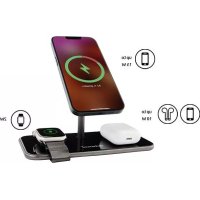
MB13 - Battery charger INTENSO - Free user manual and instructions
Find the device manual for free MB13 INTENSO in PDF.



| Product type | Wireless battery charger |
| Brand | Intenso |
| Model | MB13 |
| Dimensions | 178 x 88 x 118 mm |
| Weight | Approx. 310 g |
| Power supply | Fast charger HP8 (5V/3A, 9V/3A, 12V/2.5A, 15V/2A ; PD 3.0, QC 3.0) |
| Input | USB-C (USB-C IN) |
| MagSafe charging power | 5, 7.5, 10 or 15 W (depending on device) |
| TWS (Qi) charging power | 5, 7.5 or 10 W |
| Apple Watch charging power | 2 W |
| Number of devices charged simultaneously | 3 (MagSafe + TWS + Apple Watch) |
| Qi version | 1.2.4 |
| Frequency band | 110-205 kHz |
| Status indicator | LED (blue charging, green charged, blue flashing error) |
| Protections | Overvoltage, overheating, short circuits, foreign object detection |
| Case compatibility | Yes (max 5 mm, no metal) |
| Operating temperature | 0 to 35 °C |
| Operating humidity | 85% max |
| Maintenance | Clean with a dry cloth; do not use water or chemicals |
| Repairability | No user-serviceable parts; contact technical support |
| Package contents | MB13 charger, USB-C to USB-C cable (1.5 m), HP8 power supply, user manual |
Frequently Asked Questions - MB13 INTENSO
User questions about MB13 INTENSO
0 question about this device. Answer the ones you know or ask your own.
Ask a new question about this device
Download the instructions for your Battery charger in PDF format for free! Find your manual MB13 - INTENSO and take your electronic device back in hand. On this page are published all the documents necessary for the use of your device. MB13 by INTENSO.
USER MANUAL MB13 INTENSO
Safety instructions 2
Declaration of conformity 3
Simplified declaration of conformity 3
Scope of delivery 3
Use 4
Device overview 4
Operation 4
LED status display 4
Start-up / charging compatible devices 4
Service/distributor 5
Disposal 6
Opearting conditions 6
Technical specifications 6
*Trademarks: Apple, MagSafe, Apple Watch, Air Pods and iPhone are registered trademarks of Apple Inc. All third-party trademarks and names are the property of their respective owners.
SAFETY
Intended use
This product is designed for wireless charging of Apple iPhones with MagSafe support (iPhone 12 series and newer), Apple Watch (Series 3 and newer) and headphones (AirPods and other models that support wireless charging). Other devices that support the Qi standard can also be charged with this product on the left charging area (TWS). Any other use or extended use is considered to be use other than intended and can lead to damages or injuries. This product is not intended for commercial use or for medical and special applications, where the failure of the product can cause injuries, fatalities or considerable material damages. Claims of any type for damages resulting from use other than for the intended purpose or non-observation of the safety instructions are excluded.
The firmware and/or hardware may be changed at any time without prior notice. For this reason it is possible that parts of these instructions, technical data and images in this documentation differ slightly from the product in your possession. All points described in these instructions only serve the purpose of clarification and must not inevitably correspond to a certain situation. Legal claims cannot be made on the basis of these instructions.
Safety instructions
Dangers for children and persons with restricted physical, sensory or mental abilities:
Children often underestimate dangers or do not recognise them at all. This device is not intended to be used by persons (including children) with restricted sensory, physical or mental abilities or lack of experience and/or knowledge, unless they are supervised by a person responsible for their safety or received instructions from the person on how to use the device and they have understood the resultant dangers. Unsupervised children should not have access to the device. Make sure that children do not play with the device.
Danger of suffocation!
Children can put the packaging film or small parts in their mouths and choke on them.
Risk of injury!
If you have a pacemaker or another technical implant, consult your physician or the constructor of the implant, before you use the inductive charge station.
Do not open the adapter box. With the open box there may be a danger of life threatening electric shock. It does not contain serviceable parts.
Tripping hazard!
When positioning the device, pay attention that no one can tread on the cable or trip over it. Do not place any objects onto the cable.
Risk of short circuit!
Do not insert any items, which are not intended for its use, into the openings of the device. Do not operate the device with wet hands. This could result in injury from an electrical short circuit and/or a fire.
Do not use the device if there is visible damage to it or the USB cable, as this may result in injury or damage.
Do not expose the device to splashing or dripping water.
Vessels filled with liquids (vases, glasses or similar) must not be placed on the device or near it. There is a risk that the container will tip over and the liquid will affect the electrical safety.
It is normal that during the use the device produces heat. Do not completely cover the product during use to avoid overheating.
Damage!
Keep the device away from any type of moisture and avoid dust, heat and direct sunlight.
Do not use water or chemical solutions to clean the device. Only use a dry cloth for this purpose.
Do not open the housing of the device and do not disassemble it into its component parts. Do not try to repair it yourself. The guarantee expires in this case.
Avoid hard impacts to the device.
Operate the adapter only on earthed sockets with AC 100-240V\~, 50 / 60Hz . If the power supply is not safe at the installation site, ask the competent power supplier.
To interrupt the power supply of your device, disconnect the power supply from the power socket. When disconnecting, always hold the adapter. Never pull the cable.
Declaration of conformity

The CE marking says that this product meets the requirements of all EU Directives applicable for this product.

The UKCA marking says, that this product meets the requirements of all UK Directives applicable for this product.
Simplified declaration of conformity
Intenso International hereby declares that the Wireless Charger MB13 complies with Directive 2014/53/EU.
The full text of the EU Declaration of Conformity is available at the following internet address:
www.intenso.eu.
SCOPE OF DELIVERY
Intenso Magnetic Wireless Charger MB13
1.5 meter USB-C to USB-C cable
3 Power supply HP8
Operating instructions

Please check whether the packaging contents (see also diagram at the beginning of the manual) are complete and undamaged. If this is not the case, please contact the seller or our service department:
rma@intenso-international.de
USE
Device overview
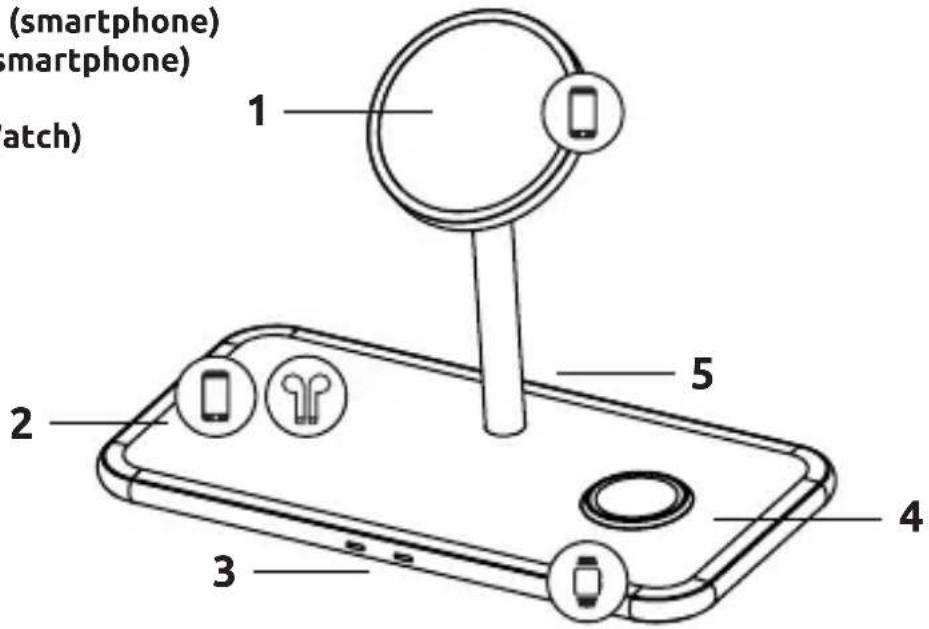
1 - Magnetic charging area (smartphone)
2 - Charging area (TWS or smartphone)
3 - Status LEDs
4 - Charging area (Apple Watch)
5-USB-C IN
Operation
LED status display
When you connect the device to the mains, the LEDs flash green once and blue once to confirm and then remain off. If you use the left charging area or charge an Apple Watch on the right side of the Wireless Charger, the charging process is indicated by the respective LED on the front. During the charging process, the corresponding LED lights up blue continuously. When the mobile device is fully charged, the respective LED usually changes from blue to green (depending on the device being charged). If a LED flashes blue quickly, there is an error; for example, the device is not positioned correctly, it has become too hot, there is a foreign object between the devices or an incompatible power supply unit is being used. If you use the magnetic stand of the wireless charger, no LED lights up; the charging process is shown on the display of the smartphone.
Start-up / charging compatible devices
Step 1: Preparation
Connect one end of the supplied USB-C to USB-C cable to the USB-C port (USB-C IN) of the inductive charging station and connect the other end of the USB cable to the supplied power supply unit (HP8). Next, connect the power supply unit to a power socket (follow the safety instructions).
Step 2: Start charging
You can charge three different devices (simultaneously) with this wireless charger.
a) Magnetic stand
You can dock your MagSafe-supporting iPhone onto the magnetic stand in the middle. The magnets on both sides ensure ideal alignment and the charging process starts automatically and is displayed on the screen of your smartphone. Please note that the use of a case can reduce the magnetic force.
b) TWS / Smartphone
The TWS area (left) of the device can be used to charge all devices that support the Qi standard. These can be, for example, headphones, smartwatches or smartphones. To find out whether your device supports wireless charging via Qi, please refer to the corresponding operating instructions or contact the manufacturer. Place your device so that the Qi area of the device is centred on the cross of the charging area. The charging process starts automatically, and the left LED lights up blue.
c) Watch
The connector for your Apple Watch is located on the right side. Apple Watches as of series 3 are supported. Simply guide the bottom of your watch over the connector and the built-in magnets will help with the correct alignment. The charging process starts automatically and the right LED lights up blue.
If the charging process does not start, please check,
a. whether your iPhone supports the MagSafe standard for the magnetic stand, whether your smartwatch for the watch area (right) is an Apple Watch series 3 or newer and whether your headphones, smartphone or other device for the TWS area (left) support the Qi standard.
b. whether there is a foreign object between the devices or you are using an unsuitable case.
c. whether you have chosen the enclosed quick-charge power supply or a different but compatible one. If this is not the case, replace it accordingly.
d. whether you have first established the power supply and only then started the charging process. If not, please disconnect both devices from each other and unplug the power supply for a few seconds. Then plug the power supply unit back into the socket and only then start the charging process.
e. whether the cable ends and the power supply unit are correctly connected.
Please note that the ambient temperature and the charging electronics of the device to be charged have an effect on the charging behaviour over which the inductive charging station itself has no influence. For example, the charging speed can be reduced at increased temperatures or already reached charging levels, the charging process - especially with the watch - can be briefly interrupted or briefly fail to make any charging progress.
Step 3: End charging process
To end the charging process, simply remove your device from the inductive charging station.
SERVICE/DISTRIBUTOR
INTENSO INTERNATIONAL GMBH | Kopernikusstraße 12-14 I D-49377 Vechta
Email (technical support): support@intenso-international.de
Email (RMA number): rma@intenso-international.de
Internet: www.intenso.eu
Telephone (technical support): +49 (0) 4441-999 111
(Mon. - Thur. 09:00 - 16:30; Fri. 09:00 - 14:00)
DISPOSAL
| Disposal of old electronic equipment: The devices marked with this symbol are subject to the European Directive 2012/19/ EC. All electrical appliances and old electrical appliances must be disposed of separate from the municipal waste stream via designated collection facilities appointed by the government or the local authorities. You avoid environmental damage with the proper disposal of old electrical equipment. | |
| Packaging: Packaging is raw material. The packaging material of this product is suitable for recycling and can be re-used. Please pay attention to the local recycling provisions when disposing of any materials. |
OPERATING CONDITIONS
Operate the device at 0 to 35 degrees Celsius and a maximum humidity of 85% .
TECHNICAL SPECIFICATIONS
| Dimensions: 178 x 88 x 118 mm | |
| Weight: ~310 g | |
| Power supply: | Quick Charge Power Supply HP8 – 5V-3A, 9V-3A, 12V-2.5A, 15V-2A, PD3.0, Quick Charge 3.0 |
| Current consumption (compatible power supplies): | 9V-3A I PD 3.0, QC 3.0 quick charge power supply |
| Charging current output: | MagSafe stand: 5, 7.5, 10 and 15 watts; TWS: 5, 7.5, and 10 watts; Watch: 2 watts – the actual power depends on the device being charged |
| Qi version: Version 1.2.4 | |
| Frequency band: 110–205 kHz | |
| Max. radiated Individual transmitting power: 15 | watts |
| Status display: LED light | |
| Overvoltage protection, overheating protection, short-circuit protection, foreign object detection: | Yes |
| Case-friendly: | Yes (depending on the material and thickness of the case. Maximum 5 mm and no metal.) |
NOTICE D'UTILISATION
Sécurité 2
Service/distributor 5
Élimination 6
Condieones de service 6
Datasétécnicos 6
SEGURIDAD
Uso previsto
- Scope of delivery 3
- Use 4
- Service/distributor 5
- Disposal 6
- Opearting conditions 6
- Technical specifications 6
- SAFETY
- Intended use
- Safety instructions
- Dangers for children and persons with restricted physical, sensory or mental abilities:
- Danger of suffocation!
- Risk of injury!
- Tripping hazard!
- Risk of short circuit!
- Damage!
- Declaration of conformity
- Simplified declaration of conformity
- SCOPE OF DELIVERY
- USE
- Device overview
- Operation
- LED status display
- Start-up / charging compatible devices
- Step 1: Preparation
- Step 2: Start charging
- a) Magnetic stand
- b) TWS / Smartphone
- c) Watch
- Step 3: End charging process
- SERVICE/DISTRIBUTOR
- DISPOSAL
- OPERATING CONDITIONS
- TECHNICAL SPECIFICATIONS
- NOTICE D'UTILISATION
- Sécurité 2
- Élimination 6
- Condieones de service 6
- Datasétécnicos 6
- SEGURIDAD
- Uso previsto
Brand : INTENSO
Model : MB13
Category : Battery charger