WA1 - Battery charger INTENSO - Free user manual and instructions
Find the device manual for free WA1 INTENSO in PDF.


User questions about WA1 INTENSO
0 question about this device. Answer the ones you know or ask your own.
Ask a new question about this device
Download the instructions for your Battery charger in PDF format for free! Find your manual WA1 - INTENSO and take your electronic device back in hand. On this page are published all the documents necessary for the use of your device. WA1 by INTENSO.
USER MANUAL WA1 INTENSO
Declaration of conformity 2
Simplified EU Declaration of Conformity 2
General 2
U s e 3
Device overview 3
Operation 3
Safety instructions 4
Operating Conditions 4
Exclusion of liability 4
Technical Data 5
Disposal 5
Guarantee conditions and complaints procedure 6
OVERVIEW
Delivery scope
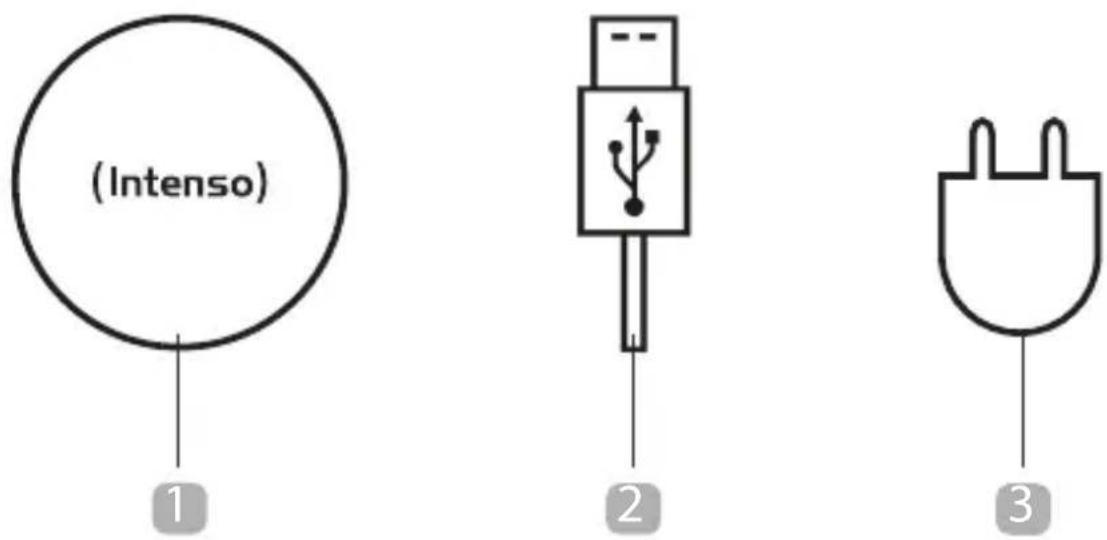
1 Intenso Wireless Charger BA1/WA1
1,5 meter microUSB charging cable
3 Adapter (BLJ-QC06HV)
Operating instructions
Declaration of conformity
The CE marking says that this product meets the requirements of all EU Directives applicable for this product.
Simplified EU Declaration of Conformity
Hereby Intenso International declares that the radio installation type Wireless Charger BA1/WA1 complies with the Directive 2014/53/EU. The complete text of the EU Declaration of Conformity is available at the following Internet address www.intenso-international.de.
GENERAL
About these instructions
Read these instructions carefully and please observe and heed all references made in these instructions to guarantee a long life and reliable use of the device. Please keep these instructions ready to hand and pass them on to other users of the device.
Intended use
This product is intended for the wireless charge of Qi-compatible devices. To check if your device supports the Qi-standard, please check the instruction manual of the respective device or get in touch with the constructor.
Another, more extended use is contrary to the designated use and can cause damage and injuries. Damage claims of all kind following a use contrary to the designated use are excluded.
USE
Device overview
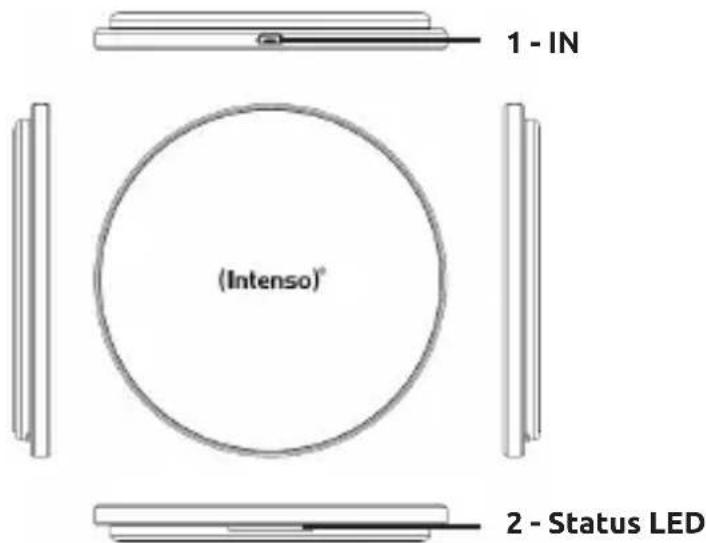
text_image
(Intenso) 1 - IN 2 - Status LEDOperation
1. LED Status display
The actual operating condition of device will be displayed by the status LED. The LED will turn green when the charge procedure starts. If the LED is switched off, the charge procedure is concluded or there is no Qi-compatible terminal to be charged on the inductive charge station. If the LED flashes green, there is an error, for example because the device has become warm, a foreign body is between the devices or a non-compatible adapter is used.
2. Starting-Up / Charging Connected Devices
Step 1: Preparation
Connect the supplied microUSB cable with the microUSB connection (IN) of the inductive charge station and connect the other USB cable end with a USB adapter. Then connect the adapter with a socket (by complying with the safety instructions mentioned above).
Step 2: Start charge procedure
Position your Qi-compatible device in the middle on the inductive charge station. The charge procedure starts automatically and the status LED turns green.
If this is not the case, please check (if):
a) There is a foreign body between the devices.
b) You have selected a compatible adapter.
c) Your device is Qi-compatible.
d) The cable ends and the adapter are connected correctly.
e) Where there is the correct position on your device for the wireless charge. In case, you must change position.
Step 3: Complete charge procedure
To complete the charge procedure, simply remove your device from the inductive charge station.
SAFETY INSTRUCTIONS
Dangers for children and persons with restricted physical, sensory or mental abilities:
Children often underestimate dangers or do not recognise them at all. This device is not intended to be used by persons (including children) with restricted sensory, physical or mental abilities or lack of experience and/or knowledge, unless they are supervised by a person responsible for their safety or received instructions from the person on how to use the device and they have understood the resultant dangers. Unsupervised children should not have access to the device. Make sure that children do not play with the device.
General
Do not disassemble the device into its parts and do no try to change or repair it by yourself. It does not contain serviceable parts and in this case the guarantee expires.
Do not insert objects intended for use into the product opening. There is short circuit danger.
Do not operate the device with wet hands.
Please do not use water or chemical substances to clean the device. Please only use a dry cloth.
It is normal that during the use the device produces heat. Do not cover the product during use.
Do not use the device if it has visible damages or has become wet.
If you have a pacemaker or another technical implant, consult your physician or the constructor of the implant, before you use the inductive charge station.
The socket must be next to the device and easily accessible. When you position the device, pay attention that nobody steps on the cable or trips over it. Do not put objects on the cable.
Do not open the adapter box. With the open box there may be a danger of life threatening electric shock. It does not contain serviceable parts.
Operate the adapter only on earthed sockets with AC 100-240V\~, 50/60 Hz. If the power supply is not safe at the installation site, ask the competent power supplier.
To interrupt the power supply of your device, disconnect the power supply from the power socket. When disconnecting, always hold the adapter. Never pull the cable.
OPERATING CONDITIONS
Operate the device at 0 to 35 degrees Celsius at max. 85% relative humidity.
The range of the ambient temperature affects the charging speed, as the charging control of most mobile devices reduces the current consumption at higher temperatures.
EXCLUSION OF LIABILITY
The firmware and/or hardware may be changed at any time without prior notice. For this reason it is possible that parts of these instructions, technical data and images in this documentation differ slightly from the product in your possession. All points described in these instructions only serve the purpose of clarification and must not inevitably correspond to a certain situation. Legal claims cannot be made on the basis of these instructions.
TECHNICAL DATA
| Dimensions (Diameter / height): 106 / 11 mm | |
| Adapter: Fast charge adapter BLJ-QC06HV | 5V 3A / 9V 2A / 12V 1.5A |
| Power consumption(compatible adapters): | Standard mode:5V 2A Standard adapterFast charge mode:9V 1.67A Fast charge adapter | QC2.0 / QC3.0 fast charge adapter |
| Charging current delivery:(depending from the used adapter) | Up to 5 Watt in the standard modeUp to 10 Watt in the fast charge mode |
| Qi-version: Version 1.2 | |
| Frequenzy band: 110-148 kHz | |
| Max. rediated power: 10W | |
| Status display: LED lamp | |
| Overvoltage protection: Yes | |
| Overheat protection: Yes | |
| Foreign body detection: Yes | |
| Cover-friendly: Yes (depending from cover material and thickness.Maximum 5mm and no metal.) | |
DISPOSAL
 | Disposal of old batteriesThe devices marked with this symbol are subject to the European Directive 2006/66/EC All old batteries must be disposed of separate from the municipal waste stream via designated collection facilities appointed by the government or the local authorities You avoid environmental damage with the proper disposal. |
 | Packaging:Packaging is raw material. The packaging material of this product is suitable for recycling and can be re-used. Please pay attention to the local recycling provisions when disposing of any materials. |
GUARANTEE CONDITIONS AND COMPLAINTS PROCEDURE
Guarantee conditions:
Intenso International GmbH grants a two-year guarantee for this product in addition to the statutory warranty. The guarantee applies only to material and production errors. Intenso International GmbH is not liable for the loss of data. The free-of-charge guarantee relates to the repair or exchange of faulty parts. You are responsible for the safe elimination of your data which is not carried out by us. The sales receipt must be retained for the determination of the guarantee period. Please understand that we cannot provide a guarantee service in the case of, e.g.:
• Non-observance of the Operating Instructions
• Abusive or improper treatment, installation or use
• Damages, scratches or wear
• Arbitrary modifications, opening the housing, interventions or repairs
• Damage through other devices, force majeur or transport
Complaints procedure:
In the case of a complaint, please proceed as follows:
- Only returns with sales receipt and full accessories will be accepted.
- Furthermore, an RMA number is absolute precondition for returns. You can request this RMA number via the homepage, by email or via the service hotline. It must be attached clearly visible on the parcel.
- Please pack the product including the sales receipt and complete accessories in a transport-proof manner. The parcel must have sufficient postage.
Please send the parcel to the following address:
INTENSO INTERNATIONAL GMBH
Service Center (your RMA-No.)
(0,39 € / min. from the German fixed network mobile phone prices may vary.)
MODE D'EMPLOI
Table des matières
Vue d'ensemble
Matériel fourni
Email (assistance technique): support@intenso-international.de
MANUAL DE INSTRUÇÕES
Índice
Visão geral
Material fornecido
natural_image
Pure electrical connector symbol without any text or labels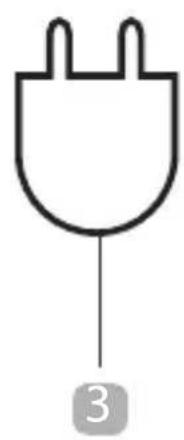
natural_image
Simple line drawing of a logic gate with two leads and a labeled pin (no text or symbols beyond the number 3)natural_image
Pure electrical connector symbol without any text or labels