Bonsaii 5S30 - Shredder Genie - Free user manual and instructions
Find the device manual for free Bonsaii 5S30 Genie in PDF.



| Product Type | Paper Shredder |
| Brand | Bonsaii (Genie) |
| Model | 5S30 |
| Dimensions (W x D x H) | 41.0 x 30.5 x 62.0 cm |
| Weight | 17.5 kg |
| Power Supply | 220-240 V AC, 50/60 Hz, 280 W |
| Bin Capacity | 30 liters |
| Noise Level | 58 dB |
| Continuous Operation | Up to 4 hours |
| Max Sheets (80 g/m²) | 5 sheets |
| Cut Type | Cross-cut (particles) |
| Particle Size | 1 x 6 mm |
| Security Level (DIN 66399-2) | P-6 |
| Paper Feed Width | 219 mm (A4 size) |
| Accepted Materials | Paper, credit cards, CD/DVD |
| Special Features | Auto start/stop, reverse, overheating and overload protection |
| Maintenance | Clean with a damp cloth and mild soap; oil the blades every 500 sheets with the Bonsaii maintenance kit |
| Safety | Automatic shutdown in case of overheating or overload; emergency stop button; do not insert fingers into the slot |
| Warranty | 3 years on the device, 7 years on the blades (conditions apply) |
| Package Contents | Shredder, power cord, user manual |
Frequently Asked Questions - Bonsaii 5S30 Genie
User questions about Bonsaii 5S30 Genie
0 question about this device. Answer the ones you know or ask your own.
Ask a new question about this device
Download the instructions for your Shredder in PDF format for free! Find your manual Bonsaii 5S30 - Genie and take your electronic device back in hand. On this page are published all the documents necessary for the use of your device. Bonsaii 5S30 by Genie.
USER MANUAL Bonsaii 5S30 Genie
natural_image
Abstract orange geometric pattern resembling a stylized tree or cloud shape (no text or symbols)bonsaii
natural_image
Row of six white and black industrial water purifiers with control panels, displayed against a plain white background (no text or symbols visible)Email: bonsaii@gerth-gmbh.de
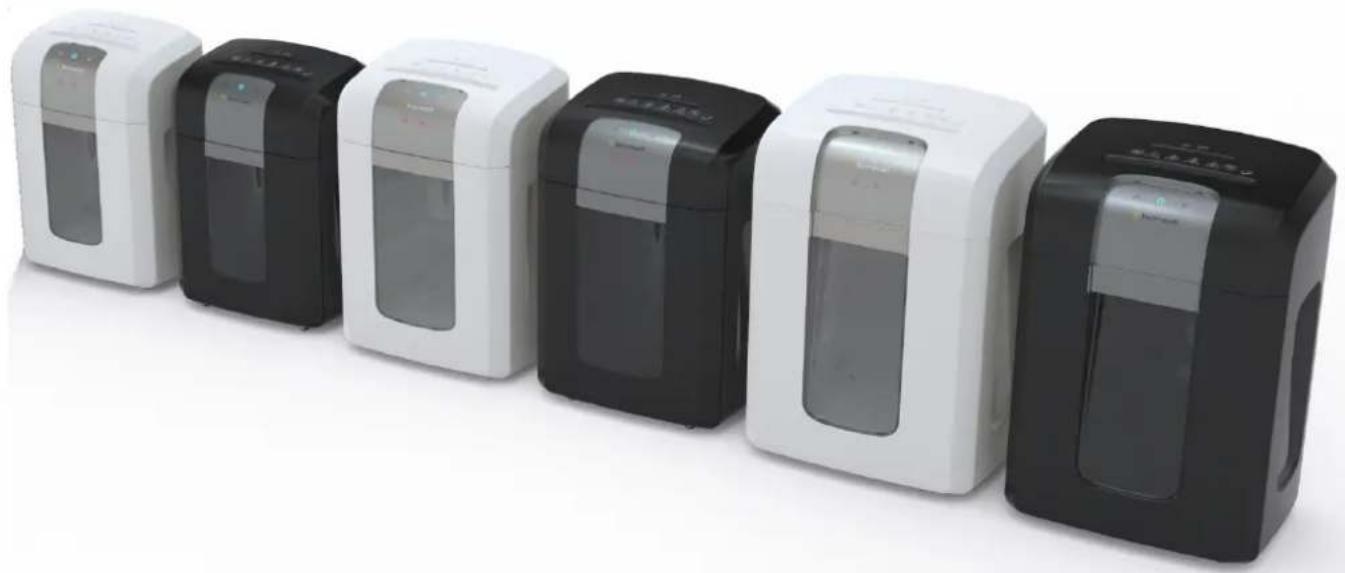
S-series paper shredder User manual
natural_image
Row of six white and black industrial water purifiers with control panels, displayed against a plain white background (no text or symbols visible)GENERAL TROUBLESHOOTING....17
EQUIPMENT MAINTENANCE AND CLEANING 17
PACKAGING CONTENTS 18
WASTE DISPOSAL: 18
DIRECTIVES: 18
Intended usage
This equipment is intended exclusively for shredding or destroying paper, CDs/DVDs, and credit cards. Any other type of use is deemed to be inappropriate, and thus may result in any extended warranty becoming invalid, and may jeopardise your own safety.
Safety information

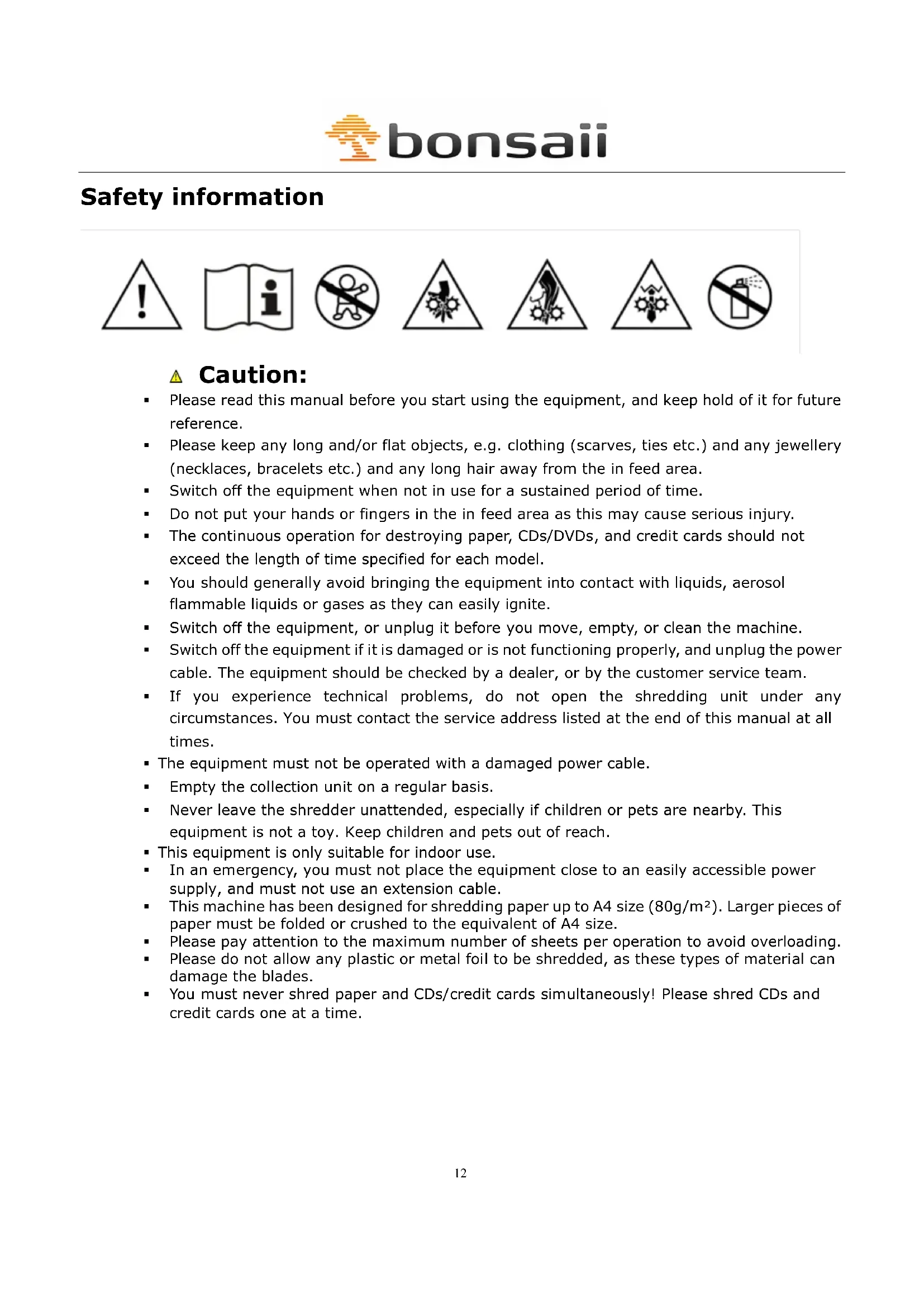
Caution:
- Please read this manual before you start using the equipment, and keep hold of it for future reference.
- Please keep any long and/or flat objects, e.g. clothing (scarves, ties etc.) and any jewellery (necklaces, bracelets etc.) and any long hair away from the in feed area.
- Switch off the equipment when not in use for a sustained period of time.
- Do not put your hands or fingers in the in feed area as this may cause serious injury.
- The continuous operation for destroying paper, CDs/DVDs, and credit cards should not exceed the length of time specified for each model.
- You should generally avoid bringing the equipment into contact with liquids, aerosol flammable liquids or gases as they can easily ignite.
- Switch off the equipment, or unplug it before you move, empty, or clean the machine.
- Switch off the equipment if it is damaged or is not functioning properly, and unplug the power cable. The equipment should be checked by a dealer, or by the customer service team.
- If you experience technical problems, do not open the shredding unit under any circumstances. You must contact the service address listed at the end of this manual at all times.
- The equipment must not be operated with a damaged power cable.
- Empty the collection unit on a regular basis.
- Never leave the shredder unattended, especially if children or pets are nearby. This equipment is not a toy. Keep children and pets out of reach.
- This equipment is only suitable for indoor use.
- In an emergency, you must not place the equipment close to an easily accessible power supply, and must not use an extension cable.
This machine has been designed for shredding paper up to A4 size (80g/m²). Larger pieces of paper must be folded or crushed to the equivalent of A4 size.
- Please pay attention to the maximum number of sheets per operation to avoid overloading.
- Please do not allow any plastic or metal foil to be shredded, as these types of material can damage the blades.
- You must never shred paper and CDs/credit cards simultaneously! Please shred CDs and credit cards one at a time.
Overview
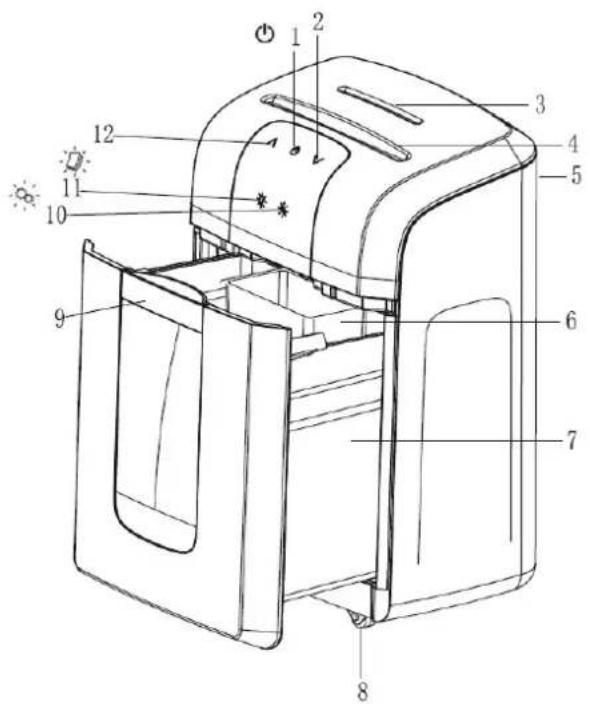
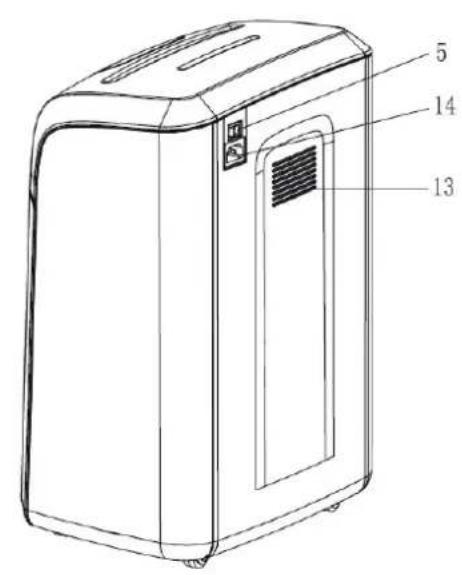
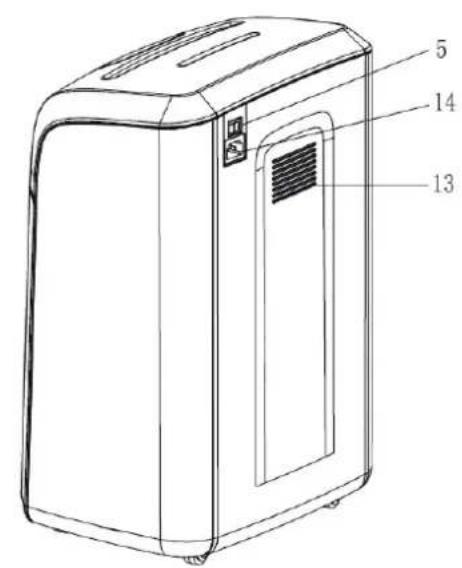
1 Standby / Emergency stop button
8 Casters
2 Forward in feed
9 Removal tray (Handle)
3 In feed for CDs/DVDs
10 Overheating light
4 In feed for paper/credit cards
11 Overflow light
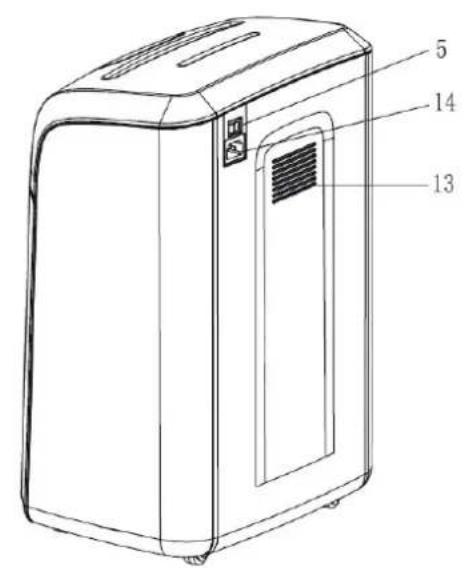
5 Main switch
12 Reverse in feed
6 Collection unit for CDs etc.
13 Cooling vent
7 Collection unit for paper/credit cards
14 Mains power supply
Installation and operation
- Place the equipment on a flat and even surface.
■ Make sure that the equipment is placed away from any radiators or hot areas. - Do not cover the cooling vent at the rear of the equipment.
- Avoid the use of extension cables and multiple power sockets if possible, and connect the equipment directly to a wall socket (as specified in the section on technical information).
- Please keep the equipment at a distance of at least 10 cm away from the wall in order to ensure the cooling vent has an adequate supply of air.
Operation:
Switch on the power button at the rear of the machine ("ON"). The "Standby" symbol lights up. The equipment is now ready to use. Should the symbol not light up, then please refer to the section "General Troubleshooting" on page 17 of this manual.
Shredding paper and credit cards
Place the paper in portrait orientation into the corresponding in feed unit. The paper will be recognised by the sensors, and the cutter will begin to feed the paper through automatically. After finishing shredding, you can press the button to switch from operation mode to standby and have minimal power consumption. Please insert credit cards in portrait orientation into the middle of the feed unit.
Please press the Button again to switch back from standby to operational mode.
Please be aware of the maximum number of sheets of paper. Further information can be found on the device, or in the table below entitled "Product Specification".
Overloading:
If you overload more paper in one go than the machine is able to handle, the overloading display will turn to red, and the cutter will stop immediately. Should this happen, then please reduce the number of sheets and try again. Should this particular fault not be rectified automatically, then press the up arrow in order to remove any paper. The machine will then be reset to either normal or standby mode.
Shredding CDs/DVDs/credit cards
Insert CDs/DVDs/credit cards one by one into the designated in feed slot. Do not hold onto the holes in the middle of the CD/DVD, as this could result in injury!
Manual in feed:
If a sheet of paper is too thin or too transparent for it to be recognised by the sensors, then please press the "forward" button ∨. You can also use the forward and backward buttons to allow any excess sheets of paper to be shred.
Overheating:
It is possible that the engine may overheat if you exceed the maximum amount of time specified for continuous operation. This is when the cutter will stop and the overheating light will turn red. The machine will then start to cool down whilst in standby mode, and can be used again when the light stops flashing.
Removing excess paper:
Switch off the equipment, and disconnect the power supply. Remover the paper tray. Remove any snippets of paper which have become stuck to the cutter. The blades are very sharp, so please do take extra care!
Put the paper tray back into position, connect the power cable, and switch on the power. You can
now use the machine once again.
Disconnecting:
Turn off the rear main switch for the equipment to become fully disconnected.
Product specification
| Model | Dimensions (cm) | Safety rating DIN 66399-2 | Cutter size (mm) | Max. Amount of sheets | Functioning width (mm) | Voltage/ current/ power rating | Container capacity (l) | Weight (kg) | Volume (dB) | Continuous operation |
| W: 34,5 | 220-240V AC, 50/60Hz | |||||||||
| 3S16 | 4x35 | 219 | 4 | 10,00 | 58 | 1 hour | ||||
| L: 24,0 | 71,2A | |||||||||
| H: 52,0 | /240 W | |||||||||
| W: 34,5 | 220-240V AC, 50/60Hz | |||||||||
| 4S16 | 2x10 | 6,219 | 5 | 0,00 | 58 | 1 hour | ||||
| L: 24,0 | 71,2A | |||||||||
| H: 52,0 | /240 W | |||||||||
| W: 37,0 | 220-240V AC, 50/60Hz | |||||||||
| 3S23 | 4x35 | 14 | 219 | 4 | 23 | 11,50 | 58 | 2 hours | ||
| L: 27,0 | 71,4A | |||||||||
| H: 56,0 | /250 W | |||||||||
| W: 37,0 | 220-240V AC, 50/60Hz | |||||||||
| 4S23 | 2x10 | 8,219 | 28 | 1,50 | 58 | 2 hours | ||||
| L: 27,0 | 71,4A | |||||||||
| H: 56,0 | /250 W | |||||||||
| W: 41,0 | 220-240V AC, 50/60Hz | |||||||||
| 3S30 | Pt4 | 38,35 | 18 | 219 | 30 | /1,5A | 17,50 | 58 | 4 hours | |
| H: 62,0 | /280W | |||||||||
| W: 41,0 | 220-240V AC, 50/60Hz | |||||||||
| L: 30,5 | P-5 | 2x10 | 10 | 219 | 30 | /1,5A | 17,50 | 58 | 4 hours | |
| H: 62,0 | /280W | |||||||||
| W: 41,0 | 220-240V AC, 50/60Hz | |||||||||
| 5S30 | Pt6 | 30,5 | 1x6 | 5 | 219 | /1,5A | 30 | 17,50 | 58 | 4 hours |
| H: 62,0 | /280W |
Extended warranty:
Bonsaii will guarantee full operation of the S-Series (3S16, 4S16, 3S23, 4S23, 3S30, 4S30 and 5S30) for a period of 3 years.
Bonsaii will offer free service and support for this period as of the date of purchase. This warranty only applies to the quality of workmanship, and any faults in relation to materials or installation. Any improper usage, wear and tear, or unauthorised repairs are specifically excluded.
Bonsaii will allow a warranty period of 7 years in relation to cutter blades with regards to materials and workmanship.
Should any relative defects be identified during this period, Bonsaii will decide whether repair or replacement of the defective part, or of the whole machine, is required. Bonsaii will assess any costs which are appropriate.
This warranty does not include any defects which have been caused by any use or misuse (other than those described here), nor does it include any deliberate damage. It also does not include any damage which has resulted from an inadequate power supply (please see the label on the equipment), nor from any authorised repairs.
Bonsaii reserves the right to charge the customer for any repairs or replacement parts outside of the country where the product was originally purchased from an authorised dealer.
Warranty claims
Contrary to expectations, please be aware of the following should the equipment not function correctly: The warranty period shall last for 3 years from date of purchase subject to correct usage. Please keep your proof of purchase and the original packaging. The proof of purchase serves as evidence of the warranty claim. This warranty shall only apply to any material or manufacturing defects, but not to any damage to fragile components, i.e. the casing. Any equipment which has been damaged by improper use beyond the guidelines shall not be covered. A warranty shall be void if any repairs have been carried out without the explicit consent of our customer service team.
Warranty repairs may only be carried out by attaching a proof of purchase – any returned items must always be reported by telephone! Any items must be returned along with sufficient postage and the relevant item return number. Please include your name, address, post code, town/city, telephone number (along with STD code), and your grounds for complaint.
Many thanks for your understanding!
Our service hotline:
Tel. +49 (0) 61 22-72 79 89 1 ● Fax +49 (0) 61 22-70 59 52
Email: bonsaii@gerth-gmbh.de
All returned items must be sent to the following address by registered post:
GENIE GmbH & Co KG | Bonsai-Service- | Berta-Cramer-Ring 22 | D-65205 Wiesbaden
General troubleshooting
| Error Troubleshooting Resolution | ||
| Equipment is not functioning | Is the power supply and socket connected to the wall correctly? | Adjust the connections. |
| Is the collection unit positioned correctly? | Adjust the position of the collection unit. | |
| Is the power cable damaged? | Replace the power cable or contact your Bonsaii dealer. | |
| Is the engine possibly overheating? Is the light flashing? | Wait until the machine has cooled down. | |
| Is the sheet of paper to thin for it to be detected by the sensors? | Fold the sheets of paper or use the manual in feed tray. | |
| Do you want to shred many pieces of paper in one go? | Reduce the amount of paper and try again. | |
| Cutter is blocked | Is the paper jammed? | Press the back button and remove any excess paper. |
| Cutter will not stop | Excess paper or unusual objects are blocking the sensors? | Remove any excess paper and try again. |
| Machine sounds too loud | Is the surface uneven? Is the equipment in a straight position? | Place the equipment on a flat surface. |
Should the instructions above not help to resolve the issue, then please contact your Bonsaii dealer.
Equipment maintenance and cleaning
As the cutter blades are very sharp and the engine is particularly powerful, you should take the appropriate precautions when using the equipment on a daily basis to ensure that any items of clothing, ties, scarves and hair do not fall into the equipment!

bonsaii
The collection unit must be regularly checked and emptied if possible to ensure it is able to operate smoothly.
Do not allow any items of clothing, plastic, or metal fragments to fall into the cutter.
It is advised to use a number of sheets of paper below the technical capacity in order to achieve a long life expectancy.
Please regularly check the collection container and empty it if necessary to ensure smooth operation.
Wear or damage to the shredder can decrease the reliability of the data destruction, so please check from time to time, the size of the material particles.
For a permanently quiet and smooth operation, we recommend the use of a Bonsaii care kit approximately after every 500 sheets.
Run the (Cleaning Kit) through the shredder. The shredder will as such be uniformly cleaned and oiled. The care kit is available from specialist retailers or by contacting the Bonsaii service hotline.
You must disconnect the plug first when cleaning the equipment. It must then be cleaned on the outside by using a cloth and mild soap solution. The cloth should only be damp and not wet. Avoid any liquids from penetrating into the cutter. Do not use bleach, alcohol, paint stripper, or any other flammable liquids under any circumstances.
Packaging contents
| Item Paper | shredder Power cable | User manual | |
| Quantity 1 1 | 1 |
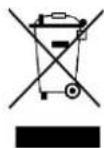
Guideline 2012/19/EU concerning the handling, collection, recycling and disposal of electrical and electronic equipment and their components ('waste electrical and electronic equipment', known as WEEE).
The crossed symbol on a rubbish container indicates that the machine or device is not allowed to be disposed of but it must be handed over to a suitably equipped collection centre for proper recycling or disposal.

We declare that this device has been manufactured in accordance with the applicable rules and regulations.
Français
natural_image
Six white and black industrial water purifiers arranged in a row, no visible text or labels.INFORMATIONS RELATIVES A LA SECURITE ....20
APERÇU....22
INSTALLATION ET FONCTIONNEMENT ....23
SPECIFICATIONS DU PRODUIT ......25
GARANTIE PROLONGEE: 26
ENTRETIEN ET NETTOYAGE DE L'APPAREIL....27
CONTENU DE L'EMBALLAGE....28
ELIMINATION DES DECHETS : FEHLER! TEXTMARKE NICHT DEFINIERT.
DIRECTIVES :...... FEHLER! TEXTMARKE NICHT DEFINIERT.
Mise en service
natural_image
Six white and black industrial water purifiers arranged in a row, no visible text or labels.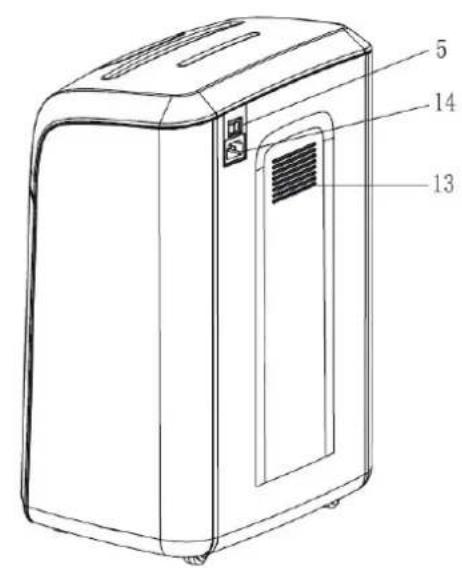
1 Standby/Arresto d'emergenza
8 Ruote
Email: bonsaii@gerth-gmbh.de
natural_image
Six white and black electronic devices arranged in a row, no visible text or symbols on the devices themselves.