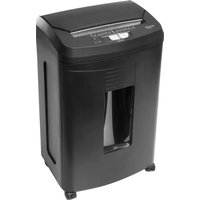
110 AFX - Shredder Genie - Free user manual and instructions
Find the device manual for free 110 AFX Genie in PDF.


| Product type | Document shredder |
| Brand | Genie |
| Model | 110 AFX |
| Cutting method | Cross-cut |
| Fragment size | 4 x 10 mm |
| Security level | P-4 (DIN 66399-2) |
| Cutting capacity (manual) | Up to 10 sheets (80 g/m²) |
| Cutting capacity (auto-feed) | Up to 100 sheets (80 g/m², one at a time) |
| Paper entry width | 220 mm |
| Bin capacity | Approximately 23 litres |
| Power supply | 230 V AC, 50 Hz, 1.7 A |
| Maximum operating cycle (manual) | 10 minutes continuous operation, then 60 minutes cooling |
| Maximum operating cycle (auto-feed) | 20 minutes continuous operation, then 60 minutes cooling |
| Types of shreddable materials | Paper, credit cards (occasionally) |
| Special functions | Auto-feed (100 sheets), manual feed (10 sheets), reverse (REV), overheating and overload protection, indicator lights (on, bin full, overheating) |
| Safety | Automatic stop if bin not properly installed; surge protection; child safety lock? (not specified, to check) |
| Maintenance | Empty bin regularly; remove staples and paper clips if possible; do not feed non-paper materials (CD, etc.); clean feed slot carefully |
| Warranty | 24 months (material or manufacturing defects) |
| Customer service | Genie GmbH & Co. KG, hotline@genie-online.de, +49 (0) 6122-7279891 |
Frequently Asked Questions - 110 AFX Genie
User questions about 110 AFX Genie
0 question about this device. Answer the ones you know or ask your own.
Ask a new question about this device
Download the instructions for your Shredder in PDF format for free! Find your manual 110 AFX - Genie and take your electronic device back in hand. On this page are published all the documents necessary for the use of your device. 110 AFX by Genie.
USER MANUAL 110 AFX Genie
natural_image
Black industrial paper filter unit with control panel and door (no visible text or symbols)EN Operating instruction 7 - 11
Thank you for purchasing this GENIE quality product. Please carefully read the operating instructions prior to the initial operation and keep them handy for future reference.
Please pay particular attention to the following safety information. If you have any questions or complaints about the device, please refer to the service information at the end of these instructions.
Installations
Plug the shredder into a grounded electrical outlet where it can be easily installed and is accessible. Connect the power cord to any standard 230 VAC, 50Hz outlet.
NOTE: This shredder will operate only when used with the supplied basket. The supplied basket has a built-in safety feature which prevents the shredder from operating if used with any other basket or if improperly assembled.
Setup
- Place the machine on level ground and plug the power cord into any easily reached grounded electrical outlet.
- Make sure the wastebasket is correctly positioned.
- Slide the switch to the Auto On position.
- The machine will be ready to operate when the Power On LED indicator is illuminated green.
Operation
The Main Switch is located on the top of the shredder. The Main Switch has four (4) settings.

Forward (FWD): The cutting blades rotate forward and shred paper.

AUTO: The machine is ready for operation. Power light will be on.


Power OFF: The machine switched off. Power light will turn off.

Reverse (REV): The cutting blades rotate backwards and push paper out of the shredder.
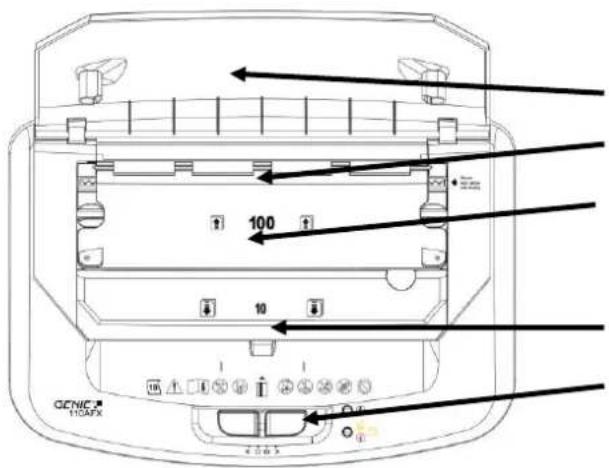
Auto feed flap
Auto feed (100 sheets max.)
Auto Feed (paper guide flap)
Manual feed (10 sheets max.)
Main switch
Manual Feed Process:
- Shred paper: insert up to 10 sheets straight into the manual feed entry.
- Shred credit card: insert 1 card at a time into the middle of the paper feed entry.
Auto Feed Process:
- Open the auto feed flap and Insert up to 100 sheets of paper into the auto feed tray and close the paper guide flap. Once you insert papers into the auto feed tray, it will start shredding each sheet automatically.
Please Note:
- Only paper should be used in the auto feed tray. Credit cards should be shred through the manual paper feed slot.
- Do not insert additional paper into the auto feed tray when it is already in use.
-
Do not insert folded paper as it may cause the unit to jam.
-
It will take approximately 9 minutes to shred 100 sheets on auto feed mode.
- After shredding, please close the auto feed flap back the machine in order to avoid the flap gets broken.
For the safety concern, always Power Off the shredder and unplug the unit when it is unattended or not in use.
BIN FULL LED / DOOR OPEN Indicator:
The Yellow Bin Full LED indicator will illuminate when waste bin is full or the basket is not inserted.
- Turn the unit OFF by sliding to the Power Off position.
- Remove the bin and either dispose of the paper shreds or compress the shreds down.
- Re-insert the bin into the housing.
- Slide the power switch to Auto On to resume normal operation.

OVERHEAT LED Indicator:
The Red Overheat indicator will illuminate when the motor temperature is high.

This shredder is equipped with a temperature sensor device that protects the motor from heat damage. If the device senses the motor is too hot, it will automatically turn off the shredder and the red Overheat LED indicator will illuminate. This is normal. If this happens, you
shredder will need approximately 60 minutes to cool. Once the Overhead LED indicator is no longer illuminated, you can continue shredding as normal.
OVERLOAD Protection:
If too much paper is inserted into either the manual feed or auto feed the unit will automatically stop shredding. When this occurs, slide the switch to Manual Reverse to dislodge the jammed paper. Remove the paper, recount the pages, and continue with no more than the maximum stated capacity.
Shredder capacity:
GENIE 110 AFX will shred up to 10 sheets of A4 size 80g/sqm paper for regular throat (front slot), and auto-feeding (flip top) for shred up to 100 sheets of A4 size 80g/sqm paper.
When shredding small material like envelopes or receipts, insert them through the front slot..
Cautions:




, jewelry


or other small items away
-
Keep all loose articles of clothing, ties from the feed opening to prevent injury
-
Keep in the OFF position when the shredder is not in use for prolonged periods of time.
-
Remove all paper clips and staples from paper before shredding. Unit will cut staples, however it is not recommended.
-
Do not place hands or fingers into the shredder throat as serious injury could result.
-
Always turn off or unplug the shredder prior to moving, cleaning or emptying the wastebasket.
-
Empty wastebasket frequently
-
Please do not leave the document shredder unattended e.g. in the event children or pets are nearby.
-
Please do not use manual and automatic infeed at the same time.
-
Please do not spray any flammable gas or oil onto this shredder, it may cause fire.
-
Please read the manual before operating the machine


-
Attention: The document shredder is not suitable for CDs/DVDs, shredding cassettes resp. diskettes.
-
The document shredder is only suitable for shredding paper, please do not insert any other materials, the paper must be dry and clean.
-
Never open the casing. In the event of problems with the device, please contact our hotline.
-
The device may not be operated with a damaged power cord.
-
For indoor use only.
Paper Jams and overload protection:
GENIE 110 AFX is equipped with a motor overload protection device. The normal short duty cycle for continuous shredding at maximum capacity is 10 minutes. When using the automatic infeed, the continuous shredding time extends to 20 minutes due to lower power needed for single sheets of paper. The power may terminate automatically in case of the following abnormal situations:
- Operating the shredder at the maximum capacity continuously for a prolonged period of time, e.g. more than 10 minutes for computer paper without stopping.
- Exceeding the shredding capacity e.g. inserting more than 10 sheets at one pass, or if the paper is not fed squarely into the feed opening.
Both abnormal operations may result in the activation of the automatic motor overload protection, which terminates the power to the unit. If this occurs, you should:
- Unplug the power cord from the AC outlet to allow shredder to cool down. Tear or cut off any excess paper from the top of the shredder.
- Plug the power cord back into the AC outlet and place the Switch in REV. Pull the remaining paper out of the cutters. Place the Switch back to the Auto position if necessary clear the feed opening of any remaining shredded pieces of paper, Keep fingers away from feed opening to avoid harm.
- With the Main Switch in the AUTO position and the feed opening clear, you are now ready to resume normal shredding.
Specifications:
Shred type: Cross cut
Shred Size: 4 x 10 mm
Shredding Capacity: max. 10 Sheets for manual feeding, max. 100 Sheets for auto feeding (one at a time)
Feed Opening: 220mm
Input: 230VAC, 50Hz, 1.7A
Basket capacity: 23 L
Security level (DIN 66399-2): P-4
Q & A: The unit does not operate
- Verify that the unit is plugged into the wall receptacle.
- Verify that the unit is in the FORWARD, POWER, or REVERSE position.
- Verify that the unit is properly placed on the basket.(For safety reasons, the shredder will not operate unless the shredder is properly placed).
Q & A: The unit stops shredding
This shredder cannot be used for constant shredding for a long period of time. To protect the shredder from damage, the overload protector will stop the shredder. The normal duty cycle for continuous shredding at maximum capacity is 10 minutes working time (manual feed); 20 minutes working time (auto feed) and 60 minutes cool down time.
Q & A: Paper Jams
Paper is jammed in the auto feed tray.
. Reverse the jammed paper by sliding to Manual Reverse.
. Open the auto feed tray slot by the orange sliders and remove jammed paper.
. Close the auto feed tray slot.
. Insert paper into the auto feed tray to resume normal operation.
Paper is jammed in the manual entry.
. If a paper jam is detected in the manual slot, the shredder will stop running.
. Slide to Manual Reverse and then remove the jammed paper.
Special note for shredding credit cards:

This shredder is designed primarily to shred paper. Occasional shredding of credit cards, will not damage the shredder. Excessive shredding of credit cards could reduce the life of the blades.
Special note for Paper Clips and Staples:
Although our shredders are safe to shred the occasional standard staple, you should remove staples whenever possible to prolong the life of the unit.
Industrial or non-standard, large-size staples MUST be removed.
DO NOT shred paper clips at any time as this will cause damage to the blades.
HANDLING THE GUARANTEE
Thank you very much for purchasing this GENIE product. Please note the following advice whenever this machine does not function faultlessly, contrary to expectations.
The guarantee period amounts to 24 months from the date of purchase, provided that the machine has been used appropriately. Please keep the proof-of-purchase voucher and original packaging in a safe place. The warranty is only valid for defects in materials or fabrication. However, it is invalid for damage that has occurred to breakable parts, e.g., on the casing. Machines that have been damaged by inappropriate use externally, are excluded from being exchanged. A guarantee will expire whenever any repairs have been carried out without the express consent of our customer service department.
Repairs under the guarantee can only be made when the proof-of-purchase voucher is enclosed with the defective machine – please notify us about the return by telephone! Only adequately pre-paid returns bearing the appropriate return number can be accepted. Please give your name, address, post code, town and telephone number with the dialing code. Please state the reason for your complaint too.
We regret any inconvenience caused!
Our service hot line
Tel. +49 (0) 6122-7279891 • Fax +49 (0) 6122-805952 •E-mail: hotline@genie-online.de
Please send all returns adequately pre-paid to the following address after notifying us about them beforehand: GENIE GmbH & Co. KG, -Service-, Berta-Cramer-Ring 22, D-65205 Wiesbaden.
Deutschland/Germany
Disposal:
Guideline 2012/19/EC concerning the handling, collection, recycling and disposal of electrical and electronic equipment and their components ('waste electrical and electronic equipment', known as WEEE).
The crossed symbol on a rubbish container indicates that the machine or device is not allowed to be disposed of but it must be handed over to a suitably equipped collection centre for proper recycling or disposal.
Directives:

We declare that this device has been manufactured in accordance with the applicable rules and regulations.
Notre Hotline service clients:
45527 Hattingen (Germany)
SK: Návod k obsluhe
Vážený zákazník,
45527 Hattingen (Germany)
45527 Hattingen (Germany)
- Installations
- Setup
- Operation
- Manual Feed Process:
- Auto Feed Process:
- BIN FULL LED / DOOR OPEN Indicator:
- OVERHEAT LED Indicator:
- OVERLOAD Protection:
- Shredder capacity:
- Cautions:
- Paper Jams and overload protection:
- Specifications:
- Q & A: The unit does not operate
- Q & A: The unit stops shredding
- Q & A: Paper Jams
- Special note for shredding credit cards:
- Special note for Paper Clips and Staples:
- HANDLING THE GUARANTEE
- Our service hot line
- Disposal:
- Directives:
- SK: Návod k obsluhe
Brand : Genie
Model : 110 AFX
Category : Shredder