ManualGo.com
Power Instantccino 20 Touch - Coffee machine CECOTEC - Free user manual and instructions
Find the device manual for free Power Instantccino 20 Touch CECOTEC in PDF.



Download the instructions for your Coffee machine in PDF format for free! Find your manual Power Instantccino 20 Touch - CECOTEC and take your electronic device back in hand. On this page are published all the documents necessary for the use of your device. Power Instantccino 20 Touch by CECOTEC.
USER MANUAL Power Instantccino 20 Touch CECOTEC
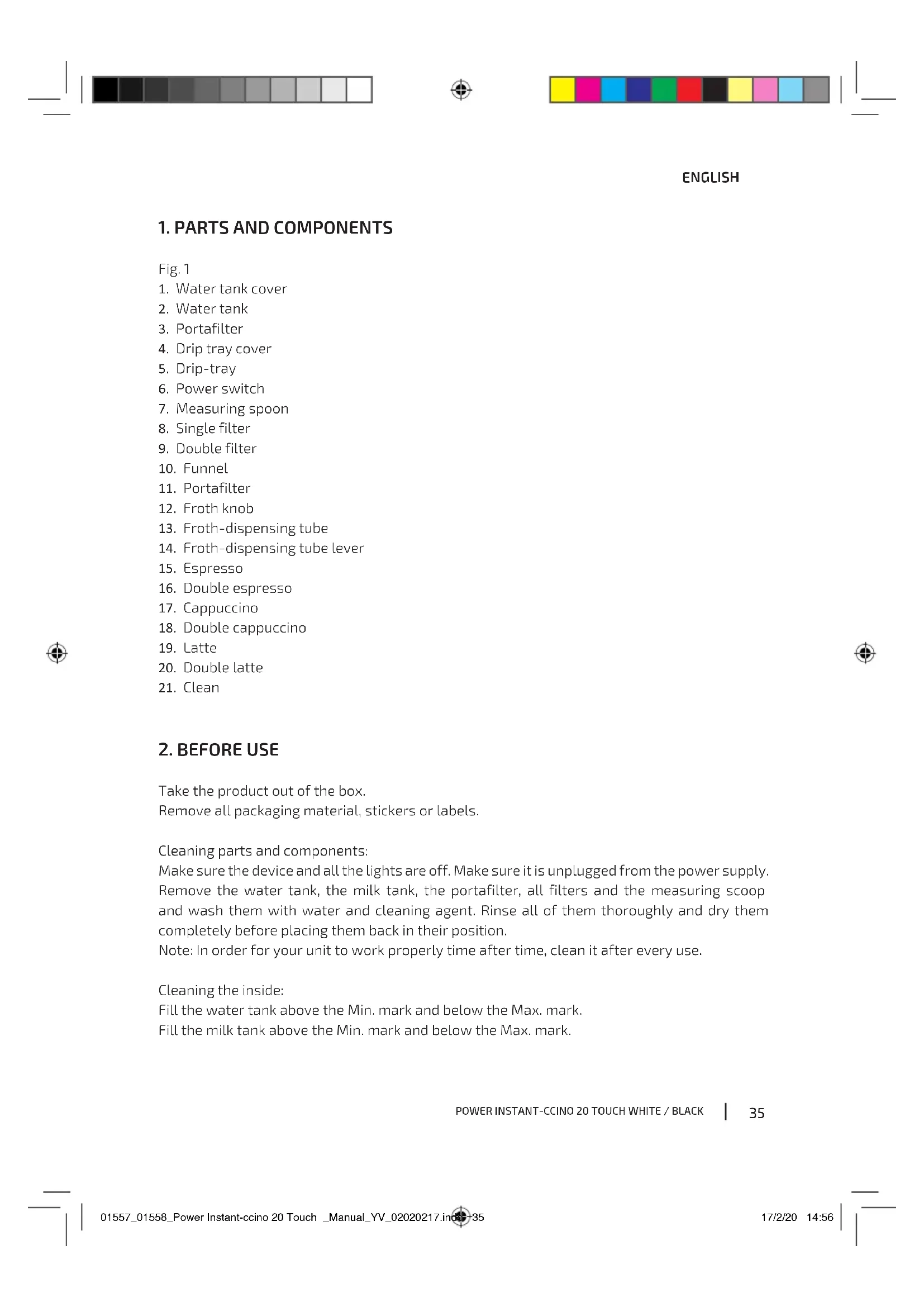
1. Parts and components 35
4. Cleaning and maintenance 38
7. Disposal of old electrical appliances 41
8. Technical support service and warranty 42
Warning: This product has undergone a quality control previous
Take the product out of the box. Remove all packaging material, stickers or labels. Cleaning parts and components: Make sure the device and all the lights are off. Make sure it is unplugged from the power supply. Remove the water tank, the milk tank, the portafilter, all filters and the measuring scoop and wash them with water and cleaning agent. Rinse all of them thoroughly and dry them completely before placing them back in their position. Note: In order for your unit to work properly time after time, clean it after every use. Cleaning the inside: Fill the water tank above the Min. mark and below the Max. mark. Fill the milk tank above the Min. mark and below the Max. mark. 01557_01558_Power Instant-ccino 20 Touch _Manual_YV_02020217.indd 3501557_01558_Power Instant-ccino 20 Touch _Manual_YV_02020217.indd 35 17/2/20 14:5617/2/20 14:5636 ENGLISH Select one of the filters and place it inside the portafilter. Place the portafilter in the unit ensuring it is properly locked and place a cup under it. Make sure the dispensing tube is inside the cup. Plug the appliance to a power supply. Turn the power switch on. The buttons on the device will blink 3 times and the device will beep. Once the buttons’ lights turn steady, press the “Double Cappuccino” button. The process will be over once all the lights are steady.
Coffee size Espresso Single Double 40-60 ml 90-110 ml Cappuccino Single Double 80-150 ml 160-300 ml Latte Single Double 160-300 ml 250-350 ml Filling the water tank Remove the water tank, fill it up with water. Then, place the tank back in its correct position and make sure it is properly fixed. To fill the water tank without removing it from the device, use a jug to pour the water inside.
Warning: The water level must not be below the min. mark or above the max. mark.
Warning: Do not use hot water to fill in the water tank.
Filling the milk tank Remove the milk tank and open the cover. Fill it with milk between the min. and max. mark. Once it is full, close it again and place it back in its correct positions making sure it is properly fixed. Note: The device is suitable for any type of milk, such as whole milk, low-fat milk, organic, soy milk… Selecting the filter Use the small filter for one shot of ground coffee. Fig. 2 Use the larger filter for a double shot or two shots of ground coffee. Fig. 3 01557_01558_Power Instant-ccino 20 Touch _Manual_YV_02020217.indd 3601557_01558_Power Instant-ccino 20 Touch _Manual_YV_02020217.indd 36 17/2/20 14:5617/2/20 14:56POWER INSTANT-CCINO 20 TOUCH WHITE / BLACK
ENGLISH Filling coffee Use the measuring spoon to pour coffee into the selected filter. Press it firmly and evenly with the spoon’s press. Clean any excess coffee from the rim before placing it in its position. Fig. 4 Placing the portafilter Move the retainer clip back and fix the portafilter in its correct position. Place the portafilter’s handle so that it is aligned with the open-lock icon on the unit and fits into the groove. Turn it to the right until the retention clip is aligned with the closed lock icon on the device. Fig. 5 Placing the cups Unfold the height-adjustment tray to the desired height depending if you desire to brew a single or double espresso. Keep the height-adjustment tray inside its compartment if you are using a larger cup to brew cappuccino or latte.
Warning: When brewing cappuccino or latte, make sure to adjust the froth-dispensing tube
lever so that the tube is inside the cup to be used. Turning the device on Make sure the device is plugged to a power supply. Turn the power switch on. The icons will blink 3 times and the machine will beep. The icons will blink during the preheating process until the water reaches the optimal temperature. Once the icon lights turn steady, the machine is ready to be used. Sleep state The machine will automatically enter sleep state after 25 minutes of no operation. All the icons will turn off except for the “Cleaning” button. Press “Cleaning” to start the machine up again. All the icons will light up and the machine will emit a beep indicating it is activated again. Functions Espresso Hot water passes through finely ground coffee. It is usually served in 44 to 59 ml portions due to its richness. Press the “Single Espresso” button to brew one single espresso. Press the “Double Espresso” button to brew a double espresso. 01557_01558_Power Instant-ccino 20 Touch _Manual_YV_02020217.indd 3701557_01558_Power Instant-ccino 20 Touch _Manual_YV_02020217.indd 37 17/2/20 14:5617/2/20 14:5638 ENGLISH Cappuccino Drink made of 1/3 espresso, 1/3 steamed milk and 1/3 frothed milk. Select the desired quantity of froth by turning the froth knob clockwise (more) or anticlockwise (less). The froth intensity can be adjusted during the brewing process. Press the “Single Cappuccino” to brew one single cappuccino. Press the “Double Cappuccino” to brew a double cappuccino. Note: Once the machine has finished brewing coffee, it will start dispensing milk. Press the before-pressed button again when you have obtained the desired amount of milk and the machine will stop automatically. Latte Drink made of ¼ espresso and ¾ of frothed milk. Press the “Single Latte” button to brew one single latte. Press the “Double Latte” button to brew a double latte. Note: Once the machine has finished brewing coffee, it will start dispensing milk. Press the before-pressed button again when you have obtained the desired amount of milk and the machine will stop automatically. Milk froth Long-press to prepare the desired amount of milk froth. Stop pressing the icon when you have the desired amount. Remove the milk tank and store it in the fridge or empty the remaining milk. Fig. 6 Coffee customization The coffee quantity can be adjusted and saved for future coffees. Long-press the “Single Espresso” button until you have obtained the desired amount of coffee for a single espresso. This quantity will be saved and applied to the rest of single coffees. Long-press the “Double Espresso” until you have obtained the desired amount of coffee for a single espresso. This quantity will be saved and applied to the rest of double coffees. To brew less coffee than the machine’s default quantity, long-press the same button and let it go once you have obtained the desired amount.
Warning: Only use roasted ground coffee or roasted coffee beans in the appliance.
4. CLEANING AND MAINTENANCE
Milk tank and froth-dispensing tube Even though the milk tank can be stored with left over milk in the refrigerator, it is important to clean the tank and froth-dispensing tube regularly to avoid clogging and building residues. Follow the instructions listed below: 01557_01558_Power Instant-ccino 20 Touch _Manual_YV_02020217.indd 3801557_01558_Power Instant-ccino 20 Touch _Manual_YV_02020217.indd 38 17/2/20 14:5617/2/20 14:56POWER INSTANT-CCINO 20 TOUCH WHITE / BLACK
ENGLISH Remove the milk tank from the unit. Remove the tank cover. Pour any milk left and rinse and wash the milk tank and cover thoroughly with warm soapy water. Rinse and dry well. Do not use abrasive cleaners or scouring pads, as they will scratch the finish. The milk tank is dishwasher safe. Do not place the lid of the milk tank on the dishwasher. Place a large empty cup under the froth-dispensing tube. Press the “Cleaning” button. The unit will start releasing steam through the frothing tube. Let it run for a few seconds until no more milk is observed in the cup. Once no more milk is observed, press the “Cleaning” button once to stop the process. Empty any water left on the milk tank and place it back in the device. Milk tank and froth-dispensing tube Make sure all icons are off by turning off the power switch located on the side of the unit and unplug the power cord from the power supply. Allow the machine to cool down in order to avoid burns. Remove the portafilter and clean any coffee grounds left. Wash both the portafilter and filter with warm soapy water and rinse them well. Do not wash the portafilter and filters in the dishwasher. Use a damp cloth or paper towel to clean the coffee outlet. Place the portafilter without any filter in the unit’s coffee outlet. Place an empty large cup under the portafilter. Press the “Single Espresso” button. The machine will carry out the cleaning process and once it has finished, it will automatically stop. Water tank It is suggested to empty the water tank after each use. Wash it with water a soap, rinse it and dry it thoroughly before placing it in the unit again. The water tank is dishwasher safe. Unit’s housing Use a soft, dampened cloth to clean the outer part of the device. Do not use abrasive cleaners or scouring pads as they could cause damage to the product’s surface.
Warning: Do not immerse the appliance in water.
Descaling Mineral deposits built up in the unit might affect the machine’s operating. An increase in the time needed for the machine to brew a coffee or excessive steaming are signs that the machine requires descaling. The descaling process must be carried out every certain time, and this time will depend on the hardness of the water used: 01557_01558_Power Instant-ccino 20 Touch _Manual_YV_02020217.indd 3901557_01558_Power Instant-ccino 20 Touch _Manual_YV_02020217.indd 39 17/2/20 14:5617/2/20 14:5640 ENGLISH Water hardness Descaling frequency Soft water (Filtered water) Every 80 coffees Hard water (Tap water) Every 40 coffees Water tank descaling Fill the tank with 50 % vinegar, 50 % water. Allow the appliance to sit overnight. Remove the tank from the appliance and pour away the vinegar. Fill the tank with water and rinse it thoroughly. Repeat this step twice. Inner part’s descaling Carry out the water tank descaling first (see the above section). Make sure all icons are off by turning off the power switch located on the side of the unit and unplug the power cord from the power supply. Fill the tank with white vinegar above the min. mark. Insert the portafilter with the filter (no coffee) and place a large cup or jar under it. Connect the device to a power supply. Turn the power switch on and once the icons stop blinking, press the “Espresso” button for 3 seconds. The vinegar will start flowing through the unit and will stop automatically. Place a large cup (at least 325 ml) under the froth-dispensing tube and fill the milk tank with water. Press the “Single Cappuccino” button for 3 seconds to activate the cleaning function. Allow the unit to dispense water through the tube for approximately 30 seconds. Press the “Single Cappuccino” button to stop it. Repeat the before steps as many times as considered in order to remove any vinegar rests.
Problem Causes Solutions Coffee does not come out. No water in tank. Coffee grind is too fine. Too much coffee in the filter. Appliance was not turned on or plugged in. Coffee has been tamped/ compressed too much. Add water. Grind medium ground coffee. Fill filter with less coffee. Plug unit into electrical outlet and turn it on. Refill filter with coffee, do not tamp too much. 01557_01558_Power Instant-ccino 20 Touch _Manual_YV_02020217.indd 4001557_01558_Power Instant-ccino 20 Touch _Manual_YV_02020217.indd 40 17/2/20 14:5617/2/20 14:56POWER INSTANT-CCINO 20 TOUCH WHITE / BLACK
ENGLISH Coffee comes out around the edge of the portafilter. Portafilter not rotated to full lock position. Coffee grounds around the filter rim. Too much coffee in the filter. Rotate filter holder to full lock position. Wipe off rim. Fill with less coffee. Milk is not foamy. Ran out of steam. Milk is not cold enough. Frothing tube is blocked. Ensure there is enough water in the tank. Allow the milk to cool down before making cappuccino. Follow the instructions to clean the milk tank and froth- dispensing tube. Coffee comes out too quickly. Ground coffee is too coarse. Not enough coffee in filter. Coffee is not tamped correctly. Use a finer grind. Use more coffee. Refill the coffee filter and tamp it with more strength.
The European directive 2012/19/EU on Waste Electrical and Electronic Equipment (WEEE), specifies that old household electrical appliances must not be disposed of with the normal unsorted municipal waste. Old appliances must be collected separately, in order to optimize the recovery and recycling of the materials they contain, and reduce the impact on human health and the environment. The crossed out “wheeled bin” symbol on the product reminds you of your obligation to dispose of the appliance correctly. Consumers must contact their local authorities or retailer for information concerning the correct disposal of old appliances and/or their batteries. 01557_01558_Power Instant-ccino 20 Touch _Manual_YV_02020217.indd 4101557_01558_Power Instant-ccino 20 Touch _Manual_YV_02020217.indd 41 17/2/20 14:5617/2/20 14:5642 ENGLISH
8. TECHNICAL SUPPORT SERVICE AND WARRANTY
This product is under warranty for 2 years from the date of purchase, as long as the proof of purchase is submitted, the product is in perfect physical condition, and it has been given proper use, as explained in this instruction manual. The warranty will not cover the following situations: The product has been used for purposes other than those intended for it, misused, beaten, exposed to moisture, immersed in liquid or corrosive substances, as well as any other fault attributable to the customer. The product has been disassembled, modified, or repaired by persons, not authorised by the official Technical Support Service of Cecotec. Faults deriving from the normal wear and tear of its parts, due to use. The warranty service covers every manufacturing defects of your appliance for 2 years, based on current legislation, except consumable parts. In the event of misuse, the warranty will not apply. If at any moment you detect any problem with your product or have any doubt, do not hesitate to contact Cecotec Technical Support Service at +34 963 210 728. 01557_01558_Power Instant-ccino 20 Touch _Manual_YV_02020217.indd 4201557_01558_Power Instant-ccino 20 Touch _Manual_YV_02020217.indd 42 17/2/20 14:5617/2/20 14:56POWER INSTANT-CCINO 20 TOUCH WHITE / BLACK