USER MANUAL G 600 STIGA
STIGA
G 300
G 600
G 1200
EN Instruction manual
ENGLISH - TRANSLATION OF THE ORIGINAL INSTRUCTIONS
TABLE OF CONTENTS
1. MODELS TECHNICAL DATA 1
1.1. MODELS....1 1.2. TECHNICAL DATA 2
2. SAFETY 3
2.1. SAFETY INFORMATION ......
3 2.2. SAFETY INSTRUCTIONS .... 5 2.2.1. SAFE OPERATING PROCEDURES....5 2.2.2. FUNCTIONS ....5 2.3. STOPPING AND TURNING OFF THE ROBOT LAWN MOWER IN SAFE CONDITIONS....7
3. INTRODUCTION 8
3.1. GENERAL INTRODUCTION 8 3.1.1. PURPOSE OF THE MANUAL....8 3.1.2. INSTRUCTIONS ON READING FROM SMARTPHONES 8 3.2. PRODUCT OVERVIEW....9 3.2.1. GENERAL DESCRIPTION 9 3.2.2. MAIN COMPONENTS 10 3.3. UNPACKING....11 3.4. SYMBOLS AND NAMEPLATES....12 3.5. GENERAL INSTRUCTIONS ON HOW TO READ THE MANUAL....13
4. INSTALLATION 14
4.1. GENERAL INFORMATION FOR INSTALLATION....14 4.2. INSTALLATION COMPONENTS....14 4.3. INSTALLATION REQUIREMENTS CHECK....15 4.3.1. GARDEN ASSESSMENT: 15 4.3.2. CHECKS FOR THE INSTALLATION OF THE DOCKING STATION AND POWER SUPPLY: 15 4.3.3. MAIN VERIFICATIONS FOR THE INSTALLATION OF THE PERIMETER CABLE: 17
4.4. CRITERIA FOR INSTALLING THE PERIMETER CABLE....19
4.4.1. PERIMETER CABLE PLACEMENT 19
4.4.2. OBSTACLES DELIMITATION: 21
4.4.3. WALKWAYS FROM ONE AREA OF THE GARDEN TO ANOTHER 23
4.5. COMPONENTS INSTALLATION....23
4.5.1. INSTALLATION OF THE PERIMETER CABLE 24
4.5.2. SPLICING THE PERIMETER CABLE.... 25
4.5.3. DOCKING STATION INSTALLATION....26
4.5.4. RESISTOR INSTALLATION FOR SMALL PERIMETERS.... 28
4.6. CHARGE ROBOT LAWN MOWER AFTER INSTALLATION 29
4.7. PRODUCT SETTINGS....30
5. FUNCTIONS 35
5.1. SAFETY DEVICES CHECK FOR STARTING THE ROBOT LAWN MOWER 35
5.2. MANUAL FUNCTIONING OF THE ROBOT LAWN MOWER....36
5.3. CONTROLS DESCRIPTION ON THE ROBOT LAWN MOWER....37
5.3.1. SAFE STOP - STOP BUTTON 37
5.3.2. SAFE SHUTDOWN - SAFETY KEY 38
5.3.3. SWITCHING ON AND OFF - ON/OFF BUTTON 38
5.3.4. SCHEDULED PROGRAM / SINGLE WORK CYCLE SELECTION - SCHEDULED PROGRAM BUTTON ..... 39
5.3.5. BLUETOOTH STATUS DISPLAY AND UNPAIRING- BLUETOOTH BUTTON 41
5.3.6. ALARM STATUS DISPLAY - ALARM ICON 41
5.3.7. BATTERY CHARGE LEVEL DISPLAY-BATTERY ICON 42
5.3.8. STARTING THE ROBOT LAWN MOWER - START BUTTON 42
5.4. FUNCTIONING OF THE DOCKING STATION 43
5.5. BATTERY CHARGING 43
5.6. CUTTING HEIGHT ADJUSTMENT 44
6. MAINTENANCE 45
6.1. SCHEDULED MAINTENANCE 45 6.2. PRODUCT CLEANING....46 6.3. CUTTING BLADES REPLACEMENT 48 6.4. WINTER BATTERY MAINTENANCE AND STORAGE 49 6.5. BATTERY REPLACEMENT 49
7. TROUBLESHOOTING 50
7.1. MAIN MESSAGES FROM THE APP....51
8. TRANSPORT, STORAGE AND DISPOSAL 53
8.1. TRANSPORT 53 8.2. STORAGE....53 8.3. DISPOSAL....53
9. ACCESSORIES 54
- WARRANTY 55
- EC DECLARATION OF CONFORMITY 56
1. MODELS AND TECHNICAL DATA
1.1. MODELS
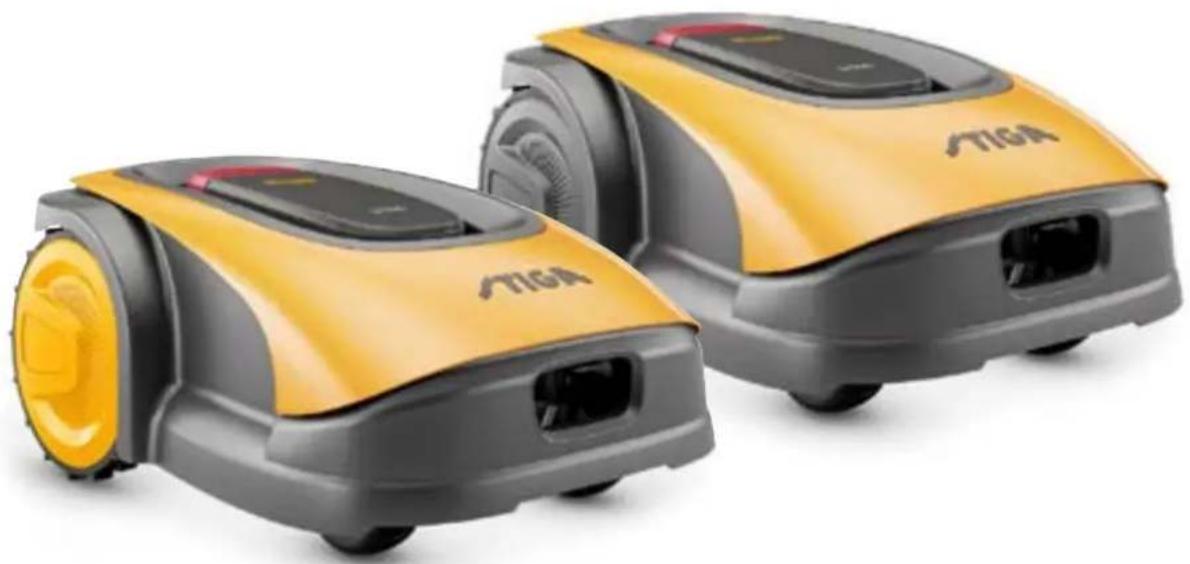
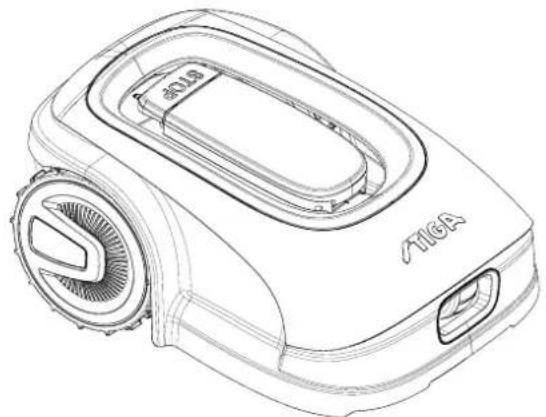
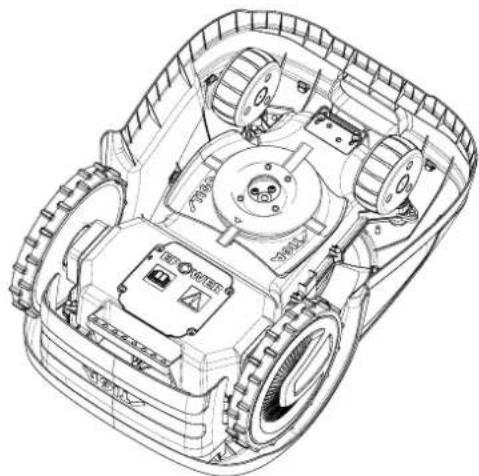
This manual refers to the models G 300, G 600, G 1200.
1.2. TECHNICAL DATA
| SPECIFICATIONS | UNIT OF MEASURE | STIGA G 300 STIGA G 600 STIGA G 1200 |
| Dimensions (WxHxD) | [mm] 413 | x 252 x 560 413 x 252 x | 560 413 x 252 x 560 | |
| Weight of the robot lawn mower | [kg] 7.4 7 | 6 8 | | |
| Cutting height (Min-Max) | [mm] 20-60 | 20-60 20-60 | | |
| Blade diameter | [mm] | 180 | 180 | 180 |
| Cutting speed | [rpm] | 2850+/-50 | 2850+/-50 | 2850+/-50 |
| Speed of movement | [m/min] | 22 | 22 | 22 |
| Maximum slope | % | 45 | 45 | 45 |
| Maximum slope along the perimeter | % | 20 | 20 | 20 |
| Type of electric traction motor | - | Brushless | Brushless | Brushless |
| Type of cutting system | - | 4 pivoting cutting blades | 4 pivoting cutting blades | 4 pivoting cutting blades |
| Cutting device code | - | 322104105/0 | 322104105/0 | 322104105/0 |
| Type of electric cutting motor | - | Brushless | Brushless | Brushless |
| Sound power level detected | [dB] (A) | 57 | 57 | 57 |
| Uncertainty of noise emissions, KWA | [dB] (A) | 1.47 | 1.47 | 1.47 |
| Sound power level guaranteed | [dB] (A) | 59 | 59 | 59 |
| Acoustic level audible by the operator | [dB] (A) | 46.3 | 46.3 | 46.3 |
| IP rating of the robot lawn mower | - | IPX5 | IPX5 | IPX5 |
| IP rating of the charging station | - | IPX1 | IPX1 | IPX1 |
| IP rating of the power supply | - | IP67 | IP67 | IP67 |
| Robot lawn mower operating ambient temperature [°C] | [°C] | 0 ÷ 50 | 0 ÷ 50 | 0 ÷ 50 |
| Charging station operating ambient temperature [°C] | [°C] | -10 ÷ 50 | -10 ÷ 50 | -10 ÷ 50 |
| Power supply ambient operating temperature [°C] | [°C] | -10 ÷ 50 | -10 ÷ 50 | -10 ÷ 40 |
| Work capacity | [m2] | 300 | 600 | 1200 |
| Power supply | - | Input:100-240Vca; 1,2AOutput:30Vcc; 2A | Input:100-240Vca; 1,2AOutput:30Vcc; 2A | Input:100-240Vca; 1,2AOutput:30Vcc; 2A |
| Battery model | - | 25.2 - 25.9 V2 Ah | 25.2 - 25.9 V2.5 Ah | 25.2 - 25.9 V5 Ah |
| Charging time | [min] | 60 | 80 | 150 |
| Bluetooth | - | 4,2 4,2 | 4,2 | |
2. SAFETY
In the design of the device, special attention has been paid to aspects that can cause risks to the safety and health of people. The purpose of this information is to sensitize users to prevent any risk, avoiding behaviours that do not comply with the regulations reported.

DANGER:
Before using the robot lawn mower you must know all the information contained in this document.

DANGER:
This robot lawn mower is not intended to be used by children and people with reduced physical, sensory or mental abilities or with lack of experience and knowledge.

ELECTRICAL HAZARD:
Before carrying out any adjustment or maintenance intervention, disconnect the power supply and activate the safety device.

ELECTRICAL HAZARD:
Do not use the robot lawn mower with a damaged transformer power cable. A damaged cable can lead to contact with live parts. The cable must be replaced by the manufacturer or its assistance service or by a person with adequate qualifications, in order to prevent any risk.

ELECTRICAL HAZARD:
Only use the battery charger and power supply provided by the manufacturer. The use of an inappropriate charger and power supply can cause electric shocks and / or overheating.

CAUTION:
In case of leakage of liquid from the battery, the affected components must be washed with water / neutralizer.
Avoid any direct contact with the battery liquid.
If the liquid comes into contact with the eyes, call a doctor immediately.

CAUTION:
During the operation of the robot lawn mower, make sure that there are no people, especially children, or pets, in the operating area. Otherwise, program the activity of the robot lawn mower during the hours when there are no people in that area.

CAUTION:
The operational area must be limited by a non-passable fence.
Make the fence suitable or supervise the robot lawn mower during its operation.

CAUTION:
Only use original spare parts.
STIGA

CAUTION:
Do not modify, tamper with, elude or eliminate the safety devices installed.

WARNING:
Check that there are no toys, tools, branches, clothing, or other items on the lawn that could damage the device.

BAN:
Do not sit on top of the robot lawn mower.

BAN:
Never lift the robot lawn mower to inspect the blade or to transport it when it's started. Do not put your hands and feet under the device.

BAN:
Do not use the robot lawn mower when a sprinkler is in operation.

BAN:
Do not wash the robot lawn mower with high pressure water jets, and do not immerse it, partially or completely, in water.

BAN:
Do not use the robot lawn mower if it is not perfectly intact in all its parts. In case of damage replace the affected parts.

BAN:
It is absolutely forbidden to use and recharge the robot lawn mower in explosive and inflammable environments.

OBLIGATION:
Visually check the robot lawn mower at regular intervals to make sure the blades and mowing mechanism are not worn out or damaged. Make sure that the robot lawn mower is in good operating conditions.

OBLIGATION:
Read the entire manual carefully, especially all safety information, and make sure you fully understand it. Follow the operating, maintenance and repair instructions carefully.

OBLIGATION:
Operators carrying out maintenance and repair interventions must be utterly familiar with the specific features and safety regulations of the robot lawn mower.

GLOVES OBLIGATION:
Use personal protection foreseen by the Manufacturer. Always use protective gloves when working on the cutting mechanism.
2.2. SAFETY INSTRUCTIONS

OBLIGATION:
Read carefully before use and store for future reference.
2.2.1. SAFE OPERATING PROCEDURES
Training
a. Read the instructions carefully, learn the controls and the correct use of the machine. b. Never allow children, persons with reduced physical, sensory or mental capabilities, or lack of experience and knowledge, or persons unfamiliar with these instructions, to operate the machine. Local regulations may limit the age of the operator. c. The operator, or user, is to be held responsible for accidents or hazards involving third parties or third party equipment.
Preparation
a. Make sure that the automatic system of perimeter delimitation is installed correctly as indicated. b. Periodically check the area where the machine is used and remove stones, sticks, cables and any other foreign objects that may interfere with its operation. c. Periodically carry out a visual inspection of the blades, blade bolts and of the cutting unit to check that they are not worn out or damaged. Replace worn out or damaged blades and bolts in pairs to maintain the balance of the machine. d. Warning signs must be placed around the working area of the machine if it is used in public areas or areas open to the public. Signs must read as follows: "Warning! Automatic lawn mower! Keep away from the machine! Children must be supervised!"
2.2.2. OPERATION
a. Do not operate the machine with defective guards or safety devices that are not present, for example without protections. b. Do not put hands or feet near or under the rotating parts. Always keep away from the drain opening. c. Do not touch any moving parts of the machine until they have come to a complete stop. d. Always wear sturdy shoes and long trousers when operating the machine. e. Never lift or transport the machine when the motor is running.
f. Remove the disabling device from the unit:
- Before removing an obstruction;
- Before checking, cleaning or working on the machine.
g. Do not leave the machine in operation unattended in the presence of pets, children or other people nearby.
Maintenance and storage
a. Tighten all nuts, bolts and screws securely for safe operation of the machine. b. Frequently check the robot lawn mower for wear or deterioration. c. For safety reasons it is necessary to replace worn out or damaged parts. d. Make sure that the blades are replaced only with suitable spare parts. e. Make sure the batteries are recharged using the correct charger recommended by the manufacturer. Incorrect use can cause electric shock, overheating or leakage of corrosive liquid from the battery. f. In case of electrolyte leaks, wash with water / neutralizing agent and consult a doctor in case of contact with eyes, etc. g. Machine maintenance must be carried out in accordance with the manufacturer's instructions.
Battery / battery charger

WARNING:
Lithium-ion batteries can explode or cause fires if disassembled, exposed to water, fire or high temperatures or in the event of a short circuit. Handle the battery carefully, do not disassemble it and avoid any type of improper electrical or mechanical stress. Avoid exposing the battery to direct sunlight.
NOTE: It is recommended to use only original products supplied by the manufacturer. Non-original or inadequate products can cause damage to the robot lawn mower or can be dangerous for people, animals and things.
a. The battery should only be installed and / or removed from the robot lawn mower by the retailer or a service centre. b. Store the unused battery in a safe place away from sources of heat or objects that can cause short circuits (pegs, screws, metal objects of various kinds). c. Use the battery charger away from flammable surfaces or substances, and in preferably dry places. d. Transport the battery and the battery charger in the original packaging.
Environmental protection
NOTE: Safeguarding the environment must be a relevant and priority aspect of machine use, of benefit to the community and the environment we live in.
a. Dispose of packaging and damaged parts as required by local regulations in the country of use. b. Dispose of electrical equipment (robot lawn mower, battery, power supplies, etc.) as per European Directive 2012/19 / EU and in compliance with the national standards. For further information on the disposal, contact your retailer or a domestic waste collection service. c. Separate collection of products and packaging is recommended.
2.3. STOPPING AND TURNING OFF THE ROBOT LAWN MOWER IN SAFE CONDITIONS

OBLIGATION:
Always switch off the robot lawn mower in safe conditions before any cleaning, transport or maintenance operation.
Requirements and obligations:
- Safety key.
Procedure:
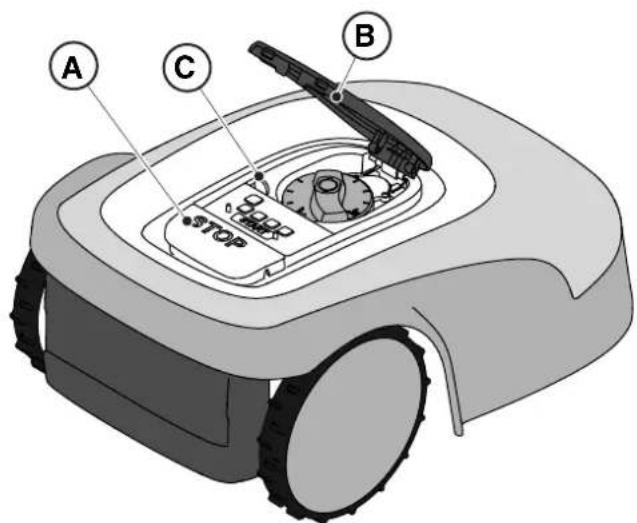
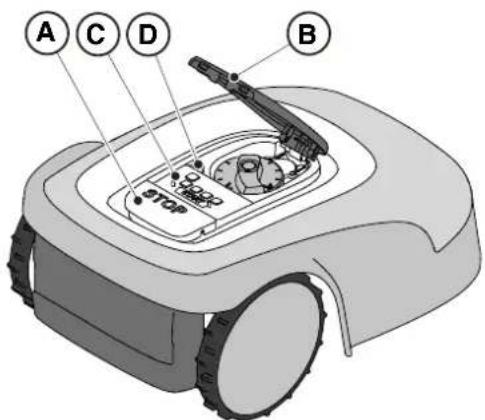
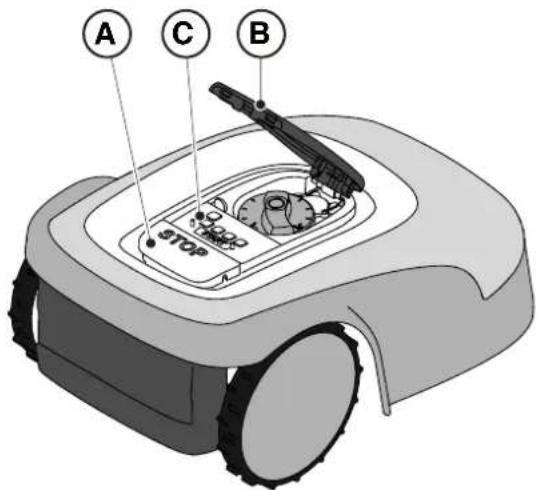
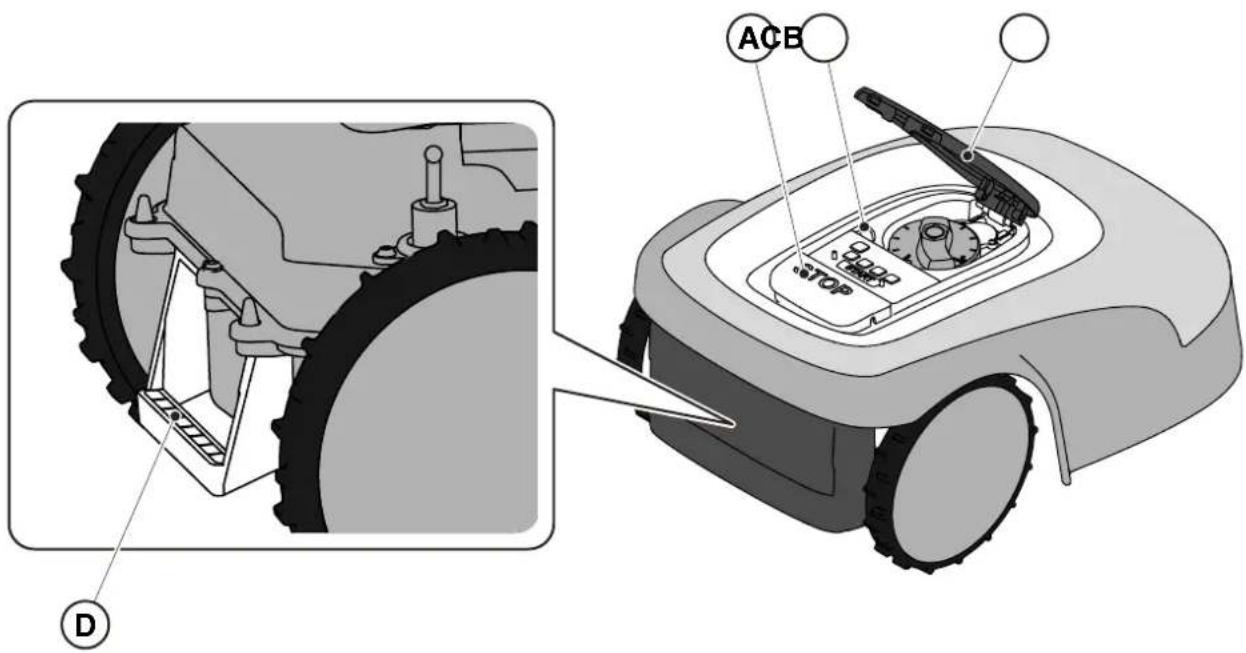
- Press the "STOP" (A) button to stop the robot lawn mower safely and open the protective cover (B).
- Disengage the safety key (C) to switch off the robot lawn mower in safe conditions.
- Close the protective cover (B).
- The robot lawn mower is stopped or switched off in a safe condition.
3. INTRODUCTION
3.1. GENERAL INTRODUCTION
3.1.1. PURPOSE OF THE MANUAL
This manual is an integral part of the device and it is intended to provide the information necessary for its use.
Keep this manual for the entire life of the device, so that it is always available in case of need.
The recipient of the manual is the user of the device, who is required to carefully read the information contained therein and apply it rigorously to protect people's safety and to avoid damage.
The information is drawn up in the original language of the manufacturer (Italian) and translated into any other languages for legislative and/or commercial needs.
The following symbols have been adopted to highlight important texts.
DANGER \ CAUTION \ WARNING:
The pictograms contained in a triangle with a yellow background and a black line indicate danger \ caution\ warning.
BAN:
The pictograms contained in a crossed-out circle with a white background and a red stroke indicate a ban.
OBLIGATION:
The pictograms contained in a circle with a blue background indicate an obligation.
NOTE: The texts shown in this form indicate technical information of particular importance, which should not be ignored.
3.1.2. INSTRUCTIONS FOR READING FROM SMARTPHONE
For better readability of the user manual, it is recommended to keep the smartphone in an horizontal position, as shown in the picture.
3.2. PRODUCT OVERVIEW
3.2.1. GENERAL DESCRIPTION
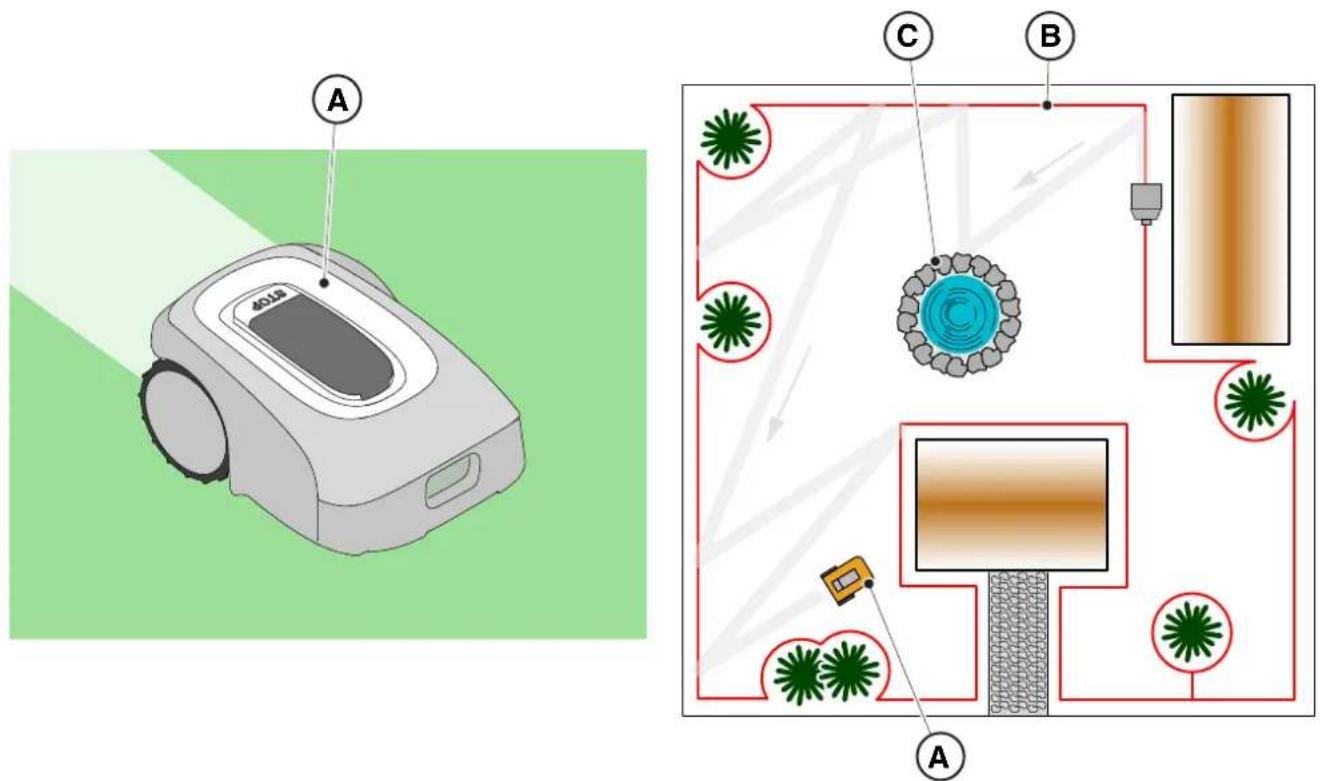
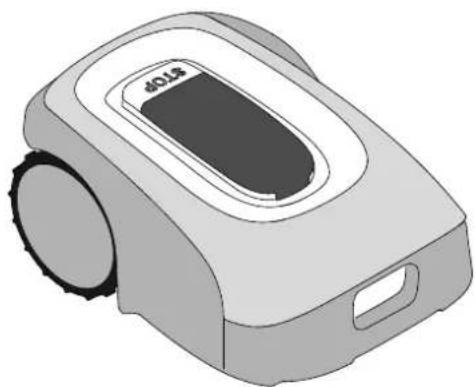
The robot lawn mower (A) is designed and built to automatically cut garden grass at any time of day and night.
According to the different characteristics of the surface to be cut, the lawnmower robot can be programmed to work on several areas delimited by the perimeter cable.
When operating, the robot lawn mower mows the area delimited by the perimeter cable (B).
When the robot lawn mower detects the perimeter cable (B) or encounters an obstacle (C), it changes trajectory randomly.
Based on the random operation principle, the robot lawn mower mows the delimited lawn automatically and completely.
Any other usage may be hazardous and harm persons and/or damage things. Improper use includes (for example, but not limited to): transporting people, children or animals on the machine; being transported by the machine; using the machine to pull or push loads; using the machine for cutting non-grass vegetation.
3.2.2. MAIN COMPONENTS
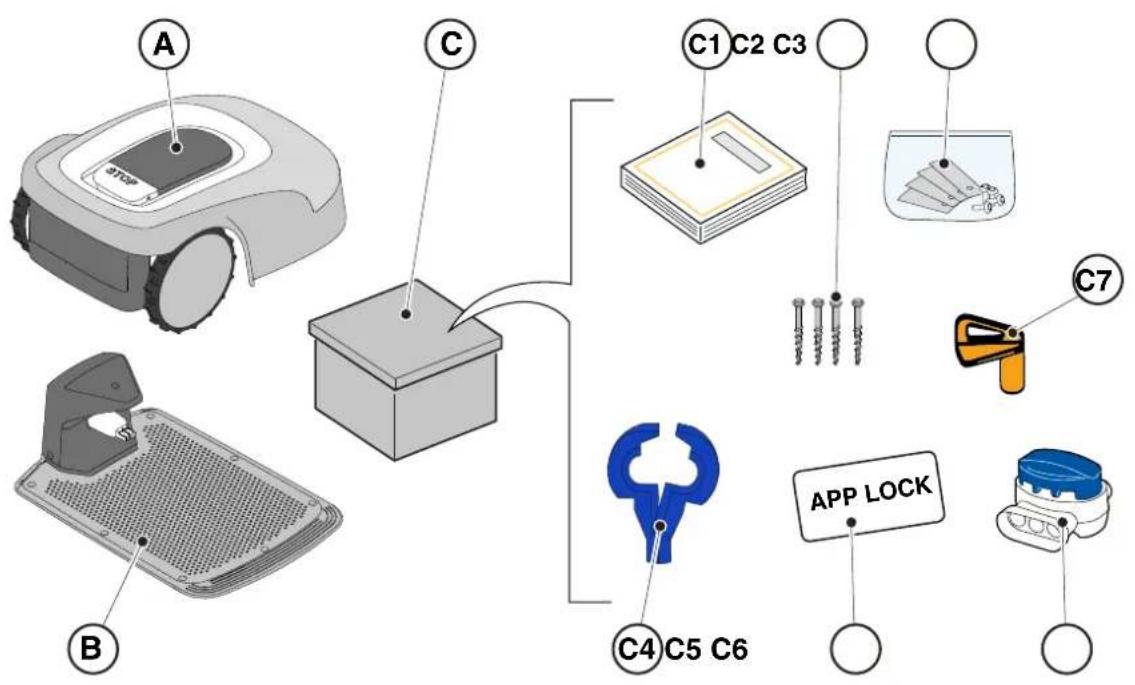
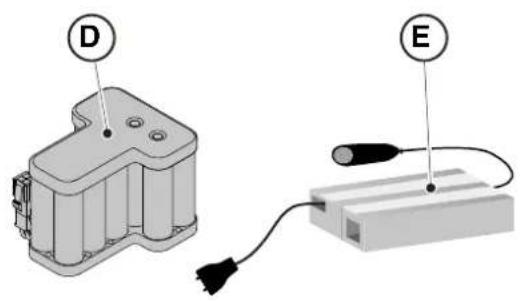
(A) Robot lawn mower (B) Docking station (C) Starter kit (D) Battery (inside the robot lawn mower) (E) Docking station power supply
(C1) Instruction manual (C2) Docking station fixing screws (C3) Blister with blades and fixing screws (C4) Charging Base connectors (C5) App Lock Label (C6) Joint for perimeter cable (C7) Safety key
• Installation kit (Optional for G 600 and G 1200)
(F) Perimeter cable (G) Perimeter cable fixing pegs (H) joint for perimeter cable (I) Docking station connectors
See Chapter 9 "Accessories"
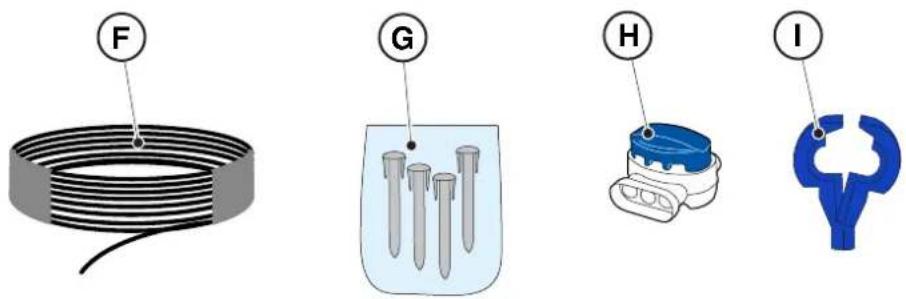
3.3. UNPACKING
Following are listed all the steps to perform the correct unpacking:
- Open the box of the robot lawn mower;
- Take out the "Starter Kit" box;
- Take out the upper containment carton;
- Take out the robot lawn mower;
- Take out the docking station.

WARNING:
Make sure to remove all packaging material from the robot lawn mower before using it.

WARNING:
To avoid injury or damage, please be careful when unpacking the robot lawn mower, avoiding contact with cutting blades or other hazardous elements.
![graph TD A["Open Box 123"] --> B["Box 4"] B --> C["Box 5"] C --> D["Robot Vacuum Cleaner"]](/content/2026/04/623884/images/65c7ab852c33ef557ad2d5bcd5e76602405057a77a34144052d35bb7c2d6ffa1.jpg)
3.4. SYMBOLS AND NAMEPLATES
Below all the symbols on the robot lawn mower are listed:
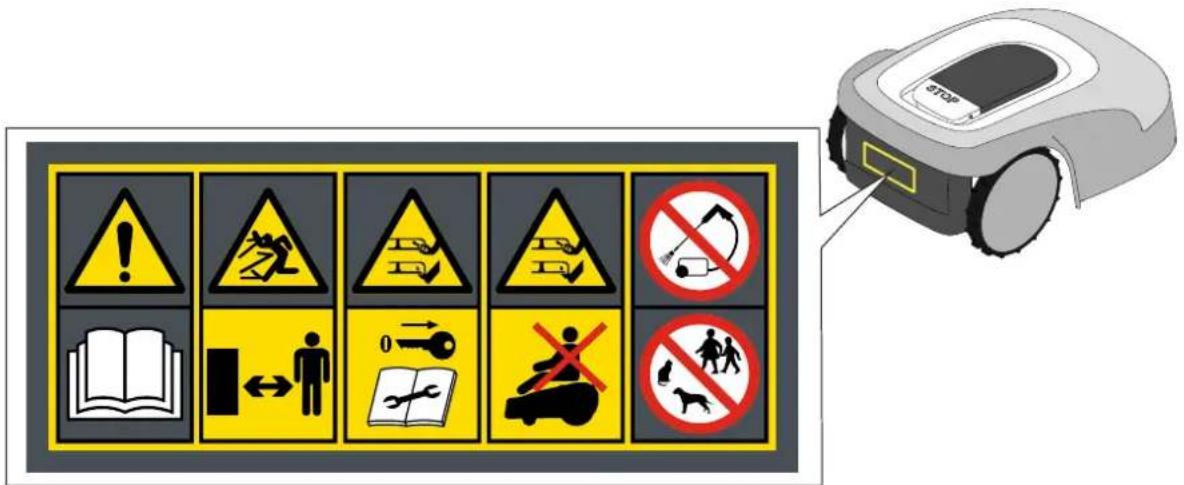

WARNING:
Read the user instructions before starting the product.

WARNING:
Danger of projections of objects against the body.
Keep an adequate safe distance from the machine while it is running.
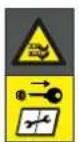
WARNING:
Do not put hands and feet near or under the opening of the cutting means.
Remove the disabling device before operating on the machine or before lifting it.

WARNING:
Do not put hands and feet near or under the opening of the cutting means.
Do not stand on the machine.

BAN:
Do not use high pressure cleaners on the machine to clean or wash it.

BAN:
Make sure that there are no people (especially children, elderly or disabled) and pets in the working area during the operation of the machine.
Keep children, pets and other people at a safe distance when the machine is functioning.
All the symbols on the Battery are shown below:
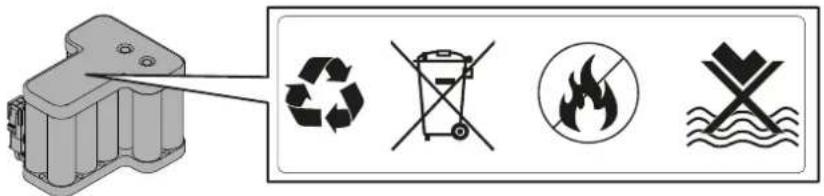

WARNING:
Read the user instructions before starting the product.

Do not dispose of the battery as normal household waste.
Dispose of the battery in the appropriate authorized collection centres.

Do not throw the battery into the fire and do not expose it to heat sources.

Do not immerse the battery in water and do not expose it to moisture.
3.5. GENERAL MANUAL READING INSTRUCTIONS
The criteria used for the preparation of this document are described below.
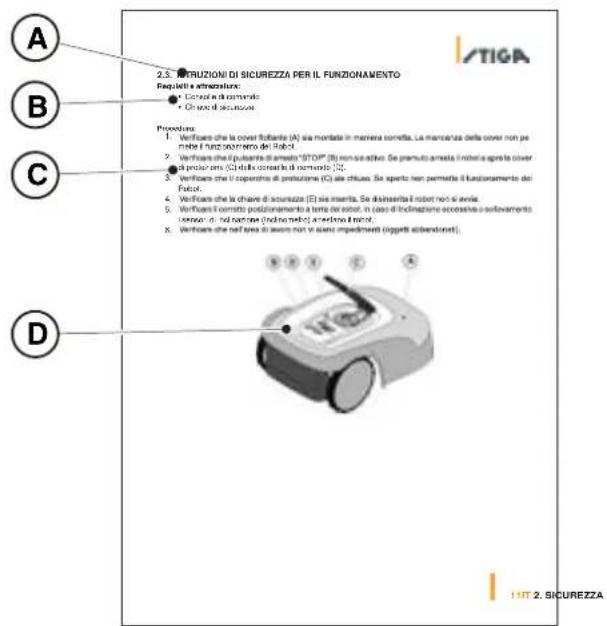
- Topic title (A)
- Requirements and equipment for carrying out the procedure (B)
- Description of the procedure (C)
- Descriptive pictures of the procedure (D)
- App section title (E)
- App navigation procedure (F)
Do not modify, tamper with, elude or eliminate the safety devices installed.
NOTE: For further clarification on the installation of the product please contact a STIGA dealer.
4.2. INSTALLATION COMPONENTS
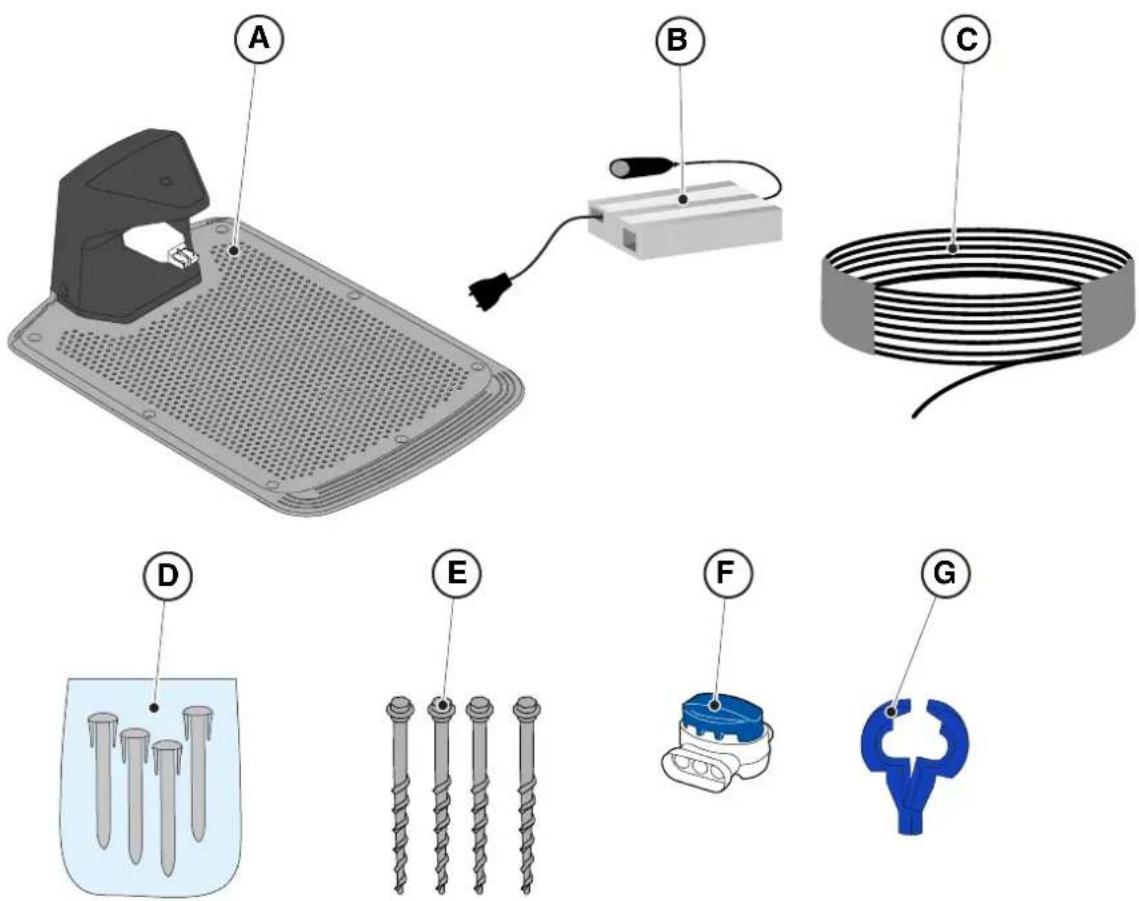
(A) Docking Station (B) Power supply (C) Perimeter cable (included in the installation Kit) (D) Perimeter cable fixing pegs (included in the installation Kit) (E) Docking station fixing screws (F) Joint for perimeter cable (included in the installation Kit) (G) Docking station connectors (included in the installation kit)
See Chapter 9 "Accessories"
4.3. VERIFICATION OF THE INSTALLATION REQUIREMENTS
Below the procedures to check the necessary requirements and prepare the garden before proceeding with the installation are described.
4.3.1. GARDEN VERIFICATION:
- Carry out a survey of the entire area for a correct detection of the state of the garden, of any obstacles and areas to be excluded.
- Check that the lawn to be mowed is uniform, free of holes, stones or other obstacles and, if necessary, carry out the appropriate environmental decontamination works.
NOTE: Level the ground to prevent puddles from forming after a rainfall.
NOTE: At the first installation, the initial height of the grass must be within the operating range of the robot lawn mower: 20-60mm. If necessary, prepare the garden using a traditional lawn mower.
4.3.2. DOCKING STATION AND POWER SUPPLY INSTALLATION CHECKS
 | ELECTRICAL HAZARD:A socket must have been prepared near the installation area to connect it to electricity. Make sure that connection to the power supply network conforms to laws in force of the Country where it is used. |  | ELECTRICAL HAZARD:Do not connect the power supply to an electrical outlet if the plug or the cable is damaged.Do not connect or touch a damaged cable before it is disconnected from the power supply.A damaged cable can lead to contact with live parts. |
 | ELECTRICAL HAZARD:The circuit provided must be protected by a residual current device (RCD) with an activation current not exceeding 30 mA. | | |
Procedure:
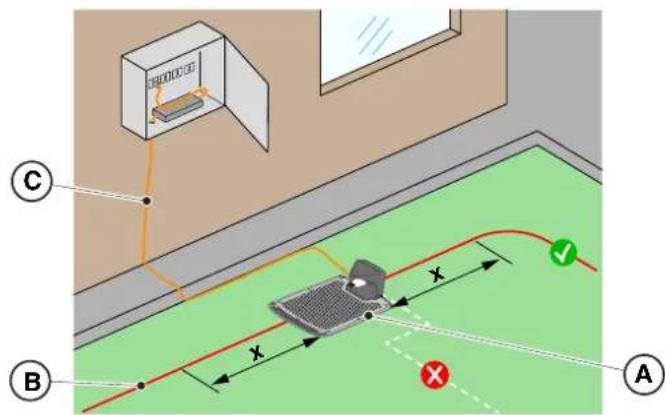
- Prepare a flat area at the edge of the lawn for positioning the docking station (A), preferably in the largest portion of the garden and near an electrical outlet.
- Make sure there is enough space to install the docking station on a straight section of the perimeter cable (B), so that the distance of the base from any curves is at least X = 200 cm ; the ground must be perfectly flat and compact in order to avoid the deformation of the surface of the docking station.

WARNING:
The power cable (C), power supply unit, extension cord and all other electric cables which do not belong to the product must remain outside the cutting area to maintain their distance from hazardous moving parts and prevent damage to cables which may come into contact with live parts.
- Make sure that the area chosen for installing the docking station (D) is at least 400 cm away from the docking station (E) of a possible second robot lawn mower.
![graph TD A["Input"] --> B{Decision} B -->|Yes| C["Process 1"] B -->|No| D["Process 2"] C --> E["Output"] D --> E style A fill:#f9f,stroke:#333 style E fill:#bbf,stroke:#333](/content/2026/04/623884/images/487c5388453230f51c9bacbd42acf6f7e93f950dde47fc42dd821b563bc0400b.jpg)

WARNING:
The excessive proximity between two docking stations could cause interference (See Par. 4.7.14)
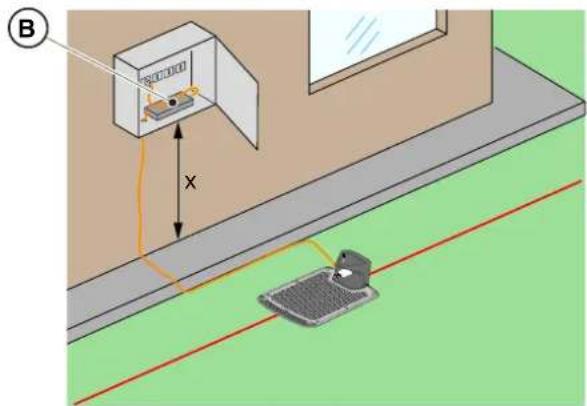
- Prepare the installation area of the power supply unit (B) so that it is protected from solar radiation and in order to prevent it from being submerged in water at any time.
NOTE: It is preferable and recommended to install the power supply (B) in a closed compartment protected from atmospheric agents, in a position that is not easily accessible by unauthorized persons such as children (X>160 cm).
4.3.3. MAIN CHECKS WHEN INSTALLING THE PERIMETER CABLE:
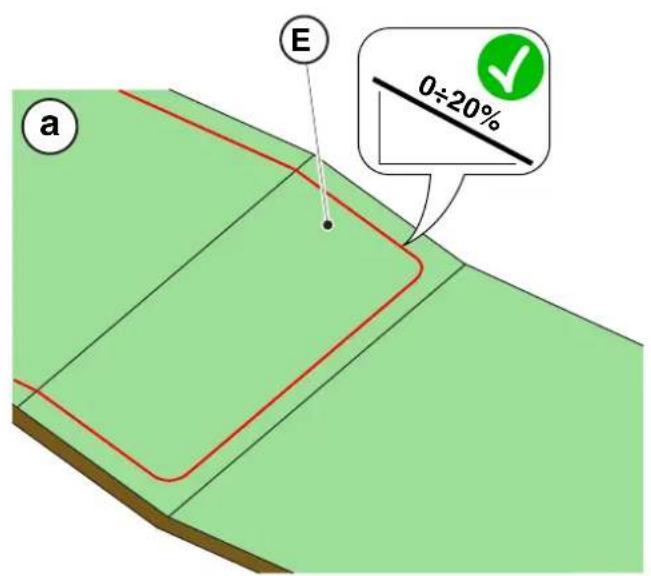
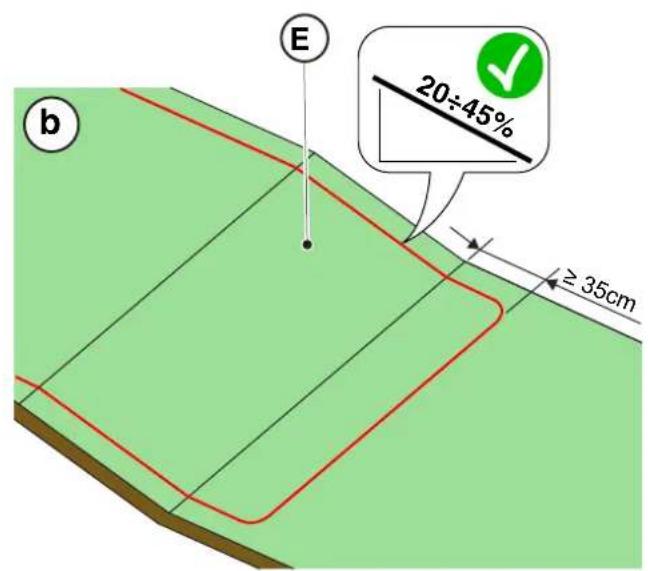
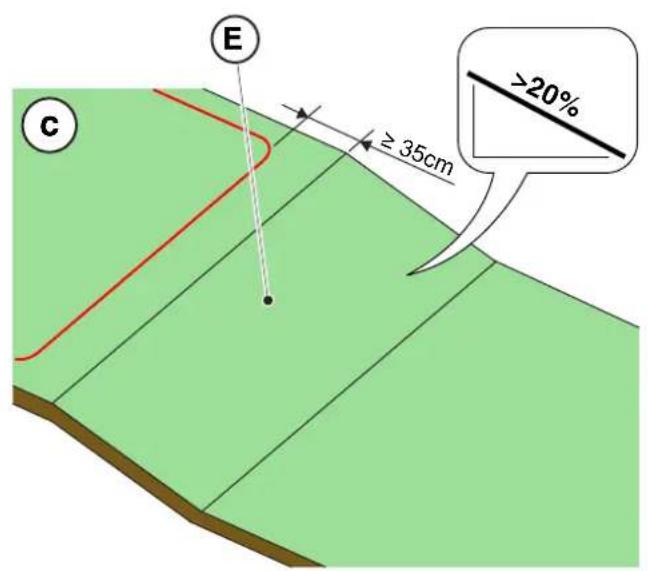
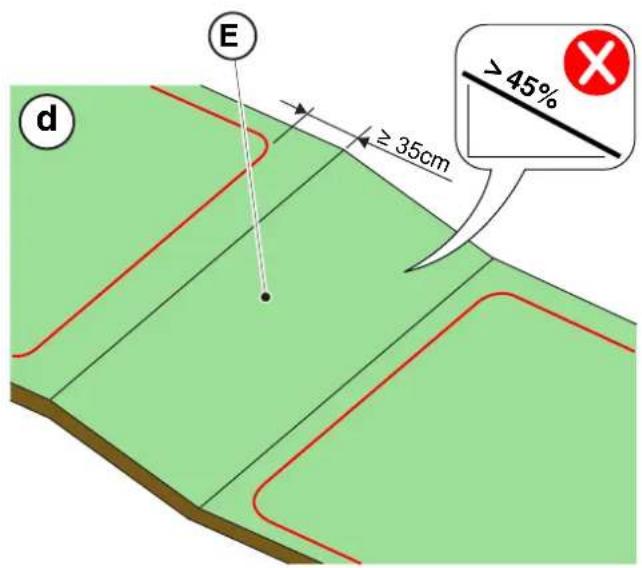
- Check that the maximum slope of the work area is less than or equal to 45% (E) and observe the rules shown in the images below:
a) If the slope is ≤ 20%, the perimeter cable can be installed on it as shown in the image; b) If the slope is >20% and ≤45%, the installation must include the slope area observing the distance indicated in the image; c) If the slope is >20% and the slope area is not part of the part of the garden to be cut, the distance indicated in the image must be observed; d) If the slope is >45%, the slope area must be excluded observing the distance indicated in the image.

WARNING:
The robot can mow surfaces with a maximum slope of 45%.
In case of non-compliance with the instructions, the robot may slip and exit the work area.

WARNING:
Areas with slopes higher than allowable slopes cannot be mowed. Then place the perimeter cable before the slope, excluding that area of lawn from the mowing.
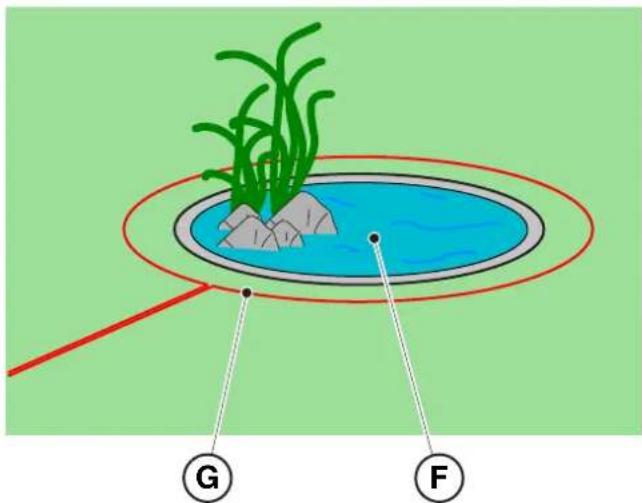
- Check the entire work surface: assess the obstacles and areas to be excluded from the work area (F), which must be delimited with the perimeter cable (G).
4.4. CRITERIA FOR INSTALLING THE PERIMETER CABLE
4.4.1. PERIMETER CABLE PLACEMENT
Procedure:
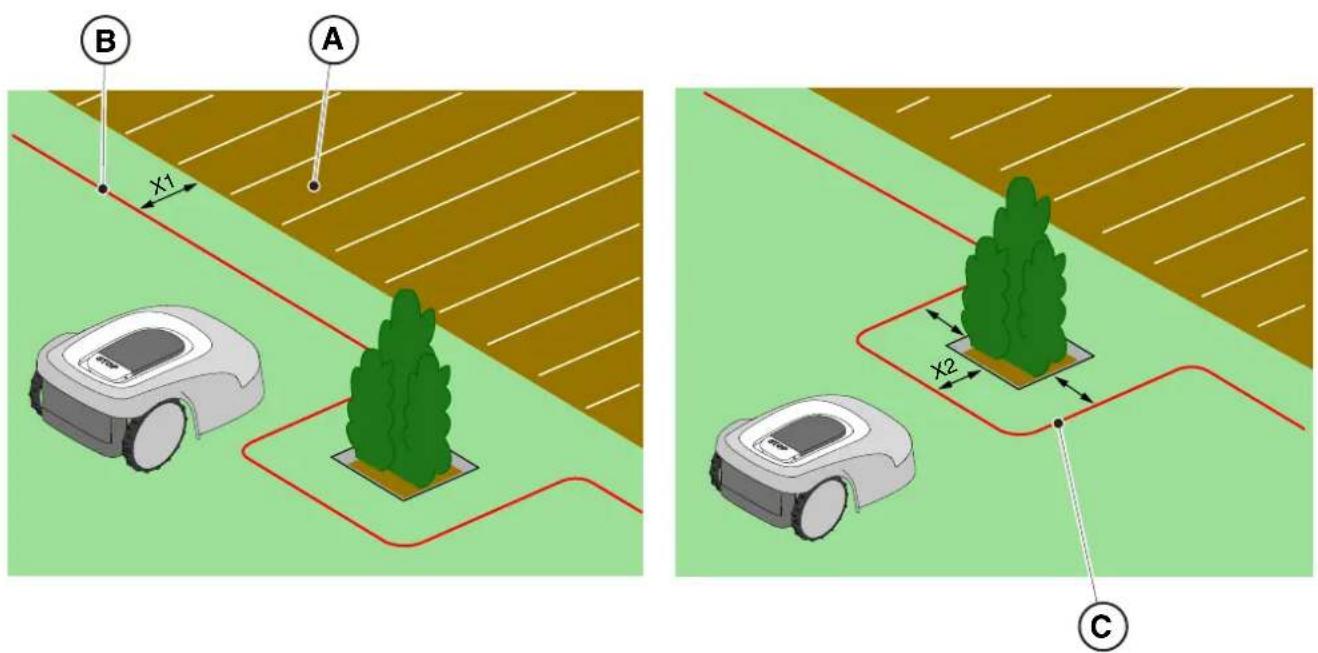
- If there is a pavement or path (A) at the same level as the lawn, arrange the perimeter cable (B) at X1 = 5 cm from the edge of the pavement.
- In the vicinity of a level flower bed, a metal manhole, a shower surface or electrical cables, arrange the perimeter cable (C) at least X2 = 30 cm away.
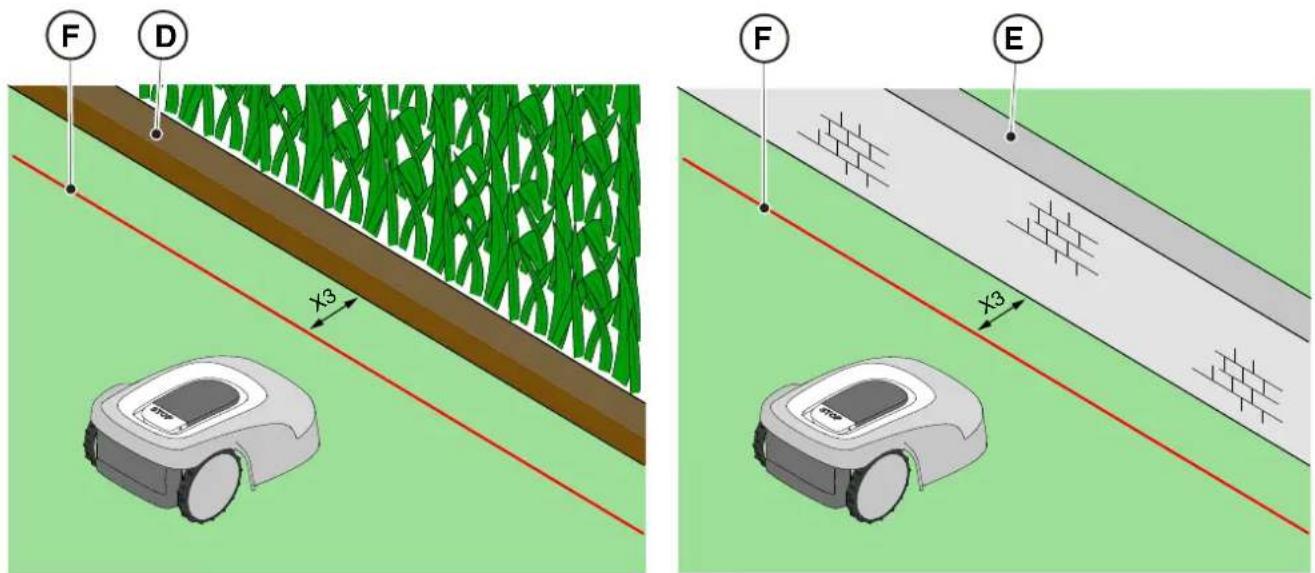
- If there is an obstacle, for example a ditch (D), a wall or a low wall (E), arrange the perimeter cable (F) at least X3 = 35 cm from the obstacle.
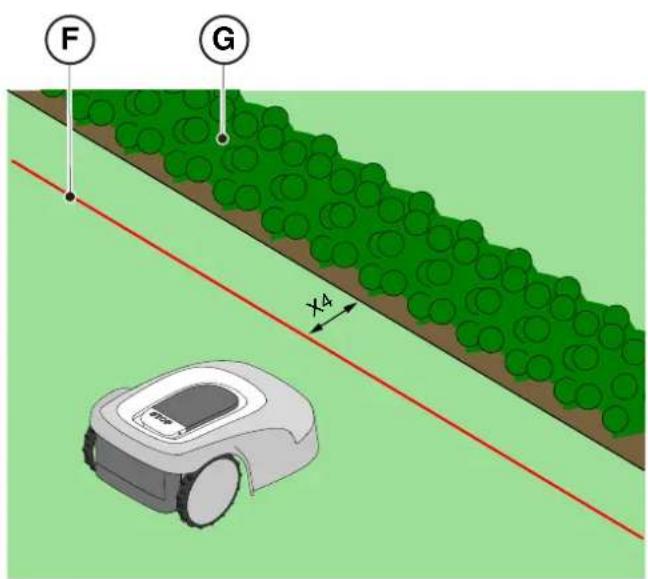
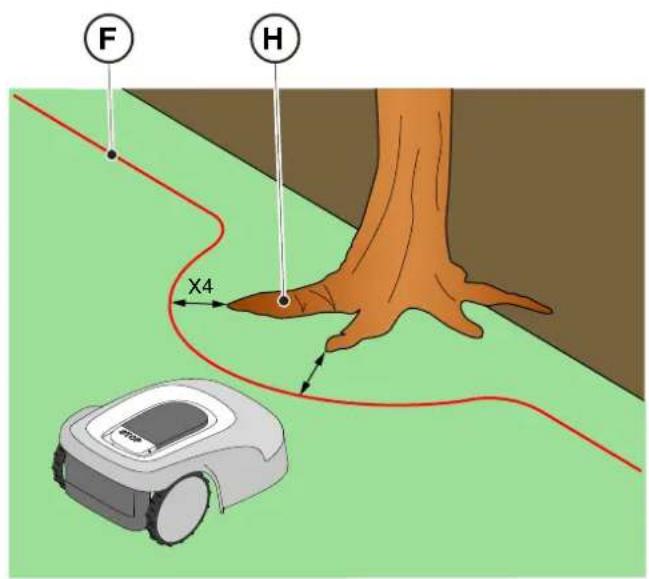
- If there is a hedge (G) or a plant with protruding roots (H), arrange the perimeter cable (F) at least X4 = 30 cm.
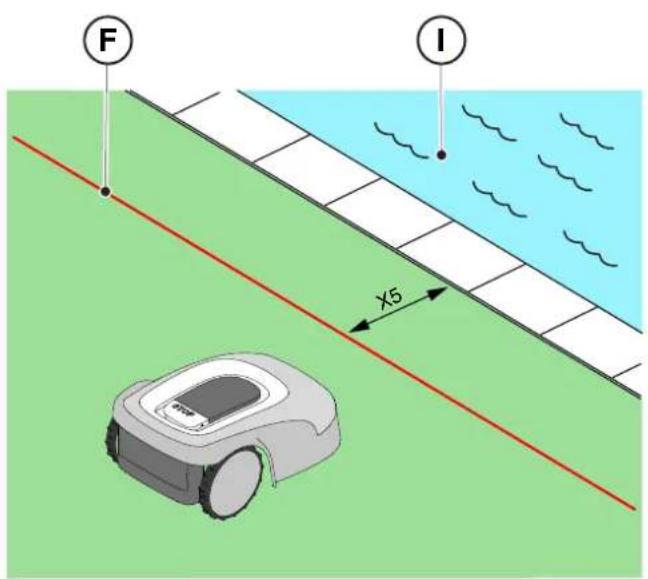
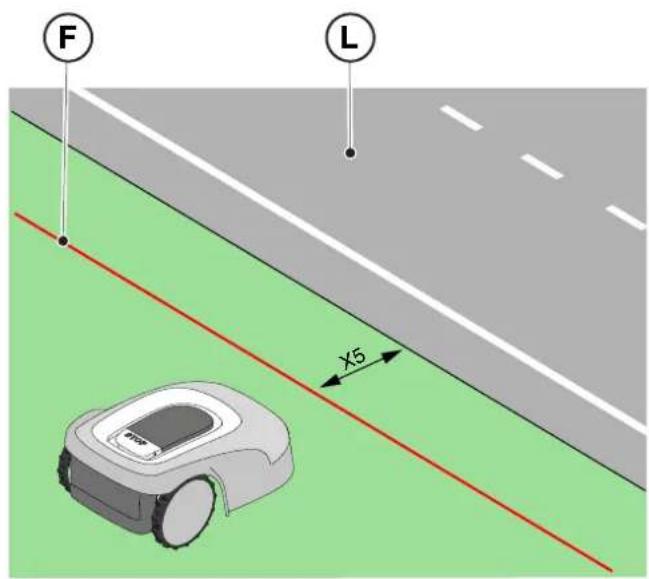
- If there is an infinity pool or pond (I), unsecured public roads (L), adjust the perimeter cable (F) at least X5 = 90 cm.
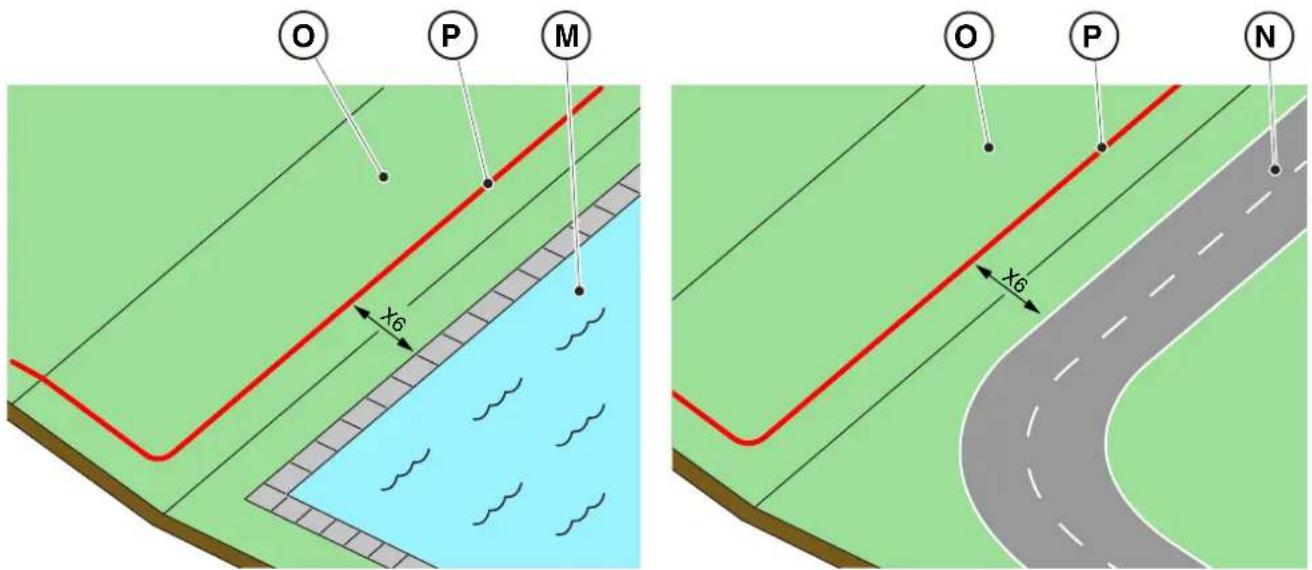
- If there is a swimming pool (M) or a road (N) at the end of a slope (O), arrange the perimeter cable (P) at least X6 = 150 cm.

WARNING:
If the slope is greater than 45%, the slope area must be excluded from the cutting area (See Par. 4.3).

CAUTION:
The operational area must be limited by a non-passable fence. Make the fence suitable or supervise the robot lawn mower during its operation.
4.4.2. DELIMITATION OF OBSTACLES
Procedure:
- If the minimum passage between two different sections of the perimeter cable is X ≥ 70 cm, the obstacle can be delimited as shown in the figure (Q), overlapping the sections of the outward and return cables without crossing them (R).
- To delimit the obstacle (S):
- Place the perimeter cable up to the obstacle and go around it;
- Bring the cable back along the previous path overlapping it under the same nail, without creating intersections (R).
![graph TD A["Valve"] --> B["Pump"] B --> C["Directional Flow Indicator X"] C --> D["Flow Indicator Q"] D --> E["Central Component"] E --> F["Bottom Component"] F --> G["Left Side"] F --> H["Right Side"] style A fill:#f9f,stroke:#333 style B fill:#ccf,stroke:#333 style C fill:#cfc,stroke:#333 style D…](/content/2026/04/623884/images/f46a79782fe305858aa1251ce025b08aab977eb85e6f34ef970a723e36ab314b.jpg)
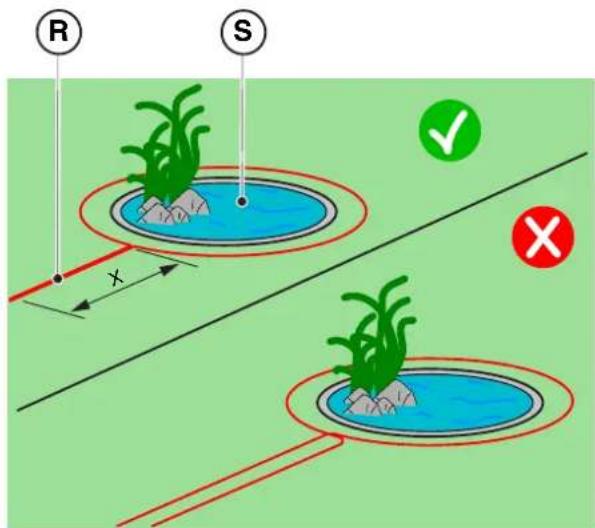
NOTE: For the robot lawn mower's correct functioning, the minimum length of the superimposed perimeter cable (R) must be X = 70 cm.
- If the minimum passage between two different sections of the perimeter cable is X < 70 cm, the obstacle can be delimited by spacing the two sections of the outward and return cable by a height Y ≥ 30 cm as indicated in the figure (T), or, if the obstacle is strong enough, it can be left unprotected as shown in figure (U).
![graph TD A["Central Rectangle"] --> B["Sensor"] B --> C["Sensor"] C --> D["Sensor"] D --> E["Sensor"] E --> F["Sensor"] F --> G["Sensor"] G --> H["Sensor"] H --> I["Sensor"] I --> J["Sensor"] J --> K["Sensor"] K --> L["Sensor"] L --> M["Sensor"] M --> N["Sensor"] N --> O["Sensor"] O --> P["Sensor"]…](/content/2026/04/623884/images/955cdefccebe41768b27eca89df7905404dedcb836ff94338c5f3a1de832ca45.jpg)
![graph TD A["Central Structure"] --> B["Arrow to U"] B --> C["Star-like Elements"] C --> D["Arrow to Right"] D --> E["Arrow to Left"] E --> F["Arrow to Right"] F --> G["Arrow to Left"] G --> H["Arrow to Right"] H --> I["Arrow to Left"] I --> J["Arrow to Right"] J --> K["Arrow to Right"] K --> L["Arro…](/content/2026/04/623884/images/b85289db7823d92c001e9a8e9aa8a93b6b443fcd88c7a97084f395fc48ddb10f.jpg)
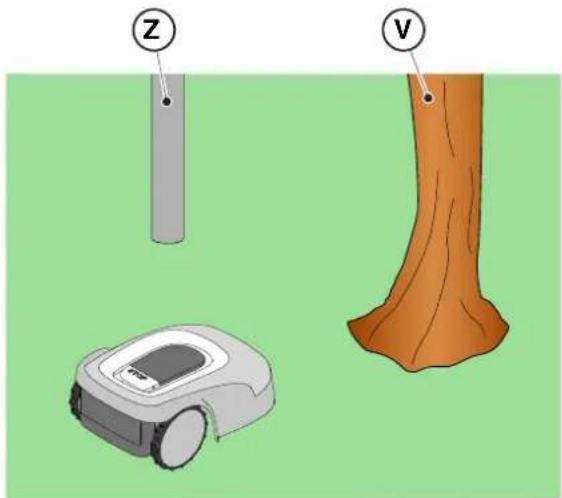
- In general, it is advisable to delimit obstacles, however if there are localized obstacles that resist impact, for example trees without protruding roots (V) or poles (Z), it is possible not to delimit them.
4.4.3. PASSAGES AMONG DIFFERENT AREAS OF THE GARDEN
Procedure:
- In the case of corridors, the distance between two different sections of the perimeter cable must be Z ≥ 70 cm.
- In case of passage between two different sections of cable Z < 70 cm, the area (A) is to be considered a "Closed Area" and cannot be reached by the robot lawn mower automatically.
![graph TD A["Central Unit"] --> B["Processing Unit"] B --> C["Output Area"] style A fill:#f9f,stroke:#333 style B fill:#bbf,stroke:#333 style C fill:#dfd,stroke:#333](/content/2026/04/623884/images/78e010cd55a1e72153265ce2af49ed581d5284ec112b43f34181848df6bf7a2b.jpg)
NOTE: For programming the robot lawn mower relating to the configuration of the garden with "Closed Area" please refer to the procedure at Par. 4.7.5 "Closed Area".
4.5. COMPONENTS INSTALLATION
 | ELECTRICAL HAZARD:Only use the battery charger and power supply provided by the manufacturer. Improper use may cause electric shock and/or overheating. |  | CAUTION:The circuit provided must be protected by a residual current device (RCD) with an activation current not exceeding 30 mA. |
 | ELECTRICAL HAZARD:A socket must have been prepared near the installation area to connect it to electricity.Make sure that connection to the power supply network conforms to laws in force of the Country where it is used. |  | ELECTRICAL HAZARD:Connect the power supply only at the end of all the installation operations. If necessary during the installation, turn off the general power supply. |
4.5.1. INSTALLATION OF THE PERIMETER CABLE
POSITIONING WITH PEGS

CAUTION: Danger of cutting hands.

CAUTION: Danger of dust in the eyes.
Requirements and obligations:
- Low grass all the way • Hammer
- Perimeter cable • Gloves
- Fixing pegs • Glasses
- Joints for perimeter cable • Electrician's scissors
- Pliers

GLOVES OBLIGATION: Use protective gloves to avoid cutting your hands.

GLASSES OBLIGATION: Use safety glasses to avoid the danger of dust in the eyes.
Procedure:
- Place the perimeter cable (A) starting from the docking station installation area.
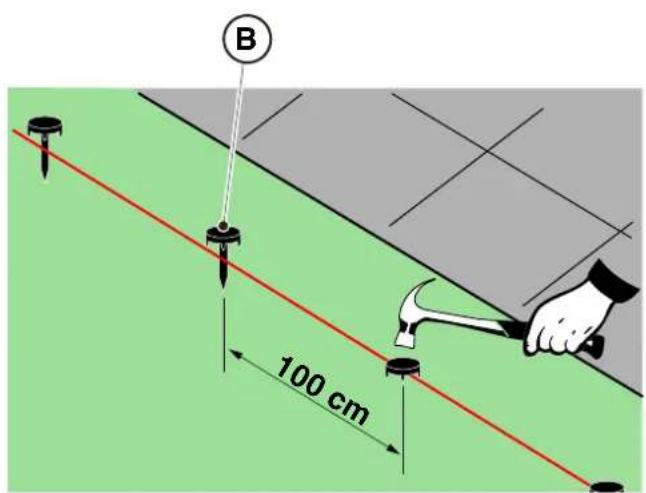
- Place the cable along the entire path, fixing it with the suitable pegs (B) spaced approximately 100 cm apart, and observing the installation requirements (See Par. 4.3 and Par. 4.4).
- Leave 2 m of cable or more to subsequently cut it to size in the final phase of connection.
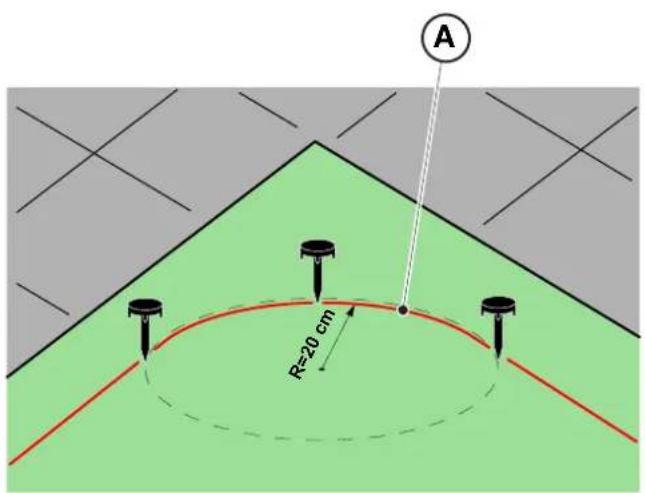
NOTE: In non-straight sections, make sure that the cable (A) does not get tangled. Position the cable in such a way as to form a regular curve with a radius of about 20 cm.
NOTE: The perimeter cable used for installation must be at least 40 m long. If the cable is shorter, it will be necessary to install the resistor for small perimeters. (See Par. 4.5.4. and Chap. 9 "Accessories").

WARNING:
Make sure that the cable is in contact with the ground along its path to prevent the robot lawn mower from damaging it.
POSITIONING UNDERGROUND
(CARRIED OUT ONLY BY AUTHORIZED RETAILER)
Turning to a STIGA retailer, the perimeter cable can also be installed using a specific wire-laying machine, without using pegs.
4.5.2. JUNCTION OF THE PERIMETER CABLE.
 | CAUTION:Danger of cutting hands. |  | CAUTION:Danger of dust in the eyes. |
Requirements and obligations:
- Joint for perimeter cable • Gloves • Electrician's scissors • Glasses
- Pliers

GLOVES OBLIGATION: Use protective gloves to avoid cutting your hands.

GLASSES OBLIGATION: Use safety glasses to avoid the danger of dust in the eyes.
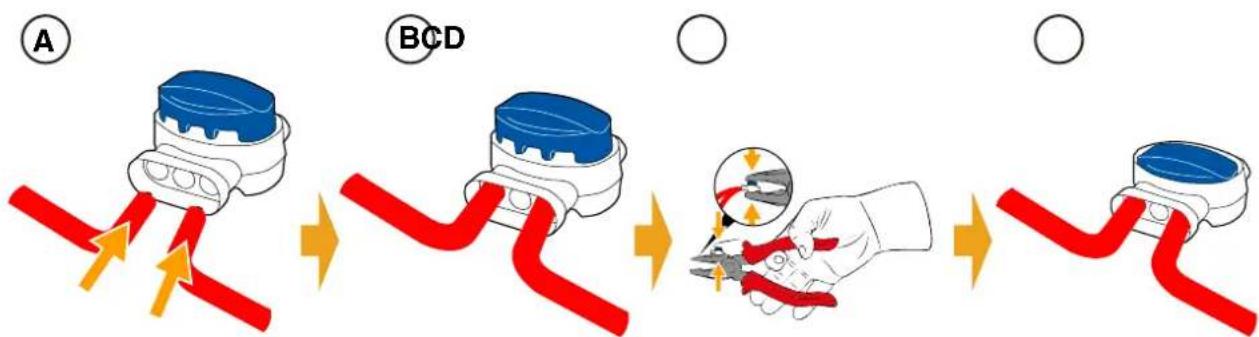
During the installation of the cable or in case of accidental breakage, it may be necessary to make junctions.
Procedure:
- Disconnect the docking station from the power supply.
- Place the perimeter cable as per position (A).
- Insert the ends of the cable into the joint as per position (B).
- Fully press the button on the upper side of the joint using a pair of pliers as per position (C).
- The perimeter cable is properly installed on the joint (D).

BAN:
Do not use insulating tape or joints of any other type that do not guarantee correct insulation (cable lugs, terminals, etc.). The soil moisture causes oxidation and the interruption of the perimeter cable.
4.5.3. INSTALLATION OF THE DOCKING STATION
 | CAUTION:Danger of cutting hands. |  | CAUTION:Danger of dust in the eyes. |
 | ELECTRICAL HAZARD:Connect the power supply only at the end of all the installation operations. If necessary during the installation, turn off the general power supply. | | |
Requirements and obligations:
- Flat land • Compact soil
- Docking station • Perimeter cable • Power supply • Fixing pegs
- Screwdriver • Hammer • Electrician's scissors • Gloves
- Glasses

GLOVES OBLIGATION:
Use protective gloves to avoid cutting your hands.

GLASSES OBLIGATION:
Use safety glasses to avoid the danger of dust in the eyes.
The docking station can be installed:
- aligned with the perimeter cable so that the robot can access it by navigating the perimeter cable clockwise.
Procedure:
- Check the installation requirements as indicated in par. 4.3.
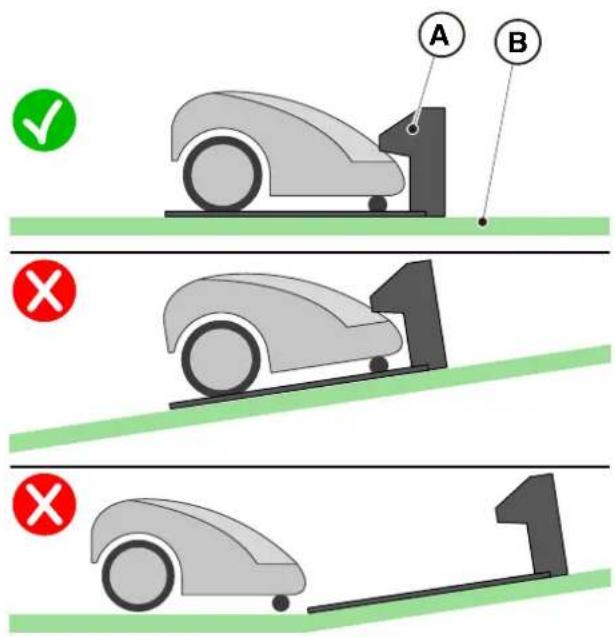
- If necessary, prepare the ground so that the surface of the docking station (A) is at the same level as the lawn (B), the ground must be perfectly flat and compact in order to avoid deformation of the surface of the docking station.
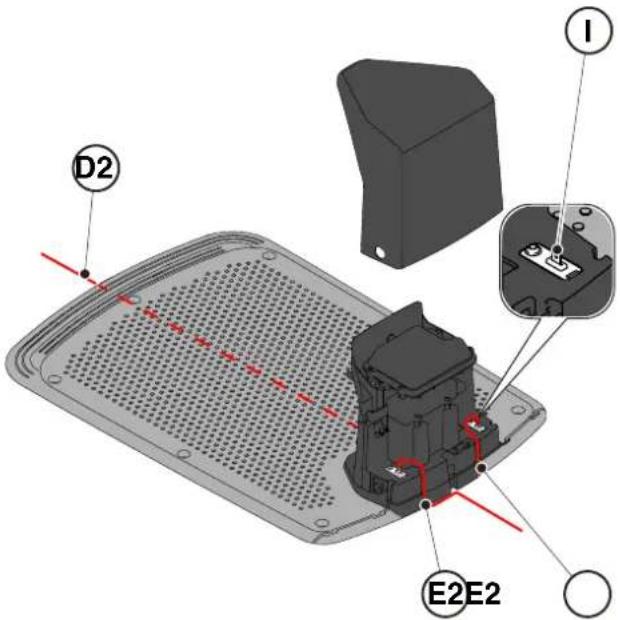
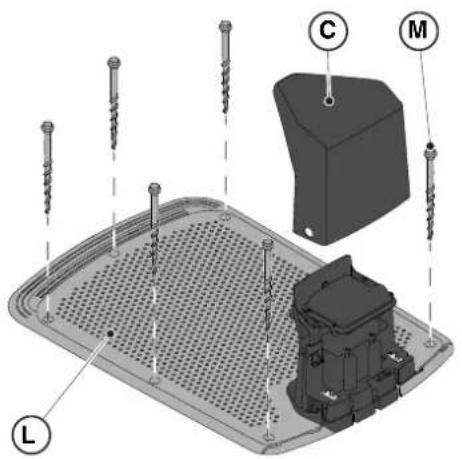
- Remove the cover (C).
- Position the docking station:
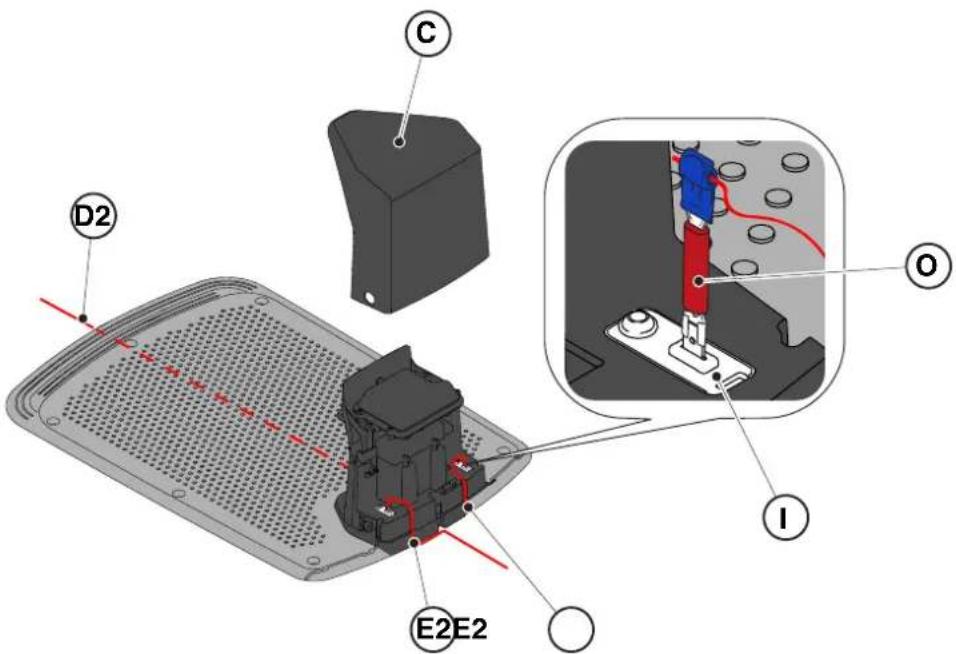
- Aligned to the perimeter cable (D2) so that the robot is able to access it by navigating the perimeter cable in a clockwise direction.
- Insert the two ends of the cable into the appropriate slots (E2).
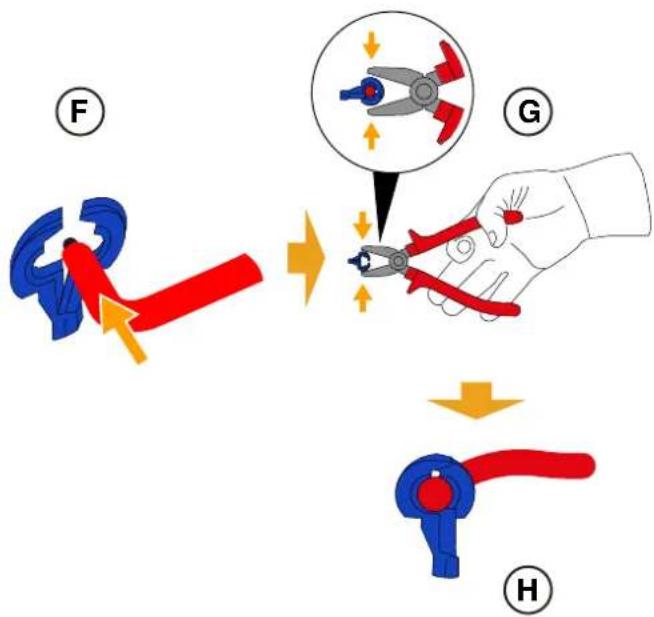
- Cut the ends of the cables to the exact length.
- Apply the self-drilling connectors on the cable (F), (G), (H).
- Connect the connectors to the terminals (I).
- Secure the docking station (L) to the ground with the fixing screws (M).
- Reposition the cover (C).
- Connect the power supply connector to the docking station and then insert the power supply plug into the electrical outlet.
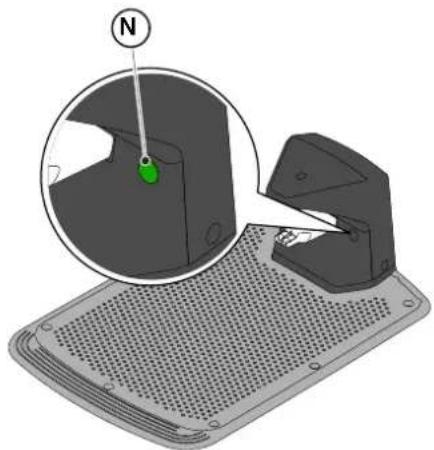
- When the robot lawn mower is not in the charging base, make sure that the indicator light on the charging base (N) is lit with a fixed light (see Par. 5.4)

WARNING:
The power cable, power supply unit, extension cord and all other electric cables which do not belong to the product must remain outside the cutting area to maintain their distance from hazardous moving parts and prevent damage to cables which may come into contact with live parts.
NOTE: If necessary, it is possible to extend the power cable to the docking station by using the extension cables. It is permitted to use a maximum of two 5-meter extension cables (See Chapt. 9 "Accessories").
4.5.4. RESISTOR INSTALLATION FOR SMALL PERIMETERS
Requirements and obligations:
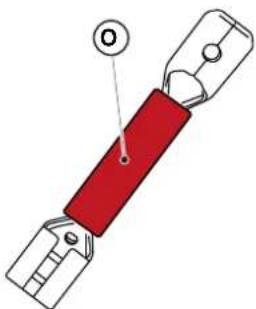
The perimeter cable used for the installation of the robot lawn mower must be at least 40 m. long. If the cable length is shorter, it is necessary to connect in series the resistor (See Ch. 9 “Accessories”) with the perimeter cable.
Procedure:
After having positioned and secured the docking station correctly (see par. 4.5.3), proceed as follows:
- Remove the cover (C).
- Cut the ends of the cables to the exact length.
- Apply the self-drilling connectors on the cable (F), (G), (H). (See par. 4.5.3).
- Connect the resistor (O) to the terminal (I) of the docking station.
- Connect the respective perimeter cable to the resistor (O).
- Connect the other perimeter cable directly to the other terminal of the docking station.
4.6. CHARGING THE ROBOT LAWN MOWER AFTER INSTALLATION
Requirements and obligations:
- Docking station.
Procedure:
- Recharge the robot lawn mower (See Par 5.5).
NOTE: When charged for the first time, the batteries must remain connected for at least 2 hours.
4.7. PRODUCT SETTINGS
Requirements and obligations:
The automatic operation of the robot lawn mower requires a series of settings that can be made via mobile device (smart phone) iOS or Android with the "STIGA GO" App installed.
The iOS app is downloadable from the iOS App Store. The Android app is downloadable from the Google Play Store.
The following functions can be set up from the app. Check the table of contents to see which functions are available for your model:
- Start, stop and force the robot lawn mower to return to the docking station.
- Select the work mode in a closed area that cannot be reached autonomously by the robot lawn mower.
- Select the Scheduled Job / Single Cutting Cycle mode.
- Schedule Working Hours for the days of the week.
- Set the Work Start Points to make cover the garden uniformly.
- Set the days of the week to perform the edge trimming.
- Enable a low energy eco mode.
- Enable and set the sensitivity of the Rain Sensor.
- Enable different users to use the robot lawn mower via app.
- Choose and contact your reference retailer.
NOTE: The images shown in this section are purely indicative and may differ over time from those of the product app.
| G 300 G 600 G | 1200 | |
| Border Cut |  |  |  |
| Go-To Cut Points | 1 3 5 | | |
| Eco Mode |  |  |  |
| Rain Sensor |  |  |  |
| Closed Area |  |  |  |
TABLE OF CONTENTS PRODUCT SETTINGS
4.7.1. PRELOGIN 31
4.7.2. SIGN UP 31
4.7.3. PAIRING 31
4.7.4. DEVICE PAGE 32
4.7.5. CLOSED AREA 32
4.7.6. SETTINGS 32
4.7.7. SPOT CUT / SCHEDULED 32
4.7.8. MOWING SESSIONS 32
4.7.9. GO-TO-CUT POINTS 33
When accessing the app for the first time, users can:
- Access the information pages regarding STIGA retailers and products.
- Complete the first-time user sign-up.
- Complete the log-in for already registered users.
4.7.2. SIGN UP
The "Sign Up" section allows user registration and enables access to all functions of the app.
- The user can log in through their Google, Facebook, and Apple accounts, or create a new account by filling in the required fields.
- The registration procedure requires an email verification.
4.7.3. PAIRING
The "Pairing" section allows you to associate your mobile device with the robot lawn mower via bluetooth connection.
- Press the "add" button to access the bluetooth pairing pages.
- Follow the set-up wizard to pair the product.
- Once the association is completed, the main page of the product will be displayed.
- Press the "device page" button to access the product page.
- Press the "options" button to access the menu where users can rename, disassociate and connect the robot lawn mower, or download the user manual.
NOTE: If the robot lawn mower is not detected by the mobile device, check whether the robot lawn mower is switched on and is in close proximity to the mobile device. Make sure that the lawn mower robot is not already paired with another user.
4.7.4. DEVICE PAGE
The "Device Page" section allows the user to check the robot lawn mower's status, to start it up for work or to force its return to the docking station.
- Press the "start" button to start the robot lawn mower.
- Press the "stop" button to stop the robot lawn mower.
- Press on the "return to base" button to force the robot lawn mower to return to base.
- Press on the "closed area" button to start the robot lawn mower working in an area that it cannot reach independently. (See Par. 4.7.5).
4.7.5. CLOSED AREA
NOTE: Check the availability of this function on the STIGA.GO App.
The "Closed Area" section allows you to start the robot lawn mower in an enclosed area that is normally excluded from the work area because it is not reachable, but is in any case delimited by the perimeter cable. (See Par. 4.4.3).
- Press the dedicated button to choose the "Closed Area" mode.
- Place the robot lawn mower inside the closed area and follow the guided procedure.
NOTE: The user can select whether to have the robot lawn mower work for the full duration of the battery life or for a shorter time set manually.
4.7.6. SETTINGS
The "Settings" section provides access to the robot lawn mower's settings screen.
- Press the "settings" button to enter Settings mode.
- Select the function to be set up.
The "Spot Cut / Scheduled" selector allows the user to activate or deactivate the programmed work schedule.
The number of weekly hours to schedule is suggested by the app according to the size of the garden.
- If set to "Scheduled", the robot lawn mower works according to the scheduled work program.
- If set to "Spot Cut", the robot lawn mower works in a single work cycle.
4.7.8. MOWING SESSIONS
The "Mowing sessions" section allows you to program the time and working days of the robot lawn mower. The number of weekly hours to schedule is suggested by the app according to the size of the garden.
- Press the "spot cut/scheduled" selector switch to enter the working hours setup menu and select a day of the week.
- Press the "add cutting time" button to add a new work schedule.
- Enter the work start and end times, then confirm.
- The user has the option of applying the same working hours to several days of the week.
- The working time will be displayed on its scheduled weekday. By pressing on each working time, it is possible to copy or delete it.
NOTE: The built-in clock of the robot lawn mower is automatically synchronized with the time on the mobile device whenever the robot is connected to the App via Bluetooth.
4.7.9. GO-TO CUT POINTS
NOTE: Check the availability of this function on the STIGA.GO App.
The "Go-To-Cut Points" section allows you to set one or more starting points for the robot lawn mower's work in order to improve coverage in the different areas of the garden (see Par. 4.4). The number of settable start points depends on the model of the robot lawn mower.
The work start points are defined using the following parameters:
- Distance from the starting point to the docking station measured along the perimeter wire.
- Direction to reach the work point (clockwise or anticlockwise).
- The frequency at which the work point is reached expressed as a % of the total working time scheduled weekly.
4.7.10. BORDER CUT
The "Border cut" section allows you to program the border cutting of the garden on a certain day.
- Choose the days on which to perform the border cut.
- Press the dedicated button to enable the function.
NOTE: The border cut can be activated only for the days of the week in which the robot lawn mower has been scheduled to work.
4.7.11. ECO MODE
NOTE: Check the availability of this function on the STIGA.GO App.
The 'Eco mode' function allows the user to set a low-energy mode by proportionally reducing the working time of the robot lawn mower compared to the time programmed by the user.
NOTE: It is advisable to use this function at times of the year when the grass grows more slowly.
4.7.12. RAIN SENSOR (DEPENDING ON THE MODEL)
The "Rain sensor" function allows you to enable or disable the rain sensor on the robot lawn mower.
- Press the dedicated button to enable the function.
- Select one of the three available rain sensor sensitivity levels.
4.7.13. APP LOCK
In order to prevent the robot lawn mower from being used by children or unauthorised persons, the keypad can be locked. This will allow the robot lawn mower to be controlled solely via the App.
Procedure:
- Activate or deactivate the Keypad/App Lock function from the app's 'settings' menu
NOTE: When the function is active, the keypad lock remains active even if the robot lawn mower is switched off.
4.7.14. USER MANAGEMENT
NOTE: Check the availability of this function on the STIGA.GO App.
The main user who performed the first registration of the product can invite other users to manage the robot lawn mower through the procedure accessible from the dedicated button.
NOTE: Added users can always be viewed and managed from the dedicated menu.
NOTE: The invited user must download the App on their mobile device and must register.
4.7.15. DEALER
The "Dealer" section allows to choose the reference service centre.
- By pressing on the "dealer" button, users can access the page where they will be able to select their dealer from a list.
4.7.16. MESSAGES
The "Messages" section displays messages/information.
- By pressing the "messages" button, users will access the page where they can view any messages/information from STIGA addressed to them.
4.7.17. PROFILE
The "Profile" section provides access to the user profile where the user can edit account details and change the password.
5. OPERATION
Requirements and obligations:
• Installation completed according to instructions (See Ch. 4)
- Programming the robot lawn mower according to the instructions (See Par. 4.7 for automatic function)
- Powered docking station
- Initial grass height in the range of operation of the robot lawn mower: 20-60 mm
- Battery charged (See Par. 5.5) • Cutting height suitably adjusted (See Par. 5.6).
5.1. CHECK OF SAFETY DEVICES FOR STARTING THE ROBOT LAWN MOWER
Requirements and obligations:
- Safety key.
Procedure:
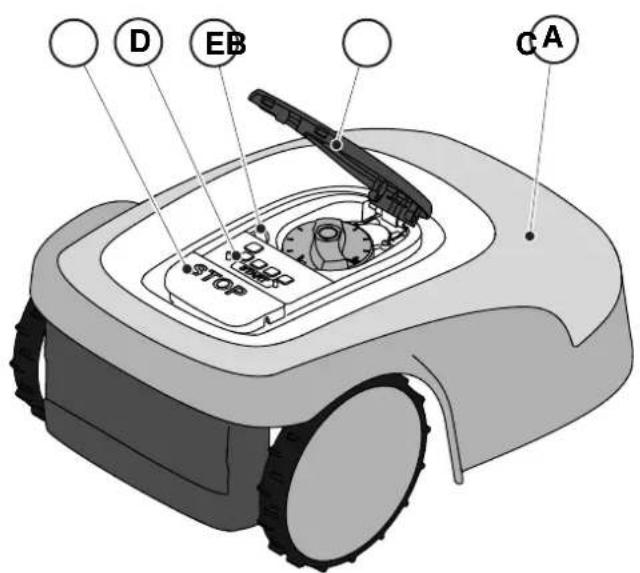
- Check that the floating cover (A) is fitted correctly. If the cover is missing the robot lawn mower doesn't work.
- Check that the safety key (E) is inserted. If it is not inserted the robot lawn mower doesn't start.
- Check that the stop button "STOP" (B) is not active. If pressed, it stops the robot lawn mower and opens the protective cover (C) of the control console (D).
- Check that the robot lawn mower is positioned on the ground correctly. In case of excessive tilt (≥ 45%) or lift, the tilt sensors (inclinometer) stop the robot lawn mower.
5.2. MANUAL FUNCTIONING OF THE ROBOT LAWN MOWER
The robot lawn mower can be used without performing the programming procedure described in Par. 4.7. In this mode the robot lawn mower carries out a work cycle, returns to the docking station and remains there until the next manual start.
Procedure:
- Place the robot mower on the docking station or within the perimeter of the installation.
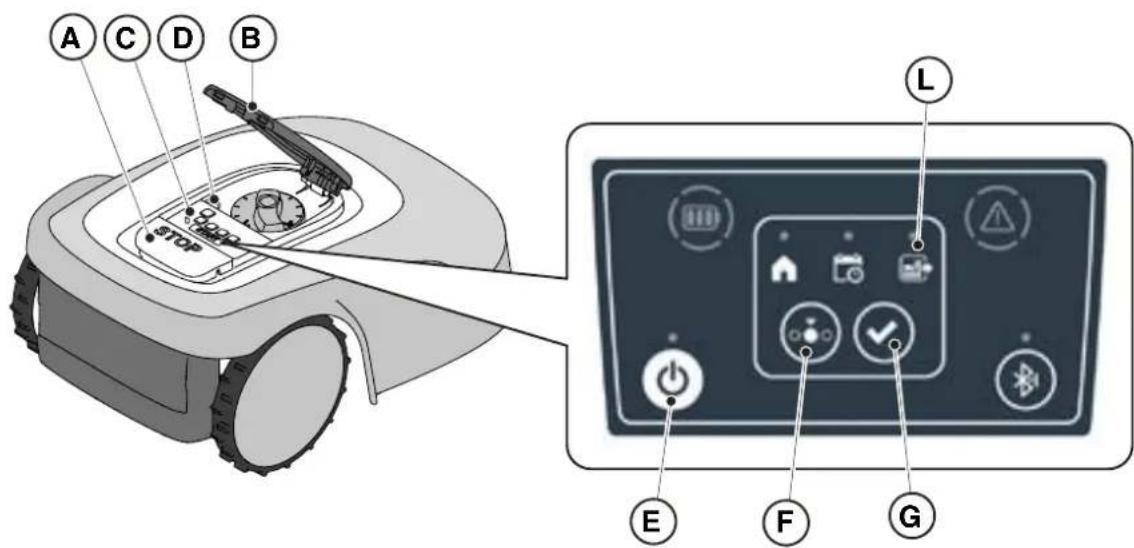
- Press the "STOP" button (A) to open the cover (B) and access the control console (C).
- Press the "ON/OFF" button (E) for 5 seconds to switch on the robot lawn mower.
- Press the "SELECT MODE" button (F) until only the icon (L) flashes.
- Press the "CONFIRM" push button (G). The icon (L) lights up with a steady light to confirm the operation.
- Close the cover (B).
- The robot lawn mower will start operating.
NOTE: this mode may not guarantee adequate coverage of the garden, both in terms of time required and in terms of uniformity of the cutting result, especially if the garden has an irregular shape. To achieve the maximum efficiency of the robot lawn mower, it is recommended to carry out programming (See par. 4.7).
NOTE: If after pressing the "CONFIRM" button (G), the "SELECT MODE" button (F) is pressed, the icons for the selected functions will start flashing again, requesting confirmation of the newly selected function. Press the "CONFIRM" button (G). The icons will once again light up with a steady glow.
NOTE: if the cover (B) is opened, either during work or with the robot in the base, the icons relating to the selected functions will flash, to indicate that it is necessary to confirm the operation before closing the cover again. If the cover is closed without pressing the "CONFIRM" button (G), the robot will not perform any operation until a new command is given by the user.
5.3. DESCRIPTION OF THE CONTROLS ON THE ROBOT LAWN MOWER
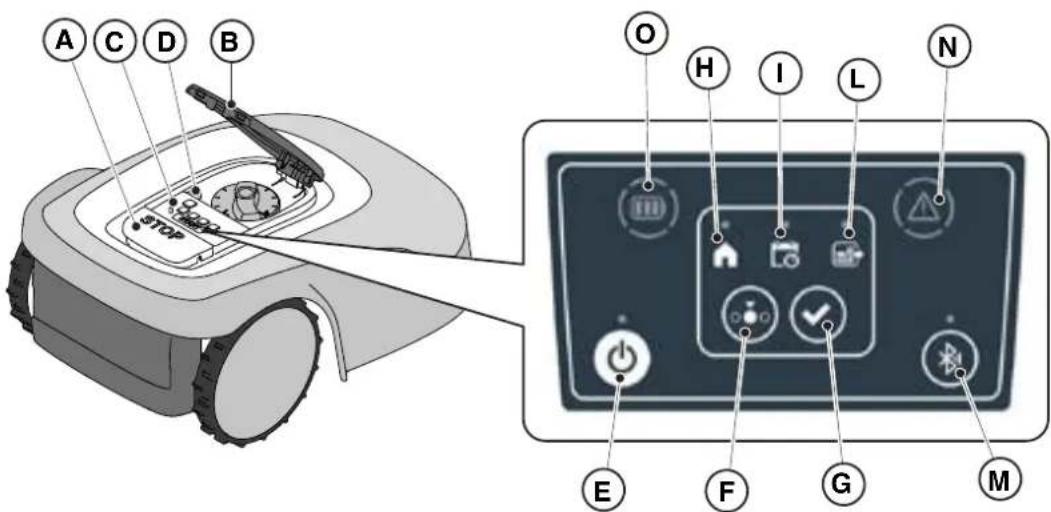
List of controls, indicators and their function:
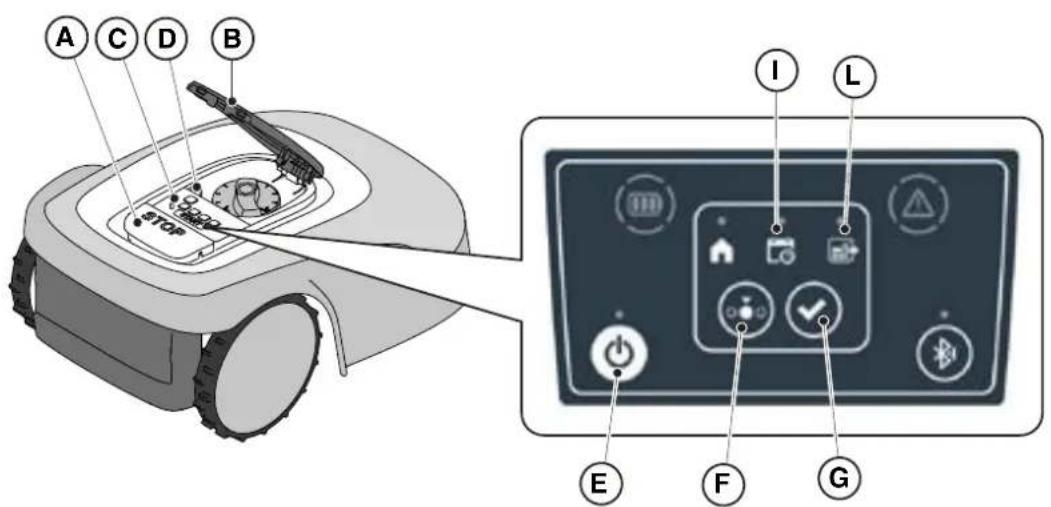
- The "STOP" button (A): is used to safely stop the robot mower.
- The "SAFETY KEY" (D): is used for the safety shut-down of the robot lawn mower.
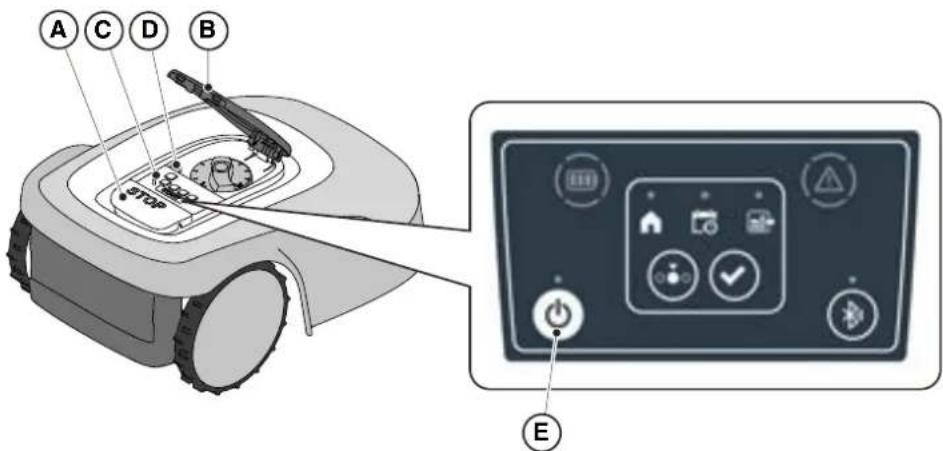
- The "ON/OFF" button (E): is used to turn the robot lawn mower on and off and resetting the alarms.
- The "MODE SELECTION" button (F): is used to select the operating mode of the robot lawn mower and to force it to return to the docking station.
- The "CONFIRM" button (G): is used to confirm the operating mode set.
- The "SCHEDULED PROGRAM" light icon (I): is used to display the scheduled program settings.
- The "SINGLE WORK CYCLE" light icon (L): is used to display the single work cycle settings.
- The "RETURN TO BASE" light icon (H): is used to display the forced return-to-base setting of the robot lawn mower.
- The "BLUETOOTH" button (M): is used to display the bluetooth status.
- The "ALARM" light icon (N): is used to display the alarms status.
- The "BATTERY" light icon (O): is used to display the battery charging.
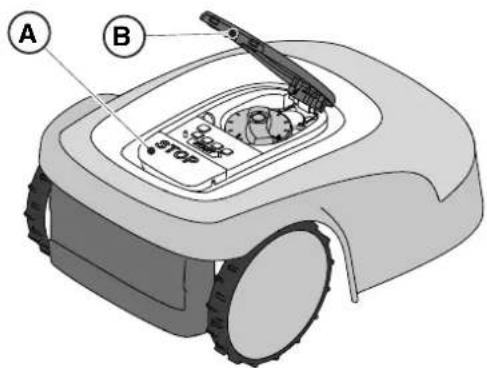
The "STOP" button (A) is a control that stops the robot lawn mower in safety conditions, whatever its operating condition is.
Procedure:
- Press the "STOP" button (A) while the robot lawn mower is moving or already still.
- When the "STOP" button (A) is pressed, the robot lawn mower stops and the cover (B) opens, allowing access to the other robot controls.
5.3.2. SAFE SHUTDOWN - SAFETY KEY
The safety key (D), by switching off, allows the robot lawn mower to be switched off safely.

OBLIGATION:
Always remove the safety key before any operation of cutting height adjustment, cleaning, transport and maintenance.
Procedure:
- Press the "STOP" button (A) to open the cover (B) and access the control panel (C).
- Remove the safety key (D) and keep it in a safe place.
- After carrying out the maintenance operations, insert the safety key to be able to switch on the robot lawn mower.
The "ON / OFF" button (E) allows to switch the robot lawn mower on and off manually.
Procedure:
- Press the "STOP" button (A) to open the cover (B) and access the control panel (C).
- Press the "ON/OFF" button (E) for 5 seconds to switch on the robot lawn mower or to switch it off.
NOTE: To switch on the robot lawn mower, the safety key (D) must be inserted.
NOTE: Removing the safety key (D) shuts down the robot lawn mower, even if it was not previously switched off using the "ON / OFF" button.
NOTE: In case of active alarms, a double press of the "ON/OFF" button will reset the alarms.
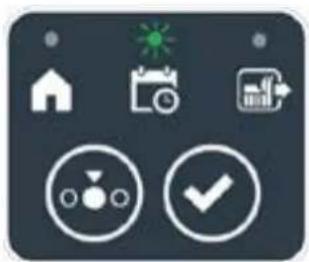
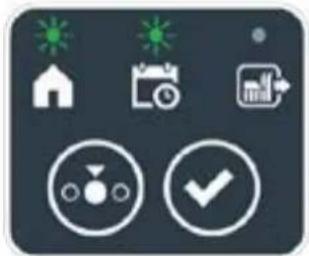
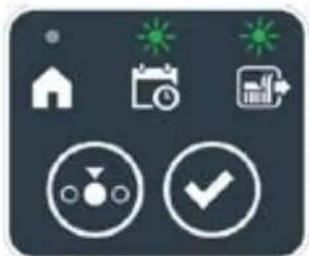
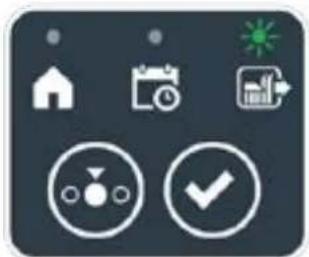
The "MODE SELECTION" button is used to activate or deactivate the set work program via the App and to select the forced return to the docking station. The robot lawn mower operates according to the possible selections described below.
KEYBOARD SELECTIONS AND ROBOT OPERATION
SCHEDULED PROGRAM
The robot lawn mower operates according to the programming set via the app.
RETURN TO BASE + SCHEDULED PROGRAM
The robot lawn mower returns to the docking station. The robot lawn mower will resume working from the following set start time.
SINGLE WORK CYCLE + SCHEDULED PROGRAM
The robot lawn mower performs a single forced work cycle and returns to the docking station when finished. The robot lawn mower will resume working from the following set start time.
SINGLE WORK CYCLE
The robot lawn mower performs a single forced work cycle and returns to the docking station.
The robot lawn mower stays in the base until the user intervenes manually.
RETURN TO BASE + SINGLE WORK CYCLE
The robot lawn mower returns to the docking station. The robot lawn mower stays in the base until the user intervenes manually.

STIGA
Procedure:
- Press the "STOP" button (A) to open the cover (B) and access the control console (C).
- Press the "MODE SELECT" button (F) until the icons of the functions you wish to activate flash. The icons relating to the selected functions flash.
- Press the "CONFIRM" push button (G). The icons of the selected functions light up steadily to confirm the action.
- Close the cover (B).
- The robot lawn mower will start working according to the set mode.
NOTE: If after pressing the "CONFIRM" button (G), the "SELECT MODE" button (F) is pressed, the icons for the selected functions will start flashing again, requesting to confirm the newly selected function. Press the "CONFIRM" button (G). The icons return to a steady light.
NOTE: if the cover (B) is opened, either during work or with the robot in the base, the icons relating to the selected functions will flash, to indicate that it is necessary to confirm the operation before closing the cover again. If the cover is closed without pressing the "CONFIRM" button (G), the robot will not perform any task until a new command is given by the user.
NOTE: If the robot battery is low, the battery icon flashes red to indicate that the selected action cannot be performed.
NOTE: NOTE: the robot lawn mower starts only after closing the cover (B).
NOTE: The robot lawn mower goes to the docking station with the cutting device switched off.
NOTE: The robot lawn mower can be used in “SINGLE WORK CYCLE” mode even without programming the working hours via the App. This mode may not guarantee adequate coverage of the garden, both in terms of time required and in terms of uniformity of the cutting result, especially if the garden has an irregular shape. To achieve the maximum efficiency of the robot lawn mower, it is recommended to carry out programming (See par. 4.7).
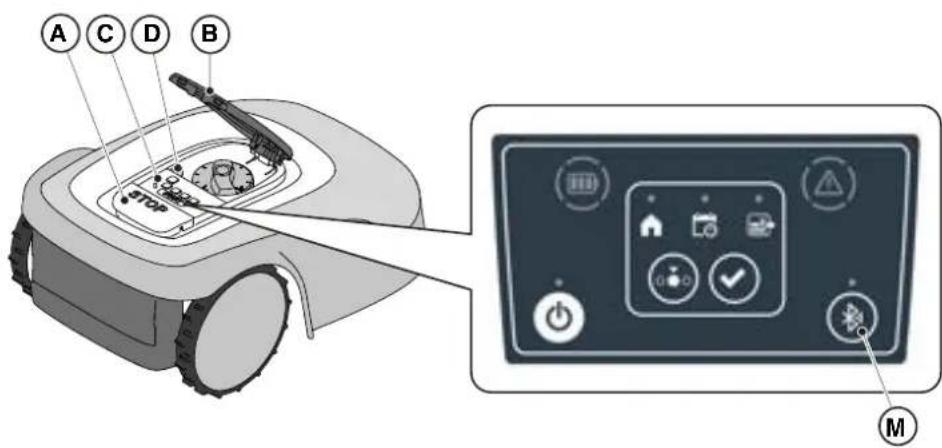
The robot lawn mower handles automatically the Bluetooth connection with external mobile devices. The Bluetooth connection is available at all times when the robot lawn mower is switched on. It is possible to connect only one mobile device at a time to the robot lawn mower via Bluetooth. The robot lawn mower automatically disconnects from the device when the app is closed. The 'BLUETOOTH' button (M) is used only by the service centre for diagnostic purposes.
NOTE: For pairing the device with the robot lawn mower via Bluetooth, see (Par. 4.7.3 Pairing).
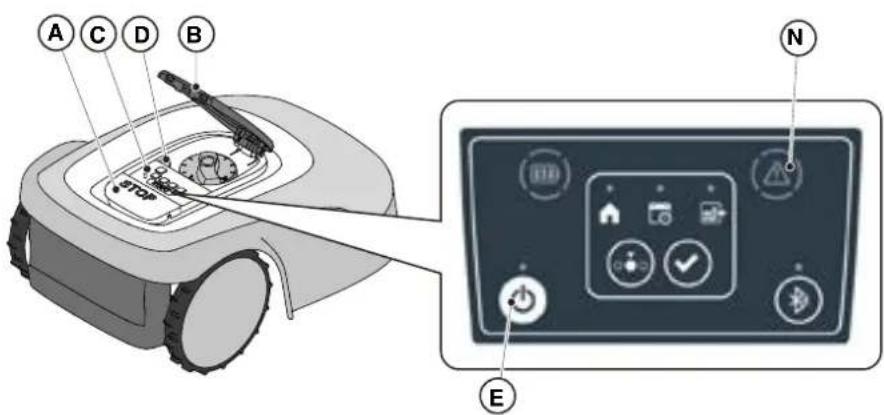
5.3.6. DISPLAY OF ALARM STATES-ALARM ICON
The "ALARM" light icon (N) indicates an operating anomaly.
Procedure:
- Press the "STOP" button (A) to open the cover (B) and access the control panel (C).
- Check the alarm status through the red light icon (N):
- After resolving the fault, press the "ON/OFF" button (E) twice in rapid succession to reset the alarm. The light icon (N) goes out, and the robot lawn mower can be restarted. If the icon (N) does not go off, remove the safety key (D), wait a few seconds and then switch the robot lawn mower on again using the "ON/OFF" button (E). If the problem persists, contact a service centre.
NOTE: Details about anomalies are viewable on the App.
5.3.7. BATTERY CHARGE DISPLAY - BATTERY ICON
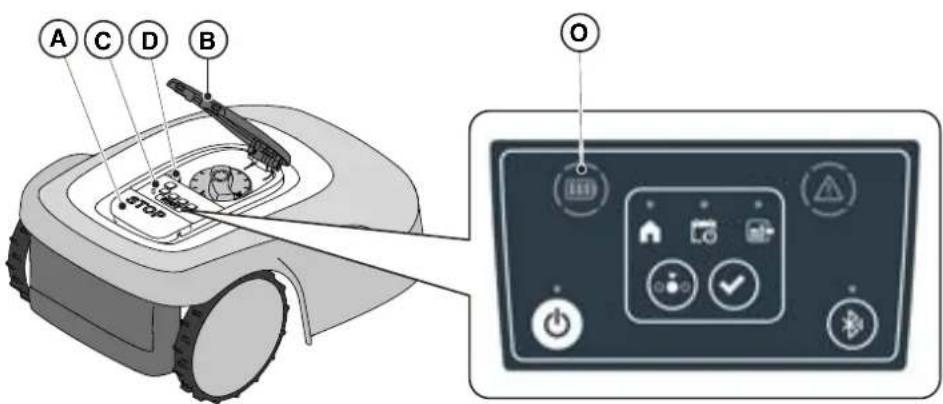
The "BATTERY" light icon (O) indicates the battery charge status.
Procedure:
- Press the "STOP" button (A) to open the cover (B) and access the control panel (C).
- Check the battery charging status through the light icon (O):
- Blue icon: the battery is charged (charge level >40 %).
- Red icon: the battery is charging (charge level 15-40 %).
- Flashing red icon: the battery charge is low (charge level <15%).
- If the robot lawn mower is charging, the light icon (O) flashes.
NOTE: if the battery icon (O) flashes rapidly red when a command is pressed, the operation cannot be carried out and it will be necessary to charge the battery manually (See chapter 5.5).
5.3.8. STARTING THE ROBOT LAWN MOWER
To start up the robot lawn mower, follow the procedure described in Par. 5.3.4 "SCHEDULED PROGRAM SELECTION / SINGLE WORK CYCLE / FORCED RETURN TO DOCKING STATION - MODE SELECTION BUTTON".
5.4. FUNCTIONING OF THE DOCKING STATION
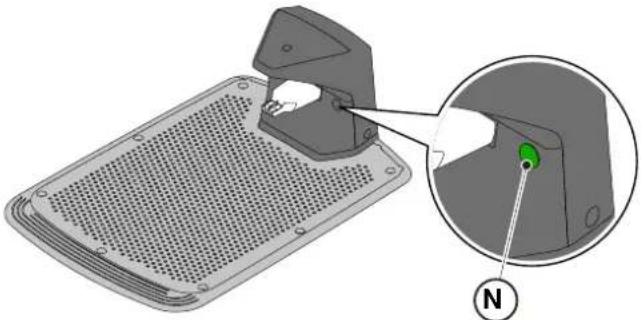
The docking station is equipped with an indicator light (N) that lights up in the following manner:
- Warning light off: the docking station is powered off or the robot is on the base.
- Steady indicator light: the perimeter cable is correctly connected to the charging base, and the perimeter signal is correctly transmitted;
- Indicator light flashing slowly: the perimeter cable is not connected or is interrupted (the perimeter cable integrity check is not performed continuously, but only when the robot leaves the charging base or the base is powered);
- Warning light flashing quickly: the perimeter cable is too short (see Par. 4.5.4) or there is a fault in the docking station.
- Indicator light flashing rapidly twice or three times: the docking station has detected a short circuit on the charging contacts. (See Chapter 7).
5.5. BATTERY CHARGING
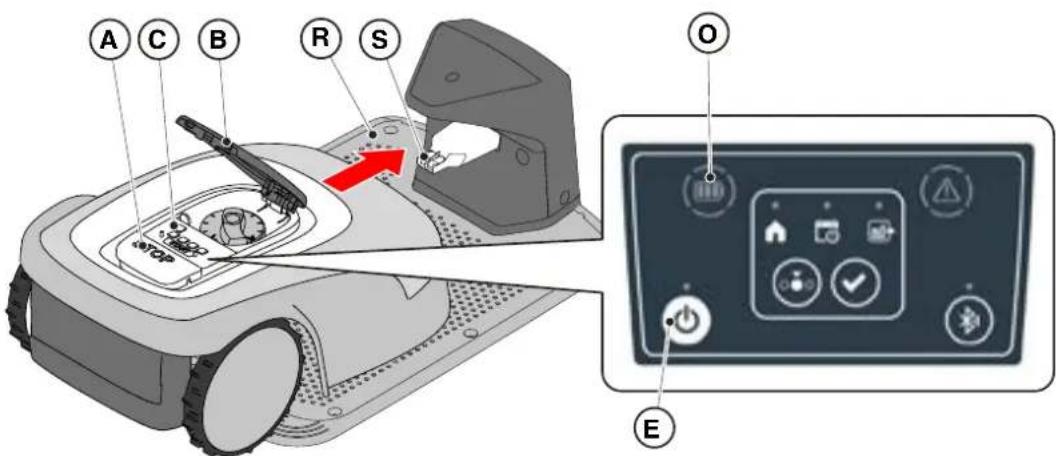
The "BATTERY CHARGING" procedure allows to recharge the robot lawn mower manually.
Requirements and obligations:
- Docking station connected to the mains.
Procedure:
- Position the robot lawn mower on the docking station (R).
- Slide the robot lawn mower onto the docking station, until the charging connector (S) is engaged.
- Press the "STOP" button (A) to open the cover (B) and access the control panel (C).
- Turn the robot lawn mower on with the "ON/OFF" button (E).
- When the "BATTERY" icon (O) flashes blue, the robot lawn mower is charging.
- Close the cover (B).
- Leave the robot lawn mower to charge for at least the time shown in Par. 4.6.
NOTE: Charging the battery before winter storage should be carried out as shown in Par. 6.4.
5.6. CUTTING HEIGHT ADJUSTMENT
The "CUTTING HEIGHT ADJUSTMENT" procedure describes how to adjust the height of the cutting blades.
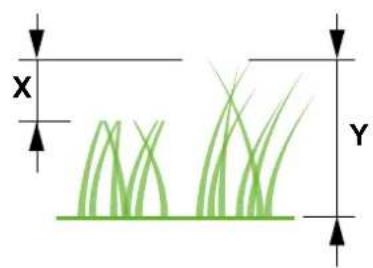
- The length X of grass cut by the robot lawn mower must not exceed 10mm.
- The robot lawn mower's operating range is 20-60 mm (cutting height).
- The initial height of the grass Y must therefore be 70mm maximum.
At the first installation or at the beginning of the mowing season, if necessary, prepare the garden with a traditional lawn mower to bring the initial height of the grass to an appropriate value.
NOTE: If you want to cut the grass more than 10mm, adjust the cutting height so that the cut grass part is 10mm. Lower the cutting height further only after the garden has been mowed evenly.
Procedure:
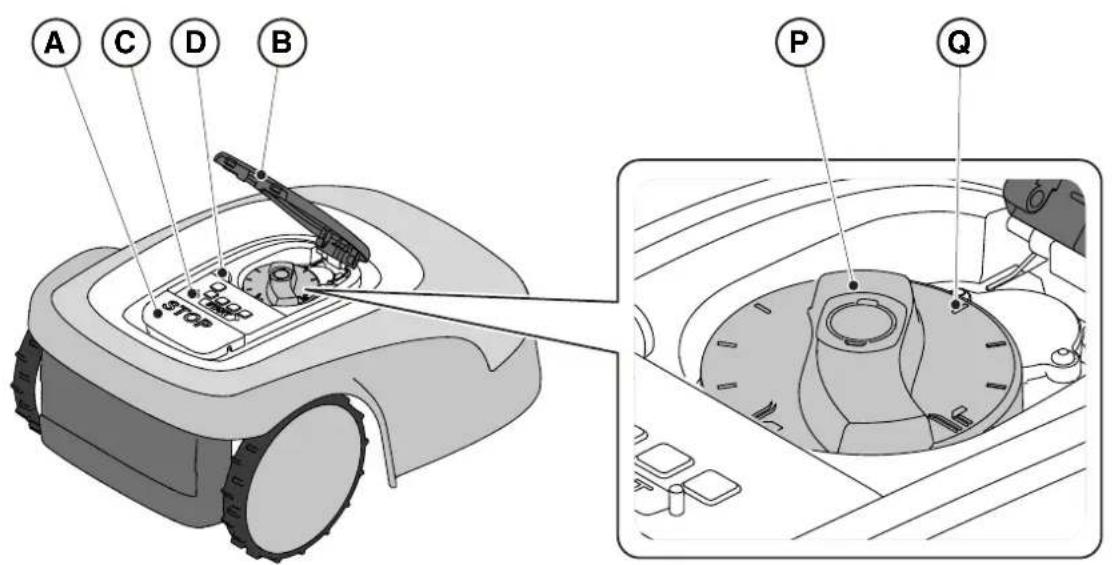
- Press the "STOP" button (A) to open the cover (B) and access the control panel (C).
- Remove the safety key (D).
- Use the height adjuster (P) to select the desired cutting height so that the cut grass part is no more than 1 cm.
- Insert the safety key (D).
NOTE: On the knob there is a scale graduated from 1 to 10 (Q) to be used as a reference.
6. MAINTENANCE
6.1. SCHEDULED MAINTENANCE
 | CAUTION:Only use original spare parts. |  | CAUTION:Do not modify, tamper with, elude or eliminate the safety devices installed. |
For better operation and longer life, be sure to clean the product regularly and replace worn parts.
Perform the interventions following the frequency indicated in the table.
| FREQUENCY COMPONENT TYPE OF INTERVENTION REFERENCE | | |
| Weekly Blade Clean and check blade | efficiency | (See Par. 6.2) | |
| If the blade is bent due to impact or if it's worn, replace it. | (See Par. 6.3) | |
| Recharging contacts | Clean and eliminate any oxidising. | (See Par. 6.2) |
| Monthly Robot lawn mower | Carry out cleaning. (See Par. 6.2) | | |
| Docking station and power cables | Check for wear or deterioration and replace if necessary. | (Contact an authorised service centre) | |
| At the end of the mowing season or every six months if the robot lawn mower is not used | Battery Perform the | pre-storage charging of the battery. | (See Par. 6.4) | |
| Annual or at the end of the cutting season | Robot lawn mower | Carry out the servicing at an authorized service centre. | (See Par. 6.1) | |
It is necessary to carry out a maintenance servicing annually at an authorized service centre to keep the robot lawn mower in good working conditions.
The servicing provides for a series of verifications including:
- The internal and external cleaning of the robot lawn mower;
- the general check of the status of the robot lawn mower; • the replacement of worn parts; • the checking of the battery status; • the verification of tightening torques;
- the verification and possible replacement of the impact and lifting kinematic mechanisms and their protective bellows;
- the check and, if necessary, replacement of the rubber bellows protecting the blade motor, to maintain the protection specifications against water infiltrations
- the replacement of the sealing gaskets of the bodies and the battery compartment to maintain the specifications of protection against water infiltrations.
NOTE: any malfunction due to not having carried out the annual servicing will not be recognized under warranty.
6.2. PRODUCT CLEANING

CAUTION: Danger of cutting hands.

CAUTION: Danger of dust in the eyes.
Requirements and obligations:
- Sponge • Dry cloth
- Neutral soap • Gloves
- Brush • Glasses
- Water

GLOVES OBLIGATION: Use protective gloves to avoid cutting your hands.

GLASSES OBLIGATION: Use safety glasses to avoid the danger of dust in the eyes.
Procedure:
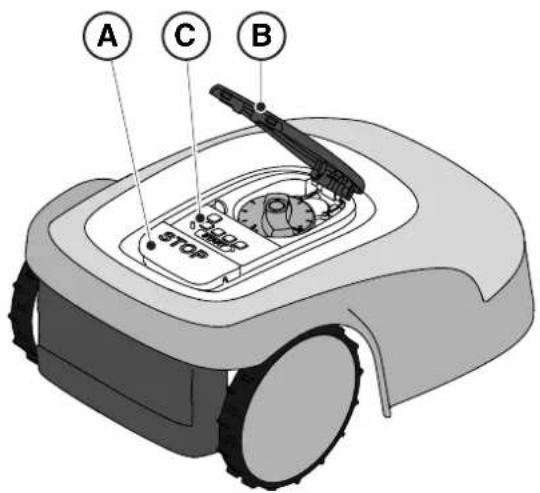
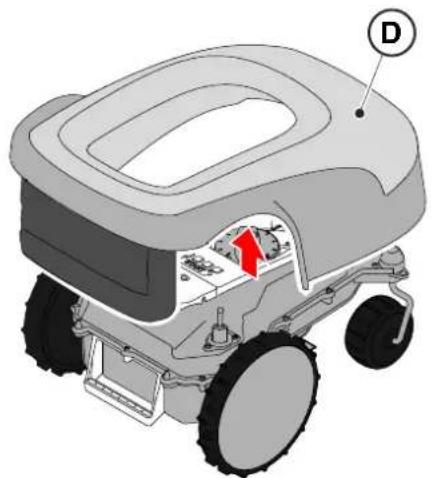
- Press the "STOP" (A) button to stop the robot lawn mower and open the protective cover (B).
- Remove the safety key (C).
- Remove the floating cover (D) to make the cleaning easier.
- Clean all the external surfaces of the robot lawn mower with a sponge dampened in lukewarm water and neutral soap.

WARNING:
Too much water can filter in and damage electrical parts.

WARNING:
Do not modify, tamper with, elude or eliminate the safety devices installed.

BAN:
Do not use pressurized water jets.

BAN:
To avoid irreversible damage to the electrical and electronic components, do not immerse the robot lawn mower, partially or completely, in water.

BAN:
Do not wash the internal parts of the robot lawn mower to avoid damaging the electrical and electronic components.

BAN:
Do not use solvents or petrol so as not to damage varnished surfaces and plastic parts.
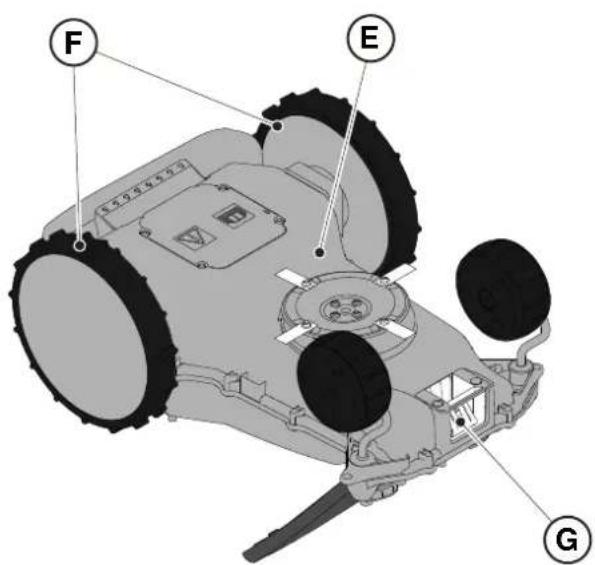
- Remove mud and dirt from the drive wheels (F).
- Clean the underside (E) of the robot lawn mower (cutting blade area, front and rear wheels). Use a suitable brush to remove encrustations and / or debris that could prevent the robot lawn mower from working properly. Complete the cleaning with a damp sponge.
- Put the floating cover (D) back on, making sure that it is correctly fastened to the supports.
- Clean the battery charging connector (G).
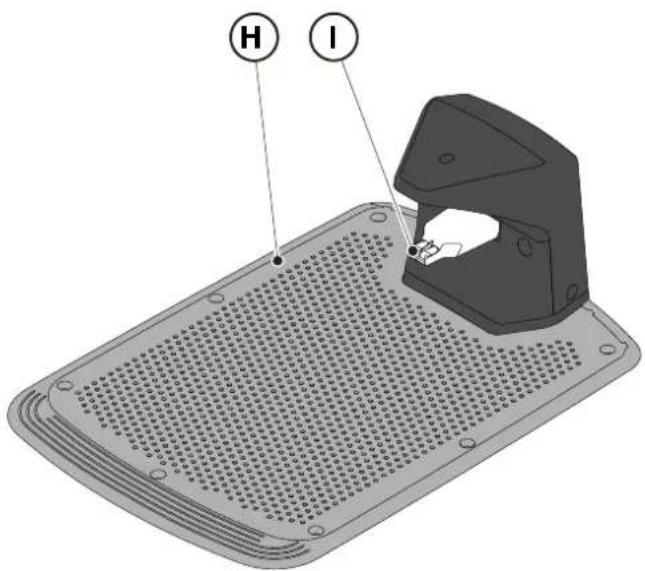
- Clean the docking station (H) and the contact connector (I) from accumulated residues.
6.3. REPLACEMENT OF THE CUTTING BLADES

CAUTION: Danger of cutting hands.
Requirements and obligations:
- Safety key • Key • Cutting blades • Gloves

GLOVES OBLIGATION:
Use protective gloves to avoid cutting your hands.
Procedure:
- Press the "STOP" (A) button to stop the robot lawn mower and open the protective cover (B).
- Remove the safety key (C).
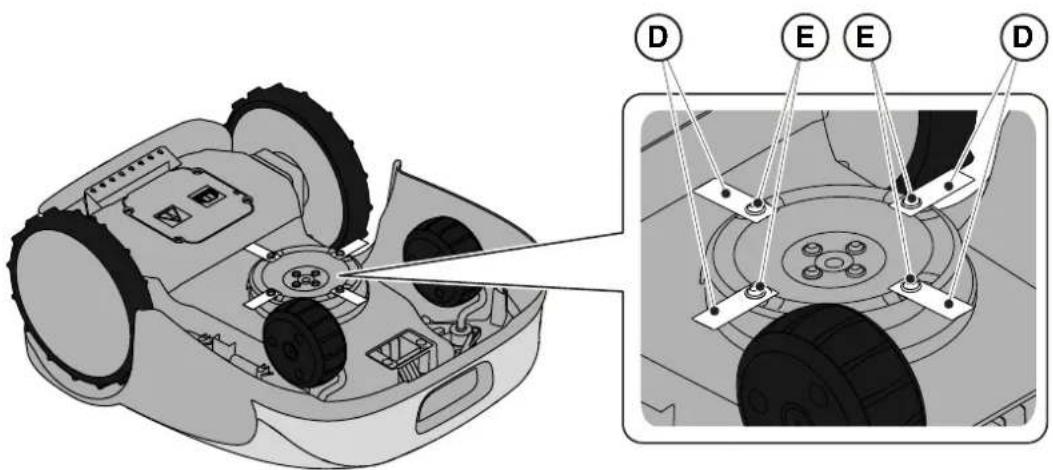
- Turn the robot lawn mower upside down, taking care not to damage the floating cover.
- Unscrew the fixing screws (E).
- Replace the cutting blades (D).
- Unscrew the fixing screws (E).
6.4. WINTER BATTERY MAINTENANCE AND STORAGE
Procedure:
- Charge the battery according to the guided procedure in the App, accessible from the "Settings" page.
- Clean the robot lawn mower (See Par. 6.2).
- Check the robot lawn mower is switched off and store in a dry place, protected from icy conditions.
- The battery must be recharged every 6 months and, in any case, before winter storage.
NOTE: The guided procedure registers the successful recharging of the battery in the cloud, and is to be considered completed if the date of the winter pre-storage recharge is updated.
NOTE: Registering the charge through the app procedure is required for the battery warranty to be valid.
NOTE: The battery must be recharged every 6 months and, in any case, before winter storage.
6.5. BATTERY REPLACEMENT
Battery replacement is the sole responsibility of the STIGA TECHNICAL ASSISTANCE STAFF. If the battery needs to be replaced, contact a service centre or your retailer.
7. TROUBLESHOOTING

CAUTION:
Stop the robot lawn mower and bring it back to safety conditions (See Par. 5.3.2).
Below there is the list of any anomalies that may arise during the work phase.
| PROBLEM CAUSES SOLUTIONS | |
| Abnormal vibrations.The robot lawn mower is noisy. | Damaged cutting disc or blades Replace the damaged components (See Par. 6.3). |
| Cutting device blocked by residues (tapes, ropes, plastic fragments, etc.). | Switch off the robot lawn mower in safety conditions (See Par. 2.3). Unlock the cutting blade. |
| The robot lawn mower was started in the presence of unexpected obstacles (fallen branches, forgotten objects, etc.). | Switch off the robot lawn mower in safety conditions (See Par. 2.3). Remove obstacles and restart the robot lawn mower (See Par. 5.3.9). |
| Electric motor failure Replace the motor, contact the nearest authorized service centre. |
| Grass too tall Increase the cutting height (See Par. 5.6). |
|
|
| The robot lawn mower does not position itself properly inside the charging station. | Incorrect position of the perimeter cable. | Check the connection of the charging station (See Par. 4.5.3). |
| Land subsidence in the vicinity of the docking station. | Restore the correct positioning of the docking station. (See Par. 4.5.3). |
| The mower robot behaves abnormally around perimeter obstacles. | Perimeter cable laid in the wrong way | Reposition the perimeter cable correctly (clockwise) (See Par. 4.5.1). |
| The robot lawn mower works at the wrong times. | Working time set incorrectly Reset the working hours (See Par. 4.7.8). |
| The working area is not mowed completely. | Insufficient working hours. Extend working hours (See Par. 4.7.8). |
| Cutting device with encrustations and / or residues. | Switch off the robot lawn mower in safety conditions (See Par. 2.3). Clean the cutting device. |
| Pivoting cutting blades blocked by encrustations or residues. | Switch off the robot lawn mower in safety conditions (See Par. 2.3). Replace the cutting blades. |
| The working area is too large for the robot lawn mower's capacity. | Reduce the work area (see Technical Data Par. 1.2). |
| Batteries about to exhaust their life cycle. | Replace the batteries with original spare parts (See Par. 6.5). |
| Batteries are not charged completely. | Clean and eliminate any oxidation from the contact points (See Par. 6.2). Recharge the batteries. |
| Parts of the garden not completely mowed. | Wrong cut point programming. Correctly program the secondary cut points correctly (See Par.. 4.7.9). |
| The docking station light does not turn on when the robot is out of the docking station. | The supply voltage is missing or there is a fault in the docking station. | Check that the power supply unit is plugged in correctly. Check the integrity of the power supply connection cable. |
| The docking station indicator lights up flashing slowly. | The perimeter cable is not connected or is broken | Check the installation and repair the break (See Par. 4.5.2) |
| The docking station indicator light flashes rapidly. | The perimeter cable is too short or there is a fault in the charging base. | Check that the length of the perimeter cable is greater than indicated in Par. 4.5.1. If necessary, install the resistor (See Par. 4.5.4). If the problem persists, contact a service centre. |
| The docking station indicator lights up flashing twice or three times rapidly. | The docking station has detected a short circuit on the charging contacts. | Disconnect the docking station from the mains, rectify any short circuits and clean the charging contacts of the docking station and the robot. Reconnect the docking station to the mains. If the problem persists, contact a service centre. |
| The Warning icon lights up on the keypad. | It indicates anomaly / failure conditions. | See the app for more information or contact a service centre. |
7.1. MAIN MESSAGES FROM APP
| PROBLEM CAUSES SOLUTIONS | |
| “No Signal” appears on the App while the robot lawn mower is inside the perimeter and the LED transmitter in the docking station is on. | The robot lawn mower has a problem in receiving the signal. | Contact an authorized service centre. |
| “Out of perimeter ” appears on the app. | Ground slopes too much Delimit the area with excessive slope (See Par. 4.3). |
| Perimeter cable laid in the wrong way | Check that the cable is installed correctly (excessive depth, proximity to metal objects, distance between the cable that delimits two elements, etc.). (See Par. 4.5.1). |
| Perimeter cable for delimiting internal areas (flower beds, bushes, etc.) incorrectly laid. | Reposition the perimeter cable correctly (go around the obstacle in the same direction of travel of the perimeter.) (See Par. 4.5.1). |
| Overheated power supply unit. Adopt suitable solutions to reduce power supply unit temperature (air or modify installation area, etc.) (See Par. 4.3). |
| "Lifted Robot" appears on the App | The robot lawn mower is lifted from the ground. | Check that the robot lawn mower is not blocked or obstructed by any objects. Clean and remove any grass residues under the hood that may obstruct the sensors (See Par. 6.2). |
| "Wheel error" appears on the app. | Uneven ground or with obstacles stopping the movement. | Check that the lawn to be mowed is uniform with no holes, stones or other obstacles. Otherwise, proceed with any necessary site clearance work ( See Par. 4.3). |
| One or both motors working the wheel drive have failed | Replace the motor, contact the nearest authorized service centre. |
| The app displays “Tall Grass” or “Mowing Error”. | Blocked or damaged cutting disc. | Stop the robot lawn mower in safety conditions (See Par. 2.3) Release the cutting disc from objects that cause it to block or replace the cutting disc with a new one (See ). 6.3). |
| Pivoting cutting blades worn or blocked by encrustations or residues. | Stop the robot lawn mower in safety conditions (See Par. 2.3). Release and clean or replace the cutting blades (See Par. 6.3). |
| The robot lawn mower was started in the presence of unexpected obstacles (fallen branches, forgotten objects, etc.). | Stop the robot lawn mower in safety conditions (See Par. 2.3). Remove the obstacles and restart the robot lawn mower. |
| Electric motor failure Replace the motor, contact the nearest authorized service centre. |
| Grass too tall Increase the cutting height (See Par. 5.6). Make a perimeter cut. |
| The App displays "Tipping". | The robot lawn mower is on a slope that is higher than the allowed limits. | Exclude the area with the slope beyond the allowed limits by delimiting it (See Par. 4.3) |
8. TRANSPORT, STORAGE AND DISPOSAL
8.1. TRANSPORT
Procedure:
NOTE: We recommend using the original packaging for transport over long distances.
- Press the "STOP" (A) button to stop the robot lawn mower and open the protective cover (B).
- Remove the safety key (C).
- Clean robot lawn mower as shown in Par. 6.2 "PRODUCT CLEANING".
- Lift the robot lawn mower by the handle (D) and carry it, taking care to keep the cutting blade away from the body.
- Reposition the robot lawn mower in its original packaging.
8.2. STORAGE
The robot lawn mower must be stored horizontally in a dry and frost-free place after cleaning and charging the battery in the winter (see Chapter 6). During long periods of inactivity, disconnect the docking station from the mains.
8.3. DISPOSAL

WARNING:
To remove the battery from the robot lawn mower, contact an authorized service centre.
Procedure:
- Dispose of the product packaging in a sustainable way in the appropriate collection containers or at special centers authorized for collection.
- Dispose of the robot lawn mower in accordance with local legal requirements.
- Contact appropriate facilities for recycling and disposal as the robot lawn mower is classified as WEEE (Waste Electrical and Electronic Equipment).
- Dispose of old or used batteries in a sustainable way in collection containers or at authorized collection centers.
9. ACCESSORIES
| Art. number Description Specifications | |
| 1127-0009-01 Cutting blades 12 pcs | |
| 1127-0011-01 Docking station cover For additional protection against rain and sunlight |
| 1127-0010-01 Cable extension for charger Cable to extend the connection between the power supply and the docking station - L=5 m |
| 1127-0020-01 Cable extension for charger Cable to extend the connection between the power supply and the docking station - L=15 m |
| 1127-0012-01 Installation KIT Small Perimeter cable ∅ 2,7 mm - L=150 m + 200 fixing pegs + 5 cable connectors + 5 docking station cable connectors |
| 1127-0013-01 Installation KIT Medium Perimeter cable ∅ 2,7 mm - L=300 m + 400 fixing pegs + 5 cable connectors + 5 docking station cable connectors |
| 1127-0000-01 Cable reel 150 m Perimeter cable ∅ 2,7 mm - L=150 m |
| 1127-0001-01 Cable reel 300 m Perimeter cable ∅ 2,7 mm - L=300 m |
| 1127-0002-01 Cable reel 500 m Perimeter cable ∅ 3,4 mm - L=500 m |
| 1127-0006-01 Fixing pegs (100 pcs) Pegs to fix the perimeter cable - 100 pcs |
| 1127-0008-01 Docking station fixing pegs 8 pcs | |
| 1127-0004-01 Cable connectors Joints for the repairing of the perimeter wire- 5 pcs |
| 1127-0005-01 Docking station cable connectors | Connectors to connect the perimeter wire to the docking station - 5 pcs |
| 122063053/0 | Small garden resistor | Resistor for installations with less than 40 m of perimeter cable |
10. WARRANTY
The warranty conditions are intended for consumers only, i.e. non-professional operators.
The warranty covers all material quality and manufacturing defects recognised during the warranty period by your Dealer or Authorised Service Centre.
The warranty is restricted to the repair or replacement of components recognised as faulty.
It is advisable to send your machine once a year to an authorized service workshop for servicing, assistance and safety device inspection.
The warranty only applies to machines subjected to regular maintenance.
The warranty does not cover damages resulting from:
- Failure to become familiar with the documentation accompanying the machine (Instruction manuals). • Professional use.
- Carelessness, negligence.
- External causes (lightning, impact, presence of foreign bodies inside the machine) or incidents.
- Incorrect use or assembly prohibited by the manufacturer.
- Poor maintenance.
- Modification to the machine.
- Use of non-genuine spare parts (adaptable parts).
- Use of accessories not supplied or approved by the manufacturer (e.g. cutting devices).
The warranty does not cover:
- Maintenance operations (described in the instruction manual).
- Normal wear of consumables such as cutting devices and wheels. • Normal wear and tear.
- Deterioration in the appearance of the machine due to use. • Cutting means supports.
- Damage resulting from an installation that does not comply with the user manual.
- Any corrosion or damage to the perimeter cable.
- Damage caused by water infiltration due to the use of a high pressure washing device or by immersion in water, for example when puddles of water form from heavy rain.
- Damage caused by improper storage or improper use of the battery.
- Damage caused by using non-original batteries.
- Any additional cost possibly connected to the repair under warranty, such as moving the machine to the user's premises, bringing the machine to the Dealer, hiring equipment or contracting other companies for any garden maintenance work while the machine is out of service.
The user is protected by his or her own national legislation. The user's rights under the national laws or his or her own country are not in any way restricted by this warranty.
(Supply of Machinery (Safety) Regulations 2008, S.I. 2008 No. 1597, Annex II, part A)
- The company: ST. S.p.A. – Via del Lavoro, 6 – 31033 Castelfranco Veneto (TV) – Italy
- Hereby declares under its own responsibility that the machine:
Robotic lawnmower
a) Homologation type: SRSW01 c) Serial number: 22A••RMO000001 ÷ 99L••RMO999999 d) Engine: battery-operated
- Conforms to UK Regulations:
• S.I. 2008/1597 - Supply of Machinery (Safety) Regulations 2008 • S.I. 2016/1091 - Electromagnetic Compatibility Regulations 2016 - S.I. 2012/3032 - The Restriction of the Use of Certain Hazardous Substances in Electrical and Electronic Equipment Regulations 2012 • S.I. 2017/1206 - Radio Equipment Regulations 2017
- Reference to harmonised standards:
EN 60335-1:2012 / AC:2014 / A11:2014 / A13:2017 / EN 61000-3-2:2019
A1:2019 / A2:2019 / A14:2019 EN 61000-3-3:2013 / A1:2019
EN IEC 63000:2018 EN 300 328 V2.2.2
EN 303 447 V1.2.0
EN 50636-107:2015 / A1 / A2
EN 301 489-17 V3.2.4
EN 62479:2010
EN 55014-1:2017 / A11:2020
EN 55014-2:2015
i) Cutting width: 18 cm
n) Person authorised to compile the technical file: ST. S.p.A.
Via del Lavoro, 6
31033 Castelfranco Veneto (TV) - Italia
o) Castelfranco Veneto, 01/12/2022 CEO Stiga Group
ST. S.p.A.
Via del Lavoro, 6
31033 Castelfranco Veneto (TV) - Italia
Sean Robinson
UK Importer:
STIGA LTD
Unit 8, Bluewater Estate Plympton,
Devon, PL7 4JH, England

| FR (Traduction de la notice originale)Déclaration CE de Conformité (Directive Machines 2006/42/CE, Annexe II, partie A)1. La Société2. Déclare sous sa propre responsabilité que la machine : Robot-tondeusea) Type / Modèle de Basec) Série d) Moteur: batterie3. Est conforme aux prescriptions des directives :4. Renvoi aux Normes harmoniséesi) Largeur de coupen) Personne habilitée à établir le Dossier Technique :o) Lieu et Date | DE (Übersetzung der Originalbetriebsanleitung)EG-Konformitätserklärung (Maschinenrichtlinie 2006/42/EG, Anhang II, Teil A)1. Die Gesellschaft2. Erklärt auf eigene Verantwortung, dass die Maschine: Mährobotera) Typ / Basismodellc) Seriennummerd) Motor: Batterie3. Den Anforderungen der folgenden Richtlinien entspricht:4. Bezugnahme auf die harmonisierten Normeni) Schnittbreiten) Zur Verfassung der technischen Unterlagen befugte Person:o) Ort und Datum | NL (Vertaling van de oorspronkelijke gebruiksaanwijzing)EG-verklaring van overeenstemming (Richtlijn Machines 2006/42/CE, Bijlage II, deel A)1. Het bedrijf2. Verklaart onder zijn eigen verantwoordelijkheid dat de machine: Robotmaaiera) Type / Basismodelc) Serienummerd) Motor: accu3. Voldoet aan de specificaties van der richtlijnen:4. Verwijzing naar de Geharmoniseerde normeni) Snijbreedten) Bevoegd persoon voor het opstellen van het Technisch Dossiero) Plaats en Datum |
| ES (Traducción del Manual Original)Declaración de Conformidad CE (Directiva Máquinas 2006/42/CE, Anexo II, parte A)1. La Empresa2. Declara bajo su propia responsabilidad que la máquina: Robot cortacéspeda) Tipo / Modelo Basec) Matrículad) Motor: bateria3. Cumple con las especificaciones de las directivas:4. Referencia a las Normas armonizadasi) Amplitud de corten) Persona autorizada a realizar el Manual Técnico:o) Lugar y Fecha | PT (Tradução do manual original)Declaração CE de Conformidade (Diretiva de Máquinas 2006/42/CE, Anexo II, parte A)1. A Empresa2. Declara sob a própria responsabilidade que a máquina: Robot corta-relvaa) Tipo / Modelo Basec) Matrículad) Moto: Bateria3. É conforme às especificações das diretivas:4. Referência às Normas harmonizadasi) Amplitude de corten) Pessoa autorizada a elaborar o Caderno Técnicoo) Local e Data | NO (Oversettelse av original bruksanvisning)EF- Samvarserklæring (Maskindirektiv 2006/42/EF, Vedlegg II, del A)1. Firmaet2. Erklærer på eget ansvar at maskinen: Robotgressklippera) Type / Modellc) Serienummerd) Motor: batteri3. Oppfyller kravene i direktivene:4. Henvisning til harmoniserte standarderI) Klippebredden) Person som har fullmakt til å ufterdige teknisk dokumentasjon:o) Sted og dato |
| SV (Översättning av bruksanvisning i original)EG-försäkran om överensstämmelse (Maskindirektiv 2006/42//EG, bilaga II, dela)1. Företaget2. Försäkrar på eget ansvar att maskinen: Gräsklipparrobota) Typ / Basmodellc) Serienummerd) Motor: batteri3. Överensstämmer med föreskrifterna i direktivet4. Referens till harmoniserade standarderi) Skärbreddn) Auktoriserad person för upprättandet av den tekniska dokumentationen:o) Ort och datum | DA (Översættelse af den originale brugsanvisning)EF-overensstemmelseserklæring (Maskindirektiv 2006/42/EF, bilag II, del A)1. Firmaet2. Erklærer på eget ansvar, at maskinen: Robotplænekllippera) Type / Modelc) Serienummerd) Motor: batteri3. Er i overensstemmelse med specifikationerne ifølge direktiverne:4. Henvisning til harmoniserede standarderi) Klippebredden) Person, der har bemyndigelse til at udarbejde det tekniske dossier:o) Sted og dato | FI (Alkuperäisten ohjeiden käännös)EY-VAATIMUSTENMUKAISUUSVAKUUTUS (Konedirektiivi 2006/42/EY, Liite II, osa A)1. Yritys2. Vakuuttaa omalla vastuullaan, että kone: Robottiruohonlelikkurla) Tyyppl / Perusmalllc) Sarjanumerod) Moottori : akku3. On yhdenmukainen seuraavien direktiivien asettamien vaatimusten kanssa:4. Viittaus harmonisoituihin standardeihini) Leikkuuleveysn) Teknisten asiakirjojen laatimiseenvaltuutettu henkilö:o) Paikka ja päivämäärä |
| SL (Prevod izvirnih navodil)ES izjava o skladnosti (Direktiva 2006/42/ES) , priloga II, del A)1. Družba2. pod lastno odgovornostjo izjavlja, da je stroj: Robotska kosilnicaa) Tip / osnovni modelc) Serijska številkad) Motor: baterija3. Skladen je z določili direktiv :4. Sklicevanje na usklajene predpisei) Obseg košnjen) Oseba, pooblaščena za sestavotehnične knjižice:o) Kraj In datum | LT (Originalių instrukciju vertimas)EB atitikties deklaracija (Mašinų direktyva 2006/42/CE, Priedas II, dalis A)1. Bendrovė2. Prisilma atsakomybę, kad jrenglnys: Žolės pjovimo robotasa) Tipas / Bazinis Modelisc) Serijos numerisd) Variklis: baterija3. Atitinka direktyvose pateiktas specifikacijas:4. Nuoroda i suderintas Normasi) Pjovimo plotisn) Autorizuotas asmuo sudaryti Techninę Dokumentaciją:o) Vieta ir Data | LV (Instrukciju tulkojums no originálvalodas)EK atbilstības deklarācija (Direktīva 2006/42/EK par mašinām, pleilkums II, daļa A)1. Uzņēmums2. Uzņemoties par to pilnu atbildību, pazino, ka mašina: Robotizēta pljaujmašinaa) Tips / Bāzes modelsc) Sērijas numursd) Motors: akumulators3. Atbilst šādu direktīvu prasībām:4. Atsauce uz harmonizētiem standartiemi) Plaušanas platumsn) Pilnvarotais darbinieks, kas sagatavoja tehnisko dokumentāciju:o) Vieta un datums |
| CS (Překlad původního návodu k používání)ES – Prohlášení o shodě(Směrnice o Strojních zařízeních 2006/42/ES, Přiloha II, část A)1. Společnost2. Prohlášuje na vlastní odpovědnost, že stroj: Robotická sekačkaa) Typ / Základní modelc) Výrobní číslod) Motor: akumulátor3. Je ve shodě s nařízeními směrnic:4. Odkazy na Harmonizované normyi) Šířka řezánín) Osoba autorizovaná pro vytvoření Technického spisu:o) Misto a Datum | PL (Tłumaczenie instrukcji oryginalnej)Deklaracja zgodności WE(Dyrektywa maszynowa 2006/42/WE,Załącznik II, część A)1. Spółka2. Oświadczenie na własną odpowiedzialność, że maszyna: Kosiarka trawnikowaa) Typ / Model podstawowyc) Numer seryjnyd) Silnik: akumulator3. Spełnia podstawowe wymogi następujących Dyrektyw:4. Odniesienie do Norm zharmonizowanychi) Szerokość cięcia n) Osoba upoważniona do zredagowania Dokumentacji technicznej:o) Miejscowość i data | ET (Algupārase kasutusjuhendi tõlge)EÜ vastavusdeklaratsioon(Masinadirektiiv 2006/42/EÜ, Lisa II, osa A)1. Firma2. Kinnitab omal vastutusel, et masin:Robotniiduka) Tüüp / Põhimudel c) Matrikkeld) Mootor: aku3. Vastab direktiivide nõuetele:4. Viide ühtlustatud standarditelei) Lõikelaiusn) Tehnilise Lehe autoriseeritud koostaja:o) Koht ja Kuupäev |
| HU (Eredeti használati utasítás fordítása)EK-megfelelőségi nyilatkozata(2006/42/EK gépirányelv, ll. melléklet "A" rész)1. Alulírott Vállalat2. Felelősségének teljes tudatában kijelenti, hogy az alábbi gép: Robotfűnyíróa) Típus / Alaptipusc) Gyártási számd) Motor: akkumulátor3. Megfelel az alábbi irányelvekelőírásainak:4. Hivatkozás a harmonizált szabványokrai) Vágási szélességn) Műszaki Dosszié szerkesztésérefelhatalmazott személy:o) Helye és ideje | RU (Перевод оригинальных инструкций)Декларация соответствия нормам EC (Direktiva o машинном оборудовании 2006/42/EC, Приложение II, часть A)1. Предприятие2. Заявляет под собственную ответственность, что машина: Робот-газонокосилкаa) Тип / Базовая модельc) Паспортd) Двигатель: батарея сгорания3. Соответствует требованиям следующих директив:4. Ссылки на гармонизированные нормыi) Амплитуда кошенияn) Лицо, уполномоченное на подготовку технической документации:o) Место и дата | HR (Prijevod originalnih uputa)EK Izjava o sukladnosti(Direktiva 2006/42/EZ o strojevima, dodatak II, dio A)1. Tvrtka:2. pod vlastitom odgovornošću izjavljuje da je stroj: Robotska kosilicaa) Vrsta / Osnovni modelc) Matični brojd) Motor: baterija3. sukladan s temeljnim zahtjevima direktiva:4. Primijenjene su slijedeće harmonizirane norme:i) Širina rezanján) Osoba ovlaštena za pravljenje Tehničke datoteke:o) Mjesto i datum |
| SR (Prevod originalnih uputstval)EC deklaracija o usaglašenosti (Direktiva o mašinama 2006/42/EC, Prilog II, deo A)1. Preduzeće2. Daje izjavu pod vlastitom odgovornošćuda je mašina: Robot kosačicaa) Tip / Osnovni modelc) Serijski brojd) Motor: akumulator3. U skladu s osnovnim zahtevima direktiva:4. Pozivanje na usklađene normei) Širina košenjan) Osoba ovlašćena za sastavljanje tehničke brošureo) Mesto i datum | TR (Orijinal Talimatların Tercümesi)AT Uygunluk Beyanı (2006/42/CE Makine Direktifi, Ek II, bölüm A)1. Şirket2. Şahsi sorumluluğu altında aşağıdaki makinenin: Robot çim biçme makinesia) Tip / Standart modelc) Sicil numarasıd) Motor : batarya3. Aşağıdaki direktiflerin özelliklerine uygun olduğunu beyan etmektedir:4. Harmonize standartlara atifi) Kesim genişligiń) Teknik Dosyayı oluşturmaya yetkili kişi:o) Yer ve Tarih | RO (Traducerea manualului fabricantului)CE -Declaratie de Conformitate (Directiva Mašini 2006/42/CE, Anexa II, partea A)1. Societatea2. Declară pe propria răspundere că mașina: Robot mașină de tuns iarbaa) Tip / Model de bazăc) Număr de seried) Motor: baterie3. Este în conformitate cu specificațiile directivelor:4. Referință la Standardele armonizatei) Lătimea de täieren) Persoană autorizată să întocmeascăDosarul Tehnico) Locul și Data |
STIGA
STIGA LTD (UK Importer)
Unit 8, Bluewater Estate Plympton, Devon, PL7 4JH, England
STIGA S.p.A.
Via del lavoro, 6
31033 Castelfranco Veneto (TV)
Italy
stiga.com

FR
FRENCH - TRANSLATION OF THE ORIGINAL INSTRUCTIONS
TABLE OF CONTENTS
1. MODELS AND TECHNICAL DATA 1
1.1. MODELS .... 1 1.2. TECHNICAL DATA....2
2. SAFETY 3
2.1. SAFETY INFORMATION .... 3 2.2. SAFETY INSTRUCTIONS .... 5 2.2.1. GOOD SAFETY PRACTICES ....5 2.2.2. OPERATION ....5
2.3. STOPPING AND TURNING OFF THE ROBOTIC LAWNMOWER IN SAFE CONDITIONS....7
3. INTRODUCTION 8
3.1. GENERAL INTRODUCTION 8 3.1.1. PURPOSE OF THIS MANUAL....8 3.1.2. INSTRUCTIONS FOR READING FROM A SMARTPHONE 8 3.2. PRODUCT PRESENTATION 9 3.2.1. GENERAL DESCRIPTION....9 3.2.2. MAIN COMPONENTS 10 3.3. UNPACKING 11 3.4. SYMBOLS AND PLATES....12 3.5. GENERAL INSTRUCTIONS FOR READING THE MANUAL....13
4. INSTALLATION 14
4.1. GENERAL INFORMATION FOR INSTALLATION....14 4.2. COMPONENTS FOR INSTALLATION....14 4.3. CHECKING THE CONDITIONS REQUIRED FOR INSTALLATION....15 4.3.1. CHECKING THE GARDEN: 15 4.3.2. CHECKS FOR INSTALLING THE CHARGING STATION AND THE ELECTRICAL POWER SUPPLY UNIT: 15 4.3.3. MAIN CHECKS FOR INSTALLING THE PERIMETER CABLE: 17
4.4. CRITERIA FOR INSTALLING THE PERIMETER CABLE....19
4.4.1. POSITIONING THE PERIMETER CABLE 19 4.4.2. DELINEATING OBSTACLES: 21 4.4.3. PASSAGES BETWEEN DIFFERENT AREAS OF THE GARDEN 23
4.5. INSTALLING THE COMPONENTS....23
4.5.1. INSTALLING THE PERIMETER CABLE 24 4.5.2. CONNECTING THE PERIMETER CABLE....25 4.5.3. INSTALLING THE CHARGING STATION 26 4.5.4. INSTALLING THE RESISTOR FOR SMALL PERIMETERS 28
4.6. CHARGING THE ROBOTIC MOWER AFTER INSTALLATION 29 4.7. PRODUCT PARAMETERS......30
5. OPERATION 35
5.1. CHECKING SAFETY FOR STARTING THE ROBOTIC MOWER....35 5.2. MANUAL OPERATION OF THE ROBOTIC MOWER 36 5.3. DESCRIPTION OF THE CONTROLS ON THE ROBOTIC MOWER 37 5.3.1. SAFETY STOP - STOP BUTTON 37
5.3.2. SAFETY STOP - SAFETY KEY......38 5.3.3. SWITCHING ON AND OFF - ON/OFF BUTTON 38 5.3.4. SELECTING THE SCHEDULED PROGRAM/SINGLE WORK CYCLE - SCHEDULED PROGRAM BUTTON....39 5.3.5. DISPLAYING BLUETOOTH STATUS AND UNPAIRING - BLUETOOTH BUTTON....41 5.3.6. DISPLAYING ALARM STATES - ALARM ICON 41 5.3.7. DISPLAYING BATTERY CHARGING - BATTERY ICON 42 5.3.8. STARTING THE ROBOTIC MOWER - START BUTTON....42 5.4. OPERATION OF THE CHARGING STATION 43 5.5. CHARGING THE BATTERY 43 5.6. ADJUSTING THE CUTTING HEIGHT 44
6. MAINTENANCE 45
6.1. SCHEDULED MAINTENANCE 45 6.2. CLEANING THE PRODUCT....46 6.3. REPLACING THE CUTTING BLADES....48 6.4. WINTER MAINTENANCE OF THE BATTERY AND STORAGE....49 6.5. REPLACING THE BATTERY....49
7. TROUBLESHOOTING 50
7.1. MAIN APP MESSAGES....51
8. TRANSPORT, STORAGE AND DISPOSAL 53
8.1. TRANSPORT 53 8.2. STORAGE 53 8.3. DISPOSAL....53
9. ACCESSORIES 54
10. WARRANTY 55
10.1. WARRANTY COVERAGE....55
1. MODELS AND TECHNICAL DATA
1.1. MODELS
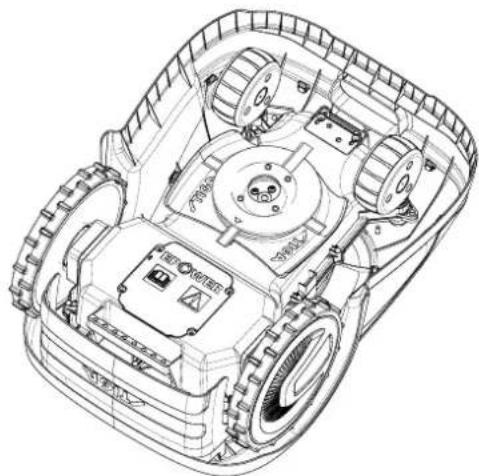
3.3. UNPACKING

CAUTION:

CAUTION:
4.3. CHECKING INSTALLATION REQUIREMENTS

CAUTION:
4.3.3. MAIN CHECKS FOR INSTALLING THE PERIMETER CABLE
4.4. CRITERIA FOR INSTALLING THE PERIMETER CABLE
4.4.1. POSITIONING THE PERIPHERAL CABLE
Procedure:
C

WARNING:
4.4.3. PASSAGES BETWEEN DIFFERENT ZONES OF THE GARDEN
Procedure:
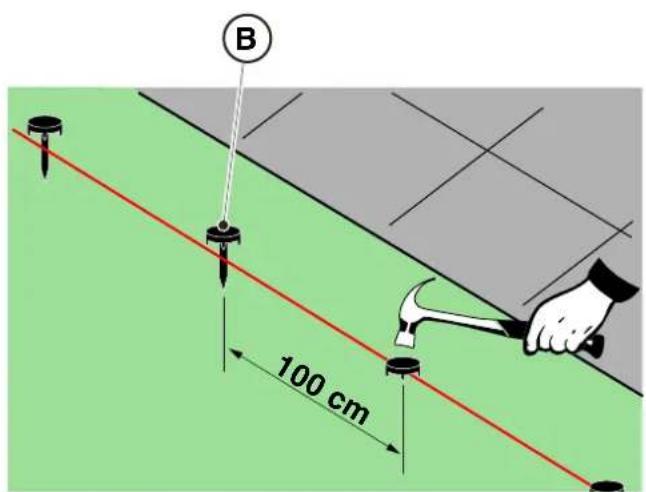
POSITIONING BY BURYING
(CAN ONLY BE DONE BY AN AUTHORIZED DEALER)
STIGA
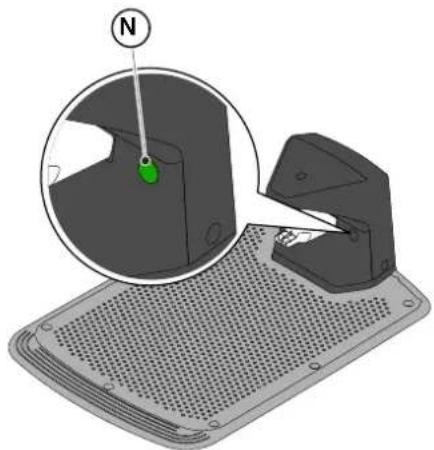
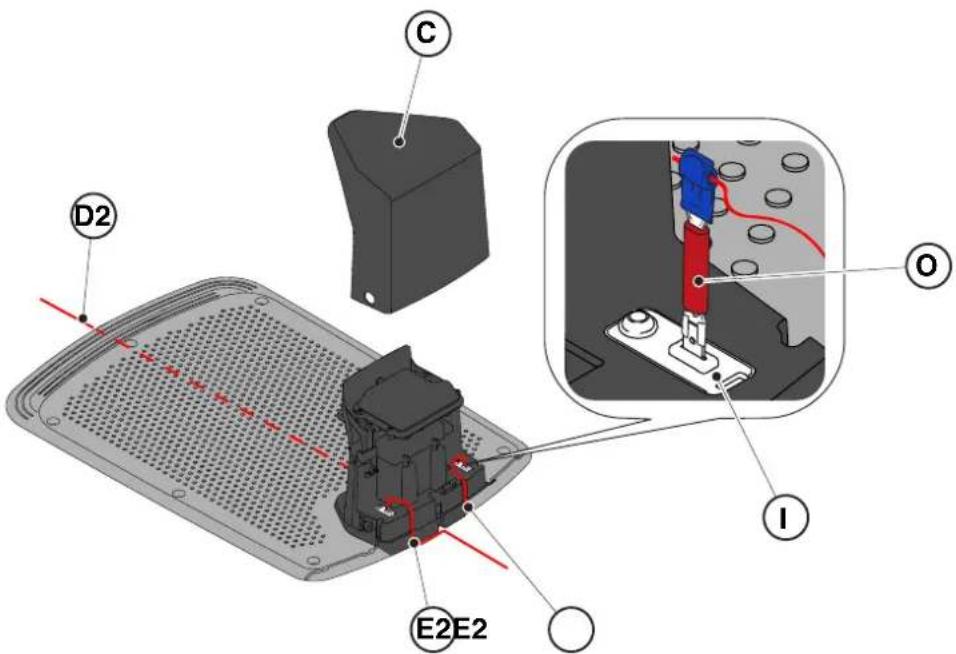
4.6. CHARGING THE ROBOT MOWER AFTER INSTALLATION
- Charging station.
Procedure:
5.2. MANUAL OPERATION OF THE ROBOT MOWER
5.3.1. SAFE STOP - STOP BUTTON
5.3.4. SELECTING SCHEDULED PROGRAM / SINGLE WORK CYCLE / FORCED RETURN TO CHARGING STATION – MODE SELECTION BUTTON
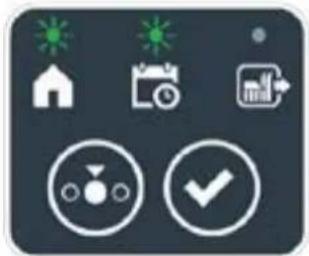

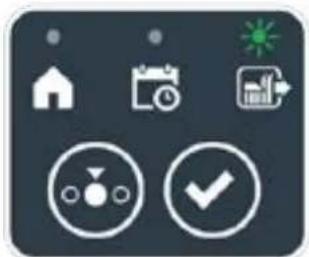

Procedure:
5.3.6. DISPLAY OF ALARM STATES - ALARMS ICON
5.3.7. DISPLAY OF BATTERY CHARGE - BATTERY ICON
5.5. BATTERY CHARGING
Procedure:
6. MAINTENANCE
6.1. SCHEDULED MAINTENANCE

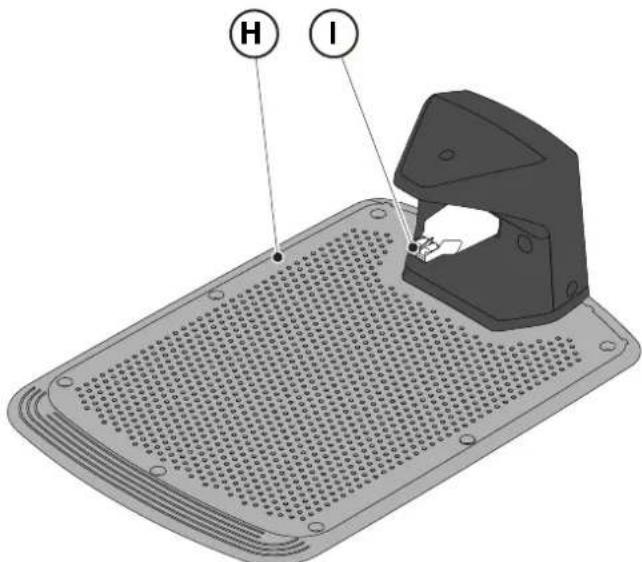
6.3. BLADE REPLACEMENT

6.4. WINTER BATTERY MAINTENANCE AND STORAGE
Procedure:
6.5. BATTERY REPLACEMENT
(Supply of Machinery (Safety) Regulations 2008, S.I. 2008 No. 1597, Annex II, part A)
- The company: ST. S.p.A. – Via del Lavoro, 6 – 31033 Castelfranco Veneto (TV) – Italy
- Hereby declares under its own responsibility that the machine:
Robotic lawnmower
a) Type approval: SRSW01 c) Serial number: 22A••RMO000001 ÷ 99L••RMO999999 d) Engine: battery-operated
- Conforms to UK Regulations:
• S.I. 2008/1597 - Supply of Machinery (Safety) Regulations 2008 • S.I. 2016/1091 - Electromagnetic Compatibility Regulations 2016 - S.I. 2012/3032 - The Restriction of the Use of Certain Hazardous Substances in Electrical and Electronic Equipment Regulations 2012 • S.I. 2017/1206 - Radio Equipment Regulations 2017
- Reference to harmonised standards:
EN 60335-1:2012 / AC:2014 / A11:2014 / A13:2017 / EN 61000-3-2:2019
A1:2019 / A2:2019 / A14:2019 EN 61000-3-3:2013 / A1:2019
EN IEC 63000:2018 EN 300 328 V2.2.2
EN 303 447 V1.2.0
EN 50636-107:2015 / A1 / A2
EN 301 489-17 V3.2.4
EN 62479:2010
EN 55014-1:2017 / A11:2020
EN 55014-2:2015
i) Cutting width: 18 cm
n) Person authorised to compile the technical file: ST. S.p.A.
Via del Lavoro, 6
31033 Castelfranco Veneto (TV) - Italia
o) Castelfranco Veneto, 01/12/2022 CEO Stiga Group
STIGA S.p.A.
Via del Lavoro, 6
31033 Castelfranco Veneto (TV) - Italy
Sean Robinson
UK Importer:
STIGA LTD
Unit 8, Bluewater Estate Plympton,
Devon, PL7 4JH, England

| FR (Traduction de la notice originale)Déclaration CE de Conformité (Directive Machines 2006/42/CE, Annexe II, partie A)1. La Société2. Déclare sous sa propre responsabilité que la machine : Robot-tondeusea) Type / Modèle de Basec) Série d) Moteur: batterie3. Est conforme aux prescriptions des directives :4. Renvoi aux Normes harmoniséesi) Largeur de coupen) Personne habilitée à établir le Dossier Technique :o) Lieu et Date | DE (Übersetzung der Originalbetriebsanleitung)EG-Konformitätserklärung (Maschinenrichtlinie 2006/42/EG, Anhang II, Teil A)1. Die Gesellschaft2. Erklärt auf eigene Verantwortung, dass die Maschine: Mährobotera) Typ / Basismodellc) Seriennummerd) Motor: Batterie3. Den Anforderungen der folgenden Richtlinien entspricht:4. Bezugnahme auf die harmonisierten Normeni) Schnittbreiten) Zur Verfassung der technischen Unterlagen befugte Person:o) Ort und Datum | NL (Vertaling van de oorspronkelijke gebruiksaanwijzing)EG-verklaring van overeenstemming (Richtlijn Machines 2006/42/CE, Bijlage II, deel A)1. Het bedrijf2. Verklaart onder zijn eigen verantwoordelijkheid dat de machine: Robotmaaier a) Type / Basismodelc) Serienummerd) Motor: accu3. Voldoet aan de specificaties van der richtlijnen:4. Verwijzing naar de Geharmoniseerde normeni) Snijbreedten) Bevoegd persoon voor het opstellen van het Technisch Dossiero) Plaats en Datum |
| ES (Traducción del Manual Original)Declaración de Conformidad CE (Directiva Máquinas 2006/42/CE, Anexo II, parte A)1. La Empresa2. Declara bajo su propia responsabilidad que la máquina: Robot cortacéspeda) Tipo / Modelo Basec) Matrículad) Motor: bateria3. Cumple con las especificaciones de las directivas:4. Referencia a las Normas armonizadasi) Amplitud de corten) Persona autorizada a realizar el Manual Técnico:o) Lugar y Fecha | PT (Tradução do manual original)Declaração CE de Conformidade (Diretiva de Máquinas 2006/42/CE, Anexo II, parte A)1. A Empresa2. Declara sob a própria responsabilidade que a máquina: Robot corta-relva a) Tipo / Modelo Basec) Matrículad) Moto: Bateria3. É conforme às especificações das diretivas:4. Referência às Normas harmonizadasi) Amplitude de corten) Pessoa autorizada a elaborar o Caderno Técnicoo) Local e Data | NO (Oversettelse av original bruksanvisning)EF- Samvarserklæring (Maskindirektiv 2006/42/EF, Vedlegg II, del A)1. Firmaet2. Erklærer på eget ansvar at maskinen: Robotgressklippera) Type / Modellc) Serienummerd) Motor: batteri3. Oppfyller kravene i direktivene:4. Henvisning til harmoniserte standarderI) Klippebredden) Person som har fullmakt til å ufterdige teknisk dokumentasjon:o) Sted og dato |
| SV (Översättning av bruksanvisning i original)EG-försäkran om överensstämmelse (Maskindirektiv 2006/42//EG, bilaga II, dela)1. Företaget2. Försäkrar på eget ansvar att maskinen: Gräsklipparrobota) Typ / Basmodellc) Serienummerd) Motor: batteri3. Överensstämmer med föreskrifterna i direktivet4. Referens till harmoniserade standarderi) Skärbreddn) Auktoriserad person för upprättandet av den tekniska dokumentationen:o) Ort och datum | DA (Översættelse af den originale brugsanvisning)EF-overensstemmelseserklæring (Maskindirektiv 2006/42/EF, bilag II, del A)1. Firmaet2. Erklærer på eget ansvar, at maskinen: Robotplænekllippera) Type / Modelc) Serienummerd) Motor: batteri3. Er i overensstemmelse med specifikationerne ifølge direktiverne:4. Henvisning til harmoniserede standarderi) Klippebredden) Person, der har bemyndigelse til at udarbejde det tekniske dossier:o) Sted og dato | FI (Alkuperäisten ohjeiden käännös)EY-VAATIMUSTENMUKAISUUSVAKUUTUS (Konedirektiivi 2006/42/EY, Liite II, osa A)1. Yritys2. Vakuuttaa omalla vastuullaan, että kone: Robottiruohonlelikkurla) Tyyppl / Perusmalllc) Sarjanumerod) Moottori : akku3. On yhdenmukainen seuraavien direktiivien asettamien vaatimusten kanssa:4. Viittaus harmonisoituihin standardeihini) Leikkuuleveysn) Teknisten asiakirjojen laatimiseenvaltuutettu henkilö:o) Paikka ja päivämäärä |
| SL (Prevod izvirnih navodil)ES izjava o skladnosti (Direktiva 2006/42/ES) , priloga II, del A)1. Družba2. pod lastno odgovornostjo izjavlja, da je stroj: Robotska kosilnicaa) Tip / osnovni modelc) Serijska številkad) Motor: baterija3. Skladen je z določili direktiv :4. Sklicevanje na usklajene predpisei) Obseg košnjen) Oseba, pooblaščena za sestavotehnične knjižice:o) Kraj In datum | LT (Originalių instrukciju vertimas)EB atitikties deklaracija (Mašinų direktyva 2006/42/CE, Priedas II, dalis A)1. Bendrovė2. Prisilma atsakomybę, kad jrenglnys: Žolės pjovimo robotasa) Tipas / Bazinis Modelisc) Serijos numerisd) Variklis: baterija3. Atitinka direktyvose pateiktas specifikacijas:4. Nuoroda i suderintas Normasi) Pjovimo plotisn) Autorizuotas asmuo sudaryti Techninę Dokumentaciją:o) Vieta ir Data | LV (Instrukciju tulkojums no originálvalodas)EK atbilstības deklarācija (Direktīva 2006/42/EK par mašinām, pleilkums II, daļa A)1. Uzņēmums2. Uzņemoties par to pilnu atbildību, pazino, ka mašina: Robotizēta pljaujmašina a) Tips / Bāzes modelsc) Sērijas numursd) Motors: akumulators3. Atbilst šādu direktīvu prasībām:4. Atsauce uz harmonizētiem standartiemi) Pljaušanas platumsn) Pilnvarotais darbinieks, kas sagatavoja tehnisko dokumentāciju:o) Vieta un datums |
| CS (Překlad původního návodu k používání)ES – Prohlášení o shodě(Směrnice o Strojních zařízeních 2006/42/ES, Přiloha II, část A)1. Společnost2. Prohlášuje na vlastní odpovědnost, že stroj: Robotická sekačkaa) Typ / Základní modelc) Výrobní číslod) Motor: akumulátor3. Je ve shodě s nařízeními směrnic:4. Odkazy na Harmonizované normyi) Šířka řezánín) Osoba autorizovaná pro vytvoření Technického spisu:o) Misto a Datum | PL (Tłumaczenie instrukcji oryginalnej)Deklaracja zgodności WE(Dyrektywa maszynowa 2006/42/WE,Załącznik II, część A)1. Spółka2. Oświadczenie na własną odpowiedzialność, że maszyna: Kosiarka trawnikowaa) Typ / Model podstawowyc) Numer seryjnyd) Silnik: akumulator3. Spełnia podstawowe wymogi następujących Dyrektyw:4. Odniesienie do Norm zharmonizowanychi) Szerokość cięcia n) Osoba upoważniona do zredagowania Dokumentacji technicznej:o) Miejscowość i data | ET (Algupārase kasutusjuhendi tõlge)EÜ vastavusdeklaratsioon(Masinadirektiiv 2006/42/EÜ, Lisa II, osa A)1. Firma2. Kinnitab omal vastutusel, et masin:Robotniiduka) Tüüp / Põhimudel c) Matrikkeld) Mootor: aku3. Vastab direktiivide nõuetele:4. Viide ühtlustatud standarditelei) Lõikelaiusn) Tehnilise Lehe autoriseeritud koostaja:o) Koht ja Kuupäev |
| HU (Eredeti használati utasítás fordítása)EK-megfelelőségi nyilatkozata(2006/42/EK gépirányelv, ll. melléklet "A" rész)1. Alulírott Vállalat2. Felelősségének teljes tudatában kijelenti, hogy az alábbi gép: Robotfűnyíróa) Típus / Alaptipusc) Gyártási számd) Motor: akkumulátor3. Megfelel az alábbi irányelvekelőírásainak:4. Hivatkozás a harmonizált szabványokrai) Vágási szélességn) Műszaki Dosszié szerkesztésérefelhatalmazott személy:o) Helye és ideje | RU (Перевод оригинальных инструкций)Декларация соответствия нормам EC (Direktiva o машинном оборудовании 2006/42/EC, Приложение II, часть A)1. Предприятие2. Заявляет под собственную ответственность, что машина: Робот-газонокосилкаa) Тип / Базовая модельc) Паспортd) Двигатель: батарея сгорания3. Соответствует требованиям следующих директив:4. Ссылки на гармонизированные нормыi) Амплитуда кошенияn) Лицо, уполномоченное на подготовку технической документации:o) Место и дата | HR (Prijevod originalnih uputa)EK Izjava o sukladnosti(Direktiva 2006/42/EZ o strojevima, dodatak II, dio A)1. Tvrtka:2. pod vlastitom odgovornošću izjavljuje da je stroj: Robotska kosilicaa) Vrsta / Osnovni modelc) Matični brojd) Motor: baterija3. sukladan s temeljnim zahtjevima direktiva:4. Primijenjene su slijedeće harmonizirane norme:i) Širina rezanján) Osoba ovlaštena za pravljenje Tehničke datoteke:o) Mjesto i datum |
| SR (Prevod originalnih uputstval)EC deklaracija o usaglašenosti (Direktiva o mašinama 2006/42/EC, Prilog II, deo A)1. Preduzeće2. Daje izjavu pod vlastitom odgovornošćuda je mašina: Robot kosačicaa) Tip / Osnovni modelc) Serijski brojd) Motor: akumulator3. U skladu s osnovnim zahtevima direktiva:4. Pozivanje na usklađene normei) Širina košenjan) Osoba ovlašćena za sastavljanje tehničke brošureo) Mesto i datum | TR (Orijinal Talimatların Tercümesi)AT Uygunluk Beyanı (2006/42/CE Makine Direktifi, Ek II, bölüm A)1. Şirket2. Şahsi sorumluluğu altında aşağıdaki makinenin: Robot çim biçme makinesia) Tip / Standart modelc) Sicil numarasıd) Motor : batarya3. Aşağıdaki direktiflerin özelliklerine uygun olduğunu beyan etmektedir:4. Harmonize standartlara atifi) Kesim genişligiń) Teknik Dosyayı oluşturmaya yetkili kişi:o) Yer ve Tarih | RO (Traducerea manualului fabricantului)CE -Declaratie de Conformitate (Directiva Mašini 2006/42/CE, Anexa II, partea A)1. Societatea2. Declară pe propria răspundere că mașina: Robot mașină de tuns iarbaa) Tip / Model de bazăc) Număr de seried) Motor: baterie3. Este în conformitate cu specificațiile directivelor:4. Referință la Standardele armonizatei) Lătimea de täieren) Persoană autorizată să întocmeascăDosarul Tehnico) Locul și Data |
STIGA
STIGA LTD (UK Importer)
Unit 8, Bluewater Estate Plympton, Devon, PL7 4JH, England
STIGA S.p.A.
Via del lavoro, 6
31033 Castelfranco Veneto (TV)
Italy
stiga.com

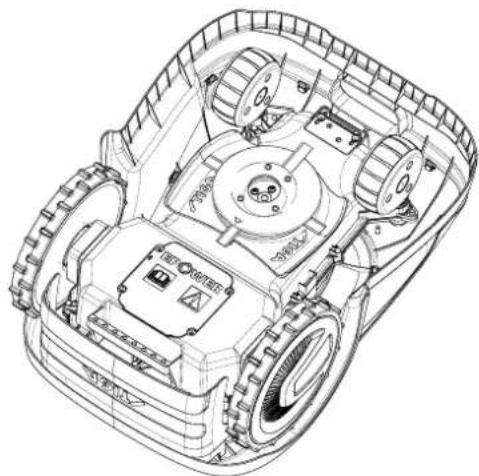
3.2.2. MAIN COMPONENTS
3.3. UNPACKING PROCEDURE

CAUTION:

CAUTION:

CAUTION:
STIGA

WARNING:
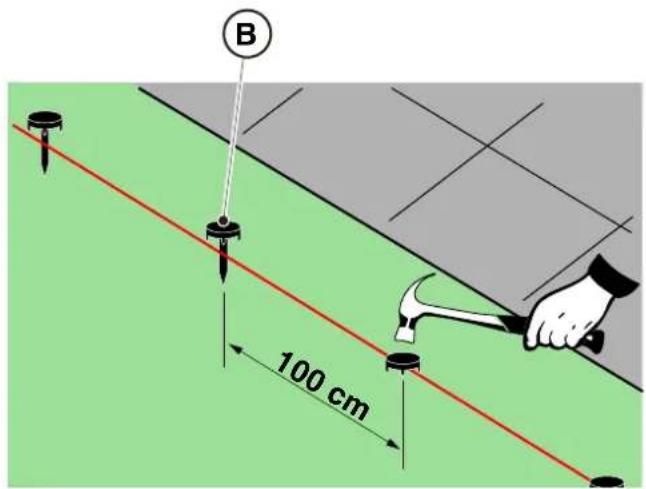
UNDERGROUND CABLE INSTALLATION
(CAN ONLY BE PERFORMED BY AN AUTHORIZED DEALER)
STIGA
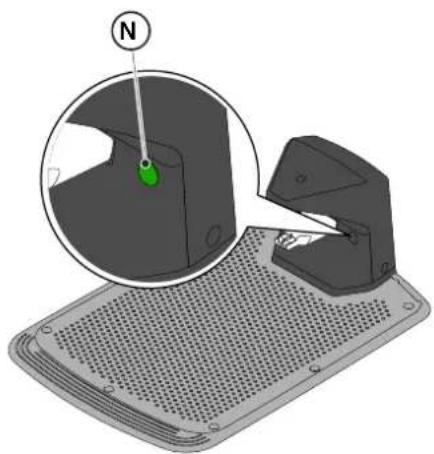
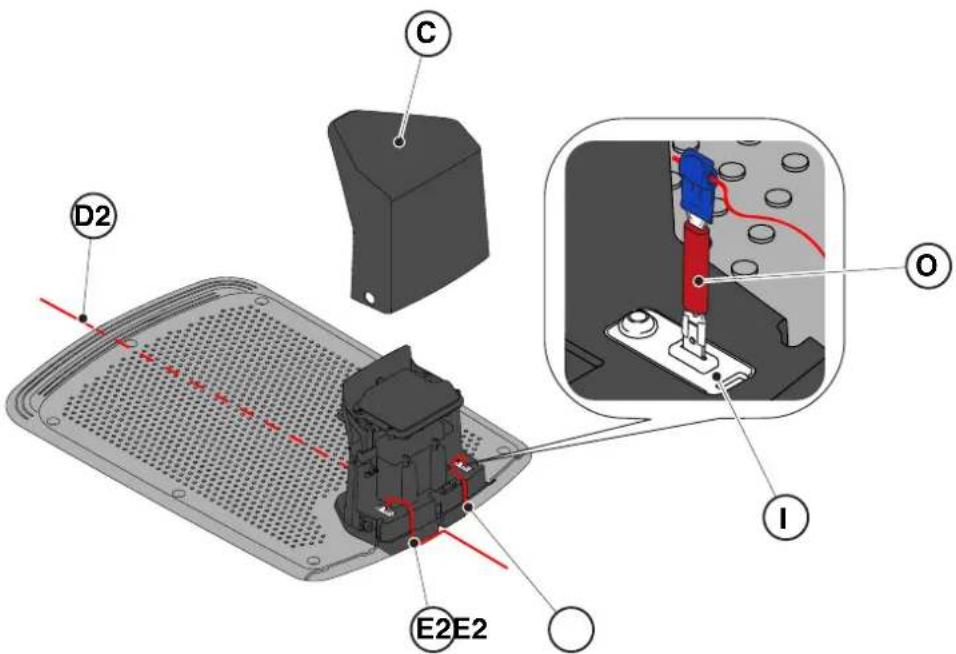
| G 300 G 600 G | 1200 | |
| Border Cut |  |  |  |
| Go-To Cut Points | 1 3 5 | | |
| Eco Mode |  |  |  |
| Rain Sensor |  |  |  |
| Closed Area |  |  |  |
5.2. MANUAL OPERATION OF THE ROBOTIC MOWER
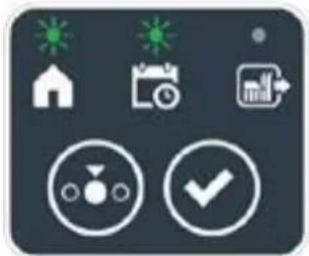
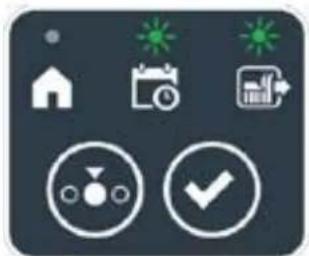
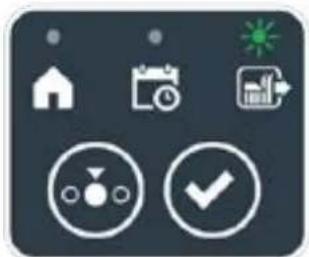

STIGA
Procedure:
Procedure:
6. MAINTENANCE
WARNING:
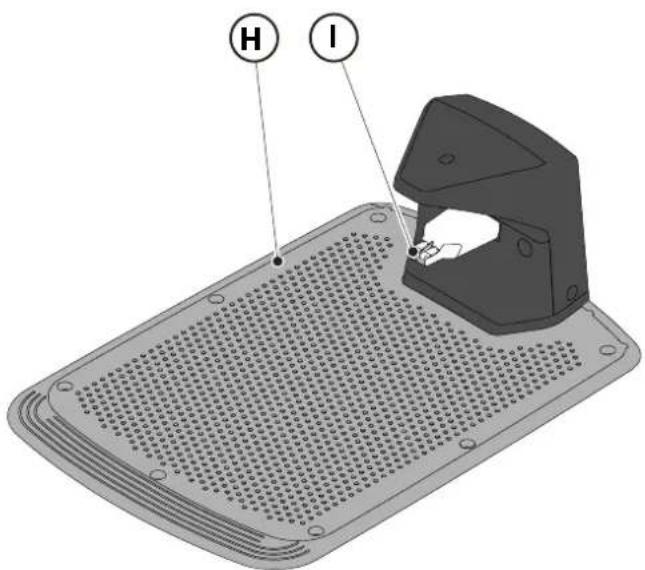
(Supply of Machinery (Safety) Regulations 2008, S.I. 2008 No. 1597, Annex II, part A)
- The company: ST. S.p.A. – Via del Lavoro, 6 – 31033 Castelfranco Veneto (TV) – Italy
- Hereby declares under its own responsibility that the machine:
Robotic lawnmower
a) Homologation type: SRSW01 c) Serial number: 22A••RMO000001 ÷ 99L••RMO999999 d) Engine: battery-operated
- Conforms to UK Regulations:
• S.I. 2008/1597 - Supply of Machinery (Safety) Regulations 2008 • S.I. 2016/1091 - Electromagnetic Compatibility Regulations 2016 • S.I. 2012/3032 - The Restriction of the Use of Certain Hazardous Substances in Electrical and Electronic Equipment Regulations 2012 • S.I. 2017/1206 - Radio Equipment Regulations 2017
- Reference to harmonised standards:
EN 60335-1:2012 / AC:2014 / A11:2014 / A13:2017 / EN 61000-3-2:2019
A1:2019 / A2:2019 / A14:2019 EN 61000-3-3:2013 / A1:2019
EN IEC 63000:2018 EN 300 328 V2.2.2
EN 303 447 V1.2.0
EN 50636-107:2015 / A1 / A2
EN 301 489-17 V3.2.4
EN 62479:2010
EN 55014-1:2017 / A11:2020
EN 55014-2:2015
i) Cutting width: 18 cm
n) Person authorised to compile the technical file: ST. S.p.A.
Via del Lavoro, 6
31033 Castelfranco Veneto (TV) - Italia
o) Castelfranco Veneto, 01/12/2022 CEO Stiga Group
Sean Robinson
UK Importer:
STIGA LTD
Unit 8, Bluewater Estate Plympton,
Devon, PL7 4JH, England

| FR (Traduction de la notice originale)Déclaration CE de Conformité (Directive Machines 2006/42/CE, Annexe II, partie A)1. La Société2. Déclare sous sa propre responsabilité que la machine : Robot-tondeusea) Type / Modèle de Basec) Série d) Moteur: batterie3. Est conforme aux prescriptions des directives :4. Renvoi aux Normes harmoniséesi) Largeur de coupen) Personne habilitée à établir le Dossier Technique :o) Lieu et Date | DE (Übersetzung der Originalbetriebsanleitung)EG-Konformitätserklärung (Maschinenrichtlinie 2006/42/EG, Anhang II, Teil A)1. Die Gesellschaft2. Erklärt auf eigene Verantwortung, dass die Maschine: Mährobotera) Typ / Basismodellc) Seriennummerd) Motor: Batterie3. Den Anforderungen der folgenden Richtlinien entspricht:4. Bezugnahme auf die harmonisierten Normeni) Schnittbreiten) Zur Verfassung der technischen Unterlagen befugte Person:o) Ort und Datum | NL (Vertaling van de oorspronkelijke gebruiksaanwijzing)EG-verklaring van overeenstemming (Richtlijn Machines 2006/42/CE, Bijlage II, deel A)1. Het bedrijf2. Verklaart onder zijn eigen verantwoordelijkheid dat de machine: Robotmaaier a) Type / Basismodelc) Serienummerd) Motor: accu3. Voldoet aan de specificaties van der richtlijnen:4. Verwijzing naar de Geharmoniseerde normeni) Snijbreedten) Bevoegd persoon voor het opstellen van het Technisch Dossiero) Plaats en Datum |
| ES (Traducción del Manual Original)Declaración de Conformidad CE (Directiva Máquinas 2006/42/CE, Anexo II, parte A)1. La Empresa2. Declara bajo su propia responsabilidad que la máquina: Robot cortacéspeda) Tipo / Modelo Basec) Matrículad) Motor: bateria3. Cumple con las especificaciones de las directivas:4. Referencia a las Normas armonizadasi) Amplitud de corten) Persona autorizada a realizar el Manual Técnico:o) Lugar y Fecha | PT (Tradução do manual original)Declaração CE de Conformidade (Diretiva de Máquinas 2006/42/CE, Anexo II, parte A)1. A Empresa2. Declara sob a própria responsabilidade que a máquina: Robot corta-relva a) Tipo / Modelo Basec) Matrículad) Moto: Bateria3. É conforme às especificações das diretivas:4. Referência às Normas harmonizadasi) Amplitude de corten) Pessoa autorizada a elaborar o Caderno Técnicoo) Local e Data | NO (Oversettelse av original bruksanvisning)EF- Samvarserklæring (Maskindirektiv 2006/42/EF, Vedlegg II, del A)1. Firmaet2. Erklærer på eget ansvar at maskinen: Robotgressklippera) Type / Modellc) Serienummerd) Motor: batteri3. Oppfyller kravene i direktivene:4. Henvisning til harmoniserte standarderI) Klippebredden) Person som har fullmakt til å ufterdige teknisk dokumentasjon:o) Sted og dato |
| SV (Översättning av bruksanvisning i original)EG-försäkran om överensstämmelse (Maskindirektiv 2006/42//EG, bilaga II, dela)1. Företaget2. Försäkrar på eget ansvar att maskinen: Gräsklipparrobota) Typ / Basmodellc) Serienummerd) Motor: batteri3. Överensstämmer med föreskrifterna i direktivet4. Referens till harmoniserade standarderi) Skärbreddn) Auktoriserad person för upprättandet av den tekniska dokumentationen:o) Ort och datum | DA (Översættelse af den originale brugsanvisning)EF-overensstemmelseserklæring (Maskindirektiv 2006/42/EF, bilag II, del A)1. Firmaet2. Erklærer på eget ansvar, at maskinen: Robotplænekllippera) Type / Modelc) Serienummerd) Motor: batteri3. Er i overensstemmelse med specifikationerne ifølge direktiverne:4. Henvisning til harmoniserede standarderi) Klippebredden) Person, der har bemyndigelse til at udarbejde det tekniske dossier:o) Sted og dato | FI (Alkuperäisten ohjeiden käännös)EY-VAATIMUSTENMUKAISUUSVAKUUTUS (Konedirektiivi 2006/42/EY, Liite II, osa A)1. Yritys2. Vakuuttaa omalla vastuullaan, että kone: Robottiruohonlelikkurla) Tyyppl / Perusmalllc) Sarjanumerod) Moottori : akku3. On yhdenmukainen seuraavien direktiivien asettamien vaatimusten kanssa:4. Viittaus harmonisoituihin standardeihini) Leikkuuleveysn) Teknisten asiakirjojen laatimiseenvaltuutettu henkilö:o) Paikka ja päivämäärä |
| SL (Prevod izvirnih navodil)ES izjava o skladnosti (Direktiva 2006/42/ES) , priloga II, del A)1. Družba2. pod lastno odgovornostjo izjavlja, da je stroj: Robotska kosilnicaa) Tip / osnovni modelc) Serijska številkad) Motor: baterija3. Skladen je z določili direktiv :4. Sklicevanje na usklajene predpisei) Obseg košnjen) Oseba, pooblaščena za sestavotehnične knjižice:o) Kraj In datum | LT (Originalių instrukciju vertimas)EB atitikties deklaracija (Mašinų direktyva 2006/42/CE, Priedas II, dalis A)1. Bendrovė2. Prisilma atsakomybę, kad jrenglnys: Žolės pjovimo robotasa) Tipas / Bazinis Modelisc) Serijos numerisd) Variklis: baterija3. Atitinka direktyvose pateiktas specifikacijas:4. Nuoroda i suderintas Normasi) Pjovimo plotisn) Autorizuotas asmuo sudaryti Techninę Dokumentaciją:o) Vieta ir Data | LV (Instrukciju tulkojums no originálvalodas)EK atbilstības deklarācija (Direktīva 2006/42/EK par mašinām, pleilkums II, daļa A)1. Uzņēmums2. Uzņemoties par to pilnu atbildību, pazino, ka mašina: Robotizēta pljaujmašina a) Tips / Bāzes modelsc) Sērijas numursd) Motors: akumulators3. Atbilst šādu direktīvu prasībām:4. Atsauce uz harmonizētiem standartiemi) Pljaušanas platumsn) Pilnvarotais darbinieks, kas sagatavoja tehnisko dokumentāciju:o) Vieta un datums |
| CS (Překlad původního návodu k používání)ES – Prohlášení o shodě(Směrnice o Strojních zařízeních 2006/42/ES, Přiloha II, část A)1. Společnost2. Prohlášuje na vlastní odpovědnost, že stroj: Robotická sekačkaa) Typ / Základní modelc) Výrobní číslod) Motor: akumulátor3. Je ve shodě s nařízeními směrnic:4. Odkazy na Harmonizované normyi) Šířka řezánín) Osoba autorizovaná pro vytvoření Technického spisu:o) Misto a Datum | PL (Tłumaczenie instrukcji oryginalnej)Deklaracja zgodności WE(Dyrektywa maszynowa 2006/42/WE,Załącznik II, część A)1. Spółka2. Oświadczenie na własną odpowiedzialność, że maszyna: Kosiarka trawnikowaa) Typ / Model podstawowyc) Numer seryjnyd) Silnik: akumulator3. Spełnia podstawowe wymogi następujących Dyrektyw:4. Odniesienie do Norm zharmonizowanychi) Szerokość cięcia n) Osoba upoważniona do zredagowania Dokumentacji technicznej:o) Miejscowość i data | ET (Algupārase kasutusjuhendi tõlge)EÜ vastavusdeklaratsioon(Masinadirektiiv 2006/42/EÜ, Lisa II, osa A)1. Firma2. Kinnitab omal vastutusel, et masin:Robotniiduka) Tüüp / Põhimudel c) Matrikkeld) Mootor: aku3. Vastab direktiivide nõuetele:4. Viide ühtlustatud standarditelei) Lõikelaiusn) Tehnilise Lehe autoriseeritud koostaja:o) Koht ja Kuupäev |
| HU (Eredeti használati utasítás fordítása)EK-megfelelőségi nyilatkozata(2006/42/EK gépirányelv, ll. melléklet "A" rész)1. Alulírott Vállalat2. Felelősségének teljes tudatában kijelenti, hogy az alábbi gép: Robotfűnyíróa) Típus / Alaptipusc) Gyártási számd) Motor: akkumulátor3. Megfelel az alábbi irányelvekelőírásainak:4. Hivatkozás a harmonizált szabványokrai) Vágási szélességn) Műszaki Dosszié szerkesztésérefelhatalmazott személy:o) Helye és ideje | RU (Перевод оригинальных инструкций)Декларация соответствия нормам EC (Direktiva o машинном оборудовании 2006/42/EC, Приложение II, часть A)1. Предприятие2. Заявляет под собственную ответственность, что машина: Робот-газонокосилкаa) Тип / Базовая модельc) Паспортd) Двигатель: батарея сгорания3. Соответствует требованиям следующих директив:4. Ссылки на гармонизированные нормыi) Амплитуда кошенияn) Лицо, уполномоченное на подготовку технической документации:o) Место и дата | HR (Prijevod originalnih uputa)EK Izjava o sukladnosti(Direktiva 2006/42/EZ o strojevima, dodatak II, dio A)1. Tvrtka:2. pod vlastitom odgovornošću izjavljuje da je stroj: Robotska kosilicaa) Vrsta / Osnovni modelc) Matični brojd) Motor: baterija3. sukladan s temeljnim zahtjevima direktiva:4. Primijenjene su slijedeće harmonizirane norme:i) Širina rezanján) Osoba ovlaštena za pravljenje Tehničke datoteke:o) Mjesto i datum |
| SR (Prevod originalnih uputstval)EC deklaracija o usaglašenosti (Direktiva o mašinama 2006/42/EC, Prilog II, deo A)1. Preduzeće2. Daje izjavu pod vlastitom odgovornošćuda je mašina: Robot kosačicaa) Tip / Osnovni modelc) Serijski brojd) Motor: akumulator3. U skladu s osnovnim zahtevima direktiva:4. Pozivanje na usklađene normei) Širina košenjan) Osoba ovlašćena za sastavljanje tehničke brošureo) Mesto i datum | TR (Orijinal Talimatların Tercümesi)AT Uygunluk Beyanı (2006/42/CE Makine Direktifi, Ek II, bölüm A)1. Şirket2. Şahsi sorumluluğu altında aşağıdaki makinenin: Robot çim biçme makinesia) Tip / Standart modelc) Sicil numarasıd) Motor : batarya3. Aşağıdaki direktiflerin özelliklerine uygun olduğunu beyan etmektedir:4. Harmonize standartlara atifi) Kesim genişligiń) Teknik Dosyayı oluşturmaya yetkili kişi:o) Yer ve Tarih | RO (Traducerea manualului fabricantului)CE -Declaratie de Conformitate (Directiva Mašini 2006/42/CE, Anexa II, partea A)1. Societatea2. Declară pe propria răspundere că mașina: Robot mașină de tuns iarbaa) Tip / Model de bazăc) Număr de seried) Motor: baterie3. Este în conformitate cu specificațiile directivelor:4. Referință la Standardele armonizatei) Lătimea de täieren) Persoană autorizată să întocmeascăDosarul Tehnico) Locul și Data |
STIGA
STIGA LTD (UK Importer)
Unit 8, Bluewater Estate Plympton, Devon, PL7 4JH, England
STIGA S.p.A.
Via del lavoro, 6
31033 Castelfranco Veneto (TV)
Italy

FR
1.2. TECHNICAL DATA
3.3. UNPACKING

WARNING:

WARNING:
4.3. CHECKING THE INSTALLATION REQUIREMENTS

WARNING:
4.4. CRITERIA FOR INSTALLING THE PERIMETER CABLE
STIGA

CAUTION:
4.4.3. PASSAGES BETWEEN DIFFERENT GARDEN AREAS
Procedure:
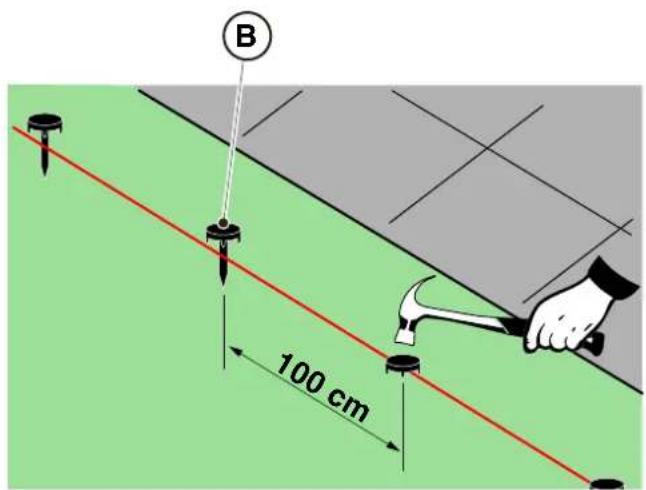
STIGA
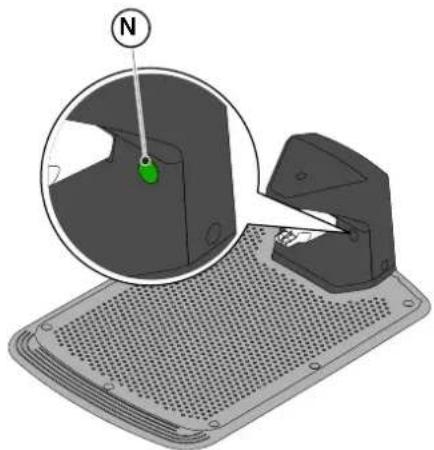
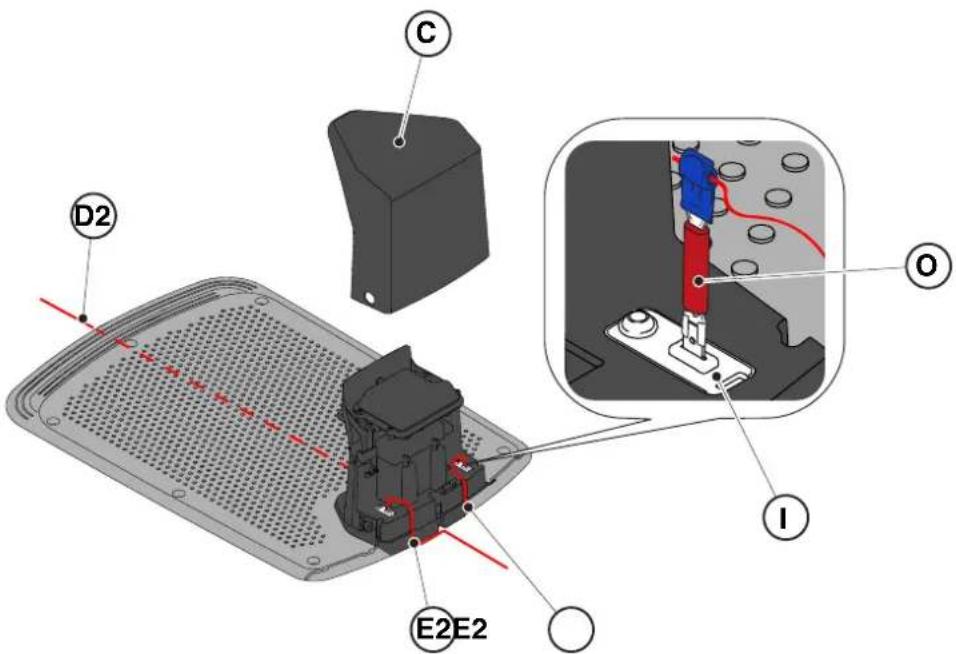
4.6. CHARGING THE ROBOTIC LAWNMOWER AFTER INSTALLATION
| G 300 G 600 G | 1200 | |
| Border Cut |  |  |  |
| Go-To Cut Points | 1 3 5 | | |
| Eco Mode |  |  |  |
| Rain Sensor |  |  |  |
| Closed Area |  |  |  |
5.3.1. SAFETY STOP - STOP BUTTON
5.3.4. SELECTING SCHEDULED PROGRAM / SINGLE WORK CYCLE / FORCED RETURN TO CHARGING BASE - MODE SELECTION BUTTON
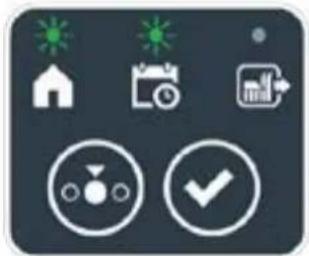
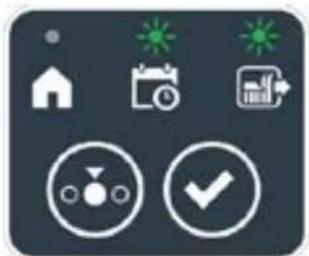
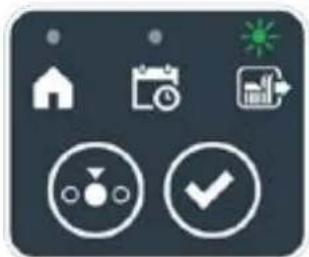

STIGA
Procedure:
Procedure:
6. MAINTENANCE
6.1. SCHEDULED MAINTENANCE

WARNING:
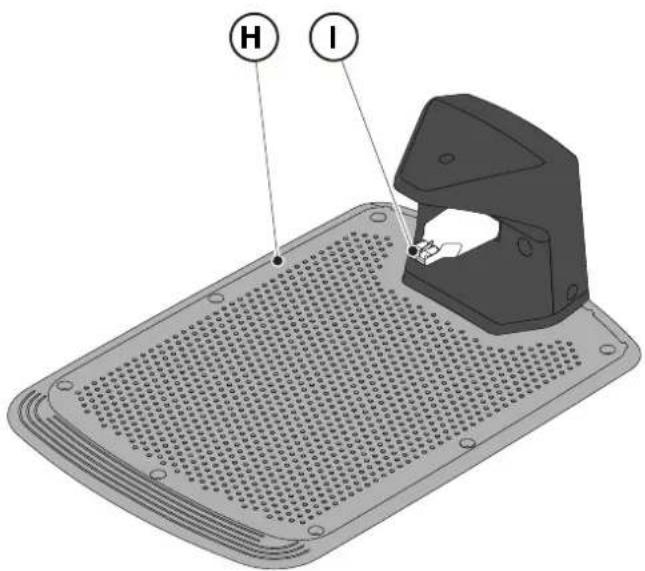
(Supply of Machinery (Safety) Regulations 2008, S.I. 2008 No. 1597, Annex II, part A)
- The company: ST. S.p.A. – Via del Lavoro, 6 – 31033 Castelfranco Veneto (TV) – Italy
- Hereby declares under its own responsibility that the machine:
Robotic lawnmower
a) Type approval: SRSW01 c) Serial number: 22A••RMO000001 ÷ 99L••RMO999999 d) Engine: battery-operated
- Conforms to UK Regulations:
• S.I. 2008/1597 - Supply of Machinery (Safety) Regulations 2008 • S.I. 2016/1091 - Electromagnetic Compatibility Regulations 2016 • S.I. 2012/3032 - The Restriction of the Use of Certain Hazardous Substances in Electrical and Electronic Equipment Regulations 2012 • S.I. 2017/1206 - Radio Equipment Regulations 2017
- Reference to harmonised standards:
EN 60335-1:2012 / AC:2014 / A11:2014 / A13:2017 / EN 61000-3-2:2019
A1:2019 / A2:2019 / A14:2019 EN 61000-3-3:2013 / A1:2019
EN IEC 63000:2018 EN 300 328 V2.2.2
EN 303 447 V1.2.0
EN 50636-107:2015 / A1 / A2
EN 301 489-17 V3.2.4
EN 62479:2010
EN 55014-1:2017 / A11:2020
EN 55014-2:2015
i) Cutting width: 18 cm
n) Person authorised to compile the technical file: ST. S.p.A.
Via del Lavoro, 6
31033 Castelfranco Veneto (TV) - Italia
o) Castelfranco Veneto, 01/12/2022 CEO Stiga Group
ST. S.p.A.
Via del Lavoro, 6
31033 Castelfranco Veneto (TV) - Italia
Sean Robinson
UK Importer:
STIGA LTD
Unit 8, Bluewater Estate Plympton,
Devon, PL7 4JH, England

| FR (Traduction de la notice originale)Déclaration CE de Conformité(Directive Machines 2006/42/CE, Annexe II, partie A)1. La Société2. Déclare sous sa propre responsabilité que la machine : Robot-tondeusea) Type / Modèle de Basec) Série d) Moteur: batterie3. Est conforme aux prescriptions des directives :4. Renvoi aux Normes harmoniséesi) Largeur de coupen) Personne habilitée à établir le Dossier Technique :o) Lieu et Date | DE (Übersetzung der Originalbetriebsanleitung)EG-Konformitätserklärung(Maschinenrichtlinie 2006/42/EG, Anhang II, Teil A)1. Die Gesellschaft2. Erklärt auf eigene Verantwortung, dass die Maschine: Mährobotera) Typ / Basismodellc) Seriennummerd) Motor: Batterie3. Den Anforderungen der folgenden Richtlinien entspricht:4. Bezugnahme auf die harmonisierten Normeni) Schnittbreiten) Zur Verfassung der technischen Unterlagen befugte Person:o) Ort und Datum | NL (Vertaling van de oorspronkelijke gebruiksaanwijzing)EG-verklaring van overeenstemming(Richtlijn Machines 2006/42/CE, Bijlage II, deel A)1. Het bedrijf2. Verklaart onder zijn eigen verantwoordelijkheid dat de machine: Robotmaaiera) Type / Basismodelc) Serienummerd) Motor: accu3. Voldoet aan de specificaties van der richtlijnen:4. Verwijzing naar de Geharmoniseerde normeni) Snijbreedten) Bevoegd persoon voor het opstellen van het Technisch Dossiero) Plaats en Datum |
| ES (Traducción del Manual Original)Declaración de Conformidad CE(Directiva Máquinas 2006/42/CE, Anexo II, parte A)1. La Empresa2. Declara bajo su propia responsabilidad que la máquina: Robot cortacéspeda) Tipo / Modelo Basec) Matrículad) Motor: bateria3. Cumple con las especificaciones de las directivas:4. Referencia a las Normas armonizadasi) Amplitud de corten) Persona autorizada a realizar el Manual Técnico:o) Lugar y Fecha | PT (Tradução do manual original)Declaração CE de Conformidade(Diretiva de Máquinas 2006/42/CE, Anexo II, parte A)1. A Empresa2. Declara sob a própria responsabilidade que a máquina: Robot corta-relvaa) Tipo / Modelo Basec) Matrículad) Moto: Bateria3. É conforme às especificações das diretivas:4. Referência às Normas harmonizadasi) Amplitude de corten) Pessoa autorizada a elaborar o Caderno Técnicoo) Local e Data | NO (Oversettelse av original bruksanvisning)EF- Samvarserklæring(Maskindirektiv 2006/42/EF, Vedlegg II, del A)1. Firmaet2. Erklærer på eget ansvar at maskinen: Robotgressklippera) Type / Modellc) Serienummerd) Motor: batteri3. Oppfyller kravene i direktivene:4. Henvisning til harmoniserte standarderI) Klippebredden) Person som har fullmakt til å ufterdige teknisk dokumentasjon:o) Sted og dato |
| SV (Översättning av bruksanvisning i original)EG-försäkran om överensstämmelse (Maskindirektiv 2006/42//EG, bilaga II, dela)1. Företaget2. Försäkrar på eget ansvar att maskinen: Gräsklipparrobota) Typ / Basmodellc) Serienummerd) Motor: batteri3. Överensstämmer med föreskrifterna i direktivet4. Referens till harmoniserade standarderi) Skärbreddn) Auktoriserad person för upprättandet av den tekniska dokumentationen:o) Ort och datum | DA (Översættelse af den originale brugsanvisning)EF-overensstemmelseserklæring(Maskindirektiv 2006/42/EF, bilag II, del A)1. Firmaet2. Erklærer på eget ansvar, at maskinen: Robotplænekllippera) Type / Modelc) Serienummerd) Motor: batteri3. Er i overensstemmelse med specifikationerne ifølge direktiverne:4. Henvisning til harmoniserede standarderi) Klippebredden) Person, der har bemyndigelse til at udarbejde det tekniske dossier:o) Sted og dato | FI (Alkuperäisten ohjeiden käännös)EY-VAATIMUSTENMUKAISUUSVAKUUTUS(Konedirektiivi 2006/42/EY, Liite II, osa A)1. Yritys2. Vakuuttaa omalla vastuullaan, että kone: Robottiruohonlelikkurla) Tyyppl / Perusmalllc) Sarjanumerod) Moottori : akku3. On yhdenmukainen seuraavien direktiivien asettamien vaatimusten kanssa:4. Viittaus harmonisoituihin standardeihini) Leikkuuleveysn) Teknisten asiakirjojen laatimiseenvaltuutettu henkilö:o) Paikka ja päivämäärä |
| SL (Prevod izvirnih navodil)ES izjava o skladnosti (Direktiva 2006/42/ES) , priloga II, del A)1. Družba2. pod lastno odgovornostjo izjavlja, da je stroj: Robotska kosilnicaa) Tip / osnovni modelc) Serijska številkad) Motor: baterija3. Skladen je z določili direktiv :4. Sklicevanje na usklajene predpisei) Obseg košnjen) Oseba, pooblaščena za sestavotehnične knjižice:o) Kraj In datum | LT (Originalių instrukciju vertimas)EB atitikties deklaracija (Mašinų direktyva 2006/42/CE, Priedas II, dalis A)1. Bendrovė2. Prisilma atsakomybę, kad jrenglnys: Žolės pjovimo robotasa) Tipas / Bazinis Modelisc) Serijos numerisd) Variklis: baterija3. Atitinka direktyvose pateiktas specifikacijas:4. Nuoroda i suderintas Normasi) Pjovimo plotisn) Autorizuotas asmuo sudaryti Techninę Dokumentaciją:o) Vieta ir Data | LV (Instrukciju tulkojums no originálvalodas)EK atbilstības deklarācija (Direktīva 2006/42/EK par mašinām, pleilkums II, daļa A)1. Uzņēmums2. Uzņemoties par to pilnu atbildību, pazino, ka mašina: Robotizēta pljaujmašinaa) Tips / Bāzes modelsc) Sērijas numursd) Motors: akumulators3. Atbilst šādu direktīvu prasībām:4. Atsauce uz harmonizētiem standartiemi) Plaušanas platumsn) Pilnvarotais darbinieks, kas sagatavoja tehnisko dokumentāciju:o) Vieta un datums |
| CS (Překlad původního návodu k používání)ES – Prohlášení o shodě(Směrnice o Strojních zařízeních 2006/42/ES, Přiloha II, část A)1. Společnost2. Prohlášuje na vlastní odpovědnost, že stroj: Robotická sekačkaa) Typ / Základní modelc) Výrobní číslod) Motor: akumulátor3. Je ve shodě s nařízeními směrnic:4. Odkazy na Harmonizované normyi) Šířka řezánín) Osoba autorizovaná pro vytvoření Technického spisu:o) Misto a Datum | PL (Tłumaczenie instrukcji oryginalnej)Deklaracja zgodności WE(Dyrektywa maszynowa 2006/42/WE,Załącznik II, część A)1. Spółka2. Oświadczenie na własną odpowiedzialność, że maszyna: Kosiarka trawnikowaa) Typ / Model podstawowyc) Numer seryjnyd) Silnik: akumulator3. Spełnia podstawowe wymogi następujących Dyrektyw:4. Odniesienie do Norm zharmonizowanychi) Szerokość cięcia n) Osoba upoważniona do zredagowania Dokumentacji technicznej:o) Miejscowość i data | ET (Algupārase kasutusjuhendi tõlge)EÜ vastavusdeklaratsioon(Masinadirektiiv 2006/42/EÜ, Lisa II, osa A)1. Firma2. Kinnitab omal vastutusel, et masin:Robotniiduka) Tüüp / Põhimudel c) Matrikkeld) Mootor: aku3. Vastab direktiivide nõuetele:4. Viide ühtlustatud standarditelei) Lõikelaiusn) Tehnilise Lehe autoriseeritud koostaja:o) Koht ja Kuupäev |
| HU (Eredeti használati utasítás fordítása)EK-megfelelőségi nyilatkozata(2006/42/EK gépirányelv, ll. melléklet "A" rész)1. Alulírott Vállalat2. Felelősségének teljes tudatában kijelenti, hogy az alábbi gép: Robotfűnyíróa) Típus / Alaptipusc) Gyártási számd) Motor: akkumulátor3. Megfelel az alábbi irányelvekelőírásainak:4. Hivatkozás a harmonizált szabványokrai) Vágási szélességn) Műszaki Dosszié szerkesztésérefelhatalmazott személy:o) Helye és ideje | RU (Перевод оригинальных инструкций)Декларация соответствия нормам EC (Direktiva o машинном оборудовании 2006/42/EC, Приложение II, часть A)1. Предприятие2. Заявляет под собственную ответственность, что машина: Робот-газонокосилкаa) Тип / Базовая модельc) Паспортd) Двигатель: батарея сгорания3. Соответствует требованиям следующих директив:4. Ссылки на гармонизированные нормыi) Амплитуда кошенияn) Лицо, уполномоченное на подготовку технической документации:o) Место и дата | HR (Prijevod originalnih uputa)EK Izjava o sukladnosti(Direktiva 2006/42/EZ o strojevima, dodatak II, dio A)1. Tvrtka:2. pod vlastitom odgovornošću izjavljuje da je stroj: Robotska kosilicaa) Vrsta / Osnovni modelc) Matični brojd) Motor: baterija3. sukladan s temeljnim zahtjevima direktiva:4. Primijenjene su slijedeće harmonizirane norme:i) Širina rezanján) Osoba ovlaštena za pravljenje Tehničke datoteke:o) Mjesto i datum |
| SR (Prevod originalnih uputstval)EC deklaracija o usaglašenosti (Direktiva o mašinama 2006/42/EC, Prilog II, deo A)1. Preduzeće2. Daje izjavu pod vlastitom odgovornošćuda je mašina: Robot kosačicaa) Tip / Osnovni modelc) Serijski brojd) Motor: akumulator3. U skladu s osnovnim zahtevima direktiva:4. Pozivanje na usklađene normei) Širina košenjan) Osoba ovlašćena za sastavljanje tehničke brošureo) Mesto i datum | TR (Orijinal Talimatların Tercümesi)AT Uygunluk Beyanı (2006/42/CE Makine Direktifi, Ek II, bölüm A)1. Şirket2. Şahsi sorumluluğu altında aşağıdaki makinenin: Robot çim biçme makinesia) Tip / Standart modelc) Sicil numarasıd) Motor : batarya3. Aşağıdaki direktiflerin özelliklerine uygun olduğunu beyan etmektedir:4. Harmonize standartlara atifi) Kesim genişligiń) Teknik Dosyayı oluşturmaya yetkili kişi:o) Yer ve Tarih | RO (Traducerea manualului fabricantului)CE -Declaratie de Conformitate (Directiva Mašini 2006/42/CE, Anexa II, partea A)1. Societatea2. Declară pe propria răspundere că mașina: Robot mașină de tuns iarbaa) Tip / Model de bazăc) Număr de seried) Motor: baterie3. Este în conformitate cu specificațiile directivelor:4. Referință la Standardele armonizatei) Lătimea de täieren) Persoană autorizată să întocmeascăDosarul Tehnico) Locul și Data |
STIGA
STIGA LTD (UK Importer)
Unit 8, Bluewater Estate Plympton, Devon, PL7 4JH, England
STIGA S.p.A.
Via del lavoro, 6
31033 Castelfranco Veneto (TV)
Italy

FR
NEDERLANDS - VERTALING VAN DE OORSPRONKELIJKE INSTRUCTIES
TABLE OF CONTENTS
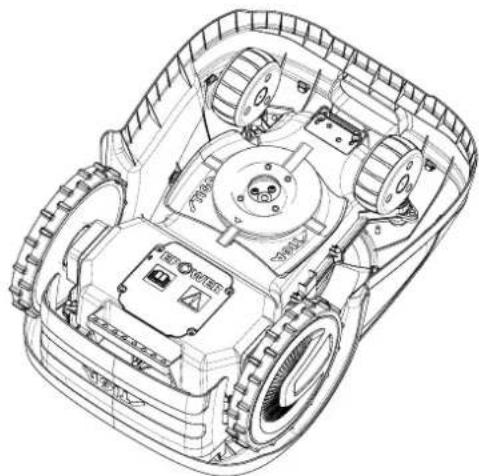
DANGER \ WARNING \ CAUTION:
3.2.2. MAIN COMPONENTS
(A) Robotic mower (B) Charging station (C) Starter kit (D) Battery (inside the robotic mower) (E) Charging station power supply
See Chapter 9 "Accessories"
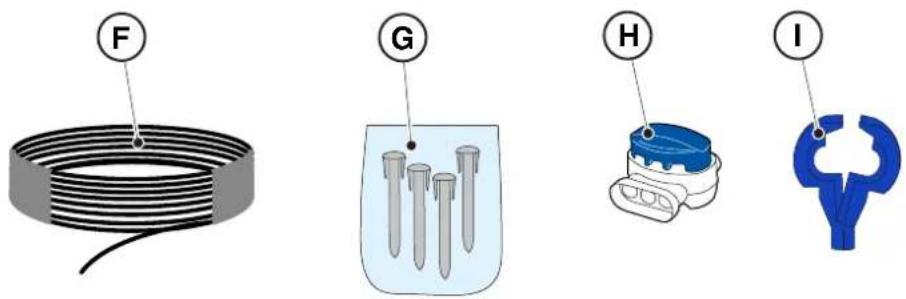
3.3. UNPACKING

CAUTION:

CAUTION:
See Chapter 9 "Accessories"
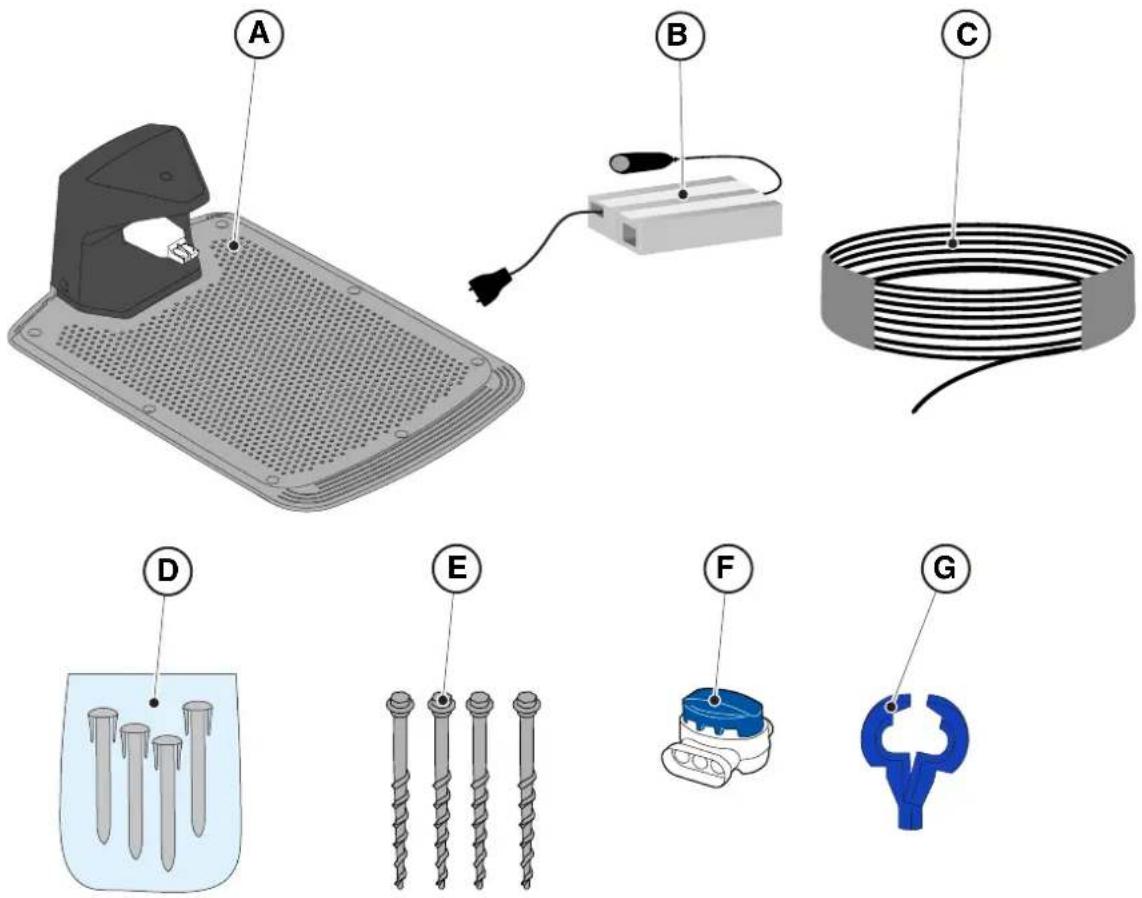
4.3. CHECKING THE REQUIREMENTS FOR INSTALLATION

CAUTION:
4.3.3. MAIN CHECKS BEFORE INSTALLING THE PERIMETER WIRE

CAUTION:
4.4. CRITERIA FOR INSTALLING THE BOUNDARY WIRE
4.4.1. PLACING THE PERIMETER WIRE
Procedure:
STIGA

WARNING:
4.4.3. PASSAGES BETWEEN DIFFERENT PARTS OF THE GARDEN
Procedure:
PLACEMENT WITH STAKES

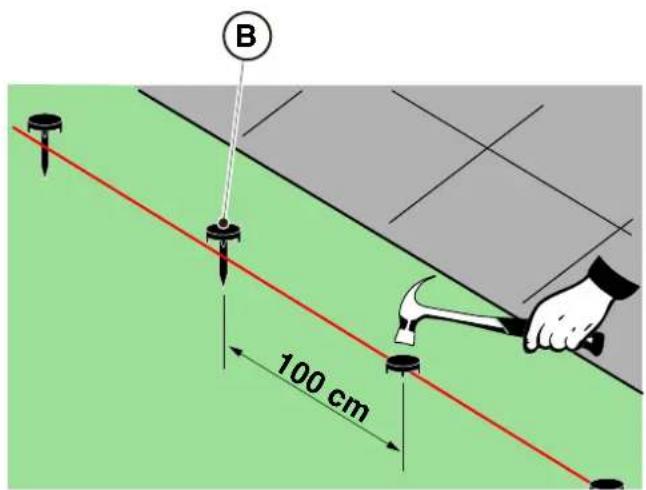
PLACEMENT BY BURYING
(ONLY POSSIBLE BY THE AUTHORIZED DEALER)
STIGA
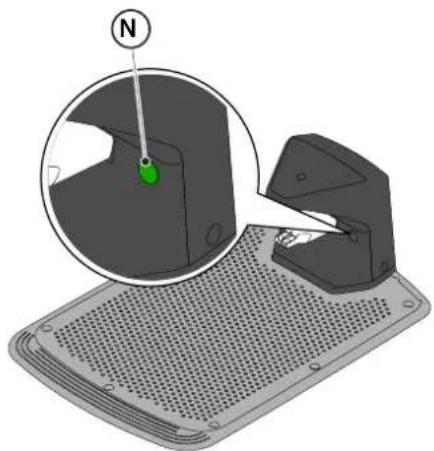
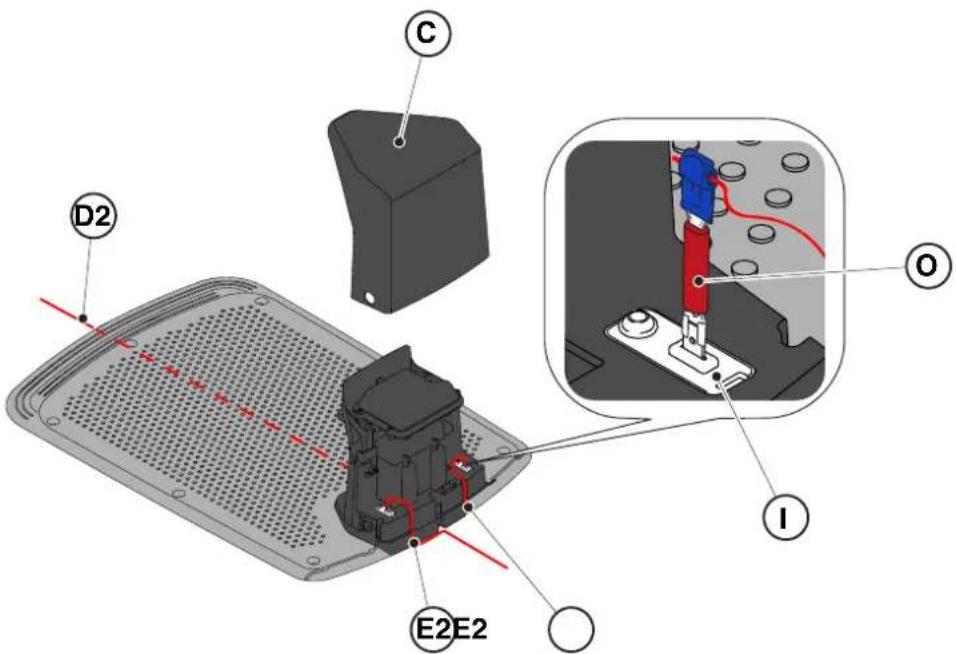
4.6. CHARGING THE ROBOTIC MOWER AFTER INSTALLATION
| G 300 G 600 G | 1200 | |
| Border Cut |  |  |  |
| Go-To Cut Points | 1 3 5 | | |
| Eco Mode |  |  |  |
| Rain Sensor |  |  |  |
| Closed Area |  |  |  |
INDEX PRODUCT SETTINGS
4.7.1. PRELOGIN 31
4.7.2. REGISTRATION (SIGN UP) 31
4.7.3. ASSOCIATION (PAIRING) 31
4.7.4. DEVICE PAGE 32
5.2. MANUAL OPERATION OF THE ROBOTIC MOWER
5.3.1. SAFE STOP - STOP BUTTON
5.3.4. SELECTION OF SCHEDULED PROGRAM / SINGLE WORK CYCLE / FORCED RETURN TO CHARGING BASE - MODE SELECTION BUTTON
RETURN TO BASE + SCHEDULED PROGRAM
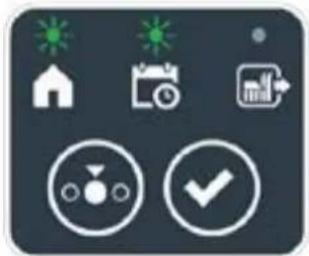
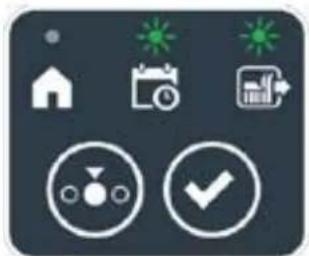
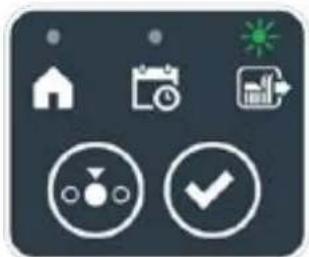

STIGA
Procedure:
5.3.6. DISPLAY OF ALARM STATUSES - ALARM ICON
5.3.7. DISPLAY OF BATTERY CHARGING STATUS - BATTERY ICON
5.5. CHARGING THE BATTERY
With the "CHARGING THE BATTERY" procedure, you can manually charge the robotic mower.
5.6. ADJUSTING THE CUTTING HEIGHT
Procedure:

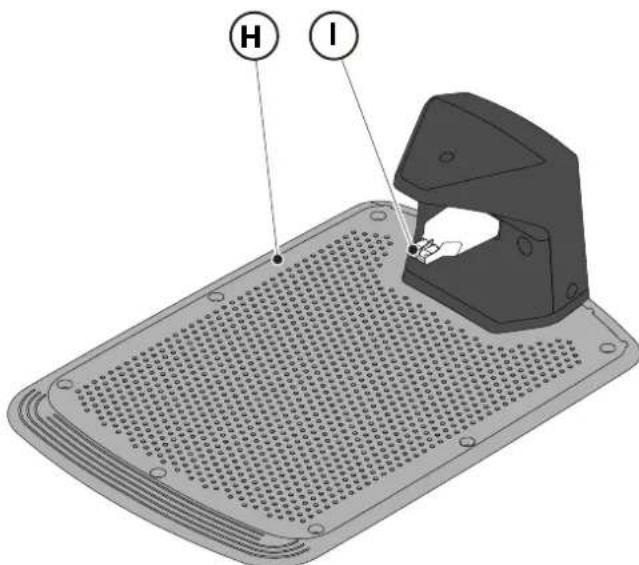
6.3. REPLACING THE CUTTING BLADES

6.4. MAINTENANCE AND STORAGE OF THE BATTERY IN WINTER
Procedure:
6.5. REPLACING THE BATTERY
(Supply of Machinery (Safety) Regulations 2008, S.I. 2008 No. 1597, Annex II, part A)
- The company: ST. S.p.A. – Via del Lavoro, 6 – 31033 Castelfranco Veneto (TV) – Italy
- Hereby declares under its own responsibility that the machine:
Robotic lawnmower
a) Homologation type: SRSW01 c) Serial number: 22A••RMO000001 ÷ 99L••RMO999999 d) Engine: battery-operated
- Conforms to UK Regulations:
• S.I. 2008/1597 - Supply of Machinery (Safety) Regulations 2008 • S.I. 2016/1091 - Electromagnetic Compatibility Regulations 2016 • S.I. 2012/3032 - The Restriction of the Use of Certain Hazardous Substances in Electrical and Electronic Equipment Regulations 2012 • S.I. 2017/1206 - Radio Equipment Regulations 2017
- Reference to harmonised standards:
EN 60335-1:2012 / AC:2014 / A11:2014 / A13:2017 / EN 61000-3-2:2019
A1:2019 / A2:2019 / A14:2019 EN 61000-3-3:2013 / A1:2019
EN IEC 63000:2018 EN 300 328 V2.2.2
EN 303 447 V1.2.0
EN 50636-107:2015 / A1 / A2
EN 301 489-17 V3.2.4
EN 62479:2010
EN 55014-1:2017 / A11:2020
EN 55014-2:2015
i) Cutting width: 18 cm
n) Person authorised to compile the technical file: ST. S.p.A.
Via del Lavoro, 6
31033 Castelfranco Veneto (TV) - Italia
o) Castelfranco Veneto, 01/12/2022 CEO Stiga Group
ST. S.p.A.
Via del Lavoro, 6
31033 Castelfranco Veneto (TV) - Italia
Sean Robinson
UK Importer:
STIGA LTD
Unit 8, Bluewater Estate Plympton,
Devon, PL7 4JH, England

| FR (Traduction de la notice originale)Déclaration CE de Conformité (Directive Machines 2006/42/CE, Annexe II, partie A)1. La Société2. Déclare sous sa propre responsabilité que la machine : Robot-tondeusea) Type / Modèle de Basec) Série d) Moteur: batterie3. Est conforme aux prescriptions des directives :4. Renvoi aux Normes harmoniséesi) Largeur de coupen) Personne habilitée à établir le Dossier Technique :o) Lieu et Date | DE (Übersetzung der Originalbetriebsanleitung)EG-Konformitätserklärung (Maschinenrichtlinie 2006/42/EG, Anhang II, Teil A)1. Die Gesellschaft2. Erklärt auf eigene Verantwortung, dass die Maschine: Mährobotera) Typ / Basismodellc) Seriennummerd) Motor: Batterie3. Den Anforderungen der folgenden Richtlinien entspricht:4. Bezugnahme auf die harmonisierten Normeni) Schnittbreiten) Zur Verfassung der technischen Unterlagen befugte Person:o) Ort und Datum | NL (Vertaling van de oorspronkelijke gebruiksaanwijzing)EG-verklaring van overeenstemming (Richtlijn Machines 2006/42/CE, Bijlage II, deel A)1. Het bedrijf2. Verklaart onder zijn eigen verantwoordelijkheid dat de machine: Robotmaaiera) Type / Basismodelc) Serienummerd) Motor: accu3. Voldoet aan de specificaties van der richtlijnen:4. Verwijzing naar de Geharmoniseerde normeni) Snijbreedten) Bevoegd persoon voor het opstellen van het Technisch Dossiero) Plaats en Datum |
| ES (Traducción del Manual Original)Declaración de Conformidad CE (Directiva Máquinas 2006/42/CE, Anexo II, parte A)1. La Empresa2. Declara bajo su propia responsabilidad que la máquina: Robot cortacéspeda) Tipo / Modelo Basec) Matrículad) Motor: bateria3. Cumple con las especificaciones de las directivas:4. Referencia a las Normas armonizadasi) Amplitud de corten) Persona autorizada a realizar el Manual Técnico:o) Lugar y Fecha | PT (Tradução do manual original)Declaração CE de Conformidade (Diretiva de Máquinas 2006/42/CE, Anexo II, parte A)1. A Empresa2. Declara sob a própria responsabilidade que a máquina: Robot corta-relvaa) Tipo / Modelo Basec) Matrículad) Moto: Bateria3. É conforme às especificações das diretivas:4. Referência às Normas harmonizadasi) Amplitude de corten) Pessoa autorizada a elaborar o Caderno Técnicoo) Local e Data | NO (Oversettelse av original bruksanvisning)EF- Samvarserklæring (Maskindirektiv 2006/42/EF, Vedlegg II, del A)1. Firmaet2. Erklærer på eget ansvar at maskinen: Robotgressklippera) Type / Modellc) Serienummerd) Motor: batteri3. Oppfyller kravene i direktivene:4. Henvisning til harmoniserte standarderI) Klippebredden) Person som har fullmakt til å ufterdige teknisk dokumentasjon:o) Sted og dato |
| SV (Översättning av bruksanvisning i original)EG-försäkran om överensstämmelse (Maskindirektiv 2006/42//EG, bilaga II, dela)1. Företaget2. Försäkrar på eget ansvar att maskinen: Gräsklipparrobota) Typ / Basmodellc) Serienummerd) Motor: batteri3. Överensstämmer med föreskrifterna i direktivet4. Referens till harmoniserade standarderi) Skärbreddn) Auktoriserad person för upprättandet av den tekniska dokumentationen:o) Ort och datum | DA (Översættelse af den originale brugsanvisning)EF-overensstemmelseserklæring (Maskindirektiv 2006/42/EF, bilag II, del A)1. Firmaet2. Erklærer på eget ansvar, at maskinen: Robotplænekllippera) Type / Modelc) Serienummerd) Motor: batteri3. Er i overensstemmelse med specifikationerne ifølge direktiverne:4. Henvisning til harmoniserede standarderi) Klippebredden) Person, der har bemyndigelse til at udarbejde det tekniske dossier:o) Sted og dato | FI (Alkuperäisten ohjeiden käännös)EY-VAATIMUSTENMUKAISUUSVAKUUTUS (Konedirektiivi 2006/42/EY, Liite II, osa A)1. Yritys2. Vakuuttaa omalla vastuullaan, että kone: Robottiruohonlelikkurla) Tyyppl / Perusmalllc) Sarjanumerod) Moottori : akku3. On yhdenmukainen seuraavien direktiivien asettamien vaatimusten kanssa:4. Viittaus harmonisoituihin standardeihini) Leikkuuleveysn) Teknisten asiakirjojen laatimiseenvaltuutettu henkilö:o) Paikka ja päivämäärä |
| SL (Prevod izvirnih navodil)ES izjava o skladnosti (Direktiva 2006/42/ES) , priloga II, del A)1. Družba2. pod lastno odgovornostjo izjavlja, da je stroj: Robotska kosilnicaa) Tip / osnovni modelc) Serijska številkad) Motor: baterija3. Skladen je z določili direktiv :4. Sklicevanje na usklajene predpisei) Obseg košnjen) Oseba, pooblaščena za sestavotehnične knjižice:o) Kraj In datum | LT (Originalių instrukciju vertimas)EB atitikties deklaracija (Mašinų direktyva 2006/42/CE, Priedas II, dalis A)1. Bendrovė2. Prisilma atsakomybę, kad jrenglnys: Žolės pjovimo robotasa) Tipas / Bazinis Modelisc) Serijos numerisd) Variklis: baterija3. Atitinka direktyvose pateiktas specifikacijas:4. Nuoroda i suderintas Normasi) Pjovimo plotisn) Autorizuotas asmuo sudaryti Techninę Dokumentaciją:o) Vieta ir Data | LV (Instrukciju tulkojums no originálvalodas)EK atbilstības deklarācija (Direktīva 2006/42/EK par mašinām, pleilkums II, daļa A)1. Uzpēnums2. Uzņemoties par to pilnu atbildību, pazino, ka mašina: Robotizēta pljaujmašinaa) Tips / Bāzes modelsc) Sērijas numursd) Motors: akumulators3. Atbilst šādu direktīvu prasībām:4. Atsauce uz harmonizētiem standartiemi) Pljaušanas platumsn) Pilnvarotais darbinieks, kas sagatavoja tehnisko dokumentāciju:o) Vieta un datums |
| CS (Překlad původního návodu k používání)ES – Prohlášení o shodě(Směrnice o Strojních zařízeních 2006/42/ES, Přiloha II, část A)1. Společnost2. Prohlášuje na vlastní odpovědnost, že stroj: Robotická sekačkaa) Typ / Základní modelc) Výrobní číslod) Motor: akumulátor3. Je ve shodě s nařízeními směrnic:4. Odkazy na Harmonizované normyi) Šířka řezánín) Osoba autorizovaná pro vytvoření Technického spisu:o) Misto a Datum | PL (Tłumaczenie instrukcji oryginalnej)Deklaracja zgodności WE(Dyrektywa maszynowa 2006/42/WE,Załącznik II, część A)1. Spółka2. Oświadczenie na własną odpowiedzialność, że maszyna: Kosiarka trawnikowaa) Typ / Model podstawowyc) Numer seryjnyd) Silnik: akumulator3. Spełnia podstawowe wymogi następujących Dyrektyw:4. Odniesienie do Norm zharmonizowanychi) Szerokość cięcia n) Osoba upoważniona do zredagowania Dokumentacji technicznej:o) Miejscowość i data | ET (Algupārase kasutusjuhendi tõlge)EÜ vastavusdeklaratsioon(Masinadirektiiv 2006/42/EÜ, Lisa II, osa A)1. Firma2. Kinnitab omal vastutusel, et masin:Robotniiduka) Tüüp / Põhimudel c) Matrikkeld) Mootor: aku3. Vastab direktiivide nõuetele:4. Viide ühtlustatud standarditelei) Lõikelaiusn) Tehnilise Lehe autoriseeritud koostaja:o) Koht ja Kuupäev |
| HU (Eredeti használati utasítás fordítása)EK-megfelelőségi nyilatkozata(2006/42/EK gépirányelv, ll. melléklet "A" rész)1. Alulírott Vállalat2. Felelősségének teljes tudatában kijelenti, hogy az alábbi gép: Robotfűnyíróa) Típus / Alaptipusc) Gyártási számd) Motor: akkumulátor3. Megfelel az alábbi irányelvekelőírásainak:4. Hivatkozás a harmonizált szabványokrai) Vágási szélességn) Műszaki Dosszié szerkesztésérefelhatalmazott személy:o) Helye és ideje | RU (Перевод оригинальных инструкций)Декларация соответствия нормам EC (Direktiva o машинном оборудовании 2006/42/EC, Приложение II, часть A)1. Предприятие2. Заявляет под собственную ответственность, что машина: Робот-газонокосилкаa) Тип / Базовая модельc) Паспортd) Двигатель: батарея сгорания3. Соответствует требованиям следующих директив:4. Ссылки на гармонизированные нормыi) Амплитуда кошенияn) Лицо, уполномоченное на подготовку технической документации:o) Место и дата | HR (Prijevod originalnih uputa)EK Izjava o sukladnosti(Direktiva 2006/42/EZ o strojevima, dodatak II, dio A)1. Tvrtka:2. pod vlastitom odgovornošću izjavljuje da je stroj: Robotska kosilicaa) Vrsta / Osnovni modelc) Matični brojd) Motor: baterija3. sukladan s temeljnim zahtjevima direktiva:4. Primijenjene su slijedeće harmonizirane norme:i) Širina rezanján) Osoba ovlaštena za pravljenje Tehničke datoteke:o) Mjesto i datum |
| SR (Prevod originalnih uputstval)EC deklaracija o usaglašenosti (Direktiva o mašinama 2006/42/EC, Prilog II, deo A)1. Preduzeće2. Daje izjavu pod vlastitom odgovornošćuda je mašina: Robot kosačicaa) Tip / Osnovni modelc) Serijski brojd) Motor: akumulator3. U skladu s osnovnim zahtevima direktiva:4. Pozivanje na usklađene normei) Širina košenjan) Osoba ovlašćena za sastavljanje tehničke brošureo) Mesto i datum | TR (Orijinal Talimatların Tercümesi)AT Uygunluk Beyanı (2006/42/CE Makine Direktifi, Ek II, bölüm A)1. Şirket2. Şahsi sorumluluğu altında aşağıdaki makinenin: Robot çim biçme makinesia) Tip / Standart modelc) Sicil numarasıd) Motor : batarya3. Aşağıdaki direktiflerin özelliklerine uygun olduğunu beyan etmektedir:4. Harmonize standartlara atifi) Kesim genişligiń) Teknik Dosyayı oluşturmaya yetkili kişi:o) Yer ve Tarih | RO (Traducerea manualului fabricantului)CE -Declaratie de Conformitate (Directiva Mašini 2006/42/CE, Anexa II, partea A)1. Societatea2. Declară pe propria răspundere că mașina: Robot mașină de tuns iarbaa) Tip / Model de bazăc) Număr de seried) Motor: baterie3. Este în conformitate cu specificațiile directivelor:4. Referință la Standardele armonizatei) Lătimea de täieren) Persoană autorizată să întocmeascăDosarul Tehnico) Locul și Data |
STIGA
STIGA LTD (UK Importer)
Unit 8, Bluewater Estate Plympton, Devon, PL7 4JH, England
STIGA S.p.A.
Via del lavoro, 6
31033 Castelfranco Veneto (TV)
Italy

FR
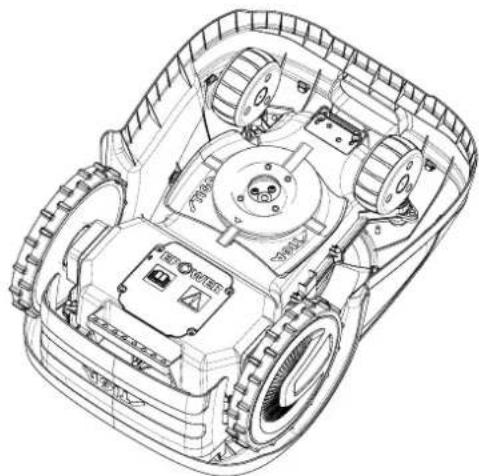
1.2. TECHNICAL DATA
3.2.2. MAIN COMPONENTS
3.3. UNPACKING
3.4. SYMBOLS AND PLATES

ATTENTION:

ATTENTION:

ATTENTION:

ATTENTION:
STIGA

WARNING:
4.4.3. STEPS BETWEEN THE DIFFERENT AREAS OF THE GARDEN
Procedure:
STIGA
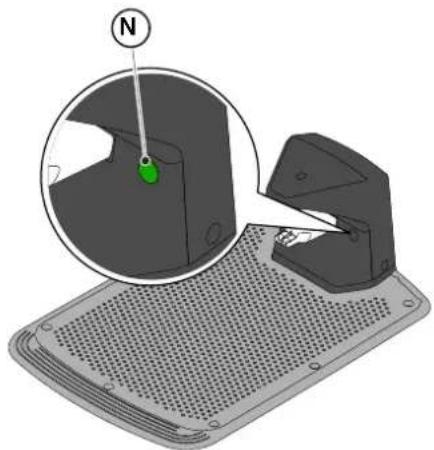
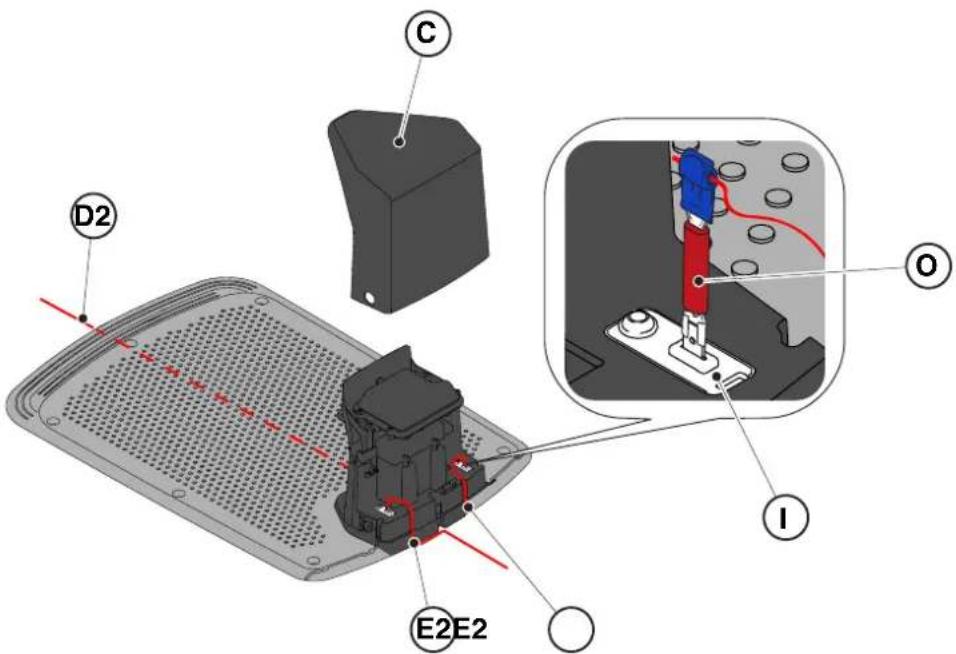
| G 300 G 600 G | 1200 | |
| Border Cut |  |  |  |
| Go-To Cut Points | 1 3 5 | | |
| Eco Mode |  |  |  |
| Rain Sensor |  |  |  |
| Closed Area | |  |  |
5.2. MANUAL OPERATION OF THE ROBOTIC LAWNMOWER
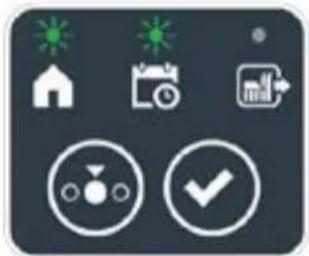
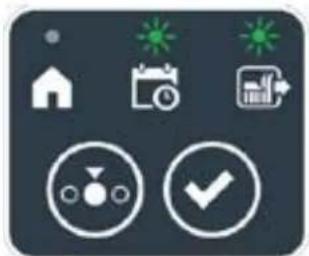
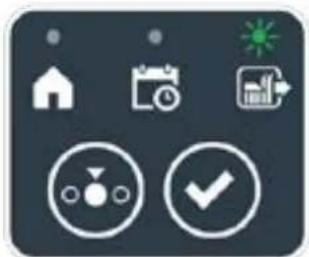

Procedure:
5.5. CHARGING THE BATTERY
Procedure:
6. MAINTENANCE
6.1. SCHEDULED MAINTENANCE

WARNING:
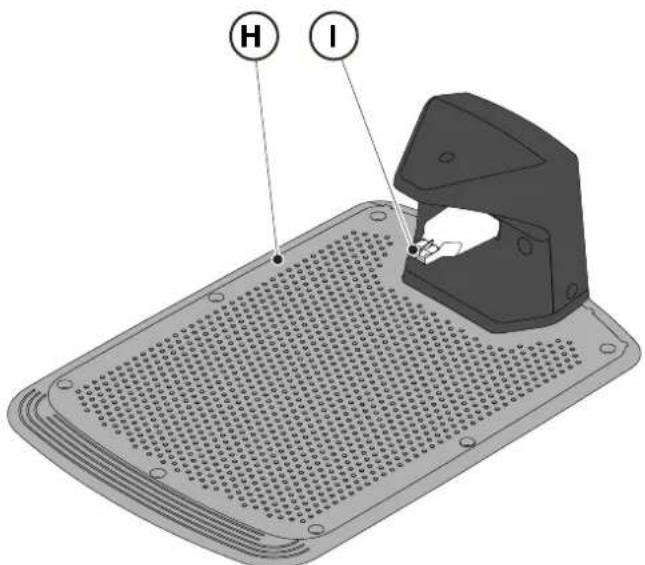
6.4. BATTERY MAINTENANCE IN WINTER AND STORAGE
Procedure:
(Supply of Machinery (Safety) Regulations 2008, S.I. 2008 No. 1597, Annex II, part A)
- The company: ST. S.p.A. – Via del Lavoro, 6 – 31033 Castelfranco Veneto (TV) – Italy
- Hereby declares under its own responsibility that the machine:
Robotic lawnmower
a) Homologation type: SRSW01 c) Serial number: 22A••RMO000001 ÷ 99L••RMO999999 d) Engine: battery-operated
- Conforms to UK Regulations:
• S.I. 2008/1597 - Supply of Machinery (Safety) Regulations 2008 • S.I. 2016/1091 - Electromagnetic Compatibility Regulations 2016 • S.I. 2012/3032 - The Restriction of the Use of Certain Hazardous Substances in Electrical and Electronic Equipment Regulations 2012 • S.I. 2017/1206 - Radio Equipment Regulations 2017
- Reference to harmonised standards:
EN 60335-1:2012 / AC:2014 / A11:2014 / A13:2017 / EN 61000-3-2:2019
A1:2019 / A2:2019 / A14:2019 EN 61000-3-3:2013 / A1:2019
EN IEC 63000:2018 EN 300 328 V2.2.2
EN 303 447 V1.2.0
EN 50636-107:2015 / A1 / A2
EN 301 489-17 V3.2.4
EN 62479:2010
EN 55014-1:2017 / A11:2020
EN 55014-2:2015
i) Cutting width: 18 cm
n) Person authorised to compile the technical file: ST. S.p.A.
Via del Lavoro, 6
31033 Castelfranco Veneto (TV) - Italia
o) Castelfranco Veneto, 01/12/2022 CEO Stiga Group
ST. S.p.A.
Via del Lavoro, 6
31033 Castelfranco Veneto (TV) - Italia
Sean Robinson
UK Importer:
STIGA LTD
Unit 8, Bluewater Estate Plympton,
Devon, PL7 4JH, England

| FR (Traduction de la notice originale)Déclaration CE de Conformité (Directive Machines 2006/42/CE, Annexe II, partie A)1. La Société2. Déclare sous sa propre responsabilité que la machine : Robot-tondeusea) Type / Modèle de Basec) Série d) Moteur: batterie3. Est conforme aux prescriptions des directives :4. Renvoi aux Normes harmoniséesi) Largeur de coupen) Personne habilitée à établir le Dossier Technique :o) Lieu et Date | DE (Übersetzung der Originalbetriebsanleitung)EG-Konformitätserklärung (Maschinenrichtlinie 2006/42/EG, Anhang II, Teil A)1. Die Gesellschaft2. Erklärt auf eigene Verantwortung, dass die Maschine: Mährobotera) Typ / Basismodellc) Seriennummerd) Motor: Batterie3. Den Anforderungen der folgenden Richtlinien entspricht:4. Bezugnahme auf die harmonisierten Normeni) Schnittbreiten) Zur Verfassung der technischen Unterlagen befugte Person:o) Ort und Datum | NL (Vertaling van de oorspronkelijke gebruiksaanwijzing)EG-verklaring van overeenstemming (Richtlijn Machines 2006/42/CE, Bijlage II, deel A)1. Het bedrijf2. Verklaart onder zijn eigen verantwoordelijkheid dat de machine: Robotmaaiera) Type / Basismodelc) Serienummerd) Motor: accu3. Voldoet aan de specificaties van derichtlijnen:4. Verwijzing naar de Geharmoniseerde normeni) Snijbreedten) Bevoegd persoon voor het opstellen van het Technisch Dossiero) Plaats en Datum |
| ES (Traducción del Manual Original)Declaración de Conformidad CE (Directiva Máquinas 2006/42/CE, Anexo II, parte A)1. La Empresa2. Declara bajo su propia responsabilidad que la máquina: Robot cortacéspeda) Tipo / Modelo Basec) Matrículad) Motor: bateria3. Cumple con las especificaciones de las directivas:4. Referencia a las Normas armonizadasi) Amplitud de corten) Persona autorizada a realizar el Manual Técnico:o) Lugar y Fecha | PT (Tradução do manual original)Declaração CE de Conformidade (Diretiva de Máquinas 2006/42/CE, Anexo II, parte A)1. A Empresa2. Declara sob a própria responsabilidade que a máquina: Robot corta-relvaa) Tipo / Modelo Basec) Matrículad) Moto: Bateria3. É conforme às especificações das diretivas:4. Referência às Normas harmonizadasi) Amplitude de corten) Pessoa autorizada a elaborar o Caderno Técnicoo) Local e Data | NO (Oversettelse av original bruksanvisning)EF- Samvarserklæring (Maskindirektiv 2006/42/EF, Vedlegg II, del A)1. Firmaet2. Erklærer på eget ansvar at maskinen: Robotgressklippera) Type / Modellc) Serienummerd) Motor: batteri3. Oppfyller kravene i direktivene:4. Henvisning til harmoniserte standarderI) Klippebredden) Person som har fullmakt til å ufterdige teknisk dokumentasjon:o) Sted og dato |
| SV (Översättning av bruksanvisning i original)EG-försäkran om överensstämmelse (Maskindirektiv 2006/42//EG, bilaga II, dela)1. Företaget2. Försäkrar på eget ansvar att maskinen: Gräsklipparrobota) Typ / Basmodellc) Serienummerd) Motor: batteri3. Överensstämmer med föreskrifterna i direktivet4. Referens till harmoniserade standarderi) Skärbreddn) Auktoriserad person för upprättandet av den tekniska dokumentationen:o) Ort och datum | DA (Översættelse af den originale brugsanvisning)EF-overensstemmelseserklæring (Maskindirektiv 2006/42/EF, bilag II, del A)1. Firmaet2. Erklærer på eget ansvar, at maskinen: Robotplæneklippera) Type / Modelc) Serienummerd) Motor: batteri3. Er i overensstemmelse med specifikationerne ifølge direktiverne:4. Henvisning til harmoniserede standarderi) Klippebredden) Person, der har bemyndigelse til at udarbejde det tekniske dossier:o) Sted og dato | FI (Alkuperäisten ohjeiden käännös)EY-VAATIMUSTENMUKAISUUSVAKUUTUS (Konedirektiivi 2006/42/EY, Liite II, osa A)1. Yritys2. Vakuuttaa omalla vastuullaan, että kone: Robottiruohonlelikkurla) Tyyppl / Perusmalllc) Sarjanumerod) Moottori : akku3. On yhdenmukainen seuraavien direktiivien asettamien vaatimusten kanssa:4. Viittaus harmonisoituihin standardeihini) Leikkuuleveysn) Teknisten asiakirjojen laatimiseenvaltuutettu henkilö:o) Paikka ja päivämäärä |
| SL (Prevod izvirnih navodil)ES izjava o skladnosti (Direktiva 2006/42/ES) , priloga II, del A)1. Družba2. pod lastno odgovornostjo izjavlja, da je stroj: Robotska kosilnicaa) Tip / osnovni modelc) Serijska številkad) Motor: baterija3. Skladen je z določili direktiv :4. Sklicevanje na usklajene predpisei) Obseg košnjen) Oseba, pooblaščena za sestavotehnične knjižice:o) Kraj In datum | LT (Originalių instrukciju vertimas)EB atitikties deklaracija (Mašinų direktyva 2006/42/CE, Priedas II, dalis A)1. Bendrovė2. Prisilma atsakomybę, kad jrenglnys: Žolės pjovimo robotasa) Tipas / Bazinis Modelisc) Serijos numerisd) Variklis: baterija3. Atitinka direktyvose pateiktas specifikacijas:4. Nuoroda i suderintas Normasi) Pjovimo plotisn) Autorizuotas asmuo sudaryti Techninę Dokumentaciją:o) Vieta ir Data | LV (Instrukciju tulkojums no originálvalodas)EK atbilstības deklarācija (Direktīva 2006/42/EK par mašinām, pleilkums II, daļa A)1. Uzņēmums2. Uzņemoties par to pilnu atbildību, pazino, ka mašina: Robotizēta pljaujmašinaa) Tips / Bāzes modelsc) Sērijas numursd) Motors: akumulators3. Atbilst šādu direktīvu prasībām:4. Atsauce uz harmonizētiem standartiemi) Pljaušanas platumsn) Pilnvarotais darbinieks, kas sagatavoja tehnisko dokumentāciju:o) Vieta un datums |
d) Motor: battery
STIGA LTD (UK Importer)
Unit 8, Bluewater Estate Plympton, Devon, PL7 4JH, England
STIGA S.p.A.
Via del lavoro, 6
31033 Castelfranco Veneto (TV)
Italy

EN
PORTUGUESE - TRANSLATION OF THE ORIGINAL INSTRUCTIONS
TABLE OF CONTENTS
1. MODELS AND TECHNICAL DATA 1
1.1. MODELS....1 1.2. TECHNICAL DATA....2
2. SAFETY 3
2.1. SAFETY INFORMATION ...... 3 2.2. SAFETY INSTRUCTIONS......5 2.2.1. SAFE OPERATIONAL PRACTICES....5 2.2.2. OPERATION....5
2.3. STOPPING AND SHUTTING DOWN THE ROBOTIC LAWNMOWER IN SAFE CONDITIONS ..... 7
3. INTRODUCTION 8
3.1. GENERAL INTRODUCTION 8 3.1.1. PURPOSE OF THE MANUAL....8 3.1.2. INSTRUCTIONS FOR READING VIA SMARTPHONE....8 3.2. PRODUCT OVERVIEW....9 3.2.1. GENERAL DESCRIPTION 9 3.2.2. MAIN COMPONENTS....10 3.3. UNPACKING....11 3.4. SYMBOLS AND PLATES 12 3.5. GENERAL INSTRUCTIONS FOR READING THE MANUAL....13
4. INSTALLATION 14
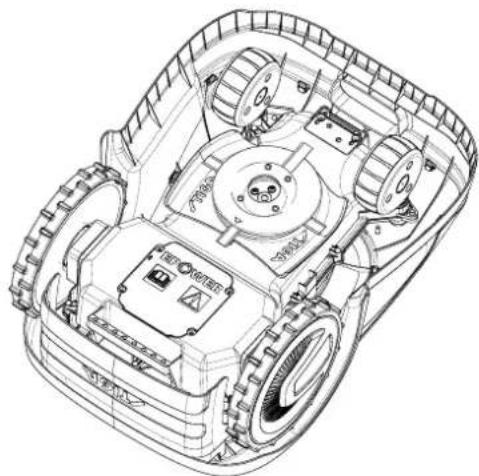
1.2. TECHNICAL DATA
3.4. SYMBOLS AND PLATES

WARNING:

WARNING:

ATTENTION:

WARNING:
4.4.3. PASSAGES BETWEEN DIFFERENT ZONES OF THE GARDEN
Procedure:
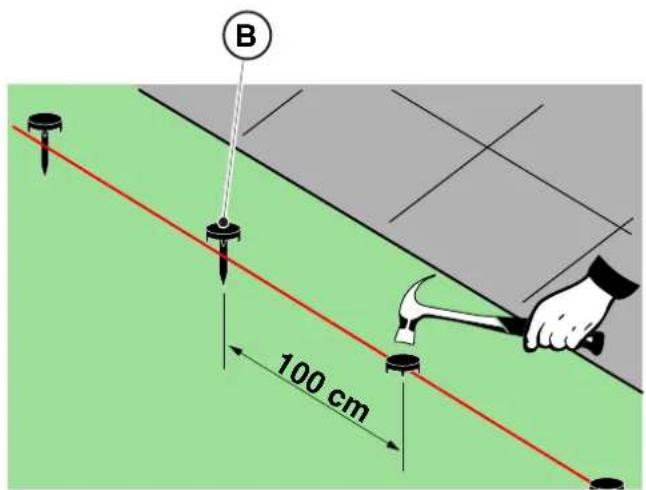
STIGA
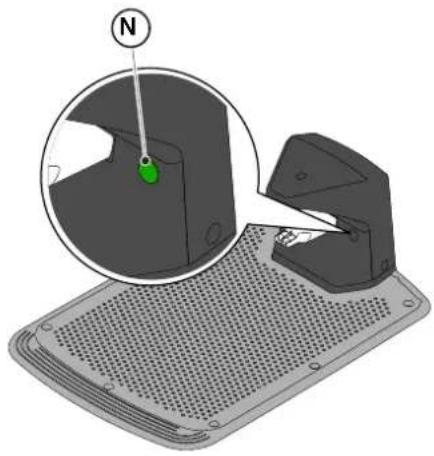
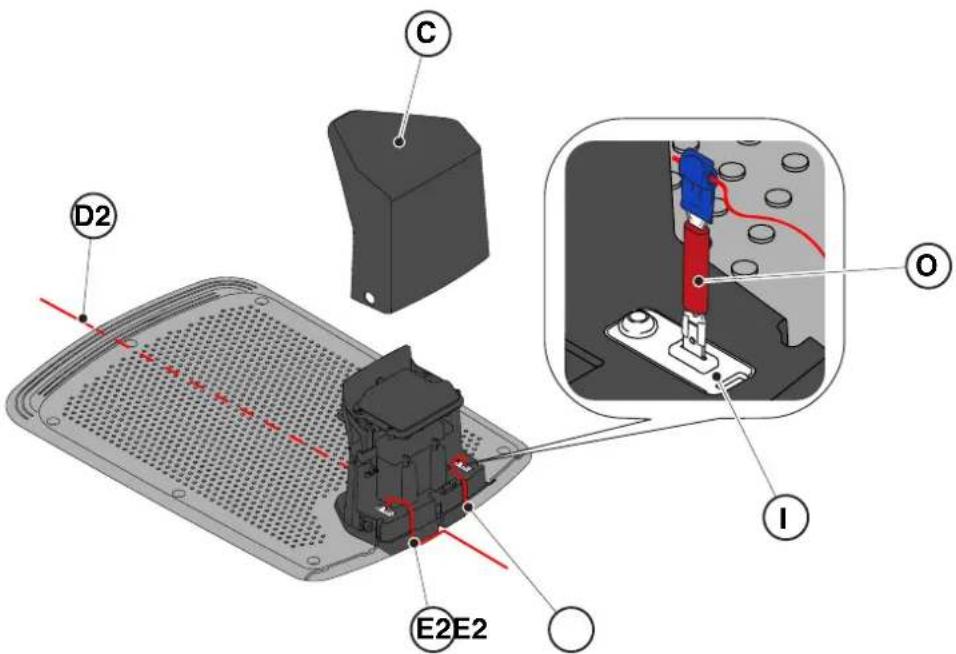
5.3.1. SAFETY STOP - STOP KEY
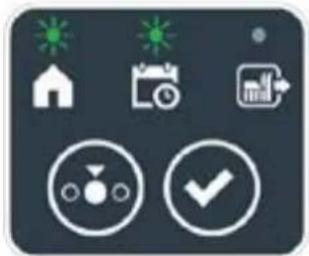
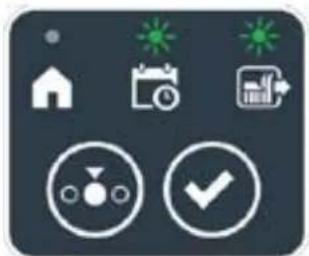
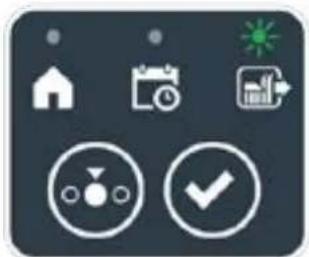

STIGA
Procedure:
Procedure:
6. MAINTENANCE

ATTENTION:
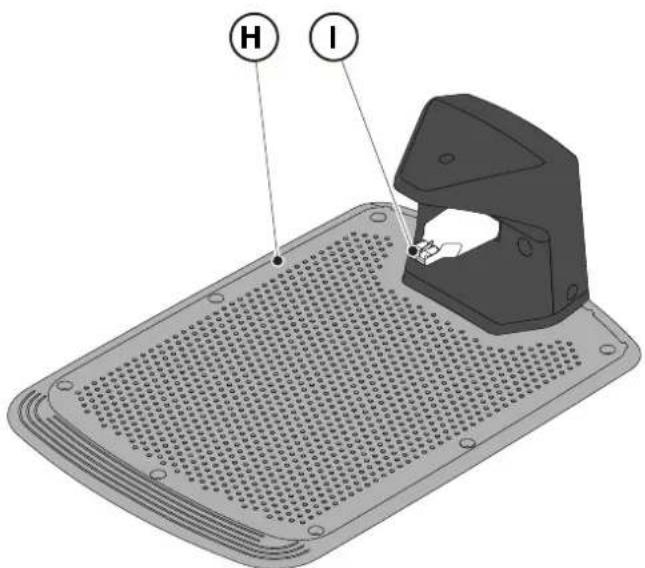
(Supply of Machinery (Safety) Regulations 2008, S.I. 2008 No. 1597, Annex II, part A)
- The company: ST. S.p.A. – Via del Lavoro, 6 – 31033 Castelfranco Veneto (TV) – Italy
- Hereby declares under its own responsibility that the machine:
Robotic lawnmower
a) Type approval: SRSW01 c) Serial number: 22A••RMO000001 ÷ 99L••RMO999999 d) Engine: battery-operated
- Conforms to UK Regulations:
• S.I. 2008/1597 - Supply of Machinery (Safety) Regulations 2008 • S.I. 2016/1091 - Electromagnetic Compatibility Regulations 2016 • S.I. 2012/3032 - The Restriction of the Use of Certain Hazardous Substances in Electrical and Electronic Equipment Regulations 2012 • S.I. 2017/1206 - Radio Equipment Regulations 2017
- Reference to harmonised standards:
EN 60335-1:2012 / AC:2014 / A11:2014 / A13:2017 / EN 61000-3-2:2019
A1:2019 / A2:2019 / A14:2019 EN 61000-3-3:2013 / A1:2019
EN IEC 63000:2018 EN 300 328 V2.2.2
EN 303 447 V1.2.0
EN 50636-107:2015 / A1 / A2
EN 301 489-17 V3.2.4
EN 62479:2010
EN 55014-1:2017 / A11:2020
EN 55014-2:2015
i) Cutting width: 18 cm
n) Person authorised to compile the technical file: ST. S.p.A.
Via del Lavoro, 6
31033 Castelfranco Veneto (TV) - Italia
o) Castelfranco Veneto, 01/12/2022 CEO Stiga Group
ST. S.p.A.
Via del Lavoro, 6
31033 Castelfranco Veneto (TV) - Italia
Sean Robinson
UK Importer:
STIGA LTD
Unit 8, Bluewater Estate Plympton,
Devon, PL7 4JH, England

| FR (Traduction de la notice originale)Déclaration CE de Conformité (Directive Machines 2006/42/CE, Annexe II, partie A)1. La Société2. Déclare sous sa propre responsabilité que la machine : Robot-tondeusea) Type / Modèle de Basec) Série d) Moteur: batterie3. Est conforme aux prescriptions des directives :4. Renvoi aux Normes harmoniséesi) Largeur de coupen) Personne habilitée à établir le Dossier Technique :o) Lieu et Date | DE (Übersetzung der Originalbetriebsanleitung)EG-Konformitätserklärung (Maschinenrichtlinie 2006/42/EG, Anhang II, Teil A)1. Die Gesellschaft2. Erklärt auf eigene Verantwortung, dass die Maschine: Mährobotera) Typ / Basismodellc) Seriennummerd) Motor: Batterie3. Den Anforderungen der folgenden Richtlinien entspricht:4. Bezugnahme auf die harmonisierten Normeni) Schnittbreiten) Zur Verfassung der technischen Unterlagen befugte Person:o) Ort und Datum | NL (Vertaling van de oorspronkelijke gebruiksaanwijzing)EG-verklaring van overeenstemming (Richtlijn Machines 2006/42/CE, Bijlage II, deel A)1. Het bedrijf2. Verklaart onder zijn eigen verantwoordelijkheid dat de machine: Robotmaaiera) Type / Basismodelc) Serienummerd) Motor: accu3. Voldoet aan de specificaties van der richtlijnen:4. Verwijzing naar de Geharmoniseerde normeni) Snijbreedten) Bevoegd persoon voor het opstellen van het Technisch Dossiero) Plaats en Datum |
| ES (Traducción del Manual Original)Declaración de Conformidad CE (Directiva Máquinas 2006/42/CE, Anexo II, parte A)1. La Empresa2. Declara bajo su propia responsabilidad que la máquina: Robot cortacéspeda) Tipo / Modelo Basec) Matrículad) Motor: bateria3. Cumple con las especificaciones de las directivas:4. Referencia a las Normas armonizadasi) Amplitud de corten) Persona autorizada a realizar el Manual Técnico:o) Lugar y Fecha | PT (Tradução do manual original)Declaração CE de Conformidade (Diretiva de Máquinas 2006/42/CE, Anexo II, parte A)1. A Empresa2. Declara sob a própria responsabilidade que a máquina: Robot corta-relvaa) Tipo / Modelo Basec) Matrículad) Moto: Bateria3. É conforme às especificações das diretivas:4. Referência às Normas harmonizadasi) Amplitude de corten) Pessoa autorizada a elaborar o Caderno Técnicoo) Local e Data | NO (Oversettelse av original bruksanvisning)EF- Samvarserklæring (Maskindirektiv 2006/42/EF, Vedlegg II, del A)1. Firmaet2. Erklærer på eget ansvar at maskinen: Robotgressklippera) Type / Modellc) Serienummerd) Motor: batteri3. Oppfyller kravene i direktivene:4. Henvisning til harmoniserte standarderI) Klippebredden) Person som har fullmakt til å ufterdige teknisk dokumentasjon:o) Sted og dato |
| SV (Översättning av bruksanvisning i original)EG-försäkran om överensstämmelse (Maskindirektiv 2006/42//EG, bilaga II, dela)1. Företaget2. Försäkrar på eget ansvar att maskinen: Gräsklipparrobota) Typ / Basmodellc) Serienummerd) Motor: batteri3. Överensstämmer med föreskrifterna i direktivet4. Referens till harmoniserade standarderi) Skärbreddn) Auktoriserad person för upprättandet av den tekniska dokumentationen:o) Ort och datum | DA (Översættelse af den originale brugsanvisning)EF-overensstemmelseserklæring (Maskindirektiv 2006/42/EF, bilag II, del A)1. Firmaet2. Erklærer på eget ansvar, at maskinen: Robotplæneklippera) Type / Modelc) Serienummerd) Motor: batteri3. Er i overensstemmelse med specifikationerne ifølge direktiverne:4. Henvisning til harmoniserede standarderi) Klippebredden) Person, der har bemyndigelse til at udarbejde det tekniske dossier:o) Sted og dato | FI (Alkuperäisten ohjeiden käännös)EY-VAATIMUSTENMUKAISUUSVAKUUTUS (Konedirektiivi 2006/42/EY, Liite II, osa A)1. Yritys2. Vakuuttaa omalla vastuullaan, että kone: Robottiruohonlelikkurla) Tyyppl / Perusmalllc) Sarjanumerod) Moottori : akku3. On yhdenmukainen seuraavien direktiivien asettamien vaatimusten kanssa:4. Viittaus harmonisoituihin standardeihini) Leikkuuleveysn) Teknisten asiakirjojen laatimiseenvaltuutettu henkilö:o) Paikka ja päivämäärä |
| SL (Prevod izvirnih navodil)ES izjava o skladnosti (Direktiva 2006/42/ES) , priloga II, del A)1. Družba2. pod lastno odgovornostjo izjavlja, da je stroj: Robotska kosilnicaa) Tip / osnovni modelc) Serijska številkad) Motor: baterija3. Skladen je z določili direktiv :4. Sklicevanje na usklajene predpisei) Obseg košnjen) Oseba, pooblaščena za sestavotehnične knjižice:o) Kraj In datum | LT (Originalių instrukciju vertimas)EB atitikties deklaracija (Mašinų direktyva 2006/42/CE, Priedas II, dalis A)1. Bendrovė2. Prisilma atsakomybę, kad jrenglnys: Žolės pjovimo robotasa) Tipas / Bazinis Modelisc) Serijos numerisd) Variklis: baterija3. Atitinka direktyvose pateiktas specifikacijas:4. Nuoroda i suderintas Normasi) Pjovimo plotisn) Autorizuotas asmuo sudaryti Techninę Dokumentaciją:o) Vieta ir Data | LV (Instrukciju tulkojums no originálvalodas)EK atbilstības deklarācija (Direktīva 2006/42/EK par mašinām, pleilkums II, daja A)1. Uzpēnums2. Uzņemoties par to pilnu atbildību, pazino, ka mašina: Robotizēta pljaujmašinaa) Tips / Bāzes modelsc) Sērijas numursd) Motors: akumulators3. Atbilst šādu direktīvu prasībām:4. Atsauce uz harmonizētiem standartiemi) Pljaušanas platumsn) Pilnvarotais darbinieks, kas sagatavoja tehnisko dokumentāciju:o) Vieta un datums |
| CS (Překlad původního návodu k používání)ES – Prohlášení o shodě(Směrnice o Strojních zařízeních 2006/42/ES, Přiloha II, část A)1. Společnost2. Prohlášuje na vlastní odpovědnost, že stroj: Robotická sekačkaa) Typ / Základní modelc) Výrobní číslod) Motor: akumulátor3. Je ve shodě s nařízeními směrnic:4. Odkazy na Harmonizované normyi) Šířka řezánín) Osoba autorizovaná pro vytvoření Technického spisu:o) Misto a Datum | PL (Tłumaczenie instrukcji oryginalnej)Deklaracja zgodności WE(Dyrektywa maszynowa 2006/42/WE,Załącznik II, część A)1. Spółka2. Oświadcza na własną odpowiedzialność, że maszyna: Kosiarka trawnikowaa) Typ / Model podstawowyc) Numer seryjnyd) Silnik: akumulator3. Spełnia podstawowe wymogi następujących Dyrektyw:4. Odniesienie do Norm zharmonizowanychi) Szerokość cięcia n) Osoba upoważniona do zredagowania Dokumentacji technicznej:o) Miejscowość i data | ET (Algupārase kasutusjuhendi tõlge)EÜ vastavusdeklaratsioon(Masinadirektiiv 2006/42/EÜ, Lisa II, osa A)1. Firma2. Kinnitab omal vastutusel, et masin:Robotniiduka) Tüüp / Põhimudel c) Matrikkeld) Mootor: aku3. Vastab direktiivide nõuetele:4. Viide ühtlustatud standarditelei) Lõikelaiusn) Tehnilise Lehe autoriseeritud koostaja:o) Koht ja Kuupäev |
| HU (Eredeti használati utasítás fordítása)EK-megfelelőségi nyilatkozata(2006/42/EK gépirányelv, ll. melléklet "A" rész)1. Alulírott Vállalat2. Felelősségének teljes tudatában kijelenti, hogy az alábbi gép: Robotfűnyíróa) Típus / Alaptipusc) Gyártási számd) Motor: akkumulátor3. Megfelel az alábbi irányelvekelőírásainak:4. Hivatkozás a harmonizált szabványokrai) Vágási szélességn) Műszaki Dosszié szerkesztésérefelhatalmazott személy:o) Helye és ideje | RU (Перевод оригинальных инструкций)Декларация соответствия нормам EC (Direktiva o машинном оборудовании 2006/42/EC, Приложение II, часть A)1. Предприятие2. Заявляет под собственную ответственность, что машина: Робот-газонокосилкаa) Тип / Базовая модельc) Паспортd) Двигатель: батарея сгорания3. Соответствует требованиям следующих директив:4. Ссылки на гармонизированные нормыi) Амплитуда кошенияn) Лицо, уполномоченное на подготовку технической документации:o) Место и дата | HR (Prijevod originalnih uputa)EK Izjava o sukladnosti(Direktiva 2006/42/EZ o strojevima, dodatak II, dio A)1. Tvrtka:2. pod vlastitom odgovornošću izjavljuje da je stroj: Robotska kosilicaa) Vrsta / Osnovni modelc) Matični brojd) Motor: baterija3. sukladan s temeljnim zahtjevima direktiva:4. Primijenjene su slijedeće harmonizirane norme:i) Širina rezanján) Osoba ovlaštena za pravljenje Tehničke datoteke:o) Mjesto i datum |
| SR (Prevod originalnih uputstval)EC deklaracija o usaglašenosti (Direktiva o mašinama 2006/42/EC, Prilog II, deo A)1. Preduzeće2. Daje izjavu pod vlastitom odgovornošćuda je mašina: Robot kosačicaa) Tip / Osnovni modelc) Serijski brojd) Motor: akumulator3. U skladu s osnovnim zahtevima direktiva:4. Pozivanje na usklađene normei) Širina košenjan) Osoba ovlašćena za sastavljanje tehničke brošureo) Mesto i datum | TR (Orijinal Talimatların Tercümesi)AT Uygunluk Beyanı (2006/42/CE Makine Direktifi, Ek II, bölüm A)1. Şirket2. Şahsi sorumluluğu altında aşağıdaki makinenin: Robot çim biçme makinesia) Tip / Standart modelc) Sicil numarasıd) Motor : batarya3. Aşağıdaki direktiflerin özelliklerine uygun olduğunu beyan etmektedir:4. Harmonize standartlara atifi) Kesim genişligiń) Teknik Dosyayı oluşturmaya yetkili kişi:o) Yer ve Tarih | RO (Traducerea manualului fabricantului)CE -Declaratie de Conformitate (Directiva Mašini 2006/42/CE, Anexa II, partea A)1. Societatea2. Declară pe propria răspundere că mașina: Robot mașină de tuns iarbaa) Tip / Model de bazăc) Număr de seried) Motor: baterie3. Este în conformitate cu specificațiile directivelor:4. Referință la Standardele armonizatei) Lătimea de täieren) Persoană autorizată să întocmeascăDosarul Tehnico) Locul și Data |
STIGA
STIGA LTD (UK Importer)
Unit 8, Bluewater Estate Plympton, Devon, PL7 4JH, England
STIGA S.p.A.
Via del lavoro, 6
31033 Castelfranco Veneto (TV)
Italy
stiga.com

FR
NORWEGIAN - TRANSLATION OF ORIGINAL INSTRUCTIONS
CONTENTS
1. MODELS AND TECHNICAL INFORMATION 1
1.1. MODELS....1 1.2. TECHNICAL DATA....2
2. SAFETY 3
2.1. SAFETY INFORMATION....3 2.2. SAFETY INSTRUCTIONS....5 2.2.1. SAFE OPERATING PRACTICES 5 2.2.2. OPERATION 5 2.3. STOPPING AND DISCONNECTING THE ROBOTIC LAWNMOWER UNDER SAFE CONDITIONS 7
3. INTRODUCTION 8
3.1. GENERAL INTRODUCTION 8 3.1.1. PURPOSE OF THE MANUAL....8 3.1.2. INSTRUCTIONS FOR READING THE INDICATIONS ON THE SMARTPHONE 8 3.2. PRODUCT OVERVIEW....9 3.2.1. GENERAL DESCRIPTION....9 3.2.2. MAIN COMPONENTS....10 3.3. UNPACKING....11 3.4. SYMBOLS AND SIGNS....12 3.5. GENERAL INSTRUCTIONS FOR READING THE MANUAL 13
4. INSTALLATION 14
4.1. GENERAL INSTALLATION INFORMATION....14 4.2. COMPONENTS FOR INSTALLATION....14 4.3. CHECKING INSTALLATION REQUIREMENTS 15 4.3.1. CHECKING THE GARDEN: 15 4.3.2. CHECKING THE INSTALLATION OF THE CHARGING BASE AND THE POWER SUPPLY: 15 4.3.3. MAIN CHECKS FOR INSTALLING THE BOUNDARY WIRE: 17
4.4. CRITERIA FOR INSTALLING THE BOUNDARY WIRE....19
4.4.1. PLACEMENT OF THE BOUNDARY WIRE 19 4.4.2. LIMITING OBSTACLES: 21 4.4.3. PASSAGE BETWEEN DIFFERENT AREAS OF THE GARDEN 23
4.5. INSTALLATION OF THE COMPONENTS 23
4.5.1. INSTALLATION OF THE BOUNDARY WIRE....24 4.5.2. SPLICING THE BOUNDARY WIRE....25 4.5.3. INSTALLATION OF THE CHARGING BASE 26 4.5.4. INSTALLATION OF THE RESISTOR FOR REDUCED PARAMETERS....28
4.6. CHARGING THE ROBOTIC LAWNMOWER AFTER INSTALLATION....29
4.7. PRODUCT SETTINGS....30
5. OPERATION 35
5.1. CHECKING THE SAFETY DEVICES BEFORE STARTING THE ROBOTIC LAWNMOWER....35 5.2. MANUAL OPERATION OF THE ROBOTIC LAWNMOWER....36 5.3. DESCRIPTION OF THE COMMANDS ON THE ROBOTIC LAWNMOWER 37 5.3.1. SAFE STOP - STOP BUTTON.... 37
5.3.2. SAFE SWITCH-OFF - SAFETY KEY.... 38 5.3.3. SWITCHING ON AND OFF - ON/OFF BUTTON 38 5.3.4. SELECTING PROGRAMMED MOWING / SINGLE MOWING CYCLE - SCHEDULED PROGRAM BUTTON ..... 39 5.3.5. DISPLAYING BLUETOOTH STATUS AND DISCONNECTION - BLUETOOTH BUTTON 41 5.3.6. DISPLAYING ALARM STATUS - ALARM ICON....41 5.3.7. DISPLAYING BATTERY CHARGING - BATTERY ICON 42 5.3.8. STARTING THE ROBOTIC LAWNMOWER - START BUTTON 42
5.4. OPERATION OF THE CHARGING BASE....43 5.5. CHARGING THE BATTERY......43 5.6. ADJUSTING THE CUTTING HEIGHT 44
6. MAINTENANCE 45
6.1. SCHEDULED MAINTENANCE....45 6.2. CLEANING THE PRODUCT 46 6.3. REPLACING THE CUTTING BLADES 48 6.4. WINTER MAINTENANCE OF THE BATTERY AND STORAGE....49 6.5. REPLACING THE BATTERY 49
7. TROUBLESHOOTING 50
7.1. MAIN MESSAGES FROM THE APP 51
8. TRANSPORT, STORAGE AND DISPOSAL 53
8.1. TRANSPORT 53 8.2. STORAGE 53 8.3. DISPOSAL......53
9. ACCESSORIES 54
- WARRANTY 55 10.1. WHAT IS COVERED BY THE WARRANTY 55
- EU DECLARATION OF CONFORMITY 56
1. MODELS AND TECHNICAL INFORMATION
1.1. MODELS
This manual refers to models G 300, G 600, G 1200.
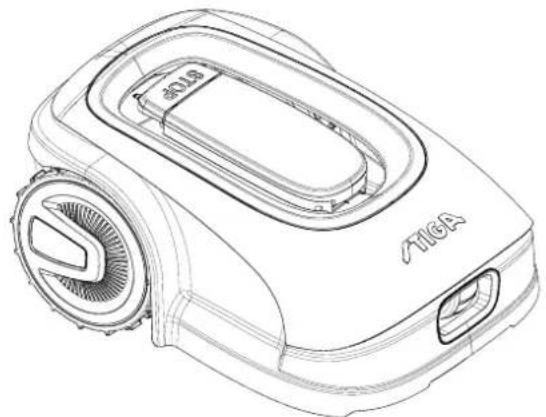
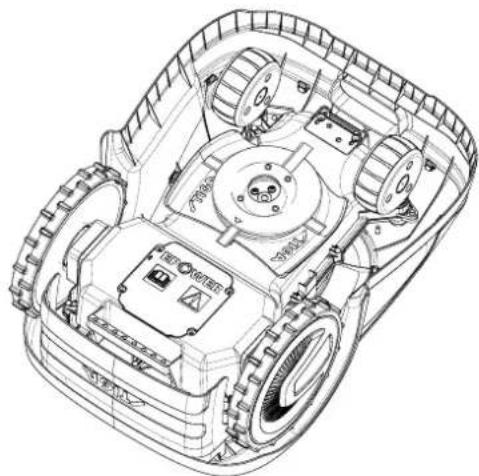
1.2. TECHNICAL DATA
| SPESIFIKASJONER | MÅLE ENHET | STIGA G 300 STIGA G 600 STIGA G 1200 |
| Dimensjoner (BxHxD) | [mm] 413 | x 252 x 560 413 x 252 x | 560 413 x 252 x 560 | |
| Robotgressklipperens vekt | [kg] 7.4 7 | 6 8 | | |
| Klippehøyde (Min-Maks) | [mm] 20-60 | 20-60 | 20-60 | |
| Bladdiameter | [mm] | 180 | 180 | 180 |
| Kuttehastighet | [omdr./min] | 2850+/-50 | 2850+/-50 | 2850+/-50 |
| Fremdriftshastighet | [m/min] | 22 | 22 | 22 |
| Maksimal helling | % | 45 | 45 | 45 |
| Maksimal helling langs omkretsen | % | 20 | 20 | 20 |
| Type elektrisk trekkmotor | - | Brushless | Brushless | Brushless |
| Type klippesystem | - | 4 svingbareklippeblader | 4 svingbareklippeblader | 4 svingbareklippeblader |
| Artikkelnummer for klippeinnretning | - | 322104105/0 | 322104105/0 | 322104105/0 |
| Type elektrisk klippemotor | - | Brushless | Brushless | Brushless |
| Påvist lydeffektnivå | [dB] (A) | 57 | 57 | 57 |
| Usikkerhet om støyutslipp, KWA | [dB] (A) | 1,47 | 1,47 | 1,47 |
| Garantert lydeffektnivå | [dB] (A) | 59 | 59 | 59 |
| Akustisk nivå ved operatørens øre | [dB] (A) | 46,3 | 46,3 | 46,3 |
| Robotgressklipper IP-klassifisering | - | IPX5 | IPX5 | IPX5 |
| IP-klassifisering av ladebasen | - | IPX1 | IPX1 | IPX1 |
| Mater IP-klassifisering | - | IP67 | IP67 | IP67 |
| Omgivelsestemperatur for robotgressklipper [°C] | [°C] | 0 ÷ 50 | 0 ÷ 50 | 0 ÷ 50 |
| Omgivelsestemperatur for ladebase [°C] | [°C] | -10 ÷ 50 | -10 ÷ 50 | -10 ÷ 50 |
| Omgivelsestemperatur for materdrift [°C] | [°C] | -10 ÷ 50 | -10 ÷ 50 | -10 ÷ 40 |
| Arbeidskapasitet | [m2] | 300 | 600 | 1200 |
| Strømforsyning | - | Input:100-240Vca; 1,2AOutput:30Vcc; 2A | Input:100-240Vca; 1,2AOutput:30Vcc; 2A | Input:100-240Vca; 1,2AOutput:30Vcc; 2A |
| Batterimodell | - | 25,2 - 25,9 V;2 Ah | 25,2 - 25,9 V;2,5 Ah | 25,2 - 25,9 V;5 Ah |
| Ladetid | [min] | 60 | 80 | 150 |
| Bluetooth | - | 4,2 4,2 | 4,2 | |
2. SAFETY
3.3. UNPACKING
3.4. SYMBOLS AND SIGNS
All symbols on the robotic lawnmower are shown below:
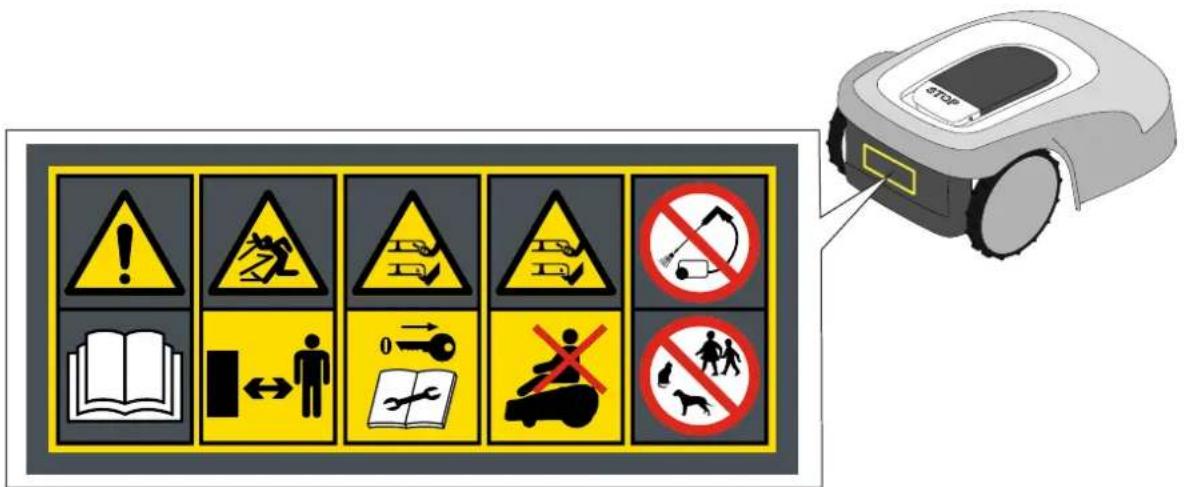

WARNING:

WARNING:
4.3. CHECKING INSTALLATION REQUIREMENTS

WARNING:
4.3.3. MAIN CHECKS FOR INSTALLING THE BOUNDARY WIRE
STIGA

WARNING:
4.4. CRITERIA FOR INSTALLING THE BOUNDARY WIRE
4.4.1. PLACEMENT OF THE BOUNDARY WIRE
Procedure:
STIGA

WARNING:
4.4.3. PASSAGE BETWEEN THREE DIFFERENT AREAS IN THE GARDEN
Procedure:
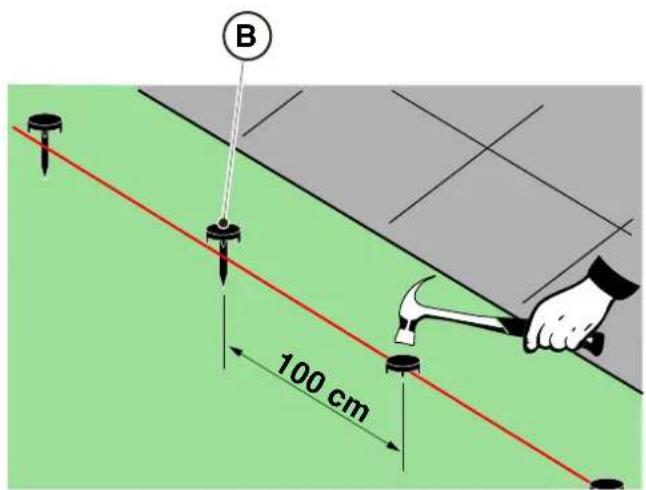
PLACEMENT BY BURYING THE WIRE IN THE GROUND
(TO BE PERFORMED ONLY BY AN APPROVED DEALER)
STIGA
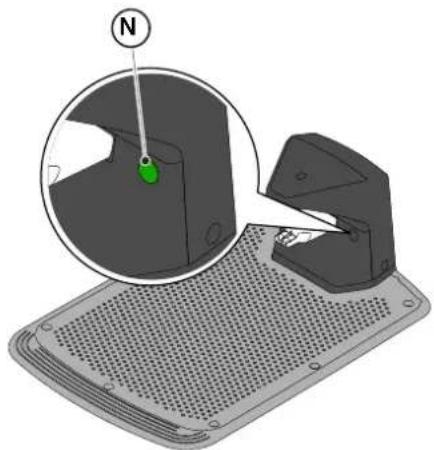
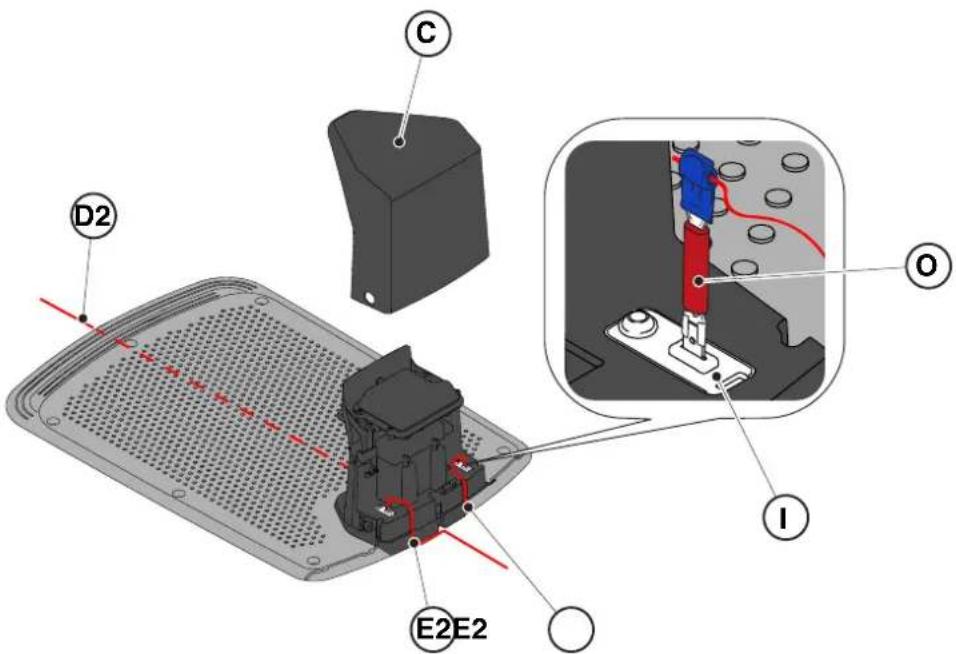
4.6. CHARGING THE ROBOTIC LAWNMOWER AFTER INSTALLATION
Requirements and regulations:
- Charging base.
Procedure:
| G 300 G 600 G | 1200 | |
| Border Cut | | | |
| Go-To Cut Points | 1 3 5 | | |
| Eco Mode | | | |
| Rain Sensor | |  |  |
| Closed Area | | | |
INDEX OF PRODUCT SETTINGS
4.7.1. PRE-LOGIN 31
4.7.2. REGISTRATION (SIGN UP) 31
4.7.3. PAIRING 31
4.7.4. DEVICE PAGE 32
4.7.5. CLOSED AREA 32
4.7.6. SETTINGS 32
4.7.7. SPOT CUT / SCHEDULED CUT.... 32
4.7.8. MOWING SESSIONS.... 32
4.7.9. GO-TO-CUT POINTS 33
4.7.10. BORDER CUT.... 33
4.7.11. ECO MODE....33
4.7.12. RAIN SENSOR (DEPENDING ON MODEL) 33
4.7.13. APP LOCK 33
4.7.14. USER MANAGEMENT 35
4.7.15. DEALER 35
4.7.16. MESSAGES .... 35
4.7.17. PROFILE 35
4.7.1. PRE-LOGIN
5.2. MANUAL OPERATION OF THE ROBOTIC LAWNMOWER
5.3.1. SAFE STOP - STOP BUTTON
The "STOP" button (A) is a command that stops the robotic lawnmower under safe conditions, regardless of the operating mode.
Procedure:
5.3.4. SELECTION OF SCHEDULED PROGRAM / SINGLE WORK CYCLE / FORCED RETURN TO CHARGING BASE - MODE SELECTION BUTTON
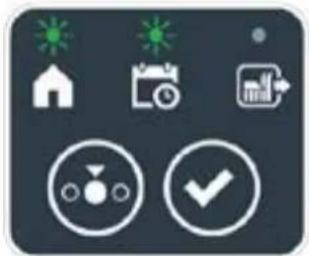
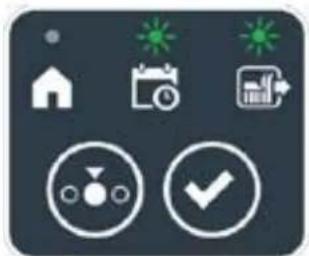
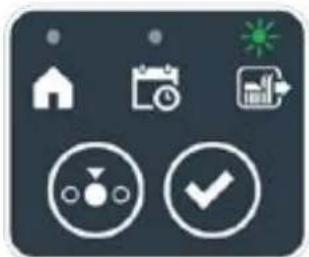

Procedure:
5.3.6. DISPLAY OF ALARM STATE - ALARM ICON
The illuminated "ALARM" icon (N) indicates a malfunction.
Procedure:
5.3.7. DISPLAY OF BATTERY CHARGE - BATTERY ICON
The illuminated "BATTERY" icon (O) allows you to see the battery charge status.
Procedure:
5.5. CHARGING THE BATTERY
5.6. ADJUSTING THE CUTTING HEIGHT
Procedure:
6. MAINTENANCE
6.1. SCHEDULED MAINTENANCE

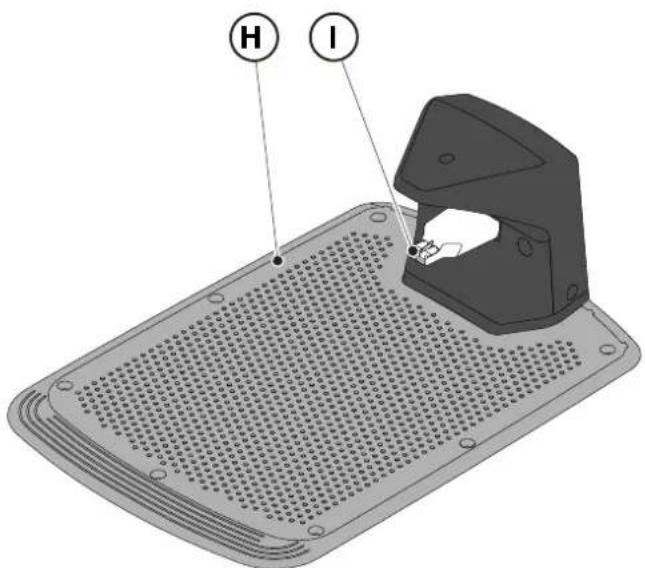
6.3. REPLACING THE CUTTING BLADES

WARNING: Risk of cuts to hands.
Requirements and instructions:
• Safety key • Key - Cutting blade • Gloves

6.4. WINTER MAINTENANCE OF THE BATTERY AND STORAGE
Procedure:
6.5. BATTERY REPLACEMENT
(Supply of Machinery (Safety) Regulations 2008, S.I. 2008 No. 1597, Annex II, part A)
- The company: ST. S.p.A. – Via del Lavoro, 6 – 31033 Castelfranco Veneto (TV) – Italy
- Hereby declares under its own responsibility that the machine:
Robotic lawnmower
a) Homologation type: SRSW01 c) Serial number: 22A••RMO000001 ÷ 99L••RMO999999 d) Engine: battery-operated
- Conforms to UK Regulations:
• S.I. 2008/1597 - Supply of Machinery (Safety) Regulations 2008 • S.I. 2016/1091 - Electromagnetic Compatibility Regulations 2016 - S.I. 2012/3032 - The Restriction of the Use of Certain Hazardous Substances in Electrical and Electronic Equipment Regulations 2012 • S.I. 2017/1206 - Radio Equipment Regulations 2017
- Reference to harmonised standards:
EN 60335-1:2012 / AC:2014 / A11:2014 / A13:2017 / EN 61000-3-2:2019
A1:2019 / A2:2019 / A14:2019 EN 61000-3-3:2013 / A1:2019
EN IEC 63000:2018 EN 300 328 V2.2.2
EN 303 447 V1.2.0
EN 50636-107:2015 / A1 / A2
EN 301 489-17 V3.2.4
EN 62479:2010
EN 55014-1:2017 / A11:2020
EN 55014-2:2015
i) Cutting width: 18 cm
n) Person authorised to compile the technical file: ST. S.p.A.
Via del Lavoro, 6
31033 Castelfranco Veneto (TV) - Italia
o) Castelfranco Veneto, 01/12/2022 CEO Stiga Group
ST. S.p.A.
Via del Lavoro, 6
31033 Castelfranco Veneto (TV) - Italia
Sean Robinson
UK Importer:
STIGA LTD
Unit 8, Bluewater Estate Plympton,
Devon, PL7 4JH, England

| FR (Traduction de la notice originale)Déclaration CE de Conformité (Directive Machines 2006/42/CE, Annexe II, partie A)1. La Société2. Déclare sous sa propre responsabilité que la machine : Robot-tondeusea) Type / Modèle de Basec) Série d) Moteur: batterie3. Est conforme aux prescriptions des directives :4. Renvoi aux Normes harmoniséesi) Largeur de coupen) Personne habilitée à établir le Dossier Technique :o) Lieu et Date | DE (Übersetzung der Originalbetriebsanleitung)EG-Konformitätserklärung (Maschinenrichtlinie 2006/42/EG, Anhang II, Teil A)1. Die Gesellschaft2. Erklärt auf eigene Verantwortung, dass die Maschine: Mährobotera) Typ / Basismodellc) Seriennummerd) Motor: Batterie3. Den Anforderungen der folgenden Richtlinien entspricht:4. Bezugnahme auf die harmonisierten Normeni) Schnittbreiten) Zur Verfassung der technischen Unterlagen befugte Person:o) Ort und Datum | NL (Vertaling van de oorspronkelijke gebruiksaanwijzing)EG-verklaring van overeenstemming (Richtlijn Machines 2006/42/CE, Bijlage II, deel A)1. Het bedrijf2. Verklaart onder zijn eigen verantwoordelijkheid dat de machine: Robotmaaiera) Type / Basismodelc) Serienummerd) Motor: accu3. Voldoet aan de specificaties van der richtlijnen:4. Verwijzing naar de Geharmoniseerde normeni) Snijbreedten) Bevoegd persoon voor het opstellen van het Technisch Dossiero) Plaats en Datum |
| ES (Traducción del Manual Original)Declaración de Conformidad CE (Directiva Máquinas 2006/42/CE, Anexo II, parte A)1. La Empresa2. Declara bajo su propia responsabilidad que la máquina: Robot cortacéspeda) Tipo / Modelo Basec) Matrículad) Motor: bateria3. Cumple con las especificaciones de las directivas:4. Referencia a las Normas armonizadasi) Amplitud de corten) Persona autorizada a realizar el Manual Técnico:o) Lugar y Fecha | PT (Tradução do manual original)Declaração CE de Conformidade (Diretiva de Máquinas 2006/42/CE, Anexo II, parte A)1. A Empresa2. Declara sob a própria responsabilidade que a máquina: Robot corta-relvaa) Tipo / Modelo Basec) Matrículad) Moto: Bateria3. É conforme às especificações das diretivas:4. Referência às Normas harmonizadasi) Amplitude de corten) Pessoa autorizada a elaborar o Caderno Técnicoo) Local e Data | NO (Oversettelse av original bruksanvisning)EF- Samvarserklæring (Maskindirektiv 2006/42/EF, Vedlegg II, del A)1. Firmaet2. Erklærer på eget ansvar at maskinen: Robotgressklippera) Type / Modellc) Serienummerd) Motor: batteri3. Oppfyller kravene i direktivene:4. Henvisning til harmoniserte standarderI) Klippebredden) Person som har fullmakt til å ufterdige teknisk dokumentasjon:o) Sted og dato |
| SV (Översättning av bruksanvisning i original)EG-försäkran om överensstämmelse (Maskindirektiv 2006/42//EG, bilaga II, dela)1. Företaget2. Försäkrar på eget ansvar att maskinen: Gräsklipparrobota) Typ / Basmodellc) Serienummerd) Motor: batteri3. Överensstämmer med föreskrifterna i direktivet4. Referens till harmoniserade standarderi) Skärbreddn) Auktoriserad person för upprättandet av den tekniska dokumentationen:o) Ort och datum | DA (Översættelse af den originale brugsanvisning)EF-overensstemmelseserklæring (Maskindirektiv 2006/42/EF, bilag II, del A)1. Firmaet2. Erklærer på eget ansvar, at maskinen: Robotplæneklippera) Type / Modelc) Serienummerd) Motor: batteri3. Er i overensstemmelse med specifikationerne ifølge direktiverne:4. Henvisning til harmoniserede standarderi) Klippebredden) Person, der har bemyndigelse til at udarbejde det tekniske dossier:o) Sted og dato | FI (Alkuperäisten ohjeiden käännös)EY-VAATIMUSTENMUKAISUUSVAKUUTUS (Konedirektiivi 2006/42/EY, Liite II, osa A)1. Yritys2. Vakuuttaa omalla vastuullaan, että kone: Robottiruohonlelikkurla) Tyyppl / Perusmalllc) Sarjanumerod) Moottori : akku3. On yhdenmukainen seuraavien direktiivien asettamien vaatimusten kanssa:4. Viittaus harmonisoituihin standardeihini) Leikkuuleveysn) Teknisten asiakirjojen laatimiseenvaltuutettu henkilö:o) Paikka ja päivämäärä |
| SL (Prevod izvirnih navodil)ES izjava o skladnosti (Direktiva 2006/42/ES) , priloga II, del A)1. Družba2. pod lastno odgovornostjo izjavlja, da je stroj: Robotska kosilnicaa) Tip / osnovni modelc) Serijska številkad) Motor: baterija3. Skladen je z določili direktiv :4. Sklicevanje na usklajene predpisei) Obseg košnjen) Oseba, pooblaščena za sestavotehnične knjižice:o) Kraj In datum | LT (Originalių instrukciju vertimas)EB atitikties deklaracija (Mašinų direktyva 2006/42/CE, Priedas II, dalis A)1. Bendrovė2. Prisilma atsakomybę, kad jrenglnys: Žolės pjovimo robotasa) Tipas / Bazinis Modelisc) Serijos numerisd) Variklis: baterija3. Atitinka direktyvose pateiktas specifikacijas:4. Nuoroda i suderintas Normasi) Pjovimo plotisn) Autorizuotas asmuo sudaryti Techninę Dokumentaciją:o) Vieta ir Data | LV (Instrukciju tulkojums no originálvalodas)EK atbilstības deklarācija (Direktīva 2006/42/EK par mašinām, pleilkums II, daļa A)1. Uzņēmums2. Uzņemoties par to pilnu atbildību, pazino, ka mašina: Robotizēta pljaujmašinaa) Tips / Bāzes modelsc) Sērijas numursd) Motors: akumulators3. Atbilst šādu direktīvu prasībām:4. Atsauce uz harmonizētiem standartiemi) Plaušanas platumsn) Pilnvarotais darbinieks, kas sagatavoja tehnisko dokumentāciju:o) Vieta un datums |
| CS (Překlad původního návodu k používání)ES – Prohlášení o shodě(Směrnice o Strojních zařízeních 2006/42/ES, Přiloha II, část A)1. Společnost2. Prohlášuje na vlastní odpovědnost, že stroj: Robotická sekačkaa) Typ / Základní modelc) Výrobní číslod) Motor: akumulátor3. Je ve shodě s nařízeními směrnic:4. Odkazy na Harmonizované normyi) Šířka řezánín) Osoba autorizovaná pro vytvoření Technického spisu:o) Misto a Datum | PL (Tłumaczenie instrukcji oryginalnej)Deklaracja zgodności WE(Dyrektywa maszynowa 2006/42/WE,Załącznik II, część A)1. Spółka2. Oświadczenie na własną odpowiedzialność, że maszyna: Kosiarka trawnikowaa) Typ / Model podstawowyc) Numer seryjnyd) Silnik: akumulator3. Spełnia podstawowe wymogi następujących Dyrektyw:4. Odniesienie do Norm zharmonizowanychi) Szerokość cięcia n) Osoba upoważniona do zredagowania Dokumentacji technicznej:o) Miejscowość i data | ET (Algupārase kasutusjuhendi tõlge)EÜ vastavusdeklaratsioon(Masinadirektiiv 2006/42/EÜ, Lisa II, osa A)1. Firma2. Kinnitab omal vastutusel, et masin:Robotniiduka) Tüüp / Põhimudel c) Matrikkeld) Mootor: aku3. Vastab direktiivide nõuetele:4. Viide ühtlustatud standarditelei) Lõikelaiusn) Tehnilise Lehe autoriseeritud koostaja:o) Koht ja Kuupäev |
| HU (Eredeti használati utasítás fordítása)EK-megfelelőségi nyilatkozata(2006/42/EK gépirányelv, ll. melléklet "A" rész)1. Alulírott Vállalat2. Felelősségének teljes tudatában kijelenti, hogy az alábbi gép: Robotfűnyíróa) Típus / Alaptipusc) Gyártási számd) Motor: akkumulátor3. Megfelel az alábbi irányelvekelőírásainak:4. Hivatkozás a harmonizált szabványokrai) Vágási szélességn) Műszaki Dosszié szerkesztésérefelhatalmazott személy:o) Helye és ideje | RU (Перевод оригинальных инструкций)Декларация соответствия нормам EC (Direktiva o машинном оборудовании 2006/42/EC, Приложение II, часть A)1. Предприятие2. Заявляет под собственную ответственность, что машина: Робот-газонокосилкаa) Тип / Базовая модельc) Паспортd) Двигатель: батарея сгорания3. Соответствует требованиям следующих директив:4. Ссылки на гармонизированные нормыi) Амплитуда кошенияn) Лицо, уполномоченное на подготовку технической документации:o) Место и дата | HR (Prijevod originalnih uputa)EK Izjava o sukladnosti(Direktiva 2006/42/EZ o strojevima, dodatak II, dio A)1. Tvrtka:2. pod vlastitom odgovornošću izjavljuje da je stroj: Robotska kosilicaa) Vrsta / Osnovni modelc) Matični brojd) Motor: baterija3. sukladan s temeljnim zahtjevima direktiva:4. Primijenjene su slijedeće harmonizirane norme:i) Širina rezanján) Osoba ovlaštena za pravljenje Tehničke datoteke:o) Mjesto i datum |
| SR (Prevod originalnih uputstval)EC deklaracija o usaglašenosti (Direktiva o mašinama 2006/42/EC, Prilog II, deo A)1. Preduzeće2. Daje izjavu pod vlastitom odgovornošćuda je mašina: Robot kosačicaa) Tip / Osnovni modelc) Serijski brojd) Motor: akumulator3. U skladu s osnovnim zahtevima direktiva:4. Pozivanje na usklađene normei) Širina košenjan) Osoba ovlašćena za sastavljanje tehničke brošureo) Mesto i datum | TR (Orijinal Talimatların Tercümesi)AT Uygunluk Beyanı (2006/42/CE Makine Direktifi, Ek II, bölüm A)1. Şirket2. Şahsi sorumluluğu altında aşağıdaki makinenin: Robot çim biçme makinesia) Tip / Standart modelc) Sicil numarasıd) Motor : batarya3. Aşağıdaki direktiflerin özelliklerine uygun olduğunu beyan etmektedir:4. Harmonize standartlara atifi) Kesim genişligiń) Teknik Dosyayı oluşturmaya yetkili kişi:o) Yer ve Tarih | RO (Traducerea manualului fabricantului)CE -Declaratie de Conformitate (Directiva Mašini 2006/42/CE, Anexa II, partea A)1. Societatea2. Declară pe propria răspundere că mașina: Robot mașină de tuns iarbaa) Tip / Model de bazăc) Număr de seried) Motor: baterie3. Este în conformitate cu specificațiile directivelor:4. Referință la Standardele armonizatei) Lătimea de täieren) Persoană autorizată să întocmeascăDosarul Tehnico) Locul și Data |
STIGA
STIGA LTD (UK Importer)
Unit 8, Bluewater Estate Plympton, Devon, PL7 4JH, England
STIGA S.p.A.
Via del lavoro, 6
31033 Castelfranco Veneto (TV)
Italy
stiga.com

FR
SWEDISH - TRANSLATION OF THE ORIGINAL INSTRUCTIONS
TABLE OF CONTENTS
1. MODELS AND TECHNICAL SPECIFICATIONS 1
1.1. MODELS....1 1.2. TECHNICAL SPECIFICATIONS 2
2. SAFETY 3
2.1. SAFETY INFORMATION....3 2.2. SAFETY INSTRUCTIONS 5 2.2.1. SAFE OPERATING METHODS 5 2.2.2. OPERATION 5 2.3. STOPPING AND SHUTTING DOWN THE ROBOTIC LAWNMOWER SAFELY....7
3. INTRODUCTION 8
3.1. GENERAL INTRODUCTION......8 3.1.1. PURPOSE OF THE MANUAL 8 3.1.2. INSTRUCTIONS FOR READING FROM SMARTPHONE 8 3.2. PRODUCT OVERVIEW 9 3.2.1. GENERAL DESCRIPTION 9 3.2.2. MAIN COMPONENTS....10 3.3. UNPACKING 11 3.4. SYMBOLS AND LABELS 12 3.5. GENERAL INSTRUCTIONS FOR READING THE MANUAL....13
4. INSTALLATION 14
4.1. GENERAL INFORMATION FOR INSTALLATION....14 4.2. COMPONENTS FOR INSTALLATION....14 4.3. CHECKING INSTALLATION REQUIREMENTS 15 4.3.1. CHECKING THE GARDEN: 15 4.3.2. CHECKS FOR INSTALLING THE CHARGING BASE AND POWER SUPPLY: 15 4.3.3. MAIN CHECKS FOR INSTALLING THE BOUNDARY WIRE: 17 4.4. CRITERIA FOR INSTALLING THE BOUNDARY WIRE....19 4.4.1. PLACEMENT OF THE BOUNDARY WIRE 19 4.4.2. DELINEATING OBSTACLES: 21 4.4.3. SWITCHING BETWEEN DIFFERENT PARTS OF THE GARDEN.... 23
4.5. INSTALLATION OF COMPONENTS....23
4.5.1. INSTALLING THE BOUNDARY WIRE....24
4.5.2. JOINING THE BOUNDARY WIRE.... 25
4.5.3. INSTALLATION OF THE CHARGING BASE 26
4.5.4. INSTALLATION OF RESISTORS FOR SMALL CIRCUITS 28
4.6. CHARGING THE ROBOTIC LAWNMOWER AFTER INSTALLATION 29 4.7. PRODUCT SETTINGS 30
5. OPERATION 35
5.1. CHECKING THE SAFETY DEVICES TO START THE ROBOTIC LAWNMOWER......35 5.2. MANUAL OPERATION OF THE ROBOTIC LAWNMOWER 36 5.3. DESCRIPTION OF THE CONTROLS ON THE ROBOTIC LAWNMOWER 37 5.3.1. STOP IN SAFETY MODE - STOP BUTTON 37
5.3.2. SHUTDOWN IN SAFETY MODE - SAFETY KEY 38 5.3.3. SWITCHING ON AND OFF - ON/OFF BUTTON 38 5.3.4. SELECTING A SCHEDULED PROGRAM/SINGLE WORK CYCLE - BUTTON .... SCHEDULED PROGRAM 39 5.3.5. BLUETOOTH STATUS DISPLAY AND DISCONNECTION - BLUETOOTH BUTTON 41 5.3.6. DISPLAY OF ALARM STATUS - ALARM ICON 41 5.3.7. DISPLAY OF BATTERY CHARGE - BATTERY ICON.... 42 5.3.8. STARTING THE ROBOTIC LAWNMOWER - START BUTTON 42
5.4. USING THE CHARGING BASE 43 5.5. BATTERY CHARGING 43 5.6. ADJUSTING THE CUTTING HEIGHT 44
6. MAINTENANCE 45
6.1. PLANNED MAINTENANCE 45 6.2. PRODUCT CLEANING 46 6.3. REPLACING THE CUTTING BLADE 48 6.4. MAINTENANCE AND STORAGE OF THE BATTERY FOR WINTER 49 6.5. BATTERY REPLACEMENT....49
7. TROUBLESHOOTING 50
7.1. MAIN MESSAGES FROM THE APP 51
8. TRANSPORT, STORAGE AND DISPOSAL 53
8.1. TRANSPORT....53 8.2. STORAGE 53 8.3. DISPOSAL....53
9. ACCESSORIES 54
- WARRANTY 55 10.1. WARRANTY COVERAGE....55
- EU DECLARATION OF CONFORMITY 56
1. MODELS AND TECHNICAL SPECIFICATIONS
1.1. MODELS
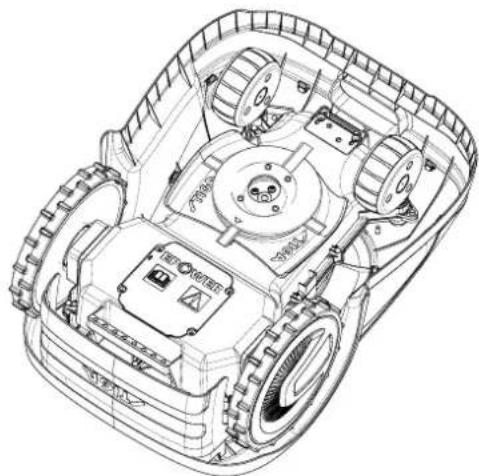
1.2. TECHNICAL SPECIFICATIONS
3.3. UNPACKING
3.4. SYMBOLS AND LABELS

WARNING:

WARNING:
4.3. CHECKING INSTALLATION REQUIREMENTS

WARNING:
4.3.3. MAIN CHECKS FOR INSTALLING THE BOUNDARY CABLE
4.4. CRITERIA FOR INSTALLING THE PERIMETER CABLE
4.4.1. PLACING THE BOUNDARY CABLE
Procedure:
STIGA

NOTE:
4.4.3. SWITCHING BETWEEN DIFFERENT PARTS OF THE GARDEN
Procedure:
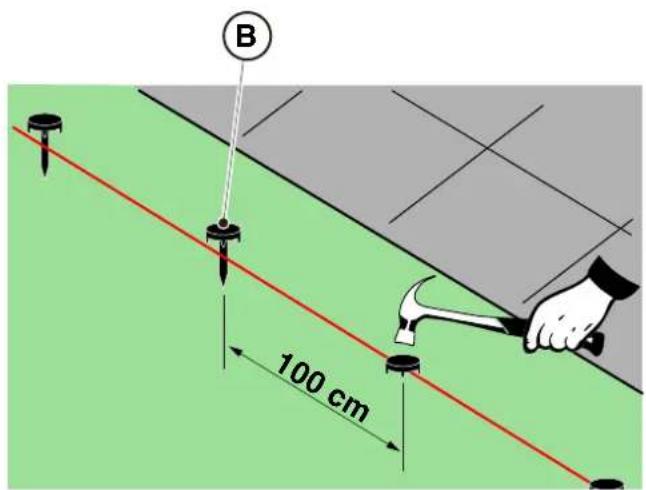
POSITIONING WITH BURIAL
(ONLY AVAILABLE FROM AUTHORIZED DEALERS)
4.5.2. JOINING THE PERIMETER CABLE.

NOTE:
STEPS
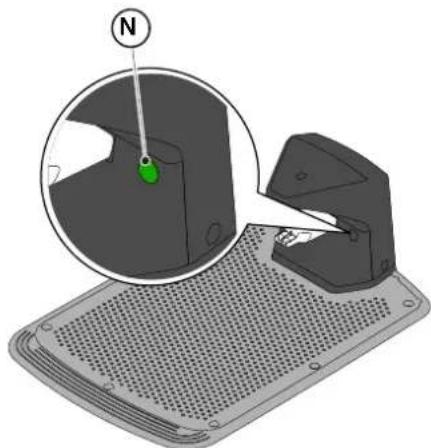
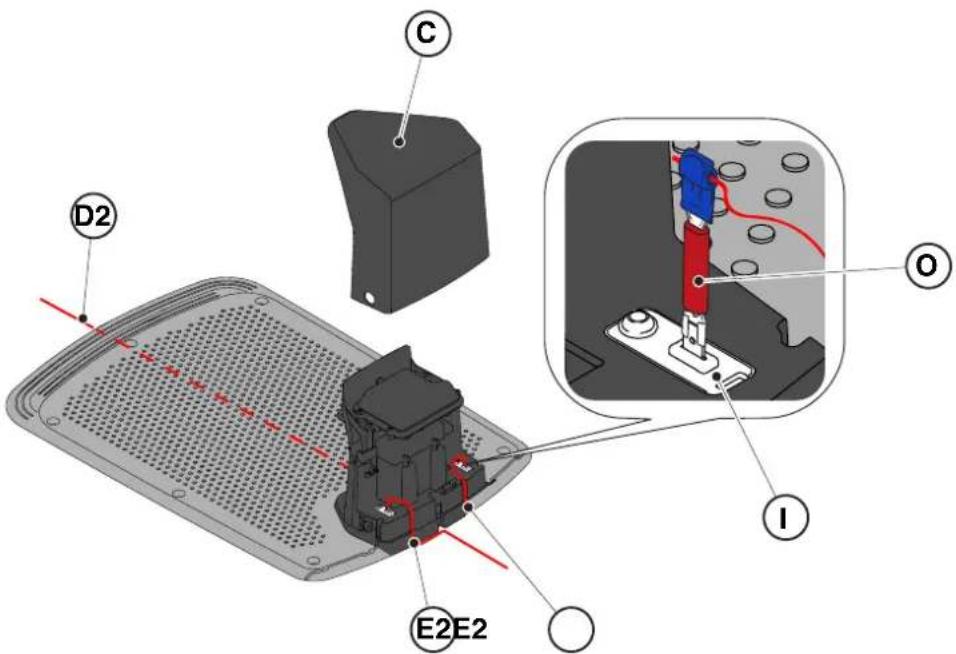
4.6. CHARGING THE ROBOTIC LAWNMOWER AFTER INSTALLATION
| G 300 G 600 G | 1200 | |
| Border Cut | | | |
| Go-To Cut Points | 1 3 5 | | |
| Eco Mode | | | |
| Rain Sensor | | | |
| Closed Area | | | |
PRODUCT SETUP INDEX
4.7.1. BEFORE LOGGING IN....31
4.7.2. REGISTRATION (SIGN UP) 31
4.7.3. PAIRING 31
4.7.4. DEVICE PAGE 32
4.7.5. CLOSED AREA 32
4.7.6. SETTINGS 32
4.7.7. SIMPLE MOWING/SCHEDULED MOWING (SPOT CUT/SCHEDULED) 32
4.7.8. MOWING SESSIONS 32
4.7.9. GO-TO-CUT POINTS 33
4.7.10. BORDER CUT 33
4.7.11. ECO MODE....33
4.7.12. RAIN SENSOR (DEPENDING ON MODEL) 33
4.7.13. KEYBOARD LOCK (APP LOCK) 33
4.7.14. USER MANAGEMENT 35
4.7.15. DEALER 35
4.7.16. MESSAGES 35
4.7.17. PROFILE 35
4.7.1. INTRODUCTION
5.2. MANUAL USE OF THE ROBOTIC LAWNMOWER
5.3.1. STOP IN SAFETY MODE - STOP BUTTON
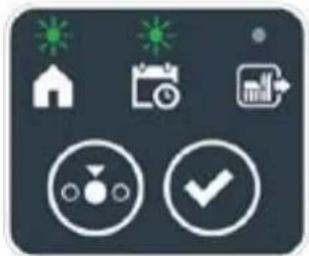
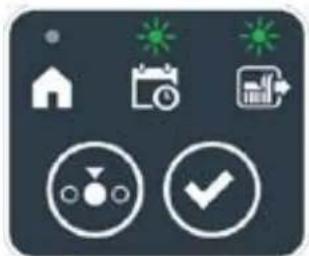
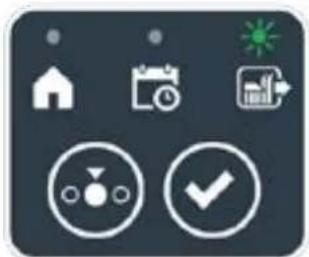

STIGA
Procedure:
5.3.6. DISPLAY OF ALARM STATUS - ALARM ICON
The "ALARM" icon (N) indicates a malfunction.
Procedure:
5.3.7. DISPLAY OF BATTERY CHARGE - BATTERY ICON
5.3.8. STARTING THE ROBOTIC LAWNMOWER
5.5. BATTERY CHARGING
5.6. ADJUSTING THE CUTTING HEIGHT
Procedure:
6. MAINTENANCE
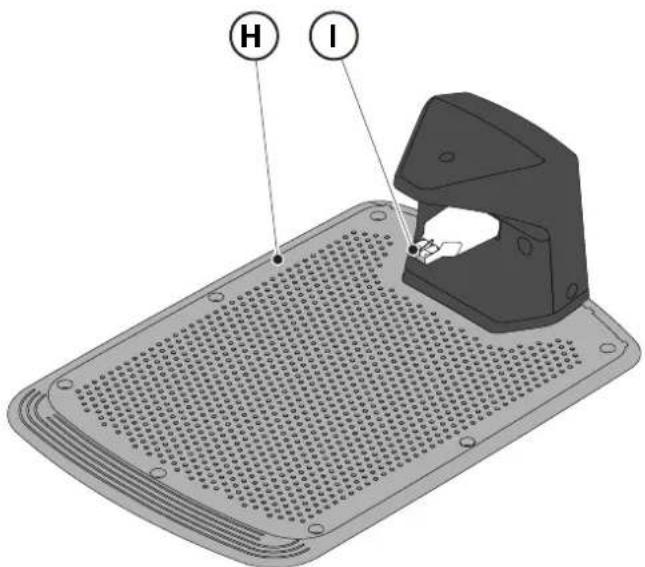
6.3. REPLACING THE CUTTING BLADE

NOTE:
6.4. MAINTENANCE AND STORAGE OF THE WINTER BATTERY
Procedure:
6.5. BATTERIBYTE
(Supply of Machinery (Safety) Regulations 2008, S.I. 2008 No. 1597, Annex II, part A)
- The company: ST. S.p.A. – Via del Lavoro, 6 – 31033 Castelfranco Veneto (TV) – Italy
- Hereby declares under its own responsibility that the machine:
Robotic lawnmower
a) Homologation type: SRSW01 c) Serial number: 22A••RMO000001 ÷ 99L••RMO999999 d) Engine: battery-operated
- Conforms to UK Regulations:
• S.I. 2008/1597 - Supply of Machinery (Safety) Regulations 2008 • S.I. 2016/1091 - Electromagnetic Compatibility Regulations 2016 • S.I. 2012/3032 - The Restriction of the Use of Certain Hazardous Substances in Electrical and Electronic Equipment Regulations 2012 • S.I. 2017/1206 - Radio Equipment Regulations 2017
- Reference to harmonised standards:
EN 60335-1:2012 / AC:2014 / A11:2014 / A13:2017 /
A1:2019 / A2:2019 / A14:2019
EN IEC 63000:2018
EN 61000-3-2:2019
EN 61000-3-3:2013 / A1:2019
EN 300 328 V2.2.2
EN 303 447 V1.2.0
EN 50636-107:2015/A1/A2
EN 301 489-17 V3.2.4
EN 62479:2010
EN 55014-1:2017 / A11:2020
EN 55014-2:2015
i) Cutting width: 18 cm
n) Person authorised to compile the technical file: ST. S.p.A.
Via del Lavoro, 6
31033 Castelfranco Veneto (TV) - Italia
o) Castelfranco Veneto, 01/12/2022 CEO Stiga Group
Sean Robinson
UK Importer:
STIGA LTD
Unit 8, Bluewater Estate Plympton,
Devon, PL7 4JH, England

| FR (Traduction de la notice originale)Déclaration CE de Conformité (Directive Machines 2006/42/CE, Annexe II, partie A)1. La Société2. Déclare sous sa propre responsabilité que la machine : Robot-tondeusea) Type / Modèle de Basec) Série d) Moteur: batterie3. Est conforme aux prescriptions des directives :4. Renvoi aux Normes harmoniséesi) Largeur de coupen) Personne habilitée à établir le Dossier Technique :o) Lieu et Date | DE (Übersetzung der Originalbetriebsanleitung)EG-Konformitätserklärung (Maschinenrichtlinie 2006/42/EG, Anhang II, Teil A)1. Die Gesellschaft2. Erklärt auf eigene Verantwortung, dass die Maschine: Mährobotera) Typ / Basismodellc) Seriennummerd) Motor: Batterie3. Den Anforderungen der folgenden Richtlinien entspricht:4. Bezugnahme auf die harmonisierten Normeni) Schnittbreiten) Zur Verfassung der technischen Unterlagen befugte Person:o) Ort und Datum | NL (Vertaling van de oorspronkelijke gebruiksaanwijzing)EG-verklaring van overeenstemming (Richtlijn Machines 2006/42/CE, Bijlage II, deel A)1. Het bedrijf2. Verklaart onder zijn eigen verantwoordelijkheid dat de machine: Robotmaaier a) Type / Basismodelc) Serienummerd) Motor: accu3. Voldoet aan de specificaties van der richtlijnen:4. Verwijzing naar de Geharmoniseerde normeni) Snijbreedten) Bevoegd persoon voor het opstellen van het Technisch Dossiero) Plaats en Datum |
| ES (Traducción del Manual Original)Declaración de Conformidad CE (Directiva Máquinas 2006/42/CE, Anexo II, parte A)1. La Empresa2. Declara bajo su propia responsabilidad que la máquina: Robot cortacéspeda) Tipo / Modelo Basec) Matrículad) Motor: bateria3. Cumple con las especificaciones de las directivas:4. Referencia a las Normas armonizadasi) Amplitud de corten) Persona autorizada a realizar el Manual Técnico:o) Lugar y Fecha | PT (Tradução do manual original)Declaração CE de Conformidade (Diretiva de Máquinas 2006/42/CE, Anexo II, parte A)1. A Empresa2. Declara sob a própria responsabilidade que a máquina: Robot corta-relva a) Tipo / Modelo Basec) Matrículad) Moto: Bateria3. É conforme às especificações das diretivas:4. Referência às Normas harmonizadasi) Amplitude de corten) Pessoa autorizada a elaborar o Caderno Técnicoo) Local e Data | NO (Oversettelse av original bruksanvisning)EF- Samvarserklæring (Maskindirektiv 2006/42/EF, Vedlegg II, del A)1. Firmaet2. Erklærer på eget ansvar at maskinen: Robotgressklippera) Type / Modellc) Serienummerd) Motor: batteri3. Oppfyller kravene i direktivene:4. Henvisning til harmoniserte standarderI) Klippebredden) Person som har fullmakt til å ufterdige teknisk dokumentasjon:o) Sted og dato |
| SV (Översättning av bruksanvisning i original)EG-försäkran om överensstämmelse (Maskindirektiv 2006/42//EG, bilaga II, dela)1. Företaget2. Försäkrar på eget ansvar att maskinen: Gräsklipparrobota) Typ / Basmodellc) Serienummerd) Motor: batteri3. Överensstämmer med föreskrifterna i direktivet4. Referens till harmoniserade standarderi) Skärbreddn) Auktoriserad person för upprättandet av den tekniska dokumentationen:o) Ort och datum | DA (Översættelse af den originale brugsanvisning)EF-overensstemmelseserklæring (Maskindirektiv 2006/42/EF, bilag II, del A)1. Firmaet2. Erklærer på eget ansvar, at maskinen: Robotplænekllippera) Type / Modelc) Serienummerd) Motor: batteri3. Er i overensstemmelse med specifikationerne ifølge direktiverne:4. Henvisning til harmoniserede standarderi) Klippebredden) Person, der har bemyndigelse til at udarbejde det tekniske dossier:o) Sted og dato | FI (Alkuperäisten ohjeiden käännös)EY-VAATIMUSTENMUKAISUUSVAKUUTUS (Konedirektiivi 2006/42/EY, Liite II, osa A)1. Yritys2. Vakuuttaa omalla vastuullaan, että kone: Robottiruohonlelikkurla) Tyyppl / Perusmalllc) Sarjanumerod) Moottori : akku3. On yhdenmukainen seuraavien direktiivien asettamien vaatimusten kanssa:4. Viittaus harmonisoituihin standardeihini) Leikkuuleveysn) Teknisten asiakirjojen laatimiseenvaltuutettu henkilö:o) Paikka ja päivämäärä |
| SL (Prevod izvirnih navodil)ES izjava o skladnosti (Direktiva 2006/42/ES) , priloga II, del A)1. Družba2. pod lastno odgovornostjo izjavlja, da je stroj: Robotska kosilnicaa) Tip / osnovni modelc) Serijska številkad) Motor: baterija3. Skladen je z določili direktiv :4. Sklicevanje na usklajene predpisei) Obseg košnjen) Oseba, pooblaščena za sestavotehnične knjižice:o) Kraj In datum | LT (Originalių instrukciju vertimas)EB atitikties deklaracija (Mašinų direktyva 2006/42/CE, Priedas II, dalis A)1. Bendrovė2. Prisilma atsakomybę, kad jrenglnys: Žolės pjovimo robotasa) Tipas / Bazinis Modelisc) Serijos numerisd) Variklis: baterija3. Atitinka direktyvose pateiktas specifikacijas:4. Nuoroda i suderintas Normasi) Pjovimo plotisn) Autorizuotas asmuo sudaryti Techninę Dokumentaciją:o) Vieta ir Data | LV (Instrukciju tulkojums no originálvalodas)EK atbilstības deklarācija (Direktīva 2006/42/EK par mašinām, pleilkums II, daļa A)1. Uzņēmums2. Uzņemoties par to pilnu atbildību, pazino, ka mašina: Robotizēta pljaujmašina a) Tips / Bāzes modelsc) Sērijas numursd) Motors: akumulators3. Atbilst šādu direktīvu prasībām:4. Atsauce uz harmonizētiem standartiemi) Pljaušanas platumsn) Pilnvarotais darbinieks, kas sagatavoja tehnisko dokumentāciju:o) Vieta un datums |
| CS (Překlad původního návodu k používání)ES – Prohlášení o shodě(Směrnice o Strojních zařízeních 2006/42/ES, Přiloha II, část A)1. Společnost2. Prohlášuje na vlastní odpovědnost, že stroj: Robotická sekačkaa) Typ / Základní modelc) Výrobní číslod) Motor: akumulátor3. Je ve shodě s nařízeními směrnic:4. Odkazy na Harmonizované normyi) Šířka řezánín) Osoba autorizovaná pro vytvoření Technického spisu:o) Misto a Datum | PL (Tłumaczenie instrukcji oryginalnej)Deklaracja zgodności WE(Dyrektywa maszynowa 2006/42/WE,Załącznik II, część A)1. Spółka2. Oświadczenie na własną odpowiedzialność, że maszyna: Kosiarka trawnikowaa) Typ / Model podstawowyc) Numer seryjnyd) Silnik: akumulator3. Spełnia podstawowe wymogi następujących Dyrektyw:4. Odniesienie do Norm zharmonizowanychi) Szerokość cięcia n) Osoba upoważniona do zredagowania Dokumentacji technicznej:o) Miejscowość i data | ET (Algupārase kasutusjuhendi tõlge)EÜ vastavusdeklaratsioon(Masinadirektiiv 2006/42/EÜ, Lisa II, osa A)1. Firma2. Kinnitab omal vastutusel, et masin:Robotniiduka) Tüüp / Põhimudel c) Matrikkeld) Mootor: aku3. Vastab direktiivide nõuetele:4. Viide ühtlustatud standarditelei) Lõikelaiusn) Tehnilise Lehe autoriseeritud koostaja:o) Koht ja Kuupäev |
| HU (Eredeti használati utasítás fordítása)EK-megfelelőségi nyilatkozata(2006/42/EK gépirányelv, ll. melléklet "A" rész)1. Alulírott Vállalat2. Felelősségének teljes tudatában kijelenti, hogy az alábbi gép: Robotfűnyíróa) Típus / Alaptipusc) Gyártási számd) Motor: akkumulátor3. Megfelel az alábbi irányelvekelőírásainak:4. Hivatkozás a harmonizált szabványokrai) Vágási szélességn) Műszaki Dosszié szerkesztésérefelhatalmazott személy:o) Helye és ideje | RU (Перевод оригинальных инструкций)Декларация соответствия нормам EC (Direktiva o машинном оборудовании 2006/42/EC, Приложение II, часть A)1. Предприятие2. Заявляет под собственную ответственность, что машина: Робот-газонокосилкаa) Тип / Базовая модельc) Паспортd) Двигатель: батарея сгорания3. Соответствует требованиям следующих директив:4. Ссылки на гармонизированные нормыi) Амплитуда кошенияn) Лицо, уполномоченное на подготовку технической документации:o) Место и дата | HR (Prijevod originalnih uputa)EK Izjava o sukladnosti (Direktiva 2006/42/EZ o strojevima, dodatak II, dio A)1. Tvrtka:2. pod vlastitom odgovornošću izjavljuje da je stroj: Robotska kosilicaa) Vrsta / Osnovni modelc) Matični brojd) Motor: baterija3. sukladan s temeljnim zahtjevima direktiva:4. Primijenjene su slijedeće harmonizirane norme:i) Širina rezanján) Osoba ovlaštena za pravljenje Tehničke datoteke:o) Mjesto i datum |
| SR (Prevod originalnih uputstval)EC deklaracija o usaglašenosti (Direktiva o mašinama 2006/42/EC, Prilog II, deo A)1. Preduzeće2. Daje izjavu pod vlastitom odgovornošćuda je mašina: Robot kosačicaa) Tip / Osnovni modelc) Serijski brojd) Motor: akumulator3. U skladu s osnovnim zahtevima direktiva:4. Pozivanje na usklađene normei) Širina košenjan) Osoba ovlašćena za sastavljanje tehničke brošureo) Mesto i datum | TR (Orijinal Talimatların Tercümesi)AT Uygunluk Beyanı (2006/42/CE Makine Direktifi, Ek II, bölüm A)1. Şirket2. Şahsi sorumluluğu altında aşağıdaki makinenin: Robot çim biçme makinesia) Tip / Standart modelc) Sicil numarasıd) Motor : batarya3. Aşağıdaki direktiflerin özelliklerine uygun olduğunu beyan etmektedir:4. Harmonize standartlara atifi) Kesim genişligiń) Teknik Dosyayı oluşturmaya yetkili kişi:o) Yer ve Tarih | RO (Traducerea manualului fabricantului)CE -Declaratie de Conformitate (Directiva Mašini 2006/42/CE, Anexa II, partea A)1. Societatea2. Declară pe propria răspundere că mașina: Robot mașină de tuns iarbaa) Tip / Model de bazăc) Număr de seried) Motor: baterie3. Este în conformitate cu specificațiile directivelor:4. Referință la Standardele armonizatei) Lătimea de täieren) Persoană autorizată să întocmeascăDosarul Tehnico) Locul și Data |
STIGA
STIGA LTD (UK Importer)
Unit 8, Bluewater Estate Plympton, Devon, PL7 4JH, England
STIGA S.p.A.
Via del lavoro, 6
31033 Castelfranco Veneto (TV)
Italy

FR
DANISH - TRANSLATION OF THE ORIGINAL INSTRUCTIONS
TABLE OF CONTENTS
1. MODELS AND TECHNICAL INFORMATION 1
1.1. MODELS....1 1.2. TECHNICAL DATA....2
2. SAFETY 3
2.1. SAFETY INFORMATION....3 2.2. SAFETY CHECKS 5
2.2.1. SAFE OPERATING PROCEDURES 5 2.2.2. FUNCTION....5
2.3. STOPPING AND SHUTTING DOWN THE ROBOTIC LAWNMOWER UNDER SAFE CONDITIONS ...... 7
3. INTRODUCTION 8
3.1. GENERAL INTRODUCTION 8
3.1.1. PURPOSE OF THE USER MANUAL ....8 3.1.2. INSTRUCTIONS FOR READING FROM SMARTPHONE 8
3.2. PRODUCT OVERVIEW 9
3.2.1. OVERALL DESCRIPTION 9 3.2.2. MAIN COMPONENTS....10
3.3. UNPACKING....11 3.4. SYMBOLS AND SIGNS 12 3.5. GENERAL INSTRUCTIONS FOR READING THE INSTRUCTION MANUAL 13
4. INSTALLATION 14
4.1. GENERAL INFORMATION REGARDING INSTALLATION .... 14 4.2. COMPONENTS FOR INSTALLATION 14 4.3. CHECKING THE PREREQUISITES FOR INSTALLATION ....15
4.3.1. CHECKING THE GARDEN: 15 4.3.2. CHECKS OF THE CHARGING STATION AND POWER SUPPLY UNIT INSTALLATION:...... 15 4.3.3. OVERALL CHECKS FOR INSTALLATION OF THE BOUNDARY WIRE: 17
4.4. CRITERIA FOR INSTALLING THE BOUNDARY WIRE 19
4.4.1. PLACEMENT OF THE BOUNDARY WIRE.... 19 4.4.2. DELINEATION OF OBSTACLES: 21 4.4.3. PASSAGES BETWEEN DIFFERENT AREAS OF THE GARDEN.... 23
4.5. INSTALLATION OF THE COMPONENTS....23
4.5.1. INSTALLATION OF THE BOUNDARY WIRE....24 4.5.2. CONNECTION OF THE BOUNDARY WIRE.... 25 4.5.3. INSTALLATION OF THE CHARGING STATION 26 4.5.4. INSTALLATION OF RESISTOR FOR SMALLER AREAS 28
4.6. CHARGING THE ROBOTIC LAWNMOWER AFTER INSTALLATION....29 4.7. PRODUCT SETTINGS....30
5. FUNCTION
5.1. CHECKING THE SAFETY DEVICES BEFORE STARTING THE ROBOTIC LAWNMOWER....35 5.2. MANUAL OPERATION OF THE ROBOTIC LAWNMOWER 36 5.3. DESCRIPTION OF THE CONTROLS ON THE ROBOTIC LAWNMOWER 37 5.3.1. SAFETY STOP - STOP BUTTON 37
5.3.2. Safe shutdown - safety key 38
5.3.3. Switching on and off - ON/OFF button 38
5.3.4. Selecting a scheduled program/single work cycle - SCHEDULED PROGRAM button ..... 39
5.3.5. Displaying the Bluetooth status and disconnecting - BLUETOOTH button....41
5.3.6. Displaying the alarm states - ALARM icon 41
5.3.7. Displaying the battery charge - BATTERY icon 42
5.3.8. Starting the robotic lawnmower - START button 42
5.4. Charging station function 43
5.5. Charging the battery 43
5.6. Adjusting the cutting height 44
6. Maintenance 45
6.1. Programmed maintenance 45
6.2. Cleaning the product....46
6.3. Replacing the cutting blades 48
6.4. Maintaining the battery before winter and storage....49
6.5. Replacing the battery....49
7. Troubleshooting 50
7.1. Main messages from the app....51
8. Transport, storage, and disposal 53
8.1. Transport 53
8.2. Storage....53
8.3. Disposal 53
9. Accessories 54
10. Warranty 55
10.1. Warranty coverage....55
- EU Declaration of Conformity 56
1. Models and technical information
1.1. Models
The instruction manual covers the models G 300, G 600, G 1200.
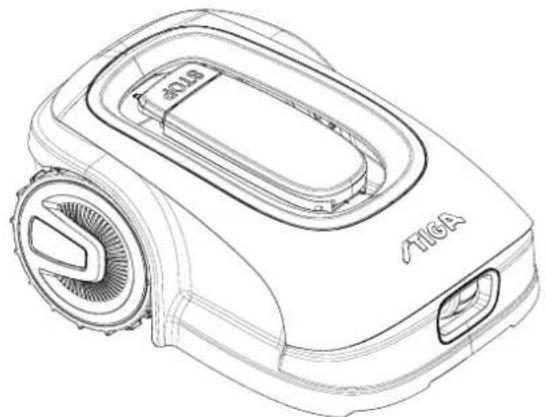
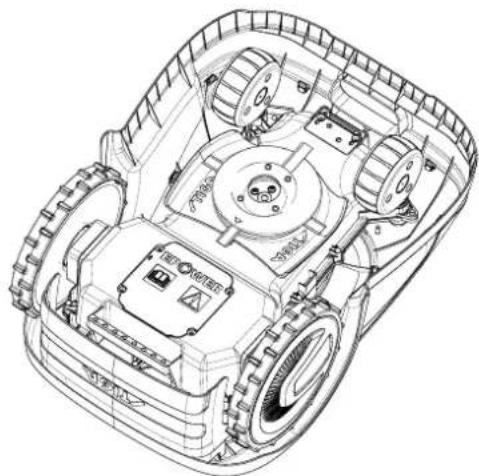
1.2. TECHNICAL DATA
| TEKNISKE OPLYSNINGER | MÅLE ENHEDER | STIGA G 300 STIGA G 600 STIGA G 1200 |
| Dimensioner (BxHxD) | [mm] 413 x 252 x 560 413 x 252 x 560 413 x 252 x 560 | | | |
| Robotplæneklipperens vægt | [kg] 7,4 7,6 8 | | | |
| Klippehøjde (Min-Maks) | [mm] 20-60 20-60 | 20-60 | | |
| Knivens diameter | [mm] | 180 | 180 | 180 |
| Klippehastighed | [rpm] | 2850+/-50 | 2850+/-50 | 2850+/-50 |
| Kørehastighed | [m/min] | 22 | 22 | 22 |
| Maksimal hældning | % | 45 | 45 | 45 |
| Maksimal hældning langs omkredsen | % | 20 | 20 | 20 |
| Elektrisk drivmotortype | - | Brushless | Brushless | Brushless |
| Klippesystemets type | - | 4 drejelige skæreknive | 4 drejelige skæreknive | 4 drejelige skæreknive |
| Skæreanordningens kode | - | 322104105/0 | 322104105/0 | 322104105/0 |
| Elektrisk skæremotortype | - | Brushless | Brushless | Brushless |
| Registreret lydeffektniveau | [dB] (A) | 57 | 57 | 57 |
| Usikkerhed om støjemissionerne, KWA | [dB] (A) | 1,47 | 1,47 | 1,47 |
| Garanteret lydeffektniveau | [dB] (A) | 59 | 59 | 59 |
| Lydniveau ved operatørens øre | [dB] (A) | 46,3 | 46,3 | 46,3 |
| IP-klassificering robotplæneklipper | - | IPX5 | IPX5 | IPX5 |
| IP-klassificering opladningsstation | - | IPX1 | IPX1 | IPX1 |
| IP-klassificering strømforsyningsenhed | - | IP67 | IP67 | IP67 |
| Omgivelsestemperatur under robotplæneklipperens drift [°C] | [°C] | 0 ÷ 50 | 0 ÷ 50 | 0 ÷ 50 |
| Omgivelsestemperatur under opladningsstationens drift [°C] | [°C] | -10 ÷ 50 | -10 ÷ 50 | -10 ÷ 50 |
| Omgivelsestemperatur under strømforsyningsenhedens drift [°C] | [°C] | -10 ÷ 50 | -10 ÷ 50 | -10 ÷ 40 |
| Driftskapacitet | [m2] | 300 | 600 | 1200 |
| Strømforsyning | - | Indgang: 100-240Vca; 1,2A Output: 30Vcc; 2A | Indgang: 100-240Vca; 1,2A Output: 30Vcc; 2A | Indgang: 100-240Vca; 1,2A Output: 30Vcc; 2A |
| Batterimodel | - | 25,2 - 25,9 V; 2 Ah | 25,2 - 25,9 V; 2,5 Ah | 25,2 - 25,9 V; 5 Ah |
| Opladningstid | [min] | 60 | 80 | 150 |
| Bluetooth | - | 4,2 4,2 | 4,2 | |
2. SAFETY
2.1. SAFETY INFORMATION
3.3. UNPACKING
3.4. SYMBOLS AND SIGNS

WARNING:

WARNING:
4.3. CHECKING THE PREREQUISITES FOR INSTALLATION

WARNING:
4.4. CRITERIA FOR INSTALLING THE PERIMETER WIRE
4.4.1. PLACING THE PERIMETER WIRE
Procedure:

CAUTION:
4.4.3. PASSAGE BETWEEN DIFFERENT AREAS OF THE GARDEN
Procedure:
PLACEMENT WITH PLUG

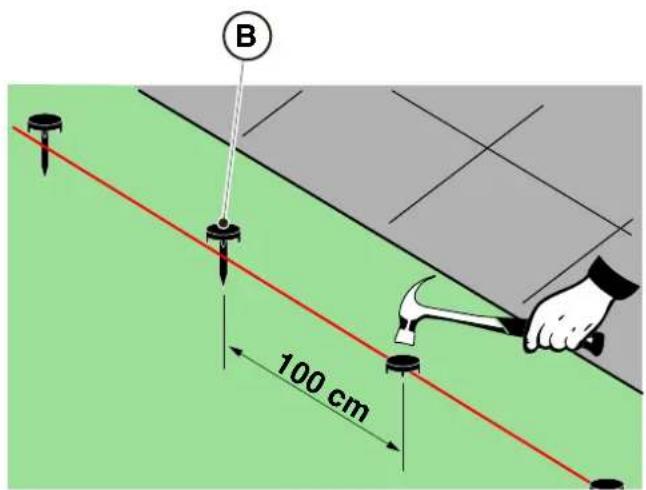
UNDERGROUND PLACEMENT
(MAY ONLY BE PERFORMED BY AN AUTHORIZED DEALER)
STIGA
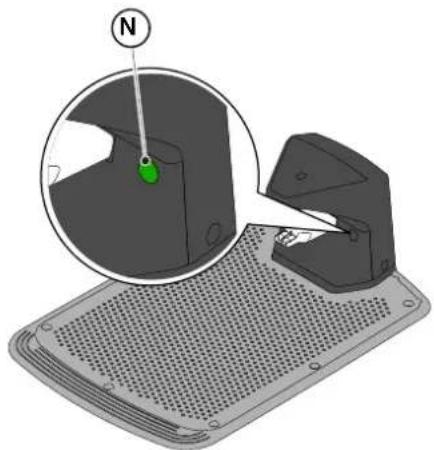
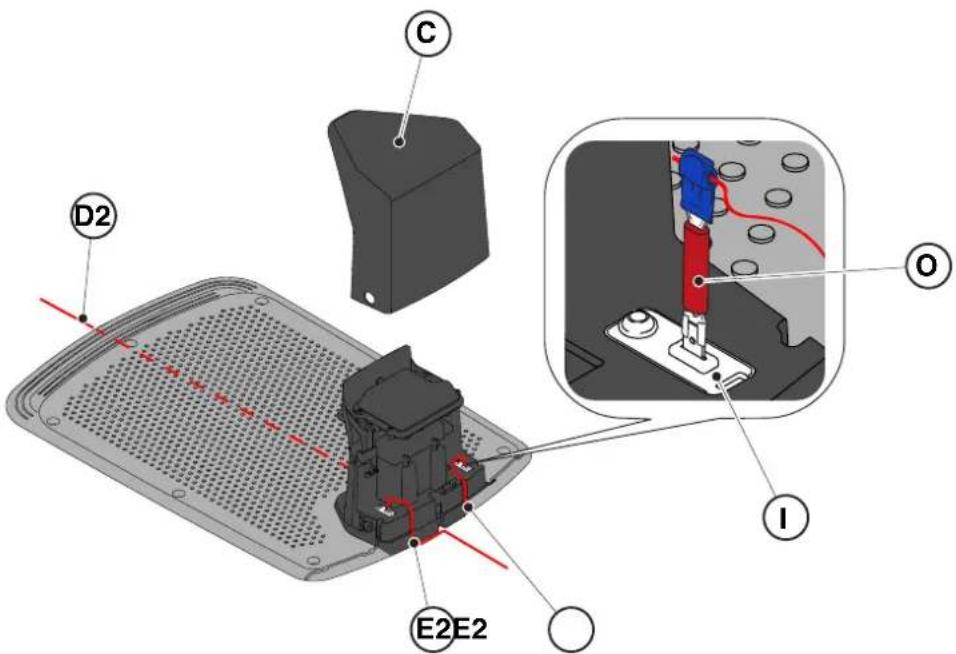
4.6. CHARGING THE ROBOTIC LAWNMOWER AFTER INSTALLATION
| G 300 G 600 G | 1200 | |
| Border Cut | | | |
| Go-To Cut Points | 1 3 5 | | |
| Eco Mode | | | |
| Rain Sensor | | | |
| Closed Area | | | |
OVERVIEW OF PRODUCT SETTINGS
4.7.1. PRELOGIN 31
4.7.2. REGISTRATION (SIGN UP) 31
4.7.3. PAIRING 31
4.7.4. DEVICE PAGE 32
4.7.5. CLOSED AREA 32
4.7.6. SETTINGS 32
4.7.7. SPOT CUT/SCHEDULED 32
4.7.8. MOWING SESSIONS 32
4.7.9. GO-TO-CUT POINTS 33
4.7.10. BORDER CUT 33
4.7.11. ECO MODE....33
4.7.12. RAIN SENSOR (DEPENDING ON MODEL) 33
4.7.13. APP LOCK 33
4.7.14. USER CONTROL....35
4.7.15. DEALER 35
4.7.16. MESSAGES 35
4.7.17. PROFILE 35
4.7.1. BEFORE LOGIN
5.2. MANUAL OPERATION OF THE ROBOTIC LAWNMOWER
5.3.1. SAFETY STOP - STOP BUTTON
The "STOP" button (A) is a control device that stops the robotic lawnmower under safe conditions, regardless of its operating conditions.
Procedure:
5.3.4. SELECTION OF SCHEDULED PROGRAM/SINGLE WORK CYCLE/RETURN TO CHARGING STATION - FUNCTION SELECTION BUTTON
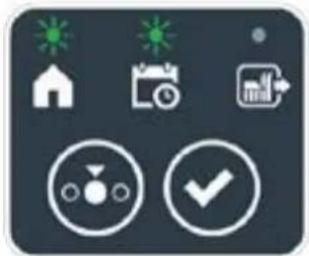
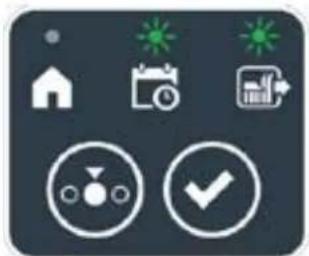
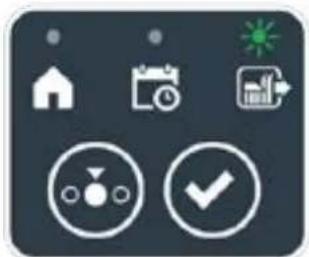

Procedure:
5.3.6. VIEWING THE ALARM STATES - ALARM ICON
The lit "ALARM" icon (N) indicates an anomaly in operation.
Procedure:
5.3.7. VIEWING THE BATTERY CHARGE - BATTERY ICON
5.5. CHARGING THE BATTERY
5.6. ADJUSTING THE CUTTING HEIGHT
Procedure:
6. MAINTENANCE
6.1. SCHEDULED MAINTENANCE
6.2. CLEANING THE PRODUCT


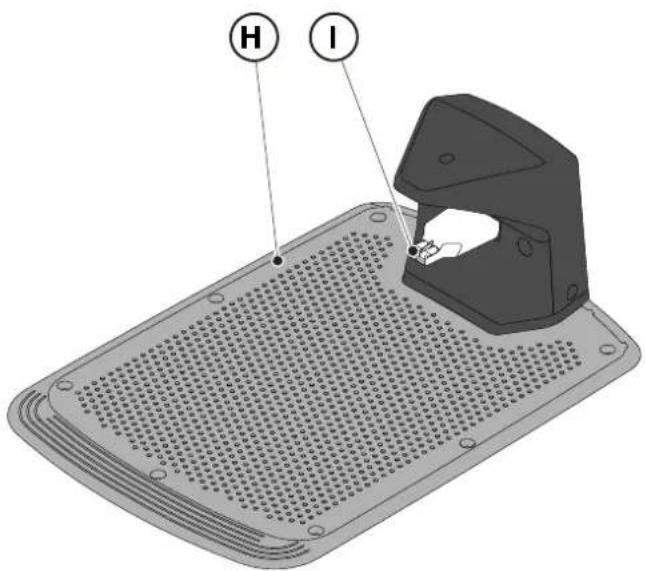
6.3. REPLACING THE CUTTING BLADES

6.4. BATTERY MAINTENANCE BEFORE WINTER AND STORAGE
Procedure:
6.5. REPLACING THE BATTERY
(Supply of Machinery (Safety) Regulations 2008, S.I. 2008 No. 1597, Annex II, part A)
- The company: ST. S.p.A. – Via del Lavoro, 6 – 31033 Castelfranco Veneto (TV) – Italy
- Hereby declares under its own responsibility that the machine:
Robotic lawnmower
a) Homologation type: SRSW01 c) Serial number: 22A••RMO000001 ÷ 99L••RMO999999 d) Engine: battery-operated
- Conforms to UK Regulations:
• S.I. 2008/1597 - Supply of Machinery (Safety) Regulations 2008 • S.I. 2016/1091 - Electromagnetic Compatibility Regulations 2016 • S.I. 2012/3032 - The Restriction of the Use of Certain Hazardous Substances in Electrical and Electronic Equipment Regulations 2012 • S.I. 2017/1206 - Radio Equipment Regulations 2017
- Reference to harmonised standards:
EN 60335-1:2012 / AC:2014 / A11:2014 / A13:2017 / EN 61000-3-2:2019
A1:2019 / A2:2019 / A14:2019 EN 61000-3-3:2013 / A1:2019
EN IEC 63000:2018 EN 300 328 V2.2.2
EN 303 447 V1.2.0
EN 50636-107:2015 / A1 / A2
EN 301 489-17 V3.2.4
EN 62479:2010
EN 55014-1:2017 / A11:2020
EN 55014-2:2015
i) Cutting width: 18 cm
n) Person authorised to compile the technical file: ST. S.p.A.
Via del Lavoro, 6
31033 Castelfranco Veneto (TV) - Italia
o) Castelfranco Veneto, 01/12/2022 CEO Stiga Group
ST. S.p.A.
Via del Lavoro, 6
31033 Castelfranco Veneto (TV) - Italia
Sean Robinson
UK Importer:
STIGA LTD
Unit 8, Bluewater Estate Plympton,
Devon, PL7 4JH, England

| FR (Traduction de la notice originale)Déclaration CE de Conformité (Directive Machines 2006/42/CE, Annexe II, partie A)1. La Société2. Déclare sous sa propre responsabilité que la machine : Robot-tondeusea) Type / Modèle de Basec) Série d) Moteur: batterie3. Est conforme aux prescriptions des directives :4. Renvoi aux Normes harmoniséesi) Largeur de coupen) Personne habilitée à établir le Dossier Technique :o) Lieu et Date | DE (Übersetzung der Originalbetriebsanleitung)EG-Konformitätserklärung (Maschinenrichtlinie 2006/42/EG, Anhang II, Teil A)1. Die Gesellschaft2. Erklärt auf eigene Verantwortung, dass die Maschine: Mährobotera) Typ / Basismodellc) Seriennummerd) Motor: Batterie3. Den Anforderungen der folgenden Richtlinien entspricht:4. Bezugnahme auf die harmonisierten Normeni) Schnittbreiten) Zur Verfassung der technischen Unterlagen befugte Person:o) Ort und Datum | NL (Vertaling van de oorspronkelijke gebruiksaanwijzing)EG-verklaring van overeenstemming (Richtlijn Machines 2006/42/CE, Bijlage II, deel A)1. Het bedrijf2. Verklaart onder zijn eigen verantwoordelijkheid dat de machine: Robotmaaiera) Type / Basismodelc) Serienummerd) Motor: accu3. Voldoet aan de specificaties van derichtlijnen:4. Verwijzing naar de Geharmoniseerde normeni) Snijbreedten) Bevoegd persoon voor het opstellen van het Technisch Dossiero) Plaats en Datum |
| ES (Traducción del Manual Original)Declaración de Conformidad CE (Directiva Máquinas 2006/42/CE, Anexo II, parte A)1. La Empresa2. Declara bajo su propia responsabilidad que la máquina: Robot cortacéspeda) Tipo / Modelo Basec) Matrículad) Motor: bateria3. Cumple con las especificaciones de las directivas:4. Referencia a las Normas armonizadasi) Amplitud de corten) Persona autorizada a realizar el Manual Técnico:o) Lugar y Fecha | PT (Tradução do manual original)Declaração CE de Conformidade (Diretiva de Máquinas 2006/42/CE, Anexo II, parte A)1. A Empresa2. Declara sob a própria responsabilidade que a máquina: Robot corta-relvaa) Tipo / Modelo Basec) Matrículad) Moto: Bateria3. É conforme às especificações das diretivas:4. Referência às Normas harmonizadasi) Amplitude de corten) Pessoa autorizada a elaborar o Caderno Técnicoo) Local e Data | NO (Oversettelse av original bruksanvisning)EF- Samvarserklæring (Maskindirektiv 2006/42/EF, Vedlegg II, del A)1. Firmaet2. Erklærer på eget ansvar at maskinen: Robotgressklippera) Type / Modellc) Serienummerd) Motor: batteri3. Oppfyller kravene i direktivene:4. Henvisning til harmoniserte standarderI) Klippebredden) Person som har fullmakt til å ufterdige teknisk dokumentasjon:o) Sted og dato |
| SV (Översättning av bruksanvisning i original)EG-försäkran om överensstämmelse (Maskindirektiv 2006/42//EG, bilaga II, dela)1. Företaget2. Försäkrar på eget ansvar att maskinen: Gräsklipparrobota) Typ / Basmodellc) Serienummerd) Motor: batteri3. Överensstämmer med föreskrifterna i direktivet4. Referens till harmoniserade standarderi) Skärbreddn) Auktoriserad person för upprättandet av den tekniska dokumentationen:o) Ort och datum | DA (Översættelse af den originale brugsanvisning)EF-overensstemmelseserklæring (Maskindirektiv 2006/42/EF, bilag II, del A)1. Firmaet2. Erklærer på eget ansvar, at maskinen: Robotplænekllippera) Type / Modelc) Serienummerd) Motor: batteri3. Er i overensstemmelse med specifikationerne ifølge direktiverne:4. Henvisning til harmoniserede standarderi) Klippebredden) Person, der har bemyndigelse til at udarbejde det tekniske dossier:o) Sted og dato | FI (Alkuperäisten ohjeiden käännös)EY-VAATIMUSTENMUKAISUUSVAKUUTUS (Konedirektiivi 2006/42/EY, Liite II, osa A)1. Yritys2. Vakuuttaa omalla vastuullaan, että kone: Robottiruohonlelikkurla) Tyyppl / Perusmalllc) Sarjanumerod) Moottori : akku3. On yhdenmukainen seuraavien direktiivien asettamien vaatimusten kanssa:4. Viittaus harmonisoituihin standardeihini) Leikkuuleveysn) Teknisten asiakirjojen laatimiseenvaltuutettu henkilö:o) Paikka ja päivämäärä |
| SL (Prevod izvirnih navodil)ES izjava o skladnosti (Direktiva 2006/42/ES) , priloga II, del A)1. Družba2. pod lastno odgovornostjo izjavlja, da je stroj: Robotska kosilnicaa) Tip / osnovni modelc) Serijska številkad) Motor: baterija3. Skladen je z določili direktiv :4. Sklicevanje na usklajene predpisei) Obseg košnjen) Oseba, pooblaščena za sestavotehnične knjižice:o) Kraj In datum | LT (Originalių instrukciju vertimas)EB atitikties deklaracija (Mašinų direktyva 2006/42/CE, Priedas II, dalis A)1. Bendrovė2. Prisilma atsakomybę, kad jrenglnys: Žolės pjovimo robotasa) Tipas / Bazinis Modelisc) Serijos numerisd) Variklis: baterija3. Atitinka direktyvose pateiktas specifikacijas:4. Nuoroda i suderintas Normasi) Pjovimo plotisn) Autorizuotas asmuo sudaryti Techninę Dokumentaciją:o) Vieta ir Data | LV (Instrukciju tulkojums no originálvalodas)EK atbilstības deklarācija (Direktīva 2006/42/EK par mašinām, pleilkums II, daļa A)1. Uzņēmums2. Uzņemoties par to pilnu atbildību, pazino, ka mašina: Robotizēta pljaujmašinaa) Tips / Bāzes modelsc) Sērijas numursd) Motors: akumulators3. Atbilst šādu direktīvu prasībām:4. Atsauce uz harmonizētiem standartiemi) Pljaušanas platumsn) Pilnvarotais darbinieks, kas sagatavoja tehnisko dokumentāciju:o) Vieta un datums |
| CS (Překlad původního návodu k používání)ES – Prohlášení o shodě(Směrnice o Strojních zařízeních 2006/42/ES, Přiloha II, část A)1. Společnost2. Prohlášuje na vlastní odpovědnost, že stroj: Robotická sekačkaa) Typ / Základní modelc) Výrobní číslod) Motor: akumulátor3. Je ve shodě s nařízeními směrnic:4. Odkazy na Harmonizované normyi) Šířka řezánín) Osoba autorizovaná pro vytvoření Technického spisu:o) Misto a Datum | PL (Tłumaczenie instrukcji oryginalnej)Deklaracja zgodności WE(Dyrektywa maszynowa 2006/42/WE,Załącznik II, część A)1. Spółka2. Oświadcza na własną odpowiedzialność, że maszyna: Kosiarka trawnikowaa) Typ / Model podstawowyc) Numer seryjnyd) Silnik: akumulator3. Spełnia podstawowe wymogi następujących Dyrektyw:4. Odniesienie do Norm zharmonizowanychi) Szerokość cięcia n) Osoba upoważniona do zredagowania Dokumentacji technicznej:o) Miejscowość i data | ET (Algupārase kasutusjuhendi tõlge)EÜ vastavusdeklaratsioon(Masinadirektiiv 2006/42/EÜ, Lisa II, osa A)1. Firma2. Kinnitab omal vastutusel, et masin:Robotniiduka) Tüüp / Põhimudel c) Matrikkeld) Mootor: aku3. Vastab direktiivide nõuetele:4. Viide ühtlustatud standarditelei) Lõikelaiusn) Tehnilise Lehe autoriseeritud koostaja:o) Koht ja Kuupäev |
| HU (Eredeti használati utasítás fordítása)EK-megfelelőségi nyilatkozata(2006/42/EK gépirányelv, ll. melléklet "A" rész)1. Alulírott Vállalat2. Felelősségének teljes tudatában kijelenti, hogy az alábbi gép: Robotfűnyíróa) Típus / Alaptipusc) Gyártási számd) Motor: akkumulátor3. Megfelel az alábbi irányelvekelőírásainak:4. Hivatkozás a harmonizált szabványokrai) Vágási szélességn) Műszaki Dosszié szerkesztésérefelhatalmazott személy:o) Helye és ideje | RU (Перевод оригинальных инструкций)Декларация соответствия нормам EC (Direktiva o машинном оборудовании 2006/42/EC, Приложение II, часть A)1. Предприятие2. Заявляет под собственную ответственность, что машина: Робот-газонокосилкаa) Тип / Базовая модельc) Паспортd) Двигатель: батарея сгорания3. Соответствует требованиям следующих директив:4. Ссылки на гармонизированные нормыi) Амплитуда кошенияn) Лицо, уполномоченное на подготовку технической документации:o) Место и дата | HR (Prijevod originalnih uputa)EK Izjava o sukladnosti(Direktiva 2006/42/EZ o strojevima, dodatak II, dio A)1. Tvrtka:2. pod vlastitom odgovornošću izjavljuje da je stroj: Robotska kosilicaa) Vrsta / Osnovni modelc) Matični brojd) Motor: baterija3. sukladan s temeljnim zahtjevima direktiva:4. Primijenjene su slijedeće harmonizirane norme:i) Širina rezanján) Osoba ovlaštena za pravljenje Tehničke datoteke:o) Mjesto i datum |
| SR (Prevod originalnih uputstval)EC deklaracija o usaglašenosti (Direktiva o mašinama 2006/42/EC, Prilog II, deo A)1. Preduzeće2. Daje izjavu pod vlastitom odgovornošćuda je mašina: Robot kosačicaa) Tip / Osnovni modelc) Serijski brojd) Motor: akumulator3. U skladu s osnovnim zahtevima direktiva:4. Pozivanje na usklađene normei) Širina košenjan) Osoba ovlašćena za sastavljanje tehničke brošureo) Mesto i datum | TR (Orijinal Talimatların Tercümesi)AT Uygunluk Beyanı (2006/42/CE Makine Direktifi, Ek II, bölüm A)1. Şirket2. Şahsi sorumluluğu altında aşağıdaki makinenin: Robot çim biçme makinesia) Tip / Standart modelc) Sicil numarasıd) Motor : batarya3. Aşağıdaki direktiflerin özelliklerine uygun olduğunu beyan etmektedir:4. Harmonize standartlara atifi) Kesim genişligiń) Teknik Dosyayı oluşturmaya yetkili kişi:o) Yer ve Tarih | RO (Traducerea manualului fabricantului)CE -Declaratie de Conformitate (Directiva Mašini 2006/42/CE, Anexa II, partea A)1. Societatea2. Declară pe propria răspundere că mașina: Robot mașină de tuns iarbaa) Tip / Model de bazăc) Număr de seried) Motor: baterie3. Este în conformitate cu specificațiile directivelor:4. Referință la Standardele armonizatei) Lătimea de täieren) Persoană autorizată să întocmeascăDosarul Tehnico) Locul și Data |
STIGA
STIGA LTD (UK Importer)
Unit 8, Bluewater Estate Plympton, Devon, PL7 4JH, England
STIGA S.p.A.
Via del lavoro, 6
31033 Castelfranco Veneto (TV)
Italy

FR
ENGLISH - TRANSLATION OF ORIGINAL INSTRUCTIONS
TABLE OF CONTENTS
1. MODELS AND TECHNICAL DATA 1
1.1. MODELS....1 1.2. TECHNICAL DATA 2
2. SAFETY 3
2.1. SAFETY INFORMATION....3 2.2. SAFETY INSTRUCTIONS 5 2.2.1. SAFE OPERATING PRACTICES 5 2.2.2. OPERATION 5 2.3. STOPPING AND SHUTTING DOWN THE ROBOTIC LAWNMOWER IN SAFETY CONDITIONS 7
3. INTRODUCTION 8
3.1. GENERAL INTRODUCTION 8 3.1.1. PURPOSE OF THE MANUAL 8 3.1.2. INSTRUCTIONS FOR READING ON A SMARTPHONE 8 3.2. PRODUCT OVERVIEW 9 3.2.1. GENERAL DESCRIPTION 9 3.2.2. MAIN PARTS 10 3.3. UNPACKING 11 3.4. SYMBOLS AND PLATES 12 3.5. GENERAL INSTRUCTIONS FOR READING THE MANUAL....13
4. INSTALLATION
4.1. GENERAL INFORMATION ABOUT INSTALLATION....14 4.2. COMPONENTS FOR INSTALLATION....14 4.3. CHECKING INSTALLATION REQUIREMENTS....15
4.3.1. GARDEN INSPECTION: 15
4.3.2. INSTALLATION OF THE CHARGING STATION AND POWER SUPPLY: 15
4.3.3. Preliminary inspections before installing the boundary cable: 17
4.4. Boundary cable installation criteria....19
4.4.1. Positioning the boundary cable....19
4.4.2. Defining obstacles: 21
4.4.3. Routes between different areas of the garden....23
4.5. Component installation....23
4.5.1. Positioning the boundary cable....4
4.5.2. Connecting the boundary cable....25
4.5.3. Installing the charging station....26
1. Models and technical specifications
1.1. Models
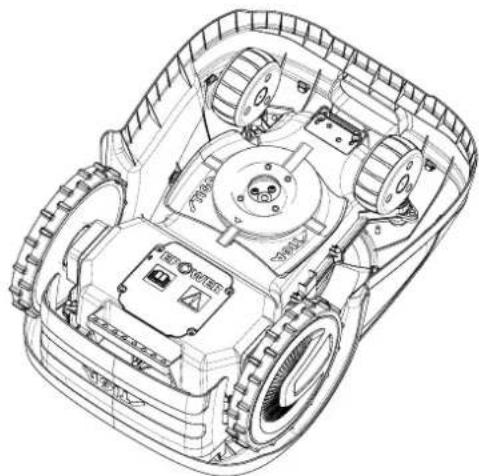
1.2. Technical specifications
3.3. Unpacking

WARNING:

WARNING:
4.3. INSPECTION OF INSTALLATION REQUIREMENTS

WARNING:
4.3.3. PRIMARY INSPECTIONS FOR BOUNDARY WIRE INSTALLATION
4.4. BOUNDARY WIRE INSTALLATION CRITERIA
4.4.1. POSITIONING THE BOUNDARY WIRE
Procedure:
STIGA

NOTE:
4.4.3. ROUTES BETWEEN DIFFERENT AREAS OF THE GARDEN
Procedure:
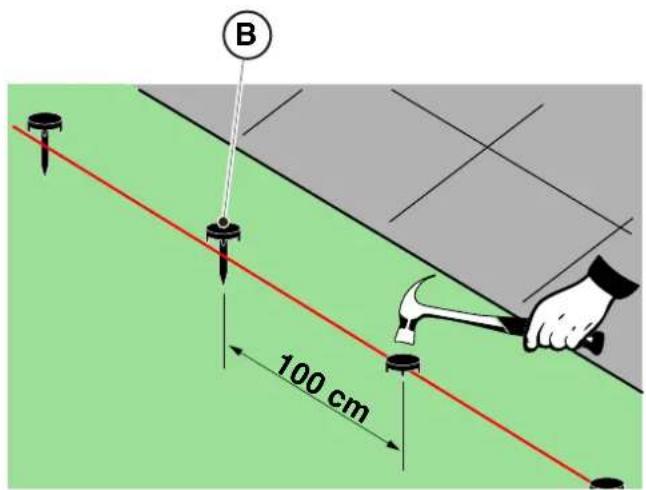
POSITIONING BY BURYING
(TO BE PERFORMED ONLY BY AN AUTHORIZED DEALER)
STIGA
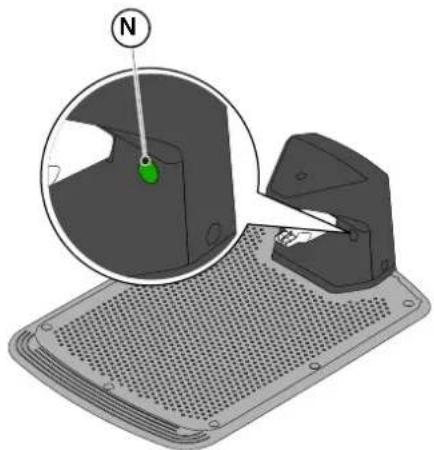
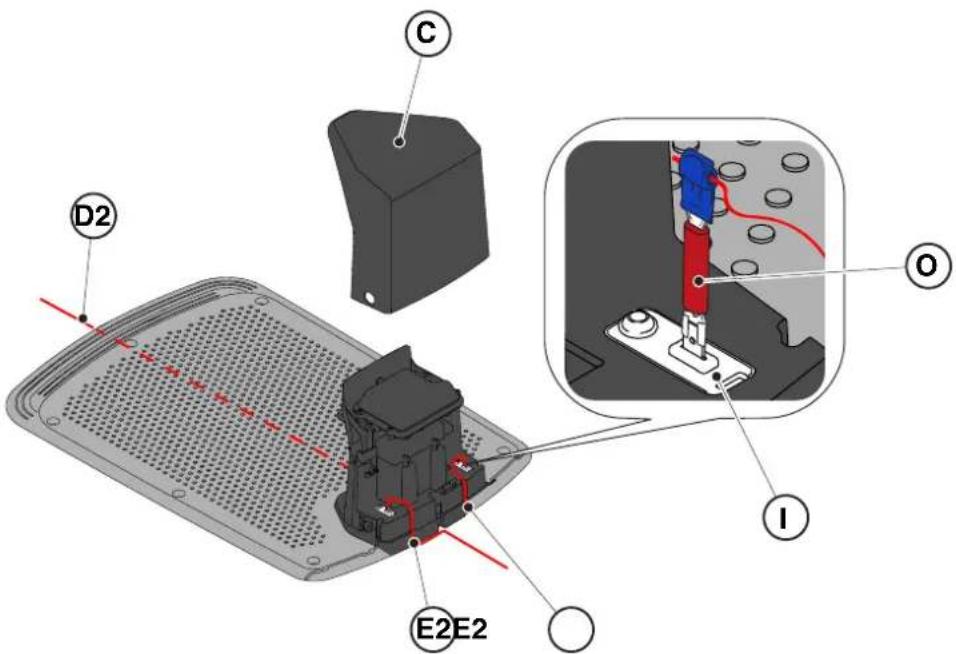
4.6. CHARGE THE ROBOTIC LAWNMOWER AFTER INSTALLATION
| G 300 G 600 G | 1200 | |
| Border Cut | | | |
| Go-To Cut Points | 1 3 5 | | |
| Eco Mode | | | |
| Rain Sensor | | | |
| Closed Area | | | |
TABLE OF CONTENTS FOR PRODUCT SETTINGS
4.7.1. LOGIN....31
4.7.2. REGISTRATION (SIGN UP) 31
4.7.3. DEVICE PAIRING 31
4.7.4. DEVICE PAGE 32
4.7.5. CLOSED AREA 32
4.7.6. SETTINGS 32
5.2. MANUAL OPERATION OF THE ROBOTIC LAWNMOWER
5.3.1. SAFE STOPPING OF THE ROBOT - STOP BUTTON
5.3.4. SELECTION OF PROGRAMMED PROGRAM / SINGLE WORK CYCLE / FORCED RETURN TO CHARGING STATION - SELECTION OF OPERATING MODE
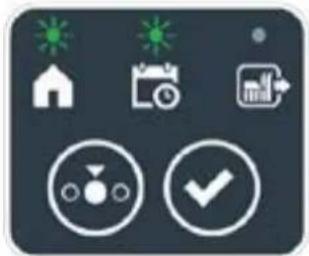
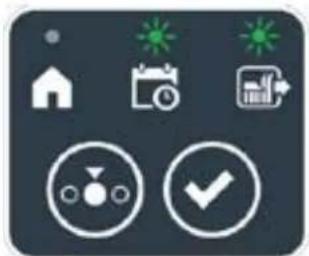
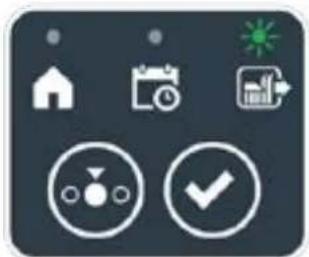

Procedure:
5.3.6. VISUALIZATION OF ALARM STATES - ALARM ICON
5.3.7. VISUALIZATION OF BATTERY CHARGE - BATTERY ICON
5.5. CHARGING THE BATTERY
5.6. ADJUSTING THE CUTTING HEIGHT
Procedure:
6. MAINTENANCE
6.1. SCHEDULED MAINTENANCE

WARNING:
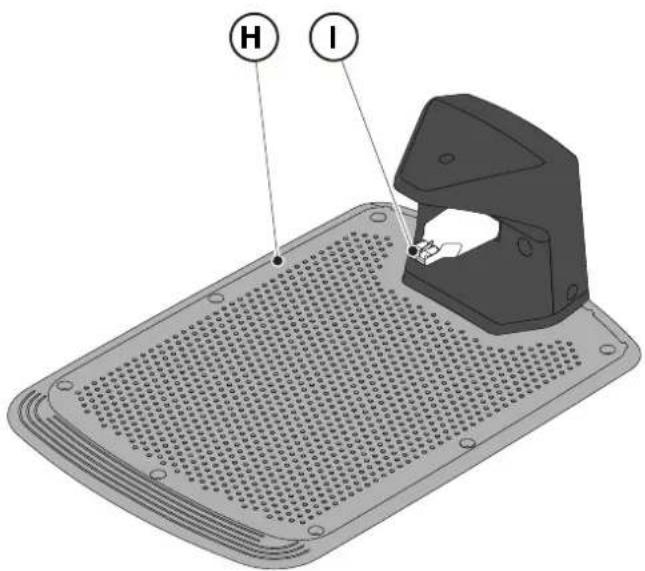
6.3. REPLACING THE CUTTING BLADE

6.4. BATTERY WINTER MAINTENANCE AND STORAGE
Procedure:
6.5. REPLACING THE BATTERY
(Supply of Machinery (Safety) Regulations 2008, S.I. 2008 No. 1597, Annex II, part A)
- The company: ST. S.p.A. – Via del Lavoro, 6 – 31033 Castelfranco Veneto (TV) – Italy
- Hereby declares under its own responsibility that the machine:
Robotic lawnmower
a) Homologation type: SRSW01 c) Serial number: 22A••RMO000001 ÷ 99L••RMO999999 d) Engine: battery-operated
- Conforms to UK Regulations:
• S.I. 2008/1597 - Supply of Machinery (Safety) Regulations 2008 • S.I. 2016/1091 - Electromagnetic Compatibility Regulations 2016 - S.I. 2012/3032 - The Restriction of the Use of Certain Hazardous Substances in Electrical and Electronic Equipment Regulations 2012 • S.I. 2017/1206 - Radio Equipment Regulations 2017
- Reference to harmonised standards:
EN 60335-1:2012 / AC:2014 / A11:2014 / A13:2017 / EN 61000-3-2:2019
A1:2019 / A2:2019 / A14:2019 EN 61000-3-3:2013 / A1:2019
EN IEC 63000:2018 EN 300 328 V2.2.2
EN 303 447 V1.2.0
EN 50636-107:2015 / A1 / A2
EN 301 489-17 V3.2.4
EN 62479:2010
EN 55014-1:2017 / A11:2020
EN 55014-2:2015
i) Cutting width: 18 cm
n) Person authorised to compile the technical file: ST. S.p.A.
Via del Lavoro, 6
31033 Castelfranco Veneto (TV) - Italia
o) Castelfranco Veneto, 01/12/2022 CEO Stiga Group
ST. S.p.A.
Via del Lavoro, 6
31033 Castelfranco Veneto (TV) - Italia
Sean Robinson
UK Importer:
STIGA LTD
Unit 8, Bluewater Estate Plympton,
Devon, PL7 4JH, England

| FR (Traduction de la notice originale)Déclaration CE de Conformité (Directive Machines 2006/42/CE, Annexe II, partie A)1. La Société2. Déclare sous sa propre responsabilité que la machine : Robot-tondeusea) Type / Modèle de Basec) Série d) Moteur: batterie3. Est conforme aux prescriptions des directives :4. Renvoi aux Normes harmoniséesi) Largeur de coupen) Personne habilitée à établir le Dossier Technique :o) Lieu et Date | DE (Übersetzung der Originalbetriebsanleitung)EG-Konformitätserklärung (Maschinenrichtlinie 2006/42/EG, Anhang II, Teil A)1. Die Gesellschaft2. Erklärt auf eigene Verantwortung, dass die Maschine: Mährobotera) Typ / Basismodellc) Seriennummerd) Motor: Batterie3. Den Anforderungen der folgenden Richtlinien entspricht:4. Bezugnahme auf die harmonisierten Normeni) Schnittbreiten) Zur Verfassung der technischen Unterlagen befugte Person:o) Ort und Datum | NL (Vertaling van de oorspronkelijke gebruiksaanwijzing)EG-verklaring van overeenstemming (Richtlijn Machines 2006/42/CE, Bijlage II, deel A)1. Het bedrijf2. Verklaart onder zijn eigen verantwoordelijkheid dat de machine: Robotmaaier a) Type / Basismodelc) Serienummerd) Motor: accu3. Voldoet aan de specificaties van der richtlijnen:4. Verwijzing naar de Geharmoniseerde normeni) Snijbreedten) Bevoegd persoon voor het opstellen van het Technisch Dossiero) Plaats en Datum |
| ES (Traducción del Manual Original)Declaración de Conformidad CE (Directiva Máquinas 2006/42/CE, Anexo II, parte A)1. La Empresa2. Declara bajo su propia responsabilidad que la máquina: Robot cortacéspeda) Tipo / Modelo Basec) Matrículad) Motor: bateria3. Cumple con las especificaciones de las directivas:4. Referencia a las Normas armonizadasi) Amplitud de corten) Persona autorizada a realizar el Manual Técnico:o) Lugar y Fecha | PT (Tradução do manual original)Declaração CE de Conformidade (Diretiva de Máquinas 2006/42/CE, Anexo II, parte A)1. A Empresa2. Declara sob a própria responsabilidade que a máquina: Robot corta-relva a) Tipo / Modelo Basec) Matrículad) Moto: Bateria3. É conforme às especificações das diretivas:4. Referência às Normas harmonizadasi) Amplitude de corten) Pessoa autorizada a elaborar o Caderno Técnicoo) Local e Data | NO (Oversettelse av original bruksanvisning)EF- Samvarserklæring (Maskindirektiv 2006/42/EF, Vedlegg II, del A)1. Firmaet2. Erklærer på eget ansvar at maskinen: Robotgressklippera) Type / Modellc) Serienummerd) Motor: batteri3. Oppfyller kravene i direktivene:4. Henvisning til harmoniserte standarderI) Klippebredden) Person som har fullmakt til å ufterdige teknisk dokumentasjon:o) Sted og dato |
| SV (Översättning av bruksanvisning i original)EG-försäkran om överensstämmelse (Maskindirektiv 2006/42//EG, bilaga II, dela)1. Företaget2. Försäkrar på eget ansvar att maskinen: Gräsklipparrobota) Typ / Basmodellc) Serienummerd) Motor: batteri3. Överensstämmer med föreskrifterna i direktivet4. Referens till harmoniserade standarderi) Skärbreddn) Auktoriserad person för upprättandet av den tekniska dokumentationen:o) Ort och datum | DA (Översættelse af den originale brugsanvisning)EF-overensstemmelseserklæring (Maskindirektiv 2006/42/EF, bilag II, del A)1. Firmaet2. Erklærer på eget ansvar, at maskinen: Robotplænekllippera) Type / Modelc) Serienummerd) Motor: batteri3. Er i overensstemmelse med specifikationerne ifølge direktiverne:4. Henvisning til harmoniserede standarderi) Klippebredden) Person, der har bemyndigelse til at udarbejde det tekniske dossier:o) Sted og dato | FI (Alkuperäisten ohjeiden käännös)EY-VAATIMUSTENMUKAISUUSVAKUUTUS (Konedirektiivi 2006/42/EY, Liite II, osa A)1. Yritys2. Vakuuttaa omalla vastuullaan, että kone: Robottiruohonlelikkurla) Tyyppl / Perusmalllc) Sarjanumerod) Moottori : akku3. On yhdenmukainen seuraavien direktiivien asettamien vaatimusten kanssa:4. Viittaus harmonisoituihin standardeihini) Leikkuuleveysn) Teknisten asiakirjojen laatimiseenvaltuutettu henkilö:o) Paikka ja päivämäärä |
| SL (Prevod izvirnih navodil)ES izjava o skladnosti (Direktiva 2006/42/ES) , priloga II, del A)1. Družba2. pod lastno odgovornostjo izjavlja, da je stroj: Robotska kosilnicaa) Tip / osnovni modelc) Serijska številkad) Motor: baterija3. Skladen je z določili direktiv :4. Sklicevanje na usklajene predpisei) Obseg košnjen) Oseba, pooblaščena za sestavotehnične knjižice:o) Kraj In datum | LT (Originalių instrukciju vertimas)EB atitikties deklaracija (Mašinų direktyva 2006/42/CE, Priedas II, dalis A)1. Bendrovė2. Prisilma atsakomybę, kad jrenglnys: Žolės pjovimo robotasa) Tipas / Bazinis Modelisc) Serijos numerisd) Variklis: baterija3. Atitinka direktyvose pateiktas specifikacijas:4. Nuoroda i suderintas Normasi) Pjovimo plotisn) Autorizuotas asmuo sudaryti Techninę Dokumentaciją:o) Vieta ir Data | LV (Instrukciju tulkojums no originálvalodas)EK atbilstības deklarācija (Direktīva 2006/42/EK par mašinām, pleilkums II, daļa A)1. Uzņēmums2. Uzņemoties par to pilnu atbildību, pazino, ka mašina: Robotizēta pljaujmašina a) Tips / Bāzes modelsc) Sērijas numursd) Motors: akumulators3. Atbilst šādu direktīvu prasībām:4. Atsauce uz harmonizētiem standartiemi) Plaušanas platumsn) Pilnvarotais darbinieks, kas sagatavoja tehnisko dokumentāciju:o) Vieta un datums |
| CS (Překlad původního návodu k používání)ES – Prohlášení o shodě(Směrnice o Strojních zařízeních 2006/42/ES, Přiloha II, část A)1. Společnost2. Prohlášuje na vlastní odpovědnost, že stroj: Robotická sekačkaa) Typ / Základní modelc) Výrobní číslod) Motor: akumulátor3. Je ve shodě s nařízeními směrnic:4. Odkazy na Harmonizované normyi) Šířka řezánín) Osoba autorizovaná pro vytvoření Technického spisu:o) Misto a Datum | PL (Tłumaczenie instrukcji oryginalnej)Deklaracja zgodności WE(Dyrektywa maszynowa 2006/42/WE,Załącznik II, część A)1. Spółka2. Oświadczenie na własną odpowiedzialność, że maszyna: Kosiarka trawnikowaa) Typ / Model podstawowyc) Numer seryjnyd) Silnik: akumulator3. Spełnia podstawowe wymogi następujących Dyrektyw:4. Odniesienie do Norm zharmonizowanychi) Szerokość cięcia n) Osoba upoważniona do zredagowania Dokumentacji technicznej:o) Miejscowość i data | ET (Algupārase kasutusjuhendi tõlge)EÜ vastavusdeklaratsioon(Masinadirektiiv 2006/42/EÜ, Lisa II, osa A)1. Firma2. Kinnitab omal vastutusel, et masin:Robotniiduka) Tüüp / Põhimudel c) Matrikkeld) Mootor: aku3. Vastab direktiivide nõuetele:4. Viide ühtlustatud standarditelei) Lõikelaiusn) Tehnilise Lehe autoriseeritud koostaja:o) Koht ja Kuupäev |
| HU (Eredeti használati utasítás fordítása)EK-megfelelőségi nyilatkozata(2006/42/EK gépirányelv, ll. melléklet "A" rész)1. Alulírott Vállalat2. Felelősségének teljes tudatában kijelenti, hogy az alábbi gép: Robotfűnyíróa) Típus / Alaptipusc) Gyártási számd) Motor: akkumulátor3. Megfelel az alábbi irányelvekelőírásainak:4. Hivatkozás a harmonizált szabványokrai) Vágási szélességn) Műszaki Dosszié szerkesztésérefelhatalmazott személy:o) Helye és ideje | RU (Перевод оригинальных инструкций)Декларация соответствия нормам EC (Direktiva o машинном оборудовании 2006/42/EC, Приложение II, часть A)1. Предприятие2. Заявляет под собственную ответственность, что машина: Робот-газонокосилкаa) Тип / Базовая модельc) Паспортd) Двигатель: батарея сгорания3. Соответствует требованиям следующих директив:4. Ссылки на гармонизированные нормыi) Амплитуда кошенияn) Лицо, уполномоченное на подготовку технической документации:o) Место и дата | HR (Prijevod originalnih uputa)EK Izjava o sukladnosti(Direktiva 2006/42/EZ o strojevima, dodatak II, dio A)1. Tvrtka:2. pod vlastitom odgovornošću izjavljuje da je stroj: Robotska kosilicaa) Vrsta / Osnovni modelc) Matični brojd) Motor: baterija3. sukladan s temeljnim zahtjevima direktiva:4. Primijenjene su slijedeće harmonizirane norme:i) Širina rezanján) Osoba ovlaštena za pravljenje Tehničke datoteke:o) Mjesto i datum |
| SR (Prevod originalnih uputstval)EC deklaracija o usaglašenosti (Direktiva o mašinama 2006/42/EC, Prilog II, deo A)1. Preduzeće2. Daje izjavu pod vlastitom odgovornošćuda je mašina: Robot kosačicaa) Tip / Osnovni modelc) Serijski brojd) Motor: akumulator3. U skladu s osnovnim zahtevima direktiva:4. Pozivanje na usklađene normei) Širina košenjan) Osoba ovlašćena za sastavljanje tehničke brošureo) Mesto i datum | TR (Orijinal Talimatların Tercümesi)AT Uygunluk Beyanı (2006/42/CE Makine Direktifi, Ek II, bölüm A)1. Şirket2. Şahsi sorumluluğu altında aşağıdaki makinenin: Robot çim biçme makinesia) Tip / Standart modelc) Sicil numarasıd) Motor : batarya3. Aşağıdaki direktiflerin özelliklerine uygun olduğunu beyan etmektedir:4. Harmonize standartlara atifi) Kesim genişligiń) Teknik Dosyayı oluşturmaya yetkili kişi:o) Yer ve Tarih | RO (Traducerea manualului fabricantului)CE -Declaratie de Conformitate (Directiva Mašini 2006/42/CE, Anexa II, partea A)1. Societatea2. Declară pe propria răspundere că mașina: Robot mașină de tuns iarbaa) Tip / Model de bazăc) Număr de seried) Motor: baterie3. Este în conformitate cu specificațiile directivelor:4. Referință la Standardele armonizatei) Lătimea de täieren) Persoană autorizată să întocmeascăDosarul Tehnico) Locul și Data |
STIGA
STIGA LTD (UK Importer)
Unit 8, Bluewater Estate Plympton, Devon, PL7 4JH, England
STIGA S.p.A.
Via del lavoro, 6
31033 Castelfranco Veneto (TV)
Italy

FR
CZECH - TRANSLATION OF THE ORIGINAL INSTRUCTIONS FOR USE
CONTENTS
1. MODELS AND TECHNICAL PARAMETERS 1
1.1. MODELS 1 1.2. TECHNICAL DATA 2
2. SAFETY 3
2.1. SAFETY INFORMATION....3 2.2. SAFETY INSTRUCTIONS 5 2.2.1. SAFE OPERATING PROCEDURES....5 2.2.2. OPERATION 5 2.3. SAFE STOPPING AND SHUTDOWN OF THE ROBOTIC MOWER 7
3. INTRODUCTION 8
3.1. GENERAL INTRODUCTION......8 3.1.1. PURPOSE OF THE MANUAL 8 3.1.2. INSTRUCTIONS FOR READING FROM A SMARTPHONE 8 3.2. PRODUCT OVERVIEW 9 3.2.1. GENERAL DESCRIPTION 9 3.2.2. MAIN COMPONENTS....10 3.3. UNPACKING....11 3.4. SYMBOLS AND LABELS 12 3.5. GENERAL INSTRUCTIONS FOR READING THE MANUAL 13
4. INSTALLATION 14
4.1. GENERAL INSTALLATION INSTRUCTIONS....14 4.2. INSTALLATION COMPONENTS 14 4.3. CHECKING INSTALLATION REQUIREMENTS....15
4.3.1. CHECKING THE GARDEN: 15 4.3.2. CHECKS FOR INSTALLING THE CHARGING BASE AND POWER SUPPLY: 15 4.3.3. MAIN CHECKS FOR INSTALLING THE BOUNDARY WIRE: 17
4.4. CRITERIA FOR INSTALLING THE BOUNDARY WIRE 19
4.4.1. PLACEMENT OF THE BOUNDARY WIRE 19 4.4.2. BOUNDING OBSTACLES: 21 4.4.3. PASSAGES BETWEEN INDIVIDUAL GARDEN AREAS.... 23
4.5. INSTALLATION OF COMPONENTS 23
4.5.1. INSTALLING THE BOUNDARY WIRE.... 24 4.5.2. CONNECTING THE BOUNDARY WIRE 25 4.5.3. INSTALLING THE CHARGING BASE 26 4.5.4. INSTALLING THE RESISTOR FOR SMALL LOOPS 28
4.6. CHARGING THE ROBOTIC MOWER AFTER INSTALLATION....29
4.7. PRODUCT SETTINGS 30
5. OPERATION
5.1. CHECKING SAFETY DEVICES BEFORE STARTING THE ROBOTIC MOWER ...... 35 5.2. MANUALLY OPERATED OPERATION OF THE ROBOTIC MOWER 36 5.3. DESCRIPTION OF THE CONTROLS ON THE ROBOTIC MOWER ...... 37 5.3.1. SAFE STOP - STOP BUTTON 37
5.3.2. Safe shutdown – safety key 38
5.3.3. Switching on and off – ON/OFF button 38
5.3.4. Selecting a scheduled program / standalone work cycle – scheduled program button 39
5.3.5. Displaying Bluetooth status and unpairing – Bluetooth button 41
5.3.6. Displaying alarm states – alarm icon 41
5.3.7. Displaying battery charge – battery icon 42
5.3.8. Starting the robotic mower – start button 42
5.4. Operation of the charging base 43
5.5. Charging the battery 43
5.6. Setting the cutting height 44
6. Maintenance 45
6.1. Scheduled maintenance 45
6.2. Cleaning the product 46
6.3. Replacing the cutting blades 48
6.4. Winter battery maintenance and storage 49
6.5. Replacing the battery 49
7. Troubleshooting 50
7.1. Main messages from the app 51
8. Transport, storage, and disposal 53
8.1. Transport 53
8.2. Storage 53
8.3. Disposal 53
9. Accessories 54
10. Warranty 55
10.1. Warranty conditions 55
11. EC Declaration of Conformity 56
1. Models and technical parameters
1.1. Models
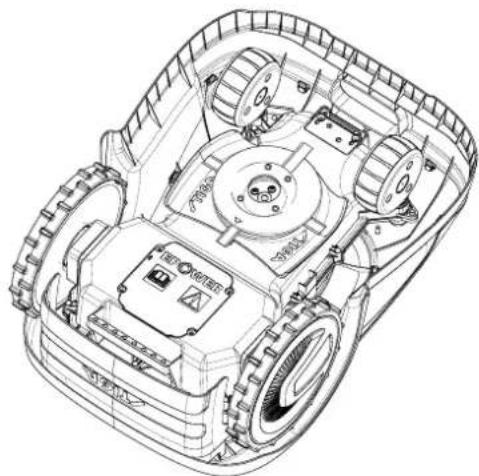
1.2. Technical data
3.3. UNPACKING
3.4. SYMBOLS AND LABELS

WARNING:

WARNING:
4.3. CHECKING INSTALLATION REQUIREMENTS

WARNING:

WARNING:
4.4. CRITERIA FOR INSTALLING THE BOUNDARY WIRE
4.4.1. PLACEMENT OF THE BOUNDARY WIRE
Procedure:
STIGA

WARNING:
4.4.3. PASSAGES BETWEEN DIFFERENT GARDEN AREAS
Procedure:
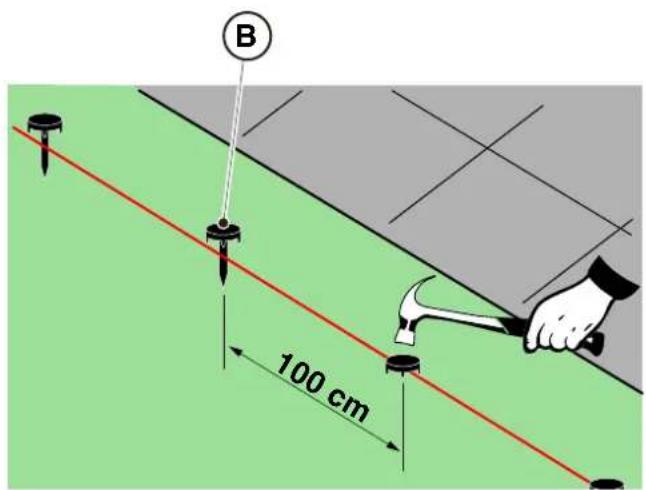
BURYING PLACEMENT
(MAY ONLY BE PERFORMED BY AN AUTHORIZED DEALER)
STIGA
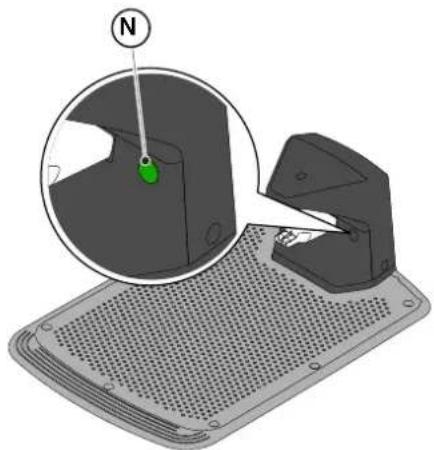
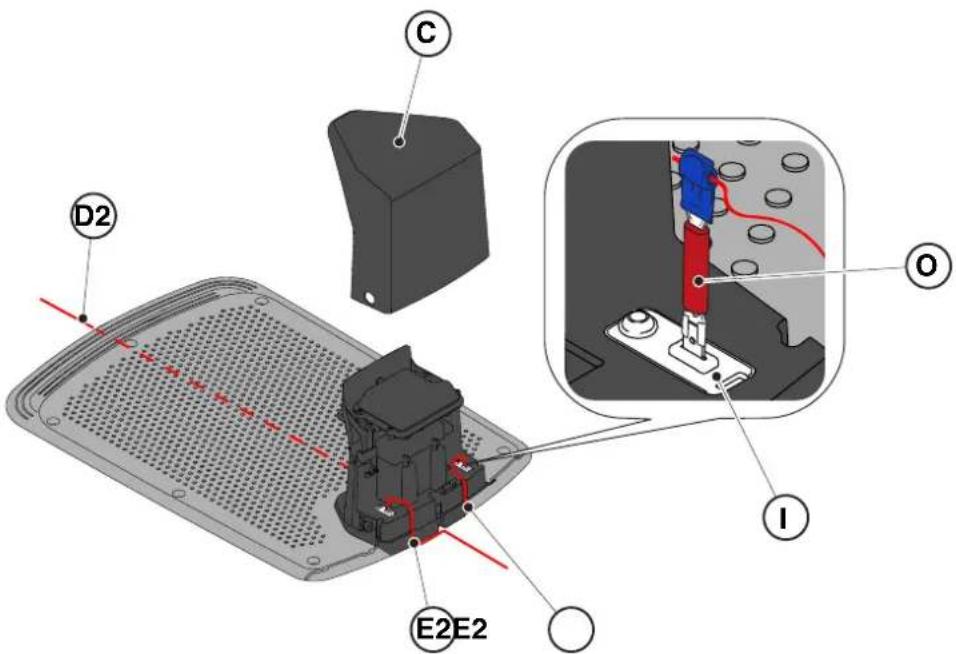
4.6. CHARGING THE ROBOTIC MOWER AFTER INSTALLATION
Requirements and obligations:
5.2. MANUAL CONTROL OF THE ROBOTIC MOWER
5.3.1. EMERGENCY STOP - STOP BUTTON
5.3.4. SELECTING THE SCHEDULED PROGRAM / INDEPENDENT WORK CYCLE / FORCED RETURN TO THE CHARGING BASE – MODE SELECTION BUTTON
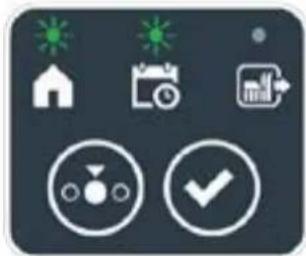
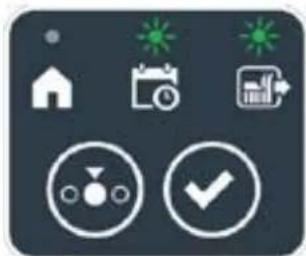


STIGA
Procedure:
5.3.6. DISPLAYING ALARM STATES - ALARM ICON
5.3.7. DISPLAYING BATTERY CHARGE - BATTERY ICON
5.5. BATTERY CHARGER
5.6. SETTING THE CUTTING HEIGHT
Procedure:
6. MAINTENANCE
6.1. PLANNED MAINTENANCE

WARNING:
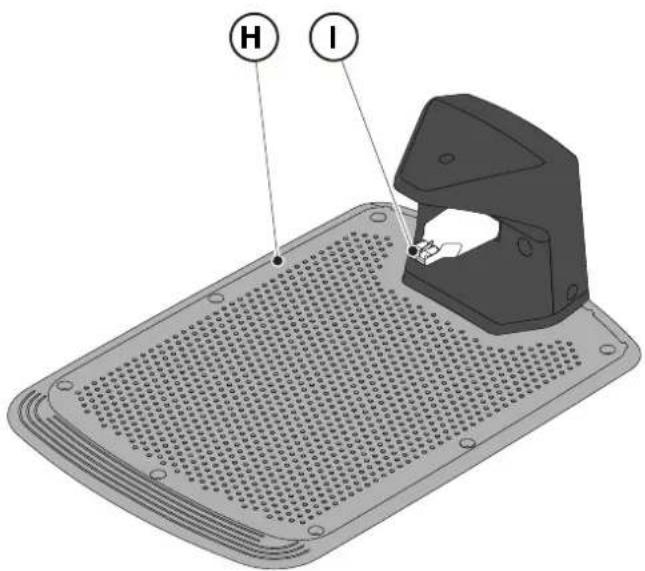
6.3. REPLACING THE CUTTING BLADES

6.4. WINTER MAINTENANCE OF THE BATTERY AND STORAGE
Procedure:
6.5. REPLACING THE BATTERY
(Supply of Machinery (Safety) Regulations 2008, S.I. 2008 No. 1597, Annex II, part A)
- The company: ST. S.p.A. – Via del Lavoro, 6 – 31033 Castelfranco Veneto (TV) – Italy
- Hereby declares under its own responsibility that the machine:
Robotic lawnmower
a) Homologation type: SRSW01 c) Serial number: 22A••RMO000001 ÷ 99L••RMO999999 d) Engine: battery-operated
- Conforms to UK Regulations:
• S.I. 2008/1597 - Supply of Machinery (Safety) Regulations 2008 • S.I. 2016/1091 - Electromagnetic Compatibility Regulations 2016 - S.I. 2012/3032 - The Restriction of the Use of Certain Hazardous Substances in Electrical and Electronic Equipment Regulations 2012 • S.I. 2017/1206 - Radio Equipment Regulations 2017
- Reference to harmonised standards:
EN 60335-1:2012 / AC:2014 / A11:2014 / A13:2017 / EN 61000-3-2:2019
A1:2019 / A2:2019 / A14:2019 EN 61000-3-3:2013 / A1:2019
EN IEC 63000:2018 EN 300 328 V2.2.2
EN 303 447 V1.2.0
EN 50636-107:2015 / A1 / A2
EN 301 489-17 V3.2.4
EN 62479:2010
EN 55014-1:2017 / A11:2020
EN 55014-2:2015
i) Cutting width: 18 cm
n) Person authorised to compile the technical file: ST. S.p.A.
Via del Lavoro, 6
31033 Castelfranco Veneto (TV) - Italia
o) Castelfranco Veneto, 01/12/2022 CEO Stiga Group
ST. S.p.A.
Via del Lavoro, 6
31033 Castelfranco Veneto (TV) - Italia
Sean Robinson
UK Importer: STIGA LTD
Unit 8, Bluewater Estate Plympton,
Devon, PL7 4JH, England
| FR (Traduction de la notice originale)Déclaration CE de Conformité (Directive Machines 2006/42/CE, Annexe II, partie A)1. La Société2. Déclare sous sa propre responsabilité que la machine : Robot-tondeusea) Type / Modèle de Basec) Série d) Moteur: batterie3. Est conforme aux prescriptions des directives :4. Renvoi aux Normes harmoniséesi) Largeur de coupen) Personne habilitée à établir le Dossier Technique :o) Lieu et Date | DE (Übersetzung der Originalbetriebsanleitung)EG-Konformitätserklärung (Maschinenrichtlinie 2006/42/EG, Anhang II, Teil A)1. Die Gesellschaft2. Erklärt auf eigene Verantwortung, dass die Maschine: Mährobotera) Typ / Basismodellc) Seriennummerd) Motor: Batterie3. Den Anforderungen der folgenden Richtlinien entspricht:4. Bezugnahme auf die harmonisierten Normeni) Schnittbreiten) Zur Verfassung der technischen Unterlagen befugte Person:o) Ort und Datum | NL (Vertaling van de oorspronkelijke gebruiksaanwijzing)EG-verklaring van overeenstemming (Richtlijn Machines 2006/42/CE, Bijlage II, deel A)1. Het bedrijf2. Verklaart onder zijn eigen verantwoordelijkheid dat de machine: Robotmaaiera) Type / Basismodelc) Serienummerd) Motor: accu3. Voldoet aan de specificaties van der richtlijnen:4. Verwijzing naar de Geharmoniseerde normeni) Snijbreedten) Bevoegd persoon voor het opstellen van het Technisch Dossiero) Plaats en Datum |
| ES (Traducción del Manual Original)Declaración de Conformidad CE (Directiva Máquinas 2006/42/CE, Anexo II, parte A)1. La Empresa2. Declara bajo su propia responsabilidad que la máquina: Robot cortacéspeda) Tipo / Modelo Basec) Matrículad) Motor: bateria3. Cumple con las especificaciones de las directivas:4. Referencia a las Normas armonizadasi) Amplitud de corten) Persona autorizada a realizar el Manual Técnico:o) Lugar y Fecha | PT (Tradução do manual original)Declaração CE de Conformidade (Diretiva de Máquinas 2006/42/CE, Anexo II, parte A)1. A Empresa2. Declara sob a própria responsabilidade que a máquina: Robot corta-relvaa) Tipo / Modelo Basec) Matrículad) Moto: Bateria3. É conforme às especificações das diretivas:4. Referência às Normas harmonizadasi) Amplitude de corten) Pessoa autorizada a elaborar o Caderno Técnicoo) Local e Data | NO (Oversettelse av original bruksanvisning)EF- Samvarserklæring (Maskindirektiv 2006/42/EF, Vedlegg II, del A)1. Firmaet2. Erklærer på eget ansvar at maskinen: Robotgressklippera) Type / Modellc) Serienummerd) Motor: batteri3. Oppfyller kravene i direktivene:4. Henvisning til harmoniserte standarderI) Klippebredden) Person som har fullmakt til å ufterdige teknisk dokumentasjon:o) Sted og dato |
| SV (Översättning av bruksanvisning i original)EG-försäkran om överensstämmelse (Maskindirektiv 2006/42//EG, bilaga II, dela)1. Företaget2. Försäkrar på eget ansvar att maskinen: Gräsklipparrobota) Typ / Basmodellc) Serienummerd) Motor: batteri3. Överensstämmer med föreskrifterna i direktivet4. Referens till harmoniserade standarderi) Skärbreddn) Auktoriserad person för upprättandet av den tekniska dokumentationen:o) Ort och datum | DA (Översættelse af den originale brugsanvisning)EF-overensstemmelseserklæring (Maskindirektiv 2006/42/EF, bilag II, del A)1. Firmaet2. Erklærer på eget ansvar, at maskinen: Robotplænekllippera) Type / Modelc) Serienummerd) Motor: batteri3. Er i overensstemmelse med specifikationerne ifølge direktiverne:4. Henvisning til harmoniserede standarderi) Klippebredden) Person, der har bemyndigelse til at udarbejde det tekniske dossier:o) Sted og dato | FI (Alkuperäisten ohjeiden käännös)EY-VAATIMUSTENMUKAISUUSVAKUUTUS (Konedirektiivi 2006/42/EY, Liite II, osa A)1. Yritys2. Vakuuttaa omalla vastuullaan, että kone: Robottiruohonlelikkurla) Tyyppl / Perusmalllc) Sarjanumerod) Moottori : akku3. On yhdenmukainen seuraavien direktiivien asettamien vaatimusten kanssa:4. Viittaus harmonisoituihin standardeihini) Leikkuuleveysn) Teknisten asiakirjojen laatimiseenvaltuutettu henkilö:o) Paikka ja päivämäärä |
| SL (Prevod izvirnih navodil)ES izjava o skladnosti (Direktiva 2006/42/ES) , priloga II, del A)1. Družba2. pod lastno odgovornostjo izjavlja, da je stroj: Robotska kosilnicaa) Tip / osnovni modelc) Serijska številkad) Motor: baterija3. Skladen je z določili direktiv :4. Sklicevanje na usklajene predpisei) Obseg košnjen) Oseba, pooblaščena za sestavotehnične knjižice:o) Kraj In datum | LT (Originalių instrukciju vertimas)EB atitikties deklaracija (Mašinų direktyva 2006/42/CE, Priedas II, dalis A)1. Bendrovė2. Prisilma atsakomybę, kad jrenglnys: Žolės pjovimo robotasa) Tipas / Bazinis Modelisc) Serijos numerisd) Variklis: baterija3. Atitinka direktyvose pateiktas specifikacijas:4. Nuoroda i suderintas Normasi) Pjovimo plotisn) Autorizuotas asmuo sudaryti Techninę Dokumentaciją:o) Vieta ir Data | LV (Instrukciju tulkojums no originálvalodas)EK atbilstības deklarācija (Direktīva 2006/42/EK par mašinām, pleilkums II, daļa A)1. Uzņēmums2. Uzņemoties par to pilnu atbildību, pazino, ka mašina: Robotizēta pljaujmašinaa) Tips / Bāzes modelsc) Sērijas numursd) Motors: akumulators3. Atbilst šādu direktīvu prasībām:4. Atsauce uz harmonizētiem standartiemi) Plaušanas platumsn) Pilnvarotais darbinieks, kas sagatavoja tehnisko dokumentāciju:o) Vieta un datums |
| CS (Překlad původního návodu k používání)ES – Prohlášení o shodě(Směrnice o Strojních zařízeních 2006/42/ES, Přiloha II, část A)1. Společnost2. Prohlášuje na vlastní odpovědnost, že stroj: Robotická sekačkaa) Typ / Základní modelc) Výrobní číslod) Motor: akumulátor3. Je ve shodě s nařízeními směrnic:4. Odkazy na Harmonizované normyi) Šířka řezánín) Osoba autorizovaná pro vytvoření Technického spisu:o) Misto a Datum | PL (Tłumaczenie instrukcji oryginalnej)Deklaracja zgodności WE(Dyrektywa maszynowa 2006/42/WE,Załącznik II, część A)1. Spółka2. Oświadcza na własną odpowiedzialność, że maszyna: Kosiarka trawnikowaa) Typ / Model podstawowyc) Numer seryjnyd) Silnik: akumulator3. Spełnia podstawowe wymogi następujących Dyrektyw:4. Odniesienie do Norm zharmonizowanychi) Szerokość cięcia n) Osoba upoważniona do zredagowania Dokumentacji technicznej:o) Miejscowość i data | ET (Algupārase kasutusjuhendi tõlge)EÜ vastavusdeklaratsioon(Masinadirektiiv 2006/42/EÜ, Lisa II, osa A)1. Firma2. Kinnitab omal vastutusel, et masin:Robotniiduka) Tüüp / Põhimudel c) Matrikkeld) Mootor: aku3. Vastab direktiivide nõuetele:4. Viide ühtlustatud standarditelei) Lõikelaiusn) Tehnilise Lehe autoriseeritud koostaja:o) Koht ja Kuupäev |
| HU (Eredeti használati utasítás fordítása)EK-megfelelőségi nyilatkozata(2006/42/EK gépirányelv, ll. melléklet "A" rész)1. Alulírott Vállalat2. Felelősségének teljes tudatában kijelenti, hogy az alábbi gép: Robotfűnyíróa) Típus / Alaptipusc) Gyártási számd) Motor: akkumulátor3. Megfelel az alábbi irányelvekelőírásainak:4. Hivatkozás a harmonizált szabványokrai) Vágási szélességn) Műszaki Dosszié szerkesztésérefelhatalmazott személy:o) Helye és ideje | RU (Перевод оригинальных инструкций)Декларация соответствия нормам EC (Direktiva o машинном оборудовании 2006/42/EC, Приложение II, часть A)1. Предприятие2. Заявляет под собственную ответственность, что машина: Робот-газонокосилкаa) Тип / Базовая модельc) Паспортd) Двигатель: батарея сгорания3. Соответствует требованиям следующих директив:4. Ссылки на гармонизированные нормыi) Амплитуда кошенияn) Лицо, уполномоченное на подготовку технической документации:o) Место и дата | HR (Prijevod originalnih uputa)EK Izjava o sukladnosti(Direktiva 2006/42/EZ o strojevima, dodatak II, dio A)1. Tvrtka:2. pod vlastitom odgovornošću izjavljuje da je stroj: Robotska kosilicaa) Vrsta / Osnovni modelc) Matični brojd) Motor: baterija3. sukladan s temeljnim zahtjevima direktiva:4. Primijenjene su slijedeće harmonizirane norme:i) Širina rezanján) Osoba ovlaštena za pravljenje Tehničke datoteke:o) Mjesto i datum |
| SR (Prevod originalnih uputstval)EC deklaracija o usaglašenosti (Direktiva o mašinama 2006/42/EC, Prilog II, deo A)1. Preduzeće2. Daje izjavu pod vlastitom odgovornošćuda je mašina: Robot kosačicaa) Tip / Osnovni modelc) Serijski brojd) Motor: akumulator3. U skladu s osnovnim zahtevima direktiva:4. Pozivanje na usklađene normei) Širina košenjan) Osoba ovlašćena za sastavljanje tehničke brošureo) Mesto i datum | TR (Orijinal Talimatların Tercümesi)AT Uygunluk Beyanı (2006/42/CE Makine Direktifi, Ek II, bölüm A)1. Şirket2. Şahsi sorumluluğu altında aşağıdaki makinenin: Robot çim biçme makinesia) Tip / Standart modelc) Sicil numarasıd) Motor : batarya3. Aşağıdaki direktiflerin özelliklerine uygun olduğunu beyan etmektedir:4. Harmonize standartlara atifi) Kesim genişligiń) Teknik Dosyayı oluşturmaya yetkili kişi:o) Yer ve Tarih | RO (Traducerea manualului fabricantului)CE -Declaratie de Conformitate (Directiva Mašini 2006/42/CE, Anexa II, partea A)1. Societatea2. Declară pe propria răspundere că mașina: Robot mașină de tuns iarbaa) Tip / Model de bazăc) Număr de seried) Motor: baterie3. Este în conformitate cu specificațiile directivelor:4. Referință la Standardele armonizatei) Lătimea de täieren) Persoană autorizată să întocmeascăDosarul Tehnico) Locul și Data |
STIGA
STIGA LTD (UK Importer)
Unit 8, Bluewater Estate Plympton, Devon, PL7 4JH, England
STIGA S.p.A.
Via del lavoro, 6
31033 Castelfranco Veneto (TV)
Italy

FR
POLISH - TRANSLATION OF THE ORIGINAL INSTRUCTIONS
TABLE OF CONTENTS
1. MODELS AND TECHNICAL DATA 1
1.1. MODELS....1 1.2. TECHNICAL DATA 2
2. SAFETY 3
2.1. SAFETY INFORMATION....3 2.2. SAFETY INSTRUCTIONS....5 2.2.1. GOOD SAFETY PRACTICES....5 2.2.2. OPERATION....5
2.3. STOPPING AND DISABLING THE AUTOMATIC LAWNMOWER IN SAFE CONDITIONS 7
3. INTRODUCTION 8
3.1. GENERAL INTRODUCTION 8 3.1.1. PURPOSE OF THE MANUAL....8 3.1.2. READING THE MANUAL WITH A SMARTPHONE 8 3.2. PRODUCT DESCRIPTION 9 3.2.1. GENERAL DESCRIPTION 9 3.2.2. MAIN PARTS 10 3.3. UNPACKING 11 3.4. SYMBOLS AND PLATES 12 3.5. GENERAL NOTES ON THE MANUAL....13
4. INSTALLATION 14
4.1. GENERAL INFORMATION ON INSTALLATION....14 4.2. PARTS TO BE INSTALLED....14 4.3. VERIFICATION OF INSTALLATION REQUIREMENTS 15 4.3.1. GARDEN VERIFICATION: 15 4.3.2. VERIFICATION FOR INSTALLATION OF THE CHARGING STATION AND POWER SUPPLY: 15 4.3.3. MAIN CHECKS DURING INSTALLATION OF THE BOUNDARY WIRE: 17
4.4. INSTALLATION CRITERIA FOR THE BOUNDARY WIRE....19
4.4.1. LAYING THE BOUNDARY WIRE.... 19 4.4.2. AVOIDING OBSTACLES: 21 4.4.3. PASSAGES BETWEEN DIFFERENT GARDEN AREAS 23
4.5. INSTALLATION OF PARTS....23
4.5.1. INSTALLATION OF THE BOUNDARY WIRE....24 4.5.2. CONNECTING THE BOUNDARY WIRE.... 25 4.5.3. INSTALLATION OF THE CHARGING STATION 26 4.5.4. INSTALLATION OF THE RESISTOR FOR SMALL LOOPS 28
4.6. CHARGING THE LAWNMOWER AFTER INSTALLATION....29
4.7. PRODUCT SETTINGS....30
5. OPERATION
5.1. CHECKING THE SAFETY DEVICES TO START THE AUTOMATIC LAWNMOWER 35 5.2. MANUAL OPERATION OF THE AUTOMATIC LAWNMOWER 36 5.3. DESCRIPTION OF THE COMMANDS ON THE AUTOMATIC LAWNMOWER 37
5.3.1. SAFE STOP - STOP BUTTON 37 5.3.2. SAFE SHUTDOWN - SAFETY KEY 38 5.3.3. SWITCHING ON AND OFF - ON/OFF BUTTON 38 5.3.4. SELECTION OF SCHEDULED PROGRAM / SINGLE WORK CYCLE - SCHEDULED PROGRAM BUTTON.... 39 5.3.5. DISPLAYING BLUETOOTH STATUS AND DISCONNECTING - BLUETOOTH BUTTON 41 5.3.6. DISPLAYING ALARM STATES - ALARM ICON 41 5.3.7. DISPLAYING BATTERY CHARGE STATUS – BATTERY ICON 42 5.3.8. STARTING THE LAWNMOWER - START BUTTON....42
5.4. OPERATION OF THE CHARGING STATION 43 5.5. BATTERY CHARGER 43 5.6. ADJUSTING THE MOWING HEIGHT 44
6. MAINTENANCE 45
6.1. SCHEDULED MAINTENANCE 45 6.2. CLEANING THE PRODUCT 46 6.3. REPLACING THE CUTTING BLADES....48 6.4. BATTERY MAINTENANCE FOR WINTER AND STORAGE 49 6.5. REPLACING THE BATTERY 49
7. TROUBLESHOOTING 50
7.1. MAIN MESSAGES FROM THE APPLICATION 51
8. TRANSPORT, STORAGE AND DISPOSAL 53
8.1. TRANSPORT....53 8.2. STORAGE 53 8.3. DISPOSAL 53
9. ACCESSORIES 54
- WARRANTY 55 10.1. WARRANTY COVERAGE....55
- CE DECLARATION OF CONFORMITY 56
1. MODELS AND TECHNICAL DATA
1.1. MODELS
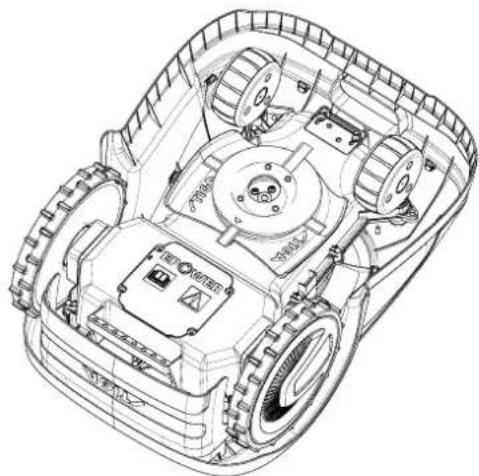
3.3. UNPACKING

WARNING:

WARNING:
4.3. VERIFICATION OF INSTALLATION REQUIREMENTS
4.3.3. MAIN CHECKS DURING INSTALLATION OF THE BOUNDARY WIRE
4.4. CRITERIA FOR INSTALLING THE BOUNDARY WIRE
4.4.1. LAYING THE BOUNDARY WIRE
Procedure:
STIGA

INSTRUCTION:
4.4.3. TRANSITIONS BETWEEN DIFFERENT GARDEN ZONES
Procedure:
STIGA
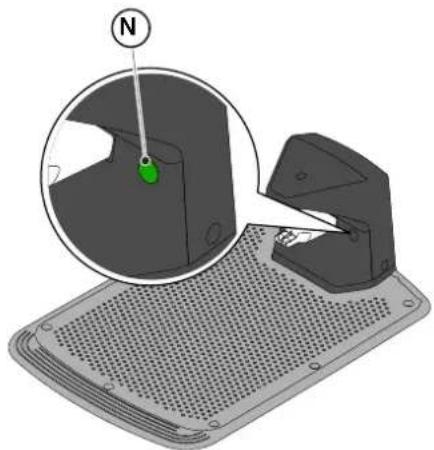
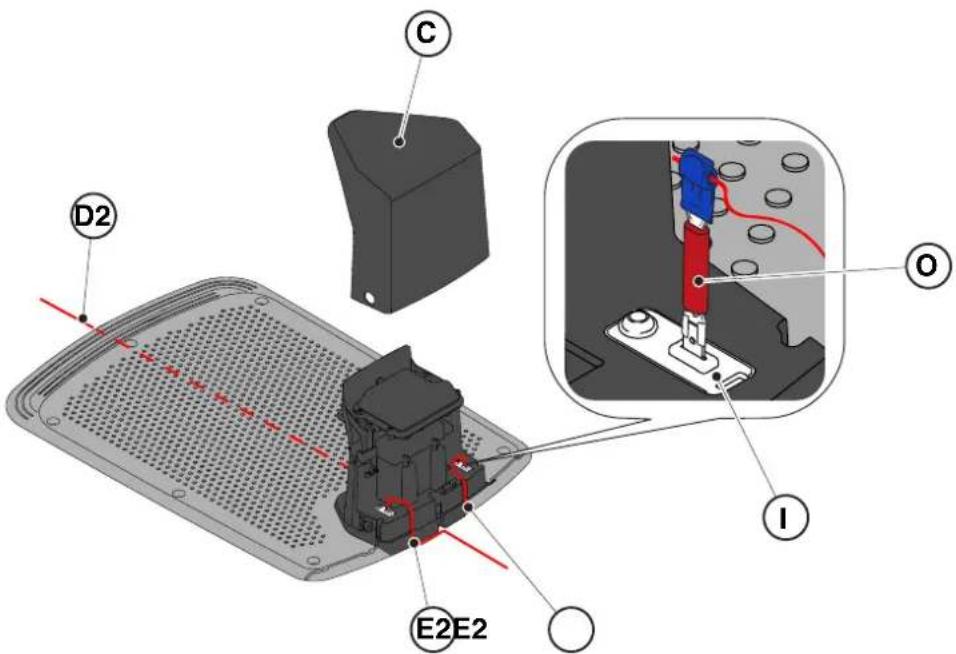
4.6. CHARGING THE AUTOMATIC LAWNMOWER AFTER INSTALLATION
Requirements and instructions:
- Charging station.
Procedure:
| G 300 G 600 G | 1200 | |
| Border Cut | | | |
| Go-To Cut Points | 1 3 5 | | |
| Eco Mode | | | |
| Rain Sensor | | | |
| Closed Area | | | |
LIST OF PRODUCT SETTINGS
4.7.1. PRELOGIN 31
4.7.2. REGISTRATION (SIGN UP) 31
4.7.3. PAIRING 31
4.7.4. DEVICE PAGE 32
4.7.5. CLOSED AREA 32
4.7.6. SETTINGS 32
4.7.7. SPOT CUT / SCHEDULED 32
4.7.8. MOWING SESSIONS 32
4.7.9. GO-TO-CUT POINTS 33
4.7.10. BORDER CUT 33
4.7.11. ECO MODE....33
4.7.12. RAIN SENSOR (DEPENDING ON MODEL) 33
4.7.13. APP LOCK 33
4.7.14. USER MANAGEMENT 35
4.7.15. DEALER 35
4.7.16. MESSAGES.... 35
4.7.17. PROFILE 35
4.7.1. INITIAL LOGIN
5.2. MANUAL OPERATION OF THE AUTOMATIC LAWNMOWER
5.3.4. SELECT A SCHEDULED PROGRAM / SINGLE WORK CYCLE / FORCED RETURN TO THE CHARGING STATION - MODE SELECTION BUTTON
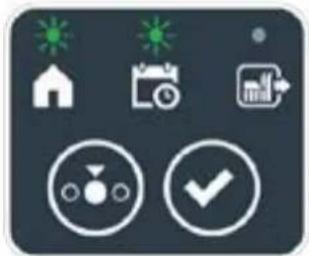
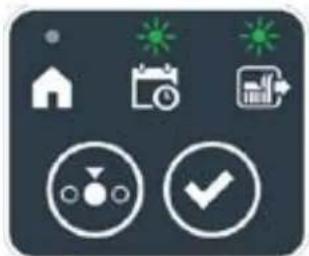
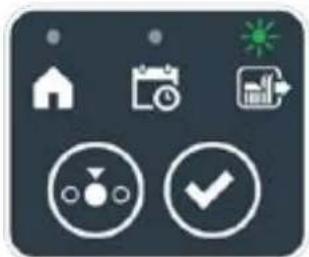

STIGA
Procedure:
5.3.6. DISPLAYING ALARM STATES - ALARM ICON
5.3.7. DISPLAYING THE BATTERY CHARGE STATUS - BATTERY ICON
5.5. CHARGING THE BATTERY
5.6. ADJUSTING THE CUTTING HEIGHT
Procedure:
6. MAINTENANCE
6.1. SCHEDULED MAINTENANCE

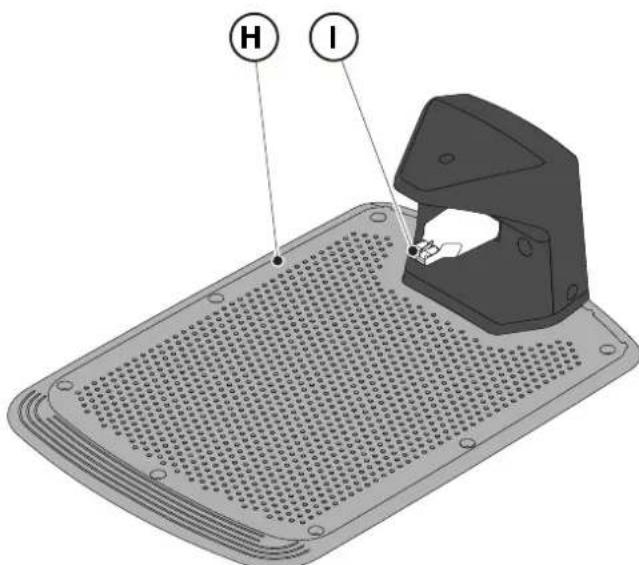
6.3. REPLACING THE CUTTING BLADES

6.4. BATTERY MAINTENANCE FOR WINTER AND STORAGE
Procedure:
6.5. BATTERY REPLACEMENT
(Supply of Machinery (Safety) Regulations 2008, S.I. 2008 No. 1597, Annex II, part A)
- The company: ST. S.p.A. – Via del Lavoro, 6 – 31033 Castelfranco Veneto (TV) – Italy
- Hereby declares under its own responsibility that the machine:
Robotic lawnmower
a) Homologation type: SRSW01 c) Serial number: 22A••RMO000001 ÷ 99L••RMO999999 d) Engine: battery-operated
- Conforms to UK Regulations:
• S.I. 2008/1597 - Supply of Machinery (Safety) Regulations 2008 • S.I. 2016/1091 - Electromagnetic Compatibility Regulations 2016 • S.I. 2012/3032 - The Restriction of the Use of Certain Hazardous Substances in Electrical and Electronic Equipment Regulations 2012 • S.I. 2017/1206 - Radio Equipment Regulations 2017
- Reference to harmonised standards:
EN 60335-1:2012 / AC:2014 / A11:2014 / A13:2017 / EN 61000-3-2:2019
A1:2019 / A2:2019 / A14:2019 EN 61000-3-3:2013 / A1:2019
EN IEC 63000:2018 EN 300 328 V2.2.2
EN 303 447 V1.2.0
EN 50636-107:2015 / A1 / A2
EN 301 489-17 V3.2.4
EN 62479:2010
EN 55014-1:2017 / A11:2020
EN 55014-2:2015
i) Cutting width: 18 cm
n) Person authorised to compile the technical file: ST. S.p.A.
Via del Lavoro, 6
31033 Castelfranco Veneto (TV) - Italia
o) Castelfranco Veneto, 01/12/2022 CEO Stiga Group
ST. S.p.A.
Via del Lavoro, 6
31033 Castelfranco Veneto (TV) - Italia
Sean Robinson
UK Importer:
STIGA LTD
Unit 8, Bluewater Estate Plympton,
Devon, PL7 4JH, England

| FR (Traduction de la notice originale)Déclaration CE de Conformité (Directive Machines 2006/42/CE, Annexe II, partie A)1. La Société2. Déclare sous sa propre responsabilité que la machine : Robot-tondeusea) Type / Modèle de Basec) Série d) Moteur: batterie3. Est conforme aux prescriptions des directives :4. Renvoi aux Normes harmoniséesi) Largeur de coupen) Personne habilitée à établir le Dossier Technique :o) Lieu et Date | DE (Übersetzung der Originalbetriebsanleitung)EG-Konformitätserklärung (Maschinenrichtlinie 2006/42/EG, Anhang II, Teil A)1. Die Gesellschaft2. Erklärt auf eigene Verantwortung, dass die Maschine: Mährobotera) Typ / Basismodellc) Seriennummerd) Motor: Batterie3. Den Anforderungen der folgenden Richtlinien entspricht:4. Bezugnahme auf die harmonisierten Normeni) Schnittbreiten) Zur Verfassung der technischen Unterlagen befugte Person:o) Ort und Datum | NL (Vertaling van de oorspronkelijke gebruiksaanwijzing)EG-verklaring van overeenstemming (Richtlijn Machines 2006/42/CE, Bijlage II, deel A)1. Het bedrijf2. Verklaart onder zijn eigen verantwoordelijkheid dat de machine: Robotmaaiera) Type / Basismodelc) Serienummerd) Motor: accu3. Voldoet aan de specificaties van derichtlijnen:4. Verwijzing naar de Geharmoniseerde normeni) Snijbreedten) Bevoegd persoon voor het opstellen van het Technisch Dossiero) Plaats en Datum |
| ES (Traducción del Manual Original)Declaración de Conformidad CE (Directiva Máquinas 2006/42/CE, Anexo II, parte A)1. La Empresa2. Declara bajo su propia responsabilidad que la máquina: Robot cortacéspeda) Tipo / Modelo Basec) Matrículad) Motor: bateria3. Cumple con las especificaciones de las directivas:4. Referencia a las Normas armonizadasi) Amplitud de corten) Persona autorizada a realizar el Manual Técnico:o) Lugar y Fecha | PT (Tradução do manual original)Declaração CE de Conformidade (Diretiva de Máquinas 2006/42/CE, Anexo II, parte A)1. A Empresa2. Declara sob a própria responsabilidade que a máquina: Robot corta-relvaa) Tipo / Modelo Basec) Matrículad) Moto: Bateria3. É conforme às especificações das diretivas:4. Referência às Normas harmonizadasi) Amplitude de corten) Pessoa autorizada a elaborar o Caderno Técnicoo) Local e Data | NO (Oversettelse av original bruksanvisning)EF- Samvarserklæring (Maskindirektiv 2006/42/EF, Vedlegg II, del A)1. Firmaet2. Erklærer på eget ansvar at maskinen: Robotgressklippera) Type / Modellc) Serienummerd) Motor: batteri3. Oppfyller kravene i direktivene:4. Henvisning til harmoniserte standarderI) Klippebredden) Person som har fullmakt til å ufterdige teknisk dokumentasjon:o) Sted og dato |
| SV (Översättning av bruksanvisning i original)EG-försäkran om överensstämmelse (Maskindirektiv 2006/42//EG, bilaga II, dela)1. Företaget2. Försäkrar på eget ansvar att maskinen: Gräsklipparrobota) Typ / Basmodellc) Serienummerd) Motor: batteri3. Överensstämmer med föreskrifterna i direktivet4. Referens till harmoniserade standarderi) Skärbreddn) Auktoriserad person för upprättandet av den tekniska dokumentationen:o) Ort och datum | DA (Översættelse af den originale brugsanvisning)EF-overensstemmelseserklæring (Maskindirektiv 2006/42/EF, bilag II, del A)1. Firmaet2. Erklærer på eget ansvar, at maskinen: Robotplænekllippera) Type / Modelc) Serienummerd) Motor: batteri3. Er i overensstemmelse med specifikationerne ifølge direktiverne:4. Henvisning til harmoniserede standarderi) Klippebredden) Person, der har bemyndigelse til at udarbejde det tekniske dossier:o) Sted og dato | FI (Alkuperäisten ohjeiden käännös)EY-VAATIMUSTENMUKAISUUSVAKUUTUS (Konedirektiivi 2006/42/EY, Liite II, osa A)1. Yritys2. Vakuuttaa omalla vastuullaan, että kone: Robottiruohonlelikkurla) Tyyppl / Perusmalllc) Sarjanumerod) Moottori : akku3. On yhdenmukainen seuraavien direktiivien asettamien vaatimusten kanssa:4. Viittaus harmonisoituihin standardeihini) Leikkuuleveysn) Teknisten asiakirjojen laatimiseenvaltuutettu henkilö:o) Paikka ja päivämäärä |
| SL (Prevod izvirnih navodil)ES izjava o skladnosti (Direktiva 2006/42/ES) , priloga II, del A)1. Družba2. pod lastno odgovornostjo izjavlja, da je stroj: Robotska kosilnicaa) Tip / osnovni modelc) Serijska številkad) Motor: baterija3. Skladen je z določili direktiv :4. Sklicevanje na usklajene predpisei) Obseg košnjen) Oseba, pooblaščena za sestavotehnične knjižice:o) Kraj In datum | LT (Originalių instrukciju vertimas)EB atitikties deklaracija (Mašinų direktyva 2006/42/CE, Priedas II, dalis A)1. Bendrovė2. Prisilma atsakomybę, kad jrenglnys: Žolės pjovimo robotasa) Tipas / Bazinis Modelisc) Serijos numerisd) Variklis: baterija3. Atitinka direktyvose pateiktas specifikacijas:4. Nuoroda i suderintas Normasi) Pjovimo plotisn) Autorizuotas asmuo sudaryti Techninę Dokumentaciją:o) Vieta ir Data | LV (Instrukciju tulkojums no originálvalodas)EK atbilstības deklarācija (Direktīva 2006/42/EK par mašinām, pleilkums II, daļa A)1. Uzņēmums2. Uzņemoties par to pilnu atbildību, pazino, ka mašina: Robotizēta pljaujmašinaa) Tips / Bāzes modelsc) Sērijas numursd) Motors: akumulators3. Atbilst šādu direktīvu prasībām:4. Atsauce uz harmonizētiem standartiemi) Pljaušanas platumsn) Pilnvarotais darbinieks, kas sagatavoja tehnisko dokumentāciju:o) Vieta un datums |
| CS (Překlad původního návodu k používání)ES – Prohlášení o shodě(Směrnice o Strojních zařízeních 2006/42/ES, Přiloha II, část A)1. Společnost2. Prohlášuje na vlastní odpovědnost, že stroj: Robotická sekačkaa) Typ / Základní modelc) Výrobní číslod) Motor: akumulátor3. Je ve shodě s nařízeními směrnic:4. Odkazy na Harmonizované normyi) Šířka řezánín) Osoba autorizovaná pro vytvoření Technického spisu:o) Misto a Datum | PL (Tłumaczenie instrukcji oryginalnej)Deklaracja zgodności WE(Dyrektywa maszynowa 2006/42/WE,Załącznik II, część A)1. Spółka2. Oświadczenie na własną odpowiedzialność, że maszyna: Kosiarka trawnikowaa) Typ / Model podstawowyc) Numer seryjnyd) Silnik: akumulator3. Spełnia podstawowe wymogi następujących Dyrektyw:4. Odniesienie do Norm zharmonizowanychi) Szerokość cięcia n) Osoba upoważniona do zredagowania Dokumentacji technicznej:o) Miejscowość i data | ET (Algupārase kasutusjuhendi tõlge)EÜ vastavusdeklaratsioon(Masinadirektiiv 2006/42/EÜ, Lisa II, osa A)1. Firma2. Kinnitab omal vastutusel, et masin:Robotniiduka) Tüüp / Põhimudel c) Matrikkeld) Mootor: aku3. Vastab direktiivide nõuetele:4. Viide ühtlustatud standarditelei) Lõikelaiusn) Tehnilise Lehe autoriseeritud koostaja:o) Koht ja Kuupäev |
| HU (Eredeti használati utasítás fordítása)EK-megfelelőségi nyilatkozata(2006/42/EK gépirányelv, ll. melléklet "A" rész)1. Alulírott Vállalat2. Felelősségének teljes tudatában kijelenti, hogy az alábbi gép: Robotfűnyíróa) Típus / Alaptipusc) Gyártási számd) Motor: akkumulátor3. Megfelel az alábbi irányelvekelőírásainak:4. Hivatkozás a harmonizált szabványokrai) Vágási szélességn) Műszaki Dosszié szerkesztésérefelhatalmazott személy:o) Helye és ideje | RU (Перевод оригинальных инструкций)Декларация соответствия нормам EC (Direktiva o машинном оборудовании 2006/42/EC, Приложение II, часть A)1. Предприятие2. Заявляет под собственную ответственность, что машина: Робот-газонокосилкаa) Тип / Базовая модельc) Паспортd) Двигатель: батарея сгорания3. Соответствует требованиям следующих директив:4. Ссылки на гармонизированные нормыi) Амплитуда кошенияn) Лицо, уполномоченное на подготовку технической документации:o) Место и дата | HR (Prijevod originalnih uputa)EK Izjava o sukladnosti(Direktiva 2006/42/EZ o strojevima, dodatak II, dio A)1. Tvrtka:2. pod vlastitom odgovornošću izjavljuje da je stroj: Robotska kosilicaa) Vrsta / Osnovni modelc) Matični brojd) Motor: baterija3. sukladan s temeljnim zahtjevima direktiva:4. Primijenjene su slijedeće harmonizirane norme:i) Širina rezanján) Osoba ovlaštena za pravljenje Tehničke datoteke:o) Mjesto i datum |
| SR (Prevod originalnih uputstval)EC deklaracija o usaglašenosti (Direktiva o mašinama 2006/42/EC, Prilog II, deo A)1. Preduzeće2. Daje izjavu pod vlastitom odgovornošćuda je mašina: Robot kosačicaa) Tip / Osnovni modelc) Serijski brojd) Motor: akumulator3. U skladu s osnovnim zahtevima direktiva:4. Pozivanje na usklađene normei) Širina košenjan) Osoba ovlašćena za sastavljanje tehničke brošureo) Mesto i datum | TR (Orijinal Talimatların Tercümesi)AT Uygunluk Beyanı (2006/42/CE Makine Direktifi, Ek II, bölüm A)1. Şirket2. Şahsi sorumluluğu altında aşağıdaki makinenin: Robot çim biçme makinesia) Tip / Standart modelc) Sicil numarasıd) Motor : batarya3. Aşağıdaki direktiflerin özelliklerine uygun olduğunu beyan etmektedir:4. Harmonize standartlara atifi) Kesim genişligiń) Teknik Dosyayı oluşturmaya yetkili kişi:o) Yer ve Tarih | RO (Traducerea manualului fabricantului)CE -Declaratie de Conformitate (Directiva Mašini 2006/42/CE, Anexa II, partea A)1. Societatea2. Declară pe propria răspundere că mașina: Robot mașină de tuns iarbaa) Tip / Model de bazăc) Număr de seried) Motor: baterie3. Este în conformitate cu specificațiile directivelor:4. Referință la Standardele armonizatei) Lătimea de täieren) Persoană autorizată să întocmeascăDosarul Tehnico) Locul și Data |
STIGA
STIGA LTD (UK Importer)
Unit 8, Bluewater Estate Plympton, Devon, PL7 4JH, England
STIGA S.p.A.
Via del lavoro, 6
31033 Castelfranco Veneto (TV)
Italy
stiga.com

FR
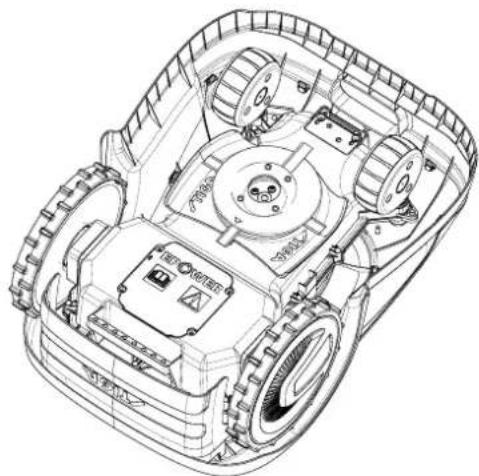
1.2. TECHNICAL DATA
3.3. UNPACKING
3.4. SYMBOLS AND DATA PLATES

WARNING:
WARNING:
4.3. CHECKING THE INSTALLATION CONDITIONS

WARNING:
4.4. CONSIDERATIONS FOR INSTALLING THE BOUNDARY WIRE
4.4.1. Placement of the boundary wire
Procedure:
STIGA
WARNING:![graph TD A["Central Structure"] --> B["Arrow to U"] B --> C["Star-like Elements"] C --> D["Arrow to Right"] D --> E["Arrow to Left"] E --> F["Arrow to Right"] F --> G["Arrow to Left"] G --> H["Arrow to Right"] H --> I["Arrow to Left"] I --> J["Arrow to Right"] J --> K["Arrow to Left"] K --> L["Arrow…](/content/2026/04/623884/images/f8a975fcc9b26bf5d6621d889e08c14da0eecead81578220a0df96c3ffc6763e.jpg)
4.4.3. Passages between different zones of the garden
Procedure:
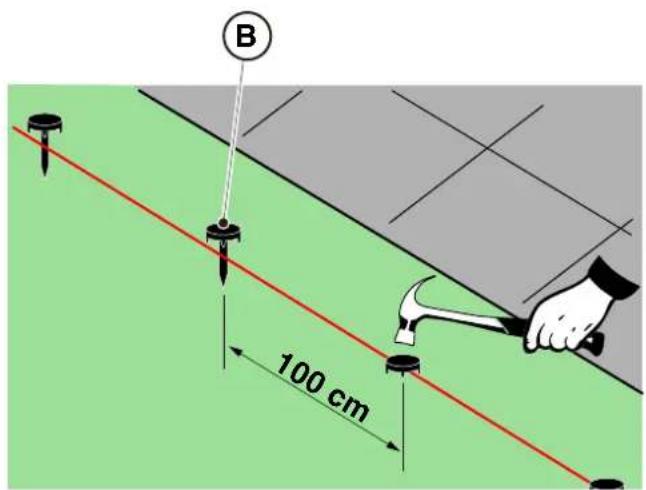
UNDERGROUND INSTALLATION
(ONLY AUTHORIZED DEALERS MAY PERFORM THIS)
STIGA
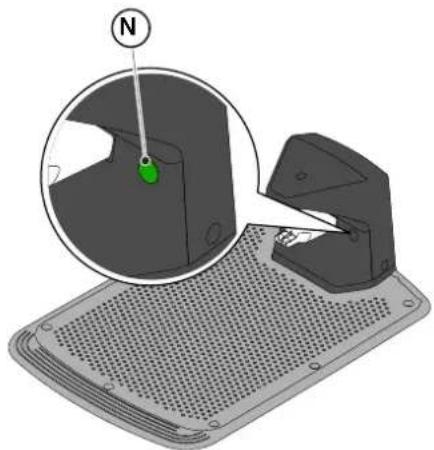
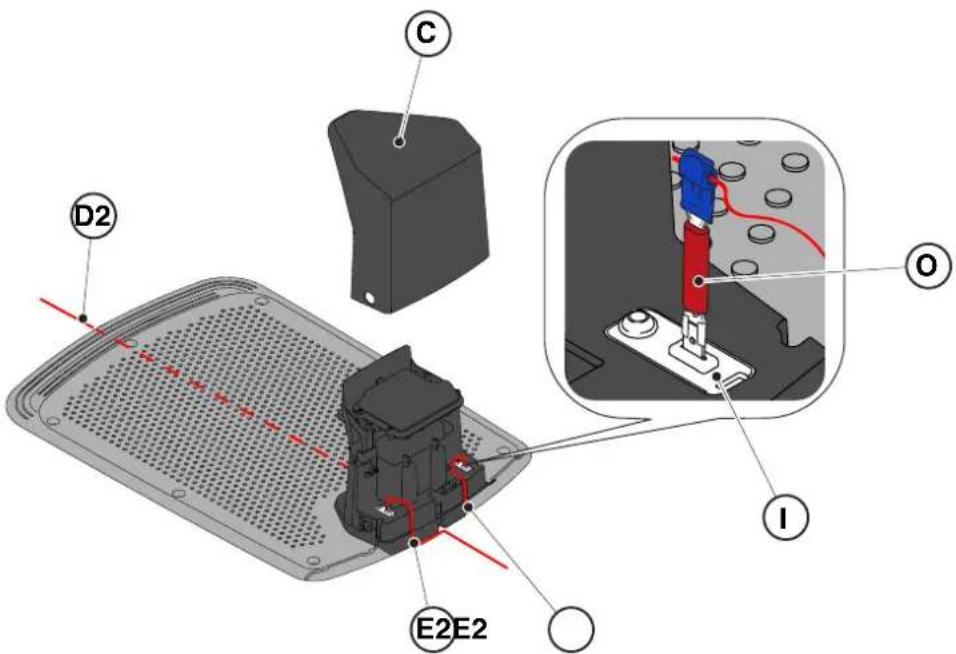
4.6. Charging the robotic mower after installation
| G 300 G 600 G | 1200 | |
| Border Cut | | | |
| Go-To Cut Points | 1 3 5 | | |
| Eco Mode | | | |
| Rain Sensor | | | |
| Closed Area | | | |
TABLE OF CONTENTS OF PRODUCT SETTINGS
4.7.1. PRELOGIN 31
4.7.2. REGISTRATION (SIGN UP) 31
5.2. Manual mode of the robotic mower
5.3.1. SAFETY STOP - STOP BUTTON
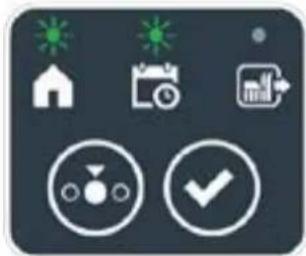


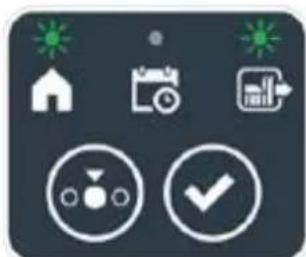
Procedure:
5.3.7. DISPLAYING THE BATTERY CHARGE - BATTERY ICON
5.3.8. STARTING THE ROBOTIC LAWNMOWER
5.5. CHARGING THE BATTERY
Procedure:
6. MAINTENANCE

WARNING:
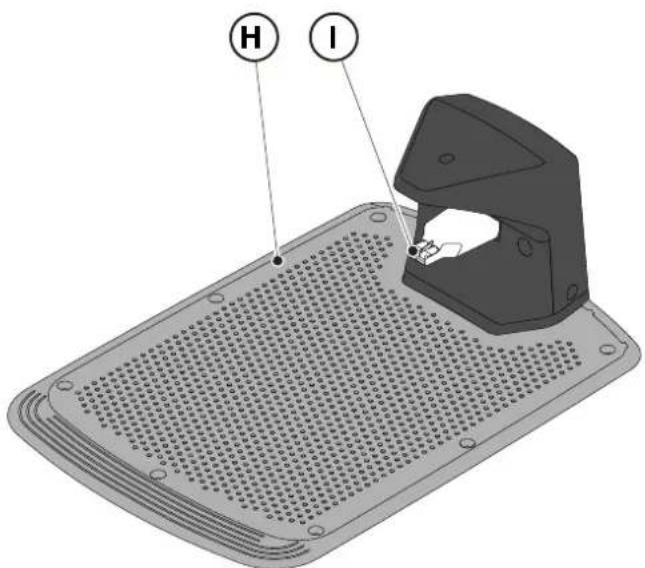
6.3. REPLACING THE CUTTING BLADES

6.5. REPLACING THE BATTERY
(Supply of Machinery (Safety) Regulations 2008, S.I. 2008 No. 1597, Annex II, part A)
- The company: ST. S.p.A. – Via del Lavoro, 6 – 31033 Castelfranco Veneto (TV) – Italy
- Hereby declares under its own responsibility that the machine:
Robotic lawnmower
a) Homologation type: SRSW01 c) Serial number: 22A••RMO000001 ÷ 99L••RMO999999 d) Engine: battery-operated
- Conforms to UK Regulations:
• S.I. 2008/1597 - Supply of Machinery (Safety) Regulations 2008 • S.I. 2016/1091 - Electromagnetic Compatibility Regulations 2016 • S.I. 2012/3032 - The Restriction of the Use of Certain Hazardous Substances in Electrical and Electronic Equipment Regulations 2012 • S.I. 2017/1206 - Radio Equipment Regulations 2017
- Reference to harmonised standards:
EN 60335-1:2012 / AC:2014 / A11:2014 / A13:2017 / EN 61000-3-2:2019
A1:2019 / A2:2019 / A14:2019 EN 61000-3-3:2013 / A1:2019
EN IEC 63000:2018 EN 300 328 V2.2.2
EN 303 447 V1.2.0
EN 50636-107:2015 / A1 / A2
EN 301 489-17 V3.2.4
EN 62479:2010
EN 55014-1:2017 / A11:2020
EN 55014-2:2015
i) Cutting width: 18 cm
n) Person authorised to compile the technical file: ST. S.p.A.
Via del Lavoro, 6
31033 Castelfranco Veneto (TV) - Italia
o) Castelfranco Veneto, 01/12/2022 CEO Stiga Group
ST. S.p.A.
Via del Lavoro, 6
31033 Castelfranco Veneto (TV) - Italia
Sean Robinson
UK Importer:
STIGA LTD
Unit 8, Bluewater Estate Plympton,
Devon, PL7 4JH, England

| FR (Traduction de la notice originale)Déclaration CE de Conformité (Directive Machines 2006/42/CE, Annexe II, partie A)1. La Société2. Déclare sous sa propre responsabilité que la machine : Robot-tondeusea) Type / Modèle de Basec) Série d) Moteur: batterie3. Est conforme aux prescriptions des directives :4. Renvoi aux Normes harmoniséesi) Largeur de coupen) Personne habilitée à établir le Dossier Technique :o) Lieu et Date | DE (Übersetzung der Originalbetriebsanleitung)EG-Konformitätserklärung (Maschinenrichtlinie 2006/42/EG, Anhang II, Teil A)1. Die Gesellschaft2. Erklärt auf eigene Verantwortung, dass die Maschine: Mährobotera) Typ / Basismodellc) Seriennummerd) Motor: Batterie3. Den Anforderungen der folgenden Richtlinien entspricht:4. Bezugnahme auf die harmonisierten Normeni) Schnittbreiten) Zur Verfassung der technischen Unterlagen befugte Person:o) Ort und Datum | NL (Vertaling van de oorspronkelijke gebruiksaanwijzing)EG-verklaring van overeenstemming (Richtlijn Machines 2006/42/CE, Bijlage II, deel A)1. Het bedrijf2. Verklaart onder zijn eigen verantwoordelijkheid dat de machine: Robotmaaiera) Type / Basismodelc) Serienummerd) Motor: accu3. Voldoet aan de specificaties van der richtlijnen:4. Verwijzing naar de Geharmoniseerde normeni) Snijbreedten) Bevoegd persoon voor het opstellen van het Technisch Dossiero) Plaats en Datum |
| ES (Traducción del Manual Original)Declaración de Conformidad CE (Directiva Máquinas 2006/42/CE, Anexo II, parte A)1. La Empresa2. Declara bajo su propia responsabilidad que la máquina: Robot cortacéspeda) Tipo / Modelo Basec) Matrículad) Motor: bateria3. Cumple con las especificaciones de las directivas:4. Referencia a las Normas armonizadasi) Amplitud de corten) Persona autorizada a realizar el Manual Técnico:o) Lugar y Fecha | PT (Tradução do manual original)Declaração CE de Conformidade (Diretiva de Máquinas 2006/42/CE, Anexo II, parte A)1. A Empresa2. Declara sob a própria responsabilidade que a máquina: Robot corta-relvaa) Tipo / Modelo Basec) Matrículad) Moto: Bateria3. É conforme às especificações das diretivas:4. Referência às Normas harmonizadasi) Amplitude de corten) Pessoa autorizada a elaborar o Caderno Técnicoo) Local e Data | NO (Oversettelse av original bruksanvisning)EF- Samvarserklæring (Maskindirektiv 2006/42/EF, Vedlegg II, del A)1. Firmaet2. Erklærer på eget ansvar at maskinen: Robotgressklippera) Type / Modellc) Serienummerd) Motor: batteri3. Oppfyller kravene i direktivene:4. Henvisning til harmoniserte standarderI) Klippebredden) Person som har fullmakt til å ufterdige teknisk dokumentasjon:o) Sted og dato |
| SV (Översättning av bruksanvisning i original)EG-försäkran om överensstämmelse (Maskindirektiv 2006/42//EG, bilaga II, dela)1. Företaget2. Försäkrar på eget ansvar att maskinen: Gräsklipparrobota) Typ / Basmodellc) Serienummerd) Motor: batteri3. Överensstämmer med föreskrifterna i direktivet4. Referens till harmoniserade standarderi) Skärbreddn) Auktoriserad person för upprättandet av den tekniska dokumentationen:o) Ort och datum | DA (Översættelse af den originale brugsanvisning)EF-overensstemmelseserklæring (Maskindirektiv 2006/42/EF, bilag II, del A)1. Firmaet2. Erklærer på eget ansvar, at maskinen: Robotplæneklippera) Type / Modelc) Serienummerd) Motor: batteri3. Er i overensstemmelse med specifikationerne ifølge direktiverne:4. Henvisning til harmoniserede standarderi) Klippebredden) Person, der har bemyndigelse til at udarbejde det tekniske dossier:o) Sted og dato | FI (Alkuperäisten ohjeiden käännös)EY-VAATIMUSTENMUKAISUUSVAKUUTUS (Konedirektiivi 2006/42/EY, Liite II, osa A)1. Yritys2. Vakuuttaa omalla vastuullaan, että kone: Robottiruohonlelikkurla) Tyyppl / Perusmalllc) Sarjanumerod) Moottori : akku3. On yhdenmukainen seuraavien direktiivien asettamien vaatimusten kanssa:4. Viittaus harmonisoituihin standardeihini) Leikkuuleveysn) Teknisten asiakirjojen laatimiseenvaltuutettu henkilö:o) Paikka ja päivämäärä |
| SL (Prevod izvirnih navodil)ES izjava o skladnosti (Direktiva 2006/42/ES) , priloga II, del A)1. Družba2. pod lastno odgovornostjo izjavlja, da je stroj: Robotska kosilnicaa) Tip / osnovni modelc) Serijska številkad) Motor: baterija3. Skladen je z določili direktiv :4. Sklicevanje na usklajene predpisei) Obseg košnjen) Oseba, pooblaščena za sestavotehnične knjižice:o) Kraj In datum | LT (Originalių instrukciju vertimas)EB atitikties deklaracija (Mašinų direktyva 2006/42/CE, Priedas II, dalis A)1. Bendrovė2. Prisilma atsakomybę, kad jrenglnys: Žolės pjovimo robotasa) Tipas / Bazinis Modelisc) Serijos numerisd) Variklis: baterija3. Atitinka direktyvose pateiktas specifikacijas:4. Nuoroda i suderintas Normasi) Pjovimo plotisn) Autorizuotas asmuo sudaryti Techninę Dokumentaciją:o) Vieta ir Data | LV (Instrukciju tulkojums no originálvalodas)EK atbilstības deklarācija (Direktīva 2006/42/EK par mašinām, pleilkums II, daļa A)1. Uzņēmums2. Uzņemoties par to pilnu atbildību, pazino, ka mašina: Robotizēta pljaujmašinaa) Tips / Bāzes modelsc) Sērijas numursd) Motors: akumulators3. Atbilst šādu direktīvu prasībām:4. Atsauce uz harmonizētiem standartiemi) Plaušanas platumsn) Pilnvarotais darbinieks, kas sagatavoja tehnisko dokumentāciju:o) Vieta un datums |
| CS (Překlad původního návodu k používání)ES – Prohlášení o shodě(Směrnice o Strojních zařízeních 2006/42/ES, Přiloha II, část A)1. Společnost2. Prohlašuje na vlastní odpovědnost, že stroj: Robotická sekačkaa) Typ / Základní modelc) Výrobní číslod) Motor: akumulátor3. Je ve shodě s nařizeními směrnic:4. Odkazy na Harmonizované normyi) Šířka řezánín) Osoba autorizovaná pro vytvoření Technického spisu:o) Misto a Datum | PL (Tłumaczenie instrukcji oryginalnej)Deklaracja zgodności WE(Dyrektywa maszynowa 2006/42/WE,Załącznik II, część A)1. Spółka2. Oświadcza na własną odpowiedzialność, że maszyna: Kosiarka trawnikowaa) Typ / Model podstawowyc) Numer seryjnyd) Silnik: akumulator3. Spełnia podstawowe wymogi następujących Dyrektyw:4. Odniesienie do Norm zharmonizowanychi) Szerokość cięciań) Osoba upoważniona do zredagowania Dokumentacji technicznej:o) Miejscowość i data | ET (Algupārase kasutusjuhendi tõlge)EÜ vastavusdeklaratsioon(Masinadirektiiv 2006/42/EÜ, Lisa II, osa A)1. Firma2. Kinnitab omal vastutusel, et masin:Robotniiduka) Tüüp / Põhimudel c) Matrikkeld) Mootor: aku3. Vastab direktiivide nõuetele:4. Viide ühtlustatud standarditelei) Lõikelaiusn) Tehnilise Lehe autoriseeritud koostaja:o) Koht ja Kuupäev |
| HU (Eredeti használati utasítás fordítása)EK-megfelelőségi nyilatkozata(2006/42/EK gépirányelv, ll. melléklet "A" rész)1. Alulírott Vállalat2. Felelősségének teljes tudatában kijelenti, hogy az alábbi gép: Robotfűnyíróa) Típus / Alaptípusc) Gyártási számd) Motor: akkumulátor3. Megfelel az alábbi irányelvekelőirásainak:4. Hivatkozás a harmonizált szabványokrai) Vágási szélességn) Múszaki Dosszié szerkesztésérefelhatalmazott személy:o) Helye és ideje | RU (Перевод оригинальных инструкций)Декларация соответствия нормам EC(Директива о машинном оборудовании 2006/42/EC, Приложение II, часть A)1. Предприятие2. Заявляет под собственную ответственность, что машина: Робот-газонокосилкаa) Тип / Базовая модельc) Паспортd) Двигатель: батарея сгорания3. Соответствует требованиям следующих директив:4. Ссылки на гармонизированные нормыi) Амплитуда кошенияn) Лицо, уполномоченное на подготовку технической документации:o) Место и дата | HR (Prijevod originalnih uputa)EK Izjava o sukladnosti(Direktiva 2006/42/EZ o strojevima,dodatak II, dio A)1. Tvrtka:2. pod vlastitom odgovornošću izjavljujeda je stroj: Robotska kosilicaa) Vrsta / Osnovni modelc) Matični brojd) Motor: baterija3. sukladan s temeljnim zahtjevimadirektiva:4. Primijenjene su slijedeće harmonizirane norme:i) Širina rezanján) Osoba ovlaštena za pravljenje Tehničke datoteke:o) Mjesto i datum |
| SR (Prevod originalnih uputstval)EC deklaracija o usaglašenosti(Direktiva o mašinama 2006/42/EC, Prilog II, deo A)1. Preduzeće2. Daje izjavu pod vlastitom odgovornošćuda je mašina: Robot kosačicaa) Tip / Osnovni modelc) Serijski brojd) Motor: akumulator3. U skladu s osnovnim zahtevimadirektiva:4. Pozivanje na uskladene normei) Širina košenjan) Osoba ovlašćena za sastavljanjetehničke brošureo) Mesto i datum | TR (Orijinal Talimatların Tercümesi)AT Uygunluk Beyanı(2006/42/CE Makine Direktifi, Ek II, bölüm A)1. Şirket2. Şahsi sorumluluğu altında aşağıdaki makinenin: Robot çim biçme makinesia) Tip / Standart modelc) Sicil numarasıd) Motor : batarya3. Aşağıdaki direktiflerin özelliklerine uygun olduğunu beyan etmektedir:4. Harmonize standartlara atıfi) Kesim genişlígin) Teknik Dosyayı oluşturmaya yetkili kişi:o) Yer ve Tarih | RO (Traducerea manualului fabricantului)CE -Declaratie de Conformitate(Directiva Mașini 2006/42/CE, Anexa II, partea A)1. Societatea2. Declară pe propria răspundere că mașina: Robot mașină de tuns iarbaa) Tip / Model de bazăc) Număr de seried) Motor: baterie3. Este în conformitate cu specificațiiledirectivelor:4. Referință la Standardele armonizatei) Lătîmea de tăieren) Persoană autorizată să întocmeascăDosarul Tehnico) Locul și Data |
STIGA
STIGA LTD (UK Importer)
Unit 8, Bluewater Estate Plympton, Devon, PL7 4JH, England
STIGA S.p.A.
Via del lavoro, 6
31033 Castelfranco Veneto (TV)
Italy

FR
ESTONIAN - TRANSLATION OF THE ITALIAN ORIGINAL INSTRUCTIONS
TABLE OF CONTENTS
1. MODELS AND TECHNICAL DATA 1
1.1. MODELS....1 1.2. TECHNICAL DATA....2
2. SAFETY 3
2.1. SAFETY INFORMATION 3 2.2. SAFETY REGULATIONS....5 2.2.1. SAFE WORKING METHODS....5 2.2.2. WORKING PRINCIPLE 5 2.3. STOPPING AND SWITCHING OFF THE ROBOTIC MOWER IN SAFETY CONDITIONS 7
3. INTRODUCTION 8
3.1. GENERAL INTRODUCTION....8 3.1.1. PURPOSE OF THE MANUAL......8 3.1.2. INSTRUCTIONS FOR READING FROM A SMARTPHONE 8 3.2. PRODUCT OVERVIEW....9 3.2.1. GENERAL DESCRIPTION....9 3.2.2. MAIN COMPONENTS 10 3.3. UNPACKING 11 3.4. SYMBOLS AND DATA PLATES....12 3.5. GENERAL INSTRUCTIONS FOR READING THE MANUAL 13
4. INSTALLATION 14
4.1. GENERAL INFORMATION ABOUT INSTALLATION 14 4.2. COMPONENTS REQUIRED FOR INSTALLATION 14 4.3. CHECKING INSTALLATION REQUIREMENTS....15 4.3.1. CHECKING THE GARDEN: 15 4.3.2. CHECKS FOR INSTALLING THE CHARGING STATION AND POWER SUPPLY: 15 4.3.3. BASIC CHECKS FOR INSTALLING THE BOUNDARY WIRE: 17
4.4. CRITERIA FOR INSTALLING THE BOUNDARY WIRE....19
4.4.1. PLACING THE BOUNDARY WIRE 19
4.4.2. MARKING OUT OBSTACLES: 21
4.4.3. TRANSITIONS BETWEEN DIFFERENT AREAS OF THE GARDEN 23
4.5. INSTALLING COMPONENTS....23
4.5.1. INSTALLING THE BOUNDARY WIRE....24
4.5.2. EXTENDING THE BOUNDARY WIRE 25
4.5.3. Installing the charging station 26
4.5.4. Installing the resistor for small perimeters....28
4.6. Charging the robot mower after installation....29
4.7. Product settings....30
5. Operating principle 35
5.1. Checking safety devices to start the robot mower....35 5.2. Manual operation of the robot mower 36 5.3. Description of the robot mower controls 37 5.3.1. Safe stop - STOP button 37
5.3.2. Stopping in unsafe conditions - safety key 38 5.3.3. Switching on and off - ON/OFF button.... 38 5.3.4. Selecting a scheduled program / single work cycle - scheduled program button ..... 39 5.3.5. Displaying Bluetooth status and disconnecting - Bluetooth button.... 41 5.3.6. Displaying alarm states - alarm icon 41 5.3.7. Displaying battery charge status - battery icon 42 5.3.8. Starting the robot mower - START button 42
5.4. Operating the charging station 43 5.5. Charging the battery....43 5.6. Adjusting the cutting height....44
6. Maintenance 45
6.1. Routine maintenance 45 6.2. Cleaning the product 46 6.3. Replacing the blades......48 6.4. Battery maintenance and storage for winter 49 6.5. Replacing the battery....49
7. Troubleshooting 50
7.1. Main app notifications....51
8. Transport, storage and disposal 53
8.1. Transport 53 8.2. Storage 53 8.3. Disposal....53
9. Accessories 54
- WARRANTY 55
10.1. WARRANTY COVERAGE ....55
- EU DECLARATION OF CONFORMITY 56
1. MODELS AND TECHNICAL DATA
1.1. MODELS
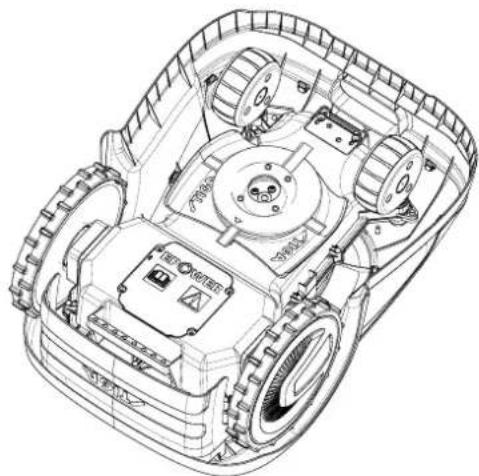
1.2. TECHNICAL DATA
![graph TD A["Environment Area"] --> B["Central Room"] B --> C["Building Area"] C --> D["Storage Area"] D --> E["Storage Area"] E --> F["Storage Area"] F --> G["Storage Area"] G --> H["Storage Area"] H --> I["Storage Area"] I --> J["Storage Area"] J --> K["Storage Area"] K --> L["Storage Area"] L -->…](/content/2026/04/623884/images/05105b4ecd2b8a8c85034c336df93de65a0cd018c18d069b0ae58ea54861c4c0.jpg)
3.2.2. MAIN COMPONENTS
3.3. UNPACKING
3.4. SYMBOLS AND DATA PLATES

ATTENTION:

ATTENTION:
4.3. CHECKING INSTALLATION REQUIREMENTS

ATTENTION:
4.3.3. MAIN CHECKS FOR INSTALLING THE BOUNDARY CABLE
STIGA

ATTENTION:
4.4. CRITERIA FOR INSTALLING THE BOUNDARY CABLE
4.4.1. PLACING THE BOUNDARY CABLE
Procedure:

WARNING:
4.4.3. TRANSITIONS BETWEEN DIFFERENT AREAS OF THE LAWN
Procedure:
4.5. INSTALLING COMPONENTS
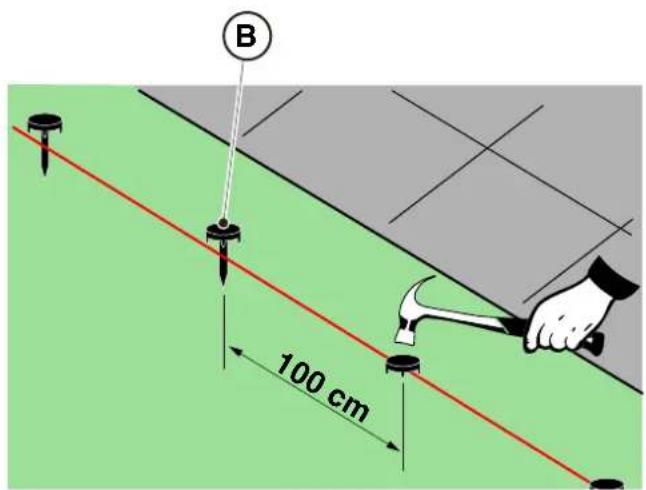
INSTALLATION IN THE GROUND
(THIS CAN ONLY BE DONE BY AN AUTHORIZED RESELLER)
STIGA
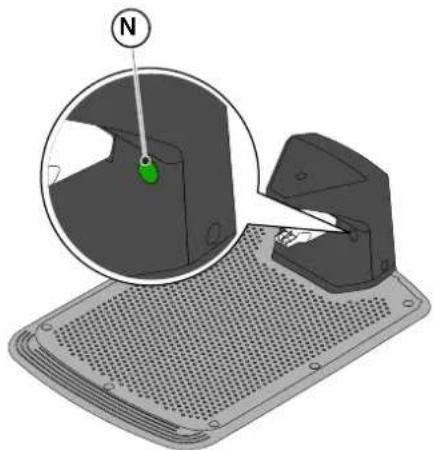
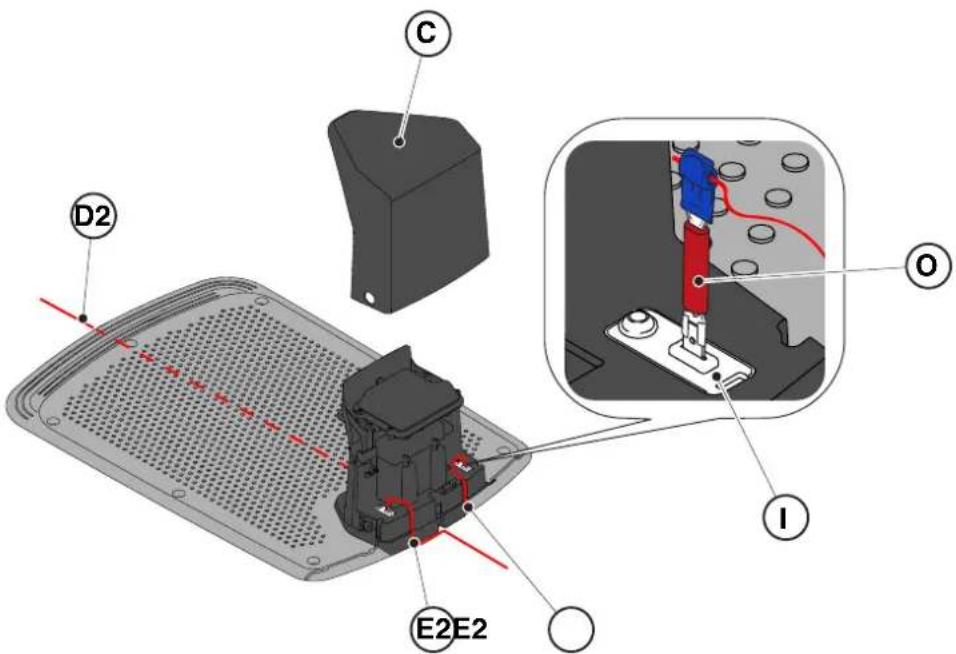
4.6. CHARGING THE ROBOTIC MOWER AFTER INSTALLATION
4.7. PRODUCT SETTINGS
| G 300 G 600 G | 1200 | |
| Border Cut |  |  |  |
| Go-To Cut Points | 1 3 5 | | |
| Eco Mode |  |  |  |
| Rain Sensor |  |  |  |
| Closed Area |  |  |  |
PRODUCT SETTINGS INDEX
4.7.1. PRE-LOGIN....31
4.7.2. REGISTRATION (SIGN UP) 31
4.7.3. PAIRING 31
4.7.4. DEVICE PAGE 32
4.7.5. CLOSED AREA 32
4.7.6. SETTINGS 32
4.7.7. SPOT CUT / SCHEDULED CUT 32
4.7.8. MOWING SESSIONS 32
4.7.9. GO-TO-CUT POINTS 33
4.7.10. BORDER CUT 33
4.7.6. SETTINGS
5.2. MANUAL OPERATION OF THE ROBOTIC MOWER
5.3.1. SAFE STOP - STOP BUTTON
5.3.4. SELECTING A SCHEDULED PROGRAM / SINGLE WORK CYCLE / RETURN TO CHARGING STATION – MODE SELECTION BUTTON
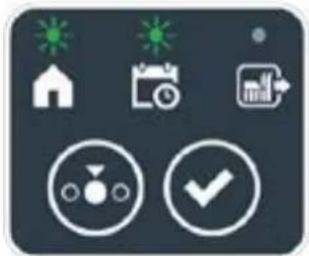
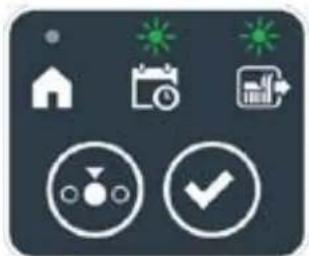
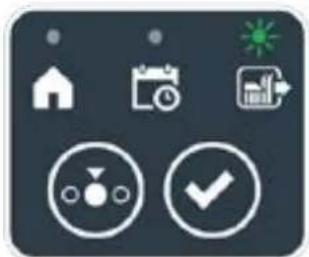

STIGA
Operating mode:
5.3.6. ALARM TESTING - ALARM SYSTEM
5.3.8. STARTING THE ROBOT MOWER
5.5. CHARGING THE BATTERY
5.6. ADJUSTING THE CUTTING HEIGHT
Operating mode:
6. MAINTENANCE
6.1. ROUTINE MAINTENANCE

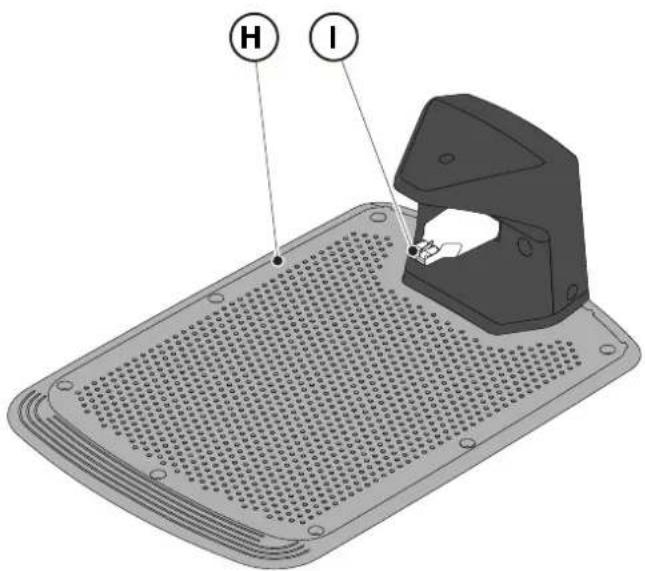
6.3. REPLACING THE BLADES

6.4. BATTERY WINTER MAINTENANCE AND STORAGE
Operating mode:
6.5. REPLACING THE BATTERY
(Supply of Machinery (Safety) Regulations 2008, S.I. 2008 No. 1597, Annex II, part A)
- The company: ST. S.p.A. – Via del Lavoro, 6 – 31033 Castelfranco Veneto (TV) – Italy
- Hereby declares under its own responsibility that the machine:
Robotic lawnmower
a) Type approval: SRSW01 c) Serial number: 22A••RMO000001 ÷ 99L••RMO999999 d) Engine: battery-operated
- Conforms to UK Regulations:
• S.I. 2008/1597 - Supply of Machinery (Safety) Regulations 2008 • S.I. 2016/1091 - Electromagnetic Compatibility Regulations 2016 - S.I. 2012/3032 - The Restriction of the Use of Certain Hazardous Substances in Electrical and Electronic Equipment Regulations 2012 • S.I. 2017/1206 - Radio Equipment Regulations 2017
- Reference to harmonised standards:
EN 60335-1:2012 / AC:2014 / A11:2014 / A13:2017 / EN 61000-3-2:2019
A1:2019 / A2:2019 / A14:2019 EN 61000-3-3:2013 / A1:2019
EN IEC 63000:2018 EN 300 328 V2.2.2
EN 303 447 V1.2.0
EN 50636-107:2015 / A1 / A2
EN 301 489-17 V3.2.4
EN 62479:2010
EN 55014-1:2017 / A11:2020
EN 55014-2:2015
i) Cutting width: 18 cm
n) Person authorised to compile the technical file: ST. S.p.A.
Via del Lavoro, 6
31033 Castelfranco Veneto (TV) - Italia
o) Castelfranco Veneto, 01/12/2022 CEO Stiga Group
STIGA S.p.A.
Via del Lavoro, 6
31033 Castelfranco Veneto (TV) - Italy
Sean Robinson
UK Importer:
STIGA LTD
Unit 8, Bluewater Estate Plympton,
Devon, PL7 4JH, England

| FR (Traduction de la notice originale)Déclaration CE de Conformité (Directive Machines 2006/42/CE, Annexe II, partie A)1. La Société2. Déclare sous sa propre responsabilité que la machine : Robot-tondeusea) Type / Modèle de Basec) Série d) Moteur: batterie3. Est conforme aux prescriptions des directives :4. Renvoi aux Normes harmoniséesi) Largeur de coupen) Personne habilitée à établir le Dossier Technique :o) Lieu et Date | DE (Übersetzung der Originalbetriebsanleitung)EG-Konformitätserklärung (Maschinenrichtlinie 2006/42/EG, Anhang II, Teil A)1. Die Gesellschaft2. Erklärt auf eigene Verantwortung, dass die Maschine: Mährobotera) Typ / Basismodellc) Seriennummerd) Motor: Batterie3. Den Anforderungen der folgenden Richtlinien entspricht:4. Bezugnahme auf die harmonisierten Normeni) Schnittbreiten) Zur Verfassung der technischen Unterlagen befugte Person:o) Ort und Datum | NL (Vertaling van de oorspronkelijke gebruiksaanwijzing)EG-verklaring van overeenstemming (Richtlijn Machines 2006/42/CE, Bijlage II, deel A)1. Het bedrijf2. Verklaart onder zijn eigen verantwoordelijkheid dat de machine: Robotmaaiera) Type / Basismodelc) Serienummerd) Motor: accu3. Voldoet aan de specificaties van derichtlijnen:4. Verwijzing naar de Geharmoniseerde normeni) Snijbreedten) Bevoegd persoon voor het opstellen van het Technisch Dossiero) Plaats en Datum |
| ES (Traducción del Manual Original)Declaración de Conformidad CE (Directiva Máquinas 2006/42/CE, Anexo II, parte A)1. La Empresa2. Declara bajo su propia responsabilidad que la máquina: Robot cortacéspeda) Tipo / Modelo Basec) Matrículad) Motor: bateria3. Cumple con las especificaciones de las directivas:4. Referencia a las Normas armonizadasi) Amplitud de corten) Persona autorizada a realizar el Manual Técnico:o) Lugar y Fecha | PT (Tradução do manual original)Declaração CE de Conformidade (Diretiva de Máquinas 2006/42/CE, Anexo II, parte A)1. A Empresa2. Declara sob a própria responsabilidade que a máquina: Robot corta-relvaa) Tipo / Modelo Basec) Matrículad) Moto: Bateria3. É conforme às especificações das diretivas:4. Referência às Normas harmonizadasi) Amplitude de corten) Pessoa autorizada a elaborar o Caderno Técnicoo) Local e Data | NO (Oversettelse av original bruksanvisning)EF- Samvarserklæring (Maskindirektiv 2006/42/EF, Vedlegg II, del A)1. Firmaet2. Erklærer på eget ansvar at maskinen: Robotgressklippera) Type / Modellc) Serienummerd) Motor: batteri3. Oppfyller kravene i direktivene:4. Henvisning til harmoniserte standarderI) Klippebredden) Person som har fullmakt til å ufterdige teknisk dokumentasjon:o) Sted og dato |
| SV (Översättning av bruksanvisning i original)EG-försäkran om överensstämmelse (Maskindirektiv 2006/42//EG, bilaga II, dela)1. Företaget2. Försäkrar på eget ansvar att maskinen: Gräsklipparrobota) Typ / Basmodellc) Serienummerd) Motor: batteri3. Överensstämmer med föreskrifterna i direktivet4. Referens till harmoniserade standarderi) Skärbreddn) Auktoriserad person för upprättandet av den tekniska dokumentationen:o) Ort och datum | DA (Översættelse af den originale brugsanvisning)EF-overensstemmelseserklæring (Maskindirektiv 2006/42/EF, bilag II, del A)1. Firmaet2. Erklærer på eget ansvar, at maskinen: Robotplænekllippera) Type / Modelc) Serienummerd) Motor: batteri3. Er i overensstemmelse med specifikationerne ifølge direktiverne:4. Henvisning til harmoniserede standarderi) Klippebredden) Person, der har bemyndigelse til at udarbejde det tekniske dossier:o) Sted og dato | FI (Alkuperäisten ohjeiden käännös)EY-VAATIMUSTENMUKAISUUSVAKUUTUS (Konedirektiivi 2006/42/EY, Liite II, osa A)1. Yritys2. Vakuuttaa omalla vastuillaan, että kone: Robottiruohonlelikkurla) Tyyppl / Perusmalllc) Sarjanumerod) Moottori : akku3. On yhdenmukainen seuraavien direktiivien asettamien vaatimusten kanssa:4. Viittaus harmonisoituihin standardeihini) Leikkuuleveysn) Teknisten asiakirjojen laatimiseenvaltuutettu henkilö:o) Paikka ja päivämäärä |
| SL (Prevod izvirnih navodil)ES izjava o skladnosti (Direktiva 2006/42/ES) , priloga II, del A)1. Družba2. pod lastno odgovornostjo izjavlja, da je stroj: Robotska kosilnicaa) Tip / osnovni modelc) Serijska številkad) Motor: baterija3. Skladen je z določili direktiv :4. Sklicevanje na usklajene predpisei) Obseg košnjen) Oseba, pooblaščena za sestavotehnične knjižice:o) Kraj In datum | LT (Originalių instrukciju vertimas)EB atitikties deklaracija (Mašinų direktyva 2006/42/CE, Priedas II, dalis A)1. Bendrovė2. Prisilma atsakomybę, kad jrenglnys: Žolės pjovimo robotasa) Tipas / Bazinis Modelisc) Serijos numerisd) Variklis: baterija3. Atitinka direktyvose pateiktas specifikacijas:4. Nuoroda i suderintas Normasi) Pjovimo plotisn) Autorizuotas asmuo sudaryti Techninę Dokumentaciją:o) Vieta ir Data | LV (Instrukciju tulkojums no originálvalodas)EK atbilstības deklarācija (Direktīva 2006/42/EK par mašinām, pleilkums II, daļa A)1. Uzņēmums2. Uzņemoties par to pilnu atbildību, pazino, ka mašina: Robotizēta pljaujmašinaa) Tips / Bāzes modelsc) Sērijas numursd) Motors: akumulators3. Atbilst šādu direktīvu prasībām:4. Atsauce uz harmonizētiem standartiemi) Pljaušanas platumsn) Pilnvarotais darbinieks, kas sagatavoja tehnisko dokumentāciju:o) Vieta un datums |
| CS (Překlad původního návodu k používání)ES – Prohlášení o shodě(Směrnice o Strojních zařízeních 2006/42/ES, Přiloha II, část A)1. Společnost2. Prohlášuje na vlastní odpovědnost, že stroj: Robotická sekačkaa) Typ / Základní modelc) Výrobní číslod) Motor: akumulátor3. Je ve shodě s nařízeními směrnic:4. Odkazy na Harmonizované normyi) Šířka řezánín) Osoba autorizovaná pro vytvoření Technického spisu:o) Misto a Datum | PL (Tłumaczenie instrukcji oryginalnej)Deklaracja zgodności WE(Dyrektywa maszynowa 2006/42/WE,Załącznik II, część A)1. Spółka2. Oświadczenie na własną odpowiedzialność, że maszyna: Kosiarka trawnikowaa) Typ / Model podstawowyc) Numer seryjnyd) Silnik: akumulator3. Spełnia podstawowe wymogi następujących Dyrektyw:4. Odniesienie do Norm zharmonizowanychi) Szerokość cięcia n) Osoba upoważniona do zredagowania Dokumentacji technicznej:o) Miejscowość i data | ET (Algupārase kasutusjuhendi tõlge)EÜ vastavusdeklaratsioon(Masinadirektiiv 2006/42/EÜ, Lisa II, osa A)1. Firma2. Kinnitab omal vastutusel, et masin:Robotniiduka) Tüüp / Põhimudel c) Matrikkeld) Mootor: aku3. Vastab direktiivide nõuetele:4. Viide ühtlustatud standarditelei) Lõikelaiusn) Tehnilise Lehe autoriseeritud koostaja:o) Koht ja Kuupäev |
| HU (Eredeti használati utasítás fordítása)EK-megfelelőségi nyilatkozata(2006/42/EK gépirányelv, ll. melléklet "A" rész)1. Alulírott Vállalat2. Felelősségének teljes tudatában kijelenti, hogy az alábbi gép: Robotfűnyíróa) Típus / Alaptipusc) Gyártási számd) Motor: akkumulátor3. Megfelel az alábbi irányelvekelőírásainak:4. Hivatkozás a harmonizált szabványokrai) Vágási szélességn) Műszaki Dosszié szerkesztésérefelhatalmazott személy:o) Helye és ideje | RU (Перевод оригинальных инструкций)Декларация соответствия нормам EC (Direktiva o машинном оборудовании 2006/42/EC, Приложение II, часть A)1. Предприятие2. Заявляет под собственную ответственность, что машина: Робот-газонокосилкаa) Тип / Базовая модельc) Паспортd) Двигатель: батарея сгорания3. Соответствует требованиям следующих директив:4. Ссылки на гармонизированные нормыi) Амплитуда кошенияn) Лицо, уполномоченное на подготовку технической документации:o) Место и дата | HR (Prijevod originalnih uputa)EK Izjava o sukladnosti (Direktiva 2006/42/EZ o strojevima, dodatak II, dio A)1. Tvrtka:2. pod vlastitom odgovornošću izjavljuje da je stroj: Robotska kosilicaa) Vrsta / Osnovni modelc) Matični brojd) Motor: baterija3. sukladan s temeljnim zahtjevima direktiva:4. Primijenjene su slijedeće harmonizirane norme:i) Širina rezanján) Osoba ovlaštena za pravljenje Tehničke datoteke:o) Mjesto i datum |
| SR (Prevod originalnih uputstval)EC deklaracija o usaglašenosti (Direktiva o mašinama 2006/42/EC, Prilog II, deo A)1. Preduzeće2. Daje izjavu pod vlastitom odgovornošćuda je mašina: Robot kosačicaa) Tip / Osnovni modelc) Serijski brojd) Motor: akumulator3. U skladu s osnovnim zahtevima direktiva:4. Pozivanje na usklađene normei) Širina košenjan) Osoba ovlašćena za sastavljanje tehničke brošureo) Mesto i datum | TR (Orijinal Talimatların Tercümesi)AT Uygunluk Beyanı (2006/42/CE Makine Direktifi, Ek II, bölüm A)1. Şirket2. Şahsi sorumluluğu altında aşağıdaki makinenin: Robot çim biçme makinesia) Tip / Standart modelc) Sicil numarasıd) Motor : batarya3. Aşağıdaki direktiflerin özelliklerine uygun olduğunu beyan etmektedir:4. Harmonize standartlara atifi) Kesim genişligiń) Teknik Dosyayı oluşturmaya yetkili kişi:o) Yer ve Tarih | RO (Traducerea manualului fabricantului)CE -Declaratie de Conformitate (Directiva Mašini 2006/42/CE, Anexa II, partea A)1. Societatea2. Declară pe propria răspundere că mașina: Robot mașină de tuns iarbaa) Tip / Model de bazăc) Număr de seried) Motor: baterie3. Este în conformitate cu specificațiile directivelor:4. Referință la Standardele armonizatei) Lătimea de täieren) Persoană autorizată să întocmeascăDosarul Tehnico) Locul și Data |
STIGA
STIGA LTD (UK Importer)
Unit 8, Bluewater Estate Plympton, Devon, PL7 4JH, England
STIGA S.p.A.
Via del Lavoro, 6
31033 Castelfranco Veneto (TV)
Italy

CROATIAN - TRANSLATION OF ORIGINAL INSTRUCTIONS
TABLE OF CONTENTS
1. MODELS AND TECHNICAL DATA 1
1.1. MODELS 1 1.2. TECHNICAL DATA 2
2. SAFETY 3
2.1. SAFETY INFORMATION .... 3 2.2. SAFETY INSTRUCTIONS....5 2.2.1. SAFE WORK PRACTICES 5 2.2.2. OPERATION....5
2.3. STOPPING AND DISCONNECTING THE ROBOTIC MOWER IN SAFE CONDITIONS ....7
3. INTRODUCTION 8
3.1. GENERAL INTRODUCTION 8
3.1.1. PURPOSE OF THE MANUAL....8
3.1.2. INSTRUCTIONS FOR READING ON A SMARTPHONE....8
3.2. PRODUCT OVERVIEW 9
3.2.1. GENERAL DESCRIPTION....9
3.2.2. MAIN COMPONENTS 10
3.3. UNPACKING 11
3.4. Symbols and nameplates....12
3.5. General instructions for reading the manual....13
4. Installation 14
4.1. General information for installation 14 4.2. Components for installation 14 4.3. Checking compliance with installation requirements....15 4.3.1. Checking the garden: 15 4.3.2. Checks for installing the charging base and power supply: 15 4.3.3. Main checks for installing the boundary wire: 17
4.4. Criteria for installing the boundary wire 19
4.4.1. Positioning the boundary wire.... 19 4.4.2. Limiting obstacles: 21 4.4.3. Passages between different garden zones....23
4.5. Installing components 23
4.5.1. Installing the boundary wire....24 4.5.2. Connector for the boundary wire.... 25 4.5.3. Installing the charging base....26 4.5.4. Installing the resistor for small perimeters 28
4.6. Charging the robotic mower after installation....29
4.7. Product settings 30
5. Operation 35
5.1. Safety check before starting the robotic mower 35 5.2. Manual mode of the robotic mower....36 5.3. Description of the controls on the robotic mower 37 5.3.1. Safe stop - STOP button 37
5.3.2. Safe shutdown – Safety key 38 5.3.3. Switching on and off - ON/OFF button 38 5.3.4. Selecting the scheduled program/single work cycle - SCHEDULED PROGRAM button 39 5.3.5. Displaying Bluetooth status and deleting from the list of paired devices - BLUETOOTH button....41 5.3.6. Displaying alarm status - ALARM icon 41 5.3.7. Displaying battery charge - BATTERY icon.... 42 5.3.8. Starting the robotic mower - START button 42
5.4. Operation of the charging base 43 5.5. Charging the battery 43 5.6. Adjusting the cutting height....44
6. Maintenance 45
6.1. SCHEDULED MAINTENANCE 45 6.2. CLEANING THE PRODUCT 46 6.3. REPLACING THE BLADES 48 6.4. WINTER MAINTENANCE OF THE BATTERY AND STORAGE....49 6.5. REPLACING THE BATTERY....49
7. TROUBLESHOOTING 50
7.1. MAIN MESSAGES IN THE APPLICATION 51
8. TRANSPORTATION/TRANSFER, STORAGE AND DISPOSAL 53
8.1. TRANSPORTATION....53 8.2. STORAGE....53 8.3. DISPOSAL....53
9. ADDITIONAL EQUIPMENT 54
10. WARRANTY 55
10.1. WHAT THE WARRANTY COVERS....55
11. EC DECLARATION OF CONFORMITY 56
1. MODELS AND TECHNICAL DATA
1.1. MODELS
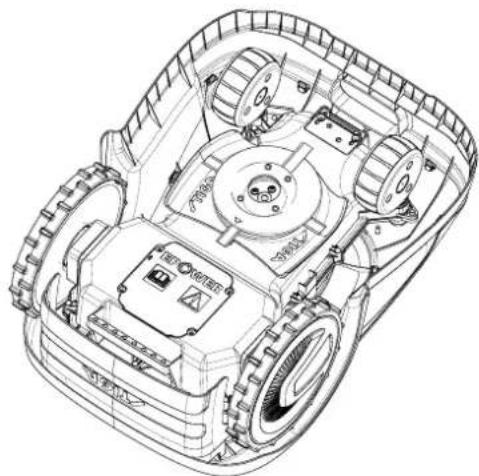
1.2. TECHNICAL DATA
| SPECIFIKACIJE | MJERNA JEDINICA | STIGA G 300 STIGA G 600 STIGA G 1200 |
| Dimenzije (DxVxŠ) | [mm] 413 | x 252 x 560 413 x 252 x | 560 413 x 252 x 560 | |
| Težina robotske kosilice | [kg] 7,4 7 | 6 8 | | |
| Visina košnje (Min.-Maks.) | [mm] 20-60 | 20-60 20-60 | | |
| Promjer noža | [mm] | 180 | 180 | 180 |
| Brzina košnje | [o/min] | 2850+/-50 | 2850+/-50 | 2850+/-50 |
| Brzina kretanja | [m/min] | 22 | 22 | 22 |
| Maksimalni nagib | % | 45 | 45 | 45 |
| Maksimalni nagib duž perimetra | % | 20 | 20 | 20 |
| Tip električnog pogonskog motora | - | Bez četkica | Bez četkica | Bez četkica |
| Tip sustava za košnju | - | 4 zakretna noža za košnju | 4 zakretna noža za košnju | 4 zakretna noža za košnju |
| Šifra noža | - | 322104105/0 | 322104105/0 | 322104105/0 |
| Tip električnog motora za košnju | - | Bez četkica | Bez četkica | Bez četkica |
| Razina izmjerene zvučne snage | [dB] (A) | 57 | 57 | 57 |
| Nesigurnost emisija buke, kWA | [dB] (A) | 1,47 | 1,47 | 1,47 |
| Jamčena razina zvučne snage | [dB] (A) | 59 | 59 | 59 |
| Razina zvuka u uhu rukovatelja | [dB] (A) | 46,3 | 46,3 | 46,3 |
| Klasifikacija IP robotske kosilice | - | IPX5 | IPX5 | IPX5 |
| Klasifikacija IP stanice za punjenje | - | IPX1 | IPX1 | IPX1 |
| Klasifikacija IP napajača | - | IP67 | IP67 | IP67 |
| Okolna temperatura za rad robotske kosilice [°C] | [°C] | 0 ÷ 50 | 0 ÷ 50 | 0 ÷ 50 |
| Okolna temperatura za rad stanice za punjenje [°C] | [°C] | -10 ÷ 50 | -10 ÷ 50 | -10 ÷ 50 |
| Okolna temperatura za rad napajača [°C] | [°C] | -10 ÷ 50 | -10 ÷ 50 | -10 ÷ 40 |
| Radna sposobnost | [m2] | 300 | 600 | 1200 |
| Napajanje | - | Ulaz:100-240 VAC; 1,2 Alzlaz:30 VCC; 2 A | Ulaz:100-240 VAC; 1,2 Alzlaz:30 VCC; 2 A | Ulaz:100-240 VAC; 1,2 Alzlaz:30 VCC; 2 A |
| Model baterije | - | 25,2 – 25,9 V;2 Ah | 25,2 – 25,9 V;2,5 Ah | 25,2 – 25,9 V;5 Ah |
| Vrijeme punjenja | [min] | 60 | 80 | 150 |
| Bluetooth | - | 4.2 4.2 | 4.2 | |
2. SAFETY
In designing the device, we have paid special attention to those aspects that may cause risks to the safety and health of people. The purpose of this information is to sensitize users to prevent any risk by avoiding behaviors that do not comply with the stated rules.

DANGER:
Before using the robotic lawnmower, you must be familiar with all the information contained in this document.

DANGER:
![graph TD A["Zone A"] --> B["Central Circle"] B --> C["Zone B"] C --> D["Terminal Box"] D --> E["Grid Area"] E --> F["Storage Area"] F --> G["Storage Area"] G --> H["Storage Area"] H --> I["Storage Area"] I --> J["Storage Area"] J --> K["Storage Area"] K --> L["Storage Area"] L --> M["Storage Area"]…](/content/2026/04/623884/images/06de0c699d3a9b18762580cc91f3ed4c8a8f3a8df6ec8665ced17b7d2ae963ef.jpg)
- Installation kit (optional for G 600 and G 1200)
(F) Boundary wire (G) Staples for securing the boundary wire (H) Connector for the boundary wire (I) Connectors for the charging base
See chap. 9 "Accessories"
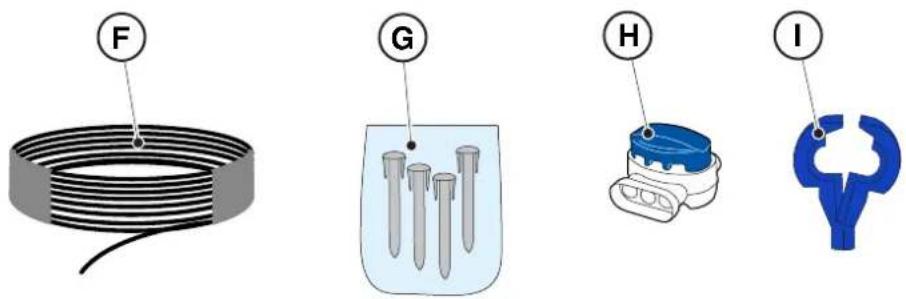
3.3. UNPACKING
3.4. SYMBOLS AND RATING PLATES
The following lists all symbols present on the robotic lawnmower:
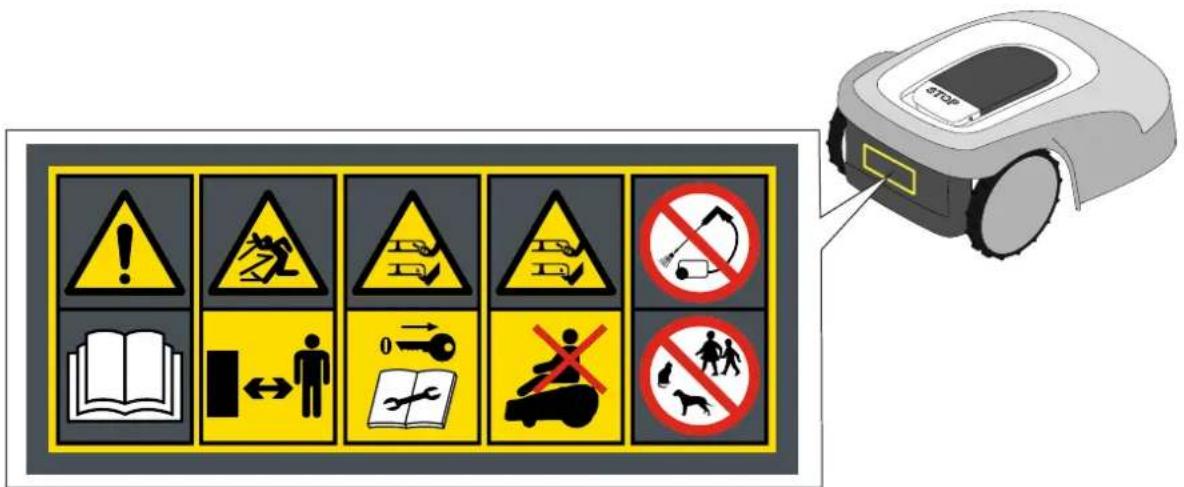

CAUTION:
Read the user instructions before starting the product.

CAUTION:

CAUTION:
Read the user instructions before starting the product.

Do not dispose of the battery as ordinary household waste.
Dispose of the battery at appropriate authorized collection centers.

Do not throw the battery into fire or expose it to heat sources.

4. INSTALLATION
4.1. GENERAL INFORMATION FOR INSTALLATION

WARNING:
4.3. CHECKING COMPLIANCE WITH INSTALLATION REQUIREMENTS

CAUTION:
4.3.3. MAIN CHECKS FOR INSTALLING THE BOUNDARY WIRE
4.4. CRITERIA FOR INSTALLING THE BOUNDARY WIRE
4.4.1. POSITIONING THE BOUNDARY WIRE
Procedure:
STIGA

WARNING:
![graph TD A["Central Node"] --> B["Top Section"] B --> C["Left Side"] C --> D["Right Side"] D --> E["Bottom Section"] E --> F["Left Side"] F --> G["Right Side"] G --> H["Center Point U"] style A fill:#f9f,stroke:#333 style B fill:#ccf,stroke:#333 style C fill:#cfc,stroke:#333 style D fill:#fcc,stroke…](/content/2026/04/623884/images/a4d9656054123f3313a6cbf1afb7fece56b2b918475880fe9842917d93e2701e.jpg)
4.4.3. PASSAGES BETWEEN DIFFERENT GARDEN ZONES
Procedure:
- In the case of a passage, the distance between two different sections of the boundary wire must be Z ≥ 70 cm.
- If the passage between two different wire sections is Z < 70 cm, the zone (A) is considered a "closed area" and the robotic mower cannot reach it automatically.

- Attach the charging base (L) to the ground using the fixing screws (M).
- Refit the cover (C).
- Connect the power supply connector to the charging base, then plug the power supply into the electrical outlet.
- Check that, when the robotic mower is not in the charging base, the control light on the charging base (N) is constantly on (see section 5.4).

WARNING:
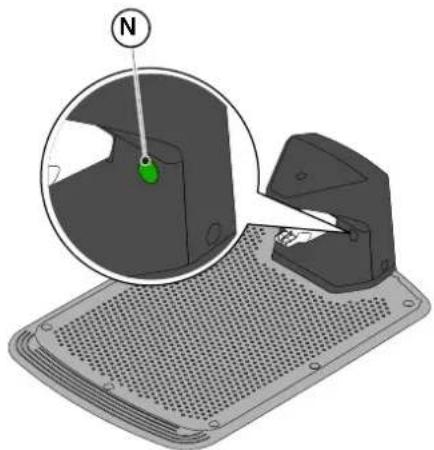
NOTE: If necessary, the cable supplying the charging base can be extended using extension cables. The use of at most two 5-meter extension cables is permitted (see chapter 9 "Accessories").
4.5.4. INSTALLING THE RESISTOR FOR SMALL PERIMETERS
Requirements and obligations:
The length of the boundary wire used for installing the robotic mower must be at least 40 meters. If the wire length is less, it is necessary to install a resistor (see chapter 9 "Accessories"), connected in series with the boundary wire.
Procedure:
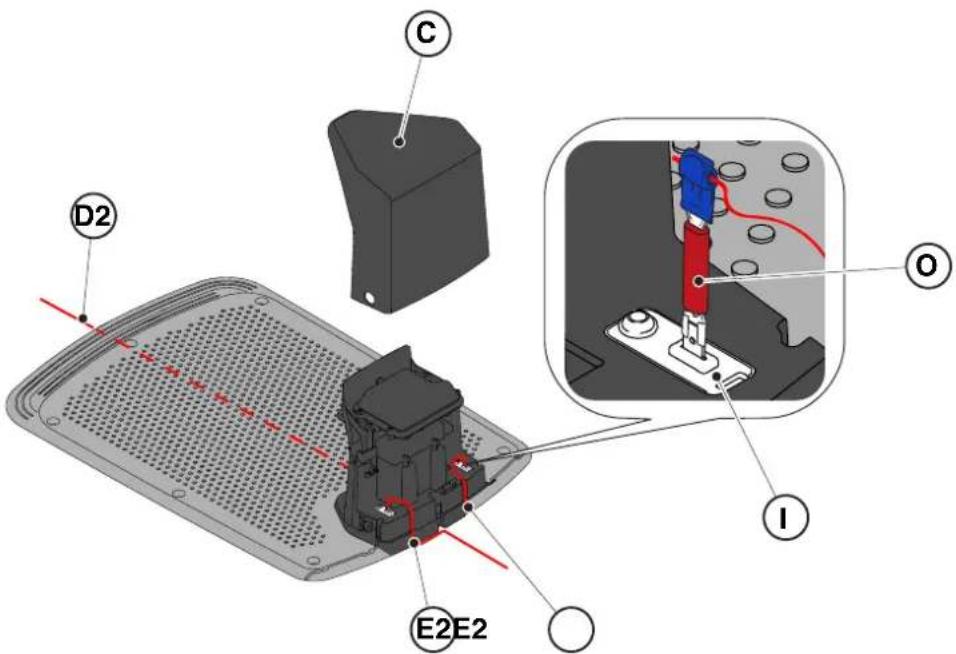
4.6. CHARGING THE ROBOTIC MOWER AFTER INSTALLATION
Requirements and obligations:
Charging station.
Procedure:
- Charge the robotic mower (see section 5.5).
NOTE: During the first charge, the batteries must be charged for at least 2 hours.
PRODUCT SETTINGS INDICATOR
4.7.1. PRE-REGISTRATION....31
4.7.2. REGISTRATION (SIGN UP) 31
4.7.3. PAIRING 31
4.7.4. DEVICE PAGE 32
4.7.5. CLOSED AREA 32