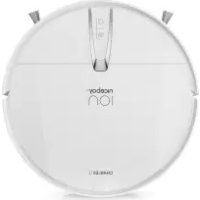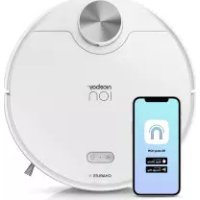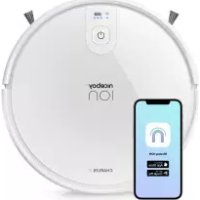
ION Charles i8 - Robot vacuum Niceboy - Free user manual and instructions
Find the device manual for free ION Charles i8 Niceboy in PDF.



| Product type | Robot vacuum |
| Brand | Niceboy |
| Model | ION Charles i8 |
| Dimensions (L x W x H) | 320 x 320 x 76 mm |
| Weight | Approximately 3 kg |
| Power supply | Li-ion battery 14.8 V / 2600 mAh, docking station 100-240 V ~ 50/60 Hz |
| Battery life | Up to 120 minutes |
| Charging time | 300 minutes |
| Suction power | 2700 Pa |
| Dust bin capacity | 680 ml (single bin) / 350 ml (dual dust bin) |
| Water tank capacity | 260 ml |
| Main functions | Automatic cleaning, return to station, mobile app (WiFi 2.4 GHz), scheduling, simultaneous vacuuming and mopping |
| Navigation | Gyroscopic (NaviGÂTE) |
| Filters | Primary filter, secondary fine filter, HEPA filter (washable, lifespan ~1 year) |
| Brushes | Main brush, side brushes, sweeping brush |
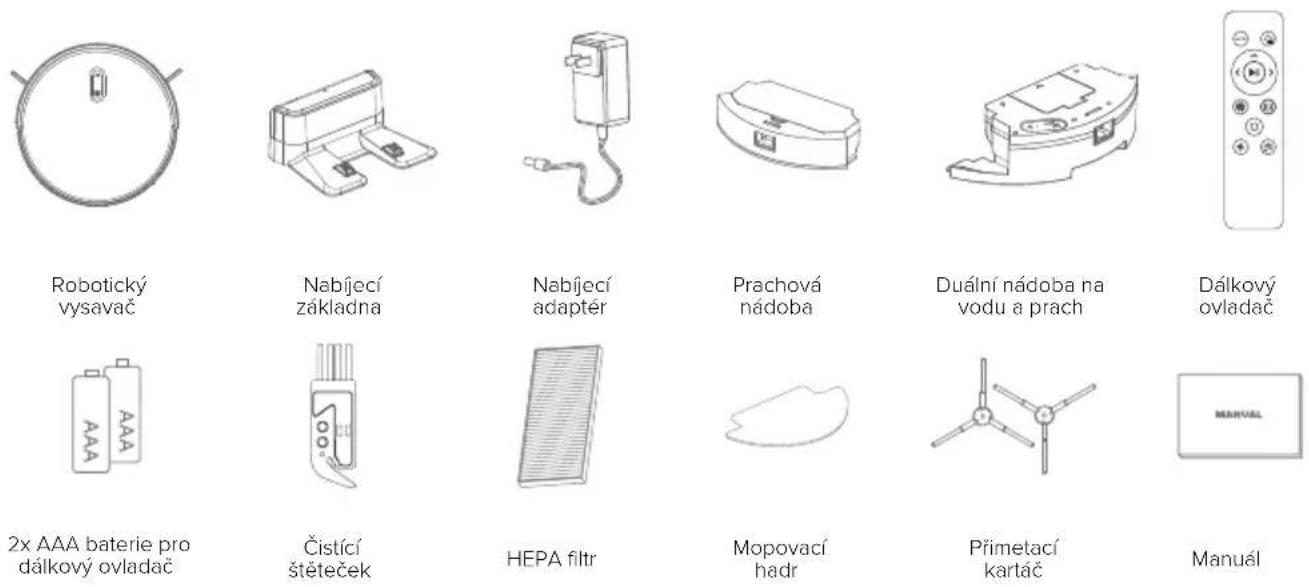
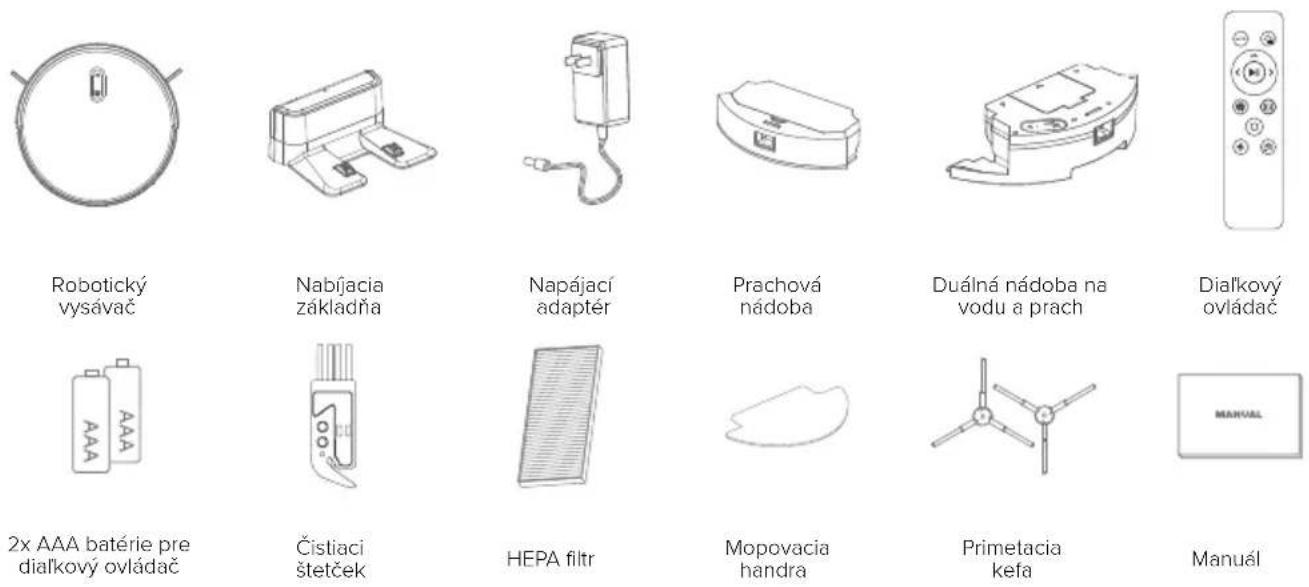
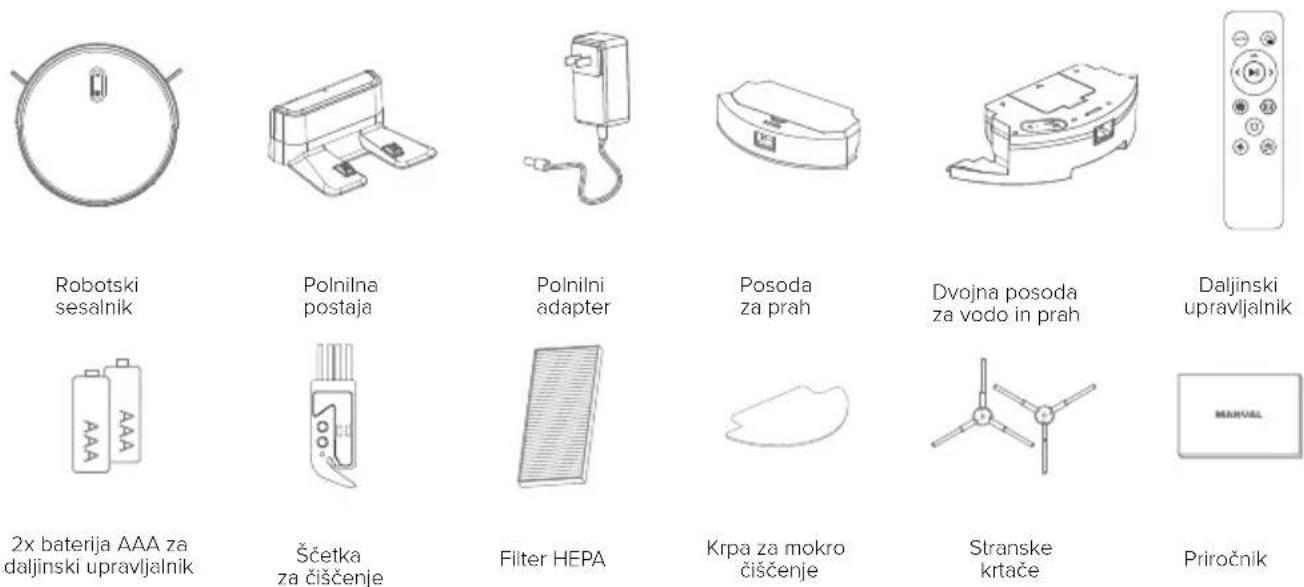
| Included accessories | Docking station, adapter, cleaning brush, mopping cloth, remote control (AAA batteries not included) |
| Safety | Anti-drop sensors, anti-collision bumper, automatic shut-off in case of overheating |
| Maintenance | Emptying bin, cleaning filters every 15-30 days, washing cloth |
| Repairability | Spare parts available from the manufacturer; battery not user-replaceable |
Frequently Asked Questions - ION Charles i8 Niceboy
User questions about ION Charles i8 Niceboy
0 question about this device. Answer the ones you know or ask your own.
Ask a new question about this device
Download the instructions for your Robot vacuum in PDF format for free! Find your manual ION Charles i8 - Niceboy and take your electronic device back in hand. On this page are published all the documents necessary for the use of your device. ION Charles i8 by Niceboy.
USER MANUAL ION Charles i8 Niceboy
User Manual / Robotic Vacuum

text_image
CZ SK EN DE HU
text_image
HR PL SL RO BG FRNávod k použití
natural_image
Line drawing of a robotic vacuum cleaner with attached cable, showing no text or symbolsnatural_image
Line drawing of a robotic vacuum cleaner on a surface, with no text or symbols present.natural_image
Illustration of a robotic vacuum cleaner with a cushioned seat and a circular checkmark (no text or symbols)natural_image
Line drawing of a staircase with a circular vent on top, no text or symbols presentnatural_image
Technical line drawing of a mechanical assembly with mounting brackets and a central component (no text or symbols)3. Schéma výrobku
natural_image
Technical line drawing of a mechanical component with internal cavities and mounting holes (no text or labels)natural_image
Technical line drawing of a mechanical component with a downward arrow indicating force or direction (no text or symbols)natural_image
Line drawing of a hand using a sewing machine to adjust or install a component (no text or symbols present)natural_image
Line drawing of a robotic vacuum cleaner with a circular top and mechanical base (no text or symbols)natural_image
Line drawing of a circular vacuum cleaner with a handle and ventilation slots (no text or symbols)Spustte zařízení.
natural_image
Line drawing of a hand holding a circular device with a handle, showing directional arrows indicating movement (no text or symbols)natural_image
Technical line drawing of a mechanical assembly with no visible text or symbolsnatural_image
Line drawings of three different cleaning or assembly steps: a device with handle, a tool holder, and a battery pack (no text or symbols present)6. Údržba
natural_image
Technical line drawing of a device interior with labeled components and a separate view of the device casing (no text or symbols present)7. Obsah balení
8. Parametry
natural_image
Line drawing of a robotic vacuum cleaner with attached cable, showing no text or symbolsnatural_image
Line drawing of a robotic vacuum cleaner on a surface, with no text or symbols present.natural_image
Illustration of a robotic vacuum cleaner with a pillow and wheels, no text or symbols presentnatural_image
Line drawing of a staircase with a circular vent on top, no text or symbols presentnatural_image
Technical line drawing of a mechanical assembly with mounting brackets and a central component (no text or symbols)3. Schéma výrobku
natural_image
Technical line drawing of a mechanical component with internal cavities and mounting holes (no text or symbols)natural_image
Technical line drawing of a mechanical component with a downward arrow indicating force or direction (no text or symbols)Pripevnite mopovaciu handru.
natural_image
Line drawing of a hand inserting into a device into a housing (no text or symbols)natural_image
Line drawing of a robotic vacuum cleaner with a circular top and mechanical base (no text or symbols)natural_image
Line drawing of a circular vacuum cleaner with a handle and ventilation slots (no text or symbols)Spustite zariadenie.
natural_image
Line drawing of a hand holding a circular device with a handle, showing directional arrows indicating movement (no text or symbols)natural_image
Technical line drawing of a mechanical assembly with no visible text or symbolsnatural_image
Line drawings of three different electronic devices: a remote control unit, a handheld device with a grid screen, and a battery pack (no text or symbols present)6. Údržba
natural_image
Technical line drawing of a device interior with labeled components and a separate view showing a device with control buttons (no text or symbols present)7. Obsah balenia
8. Parametry
https://niceboy.eu/sk/declaration/ion-charles-i8
INFORMÁCIE PRE POUŽÍVATELOV NA LIKVIDÁCIU ELEKTRICKÝCH A ELEKTRONICKÝCH ZARIADENÍ (DOMÁCE POUŽITIE)

- ......Safety instructions
- ......Security measures
- ......Product diagram
-
..... Operating instructions
4.1.....First launch
4.2.....Roller brush
4.3.....Dual container for water and dust
4.4.....App Connection -
...... Maintenance
5.1..... Dust container and filter
5.2..... Dual water and dust container
5.3.....Side brushes
5.4..... Other components
-
...... Package contents
-
...... Parameters
-
...... Frequently asked questions
1. Safety instructions
Read the instruction manual carefully before using the product and keep it for future reference.
- The product is intended for indoor cleaning. Do not use the product to clean outdoor areas (such as outdoor patios) or surfaces other than the floor (such as sofas).
- The products cannot be used by children under 8 years of age. If necessary, this must be done under the supervision of a guardian. Do not allow children to ride the product.
- This product is not intended for use by persons (including children) with reduced physical, sensory or mental abilities or insufficient experience and knowledge unless supervised by a person responsible for their safety.
- Clean up power cords and small objects on the floor to prevent blocking the equipment during cleaning.
- Fold the edges of the carpet to the underside of the carpet. Prevent hanging curtains, tablecloths, etc. from touching the floor.
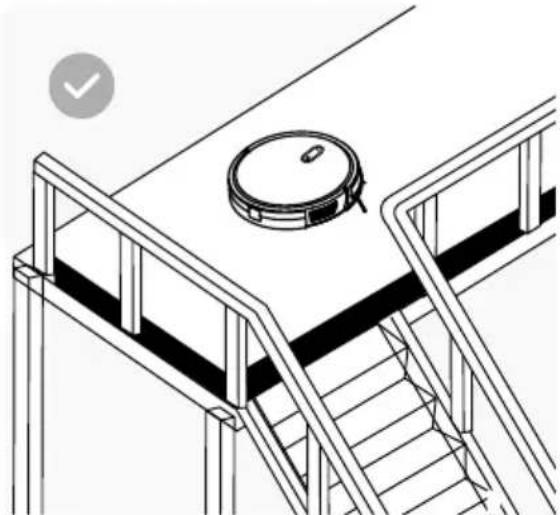
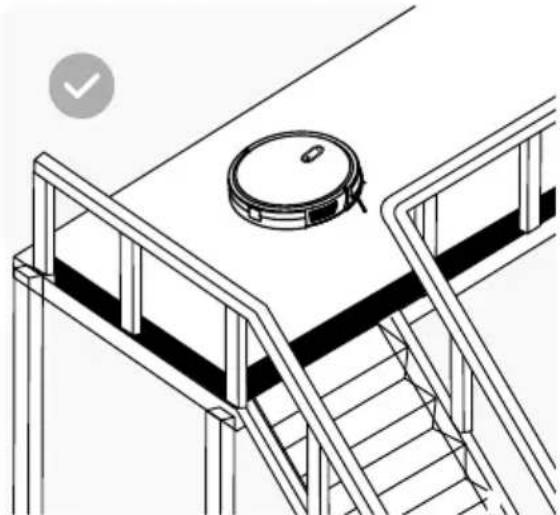
- Protective barriers should be installed at the edge of the raised area to prevent products from falling.
- When using the product, follow the operating instructions. Use only accessories recommended or sold by the manufacturer.
- Use only original batteries and charging docks that are specific to the product.
- Before using the products, make sure that the dust box and filter materials are installed.
- Use of the product in an environment with open flames is prohibited.
- Do not use the product in extreme heat (above 40^ ) or extreme cold (below 4^ ).
- Keep hair, clothing, fingers and other body parts away from the suction operating parts of the product.
- Do not use the product on wet or waterlogged floor.
- Avoid any objects such as:
- Stones, wastepaper,
- Flammable materials
- Cigarettes, matches, ashes or other objects that may cause a fire.
- Do not use the device if the intake is blocked. At the suction opening, remove dust, wool, hair, etc. to ensure smooth air circulation in the suction opening.
- Use the power cord with care to avoid damaging it. Do not use the power cord to pull or tug on the machine.
- Do not use the power cord as a grip.
- Do not insert the power cord into door frames.
- Do not pull the power cord by sharp corners or folds.
- Do not use the product if the power cord, socket or charging dock is damaged.
- Do not use the product if it does not function properly due to dropping, damage, outdoor use, or water intrusion. To avoid injury, the product should be repaired by the manufacturer or its after-sales service.
- To avoid blocking the suction of the product and to prevent damage to valuables, remove light objects (e.g. plastic bags) and fragile objects (e.g. vases) from the floor before cleaning.
2. Security measures
Please read the following instructions before using the cleaner.
natural_image
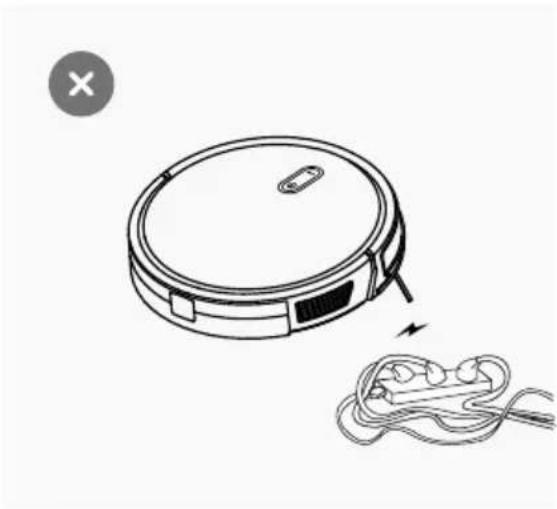
Line drawing of a robotic vacuum cleaner with attached cable, showing no text or symbols- Power lines and other electrical equipment scattered on the ground can cause damage to the product. They should be removed before use.
natural_image
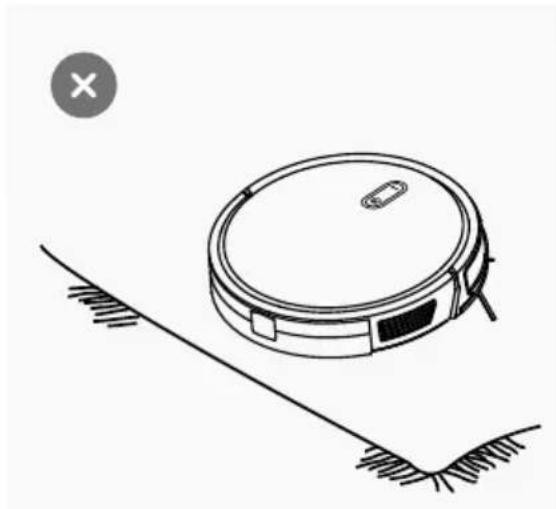
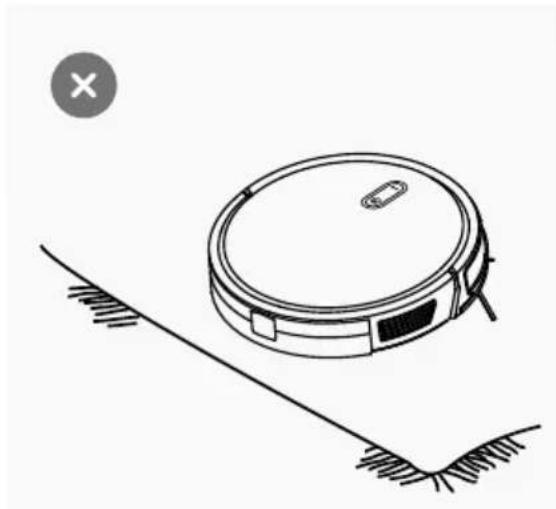
Line drawing of a robotic vacuum cleaner on a surface, with no text or symbols present.- Roll up carpet tassels or work on short pile carpets.
natural_image
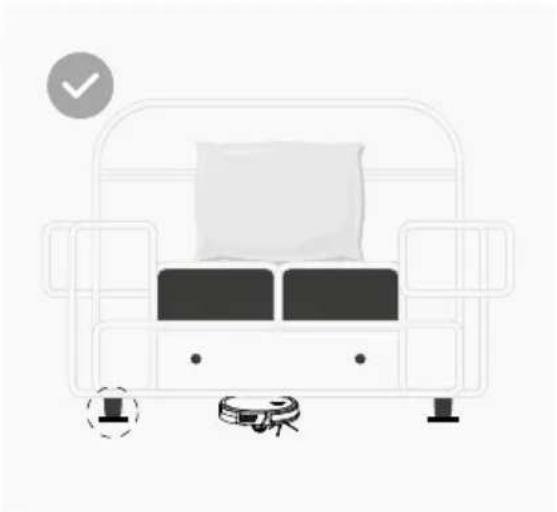
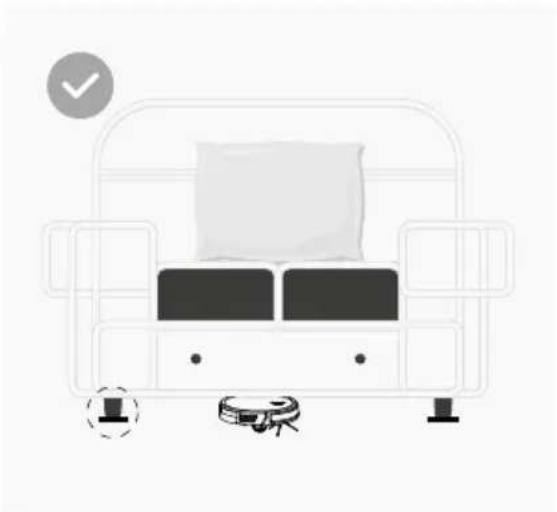
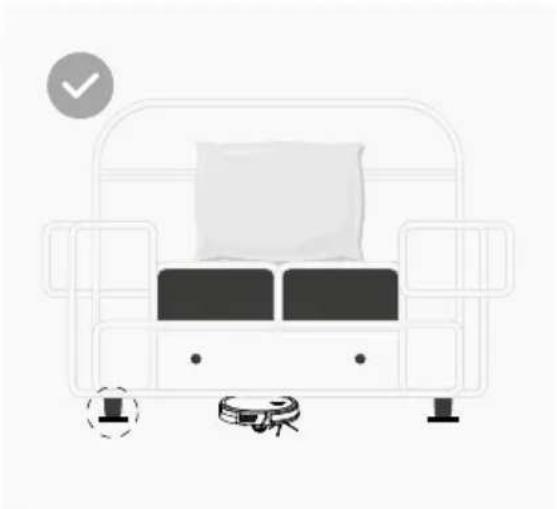
Illustration of a robotic vacuum cleaner with a cushioned seat and a checkmark icon (no text or symbols)- A gap of less than 8 cm on the underside of the furniture can trap the product. If you need to vacuum the space under the furniture, remove it.
natural_image
Line drawing of a staircase with a circular device on top, no text or symbols present- A guardrail should be place dat the edge of the staircase to ensure safe operation of the product.
Please read the following instructions before using the cleaner.
- Keep the main brush cleaning tools out of the reach of children.
- Do not place any objects (including children and pets) on the product, whether it is in use or not.
- Keep hair, loose clothing, fingers and all body parts well away from openings and moving parts.
- Do not use the product on burning objects (such as cigarette butts).
- Do not use the product to clean hard or sharp objects (such as decorative remnants, glass and nails).
- Before cleaning or servicing the product, the product must be switched off and the plug must be unplugged.
- Do not use a wet cloth or liquids to clean the product.
- Do not use the mopping module on carpets.
- Use the product in accordance with the operating instructions. Any loss or damage caused by improper use is the responsibility of the user.
- This product contains batteries that can only be replaced by qualified personnel.
- Improper handling (prolonged charging, short-circuiting, breakage by another object, etc.) can lead to fires, overheating or leakage of the battery, for example.
- Danger of explosion if the battery is replaced with the wrong type.
- Dispose of used batteries according to the instructions on the product packaging.
- Do not consume the battery, there is a risk of chemical burns.
- This product contains a lithium battery. Ingestion of a lithium battery can cause severe internal burns in as little as 2 hours and can lead to a fatal injury.
- Keep new and used batteries out of the reach of children.
- If you believe that the batteries may have been swallowed or placed in any part of the body, seek medical attention immediately.
- Throwing a battery into a fire or hot oven or mechanically crushing or cutting a battery can lead to an explosion.
- Leaving the battery in an environment of extremely high temperature may cause an explosion or leakage of flammable liquid.
- A battery exposed to extremely low air pressure may result in an explosion or leakage of flammable liquid.
- Improper handling (prolonged charging, short-circuiting, breakage by another object, etc.) may result in fire, overheating or leakage of hazardous substances from the battery.
- The battery or accumulator that may be included in the product is subject to a six-month service life as it is a consumable material.
- Do not disassemble, repair or modify the battery or charging station.
- Protect the charging station from heat (such as heating vents).
- When removing the battery, the product must be disconnected from the power supply.
- Do not wipe or clean the charger tips with a wet cloth or wet hands.
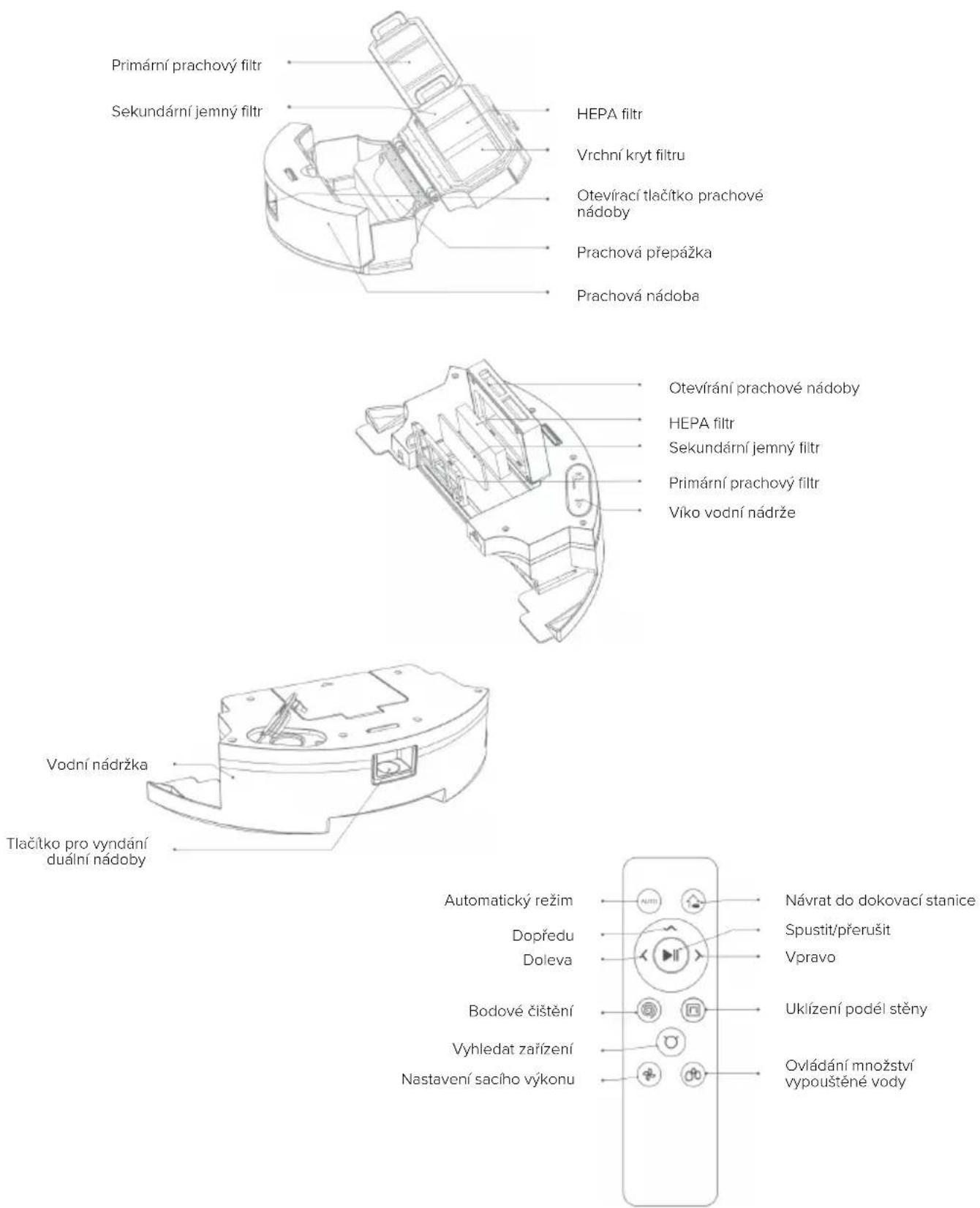
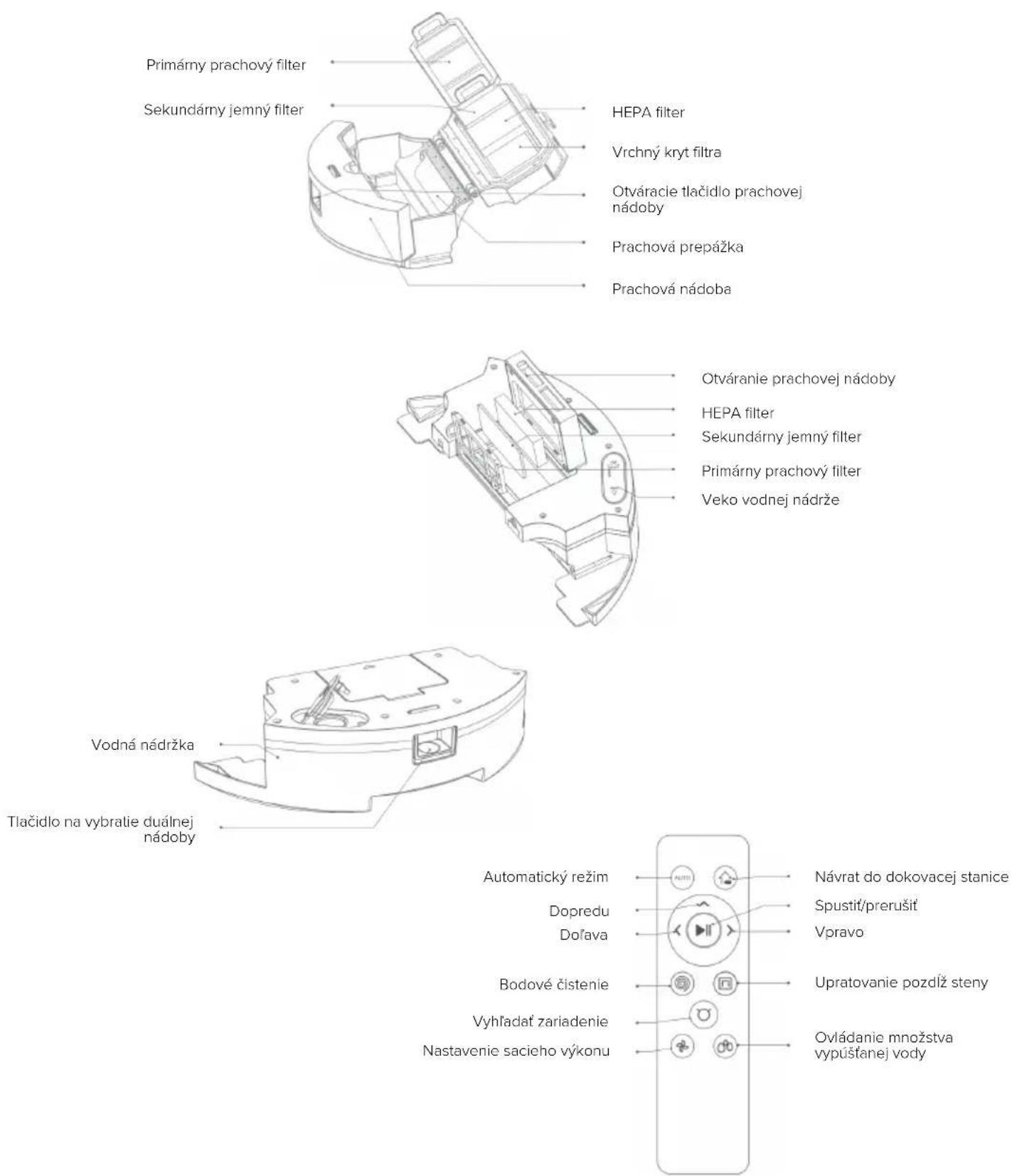
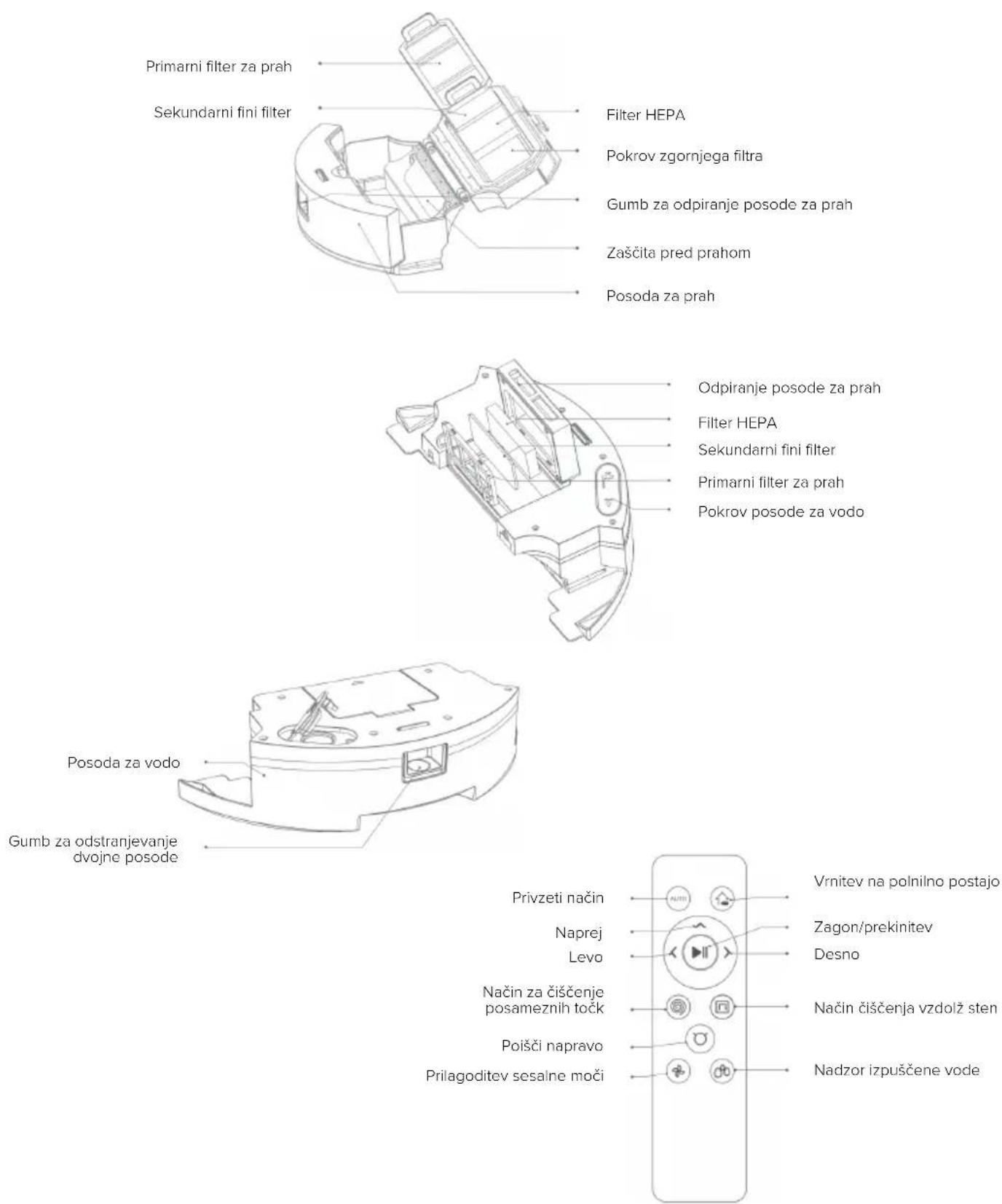
3. Product diagram
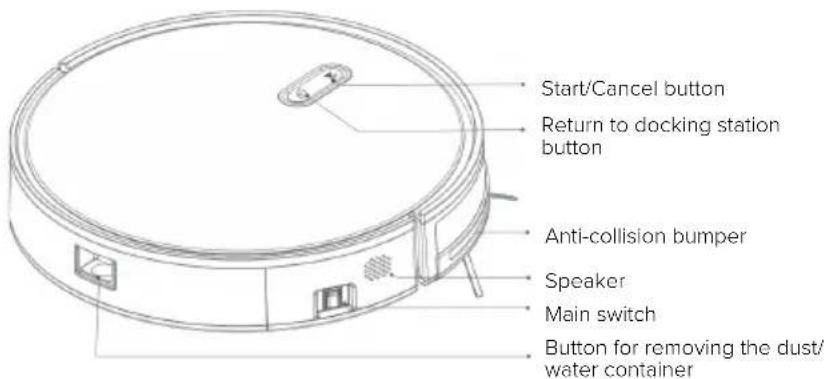
text_image
Start/Cancel button Return to docking station button Anti-collision bumper Speaker Main switch Button for removing the dust/ water containerFall sensors
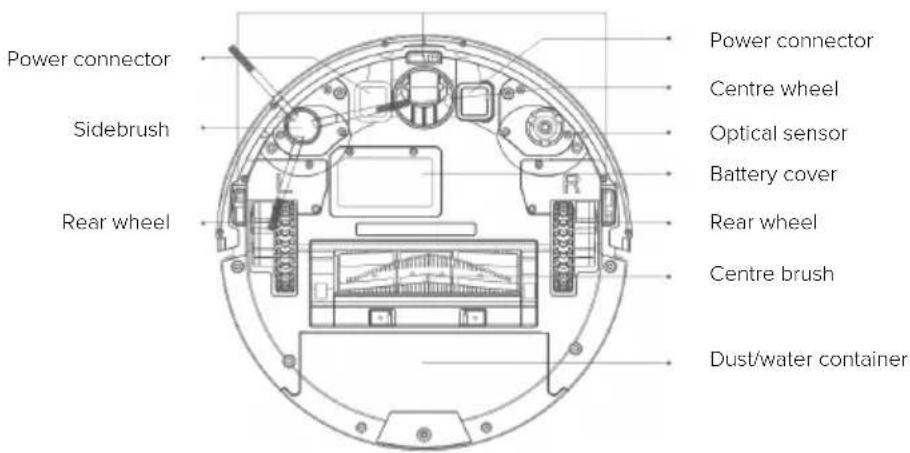
text_image
Power connector Sidebrush Rear wheel Power connector Centre wheel Optical sensor Battery cover Rear wheel Centre brush Dust/water container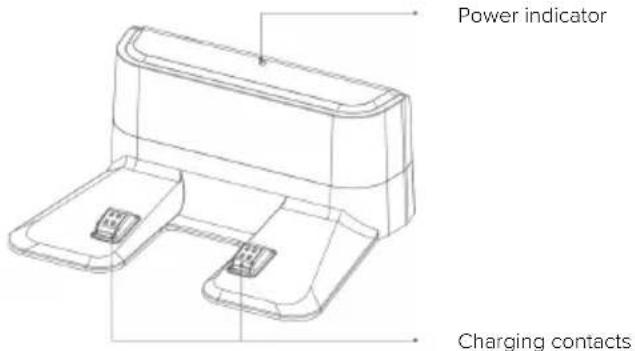
text_image
Power indicator Charging contacts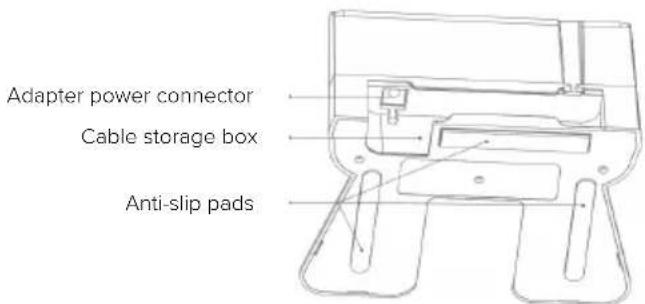
text_image
Adapter power connector Cable storage box Anti-slip pads3. Product diagram
4. Operating Instructions
4.1. First launch
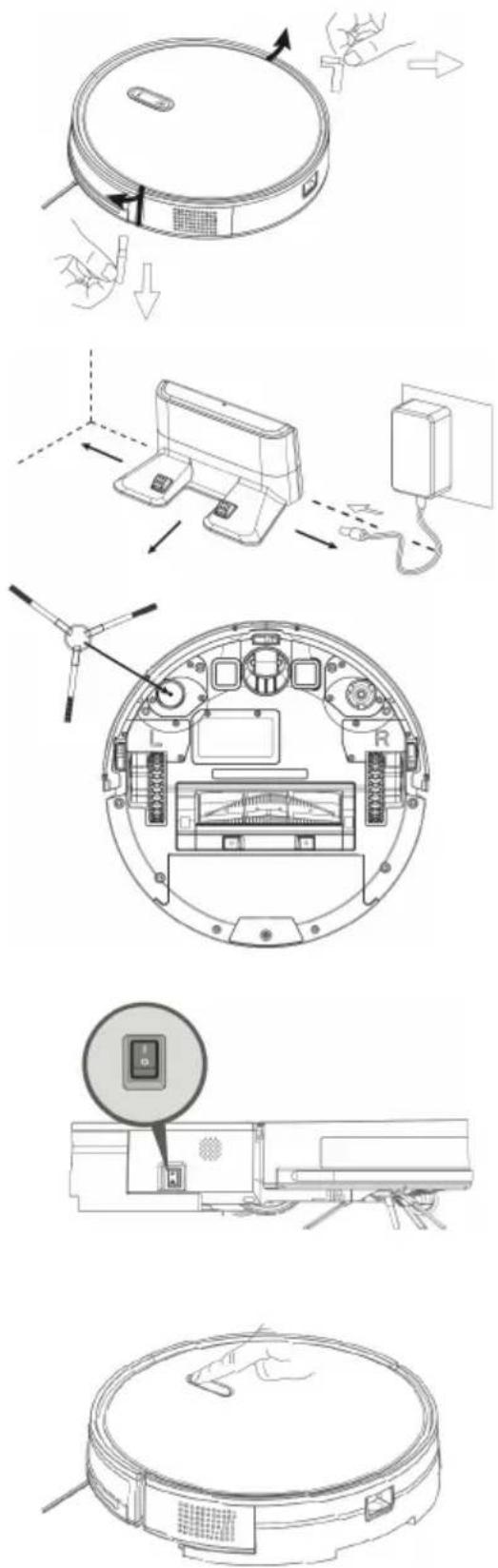
4.1.1. Removing the stickers
Remove the stickers located on the sides of the front bumper
4.1.2. Connect the adapter to the charging dock.
Place the charging stand flat against the wall. Do not place objects on the left and right sides within 1m and in front withing 2m. The base should not be located near objects with a strong reflective surface (mirrors).
4.1.3. Attach the sidebrush
4.1.4. Switch on the machine
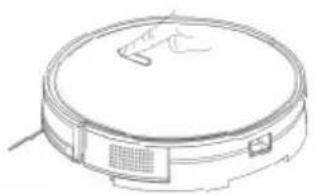
Press the main power button on the side of the device to put the product into standby mode. We recommend leaving the device in the charging stand after each use, rather than turning it off immediately, to ensure that it is fully charged for the next cleaning.
4.1.5. Charging the device
Place Charles in the charging base. Turn on Charles using the power button on the top of the device. The flashing blue „house“ light indicates that the battery needs to be charged. A steady blue light indicates charging. When charging is complete, the light goes off. When using the device for the first time, charge the device for more than 6 hours.
4. Operating Instructions
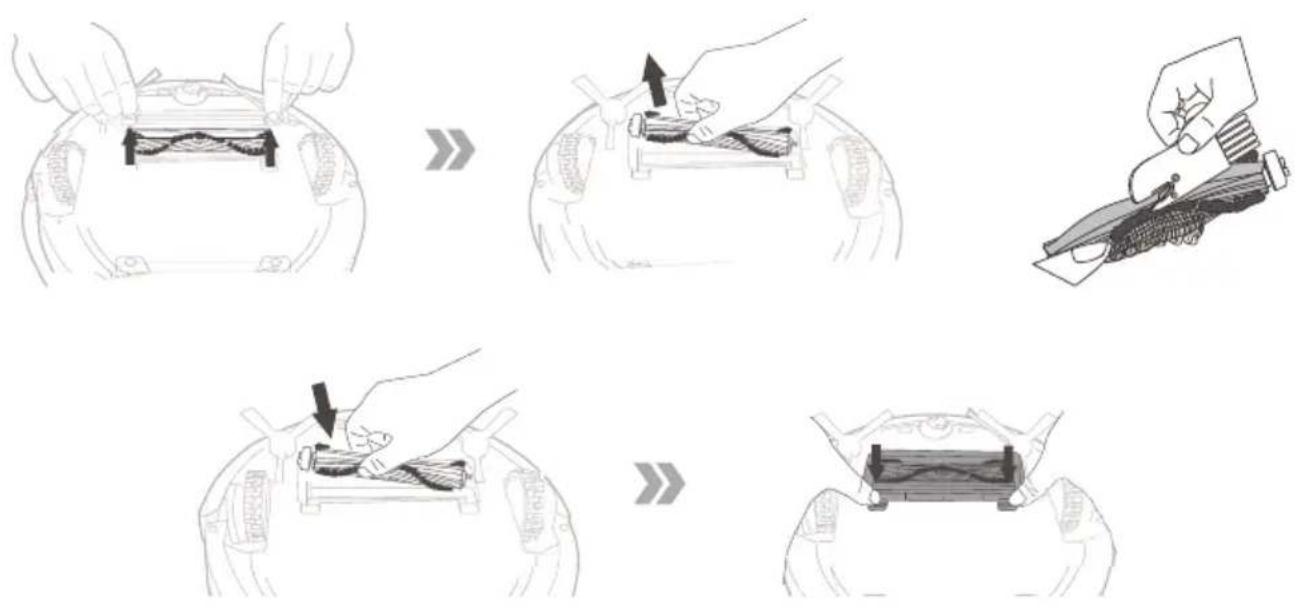
4.2. Roller brush
Remove the roller brush cap, take out the roller brush, remove the hair coiled on it and then clean it with a cleaning brush.
4.3. Dual water and dust container
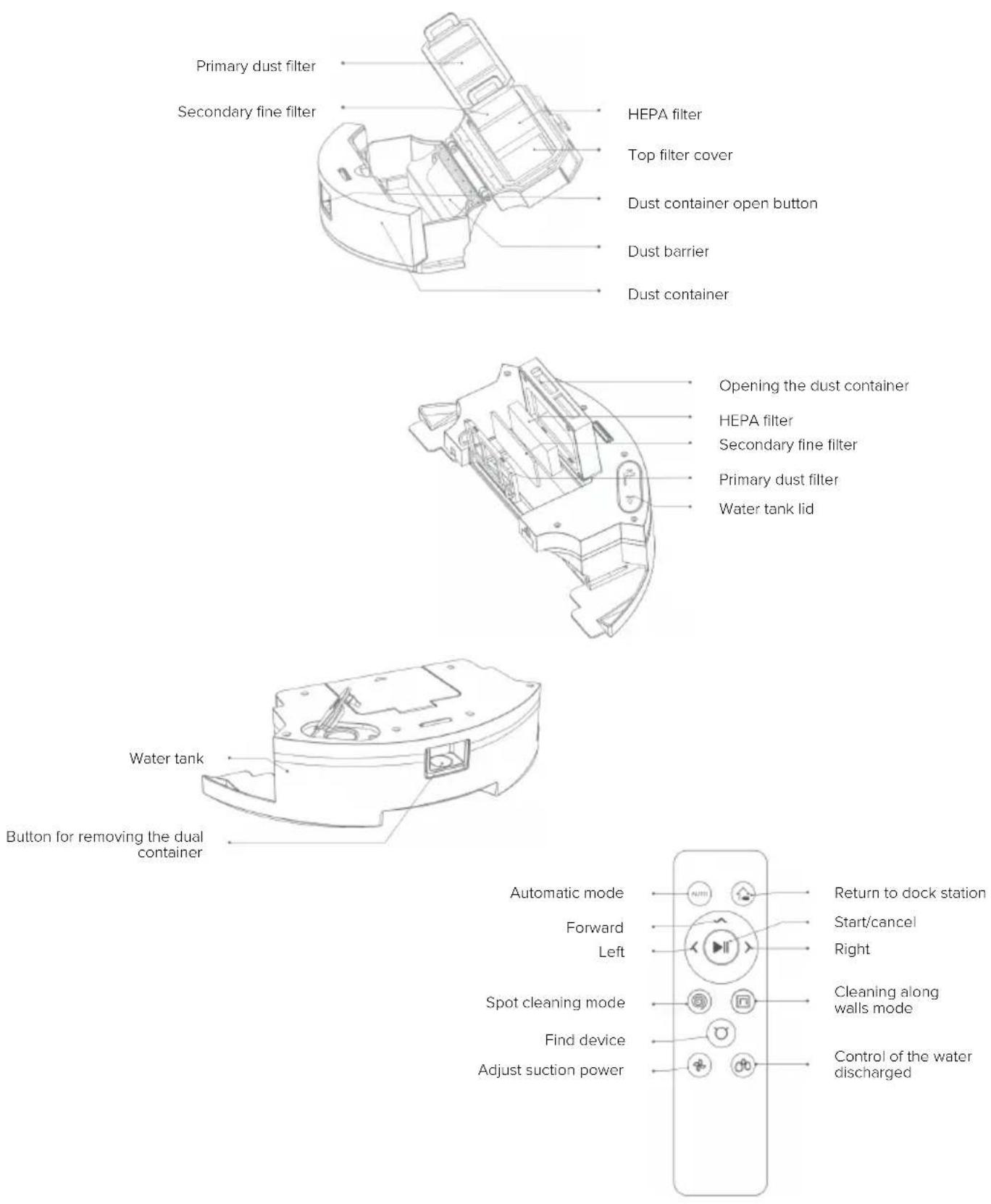
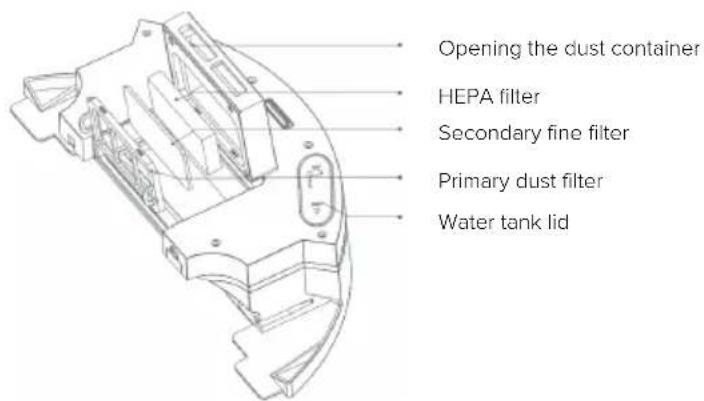
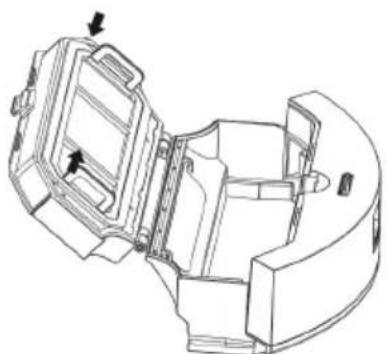
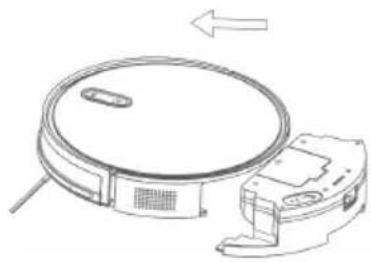
The device is equipped with a dual water and dust tank, which makes it possible to vacuum and mop at the same time. A description of the individual parts can be found in the following picture.
text_image
Opening the dust container HEPA filter Secondary fine filter Primary dust filter Water tank lidThe dust container contains three washable filters that should be washed with clean running water approximately every 15-30 days. The filters themselves should be replaced after approximately one year of use (with heavy contamination, it is advisable to change the filters more frequently). A low foaming detergent can be poured into the water container with the water.
4. Operating Instructions
4.3. Dual water and dust container
natural_image
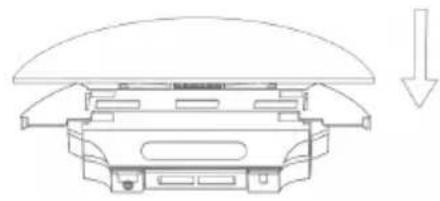
Technical line drawing of a mechanical component with a downward arrow indicating force or direction (no text or symbols)Attach the sweeping cloth.
natural_image
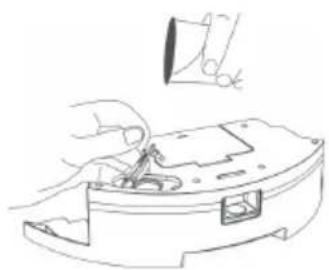
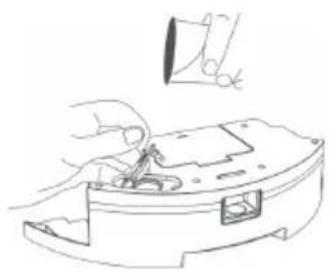
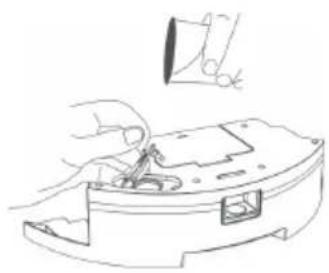
Line drawing of a hand using a sewing machine to adjust or install a component (no text or symbols present)Open the lid of the water tank and pour in water with low-foaming detergent.
natural_image
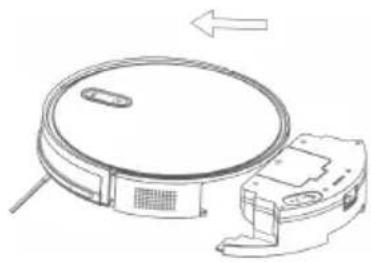
Line drawing of a robotic vacuum cleaner with a circular top and mechanical base (no text or symbols)Insert the dual container into the vacuum.
natural_image
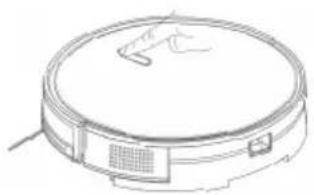
Line drawing of a circular vacuum cleaner with a handle and ventilation slots (no text or symbols)Start the device.
5. App Connection
-
Download the app by scanning the QR code with your mobile phone or search for „Niceboy ION“ in the Google Play/Apple App Store and download the app.
-
Open the „Niceboy ION“ app and register a new account or use your existing one.
-
After logging into the app to add a product, click on the „+“ in the upper right corner and then „Add Device“.
-
Then go to the „Robotic vacuum cleaners“ tab and select „Charles i8“.
-
Switch the vacuum cleaner on by using the main switch on the side of the machine (I - ON; 0 - OFF).
-
There are two ways to connect to the application. For faster and easier connection, we recommend using the EZ mode.
-
EZ mode – After selecting the Charles i8 vacuum cleaner, select your WIFI and enter your password. Continue to the next page using the „Next“ button. Next, select EZ mode in the upper right and press the Home button (💡) on the vacuum cleaner for approximately 4 seconds until the beep sounds and the LED indicator starts flashing rapidly. In the app, confirm that the LED is blinking rapidly and wait until the vacuum cleaner connects to the app. If Charles does not connect, try the process again. Make sure your WIFI is transmitting at 2.4 GHz. If the vacuum cleaner fails to connect on the second attempt, try connecting using AP mode.
-
AP mode - After selecting the Charles i8 vacuum cleaner, select your WIFI and enter your password. Continue to the next page using the „Next“ button. Next, select AP mode in the upper right and press the Home button (💡) and the Start/Cancel button (▶++) on the vacuum cleaner at the same time for approximately 4 seconds until the beep sounds and the LED indicator begins to blink slowly. In the application, confirm that the indicator is blinking slowly. Then go to the WIFI settings on your phone and connect to the vacuum cleaner hotspot named „SmartLife-XXXX“ (instead of XXXX, it will be your hotspot number). Wait until your phone connects you to the hotspot. Some devices may prompt you to disconnect from the hotspot due to not carrying an internet connection. In this case, click Maintain Connection and go back to the app. The device will automatically start pairing.
-
Once the device is successfully connected, you can edit the device name and add it to the room of your choice. Click on „Done“ to access the vacuum cleaner interface.
To connect to the app, your WIFI network must be transmitting at 2.4 GHz.
6. Maintenance
6.1.Dust container and filter
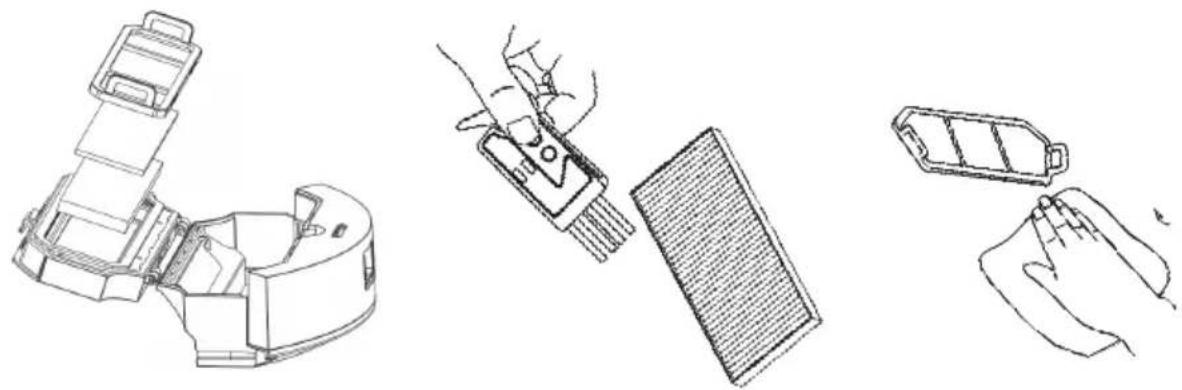
Switch off the vacuum cleaner and disconnect the charging stand before cleaning and maintaining the equipment and its accessories. Remove the dust box, open the dust box cover and dispose of the clutter. Remove the filters and shake them out. The filters are washable and recommended washing is every 15-30 days depending on contamination. Approximate life of the filters is one year.
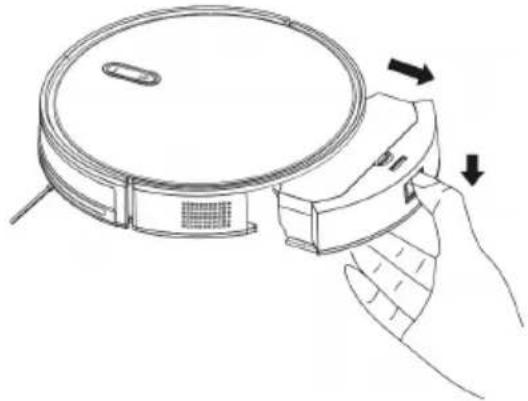
1. Remove the dust container from the device.
natural_image
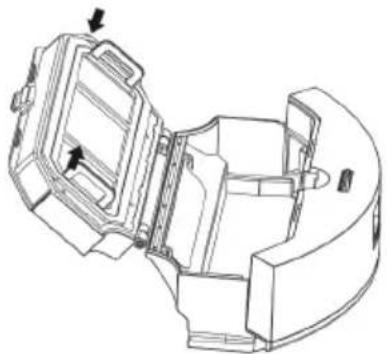
Line drawing of a hand holding a vacuum cleaner with directional arrows indicating motion (no text or symbols)2. Open the top of the container and empty the clutter into the bin.
natural_image
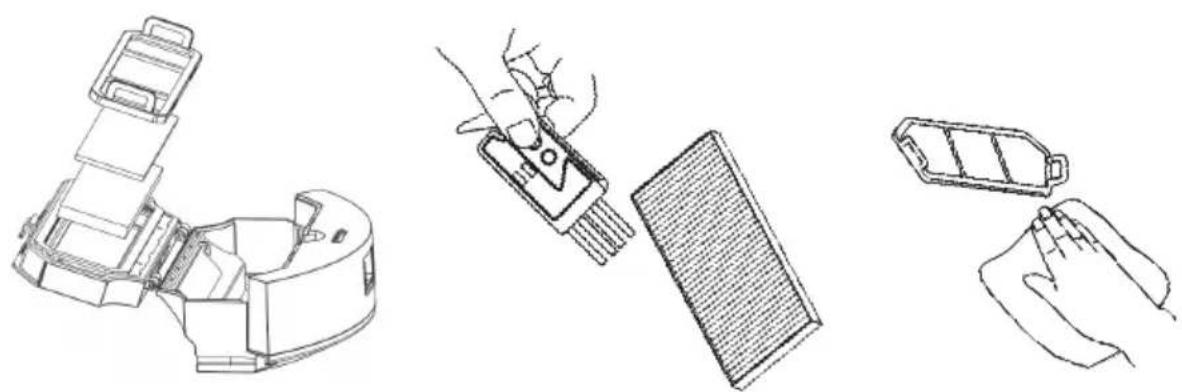
Technical line drawing of a mechanical device with internal components and directional arrows (no text or symbols)3. Remove the filters and clean them. Use the supplied brush to clean the HEPA filter.
natural_image
Line drawings of three different electronic devices: a device with a handle, a handheld device with a grid screen, and a battery pack (no text or symbols present)6. Maintenance
6.2. Dual water and dust container
Switch off the vacuum cleaner and disconnect the charging stand before cleaning and maintaining the equipment and its accessories. Remove the dust box, open the dust box cover and dispose of the rubbish. Remove the filters and shake them out. The filters are washable and recommended washing is every 15-30 days depending on contamination. Approximate life of the filters is one year. The mopping cloth is washable. Never submerge the entire container in water!
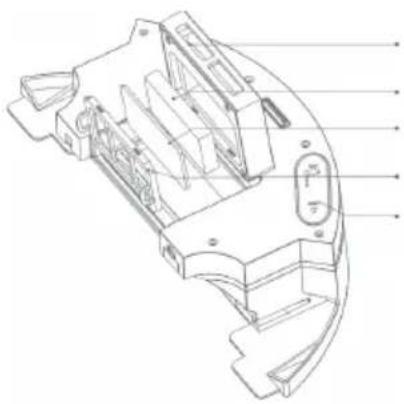
natural_image
Technical line drawing of a mechanical component with internal cavities and mounting holes (no text or symbols)Opening the dust container
HEPA filter
Secondary fine filter
Primary dust filter
Water tank lid
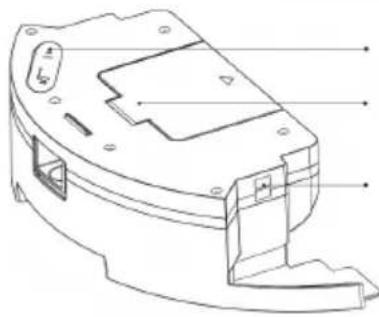
text_image
Technical diagram of a mechanical device with labeled components and mounting pointsWater tank lid
Dust container lid
Pressure sensor connectors
Pour the water into the tank carefully so that it does not get on the pressure sensor connectors!
6.3. Side bristles
Remove the side bristles and wipe them with a clean cloth.
6.4. Other components
In case of abnormal movement of the vacuum, clean the centre wheel from hair and other debris.
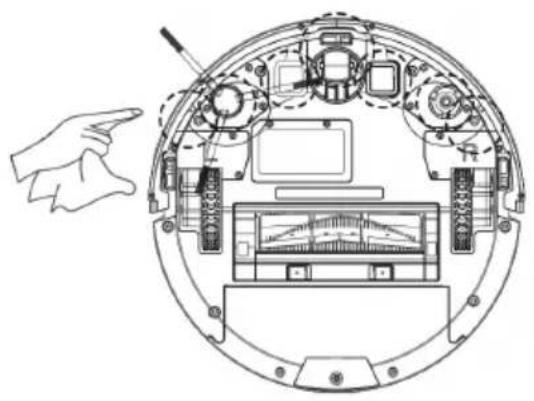
natural_image
Technical line drawing of a circular electronic device with internal components and a hand pointing to the left side (no text or symbols present)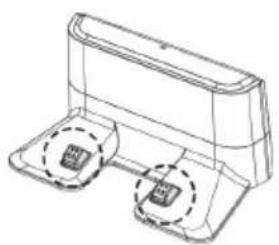
natural_image
Technical line drawing of a mechanical component with two base supports and two circular features (no text or symbols)7. Package contents
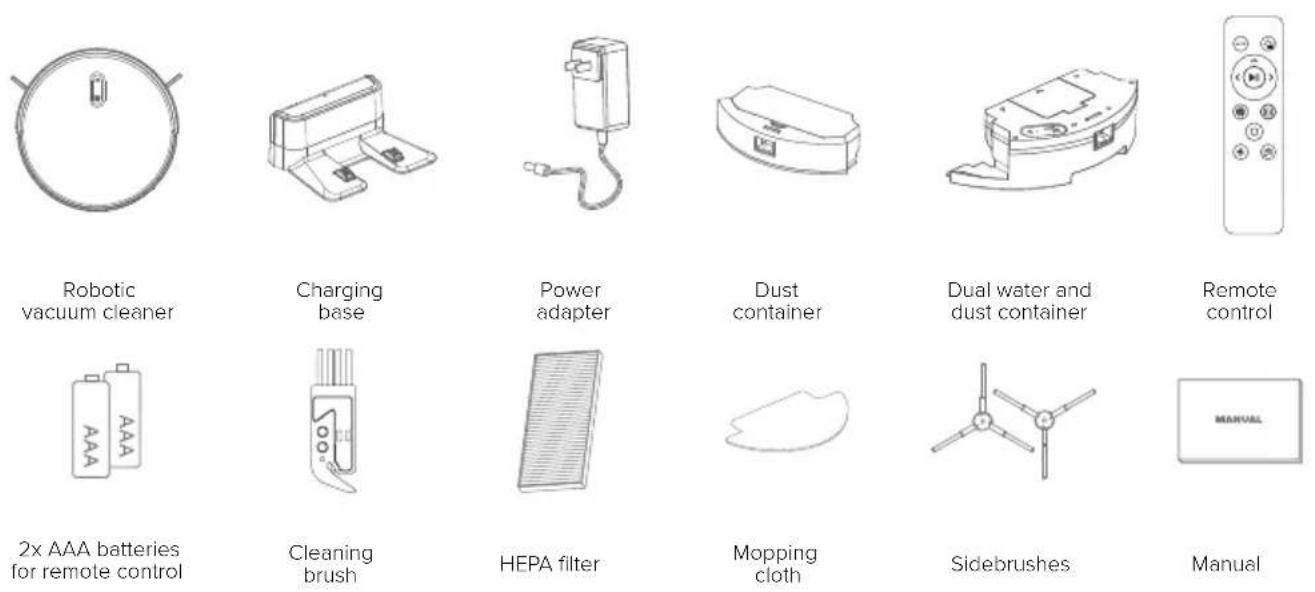
8.Parameters
Product model: Charles i8
Measurements: L320 * W320 * H 76 mm
Voltage: DC 14.8 V
Power: 3 5 W
Suction power: 2 700 Pa
Battery capacity: DC 14.8 V Li-ion 2 600 mAh
Dust box volume: 680 ml
Dual container volume - dust: 350 ml
Dual container volume - water: 260 ml
Cleaning time: Up to 120 min
Charging time: 300 min
Driver battery: DC 3 V (AAA)
Remote control method: Infrared
Transmission and reception distance: <5M
Nominal docking station voltage range: 100-240 V
Rated frequency: 50–60 Hz
Nominal docking station input voltage: 19 V / 0.6 A
Docking station output voltage: 19 V / 0.6 A
Install 2 AAA batteries before using the remote control for the first time. Make sure the positive and negative ends of the battery are facing the correct direction as marked in the battery compartment.
NICEBOY s.r.o. hereby declares that the type of radio equipment Charles i8 complies with Directives 2014/53 / EU, 2014/30 / EU, 2014/35 / EU, and 2011/65 / EU. The full content of EU Declaration of Conformity is available on the following websites: https://niceboy.eu/en/declaration/ion-charles-i8
USER INFORMATION FOR DISPOSING ELECTRICAL AND ELECTRONIC DEVICES (HOME USE)

This symbol located on a product or in the product's original documentation means that the used electrical or electronic products may not be disposed together with the communal waste. In order to dispose of these products correctly, take them to a designated collection site, where they will be accepted for free. By disposing of a product in this way, you are helping to protect precious natural resources and helping to prevent any potential negative impacts on the environment and human health, which could be the result of incorrect waste disposal. You may receive more detailed information from your local authority or nearest collection site. According to national regulations, fines may also be given out to anyone who disposes of this type of waste incorrectly. User information for disposing electrical and electronic devices. (Business and corporate use). In order to correctly dispose of electrical and electronic devices for business and corporate use, refer to the product's manufacturer or importer. They will provide you with information regarding all disposal methods and, according to the date stated on the electrical or electronic device on the market, they will tell you who is responsible for financing the disposal of this electrical or electronic device. Information regarding disposal processes in other countries outside the EU. The symbol displayed above is only valid for countries within the European Union. For the correct disposal of electrical and electronic devices, request the relevant information from your local authorities or the device seller.
9. Frequently Asked Questions
• I cannot install the app. What to do?
To install the app, you must use a device running iOS version 9.0 (or higher) or Android version 5.0 (or higher).
• The device is not charging. What to do?
o If the device does not charge, check that both sides of the power adapter are properly connected. If the connectors are dirty, unplug the power adapter and wipe them with a dry cloth.
- The device has a problem returning to the docking station. What to do?
o Make sure the docking station is positioned with sufficient surrounding space. Do not place objects on the left and right sides within 1m and in front within 2m. The base should not be located near objects with a strong reflective surface (mirrors).
To return to the docking station, the docking station must be plugged into the power supply. If you disconnect the docking station from the power supply, the device will not be able to return.
- The vacuum has a problem with cleaning. What to do?
o Check that the dust container is not full or that the dust filters are not blocked.
• The vacuum is making abnormal noises. What to do?
o If the vacuum cleaner makes abnormal noises, it is possible that the centre roller, the sidebrush or the wheels are stuck. In this case, turn off the vacuum cleaner and check it.
- The vacuum cannot be connected to WIFI. What to do?
o Make sure your WIFI network is transmitting at 2.4 GHz.
o Make sure that you have entered the correct password for your WIFI network.
• The vacuum did not finish cleaning and returned to the docking station. What to do?
o If the battery is low (below 20%), the vacuum cleaner will automatically return to the docking station. After charging, it will resume cleaning where it left off.
• The remote control is not working. What to do?
o The remote control has an effective control distance of 5 meters. Make sure the remote control is pointing at the machine.
o If the battery runs out, replace it with a new one.
o Make sure the machine switch is on and has sufficient power to complete the operation.
o Please wipe the infrared transmitter of the remote controller and the infrared receiver of the main controller with a clean cloth.
- It is possible to clean individual rooms and select which room the vacuum cleaner will clean and which will not?
o The Charles i8 features the NaviGATE navigation system, which is a gyro navigation system, not a laser navigation system. Therefore, the vacuum cannot be assigned to clean an individual room. It cleans the household as a whole.
- Can the vacuum cleaner be set to clean in my absence?
o Yes, you can set a schedule in the ION app. You can set the day and time when the vacuum cleaner will automatically launch and start cleaning.
- Can I leave the vacuum cleaner permanently in the docking station, which is connected in an power socket?
o Yes. When fully charged, the vacuum cleaner switches to standby mode.
- Can be the Charles i8 connected to multiple mobile phones so that all members of the household can operate the vacuum cleaner?
o Yes. In order for all household members to operate the vacuum cleaner, you need to create a shared household in the ION app. In the ION app, in the bottom right corner, select Me, select Household Management from the menu and add family. Then add the vacuum cleaner to the household. Another important setting is to set the rights for each user. This can also be found by clicking on Me - Household Management and then selecting the household you created. You will find the members of the household in the list, then click on the family role menu It is necessary that the administrator role is set for each member. Video instructions can be found on the Niceboy YouTube channel under the title „Manual for creating a household in Niceboy ION“.
- Are the filters washable?
o Yes, the filters are washable and the recommended washing is every 15-30 days depending on contamination. Approximate life of the filters is one year
- Can I pour detergent into the water tank?
o Yes, but it should be a low-foaming cleaner.
Gebrauchsanweisung
natural_image
Line drawing of a robotic vacuum cleaner with attached cable, showing no text or symbolsnatural_image
Line drawing of a robotic vacuum cleaner on a surface, with no text or symbols present.natural_image
Illustration of a robotic vacuum cleaner with a cushioned seat and a checkmark icon (no text or symbols)natural_image
Line drawing of a staircase with a circular vent on top, no text or symbols present4. Operating Instructions
4.2. Walzenbürste
natural_image
Technical line drawing of a mechanical component with internal cavities and mounting holes (no text or symbols)Opening the dust container
HEPA filter
Secondary fine filter
Primary dust filter
Water tank lid
4. Operating Instructions
natural_image
Technical line drawing of a mechanical component with a downward arrow indicating force or direction (no text or symbols)natural_image
Line drawing of a hand using a sewing machine to adjust or install a component (no text or symbols present)natural_image
Line drawing of a robotic vacuum cleaner with a circular top and attached mechanical housing (no text or symbols)natural_image
Line drawing of a circular vacuum cleaner with a mounted sensor and ventilation grille (no text or symbols)natural_image
Line drawing of a hand holding a circular device with a handle, showing motion arrows (no text or symbols)natural_image
Technical line drawing of a mechanical assembly with no visible text or symbolsnatural_image
Line drawings of three different electronic devices: a device with a handle, a handheld device with a grating, and a battery pack (no text or symbols present)natural_image
Technical line drawing of a mechanical component with internal parts and labeled features (no text or symbols present)natural_image
Technical line drawing of a mechanical device casing with mounting holes and internal components (no text or symbols)natural_image
Technical diagram of a circular mechanical device with internal components and a hand pointing to the left side (no text or symbols present)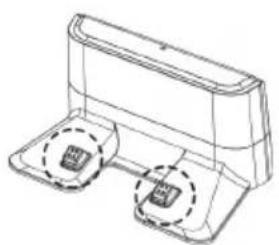
natural_image
Technical line drawing of a mechanical component with two circular features (no text or symbols)7. Packungsinhalt
natural_image
Line drawing of a robotic vacuum cleaner with attached cable, showing no text or symbolsnatural_image
Line drawing of a robotic vacuum cleaner on a surface, with no text or symbols present.natural_image
Illustration of a robotic vacuum cleaner placed on a bed with a checkmark icon (no text or symbols)natural_image
Line drawing of a staircase with a circular vent on top, no text or symbols presentnatural_image
Technical line drawing of a mechanical component with internal cavities and mounting holes (no text or symbols)natural_image
Technical line drawing of a mechanical component with a downward arrow indicating motion (no text or symbols)natural_image
Line drawing of a hand using a sewing machine to adjust or install a component (no text or symbols present)natural_image
Line drawing of a robotic vacuum cleaner with a circular top and mechanical base (no text or symbols)natural_image
Line drawing of a circular vacuum cleaner with a handle and ventilation slots (no text or symbols)natural_image
Line drawing of a hand holding a circular device with a handle, showing motion arrows (no text or symbols)natural_image
Technical line drawing of a mechanical assembly with no visible text or symbolsnatural_image
Line drawings of three different cleaning or assembly tools: a robotic arm, a handheld tool, and a battery pack (no text or symbols present)6. Karbantartás
natural_image
Technical line drawing of a mechanical device casing with mounting holes and internal components (no text or symbols)Víztartály fedele
Portartály fedele
natural_image
Technical line drawing of a device interior with labeled components and a separate view showing a device with buttons (no text or symbols present)https://niceboy.eu/hu/declaration/ion-charles-i8
FELHASZNÁLÓI TÁJÉKOZTATÓ (HÁZTARTÁSI) ELEKTROMOS ÉS ELEKTRONIKUS BERENDEZÉSEK ÁRTALMATLANÍTÁSÁRÓL
natural_image
Line drawing of a robotic vacuum cleaner with attached cable, showing no text or symbols- Električni vodovi i druga električna oprema razbacana po tlu mogu prouzročiti oštećenje proizvoda. Prije upotrebe treba ih ukloniti.
natural_image
Line drawing of a robotic vacuum cleaner on a surface, with no text or symbols present.- Namotajte rese od tepiha ili radite na tepisima niskog flora.
natural_image
Illustration of a robotic vacuum cleaner inside a chair with a checkmark icon (no text or symbols)- Razmak manji od 8 cm na donjoj strani namještaja može zahvatiti proizvod. Ako trebate usisati prostor ispod namještaja, uklonite ga.
natural_image
Line drawing of a staircase with a circular vent on top, no text or symbols presentnatural_image
Technical line drawing of a mechanical component with internal cavities and mounting holes (no text or symbols)Otvaranje spremnika za prašinu
Filtar HEPA
Sekundarni fini filtar
natural_image
Line drawing of a hand holding a circular device with a handle, showing motion arrows (no text or symbols)2. Otvorite vrh spremnika i ispraznite smeće u koš za smeće.
natural_image
Technical line drawing of a mechanical device with internal components and directional arrows (no text or symbols)3. Izvadite filtre i očistite ih. Koristite isporučenu četku za čišćenje HEPA filtra.
natural_image
Line drawings of three different electronic devices: a remote control unit, a handheld device with a grid screen, and a battery pack (no text or symbols present)6. Održavanje
natural_image
Technical line drawing of a circular device interior with internal components and a separate view of a rectangular device (no text or symbols present)natural_image
Line drawing of a robotic vacuum cleaner with attached cable, showing no text or symbolsnatural_image
Line drawing of a robotic vacuum cleaner on a surface, with no text or symbols present.natural_image
Illustration of a robotic vacuum cleaner placed on a bed with a checkmark icon (no text or symbols)natural_image
Line drawing of a staircase with a circular vent on top, no text or symbols presentnatural_image
Technical line drawing of a mechanical component with internal cavities and mounting holes (no text or symbols)natural_image
Technical line drawing of a mechanical component with a downward arrow indicating force or direction (no text or symbols present)natural_image
Line drawing of a hand using a sewing machine to adjust or install a component (no text or symbols present)natural_image
Line drawing of a robotic vacuum cleaner with a circular top and attached mechanical housing (no text or symbols)natural_image
Line drawing of a circular vacuum cleaner with a mounted sensor and ventilation grille (no text or symbols)Uruchom urządzenie.
natural_image
Line drawing of a hand holding a vacuum cleaner with directional arrows indicating motion (no text or symbols)natural_image
Technical line drawing of a mechanical assembly with no visible text or symbolsnatural_image
Line drawings of three different cleaning or assembly steps: a device with handle, a handheld tool, and a battery pack (no text or symbols present)6. Konserwacja
natural_image
Technical line drawing of a mechanical component with internal cavities and mounting holes (no text or symbols)natural_image
Technical line drawing of a mechanical component with labeled parts (no text or symbols present)natural_image
Technical line drawing of a circular mechanical device with internal components and a hand pointing to the left side (no text or symbols)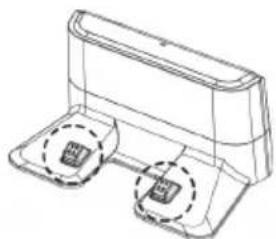
natural_image
Line drawing of a device with two ports and a lid, no text or symbols presentnatural_image
Line drawing of a robotic vacuum cleaner with attached cable, showing no text or symbolsnatural_image
Line drawing of a robotic vacuum cleaner on a surface, with no text or symbols present.- Zvijte resice preprog oz. sesajte samo preproge s kratkimi vlakni.
natural_image
Illustration of a robotic vacuum cleaner with a cushion and wheels, no text or symbols presentnatural_image
Line drawing of a staircase with a circular vent on top, no text or symbols presentnatural_image
Technical line drawing of a mechanical device with two ports and a lid (no text or symbols)natural_image
Technical line drawing of a mechanical assembly with mounting brackets and a central component (no text or symbols)3. Diagram naprave
natural_image
Technical line drawing of a mechanical component with internal cavities and mounting holes (no text or labels)natural_image
Technical line drawing of a mechanical component with a downward arrow indicating force or direction (no text or symbols)Pritrdite krpo za pomivanje
natural_image
Line drawing of a hand using a sewing machine to adjust or install a component (no text or symbols present)Odprite pokrov posode za vodo in nalijte vodo z nizko penečim detergentom.
natural_image
Line drawing of a robotic vacuum cleaner with a circular top and mechanical base (no text or symbols)Vstavite dvojno posodo v sesalnik.
natural_image
Line drawing of a circular vacuum cleaner with a handle and ventilation slots (no text or symbols)Vklopite napravo.
natural_image
Line drawing of a hand holding a circular device with a handle, showing motion arrows (no text or symbols)natural_image
Technical line drawing of a mechanical assembly with no visible text or symbolsnatural_image
Line drawings of three different electronic devices: a battery pack, a handheld device with a grid screen, and a battery holder (no text or symbols present)6. Vzdrževanje
natural_image
Technical line drawing of a mechanical component with labeled parts (no text or symbols present)natural_image
Technical line drawing of a device interior with labeled components and a separate view of a device (no text or symbols present)7. Vsebina embalaže
8. Lastnosti
Model naprave: Charles i8
Mere: D320 * Š320 * V76 mm
Napetost: DC 14,8 V
Moč: 3 5 W
Sesalna moč: 2 700 Pa
Zmogljivost baterije: DC 14,8 V litij-ionska baterija 2 600 mAh
Prostornina posode za prah: 680 ml
Prostornina dvojne posode - prah: 350 ml
Prostornina dvojne posode - voda: 260 ml
natural_image
Line drawing of a robotic vacuum cleaner with attached cable, showing no text or symbolsnatural_image
Line drawing of a robotic vacuum cleaner on a surface, with no text or symbols present.natural_image
Illustration of a robotic vacuum cleaner placed on a chair with a checkmark icon (no text or symbols)natural_image
Line drawing of a staircase with a circular vent on top, no text or symbols presentnatural_image
Technical line drawing of a mechanical component with internal cavities and mounting holes (no text or symbols)natural_image
Technical line drawing of a mechanical component with a downward arrow indicating motion (no text or symbols)natural_image
Line drawing of a hand using a sewing machine to adjust or install a component (no text or symbols present)natural_image
Line drawing of a robotic vacuum cleaner with a circular top and mechanical base (no text or symbols)natural_image
Line drawing of a circular vacuum cleaner with a handle and ventilation slots (no text or symbols)Porniti dispozitivul.
natural_image
Line drawing of a robotic vacuum cleaner with hand gesture indicating motion (no text or symbols)natural_image
Technical line drawing of a mechanical assembly with no visible text or symbolsnatural_image
Line drawings of three different cleaning or assembly steps: a device with a handle, a hand holding a clip, and a battery pack (no text or symbols present)6. Întreținere
natural_image
Technical line drawing of a mechanical component with internal cutaway view (no text or symbols)natural_image
Technical line drawing of a mechanical component with labeled parts (no text or symbols present)natural_image
Technical line drawing of a circular mechanical or electronic component with internal components and a hand pointing to the left side (no text or symbols present)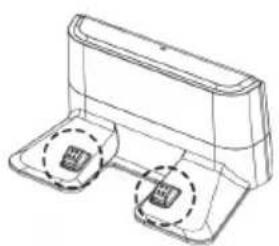
natural_image
Technical line drawing of a mechanical component with two circular features (no text or symbols)natural_image
Line drawing of a robotic vacuum cleaner with attached cable, showing no text or symbolsnatural_image
Line drawing of a robotic vacuum cleaner on a surface, with no text or symbols present.natural_image
Illustration of a robotic vacuum cleaner placed on a chair with a pillow and wheels, no text or symbols present.natural_image
Line drawing of a staircase with a circular vent on top, no text or symbols presenttext_image
Technical diagram of a circular electronic device with labeled components and internal structurenatural_image
Technical line drawing of a mechanical device with two ports and a lid (no text or symbols)natural_image
Technical line drawing of a mechanical assembly with mounting brackets and a central component (no text or symbols)text_image
Illustration showing five steps of a robotic arm handling a cable or wire, with arrows indicating process flow.4.3. Двоен контейнер за вода и прах
natural_image
Technical line drawing of a mechanical component with a downward arrow indicating motion (no text or symbols)natural_image
Line drawing of a hand inserting into a device into a housing (no text or symbols)natural_image
Line drawing of a robotic vacuum cleaner with a circular top and mechanical base (no text or symbols)natural_image
Line drawing of a circular vacuum cleaner with a handle and ventilation slots (no text or symbols)Включете уреда.
natural_image
Line drawing of a robotic vacuum cleaner with hand gesture indicating motion (no text or symbols)natural_image
Technical line drawing of a mechanical assembly with no visible text or symbolsnatural_image
Line drawings of three different electronic devices: a battery pack, a handheld device with a filter, and a battery holder (no text or symbols present)6. Текуща поддръжка
6.2. Двоен контейнер за вода и прах
natural_image
Technical line drawing of a mechanical component with internal cavities and mounting holes (no text or symbols)natural_image
Technical line drawing of a mechanical component with labeled parts (no text or symbols present)Капак на резервоара за вода
Капак на контейнера за прах
natural_image
Technical line drawing of a circular mechanical or electronic device with internal components and a hand pointing to the left side (no text or symbols present)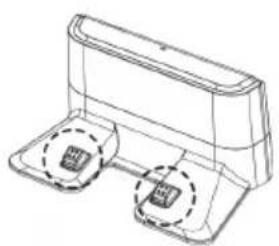
natural_image
Technical line drawing of a mechanical component with two circular features (no text or symbols)natural_image
Line drawing of a robotic vacuum cleaner with attached cable, showing no text or symbolsnatural_image
Line drawing of a robotic vacuum cleaner on a surface, with no text or symbols present.natural_image
Illustration of a robotic vacuum cleaner in a bed with a checkmark icon (no text or symbols)natural_image
Line drawing of a staircase with a circular vent on top, no text or symbols presenttext_image
Technical diagram of a circular electronic device with labeled components and internal wiringnatural_image
Technical line drawing of a mechanical device with two ports and a lid (no text or symbols)natural_image
Technical line drawing of a mechanical assembly with mounting brackets and a central component (no text or symbols)natural_image
Technical line drawing of a mechanical component with internal cavities and mounting holes (no text or symbols)text_image
Illustration showing five steps of a robotic arm handling a cable or wire, with arrows indicating process flow.natural_image
Technical line drawing of a mechanical component with a downward arrow indicating motion (no text or symbols)natural_image
Line drawing of a hand using a tool to cut or install a component, with no visible text or symbols.natural_image
Line drawing of a robotic vacuum cleaner with a circular top and mechanical base (no text or symbols)natural_image
Line drawing of a circular vacuum cleaner with a handle and control panel (no text or symbols)natural_image
Line drawing of a robotic vacuum cleaner with hand gesture indicating motion (no text or symbols)natural_image
Technical line drawing of a mechanical assembly with no visible text or symbolsnatural_image
Line drawings of four different cleaning or assembly tools: a device with handle, a handheld tool, a grid-patterned surface, and a battery clip (no text or symbols present)6. Maintenance
text_image
Technical diagram of a mechanical component with labeled parts in Chinesenatural_image
Technical line drawing of a mechanical component with labeled parts (no text or symbols present)natural_image
Technical diagram of a circular device interior with internal components and a hand pointing to the left side (no text or symbols present)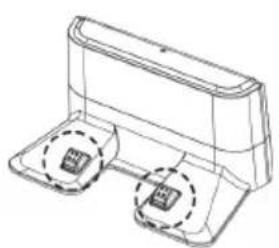
natural_image
Technical line drawing of a mechanical component with two circular features (no text or symbols)Praha 4, Czech Republic, ID: 294 16 876.
Made in China.