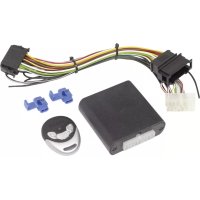
MagicTouch MT200 - Remote control WAECO - Free user manual and instructions
Find the device manual for free MagicTouch MT200 WAECO in PDF.



| Brand | Waeco |
| Model | MagicTouch MT200 |
| Product type | Radio remote control for central locking |
| Control unit - Dimensions (L x W x H) | 86 x 74 x 24 mm |
| Manual transmitter - Dimensions (L x W x H) | 54 x 39 x 12 mm |
| Control unit - Operating voltage | 9 – 15 V DC |
| Control unit - Current consumption at rest | approx. 3 mA (without LED) / approx. 8 mA (with LED) |
| Manual transmitter - Battery type | CR2032, 3 V |
| Manual transmitter - Transmission frequency | 433.92 MHz |
| Range | 10 m – 20 m |
| Operating temperature - Control unit | -40 °C to +85 °C |
| Operating temperature - Manual transmitter | -20 °C to +60 °C |
| Maximum number of transmitters | 10 |
| Main functions | Opening and closing of central locking, rolling code, transmitter learning |
| Maintenance and cleaning | Do not use sharp or hard objects; clean with a soft cloth |
| Safety | Disconnect the negative terminal of the battery before any electrical intervention |
| Delivery contents | Control unit, 1 manual transmitter, adapter cable, mounting hardware |
| Certifications | CE, R&TTE |
Frequently Asked Questions - MagicTouch MT200 WAECO
User questions about MagicTouch MT200 WAECO
0 question about this device. Answer the ones you know or ask your own.
Ask a new question about this device
Download the instructions for your Remote control in PDF format for free! Find your manual MagicTouch MT200 - WAECO and take your electronic device back in hand. On this page are published all the documents necessary for the use of your device. MagicTouch MT200 by WAECO.
USER MANUAL MagicTouch MT200 WAECO
Installation and Operating Manual
We will be happy to provide you with further information about Dometic WAECO products. Please order our free catalogue with no obligation to buy on our homepage: www.dometic-waeco.com
F
Please read this manual carefully before installing and starting up, and store it in a safe place. If you pass on the device to another person, hand over this instruction manual along with it.
Table of contents
1 Notes on using the manual.... 11
2 Safety and installation instructions ..... 12
3 Scope of delivery 12
4 Intended use....12
5 Hand-held transmitter control elements ..... 13
6 Installing and connecting the MT200 13
7 Operating the MT200 13
8 Learning or unpairing the hand-held transmitter....14
9 Maintaining and cleaning the MT200 15
10 Guarantee....15
11 Disposal 15
12 Technical data 16
1 Notes on using the manual

NOTICE!
Failure to observe this instruction can cause material damage and impair the function of the product.

NOTE
Supplementary information for operating the product.
▶ Action: This symbol indicates that action is required on your part. The required action is described step-by-step.
√ This symbol describes the result of an action.
fig. 1 5, page 3: This refers to an element in an illustration. In this case, item 5 in figure 1 on page 3.
Please observe the following safety instructions.
2 Safety and installation instructions
Please observe the prescribed safety instructions and stipulations from the vehicle manufacturer and service workshops.
The manufacturer will not be held liable for claims for damage resulting from the following:
● Faulty assembly or connection
● Damage to the product resulting from mechanical influences and excess voltage
● Alterations to the product without express permission from the manufacturer
- Use for purposes other than those described in the operating manual
Please note the following:
- To prevent the risk of short circuits, always disconnect the negative terminal of the vehicle's electrical system before working on it.
If you disconnect the negative terminal of the battery, all data stored in the volatile memories will be lost.
● The following data must be reset, depending on the vehicle equipment options:
- Radio code
- Vehicle clock
- Timer
- On-board computer
- Seat position
You can find instructions for making these settings in the operating manual.
● Always follow the safety instructions of the vehicle manufacturer. Some work (e.g. on retention systems such as the AIRBAG etc.) may only be performed by qualified specialists.
3 Scope of delivery
Quantity Designation Item no.
1 Controller On request
1 Hand-held transmitter 9101300008
1 Controller adapter cable On request
- Fastening material
4 Intended use
The MagicTouch MT200 radio remote control supplements the central locking system of your vehicle. You lock and unlock the doors of your vehicle using a hand-held transmitter.
Consult the supplementary sheet to find out in which vehicle types this radio remote control is installed.
5 Hand-held transmitter control elements
The hand transmitter has the following control elements:
fig. 1, page 4
Designation
Function
1 "Lock" button Locks the vehicle
2 "SET" button Learns the hand-held transmitter
3 "Unlock" button Unlocks the vehicle
4 LED indicator (blue) Lights up when pressed
6 Installing and connecting the MT200

NOTE
- If you do not have sufficient technical knowledge for installing and connecting components in vehicles, you should have a specialist install the radio remote control in your vehicle.
- Use the red piercing connector for cables of up to 1 mm ^2 . Use the blue piercing connector for cables of up to 1.5 mm to 2.5 mm ^2 .
- Refer to the vehicle-specific instructions in the supplementary sheet to find out how to install and connect the MT200 in your vehicle.
7 Operating the MT200
7.1 Using the remote control
Observe the following instructions when you use MagicTouch:
- To ensure the remote control functions properly, a interference-free connection between the hand-held transmitter and the control unit is required.
- Depending on where the control unit is installed, and the transmission power of nearby sources of interference, the range is up to 20 m.
- Each time the hand-held transmitter is used, it sends a new code (rolling code). For this reason, the control unit might not recognise the hand-held transmitter immediately if you use the hand-held transmitter too frequently without the control unit receiving the transmission signal. In this case, press the hand-held transmitter another one to three times; after the third attempt at the latest, the control unit will detect the hand-held transmitter again.
Locking the central locking system
▶ Press the "Lock" button on the hand-held transmitter.
√ If the ignition is switched off, the hazard lights flash once to confirm.
Unlocking the central locking system
▶ Press the "Unlock" button on the hand-held transmitter.
√ If the ignition is switched off, the hazard lights flash twice to confirm.
8 Learning or unpairing the hand-held transmitter
MagicTouch can be operated using up to 10 hand-held transmitters. If a new hand-held transmitter needs to be learned, all other transmitters will have to be paired again.
Proceed as follows for learning a new hand-held transmitter:
To switch to learning mode:
▶ Use a hand-held transmitter to unlock the vehicle.
▶ Take a seat in the vehicle and leave the door open.
▶ Schalten Sie die Zündung ein.
▶ Press and hold down the "SET" button on a hand-held transmitter already paired.
▶ Switch the ignition off.
▶ Release the button.
√ The hazard lights flash 10 times and then remain lit.
√ The system is now in learning mode.

NOTE
If you do not press a button within 10 seconds, you will exit the learning mode.
Learning the hand-held transmitter
Learn all the hand-held transmitters which you would like to use during this phase. This also applies for the hand-held transmitters which you have already been using!
▶ Press the "SET" button on the hand-held transmitter.
√ The hazard lights turn off while the value is saved.
√ If the LED indicator and the hazard lights light up continually again after 2 seconds, then the hand-held receiver has been learned and you can now proceed with the next one.

NOTE
Only exit learning mode when you have learned all the hand-held receivers you wish to use. Hand-held receivers which you do not learn during this phase will be automatically unpaired from the system. They can only be used again once they have been learned again.
To exit learning mode:
▶ Switch on the ignition.
Testing the hand-held transmitter
▶ Test the new hand-held transmitter.
If a hand-held receiver does not function, then they must all be learned again.
9 Maintaining and cleaning the MT200

NOTICE!
Do not use sharp or hard objects to clean the device as these may damage the components.
10 Guarantee
The statutory warranty period applies. If the product is defective, please contact the manufacturer's branch in your country (see the back of the instruction manual for the addresses) or your retailer.
For repair and guarantee processing, please send the following items:
- Defect components
● A copy of the receipt with purchasing date
● A reason for the claim or description of the fault
11 Disposal
Place the packaging material in the appropriate recycling waste bins wherever possible.
If you wish to finally dispose of the product, ask your local recycling centre or specialist dealer for details about how to do this in accordance with the applicable disposal regulations.
11.1 Disposing of hand-held transmitter batteries

Protect the environment!
Do not dispose of any batteries with general household waste.
Return defective or used batteries to your retailer or dispose of them at collection points.
12 Technical data
Controller
| Operating voltage: 9 – 15 V DC | |
| Standby current consumption without LED: approx. 3 mA | |
| Standby current consumption with LED: approx. 8 mA | |
| Operating temperature: -40 °C to +85 °C | |
| Dimensions (L x W x H): 86 x 74 x 24 mm | |
Hand-held transmitter
| Frequency: 433.92 MHz | |
| Range: 10 m – 20 m | |
| Battery type: CR2032, 3 V | |
| Operating temperature: -20 °C to +60 °C | |
| Dimensions (L x W x H): 54 x 39 x 12 mm |
Versions, technical modifications and delivery options reserved.
Certifications
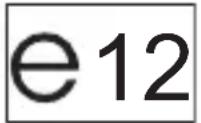
The device has e12 certification and R&TTE certification.
CE
Approved in all member states of the EU
Dometic Italy S.p.A.
Via Virgilio, 3
I-47100 Forlì
+39 0543 754901
+39 0543 756631
Mail: info@dometic.it
Overseas + Middle East

Dometic Australia
1 John Duncan Court
Varsity Lakes QLD 4227
+61 7 55076000
+61 7 55076001
Mail: sales@dometic-waeco.com.au

Dometic Switzerland AG
Riedackerstrasse 7a
CH-8153 Rümlang (Zürich)
+41 44 8187171
+41 44 8187191
Mail: info@dometic-waeco.ch

Dometic Norway AS
Skolmar 24
N-3232 Sandefjord
+47 33428450
+47 33428459
Mail: firmapost@waeco.no

WAECO Impex Ltd.
Suites 2207-2211 · 22/F · Tower 1
The Gateway · 25 Canton Road,
Tsim Sha Tsui · Kowloon
Hong Kong
+852 24611386
+852 24665553
Mail: info@dometic-waeco.com.hk

Dometic Denmark A/S
Nordensvej 15, Taulov
DK-7000 Fredericia
+45 75585966
+45 75586307
Mail: info@waeco.dk

Dometic Benelux B.V.
Ecustraat 3
NL-4879 NP Etten-Leur
+31 76 5029000
+31 76 5029090
Mail: info@dometic.nl

WAECO Impex Ltd.
Taipei Office
2 FL-3 · No. 56 Tunhua South Rd, Sec 2
Taipei 106, Taiwan
+886 2 27014090
+886 2 27060119
Mail: marketing@dometic-waeco.com.tw

Dometic Spain S.L.
Avda. Sierra del Guadarrama, 16
E-28691 Villanueva de la
Cañada
Madrid
+34 902 111 042
+34 900 100 245
Mail: info@dometic.es

Dometic Scandinavia AB
Gustaf Melins gata 7
Regional Office Middle East
P O Box 74775
Dubai, United Arab Emirates
+971 4 321 2160
+971 4 321 2170
Mail: info@dometic.ae

Dometic S.N.C.
Dometic House · The Brewery
Blandford St. Mary
Dorset DT11 9LS
+44 844 626 0133
+44 844 626 0143
Mail: sales@dometic.co.uk

Dometic Marine Division
2000 N. Andrews Ave. Extension
Pompano Beach, FL 33069 USA
+1 954 973 2477
+1 954 979 4414
Mail: marinesales@dometicusa.com

Dometic Finland OY
Mestarintie 4
FIN-01730 Vantaa
+358 20 7413220
+358 9 7593700
Mail: info@dometic.fi

www.dometic-waeco.com