Aqua Xpert Animal S450 - Vacuum Cleaner EZICLEAN - Free user manual and instructions
Find the device manual for free Aqua Xpert Animal S450 EZICLEAN in PDF.



User questions about Aqua Xpert Animal S450 EZICLEAN
0 question about this device. Answer the ones you know or ask your own.
Ask a new question about this device
Download the instructions for your Vacuum Cleaner in PDF format for free! Find your manual Aqua Xpert Animal S450 - EZICLEAN and take your electronic device back in hand. On this page are published all the documents necessary for the use of your device. Aqua Xpert Animal S450 by EZICLEAN.
USER MANUAL Aqua Xpert Animal S450 EZICLEAN
ezi clean® make it easy
MANUEL D'UTILISATION DE VOTRE ROBOT ASPIRATEUR
eziclean®
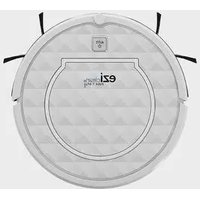
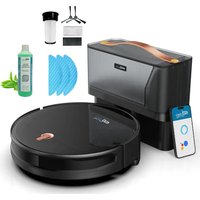
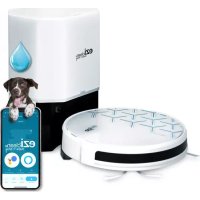
Aqua Xpert animal S450
*user manual for your connected robot vacuum cleaner / Bedienungsanleitung für Ihren vernetzten Saugroboter / manual de usuario de su robot aspirador conectado / manuale utente per il tuo robot aspirapolvere connesso / gebruikershandleiding voor uw aangesloten robotstofzuiger

text_image
ezi clean® Make it best
text_image
QR code image containing encoded data, no visible human-readable textTélécharger votre application sur Apple Store Upload your application to the Apple Store Laden Sie Ihre App im Apple Store herunter Sube tu solicitud al Apple Store Carica la tua applicazione su Apple Store Upload uw aanvraag naar de Apple Store

text_image
QR code image containing encoded data, no visible human-readable textTélécharger votre application sur Google Play Upload your application to the Google Play Laden Sie Ihre App im Google Play herunter Sube tu solicitud al Google Play Carica la tua applicazione su Google Play Upload uw aanvraag naar de Google Play

text_image
QR code image containing encoded data, no visible human-readable textTo use your application, scan this code or go to https://eziclean.com/application-eziclean/
https://eziclean.com/application-eziclean/
natural_image
Technical line drawing of a cockpit interior with two propeller blades (L and R) above the cockpit, showing no text or symbols.natural_image
Line drawing of a circular device with arrows indicating motion or assembly (no text or symbols)natural_image
Line drawing of a circular device with a handle and small components, no text or symbols presentnatural_image
Line drawing of a circular robotic vacuum cleaner with a control panel and power button (no text or symbols)
natural_image
Line drawing of a circular vacuum cleaner with attached electrical outlet (no text or symbols)natural_image
Line drawing of a mechanical device with a hand operating it, showing a circular component and adjustment mechanism (no text or symbols)natural_image
Diagram of a mechanical component with a downward arrow indicating direction (no text or symbols)natural_image
Line drawing of a hand holding a device with an arrow indicating direction (no text or symbols present)natural_image
Line drawing of hands inserting a small component into a device casing (no text or symbols)natural_image
Line drawing of a robotic vacuum cleaner with hand operating controls (no text or symbols)natural_image
Simple line drawing of a hand pressing a button on a circular frame (no text or symbols)natural_image
Line drawing of a robotic vacuum cleaner with a hand adjusting the component (no text or symbols)natural_image
Technical line drawing of a mechanical component with no visible text or symbolsnatural_image
Technical line drawing of a mechanical component with internal components and a base plate (no text or symbols)
natural_image
Line drawing of a hand inserting a component into a device housing (no text or symbols)natural_image
Technical line drawing of a car interior with plastic components and ventilation ducts (no text or symbols)natural_image
Line drawing of a faucet pouring liquid into a tray (no text or symbols)natural_image
Line drawing of a hand holding a device component, no text or symbols presentnatural_image
Line drawing of a car front bumper with no text or symbolsnatural_image
Simple line drawing of a sun, a boat, and two stacked rectangular blocks (no text or symbols)Remarques :
natural_image
Line drawing of a mechanical device with a hand operating it, showing no text or symbolsnatural_image
Line drawing of a hand holding a flat electronic device with a downward arrow indicating compression (no text or symbols)natural_image
Pure technical diagram of a mechanical component with no text or symbolsnatural_image
Line drawing of a mechanical component with a droplet falling (no text or symbols)natural_image
Illustration of a faucet pouring liquid into a boat (no text or symbols)natural_image
Simple line drawing of a boat with a sun symbol above it (no text or labels)natural_image
Simple line drawing of a faucet pouring water into a bowl (no text or symbols)natural_image
Simple line drawing of a sun and a stylized leaf (no text or symbols)natural_image
Line drawing of a hand holding a tool, with no visible text or symbolsnatural_image
Line drawing of a device with a hand holding a button, showing internal components (no text or symbols)natural_image
Technical line drawing of a mechanical assembly with no visible text or symbolsnatural_image
Technical line drawing of a mechanical assembly with no visible text or symbolsnatural_image
Technical line drawing of a mechanical housing with internal components and mounting holes (no text or symbols)Dimensions (mm): 320 x 76
Poids (kg): 2,800
- Only authorized technicians may disassemble this product. It is not recommended that users disassemble this product themselves.
- Use only the original power adapter provided. Other adapters may damage this product.
- Do not touch wires, plugs or power adapters with wet hands.
- Keep curtains away from the robot so that it does not suck them up.
- Clean the product when not under load.
- Do not bend wires or place heavy and/or sharp objects on the machine.
- This product is an indoor household product. Do not use outdoors.
- Do not sit on the product.
- Do not use this product in a wet environment (e.g. bathroom).
- Before using the product, remove any fragile items (e.g. glasses, lamps, etc.) that may become entangled in the side brushes, wheels and main brush.
- Do not place this product where it can easily fall (e.g. desk or chairs).
- Turn off the power switch on the side of the machine during transport or if you are not going to use it for a long time.
- Make sure the AC adapter is plugged in securely before use.
- To avoid tripping, inform other members of the household when this product is in use.
- If full, empty the dust pan before using the product.
- Keep the product between 0 and 40°C.
- Do not use the product in an environment above 40°C.
- Remove the battery from the robot before recycling it.
- Make sure that the product is not under power when removing the battery.
- Recycle the battery.
- Use only the original rechargeable battery and the charging base provided by the manufacturer.
- Non-rechargeable batteries are strictly prohibited.
- Do not use the product in environments near flames or fragile objects.
- Keep hair, clothing, fingers and other body parts away from the robot's openings, as they may be absorbed.
- Do not use the product on wet or stagnant ground.
- Make sure that the robot does not absorb stones and/or old paper that
could obstruct it.
- Do not expose the robot to flammable substances such as gasoline, toner and toner for printers or photocopiers.
- Do not expose the robot to burning items such as cigarettes, matches, ashes and other items that can cause a fire.
- Do not place items near the suction nozzles.
- Do not use the product when the suction nozzle is blocked.
- Clean dust, cotton, hair, etc. from the suction nozzle to ensure proper air flow.
- Use the power cord with care to avoid damage.
- Do not use the power cord to slide or pull the robot and charging station.
- Do not trap the power cord in doors.
- Do not pull on the power cord.
- Keep the power cord away from heat sources.
- Do not use the charging station if it is damaged.
- Even if the product has been severely damaged, burning the product is prohibited, as this may cause the product's battery to explode.
Please read the following information carefully before using your vacuum cleaner or its accessories. Do not disassemble the unit or attempt to repair it yourself. In case of malfunction, please contact your dealer for professional advice. Stairs: The unit uses sensors to prevent falling down steps, stairs or over the edge. In some situations, the sensors may not function properly. This unit cannot detect steps that are less than 8 cm high. Steps less than 8 cm high may cause the robot to fall. Highly reflective or dark surfaces on some steps or stairs, such as glass or polished ceramic, may cause the device to fall. If available, use the virtual wall or place a mat on the bottom step to prevent your robot from falling. Avoid using your vacuum cleaner on mezzanines, landings or unbounded high surfaces.
The symbol on this device indicates that it cannot be disposed of with household waste. You must dispose of it at an electrical and electronic waste recycling center. Disposal must be made in accordance with local waste regulations. For further information on the treatment, recovery and recycling of this device, please contact your municipality, local waste disposal service or the dealer of the device.
Cardboard and paper can be sorted. For more information: www.quefairedemesdechets.fr
Your device


text_image
Mop base Mop base button Mop
text_image
Base cover Base dust tank Infrared lenses (x3) Load cells (x2) Suction mouth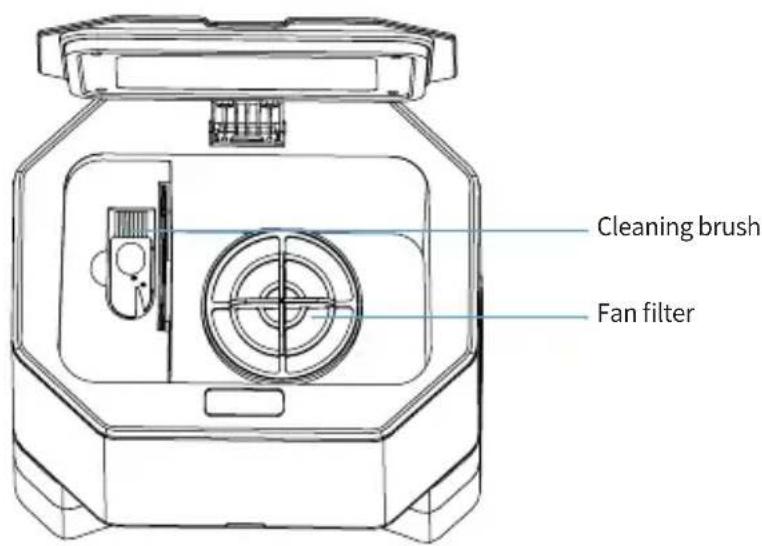
text_image
Cleaning brush Fan filter
text_image
Dust bag handle Dust bagRemote control

text_image
ON / OFF Back to the loading base Manual control keys Start / Stop cleaning Vacuum power adjustment knob Water flow adjustment knob Cleaning method along the walls Cleaning of a specific pointSetting up
natural_image
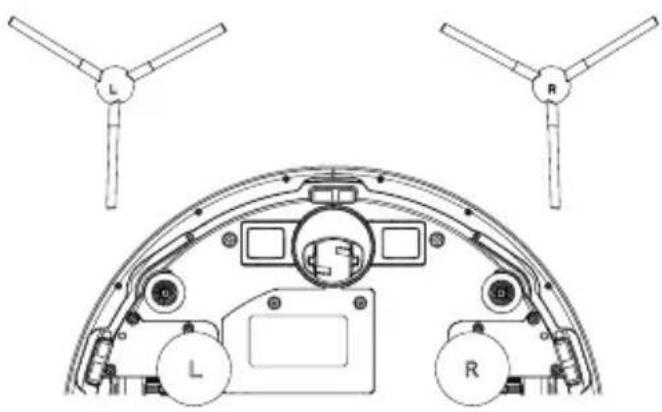
Technical line drawing of a cockpit interior with two propeller arms (L and R) above the cockpit, showing no text or symbols.- Install the side brushes taking care to respect the indications (L/R).

natural_image
Technical line drawing of a circular device with arrows indicating motion or assembly (no text or symbols)- Remove the protective foam strips from the sides of the bumper.
Setting up / Reloading

text_image
1M 1M 1.5M- Place the loading base against the wall, observing the distances indicated above.
natural_image
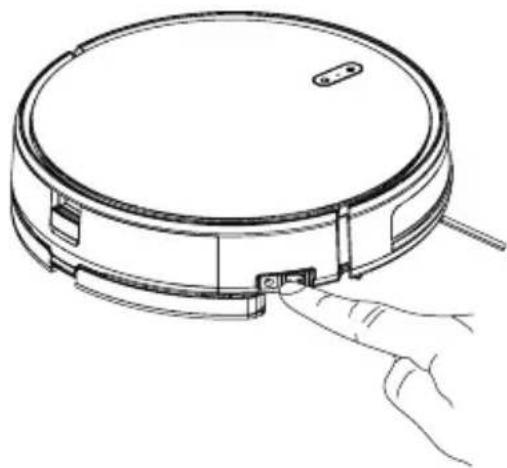
Line drawing of a circular device with a handle and small components, no text or symbols present- Set the main switch to «I». Set it to «0» if you want to turn it off.

natural_image
Line drawing of a circular robotic vacuum cleaner with a control panel and power button (no text or symbols)
natural_image
Line drawing of a circular vacuum cleaner with attached electrical outlet (no text or symbols)There are two ways to recharge the robot.
- Place the robot on its charging base or plug it in directly with its power cable. When charging is in progress, a yellow light flashes. When charging is complete, a green light will come on.
While cleaning, your robot will automatically return to its charging base if its battery is low. You can also ask it to return to its base by pressing the «Home» button on the robot, on the remote control or directly from your app.
Caution:
- In order for the robot to be able to find its way around properly, it is recommended to place the charging base in a place that is not exposed to direct sunlight or on a dark or overly dark floor.
- Please charge the robot for at least 6 hours before its first use.
- During charging, it is recommended not to leave standing water in your water tank. This is to avoid mold and therefore leaks. If possible, if you do not use the washing function of your machine frequently, remove the water from the tank and detach the mop from the robot. This is to prevent an inactive wet mop from damaging your floor.
Set up / Washing option

natural_image
Line drawing of a hand operating a circular device with a scroll wheel (no text or symbols)- Press the button on the dust pan to remove it from the robot.

natural_image
Diagram of a mechanical component with a downward arrow indicating force or direction (no text or symbols present)- Install the mop on its base.

natural_image
Line drawing of a hand holding a device with an arrow indicating direction (no text or symbols present)- Place the mop base on the water tank,

natural_image
Line drawing of a hand inserting a small component into a device casing (no text or symbols)- Fill the tank with water. You can add a few drops of cleaning solution.

natural_image
Line drawing of a robotic vacuum cleaner with a hand adjusting the component (no text or symbols)- Place the trays in the robot.

natural_image
Simple line drawing of a hand pressing a button on a circular object (no text or symbols)- Start the robot by pressing directly on your robot, on your remote control or via your application.
Caution:
- Water flow adjustment can only be done via the remote control or the app if the mop base has been properly installed. Otherwise, the adjustment cannot be made.
- It is not recommended to use your mop on carpets or rugs.
- When you have finished cleaning, it is recommended that you rinse your water tank to prevent it from becoming moldy.
Start cleaning
The different cleaning modes:
Auto mode
The robot performs the intended cleaning by automatically adapting to its environment.
- Turn on the main switch, when the light is on, it means that the robot is powered on.
- Then briefly press the button on the robot, the button on the remote control or from the application.
Focus mode
Suitable for floors where dirt is concentrated, the robot cleans the floor «spirally» and intensively.
- Briefly press the button on the robot, the button on the remote control or from the application.
Bordure mode
When cleaning baseboards, the robot cleans along the walls.
- Briefly press the button on the robot, the button on the remote control or from the application.
Manual control
Control the robot manually using the directional arrows.
- Press the directional arrows on the remote control or on the application.
Control of the suction power
Set the suction power according to the different floor types.
- Press the buttons on the remote control or from the application.
Attention: The suction power can only be adjusted in auto mode.
Water flow control
Set the water flow rate.
- Press the button on the remote control or from the application.
Attention: The water flow can only be controlled if the mop is installed on the robot.
Stop cleaning
Stand by
While the unit is running, press the «Start/Pause» button on the robot or the pause button on the remote control or the app to suspend cleaning.
Start
The robot will go into sleep mode after 10 minutes of inactivity and all lights will turn off.
Use any button on the robot or the app to turn the robot back on.
Stop
Once the unit has stopped working, press the «start» button for a few seconds and all lights will turn off.
If you do not want to use your robot for a long time, set the switch to «O».
If you want to use it regularly, leave the switch on «I» so that it can recharge properly.
Maintenance of your device
To clean the dust pan, follow these instructions:

natural_image
Line drawing of a robotic vacuum cleaner with a hand adjusting the component (no text or symbols)- Press the button on the dust pan to remove it from the robot.

natural_image
Technical line drawing of a mechanical component with no visible text or symbols- Open the dust pan. 3. Remove dirt.

natural_image
Technical line drawing of a mechanical component with internal components and a base plate (no text or symbols)
natural_image
Line drawing of a faucet pouring liquid into a tray (no text or symbols)- Gently clean the HEPA filter and the pre-filter with water.
natural_image
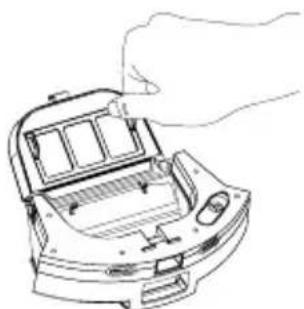
Line drawing of a hand inserting a component into a device housing (no text or symbols)- Open the HEPA filter cover

natural_image
Technical line drawing of a car interior with visible structural components (no text or symbols)- Remove the pre-filter and HEPA filter from the robot.

natural_image
Line drawing of a hand holding a device with a curved handle and control panel (no text or symbols)- Clean the dust pan with a cloth or brush. Do not rinse with water.

natural_image
Line drawing of a car interior with solar panel and battery components (no text or symbols)- Allow the various components to dry before inserting them again.
Notes:
- Before installing the filters, make sure the HEPA filter and pre-filter are completely dry.
- Do not expose filters to sunlight.
(2) f(x) = 12 ( x^2 - 1 ) × 12 ( x^2 - 1 ) × 12 ( x^2 - 1 ) × 12 ( x^2 - 1 ) × 12 ( x^2 - 1 ) × 12 ( x ^2 - 1 ) × 12 ( x ^2 - 1 ) × 12 ( x ^2 - 1 ) × 12 ( x ^2 - 1 ) × 12 ( x ^2 - 1 ).
To clean the water tank, follow these instructions:
natural_image
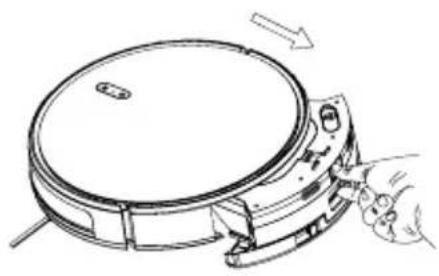
Line drawing of a mechanical device with a hand operating it, showing no text or symbols.- Press the button on the tank to remove it from the robot.

natural_image
Line drawing of a hand holding a flat electronic device with a downward arrow indicating compression (no text or symbols)- Remove the mop holder. mop holder.

natural_image
Pure technical diagram of a mechanical component with an upward arrow, no text or symbols present- Remove the mop.

natural_image
Line drawing of a car interior with a water droplet falling (no text or symbols)- Empty the rest of the tank.

natural_image
Illustration of a faucet pouring liquid into a boat (no text or symbols)- Clean the base of the mop with clean with clear water.

natural_image
Simple line drawing of a boat with a sun symbol above it (no text or labels)- Let dry for 24 hours.
natural_image
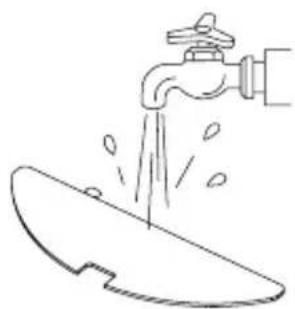
Simple line drawing of a faucet pouring water into a bowl (no text or symbols)- Clean the mop with clear water.

natural_image
Simple line drawing of a sun and a stylized leaf (no text or symbols)- Let dry for 24 hours.
Notes:
- Before reinstalling the base, please make sure the base is completely dry.
- Do not leave the components to dry in direct sunlight.
To clean the main brush, follow these instructions:

To clean the side brushes, run them under water or clean them with a cloth

natural_image
Line drawing of a hand holding a tool, no text or symbols presentTo clean the sensors, follow these instructions:
The sensors on the charging base, the sensors on the robot and the bumper contain sensitive electronics. Use a dry cloth to clean them and be careful not to get them wet as this could damage them.

natural_image
Line drawing of a cylindrical device with two circular components, being pointed at by a hand (no text or symbols)- Clean the load cells. load cells.

natural_image
Diagram of a mechanical device with internal components and a hand pointing to a component (no text or symbols visible)- Clean the robot's sensors.
natural_image
Technical diagram of a mechanical assembly with hands operating a component (no visible text or labels)-
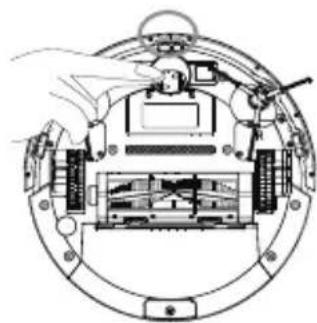
Clean the center wheel.
-
If you are not going to use the product for a long time, fully charge it before storing it.
- Turn off the unit and continue charging every 3 months to prevent the battery from being completely discharged.
- If the battery is too discharged or not used for a long time, the product may not be able to be recharged. Contact our company for service. Do not disassemble the product yourself.
When the dust bag is full, a red light flashes on the charging base. It is therefore important to replace it.
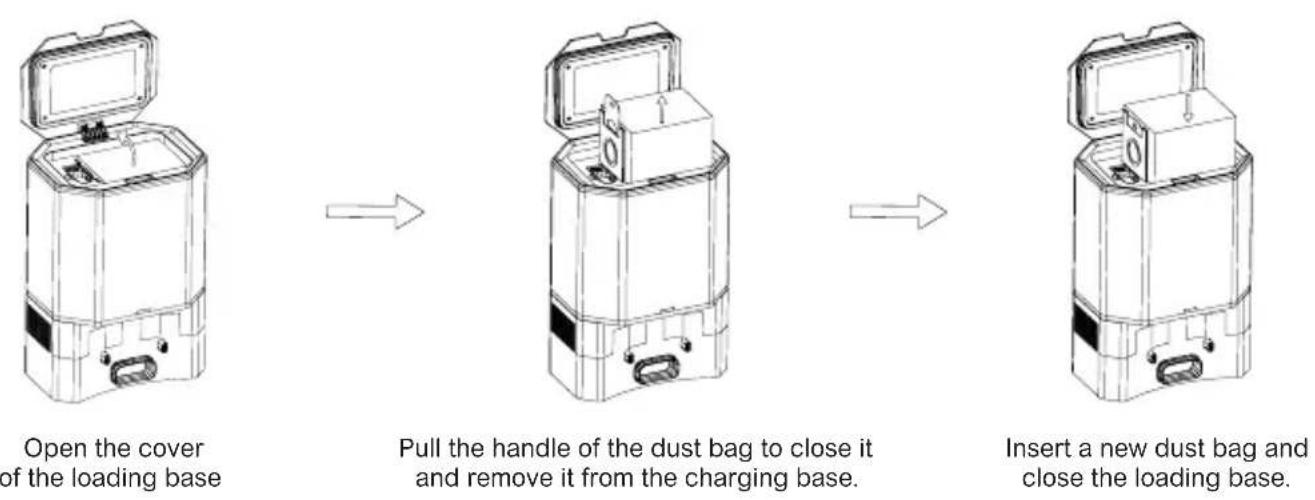
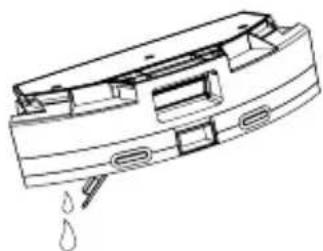
If the red light continues to flash after the dust bag has been replaced, it is recommended that you unplug the charger base, turn it over and check that the suction port is not blocked.
If it is blocked, please follow the picture below to remove the transparent cover and clean the suction port.
Please take care to handle the charging base parts carefully when disassembling and reassembling them. and reassembling them.

natural_image
Technical line drawing of a mechanical housing with internal components and mounting holes (no text or symbols)Technical characteristics
eziclean® Xpert animal S450 :
Dimensions (mm): 320 x 76
Weight (kg): 2,800
Navigation technology: NAVIG+TM - Gyroscopic
Noise level: 55dB
Battery life: 150 min
Charging time: 4 hours
Dust container capacity: 600 mL
Filtration: HEPA filter + foam filter + pre-filter
Remote control: Yes
Connected via app: Yes
Wash function: Yes
Charging base:
Dimensions (mm): 250 x 206 x 357
Weight (kg) : 4
Power (W) : 900
Precauciones de uso
natural_image
Technical line drawing of a spacecraft cockpit with two propeller arms (L and R) above the cockpit, showing no text or symbols.natural_image
Technical line drawing of a circular device with arrows indicating motion or assembly (no text or symbols)natural_image
Line drawing of a robotic vacuum cleaner with a finger pointing to the component (no text or symbols)natural_image
Line drawing of a circular vacuum cleaner with a control panel and power button (no text or symbols)
natural_image
Line drawing of a circular vacuum cleaner with attached electrical outlet (no text or symbols)natural_image
Line drawing of a hand operating a circular device with a scroll wheel (no text or symbols)natural_image
Diagram of a mechanical component with a downward arrow indicating force or direction (no text or symbols)- Instale la mopa en su base.

natural_image
Line drawing of a hand holding a device with an arrow indicating direction (no text or symbols present)natural_image
Line drawing of hands inserting a small component into a device casing (no text or symbols)natural_image
Line drawing of a robotic vacuum cleaner with a hand adjusting the component (no text or symbols)natural_image
Simple line drawing of a hand pressing a button on a circular object (no text or symbols)natural_image
Line drawing of a robotic vacuum cleaner with a hand adjusting the component (no text or symbols)natural_image
Technical line drawing of a mechanical device with no visible text or symbolsnatural_image
Technical line drawing of a mechanical component with internal components and a base plate (no text or symbols)- Quitar la suciedad.

natural_image
Line drawing of a hand inserting a component into a device housing (no text or symbols)natural_image
Technical line drawing of a car interior with plastic components and ventilation ducts (no text or symbols)natural_image
Line drawing of a faucet dispensing water into a tray (no text or symbols)natural_image
Technical line drawing of a hand holding a device component (no text or symbols visible)natural_image
Line drawing of a car interior with solar panel and battery pack (no text or symbols)natural_image
Line drawing of a mechanical device with a hand operating it, showing no text or symbols.natural_image
Line drawing of a hand holding a flat electronic device with a downward arrow indicating compression (no text or symbols)natural_image
Pure technical diagram of a mechanical component with an upward arrow, no text or symbols present- Retira la fregona.
natural_image
Line drawing of a mechanical component with a droplet falling (no text or symbols)natural_image
Illustration of a faucet pouring liquid into a boat (no text or symbols)natural_image
Simple line drawing of a small boat on the left and a sun symbol above it (no text or labels)natural_image
Simple line drawing of a faucet pouring water into a boat (no text or symbols)natural_image
Simple line drawing of a sun and a stylized leaf (no text or symbols)natural_image
Line drawing of a hand holding a tool with a curved tool (no text or symbols)natural_image
Line drawing of a device with a hand holding a button, showing internal components (no text or symbols)natural_image
Technical line drawing of a mechanical assembly with no visible text or symbolsnatural_image
Technical line drawing of a mechanical assembly with no visible text or symbolsnatural_image
Technical line drawing of a mechanical housing with internal components and mounting holes (no text or symbols)natural_image
Technical line drawing of a spacecraft cockpit with two propeller arms (L and R) above the cockpit, showing no text or symbols.natural_image
Technical line drawing of a circular device with arrows indicating motion or assembly (no text or symbols)natural_image
Line drawing of a circular device with a handle and small components, no text or symbols presentnatural_image
Line drawing of a circular robotic vacuum cleaner with a control panel and power button (no text or symbols)
natural_image
Line drawing of a circular robotic vacuum cleaner with attached electrical outlet (no text or symbols)natural_image
Line drawing of a hand operating a circular device with a scroll wheel (no text or symbols)natural_image
Diagram of a mechanical component with a downward arrow indicating direction (no text or symbols)natural_image
Line drawing of a hand holding a device with an arrow indicating direction (no text or symbols present)natural_image
Line drawing of hands inserting a small component into a device casing (no text or symbols)natural_image
Line drawing of a robotic vacuum cleaner with a hand adjusting the component (no text or symbols)natural_image
Simple line drawing of a hand pressing a button on a circular object (no text or symbols)natural_image
Line drawing of a mechanical device with a hand operating it, showing a circular component and adjustment knob (no text or symbols)natural_image
Technical line drawing of a mechanical component with no visible text or symbolsnatural_image
Technical line drawing of a mechanical component with internal components and a base plate (no text or symbols)natural_image
Line drawing of a hand inserting a component into a device housing (no text or symbols)natural_image
Technical line drawing of a car interior with plastic components and ventilation ducts (no text or symbols)natural_image
Line drawing of a faucet pouring water into a tray (no text or symbols)natural_image
Line drawing of a hand holding a device component, no text or symbols presentnatural_image
Line drawing of a car interior with solar panel and battery components (no text or symbols)natural_image
Line drawing of a mechanical device with a hand operating it, showing no text or symbolsnatural_image
Line drawing of a hand holding a flat electronic device with a downward arrow indicating compression (no text or symbols)natural_image
Pure technical diagram of a mechanical component with no text or symbolsnatural_image
Line drawing of a mechanical component with a droplet falling (no text or symbols)natural_image
Illustration of a faucet pouring liquid into a boat (no text or symbols)natural_image
Simple line drawing of a boat with a sun symbol above it (no text or labels)natural_image
Simple line drawing of a faucet pouring water into a bowl (no text or symbols)natural_image
Simple line drawing of a sun and a leaf outline (no text or symbols)natural_image
Line drawing of a device with a hand interacting with it, showing internal components (no text or symbols)natural_image
Diagram of a mechanical assembly with a hand pointing to a component, showing internal components and no text or symbols.natural_image
Technical line drawing of a mechanical assembly with no visible text or symbolsnatural_image
Technical line drawing of a mechanical housing with internal components and mounting holes (no text or symbols)Technische Daten
eziclean» Xpert animal S450 :
Abmessungen (mm): 320 x 76
Gewicht (kg): 2,800
natural_image
Technical line drawing of a cockpit interior with two propeller blades (L and R) above the cockpit, showing no text or symbols.natural_image
Technical line drawing of a circular device with arrows indicating motion or assembly (no text or symbols)natural_image
Line drawing of a circular device with a handle and small components, no text or symbols presentnatural_image
Line drawing of a circular robotic vacuum cleaner with a control panel and power button (no text or symbols)
natural_image
Line drawing of a circular robotic vacuum cleaner with attached electrical outlet (no text or symbols)natural_image
Line drawing of a hand operating a circular device with a scroll wheel (no text or symbols)natural_image
Diagram of a mechanical component with a downward arrow indicating force or direction (no text or symbols)natural_image
Line drawing of a hand holding a device with an arrow indicating direction (no text or symbols present)natural_image
Line drawing of hands inserting a small component into a device casing (no text or symbols)natural_image
Line drawing of a robotic vacuum cleaner with a hand adjusting the component (no text or symbols)natural_image
Simple line drawing of a hand pressing a button on a circular object (no text or symbols)natural_image
Line drawing of a robotic vacuum cleaner with a hand adjusting the component (no text or symbols)natural_image
Technical line drawing of a mechanical device with no visible text or symbolsnatural_image
Technical line drawing of a mechanical component with internal components and a base plate (no text or symbols)natural_image
Line drawing of a hand inserting a component into a device housing (no text or symbols)natural_image
Technical line drawing of a car interior with plastic components and ventilation ducts (no text or symbols)natural_image
Line drawing of a faucet pouring liquid into a tray (no text or symbols)natural_image
Line drawing of a hand holding a device with a curved handle and control panel (no text or symbols)natural_image
Line drawing of a car interior with solar panel and battery components (no text or symbols)natural_image
Line drawing of a mechanical device with a hand adjusting its component (no text or symbols)natural_image
Line drawing of a hand holding a device with a downward arrow indicating compression (no text or symbols)natural_image
Pure technical diagram of a mechanical component with an upward arrow, no text or symbols present- Rimuovere il mop.

natural_image
Line drawing of a mechanical component with water droplets (no text or symbols)natural_image
Illustration of a faucet pouring liquid into a boat (no text or symbols)natural_image
Simple line drawing of a boat with a sun symbol above it (no text or labels)natural_image
Simple line drawing of a faucet pouring water into a bowl (no text or symbols)natural_image
Simple line drawing of a sun and a stylized leaf (no text or symbols)natural_image
Line drawing of a device with a hand holding a button, no text or symbols presentnatural_image
Technical line drawing of a mechanical assembly with no visible text or symbolsnatural_image
Technical diagram of a mechanical device with internal components and a hand operating it (no text or labels)natural_image
Technical line drawing of a mechanical housing with internal components and mounting holes (no text or symbols)Specifiche tecniche
eziclean® Xpert animal S450 :
Dimensioni (mm): 320 x 76
Peso (kg): 2.800
natural_image
Technical line drawing of a cockpit interior with two propeller blades (L and R) above the cockpit, showing no text or symbols.natural_image
Technical line drawing of a circular device with arrows indicating motion or assembly (no text or symbols)natural_image
Line drawing of a circular device with a handle and small components, no text or symbols presentnatural_image
Line drawing of a circular robotic vacuum cleaner with a control panel and power button (no text or symbols)
natural_image
Line drawing of a circular robotic vacuum cleaner with attached electrical outlet (no text or symbols)natural_image
Line drawing of a hand operating a circular device with a scroll wheel (no text or symbols)natural_image
Diagram of a mechanical component with a downward arrow indicating force or direction (no text or symbols)natural_image
Line drawing of a hand holding a device with an arrow indicating direction (no text or symbols present)natural_image
Line drawing of hands inserting a small component into a device casing (no text or symbols)natural_image
Line drawing of a robotic vacuum cleaner with a hand adjusting the component (no text or symbols)natural_image
Simple line drawing of a hand pressing a button on a circular frame (no text or symbols)natural_image
Line drawing of a robotic vacuum cleaner with a hand adjusting the component (no text or symbols)natural_image
Technical line drawing of a mechanical component with no visible text or symbolsnatural_image
Technical line drawing of a mechanical component with internal components and a base plate (no text or symbols)
natural_image
Line drawing of a hand inserting a component into a device housing (no text or symbols)natural_image
Technical line drawing of a car interior with plastic components and ventilation ducts (no text or symbols)natural_image
Line drawing of a faucet pouring liquid into a tray (no text or symbols)natural_image
Line drawing of a hand holding a device component, no text or symbols presentnatural_image
Line drawing of a car interior with solar panel and battery components (no text or symbols)natural_image
Line drawing of a robotic vacuum cleaner with a hand adjusting the component (no text or symbols)natural_image
Line drawing of a hand holding a mechanical component with an arrow indicating rotation (no text or symbols)natural_image
Pure technical diagram of a mechanical component with an upward arrow, no text or symbols present- Verwijder de mop.

natural_image
Line drawing of a mechanical device with a droplet falling into the base (no text or symbols)natural_image
Illustration of a faucet pouring liquid into a boat (no text or symbols)natural_image
Simple line drawing of a boat with a sun symbol above it (no text or labels)- Laat 24 uur drogen.
natural_image
Simple line drawing of a faucet pouring water into a bowl (no text or symbols)natural_image
Simple line drawing of a sun and a stylized bird silhouette (no text or symbols)- Laat 24 uur drogen.
Let op:
natural_image
Line drawing of a hand holding a tool near a small object (no text or symbols)natural_image
Line drawing of a device with a hand holding a button, no text or symbols present- Maak de krachtopnemers schoon sensoren.

natural_image
Technical line drawing of a mechanical assembly with no visible text or symbolsnatural_image
Technical line drawing of a mechanical assembly with no visible text or symbolsnatural_image
Line drawing of a portable electronic device with open lid and internal compartments (no text or symbols)natural_image
Technical line drawing of a mechanical device with open lid and internal components (no text or symbols)

natural_image
Technical line drawing of a mechanical device with open lid and internal components (no text or symbols)natural_image
Technical line drawing of a mechanical housing with internal components and mounting holes (no text or symbols)Technische specificaties
eziclean® Xpert animal S450 :
Afmetingen (mm): 320 x 76
Gewicht (kg): 2.800
text_image
QR code image containing encoded data, no visible human-readable textTéléchargez votre application sur Apple Store Upload your application to the Apple Store Laden Sie Ihre App im Apple Store herunter Sube tu solicitud al Apple Store Carica la tua applicazione su Apple Store Upload uw aanvraag naar de Apple Store

text_image
QR code image containing encoded data, no visible human-readable textTéléchargez votre application sur Google Play Upload your application to the Google Play Laden Sie Ihre App im Google Play herunter Sube tu solicitud al Google Play Carica la tua applicazione su Google Play Upload uw aanvraag naar de Google Play

text_image
QR code image containing encoded data, no visible human-readable textTo use your application, scan this code or go to https://eziclean.com/application-eziclean/
EZIclean® is an E.ZICOM® company brand
46/48, rue Gay Lussac
94430 Chennevières-sur-Marne
www.eziclean.com