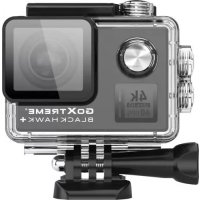
GoXtreme Black Hawk+ 4K - Sports camera EASYPIX - Free user manual and instructions
Find the device manual for free GoXtreme Black Hawk+ 4K EASYPIX in PDF.



| Product type | Action camera (Sportscam) |
| Brand | Easypix |
| Model | GoXtreme Black Hawk+ 4K |
| Sensor | CMOS 12 Megapixels |
| Maximum video resolution | 4K (3840x2160) at 60 frames per second |
| Maximum photo resolution | 14 Megapixels interpolated (4320x3240), 12 Megapixels native (4032x3024) |
| Lens | f = 3.21 mm, F2.8, viewing angle 170° |
| Display | 2-inch LCD, 320x240 pixels |
| Image stabilization | Yes, electronic (EIS) can be enabled/disabled |
| WiFi | Yes (SSID: GOXTREME, password: 1234567890), control via iSmart DV app |
| Connectivity | USB 2.0 (charging and transfer), HDMI (1080p60 output), microSD card slot |
| Storage | microSDHC U3 card up to 64 GB (not included) |
| Power | Rechargeable Li-ion battery 1050 mAh, battery life up to 90 minutes |
| Dimensions (L x W x H) | 61 x 42 x 23 mm (with lens: 33 mm) |
| Weight | Approx. 78.5 g (with battery) |
| Waterproof | Waterproof housing included (submersible) |
| Special features | Time lapse, slow motion (720p at 240 fps), webcam mode, loop recording, motion detection |
| Maintenance and cleaning | Clean the housing after use in salt water or chlorinated water, allow to air dry |
| Safety | Do not expose to high temperatures, do not short-circuit the battery, keep out of reach of children under 3 years |
| Spare parts and repairability | Removable battery, removable memory card; for assistance, contact Easypix via www.easypix.eu |
Frequently Asked Questions - GoXtreme Black Hawk+ 4K EASYPIX
User questions about GoXtreme Black Hawk+ 4K EASYPIX
0 question about this device. Answer the ones you know or ask your own.
Ask a new question about this device
Download the instructions for your Sports camera in PDF format for free! Find your manual GoXtreme Black Hawk+ 4K - EASYPIX and take your electronic device back in hand. On this page are published all the documents necessary for the use of your device. GoXtreme Black Hawk+ 4K by EASYPIX.
USER MANUAL GoXtreme Black Hawk+ 4K EASYPIX
Easypix makes no representations or warranties with respect to this manual and, to the maximum extent permitted by law, expressly limits its liability for breach of any warranty that may be implied to the replacement of this manual with another.
Furthermore, Easypix reserves the right to revise this publication at any time without incurring an obligation to notify any person of the revision.
Easypix is not responsible or liable for misuse of the information that is contained herein. If you have any suggestions for improvements or amendments or have found errors in this publication, please notify us.
All pertinent state, regional, and local safety regulations must be observed when installing and using this product. For reasons of safety and to help ensure compliance with documented system data, only the manufacturer shall perform repairs to components.
Failure to observe this information can result in injury or equipment damage.
Copyright © by Easypix GmbH
All rights reserved. No part of this publication may be reproduced, distributed, or transmitted in any form or by any means, including photocopying, recording, or other electronic or mechanical methods, without the prior written permission of the publisher. For permission requests, please write to the publisher below.
Easypix GmbH, Em Parkveedel 11, 50733 Köln, Germany
support@easypix.eu • www.easypix.eu
Retaining instructions
Please read this manual and its safety instructions before using this product and follow all of the instructions contained herein.
The product should only be used by persons who have fully read and understand the contents of this user manual.
Ensure that each person who uses the product has read these warnings and instructions and understands its content.
Keep all safety information and instructions for future reference and pass them on to all subsequent users of the product.
The manufacturer is not liable for cases of material damage or personal injury caused by incorrect handling or non-compliance with the safety instructions.
Product introduction
This action cam is a high-definition digital motion video recording device.
It uses class leading components to deliver a broad range of high end features including: high frame rate 4K video recording, image capture, colour display and built-in WiFi.
The camera includes various mounting accessories including an underwater housing, waterproof up to 40m.
EN
Notes on MicroSD card
NOTICE
- Please ensure your memory card is formatted in the camera before using the card for the first time (Menu mode > Camera Settings).
- The maximum capacity memory card supported is 64GB.
Use of memory cards exceeding the maximum recommended capacity may result in file errors.
- For best results, we recommend using high quality Micro SD cards Class 10 with U3 High Speed or higher.
Ensure a U3 rated memory card is used when recording 4K video.
Using a lower rated card may present data transfer speed issues due to the large file size produced by a 4K video recording.
• The recording time depends on the selected resolution.
Notes on charging the battery
NOTICE
- Ensure the camera is charged completely before using it for the first time.
- Keep the device away from children while charging.
- Ensure the camera is switched off when charging. If the camera turns on automatically when connected to a power source please turn it off to complete charging.
A camera plugged into a power source while switched on will not charge.
- The camera should only be charged via the USB port of a computer or a USB power adapter with a maximum capacity of 1000mAh.
- Unplug the USB cable connected to the camera before using the camera.
- Battery life is up to 90 minutes in optimal conditions (i.e. depending on the settings and resolution selected and the outside temperature)
Notes on WiFi connection
NOTICE
- Ensure you have downloaded the correct companion app for your camera model.
- Please note that wireless transfer of files using the app is not possible for video with resolution higher than 1080p. Files using any resolution higher then 1080p can only be accessed via your computer using a card reader.
EN
Safety instructions
WARNING
This product is not suitable for children under 36 months because of choking hazard.
WARNING
Always protect your camera from impact with hard surfaces.
- Keep a sufficient distance from objects that generate strong magnetic fields or radio waves, such as electrical appliances to prevent them from damaging the product or affecting the sound and image quality.
- Store the device at room temperature in a dry and dust-free location and never expose the product to high temperatures or direct sunlight for prolonged periods.
- In the unlikely event of overheating, smokes or unpleasant odors coming out of the unit, disconnect it immediately from the charging cable and remove the battery.
EN
WARNING
Before using the camera in the water, ensure that all lids and latches on the camera and underwater housing are closed and sealed.
- Following use in salty or chlorinated water, clean the case and let it dry naturally.
- To prevent condensation inside the case or behind the lens, avoid exposing the camera to high temperature and humidity differences.
- Following use under water, the housing must be left open to avoid condensation or rusting.
EN
Product description
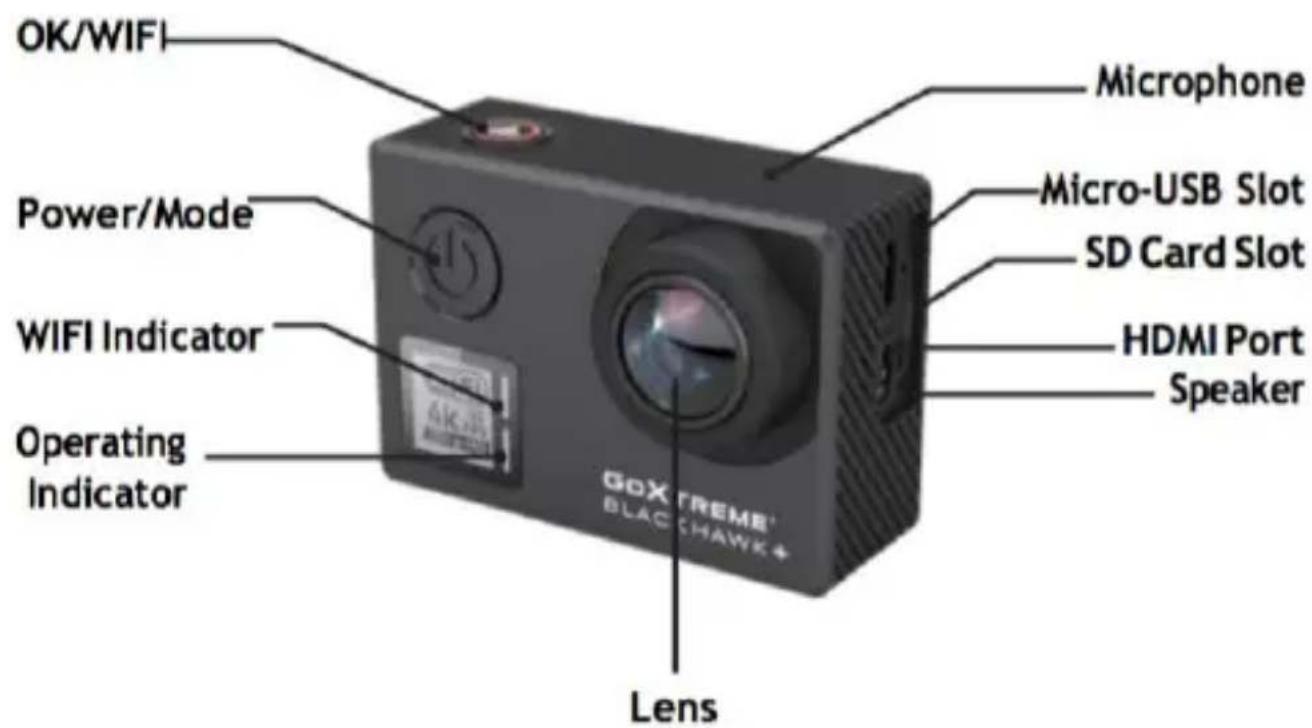
EN
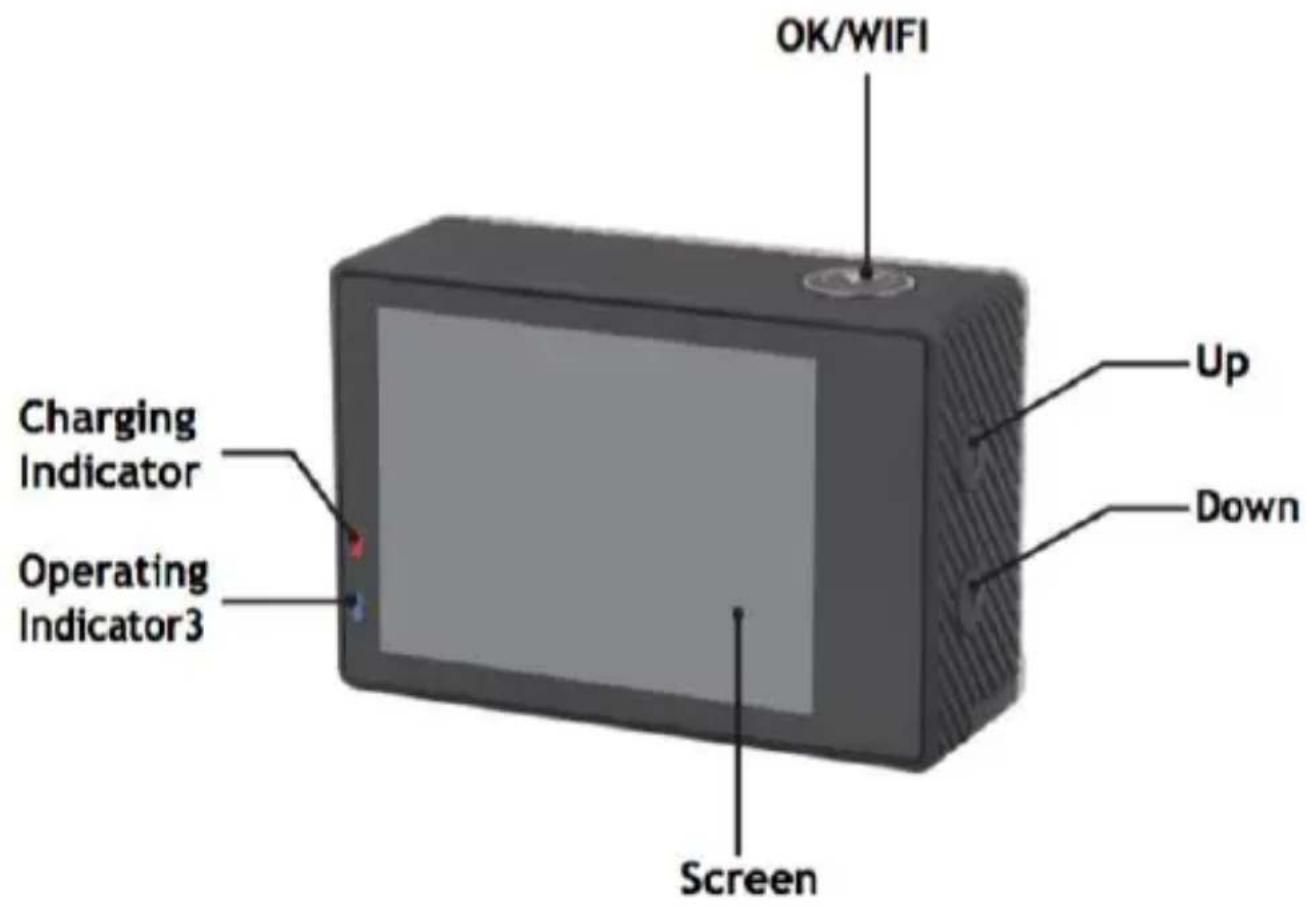
EN
Waterproof case description
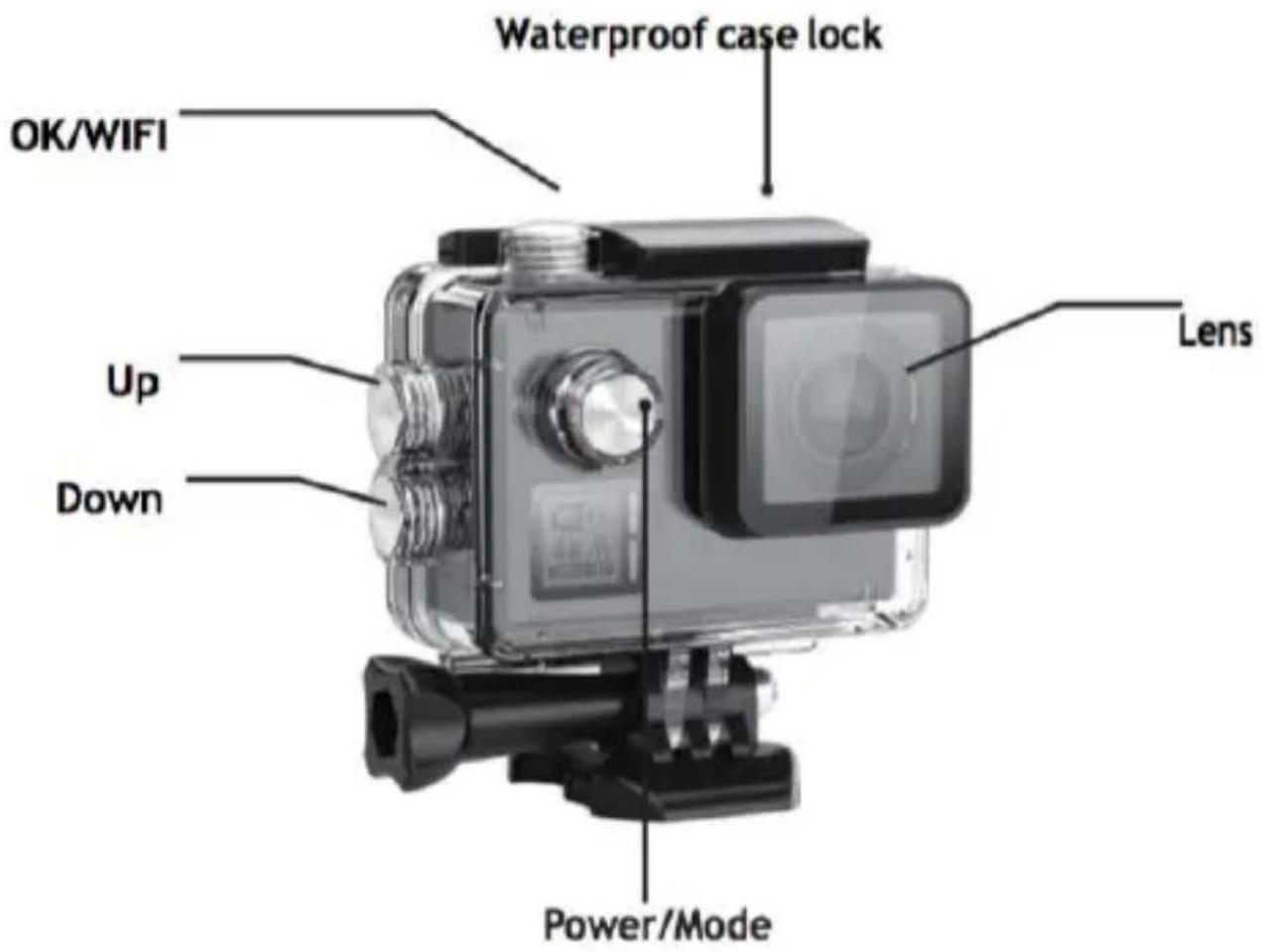
EN
Inserting micro SD Card
Note: Please choose a branded U3 micro SD card and format the memory card in the camera using the 'Format Card' option in the camera settings menu before using the card for the first time (Menu mode > Camera settings).
Installing and removing the battery
The battery compartment features a sliding lock.
To open the battery compartment, unlock it and slide it in the direction shown on the cover.
Install the battery into the camera ensuring that the pins inside the camera and the slots on the battery are aligned before closing and securing the battery compartment.
Removing the battery
Open the battery cover and remove the battery using the tag attached to the battery.
Note: Please engage the lock on the battery compartment cover before each use.
Charging the battery
The battery can be charged by connecting it to a computer or a power adapter.
The camera can record videos while charging (switch into vehicle-mounted mode in the Menu). The camera can also be charged while the camera is turned off.
EN
Switching the camera on and off
Press and hold the power button for 3-5 seconds to turn the device on/off.
Mode switching
Short pressing the power button changes the camera operating modes in the following sequence: Video mode / Photo mode / Menu mode.
Inside the Menu you will find: Video settings, Photo settings, Playback mode and Camera settings (various camera system settings or format a memory card).
Video mode
Switch to video recording mode by repeated pressing the Mode button to select "Video Mode".
Press the WiFi/OK/Shutter button to start recording and the icon will start to flash.
Press WiFi/OK/Shutter button again to stop recording and the icon will disappear.
Photo mode
Switch to video recording mode by repeated pressing the Mode button to select "Photo Mode". The icon in the upper left corner of the screen shows, that the camera is in the photo mode. Press OK/Shutter/WiFi button to take photos.
EN
Menu mode
Switch to video recording mode by repeated pressing the Mode button to select "Menu Mode".
Use the 'Up' and 'Down' buttons on the camera to navigate between the 4 options
• Video Setting: Enter to adjust various setting related to video recording
- Photo Setting: Enter to adjust various settings related to photos
- Playback: Enter to review your files (see below for more details)
- Camera Setting: Enter to adjust various camera system settings or format a memory card.
File storage & Playback
Switch the camera to the Menu mode by repeated pressing the Mode button and click on "Playback".
“”is shown on the top left corner of video preview mode,
and“ is shown on the top left corner of photo preview mode.
Use the UP and DOWN buttons to slect between video or photo preview modes.
Press the OK/Shutter/WiFi button to confirm your selection.
Select the individual files for review by using the UP and DOWN arrows, then replay and stop videos or review photos by pressing the OK/Shutter/WiFi button again.
Remember you can always press the 'Mode' button to go back a step.
EN
You can also review your files on your smartphone via WiFi.
Note: In the unlikely event that the camera freezes during use, please remove and re-insert the battery.
WiFi control
Before using the WiFi function, please install the iSmart DV app on your smartphone or tablet PC. After turning the camera on, press the WiFi/OK/Shutter button for 2 seconds to activate WiFi function. When the WiFi is turned on, the camera displays the SSID and password (PWD) for pairing your camera and smartphone.
Pairing your camera and smartphone
Open the WiFi settings on your smartphone and search for the camera SSID as displayed on the camera display.
The password to complete the pairing is 1234567890. (This should only be required the first time your camera is paired with your smartphone)
When the WiFi connection is confirmed on your smartphone, exit the WiFi settings screen and open the iSmartDV app.
Follow the app instructions to complete the connection.
EN
Webcam function
Your action cam also features a webcam function.
To use your cam as a webcam please follow the following steps:
- Remove the battery and memory card.
- Connect the camera to your computer using the USB cable provided.
- If prompted, select the PC-Cam or Web Cam option.
- If you are using Windows, driver installation will be automatic and complete within 2 minutes.
PLEASE NOTE:
Please note that the web cam function provides video only and does not include audio.
A headset or earphones with in-line mic as provided with many smartphones is required for audio.
Please note you may need to enter the settings of any app or program you use (e.g.
Skype) so you can select your action cam as the preferred web cam option.
EN
Box contents
- Action Cam
- Waterproof case
- Bike mount
- Helmet mounts
- Orientation arms
- Tripod adaptor
- Monopod adaptor
- Battery
- USB Cable
EN
| Specifications | ||
| Image Sensor | Type | 12MP CMOS |
| Lens | Focal Length | Lens f= 3.21mm |
| F No. | F= 2.8 | |
| F.O.V(D) | 170° | |
| LCD Display | 2” 320x240 TFT LCD | |
| Focusing | Type | Fixed |
| Exposure | Control | Programmed AE |
| Compensation | ± 2EV (0,33 EV) -2,0 / -1,0 / + 0,0 / + 1,0 / 2,0 | |
| ISO Equivalent | Auto, 100, 200, 400, 800, 1600 | |
| White Balance | Auto /Daylight / Shade/Tungsten Light / Fluorescent/ Underwater | |
| Video resolution | 4K 3840x2160 60fps / EIS 30fps2.7K 2704x1520 60fps / 30fps1920x1080 120fps / EIS 60fps / EIS 30fps1280x720 240fps / 200fps / 120fps / 60fps / 30fps | |
| Image Stabilization | On/Off | |
| Memory | External memory: supporting U3 micro SDHC cards up to 64GB (not included) | |
| Video Encoder | H.264 | |
| Image Size | 14M (4320x3240) interpolated12M (4032x3024), 10MP(3648x2736)8M (3840x2160)5M (2592x1944) | |
| Video Output | HDMI: Support 1920x1080 P60, output With CECComposite: NTSC/PAL | |
| Time Lapse Function | OFF / 1 sec. / 3 sec. / 5 sec. / 10 sec. / 30 sec./ 60 sec. | |
| Photo Functions | Self Timer: OFF / 3 sec. / 5 sec. / 10 sec. / 20 sec.Burst Rate: OFF / 3 P/s / 7 P/s / 15 P/s /30P/s Time LapsePhoto Interval: OFF / 3 sec. / 5 sec. / 10 sec. / 30 sec. /60 sec.Time Lapse photo shooting time: 5Min/10Min/15Min/20Min | |
| Default Mode | Video | |
| EIS | On / OFF | |
| Motion Detection | Off / Low / Medium / High | |
| TV Mode | NTSC / PAL | |
| Light Freq. | 50HZ / 60HZ | |
| Screen-Off | OFF / 30 Seconds / 1 Min. / 2Min | |
| WiFi LED | ON / OFF | |
| Sharpness | Strong / Normal / Soft | |
| Scene Mode | Normal/Indoor/Outdoor/Landscape/Portrait/Night | |
| ISO | Auto / 100 / 200 / 400 / 800 / 1600 / 3200 | |
| EV : 0.0 | EV : -2.0 / -1.0 / +0.0 / +1.0 / +2.0 | |
EN
| Date Format | Y/M/D,D/M/Y,M/D/Y |
| Wi-Fi | ON / OFF |
| WiFi SSID | GOXTREME |
| WiFi Password | 1234567890 |
| Format | YES/NO |
| Default Setting | YES/NO |
| Version | GOXTREME V1.0 |
| Interface | USB 2.0: Recharging/File Transfer |
| Power Source | Li-ion rechargeable battery 1050mAh |
| Dimensions (W*H*D) | L: 61mm, W:42mm, H:23 mm(with lens part will be 33mm) |
| Weight | about 78.5g (with battery) |
| Support | Mass Storage DriverWindows XP (Service pack 2) or later Mac OS X 10.5.11or later |
EN
CONFORMITY
The manufacturer hereby declares that the CE marking was applied to the product GoXtreme Black Hawk+ in accordance with the basic requirements and other relevant provisions of the following CE Directives:
2014/53/EU
2011/65/EC RoHs
2014/30/EU EMV
2012/19/EC WEEE
The EC Declaration of Conformity can be downloaded here:
http://www.easypix.info/download/pdf/doc_goxtreme_blackhawkplus.pdf
EN
DISPOSAL

Dispose of packaging
For disposal, separate packaging into different types. Cardboard and board must be disposed of as paper and foil must be recycled.
Disposal of Waste Electrical and Electronic Equipment and/or Battery by users
in private households in the European Union. This symbol on the product or on the packaging indicates that this cannot be disposed of as a household waste. You must dispose of your waste equipment and/or battery by handling it over to the applicable take-back scheme for the recycling of electrical and electronic equipment and/or battery. For more information about recycling of this equipment and/or battery, please contact your city office, the shop where you purchased the equipment or your household waste disposal service. The recycling of materials will help to conserve natural resources and ensure that it is recycled in a manner that protects human health and environment.
EN
WARNING
Battery warning
- Never dismantle, crush, or pierce the battery, or allow the battery to short-circuit.
Do not expose battery being placed in high temperature environment, if battery leaks or bulges, stop continue to use.
• Always charge using the charger. Risk of explosion if battery is replaced by an incorrect type. - Keep the battery out of reach of children.
- Batteries may explode if exposed to naked fire. Never dispose of batteries in a fire.
- Disposed of used batteries observing local regulations.
- Before disposing the device, please remove the battery.
WARNING
The camera is not suitable for children under 3 years because of choking hazard.
EASYPIX® | LIFESTYLE ELECTRONICS
EN
DE
Haftungsausschluss
Easypix GmbH, Em Parkveedel 11, 50733 Köln, Germany
support@easypix.eu • www.easypix.eu
Allgemeines
natural_image
Symbol of a trash bin crossed with diagonal lines, no text or numbers presentMade in China / Only for EU

LIFESTYLE ELECTRONICS

Made in China / Only for EU
easypix®
LIFESTYLE ELECTRONICS

Made in China / Only for EU

LIFESTYLE ELECTRONICS

BELANGRIJKE INFORMATIE
Made in China / Only for EU

LIFESTYLE ELECTRONICS

INFORMATION IMPORTANTE
DECLARATION DE CONFORMITÉ
Made in China / Only for EU
easypix®
LIFESTYLE ELECTRONICS
DŮLEŽITÉ INFORMACE
All product specifications are correct at time of print and are subject to change out prior notice.
Easypix GmbH reserve the right for errors or omissions.
For technical help please visit our support area on www.easypix.eu.
CONFORMITY
The manufacturer hereby declares that the CE marking was applied to the product GoXtreme Black Hawk+ in accordance with the basic requirements and other relevant provisions of the following CE Directives:
2014/53/EU
2011/65/EC RoHs
2014/30/EU EMV
2012/19/EC WEEE

The EC Declaration of Conformity can be downloaded here:
http://www.easypix.info/download/pdf/doc_goxtreme_blackhawkplus.pdf
DISPOSAL

Dispose of packaging
For disposal, separate packaging into different types. Cardboard and board must be disposed of as paper and foil must be recycled.

Disposal of Waste Electrical and Electronic Equipment and/or Battery by users
in private households in the European Union. This symbol on the product or on the packaging indicates that this cannot be disposed of as a household waste. You must dispose of your waste equipment and/or battery by handling it over to the applicable take-back scheme for the recycling of electrical and electronic equipment and/or battery. For more information about recycling of this equipment and/or battery, please contact your city office, the shop where you purchased the equipment or your household waste disposal service. The recycling of materials will help to conserve natural resources and ensure that it is recycled in a manner that protects human health and environment.

Battery warning
- Never dismantle, crush, or pierce the battery, or allow the battery to short-circuit. Do not expose battery being placed in high temperature environment, if battery leaks or bulges, stop continue to use.
- Always charge using the charger. Risk of explosion if battery is replaced by an incorrect type.
- Keep the battery out of reach of children.
- Batteries may explode if exposed to naked fire. Never dispose of batteries in a fire.
- Disposed of used batteries observing local regulations.
- Before disposing the device, please remove the battery.

The camera is not suitable for children under 3 years because of choking hazard.


Made in China / Only for EU

LIFESTYLE ELECTRONICS
All product specifications are correct at time of print and are subject to change without prior notice.
Easypix GmbH reserve the right for errors or omissions.
For technical help please visit our support area on www.easypix.eu.
CONFORMITY
The manufacturer hereby declares that the CE marking was applied to the product GoXtreme Black Hawk+ in accordance with the basic requirements and other relevant provisions of the following CE Directives:
2014/53/EU
2011/65/EC RoHs
2014/30/EU EMV
2012/19/EC WEEE

The EC Declaration of Conformity can be downloaded here: http://www.easypix.info/download/pdf/doc_blackhawkplus.pdf
DISPOSAL

Dispose of packaging
For disposal, separate packaging into different types. Cardboard and board must be disposed of as paper and foil must be recycled.

natural_image
Symbol of a trash bin crossed with no text or numbers, representing waste sorting or disposal (no text present)Disposal of Waste Electrical and Electronic Equipment and/or Battery
by users in private households in the European Union. This symbol on the product or on the packaging indicates that this cannot be disposed of as a household waste. You must dispose of your waste equipment and/or battery by handling it over to the applicable take-back scheme for the recycling of electrical and electronic equipment and/or battery. For more information about recycling of this equipment and/or battery, please contact your city office, the shop where you purchased the equipment or your household waste disposal service. The recycling of materials will help to conserve natural resources and ensure that it is recycled in a manner that protects human health and environment.

Battery warning
- Never dismantle, crush, or pierce the battery, or allow the battery to short-circuit. Do not expose battery being placed in high temperature environment, if battery leaks or bulges, stop continue to use.
- Always charge using the charger. Risk of explosion if battery is replaced by an incorrect type.
- Keep the battery out of reach of children.
- Batteries may explode if exposed to naked fire. Never dispose of batteries in a fire.
- Disposed of used batteries observing local regulations.
- Before disposing the device, please remove the battery.

The camera is not suitable for children under 3 years because of choking hazard.


Made in China / Only for EU
easypix®
LIFESTYLE ELECTRONICS
FONTOS INFORMÁCIÓK
All product specifications are correct at time of print and are subject to change without prior notice.
Easypix GmbH reserve the right for errors or omissions.
For technical help please visit our support area on www.easypix.eu.
HU
CONFORMITY
The manufacturer hereby declares that the CE marking was applied to the product GoXtreme Black Hawk+ in accordance with the basic requirements and other relevant provisions of the following CE Directives:
2014/53/EU
2011/65/EC RoHs
2014/30/EU EMV
2012/19/EC WEEE

The EC Declaration of Conformity can be downloaded here: http://www.easypix.info/download/pdf/doc_blackhawkplus.pdf
DISPOSAL

Dispose of packaging
For disposal, separate packaging into different types. Cardboard and board must be disposed of as paper and foil must be recycled.
natural_image
Symbol of a trash bin crossed with a diagonal line, no text or numbers presentDisposal of Waste Electrical and Electronic Equipment and/or Battery by
users in private households in the European Union. This symbol on the product or on the packaging indicates that this cannot be disposed of as a household waste. You must dispose of your waste equipment and/or battery by handling it over to the applicable take-back scheme for the recycling of electrical and electronic equipment and/or battery. For more information about recycling of this equipment and/or battery, please contact your city office, the shop where you purchased the equipment or your household waste disposal service. The recycling of materials will help to conserve natural resources and ensure that it is recycled in a manner that protects human health and environment.
HU

Battery warning
- Never dismantle, crush, or pierce the battery, or allow the battery to short-circuit. Do not expose battery being placed in high temperature environment, if battery leaks or bulges, stop continue to use.
• Always charge using the charger. Risk of explosion if battery is replaced by an incorrect type. - Keep the battery out of reach of children.
- Batteries may explode if exposed to naked fire. Never dispose of batteries in a fire.
- Disposed of used batteries observing local regulations.
- Before disposing the device, please remove the battery.
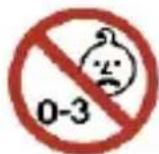
The camera is not suitable for children under 3 years because of choking hazard.





Made in China / Only for EU

LIFESTYLE ELECTRONICS
Vigtig information
File Storage & Playing
All product specifications are correct at time of print and are subject to change
without prior notice.
Easypix GmbH reserve the right for errors or omissions.
For technical help please visit our support area on www.easypix.eu.
DA
CONFORMITY
The manufacturer hereby declares that the CE marking was applied to the product GoXtreme Black Hawk+ in accordance with the basic requirements and other relevant provisions of the following CE Directives:
2014/53/EU
2011/65/EC RoHs
2014/30/EU EMV
2012/19/EC WEEE

The EC Declaration of Conformity can be downloaded here: http://www.easypix.info/download/pdf/doc_blackhawkplus.pdf
DA
DISPOSAL

Dispose of packaging
For disposal, separate packaging into different types. Cardboard and board must be disposed of as paper and foil must be recycled.
natural_image
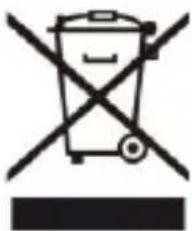
Symbol of a trash bin crossed with no text or numbers, representing waste sorting or disposal (no text present)Disposal of Waste Electrical and Electronic Equipment and/or Battery by
users in private households in the European Union. This symbol on the product or on the packaging indicates that this cannot be disposed of as a household waste. You must dispose of your waste equipment and/or battery by handling it over to the applicable take-back scheme for the recycling of electrical and electronic equipment and/or battery. For more information about recycling of this equipment and/or battery, please contact your city office, the shop where you purchased the equipment or your household waste disposal service. The recycling of materials will help to conserve natural resources and ensure that it is recycled in a manner that protects human health and environment.

Battery warning
- Never dismantle, crush, or pierce the battery, or allow the battery to short-circuit. Do not expose battery being placed in high temperature environment, if battery leaks or bulges, stop continue to use.
- Always charge using the charger. Risk of explosion if battery is replaced by an incorrect type.
- Keep the battery out of reach of children.
- Batteries may explode if exposed to naked fire. Never dispose of batteries in a fire.
- Disposed of used batteries observing local regulations.
- Before disposing the device, please remove the battery.

The camera is not suitable for children under 3 years because of choking hazard.





Made in China / Only for EU
easypix®
LIFESTYLE ELECTRONICS
i VIKTIG INFORMATION
Made in China / Only for EU

LIFESTYLE ELECTRONICS
Tärkeää tietoa
All product specifications are correct at time of print and are subject to change without prior notice.
Easypix GmbH reserve the right for errors or omissions.
For technical help please visit our support area on www.easypix.eu.
FI
CONFORMITY
The manufacturer hereby declares that the CE marking was applied to the product GoXtreme Black Hawk+ in accordance with the basic requirements and other relevant provisions of the following CE Directives:
2014/53/EU
2011/65/EC RoHs
2014/30/EU EMV
2012/19/EC WEEE
The EC Declaration of Conformity can be downloaded here: http://www.easypix.info/download/pdf/doc_blackhawkplus.pdf
DISPOSAL

Dispose of packaging
For disposal, separate packaging into different types. Cardboard and board must be disposed of as paper and foil must be recycled.
natural_image
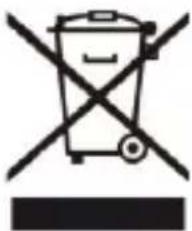
Symbol of a trash bin crossed with no text or numbers, representing waste sorting or disposal (no text present)Disposal of Waste Electrical and Electronic Equipment and/or Battery by
users in private households in the European Union. This symbol on the product or on the packaging indicates that this cannot be disposed of as a household waste. You must dispose of your waste equipment and/or battery by handling it over to the applicable take-back scheme for the recycling of electrical and electronic equipment and/or battery. For more information about recycling of this equipment and/or battery, please contact your city office, the shop where you purchased the equipment or your household waste disposal service. The recycling of materials will help to conserve natural resources and ensure that it is recycled in a manner that protects human health and environment.

Battery warning
- Never dismantle, crush, or pierce the battery, or allow the battery to short-circuit. Do not expose battery being placed in high temperature environment, if battery leaks or bulges, stop continue to use.
- Always charge using the charger. Risk of explosion if battery is replaced by an incorrect type.
- Keep the battery out of reach of children.
- Batteries may explode if exposed to naked fire. Never dispose of batteries in a fire.
- Disposed of used batteries observing local regulations.
- Before disposing the device, please remove the battery.

The camera is not suitable for children under 3 years because of choking hazard.





Made in China / Only for EU
easypix®
LIFESTYLE ELECTRONICS
Viktig informasjon
All product specifications are correct at time of print and are subject to change
without prior notice.
Easypix GmbH reserve the right for errors or omissions.
For technical help please visit our support area on www.easypix.eu.
NO
CONFORMITY
The manufacturer hereby declares that the CE marking was applied to the product GoXtreme Black Hawk+ in accordance with the basic requirements and other relevant provisions of the following CE Directives:
2014/53/EU
2011/65/EC RoHs
2014/30/EU EMV
2012/19/EC WEEE

The EC Declaration of Conformity can be downloaded here: http://www.easypix.info/download/pdf/doc_blackhawkplus.pdf
NO
DISPOSAL

Dispose of packaging
For disposal, separate packaging into different types. Cardboard and board must be disposed of as paper and foil must be recycled.
natural_image
Symbol of a trash bin crossed with no text or numbers, representing waste sorting or disposal (no text present)Disposal of Waste Electrical and Electronic Equipment and/or Battery by
users in private households in the European Union. This symbol on the product or on the packaging indicates that this cannot be disposed of as a household waste. You must dispose of your waste equipment and/or battery by handling it over to the applicable take-back scheme for the recycling of electrical and electronic equipment and/or battery. For more information about recycling of this equipment and/or battery, please contact your city office, the shop where you purchased the equipment or your household waste disposal service. The recycling of materials will help to conserve natural resources and ensure that it is recycled in a manner that protects human health and environment.

Battery warning
- Never dismantle, crush, or pierce the battery, or allow the battery to short-circuit. Do not expose battery being placed in high temperature environment, if battery leaks or bulges, stop continue to use.
- Always charge using the charger. Risk of explosion if battery is replaced by an incorrect type.
- Keep the battery out of reach of children.
- Batteries may explode if exposed to naked fire. Never dispose of batteries in a fire.
- Disposed of used batteries observing local regulations.
- Before disposing the device, please remove the battery.

The camera is not suitable for children under 3 years because of choking hazard.





Made in China / Only for EU

LIFESTYLE ELECTRONICS
Dôležitá informácia
All product specifications are correct at time of print and are subject to change without prior notice.
Easypix GmbH reserve the right for errors or omissions.
For technical help please visit our support area on www.easypix.eu.
CONFORMITY
The manufacturer hereby declares that the CE marking was applied to the product GoXtreme Black Hawk+ in accordance with the basic requirements and other relevant provisions of the following CE Directives:
2014/53/EU
2011/65/EC RoHs
2014/30/EU EMV
2012/19/EC WEEE
The EC Declaration of Conformity can be downloaded here:
http://www.easypix.info/download/pdf/doc_blackhawkplus.pdf
DISPOSAL

Dispose of packaging
For disposal, separate packaging into different types. Cardboard and board must be disposed of as paper and foil must be recycled.

natural_image
Symbol of a trash bin crossed with a diagonal line, no text or numbers presentDisposal of Waste Electrical and Electronic Equipment and/or Battery by
users in private households in the European Union. This symbol on the product or on the packaging indicates that this cannot be disposed of as a household waste. You must dispose of your waste equipment and/or battery by handling it over to the applicable take-back scheme for the recycling of electrical and electronic equipment and/or battery. For more information about recycling of this equipment and/or battery, please contact your city office, the shop where you purchased the equipment or your household waste disposal service. The recycling of materials will help to conserve natural resources and ensure that it is recycled in a manner that protects human health and environment.

Battery warning
- Never dismantle, crush, or pierce the battery, or allow the battery to short-circuit. Do not expose battery being placed in high temperature environment, if battery leaks or bulges, stop continue to use.
• Always charge using the charger. Risk of explosion if battery is replaced by an incorrect type.
- Keep the battery out of reach of children.
- Batteries may explode if exposed to naked fire. Never dispose of batteries in a fire.
- Disposed of used batteries observing local regulations.
- Before disposing the device, please remove the battery.

The camera is not suitable for children under 3 years because of choking hazard.





Made in China / Only for EU
easypix®
LIFESTYLE ELECTRONICS

WAŻNE INFORMACJE
Made in China / Only for EU
easypix
LIFESTYLE ELECTRONICS

- Retaining instructions
- Product introduction
- Notes on MicroSD card
- NOTICE
- Notes on charging the battery
- Notes on WiFi connection
- Safety instructions
- WARNING
- Product description
- Inserting micro SD Card
- Installing and removing the battery
- Removing the battery
- Charging the battery
- Switching the camera on and off
- Mode switching
- Video mode
- Photo mode
- Menu mode
- File storage & Playback
- WiFi control
- Pairing your camera and smartphone
- Webcam function
- PLEASE NOTE:
- Box contents
- CONFORMITY
- DISPOSAL
- Dispose of packaging
- Disposal of Waste Electrical and Electronic Equipment and/or Battery by users
- Battery warning
- Haftungsausschluss
- Allgemeines
- BELANGRIJKE INFORMATIE
- INFORMATION IMPORTANTE
- DECLARATION DE CONFORMITÉ
- DŮLEŽITÉ INFORMACE
- Disposal of Waste Electrical and Electronic Equipment and/or Battery
- FONTOS INFORMÁCIÓK
- Disposal of Waste Electrical and Electronic Equipment and/or Battery by
- Vigtig information
- File Storage & Playing
- i VIKTIG INFORMATION
- Tärkeää tietoa
- Viktig informasjon
- Dôležitá informácia
- WAŻNE INFORMACJE
Brand : EASYPIX
Model : GoXtreme Black Hawk+ 4K
Category : Sports camera