6061 - Measuring equipment Testo - Free user manual and instructions
Find the device manual for free 6061 Testo in PDF.



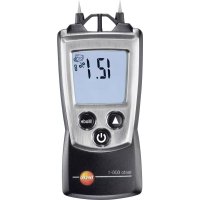
| Product type | Material moisture meter |
| Brand | Testo |
| Model | 606-1 |
| Dimensions (with cover) | 119 x 46 x 25 mm |
| Weight (with batteries and cover) | 90 g |
| Power supply | 2 AAA 1.5 V batteries |
| Battery life | 200 h (without backlight) |
| Measuring range (wood) | 7.0 to 54.8 % by mass depending on type |
| Measuring range (building materials) | 0.0 to 22.1 % by mass depending on material |
| Resolution | 0.1 % |
| Accuracy | ±1 % (conductivity) |
| Measurement frequency | 0.5 s |
| Operating temperature | -10 to 50 °C |
| Storage temperature | -40 to 70 °C |
| Protection class | IP20 |
| Display | LCD display with backlight |
| Functions | Auto off, Hold, material curve selection, function test |
| Measurable materials | Wood (beech, oak, pine, etc.) and building materials (cement, plaster, brick, etc.) |
| Maintenance | Clean the housing with a damp cloth (soapy water). No solvents. |
| Battery replacement | Slide the cover, replace with 2 AAA batteries observing polarity |
| Warranty | 2 years |
| Certifications | Directive 2014/30/EU |
Frequently Asked Questions - 6061 Testo
User questions about 6061 Testo
0 question about this device. Answer the ones you know or ask your own.
Ask a new question about this device
Download the instructions for your Measuring equipment in PDF format for free! Find your manual 6061 - Testo and take your electronic device back in hand. On this page are published all the documents necessary for the use of your device. 6061 by Testo.
USER MANUAL 6061 Testo
text_image
Labeled diagram of a medical or health monitoring device showing internal components and a digital display with measurement scale.text_image
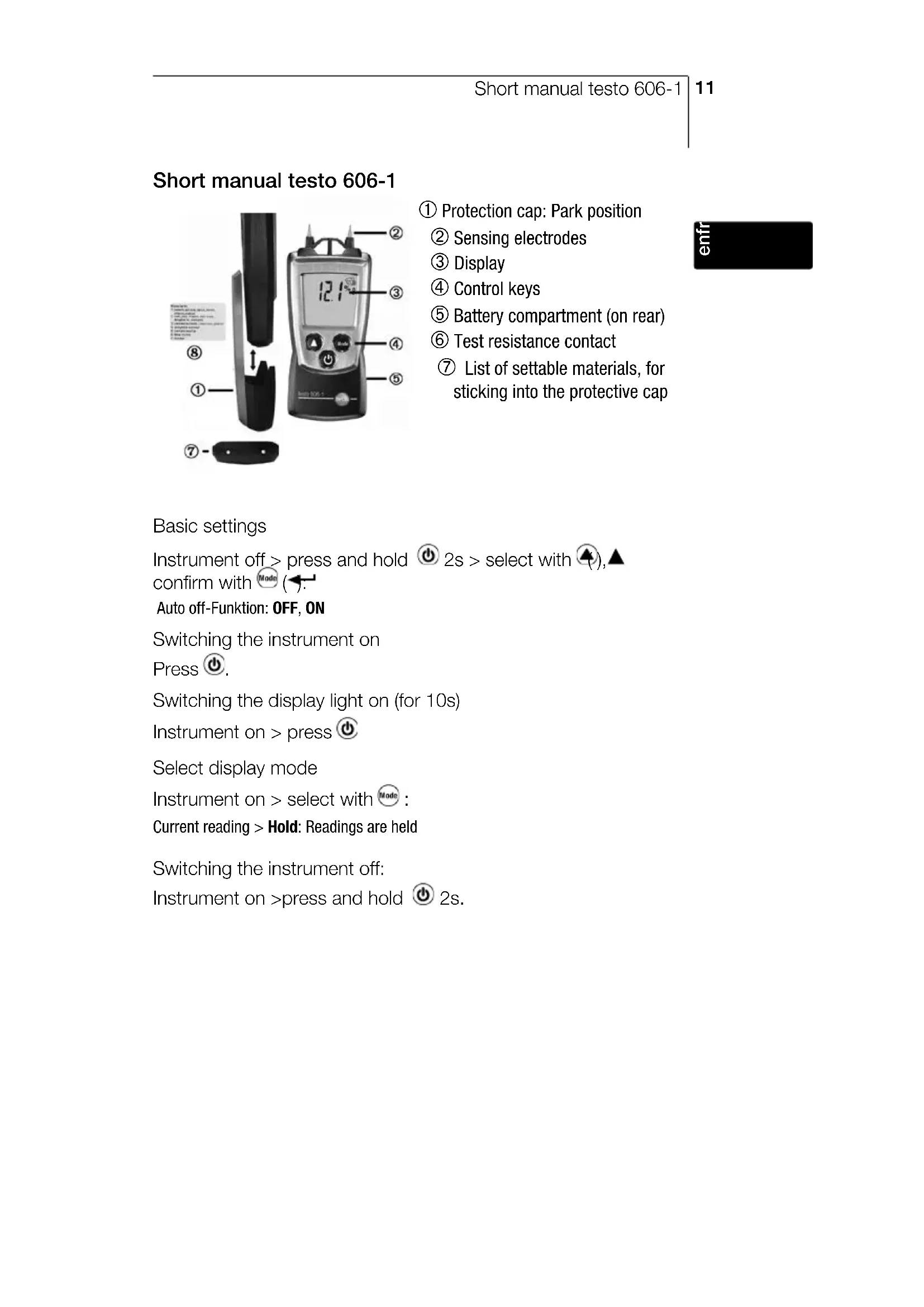
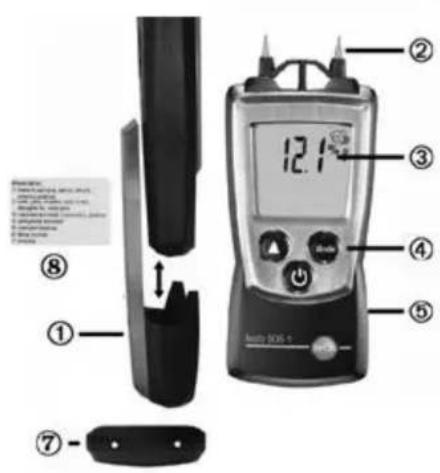
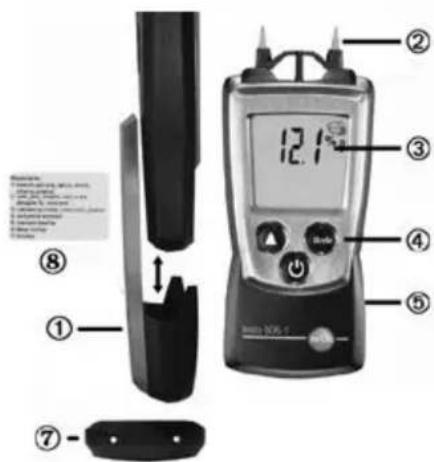
① ② ③ ④ ⑤ ⑦ ⑧ 12.1°C Bosch 1005-1① Protection cap: Park position
② Sensing electrodes
③ Display
④ Control keys
⑤ Battery compartment (on rear)
⑥ Test resistance contact
⑦ List of settable materials, for sticking into the protective cap
enin
Basic settings
Instrument off > press and hold ⏻ 2s > select with ⬆, ▲ confirm with ⏻ Mode (←).
Switching the instrument on
Press ⏻.
Switching the display light on (for 10s)
Instrument on > press ⏻
Select display mode
Instrument on > select with Mode :
Current reading > Hold: Readings are held
Switching the instrument off:
Instrument on >press and hold ⏻ 2s.
Safety and the environment
About this document
Please read this documentation through carefully and familiarise yourself with the product before putting it to use. Keep this document to hand so that you can refer to it when necessary. Hand this documentation on to any subsequent users of the product.
Pay particular attention to information emphasised by the following symbols:

With the signal word Caution!:
Warns against hazards which could result in minor physical injury or damage to equipment if the precautionary measures indicated are not taken.

Important.
Avoid personal injury/damage to equipment
Only operate the measuring instrument properly, for its intended purpose and within the parameters specified in the technical data. Do not use force.
Never store the product together with solvents, acids or other aggressive substances.
Only carry out the maintenance and repair work that is described in the documentation. Follow the prescribed steps when doing so. Use only OEM spare parts from Testo.
Protecting the environment
Take faulty rechargeable batteries as well as spent batteries to the collection points provided for them.
Send the product back to Testo at the end of its useful life. We will ensure that it is disposed of in an environmentally friendly manner.
Specifications
Functions and use
The testo 606-1 is a material moisture measuring instrument. It is normally used to determine the material moisture content in wood or building materials. The measurement procedure used is suitable for overview measurement to determine whether the material is continuing to dry out. The material moisture is given in % by weight.
Technical data
Measurement data
- Sensors:
Electrical resistance (conductivity measurement)
Parameters:
% by weight material moisture (wood, building materials),
• Measuring ranges: See chapter Using the Product - Resolutions: 0.1%
- Accuracies (Nominal temperature 25 °C, ±1 Digit): Conductivity measurement ±1 %,
- Measuring rate: 0.5 s, humidity: 1s
Further instrument data
- Protection class: IP20
- Ambient conditions: -10...50 °C, 14...122 °F
- Storage/transport conditions: -40...70 °C, -40...158 °F
• Voltage supply: 2x 1.5 V type AAA - Battery life: 130 h (without display light)
- Dimensions: 119x46x25mm / 4.69x1.81x0.98" (inc. protection cap)
- Weight: 90 g / 3.2 oz (inc. batteries and protection cap)
Examinations and licenses
- As declared in the Certificate of Conformity, this product complies with Directive 2014/30/EU.
Warranty
• Duration: 2 years, warranty conditions: see www.testo.com/warranty
Product description
At a glance
text_image
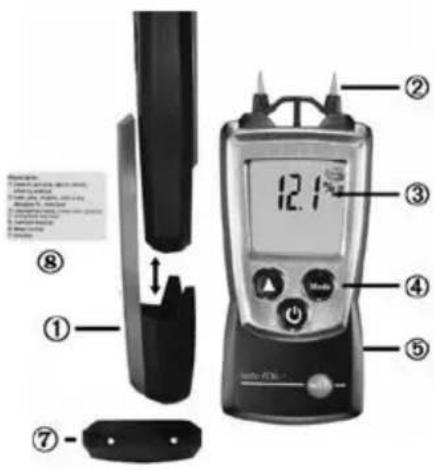
① ② ③ ④ ⑤ ⑦ ⑧ 12.1① Protection cap: Park position
② Sensing electrodes

Caution! Risk of injury from sensing electrodes!
Attach protection cap when not in use.
③ Display
④ Control keys
⑤ Battery compartment (on rear)
⑥ Test resistance contact
⑦ List of settable materials, for sticking into the protective cap
First steps
▶ Inserting batteries:
1 To open the battery compartment, push the battery cover down.
2 Insert batteries (2x 1.5 V type AAA). Observe the polarity!
3 To close the battery compartment, push the battery cover back on.
▶ Basic settings (configuration mode):
Adjustable functions
- Auto off function: OFF, ON (instrument switches off automatically if no key is pressed for 10 minutes)
1 When switching the instrument on, press and hold until ▲ and ← appear on the display (configuration mode).
- The adjustable function is displayed. The current setting flashes.
2 Press ⬆ (▲several times until the desired setting flashes.
3 Press Mode (◀) to confirm the input. - The instrument changes to measuring mode.
Using the product
To guarantee correct readings:
- Repeat the measurement at several points. The differing resistance of the wood, with or across the grain, may have an impact on the measurement result. If the injection needles are inserted with the grain, this may result in slightly higher readings because the resistance in the material is lower.
- A measurement is only implemented as far as the depth that the injection needles are inserted within the material. Insert the measuring needles as far as possible (4 to 5 mm).
- When measuring fuel moisture content, it is advisable to split the log prior to measurement and to measure at three points. Measuring points: each 5 cm away from the left and right cut edge and once in the centre of the log.
The values displayed are highly dependent on the building material/manufacturer used, and on the ambient conditions. As the materials are natural, the same materials can vary from batch to batch.
▶ Switching the instrument on:
Press ⏻.
- Measuring mode is opened.
▶ Switching the display light on:
√ The instrument is switched on.
Press ⏻.
- The display light goes out automatically if no key is pressed for 10 seconds.
➢ Setting the material characteristic curve:
The material moisture is indicated in the top line of the display. The material symbol 📋 (wood) or ⚙ (building material) is displayed with the relevant material number (see enclosed sticker for the inside of the protective cap).
Settable materials Measuring range
- beech, spruce, larch, birch, cherry, walnut 8.8...54.8 % by weight
- oak, pine, maple, ash-tree, douglas fir, meranti 7.0...47.9 % by weight
- cement screed, concrete 0.9...22.1 % by weight
- anhydrite screed 0.0...11.0 % by weight
- cement mortar 0.7...8.6 % by weight
- lime mortar, plaster 0.6...9.9 % by weight
- bricks 0.1...16.5 % by weight
Press ⬆ several times until the desired material characteristic curve appears.
▶ Testing the instrument function:
1 Press ⬆ several times until Test: lights up.
2 Connect sensing electrodes with the contacts of the test resistor on the top of the protection cap.
- Test flashes.
- Test: ok lights up: instrument is functioning.
Test: ok does not light up: test not possible, see chapter, Tips and assistance'.
3 Press ▲ back to measurement menu.
▶ Changing the display view:
Adjustable views
- Current reading
- Hold: Readings are held.
Press 📂 until the desired view appears.
▶ Switching the instrument off:
Press ⏻ and hold until the display goes out.
Maintaining the product
Changing batteries:
1 To open the battery compartment, push the battery cover down.
2 Remove used batteries and insert new batteries (2x 1.5 V type AAA). Observe the polarity!
3 To close the battery compartment, push the battery cover back on.
▶ Cleaning the housing:
Clean the housing with a moist cloth (soap suds) if it is dirty. Do not use aggressive cleaning agents or solvents!
Tips and assistance
Questions and answers
| Question Possible causes/solutions | |
| Hi or Lo | · Readings outside the measuring range (too high, too · low): Readings outside the measuring range (too high, too low): for materials that have not been specially dried or moistened, the measurement results should always be within the measuring range. |
| Residual capacity <10 min: Change batteries. | |
| Testing the instrument function: Test: ok does not light up · Clean sensing electrodes and contacts on the top of the protection cap. · If the error message appears again, send the instrument to Testo Customer Service. | |
| Meas. electrodes defective/ worn · Send instrument to Testo customer service. | |
The material's measured moisture content is relative to the dry weight (0% moisture) of the relevant material. The stored material characteristic curves were determined using the Darr (wet and dry weighing) method. The specified measuring ranges are derived from this.
Conversion to percent by weight
Percent by weight = (wet weight-dry weight) * 100 / dry weight
Example
Wet weight: 180 g
Dry weight: 150 g
Percent by weight: (180 - 150) * 100 / 150 = 20%
Conversion to water content
Water content % = (wet weight - dry weight) * 100 / wet weight
Example
Wet weight: 180 g
Dry weight: 150 g
Water content %: (180 - 150) * 100 / 180 = 16.6%
What constitutes dry, or at risk, or damp?
The values indicated serve as guideline figures for assessing the materials. The values are typical inner area values
| Characteristic curve Material Dry At risk Damp / | very damp | |||
| Characteristic curve 1 or 2 inside heated | Beech, fir, larch... | < 12 12...15 | >15 | |
| Characteristic curve 1 or 2 inside unheated | Oak, pine, maple wood... | < 15 15 | ...20 >20 | |
| Characteristic curve 3 Cement screed < 3 3... | 5 >5 | |||
| Characteristic curve 3 Concrete < 2.2 2.2...4 | 4 >4.4 | |||
| Characteristic curve 4 Anhydrite screed < 0.5 | 0.5...1 > | |||
| Characteristic curve 5 Cement mortar < 3 | 3...5 | >5 | ||
| Characteristic curve 6 Lime mortar | < 2 | 2...4 | >4 | |
| Characteristic curve 6 Gypsum | < 2 | 2...4 | >4 | |
| Characteristic curve 7 Brick | < 1 | 1...3 | >3 | |
Guideline values for the installation moisture of wood, which sets in as an average after a certain period in use-status (DIN 1052-1 (4/88) Para. 4.2.1.):
| Char. curve | Application area | Wood humidity in % by weight |
| 1 or 2 | buildings closed on all sides with heating | 9 ± 3 |
| 1 or 2 | buildings closed on all sides without heating | 12 ± 3 |
| 1 or 2 | roofed open buildings | 15 ± 3 |
| 1 or 2 | constructions which are open to the weather on all sides | 18 ± 6 |
If we could not answer your question, please contact your dealer or Testo Customer Service. For contact details, please visit www.testo.com/service-contact.
Instructions succinctes testo 606-1
text_image
12.1 ② ③ ④ ⑤ ⑦ ⑧ ① Analog 506-1www.testo.com/service-contact.
Instrucciones breves del testo 606-1
text_image
Labeled diagram of a medical or scientific instrument with numbered parts and a digital display showing 12.1 μm.text_image
Labeled diagram of a digital measuring device with numbered parts and internal componentsFunzione Auto Off: OFF, ON
text_image
① ⑦ ⑧ ② 12.1 ③ ④ ⑤text_image
① ② ③ ④ ⑤ ⑦ ⑧ 12.1s Water 500-1do instrumento: Test: ok
não está aceso
text_image
① ② ③ ④ ⑤ ⑥ ⑦ ⑧ 12:1°text_image
Diagram of a medical or health monitoring device with labeled parts including a digital display, cable clip, and control panel.① Защитный чехол
text_image
Diagram of a medical or scientific device with labeled parts including a digital display and a separate device with numbered annotations.①Beschermkap