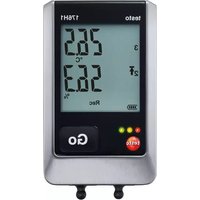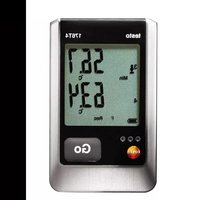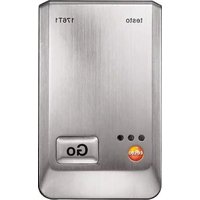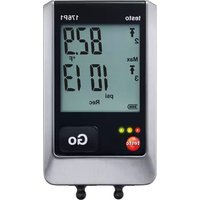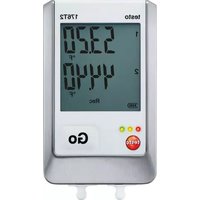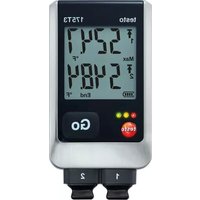
175T3 - Measuring equipment Testo - Free user manual and instructions
Find the device manual for free 175T3 Testo in PDF.



| Product Type | Temperature Data Logger |
| Brand | Testo |
| Model | 175T3 |
| Measured Variables | Temperature (°C / °F) |
| Sensor Type | 2 external thermocouples (type K or T) |
| Measurement Range (type K) | -50 to +1000 °C |
| Measurement Range (type T) | -40 to +400 °C |
| Accuracy | ±0.5 °C (-50 to +70 °C) ± 1 Digit ; ±0.7% of reading (+70.1 to +1000 °C) ± 1 Digit |
| Resolution | 0.1 °C |
| Operating Temperature | -20 to +55 °C |
| Storage Temperature | -20 to +55 °C |
| Power Supply | 3 AAA batteries (alkaline or Energizer L92) |
| Battery Life | Up to 3 years (measurement interval 15 min at +25 °C) |
| Protection Class | IP 65 |
| Dimensions (L x W x H) | 89 x 53 x 27 mm |
| Weight | 130 g |
| Housing Material | ABS/PC |
| Measurement Interval | 10 s to 24 h (free selectable) |
| Interface | Mini USB, SD card slot |
| Memory Capacity | 1 million values |
| Warranty | 24 months |
| Display | LCD screen |
| Main Functions | Temperature recording, threshold alarms, time stamp, reading via USB or SD card |
| Safety | Proper use, do not measure on live parts, respect protection class |
| Maintenance and Cleaning | Clean with a damp cloth, no solvents, replace batteries, reset after change |
| Accessories | Wall holder, USB cable, SD card, batteries, ComSoft software |
| Repairability | Spare parts available, Testo after-sales service |
Frequently Asked Questions - 175T3 Testo
User questions about 175T3 Testo
0 question about this device. Answer the ones you know or ask your own.
Ask a new question about this device
Download the instructions for your Measuring equipment in PDF format for free! Find your manual 175T3 - Testo and take your electronic device back in hand. On this page are published all the documents necessary for the use of your device. 175T3 by Testo.
USER MANUAL 175T3 Testo
www.testo.com/download-center.
i
2 Safety and the environment 32
2.1. About this document 32
2.2. Ensure safety 33
2.3. Protecting the environment 33
3 Specifications 34
3.1. Use 34
4 Technical data 35
5 First steps 40
5.1. Unlock the data logger 40
5.2. Inserting batteries 40
5.3. Connecting the data logger to PC 41
6 Display and control elements 42
6.1. Display 42
6.2. LED 45
6.3. Key functions 46
7 Using the product 47
7.1. Connecting a sensor 47
7.2. Programming data logger 47
7.3. Menu overview 48
7.4. Mounting the wall bracket 51
7.5. Securing the data logger 51
7.6. Reading out measurement data 52
8 Maintaining the product 53
8.1. Changing batteries 53
8.2. Cleaning the instrument 54
9 Tips and assistance 55
9.1. Questions and answers 55
9.2. Accessories and spare parts 56
2 Safety and the environment
2.1. About this document
Use
Please read this documentation through carefully and familiarize yourself with the product before putting it to use. Pay particular attention to the safety instructions and warning advice in order to prevent injuries and damage to the products.
Keep this document to hand so that you can refer to it when necessary.
Hand this documentation on to any subsequent users of the product.
Symbols and writing standards
| Representation | Explanation |
| Warning advice, risk level according to the signal word:Warning! Serious physical injury may occur.Caution! Slight physical injury or damage to the equipment may occur.> Implement the specified precautionary measures. | |
| i | Note: Basic or further information. |
| 1. ...2. ... | Action: more steps, the sequence must be followed. |
| > ... Action: a step or an optional step. | |
| - ... Result of an action. | |
| Menu Elements | of the instrument, the instrument display or the program interface. |
| [OK] Control keys | s of the instrument or buttons of the program interface. |
| ... | ... Functions | paths within a menu. |
| “...” | Example entries |
2.2. Ensure safety
Only operate the product properly, for its intended purpose and within the parameters specified in the technical data. Do not use any force.
Never use the instrument to measure on or near live parts.
Before each measurement check that the connections are correctly closed with blanking plugs or that appropriate sensors have been correctly plugged in. The protection class in the technical data specified for the corresponding instrument may otherwise not be reached.
testo 175 T3: The sensor inputs on the testo 175 T3 are not galvanically isolated amongst each other. Take this into account when using surface sensors with non-isolated thermocouple.
After the final measurement, allow probes and probe shafts to cool down sufficiently in order to avoid burns from the hot sensor tip or the probe shaft.
Temperatures given on probes/sensors relate only to the measuring range of the sensors. Do not expose handles and feed lines to any temperatures in excess of 70 °C unless they are expressly permitted for higher temperatures.
Carry out only the maintenance and repair work on this instrument that is described in the documentation. Follow the prescribed steps exactly. Use only original spare parts from Testo.
2.3. Protecting the environment
Dispose of faulty rechargeable batteries/spent batteries in accordance with the valid legal specifications.
At the end of its useful life, send the product to the separate collection for electric and electronic devices (observe local regulations) or return the product to Testo for disposal.
3 Specifications
3.1. Use
Data loggers testo 175 are used to store and to read out individual readings and measurement series.
With testo 175 measurement values are measured, saved and transmitted to the PC via USB cable or SD card, where they can be read out and analysed with the software testo ComSoft. With the software the data loggers can also be individually programmed.
Typical applications
testo 175 T1 and testo 175 T2 are optimally suitable for temperature measurements in refrigerators, freezers, cold-storage rooms and cooling shelves.
testo 175 T3 records two temperatures at the same time and is most suitable e.g. for monitoring the temperature spreading between feed and return flow in a heating system.
testo 175 H1 controls the climatic conditions e.g. in warehouses, offices and in the production area.
4 Technical data
| Feature Values | |
| Measurement parameter | Temperature (°C/°F) |
| Sensor type NTC temperature sensor internal | |
| Measurement range -35 to +55 °C | |
| System accuracy ±0.5 °C (-35 to +55 °C) ± 1 digit | |
| Resolution | 0.1 °C |
| Operating temperature | -35 to +55 °C |
| Storage temperature -35 to +55 °C | |
| Battery type | 3x battery type AAA or Energizer L92 AAA-size cells |
| Life | 3 years (15 min. measuring cycle, +25 °C) |
| Degree of protection IP 65 | |
| Dimensions in mm (LxWxH) | 89 x 53 x 27 mm |
| Weight | 130g |
| Housing | ABS/PC |
| Measuring cycle 10s -24h (freely selectable) | |
| Interface Mini-USB, SD card slot | |
| Memory capacity 1 million readings | |
| Warranty 24 years, warranty conditions: see website www.testo.com/warranty | |
| EC Directive 2004/108/EC, complies with the EN standard 12830 ^4 | |
testo 175 T2 (0572 1752)
| Feature Values | |
| Measurement parameter | Temperature (°C/°F) |
| Sensor type | NTC temperature sensor internal and external |
| Measurement range | -35 to +55 °C internal-40 to +120 °C external |
| System accuracy | ±0.5 °C (-35 to +55 °C) ± 1 digit |
| Instrument accuracy | ±0.3 °C (-40 to +120 °C) ± 1 digit |
| Resolution | 0.1 °C |
| Operating temperature | -35 to +55 °C |
| Storage temperature | -35 to +55 °C |
| Battery type | 3x battery type AAA or Energizer L92 AAA-size cells |
| Life | 3 years (15 min. measuring cycle, +25 °C) |
| Degree of protection | IP 65 |
| Dimensions in mm (LxWxH) | 89 x 53 x 27 mm |
| Weight | 130g |
| Housing | ABS/PC |
| Measuring cycle 10s | -24h (freely selectable) |
| Interface Mini-USB, SD card slot | |
| Memory capacity 1 million readings | |
| Warranty 24 years, warranty conditions: see website www.testo.com/warranty | |
| EC Directive 2004/108/EC, complies with the EN standard 12830 ^5 | |
testo 175 T3 (0572 1753)
| Feature Values | |
| Measurement parameter | Temperature (°C/°F) |
| Sensor type 2 the | rmocouples (type K or T) external |
| Measurement range | -40 to +400 °C (type T)-50 to +1000 °C (type K) |
| Instrument accuracy | ±0.5 °C (-50 to +70 °C) ± 1 digit± 0.7% of the measurement value(+70.1 to +1000 °C) ± 1 digit |
| Resolution | 0.1 °C |
| Operating temperature | -20 to +55 °C |
| Storage temperature | -20 to +55 °C |
| Battery type | 3x battery type AAA or Energizer L92 AAA-size cells |
| Life | 3 years (15 min. measuring cycle,+25 °C) |
| Degree of protection | IP 65 |
| Dimensions in mm (LxWxH) | 89 x 53 x 27 mm |
| Weight | 130g |
| Housing | ABS/PC |
| Measuring cycle 10s - 24h (freely selectable) | |
| Interface Mini-USB, SD card slot | |
| Memory capacity 1 million readings | |
| Warranty 24 years, warranty conditions: see website www.testo.com/warranty | |
| EC Directive 2004/108/EC | |
testo 175 H1 (0572 1754)
| Feature Values | |
| Measurement parameter | Temperature (°C/°F), moisture (%rF /%RH/ °Ctd/ g/m3) |
| Sensor type | NTC temperature sensor, capacitive humidity sensor |
| Number of measuring channels | 2x internal (stubs) |
| Measuring ranges -20 to +55 °C-40 to +50 °Ctd0 to 100 %rF (non-dewing atmosphere) | |
| System accuracy ±2%rF (2 to 98%rF)+0.03 %rF/K ± 1 digit±0.4 °C (-20 to +55 °C) ± 1 digit | |
| Resolution 0.1 %rF, 0.1 °C | |
| Operating temperature -20 to +55 °C | |
| Storage temperature -20 to +55 °C | |
| Battery type | 3x battery type AAA or Energizer L92 AAA-size cells |
| Life | 3 years (15 min. measuring cycle, +25 °C) |
| Degree of protection IP | 54 |
| Dimensions in mm (LxWxH) | 149 x 53 x 27 mm |
| Weight | 130g |
| Housing | ABS/PC |
| Measuring cycle 10s - 24h (freely selectable) | |
| Interface Mini-USB, SD card slot | |
| Memory capacity 1 million readings | |
| Warranty | 24 years, see website www.testo.com/warranty |
EC Directive 2004/108/EC
war
Battery life
The programming windows of the software provide you with typical guide values for the expected lifetime of the battery. This lifetime is calculated on the basis of the following factors:
- Measuring cycle
• Number of connected sensors
Since the battery life depends on quite a few other factors, the calculated data can only serve as guide values.
The following factors have a negative effect on the battery life:
- longer flashing of the LEDs
- frequent reading out (several times per day) via the SD-card
• extreme fluctuations in operating temperature
The following factors have a positive effect on the battery life:
• display switched off
The battery capacity reading in the display of the data logger is based on the calculated values. However, the data logger is switched off when a critical voltage level has been reached. It may therefore happen that:
- readings are still recorded, even though the battery capacity reading says "empty".
- the measurement program is stopped, even though the battery capacity reading just before indicated a still remaining battery capacity.
In case of an empty battery or a battery change saved readings will not be lost.
5 First steps
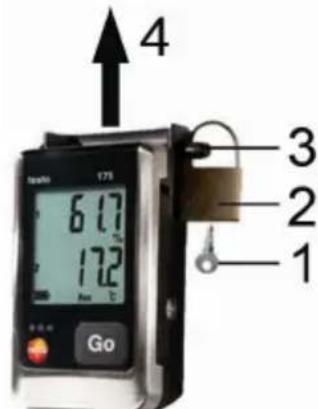
5.1. Unlock the data logger
text_image
4 175 61.7 172 Go 3 2 1- Open the lock with the key (1).
- Remove the lock (2) from the locking pin.
- Pull the locking pin (3) out of the holes in the wall bracket.
- Slide the data logger out of the wall bracket (4).
5.2. Inserting batteries

In order to reach the battery life under application temperatures below -10 °C you should use Energizer L92 AAA-size cells.
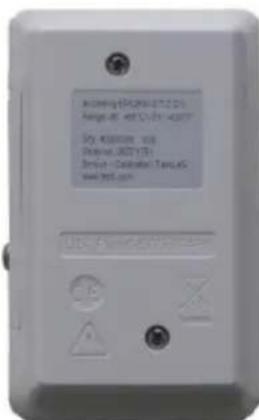
- Place the data logger on its front.
text_image
accessing 012800001320 Range at 400V/240V Sdy.00000.00 Serial: 007175 Service-Controller: Tencus www.toc.org- Loosen the screws on the back of the data logger.
-
Remove the battery compartment cover.
-
Insert the batteries (type AAA). Observe the polarity!
- Place the battery compartment cover on the battery compartment.
- Tighten the screws.
- The display shows rST.
5.3. Connecting the data logger to PC
For testo ComSoft 5 Basic:
The software is available in the Internet as a free download requiring registration: www.testo.com/download-center.
i
The instructions for the installation and operation of the software can be found in the testo ComSoft 5 Basic instruction manual, which can be downloaded together with the software.
i
The software can be ordered on CD (article-no: 0572 0580), if the download from the Internet is not desired.
For testo ComSoft Professional und testo ComSoft CFR:
Insert the CD into the CD-ROM drive.
- Install the software testo ComSoft.
- Connect the USB cable to a free USB port on the PC.
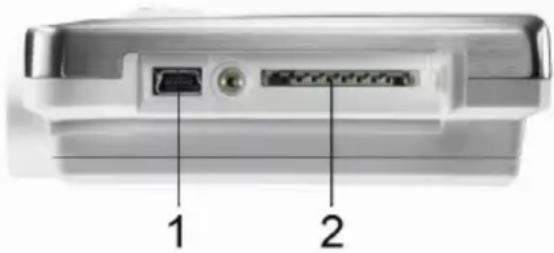
- Loosen the screw on the right side of the data logger.
- Open the cover.
text_image
1 2- Plug the USB cable into the Mini USB port (1).
- Configure the data logger, see separate operating instructions testo ComSoft.
6 Display and control elements
6.1. Display
i The display function can be switched on/off via the software testo ComSoft.
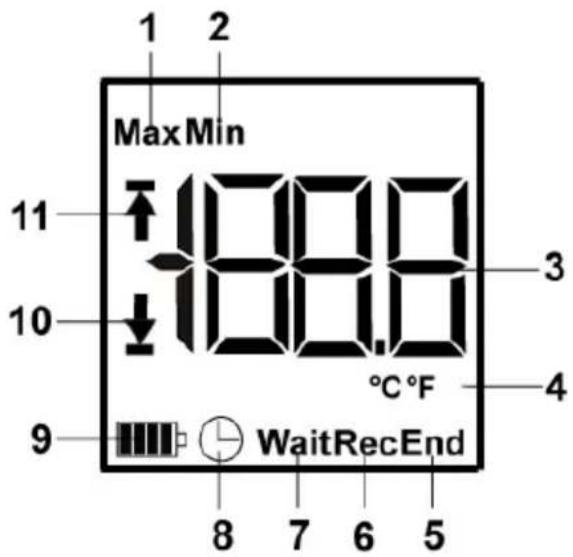
Depending on the operating status, various information may be shown in the display. A detailed representation of the information that can be called up can be found under Menu overview, page 48.
For technical reasons the display speed of liquid crystal displays becomes slower at temperatures below 0 °C (approx. 2 seconds at -10 °C, approx. 6 seconds at -20 °C). This has no influence on the measuring accuracy.
testo 175 T1
text_image
1 2 MaxMin 11 10 9 WaitRecEnd 8 7 6 5 3 °C °F 41 Highest saved reading
2 Lowest saved reading
3 Reading
4 Units
5 Measurement program over
6 Measurement program running
7 Wait for start of measurement program
8 Start criterion Date/ Time programmed
9 Battery capacity
| Icon Capacity | |
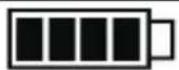 | >151 days |
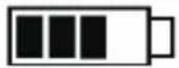 | <150 days |
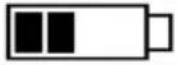 | <90 days |
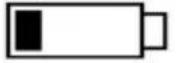 | <60 days |
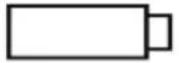 | <30 days> Read out data and change battery(see Reading out measurement data,page 52). |
10 Lower alarm value
• Flashes: programmed alarm value is shown
- Lights: programmed alarm values were fallen short of
11 Upper alarm value
• Flashes: programmed alarm value is shown
- Lights: programmed alarm values were exceeded
1 Reading channel 1
2 Units channel 1
3 Reading channel 2
4 Units channel 2
5 Measurement program over
6 Measurement program running
7 Wait for start of measurement program
8 Start criterion Date/ Time programmed
9 Battery capacity
| Icon Capacity | |
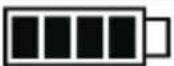 | >151 days |
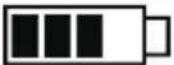 | <150 days |
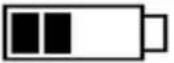 | <90 days |
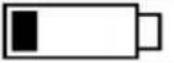 | <60 days |
 | <30 days> Read out data and change battery (see Reading out measurement data, page 52. |
10 Lower limit value channel 2:
• Flashes: programmed alarm value is shown
- Lights: programmed alarm values were fallen short of
11 Upper limit value channel 2:
• Flashes: programmed alarm value is shown
• Lights: programmed alarm values were exceeded
12 Lowest saved reading
13 Highest saved reading
14 Lower limit value channel 1:
• Flashes: programmed alarm value is shown
- Lights: programmed alarm values were fallen short of
15 Upper limit value channel 1:
• Flashes: programmed alarm value is shown
- Lights: programmed alarm values were exceeded
6.2. LED
| Representation Explanation | |
| Red LED flashes once every 10 seconds | Remaining battery capacity has dropped below 30 days |
| Red LED flashes twice every 10 seconds | Remaining battery capacity has dropped below 10 days |
| Red LED flashes three times every 10 seconds | Battery is empty: |
| Red LED flashes three times when pressing the button | Limiting value was exceeded/fallen short of |
| Yellow LED flashes three times | Instrument changes from Wait-mode to Rec-mode. |
| Yellow LED flashes three times when pressing the button | Instrument is in Rec-mode |
| Green and yellow LED flash three times when pressing the button. | Instrument is in End-mode |
| Green LED flashes three times when pressing the button | Instrument is in Wait-mode |
| Green LED flashes five times when pressing the button | Long pressing of the GO button has set a time mark. |
| Green, yellow and red LED flash in succession | The battery has been changed. |
6.3. Key functions
A detailed representation of the display readings can be found under Menu overview, page 48.
√ Instrument in operating status Wait and start criterion Button start programmed.
Press [GO] for approx. 3 seconds to start the measurement program.
- The measurement program starts and Rec appears in the display.
√ Instrument is in operating status Wait:
Press [GO] in order to change between displays of upper alarm value, lower alarm value, battery life and last reading.
The displays appear in the specified sequence.
√ Instrument is in operating status Rec or End:
Press [GO] in order to change between displays of highest saved reading, lowest saved reading, upper alarm value, lower alarm value, battery life and last reading.
The displays appear in the specified sequence.
Time mark
The time mark function enables you to read out the memory contents starting from a defined time without reprogramming the logger. The readings starting with the start of recording are saved parallel to this.
√ Instrument is in operating status REC:
Hold [GO] depressed for about 3 seconds to set a time mark.

Only one time mark can be set. When [GO] is pressed again, the existing time mark is deleted and a new one is set.
- The green LED flashes five times.
- The display only shows the readings starting from the set time mark.
7 Using the product
7.1. Connecting a sensor
Observe the following points when connecting sensors to data logger and measuring points.
Ensure correct polarity of the plugs.
Press the plugs firmly into the ports to ensure leak tightness. However, do not apply force!
Make sure that the plugs are firmly connected to the data logger or that the connections are closed with blanking plugs.
Ensure correct positioning of the sensor to avoid disturbing influences affecting the measurement.
testo 175 T3: Always make sure that you connect the sensor configured (via the software testo ComSoft) to the individual sockets. The numbers of the connections are printed on the housing.
7.2. Programming data logger
In order to adapt the programming of your data logger to your individual requirements, you require the testo ComSoft 5 Basic software. It is available in the Internet as a free download requiring registration www.testo.com, International, Service&Support | Download Center.
i
The instructions for the installation and operation of the software can be found in the testo ComSoft 5 Basic instruction manual that is downloaded together with the software.
7.3. Menu overview
i
The menu overview shows exemplary display representations of the data logger testo 175-T2.
The display must be switched on to be able to show the corresponding indications. This is accomplished with the software testo ComSoft.
The indication in the display is updated according to the programmed measurement rate. Only readings from active channels are displayed.
The channels are also activated via the software testo ComSoft.
The symbols for upper or lower alarm value light up in operating states Rec and End, if the programmed alarm value has been exceeded or fallen short off.
After 10 seconds without operating a key the display will return to its initial state.
Wait mode: Start criterion is programmed, but not yet fulfilled.
① Last
reading ^6
Start criterion key Start criterion start / PC start Date/Time
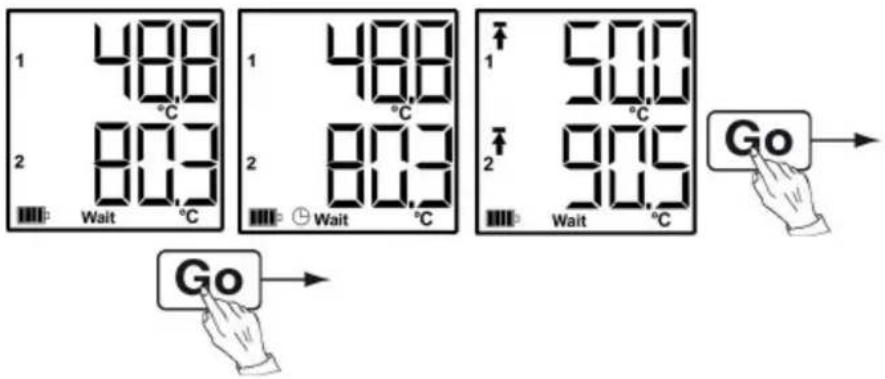
② Upper alarm value
text_image
1 488 2 803 Wait °C 1 488 2 803 Wait °C 1 500 2 900 Wait °C Go Go③ Lower alarm value
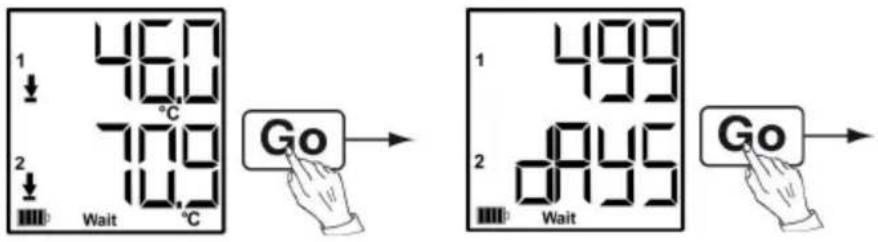
text_image
1 ↓ 46.0 °C 2 ↓ 77.0 °C Wait Go 1 499 °C 2 Wait Go Go④ Battery capacity in days
Last reading ^6 (see Fig. ① Wait mode)
Rec mode: Start criterion was fulfilled, data logger saves readings
End mode: Measurement program finished (stop criterion reached – memory full or number of readings) depending on programming
① Last reading
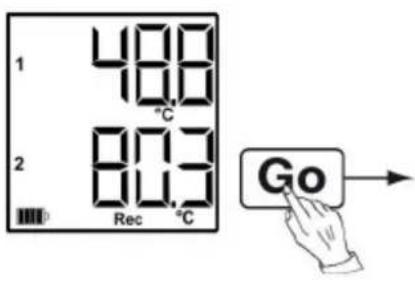
text_image
1 400 400 °C 2 80.3 Rec °C Go② Highest reading
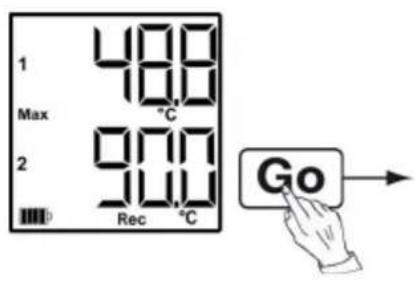
text_image
1 Max 2 400 °C 900 Rec °C Go③ Lowest reading
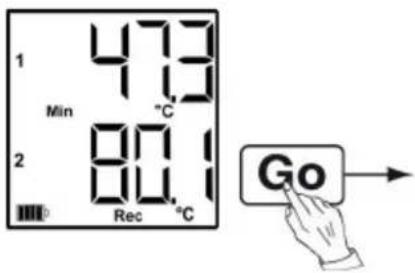
text_image
1 47.3 Min °C 2 80.1 Rec °C Go④ Upper alarm value
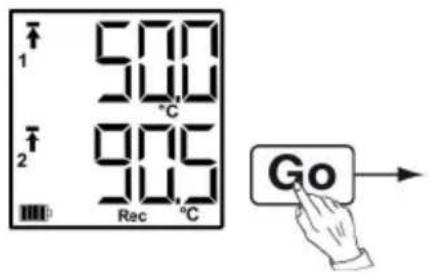
text_image
↑ 1 900 ↑ 2 905 Rec °C Go →⑤ Lower alarm value
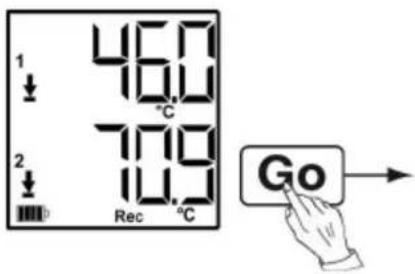
text_image
1 ↓ 46.0 °C 2 ↓ 70.0 °C Rec Go⑥ Battery capacity in days
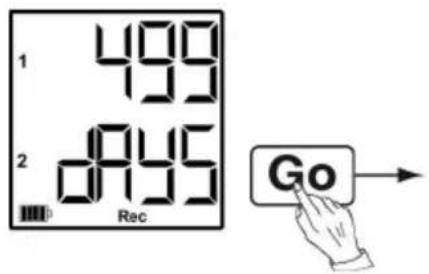
text_image
1 400 199 2 8995 0995 Rec GoLast reading (see Fig. ①)
7.4. Mounting the wall bracket

The scope of delivery does not include mounting materials (e.g. screws, wall plugs).
√ The data logger has been removed from the wall bracket.
1. Position the wall bracket at the desired place.
2. Use a pen or something similar to mark the location for the fastening screws.
3. Prepare the fastening location in accordance with the fastening material (e.g. drill hole, insert wall plugs).
4. Fasten the wall bracket with suitable screws.
7.5. Securing the data logger
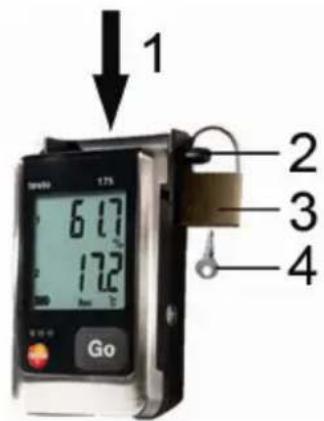
text_image
1 6.17 17.2 Go 2 3 4√ The wall bracket has been mounted.
- Slide the data logger into the wall bracket (1).
- Push the locking pin (2) through the holes in the wall bracket.
- Fasten the lock (3) on the locking pin.
- Pull off the key (4).
7.6. Reading out measurement data

The measurement data remain stored in the data logger after they have been read out and can therefore be read out several times. The measurement data will only be deleted when the data logger is reprogrammed.
Via USB cable
- Connect the USB cable to a free USB port on the PC.
- Loosen the screw on the right side of the data logger.

Use a coin for this purpose.
- Open the cover.
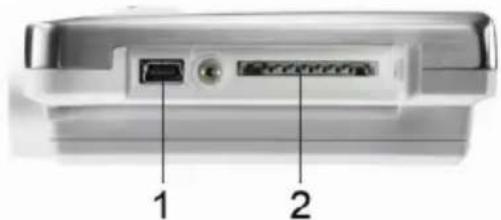
text_image
1 2-
Plug the USB cable into the Mini USB port (1).
-
Read out the data logger and process the read out data, see separate operating instructions testo ComSoft.
Via SD card
- Loosen the screw on the right side of the data logger.

Use a coin for this purpose.
- Open the cover.
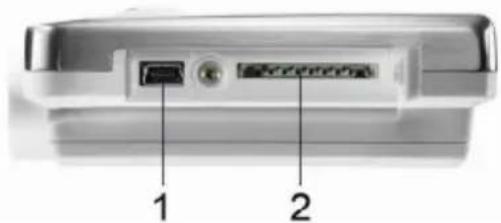
text_image
1 2- Push the SD card into the SD card slot (2).
- The display shows Sd (testo 175 T1) or Sd CArD (testo 175 T2, testo 175 T3, testo 175 H1).
-
Hold [Go] depressed for longer than 2 seconds.
-
The display shows CPY (testo 175 T1) or COPY (testo 175 T2, testo 175 T3, testo 175 H1).
- The yellow LED lights during the copying process.
- The green LED flashes twice and after the copying process the display shows OUT.
- Remove the SD card.
- Insert the SD card into the SD card slot on the PC.
- Process the read out data, see separate operating instructions testo ComSoft.
8 Maintaining the product
8.1. Changing batteries
i
The battery change stops the currently running measurement program. However, stored measurement data are preserved.
- Read out stored measurement data, see Reading out measurement data, page 52.
√ If it is no longer possible to read out the saved measurement data because the battery capacity is too low:
Change the batteries and read out the stored measurement data after.
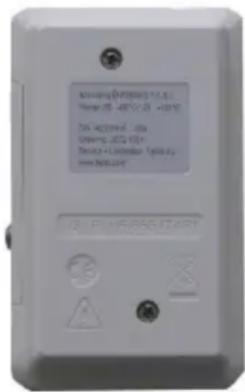
- Place the data logger on its front.
text_image
MOUNTING DENTRAPHY & SL Volume: 25, -40V/21.21 +2019 DATA: 1000mmol / 10A UNLESS: 1000mmol Distance: 100mm/100mm www.mncc.com-
Loosen the screws on the back of the data logger.
-
Remove the battery compartment cover.
-
Take the empty batteries out of the battery compartment.
- Insert three new batteries (type AAA). Observe the polarity!

Only use new branded batteries. If a partially exhausted battery is inserted, the calculation of the battery capacity will not be performed correctly.
In order to reach the battery life under application temperatures below -10 °C you should use Energizer L92 AAA-size cells.
- Place the battery compartment cover on the battery compartment.
- Tighten the screws.
- The display shows rST.

The data logger needs to be reconfigured. For this purpose the software testo ComSoft must be installed on the computer and a connection to the data logger must be set up.
- Connect the data logger to the PC with a USB cable.
- Start the software testo ComSoft and set up a connection to the data logger.
- Reconfigure the data logger or load the old, saved configuration, see separate operating instructions testo ComSoft.
- The data logger is once again ready for use.
8.2. Cleaning the instrument
CAUTION
Damage to the sensor!
Ensure that no liquid enters the inside of the housing.
If the housing of the instrument is dirty, clean it with a damp cloth.
Do not use any aggressive cleaning agents or solvents! Weak household cleaning agents or soap suds can be used.
9 Tips and assistance
9.1. Questions and answers
| Question Possible causes / solution | |
| FULL appears in the display, the red LED flashes twice,outappears in the display. | Insufficient memory capacity on SD card to save the data.> Remove the SD card, free up more memory space and copy data. |
| Err appears in the display, the red LED flashes twice,outappears in the display. | An error occurred while saving data to the SD card.> Remove the SD card, free up more memory space and copy data. |
| nO dAtA appears in the display, the red LED flashes twice. | The logger has not yet recorded any data and is in Wait mode.> Remove the SD card and wait until the logger is in Rec mode. |
| rST appears in the display. | The battery was changed. No data are recorded.> Reprogram the data logger via the software. |
| - - - -appears in the display. | Sensor of data logger defective.> Contact your dealer or the Testo Customer Service. |
If you have any questions please contact your local dealer or the Testo Customer Service. You find contact data in the Internet under www.testo.com/service-contact.
9.2. Accessories and spare parts
| Description Article no. | |
| Wall bracket (black) with lock 0554 1702 | |
| Mini USB cable to connect the data logger testo 175 to the PC | 0449 0047 |
| SD card to read out the data logger 175 | 0554 1700 |
| Batteries (alkaline-manganese AAA-size cells) for applications down to -10 °C | 0515 0009 |
| Batteries (Energizer L92 AAA-size cells) for applications down to -10 °C | 0515 0042 |
| CD testo ComSoft 5 Basic (if free-of-charge, registered download from website is not wanted) | 0572 0580 |
| CD testo ComSoft Professional 0554 1704 | |
| CD testo ComSoft CFR 0554 1705 | |
| ISO moisture calibration certificate, calibration points 11,3 %rF; 50,0 %rF; 75,3 %rF at +25°C/+77°F; per channel/instrument | 0520 0076 |
| ISO temperature calibration certificate, calibration points -18°C, 0°C, +40°C; per channel/instrument | 0520 0153 |
For further accessories and spare parts, please refer to the product catalogues and brochures or look up our website: www.testo.com
1 Sommaire
1 Sommaire 57
text_image
Health 175 6.17 17.2 Go 3 2 1 4Pour testo ComSoft 5 Basic:
text_image
Model No. 0011-01-02 Address: 0011-01-02 Type: 34-80000000 Date: 2011-01-02 Volume: 740000000 www.mu.edu.cnPara testo ComSoft 5 Basic:
www.testo.com/download-center.
i
text_image
1 ↓ 40.0 °C 2 ↓ 70.0 °C Rec Gotext_image
Diagram of a device rear panel with labeled ports and ports, showing two numbered labels pointing to the ports.text_image
Diagram of a device rear panel with labeled ports and ports, showing two numbered labels pointing to the interface.Per testo ComSoft 5 Basic:
www.testo.com/download-center.
i
natural_image
Close-up of a device rear panel with labeled ports (no text or symbols beyond labels)Voor testo ComSoft 5 Basic:
www.testo.com/download-center.