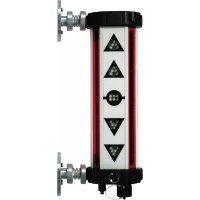
SensoPilot Pro - Laser level Laserliner - Free user manual and instructions
Find the device manual for free SensoPilot Pro Laserliner in PDF.



| Product type | Laser receiver level for construction machinery |
| Brand | Laserliner |
| Model | SensoPilot Pro |
| Laser reception range | 200 m |
| Fine accuracy | ± 2 mm – ± 5 mm |
| Coarse accuracy | ± 5 mm – ± 15 mm |
| Power supply | 7.2 V NiMh 2500 mA rechargeable battery / Mains charger or 12/24 V battery cable |
| Battery life | Approximately 40 h |
| Charging time | Approximately 15 h |
| Operating temperature | -20°C to 50°C |
| Dimensions (SensoPilot) | 390 x 170 x 85 mm |
| Weight (SensoPilot) | 3.4 kg |
| Weight (remote display) | 1.1 kg |
| Number of laser receiving units | 4 (25 cm each) |
| Detection angle | 360° |
| LED indicators | Green LED (height reached), red LEDs (high/low) |
| Mounting | Integrated powerful magnets (mounting on machinery) |
| Housing protection | Water and dust resistant |
| Remote display | Robust model with mounting base and waterproof housing |
| Accuracy settings | Fine and coarse via ON/OFF switch |
| Laser compatibility | High-speed automatic rotating lasers (no line lasers) |
| Maintenance and cleaning | Clean with a slightly damp cloth, no solvents or abrasive products |
| Safety instructions | Beware of strong magnetic fields (30 cm distance from implants/dangers) |
| Spare parts | Charger, connection cable, 12/24 V battery cable, remote display (part number 035.01) |
| Repairability | Only accessories approved by the manufacturer should be used |
| Order number (SensoPilot) | 035.00A |
| Standards | Compliant with EMC Directive 2014/30/EU and WEEE Directive |
Frequently Asked Questions - SensoPilot Pro Laserliner
User questions about SensoPilot Pro Laserliner
0 question about this device. Answer the ones you know or ask your own.
Ask a new question about this device
Download the instructions for your Laser level in PDF format for free! Find your manual SensoPilot Pro - Laserliner and take your electronic device back in hand. On this page are published all the documents necessary for the use of your device. SensoPilot Pro by Laserliner.
USER MANUAL SensoPilot Pro Laserliner
natural_image
Two industrial vertical gauges with triangular control buttons and circular components, no visible text or symbols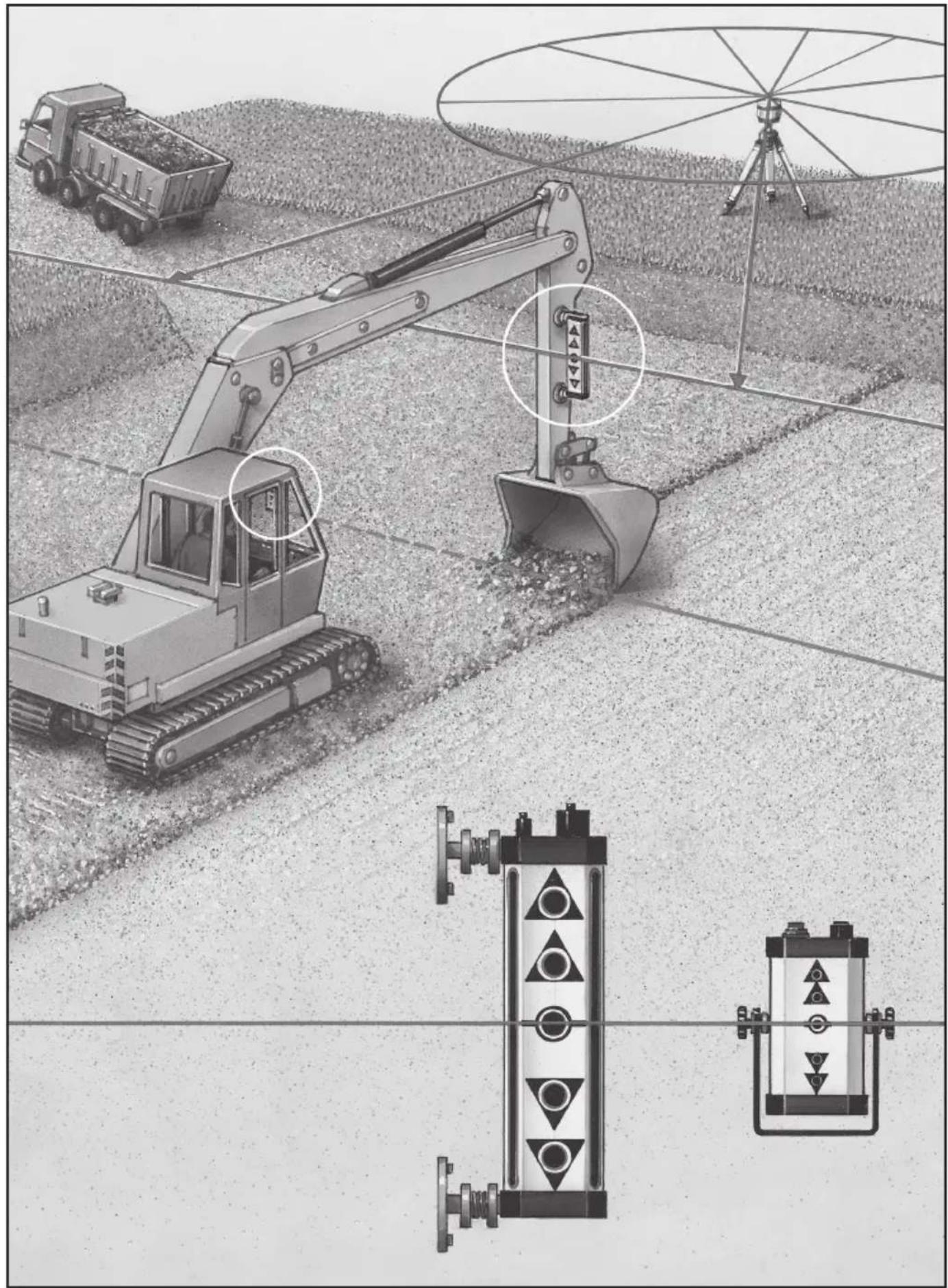
natural_image
Illustration of agricultural machinery and a radar system in operation, showing excavators, a truck, and a control panel (no text or symbols present)!
natural_image
Illustration of an excavator and a tripod in a construction or surveying context (no text or symbols)Completely read through the operating instructions, the „Warranty and Additional Information” booklet as well as the latest information under the internet link at the end of these instructions. Follow the instructions they contain. This document must be kept in a safe place and passed on together with the device.
SensoPilot Pro
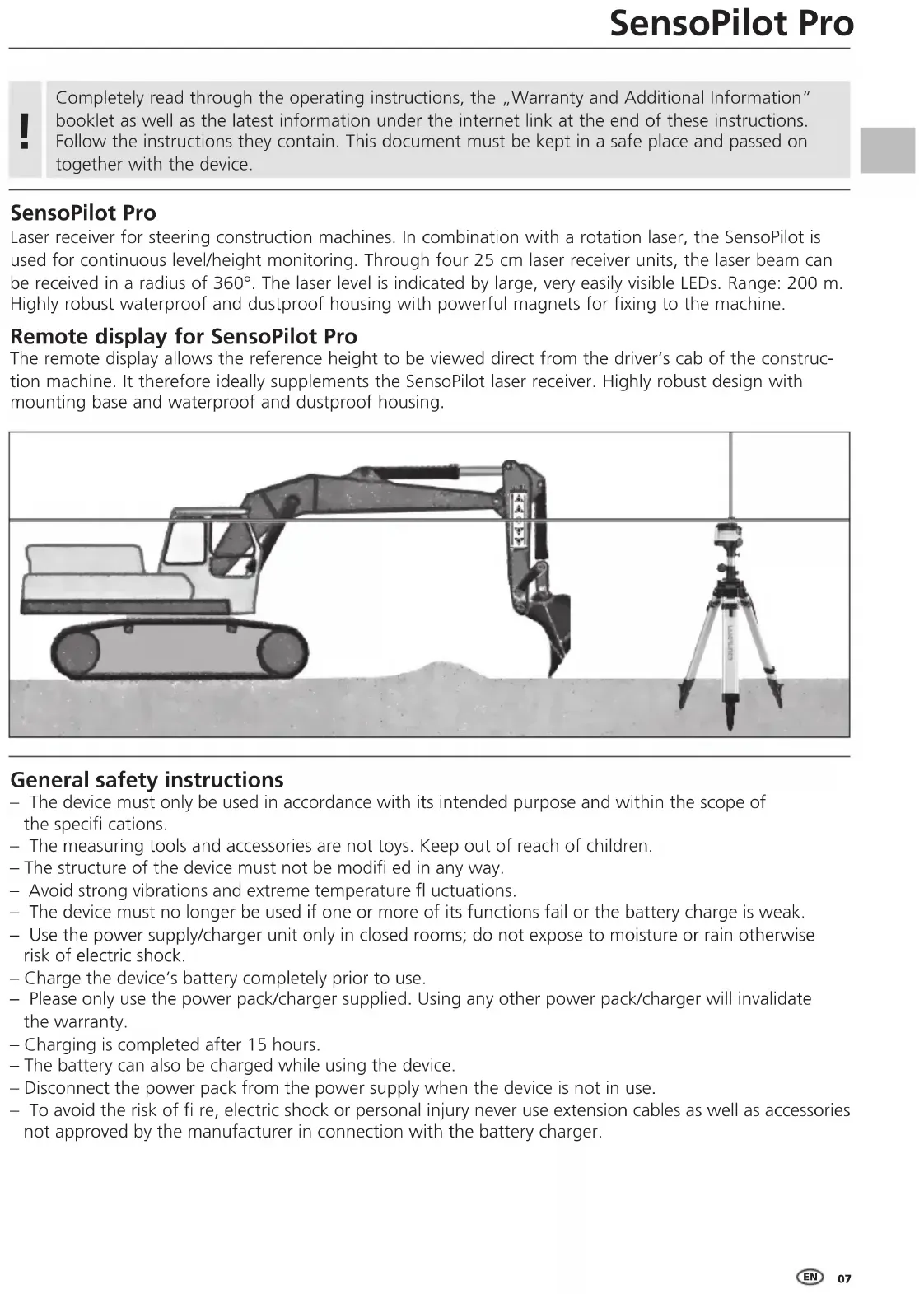
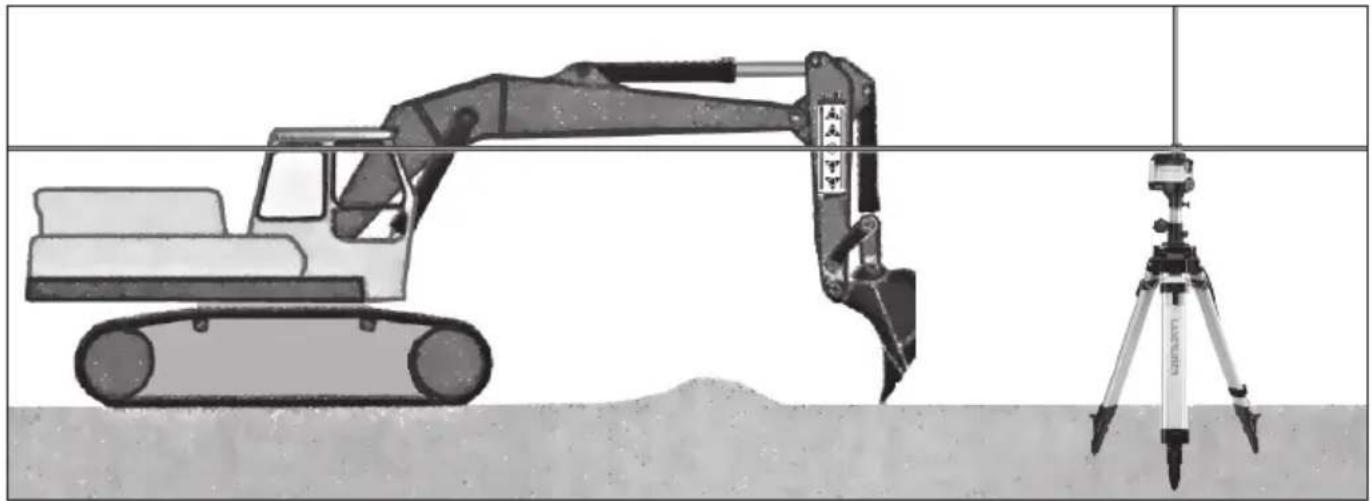
Laser receiver for steering construction machines. In combination with a rotation laser, the SensoPilot is used for continuous level/height monitoring. Through four 25 cm laser receiver units, the laser beam can be received in a radius of 360^ . The laser level is indicated by large, very easily visible LEDs. Range: 200 m. Highly robust waterproof and dustproof housing with powerful magnets for fixing to the machine.
Remote display for SensoPilot Pro
The remote display allows the reference height to be viewed direct from the driver's cab of the construction machine. It therefore ideally supplements the SensoPilot laser receiver. Highly robust design with mounting base and waterproof and dustproof housing.
natural_image
Illustration of an excavator and a tripod in a construction or excavation site (no text or symbols)General safety instructions
- The device must only be used in accordance with its intended purpose and within the scope of the specifications.
- The measuring tools and accessories are not toys. Keep out of reach of children.
- The structure of the device must not be modified in any way.
- Avoid strong vibrations and extreme temperature fl uctuations.
- The device must no longer be used if one or more of its functions fail or the battery charge is weak.
- Use the power supply/charger unit only in closed rooms; do not expose to moisture or rain otherwise risk of electric shock.
- Charge the device's battery completely prior to use.
- Please only use the power pack/charger supplied. Using any other power pack/charger will invalidate the warranty.
- Charging is completed after 15 hours.
- The battery can also be charged while using the device.
- Disconnect the power pack from the power supply when the device is not in use.
- To avoid the risk of fi re, electric shock or personal injury never use extension cables as well as accessories not approved by the manufacturer in connection with the battery charger.
Laserliner
Safety instructions
Dealing with electromagnetic radiation
- The measuring device complies with electromagnetic compatibility regulations and limit values in accordance with EMC-Directive 2014/30/EU.
- Local operating restrictions – for example, in hospitals, aircraft, petrol stations or in the vicinity of people with pacemakers – may apply. Electronic devices can potentially cause hazards or interference or be subject to hazards or interference.
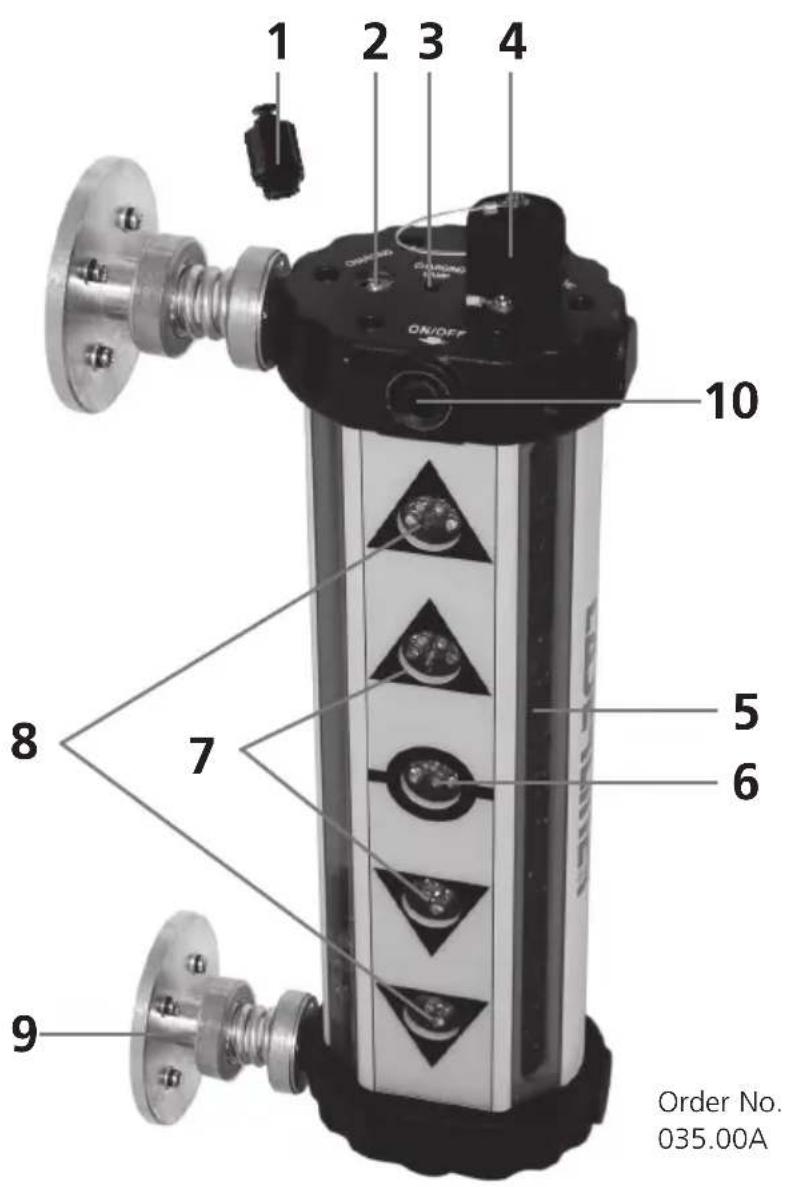
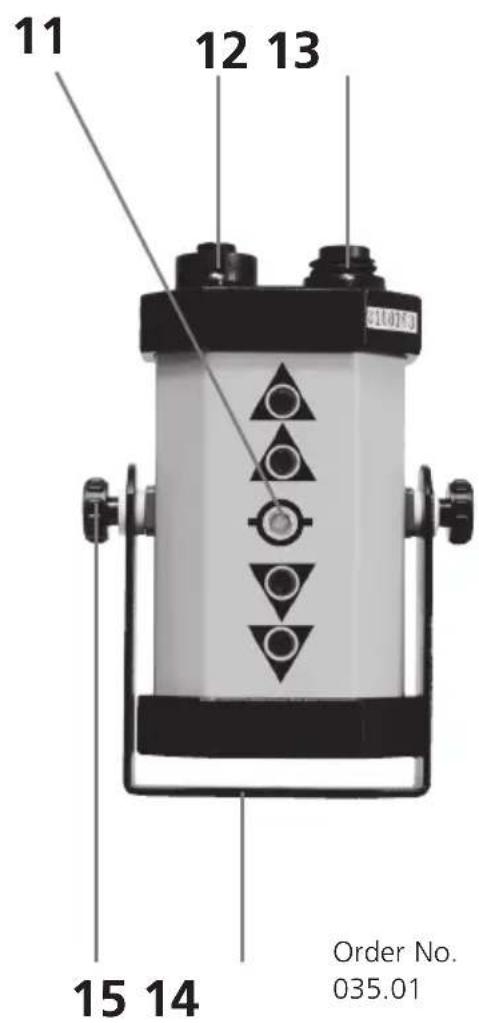
Remote display for SensoPilot Pro
1 Cover for charger socket
2 Charger socket
3 LED charge display
4 Socket for SensoPilot - remote display connection cable OR 12/24V battery cable
5 Laser beam receiver fields
6 LED laser height display (green)
7 LED laser height display (red)
8 LED laser height display (red)
9 Extrem powerful Magnets for fixing to building machine
10 ON / OFF switch Precision selection
11 LED laser height display
12 Socket for SensoPilot - remote display connection cable
13 Socket for 12/24V battery cable
14 Fixing bracket
15 Securing screw for fixing bracket
Danger - powerful magnetic fields
Powerful magnetic fields can adversely affect persons with active medical implants (e.g. pacemaker) as well as electromechanical devices (e.g. magnetic cards, mechanical clocks, precision mechanics, hard disks).
With regard to the effect of powerful magnetic fields on persons, the applicable national stipulations and regulations must be complied with such as BGV B11 §14 „electromagnetic fields“ (occupational health and safety - electromagnetic fields) in the Federal Republic of Germany.
To avoid interference/disruption, always keep the implant or device a safe distance of at least 30 cm away from the magnet.
Information on maintenance and care
Clean all components with a damp cloth and do not use cleaning agents, scouring agents and solvents. Remove the battery(ies) before storing for longer periods. Store the device in a clean and dry place.
Operation of SensoPilot Pro
Power supply
- Before using the SensoPilot, ensure the batteries are fully charged.
- If LEDs 6 / 7 / 8 blink from inside to outside, the batteries need recharging. To do so, remove the cover of the charger socket (1) and connect the charger. Recharging takes approx. 15 hours.
- Alternatively, the SensoPilot can be operated and be recharged at the same time from the battery of the construction machine via the 12/24V battery cable. To do this, plug the battery cable into the socket (4).
- When no laser beam is being received, the SensoPilot switches itself off automatically.
Fixing the SensoPilot Pro
The powerful magnets (9) allow the SensoPilot to be fixed directly on the construction machine. Take care that the contact surfaces are clean and level so as to ensure that the magnets have a firm and reliable hold.

The extremely powerful magnets pose a risk of crush injuries.
Putting the SensoPilot into operation
Press the ON / OFF switch once; all the LEDs will flash briefly. The SensoPilot is now ready for operation. The large oblong receiver fields (5) recognise the laser beam, and the LEDs (6, 7, 8) indicate when the reference height is reached.
• Upper LEDs blinking: Move the SensoPilot upwards.
- Middle LED (6): The SensoPilot is at reference height.
- Lower LEDs blinking: Move the SensoPilot downwards.
Precision select
Two levels of precision (HIGH and LOW) can be selected. Changeover between the precision levels is done using the On / OFF switch (10).
• HIGH: The inner LEDs (7) blink 3 times.
- LOW: The outer LEDs (8) blink 3 times.
Switching off the SensoPilot
Press the ON / OFF switch (10) for about 3 seconds.
Rotation laser
For generating a laser reference height, automatic rotation lasers with a high maximum rotation speed are best.

The SensoPilot Pro cannot be used together with line lasers.
Laserliner
Operation of remote display
Power supply
- In the case of battery operation, power is supplied from the SensoPilot.
- For operation from the battery of the construction machine, connect the remote display (13) using the 12/24V battery cable, ensuring that RED is connected to the positive battery pole (+) and BLACK to earth (engine block). The SensoPilot is then also supplied with power via the connection cable - see illustration below.
Use of the remote display
The remote display allows laser reception of the SensoPilot to be monitored when this cannot be seen from the cab of the construction machine. In this case, connect the remote display (12) to the SensoPilot (4) using the connection cable and install the remote display in the operator's cab.
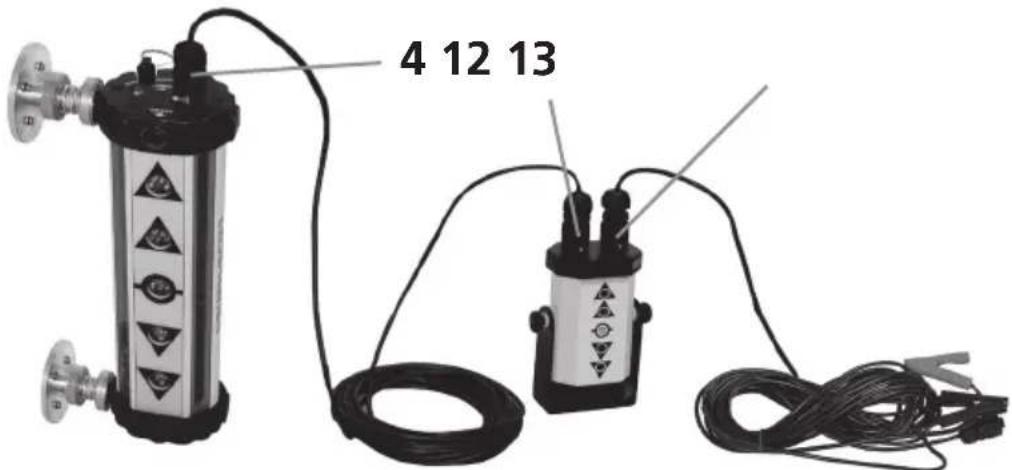
Connection cable from SensoPilot to remote display
12/24 V battery cable
| Technical data | Technical revisions reserved. 18W16 |
| Laser reception range 200 m | |
| Precision HIGH | ± 2 mm – ± 5 mm |
| Precision LOW | ± 5 mm – ± 15 mm |
| Battery / Charger | 7,2 V NiMh / 2500 mA |
| Battery operating time / Charging time | approx. 40 hours / approx. 15 hours |
| Working temperature | -20°C ... 50°C |
| Dimensions | 390 x 170 x 85 mm |
| Weight of SensoPilot / remote display | 3,4 kg / 1,1 kg |
EU directives and disposal
This device complies with all necessary standards for the free movement of goods within the EU.
This product is an electric device and must be collected separately for disposal according to the European Directive on waste electrical and electronic equipment.
Further safety and supplementary notices at: http://laserliner.com/info?an=sesopipr
!
natural_image
Illustration of an excavator and surveying equipment (no text or symbols)natural_image
Illustration of an excavator and a surveying instrument on a construction site (no text or symbols)natural_image
Illustration of an excavator and surveying equipment (no text or symbols)!
natural_image
Illustration of an excavator and a tripod in construction (no text or symbols)natural_image
Illustration of an excavator and surveying equipment (no text or symbols)natural_image
Illustration of an excavator and a tripod-mounted surveying instrument on a construction site (no text or symbols)natural_image
Illustration of an excavator and a tripod in a construction or surveying context (no text or symbols)natural_image
Illustration of an excavator and surveying instrument on a construction site (no text or symbols)SERVICE


Umarex GmbH & Co. KG
-Laserliner-
- SensoPilot Pro
- Remote display for SensoPilot Pro
- General safety instructions
- Laserliner
- Safety instructions
- Danger - powerful magnetic fields
- Information on maintenance and care
- Operation of SensoPilot Pro
- Power supply
- Fixing the SensoPilot Pro
- Putting the SensoPilot into operation
- Precision select
- Switching off the SensoPilot
- Rotation laser
- Operation of remote display
- Use of the remote display
- EU directives and disposal
Brand : Laserliner
Model : SensoPilot Pro
Category : Laser level