
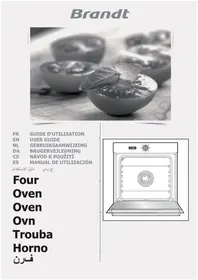
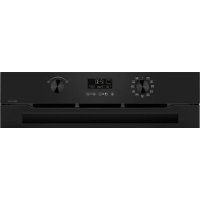
FV600XS1 - Electric oven BRANDT - Free user manual and instructions
Find the device manual for free FV600XS1 BRANDT in PDF.



| Product type | Built-in electric steam oven |
| Brand | BRANDT |
| Model | FV600XS1 |
| Usable volume | 23.5 liters |
| Dimensions (W x H x D) | 38.5 x 18.2 x 33.5 cm |
| Power supply | 220-240 V ~ 50 Hz |
| Total power | 1.77 kW |
| Energy consumption | 0.71 kWh (heating and maintaining at 100°C for 1 hour) |
| Cooking functions | Steam cooking at 100°C, defrost at 60°C, delayed cooking, timer |
| Water tank capacity | Approximately 1 liter (max level) |
| Accessories included | Casserole set (perforated dish, recovery dish, removable stainless steel support grid), removable tank |
| Bulb type | 15 W - 220-240 V, 300°C, socket E14 |
| Safety | Hot steam - keep children away, keyboard lock, automatic stop at end of cooking, thermal protection 10 A |
| Maintenance | Clean the cavity after each use, descale the steam generator with white vinegar every month, clean the water inlet hose |
| Time setting | Yes, with automatic validation after one minute |
| Energy saving | Reduced brightness after 1 minute of inactivity |
| Materials | Stainless steel (grid), glass (porthole) |
Frequently Asked Questions - FV600XS1 BRANDT
User questions about FV600XS1 BRANDT
0 question about this device. Answer the ones you know or ask your own.
Ask a new question about this device
Download the instructions for your Electric oven in PDF format for free! Find your manual FV600XS1 - BRANDT and take your electronic device back in hand. On this page are published all the documents necessary for the use of your device. FV600XS1 by BRANDT.
USER MANUAL FV600XS1 BRANDT
flowchart
graph TD
    A["1"] --> B["Weather Icon"]
    C["2"] --> D["Weather Icon"]
    E["3"] --> F["Weather Icon"]
    G["5"] --> H["Weather Icon"]
    I["4"] --> J["Weather Icon"]
    K["14"] --> L["Weather Icon"]
    M["9"] --> N["Weather Icon"]
    O["10"] --> P["Weather Icon"]
    Q["13"] --> R["Weather Icon"]
    S["12"] --> T["Weather Icon"]
    U["8"] --> V["Weather Icon"]
    W["15"] --> X["Weather Icon"]
    Y["11"] --> Z["Weather Icon"]
    AA["6"] --> AB["Weather Icon"]
    AC["7"] --> AD["Weather Icon"]
natural_image
Line drawing of a square tray with perforated interior and handles (no text or symbols)natural_image
Simple line drawing of a symmetrical, teardrop-shaped object with internal lines (no text or symbols)natural_image
Line drawing of a rectangular object with vertical slats, resembling a bamboo slip or roller (no text or symbols)natural_image
Technical line drawing of a mechanical component with no visible text or symbolsnatural_image
Technical line drawing of a kitchen appliance with two upward arrows indicating movement or force (no text or symbols)LES CAUSES POSSIBLES
Your oven, how it works p.24
Accessories p.25
How to install your oven
Electrical connection p.26
Fitting p.27
How to use your oven
Setting the time p.28-29
Cooking immediately p.30-31
Managing the water p.32
Delayed cooking p.33
The timer p.34
Cooking times p.35-36
How to maintain your oven p.37
Changing the light bulb? p.38
Troubleshooting ? p.38
Brandt
Dear Customer,
You have just acquired a BRANDT oven and we would like to thank you.
We have invested all our dedication and know-how in this appliance so that it would best meet your needs. With innovation and performance, we designed it to be always easy to use.
In the BRANDT product range, you will also find a wide choice microwaves, cooking hobs, ventilation hoods, cookers, dishwashers, washing machines, driers, fridges and freezers, that you can coordinate with your new BRANDT oven.
Visit our website www.brandt.com where you will find all of our products, as well as useful and complementary information.
BRANDT
As part of our commitment to constantly improving our products, we reserve the right to make changes to them based on technical advances to their technical and functional features and appearance.

Warning: Before installing and using your appliance, please carefully read Guide to Installation and Use, which will allow you to quickly familiarise your-with its operation.
www.brandt.com

Steam cooking
General remarks
Used in accordance with the instructions, steam cooking has many advantages over other methods. Healthy and natural, steam cooking preserves the true taste of your food. A fine sauce flavoured with aromatic herbs can make all the difference in the world.
Steam cooking is odourless. There is no need to flavour the cooking water with herbs or spices, though - fish, for example, can be flavoured by placing it on a bed of seaweed, or chicken on a bunch of rosemary or tarragon.
Meat, fish and vegetables can be cooked simultaneously.
Pasta, rice and purees can be reheated without drying out or sticking to the pan.
Cooking custards, flans, or milky rice dishes is facilitated by steam cookery. Covered in aluminium foil, the condensation will not reach the food.
There is no need to season prior to cooking, not even the cooking water.
Meat can browned by a quick searing in hot butter on each side.
In comparison to boiling, steam cookery wins hands down.
It is quick: cooking starts immediately, whereas the cooking time of food in boiling water is only counted from the return of the water to the boil.
It is healthy: the hydro soluble vitamins and minerals are conserved because they barely dissolve in the condensed water that surrounds the food.
In addition, no fat is used in cooking.
Steam respects the food's own flavour. It adds neither flavour, nor the grilled or fried taste.
It doesn't remove any flavour either, because there is no dilution in water.
The other side of the coin: it is not worth cooking a fish that isn't fresh, or vegetables that have been forgotten at the back of the refrigerator for a week: in this way - the results will be catastrophic!
Steam does not transfer tastes or odours, so you can save both time and money by cooking - side by side but not touching - a fish and a dessert, for example.
Steam is also highly suitable for blanching, defrosting and reheating, as well as keeping warm - especially sauces.
Meats such as poultry, veal, and pork should be lightly browned in very little oil prior to cooking, to render them appetisingly golden.
Then finish their cooking by steam.
Foods will cook more quickly and evenly if they are cut into pieces than if they are left whole.
Your oven, how it works
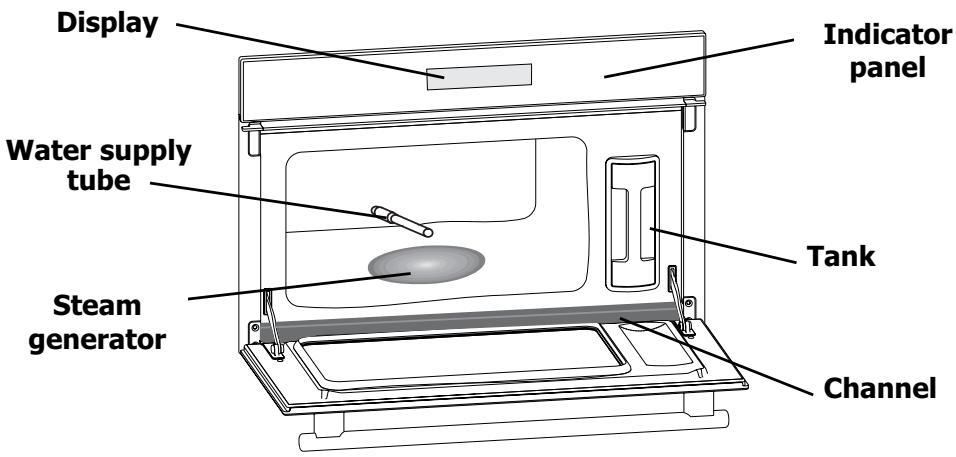
The indicator panel in detail
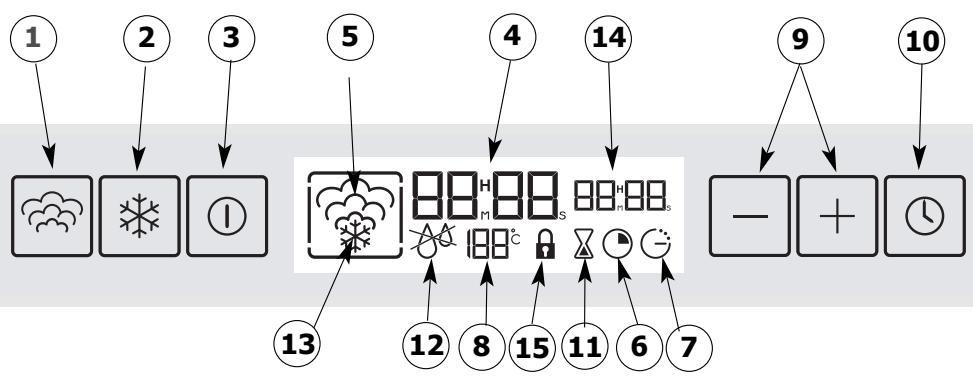
flowchart
graph TD
    A["1"] --> B["Weather Icon"]
    C["2"] --> D["Weather Icon"]
    E["3"] --> F["Weather Icon"]
    G["5"] --> H["Weather Icon"]
    I["4"] --> J["Digital Display Unit"]
    K["14"] --> L["Digital Display Unit"]
    M["9"] --> N["Weather Icon"]
    O["10"] --> P["Weather Icon"]
    Q["13"] --> R["Weather Icon"]
    S["12"] --> T["Weather Icon"]
    U["8"] --> V["Weather Icon"]
    W["15"] --> X["Weather Icon"]
    Y["11"] --> Z["Weather Icon"]
    AA["6"] --> AB["Weather Icon"]
    AC["7"] --> AD["Weather Icon"]
- Steam cooking control
- Defrosting button
- Start/Stop control
- Time and delay display or timed period
- Steam cooking symbol
- Cooking time symbol
-
End of cooking time symbol
-
Temperature display
- +/- controls for timer
- Selector button : SET
- Autonomous timer
- Water circuit problem signal
- Defrosting symbol
- Display of the cooking period or delayed start time
- Control panel locked
Accessories
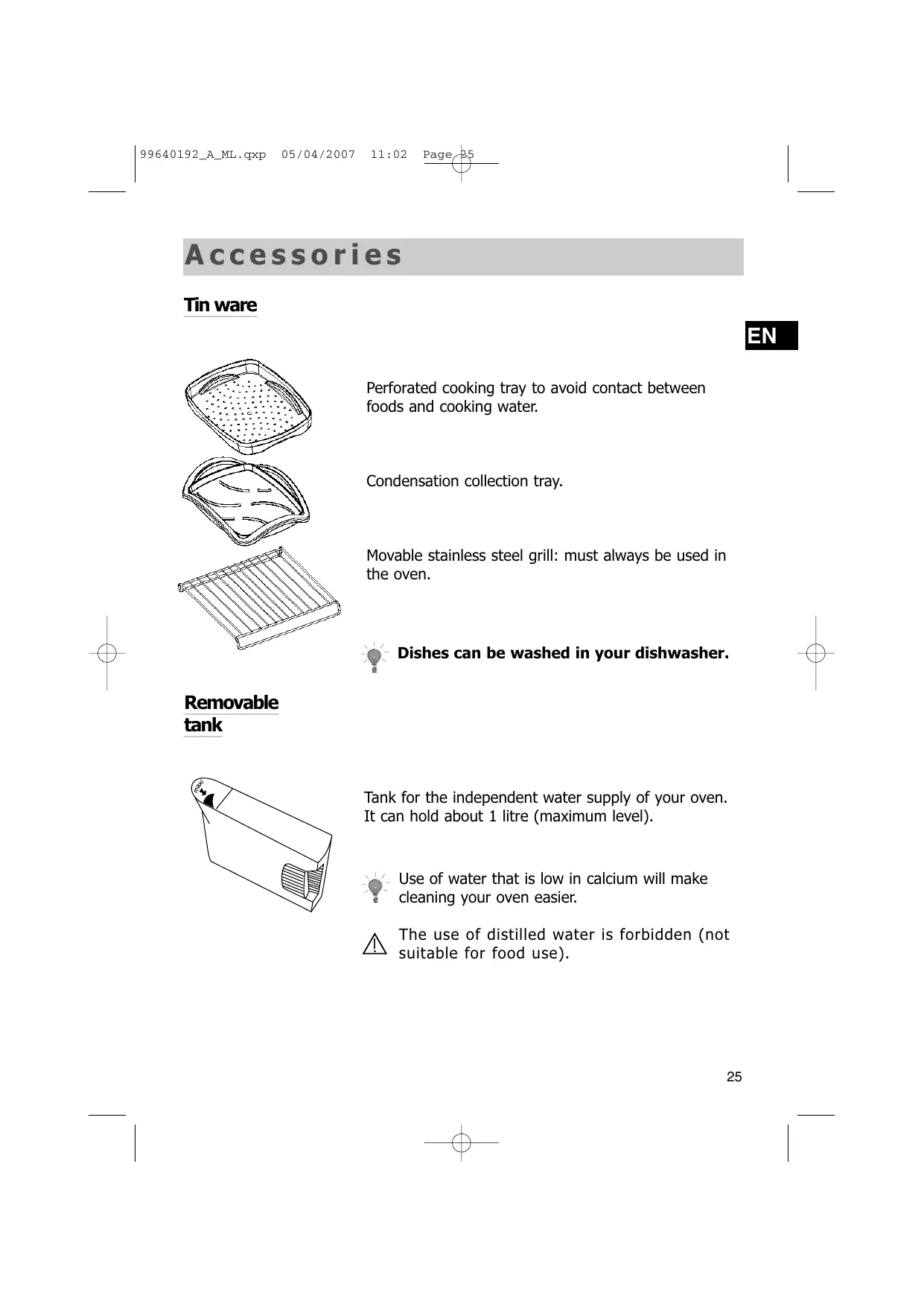
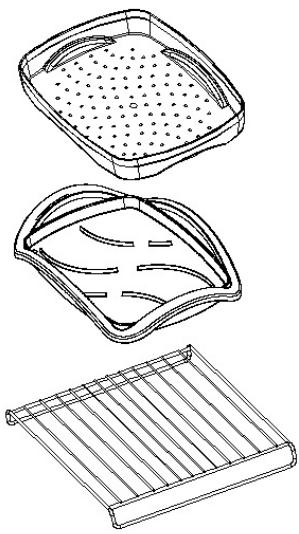
Tin ware
natural_image
Line drawings of three different plastic containers: a square tray with perforated lid, a curved handle with handles, and a rectangular grid base (no text or symbols)Perforated cooking tray to avoid contact between foods and cooking water.
Condensation collection tray.
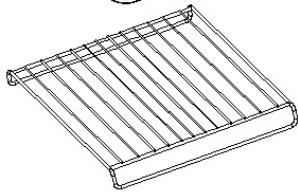
Movable stainless steel grill: must always be used in the oven.

Dishes can be washed in your dishwasher.
Removable tank
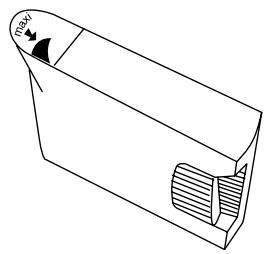
natural_image
Technical line drawing of a mechanical component with no visible text or symbolsTank for the independent water supply of your oven. It can hold about 1 litre (maximum level).

Use of water that is low in calcium will make cleaning your oven easier.

The use of distilled water is forbidden (not suitable for food use).
How to install your oven
Electrical connection
For a permanent connection, make sure a system of disconnection that complies with the installation regulations. The appliance must be placed in such a way as to leave the plug accessible if it is flush-fitted.
Use of an earthed power socket, connected in compliance with current safety standards. Your installation must be fitted with a 10 amp device for thermal protection.
Do not use the oven if the supply cord or its plug are damaged. In this case, they must be replaced by the manufacturer, its after-sales service or similarly qualified persons, to avoid any danger.
Operating voltage 220-240 V \~ 50 Hz Total power of oven 2,77 kW
Energy consumption
-Heating to 100°C and maintaining temperature for 1 hour ..... 0,71 kWh Inside dimensions of oven
- Place the appliance in the hole. The appliance must be horizontal. Check this position.
- For improved stability, attach the oven to the unit using 2 screws, via the holes provided for this purpose on the side posts.
- Carry out the electrical connection.
Make sure that the rating plate remains accessible after installation.

How to use your oven
Setting the time
The first time the oven is turned on: Set the time.
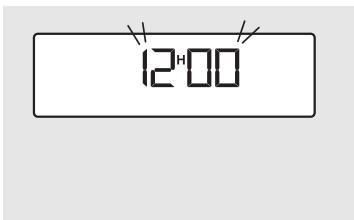
1 The display flashes on 12.00.
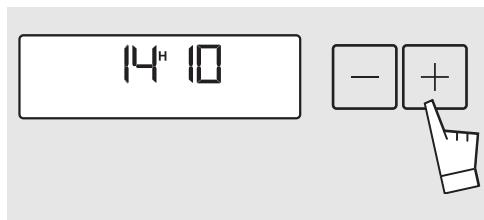
2 Use the + and - buttons to adjust the time.
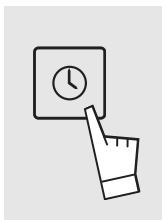
3 Validate with SET.
Changing the time
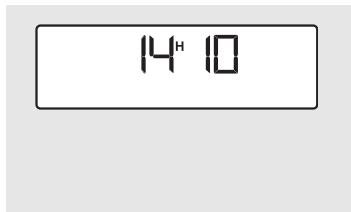
1 The time is displayed.
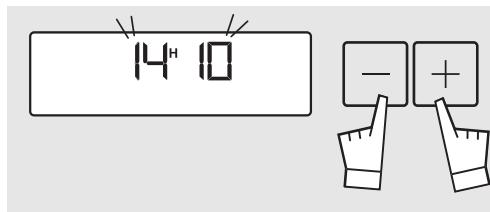
2 Press on the + and - buttons simultaneously until the time starts to flash. Adjust the time using the + and -button.
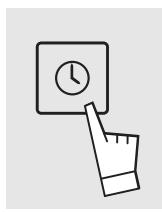
3 Validate with SET

If the time set is not validated by the SET button, it is automatically recorded after one minute.
Reducing energy consumption
After one minute of inactivity, display brightness is reduced, in order to reduce energy.
Locking the control panel
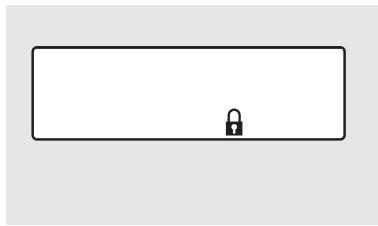
The control panel can be locked. This can only be activated when you are not using timed or delayed cooking features.
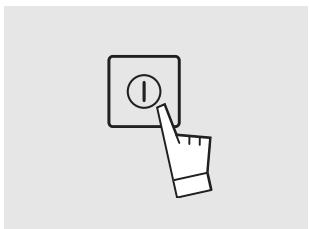
natural_image
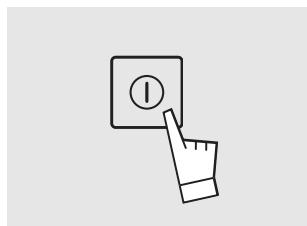
Hand cursor clicking a button labeled '1' on a screen (no text or symbols beyond the icon)1 Hold down the START/STOP button for a few seconds.
natural_image
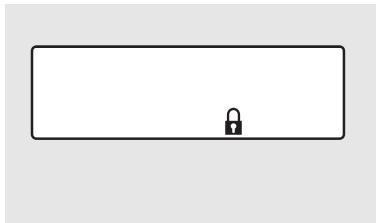
Simple line drawing of a rectangular frame with a small lock icon at the center (no text or symbols)2 A beep sounds and a "pad-lock" appears on the screen. From this moment, no button is live.
3 To unlock, hold down the START/STOP button for a few seconds. A beep sounds ans the padlock disappears.
EN
Cooking immediately
Operational principle
The water contained in the tank reaches the cavity via a tube. This water is transformed into steam on contact with a hot surface placed in the lower part of the cavity: the steam generator.
There is no need to add water to the cooking dish. To guarantee TRUE STEAM COOKING, your oven is supplied with a set of specially designed for cookware to perfection.

You MUST IMPERATIVELY fill the water tank up to the maximum level before starting cooking. Put the tank back in place, and push it as far as possible until it CLICKS INTO PLACE.

When cooking, the appliance gets hot. Hot steam may escape when you open the door of the appliance. Keep children out of the way.
Steam cooking
Steam cooking at 100°C.
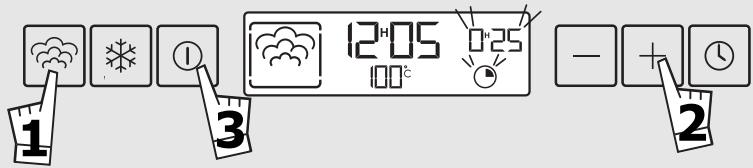

Press the button 🎨. A time of 25 minutes is suggested.
2 Adjust the cooking time as necessary (minimum 5 min and maximum 60 min by pressing on + and - button

Validate with the START button.

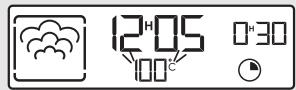


The symbol 🙏️ comes on. When the temperature is reached, 100^ becomes constant, and a beep sounds.

In order to avoid altering the results of the cooking, avoid opening the appliance door during cooking.
Defrosting
Defrosting at 60°C.
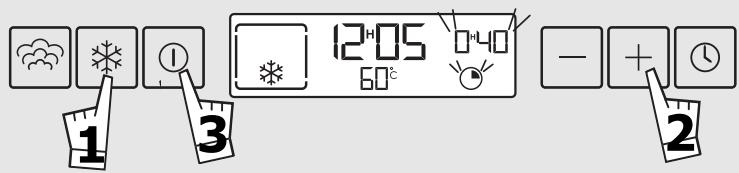
1 Press the button *. A time of 40 minutes is suggested.
2 Adjust the cooking time as necessary (minimum 5 min and maximum 60 min by pressing on + and - button.
3 Validate with the START button.

4 The symbol ✦ comes on. When the temperature is reached, 60^ becomes constant, and a beep sounds.
Modifying the cooking time
During cooking, you can modify the cooking time by using the + and - buttons.
Stopping the appliance during cooking
You can stop the cooking at all times by pressing on START/STOP (hold the button down for about 1 second).
If the steam production has not yet started (about 1 minute), the oven will stop immediately and the time setting will disappear.
If the steam production has already started, the time passes to 3 minutes and during this period, the steam evacuates before you open the oven.
At the end of cooking
0m00s displays. The display animation stops. Beeps are heard for a 3 minute period.
To stop the beeps, press on STOP and open the door.
⚠️ You MUST IMPERATIVELY empty the tank

In order to make sure the oven is reliable, the fan continues to operate for a certain period after the end of cooking.
Advice
Freeze small portions; defrosting will be faster, more homogenous and quality will be preserved. When semi-defrosted, you can turn over the food items or spread them out (for example vegetables patties). Protect pastries with a cling wrap or keep the original packaging. Wipe fish and sausages before grilling: humidity stops them from becoming golden brown. For large pieces (roasts, etc.) proceed in steps by turning the piece over several times and adjust the time accordingly.
| VEGETABLES | Patties (spinach, etc.) | placed on dish | 25 min |
| In blocks | placed on dish | 40/45 min | |
| FISH | Trout (whole) | placed on dish | 30 min |
| Salmon steak | placed on dish, turned over half way through | 25 min | |
| Filets (protected by a cling wrap) | placed on dish | 15/20 min depending on thickness | |
| Prawns | placed on dish | 10/12 min | |
| MEATS | Chicken thighs | placed on dish, turned over half way through | 40/45 min |
| Poultry breast (protected by a film) | 25 min | ||
| Sausages | placed on dish | 25 min | |
| Chops (pork, veal, etc.) | placed on dish, protected by a cling wrap, placed on the grill | 25/30 min | |
| Liver cubes (for skewers) | to be separated half way through | 55/60 min | |
| FRUIT | Mixed berries | placed on dish | 15 min |
| Stewed fruit (apple, etc.) | protected by a cling wrap | 35/40 min | |
| PASTRIES | Doughnuts | kept in packaging, placed on the grill | 15 min |
| Chocolate croissants | kept in packaging, placed on the grill | 15 min |
Reheating
You can reheat a cooked dish in your steam oven. The dish will not dry out, will not become overcooked and will not splatter or stick. Adjust steam sequence at 100^ C, place the dish or plate on the grill, protect with aluminium foil or cling wrap to avoid drops of water accumulating and heat for 20 to 25 minutes depending on the dish and your preferences.
Examples:
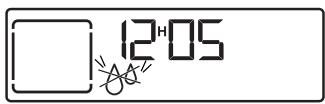
In case of problems related to the water circuit during cooking, the 'no water' symbol appears and a beep sounds. This fault is specifically related to:
- an empty tank,
- a wrongly-fitted tank.
After checking these two points, the cooking will recommence automatically after the door.
Delayed cooking
Steam cooking
Steam cooking at 100°C.
You can program the cooking time so that your dish is ready at a time of your choice.
EN
For example:
It is 10 o'clock, and you have to go out, your dish should be ready at 12 o'clock and it will take 20 minutes to cook.
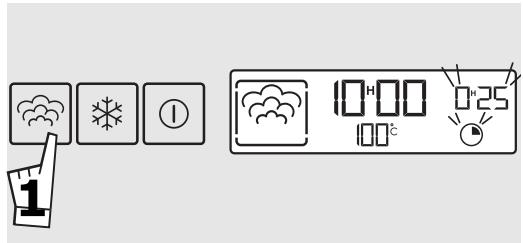
1 Press the button 🔗. A time of 25 minutes is suggested.
2 Adjust the cooking time as necessary (minimum 5 min and maximum 60min) by pressing on + and - button.
For example : 20 min.
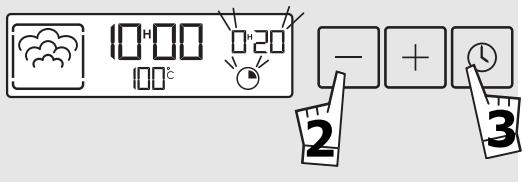
3 Validate with the SET button.
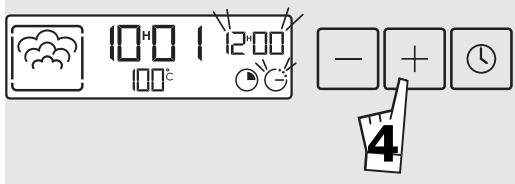
4 The time and the end of cooking time symbol display and flash. The adjustment of the end of cooking time is now possible: Press the + or - buttons For example : 12h00
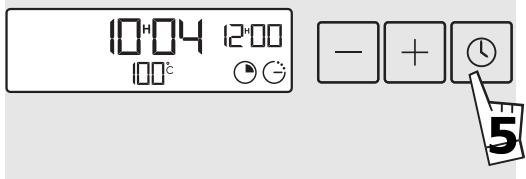
5 Validate with the SET button. The time and the end of cooking time become constant. The symbol for the length of cooking time displays.

If the programming is not validated by touching SET, the recording of the program is cancelled, the time display disappears and the time is displayed again.
Modification of cooking time and the end of cooking time
You can consult or modify the length of cooking time and the end of cooking time, at all times. To cancel the programming, press START/STOP.
How to use the timer
Timer
Your oven is fitted with an electronic timer that is independent of the operation of the oven, and allows time to be counted down.
This function is independent of your oven. It can not order the end of automatic cooking.
However, this function can be used even during operation of the oven. In this case, the display of the timer is given priority over the display of the time.
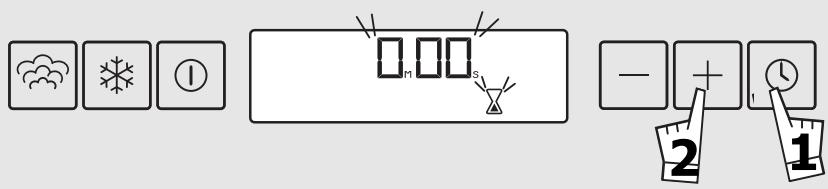
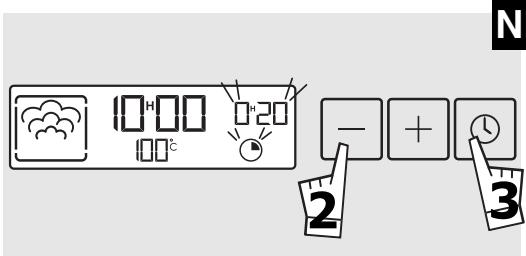
1 Hold the SET button down for a few seconds. 00m00s and the timer symbol flash.
2 Adjust to the period required (maximum 9 minutes and 50 seconds) using the + and - buttons.
After a few seconds, the timer counts down the time.
Once the time has run out, beeps will sound every few seconds. 0m00s displays and flashes.
The beeps can be stopped by holding down SET or START.
Modifying and stopping the timer
Once the countdown has started, you can modify the time remaining by holding down SET then pressing the + or - buttons.
To cancel the timer, hold SET down for a few seconds, then return the time to 0m00s.
Cooking times
| VEGETABLES | TIMEWhatever the quantity | PREPARATION | REMARKS |
| Artichokes (Small)AsparagusBroccoliCarrotsCeleriacPumpkinMushroomsCabbageCourgettesChinese artichokesSpinachChicoryFennelGreen beansTurnipsFresh peasLeeksPotatoes | 40 to 45 min.35 to 40 min.18 min.20 to 22 min.25 to 30 min.15 to 20 min.15 min.30 to 35 min.22 min.30 to 35 min.10 to 15 min.20 min.20 min.35 min30 min.22 min.30 to 35 min.15 to 20 min.20 to 25 min.25 min.25 min.40 to 45 min. | placed upside down in the dish for the tips, reduce the cooking timein little floweretsin fine slicesin fine slicesin cubesin fine stripsBrussels sproutsFlowers in little bunchesGreen shreddedin slices(fresh) stir during cooking(frozen) " " "core removed and cut in twolengthwisecut in 2cubed/cut in 2slicedwhole | These times depend on the nature, size and freshness of the vegetables.Follow the instructions given in the "Preparation" column.The cooking time is the same regardless of the quantity to be cooked.For example:1 or 4 artichokes, same cooking time.To check how well done the food is, test the thickest part of the vegetable; if it is cooked, it will not resist. |
| SHELLFISH | TIME | PREPARATION | REMARKS |
| ScallopsMussels/WhelksCrabs/Lobster/Dublin BayPrawns | 10 to 12 min.20 to 25 min.25 min.30 to 35 min.12 to 15 min. | with aromatic herbs with aromatic herbs/according to weight/ | Arrange the shellfish on a grill or glass dish, and add a few aromatic herbsArrange seafood on a bed of sea-weed. |
| FRUITSCUSTARDS | TIME | PREPARATION | REMARKS |
| Apples/ pears/peachespureeCustards | 10 to 15 min.25 min.10 min. | whole, peeledstrips of fruitin ramekins | Time according to ripeness |
| FISH | TIME | PREPARATION | REMARKS |
| PikeCod/hakeSea breamHaddockHerringMonkfishLotteMackerelWhiting/codSkateMulletMulletsDogfishSalmonSoleTunaWhole trout (1kg) | 25 to 30 min.13 to 15 min.20 to 25 min.15 min.20 min.15 to 20 min.15 min.20 min.15 min.25 to 30 min.15 min.10 min.20 min.15 to 20 min.10 to 12 min.20 to 25 min.20 to 25 min. | whole (1kg)steaks (180g)*whole (1kg)filletswhole (200g)steaks (180 g)according to thicknesswhole (250g)filletswhole (200g)filletsthick slice (6 to 10 cm long)steaks (180/200 g)filletssteaks (180/200 g)whole (200g) 13 to 15 min. | *Steaks :slices of fish 2 or 3 cm thick (180/200g) per person.Always insist on very fresh productsPlace whole fish directly into the dish or on bay leaves, fennel or other herbs.At the end of cooking, remove the skin which will come away easily. |
| MEATS/EGGS | TIME | PREPARATION | REMARKS |
| BeefPork (filet mignon)Poultry (breast, fillet)(Paupiettes)SausagesBlack pudding | 15 to 30 min.25 min.20 to 25 min.25 min.20 min.10 to 15 min. | Joint 800 gr.: 55 to 60 min.Chicken drumsticks: 35 to 40 min.Turkey roast joint: 50 to 60 min.Morteau 400 g piece | The brown under grill in another dish. |
| Eggseggs that are very fresh and stored at room temperature | 7 min.5 to 6 min.8 min.10 to 12 min. | Boiled eggs: Place directly on the grill.Fried eggs: broken in an individual dish on the grill and cover with cling filmSoft-boiled: Place directly on the grill.Hard / Cocotte see detailed recipes. | |
| RICE, PASTA COUCOUS | TIME | PREPARATION | REMARKS |
| Place directly in a dish, covered with water or milk. The steam is not sufficiently wet to saturate these foodstuffs that swell. Place a sheet of aluminium foil over the dish to protect it from the droplets of water. | |||
| Rice puddingCouscous | 30 min.20 min. | 100g of washed rice - 20 cl of milk2 dessertspoons of sugar200g (1/4 litre of water) | Separate grains with a fork at the end of the cooking. |
How to maintain your oven
Maintenance
Cavity (after each use)
Wipe out the cavity with a dry cloth after the steam generator has cooled or leave the cavity to dry out with the door open.
Water supply tube (Once per month)
Remove the water supply tube by unscrewing it. Remove any scale that may have formed on the inside (using a fine, pointed object such as a skewer or knitting needle).
Steam generator tube (Once per month)
Pour half a glass of spirit vinegar onto the generator. Leave to work for a few minutes, clean and rinse with water. Do not use sponges, abrasive powder, or descaler.
EN
Cleaning the channel
natural_image
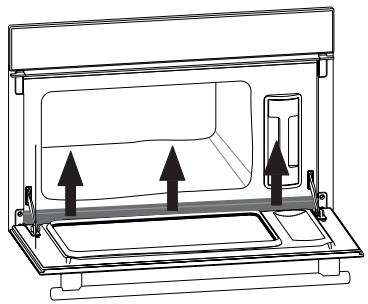
Technical line drawing of a kitchen appliance with two arrows indicating movement or force (no text or symbols)Dismantle this channel by pulling upwards. Wipe it and replace it, using the three notches provided for this purpose.

The oven must not be cleaned with a steam cleaner.
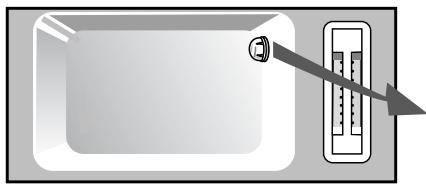
Changing the light bulb ?
natural_image
Diagram of a microwave oven with a thermometer and a hanging sensor (no text or symbols)
The bulb is by the far right corner.
⚠️ Always switch the oven off at the mains before changing the bulb in order to safeguard against electric shocks.
- Turn the cover slightly anti-clockwise (left).
- Unscrew the bulb the same way.
The bulb is a :
- 25 W - 220/240 V
- Type E14 suitable up to 300°C
- Change the bulb and reassemble the unit making sure the seals are positioned correctly.
- Switch the oven back on at the mains.
Troubleshooting
IF YOU REALIZE THAT
The display panel is not lit up.
The light doesn't work.
Water or steam leaking from the door during cooking.
POSSIBLE CAUSES
A fault in the oven electrical supply.
Electric card out of order.
The bulb needs replacing.
The oven is not switched on at the mains.
The fuse has blown.
The door is not shut correctly.
The door seal is faulty.
WHAT SHOULD YOU DO?
- Check that the tank has been pushed in completely.
- Contact the After-Sales Service.
- Change the bulb. - Switch the oven on at the mains.
- Change the fuse.
- Contact the After-Sales Service.
In all cases, if you are unable to solve the problem yourself, please contact the After-Sales Service without delay.
Inhalt
Vorwort S.40
Dampfgaren Allgemeines S.41
natural_image
Line drawings of three different plastic containers: a square tray with perforated contents, a curved basket with handles, and a rectangular grid base (no text or symbols)natural_image
Technical line drawing of a mechanical component with no visible text or symbolsnatural_image
Technical line drawing of a kitchen appliance with two arrows indicating movement or force (no text or symbols)natural_image
Diagram of a microwave oven with a thermometer and a hanging sensor (no text or symbols)
flowchart
graph TD
    A["1"] --> B["Weather Icon"]
    C["2"] --> D["Weather Icon"]
    E["3"] --> F["Weather Icon"]
    G["5"] --> H["Weather Icon"]
    I["4"] --> J["Weather Icon"]
    K["14"] --> L["Weather Icon"]
    M["9"] --> N["Weather Icon"]
    O["10"] --> P["Weather Icon"]
    Q["13"] --> R["Weather Icon"]
    S["12"] --> T["Weather Icon"]
    U["8"] --> V["Weather Icon"]
    W["15"] --> X["Weather Icon"]
    Y["11"] --> Z["Weather Icon"]
    AA["6"] --> AB["Weather Icon"]
    AC["7"] --> AD["Weather Icon"]
natural_image
Line drawings of three different plastic containers: a square tray with perforated contents, a curved tray with handles and a rectangular base (no text or symbols)natural_image
Technical line drawing of a mechanical component with no visible text or symbolsNL
natural_image
Technical line drawing of a microwave oven with two upward arrows indicating airflow or movement (no text or symbols)natural_image
Diagram of a microwave oven with a thermometer and a hanging pointer (no text or symbols)
natural_image
Line drawings of three different plastic containers: a square tray with perforated contents, a curved tray with handles, and a grid-patterned rack (no text or symbols)natural_image
Technical line drawing of a mechanical component with internal grooves and a curved top (no text or symbols)1 Tryk på tasten START/STOP i nogle sekunder.
natural_image
Simple line drawing of a rectangular shape with a small lock icon at the center (no text or symbols)natural_image
Simple line drawing of a hand pressing a button with an 'I' symbol (no text or numbers present)4 Symbolet 🌐 animeres. Når temperaturen nås, lyser 100°C fast, og der lyder et bip.

natural_image
Technical line drawing of a microwave oven with two upward arrows indicating airflow or movement (no text or symbols)natural_image
Line drawing of a square tray with perforated interior (no text or symbols)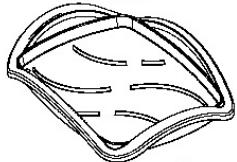
natural_image
Line drawing of a rectangular metal grate with vertical slats (no text or symbols)natural_image
Technical line drawing of a mechanical component with no visible text or symbols4
EL
natural_image
Line drawing of a kitchen appliance with two upward arrows indicating movement or force (no text or symbols)natural_image
Line drawings of three different plastic containers: a square tray with perforated inner plate, a curved basket with handles and internal compartments, and a grid-patterned rack base (no text or symbols)natural_image
Technical line drawing of a mechanical component with internal channels and a labeled section (no text or symbols)natural_image
Technical line drawing of a microwave oven with two upward arrows indicating airflow or movement (no text or symbols)natural_image
Diagram of a microwave oven with a thermometer and a pointer, no text or symbols present
- LES CAUSES POSSIBLES
- Brandt
- Steam cooking
- General remarks
- Your oven, how it works
- Accessories
- Tin ware
- Removable tank
- How to install your oven
- Electrical connection
- Energy consumption
- How to use your oven
- Setting the time
- Changing the time
- Reducing energy consumption
- Locking the control panel
- EN
- Cooking immediately
- Operational principle
- Defrosting
- Modifying the cooking time
- Stopping the appliance during cooking
- At the end of cooking
- ⚠️ You MUST IMPERATIVELY empty the tank
- Advice
- Reheating
- Examples:
- Delayed cooking
- Modification of cooking time and the end of cooking time
- How to use the timer
- Timer
- Modifying and stopping the timer
- How to maintain your oven
- Maintenance
- Cleaning the channel
- Changing the light bulb ?
- Troubleshooting
- IF YOU REALIZE THAT
- POSSIBLE CAUSES
- WHAT SHOULD YOU DO?
- Inhalt
- NL
- 4
- EL
Brand : BRANDT
Model : FV600XS1
Category : Electric oven