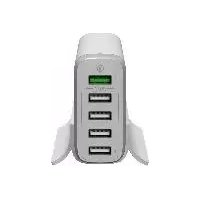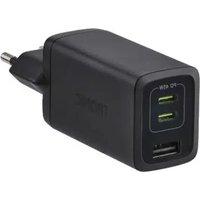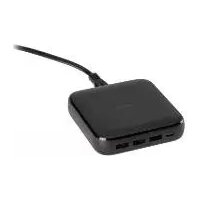
HG07784 - USB Charging Station TRONIC - Free user manual and instructions
Find the device manual for free HG07784 TRONIC in PDF.



| Product type | USB charging station |
| Brand | Tronic |
| Model | HG07784 |
| Dimensions | 94 x 90 x 21 mm |
| Weight | 210 g (main device) |
| Input power | 100-240 V~, 2 A, 50/60 Hz |
| Total output power | 65 W max |
| USB ports | 1 x USB-C (PD, 45 W max), 2 x USB-A (12 W max per port) |
| USB-A output current | 2.4 A per port (total 4.0 A) |
| USB-C output current | 3.0 A (5-15 V), 2.25 A (20 V) |
| Average active efficiency | 86.00 % |
| Efficiency at low load (10%) | 74.00 % |
| No-load power consumption | 0.30 W |
| Protection class | II (double insulation) |
| Power cable length | 1.2 m |
| Operating temperature | 0 - 35 °C, 40-85 % RH |
| Storage temperature | 0 - 45 °C, 10-70 % RH |
| Intended use | Charging USB devices in dry indoor areas |
| Package contents | Charging station, power cable, instruction manual |
| Maintenance and cleaning | Unplug, clean with a dry or slightly damp cloth, no corrosive products |
| Safety | Do not expose to water, do not open, use only indoors, disconnect during thunderstorms |
| Warranty | 3 years from date of purchase |
Frequently Asked Questions - HG07784 TRONIC
User questions about HG07784 TRONIC
0 question about this device. Answer the ones you know or ask your own.
Ask a new question about this device
Download the instructions for your USB Charging Station in PDF format for free! Find your manual HG07784 - TRONIC and take your electronic device back in hand. On this page are published all the documents necessary for the use of your device. HG07784 by TRONIC.
USER MANUAL HG07784 TRONIC
Operation and Safety Notes
FR BE
STATION DE CHARGE USB
text_image
Icon set showing a lowercase 'i' next to an open book with a patterned cover and a curved arrow, likely indicating information or information.DE/AT/CH
Operation and Safety Notes Page 22
FR/BE
(Anschlüsse 2): 5,0 V=
Warnings and symbols used ...... Page 23
Introduction Page 25
Intended use...... Page 25
Product features...... Page 25
Trademark notices...... Page 26
Scope of delivery....Page 26
General safety instructions......Page 26
Description of parts ...... Page 30
Technicaldata Page 30
Before use ...... Page 32
Operation and use......Page 32
Connecting the charger to the
power supply......Page 33
Connecting your devices ...... Page 33
Disconnectingyourdevice...... Page 33
Disconnect from the power supply......Page 33
Storage when not in use ...... Page 33
Cleaning Page 34
Troubleshooting......Page 34
Disposal Page 35
Warranty and service ...... Page 36
Warranty Page 36
Warranty claim procedure ...... Page 37
Service Page 37
| Warnings and symbols usedThe following symbols and warnings are usedin these instructions for use, on the packaging and on the product: | |
 | DANGER! This symbol with the signal word “DANGER” indicates a hazard with a high level of risk which, if not avoided, will result in serious injury or death. |
 | WARNING! This symbol with the signal word “WARNING” indicates a hazard with a medium level of risk which, if not avoided, will result in serious injury or death. |
 | CAUTION! This symbol with the signal word “CAUTION” indicates a hazard with a low level of risk which, if not avoided, could result in minor or moderate injury. |
 | ATTENTION! This symbol with the signal word“ ATTENTION” indicates a potential property damage, if not avoided, could result in property damage. |
 | NOTE: This symbol with the signal word “NOTE” provides additional useful information. |
 | Use product only in dry indoor areas. |
 | Safety class II The product has double insulation and no safety connection with grounding is required. |
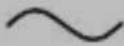 | Alternating current / voltage |
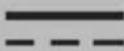 | Direct current / voltage |
 | CE mark indicates conformity with relevant EU directives applicable for this product. |
  | Technology to optimize charging time. |
 | This symbol means that the operating instructions must be observed before using the product. |
USB CHARGING STATION
Introduction
We congratulate you on the purchase of your new product. You have chosen a high quality product. The instructions for use are part of the product. They contain important information concerning safety, use and disposal. Before using the product, please familiarise yourself with all of the safety information and instructions for use. Only use the unit as described and for the specified applications. If you pass the product on to anyone else, please ensure that you also pass on all the documentation with it.
Intendeduse
This USB CHARGING STATION (hereinafter called „product“) is an information technology device designed for charging and operating USB devices that are charged or operated from a USB port by default. Compatible connected devices are automatically detected and supplied with the appropriate output voltage and current from the USB charger.
The product is not intended for commercial use. The manufacturer is not liable for any damages caused by any use other than for the intended purpose.
Productfeatures
The product has 4 USB ports with a total maximum output power of 65 W. When multiple USB ports are used at the same time, the maximum output power is 20 W for type A USB ports 2 , each port with a max. 2.4 A / 12 W output.
For type C USB port 1, the maximum output power is 45 W.
Trademark notices
■ iUSB Registered trademark of USB Implementers Forum, Inc.
The Smart Fast Charge trademark and trade name is the property of their respective owners.
■ The Tronic trademark and trade name is the property of their respective owners.
■ Any other names and products are trademarks or registered trademarks of their respective owners.
Scopeofdelivery
1 x USB charging station
1 x Power cable
1 x Instructions for use
⚠️ General safety instructions
Before using the product, please familiarize yourself with all of the safety instructions and instructions for use! When passing this product on to others, please also include all the documents!
DANGER!
DANGER TO LIFE AND RISK OF ACCIDENT FOR INFANTS AND CHILDREN!
Risk of suffocation!
Never leave children unsupervised with the packaging material. The packaging material poses a suffocation hazard. Children frequently underestimate the dangers. The packaging material is not a toy.
This product may be used by children age 8 years and up, as well as by persons with reduced physical, sensory or mental capacities or lacking experience and / or knowledge, so long as they are supervised or instructed in the safe use of the product and understand the associated risks. Do not allow children to play with the product. Cleaning and user maintenance should not be performed by children without supervision. The product is not a toy.
DANGER!
- Danger to life due to electric shock! Keep the product away from moisture, damp areas, dripping and splashing water!
- Never open the product. There is the risk of electrical shock, if the product is open.
- Refer all servicing to qualified personnel. Servicing is required when the product has been damaged in any way, such as liquid has been spilled or objects have fallen into the product, the product has been exposed to rain or moisture, does not operate normally, or has been dropped.
WARNING!
- Unplug the product during lightning storms or when unused for long periods of time.
- Grip the power plug every time directly whenever you want to pull it from the mains socket. Do not pull on the power cable itself.
- Never touch the power plug with wet hands, as this could result in either a short circuit or electric shock.
-
Do not place any furniture or similar items on the power cable and ensure that it cannot become trapped.
-
Never tie knots in the power cable and do not bind it together with other cables.
- A damaged power cable or power plug can cause fire or electric shock. Check the power cable and power plug regularly. Do not use a damaged power cable or power plug.
- The mains socket used must be easily accessible so that the power plug can be quickly disconnected in an emergency.
- To completely disconnect the product from the power, you must remove the power plug from the mains socket. The power plug serves as a separator. At standby mode, a minor power is consumed.
- If you notice any unusual noise, smoke or similar uncertain situations, immediately disconnect the power plug from the mains socket and disconnect all connected devices. Have the product checked by a qualified person before using it again.
WARNING!
- Before operating this product, check the input voltage of this product to see if it is identical to the voltage of your local power supply.
- The product may only be used in dry indoor areas.
- Unplug the product from the mains socket before cleaning.
- The socket-outlet shall be installed near the equipment and shall be easily accessible.
ATTENTION! RISK OF PROPERTY DAMAGE
- This product does not contain any parts which can be serviced by the user.
- Do not place burning candles or other open fire on or next to the product.
- Check the product and accessories for damage before each use. Never use a damaged product.
- Do not operate the product near heat sources, e.g. radiators or other devices emitting heat!
ATTENTION! Ensure that:
- the product is not exposed to bright artificial light.
- any contact with splashed and dripping water and corrosive liquids is avoided and the product are not operated in the vicinity of water. In particular, the product should never be submerged in liquid; do not place any vessels filled with liquid, for example, vases or drinks, on or near the product.
- the product is not used in the immediate vicinity of magnetic fields (e.g. speakers).
- no foreign objects penetrate the product.
- the product is never subjected to extreme temperature fluctuations as this could result in condensation and electrical short circuits. If the product were subjected to extreme temperature fluctuations, however, wait (approx. 2 hours) until the product has reached ambient temperature before use.
- the product is never subjected to excessive shocks and vibrations.
- the connected cables are always laid in such a manner that nobody can step on or trip over them. There is a risk of injury.
- no objects are placed on a cable and cables are not connected over sharp edges because they could be damaged.
- the power cable is protected from being walked
on and pinched or kinked particularly at plugs, convenience receptacles, and the point where they exit from the product.
● Description of parts
Please refer to the fold out page.
1 USB type C port
2 USB Type A ports
3 USB charging hub
4 Power cable socket
5 Power cable connector
6 Power cable
7 Power plug
●Technicaldata
Manufacturer's name OWIM GmbH & Co. KG or trade mark, HRA 721742 commercial registration Stiftsbergstraße 1, 74167 number and address: Neckarsulm, GERMANY
Model identifier: HG07784
Input voltage and current: 100 - 240 V \~, 2 A
Input AC frequency: 50 / 60 Hz
Output voltage USB Type A (ports 2): 5.0 V =
| Output voltageUSB Type C(PD* port 1): | 5.0 V---/9.0 V=≠12.0 V---/15.0 V=≠20.0 V--- |
| Output currentUSB Type A (ports 2): | 2.4 A (per USB port)4.0 A (Total) |
| Output currentUSB Type C(PD* port 1): | 3.0 A (for 5.0-15.0 V---)2.25 A (for 20.0 V---) |
| Total output power: 65.0 W (USB Type A & C)12.0 W, 5.0 V---2.4 A (USB Type A)20.0 W, 5.0 V---4.0 A (USB Type A, total)15.0 W, 5.0 V---3.0 A or27.0 W, 9.0 V---3.0 A, or36.0 W, 12.0 V---3.0 A, or45.0 W, 15.0 V---3.0 A, or45.0 W, 20.0 V---2.25 A(USB Type C) | |
| Average active efficiency: | 86.00 % |
| Efficiency at low load(10%): | 74.00 % |
| No-load power consumption: | 0.30 W |
| Protection class: | II / ☐ |
| Dimensions: approx. 94 x 90 x 21 mm | |
| Weight (main device): approx. 210 g | |
Operating temperature: 0 - 35 °C, 40 - 85 % rel. humidity
Storage temperature: 0 - 45 °C
Humidity
(no condensation): 10 - 70 %
Length of power cable: approx. 1.2 m
NOTE: The specification and design may be changed without notification.
*Power Delivery (PD) is a cutting edge technology which enables extremely fast charging for all PD-compatible devices, including Apple iPhone and Samsung Android mobile devices.
●Before use
i NOTE:
- All parts have to be unpacked and the packaging material has to be removed completely.
- Before use, verify the package contents are complete and undamaged!
- If you notice any damage or missing parts, please contact the dealer who sold this product.
● Operation and use
ATTENTION! RISK OF OVERHEATING! The total power consumption of the connected devices must not exceed 65 W (USB Type-A 20 W 2 and USB Type-C 45 W 1).

ATTENTION! If you use the product under max.
loading condition, the product may get hot. This is normal because in this condition, the product uses more power and therefore generates more heat.
Connecting the charger to the power supply
■ Connect the power cable connector the power cable socket 4.
- Insert the power7pluto an easily accessible mains socket. The requirements for the voltage can be found in the "Technical data" section.
- Connecting your devices
■ Connect your devices USB plugs into desired USB port (USB Type A 2 or USB type C 1). The optimum charging voltage / charging current for the connected device is set automatically.
- Disconnecting your device
After charging is complete, simply unplug your device's USB plug from the product.
- Disconnect from the power supply
Grip the power7plagd unplug it from the mains socket. Do not pull on the power cable 6.
●Storage when not in use
Store the product in a dry environment, protected from dust and direct sunlight.
●Cleaning
- Disconnect the product from the mains socket and remove all plugs before cleaning!
- Be sure moisture does not enter the product during cleaning to prevent damage to the product and related repairs.
- Only use a clean, dry cloth for cleaning the product and never use any corrosive liquids / abrasive cleaning agents. Use a slightly moistened cloth and a mild cleaning agent to remove stubborn dirt.
●Troubleshooting
What should I do if external devices cannot get power from the product?
- Check the power cable connection between the mains socket and the product.
- Check the USB cable (not included) connection between the external devices and the product.
- Make sure the external device's charging socket is working properly.
What should I do if the device charges very slowly?
- Check if you have connected the device to the wrong USB port.
●Disposal
Packaging:
The packaging is made of environmentally friendly materials, which may be disposed of through your local recycling facilities.
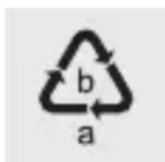
Observe the marking of the packaging materials for waste separation, which are marked with abbreviations (a) and numbers (b) with following meaning: 1–7: plastics / 20–22: paper and fibreboard / 80–98: composite materials.
Product:

Contact your municipality for information on how to dispose of your worn-out product.
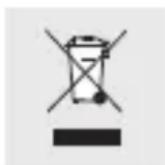
The adjacent symbol of a crossed out dustbin on wheels indicates this product is subject to Directive 2012/19/EU. This directive states at the end of the life this product must not be disposed of through regular household refuse but must be returned to special collection sites, recycling depots or waste management companies.
This disposal is free of charge to you.
Protect the environment and dispose of properly.

The product is recyclable, subject to extended manufacturer responsibility, and collected separately. an be obtained from your local authority.
●Warranty and service
Warranty
The product has been manufactured to strict quality guidelines and meticulously examined before delivery. In the event of product defects you have legal rights against the retailer of this product. Your legal rights are not limited in any way by our warranty detailed below.
The warranty for this product is 3 years from the date of purchase. The warranty period begins on the date of purchase. Please keep the original sales receipt in a safe location. This document is required as your proof of purchase.
Should this product show any fault in materials or manufacture within 3 years from the date of purchase, we will repair or replace it – at our choice – free of charge to you. This warranty becomes void if the product has been damaged, or used or maintained improperly.
The warranty applies to defects in material or manufacture. This warranty does not cover product parts subject to normal wear, thus possibly considered consumables (e.g. batteries) or for damage to fragile parts, e.g. switches, rechargeable batteries or glass parts.
●Warranty claim procedure
To ensure quick processing of your case, please observe the following instructions:
Please have the till receipt and the item number (IAN 386223_2110) available as proof of purchase.
You will find the item number on the rating plate, an engraving, on the front page of the instructions for use (bottom left), or as a sticker on the rear or bottom of the product.
If functional or other defects occur, please contact the service department listed either by telephone or by e-mail.
You can return a defective product to us free of charge to the service address that will be provided to you. Ensure that you enclose the proof of purchase (till receipt) and information about what the defect is and when it occurred.
Service
GB Service Great Britain
Tel.: 08000569216
E-Mail: owim@lidl.co.uk
IE Service Ireland
Tel.: 1800 200736
E-Mail: owim@lidl.ie
CE
type A (ports 2): 5,0 V
type C (port PD* [1]): 12,0 V = 15,0 V / ===
20,0 V ---
Type A (poorten 2): 5,0 V ===
Uitgangsspanning USB 5,0 V ≠ 9,0 V / =
Type C (PD*-poort 1): 12,0 V = 15,0 V / ---
20,0 V ---
Napięcie wyjścia USB 5,0 V = 9,0 V / === typu C (port PD* [1]): 12,0 V = 15,0 V / === 20,0 V ===
Výstupní proud USB Type C (port PD ^* 3,0 A (pro 5,0 - 15,0 V = 2,25 A (pro 20,0 V =
tipo A (Porte 2): 5,0 V

12,0 V =--/15,0 V ≠-
20,0 V =
| Potenza in uscita totale: 65,0 W (USB tipo A e C) |
| 12,0 W, 5,0 V--- 2,4 A(USB tipo A) |
| 20,0 W, 5,0 V--- 4,0 A(USB tipo A, totale) |
| 15,0 W, 5,0 V--- 3,0 A o |
| 27,0 W, 9.0 V--- 3,0 A, o |
| 36,0 W, 12,0 V--- 3,0 A, o |
| 45,0 W, 15,0 V--- 3,0 A, o |
| 45,0 W, 20,0 V--- 2,25 A(USB tipo C) |
5,0 V = - / 9,0 V = ≠
12,0 V = - / 15,0 V ≠
20,0 V ---
USB Type A (2)
aljzatok) kimeneti
áramerőssége:
Pooblaščeni serviser:
OWIM GmbH & Co. KG
Stiftsbergstraße 1
74167 Neckarsulm
NEMČIJA