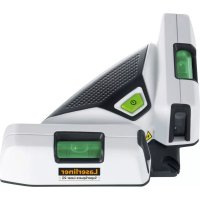
SuperSquareLaser 2G Plus - Laser pointer Laserliner - Free user manual and instructions
Find the device manual for free SuperSquareLaser 2G Plus Laserliner in PDF.


| Product type | 90° line laser |
| Brand | Laserliner |
| Model | SuperSquareLaser 2G Plus |
| Laser technology | PowerGreen+ (green diode 515 nm) |
| Laser safety class | 2 (< 1 mW according to EN 60825-1) |
| Angle accuracy | ± 0.5 mm/m |
| Visibility range (typical) | 40 m (at 300 lx max) |
| Leveling | Manual (using bubbles) |
| Power supply | 2 AA batteries (LR6) 1.5 V |
| Battery life | Approximately 3 hours |
| Dimensions (L x W x H) | 200 x 48 x 100 mm |
| Weight (including batteries) | 350 g |
| Operating temperature | 0°C to 50°C |
| Storage temperature | -10°C to 70°C |
| Max relative humidity | 80% RH (non-condensing) |
| Max working altitude | 4000 m above sea level |
| Applications | Floor and wall tiling, vertical/horizontal alignment |
| Special functions | 90° guide edge, placement surface, bubbles, special pins for wall mounting |
| Maintenance | Clean with a slightly damp cloth; avoid abrasive cleaners and solvents |
| Storage | Dry and clean place; remove batteries before prolonged storage |
| Manual available | 64 pages, downloadable in several languages (FR, DE, EN, ES, etc.) |
Frequently Asked Questions - SuperSquareLaser 2G Plus Laserliner
User questions about SuperSquareLaser 2G Plus Laserliner
0 question about this device. Answer the ones you know or ask your own.
Ask a new question about this device
Download the instructions for your Laser pointer in PDF format for free! Find your manual SuperSquareLaser 2G Plus - Laserliner and take your electronic device back in hand. On this page are published all the documents necessary for the use of your device. SuperSquareLaser 2G Plus by Laserliner.
USER MANUAL SuperSquareLaser 2G Plus Laserliner
Laserliner
!
natural_image
Exterior view of a modern office building (no signage)!
Completely read through the operating instructions, the „Warranty and Additional Information“ booklet as well as the latest information under the internet link at the end of these instructions. Follow the instructions they contain. This document must be kept in a safe place and if the laser device is passed on, this document must be passed on with it.
90° line Laser
- The 2 clearly visible laser lines are ideally suited for aligning tiles.
– Vertical and horizontal levelling on walls - The applied lay edges and contact surface make it easy to position floor tiles.
- Clean application on all surfaces – also when using pins
– Vials to adjust the device
General safety instructions
- The device must only be used in accordance with its intended purpose and within the scope of the specifications.
- The measuring tools and accessories are not toys. Keep out of reach of children.
- Modifications or changes to the device are not permitted, this will otherwise invalidate the approval and safety specifications.
- Do not expose the device to mechanical stress, extreme temperatures, moisture or significant vibration.
- The device must no longer be used if one or more of its functions fail or the battery charge is weak.
Safety instructions
Using class 2 lasers

natural_image
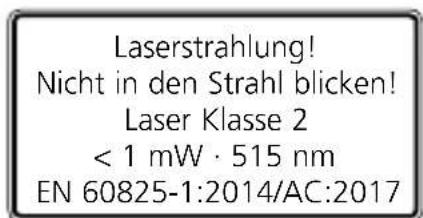
Warning symbol with a triangular triangle and central sunburst (no text or numbers)Laser radiation! Do not stare into the beam! Class 2 laser < 1 mW · 515 nm EN 60825-1:2014/AC:2017
- Attention: Do not look into the direct or reflected beam.
- Do not point the laser beam towards persons.
- If a person's eyes are exposed to class 2 laser radiation, they should shut their eyes and immediately move away from the beam.
- Under no circumstances should optical instruments (magnifying glass, microscope, binoculars) be used to look at the laser beam or reflections.
- Do not use the laser at eye level (1.40 ... 1.90 m)
Laserliner
- Reflective, specular or shiny surfaces must be covered whilst laser devices are in operation.
- In public areas shield off the laser beam with barriers and partitions wherever possible and identify the laser area with warning signs.
Safety instructions
Dealing with electromagnetic radiation
- The measuring device complies with electromagnetic compatibility regulations and limits in accordance with the EMC Directive 2014/30/EU.
- Local operating restrictions – for example, in hospitals, aircraft, petrol stations or in the vicinity of people with pacemakers – may apply. Electronic devices can potentially cause hazards or interference or be subject to hazards or interference.
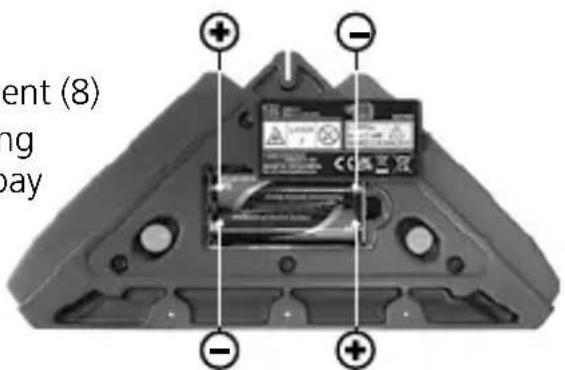
1 Inserting batteries
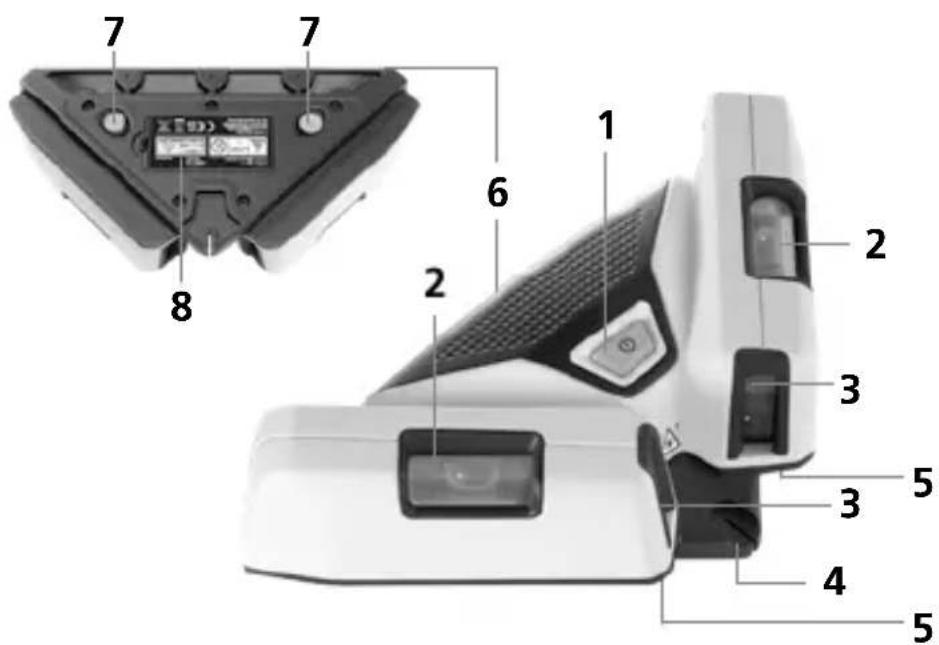
Open the battery compartment (8) and insert batteries according to the symbols. Be sure to pay attention to polarity.
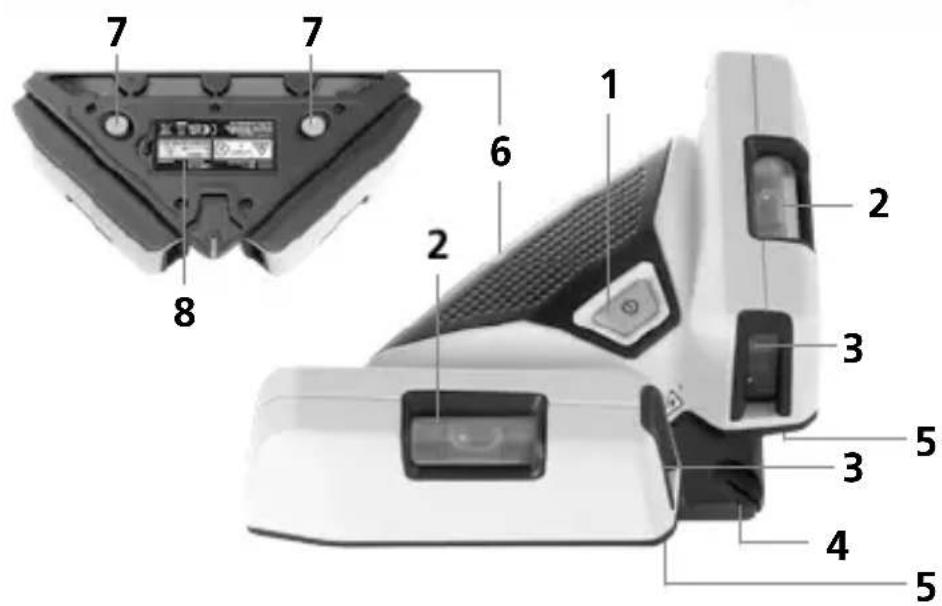
1 ON / OFF switch
2 Vials for wall applications
3 Laser output windows
4 90° try-square edge
5 Contact surface
6 Lay edge
7 Pins
8 Battery compartment
2 On-floor applications
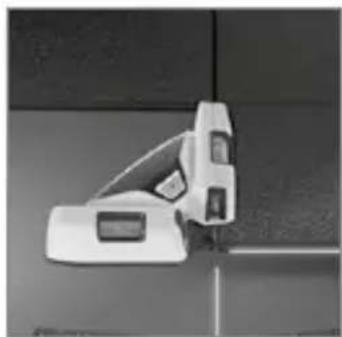
Turn on the unit with the ON / OFF switch (1). The laser lines now produce 2 marks at 90° angles on the floor. These projected lines allow tiles to be laid easily, yet precisely. The 90° lay edge (4) and the contact surface (5) make it easy to align the first floor tile.
natural_image
Exterior view of a modern office building (no signage)
Green laser technology

Devices with the PowerGreen+ technology have very bright, green high-performance diodes which provide outstanding visibility of the laser lines at great distances, on dark surfaces and in bright ambient lighting conditions.
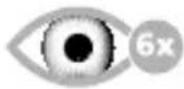
Approx. 6 times brighter than a typical red laser with 630 - 660 nm.
3 Wall applications
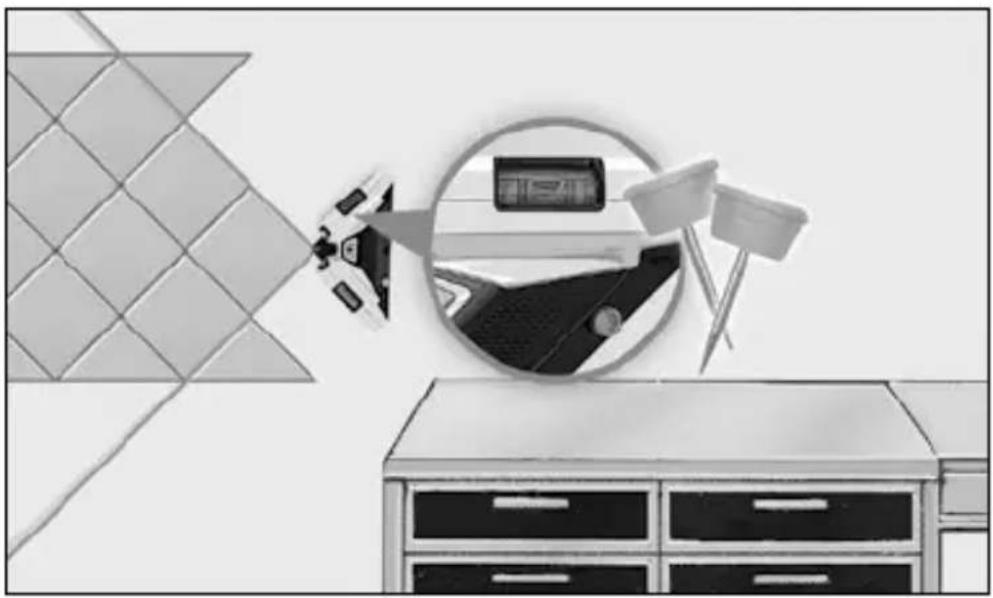
Mount the device on the wall for horizontal and vertical levelling. Then align the device with the vials.
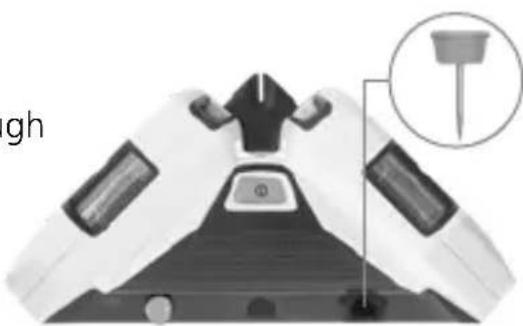
4 Mounting on the wall
- Place device on the wall.
- Push the special pins through the appropriate holes.
natural_image
Top-down view of a medical device with a close-up inset showing a needle inserted into the chest area (no text or symbols)!
Regularly check the calibration before use, after transport and after extended periods of storage.
Laserliner
5 Checking the vertical line
Fix a plumb bob with a line at least 2.5 m in length on the wall, making sure that the bob can swing freely. Switch on the laser, direct the lines at the plumb and align the bubble levels (2). The precision is within tolerance if the deviation between the laser line and plumb line is not greater than 0.5 mm / m.
Calibration
The measuring device should be calibrated and tested on a regular basis to ensure it is accurate and working properly. We recommend the measuring device is calibrated every 1 - 2 years. If necessary, contact your distributor or the UMAREX-LASERLINER service department.
Information on maintenance and care
Clean all components with a damp cloth and do not use cleaning agents, scouring agents and solvents. Remove the battery(ies) before storing for longer periods. Store the device in a clean and dry place.
Technical data (Subject to technical changes without notice. 21W25)
| Angle accuracy ± 0.5 mm / m | |
| Levelling manual | |
| Visibility (typical)* 40 m | |
| Laser wavelength 515 nm | |
| Laserklasse | 2 / < 1 mW(EN 60825-1:2014/AC:2017) |
| Power supply 2 x 1.5V LR6 | (AA) |
| Operating time approx. 3 hours | |
| Operating conditions | 0°C ... 50°C, max. humidity80% rH, no condensation,max. working altitude 4000 mabove sea level |
| Storage conditions | -10°C ... 70°C,max. humidity 80% rH |
| Dimensions (W x H x D) 200 x 48 x 100 mm | |
| Weight 350 g (incl. batteries) | |
* at max. 300 lux
EU directives and disposal
This device complies with all necessary standards for the free movement of goods within the EU.
This product is an electric device and must be collected separately for disposal according to the European Directive on waste electrical and electronic equipment.
Further safety and supplementary notices at: http://laserliner.com/info/?an=AFP

Laserliner

natural_image
Exterior view of a modern office building (no signage)Groene lasertechnologie

!
natural_image
Warning symbol with a triangular triangle and central sunburst pattern (no text)Laserstråling!
natural_image
Exterior view of a modern office building (no signage)Grøn laserteknologi

Laserliner
!
natural_image
Warning symbol with a sunburst pattern inside a triangle (no text or numbers)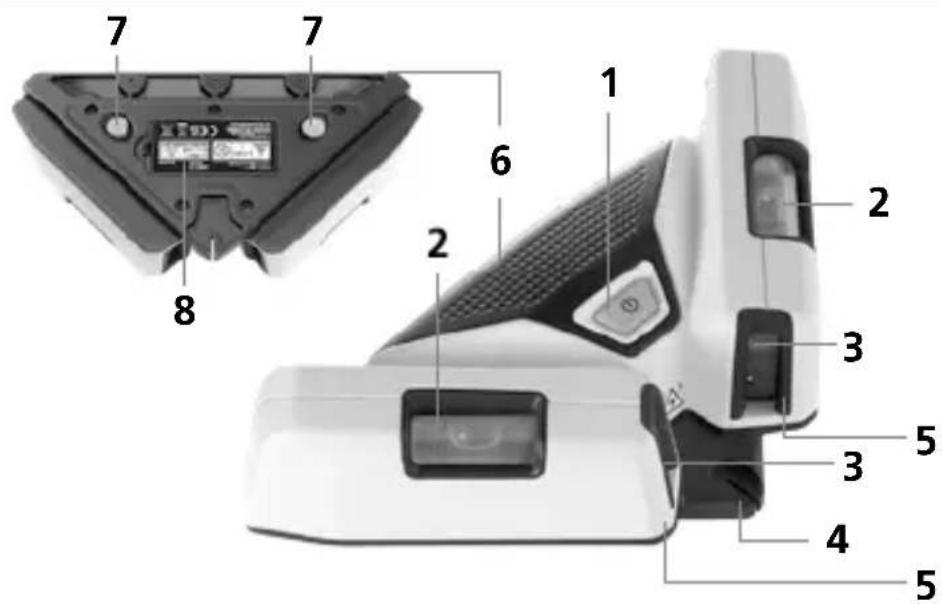
natural_image
Exterior view of a modern office building (no signage)
natural_image
Warning symbol with a triangular frame and central sunburst pattern (no text)natural_image
Exterior view of a modern office building (no signage)Laserliner
!
natural_image
Warning symbol with a triangular triangle and central sunburst pattern (no text)Radiazione laser!
natural_image
Exterior view of a modern office building (no signage)Tecnologia a laser verde

!
natural_image
Warning symbol with a triangular triangle containing a central starburst pattern (no text or numbers)natural_image
Top-down view of a device casing with battery pack and warning labels (no readable text or symbols)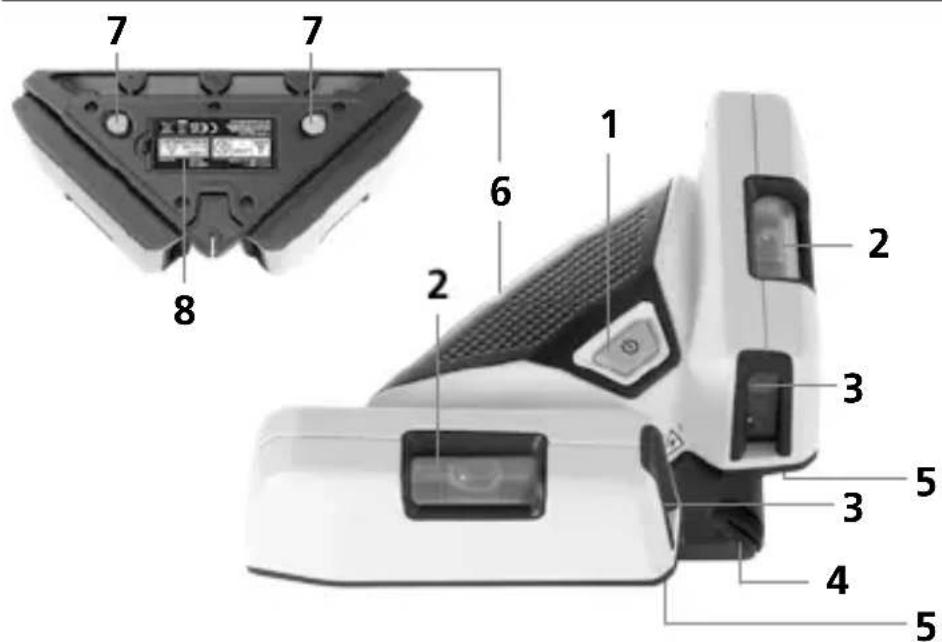
natural_image
Exterior view of a modern office building (no signage)natural_image
Medical device component diagram with a magnified inset showing internal structure (no text or symbols)!
Laserliner

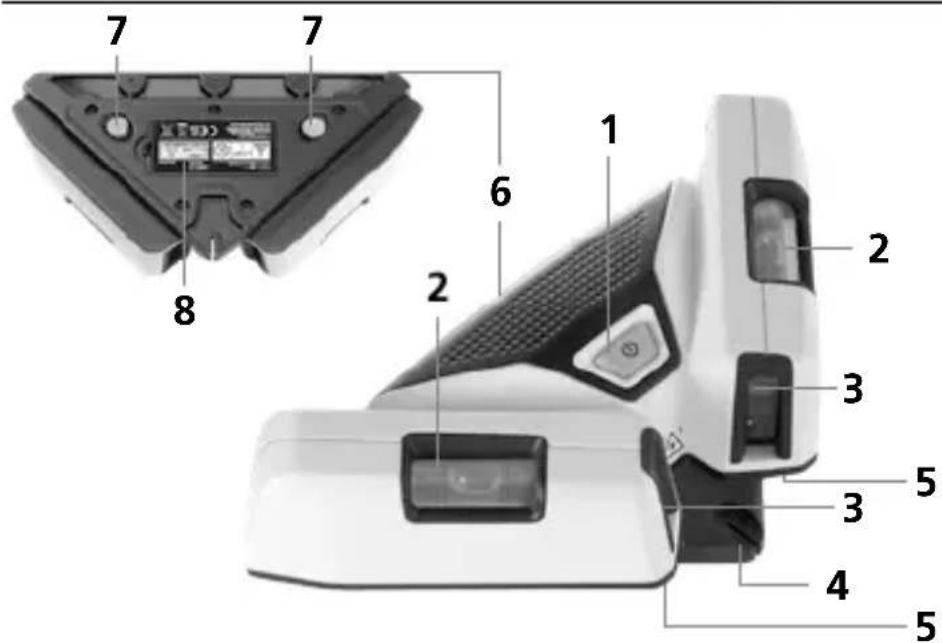
1 PÄÄLLE/POIS-kytkin
2 Libellit seinien mittaukseen
3 Lasersäteen ulostuloikkuna
4 90°:een reuna
natural_image
Exterior view of a modern office building (no signage)natural_image
Medical cross-sectional diagram of a human head with internal organs and a highlighted anatomical structure (no text or labels)

natural_image
Warning symbol with a triangular triangle and central sunburst pattern (no text)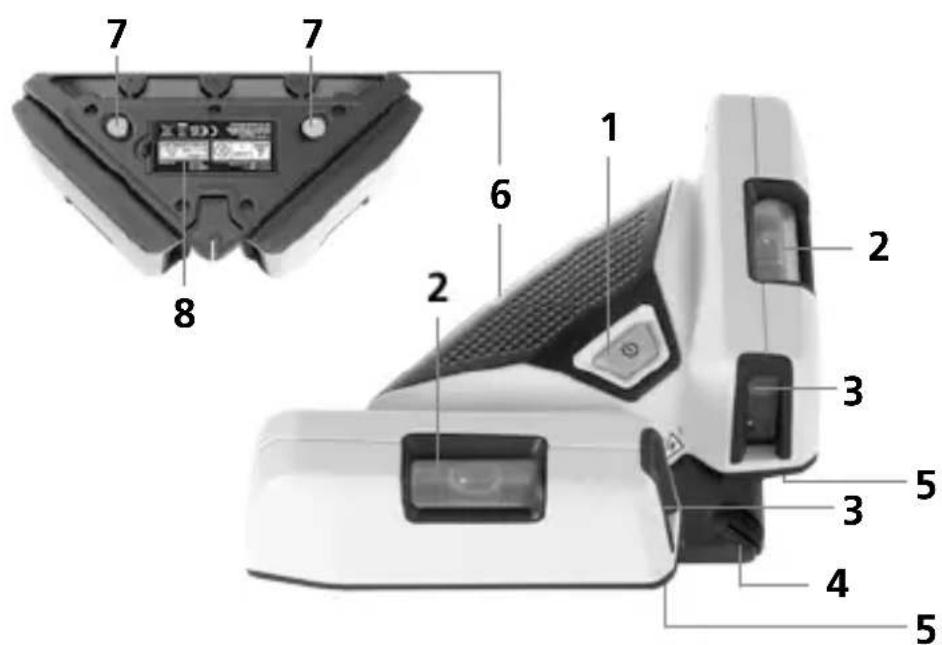
natural_image
Exterior view of a modern office building (no signage)Tecnologia de laser verde

natural_image
Top-down view of a mechanical component with a circular inset showing a tool or fixture (no text or symbols visible)!
Laserliner
!
Laserstrålning! Titta aldrig direkt in i laserstrålen! Laser klass 2 < 1 mW · 515 nm EN 60825-1:2014/AC:2017
natural_image
Top-down view of a device showing internal battery pack and mounting points (no text or symbols visible)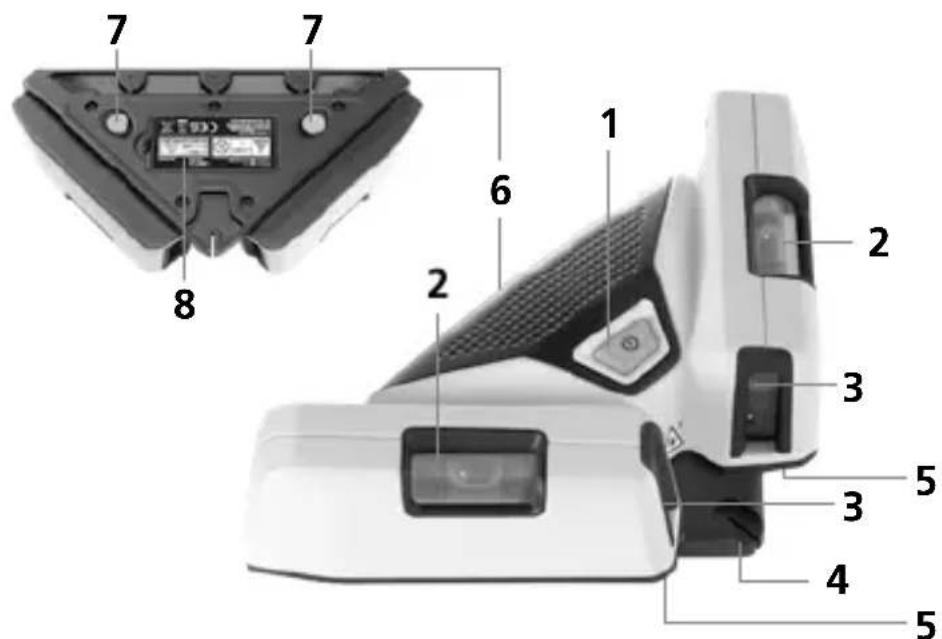
1 PA-/AV-knapp
5 Stödyta
natural_image
Exterior view of a modern office building (no signage)Grön laserteknik


natural_image
Warning symbol with a triangular triangle containing a central starburst (no text or numbers)Laserstråling! Ikke se inn i strålen!
Laser klasse 2
< 1 mW · 515 nm
EN 60825-1:2014/AC:2017
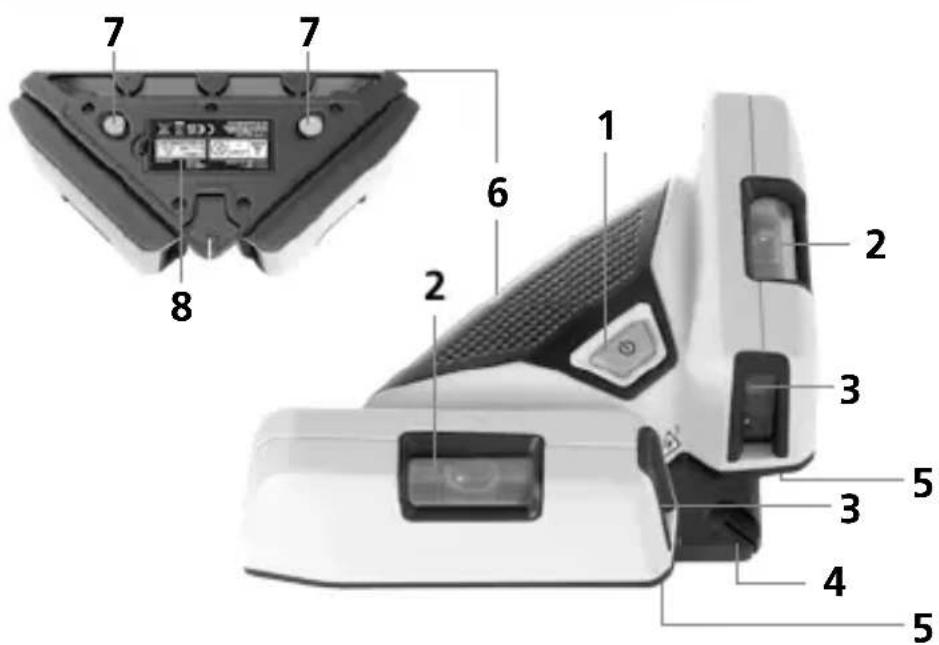
1 PA- / AV bryter
2 Libeller for bruk på vegg
3 Laserstrålehull
4 90° Føringskant
5 Kontaktflate
6 Kontaktkant
7 Stifter
8 Batterirom
2 Anvendelser på gulv
natural_image
Exterior view of a modern office building (no signage)Grønn laserteknologi

natural_image
Top-down view of a mechanical component with a close-up inset showing a tool tip (no text or symbols)
Laserliner
SuperSquare-Laser 2G
natural_image
Illustration of a smart room setup with a satellite, camera, and storage unit (no text or symbols)SERVICE

Umarex GmbH & Co. KG
-Laserliner-
- Laserliner
- !
- 90° line Laser
- General safety instructions
- Safety instructions
- Inserting batteries
- On-floor applications
- Green laser technology
- Wall applications
- Mounting on the wall
- Checking the vertical line
- Calibration
- Information on maintenance and care
- EU directives and disposal
- Groene lasertechnologie
- Grøn laserteknologi
- Tecnologia a laser verde
- Tecnologia de laser verde
- Grön laserteknik
- Anvendelser på gulv
- Grønn laserteknologi
- SuperSquare-Laser 2G
- Umarex GmbH & Co. KG
Brand : Laserliner
Model : SuperSquareLaser 2G Plus
Category : Laser pointer