NXB02 - Speakers YAMAHA - Free user manual and instructions
Find the device manual for free NXB02 YAMAHA in PDF.



| Product Type | Wireless Stereo Speaker |
| Brand | YAMAHA |
| Model | NXB02 |
| Category | Speakers |
| Main Functions | Bluetooth connection, analog input (3.5 mm mini-jack), SR-Bass technology, PowerStorage™ (20 W instant power) |
| Power Supply | AC adapter (100-240 V) or 4 AA batteries (LR6/UM-3); battery life: 4 hours (alkaline) |
| Power | 6 W × 2 (dynamic), 10 W × 2 (instant) |
| Frequency Response | 90 Hz – 20 kHz |
| Input Sensitivity | 200 mV |
| Impedance | 6 Ω |
| Bluetooth Profile | Version 2.0+EDR, A2DP |
| Speaker Type | Stereo 1 box, Twin SR-Bass, magnetic shielding |
| Driver | 45 mm titanium cone full-range speaker × 2 |
| Inputs | 1 × 3.5 mm stereo mini-jack (analog), 1 × Bluetooth |
| Status Indicator | LED (green/blue/flashing) |
| Safety | Do not expose to water or humidity; do not open; use the supplied adapter; keep away from pacemakers; do not place burning objects or liquids on the device. |
| Maintenance | Clean with a dry, clean cloth; do not use chemical solvents. |
| Spare Parts | AC adapter included (specific models by region); batteries not included. |
| Repairability | Contact an authorized Yamaha service center; do not modify the device. |
| Ambient Conditions | Temperature: +5 to +35 °C |
| Power Consumption | 8 W |
| Warranty | 2 years (EEA and Switzerland) against manufacturing defects (subject to conditions) |
Frequently Asked Questions - NXB02 YAMAHA
User questions about NXB02 YAMAHA
0 question about this device. Answer the ones you know or ask your own.
Ask a new question about this device
Download the instructions for your Speakers in PDF format for free! Find your manual NXB02 - YAMAHA and take your electronic device back in hand. On this page are published all the documents necessary for the use of your device. NXB02 by YAMAHA.
USER MANUAL NXB02 YAMAHA
CAUTION: Read this before operating your unit.
To assure the finest performance, please read this manual carefully. Keep it in a safe place for future reference.
1 Install this unit in a well ventilated, cool, dry, clean place - away from direct sunlight, heat sources, vibration, dust, moisture, and/or cold. (Do not use/keep this unit in a car etc.)
2 Locate this unit away from other electrical appliances, motors, or transformers to avoid humming sounds.
3 Do not expose this unit to sudden temperature changes from cold to hot, and do not locate this unit in an environment with high humidity (i.e. a room with a humidifier) to prevent condensation inside this unit, which may cause an electrical shock, fire, damage to this unit, and/or personal injury.
4 Avoid installing this unit where foreign objects may fall onto this unit and/or this unit may be exposed to liquid dripping or splashing. On the top of this unit, do NOT place:
- Other components, as they may cause damage and/or discoloration on the surface of this unit.
- Burning objects (i.e. candles), as they may cause fire, damage to this unit, and/or personal injury.
- Containers with liquid in them, as they may fall and liquid may cause electrical shock to the user and/or damage to this unit.
5 Do not cover this unit with a newspaper, tablecloth, curtain, etc. in order not to obstruct heat radiation. If the temperature inside this unit rises, it may cause fire, damage to this unit, and/or personal injury.
6 Do not plug this unit into an AC wall outlet until all connections are complete.
7 Do not operate this unit upside-down. They may overheat, possibly causing damage.
8 Do not use force on switches, knobs, and/or cords.
9 When disconnecting the AC adaptor from the wall outlet, grasp the AC adaptor; do not pull the cord.
10 Do not clean this unit with chemical solvents; this might damage the finish. Use a clean, dry cloth.
11 Only the voltage specified on this unit must be used. Using this unit with a higher voltage than specified is dangerous and may cause fire, damage to this unit, and/or personal injury. Yamaha will not be held responsible for any damage resulting from use of this unit with a voltage other than that specified.
12 Do not attempt to modify or fix this unit. Contact qualified Yamaha service personnel when any service is needed. The cabinet should never be opened for any reason.
13 When not planning to use this unit for long periods of time (i.e. when going on vacation), disconnect the AC adaptor from the AC wall outlet.
14 Be sure to read the "Troubleshooting" section regarding common operating errors before concluding that the unit is faulty.
15 Before moving this unit, press to set this unit to off, and disconnect the AC adaptor from the wall outlet.
16 Be sure to use the AC adaptor supplied with this unit. Using an AC adaptor other than the one provided may cause fire or damage to this unit.
17 Install this unit near the wall outlet and where the AC adaptor can be reached easily.
18 For added protection for this product during a lightning storm, or when it is left unattended and unused for long periods of time, unplug it from the wall outlet. This will prevent damage to the product due to lightning and power-line surges.
19 The batteries shall not be exposed to excessive heat such as sunshine, fire or the like.
This unit features a magnetically shielded design, but there is still a chance that placing it too close to a TV set might impair picture color. Should this happen, move this unit away from the TV set.
Do not use this unit within 22 cm (9 inches) of persons with a heart pacemaker implant or defibrillator implant.
WARNING
TO REDUCE THE RISK OF FIRE OR ELECTRIC SHOCK, DO NOT EXPOSE THIS UNIT TO RAIN OR MOISTURE.
This unit is not disconnected from the AC power source as long as it is connected to the wall outlet, even if this unit itself is turned off. In this state, this unit is designed to consume a very small quantity of power.

This symbol mark is according to the EU directive 2002/96/EC.
This symbol mark means that electrical and electronic equipment, at their end-of-life, should be disposed of separately from your household waste.
Please act according to your local rules and do not dispose of your old products with your normal household waste.
The user shall not reverse engineer, decompile, alter, translate or disassemble the software used in this unit, whether in part or in whole. For corporate users, employees of the corporation itself as well as its business partners shall observe the contractual bans stipulated within this clause. If the stipulations of this clause and this contract cannot be observed, the user shall immediately discontinue using the software.
■ Special Instructions for U.K. Model
If the socket outlets in the home are not suitable for the plug supplied with this appliance, it should be cut off and an appropriate 3 pin plug fitted. For details, refer to the instructions described below.
Note
The plug severed from the mains lead must be destroyed, as a plug with bared flexible cord is hazardous if engaged in a live socket outlet.
IMPORTANT
THE WIRES IN MAINS LEAD ARE COLOURED IN ACCORDANCE WITH THE FOLLOWING CODE:
Blue: NEUTRAL
Brown: LIVE
As the colours of the wires in the mains lead of this apparatus may not correspond with the coloured markings identifying the terminals in your plug, proceed as follows:
The wire which is coloured BLUE must be connected to the terminal which is marked with the letter N or coloured BLACK.
The wire which is coloured BROWN must be connected to the terminal which is marked with the letter L or coloured RED.
Making sure that neither core is connected to the earth terminal of the three pin plug.
We, the manufacturer Yamaha hereby declare that the NX-B02 is in compliance with the essential requirements and other relevant provisions of Directive 1999/5/EC.
◆ 2 way power supply
You can choose one of two power supplies according to your usage circumstances: AC adaptor or batteries.
◆ The Bluetooth wireless technology
By the Bluetooth technology, you can enjoy clear sound without wire connections.
◆ Real stereo sound
The high quality amplifier, titanium diaphragm and Yamaha's unique SR-Bass technology achieve high quality sound.
◆ PowerStorage™ circuit (High 20 W power)
Yamaha's original power technology enables an impressive 20 W output (Max. Instantaneous Power).
■ Supplied accessory
AC adaptor (DC 12 V, 1 A) .... 1
The shape of the adaptor may vary depending on the area where you purchased.
China model MU12-2120100-A2
Europe model ...... MU12-2120100-C5
Korea model ...... MU12-2120100-C4
U.K. model ...... MU12-2120100-B2
SR-Bass
"Swing Radiator Bass™" is a trademark of YAMAHA
CORPORATION.
PowerStorage™
"PowerStorage™" is a trademark of YAMAHA CORPORATION.
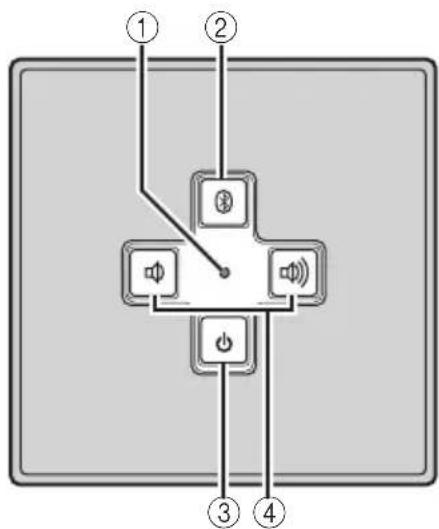
Controls and functions
flowchart
graph TD
    A["①"] --> B["Switch"]
    C["②"] --> B
    D["③"] --> E["Power"]
    F["④"] --> E
    B --> G["Speaker"]
    B --> H["Audio"]
    B --> I["Power"]
①Status indicator (LED)
Indicates the current status of this unit. For details, refer to "About the status indicator (LED)" on page 4.
② (Bluetooth/Mute button)
Sets this unit to pairing mode to use Bluetooth connection or mutes the sound. To cancel the mute, press again or The status indicator flashes during mute.
③ (Power button)
Turns this unit on. Press again to turn this unit off. When this unit is on, the power indicator lights up.
④/(Volume buttons)
Adjust the volume level. Press to increase the volume level and press to decrease.
Connections
Choose one of the two ways of the power supplies and the audio inputs according to your usage circumstances.
Power supplies
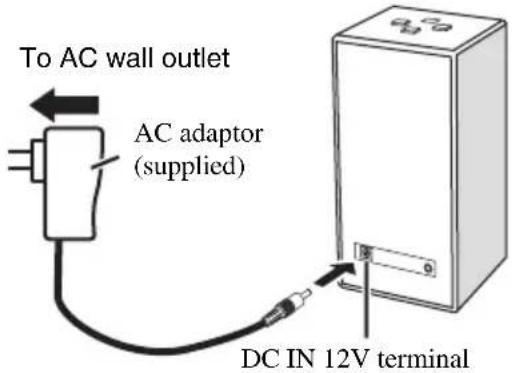
When using AC Adaptor
text_image
To AC wall outlet AC adaptor (supplied) DC IN 12V terminal1 Connect the supplied AC adaptor to DC IN 12V terminal at the back of this unit.
2 Plug the AC adaptor to the AC wall outlet.
2When using batteries
text_image
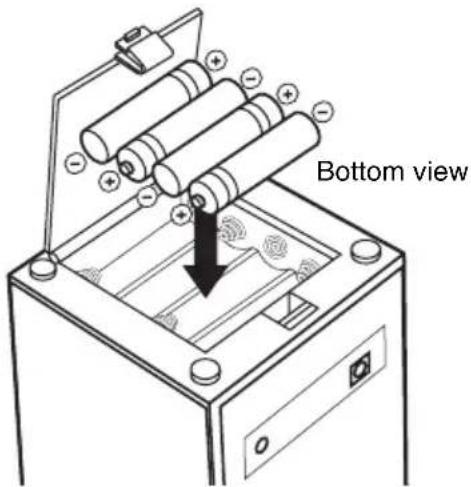
Bottom view1 Open the battery compartment cover on the bottom of this unit.
2 Insert 4 commercially available batteries (AA, LR6, UM-3) according to the polarity markings (+ and -) on the inside of the battery compartment.
3 Close the battery compartment cover.
Notes
- When the status indicator (LED) does not light even though dis pressed, change all batteries.
- Do not use old batteries and new ones together.
- Do not use different types of batteries (such as alkaline and manganese batteries) together. Read the packaging carefully because some batteries may be different type even they have the same shape and color.
- When not planning to use this unit for long periods of time (for more than 1 month), remove the batteries from this unit.
- If the batteries have leaked, dispose of them immediately. Avoid touching the leaked material or letting it come into contact with clothing, etc. Clean the battery compartment thoroughly before installing new batteries.
- Do not throw away batteries with general house waste; dispose of them correctly in accordance with your local regulations.
Audio inputs
When using Bluetooth connection
flowchart
graph LR
    A["Mobile Phone"] --> B["Handshake"]
    B --> C["YAMKA Box"]
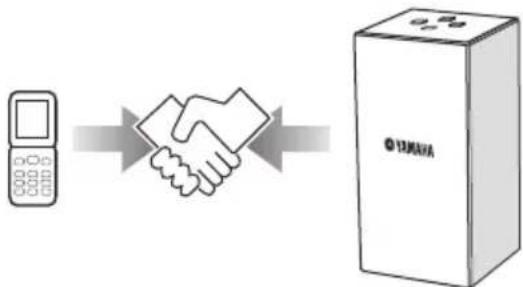
Pairing must be performed when using Bluetooth connections for the first time or if the pairing data has been deleted. “Pairing” refers to the operation of registering mobile phones, etc., for Bluetooth communications (hereafter referred to as “other components”). Use the procedure described below to pair.
[Non-Text]
To ensure security, a time limit of 8 minutes is set for the pairing operation. You are recommended to read and fully understand all the instructions before starting.
1 Turn on the power of the other component you want to pair with.
2 Press to turn this unit on.
3 Press and hold for more than 4 seconds.
This unit is set to the pairing mode (the status indicator flashes in blue).
4-a [For components with input keys (mobile phones, computers, etc).] Operate the other component to detect Bluetooth components.
For details, refer to the other component's operating instructions.
4-b [For components without input keys (Bluetooth adaptors, etc.)] Set the other component to the pairing mode and then proceed to step 7.
For details, refer to the other component's operating instructions.
5 Select "NX-B02 YAMAHA" from the list of the other component.
6 If you are asked to input a passkey, input the number "0000".
7 Check that pairing is completed.
The status indicator flashes quickly, indicating that the pairing process on this unit has been completed. Check that the pairing process on the other component has also been completed. If the status indicator does not flash quickly or if the pairing process on the other component fails, start over from step 3.
Notes
- Bluetooth communications with other components are not possible while this unit is in the pairing mode. If the pairing mode is set accidentally, press ⚣shortly to cancel the pairing mode.
- This unit can be paired with up to eight other components. When pairing is conducted successfully with a ninth component and the pairing data is registered, the pairing data for the least recently used other component is cleared.
- If the power supply to this unit is cut off during the pairing operation, the pairing data may be damaged. If so, perform the procedure described at “Clearing the pairing data” on page 4 and then perform pairing again.
2When using analog input
text_image
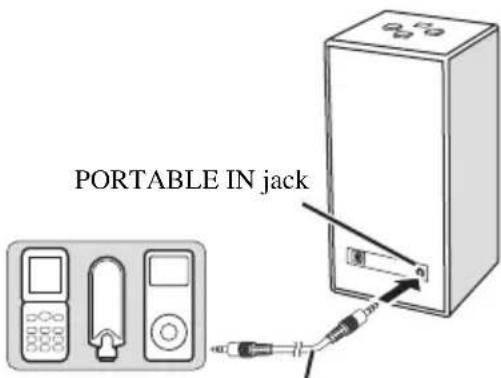
PORTABLE IN jackCommercially available 3.5 mm stereo mini plug cable
Connect an audio output jack of your portable audio player and the PORTABLE IN jack of this unit using a commercially available 3.5 mm stereo mini plug cable.
Note
Before connecting, make sure that this unit is turned off.
1 Press to turn this unit on.
The status indicator (LED) lights up.
2 Start playback of your Bluetooth component or portable audio player.
3 Adjust the volume level using /.
Note
During playback, the Bluetooth connection takes priority over the analog connection.
y
- This unit is a stereo speaker. To enjoy the fine sound balance between right and left, face the Yamaha logo to the listening position.
- When not using this unit, press to turn this unit off to save the power.
■ After using this unit
1 Stop playback of your Bluetooth component or portable audio player.
2 Press to turn this unit off.
The status indicator (LED) turns off.
■ About the status indicator (LED)
LED status The current status of this unit
Lit in green This unit is on and playbacks your portable audio player.
Lit in blue This unit is on and playbacks your Bluetooth component.
Flashing This unit is muted or in pairing mode.
Flashes once The volume of this unit is the maximum or minimum.
Off This unit is off, or power supply is not connected.
1 Make sure that this unit is turned off.
2 While pressing and holding, and, press to turn this unit on.
The status indicator (LED) flashes in blue.
3 Press .
This unit clears the pairing data.
When clearing is finished, the status indicator (LED) lights up in green.
Troubleshooting
If the problem you are experiencing is not listed below, set this unit to off, disconnect the power, and contact the nearest authorized Yamaha dealer or service center.
General
| Problem Cause Remedy | ||
| No sound. The connection between this unit and the other component is not correct. | Connect the cable properly. | |
| The volume is set to the minimum. Increase the volume level. | ||
| This unit is muted. Cancel the mute. | ||
| AC adaptor is not connected correctly. Connect AC adaptor correctly. | ||
| The batteries are weak. Replace all batteries. | ||
| The volume level is unstable. | The limiter control has been activated due to excessive input. | Decrease the volume level. |
When using the Bluetooth connection
| Problem Cause Remedy | ||
| Cannot make this unit paired with the other component. | The other component does not support A2DP. | Perform pairing operations with a component which supports A2DP. |
| A Bluetooth adaptor, etc. that you want to pair with this unit has a password other than “0000”. | Use a Bluetooth adaptor, etc. whose password is “0000”. | |
| Wrong distance. Reposition this unit within | 10 m (33 ft) range from the other component. | |
| There is a device (microwave oven, wireless LAN, etc.) outputs signals in the 2.4 GHz frequency band nearby. | Reposition this unit. | |
| The power of the connected component is off. | Turn on the connected component. | |
| No sound is produced or the sound is interrupted during playback. | The other component is not connected to this unit by Bluetooth. | If Bluetooth communications have dropped, reconnect. |
| Wrong distance. Reposition this unit within | 10 m (33 ft) range from the other component. | |
| There is a device (microwave oven, wireless LAN, etc.) outputs signals in the 2.4 GHz frequency band nearby. | Reposition this unit. | |
| The other component's Bluetooth function is not enabled. | Check that the Bluetooth function of the other component is set properly. | |
| This unit is not registered on the other component's Bluetooth device list. | Perform pairing operations again. | |
| The other component is not set to send Bluetooth audio signals to this unit. | Check that the Bluetooth function of the other component is set properly. | |
| The pairing setting of the other component is not set to this unit. | Set the pairing setting of the other component to this unit. | |
| The other component's volume is set to the minimum. | Increase the volume level. |
Specifications
Speaker type .... 1-box stereo, Twin SR-Bass
Magnetic shielding type
Driver 45 mm Ti-cone full-range driver x 2
Input (Analog) 3.5 mm Stereo mini jack
200 mV/20 kΩ
Bluetooth ...... Ver. 2.0+EDR Support A2DP profile
Dynamic power 6 W x 2 (1 kHz, 6 Ω)
Max. instantaneous power*
10 W x 2 (1 kHz, 6 Ω, 10% THD)
Input sensitivity 200 mV
Maximum input signal
Analog input 2.0 V
Frequency response 90 Hz to 20 kHz
Power supply
AC adaptor 100 to 240 V AC, 50/60 Hz
Battery ...... AA, LR6, UM-3 x 4
Battery life: 4 hours as alkaline
(Output: 10 mW + 10 mW)
Power consumption 8 W
Operating environment
Temperature ....+5 to +35 °C
Dimensions (W x H x D) 84 x 170 x 84 mm
(3-5/16" x 6-11/16" x 3-5/16")
Weight 600 g (1 lbs. 5 oz.)
* Refers to the power that can be output for 100 ms continuously.
Please note that all specifications are subject to change without notice.
Bluetooth®
- Bluetooth is a technology for wireless communication between devices within an area of about 10 meters (33 ft) employing the 2.4 GHz frequency band, a band which can be used without a license.
- Bluetooth is a registered trademark of the Bluetooth SIG and is used by Yamaha in accordance with a license agreement.
■ Handling Bluetooth communications
- The 2.4 GHz band used by Bluetooth compatible devices is a radio band shared by many types of equipment.
While Bluetooth compatible devices use a technology minimizing the influence of other components using the same radio band, such influence may reduce the speed or distance of communications and in some cases interrupt communications. - The speed of signal transfer and the distance at which communication is possible differs according to the distance between the communicating devices, the presence of obstacles, radio wave conditions and the type of equipment.
- Yamaha does not guarantee all wireless connections between this unit and devices compatible with Bluetooth function.
Limited Guarantee for European Economic Area (EEA) and Switzerland
Thank you for having chosen a Yamaha product. In the unlikely event that your Yamaha product needs guarantee service, please contact the dealer from whom it was purchased. If you experience any difficulty, please contact Yamaha representative office in your country. You can find full details on our website (http://www.yamaha-hifi.com/ or http://www.yamaha-uk.com/ for U.K. resident).
The product is guaranteed to be free from defects in workmanship or materials for a period of two years from the date of the original purchase. Yamaha undertakes, subject to the conditions listed below, to have the faulty product or any part(s) repaired, or replaced at Yamaha's discretion, without any charge for parts or labour. Yamaha reserves the right to replace a product with that of a similar kind and/or value and condition, where a model has been discontinued or is considered uneconomic to repair.
Conditions
- The original invoice or sales receipt (showing date of purchase, product code and dealer's name) MUST accompany the defective product, along with a statement detailing the fault. In the absence of this clear proof of purchase, Yamaha reserves the right to refuse to provide free of charge service and the product may be returned at the customer's expense.
- The product MUST have been purchased from an AUTHORISED Yamaha dealer within the European Economic Area (EEA) or Switzerland.
- The product must not have been the subject of any modifications or alterations, unless authorised in writing by Yamaha.
- The following are excluded from this guarantee:
a. Periodic maintenance and repair or replacement of parts due to normal wear and tear. b. Damage resulting from:
(1) Repairs performed by the customer himself or by an unauthorised third party.
(2) Inadequate packaging or mishandling, when the product is in transit from the customer. Please note that it is the customer's responsibility to ensure the product is adequately packaged when returning the product for repair.
(3) Misuse, including but not limited to (a) failure to use the product for its normal purpose or in accordance with Yamaha's instructions on the proper use, maintenance and storage, and (b) installation or use of the product in a manner inconsistent with the technical or safety standards in force in the country where it is used.
(4) Accidents, lightning, water, fire, improper ventilation, battery leakage or any cause beyond Yamaha's control.
(5) Defects of the system into which this product is incorporated and/or incompatibility with third party products.
(6) Use of a product imported into the EEA and/or Switzerland, not by Yamaha, where that product does not conform to the technical or safety standards of the country of use and/or to the standard specification of a product sold by Yamaha in the EEA and/or Switzerland.
(7) Non AV (Audio Visual) related products.
(Products subject to "Yamaha AV Guarantee Statement" are defined in our website at http://www.yamaha-hifi.com/ or http://www.yamaha-uk.com/ for U.K. resident.)
- Where the guarantee differs between the country of purchase and the country of use of the product, the guarantee of the country of use shall apply.
- Yamaha may not be held responsible for any losses or damages, whether direct, consequential or otherwise, save for the repair or replacement of the product.
- Please backup any custom settings or data, as Yamaha may not be held responsible for any alteration or loss to such settings or data.
- This guarantee does not affect the consumer's statutory rights under applicable national laws in force or the consumer's rights against the dealer arising from their sales/purchase contract.
text_image
Prise PORTABLE INnatural_image
Simple line drawing of a rectangular device emitting sound waves (no text or symbols)Dimensions (L x H x P) 84 x 170 x 84 mm
Poids 600 g
■ Communications Bluetooth
natural_image
Simple line drawing of a rectangular device emitting sound waves (no text or symbols)[Non-Text]
flowchart
graph LR
    A["Mobile Phone"] --> B["Shielded Hand"]
    B --> C["Certificate Box with 'YAMAYA' label"]
natural_image
Simple line drawing of a rectangular device emitting sound waves (no text or symbols)natural_image
Simple line drawing of a rectangular device emitting sound waves (no text or symbols)per spegnerla e
flowchart
graph LR
    A["Mobile Phone"] --> B["Shielded Hand"]
    B --> C["Certificate Box with 'YAMAYA' label"]
text_image
Jack PORTABLE INnatural_image
Simple line drawing of a rectangular device emitting sound waves (no text or symbols)para apagarla y
natural_image
Simple line drawing of a rectangular device emitting sound waves (no text or symbols)flowchart
graph LR
    A["Mobile Phone"] --> B["Shield"]
    B --> C["YAMKA Box"]