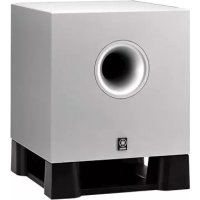
YSTSW011 - Speakers YAMAHA - Free user manual and instructions
Find the device manual for free YSTSW011 YAMAHA in PDF.



| Product Type | Subwoofer |
| Brand | YAMAHA |
| Model | YST-SW011 |
| Technologies | Advanced YST (Yamaha Active Servo Technology), QD-Bass (Quad Dispersion Bass), special linear port |
| Speaker | 20 cm cone woofer with magnetic shielding |
| Rated Power | 50 W |
| Dynamic Power | 100 W (5 Ω) |
| Input Impedance | 12 kΩ |
| Frequency Response | 30 Hz – 200 Hz |
| Input Sensitivity | 50 mV (50 Hz, 50 W/5 Ω) |
| Power Consumption | 45 W |
| Power Supply | According to version: 120 V AC (USA/Canada), 230 V AC (UK/Europe), 240 V AC (Australia), 110-120/220-240 V AC (China, Korea, Asia, general) |
| Supplied Accessories | Non-slip feet, subwoofer cable (5 m) |
| Placement | Outside the front speakers; 20 cm free space around the unit; avoid parallel walls for bass |
| Care and Cleaning | Use a clean, dry cloth; do not use chemical solvents |
| Safety | Do not open the cabinet; do not expose to rain or moisture; unplug during storms or prolonged non-use |
| Additional Features | YST port on the right side; built-in amplifier with ANIC converter; lead-free soldering |
Frequently Asked Questions - YSTSW011 YAMAHA
User questions about YSTSW011 YAMAHA
0 question about this device. Answer the ones you know or ask your own.
Ask a new question about this device
Download the instructions for your Speakers in PDF format for free! Find your manual YSTSW011 - YAMAHA and take your electronic device back in hand. On this page are published all the documents necessary for the use of your device. YSTSW011 by YAMAHA.
USER MANUAL YSTSW011 YAMAHA
Precautions: Read this before operating this unit
- To assure the finest performance, please read this manual carefully. Keep it in a safe place for future reference.
- Install this unit in a cool, dry, clean place - away from windows, heat sources, sources of excessive vibration, dust, moisture and cold. Avoid sources of humming (transformers, motors). To prevent fire or electrical shock, do not expose this unit to rain or water.
- Never open the cabinet. If any foreign objects drop into the set, contact your dealer.
- The voltage to be used must be the same as that specified on the rear panel. Using this unit with a higher voltage than specified is dangerous and may cause a fire and/or electric shock.
- To reduce the risk of fire or electric shock, do not expose this unit to rain or moisture.
- Do not use force on switches, controls, or connection wires. When moving the unit, first disconnect the power plug and the wires connected to other equipments. Never pull the wires themselves.
- When not planning to use this unit for a long period (ie., vacation, etc.), disconnect the AC power plug from the wall outlet.
- To prevent lightning damage, disconnect the AC power plug when there is an electric storm.
- Since this unit has a built-in power amplifier, heat will radiate from the rear panel. Place the unit apart from the walls, allowing at least 20cm of space above, behind and on both sides of the unit to prevent fire or damage. Furthermore, do not position with the rear panel facing down on the floor or other surfaces.
- Do not cover the rear panel of this unit with a newspaper, a tablecloth, a curtain, etc. in order not to obstruct heat radiation. If the temperature inside the unit rises, it may cause fire, damage to the unit and/or personal injury.
- Do not place the following objects on this unit: Glass, china, small metallic etc.
If glass etc. falls by vibrations and breaks, it may cause bodily injury.
A burning candle etc.
If the candle falls by vibrations, it may cause fire and bodily injury.
A vessel with water in it
If the vessel falls by vibrations and water spills, it may cause damage to the speaker, and/or you may get an electric shock.
This unit features a magnetically shielded design, but there is still a chance that placing it too close to a TV set might impair picture color. Should this happen, move this unit away from the TV set.
- Do not place this unit where foreign objects such as water drips might fall. It might cause a fire, damage to this unit, and/or personal injury.
- Never put a hand or a foreign object into the YST port located on the right side of this unit. When moving this unit, do not hold the port as it might cause personal injury and/or damage to this unit.
- Never place a fragile object near the YST port of this unit. If the object falls or drops by the air pressure, it may cause damage to the unit and/or personal injury.
- Never open the cabinet. It might cause an electric shock since this unit uses a high voltage. It might also cause personal injury and/or damage to this unit.
- When using a humidifier, be sure to avoid condensation inside this unit by allowing enough spaces around this unit or avoiding excess humidification. Condensation might cause a fire, damage to this unit, and/or electric shock.
- Super-bass frequencies reproduced by this unit may cause a turntable to generate a howling sound. In such a case, move this unit away from the turntable.
- This unit may be damaged if certain sounds are continuously outputted at high volume level. For example, if 20 Hz-50 Hz sine waves from a test disc, bass sounds from electronic instruments, etc. are continuously outputted, or when the stylus of a turntable touches the surface of a disc, reduce the volume level to prevent this unit from being damaged.
- If you hear distorted noise (i.e., unnatural, intermittent “rapping” or “hammering” sounds) coming from this unit, reduce the volume level. Extremely loud playing of a movie soundtrack’s low frequency, bass-heavy sounds or similarly loud popular music passages can damage this subwoofer system.
- Vibration generated by super-bass frequencies may distort images on a TV. In such a case, move this unit away from the TV set.
- Do not attempt to clean this unit with chemical solvents as this might damage the finish. Use a clean, dry cloth.
- Be sure to read the “TROUBLESHOOTING” section regarding common operating errors before concluding that the unit is faulty.
- Secure placement or installation is the owner's responsibility. YAMAHA shall not be liable for any accident caused by improper placement or installation of the subwoofer.
WARNING
TO REDUCE THE RISK OF FIRE OR ELECTRIC SHOCK, DO NOT EXPOSE THIS UNIT TO RAIN OR MOISTURE.
Table of contents
Precautions: Read this before operating this unit ..... i
Introduction 1
Features 1
Supplied accessories 1
Positioning the subwoofer 2
Connections....3
Basic connection example 3
Connecting components and the subwoofer to AC power 3
Using the subwoofer 4
Pre-adjusting the subwoofer volume 4
Advanced Yamaha Active Servo Technology 5
Troubleshooting 6
Specifications 7
Frequency characteristics....7
Introduction
Features Supplied accessories

Advanced
Y·S·T
Advanced YST
Advanced Yamaha Active Servo Technology is a unique system to let the speaker unit have a perfectly linear motion by the speaker and amplifier combination.
QD·Bass
TECHNOLOGY
QD-Bass Technology
QD-Bass (Quatre Dispersion Bass) technology is a Yamaha unique technology to radiate the sound efficiently in four horizontal direction.
This subwoofer system is equipped with a linear port unique to Yamaha that provides smooth bass response during playback, minimizing extraneous noise not included in the original input signal.
Please confirm that the following item is included in the package.
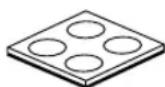
Non-skid pads
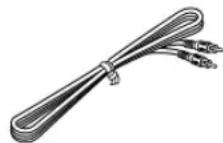
Subwoofer cable (5 m)
A
flowchart
graph TD
    A["Square"] --> B["Arrow to bottom"]
    C["Square"] --> D["Arrow to top"]
    E["Square"] --> F["Arrow to bottom"]
B
flowchart
graph TD
    A["Square"] --> B{Decision}
    B --> C["Circle"]
    D["Square"] --> E["Circle"]
    E --> F["Circle"]
    B --> G["Arrow"]
    C --> H["Arrow"]
    F --> I["Arrow"]
C
flowchart
graph TD
    A[" "] --> C[" "]
    B[" "] --> C[" "]
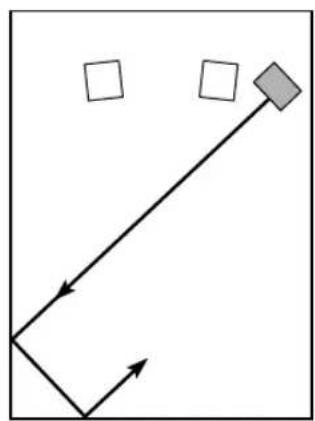
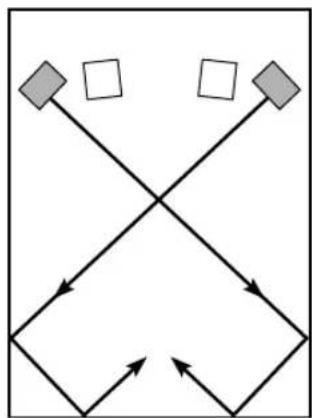
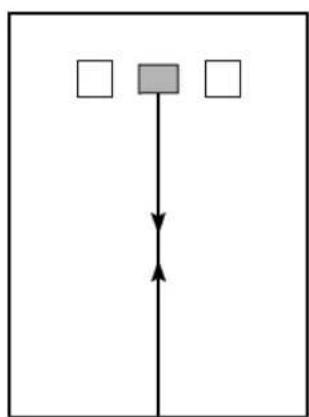
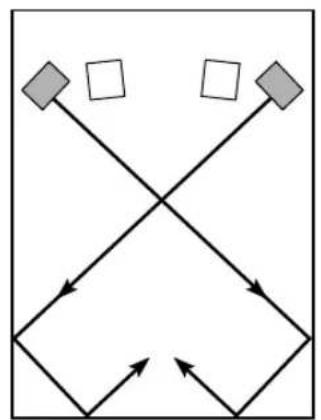
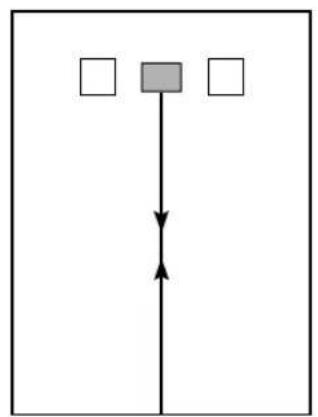
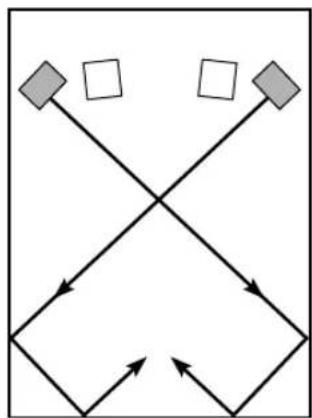
( : subwoofer, : front speaker)
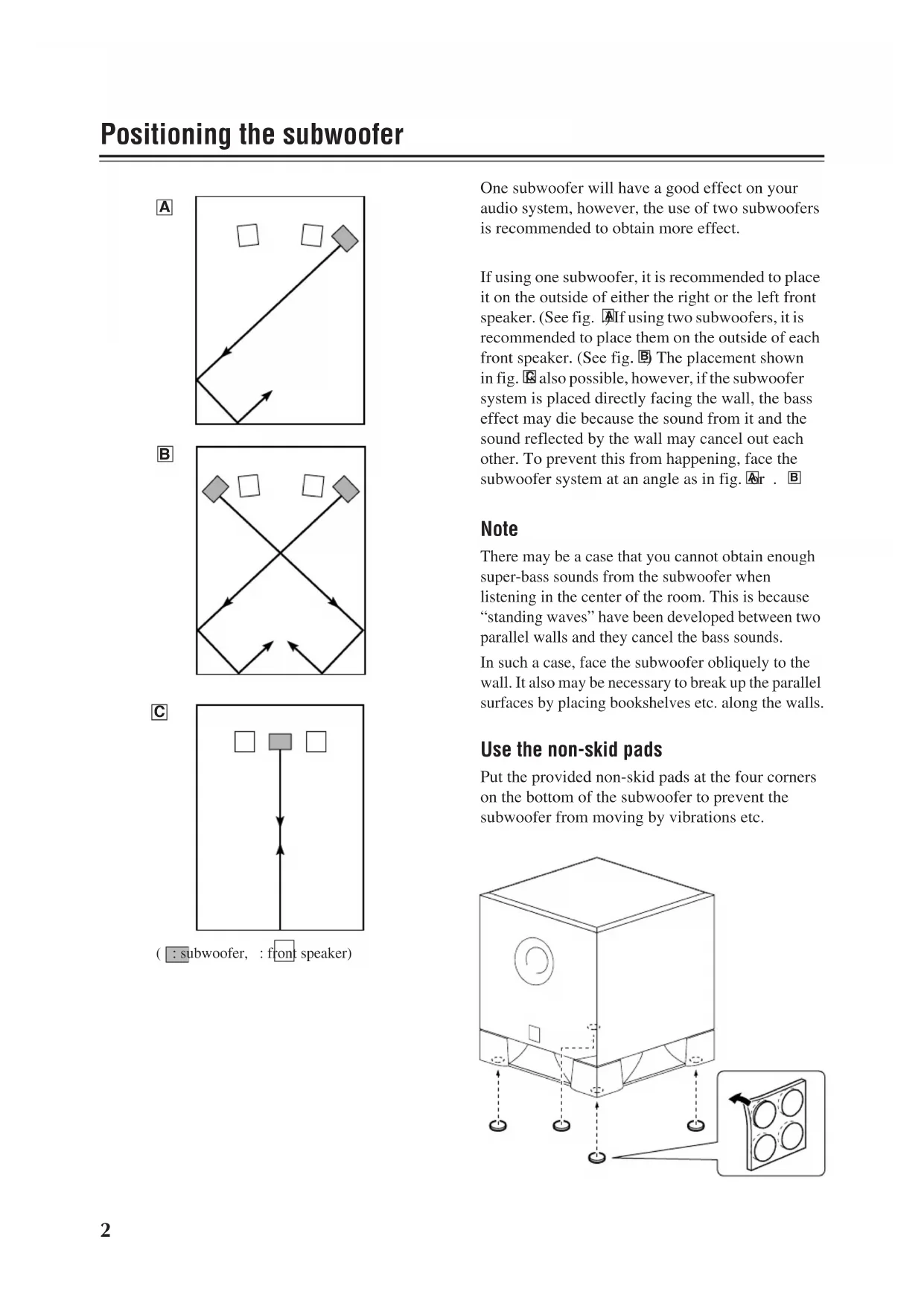
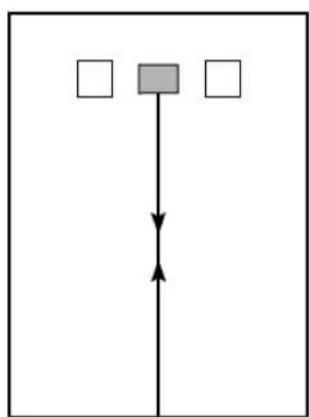
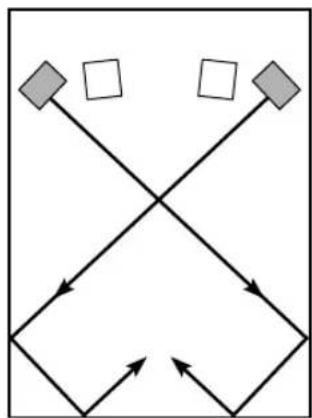
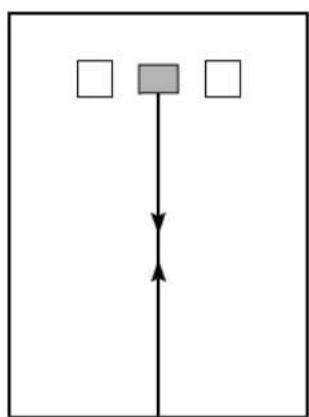
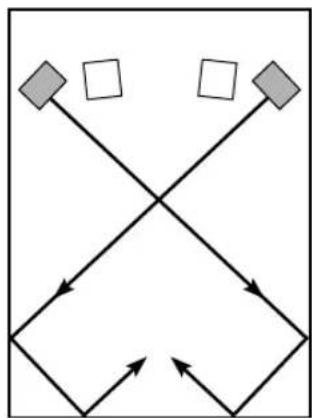
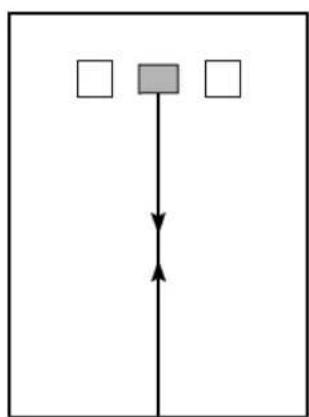
One subwoofer will have a good effect on your audio system, however, the use of two subwoofers is recommended to obtain more effect.
If using one subwoofer, it is recommended to place it on the outside of either the right or the left front speaker. (See fig. A) If using two subwoofers, it is recommended to place them on the outside of each front speaker. (See fig. B) The placement shown in fig. C also possible, however, if the subwoofer system is placed directly facing the wall, the bass effect may die because the sound from it and the sound reflected by the wall may cancel out each other. To prevent this from happening, face the subwoofer system at an angle as in fig. Ar . B
Note
There may be a case that you cannot obtain enough super-bass sounds from the subwoofer when listening in the center of the room. This is because “standing waves” have been developed between two parallel walls and they cancel the bass sounds.
In such a case, face the subwoofer obliquely to the wall. It also may be necessary to break up the parallel surfaces by placing bookshelves etc. along the walls.
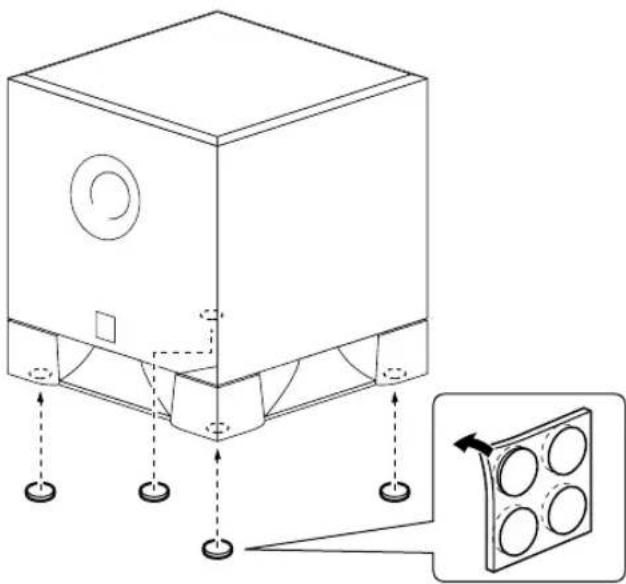
Use the non-skid pads
Put the provided non-skid pads at the four corners on the bottom of the subwoofer to prevent the subwoofer from moving by vibrations etc.
natural_image
Technical line drawing of a mechanical housing with mounting holes and a magnified inset showing a component with four circular holes (no text or symbols)Caution: Plug the power cables for the sub-woofer and other audio/video components into an AC outlet only after you complete all other connections.
Basic connection example
Connect a subwoofer cable to the output jack of your AV amplifier and to the INPUT jack of the subwoofer.
Amplifier (The rear panel of various amplifiers may differ in appearance.)
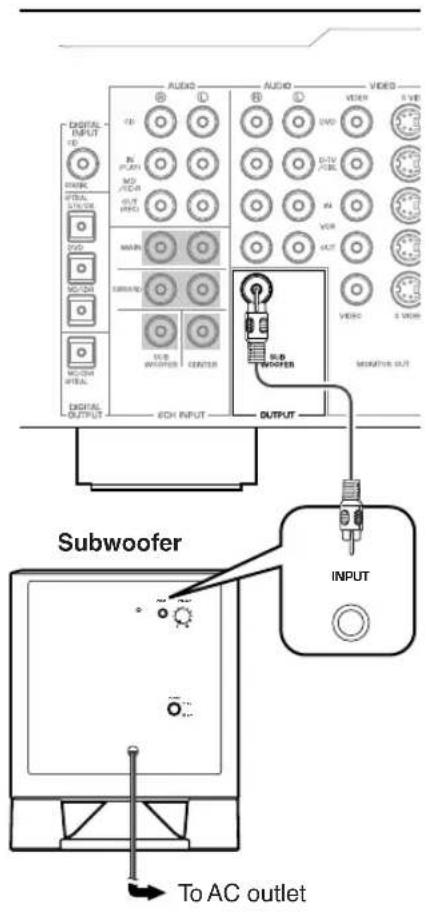
Connecting components and the subwoofer to AC power
After you complete a subwoofer connection, plug the amplifier, other audio/video component, and the subwoofer into an AC outlet of appropriate voltage.
VOLTAGE SELECTOR
(For China, Korea, Asia and General models) The voltage selector switch on the rear panel of this unit must be set for your local main voltage BEFORE plugging this unit into the AC main supply. Voltages are 110–120/220–240 V AC, 50/60 Hz.
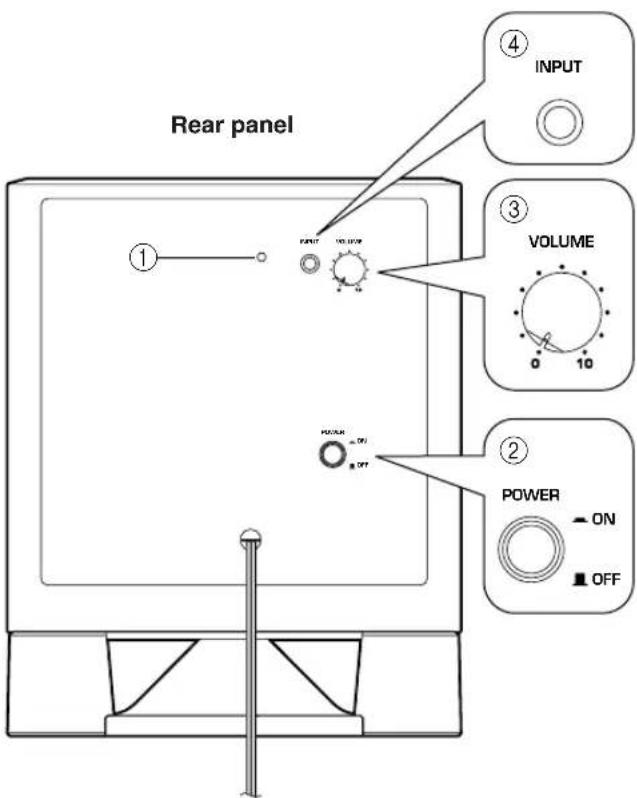
①Power indicator
Lights up GREEN when the POWER switch (②) is turned ON; turns off when the POWER switch is turned OFF.
② POWER switch
Press this switch to the ON position to turn on the power to the subwoofer. When the power of the subwoofer is on, the power indicator (①) on the rear panel lights up green. Press this switch again to set it to the OFF position to turn off the power of the subwoofer.
③VOLUME control
Adjusts the volume level. Turn the control clockwise to increase the volume, and counterclockwise to decrease the volume.
④INPUT terminal
Input terminal for line level signals from the amplifier.
Pre-adjusting the subwoofer volume
Before you use the subwoofer, first adjust the volume balance between the subwoofer and the front speakers by following the procedure below.
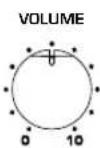
- Set the VOLUME control to minimum (0).
- Turn on the power to all other components.
- Press the POWER switch to the ON position. The power indicator on the rear panel lights up green.
- Play a source that contains low-frequency sounds. Adjust the amplifier's volume control to the desired listening level.
- Increase the volume gradually to adjust the volume balance between the subwoofer and the front speakers. To enjoy natural bass sound, keep the subwoofer volume at a level where it is barely distinguishable from other speakers.
- Adjust the volume of the entire sound system using the amplifier's volume control.
Note: It is recommended that you set the VOLUME control about in the middle position when using the subwoofer in a multi channel home theater system.
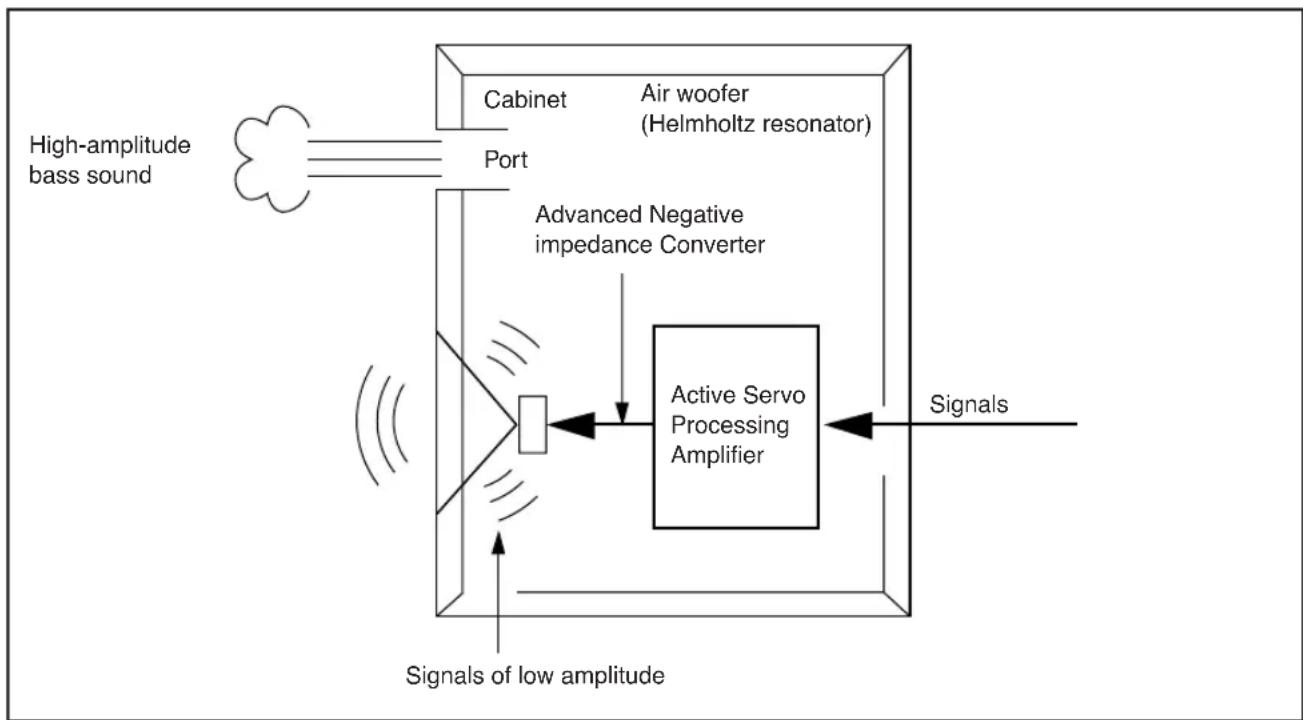
The theory behind Yamaha Active Servo Technology is based on two factors: the Helmholtz resonator and negative-impedance drive. Active Servo Processing speakers reproduce the bass frequencies through an “air woofer,” which is a port or opening in the speaker’s cabinet.
This opening is used instead of, and performs the functions of, a woofer in a conventionally designed speaker system.
Thus, signals of low amplitude within the cabinet can, according to Helmholtz resonance theory, be output from this opening as waves of great amplitude if the size of the opening and the volume of the cabinet are in proportion to satisfy a certain ratio. In order to accomplish this, moreover, the amplitudes within the cabinet must be both precise and of sufficient power because these amplitudes must overcome the “load” presented by the air in the cabinet.
This problem is resolved by a design in which the amplifier supplies special signals. If the electrical resistance of the voice coil could be reduced to zero, the movement of the speaker unit would become linear with respect to signal voltage. To accomplish this, the system utilizes a special negative-impedance output-drive amplifier that subtracts the output impedance of the amplifier.
By employing negative-impedance drive circuits, the amplifier is able to generate precise, low-amplitude, low frequency waves with superior damping characteristics.
These waves are then radiated from the cabinet opening as high-amplitude signals. The system can, therefore, by employing the negative-impedance output drive amplifier and a speaker cabinet featuring a Helmholtz resonator, reproduce an extremely wide range of frequencies with outstanding sound quality and low distortion.
The features described above combine to create the fundamental structure of conventional Yamaha Active Servo Technology.
Our new Active Servo Technology — Advanced Yamaha Active Servo Technology — adopts Advanced Negative Impedance Converter (ANIC) circuits, which allow the conventional negative impedance converter to dynamically vary to select an optimum value for speaker impedance variation. With these new ANIC circuits, Advanced Yamaha Active Servo Technology provides a more stable performance and improved sound pressure compared to conventional Yamaha Active Servo Technology, resulting in more natural and dynamic bass reproduction.
flowchart
graph TD
    A["High-amplitude bass sound"] --> B["Cabinet"]
    B --> C["Air woofer (Helmholtz resonator)"]
    C --> D["Port"]
    D --> E["Advanced Negative impedance Converter"]
    E --> F["Active Servo Processing Amplifier"]
    F --> G["Signals"]
    G --> H["Signals of low amplitude"]
Refer to the chart below if the unit does not function properly. If the problem you are experiencing is not listed, or if the instructions fail to help you resolve the problem, disconnect the power cord and contact your authorized Yamaha dealer or service center.
| Problem Cause Remedy | ||
| Power is not supplied even though the POWER switch is set to the ON position. | The power plug is not securely connected. | Turn the power switch OFF, then connect the power plug securely. |
| No sound. | The VOLUME control is set to 0. Turn | the VOLUME control to the right (clockwise). |
| A subwoofer cable is not connected securely. | Connect a subwoofer cable securely. | |
| Sound level is too low. | You are playing a sound source that includes inadequate bass frequencies. | Play a sound source that includes more bass frequencies. |
| The sound level has been diminished by standing waves. | Reposition the subwoofer, or break up the parallel wall surface by placing bookshelves or other large objects along the wall. |
YST-SW011
Type.....Advanced Yamaha Active Servo Technology
Driver ...... 20 cm (8") cone woofer Magnetically shielded type
Output Power 50 W
Dynamic Power....100 W, 5 Ω
Input Impedance....12 kΩ
Frequency Response 30 Hz – 200 Hz
Input Sensitivity.....50 mV (50 Hz, 50 W/5 Ω)
Power Supply
[U.S.A. and Canada models] ...... AC 120 V, 60 Hz
[Australia model]...... AC 240 V, 50 Hz
[China model] .... AC 110–120/220–240 V, 50/60 Hz
[Korea model] .... AC 110–120/220–240 V, 50/60 Hz
[U.K. and Europe models]...... AC 230 V, 50 Hz
[Asia model]..... AC 110–120/220–240 V, 50/60 Hz
[General model].. AC 110–120/220–240 V, 50/60 Hz
Power Consumption....45 W
Dimensions (W x H x D)
290 mm × 360 mm × 303 mm
Weight.... 10 kg
Frequency characteristics
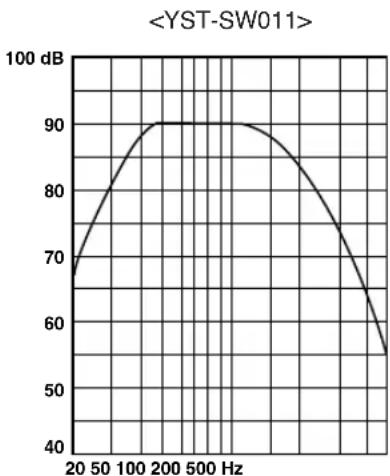
line
| Frequency (Hz) | Value | | -------------- | ----- | | 20 | 70 | | 50 | 80 | | 100 | 90 | | 200 | 90 | | 500 | 85 | | 1000 | 75 | | 2000 | 65 |Frequency response graph*
*This diagram does not depict actual frequency response characteristic accurately.
Specifications are subject to change without notice.
Advanced Yamaha Active Servo Technology 5
Dépannage 6
Fiche technique 7
flowchart
graph TD
    A["Square"] --> B["Arrow to bottom"]
    C["Square"] --> D["Arrow to top"]
    E["Square"] --> F["Arrow to bottom"]
B
flowchart
graph TD
    A["Square"] --> B{Loop}
    B --> C["Square"]
    B --> D["Square"]
    C --> E["Loop"]
    D --> E
    E --> F["Square"]
C
flowchart
graph TD
    A[" "] --> C[" "]
    B[" "] --> C[" "]
natural_image
Technical line drawing of a mechanical housing with mounting holes and a magnified inset showing internal components (no text or symbols)Type ...... "Advanced Yamaha Active Servo Technology"
Dimensions (L x H x P)
290 mm x 360 mm x303mm
Poids 10 kg
Advanced Yamaha Active Servo Technology 5
flowchart
graph TD
    A[" "] --> C[" "]
    B[" "] --> C[" "]
( : subwoofer, : frontlautsprecher)
natural_image
Technical line drawing of a mechanical housing with mounting holes and a magnified inset showing a multi-hole panel (no text or symbols)Typ...... "Advanced Yamaha Active Servo Technology"
Advanced Yamaha Active Servo Technology 5
Felsökning....6
Tekniska data....7
Frekvenskarakteristik 7
Presentation
Egenskaper

Advanced
Y·S·T
Advanced YST
flowchart
graph TD
    A[" "] --> C[" "]
    B[" "] --> C[" "]
natural_image
Technical line drawing of a mechanical housing with mounting holes and a magnified inset showing a multi-hole component (no text or symbols)Advanced Yamaha Active Servo Technology 5
flowchart
graph TD
    A["Square"] --> B["Arrow to bottom"]
    C["Square"] --> D["Arrow to top"]
    E["Square"] --> F["Arrow to bottom"]
B
flowchart
graph TD
    A["Square"] --> B{Decision}
    B --> C["Circle"]
    D["Square"] --> E["Circle"]
    E --> F["Circle"]
    B --> G["Arrow"]
    C --> H["Arrow"]
    F --> I["Arrow"]
C
flowchart
graph TD
    A[" "] --> C[" "]
    B[" "] --> C[" "]
natural_image
Technical line drawing of a mechanical housing with mounting holes and a magnified inset showing internal components (no text or symbols)Dimensioni (L x A x P)
290 mm × 360 mm × 303 mm
Peso 10 kg
Advanced Yamaha Active Servo Technology 5
flowchart
graph TD
    A["Square"] --> B["Arrow to bottom"]
    C["Square"] --> D["Arrow to top"]
    E["Square"] --> F["Arrow to bottom"]
B
flowchart
graph TD
    A["Square"] --> B["Circle"]
    C["Square"] --> D["Circle"]
    B --> E["Loop"]
    D --> E
    E --> F["Arrow Left"]
    E --> G["Arrow Right"]
    F --> H["Arrow Bottom"]
    G --> I["Arrow Top"]
C
flowchart
graph TD
    A[" "] --> C[" "]
    B[" "] --> C[" "]
natural_image
Technical line drawing of a mechanical housing with mounting holes and a magnified inset showing a component with four circular holes (no text or symbols)Advanced Yamaha Active Servo Technology 5
Problemen oplossen 6
flowchart
graph TD
    A["Square"] --> B["Arrow to bottom"]
    C["Square"] --> D["Arrow to top"]
    E["Square"] --> F["Arrow to bottom"]
B
flowchart
graph TD
    A["Square"] --> B{Loop}
    B --> C["Square"]
    B --> D["Square"]
    C --> E["Loop"]
    D --> E
    E --> F["Square"]
C
flowchart
graph TD
    A[" "] --> C[" "]
    B[" "] --> C[" "]
natural_image
Technical line drawing of a mechanical housing with mounting holes and a magnified inset showing internal components (no text or symbols)①Spanningsindicator
This product mainly uses lead-free solder.
© 2005 All rights reserved
YAMAHA ELECTRONICS CORPORATION, USA 6660 ORANGETHORPE AVE., BUENA PARK, CALIF. 90620, U.S.A.
YAMAHA CANADA MUSIC LTD. 135 MILNER AVE., SCARBOROUGH, ONTARIO M1S 3R1, CANADA
YAMAHA ELECTRONIK EUROPA G.m.b.H. SIEMENSSTR. 22-34, 25462 RELLINGEN BEI HAMBURG, GERMANY
YAMAHA ELECTRONIQUE FRANCE S.A. RUE AMBROISE CROIZAT BP70 CROISSY-BEAUBOURG 77312 MARNE-LA-VALLEE CEDEX02, FRANCE
YAMAHA ELECTRONICS (UK) LTD. YAMAHA HOUSE, 200 RICKMANSWORTH ROAD WATFORD, HERTS WD18 7GQ, ENGLAND
YAMAHA SCANDINAVIA A.B. J A WETTERGRENS GATA 1, BOX 30053, 400 43 VÄSTRA FRÖLUNDA, SWEDEN
YAMAHA MUSIC AUSTRALIA PTY, LTD. 17-33 MARKET ST., SOUTH MELBOURNE, 3205 VIC., AUSTRALIA
- Precautions: Read this before operating this unit
- WARNING
- Table of contents
- Introduction
- Features Supplied accessories
- Advanced YST
- QD·Bass
- QD-Bass Technology
- Note
- Use the non-skid pads
- Basic connection example
- Connecting components and the subwoofer to AC power
- VOLTAGE SELECTOR
- ①Power indicator
- ② POWER switch
- ③VOLUME control
- ④INPUT terminal
- Pre-adjusting the subwoofer volume
- YST-SW011
- Power Supply
- Dimensions (W x H x D)
- Frequency characteristics
- Dimensions (L x H x P)
- Presentation
- Egenskaper
- Dimensioni (L x A x P)
- ①Spanningsindicator
Brand : YAMAHA
Model : YSTSW011
Category : Speakers