ELVOX 6611AU - Intercom Vimar - Free user manual and instructions
Find the device manual for free ELVOX 6611AU Vimar in PDF.

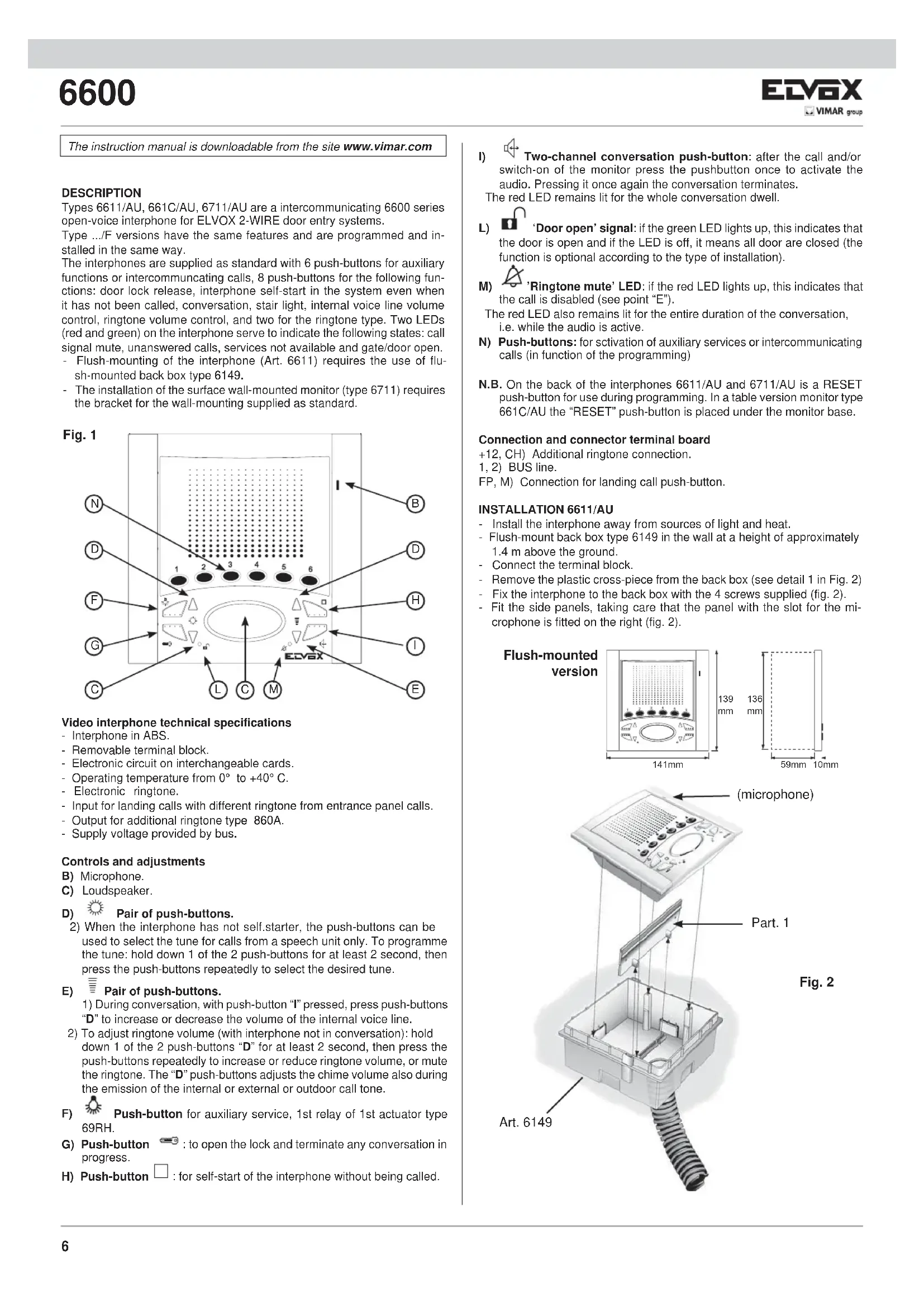


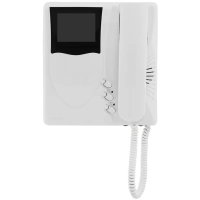
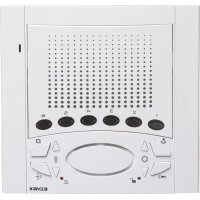
| Product type | Hands-free apartment station for 2-wire video door entry system |
| Brand | Vimar |
| Model | ELVOX 6611AU |
| Dimensions (approx.) | 139 x 141 x 59 mm (flush-mounted) |
| Power supply | Via bus (2-wire line) |
| Operating temperature | 0°C to +40°C |
| Material | ABS |
| Terminal block | Removable |
| Electronic circuit | On interchangeable boards |
| Number of buttons | 6 auxiliary buttons + 8 buttons (door release, auto answer, conversation, light, sound volume, ring volume, melody selection) |
| Visual indication | Red LED (call excluded, conversation) and green LED (door open) |
| Ring tone | Electronic, multiple programmable melodies |
| Main functions | Hands-free call from street panel, intercom communication, door release, auto answer, ring tone exclusion, volume settings |
| Programming | Identification code, secondary code, button programming for intercom calls and auxiliary services |
| Installation | Flush-mounted (box 6149 or brackets R660) or surface wall-mounted |
| Repairability | Interchangeable boards, removable terminal block |
| Maintenance | Clean with a soft, dry cloth |
| Safety | Comply with current electrical installation standards |
| Compatible accessories | Additional ringer art. 860A, timer art. 950C, actuator art. 69RH |
Frequently Asked Questions - ELVOX 6611AU Vimar
User questions about ELVOX 6611AU Vimar
0 question about this device. Answer the ones you know or ask your own.
Ask a new question about this device
Download the instructions for your Intercom in PDF format for free! Find your manual ELVOX 6611AU - Vimar and take your electronic device back in hand. On this page are published all the documents necessary for the use of your device. ELVOX 6611AU by Vimar.
USER MANUAL ELVOX 6611AU Vimar
text_image
1 2 3 4 5 6 EDV6XArt. 6611/AU (6611/AUF), 6711/AU (6711/AUF), 661C/AU (661C/AUF)
Flush-mounted intercom interphone / Wall-mounted intercom interphone / Desktop intercom interphone
Poste encas. intercom. / Poste en saillie intercom. / Poste de table intercom.
text_image
g. 1 N D F G C L C M EDVAX I B D H I Etext_image
Diagram of a device with numbered components and directional arrows indicating flow or movementFig. 2B
natural_image
Close-up of a mechanical component with a coiled spring and threaded base (no visible text or symbols)natural_image
White electronic device with control panel and display screen (no visible text or symbols)Fig. 2C
STABILIZZAZIONE SEGNALE VIDEO
natural_image
Close-up of a mechanical assembly with a vertical rod inserted into a housing (no visible text or symbols)Art. 6611/AU
natural_image
3D rendering of an electronic device with a grid and power connector (no visible text or symbols)Art. 6711/AU
natural_image
Exterior view of a white electronic device housing with an open panel showing internal components (no visible text or symbols)Art. 661C/AU
PROGRAMMAZIONE
The instruction manual is downloadable from the site www.vimar.com
DESCRIPTION
Types 6611/AU, 661C/AU, 6711/AU are a intercommunicating 6600 series open-voice interphone for ELVOX 2-WIRE door entry systems.
Type .../F versions have the same features and are programmed and installed in the same way.
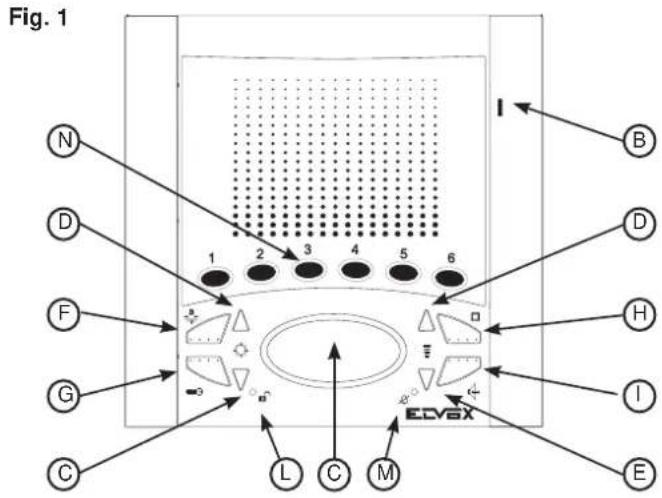
The interphones are supplied as standard with 6 push-buttons for auxiliary functions or intercommunicating calls, 8 push-buttons for the following functions: door lock release, interphone self-start in the system even when it has not been called, conversation, stair light, internal voice line volume control, ringtone volume control, and two for the ringtone type. Two LEDs (red and green) on the interphone serve to indicate the following states: call signal mute, unanswered calls, services not available and gate/door open.
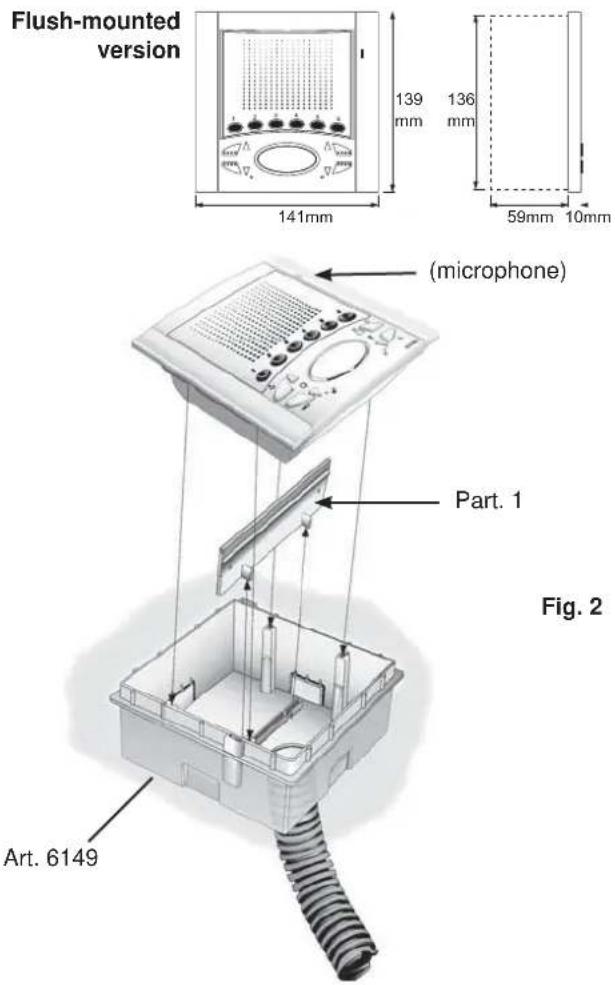
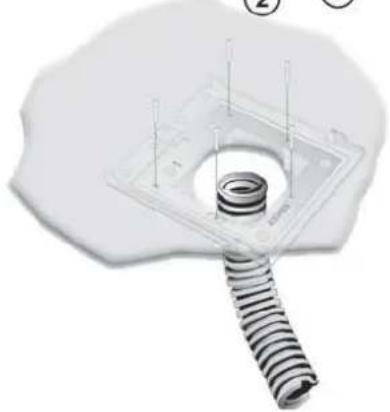
- Flush-mounting of the interphone (Art. 6611) requires the use of flush-mounted back box type 6149.
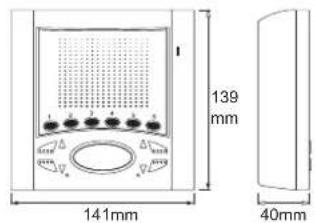
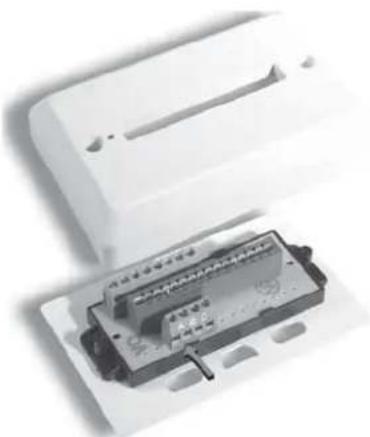
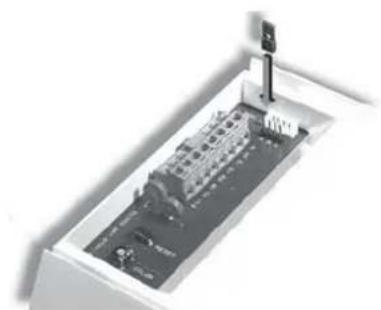
- The installation of the surface wall-mounted monitor (type 6711) requires the bracket for the wall-mounting supplied as standard.
text_image
Fig. 1 N D F G C L C M I B D H I EVideo interphone technical specifications
- Interphone in ABS.
- Removable terminal block.
- Electronic circuit on interchangeable cards.
- Operating temperature from 0° to +40°C.
- Electronic ringtone.
- Input for landing calls with different ringtone from entrance panel calls.
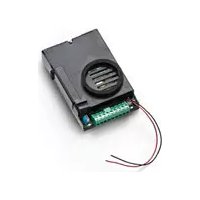
- Output for additional ringtone type 860A.
- Supply voltage provided by bus.
Controls and adjustments
D) Pair of push-buttons.
2) When the interphone has not self.starter, the push-buttons can be used to select the tune for calls from a speech unit only. To programme the tune: hold down 1 of the 2 push-buttons for at least 2 second, then press the push-buttons repeatedly to select the desired tune.
E) Pair of push-buttons.
1) During conversation, with push-button "I" pressed, press push-buttons "D" to increase or decrease the volume of the internal voice line.
2) To adjust ringtone volume (with interphone not in conversation): hold down 1 of the 2 push-buttons "D" for at least 2 second, then press the push-buttons repeatedly to increase or reduce ringtone volume, or mute the ringtone. The "D" push-buttons adjusts the chime volume also during the emission of the internal or external or outdoor call tone.
F) Push-button for auxiliary service, 1st relay of 1st actuator type 69RH.
G) Push-button ☐: to open the lock and terminate any conversation in progress.
H) Push-button □: for self-start of the interphone without being called.
G) Push-button ☐: to open the lock and terminate any conversation in progress. H) Push-button □: for self-start of the interphone without being called.
Two-channel conversation push-button: after the call and/or ch-on of the monitor press the pushbutton once to activate the o. Pressing it once again the conversation terminates.
The red LED remains lit for the whole conversation dwell.

L) 'Door open' signal: if the green LED lights up, this indicates that the door is open and if the LED is off, it means all door are closed (the function is optional according to the type of installation).
M) 'Ringtone mute' LED: if the red LED lights up, this indicates that the call is disabled (see point "E").
The red LED also remains lit for the entire duration of the conversation, i.e. while the audio is active.
N) Push-buttons: for stivation of auxiliary services or intercommunicating calls (in function of the programming)
N.B. On the back of the interphones 6611/AU and 6711/AU is a RESET push-button for use during programming. In a table version monitor type 661C/AU the "RESET" push-button is placed under the monitor base.
Connection and connector terminal board
+12, CH) Additional ringtone connection.
1, 2) BUS line.
FP, M) Connection for landing call push-button.
INSTALLATION 6611/AU
- Install the interphone away from sources of light and heat.
- Flush-mount back box type 6149 in the wall at a height of approximately 1.4 m above the ground.
- Connect the terminal block.
- Remove the plastic cross-piece from the back box (see detail 1 in Fig. 2)
- Fix the interphone to the back box with the 4 screws supplied (fig. 2).
- Fit the side panels, taking care that the panel with the slot for the microphone is fitted on the right (fig. 2).
text_image
Flush-mounted version 139 mm 136 mm 141mm 59mm 10mm (microphone) Part. 1 Art. 6149 Fig. 2INSTALLATION OF TYPE 6611/AU WITH BRACKETS TYPE R660
- Install the interphone away from sources of light and heat
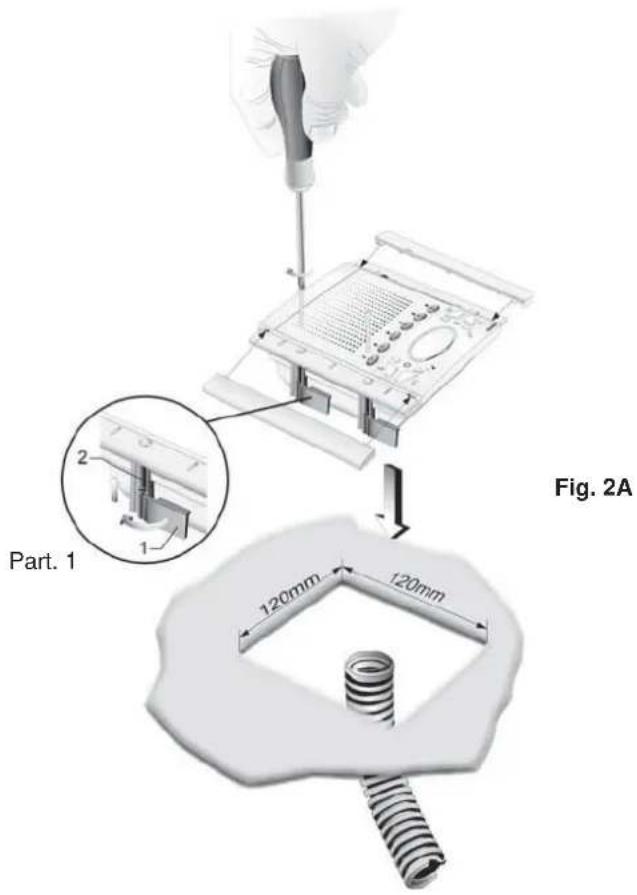
- Make a 120x120mm (nearly) hole in the plasterboard wall at 1,40 m. high from the floor to the lower border.
- Fix the bracket to the intephone as indicated in figure, keeping the cursors well aligned to the intephone sides.
- Connect the terminal block.
- Insert the intephone inside the wall in plasterboard.
- Tighten the screws so as the cursors can get closer to the plasterboard wall.
- By screwing, the cursors should get aligned orthogonally to the interphone.
- Insert the side grids, paying attention that the one with the slot for the microphone must be inserted on the right.
text_image
Part. 1 120mm 120mm Fig. 2AINSTALLATION OF TYPE 6711/AU
- Install the interphone away from sources of light and heat.
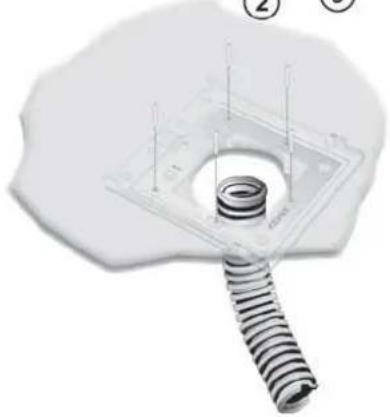
- Fix the intephone fixing plate at 1,40m. from the ground level to the lower border.
- Connect the terminal block.
- Insert the intephone according to the 1 and 2 arrow direction
- To remove the intephone from the plate hook, operate with a screw driver on the security lock (placed on the upper side and behind the monitor), and remove it according to the 3 and 4 arrow direction.
Surface wall-mounting version
text_image
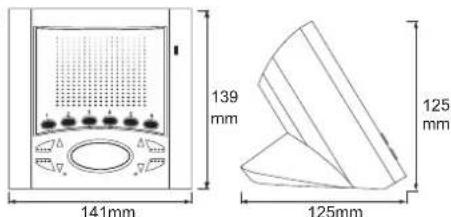
139 mm 141mm 40mm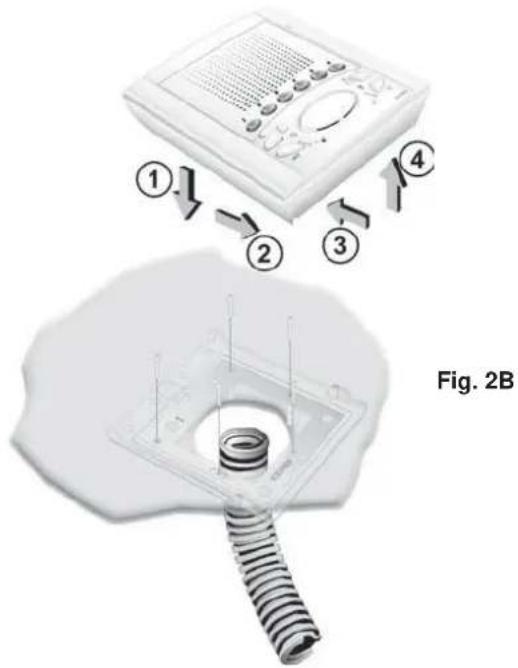
text_image
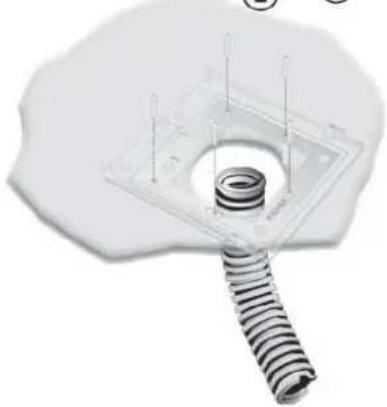
① ② ③ ④ Fig. 2BINSTALLATION OF TYPE 661C/AU
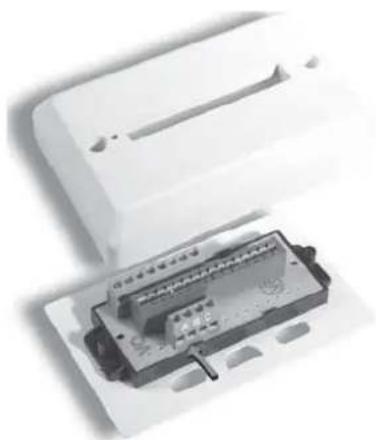
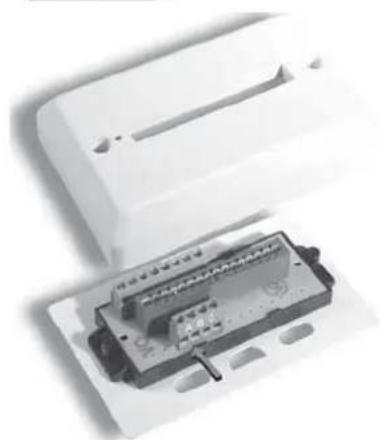
- Fix the stub of the surface wall-mounted interphone and hook the interphone to the stub.
- Connect the terminal block.
Table version
text_image
139 mm 141mm 125mm 125mm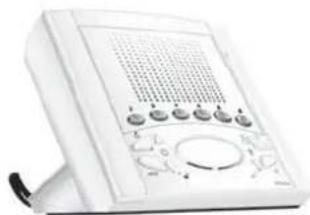
natural_image
White portable electronic device with control panel and buttons (no visible text or symbols)Fig. 2C
VIDEO SIGNAL STABILISATION
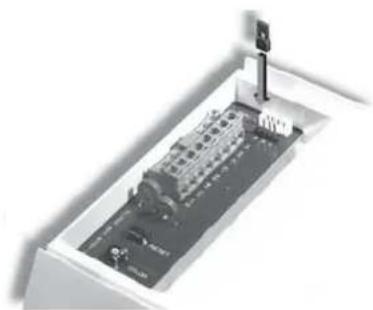
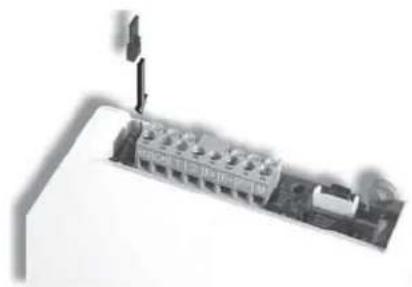
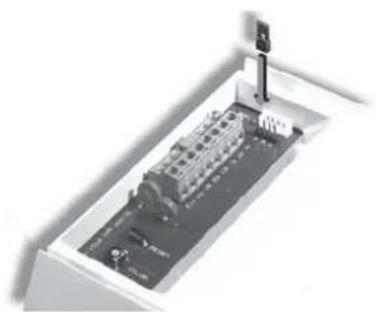
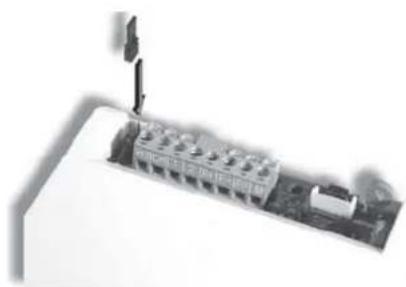
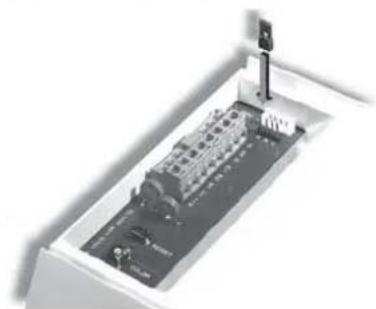
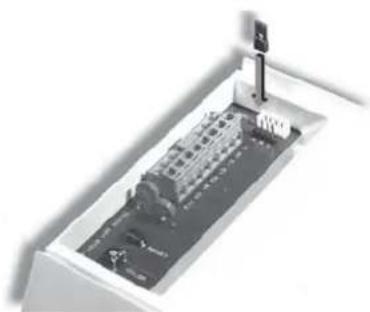
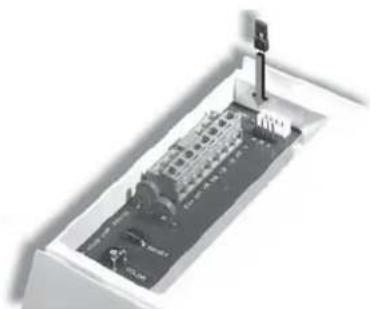
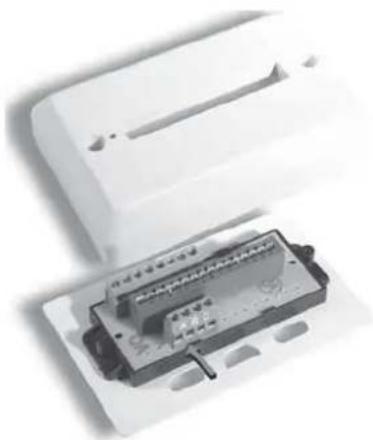
On the rear of interphone type 6611/AU and 6711/AU there are some connectors (A-B-C) for the video signal stabilization.
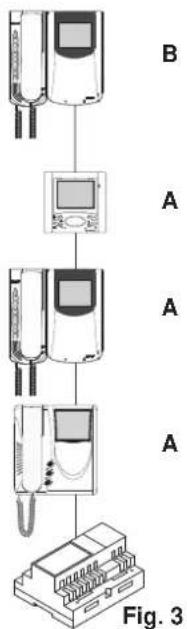
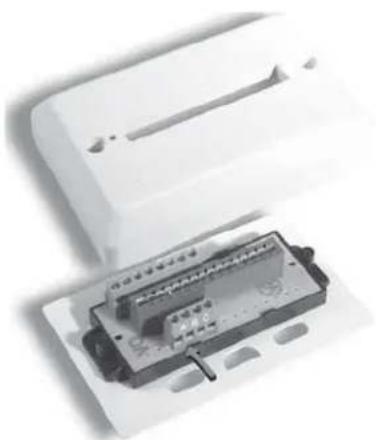
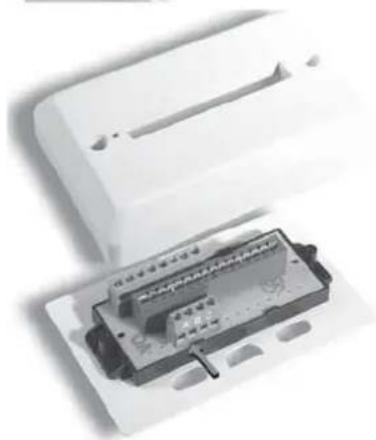
For the table version interphone type 661C/AU the video signal stabilization is carried out by means of a jumper on terminal block A-B-C present on the stud. This jumper must be used in installations with several appliances (interphones and monitors) connected in series (Fig. 3).
In series configuration displace the jumper (only in the last set) into "B" position and keep the jumpers of other interphones or monitors in the initial position, i.e. "A" (Fig. 3).
For other wiring configurations see note: "Bus termination" installations" provided below, in the wiring diagrams section.
flowchart
graph TD
    A["Device 1"] --> B["Device 2"]
    B --> C["Device 3"]
    C --> D["Device 4"]
    style A fill:#f9f,stroke:#333
    style B fill:#ccf,stroke:#333
    style C fill:#cfc,stroke:#333
    style D fill:#fcc,stroke:#333
natural_image
Exterior view of a modern office building (no signage)Art. 6611/AU
natural_image
3D rendering of an electronic device with a circuit board and connector (no visible text or symbols)Art. 6711/AU
natural_image
Exterior view of a white plastic enclosure with internal components and mounting holes (no visible text or symbols)Art. 661C/AU
PROGRAMMING
There are three monitor programming modes: assignment of an identification code or call code (indispensable), assignment of a secondary identification code (for interphones associated with a master interphone), programming of push-buttons for auxiliary services and intercommunicating calls (when necessary).
Programming must be performed with the system switched on, without active communication and only after connecting the interphones/video interphones to the system and programming the panels.
Programming the identification code
The identification code is to be programmed by means of an entrance panel (main- "Master"), present on the installation and already configured. The video-interphone is supplied without associated identification code. To check this, press the "G" push-button and the video-interphone will emit a triple "Beep".
Attention: during the interphone/video interphone identification code programming you have 30 seconds from the moment you enter the programming in the interphone/video interphone and the moment you press the call push-button on the panel or you send the code.
Programming phase:
1) Press and hold down "I".
2) Press and hold down also "H" together with "I".
3) Wait for nearly 3 seconds until the red led "M" flashes.
4) Now the microprocessor is physically reset.
5) Release both push-buttons "I" and "H". You have now 5 seconds to carry out any of the described programmings.
6) Press and hold down the "G" lock push-button.
7) After nearly 2 seconds the video-interphone emits a high-pitched tone, it self-starts and gets in communication with the entrance panel.
8) On the entrance panels with push-buttons press the call push-button corresponding to the video-interphone, on the alphanumeric entrance panel, on the contrary, enter the call code and press "☐".
9) If on the installation there is already an interphone / video-interphone with the same associated identification code, the panel emits a low-pitched tone and you must repeat the operation from the beginning.
10) If not, the code is associated to the video-interphone and the communication is terminated.
Programming the secondary identification code
The programming of the secondary identification code is required only when you want more than a video- interphone to ring at the same time with the same push-button or call code. The video-interphones which must ring simultaneously are associated with the same push-button to the same group. The "master" interphone / video-interphone is programmed in first place by means of the previous procedure: "programming the identification code". The additional interphones / video-interphones are programmed with the secondary identification code (see table shown in the wiring diagram section). A maximum of three audio door entry units plus one group master can be associated with the same group, without the need for programmer Type 950C or SaveProg.
Programming phase:
1) Press and hold down "I".
2) Press and hold down also "H" together with "I".
3) Wait for nearly 3 seconds until the red led "M" flashes.
4) Now the microprocessor is physically reset.
5) Release both push-buttons "I" and "H"
6) Press and hold down the "G" door lock and the "H" self-start push-buttons simultaneously.
7) After 2 seconds the video-interphone emits a high-pitched tone and gets in communication with the entrance panel.
8) Release the door lock "G" and the self-start "G" push-buttons.
9) On the push-buttons entrance panels press the call push-button corresponding to the main (already programmed) interphone / video-interphone, on the alphanumeric entrance panel, on the contrary, enter the same call code of the "Master" interphone / video-interphone and press "☐".
10) If on the installation there is already an interphone / video-interphone with the same associated identification code, the panel emits a low-pitched tone and you must repeat the operation from the beginning.
11) Once the secondary identification code is associated to the video-interphone, the communication is terminated.
To know the number assigned see table shown in the wiring diagram section.
Programming the push-buttons
The video-interphone is supplied with 3 push-buttons for the following functions: lock release, self-start and "stair light" auxiliary service, which activates the 1st relay of the 1st actuator (type 69HR), if connected to the installation and with other 6 push-buttons for intercommunicating calls or auxiliary services. To change the operation type of push-buttons it is necessary to use programmer type 950C or SaveProg, with the exception of the assignation of the functions for the intercommunicating calls and self-start to a specific entrance panel.
Programming the push-buttons for the intercommunicating calls (With series 8870, Giotto, Petrarca raise the handset of the interphone / video-interphone to call. On the 6600 series keep pressed the talk / listen push-button "I").
Programming phase:
1) Press and hold down "I".
2) Press and hold down also "H" together with "I".
3) Wait for nearly 3 seconds until the red led "M" flashes.
4) Now the microprocessor is physically reset.
5) Release both push-buttons "I" and "H"
6) Press and hold down the "N" push-button to be programmed.
7) After 2 seconds the video-interphone emits a high-pitched tone, while the other interphone / video-interphone emits a three-tone ascending scale.
8) Release the "N" push-button related to the intercommunicating call.
9) On the called interphone / video-interphone (the one with the three-tone scale) press one of the push-buttons programmed as door lock or F1 or F2 or the auxiliary one.
10) A high-pitched tone confirms the end of the procedure.
Repeat the procedure also for the other interphones / video-interphones ad possible intercommunicating call push-buttons.
NOTE: On video door entry units Type 6611/AU, 661C/AU, 6711/AU with the same procedure it is also possible to program a push-button "N".
Programming the self-start push-button to a specific entrance panel.
Programming phase:
1) Press and hold down "I".
2) Press and hold down also "H" together with "I".
3) Wait for nearly 3 seconds until the red led "M" flashes.
4) Now the microprocessor is physically reset.
5) Release both push-buttons "I" and "H"
6) Press and hold down the "N" push-button to be programmed.
7) After nearly 2 seconds the video-interphone emits a high-pitched tone.
8) Release the push-button "N" related to the self-start.
9) On the entrance panels with push-buttons press the call push-button corresponding to the video -interphone; on the alphanumeric entrance
panel, on the contrary, enter the call code and press “☐”.
10) A high-pitched tone will confirm the end of the procedure.
NOTE: On video door entry units Type 6611/AU, 661C/AU, 6711/AU with the same procedure it is also possible to program a push-button "N".
Restoring the default values of push-buttons
Programming phase:
1) Press and hold down "I".
2) Press and hold down also "H" together with "I".
3) Wait for nearly 3 seconds until the red led "M" flashes.
4) Now the microprocessor is physically reset.
5) Release both push-buttons "I" and "H"
6) Press and hold down the push-button to be restored to its default setting.
7) After 2 seconds the video-interphone emits a high-pitched tone.
8) Release the push-buttons and press again the push-button to restore to its default setting.
NOTE: On video door entry units Type 6611/AU, 661C/AU, 6711/AU with the same procedure it is also possible to program a push-button "N".
Deleting all settings
This procedure is recommended when you want to change the ID of a previously programmed video-interphone without retaining its programming parameters.
Programming phase:
1) Press and hold down "I".
2) Then press and hold down also "H" together with "I".
3) Wait for nearly 3 seconds until the red led "M" flashes.
4) Now the microprocessor is physically reset.
5) Release both push-buttons "H" and "I"
6) Press and hold down the self-start push-button "H".
7) After 2 seconds the video-interphone emits a continuous tone for two seconds.
8) Release the self-start push-button "H".
9) During the long tone press the lock push-button "G".
If the deletion procedure was successful, press the lock push-button "G" and the video-interphone will emit a triple "BEEP".
OPERATION
Calls from an entrance panel, intercommunicating calls and landing calls are differentiated by means of different tones.
Landing calls
Calls from entrance panels do not follow the pressing of the call push-button but are generated internally by the video interphone. The call time dwell or cycle consists of a ringtone of 1 second and a pause of 2 seconds, repeated twice (default setting of entrance panel). The duration of "Ding-Dong" and "Ding-Dong-Dang" ringtones does not correspond to the time dictated by the call cycle but to the natural duration of the ringtone. To answer, press and release push-button "I". If push-button "I" has already been pressed during the call, release it and press it again. The call answer time (30 s) and the conversation time (2 minutes by default) are set in the entrance panel parameters. Once the conversation time has elapsed, conversation can be continued if the call is made again within 10 s, from the same entrance panel. During conversation, the audio can be interrupted momentarily (maximum 5 s) by pressing the "I" push-button. To resume conversation, press the conversation push-button again within 5 s, otherwise communication is lost. Press push-button "I" to terminate the conversation. The red LED "M" remains lit while the audio is active.
Intercommunicating call.
Press the intercommunicating push-button, if programmed, for the interphone/video interphone to be called. The loudspeaker of the calling video interphone will emit a ringing tone (if the call is possible) or an engaged tone (if the call is not possible). On the called interphone/video interphone the ringtone starts sequentially at intervals of 1 s ringing and 4 s pause. The maximum duration of the call is 30 s (6 cycles). If you wish to interrupt the call, press the conversation push-button "I" before an answer is received from the called device. To answer a call, lift the handset on the called interphone/video interphone, or press the conversation push-button. When answered, the video interphone enters direct communication with the called device. Maximum duration of conversation is 5 minutes. When the conversation time has elapsed, the user can continue without replacing the handset if a new call is made within 10 s. Calls from the entrance panel have priority over intercommunicating calls.
Denied calls.
The chime exclusion is indicated by the permanent lighting of the red LED "M". If calls are made from the entrance panel to the video interphone when the call mute is enabled, they are denied. A denied call causes the red LED "M" to briefly switch off according to the number of times calls are denied (maximum 4 denied calls). The signal is repeated every 10 s (approx.). Deletion of denied calls is by re-enabling the ringtone, resetting the video interphone or a system power failure. On the entrance panel, a denied call is indicated by means of a dissuasion tone (a series of "Beeps" at 100ms intervals with a pause of 100ms for a total of 5 s). The message "Do not disturb" also appears on entrance panels with display. The programming of push-buttons "G" and "I" can be changed through two different configurations ("HANDS FREE" or with the speak/listen push-button PRESSED), using the programmer type 950C connected to a push-button entrance panel and/or an alphanumeric entrance panel with software version V4 or bigger. See instructions for programmer type 950C and entrance panels or electronic units.
Lock Button
The lock button of each device works in the following manner.
- Device with handset at rest → lock to the last entrance panel with which it has spoken or from which it has been called.
- Device with handset raised but not engaged in a conversation → call to switchboard if the Switchboard flag is YES. Otherwise it goes back to the first case.
- Device with handset raised and engaged in an internal conversation → as in the first case.
- Device with handset raised and engaged in an external conversation or called from entrance panel lock to the entrance panel being spoken with or from which it has been called.
In practice a lock is always activated except when the handset is raised and you immediately press the lock button. This can also be taken to the standard case if the system has no porter switchboard and the Switchboard flag is set on NO.
NOTE: In series 6600 the equivalent operation is to press for an instant the "open voice" push-button and then the lock release. Also in this case the switchboard is called.
text_image
g. 1 N D F G C L C M EDV6X I B D H I Etext_image
Diagram of a device with numbered arrows indicating process steps or componentsFig. 2B
natural_image
3D illustration of a mechanical component with a coiled spring and mounting base (no text or symbols)INSTALLATION ART. 661C/AU
natural_image
White portable electronic device with control panel and buttons (no visible text or symbols)Fig. 2C
STABILISATION DU SIGNAL VIDÉO
flowchart
graph TD
    A["Front Panel"] --> B["Screen"]
    B --> C["Front Module"]
    C --> D["Back-mounted Device"]
Fig. 3
natural_image
Close-up of a mechanical component with a lever and base structure (no visible text or symbols)Art. 6611/AU
natural_image
3D rendering of a mechanical device with internal components and mounting bracket (no visible text or symbols)Art. 6711/AU
natural_image
Exterior view of a white electronic device with a black internal component and mounting holes (no visible text or symbols)Art. 661C/AU
PROGRAMMATION
Programmation code identification
text_image
Abb. 1 N D F G C L C M EDVAX I B D H I Enatural_image
Front view of a white electronic device with control panel and buttons (no visible text or symbols)Abb. 2C
STABILISIERUNG DES VIDEOSIGNALS
natural_image
Close-up of a mechanical component with a mounted tool and housing (no visible text or symbols)Art. 6611/AU
natural_image
3D rendering of an electronic device with a central panel and mounting bracket (no visible text or symbols)Art. 6711/AU
natural_image
Close-up of a white plastic electronic device with a black connector block and mounting holes (no visible text or symbols)Art. 661C/AU
PROGRAMMIERUNG
text_image
Fig. 1 N D F G C L C M EDVAX I B D H I Etext_image
Diagram showing a medical device with labeled parts and a magnified view of the screw being inserted into a housing.Fig. 2B
natural_image
White electronic device with control panel and buttons (no visible text or symbols)Fig. 2C
natural_image
Close-up of a mechanical assembly with a tool inserted, showing no visible text or symbols.Art. 6611/AU
natural_image
3D rendering of a rectangular electronic device with internal components and a vertical support (no visible text or symbols)Art. 6711/AU
natural_image
Exterior view of a white plastic enclosure with internal components (no visible text or symbols)Art. 661C/AU
PROGRAMACIÓN
text_image
Fig. 1 N D F G C L C M I B D H I E EDVaxCaracterísticas técnicas do monitor
text_image
Diagram of a device with numbered parts indicating sequence or components: 1, 2, 3, and 4.Fig. 2B
natural_image
3D illustration of a medical implant with a coiled spring and central screw (no text or symbols)natural_image
White electronic device with control panel and buttons (no visible text or symbols)Fig. 2C
natural_image
Close-up of a mechanical component with a vertical rod inserted, showing no visible text or symbols.Art. 6611/AU
natural_image
3D rendering of a mechanical assembly with no visible text or symbolsArt. 6711/AU
natural_image
Close-up of a white electronic device with a black connector block and mounting holes (no visible text or symbols)Art. 661C/AU
PROGRAMAÇÃO
This note applies to all devices with Due Fili Plus technology equipped with "BUS termination connector or dip-switch", which is identified by the screen-printed letters "ABC" and marked on the wiring diagrams with *.
For correct adaptation of the line, make the setting according to the following rule:
Maintain position "A" if the BUS enters and exits from the device;
Move to position "B" (if Elvox cable) or to position "C" (if CAT5 twisted pair cable) if the BUS line terminates in the device itself.
"A" = NO TERMINATION
“B” = TERMINATION 100 ohm
"C" = TERMINATION 50 ohm
INSTALLATIONS WITH PASSIVE DISTRIBUTOR 692D
(DIN rail version)
ALWAYS use output 1 on distributor type 692D (the only one that has no termination jumper).
For termination of type 692D: If outputs "OUT", "2", "3" or "4" are not used, KEEP the jumper on the "TOUT", "T2", "T3" or "T4" connector. The default "TOUT" connector is in the "100" position (Elvox cable), position it to "50" only if using a CAT5 twisted pair cable.
INSTALLATIONS WITH ACTIVE DISTRIBUTOR 692D/2.
The termination jumper must be positioned on "B" (for Elvox cable) or on "C" (for CAT5 twisted pair cable) IF AND ONLY IF the BUS terminates at the device itself. It must be left on "A" if effecting entry-exit using terminals 1-2 on 692D/2.
\*
TERMINACIÓN DEL BUS
"A" = AUCUNE TERMINAISON
"B" = TERMINAISON 100 ohm
“C” = TERMINAISON 50 ohm
INSTALLATIONS AVEC DISTRIBUTEUR PASSIF 692D
(version "rail DIN")
Single and multiple residence audio door entry system with one external entrance panel (REF. SI649).
A2 - 6600 series interphone
Art. 6611/AU, 661C/AU, 6711/AU
Art. 6601/AU, 660C/AU, 6701/AU
A3- 8870 series interphone Art. 8879
A6 - Tab series interphone Art. 7509. 7509/D
C - Push-button external audio entrance panel
C0 - Alphanumeric external audio entrance panel
F - Power supply unit 6922
K - Door call button
L - 12 Vdc electric lock
P - Door release control
X - Cable 732H, 732I (Twisted Pair)
Wiring diagram of additional electronic ringtone type 860A.
The electronic ringtone type 860A features a two or three-note ringtone connected between terminal 7 and terminal 8. The ringtone must be powered at mains voltage.
Wiring diagram for door calls
When the door call button is pressed, interphone sounds with a different tone from the tone generated by a call from the entrance panel or intercommunicating call.
Wiring diagram for additional mechanical doorbells.
Additional doorbells operating at 12V AC can be connected by using relay type 0170/101 connected as shown in the diagram.
CONFORMITÀ NORMATIVA.
Direttiva EMC
Norme EN 61000-6-1, EN 61000-6-3.
INSTALLATION RULES.
Installation should be carried out observing current installation regulations for electrical systems in the Country where the products are installed.
CONFORMITY.
EMC directive
Standards EN 61000-6-1, EN 61000-6-3.
RÈGLES D'INSTALLATION.
CONFORMITÉ AUX NORMES.
Directive EMC
Normes EN 61000-6-1, EN 61000-6-3.

In order to avoid damage to the

COMMUNICATION AUX UTILISATEURS CONFORMÉMENT À LA DIRECTIVE 2002/96 (RAEE)
e ronment and human health as well any administrative sanctions, any appliance marked with this symbol must be dispos separately from municipal waste, that must be reconsigned to the dealer upon chase of a new one. Appliances marked the crossed out wheelie bin symbol mus collected in accordance with the instruction issued by the local authorities responsible waste disposal.