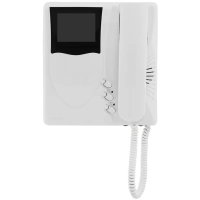
ELVOX 6329C - Intercom Vimar - Free user manual and instructions
Find the device manual for free ELVOX 6329C Vimar in PDF.



| Product Type | Color video monitor (Giotto series) for Due Fili Plus system |
| Brand | Vimar |
| Model | ELVOX 6329C (color) / 6329 (B/W) / 6329CD (with hearing aid function) |
| Screen | TFT LCD 3.5 inches |
| Video standard | PAL, 625 lines, 50 fields/s; bandwidth 4 MHz |
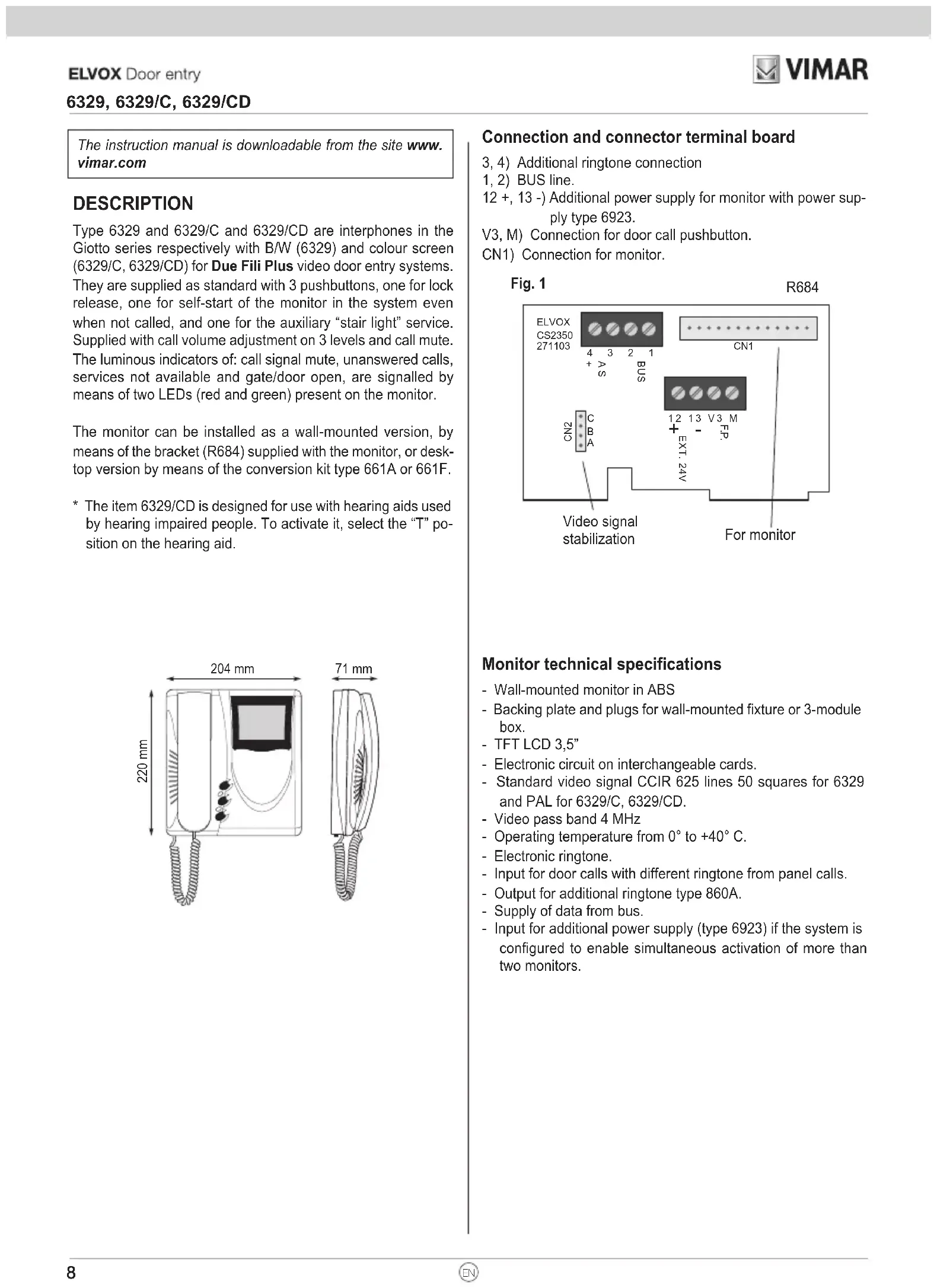
| Dimensions (W x H x D) | 204 x 220 x 71 mm |
| Power supply | Via Due Fili Plus bus; input for additional 24 V power supply (item 6923) if more than 2 monitors are turned on simultaneously |
| Operating temperature | 0 °C to +40 °C |
| Function buttons | Door release (D), auto-on (E), auxiliary service/staircase lighting (F), RESET button (G) |
| Settings | Volume 3 levels + mute, brightness, contrast (B/W) or color (color) |
| LED indicators | Red (ring excluded), green (door open) |
| Main functions | Call from street panel, floor call, intercom between units, door release control, auto-on, call muting, programming of identification codes |
| Compatibility | Due Fili Plus system; compatible with hearing aids (model 6329/CD, selector position T) |
| Installation | Surface-mounted (support bracket R684) or table-top (kit 661A/661F); recommended height 1.40 m from floor |
| Connections | BUS terminal block (1,2), additional ringer (3,4), additional power supply (12+,13-), floor call (V3,M), CN1 connector for monitor |
| Cleaning | Use a soft dry cloth; do not use abrasive products or solvents |
| Safety | Installation by qualified personnel; compliant with EMC directives (EN 61000-6-1/-3); comply with WEEE regulations |
Frequently Asked Questions - ELVOX 6329C Vimar
User questions about ELVOX 6329C Vimar
0 question about this device. Answer the ones you know or ask your own.
Ask a new question about this device
Download the instructions for your Intercom in PDF format for free! Find your manual ELVOX 6329C - Vimar and take your electronic device back in hand. On this page are published all the documents necessary for the use of your device. ELVOX 6329C by Vimar.
USER MANUAL ELVOX 6329C Vimar
natural_image
Line drawing of a wall-mounted mobile phone with attached cables and a side panel (no text or symbols)Giotto
6329, 6329/C, 6329/CD*
flowchart
graph TD
    A["Device Opening"] --> B["Internal Processing"]
    B --> C["Packaging with Buttons"]
    C --> D["Final Packaging with Buttons"]
PROGRAMMAZIONE
The instruction manual is downloadable from the site www.vimar.com
DESCRIPTION
Type 6329 and 6329/C and 6329/CD are interphones in the Giotto series respectively with B/W (6329) and colour screen (6329/C, 6329/CD) for Due Fili Plus video door entry systems. They are supplied as standard with 3 pushbuttons, one for lock release, one for self-start of the monitor in the system even when not called, and one for the auxiliary "stair light" service. Supplied with call volume adjustment on 3 levels and call mute. The luminous indicators of: call signal mute, unanswered calls, services not available and gate/door open, are signalled by means of two LEDs (red and green) present on the monitor.
The monitor can be installed as a wall-mounted version, by means of the bracket (R684) supplied with the monitor, or desktop version by means of the conversion kit type 661A or 661F.
* The item 6329/CD is designed for use with hearing aids used by hearing impaired people. To activate it, select the "T" position on the hearing aid.
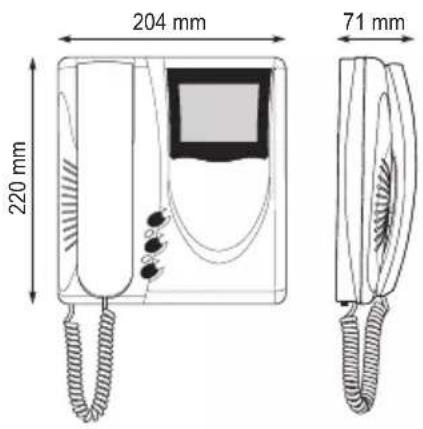
Connection and connector terminal board
3, 4) Additional ringtone connection
1, 2) BUS line.
12 +, 13 -) Additional power supply for monitor with power supply type 6923.
V3, M) Connection for door call pushbutton.
CN1) Connection for monitor.
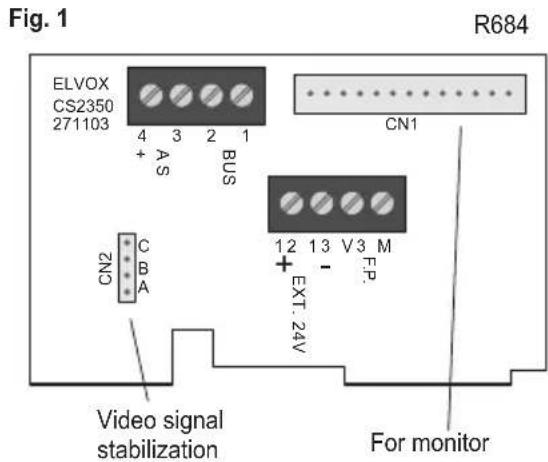
Monitor technical specifications
- Wall-mounted monitor in ABS
- Backing plate and plugs for wall-mounted fixture or 3-module box.
- TFT LCD 3,5"
- Electronic circuit on interchangeable cards.
- Standard video signal CCIR 625 lines 50 squares for 6329 and PAL for 6329/C, 6329/CD.
- Video pass band 4 MHz
- Operating temperature from 0° to +40°C.
- Electronic ringtone.
- Input for door calls with different ringtone from panel calls.
- Output for additional ringtone type 860A.
- Supply of data from bus.
- Input for additional power supply (type 6923) if the system is configured to enable simultaneous activation of more than two monitors.
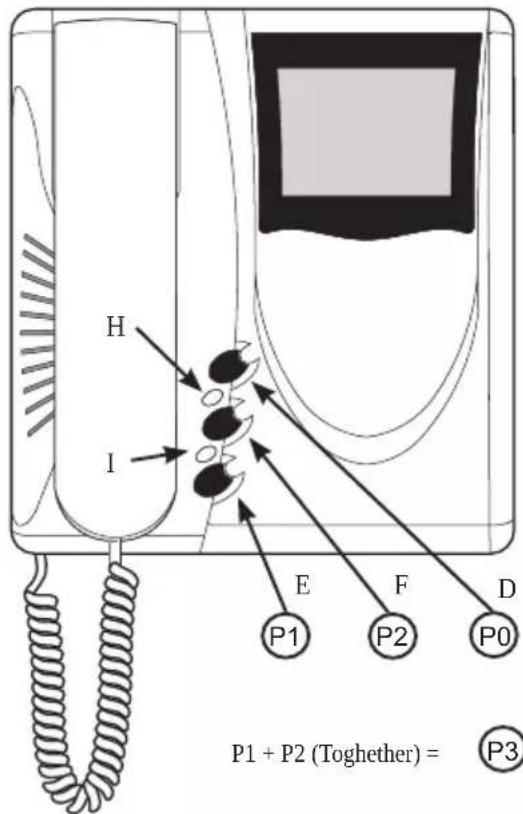
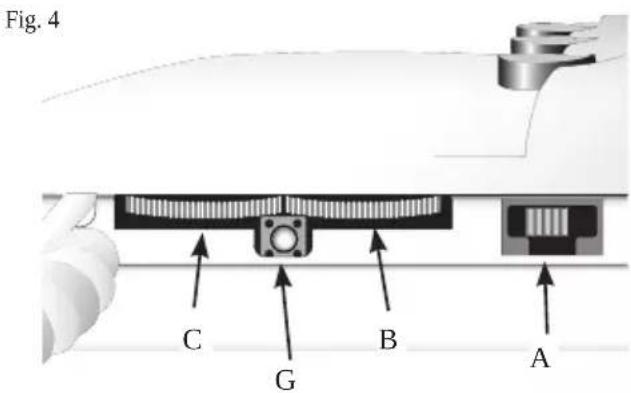
Controls and adjustments (Fig. 3 - 4)
A - Ringtone volume and mute control.
B - Brightness control.
C - Contrast control for 6329 and color for 6329/C, 6329/CD.
D - Lock release pushbutton
E - System self-start pushbutton □.

F - Pushbutton 🌿 for auxiliary service, 1st relay of 1st ac-
tuator type 69RH. When the pushbuttons and are pressed together, a second auxiliary service is activated, 2nd relay of 1st actuator type 69RH.
G - RESET pushbutton for monitor programming.
H - Ringtone mute LED. The fixed light illuminates when the ringtone mute is enabled by means of slider "A" and flashes when calls have been denied (red led).
I - Door open LED. On systems in which this function is used, the LED remains lit permanently when the door/gate is open (green led).
Fig. 3
VIDEO SIGNAL STABILISATOR
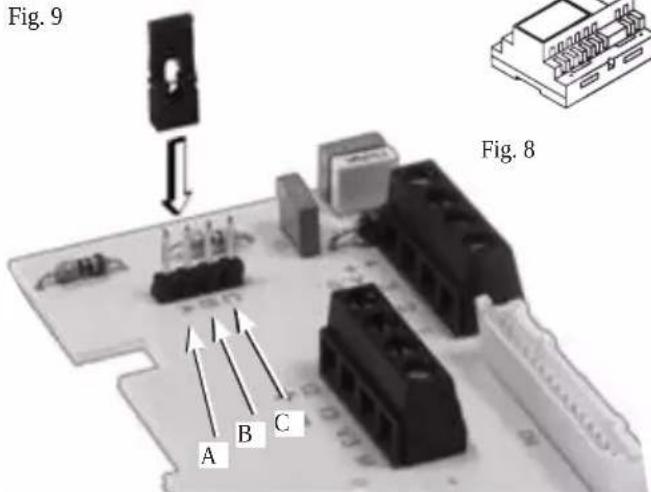
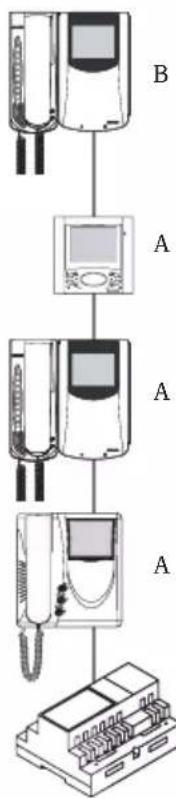
On the monitor intercommunication card there is a connector (A-B-C) and a jumper for the video signal balance (Fig. 9). This jumper must be used on the installations where there are more appliances (interphones or monitors) connected in series (Fig. 8).
Displace the jumper into "B" (Termination 100 Ohm) only on the last set and keep the jumpers on the other appliances in the initial position "A" (No termination).
For other connection configurations see the: TERMINATION TABLE FOR THE TWO WIRE ELVOX INSTALLATIONS" shown in the wiring diagram section.
Fig. 9
flowchart
graph TD
    A["Device 1"] --> B["Device 2"]
    B --> C["Device 3"]
    C --> D["Device 4"]
    D --> E["Device 5"]
INSTALLATION
- Install the monitor away from sources of light and heat.
- Fig. 1 - Fix the monitor mounting plate to the wall with a distance of about 1.4 m between the bottom edge and the ground (Fig. 5).
- Make the connections on the monitor terminal block.
- Fit the monitor following the direction of arrows 1 and 2 (Fig. 6).
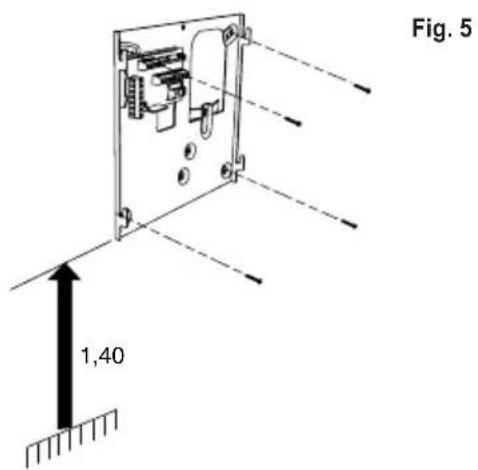
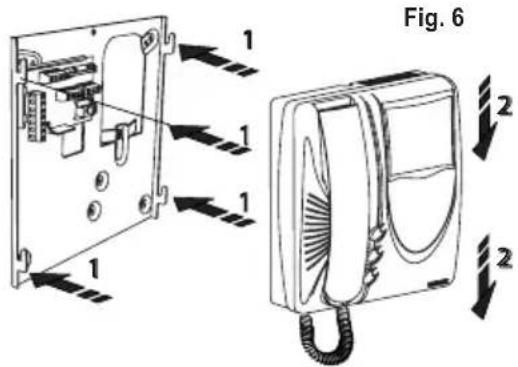
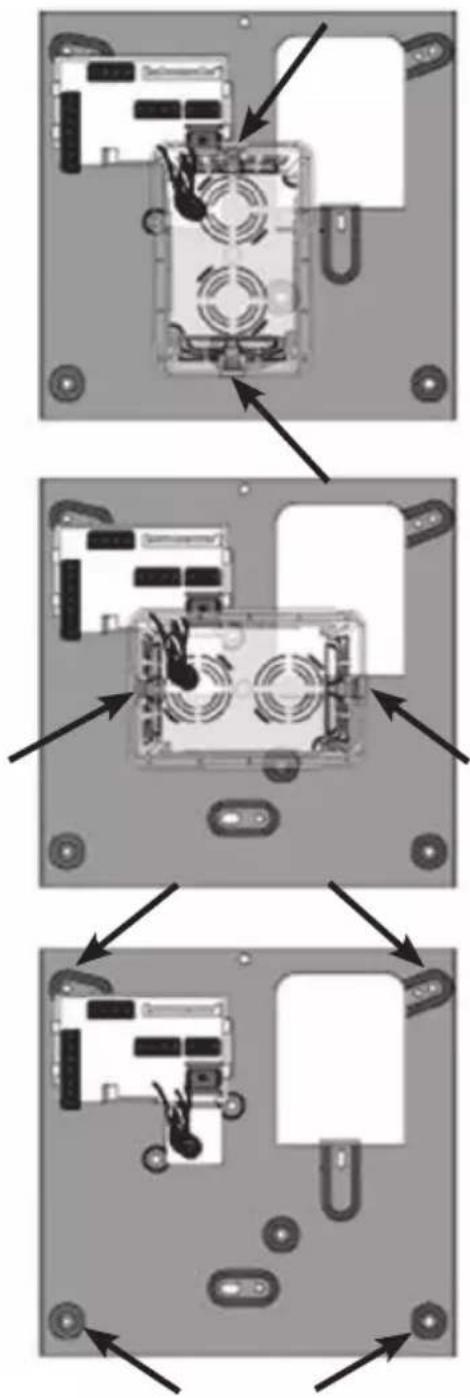
The plate can be mounted using a 3-module flush-mounted back box (horizontal or vertical) or with pressure plugs.
→ Mounting points
Fig. 7
flowchart
graph TD
    A["Device 1"] --> B["Inserting Device"]
    B --> C["Internal Processing"]
    C --> D["Final Assembly"]
    style A fill:#f9f,stroke:#333
    style D fill:#bbf,stroke:#333
Programming
There are three monitor programming modes: assignment of an identification code or call code (indispensable), assignment of a secondary identification code (for monitors associated with a master monitor), programming of pushbuttons for auxiliary services and intercommunicating calls (when necessary).
Programming must be performed with the system switched on, without active communication and only after connecting the interphones/monitors to the system and programming the panels.
N.B. all the programming or deletion phases must be carried out with the handset of the monitor raised.
Identification code programming
The identification code is programmed via an entrance panel (MASTER), already configured and present on the system.
The monitor is supplied without associated identification code. To verify this condition, press the lock release pushbutton and the monitor should emit a triple "Beep".
Attention: during the video interphone identification code programming you have 30 seconds from the moment you enter the programming in the video interphone and the moment you press the call push-button on the panel or you send the code.
Programming phase:
1) Lift the handset 2) Press and hold the RESET pushbutton "G" present below the monitor (see Fig. 4).
3) Press and hold the lock release pushbutton "D" together with the RESET pushbutton "G".
4) Release the RESET pushbutton "G", keeping the lock release pushbutton "D" pressed.
5) After 2 seconds the monitor emits a high tone, the monitor switches on and communication is enabled with the panel.
6) Release the lock pushbutton "D".
7) On pushbutton entrance panels, press the call button for the monitor, while on alphanumeric keypads, enter the call code and press pushbutton "☐".
8) If the system contains a monitor that already has the same associated identification code, the panel emits a low signal and the operation should be repeated from point 2.
9) Otherwise the code is associated with the monitor, communication is terminated and the monitor switches OFF.
Secondary identification code programming
Programming of the secondary identification code is only required when more than one monitor is to be called by means of the same pushbutton or call code. The monitors that ring at the same time are associated with the same group. The "master" monitor is programmed first by means of the "identification code programming" procedure described above, while the additional group monitors are programmed with the secondary identification code (see table shown in the wiring diagram section).
A maximum of three audio door entry units plus one group master can be associated with the same group, without the
need for programmer Type 950C or SaveProg.
In case monitors Petrarca are associated to the interphones, it is necessary to add an additional power supply type 6923 for any possible additional monitor. By using programmer type 950C or SaveProg it is possible to program the activation of chime of all monitors and the switching on of the "master" monitor. Before answering from a secondary video interphone from a secondary video interphone it is possible to switch the respective monitor on by means of the self-start push-button "☐".
Programming phase:
1) Lift the handset 2) Press and hold the RESET pushbutton "G" present below the monitor (see Fig. 4).
3) Press and hold the lock release pushbutton "D" and self-start pushbutton ☐ "E", together with the RESET push-button "G".
4) Release the RESET pushbutton "G", keeping the other two pushbuttons pressed (D end E).
5) After 2 seconds the monitor emits a high tone, the monitor switches on and communication is enabled with the panel.
6) Release the lock release pushbutton "D" and self-start pushbutton "E".
7) On pushbutton entrance panels, press the call button for the "master" monitor, while on alphanumeric keypads, enter the call code of the "master" interphone and press pushbut-
8) When the secondary code is associated with the monitor the communication is terminated and the monitor switches off.
To know the number assigned see table shown in the wiring diagram section.
Pushbutton programming
The monitor is fitted with three pushbuttons for the functions lock release, self-start and the auxiliary service "stair light", which activates the 1st relay of the 1st actuator (type 69RH), if connected to the system.
To change the operating mode of the self-start pushbutton and auxiliary service "stair light" use programmer type 950C or Save-Prog, with the exception of assignment of the functions of inter-communicating calls and self-start service to a specific panel.
During pushbutton programming the ringtone volume control must not be in the ringtone mute position.
Intercommunicating call pushbutton programming " (P2)

Programming phase:
1) Raise the handset of the interphone/video interphone to call (when using series 8870, Giotto, Petrarca). With other versions of series 6600 (without handset) press
and keep pressed the talk/listen push-button

2) Press and hold the RESET pushbutton "G" present below the monitor (see Fig. 4) to be called.
6329, 6329/C, 6329/CD
3) Press and hold the additional pushbutton to make the inter-communicating call together with the RESET pushbutton "G".
4) Release the RESET pushbutton "G", keeping the call push-button pressed.
5) After 2 seconds the monitor emits a high tone, while the other interphone/monitor emits a 3-tone ascending scale.
6) Release the intercommunicating call pushbutton.
7) On the interphone/monitor called (with the 3-tone ring), press one of the programmed pushbuttons (such as lock, F1, F2 or actuator.).
8) A high tone confirms the end of the procedure.
Repeat the same procedure for the other interphones/monitors and any other intercommunicating call pushbuttons.
Programming the self-start push-button to a specific entrance panel
With this procedure it is possible to activate only push-button "

. The default push-button " " activates the self-start of the main entrance panel (master), as an alternative it can be programmed only by means of programmer 950C or SaveProg to activate the self-start of another entrance panel (slave).
Programming phase:
1) Lift the handset
2) Press and hold the pushbutton " [icon] " to activate the self-start function together with the RESET pushbutton "G".
3) Release the RESET pushbutton "G", keeping the pushbutton "E" pressed.
4) After 2 seconds the monitor emits a high tone.
5) Release the pushbutton "E".
6) On pushbutton entrance panels, press the call button for the monitor, while on alphanumeric keypads, enter the call code
and press pushbutton " 🔊".
7) A high tone confirms the end of the procedure.
Restoring default values of pushbuttons.
Programming phase:
1) Press and hold the RESET pushbutton "G" present below the monitor (see Fig. 4).
2) Press and hold the relative pushbutton to be reprogrammed together with the RESET pushbutton "G".
3) Release the RESET pushbutton "G", keeping the other pushbutton pressed.
4) After 2 seconds the interphone emits a high tone.
5) Release the pushbutton to restore to default and then press again.
Pressing a disabled push-button, the "chime excluded" LED "H" will flash to indicate this operation mode.
Deleting all settings.
Programming phase:
This procedure is advised when you want to change the ID of an interphone/monitor previously programmed and you do not want keep the operation programming of the appliance.
1) Press and hold the RESET pushbutton "G" present below the monitor (see Fig. 4).
2) Press and hold the self-start pushbutton "E" together with the RESET pushbutton "G".
3) Release the RESET pushbutton "G", keeping the self-start pushbutton "E" pressed.
4) After 2 seconds the monitor emits a continuous tone for two seconds.
5) Release the self-start pushbutton "E".
6) During the continuous tone, press the lock release pushbutton "D".
If the deletion procedure is successful, when the lock release tab is pressed once more the interphone emits a triple "Beep".
OPERATION
Calls from an entrance panel, intercommunicating calls and door calls are differentiated by means of different tones.
Door calls.
Calls from entrance panels do not follow the pressed pushbutton but are generated inside the monitor. The call interval is 1 s of ringtone and 2 s of pause repeated twice (default value set on panel). To answer, raise the handset. If the handset is already raised during the call, replace and raise it again. The call answer time (30 s) and the conversation time (2 minutes by default) are set in the panel parameters. When the conversation time has elapsed, the user can continue without replacing the handset if a new call is made within 10 s from the same panel.
Intercommunicating call.
Lift the monitor handset and press the intercommunicating button, if programmed, for the interphone/monitor to be called. On the handset of the monitor calling, a call tone will ring (if the call is enabled) or an engaged tone (if not enabled). On the called monitor the ringtone starts sequentially at intervals of 1 s ringing and 4 s pause. The maximum duration of the call is 30 s (6 cycles). To answer the call, simply raise the handset; the maximum duration of the conversation is 5 minutes. When the conversation time has elapsed, the user can continue without replacing the handset if a new call is made within 10 s. Calls from the panel have priority over intercommunicating calls.
Denied calls.
The variator located below the monitor (Fig. 4) enables modification to the call volume or to mute the signal. Call mute is indicated by permanent illumination of the red LED. If calls are made to the monitor when the call mute is enabled, they are denied. A denied call causes the red Led to briefly switch off according to the number of times calls are denied (maximum 4 denied calls). The signal is repeated every 10 s (approx.). Deletion of denied calls is by: reenabling the ringtone, resetting the monitor or a system power failure. On the panel, a denied call is indicated by means of a dissuasion tone (a series of "Beeps" at 100ms intervals with a pause of 100ms for a total of 5 seconds). The message "Do not disturb" also appears on panels
with display.
Lock Button
The lock button of each device works in the following manner.
- Device with handset at rest lock to the last entrance panel with which it has spoken or from which it has been called.
- Device with handset raised but not engaged in a conversation call to switchboard if the Switchboard flag is YES. Otherwise it goes back to the first case.
- Device with handset raised and engaged in an internal conversation as in the first case.
- Device with handset raised and engaged in an external conversation or called from entrance panel lock to the entrance panel being spoken with or from which it has been called.
In practice a lock is always activated except when the handset is raised and you immediately press the lock button. This can also be taken to the standard case if the system has no porter switchboard and the Switchboard flag is set on NO.
Installation rules
Installation should be carried out by qualified personnel in compliance with the current regulations regarding the installation of electrical equipment in the country where the products are installed.
Conformity
EMC directive
Standards EN 61000-6-1 and EN 61000-6-3.
REACH (EU) Regulation no. 1907/2006 – Art.33. The product may contain traces of lead.

WEEE - Information for users
If the crossed-out bin symbol appears on the equipment or packaging, this means the product must not be included with other general waste
at the end of its working life. The user must take the worn product to a sorted waste center, or return it to the retailer when purchasing a new one. Products for disposal can be consigned free of charge (without any new purchase obligation) to retailers with a sales area of at least 400m², if they measure less than 25cm. An efficient sorted waste collection for the environmentally friendly disposal of the used device, or its subsequent recycling, helps avoid the potential negative effects on the environment and people's health, and encourages the re-use and/or recycling of the construction materials.
PROGRAMMATION
flowchart
graph TD
    A["Device Opening"] --> B["Internal Processing"]
    B --> C["Final Packaging with Mounting Rods"]
PROGRAMMIERUNG
When using more than two monitors with simultaneous activation an additional power supply type 6923 must be installed for each additional monitor. As an alter-native a monitor as head-monitor must be programmed (by means of programmer type 950C), which will be the only to be turned on at the external call; the other monitors are activated by pressing the self-start push-button or raising the handset. In this case the main monitor switches off automatically.
This note applies to all devices with Due Fili Plus technology equipped with "BUS termination connector or dip-switch", which is identified by the screen-printed letters "ABC" and marked on the wiring diagrams with *.
For correct adaptation of the line, make the setting according to the following rule:
Maintain position "A" if the BUS enters and exits from the device;
Move to position "B" (if Elvox cable) or to position "C" (if CAT5 twisted pair cable) if the BUS line terminates in the device itself.
"A" = NO TERMINATION
“B” = TERMINATION 100 ohm
"C" = TERMINATION 50 ohm
INSTALLATIONS WITH PASSIVE DISTRIBUTOR 692D
(DIN rail version)
ALWAYS use output 1 on distributor type 692D (the only one that has no termination jumper).
For termination of type 692D: If outputs "OUT", "2", "3" or "4" are not used, KEEP the jumper on the "TOUT", "T2", "T3" or "T4" connector. The default "TOUT" connector is in the "100" position (Elvox cable), position it to "50" only if using a CAT5 twisted pair cable.
INSTALLATIONS WITH ACTIVE DISTRIBUTOR 692D/2.
The termination jumper must be positioned on "B" (for Elvox cable) or on "C" (for CAT5 twisted pair cable) IF AND ONLY IF the BUS terminates at the device itself. It must be left on "A" if effecting entry-exit using terminals 1-2 on 692D/2.
"A" = AUCUNE TERMINAISON
"B" = TERMINAISON 100 ohm
“C” = TERMINAISON 50 ohm
INSTALLATIONS AVEC DISTRIBUTEUR PASSIF 692D
(version "rail DIN")
Wiring diagram of additional electronic ringtone type 860A.
The electronic ringtone type 860A features a two or three-note ringtone connected between terminal 7 and terminal 8. The ringtone must be powered at mains voltage.
Wiring diagram for door calls
It is possible to connect additional chimes operating with an alternating current from 12V\~ to 240V\~ obtained through a relay type 0170/101 and connecting them as shown in the wiring diagram
Wiring diagram for door calls
When the door call button is pressed, the monitor sounds with a different tone from the tone generated by a call from the entrance panel or intercommunicating call.
Wiring diagram with simultaneous switch-on of two or more monitors with power supply type 6923.
The power supply type 6922 can power two monitors type 6329, 6329/C, 6329/CD simultaneously or a video interphone art. 6329. With a larger number of monitors switched on simultaneously, additional power supply type 6923, after the 2nd monitor. One power supply type 6923 must be used per additional monitor.
On ELVOX 2-WIRE audio/video door entry systems, the Petrarca and Giotto interphones/monitors can make intercommunicating calls. During an intercommunicating conversation, the entire system remains engaged until the end of the conversation; only calls from entrance panels can interrupt an intercommunicating conversation.
To enable monitor type 6329, 6329/C, 6329/CD for intercommunicating calls, program the pushbuttons as described in the programming phases. The auxiliary service stair light pushbutton can also be reprogrammed for intercommunicating calls, but the previously assigned function would be lost.


- PROGRAMMAZIONE
- DESCRIPTION
- Connection and connector terminal board
- Monitor technical specifications
- VIDEO SIGNAL STABILISATOR
- INSTALLATION
- → Mounting points
- Programming
- N.B. all the programming or deletion phases must be carried out with the handset of the monitor raised.
- Identification code programming
- Secondary identification code programming
- Pushbutton programming
- Intercommunicating call pushbutton programming " (P2)
- 6329, 6329/C, 6329/CD
- Programming the self-start push-button to a specific entrance panel
- Restoring default values of pushbuttons.
- Deleting all settings.
- OPERATION
- Door calls.
- Intercommunicating call.
- Denied calls.
- Lock Button
- Installation rules
- Conformity
- WEEE - Information for users
- PROGRAMMATION
- PROGRAMMIERUNG
- INSTALLATIONS WITH PASSIVE DISTRIBUTOR 692D
- (DIN rail version)
- INSTALLATIONS WITH ACTIVE DISTRIBUTOR 692D/2.
- INSTALLATIONS AVEC DISTRIBUTEUR PASSIF 692D
- (version "rail DIN")
Brand : Vimar
Model : ELVOX 6329C
Category : Intercom