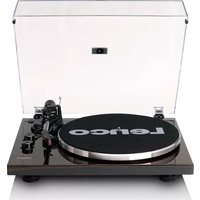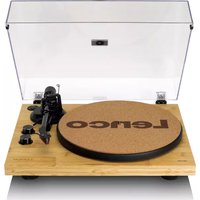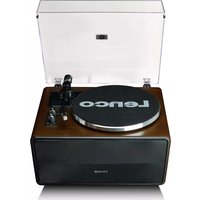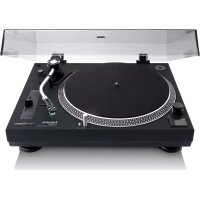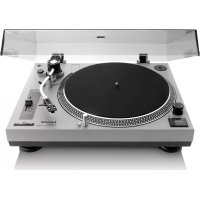
L3810 - Turntable LENCO - Free user manual and instructions
Find the device manual for free L3810 LENCO in PDF.



| Product type | Professional direct-drive turntable with USB recording output |
| Brand | Lenco |
| Model | L3810 |
| Dimensions | 450 x 350 x 139 mm (W x D x H) |
| Weight | 4.9 kg |
| Power supply | 12 V AC, 2 A power adapter |
| Rotation speeds | 33 1/3 and 45 RPM (manual selection) |
| Motor | Brushless DC motor, 8-pole, 2-phase |
| Drive | Direct |
| Platter | Aluminum, diameter 332 mm |
| Pitch control | Variable pitch ±10% |
| Signal-to-noise ratio | Typical < 65 dB (DIN-B) |
| Audio output | Switchable RCA Phono/Line |
| USB recording | 16-bit, 44.1 or 48 kHz (Audacity software included) |
| Tone arm | S-shaped statically balanced, gimbal suspension |
| Cartridge | AT3600L (included); tracking force 3.5 ±0.5 g |
| Applicable cartridge weight | 3.5 to 8.5 g |
| Supplied accessories | Dust cover, platter, mat, 45 RPM adapter, counterweight, RCA and USB cables, power adapter |
| Auto stop | After 20 min of inactivity (standby); stops platter rotation if stylus not in contact |
| Maintenance | Clean the stylus with a soft brush; clean the casing with a dry cloth |
| Operating temperature | 0 to 35 °C |
| Standby power consumption | < 0.5 W |
Frequently Asked Questions - L3810 LENCO
User questions about L3810 LENCO
0 question about this device. Answer the ones you know or ask your own.
Ask a new question about this device
Download the instructions for your Turntable in PDF format for free! Find your manual L3810 - LENCO and take your electronic device back in hand. On this page are published all the documents necessary for the use of your device. L3810 by LENCO.
USER MANUAL L3810 LENCO
Model: L-3808/L-3810/L-3828
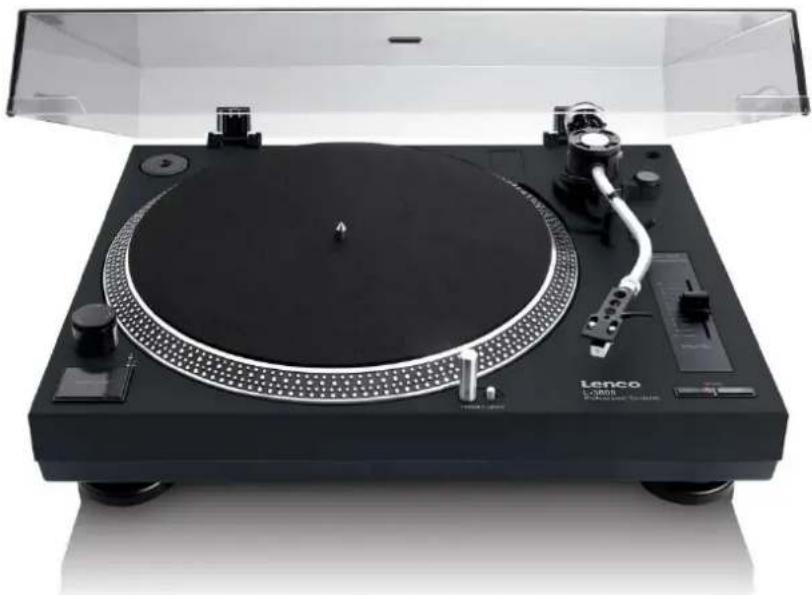
User manual Direct drive turntable with USB recording
Usage of controls or adjustments or performance of procedures other than those specified herein may result in hazardous radiation exposure.
KEEP THESE INSTRUCTIONS IN MIND:
- Do not cover or block any ventilation openings. When placing the device on a shelf, leave 5cm (2") free space around the whole device.
- Install in accordance with the supplied user manual.
- Keep the device away from heat sources such as radiators, heaters, stoves, candles and other heat-generating products or naked flame. The device can only be used in moderate climates. Extremely cold or warm environments should be avoided. Working temperature between 0^ and 35^
- Avoid using the device near strong magnetic fields.
- Electrostatic discharge can disturb normal usage of this device. If so, simply reset and restart the device following the instruction manual. During file transmission, please handle with care and operate in a static-free environment.
- Warning! Never insert an object into the product through the vents or openings. High voltage flows through the product and inserting an object can cause electric shock and/or short circuit internal parts. For the same reason, do not spill water or liquid on the product.
- Do not use in wet or moist areas such as bathrooms, steamy kitchens or near swimming pools.
- The device shall not be exposed to dripping or splashing and make sure that no objects filled with liquids, such as vases, are placed on or near the apparatus.
- Do not use this device when condensation may occur. When the unit is used in a warm wet room with damp, water droplets or condensation may occur inside the unit and the unit may not function properly; let the unit stand in power OFF for 1 or 2 hours before turning on the power: the unit should be dry before getting any power.
- Although this device is manufactured with the utmost care and checked several times before leaving the factory, it is still possible that problems may occur, as with all electrical appliances. If you notice smoke, an excessive build-up of heat or any other unexpected phenomena, you should disconnect the plug from the main power socket immediately.
- This device must operate on a power source as specified on the specification label. If you are not sure of the type of power supply used in your home, consult your dealer or local power company.
- Keep away from animals. Some animals enjoy biting on power cords.
- To clean the device, use a soft dry cloth. Do not use solvents or petrol based fluids. To remove severe stains, you may use a damp cloth with dilute detergent.
- The supplier is not responsible for damage or lost data caused by malfunction, misuse, modification of the device or battery replacement.
- Do not interrupt the connection when the device is formatting or transferring files. Otherwise, data may be corrupted or lost.
- If the unit has USB playback function, the USB memory stick should be plugged into the unit directly. Don't use an USB extension cable because it can cause interference resulting in failing of data.
- The rating label has been marked on the bottom or back panel of the device.
- This device is not intended for use by people (including children) with physical, sensory or mental disabilities, or a lack of experience and knowledge, unless they're under supervision or have received instructions about the correct use of the device by the person who is responsible for their safety.
- This product is intended for non professional use only and not for commercial or industrial use.
- Make sure the unit is adjusted to a stable position. Damage caused by using this product in an unstable position vibrations or shocks or by failure to follow any other warning or precaution contained within this user manual will not be covered by warranty.
- Never remove the casing of this device.
- Never place this device on other electrical equipment.
- Do not allow children access to plastic bags.
- Only use attachments/accessories specified by the manufacturer.
- Refer all servicing to qualified service personnel. Servicing is required when the device has been damaged in any way, such as the power supply cord or the plug, when liquid has been spilled or objects have fallen into the device, when the device has been exposed to rain or moisture, does not operate normally, or has been dropped.
-
Long exposure to loud sounds from personal music players may lead to temporary or permanent hearing loss.
-
If the product is delivered with power cable or AC power adaptor:
-
If any trouble occur, disconnect the AC power cord and refer servicing to qualified personnel.
- Don't step on or pinch the power adaptor. Be very careful, particularly near the plugs and the cable's exit point. Do not place heavy items on the power adaptor, which may damage it. Keep the entire device out of children's reach! When playing with the power cable, they can seriously injure themselves.
- Unplug this device during lightning storms or when unused for a long period.
- The socket outlet must be installed near the equipment and must be easily accessible.
- Do not overload ac outlets or extension cords. Overloading can cause fire or electric shock.
- Devices with class 1 construction should be connected to a main socket outlet with a protective earthed connection.
- Devices with class 2 construction do not require a earthed connection.
- Always hold the plug when pulling it out of the main supply socket. Do not pull the power cord. This can cause a short circuit.
-
Do not use a damaged power cord or plug or a loose outlet. Doing so may result in fire or electric shock.
-
If the product contains or is delivered with a remote control containing coin/cell batteries:
Warning:
- "Do not ingest battery, Chemical Burn Hazard" or equivalent working.
- [The remote control supplied with] This product contains a coin/button cell battery. If the battery is swallowed, it can cause severe internal burns in just 2 hours and can lead to death.
- Keep new and used batteries away from children.
-
If the battery compartment does not close securely, stop using the product and keep it away from children.
If you think batteries might have been swallowed or placed inside any part of the body, seek immediate medical attention. -
Caution about the use of Batteries:
-
Danger of explosion if battery is incorrectly replaced. Replace only with the same or equivalent type.
- Battery cannot be subjected to high or low extreme temperatures, low air pressure at high altitude during use, storage or transportation.
- Replacement of a battery with an incorrect type that can result in an explosion or the leakage of flammable liquid or gas.
- Disposal of a battery into fire or a hot oven, or mechanically crushing or cutting of a battery, that can result in an explosion.
- Leaving a battery in an extremely high temperature surrounding environment that can result in an explosion or that leakage of flammable liquid or gas.
- A battery subjected to extremely low air pressure that may result in an explosion or the leakage of flammable liquid or gas.
-
Attention should be drawn to the environmental aspects of battery disposal.
-
INSTALLATION:
-
Unpack all parts and remove protective material.
- Do not connect the unit to the mains before checking the mains voltage and before all other connections have been made.

The lightning flash with the arrowhead symbol within the equilateral triangle is intended to alert the user to the presence of un-insulated "dangerous voltage" within the product's enclosure that may be of sufficient magnitude to constitute a risk of an electrical shock.

The exclamation point within the equilateral triangle is intended to alert the user to the presence of important operation and maintenance (servicing) instructions in the literature accompanying this appliance.
WARNING!
To reduce the risk of fire or an electrical shock, do not expose this device to rain or moisture. The device must not be exposed to dripping or splashing water. Furthermore no objects filled with liquids, such as vases, shall be placed on the device.
CAUTION: In order to reduce the risk of an electrical shock, do not remove any cover. There are no user-serviceable parts inside the device. Refer servicing to qualified service personnel only.
FEATURES EN
STANDBY
This device is provided with an automatic standby mode which is automatically activated after 20 minutes of non-use. In standby mode, the power consumption of the turntable is reduced to less than 0.5W to avoid unnecessary power consumption. The standby mode will be interrupted automatically as soon as the speed selector is set to one of the two speeds.
AUTO STOP
Auto stop, also known as auto shut off, uses a system to halt the record from spinning once it has finished playing or the stylus doesn't come into contact with the vinyl record for 5 minutes, rather than continuing to wear at the stylus.
ACCESSORIES SUPPLIED
Instruction manual x 1
2P RCA cable x 1
Power Adapter x 1
Platter x 1
Head shell assembly x 1
Counter weight x 1
USB cable x 1
Felt mat x 1
45 rpm adapter x 1
UL/PSE transfer plug x 1
Dust cover x 1
Hinge x 2
Remark :
For power adaptor, L-3810 / L-3828 it is CE and UK version
For L-3828 the delivered cartridge is AT-95E
ASSEMBLY
Some assembly required before you can begin to use your new unit. Please follow the assembly instruction below before attempting to use you new turntable.
Before you begin assembly please be sure all parts and accessories have arrived intact.
NOTES:
- Do not connect the Power Adapter before assembly has been completed.
- Before turning the power on, make sure once again all the connections. Always turn off the power when connecting or disconnecting.
- Read this manual carefully before using the unit. Be sure to store the manual in a safe place for future reference.
- Attach a stylus cartridge to the HEADSHELL before assembling the turntable unit.
Headshell Assembly:
When installing a cartridge, refer to the operating instructions of that cartridge.
During installation, attach the stylus protector to guard the stylus tip from damage.
Connect the HEADSHELL lead wires to the cartridge terminals. The terminals of cartridges and the HEADSHELL lead wires are color coded. Connect each lead wire to the cartridge terminals of the same color.
White ( + ) Left channel ^+
Blue (L-) Left channel -
Red (^+) Right channel ^+
Green (R-) Right channel -
ASSEMBLY EN
Turntable Assembly:
1. REMOVING FROM CARTON:
Carefully remove the main unit with the packing material intact from the box. Remove the packing material once the unit has been removed from the shipping carton. Be sure to locate all the accessories located in the packing material.
2. 45 ADAPTER:
Locate and remove the 45-rpm adapter from the packing material and place it in the 45 adapter cutout on the top of the main unit.
3. TURNTABLE PLATTER:
Remove the turntable platter from the packing material and gently insert the platter into the CENTER SPINDLE on the base of the turntable unit.
4. SLIPMAT:
Remove the black slipmat from the packaging and place it on the PLATTER.
5. HEADSHELL:
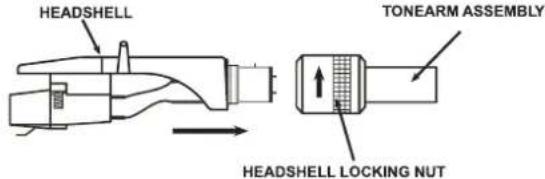
Insert the HEADSHELL into the front end of the TONEARM ASSEMBLY. While holding HEADSHELL firmly into the front end of the tonearm assembly, turn the HEADSHELL LOCKING NUT counter-clockwise to firmly secure the HEADSHELL to TONEARM ASSEMBLY.
6. COUNTERWEIGHT:
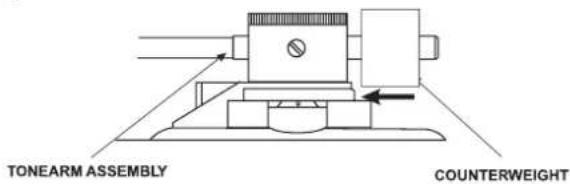
Locate and remove the tonearm COUNTERWEIGHT from the packaging. Slide COUNTERWEIGHT onto the rear of the TONEARM ASSEMBLY. Turn it lightly and it will screw onto the rear shaft of the tonearm.
CONNECTION
Before connecting the unit it is advised that you also consult your current equipment instruction manual.
- Be sure to turn off the audio device, such as a stereo system or an amplifier, before connection.
Be sure to make all the connections before you connect the Power adapter to a power outlet.
Note: To avoid noise interference, place the Power adapter body away from your turntable as far as possible.
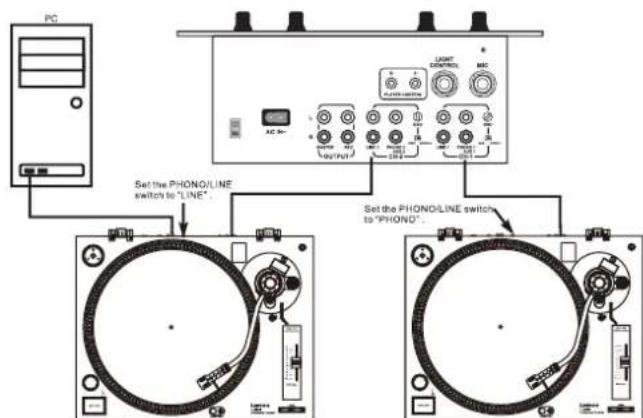
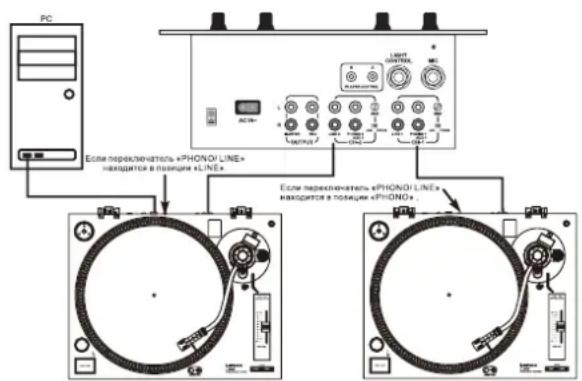
- Connect the RCA cable to the PHONO input of your AMPLIFIER when you set the PHONO/LINE switch to PHONO position. You can also use a line input by setting the PHONO/LINE switch at the rear of the turntable to LINE.
Output terminals Amplifier (Receiver)
L (White)
R (Red)
GND (Spade)
L Channel
R Channel
GND
NOTE: Be sure to connect the ground terminal firmly to the amplifier or receiver.
If this connection is not made or is loose, a power source "HUM" will result.
- Connect PC via USB cord.
SET-UP EN
Turntable Installation:
- Do not place the unit in a location where it will be exposed to direct sunlight or near any type of heating appliance.
- Do not place the unit in a location where there is high humidity or a lot of dust.
- Cartridge may pick up slight sound pressure or vibrations of nearby speakers. For best results, do not install this unit too close to speakers.
- Install this unit on a horizontal surface that is stable and vibration free.
- The rubber feet have been specially designed to isolate the unit from excess vibration. The feet may also be used to stabilize the main body horizontally. Adjust the height of the unit by turning the feet in a clockwise or counterclockwise direction.
Tonearm Balance and Stylus Pressure:
Adjustment of horizontal zero balance and stylus pressure:
- Remove the stylus protective cover, if so equipped. Never touch the stylus tip during the adjustment.
- Lower the TONEARM LEVER.
- Release the tonearm clamp and release the tonearm from the arm rest.
- Set the ANTI-SKATE adjustment to zero.
- Rotate the COUNTERWEIGHT in either direction until the TONEARM is perfectly balanced horizontally (floats freely).
- Return the TONEARM to the arm rest and lock it in place.
- Hold the COUNTERWEIGHT stationary with one hand and rotate only the stylus-pressure ring to bring the number "0" of the ring into alignment with the center line on the tonearm rear shaft.
- Rotate the COUNTERWEIGHT counterclockwise until the scale value corresponding to the recommended stylus pressure.
Note: The recommended stylus pressure of the optional cartridge that may have been included with your unit is 2 grams. For all other cartridge systems please refer to the manufactures specification included with the cartridge.
Anti-Skate:
The anti-skate adjustment prevents the TONEARM ASSEMBLY from skipping across the record from the centrifugal force that is caused spinning rotation of the PLATTER. The ANTI-SKATING control knob should be set to the same value as the stylus pressure. For example if your COUNTERWEIGHT is set to 2.5 grams the ANTI-SKATE value should also be set to 2.5.
QUICK-START
Turntable Quick-Start:
1. Changing Platter Speed
Use the RPM selectors to change the platter speeds. The 33-rpm and 45-rpm speed selectors change the platter rotation respectively.
2. Starting and Stopping the Platter
Use the START/STOP BUTTON to switch back and forth between platter rotation and pause modes.
3. Pitch Control
(1) The pitch adjustment is a fine adjustment to the platter's RPMs.
(2) The pitch adjustment is variable and may be adjusted between -10% and +10% of the platter-selected speed.
(3) The pitch is changed by sliding the Pitch Slider in an up and down motion.
(4) The STROBE INDICATORS on the rim of the PLATTER can be used to visual approximate the platter pitch. These indicators are lit by the STROBE INDICATOR PILOT LAMP as they pass by the POWER SWITCH. At different pitch levels each row of STROBE INDICATORS may appear stand still.
Note: The use of heavy fluorescent lighting directly above the turntable will defeat the STROBE PILOT LAMP affect indicator accuracy.
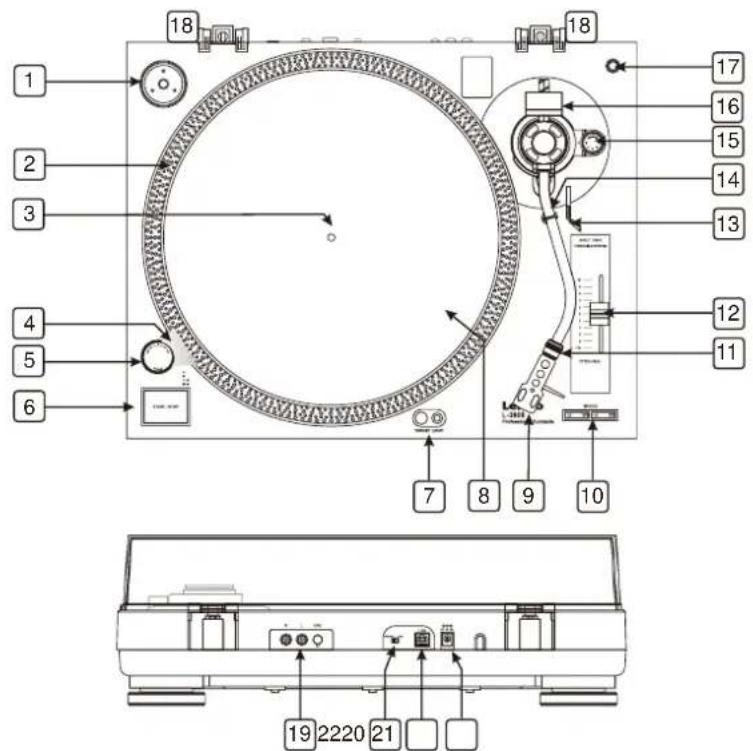
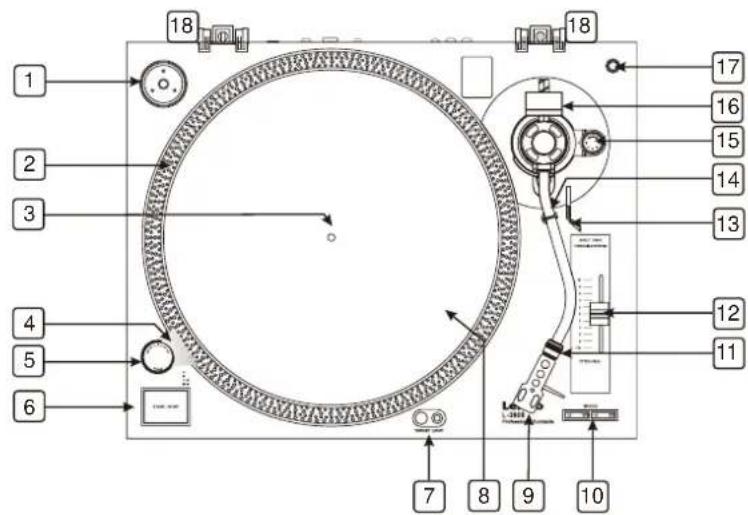
1. EP ADAPTER
This adapter allows you to play standard 7" EP vinyl records with large center holes. Place the adapter on the CENTER SPINDLE 7" records.
2. STROBE INDICATORS
The PLATTER has four rows of indicators. These indicators are used to visually detail various stages of pitch. The indicators are illuminated by the STROBE INDICATOR PILOT LAMP. Each row may appear to stand still at different pitch levels.
Note: The use of heavy fluorescent lighting directly above the turntable will defeat the STROBE PILOT LAMP affect indicator accuracy.
3. CENTER SPINDLE
This spindle holds the turntable PLATTER records stable and centered.
4. STROBE INDICATOR PILOT LAMP
This is lamp specially designed to pulse a beam of light at the STROBE INDICATORS on the turntable PLATTER. This will give the illusion that indicators are not spinning at certain speeds.
5. POWER SWITCH
This is a rotary power switch. To turn main power on turn the switch in a clockwise direction. To turn main power off turn the switch in counter-clockwise direction.
6. START/STOP BUTTON
This oversized push button controls platter motion. When the unit is turned on the platter will not automatically begin to spin. Pressing the button once will engage the high torque motor and spin the platter, pressing this again will stop the platter.
7. TARGET LIGHT
Press the right button and a light will pop up directed at the stylus position. To retract the light, press down on the light itself.
8. PLATTER
This platter connects directly to the center spindle. The platter and center spindle holds a vinyl record perfectly center. The platter also spins the record at a consistent speed.
9. STYLUS HEADSHELL
The included HEADSHELL is used to connect your stylus with the tonearm.
CONTROLS AND FUNCTIONS EN
10. 33/45-RPM SPEED SELECTOR BUTTONS
Engaging these buttons will rotate the platter at 33 or 45 RPMs. A function LED will glow when this function is activated.
11. HEADSHELL LOCKING NUT
After attaching the headshell to the tonearm, this locking nut will securely hold the headshell to the tonearm.
12. PITCH ADJUST SLIDER
This slider is used to adjust the playback pitch percentage (platter speed).
13. TONEARM LEVER
This lever is used to safely elevate the tonearm above a record surface without endangering a records surface.
14. TONEARM CLAMP AND REST
Use this rest to safely hold the tonearm in position during non-use and transportation.
15. ANTI-SKATE CONTROL
The anti-skate applies inward force to the tonearm to prevent outward skipping across the record due to the centrifugal force cause by platter rotation. The anti-skate value should be equally to that of the stylus counterweight pressure.
16. COUNTERWEIGHT
Use the counterweight to balance the tonearm and to adjust the stylus pressure.
17. EXTRA STYLUS HOLDER
This cutout has been designed to safely store an extra stylus headshell.
18. DUST COVER HINGE HOLDERS
Attachment points for dust cover hinges.
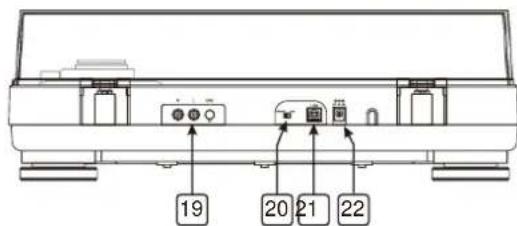
19. RCA OUTPUT JACKS
The output is switchable PHONO/LINE output. Depending on the position of the phono/line switch, you can connect the turntable to any phono or line input. Connect the RCA-cables (white=left channel, red=right channel) with the Phono-sockets of your amplifier or mixer. Connect the ground lead with the ground terminal of your amplifier or mixer.
20. PHONO/LINE SWITCH
This switch is used to change the mode of PHONO OUTPUT or LINE OUTPUT.
21. USB SOCKET (USB cable limit within 3m)
After connecting the Turntable to the computer via USB, you can record your vinyl to your hard disk using software. You can download the free software on http://audacity.sourceforge.net/
22. DC IN JACK
MAINTENANCE
- Clean the stylus periodically with a soft brush to prevent the accumulation of dust.
- When sound becomes distorted or noisy, check the stylus. If the stylus is worn out, replace it with a new one.
- From time to time, the dust cover and turntable cabinet should be wiped down with a soft, dry cloth.
- Volatile materials should not be used, such as: alcohol, thinner, benzine etc. They may remove the paint or damage the luster.
AUDACITY SOFTWARE OVERVIEW EN
Audacity is free software, licensed under the GNU General Public License (GPL). More information as well as open source code can be found on the web at https://www.audacityteam.org/download/
- Please ensure you have installed the software before starting.
Setting up your PC to work with Audacity
- Connect an input source to the unit.
- Connect the USB lead to your computer.
- Install the Audacity recording software.
- Open the Audacity program.
- Select Preference from the Edit tab in the Audacity Menu.
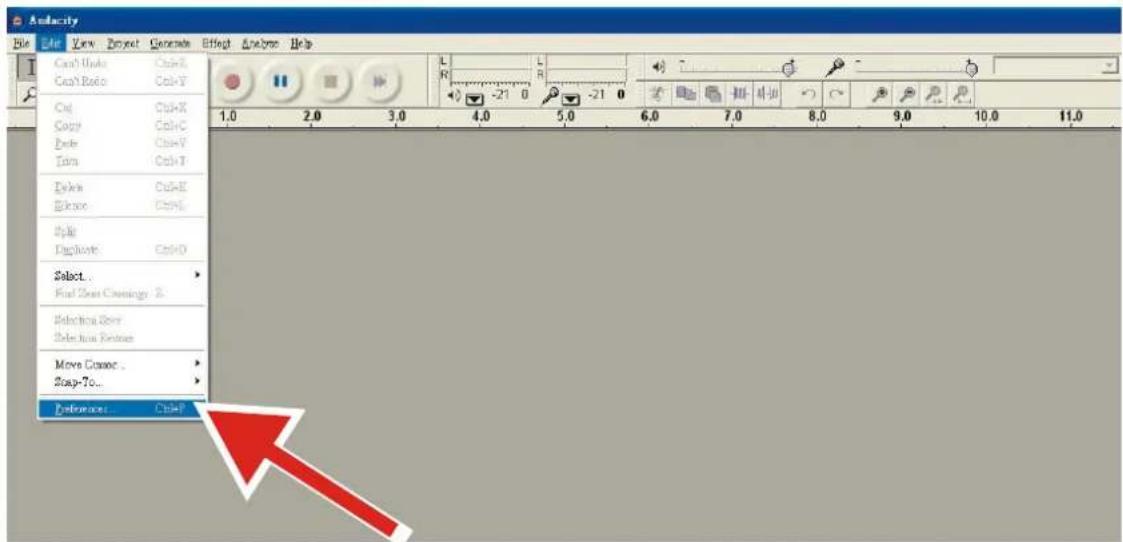
-
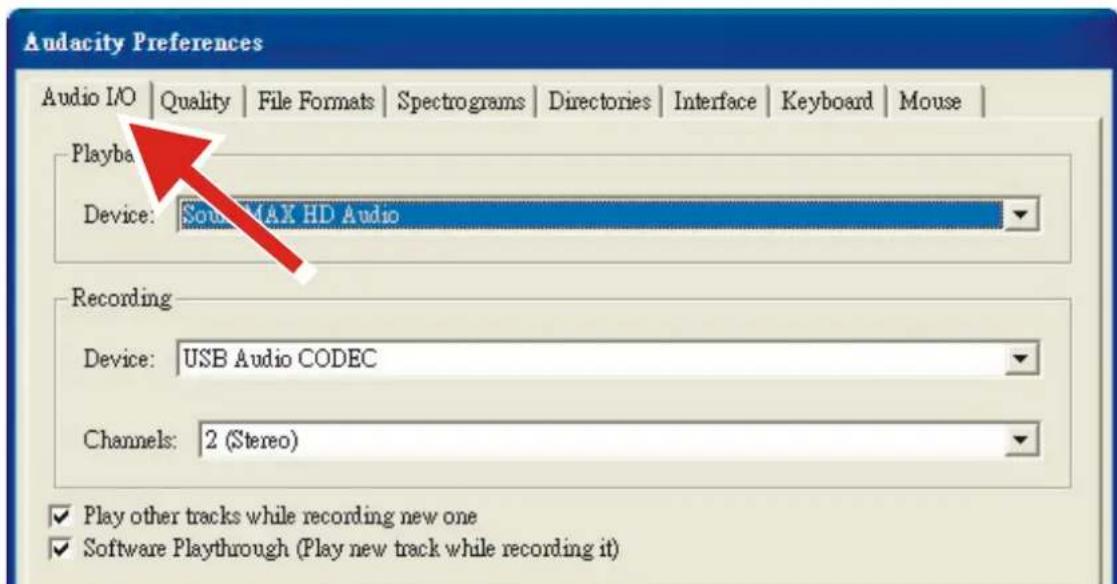
Select Audio I/O tab at the top left.
-
Under Playback, Device, select your internal sound card.
- Under Recording, Device, select USB Audio CODEC.
- Under Recording, Channels, select 2 (Stereo).
- Check the box marked Play other tracks while recording new one.
- Check the box marked Software Playthrough.
Recording Albums with Audacity
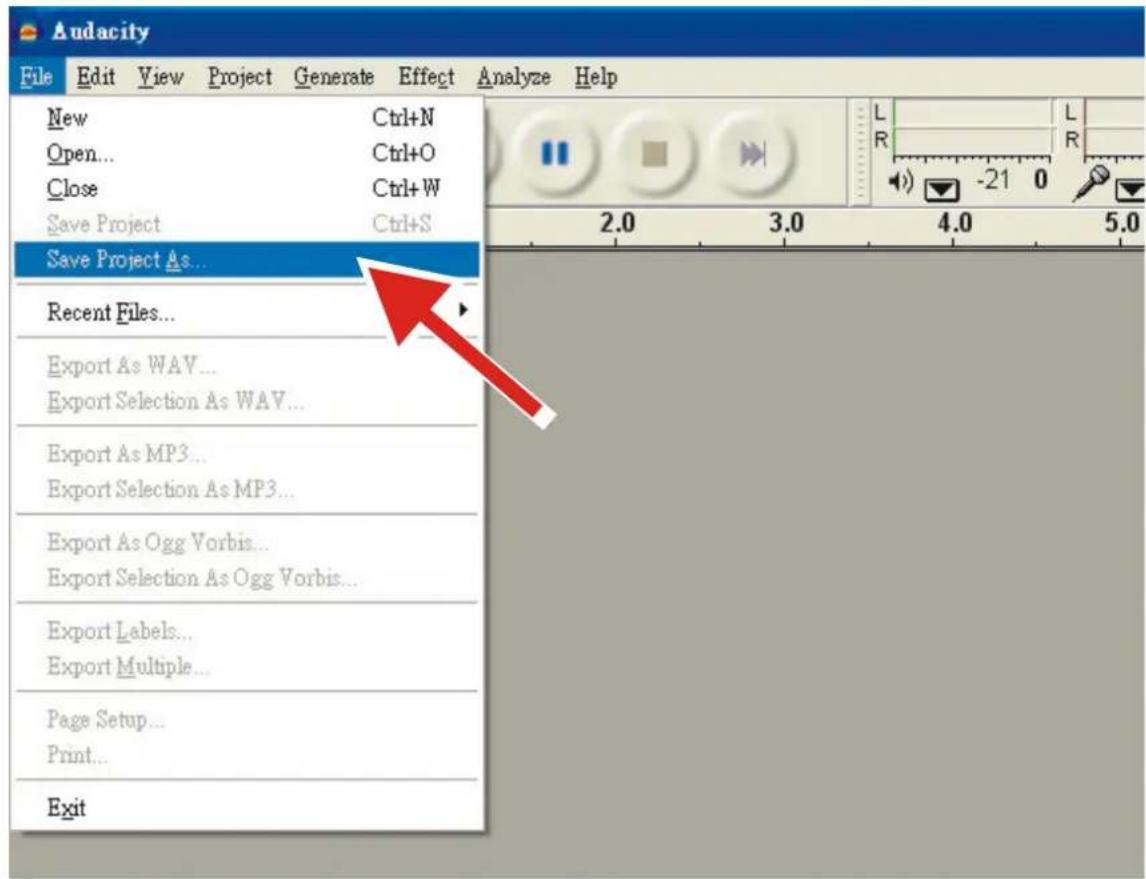
1. Saving a project
- Audacity writes all the changed and recorded audio to a directory called Projectname_data, which is located right where you saved the project file itself.
- Thus, select Save Project as from your Audacity File tab and choose a location and filename for your project.
- Please note that when you startup Audacity fresh, only the "Save As..." menu option is available.
2. How to record
- Set your USB turntable up to play the song or album you want to record.
- Click on the red Record button to begin recording.
- Lower tone arm on USB turntable onto album and track you want to record.
- Click on the blue Pause button to pause the recording. Press it again to continue.
- Click on the yellow Stop button.
That's it. You can now play around with your recording and explore the editing capabilities of Audacity. Remember that you can use the Undo function almost without limits while the project is open.
NOTE: CD's cannot be burned directly from the Audacity application. Other CD burning applications should be used.
SPECIFICATION EN
1. GENERAL SECTION:
Product Direct Drive Professional Turntable with USB recording
Power Supply DC 12V, 2A
Dimensions 450 (W) x 350 (D) x 139 (H) mm
Weight 4.9 Kg
2. STANDARD TEST CONDITION:
Ambient Temperature 23 +/- 2 degC
Relative Humidity 65% + / - 5%
NOTE: Measurements can be carried out between 5 degC to 35 degC and 45% to 85% relative humidity.
3. TURNTABLE SECTION:
Type 2-speed full manual
Motor 8pole, 2phase, brushless DC motor
Driving Method Direct drive
Turntable Platter 332mm (Aluminum)
Speeds 33^1 / 3 and 45rpm
Starting Torque More than 1 kgf.cm
Braking System Electronic brake
Starting Time Less than 1 sec.
Time for Speed Change Less than 1 sec. from 33^1 / 3 to 45 rpm.
Less than 1.5ec. from 45 to 33^1 / _3 rpm.
Pitch Controls +/- 10%
Speed Tolerance Typical: 3000Hz: + / - 0.3%
Limit: 3000Hz: +/ - 0.5%
Wow and Flutter Typical: Less than 0.1% WTD at 3KHz_RMS
Limit: Less than 0.15% WTD at 3KHz_RMS
S/N Ratio Typical: More than 65dB_DIN-B
Limit: More than 60dB_DIN-B
Channel Separation Typical: More than 18 dB at 1KHz
Limit: More than 15 dB at 1KHz
Channel Balance Typical: Within 2 dB at 1KHz
Limit: Within 2.5 dB at 1KHz
Phono Output Level Typical: 2.1mV 2.97mV at 1KHz 5cm/sec
Limit: 1.7mV\~3.6 mV at 1KHz 5cm/sec (AT3600L)
1.5mV 3.6mV at 1kHz5cm / sec (AT95E)
Line Output Level Typical: 132mV 187mV at 1KHz 5cm/sec
Limit: 105mv\~236 mV At 1khz 5cm/Sec (AT3600L)
90mV~236mV at 1KHz 5cm/sec (AT95E)
Frequency Response (RIAA) Input: 1KHz -43dBV; EQ Inverse RIAA
Typical: 20Hz 20KHz + / - 0.5 dB
Limit: 20Hz 20KHz + / - 1.5 dB
RIAA Gain Typical: 36dB +/-0.3dB 1KHz IN
Limit: 36dB +/-0.5dB 1KHz IN
USB Function USB rec. Function
A/D,D/A 16BIT44.1KHz or 48KHz USB Selectable
Computer interface USB 1.1 Compliant Windows 7 or above, MAC OSX or above
4. TONEARM SECTION:
| Type | Static balanced S-shaped tonearm with Cardan's suspension |
| Effective Arm Length | 228mm |
| Overhang | 22mm |
| Tracking Error Angle | Less than 3 degree |
| Tracking Force Adjustment Range | 0-4g |
| Applicable Cartridge Weight | 3.5-8.5g |
| Anti-skating Range | 0~4 |
| High of cue (first track) | 8~10.5 mm |
| Descend of cue | 1~3sec. |
5. CARTRIDGE
| Output Voltage | 1.7~3.6mV at 1KHz 5cm/sec (CD-4005) |
| Channel Separation | More than 18 dB |
| Channel Balance | Within 2.5dB at 1KHz |
| Tracking Force | 3.5+/-0.5gr |
6. Cartridge (L-3828)
| Output Voltage | 2.5mV +/-3dB at 1KHz 3.54cm/sec (AT6606A) |
| Channel Separation | More than 18 dB |
| Channel Balance | Within 2dB at 1KHz (AT6606A) |
| Tracking Force | 2+/-0.5gr |
7. TECHNICAL DATA OF THE INCLUDED POWER SUPPLY (one of the 2 options)
| Information | Value and Precision | Value and Precision |
| Manufacturers name or trade mark commercial registration and address | HON-KWANG ELECTRIC CO.,LTD. | SHENZHEN FU JIA APPLIANCE CO., LTD. |
| Model Identifier | HK-CW-120A200-CP | FJ-SW1202000N |
| Input voltage | AC100-240V | AC100-240V |
| Input AC frequency | 50/60Hz | 50/60Hz |
| Output voltage | DC 12.0V | DC 12.0V |
| Output current | 2.0A | 2.0A |
| Output Power | 24.0W | 24.0W |
| Average active efficiency | ≥86.20% | ≥86.20% |
| No load Power consumption | 0.1W Max | 0.1W Max |
8. NOTES
(1) The specifications are subject to change to any improvement by negotiations in advance.
(2) The parts are subject to change to any improvement within the range of the specifications.
Lenco offers service and warranty in accordance with the European law, which means that in case of repairs (both during and after the warranty period) you should contact your local dealer.
Important note: It is not possible to send products that need repairs to Lenco directly.
Important note: If this unit is opened or accessed by a non-official service center in any way, the warranty expires.
This device is not suitable for professional use. In case of professional use, all warranty obligations of the manufacturer will be voided.
Disclaimer
Updates to Firmware and/or hardware components are made regularly. Therefore some of the instruction, specifications and pictures in this documentation may differ slightly from your particular situation. All items described in this guide for illustration purposes only and may not apply to particular situation. No legal right or entitlements may be obtained from the description made in this manual.
Disposal of the Old Device
This symbol indicates that the relevant electrical product or battery should not be disposed of as general household waste in Europe. To ensure the correct waste treatment of the product and battery, please dispose them in accordance to any applicable local laws of requirement for disposal of electrical equipment or batteries. In so doing, you will help to conserve natural resources and improve standards of environmental protection in treatment and disposal of electrical waste (Waste Electrical and Electronic Equipment Directive).
CE Marking

Products with the CE marking comply with the EMC Directive (2014/30/EU) and the Low Voltage Directive (2014/35/EU) issued by the Commission of the European Community.
Hereby, Commaxx B.V. Wiebachstraat 37, 6466 NG Kerkrade, The Netherlands, declares that this product is in compliance with the essential requirements.
The declaration of conformity may be consulted at techdoc@lenco.com
Service
For more information and helpdesk support, please visit www.lenco.com Commaxx B.V. Wiebachstraat 37, 6466 NG Kerkrade, The Netherlands
LET OP:
Voeding DC 12 V, 2 A
Afmetingen 450x350x139 (BxDxH) mm
Gewicht 4,9 Kg
2. STANDAARD TESTCONDITIONS:
2. CONDITION DETESTSTANDARD:
MEPbI PEPDOCTOPOXHOCTN IPEED 3KCNPIYATAUEN
COBLODAITE CLEDYIOUINE INHCTPYKUIN:
- He 3aKpbIbAte H He 6IIOKpyTe BEHTINLAHOHbIe OTBepCTn. Pp n pa3MeueHN yCTpoNCTBa Ha nOKe OCTaBBTe BOKpyr Hero 5cm (2 dnoMa) cbo6oDHoro npocTpaHCTBa.
- YctAHOBNTe yCtpoiCTBO B COOTBcETCBN C pyKOBoIDCTBOM NOLb3OBATeJI, BXoJaIIM B KOMnIeKT NOCTaBN.
- YcpoCTBO DoJHKHO HaxOHTbcra BdaJIOn OT NcToCHNKOB TeNla, TaKnx KaK 6aTapeN, O6OrpeBaTeJIH, HarpeBaTeNbHbIe neuN, CBeuN IpyrHe N3deJIInra, BblJeJIouIe NeTLO, INn ONKpbIToe NlaMaR. YcPoICTB0 MoXHO NcNoJIb3OBA Tb TOLko B yCIOBHX UMepeHHoro KImMaTa. CneDyET N36eRaTb Upe3MepHO BbICOKNX INn Hn3Knx TemNepaTyp OkpykaUoSe n cpeDbI. Pa6OuaY TemNepaTypa cocTabIaReT oT 0^ do 35^ ..
- He nCnoJb3yIte yCTpoCTBO B6JIa3n CInJbHbIX MaHHTbIX NOJIe.
- ΘleKtpocTaTnueckn pa3pnd MoKeT nomeaaH HopMaIbHoN 3KcNpyatauyn yctpoCTBa.EcIn 3To TaK, npocTo nepe3aRpy3nte n pepe3anyCTne yctpoCTBO, cLeyra HnCTpykCmN NO 3KcNpyatauyn. Co6IIOaJte ocTopoXHOCTb npn nepedaue faiNoB n 3KcNpyATnpyTe yctpoCTBO B cpeDe, Cbo6OdHOn OT aTMocΦephbx NOMex.
- PpeDynpexKdene! He BCTabIaIte KaKe-Imo 1peMeTb I n3dJeIne Uepe3 BeHTnIaONHbIe OTBepCTn IIN npOembl. Upe3 n3DeJIne IpoxoNIT BbICOKoe HApJxHeHne, IN BCTabIaENHbI INpeMeT MoXET BbI3BaTb NopaxHeHne 3JIeKtpUeCKM TOKOM I/IIN KopoTKe 3aMbKaHne BHyTpEnHHx Yacte.I No ToJ Xe npuHne He npolNaBaiTe Ha n3deJIne BOdy IIN IIObYIO DpyrYIO JxNIOcTb.
- He nCnoJIb3yIte yCtpoIcTBo B NOMEeHnax C NOBblEHHoB BLaXHocTbIO, TaKNX KaK BaHHbIe KOMHaTbI, KxHn, HacblIeHHbIe napom, nII OKIo 6accenHOB.
- He donyckaite nonaadaHnHa ycTpoiCTBO KaneIb IIN 6pb3r.CleDInTe 3a TeM, YTO6bl Ha ycTpoiCTBO IIN pAOM C HmHe CTabNlncb npEMeTbI, HanoJIHeHHbIe JKnKoCTbIO, HApnPmEp Ba3bl.
- He nCnoJb3yIte 3To yCtpoiCTBO B CpeIe, Ie Bo3MOxHOb o6pa3OBAHne KOHeHcATA. Pn HcNoJIb3OBAHm B TeNlOM N BlaXHOM NOMeUeHN, BHyTpNI yCtpoiCTBa MoKeT o6pa3OBBiBaTbc KOnHeHcA, YTO pINBEeT K HeKOppeKTHoP pa6Ote npOnrPbIBaTeJIa. OctABBe IponrPbIBaTeJI B BvIKIOueHHOM CoCTOAHm Ha 1-2 Yaca N ToJIbKO IocNe 3TOrO BKJIQUaYte 3aHOBo. IpeE, BkIOueHHem y6eINTEcb, YTO yCtpoiCTBO NOIHOCTBIO BbICOXIo.
- HecMOTpHa To, 4TO 3TO yCTpoiCtBO n3rOToBLeHo C oO6oB TuaTeIbHocTbHO HeCKoJIbKO pa3 npOBepeHO nepeD BvIyCkOM C 3aBoDa, BO3HnKHOBeHne np6Ie M BCE Jx Bo3MOXHO, KaH CO BcEMN 3JeKTpUHeCKmN pnp6OpamN. Ecln Bbl 3aMeTHIN DblM, Upe3MepHoe HarpeBaHne INI IIO6bIe dpyrIe HeoxKnDaHHbIe ABlEHn, Bam cIeJyET HemeJeHNO OTKlOHTb BNky OTO po3EtKN 3JeKTPoPiTuHn.
- 3TO yCTPOCTBO DOJIKHO pa6oTaB OT taKoro nCTOCHNka nHTAHn, KAK yKa3aHO Ha 3aBOckO Ta5NJUe Co cneuNkauMn. EcIn Bb He yBepeHb I TOM, KaKoT TIN NCTOCHNka nHTAHn IcNoJIbayETcB BaWeM dOME, npokOHcyIbTIpyITecb C BaIM TopROBbIM NocpeDnHKOM INI MeCTHOn 3JIeKTpo3HePretNUeCKO KOMNaHne.
- Pa3MeuaTe ycTpoiCTBO nOdaIbIe OT JINBOTbIX. HeKoTOpbiM JINBOTbIM HpaBntc KycaTb UHyp nITaHnA.
- ⅡIyOuHCTKn yCTPOJcTbA hCNOJIb3yIe MArKyIO cyXyIO tKaHb. He IcNoJIb3yIe pAcTBOpUTeIN IIN JIKIOcTn Ha OCHOBe 6EH3nHa. YTo6bl ydaJIITb yCTOuHNBbIe IaTHa, Bbl MoKeTe IcNoJIb3OBAbB bIAJHyIO tKaHb Cpa36aBJIeHHbIM MOHOUM CpeIcTBOM.
- NocTaBnIK He Hecet OTBeTcBeHHocTn 3a NOBpeKdHne HnI NoTePIO daHHbIX, Bbl3BaHHbIe HeNCpnaBHocTbIO, HeNpaBnIbHbIM nCNoJIb3OBAHnEM, peKoHCTpyKUneY cTpoiCTBa HnI 3aMeHO bAtapen.
- He npepbIbai Te coeHHeHne, KOrda yCTpoiCtBO fOpMaTnpyET nn nepeJaet faJIbI. B npOTnBHom cIyae daHHbIe Moryr 6bITb NOBpeKdEhblnn yTePraHbl.
- EcnB yctpoiCTBe ecbyHKUBAocpOIN3BeDEHnuepe3 USB, KapTy naATn USB cneyeT noKIOuHaHnpanMyIO K yctpoiCTBy. He nCnoB3yIe Te yDInHInTeBnHi Ka6eJb USB, TaK KaK OH MoKeT Bbl3BaT NomExN, UTo npBedeT K NOtepe DaHHbIX.
- Ta6nUka c TexHnueckmM daHbIMn HaxoDntcHa HnKHei nn 3aHne nAHei ycTpoIcTba.
- 3TO yCTPOIcTB0 He npEHa3HaueNo IIN CNOB3OBAHn IIObMn (BKIOUaJeTe) C fN3NeCKMn, YMCtBEHHbIMn pacCTPOIcTBAMn paCCTPOIcTBAMn yBCTBeHHoro BOCpNtTnA INn C HeIOCTaTKOM ObIta n 3HaHn, ecIn OHn HE HaxoJrTa NOD, h6JIIODeHnem INn He pONyHm INHCTpyKuIN NO pABuNbHOMy NCNOB3OBAHnIO yCTPOIcTBa CO CTOpHOblIuca, OTBeauIoJero 3a INx 6e3OnacHoCTb.
- 3To n3deIne He npedHa3HaueHo IJI npofoeccnoHaIbHoro, KOMMepueckoro IJI npomblJeHHoro ICNoJIb3OBAHnA.
- Y6eDnTeCb, yTO ycTpoNCTBO yCTaHOBHeO B yCToHnHOE nOLOXHe. TapaHTn He pacnpoctpaHReTcHa NOBpeKHeH, Bb3BaHHbIe 3KcNpyatauNe 3TORo H3DeJInB HecTa6nHbHom nOLOxHeHn, BN6paunm nnUyapAmn, IIO6 Heco6nIOHeHem IIO6bIX Dpynx npdeynpeKHeHn nnMep npedocTopoKHXOCt, coepKaunxCB DaHHom pyKOBoCTBe noIb3OBAteJIa.
- HNKoRda He cHmMaTe KOpNc 3TOrO yCtPoIcTbA.
- HnKoIa He nOmeuAte 3To yCtpoiCTBO Ha dpyroe 3JIeKtpnuEeckoe 6OpdyOBaHne.
23.HeDonycKaIteIrpTei nlaactKOBbIMn NaKeTaMn,InCnoIb3yEmbIMn IJIyynaKOBKn YcTPOIcTBa.
BAKHAR INΦOPMAÇNЯ INHCTPYKÇN RU
- IcnoIb3yTeToIbKO npncnocO6leHn/npHaadJeKHOCTn, yka3aHHbIe npOn3BODnteJIem.
- NopyuHte Bce 6cnyKbAHHe KBaIIINHpOBAHmOy 6cbNyKbAIOeMy nepcoHany. 6cbNyKbAHHe Tpe6yeTc, KOrda yCTpoiCTBO 6blno nobpeKJdeHo, HapnpMep, ero 7Hyp 3JIeKTPoNTaHnI INn BnIka, Korda 6blna npolnta JNkKOCTb INn KaKe-Imbo npedMeTbI yNaIHa ycToiCTBO, Korda yCTpoiCTBO nOdBeprIoB Bo3DeIcTBIO DOxJa INn BlarN, Korda yCTpoiCTBO pa60TaET HeHopMaIbHO, INI KOrda npOn3OJIo naDeHne ycToiCTBa.
26.ДиTeHbOe BO3dEChTBnE rPOMKx 3ByKOB IInuHbIX My3bIkaIbHbIX npOnrpbIbATEneM oKeT npBecTN K BpeMeHHoN INIOCTOaHHoN IOTepe clyxa. -
EcIyUcTpoIcTBIOCTABJIeTcB KOMIIeKTe c aJaITepOM NHTAHN NIN Ka6JIeM NTaHIN:
-
Пив Bo3нКНовени KaKnx-JI60 npo6JIeM, OTKJIIOHTe aДaNTep NITaHn I3 po3eTkn I O6paTNTecb K KBaIIΦNtIpOBAHHOMy cepBnCHOMY nIHKeHepy.
He hactynaiTe Ha aadantep nHTAHn H He 3aKIMaIte ero. Bybte OeHb octopoknbl,OCO6EHNO Bo3Je WTekepoB N Ka6JIbHoro BbBOda. He pa3MeaaiTe Ha aadantpe 3neKTponNTAHn TaeKeJbIe npEdMeTb, TaK KAK OHN MOrY T NOBpeNTb erO. XpaHInTe yCTPOcTB BO HeNoctynHom dJa DeTe MeCte! UrpA c Ka6eJem 3neKTponNTAHn, OHN MOrY CepBe3HO nopAHHTcbra. - OTKIIOyAHTe 3TO yCTPOHCTBO OT cETN BO BpeM rpo3bln He nCNOb3yeTe B TeueHne dIITeBHorO BpeMeHN.
- WTeNCeBHa pO3eTka DOLJHbA 6bITb yCTaHOBHeHa PAnOM c O6OpyDobAHm E 6bITb HEnOCpeDCTBeHHOM DoCTyIe.
He neperpyaKeTe po3eTKn nepemehHoro ToKa nn ydInHntbHbIe uHypbl. Neperp3ka MoKet BblBaTb Bo3ropaHne nn nopakHe Hne 3JeKTpUcckm TokOM. - YcTpoiCTBa, cnPoekTnpoBAHHbIe B COOTBeTCTBm C nepBbIM Klaaccom 3JeKtpoo6OpyDoBaHnno eBponeckm cTaHapTaM, «class 1», Heo6xOdmo nodkJIIOuA Tb K 3a3eMJeHHbIM po3eKam 3JeKtpoNTaHn.
-
YcTpoiCTBa, cIPOeKTHIpOBAHHbIe B COOTBeTcTBHn CO BTOpbIM KlaaccOM 3JIeKtpoo6OpydoBaHnno Ebponeckm CtaHapTaM, «class 2», He Tpe6byOt HAIuHnra 3aemLeHnB C cTeN 3JIeKtponiTahHn.
BbHIMa Bnky n3 WTeCenbHOn po3eKn, Bcerda depKntecb 3a BNky. He TaHInTe 3a UHyp NHTAHy. 3TO MoXe TbBtBaTb KOpOTKe 3AmbikAHne.
He nCnoB3yIte nobpeKdEHHbI shHyp nHTAHn, BnIKy IIN nIOxo 3aKpeNJIeHHyO po3eTKy. 3To MoKeT npNBecTN K BO3rOpAHNI OII NopAkeHNI 3JIeKTpUeCKM TOKOM. -
Ecn npodyKT coedepeKHT nnn noctabJIeTcA CnybTom dNCTaHcUHOHOrO ynpaBHeHc 6taapee Tnna «TaIeTKa》/«MOHeTKa»:
PpeynpeKdHne:
«He nporlaTbIbTa6aTapeIO, onacHocTb xIMnueckoro oXORA» nIIN aHaIOrnHbIe DeiCTBIA.
- [Пиьт дисанционногу упаьлени, BXODДИ B KOMПЛЕКТ ]ЗТОТ пордксоарпг STaTapeйку TUNA «ТаблETKa»/«MOHETKa». Ecn npornotb 6aTapeKey, 3TO MOKET Bbl3BaTb cepbe3HbE BHYtpEHnE OXORN BCero 3a 2 Yaca n npnbecTN K CmepTN.
XpaHHTe HOBbie HcNoJIb3OBAHHbe 6aTapeu B HeIoCTyHOM dIa DeTeMeCTe.
- Ecni 6aTapeHbI OTCek 3aKpbIbAeTc HHeHaTeKHO, npeKpaTnte NcNoIb3ObaHne npOyKTa I XpaHITe ero B HeIOCTynHom dIeTe MeCTe.
- Ecnn Bby cunTaete, yTo 6aTapeeKIMMORn6bITb nporIOTnB nIN OHN MOrn nonactb BaKyIO-JIn6O qactb TeNa, HEmdneHHO. 6paTntec3a MeuHckoHOMOouIO.
29.праздостешип ри И спользовни 6атAPEEK:
- OnachocTb B3pbIbA, ecIn 6aTaapeKHa 3aMeHeHa HeKOppeKTHo. IcNoJIb3yIe ToIbKO 6aTaapeKn AnaIIOrNHyOTo Tnna.
He noDbepraTe 6aTapeKn BbICOKM HnHn3Km TempePaTpAM, Hn3KOMy nN BbICOKMy DaBJeHHIO.
3aMeHa Ha HeKoppeKTHyO 6aTapeNky MoXeT npVBecTN K B3pbBy Nn IpoteKaHIO OrHeonacOH JxNdkoCTN.
He npBepraTe 6aTapeKn BO3deICTBIO OTKpbIOTOr OTHN MmKpOBoJHOBBIX BOH.N36eraTe MexAHueckoro BO3deIcTBNA. -
PpokohcynbTnpyItebc C MeCThbIM 3aKoHOdaTeNbCTBOM KacaTeNbHO yTuJIn3aUIN 6aTaapeek.
-
YCTAHOBKA:
-
PacnakyTe BCE KOMNoHEnTbI npOnrPbBaTeJI r CHMnTe 3aunTHbIe MaTePnaJIbI.
- He nodklnouaHTye yctpoiCTBO K 3neKtpocetn Do npOBepkn ceTeBoro HaprrKeHn I Do BblnoJIHeHn BCEx ocTaJIbHbIX nodkluoyehn.

3HaK MoJIHH BHyTpN TpeyrolbHnKa IpeDynpeJdaeT O HAIChn HEn3OJInpoBaHHbIX npOBdoaX qAcTei PoI HaNPxKeHHeM ONaChbIM IJIA JIN3HN INI 3OpOBbY eNoBeka.

BocknuaTeIbHbI 3NaK BHyTpN TpeyrolbHnka npedynpexJaet noIb3ObaTeJe O hAnuHn CneuaJIbHbIX HCTpyku KOTOpbIM Heo6xoDmIO cIeIOBaTb npaBoTe c yctpoiCTBOM nI npn erO obcnykBaHN.
BHIMAHHE!
Bo n36eXaHne yDapa 3JleKTPnueCTBOM, He noDBePraIte npOnrpbBaTeIb BO3JeCTBIO BODJI (OJxN) IIN dpYnx JxNkOCTe. Ha npOnrpbBaTeIb He DOJxHa Kaata b IIN pa3JIbBaTcB Oda. BoIee TOrO, IIObIe ObBeKTbIC BoIoN, TIna Ba3, He DoJxHbI pa3MeuTaBcRa H a YcTPOIcTBe.
IPEyPExEHEHe: He BckpbBaTe ycTpoiCTBO BO n36eKaHne npaKeHnna 3JIeKtpnueckm TOKOM. BHyTpHn HET qacheT, o6CnyKbAebMbx nOlb3OBaTeMe. O6CnyKbAHnem ycTpoiCTBa DOJKeH 3aHmMaTbCn POIdrTOBJIeHHbI cepBnCHbI INHeHep.
OCOBEHHOCTRU
PEKIM OXINDAHNA
JaHHoe yctpoiCTBO IMeET BCTpoeHHbI peKIM OxHdAHNIA, KOtOpB I AKTNBIPyETcABTOMaTnueckn nocIe 20 MNHT 6e3deiCTBnA. BpeKIMe OxHdAHNIA NOTpe6JIeHne 3HePmN CHNXaETcdo 0.5BT.YCTPOiCTBO BblIeT n3peKIMa OXHdAHNIA KAK TOJbKO nepeKIIuOHTaTeNb CKOpOCTN bYdET YCTaHOBLeH B OJHO n3 DBYX nIOJOKeHNI.
ABTOCTON
ABTOCTON, TAKKHe N3BecTHbI KAK ABTOOTKIIOueHne, OCTaHaBnBaET PIACTINHKY NOcIe TORO, KaK 3aKOHUJIacb My3bIka. Ecln Hla He Kacaetcra PIACTINHKn Ha IpoTJKeHnn PtTn (5) MmHyT, TAKKHe IpOncXoDIT OTKIIOueHne n TapeJIka nepectaet BpaauTaBCr.
KOMNJIeKTaUa
L (6eIbI) IeBbI KaHaI
R (KpaChb) PpaBbKaHa
GND (KOpnUHeBbI) GND
PIMMEAHHE: y6eIHTecb, yTO pa3beM GND naekHo
3aФнсрованВусиlte/фОнокрtepe.
Ecnn nodkloueHne HehaekHoe nn OTCyTCTByeT,
MOKeT pOraBntbC rYI B 3ByaHn.
- NpoklHouHTe K NK, HcnoIb3yra USB ka6eJIb.
PacnoJoxHe npOnrpbBaTeIa:
- He pacnojaraTe nponrpbIbATEIb NOi npmBIMn COJIHeHbIMn Lyamn, HApnPmep y OKHa, IIN pRdOM C yCTpoiCTBaMn, BblJeIIOUImN 3HaunTeIbHoe KOInueCTBO TeIIa, HApnPmep PAdOM C o6OrpeBaTeIaMn, PInTuMn, MoUHbIMN YcHInTeJAMn N.T.D..
- He pacnonaraTe npoirpbyBaTeIb B nbIbHbIX nIN BlaJHHbIX MecTaX.
- KaptpnJx 3ByKoCHMaTeIe OueHb YyBCTBnteIbHbI N MoKeT BocpHIMaTb Bn6paun Hnn 3ByK OT 6n3ko pacnoLoXeHHbIX aKyCTNuecknx CnCTeM. IJIa DoCTNkeHn HaJIyUweRo KauecTBa 3ByuHn He pacnoJaarTe npOnrpbBaTeIb PAnOM c AkyCTNueckmCnCTeMaMn.
- YcTaHaBnBaIe TnpOnrPbIBaTeJIb Ha pOBHOr cTa6nJIbHOJ NOBepXHOCTN, He NOpDBepKeHHoB Bn6paunM.
- Pe3HOBbIe HOxKn CnpoeKtnpOBAhbl IyI NOrLoUeHnBn6paun, OHaKo NcNoJIb3OBAHne DOnOIHNTeJbHbIX Bn6bpONorLOuOuX NoCTaBOK MoKeT yLyUWHTb KaueCTBO 3ByuHnCnCTeMbI. HOxKn npOnrPbIBaTeN MaYr 6bITb TAKKe IcNoJIb3OBAhbl IyI NOcTpoKn RopU3OHTaBHorO NOLOKeHn PpOnrPbIBaTeN. Bbcota KaJdoN HOxKn peryInpPyETc NOBOpOTm HOxKn No YAcOBn IIN IpOTNB YAcOBn CTpeJIKN.
Noarobay Hnctpykqun no 6aIahcnpOBKe ToHapMa:
1.Пи НИЧИЗЗДТНО КОЛПУСКА HA KAPТРДЖЕ 3BYKOCHIMATEЯ, CHIMITE erO. HIKORda He npINKAcAITecb K KOHUNKY IIGIbl 3BYKOCHIMATEЯ.
2. Onyctnte pbiHaY yCTaHOBKn ToHapMa.
3.Ocbo6oIte fikcaTOp ToHapMa n nepeBeIte ToHapM B pa6Ouee noLoKeHne.
4. YctaHOBnTe perynnoBky aHTn-ckeTnHra B HnyeBOe noJooKeHne.
5. NobopauhBa npoTnBOBec no nIIN npOTnB YacOBOY CTpeJIKN, ycTaHOBITE ToHApM TaKIM O6pa3OM, yTo6bl OH CBO6oJHO BnCeI B rOpu3oHTaIbHOM NOLOKeHHN. B TAKOM NoLOKeHHN cIIa daBHeHHN irIbI coCTaBIAET 0 rpaMM.
6. BepnTe ToHapM Ha nCxOndHyIO (He pa6ooyIO) No3nIIO u 3akpennte erO fHKcaTopoM.
7. UdepKnBa npoTnBOBc HneoDbNkHo OdHoi pyKoi, NOBepHnte INDnKaTOpHOe KOnbO ToaM O6pa3OM, YTo6bl cHpa0 «0» coBnala c IHHne npOBedeHHo N O eHTpy 3aDHe YacTn TOHaPma.
8. ПовернITE npOTnBOBec no YacOBoi CTpeNke TaKIM o6pa3OM, yTObI cHΦpa Ha INHnKaTOpHOM KoJIbe, nepeceKaIOuaJyINHIO NO CEHTpy TOHaPMa, COOTBeTCTBOBaIa peKOMeHNdyEMOi CIIe DaBHeHry IrIbI 3ByKOCHMaTeJЯ dJaYcTaHOBLeHHoro KapTpndka.
IpmeHn: PekomeHdyemam Cnla daBleHn HJIb3 BkyoCHMaTeJ dJa KApTpndJa, KOtOpb MoKet 6bITb BKIOueH BV KOMnIeKT nocTabKn MoeJIn L-3808/L-3810/L-3828, coCTaBIAeT 2 rpaMa. Ppi ycTaHOBKe Dpyrnx KapTpndJe Heo6xOJMo yCTaHaBnBaTb cnly daBleHn B COOTBeTcTBn C npnilaraeMoK KapTpndKy INHCTpykUnei
PerynpoBka aHTN-ckeTnHra:
CnCTema aHTN-CKeITINHra npdeTbpaaet npocKaJIb3bIBaHHe nroKn I nepeckaKNBaHne MeJdy DOpOKKaMn BO BpeMa BOCIPON3BcDEHnI IOd DeIcTBnEM cIeHTpO6ExHO Cnbl. Pyka perynipOBKn Cnlbl aHTN-CKeITINHa dOLXHa 6bItb YcTaHOBLeHa Ha To JKe 3NaueHne, UTo N cIIa daBleHn I rIbI 3ByKOCHMaTeJl. HanpImep, ecIn npOTuBOBe cYcTAHOBHe Ha 3NaueHne 2,5 rpaMa, pyka perynipOBKn aHTN-CKeITINHa TaKke DoJIkHa 6bItb YcTaHOBHeHa Ha 3NaueHne 2,5.
BbICTPbI 3ANYCK
Bbictpb3anynck nponrpbaTeia:
1.YctaHOBkaKoJIHueCTBaO6OpOTOBnCKa
NcnoIb3yIte KhoNk yTaHOBKn KOJIueCTBa O6oPoTob (RPM) IJy BbIbopa KeJaemOn cKOpocTn BpaJeHn DaNcKa. KhoNk «33-rpm» n «45-rpm» yCTaHaBJIbBAHOT KOJIueCTBO O6oPoTob B COOTBeTCTBn C HaIINCbIO.
2.3anyck n octaHOBka dNcKa
IcnoJIb3yIe KhoNkY «START/STOP»ДЯЗANyCsAи npNoCTaHOBKn BpaIeHnДИscKa.
3. KoHTpoJIb ckOpocTn BpaueHn/ToHa (Pitch Control)
(1) CnaIep no3B0JraT nlaBHO n3MeHrTaCKOpOCTb BpaUeHnN, COOTBeTCTBeHHo, CKOpOCTb N TOH 3ByaHnN 3aINCN.
(2)Дианазон рergyларовки лжп в п dedелax OT -10%do +10%OT HOMнаньно ckopoctи Врашени диска.
(3)ИзменинскорocTNвршени npoиЗВODNTспершениm сайдара «PitchSlider» Вьерхи Винз.
(4) Ctpo6-нднкatop. Стpo6-MeTKn Ha обODE ДИСКа мOrT 6bIb ИСПОЛБЗОВАНБД ДЯ ВИЗУАЛБНО КОHTрОЛ N3MeHeHЯ ckOpocTи BpaUSeHЯ. MeTKn NOДСBEЧИBAHOTсЯМПОДС KHONKOJpyCKA/OCTaHOBKN «START/STOP».
PnmeHne: NcnoB3OBaHne MoNbIX fnyopeCHTbIX lamn, CBeTaux CBepxHa npourpBbATElb, MoKeT npenrCTBOBaT npabNbHO pa6oTe cToPo6 lamnbI nOTpaNTbcra Ha ToUHOCTNoTOHIOKaTopa.
1.AAANTEP HA 45 OBOPOTOB
3TOT aanTep no3B0Jre TBOcPOn3BOIDnTB nlaCTnHK cTaHApTa EP 7" c 6oJIbWM CEHTpaJIbHbIM OTBepCTnEM. YcTaHaBnBaIte 3TOT aanTep Ha ceHTpaJIbHOE OTBepCTne EP nlaCTnHOK.
2. CTPOB-METK
OnopHbI DnCK HmeeT HeBipe pda cTpo6 MeTOK. 3TN MetKN nCNoB3yIOCTa IBy Bn3yaJIbHO KOHTPOJcKOpOCTN BpaueHn DaCKa N, COOTBeTCTBeHHo, TOHa BOCPON3BeDeHn 3aNNcN. INDkaTOPbI NOcCBeUBAOTc CneuaJIbHO CTpo6-JaMnO. PpN OnpdeJeHHbIX CKOpOCTX BpaueHn, OINH n3 PpAOB NOcCBeUBAEMbIX MeTOK bYdet BBIIaTeB HeNOdBnKhbIM. INPMEAHNE: NcNoB3OBaHHe MouHbIX PhlyopeCteHTbIX LaMn, CBetauNX CBepxHa npOnrpbIBateIb, MoKeT npenATCTBOBaTb npabUNbHO pa6ote cTpo6 lamnbI n OTPaNTbc Ha ToHocTH cTpo6-HnDKaTopa.
3. ΒΕΗΤΑΝΙνΗΟ Κόβ
3TaOcb(wTnΦT) ydepKnaBaET onOpHbI nDCN nIIaCTnHN.
4. CTPOB-индИКATOP (CTPOB-JAMNA)
3Ta lamna noCbeuBaet Cpo6-MeKn HmNylbcamn CBeta C onpeJeHHOaCTOTOn. 3a cHT eTO r npn onpeJeHHbIX CKOpOCTaX BpaueHn, OINH n3 pRIOB NOcBeuBaembIX MeTOK 6yET BvITIaTeB HeNOdBHXHBIM.
5.PYUKBAKIIIOUEHNA
IyBKnHoueHn npOnrPbIBaTeTn NOBepHnTe pyKy BKnHoueHn no YacOBo CTpeJIke. Iy BbIKIOueHn npOnrPbIBaTeTn NOBepHnTe pyKy npOTNB YacOBo CTpeJIke.
6. NYCK/OCTAHOBKA (START/STOP)
3Ta 60JIb7a KHONKa ynpabIraeT 3anyckom BpaueHn Inu. PpN BKIOUeHn npOnrpbBaTeIa NCK He HauHaet BpaueHne ABOTMaTHueCkn. HaKATne 3TOJ KHONKn 3anyckaet BpaueHne DnCK. NobTOPHOe HaKATne KHNKn OCTaHaBnBaET BpaueHne.
7. NOCDBETKA NIACTNHKN
HaHMMte Ha npabyo KhoNky, yTo6bl nOHHb N BkJIIOHTb NOcBETKy IlaCTnHKN. YTo6bl y6paTb N BbIKHOHTb NoCDBETK, HAdaBHTe Ha cam cToI6 c noDCBETKO.
8. ONOPbI INCK
OnopHbI DnCK yCTaHaBnBaETcHa ZeHTpaJbHyO c6b. NcNoJIb3yETcIy YCTaHOBKn BHHIOBbIX IINCKOB IV oBeCneueHn CtaBnHocTn CKOpOCTn BpaSeHn.
9. TOJIOBHAR YACTb TOHAPMA
3Ta yacTb HcnoJIb3yeTcB KaueCTBe epKaTeIa KapTpndka 3ByKoCHMaTeIa.
10. KHOIIKA BbIbOPA CKOPOCTN 33/45-RPM
HaxaTne 3nX KHOONKAKTNBUPyET peXIM pa60bI npOurpbBaTeJIco CKOpocTbIO BpaUeHNJ DaNcKa 33 nII 45 o6oPoTOB B MnHyTu (RPM).PpN BkIoUeHmN 3aropaetcCBeTOBOHnDnKaTop.
11.ФИКСИРУЮUIEEKOЛБЦО
IcnoIb3yeTcA JnKcaun CoeHHeHHa MeJy ToHaPOM I rOIOBHO uacTbU C KapTpNIXeM.
12. CIAI DEP IOIDCTPOIK TOHA (Pitch Control)
3TOT cIaIep n03BOLJeT IlaBHO N3MeHrTb CKOpOCTb BpaUeHnN, COOTBeTCTBeHHo, CKOpOCTb N TOH 3ByaHnN 3aNNcN.
13. Pbyar YCTAHOBKTOHAPMA
3TOT pbyar no3BOJare TnlaBHO onyckaTb NnoHmatab ToHaP M He NOBpeKdA NOBepxHocTb nlaactnKn.
14.ФИКCATOP TOHAPMA
IcnoJIb3yIte 3Ty pyKU dla fKncaun ToHapMa, KOrda OH He IcNoJIb3yeTcR, IIN BO BpeM TraHCnOpTnpOBKn.
TAPAHNTHbIE O8a3ATEJIbCTBA RU
Cpok rapaHTn coCTabIaeT 1 (OINH) roD c daTbI npoJaKn. Cpok cnX6bl-Do 5 (nTn) IeT.
Baxnoe npmeuHne: KomnaHnL E nco He oecneuBaet oocJxuBaHne o6OpydoBaHn B clyuae HnOcpeDCTBeHHoro.
obpaueHn B roIobHO ooc KOMnAHn.
BaxnHoe npimcuaHne: TapaHTnHe DeiCTByeT, eCIn yCTpoiCTBO BCKpbIbAIOCb NIN NODBePraIOCb N3MeHnM BHe oHnauNbHorO cepBnCHoro ceHTpa.
3TO yCTpoIcTBo He npedHa3HaueHO IJI npofoecnOHaIbHorO nCNoIb3OBAHnA. B clyuae npofoecnOHaIbHorO nCNoIb3OBAHnRA rapaHTnHbIe 06aTeNbCTBa npOn3BOdnteIe He 6yDyT BblOpNHaTbcra.
3aBHeHne 06 orpaHnueHHN OTBeTCTBeHHOCTN
O6HOBLeHnMikpOpnporpaMM n/nnKOMNoHeHToB annapathoro obecneueHn npOn3BOaTcpeyIrpHo. N03Tomy HeKOTOpbIe IHCTpyKcun, cneuΦnkaun n 3o6paKeHn B 3toJ DOkUMeHTaun MOrYT He3HaUHTbHO OTnuaTbcr OBaWe KOnKpeTHo CtYaauu. Bce 3JeMeHbI, onncAHbIe B DaHHOM pyKOBoDCTBe, ppeHa3HaueHbI ToJIbKO dJa nnLIOCTpaun N MOrYT He OTHocntbcra K KOHKpeTHo CtYauun. N3 onncAun, npnbEdeHHOro B 3TOm pyKOBoDCTBe, HeJIb3a POnyUHTb HnKaNX Iopnduuecknx npab.
YtHn3aunna 6OpydoBaHH
3TOT CnMBOJ O3Haayet, YTO COOTBeTCTByIOoee 3JeKTPoo6OpyOBoAHne IIN 6aTapeR He MoXeT 6bITb yTNIIIN3IPOBaHa KaK O6bIuHbIe 6bITOBbIe OTxOdbI B Ebpone. YTo6bl ObecNeytB KoppeKTHyIO yTNIIIN3aCIO DaHHoro 6OpyOBoAHn pyKOBoIDCTByITeCb MeCTHbIMN 3aKOHaM N IIN Tpe6OBAHnAMN NO yTNIIIN3aCIN 3JeKTPoHnHO 6OpyOBoAHn I 6aTapeR.
IocTynaTakim o6pa3om, Bbl nOmoKeTe coXpAHnTB npnpoHbIe pecypcbI uIyUHTb cTaHdapTbI 3auntbI OkpykaIoSei CpeBbI npn o6pa6OTke i yTuIn3aunu 3JeKtpuecknx OTxoDob (DnpeKtBa EC 06 OToxdoax 3JeKtpueckoro n 3JeKtpoHHoro 6OpuyoBaHna).
Mapknipobka «CE»

Пюдукця с Маркнровков CE COOTBECTBYe Tpe6OBaHnMДиpeKTHube EC no 3JIeKtpOMarHHTHOI COBmecTnMoCTn (2014/30/EC) nДиpeKTHube EC no BOpocam KaheCTBa Hn3KOBOLbTHbIX 3JIeKTPoTEXHnuecknX n3delen (2014/35/EC), npINHbIx KomnccneE Ebponeckoro CoIO3a.
HactoIIM KOMnHaHra 《JIeHko BeHeHIOK CB》KOMMaKc B.B.,Bn6axTpaat 37,6466HΓ,KePkpAide,
HndepnaBb (Commax B.V. Wiebachstraat 37, 6466 NG Kerkrade, The Netherlands)
3aBJIaET,уTO 3OT npOdyKT COOTBeTCTByET OCHOHbIM Tpe6OBaHnM. C DeKlapaUeN COOTBeTCTBnM OJHO O3HaKOMNTbCS no aDpeCy techdoc@lenco.com. «Лeнko БeHeJIIOKc BВ», TepmIKCTpaat 1a, HOT, 6361 HB, HndepIaNdbI
MapKupobka «EAC»

Tobap ceptnfHnucpoBaH dIy hCnoJb3OBaHnHa TeppntOpnn TaMOxehHoro CoIO3a 6e3 KaKnx-Jn6o
OrpaHnueH. CoOTBeCTByET Tpe6OBaHnM TP TC 004/2011 «O 6e3oNaChocTn Hn3KOBoJbTOBOrO
ObopydOBaHn» n TP TC 020/2011 «JneKTpOMarHHTHa corMeCTmOCtB texHnuecknx cpeDcTB>.
Mnpoptep n opraHn3aun, ynoHHomoueHHa Ha npHHaTne npTeH3n: OOO "Bn3HeC-phi6pNka",
123458 r. MockBa, yI. Mapwala IpoWJaKOBa, d. 30, oΦnc 503, +7 495 787 5900. N3rotOBHTelb:
KOMMaKc B.B., Bn6axuTpaat 37, 6466HΓ, KepKpaIe, HnIepLaHdbI / ΦmuaIa: 3c.Tn.Ai. 3JIeKtpoHnKc JITd., IOHNT 903-907, 9/Φ, lo3 KomMepuHaI Pna3a, 788 YOHr Ia BaH PoYd, KoYLyH, ToHCOHr. CdeHaHO B KItae
06cnyxmbHae
Data n3roTOBHeHH npOdyKcH
Tod n Mecau n3rotoblenn npodykun yka3aHbB Homepe naptnn n cepHOM Homepe npodykta. Hxke onncahbl cnocobbyTOUHeHn 3ToJ DaTbI.
- Ho HOMepy napTIN (Homep napTIN yka3aH IIn6o Ha ynaKOBKe yCTpoiCtBa, IIn6o Ha TpaHCnOpTIpOBOuHOH ynaKOBKe).
ΦopMaTHHomepa napTuA AAAABDDMY - Ito cepiny Homepy npodykTa (cepinyHbH Homep yka3aHa yctpoCTbe).
ΦOpMaT cepHOro Homepa: AAAABDDMYSSSSS
Ide M (Bocbmoi cmboI cIeBa) paBeH Mecau npOn3BOcTBa, a Y (DeBraBcMBoI cIeBa) paBeH rOdy npOn3BOcTBA. Mecau npOn3BOcTBa yKa3bIbaeTc oNHO 6yKB IaTHCkOro aIabNTa.
COOTBETCTBnE 6yKBeHHbIX 0603NaHcHm MeCya npOn3BOcTBA:
Montera ditt pickupscal:
Se bruksanvisingen for din specifica pickup nar den sca monteras.
33. PICKUPSKALETS LASMUTTER
Den har lasmuttern sakrar pickupskalet pa tonarmen after montering.