VB342 Pro - Video conferencing system AVer - Free user manual and instructions
Find the device manual for free VB342 Pro AVer in PDF.


| Product Type | Video Conferencing System |
| Brand | AVer |
| Model | VB342 Pro |
| Dimensions (approx.) | 200 x 100 x 100 mm (estimation) |
| Weight | 1.2 kg (estimation) |
| Power Supply | 12 V DC power adapter, power cord included |
| Power Consumption | Not specified |
| Lens | Wide-angle lens with optical zoom (not specified) |
| Microphone | 10 built-in microphones with array |
| Connection Ports | USB 3.0 Type-B (PC), USB 2.0 Type-A, HDMI, Ethernet RJ-45, RS232, phone input/audio output, audio extension |
| Main Functions | Video conferencing, AI audio & video tracking, smart framing, gesture control, pan/tilt/zoom, screen sharing |
| Included Accessories | Remote control, USB 2.0 Type-B to Type-A cable (5 m), USB Type-A to Type-C adapter, wall mount kit, screws, QR code card, drilling template |
| Optional Accessories | RJ-45 microphone/speaker extender, USB 3.1 extender, HDMI cable, Bluetooth dongle, audio converter, VESA kit |
| Control Software | PTZApp 2 (downloadable from AVer website) |
| Maintenance and Cleaning | Clean the lens with a soft dry cloth. Unplug before cleaning. |
| Safety | Class A digital device complies with ICES-003/NMB-003. Use only the supplied adapter. |
| Repairability | Spare parts available through AVer after-sales service. Contact a technician for any repairs. |
| Warranty | Standard manufacturer's warranty (check with retailer) |
Frequently Asked Questions - VB342 Pro AVer
User questions about VB342 Pro AVer
0 question about this device. Answer the ones you know or ask your own.
Ask a new question about this device
Download the instructions for your Video conferencing system in PDF format for free! Find your manual VB342 Pro - AVer and take your electronic device back in hand. On this page are published all the documents necessary for the use of your device. VB342 Pro by AVer.
USER MANUAL VB342 Pro AVer
VB342 Pro Conference

Package Contents
| VB342 Pro Unit | Remote Control | Power Adaptor & Power Cord* | USB 2.0 Type-B to Type-ACable (5m) | |
| USB Type-A to Type-C Adapter | Wall Mount Kit | Screws (x4) for Wall Mount | Tripod Screw (x3) | |
| QR Code Card | Drilling Paper | |||
*The power cord will vary depending on the standard power outlet of the country where it is sold.
Optional Accessories
| Expansion RJ-45 wired microphone 10m/20m (Cable is included) | Expansion RJ-45 wired Speakerphone 10m/20m (Cable is included) | USB 3.1 Extender 10m/20m/30m | HDMI Cable |
| USB 3.0 Type-B to Type-A Cable (3m) | Din6 to RS232 adapter | BT Dongle | Audio-out Converter |
| TV VESA Mount Kit | |||
*Optional Accessories will vary depending on the country where it is sold.
Overview
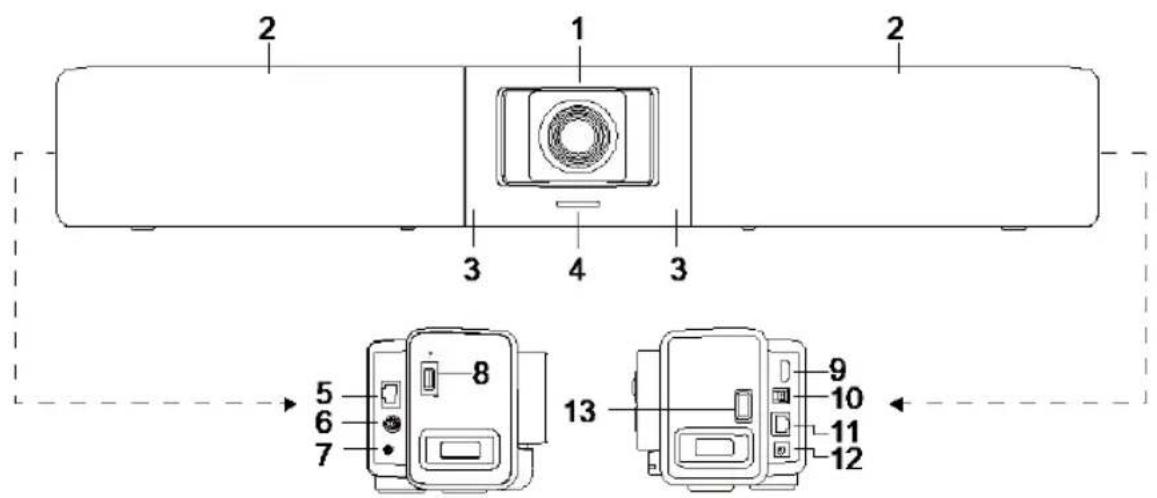
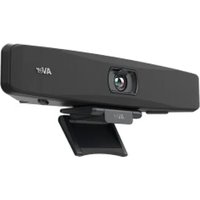
(1) Lens
(7) Phone In/Audio Out Port*
(2) Microphone Array Area (10 Built-in Microphones)
(8) USB 2.0 Type A Port (only for BT Dongle)
(3) IR Sensor
(9) HDMI Output Port (to TV) ***
(4) LED Indicator
(10) USB 3.0 Type B Port (to PC)
(5) Expansion Audio (for Speakerphone/ Microphone)
(11) RJ-45 Ethernet Port
(6) RS232 Port
(12) DC 12V Power Jack
- The default is phone in function. To support audio out function for HA system, please set it up via PTZApp2 and purchase audio-out convert (TRS female to TRRS male) from AVer.
(13) USB 2.0 Port****
** BT dongle is an optional item in certain countries. Please contact your local dealer for purchasing.
*** Support DisplayLink technology.
**** If using MAC latest Monterey OS version and want to use this USB 2.0 port, please don't use USB extender cable, otherwise, MAC PC can't detect the VB342 Pro and system instability issue may occur.
LED Indicator
Power on: Blink blue once
Start-up: Solid red
Power on completely but no USB connection: Solid orange
Power and USB cable connected but device is idle or a call on hold: Solid white
Video and audio on: Solid blue
Calling: Fast blink white or blue depending on original status
Video on and audio mute (During a call): Solid red
A second calling: Fast blink white, blue, or purple depending on original status
Gesture control
Blue light blinks for 2 seconds: Successfully wake up gesture control function by any valid gesture command.
Blue light blinks for 4 seconds: Camera recognizes a valid gesture command and start to action.
[Note] The default of gesture control is off. Please enable it via PTZApp2 or IP web page. The effective distance is up to 5-meter away from the camera.
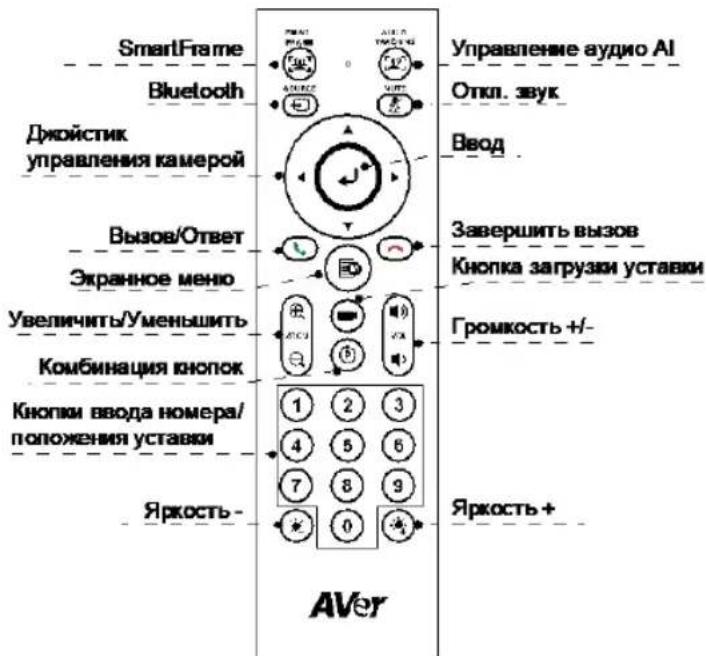
Remote Control
[Note] AAA batteries required
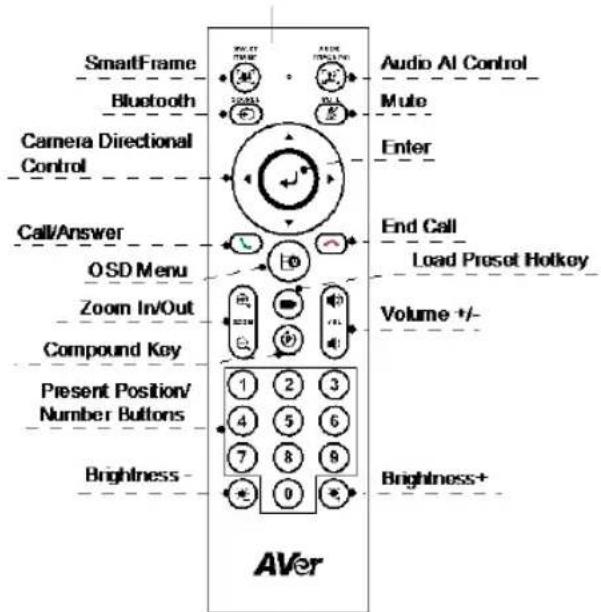
SmartFrame: One-click automatic field of view adjustment to fit all participants in screen for one time. Press and hold the button for 1~2 sec to switch from manual to auto framing mode or Off.
■ Audio AI Control: Press and hold the button for 1~2 sec to switch modes among Audio tracking, Presentation mode, Audio fence and Off.
[Note] Audio AI function supports up to 7~8 meters away from camera.
■ Bluetooth (): Hold it for 1~2 sec to enable Bluetooth pairing with mobile phone or AVer FONE540 speakerphone. Short press it again to disconnect Bluetooth.
[Note] BT dongle is an optional item. Please contact your local dealer for purchasing.
Enter (): Press it to show the current AI function on screen such as Auto Framing. When pressing this button, it will also force camera to do manual focus for once at the same time.
OSD Menu (): Short press to pull out gesture control guide
Load Preset Hotkey (): Press it to move to preset position as user has set in sequence.
Number 0~9: Long press the number button to set preset point. One-click the number key to load preset point.
WDR: Press to enable/disable the WDR function.
Set preset: Press to enable/disable Set preset function
RTMP: Press to enable/disable the RTMP streaming function.
Sleep mode: Press P then 4 to force camera to enter sleep mode. If there is USB streaming, this function won't work.
Installation
- Connect VB342 Pro to PC/laptop with provided USB 2.0 cable and connect the power cord of VB342 Pro to power wall outlet.
[Note] Use the supplied Velcro strap to secure and manage the cable.
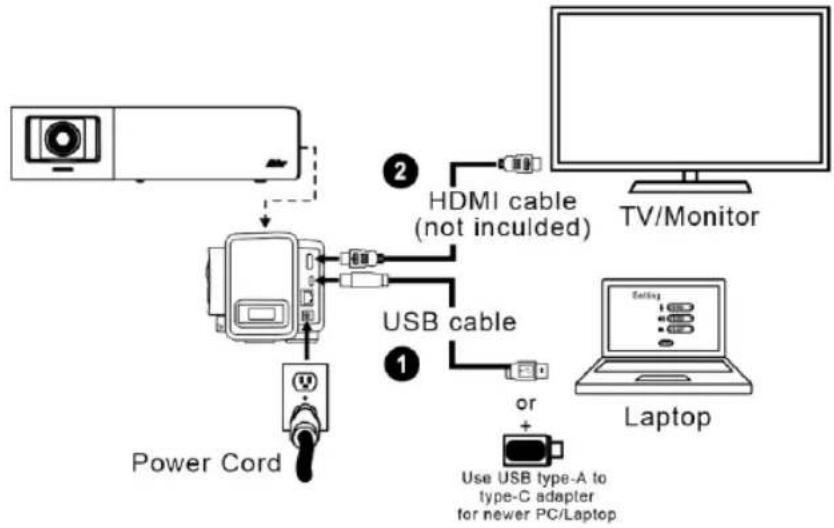
- Connect TV/HDMI monitor to VB342 Pro through the HDMI cable.
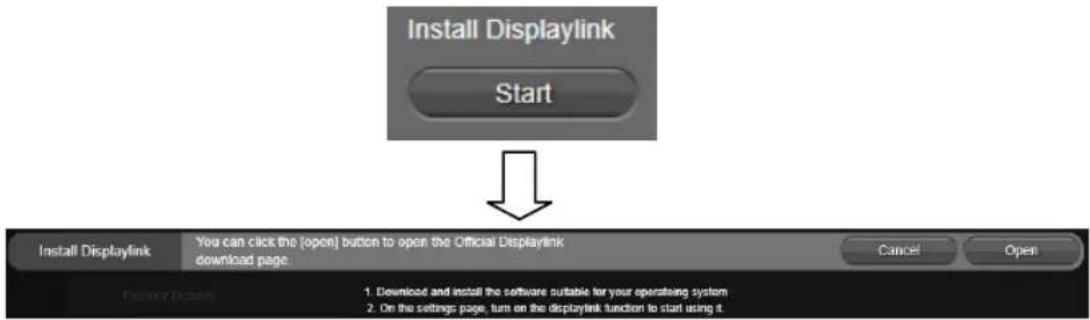
[Note] For Windows® 7 OS, a Displaylink driver is required for the TV/Monitor connection with VB342 Pro. Please use PTZApp 2 to install Displaylink driver.
On the PTZApp 2, go to System setting. In the "Install Displaylink" field, click the "Start" button and follow the on-screen instructions to install Displaylink.
-
Install a BT dongle before powering up the device. Plug it into the USB 2.0 type-A port. Use remote control or PTZApp 2 to enable Bluetooth function. There are two kinds of connection scenarios.
-
Scenario 1: Connection with mobile phone. Enable Bluetooth of mobile phones to find VB342 Pro and connect it to use VB342 Pro as external microphone and speaker during a conference meeting.
- Scenario 2: Connection with AVer FONE540 BT speakerphone.
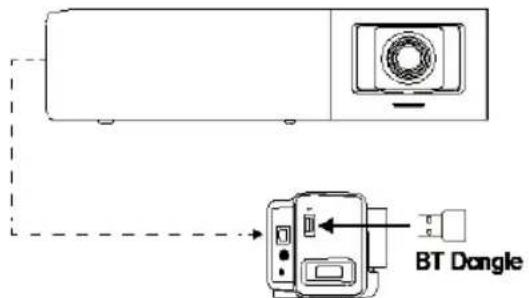
[Note] The BT dongle is an optional item in certain countries. Regarding detailed settings of Bluetooth, please refer to user's manual.
Install PTZApp 2
Please go to https://www.aver.com/download-center (Global),
https://www.aveurope.com/download-center (Europe) or https://www.averusa.com/business/support/
(USA) to download the PTZApp 2. After downloading, double-click on the file and follow the on-screen instructions to complete the installation.
After installing the PTZApp 2, double-click on the PTZApp 2 icon to run the application.
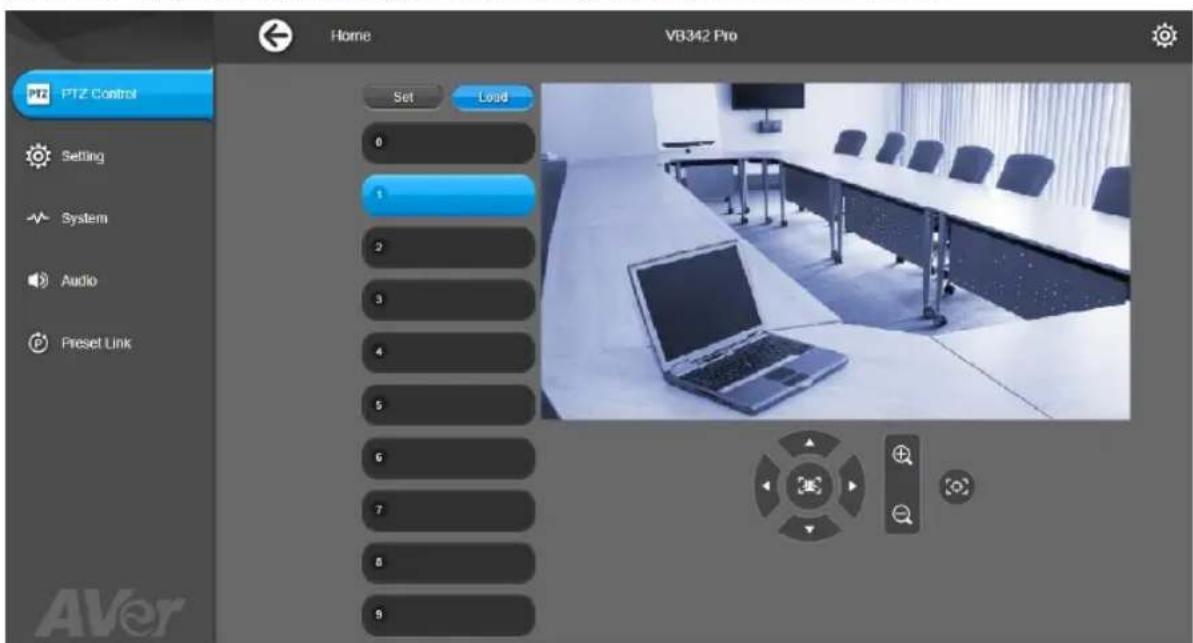
Use PTZApp 2
You can use the PTZApp 2 to set up AI tracking functions, pan, tilt and zoom the camera and some advanced image and audio settings. Please refer to the user's manual for details.
FEDERAL COMMUNICATIONS COMMISSION
NOTE: This equipment has been tested and found to comply with the limits for a Class A digital device, pursuant to part 15 of the FCC Rules. These limits are designed to provide reasonable protection against harmful interference when the equipment is operated in a commercial environment. This equipment generates, uses, and can radiate radiofrequency energy and, if not installed and used in accordance with the instruction manual, may cause harmful interference to radio communications. Operation of this equipment in a residential area is likely to cause harmful interference in which case the user will be required to correct the interference at his own expense.
FCC Caution: Any changes or modifications not expressly approved by the party responsible for compliance could void the user's authority to operate this equipment.
This device complies with part 15 of the FCC Rules. Operation is subject to the following two conditions: (1)
This device may not cause harmful interference, and (2) this device must accept any interference received, including interference that may cause undesired operation.
Warning:
This is a class A product. In a domestic environment this product may cause radio interference in which case the user may be required to take adequate measures.
Risk of Explosion if Battery is replaced by an Incorrect Type. Dispos of Used Batteries According to the Instructions.
COPYRIGHT
© 2022 AVer Information Inc. All rights reserved.
MORE HELP
For FAQs, technical support, software and user manual download, please visit:
Headquarters: https://www.aver.com/download-center/
USA Branch Office: https://www.averusa.com/business/support/
Europe Branch Office: https://www.aveereurope.com/download-center/
Technical Support:
Headquarters: https://www.aver.com/technical-support
USA Branch Office: https://averusa.force.com/support/s/contactsupport
Europe Branch Office: https://www.aveereurope.com/technical-support/
Contact Information
Headquarters
AVer Information Inc.
https://www.aver.com
8F, No.157, Da-An Rd., Tucheng Dist., New Taipei City 23673, Taiwan
Tel: +886 (2) 2269 8535
USA Branch Office
AVer Information Inc. https://www.averusa.com
668 Mission Ct., Fremont, CA 94539, USA
Tel: +1 (408) 263 3828
Toll-free: +1 (877) 528 7824
Technical support: support.usa@aver.com
Europe Branch Office
AVer Information Europe B.V.
https://www.aveurope.com
Westblaak 134, 3012 KM, Rotterdam, The Netherlands
Technical support: eu.rma@aver.com
Japan Branch Office
A巴一·个n才一J3N株式会社
https://jp.aver.com
Vietnam Branch Office
Congty TNHH AVer Information (Viet Nam)
Tang 5, 596 Nguyen Dinh Chiou, P.3, Quan 3, Thanh pho Ho Chi Minh 700000, Viet Nam
Tel: +84 (0) 28 22 539 211
包装内容物
https://www.aver.com
https://www.avcr.com
新北市土城区大安路 157 号 8 楼
电话:+886(2)22698535
八味一内容
©2022 AVer Information Inc. All rights reserved.
その 他のサ木一卜
PTZApp2 01iHhAeAI A HJH, HJI, HJI, HJI, HJI, HJI, HJI, HJI, HJI, HJI, HJI, HJI, HJI, HJI, HJI, HJI, HJI, HJI, HJI, HJI, HJI, HJI, HJI, HJI, HJI, HJI, HJI, HJI, HJI, HJI, HJI, HJI, HJI, HJI, HJI
C2022 AVer Information Inc. All rights reserved.
多云
T
https://www.aver.com/download-center/
| 사용자 기재목 | |
| 이기지는 전무상품만 썸고해 쓸고해 쓸고해 쓸고해 쓸고해 쓸고해 쓸고해 쓸고해 쓸고해 쓸고해 쓸고해 쓸고해 쓸고해 쓸고해 쓸고해 쓸고해 쓸고해 쓸고해 쓸고해 쓸고해 쓸고해 셐고해 쓸고해 셐고해 셐고해 셐고해 셐고해 셐고해 셐고해 셐고해 셐고해 셐고해 셐고해 셐고해 셐고해 셐고해 셐고해 셐고해 셐고해 셐고해 셐고해 셐고해 셐고해 션고해 셐고해 셐고해 셐고해 셐고해 셐고해 셐고해 셐고해 셐고해 셐고해 셐고해 셐고해 셐고해 셐고해 셐고해 셐고해 셐고해 셐고해 셐고해 셐고해 셔고해 셐고해 셔고해 셔고해 셔고해 셔고해 셔고해 셔고해 셔고해 셔고해 셔고해 셔고해 셔고해 셔고해 셔고해 셔고해 셔고해 셔고해 셔고해 셔고해 셔고해 셔고해 셕고해 셕고해 셕고해 셕고해 셕고해 셕고해 셕고해 셕고해 셕고해 셕고해 셕고해 셕고해 셕고해 셕고해 셕고해 셕고해 셕고해 셕고해 셕고해 셕고해 셜고해 셕고해 셜고해 셜고해 셜고해 셜고해 셜고해 셜고해 셜고해 셜고해 셜고해 셜고해 셜고해 셜고해 셜고해 셜고해 셜고해 셜고해 셜고해 셜고해 셜고해 셜고해 셕고해 셕고해 셕고해 셕고해 셕고해 셕고해 셕고해 셕고해 셕고해 셕고해 셕고해 셕고해 셕고해 셕고해 셕고해 셕고해 셕고해 셕고해 셕고해 셆고해 셕고해 셆고해 셆고해 셆고해 셆고해 셆고해 셆고해 셆고해 셆고해 셆고해 셆고해 셆고해 셆고해 셆고해 셆고해 셆고해 셆고해 셆고해 셆고해 셆고해 셆고해 셔고해 셆고해 셔고해 셔고해 셔고해 셔고해 셔고해 셔고해 셔고해 셔고해 셔고해 셔고해 셔고해 셔고해 셔고해 셔고해 셔고해 셔고해 셔고해 셔고해 셔고해 셆고해 셆고해 셆고해 셆고해 셆고해 셆고해 셆고해 셆고해 셆고해 셆고해 셆고해 셆고해 셆고해 셆고해 셆고해 셆고해 셆고해 셆고해 셆고해 셄고해 셆고해 셆고해 셔고해 셔고해 셔고해 셔고해 셔고해 셔고해 셔고해 셔고해 셔고해 셔고해 셔고해 셔고해 셔고해 셔고해 셔고해 셔고해 셔고해 셔고해 셆고해 셔고해 셆고해 셆고해 셆고해 셆고해 셆고해 셔고해 셔고해 셔고해 셔고해 셔고해 셔고해 셔고해 셔고해 셔고해 셔고해 셔고해 셔고해 셔고해 셔고해 셔고해 셔고해 셔고해 셆고해 셔고해 셔고해 셔고해 셔고해 셔고해 셔고해 셔고해 셔고해 셔고해 셔고해 셔고해 셔고해 셔고해 셔고해 셔고해 셔고해 셔고해 셕고해 셔고해 셕고해 셕고해 셕고해 셕고해 셕고해 셕고해 셕고해 셕고해 셕고해 셕고해 셕고해 셕고해 셕고해 셕고해 셕고해 셕고해 셕고해 셕고해 셈고해 셕고해 셈고해 셈고해 셈고해 셈고해 셈고해 셈고해 셈고해 셈고해 셈고해 셈고해 셈고해 셈고해 셈고해 셈고해 셈고해 셈고해 셈고해 셈고해 셈고해 셈고해 셕고해 셕고해 셕고해 셕고해 셕고해 셕고해 셕고해 셕고해 셕고해 셕고해 셕고해 셕고해 셕고해 셕고해 셕고해 셕고해 셕고해 셕고해 셕고해 셈고해 셈고해 셈고해 셈고해 셈고해 셈고해 셈고해 셈고해 셈고해 셈고해 셈고해 셈고해 셈고해 셈고해 셈고해 셈고해 셈고해 셈고해 셕고해 셈고해 셕고해 셕고해 셈고해 셕고해 셕고해 셈고해 셕고해 셈고해 셕고해 셈고해 셕고해 셈고해 셈고해 셕고해 셈고해 셈고해 셈고해 셈고해 셈고해 셈고해 셈고해 셈고해 셈고해 셈고해 셈고해 셈고해 셈고해 셈고해 셈고해 셈고해 셈고해 셕고해 셈고해 셈고해 셈고해 셈고해 셈고해 셈고해 셈고해 셈고해 셈고해 셈고해 셈고해 셈고해 셈고해 셈고해 셈고해 셈고해 셕고해 셈고해 셈고해 셕고해 셈고해 셈고해 셈고해 셈고해 셈고해 셈고해 셈고해 셈고해 셈고해 셈고해 셈고해 셈고해 셈고해 셈고해 셕고해 셈고해 셈고해 셈고해 셈고해 셕고해 셈고해 셈고해 셈고해 셈고해 셈고해 셈고해 셈고해 셈고해 셈고해 셈고해 셈고해 셈고해 셈고해 셈고해 셕고해 셈고해 셕고해 셈고해 셈고해 셕고해 셈고해 셈고해 셈고해 셈고해 셈고해 셈고해 셈고해 셈고해 셈고해 셈고해 셈고해 셈고해 셕고해 셈고해 셈고해 셈고해 셈고해 셈고해 셈고해 셕고해 셈고해 셈고해 셈고해 셈고해 셈고해 셈고해 셈고해 셈고해 셈고해 셈고해 셈고해 셈고해 셕고해 셈고해 셈고해 셈고해 셕고해 셈고해 셈고해 셈고해 셈고해 셈고해 셈고해 셈고해 셈고해 셈고해 셈고해 셈고해 셈고해 셈고해 셈고해 셈고해 셕고해 셈고해 셈고해 셈고해 셕고해 셈고해 셈고해 셕고해 셈고해 셈고해 셈고해 셈고해 셈고해 셈고해 셈고해 셈고해 셈고해 셈고해 셈고해 셈고해 셕고해 셈고해 셕고해 셈고해 셕고해 셈고해 셕고해 셈고해 셕고해 셈고해 셕고해 셈고해 셕고해 셈고해 셕고해 셈고해 셕고해 셈고해 셕고해 셈고해 셈고해 셕고해 셈고해 셕고해 셈고해 셕고해 셈고해 셈고해 셕고해 셈고해 셈고해 셕고해 셈고해 셈고해 셕고해 셈고해 셈고해 셈고해 셕고해 셈고해 셈고해 셈고해 셕고해 셈고해 셈고해 셈고해 셈고해 셈고해 셈고해 셈고해 셈고해 셈고해 셈고해 셈고해 셕고해 셈고해 셈고해 셈고해 셈고해 셈고해 셈고해 셈고해 셕고해 셈고해 셈고해 셈고해 셈고해 셈고해 셈고해 셈고해 셈고해 셈고해 셈고해 셈고해 셕고해 셈고해 셈고해 셈고해 셕고해 셈고해 셈고해 셈고해 셕고해 셈고해 셈고해 셈고해 셈고해 셈고해 셈고해 셈고해 셈고해 셕고해 셈고해 셈고해 셈고해 셈고해 셈고해 셈고해 셈고해 셈고해 셈고해 셈고해 셕고해 셈고해 셈고해 셈고해 셈고해 셈고해 셈고해 셈고해 셈고해 셕고해 셈고해 셈고해 셈고해 셈고해 셈고해 셈고해 셕고해 셈고해 셈고해 셈고해 셕고해 셈고해 셈고해 셈고해 셈고해 셈고해 셈고해 셈고해 셈고해 셕고해 셈고해 셈고해 셕고해 셈고해 셈고해 셈고해 셈고해 셈고해 셈고해 셈고해 셕고해 셈고해 셈고해 셈고해 셈고해 셈고해 셈고해 셈고해 셈고해 셕고해 셈고해 셈고해 셕고해 셈고해 셈고해 셈고해 셕고해 셈고해 셈고해 셕고해 셈고해 셈고해 셈고해 셕고해 셈고해 셈고해 셕고해 셈고해 셈고해 셕고해 셈고해 셈고해 셈고해 셕고해 셈고해 셈고해 셕고해 셈고해 셈고해 셈고해 셕고해 셈고해 셈고해 셈고해 셕고해 셈고해 셈고해 셕고해 셈고해 셈고해 셕고해 셈고해 셈고해 셕고해 셈고해 셈고해 셕고해 셈고해 셈고해 셕고해 셈고해 셈고해 셕고해 셈고해 셕고해 셈고해 셈고해 셕고해 셈고해 셈고해 셕고해 셈고해 셈고해 셕고해 셈고해 셈고해 셕고해 셈고해 셈고해 셕고해 셈고해 셈고해 셈고해 셕고해 셈고해 셈고해 셕고해 셈고해 셈고해 셕고해 셈고해 셈고해 셕고해 셈고해 셈고해 셕고해 셕고해 셈고olem 펋지지지지지지지지지지지지지지지지지지지지지지지지지지지지지지지지지지지지지지지지지지지지지지지지지지지지지지지지지지지지지지지지지지지지지지지지지지지지지지지지지지지지지지지지지지지지지지지지지지지지ź지지ź지지ź지지ź지지ź지지ź지지ź지지ź지지ź지지ź지지ź지지ź지지ź지지ź지지ź지지ź지지ź지지ź지지ź지지ź지지ź지지ź지지ź지지ź지지ź지지ź지지ź지지ź지지ź지지ź지지ź지지ź지지ź지지źźźźźźźźźźźźźźźźźźźźźźźźźźźźźźźźźźźźźźźźźźźźźźźźźźźźźźźźźźźźźźźźźźźźźźźźźźźźźźźźźźźźźźźźźźźźźźźźźźźź;z;z;z;z;z;z;z;z;z;z;z;z;z;z;z;z;z;z;z;z;z;z;z;z;z;z;z;z;z;z;z;z;z;z;z;z;z;z;z;z;z;z;z;z;z;z;z;z;z;z;z;z;z;z;z;z;z;z;z;z;z;z;z;z;z;z;z;z;z;z;z;z;z;z;z;z;z;z;z;z;z;z;z;z;z;z;z;z;z;z;z;z;z;z;z;z;z;z;z;z=z;z;z;z;z;z;z;z;z;z;z;z;z;z;z;z;z;z;z;z;z;z;z;z;z;z;z;z;z;z;z;z;z;z;z;z;z;z;z;z;z;z;z;z;z;z;z;z;z;z;z;z;z;z;z;z;z;z;z;z;z;z;z;z;z;z;z;z;z;z;z;z;z;z;z;z;z;z;z;z;z;z;z;z;z;z;z;z;z;z;z;z;z;z;z;z;z;z;z;z; |
8F, No.157, Da-An Rd., Tucheng Dist.,
New Taipei City 23673, Taiwan
*886(2)22698535
Assistance Technique: https://www.aveurope.com/technical-support
Westblaak 134, 3012 KM, Rotterdam, The Netherlands
Tel: +31 (0) 10 7600 550
Assistance technique: eu.rma@aver.com
Por favor, vaya a https://www.aver.com/download-center/ (Sede Global),
https://www.avereurope.com/download-center/ (Sede Europa), o
Sopporté technique: https://www.aveurope.com/technical-support
Westblaak 134, 3012 KM, Rotterdam, The Netherlands
Tel.: +31 (0) 10 7600 550
Soporte专业技术: eu.rma@aver.com
KoMnJIeKT NOCTaBKn
(2) MmKpofoHHa peWtka (10 BCTpoeHHbIX MmKpOfoHOB)
(8) NopT USB 2.0 Tnna A** (ToIbko IЯ BA-anaTepea) (9) BbIXoHoi nopT HDMI (K TeIeBn3Opy) ***
(3)ДатчИкUbeteA
(10) Nopr USB 3.0 Tuna B (ДяпК)
(4) INHnKaTOp
(11) Ethernet-nopt RJ-45
(5)PacuHpeHneaydno (DnI rpoMkoCBa3N/MKpOPOHa)
(12) THe3do nHTaHn 12B (noCT. t.)
(6) NopT RS232
(13) NopT USB 2.0***
* CtaHdapTHa yHKnra nopTa: Phone In (BXoD TelefoHa) UTo6bI oBeceNeHTb NOdepKky fHyKnau ayNoBbIXOda dJa cncTeMbI HA, BblOnHnte ee HacTpoKy c NOMOu bIO npInnoKeHH PTZApp2, a TaKke npNo6peTne y KOMNaHH AVer KOHBeTp eayNoBbIXOda (Bnka TRS - po3eTKa TRRS).
^** B HeKOTOpbIX cTpaHax BT-adaantep npOaetcra OTdEhbNo. Дя пиOBpeTeHnЯ obpaTntecb K MeCTHOMy dUnepy.
*** ПдерхиBaet TextHOrnO DisplayLink.
*** Ecnn Bbl nCnoNb3yTe nocJeHIOB BepCIO OC MAC Monterey u xoTne nCnoJb3ObaTb 3TO T USB 2.0-nopT, noXaIyIcTa, He nCnoNb3yIe yDnHInTeNbHbI USB-ka6eB, B npOTNBOM cIyae KOMNbIoTeP MAC He CMOKeT O6HApYKHTb VB342 Pro, n MOKeT Bo3HnKHyTb npO6Iema HecTa6NJbHOCTn CnCTeMbI.
HdNkaTop
BknIOueHne:OINHpa3MnHTcNHM
3anyck:TopNTKpaChbIM
I\PaHHe NOnHocTbU BkJIbOeHo, Ho USB-coeAnHeHne OTCyTcTByeT: TOpNT opaHKeBbIM.
Ka6enb nHTaanHn USB-ka6enb noKlnOyeHbI, Ho yCTpoiCTBO HeaKTNBHO Hn BB3OB Ha ydepXaHH: rOpNT 6eJIbIM CBETOM.
Bndeo aydno BkIIOueHbI: TOpNT CINHM CBETOM
Bb3OB: 6bictpoe MrraHne 6enblm NnCnHIM B 3aBNCMOCNt O TxCxOHO CTatYCa
OTKnHueHne Bndeo n 3Byka (BO BpeMa pa3roBopa): CnIOuHoi HNOJETOBbI
BknHueHne BnDeo n OTKJIIOUeHne 3Byka (BO BpeMa pa3roBopa): ropnt KpaChbIM
BToP0Bb3OB:6bICTpoe MURAHHe 6eJIbIM,CINHM INIΦIOJETOBbIM B 3aBNCMOCTN OT NCXoHOrO CTatYca
XecToboe ynpabJeHne
CnHn HndkaTOp Mnaet B TeueHne 2 cekyHd: YcneuHa aKTHBaun yHKUn XeCTOBOr OynpaBHeHn JIO6oI dOyncTmOJ XeCTOBOn KOMaHDoN.
CnHnn Hndnkatop Mnaet B TeueHne 4 cekyHd: Kamepa pacno3Haet donyctmyo JecToByIO KOMaHny n 3anyckaet BBINOJIHeHne DeIcTBnJ.
[Примочи] ПО умочию ќостове упаьени Быклioуно. Вьлочи erо черes прилочен PTZApp2 ИИн настанце IP-иnteрфсяca. Θффektubhoepacctordонe coctab然是 do 5metpoB ot kamepbI.
NynbT dy
[Приимецане] Tpe6byotc8aTapeen AAA
SmartFrame: Ondno haxatne: abtohactpoika nojra o63opacero nOIOHOKOnIJI POMeueHnB KaDp Bcex yuactHnKOB. PnpKmTe Ha 1-2 cekyHdbi, YTObI nepeKnIOHTbcrN3 pyHoro peKIma B peKIM ABTOkApnpoBaHnI Nn BbIKIOUeHnI.
UnpaBHeHne ayDnO AI (): PpNKMITE Ha 1-2 cekyHdbI dIe nepeKJIIOueHn MExdy peKIMAM: OTCJIeXINBaHne 3Byka, AyDnO-pamKa, OTCJIeXINBaHne 3ByKOBoYcTaBKn, Pexm Ipe3eHTaCNI, AyDnO-6apbep, BbIKIOueHne.
[ПиMueahn]ФункцAudio AI noДерхиBaetpacToHnI Do 7-8 MeTpoB OT KaMepbl.
3aRpy3nTe npInoJxHne PTZApp 2 c caTa https://www.aver.com/download-center/ (MeKdyHapOndHbIe oΦncbl), https://www.avereurope.com/download-center/ (eBpOeNcKHe oΦncbl), nIiN https://www.averusa.com/business/support/ (B CUSA).ДВaxdI hAnKMITE Ha ФаIe N BvIpOnHITe yCTaHOBky, cIeDy INHCTpyKUqMHa 3KpaHe. IocNe yCTaHOBKn PTZApp 2 BBI cMOxKeTe 3aNyCKaTb npInoJxHne DBOHbIM 5eJIYKOM Ha 3HaUKe PTZApp 2.
LcHTp 3aRpy3ok: https://www.aver.com/download-center
TexpoДeрЖka: https://www.aver.com/technical-support
KoHTaKTHaNnHΦopMaζη
AVer Information Inc.
https://www.aver.com
8F, No.157, Da-An Rd., Tucheng Dist.,
New Taipei City 23673, Taiwan
Ten.: +886 (2) 2269 8535