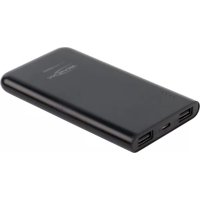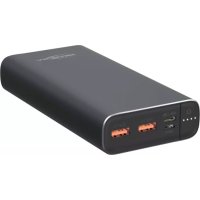
Powerbank 20.0 - Power bank ANSMANN - Free user manual and instructions
Find the device manual for free Powerbank 20.0 ANSMANN in PDF.



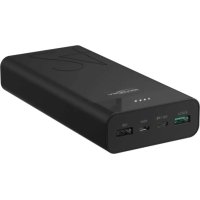
| Product type | Portable battery 20000 mAh |
| Brand | ANSMANN |
| Model | Powerbank 20.0 |
| Battery technology | Lithium-Polymer (Li-Po) |
| Capacity | 20000 mAh / 74 Wh |
| Micro USB input | 5V / 2A |
| USB Type C input (PD) | 5-9V / 2.5A |
| USB Type C output (PD) | 5V/3A, 9V/2A, 12V/1.5A |
| USB output (QC3.0) | 5V/3A, 9V/2A, 12V/1.5A |
| Total output power | 18W max |
| Charging time | ≈7.5h (9V/2.5A) or ≈11h (5V/2A) |
| Status display | 4 capacity LEDs |
| Protection functions | Overcharge, deep discharge, overcurrent, short circuit |
| Supported technologies | Quick Charge 3.0, Power Delivery (PD) |
| Simultaneous charging | Yes, limited according to total current |
| Included accessories | 2 USB-A/micro USB cables, 1 USB-C/USB-C cable |
| Operating temperature | -20°C to +25°C |
| Warranty | 3 years (subject to conditions) |
Frequently Asked Questions - Powerbank 20.0 ANSMANN
User questions about Powerbank 20.0 ANSMANN
0 question about this device. Answer the ones you know or ask your own.
Ask a new question about this device
Download the instructions for your Power bank in PDF format for free! Find your manual Powerbank 20.0 - ANSMANN and take your electronic device back in hand. On this page are published all the documents necessary for the use of your device. Powerbank 20.0 by ANSMANN.
USER MANUAL Powerbank 20.0 ANSMANN
text_image
Input: Micro USB: 5 V DC 2.0 A Capacity LED On/Off USB Type C Input: 5 V - 9 V DC 2.5 A Output: 5 V DC 3.0 A 9 V DC 2.0 A 12 V DC 1.5 A Output USB QC 3.0: 5 V DC 3.0 A 9 V DC 2.0 A 12 V DC 1.5 A 25mm 67mm 137mm1700-0113
Deutsch | English | Français | Español | Português Italiano | Nederlands | Dansk | Suomalainen | Norsk | Svenska
DE - VORWORT
Many thanks for choosing an ANSMANN POWERBANK. The operating instructions will help you to get the best from the functions of your new external rechargeable battery pack. We hope you enjoy your new product.
Your ANSMANN Team
SAFETY INSTRUCTIONS
- Read the operating instructions carefully before first use and observe the safety instructions.
■ Please disconnect your device from the ANSMANN POWERBANK if you are not using it.
In order to prevent any risk of fire or electric shock, the ANSMANN POWERBANK must be protected from moisture and rain!
■ The product can be damaged by impacts, shocks or being dropped, even from low heights. Handle the product carefully!
■ Do not expose the device to intense heat or leave it in direct sunlight!
■ Never open the product or attempt to carry out repairs yourself!
■ Product safety is impaired by modifications or alterations to the product. There is a risk of injury!
This product is not to be used by persons (including children) who have restricted physical, sensory or mental capabilities or who do not have adequate experience and knowledge in handling this product. Such persons must be instructed beforehand by a supervisory person who is responsible for their safety or must be supervised during the use of the device!
■ Do not perform charging and discharging of the Powerbank at the same time. - Do not expose the Powerbank to any direct sun radiation. Protect the product against open fire. There is a risk of explosion.
■ Do not touch leaking batteries - Risk of injury through burns!
■ Micro USB and USB Type-C can't be inserted at the same time.
■ Micro USB and Type-C(PD) can't inserted at the same time.
■ Failure to observe the safety instructions can result in dangerous injuries to persons or damage to the POWERBANK or the connected devices!
■ If you have questions please contact your local dealer or our service department.
CAUTION
RISK OF EXPLOSION IF BATTERY IS REPLACED BY AN INCORRECT TYPE. DISPOSE OF USED BATTERIES ACCORDING TO THE INSTRUCTIONS.
USE
> CAPACITY INDICATION
Press the power button to check the energy remaining.
■ 4 LEDs illuminate: 75% - 100%
■ 3 LEDs illuminate: 50% - 75%
■ 2 LEDs illuminate: 25% - 50%
■ 1 LED illuminates: 1% - 25%
■ No LED illuminates: The POWERBANK is completely discharged.
Please charge the POWERBANK immediately. If the POWERBANK will not be used for an extended period of time, it is necessary to charge it before storage in order to avoid the rechargeable battery being damaged.
> CHARGING THE POWERBANK
MICRO USB
Insert the Micro-USB plug of the USB cable into the Micro-USB socket on the POWERBANK and the USB plug into the USB port on a computer or a USB charger.
TYPE C
Insert the type-C plug of the USB cable into the type-C socket on the POWERBANK and the USB plug into the USB port on a computer or a USB charger.
The charging process starts automatically. During the charging process, up to 4 white LEDs indicate the charge progress. After the charging process is complete, all 4 white LEDs illuminate steadily.
> CHARGING DEVICES
In order to charge a device, such as a smartphone for example, please use the USB cable supplied (provided that the Micro-USB plug fits your mobile device) or the original charge cable for your device. The Powerbank likewise has a type-C output. Please use a suitable type-C cable for this. Insert the USB / type C plug of the cable into the POWER-BANK and the other end into your device. The charging process starts automatically.
The POWERBANK has Quick Charge 3.0 and a Power Delivery (PD) protocol. To use this technology, please check whether your device is
Quick-Charge-capable or supports Power Delivery (PD). Please refer to this information from the product information or operating instructions of the respective manufacturer or the Internet.
Simultaneous charging of multiple end-devices is possible with restrictions. This depends on the total charge current required.
The POWERBANK switches off automatically after the charging is complete. Please disconnect your device from the POWERBANK once the charging process is complete. Please note that the Powerbank should not be charged and discharged simultaneously.
The POWERBANK has a smart microcontroller that detects the connected device, provides the optimum current, and thus reduces the charging time to a minimum.
The POWERBANK may heat up a little depending on the charge/discharge current.
TECHNICAL DATA
- Cell type: Li-Po battery pack
- Capacity: 20000mAh | 74Wh
- Input: Micro-USB: 5VDC | 2 .0A
USB Type C (PD): 5VDC - 9VDC | 2.5A -
Output: USB Type C (PD): 5VDC | 3 .0A 9VDC | 2 .0A 12VDC | 1.5A USB (QC3.0): 5VDC | 3 .0A 9VDC | 2 .0A 12VDC | 1.5A
Total output: 3 .0A max. | 18W -
Accessories: 2x charging cables (USB to Micro-USB and USB Type C to USB Type C)
-
Operating temperature: -20°C to +25°C
-
Charge time: 5V | 2 .0A: about 11h 9V | 2.5A: about 7.5h
-
Protective functions: Over-charging protection, deep discharge protection, overload protection short-circuit protection
-
Display: LED display
SIGNS AND SYMBOLS
Please take note of the following symbols on the product and on the packaging.
= The product meets the condition of the European directive.
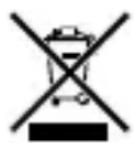
= At the end of its service life, dispose of the product in keeping with all legal requirements. The dustbin symbol indicates that waste electrical and electronic equipment may not be disposed of with normal household waste within the EU. Please use local recycling and collection points or contact the retailer where you purchased the product.
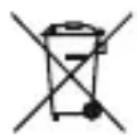
ENVIRONMENTAL INFORMATION
The device should not be discarded in the normal household waste under any circumstances. Dispose of the device via an authorised disposal centre or your communal waste disposal facility. Observe the current applicable regulations. Contact your waste disposal facility in the event of any doubt. Dispose of all packaging materials via an environmentally friendly disposal facility.
LIMITATION OF LIABILITY
The information contained within these operating instructions can be changed without prior notification. ANSMANN accepts no liability for direct, indirect, incidental or other damage or consequential damage arising though improper handling or through disregard of the information contained within these operating instructions.
GUARANTEE INFORMATION
The device has a three-year guarantee. The guarantee does not apply to damage to the device arising through a failure to comply with the operating instructions. You can find our warranty terms online at www.ansmann.de
Subject to technical changes. We assume no liability for printing errors. 04/2021
FR - AVANT-PROPOS
Chère cliente, cher client,
Saída total: 3 .0A max. | 18W
text_image
CE = Beha■ 4 LED lyser: 75% - 100%
■ 3 LED lyser: 50% - 75%
■ 2 LED lyser: 25% - 50%
■ 1 LED lyser: 1% - 25%
■ Ingen LED lyser: POWERBANK er helt afladet.
> OPLADNING AF APPARATER
■ 4 LEDs lyser: 75% - 100%
■ 3 LEDs lyser: 50% - 75%
■ 2 LEDs lyser: 25% - 50%
■ 1 LED lyser: 1% - 25%
■ Ingen LED lyser: POWERBANK er helt utladet.
natural_image
Completely black image with no visible content or text.
natural_image
Completely blank white image with no visible content, text, or symbols.
natural_image
Blank white image with no visible content, text, or symbols.
natural_image
Blank white image with no visible content, text, or symbols.
natural_image
Blank white image with no visible content, text, or symbols.
natural_image
Blank white image with no visible content, text, or symbols.
natural_image
Blank white image with no visible content, text, or symbols.
natural_image
Blank white image with no visible content, text, or symbols.
natural_image
Blank white image with no visible content, text, or symbols.
natural_image
Blank white image with no visible content, text, or symbols.
natural_image
Blank white image with no visible content, text, or symbols.
natural_image
Blank white image with no visible content, text, or symbols.
natural_image
Blank white image with no visible content, text, or symbols.
natural_image
Blank white image with no visible content, text, or symbols.
natural_image
Blank white image with no visible content, text, or symbols.
natural_image
Blank white image with no visible content, text, or symbols.
natural_image
Blank white image with no visible content, text, or symbols.
natural_image
Blank white image with no visible content, text, or symbols.
natural_image
Blank white image with no visible content, text, or symbols.
natural_image
Blank white image with no visible content, text, or symbols.
natural_image
Blank white image with no visible content, text, or symbols.
natural_image
Blank white image with no visible content, text, or symbols.
natural_image
Blank white image with no visible content, text, or symbols.
natural_image
Blank white image with no visible content, text, or symbols.
natural_image
Blank white image with no visible content, text, or symbols.
natural_image
Blank white image with no visible content, text, or symbols.
natural_image
Blank white image with no visible content, text, or symbols.
natural_image
Blank white image with no visible content, text, or symbols.
natural_image
Blank white image with no visible content, text, or symbols.
natural_image
Blank white image with no visible content, text, or symbols.
natural_image
Blank white image with no visible content, text, or symbols.
natural_image
Blank white image with no visible content, text, or symbols.
natural_image
Blank white image with no visible content, text, or symbols.
natural_image
Blank white image with no visible content, text, or symbols.
natural_image
Blank white image with no visible content, text, or symbols.
natural_image
Blank white image with no visible content, text, or symbols.
natural_image
Blank white image with no visible content, text, or symbols.
natural_image
Blank white image with no visible content, text, or symbols.
natural_image
Blank white image with no visible content, text, or symbols.
natural_image
Blank white image with no visible content, text, or symbols.
natural_image
Blank white image with no visible content, text, or symbols.
natural_image
Blank white image with no visible content, text, or symbols.
natural_image
Pure black horizontal line on white background (no text or symbols)
natural_image
Completely black image with no visible content or text.
natural_image
Completely black image with no visible content or text.
natural_image
Completely black image with no visible content or text.
natural_image
Blank white image with no visible content, text, or symbols.
natural_image
Completely black image with no visible content or text.
natural_image
Completely blank white image with no visible content, text, or symbols.
natural_image
Blank white image with no visible content, text, or symbols.
natural_image
Blank white image with no visible content, text, or symbols.
natural_image
Blank white image with no visible content, text, or symbols.
natural_image
Blank white image with no visible content, text, or symbols.
natural_image
Blank white image with no visible content, text, or symbols.
natural_image
Blank white image with no visible content, text, or symbols.
natural_image
Blank white image with no visible content, text, or symbols.
natural_image
Blank white image with no visible content, text, or symbols
natural_image
Blank white image with no visible content, text, or symbols
natural_image
Blank white image with no visible content, text, or symbols
natural_image
Blank white image with no visible content, text, or symbols
natural_image
Blank white image with no visible content, text, or symbols
natural_image
Blank white image with no visible content, text, or symbols
natural_image
Blank white image with no visible content, text, or symbols
natural_image
Blank white image with no visible content, text, or symbols
natural_image
Blank white image with no visible content, text, or symbols
natural_image
Blank white image with no visible content, text, or symbols.
natural_image
Blank white image with no visible content, text, or symbols.
natural_image
Blank white image with no visible content, text, or symbols.
natural_image
Blank white image with no visible content, text, or symbols.
natural_image
Blank white image with no visible content, text, or symbols.
natural_image
Blank white image with no visible content, text, or symbols.
natural_image
Blank white image with no visible content, text, or symbols.
natural_image
Blank white image with no visible content, text, or symbols.
natural_image
Blank white image with no visible content, text, or symbols.
natural_image
Blank white image with no visible content, text, or symbols.
natural_image
Blank white image with no visible content, text, or symbols.
natural_image
Blank white image with no visible content, text, or symbols.
natural_image
Blank white image with no visible content, text, or symbols.
natural_image
Blank white image with no visible content, text, or symbols.
natural_image
Blank white image with no visible content, text, or symbols.
natural_image
Blank white image with no visible content, text, or symbols.
natural_image
Blank white image with no visible content, text, or symbols.
natural_image
Blank white image with no visible content, text, or symbols.
natural_image
Blank white image with no visible content, text, or symbols.
natural_image
Blank white image with no visible content, text, or symbols.
natural_image
Blank white image with no visible content, text, or symbols.
natural_image
Blank white image with no visible content, text, or symbols.
natural_image
Blank white image with no visible content, text, or symbols.
natural_image
Blank white image with no visible content, text, or symbols.
natural_image
Pure black horizontal line on white background (no text or symbols)
natural_image
Completely black image with no visible content or text.
natural_image
Completely black image with no visible content or text.
natural_image
Completely black image with no visible content or text.
natural_image
Blank white image with no visible content, text, or symbols.ANSMANN AG
Industriestrasse 10
97959 Assamstadt
Germany
Hotline: +49 (0) 6294 / 4204 3400
E-Mail: hotline@ansmann.de