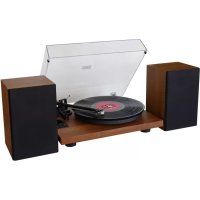
PL711 - Turntable Soundmaster - Free user manual and instructions
Find the device manual for free PL711 Soundmaster in PDF.



| Product type | Turntable |
| Brand | Soundmaster |
| Model | PL711 |
| Speeds | 33 1/3 and 45 rpm |
| Drive | Belt drive |
| Pre-installed cartridge | Recommended weight 3.5 g ± 0.5 g |
| Bluetooth | Built-in, selectable Bluetooth mode |
| USB port | Yes, for connection to a computer and recording |
| Audio outputs | Phono jack, line jack, built-in speakers (2x) |
| Power supply | External AC adapter (DC), wall plug 100-240 V |
| Standby consumption | Automatic shut-off after 15 minutes of inactivity |
| Stylus maintenance | Clean with brush, replace after 400 hours of use |
| Felt mat maintenance | Remove regularly and clean to avoid scratches |
| Safety | Do not open, risk of electric shock; use indoors in a dry place |
| Spare parts | Stylus, cartridge, belt, counterweight available |
| Repairability | Repair by authorized center only |
| Included accessories | 2 speakers, audio cables, 45 rpm adapter, Audacity software (download) |
| Warranty | Warranty card included |
| Compliance | Directive 2014/53/EU |
Frequently Asked Questions - PL711 Soundmaster
User questions about PL711 Soundmaster
0 question about this device. Answer the ones you know or ask your own.
Ask a new question about this device
Download the instructions for your Turntable in PDF format for free! Find your manual PL711 - Soundmaster and take your electronic device back in hand. On this page are published all the documents necessary for the use of your device. PL711 by Soundmaster.
USER MANUAL PL711 Soundmaster
RCA wired connection
or
The current instruction manual can be downloaded from www.soundmaster.de Technical changes and misprints reserved.
Copyright by Woerlein GmbH, 90556 Cadolzburg, www.soundmaster.de Duplication only with the permission of Woerlein GmbH
CE

ENVIRONMENTAL PROTECTION
Do not dispose of this product with the normal household waste at the end of its life cycle. Return it to a collection point for the recycling of electrical and electronic devices. This is indicated by the symbol on the product, user manual or packaging
The materials are recyclable according to their labeling. By reusing materials or other forms of recycling old devices and packaging, you are making an important contribution to protecting our environment. If necessary, remove batteries and personal data before disposal free of charge and ask your local authority about the responsible disposal point
| 3 | WARNING Risk of electric shock Do not open! | 1 |
| Caution: To reduce the risk of electric shock, do not remove the cover (or back). There are no user serviceable parts inside. Refer servicing to qualified service personnel. | ||

This symbol indicates the presence of dangerous voltage inside the enclosure, sufficient enough to cause electric shock.
This symbol indicates the presence of important operating and maintenance instructions for the device
Used batteries are hazardous waste and NOT to be disposed of with the household waste! As a consumer you are legally obligated to return all batteries for environmentally responsible recycling - no matter whether or not the batteries contain harmful substances*)
Return batteries free of charge to public collection points in your community or shops selling batteries of the respective kind.
Only return fully discharged batteries
*) marked Cd = cadmium, Hg = mercury, Pb = lead
- Only use mercury and cadmium-free batteries.
- Used batteries are hazardous waste and NOT to be disposed of with the household waste!!!
- Keep batteries away from children. Children might swallow batteries.
- Contact a physician immediately if a battery was swallowed.
- Check your batteries regularly to avoid battery leakage.
- Batteries shall not be exposed to excessive heat such as sunshine, fire or the like.
- CAUTION: Danger of explosion if battery is incorrectly replaced
- Replace only with the same or equivalent type
- Use the device in dry indoor environments only.
- Protect the device from humidity.
- This apparatus is for moderate climates areas use, not suitable for use in tropical climates countries.
Safety, Environmental and Setup Instructions
- No objects filled with liquids, such as vases, shall be placed on the apparatus.
- The mains plug or an appliance coupler is used as the disconnect device, the disconnect devices shall remain readily operable.
- Connect this device to a properly installed and earthed wall outlet only. Make sure the mains voltage corresponds with the specifications on the rating plate.
- Make sure the mains cable stays dry during operation. Do not pinch or damage the mains cable in any way.
- A damaged mains cable or plug must immediately be replaced by an authorized service center.
- In case of lightning, immediately disconnect the device from the mains supply.
Children should be supervised by parents when using the device. - Clean the device with a dry cloth only.
- Do NOT use CLEANING AGENTS or ABRASIVE CLOTHS!
- Do not expose the device to direct sunlight or other heat sources.
- Install the device at a location with sufficient ventilation in order to prevent heat accumulation.
- Do not cover the ventilation openings!
- Install the device at a safe and vibration-free location.
- Install the device as far away as possible from computers and microwave units; otherwise radio reception may be disturbed.
- Do not open or repair the enclosure. It is not safe to do so and will void your warranty. Repairs only by authorized service/ customer center.
- No naked flame sources, such as lighted candles, should be placed on the unit.
- When you are necessary to ship the unit store it in its original package. Save the package for this purpose.
- In case of malfunction due to electrostatic discharge or fast transient (burst), remove and reconnect the power supply.
- If the unit is not using for a long period of time, disconnect it from the power supply by unplugging the power plug. This is to avoid the risk of fire.
LOCATION OF CONTROLS
TOP VIEW
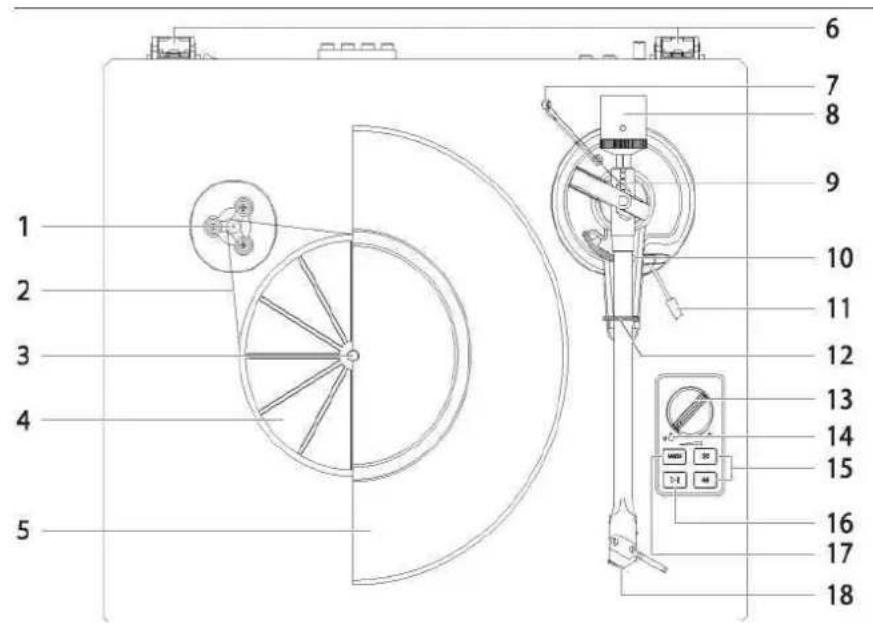
1 Motor Pulley
2 Drive Belt
3 Turntable Spindle
4 Turntable Sub-platter
5 Turntable Platter
6 Lid Hinges
7 Anti-Skating Weight
8 Counterweight
9 Anti-Skating Stick
10 Tonearm Rest
11 Tonearm Lift Lever
12 Tonearm Clip
13 Volume Control
14 Indicator
15 33/45RPM Selector
16 Play/Stop Button
17 Mode Button
18 Stylus Cartridge
BACK VIEW
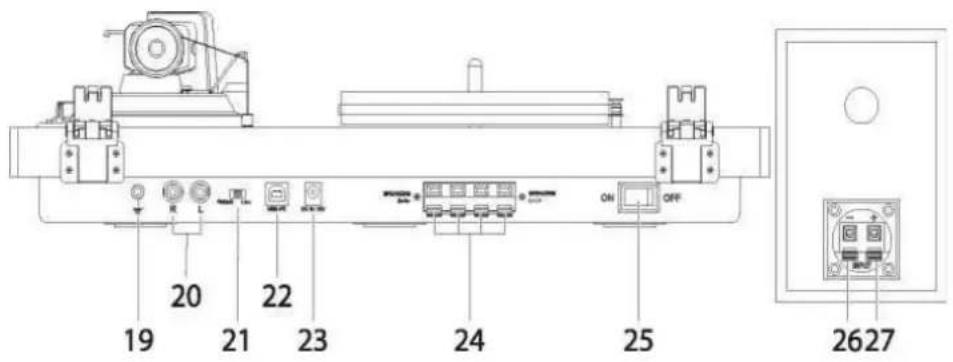
19 Ground Connector
20 Phono & Line Out Jacks
21 Phono & Line Out Switch
22 USB Port for PC Link
23 Power Cord Jack
24 External Speaker Jacks
25 Power Switch
26 Speaker Jack- (black)
27 Speaker Jack + (red)
INSTALLATION
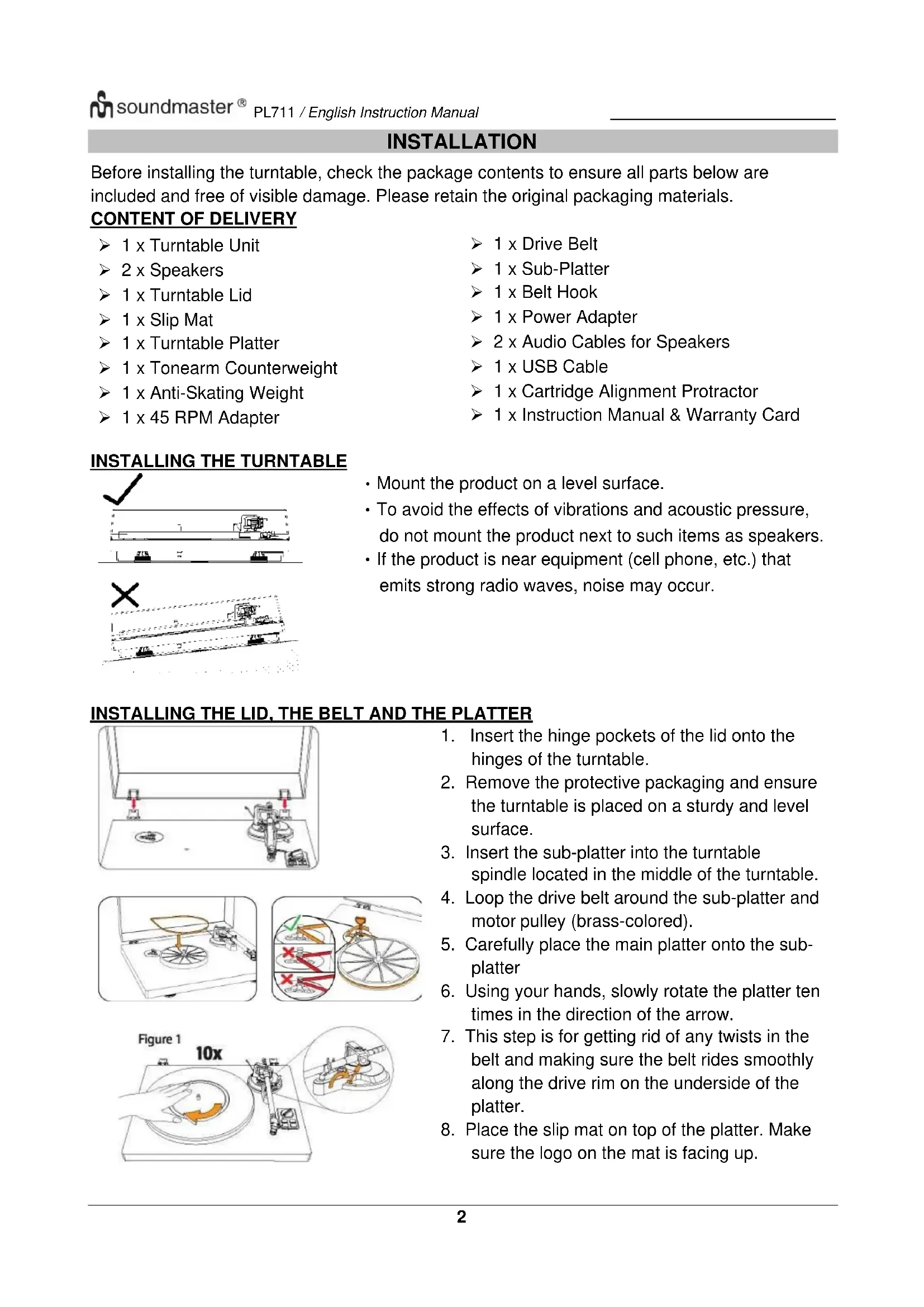
Before installing the turntable, check the package contents to ensure all parts below are included and free of visible damage. Please retain the original packaging materials.
CONTENT OF DELIVERY
1xTurntableUnit
2 x Speakers
1xTurntableLid
1xSlipMat
1xTurntable Platter
1 x Tonearm Counterweight
1 x Anti-Skating Weight
1 x 45 RPM Adapter1xDriveBelt
1x Sub-Platter
1xBeltHook
1xPowerAdapter
2 x Audio Cables for Speakers
1xUSB Cable
1 x Cartridge Alignment Protractor
1 x Instruction Manual & Warranty Card
INSTALLING THE TURNTABLE
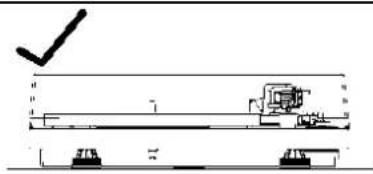
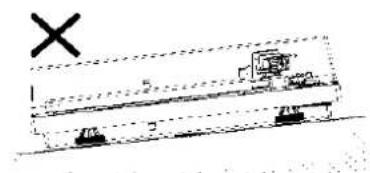
- Mount the product on a level surface.
- To avoid the effects of vibrations and acoustic pressure, do not mount the product next to such items as speakers.
- If the product is near equipment (cell phone, etc.) that emits strong radio waves, noise may occur.
INSTALLING THE LID, THE BELT AND THE PLATTER
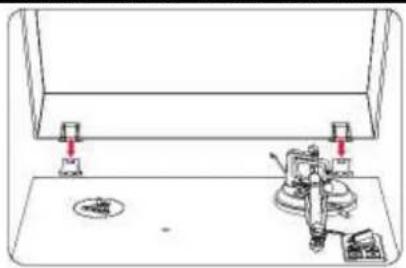
- Insert the hinge pockets of the lid onto the hinges of the turntable.
- Remove the protective packaging and ensure the turntable is placed on a sturdy and level surface.
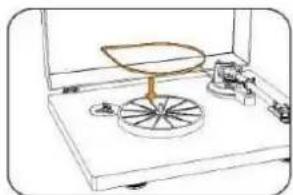
- Insert the sub-platter into the turntable spindle located in the middle of the turntable.
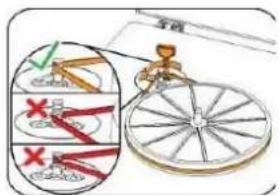
- Loop the drive belt around the sub-platter and motor pulley (brass-colored).
- Carefully place the main platter onto the sub- platter
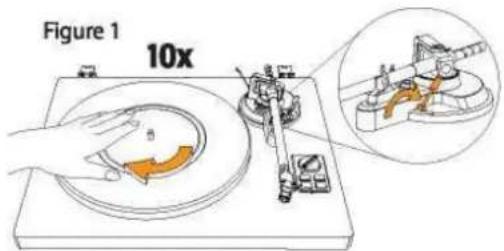
- Using your hands, slowly rotate the platter tentimes in the direction of the arrow.
- This step is for getting rid of any twists in the belt and making sure the belt rides smoothly along the drive rim on the underside of the platter.
- Place the slip mat on top of the platter. Make sure the logo on the mat is facing up.
CARTRIDGE TRACKING FORCE ADJUSTMENT
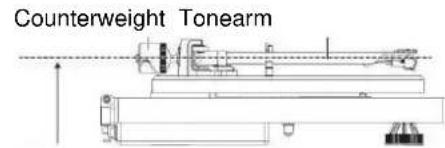
Adjust for balanced tonearm
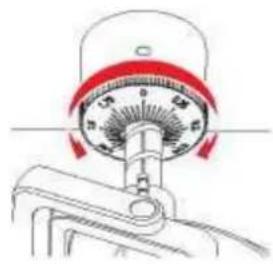
- The supplied Counterweight is suitable for cartridges weighing between 3.0-6.0g.
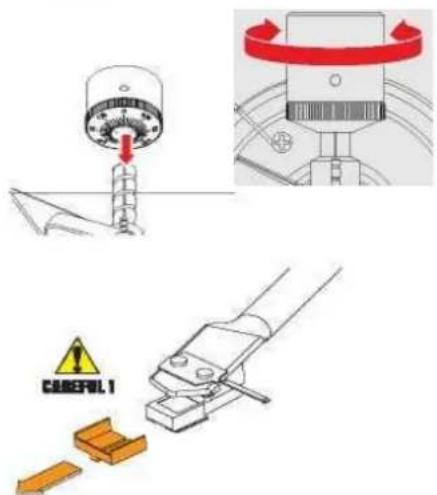
- Gently push and turn the Counterweight onto the rear of the tonearm (with the dial facing toward the front of the turntable).
- Pull the protector straight forward to remove it.
NOTE: Applying a downward force may cause the stylus to come off the body. Only low volume is output if the stylus has come off; or is about to come off; so refer to "Replacing the stylus" to reattach the stylus correctly.
- Remove the tie-wrap and unlock the tonearm.
- Lower the tonearm lift lever and position the cartridge in the space between the tonearm rest and platter.
- Carefully rotate the counterweight until the tonearm achieves a neutral balance. The tonearm should return to this balanced position if it is moved up or down. This adjustment must be done carefully.
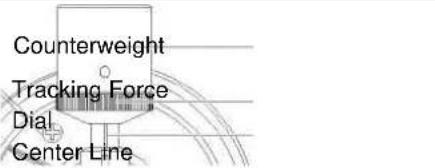
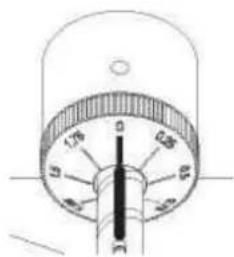
- Once the tonearm is correctly balanced, return the tonearm to its rest. Hold the Counterweight without moving it, and gently rotate the tracking force dial until the zero is in line with black center line on the rear of the tonearm. Check to make sure the tonearm is still neutrally balanced.
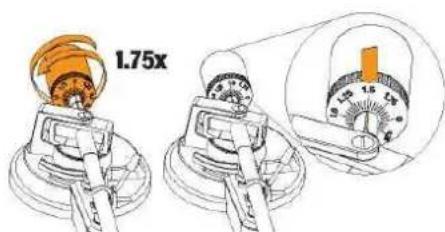
Rotate the counterweight counter clockwise (as seen from the front) to adjust the tracking force according to the cartridge manufacturer's recommendations.
Note: Each mark on the scale represents 0.05g. The recommended tracking force for the factory-installed cartridge is 3.5g± 0.5g . The cartridge tracking force only goes up to 2g for one rotation of the tracking force dial.
- You will need 1.75 rotations to reach 3.5g
ANTI - SKATING FORCE ADJUSTMENT
The anti-skating force must be adjusted corresponding to the tracking force as follows:
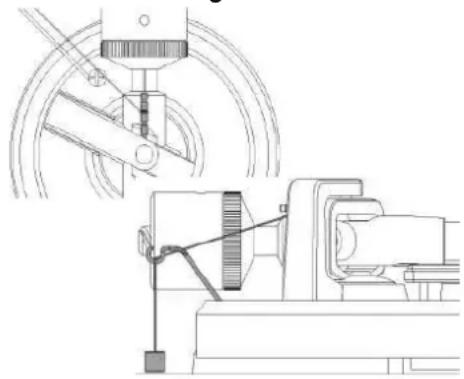
| Tracking Force | Groove in the Stick |
| 1 - 2 g | 1st from the bearing ring |
| 2 - 3 g | 2nd from the bearing ring |
| 3 - 4 g | 3rd from the bearing ring |
| >4 g | 4th from the bearing ring |
- Slip the loop of the anti-skating weight's thread over the 3rd groove of the stick to set the correct anti-skating force for the factory-installed cartridge.
- Feed the thread through the loop of the wire hanger
CONNECTION TO THE INCLUDED SPEAKERS
This turntable includes a built-in amplifier and comes supplied with Hi-Fi speakers.
Connect the speakers using the supplied speaker cable (black cable to black clamp; & red cable to red clamp) connect the left speaker with left and right speaker with the right outlet clamps.
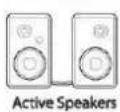
CONNECTION TO EXTERNAL UNITS WITH CHINCH AUDIO CABLE
If you wish to use your own amplifier or speakers, please follow the instructions below
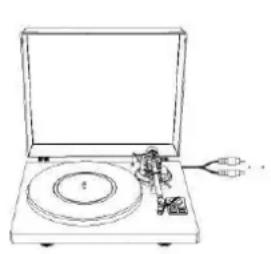
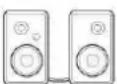
RCA wired connection
Active Speakers

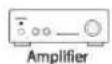
or
Amplifier
This product has a built-in phono equalizer function. You can use the product even if you do not have a phono amplifier or connectable equipment with a built-in phono amplifier.
Use the pre-amplifier selector switch to set the output, as described below
If you have amplifier with PHONO input pls use the Phono input jack and GROUND connection and switch to the pre amplifier selector to PHONO.
If you have amplifier or active speakers with LINE INPUT pls switch the pre amplifier selector to LINE and connect to the LINE input sockets of the amplifier/active speakers
The red cable is for the right channel and the white is for the left channel.
MAIN POWER CONNECTION
- Insert the DC plug of the AC adapter cord into the DC INPUT Jack at the back of the turntable.
- Plug the AC adapter into a normal power outlet.
NOTE: Do not plug the AC power adapter into a power outlet before all turntable assembly is completed. Before turning on turntable power, recheck all connections to make sure they are correct and secure. Always turn off the turntable before connecting or disconnecting from power.
POWER MANAGEMENT FUNCTION
The turntable will automatically go into standby mode after 15 minutes of inactivity.
To resume operation, press and hold the Mode button for 3 seconds.
TURNTABLE OPERATION
BEFORE PLAYING A RECORD
Switch the Power Switch to the ON position.
Pull the protector straight forward to remove it carefully.
PLAYING A RECORD
- Sufficiently lower the volume of the amplifier, speakers, etc.
- Press the MODE button to choose turntable mode. The Red indicator light indicates Turntable mode and blue indicator light indicates Bluetooth mode.
- Place the record on the slip mat. If using 45RPM records, put the 45RPM adapter on the center spindle before placing the record on the platter.
- Press the 33 or 45 RPM speed button according to the type of record.
- Press the Play/Stop button. The platter will start spinning.
- Unlock the tonearm clip and set the tonearm lift lever to the up position.
- Position the tonearm over the desired location (groove) on the record.
- Carefully lower the tonearm on the record.
- Turn up the volume of the turntable as needed.
- When you are finished playing the record, raise the tonearm, return it to rest on the arm clip and press the Play/Stop button to stop.
NOTE:
- If the silent pause time between each track is longer than 3 minutes, the platter will stop spinning automatically to avoid damaging the record. This stoppage does not mean the turntable is defective.
- If the felt mat gets dirty, it can easily scratch the record, so remove the felt mat periodically and wipe off any dust
- prevent the record from scratches and warping, remove it after use.
BLUETOOTH OPERATION
- Press the MODE button to choose Bluetooth mode. The red indicator light indicates Turntable mode and blue indicator light indicates Bluetooth mode. You will hear an activation sound from the turntable.
- Turn on the Bluetooth feature of your media device and search for and select PL711 to pair the media device with turntable,
- Once your media device is successfully paired with the turntable, the turntable will play a short confirmation sound.
- Play and stream music from your media device to the turntable.
RECORDING WITH A COMPUTER
CONNECTING WITH A COMPUTER
- Connect this record player to a computer using a commercially-available USB cable to convert audio signals from a record to digital data and send them to the computer.
- Turn the computer on: confirm that the operating system is working correctly.
- Turn the record player on and the computer will automatically detect and identify the unit's USB port as "USB Audio CODEC".
INSTALL "AUDACITY" SOFTWARE IN YOUR COMPUTER
With a computer, you can record the audio from this record player. You must first install a software that can be used for audio recording on the computer. For example, the software "Audacity" for free download.
- Install and open the software.
- Click the "Record" icon in the software. The encoding is going on.
- When finish the encoding, click "STOP" icon.
- Open the Files icon in the software and save the project.
The project can be exported in MP3 or other audio format as you like.
CARE
Stylus Tip
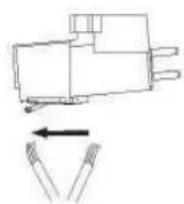
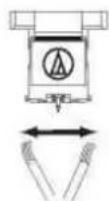
If dirt and grime are stuck to the stylus tip, clean it with a commercially sold brush,
We recommend using a stylus cleaner (not included) if the stylus tip is considerably dirty.
Clean the stylus tip by moving the brush from the rear to the front of the stylus tip.
Replacing the Stylus
It's suggested to replace the stylus after 400 hours of use.
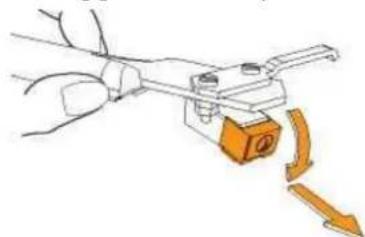
In addition to the deterioration of sound quality, records may also be damaged as the cartridge's stylus tip wears down.
Be sure to disconnect the products AC adapter from the outlet. When replacing the stylus, hold the head shell and the cartridge body tightly. Move the front of the stylus in a forward and down motion.
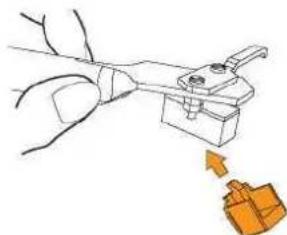
Mount the new replacement stylus to the cartridge
Lift the stylus up until you hear a click
Make sure there is no gap between the headshell and cartridge.
Cartridge Replacement
- Carefully remove the wire leads from the original cartridge.
2 Loosen the two screws on the headshell that are securing the cartridge and then remove the original cartridge.
3 Mount the new cartridge to the headshell and tighten it lightly. Do not completely tighten the screws at this moment.
4 Connect the wire leads to the new cartridge's terminals. The wire lead color codes are as below:
Wire Channel
White Left channel positive ( + ) Red Right channel positive ( + )
Black Left channel negative (L-) Black Right channel negative (R-)
- Adjust the cartridge's position to make sure it is precisely aligned on the headshell so that the stylus will be tracking the grooves in parallel perfectly.
To achieve this, place the included paper cartridge alignment protractor over the turntable spindle, carefully lift the tone arm and place the tip of the stylus on the points marked 130mm and 250mm respectively. Fine tune the cartridge's position on the head shell until the cartridge is perfectly in parallel with the reference lines at both points.
- Tighten the screws completely once the perfect alignment is achieved.
NOTE: If you are unfamiliar or uncomfortable with completing this procedure, we recommend consulting with a professional to perform the installation.
WHEN THE TURNTABLE IS MOVED
- Wrap the turntable in the reverse order from when you unwrapped it.
Using the products original packing materials, if you do not have the packaging materials, take the following measures: - After disconnecting the AC adapter from the outlet, remove the felt mat and platter.
- Wrap the platter that it cannot damaged or damage any part during the transport.
- Attach the protector to the cartridge.
- Use a string or something similar to tie the tonearm to the rest so that it does not become dislodged.
- Wrap the turntable body with paper or a soft cloth so that it does not get damaged.
IMPORTANT:
NO LIABILITY IS ACCEPTED FOR IMPROPERLY SHIPPED
DEVICES!
The current instruction manual can be downloaded from www.soundmaster.de
Technical changes and misprints reserved.
Copyright by Woerlein GmbH, 90556 Cadolzburg, www.soundmaster.de
Duplication only with the permission of Woerlein GmbH
CE

PROTECTION DE L'ENVIRONNEMENT

WANNEER DE DRAATAFEL WORDT VERPLAATST
D 90556 Cadolzburg, Germany
Tel: +49 9103 71 67 0
Fax: +49 9103 71 67 12
E-Mail: info@soundmaster.de
Internet: www.soundmaster.de
Hereby, Worlein GmbH declares that this device is in compliance with the essential requirements and other relevant provisions of Directive 2014/53/EU.
A copy of the declaration of conformity can be obtained from the above address.
- ENVIRONMENTAL PROTECTION
- LOCATION OF CONTROLS
- TOP VIEW
- BACK VIEW
- INSTALLATION
- CONTENT OF DELIVERY
- INSTALLING THE TURNTABLE
- INSTALLING THE LID, THE BELT AND THE PLATTER
- CARTRIDGE TRACKING FORCE ADJUSTMENT
- ANTI - SKATING FORCE ADJUSTMENT
- CONNECTION TO THE INCLUDED SPEAKERS
- CONNECTION TO EXTERNAL UNITS WITH CHINCH AUDIO CABLE
- MAIN POWER CONNECTION
- POWER MANAGEMENT FUNCTION
- TURNTABLE OPERATION
- BEFORE PLAYING A RECORD
- PLAYING A RECORD
- NOTE
- BLUETOOTH OPERATION
- RECORDING WITH A COMPUTER
- CONNECTING WITH A COMPUTER
- INSTALL "AUDACITY" SOFTWARE IN YOUR COMPUTER
- CARE
- STYLUS TIP
- REPLACING THE STYLUS
- CARTRIDGE REPLACEMENT
- WIRE CHANNEL
- WHEN THE TURNTABLE IS MOVED
- IMPORTANT
- NO LIABILITY IS ACCEPTED FOR IMPROPERLY SHIPPED
- DEVICES
- PROTECTION DE L'ENVIRONNEMENT
- WANNEER DE DRAATAFEL WORDT VERPLAATST
Brand : Soundmaster
Model : PL711
Category : Turntable