
RoninSC Focus Motor - Electric motor DJI - Free user manual and instructions
Find the device manual for free RoninSC Focus Motor DJI in PDF.
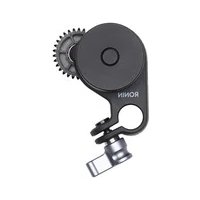



| Product type | Focus motor for gimbal |
| Brand | DJI |
| Model | RoninSC Focus Motor |
| Dimensions | 71 × 47 × 34 mm |
| Weight | 88 g |
| Power supply | 5 V (via communication port) |
| Maximum torque | 0.2 Nm |
| Maximum speed | 100 rpm |
| Noise | 25 dB |
| Clamp inner diameter | 12 mm |
| Gear (motor) | 40 teeth, module 0.8 |
| Gear belt | 151 teeth, module 0.8, diameter 30-110 mm, length 377 mm |
| Operating temperature | -20 to 45 °C |
| Main use | Control of focus, aperture and zoom |
| Compatibility | Ronin-SC gimbal (Focus Wheel required) |
| Calibration | Automatic (lenses with mechanical limit) or manual |
| Firmware update | Via the Ronin-SC |
| Safety | Do not touch rotating gear |
| Maintenance | Clean with a dry cloth |
| Repairability | Consult DJI after-sales service |
Frequently Asked Questions - RoninSC Focus Motor DJI
User questions about RoninSC Focus Motor DJI
0 question about this device. Answer the ones you know or ask your own.
Ask a new question about this device
Download the instructions for your Electric motor in PDF format for free! Find your manual RoninSC Focus Motor - DJI and take your electronic device back in hand. On this page are published all the documents necessary for the use of your device. RoninSC Focus Motor by DJI.
USER MANUAL RoninSC Focus Motor DJI
RONIN-SC FOCUS MOTOR
User Guide
Instructions for Use
Instructions for Use
One
Operating Instructions
User Guide
- When purchasing the Ronin-SC Combo, the listed items are included in the Ronin-SC packaging.
- If you purchased the Ronin-SC Combo, the listed items are already included in the package.
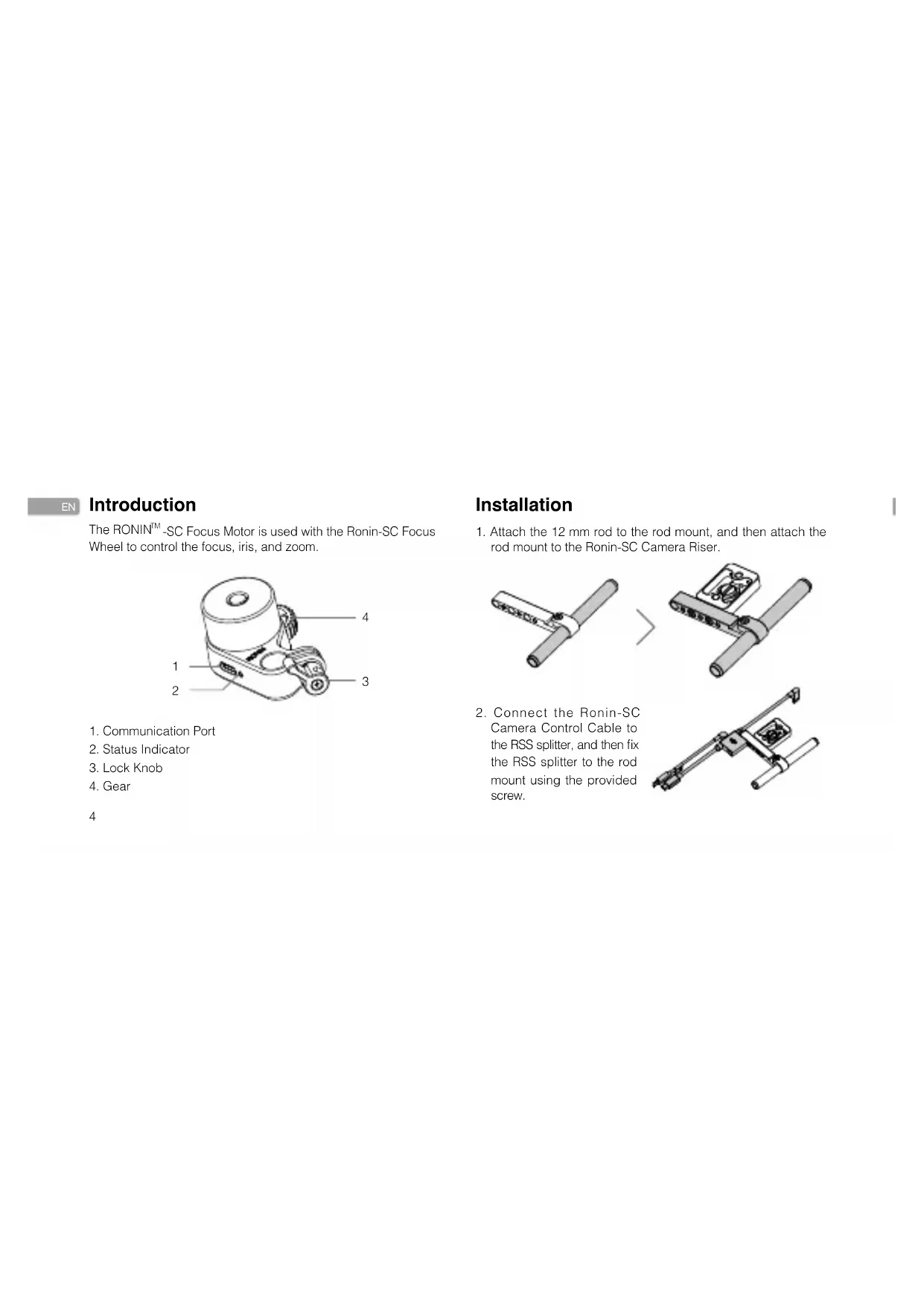
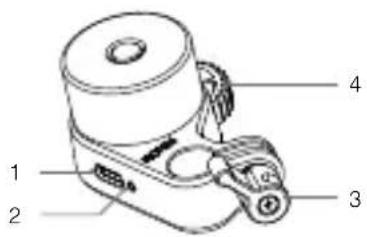
The RONIN™-SC Focus Motor is used with the Ronin-SC Focus Wheel to control the focus, iris, and zoom.
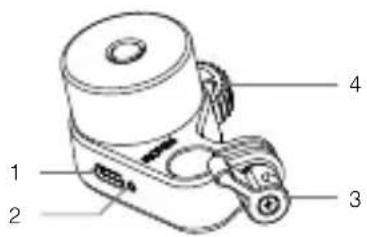
- Communication Port
- Status Indicator
- Lock Knob
- Gear
Installation
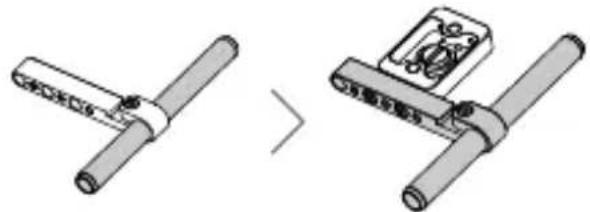
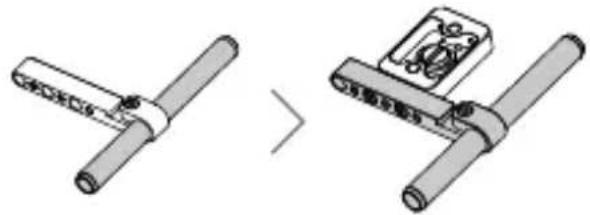
- Attach the 12 mm rod to the rod mount, and then attach the rod mount to the Ronin-SC Camera Riser.
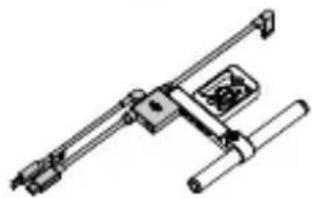
- Connect the Ronin-SC Camera Control Cable to the RSS splitter, and then fix the RSS splitter to the rod mount using the provided screw.
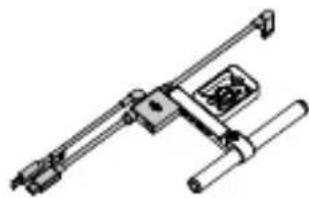
- Attach the camera riser with the rod mount to the bottom of the camera.
- Attach the focus motor to the 12 mm rod.
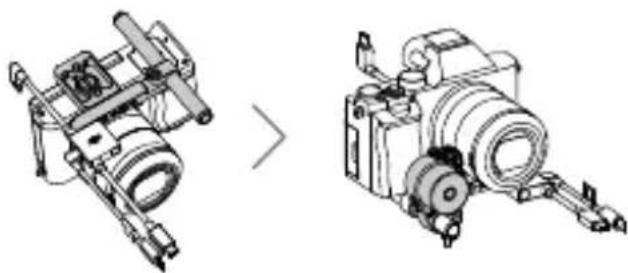

- The focus motor can be mounted on either side of the camera. Make sure the focus motor is mounted firmly.
- If the camera does not have a lens focus ring with a 0.8 m gear, attach the provided gear strip to the camera lens to use the focus motor.
a. Be sure the teeth of the gear strip are facing outward. Line up the gear strip on the focus ring or the zoom ring on the lens and pull it taut. b. Press the gear strip into the belt holder while holding it tightly. Make sure the gear strip is securely in place in the belt holder.
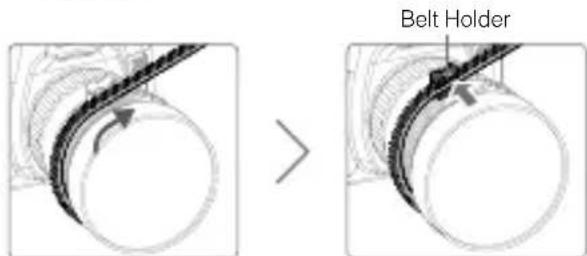

- To loosen the gear strip, push the gear strip outward while holding the belt holder tightly. DO NOT pull out the gear strip forcibly or the gear strip may be damaged.
- Trim the gear strip to the required length, leaving enough for adjustments (if needed).
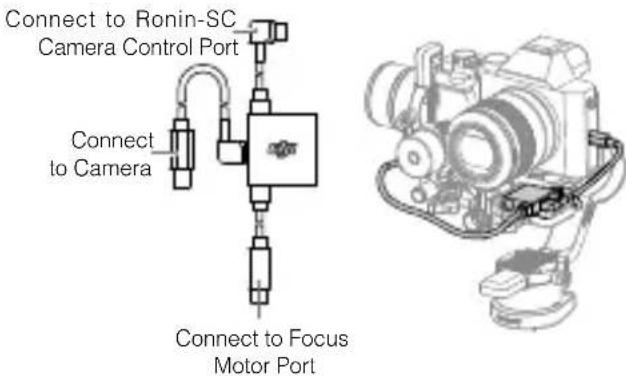
- After mounting the camera dovetail plate and lens support to the camera, attach the camera to Ronin-SC. Connect the camera, Ronin-SC, and Focus motor according to the figure below.
Usage
Control the focus motor by using the focus wheel after powering on Ronin-SC.
Calibration
The focus motor can be used before calibration, but the range that the focus wheel can rotate the motor will be limited. After calibration, the focus wheel will be able to fully rotate the motor.
Calibration Procedure
- For lenses with a mechanical limit, calibration can be done automatically. Press the focus wheel multifunction button twice to calibrate the focus motor.
Focus Wheel Multifunction Button
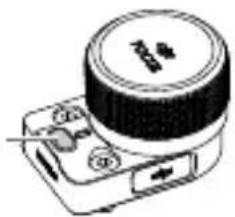
- For lenses without a mechanical limit, calibration must be done manually. Press the focus wheel multifunction button twice to start the calibration.
a. When the motor rotates to the start point, stop the motor manually. The motor will continue to rotate and stop the motor manually again when it reaches the start point. b. Repeat the step above to confirm the end point.
Set Focus Motor Range
The range of the focus motor can be set by confirming Points A and B on the focus wheel.
Rotate the motor to the desired Point A and press the focus wheel multifunction button to confirm. After Point A is confirmed, repeat the step to confirm Point B. Press the focus wheel multifunction button again to delete Points A and B.
Press and hold the focus wheel multifunction button to reverse the rotational direction of the focus motor.

The focus motor must be calibrated every time it is powered on. DO NOT touch the gear of the focus motor when it is rotating.
The status indicator of the focus wheel indicates the calibration status.
Blinking Pattern Descriptions
Solid yellow
Focus Motor is connected, but not calibrated
Blinks yellow slowly Calibrating
Solid green Focus Motor is connected and calibrated
Blinks green slowly Point A is set
Blinks green twice Points A and B are set
Focus Motor Status Indicator Descriptions
Blinking Pattern Descriptions
Blinks red twice Focus Motor error, update firmware
Blinks red slowly Focus Motor is disconnected
Blinks red quickly Focus Motor has stalled
Solid green Calibration complete
Blinks green slowly Working normally
Firmware Update
The focus motor firmware is part of the Ronin-SC firmware. When new firmware is available, connect the focus motor to Ronin-SC to update.
Specifications
| Focus Motor |
| Weight 88 g |
| Dimensions 71×47×34 mm |
| Max. Torque 0.2 Nm |
| Max. Speed 100 RPM |
| Operating Current Free current: 50 mA (5 V); Stall current: 1.2 A (5 V) |
| Operating Voltage 5 V |
| Noise 25 dB |
| Rod Clamp Inner Diameter 12 mm |
| Gear No. of teeth: 40; Module: 0.8 |
| Operating Temperature -20° to 45°C |
| Gear |
| No. of Teeth 151 |
| Module 0.8 |
| Diameter 30-110 mm |
| Length 377 mm |
RONIN is a trademark of DJI OSMO. Copyright © 2019 DJI OSMO All Rights Reserved.
Introduction
Copyright © 2019 DJI OSMO All Rights Reserved.
Preface
JP
Copyright © 2019 DJI OSMO All Rights Reserved.
- 12mm focus ring to focus motor
2. Ronin-SC camera mounting plate RSSSsplelriTeaenrgeh 好该国的nArae
Copyright © 2019 DJI OSMO All Rights Reserved.
Introduction
- The focus motor can be installed on either side of the camera. Make sure it is securely attached.
5. If the camera is not equipped with a focus ring with 0.8 mm gear pitch, attach the included gear ring solution to the camera lens to use the focus motor.
a. Make sure the gear teeth of the gear ring are aligned with the gear teeth on the focus ring. Align the teeth on the focus ring with the teeth on the lens and press it on. b. Insert the gear ring solution into the belt holder, firmly holding it. Make sure the belt is securely attached to the gear ring holder.
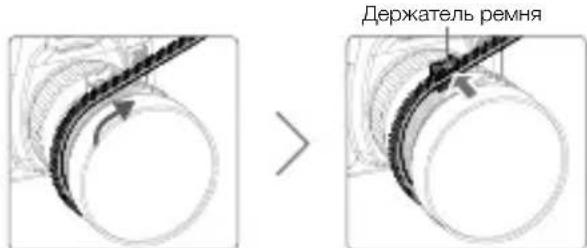

To install the gear ring belt, pull it tight, firmly holding the belt holder. Do not use excessive force when installing the gear ring belt. This may cause damage. - Adjust the gear ring belt, leaving enough slack for adjustment (if necessary).
- After installing the camera mounting plate and the lens holder on the camera, connect the camera to the Ronin-SC. Connect the camera, Ronin-SC, and focus motor as shown in the figure.
RU
Connect to the focus motor port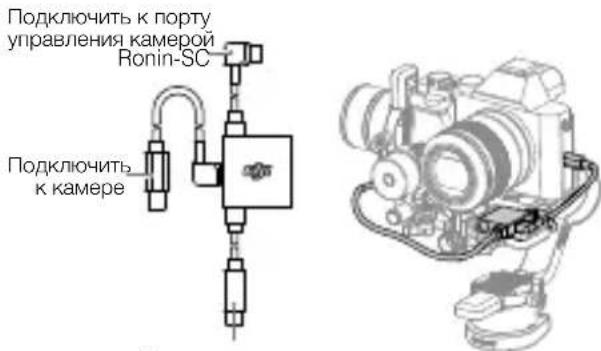
Usage
Control the focus motor using the focus ring after turning on the Ronin-SC.
Calibration
The focus motor can be used without calibration, but the rotation range of the motor using the focus ring will be limited. After calibration, the motor can be fully controlled using the focus ring.
1. If the motor is not mechanically limited, it can be calibrated automatically. Press the multi-function button of the focus ring to calibrate the motor.
Multi-function button of the focus ring
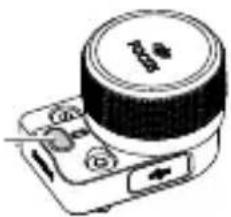
- If the lens is not mechanically limited, calibration must be performed manually. Press the multi-function button of the focus ring three times to start calibration.
a. When the motor returns to the initial position, stop it manually. The motor will continue to rotate. c. Stop it again when it reaches the initial position. b. Repeat the previous action to confirm the final position.
Setting the motor range of the focus ring
To set the motor range of the focus ring, confirm points A and B on the focus ring.
Move the motor to the selected point A and press the multi-function button of the focus ring to confirm. After confirming point A, repeat this action to confirm point B. To delete points A and B, press the multi-function button of the focus ring again.
Press and hold the multi-function button of the focus ring to change the rotation direction of the focus ring motor.

The focus ring motor must be calibrated each time it is turned on. Do not touch the gear housing of the focus ring motor while it is rotating.
The focus ring status indicator determines the calibration status.
This device complies with Part 15 of the FCC Rules. Operation is subject to the following two conditions: (1) This device may not cause harmful interference, and (2) This device must accept any interference received, including interference that may cause undesired operation.
Any changes or modifications not expressly approved by the party responsible for compliance could void the user's authority to operate the equipment.
EU Compliance Statement: SZ DJI Osmo Technology Co., Ltd. hereby declares that this device is in compliance with the essential requirements and other relevant provisions of the Directive 2014/30/EU.
A copy of the EU Declaration of Conformity is available online at www.dji.com/euro-compliance
EU contact address: DJI GmbH, Industriestrasse 12, 97618, Niederlauer, Germany
Niederlauer, Germany
97618, Niederlauer, Germany
CAUTION: RISK OF EXPLOSION IF BATTERY IS REPLACED BY AN INCORRECT TYPE. DISPOSE OF USED BATTERIES ACCORDING TO THE INSTRUCTIONS
Environmentally friendly disposal
Old electrical appliances must not be disposed of together with the residual waste, but have to be disposed of separately. The disposal at the communal collecting point via private persons is for free. The owner of old appliances is responsible to bring the appliances to these collecting points or to similar collection points. With this little personal effort, you contribute to recycle valuable raw materials and the treatment of toxic substances.
This device complies with ICES-003 standard. Operation is subject to the following two conditions: (1) this device may not cause interference, and (2) this device must accept any interference, including interference that may cause undesired operation of the device.
CAN ICES-3 (B)/NMB-3(B)
For online support, please scan this code with Facebook Messenger
Scan this code with WeChat for technical support
If you have any questions about this document, please contact DJI by sending a message to DocSupport@dji.com.
Printed in China. YC.BZ.SS001010.03
Brand : DJI
Model : RoninSC Focus Motor
Category : Electric motor