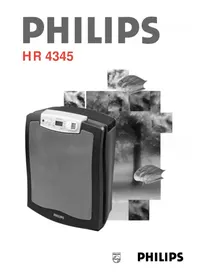
HR4345 - Air purifier PHILIPS - Free user manual and instructions
Find the device manual for free HR4345 PHILIPS in PDF.



| Product Type | Air Purifier |
| Brand | Philips |
| Model | HR4345 |
| Recommended Coverage Area | Up to 40 m² |
| Power Supply | Mains (220-240 V) |
| Number of Filters | 3: pre-filter, HEPA filter, activated carbon filter |
| Speed Levels | 3 (1, 2, Turbo) |
| Auto Mode | Yes, with smoke detector |
| Timer | Yes, adjustable from 1 to 240 minutes |
| Integrated Clock | Yes, 24-hour |
| Smoke Detector | Yes, adjustable according to room size |
| Carbon Filter Replacement Indicator | Yes, lights up to indicate replacement needed |
| Wall Mountable | Yes |
| Pre-filter Cleaning | Every 2 months: washable with water or vacuum |
| HEPA Filter Replacement | Every 2 years (ref. HR4940) |
| Carbon Filter Replacement | When the indicator lights up (ref. HR4941) |
| Safety | Automatic shut-off if front cover is removed or in case of overheating |
| Included Accessories | Cardboard funnel, bag of carbon pellets, foam pad |
Frequently Asked Questions - HR4345 PHILIPS
User questions about HR4345 PHILIPS
0 question about this device. Answer the ones you know or ask your own.
Ask a new question about this device
Download the instructions for your Air purifier in PDF format for free! Find your manual HR4345 - PHILIPS and take your electronic device back in hand. On this page are published all the documents necessary for the use of your device. HR4345 by PHILIPS.
USER MANUAL HR4345 PHILIPS
English Page 4
- Keep page 3 open when reading these operating instructions.
Français Page 10
Cigarettes, cigars and pipes produce a smoke which contains microscopic particles (approx. 0.18 micron) and around 3000 different gases.
Your Philips Air Cleaner helps you clean the air effectively by catching 90% of gases and 95% of particles produced by smoking.
How does the Philips Air Cleaner work?
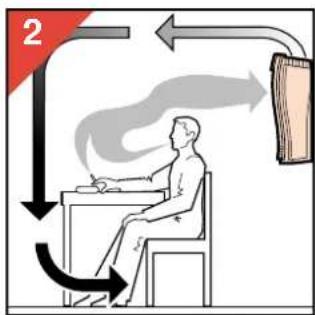
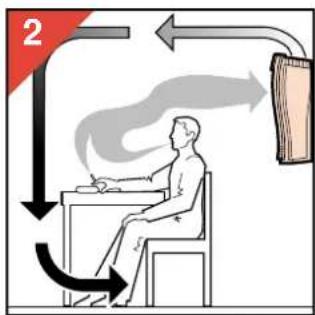
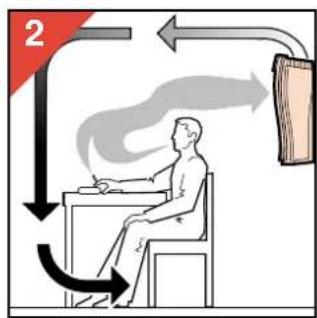
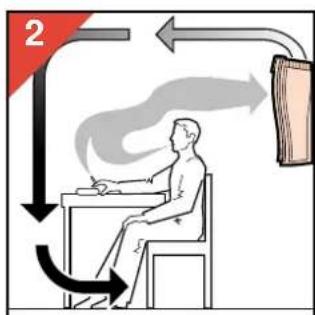
The Air Cleaner takes air from the room and directs it through the filter system.
After cleaning, the purified air is blown back into the room towards the ceiling.
For optimum removal of gases and particles from the air, the appliance employs a sophisticated 3-stage Air Cleaner filter:
① Pre-filter
The Pre-filter catches the larger dust particles floating in the air, such as fluff and hairs.
② Hepa filter
This filter takes out all the smaller airborne particles.
The filter is made from glass fibres closely matted such that particles cannot pass through.
Similar filters are used in most hospital operating rooms.
③ Carbon filter
The last filter is the Carbon filter.
Activated Carbon is the only material which can effectively adsorb gases.
This Air Cleaner can be set to automatically select the correct speed of air cleaning.
The appliance is equipped with a 24-hour clock and a timer which make it possible to select a timespan after which the appliance will switch off.
An indicator light will light up when the Carbon filters need replacement.
Positioning
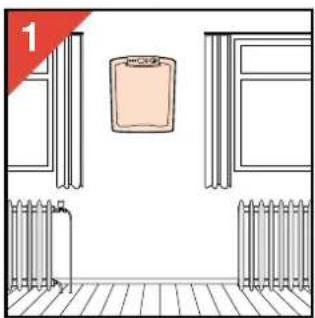
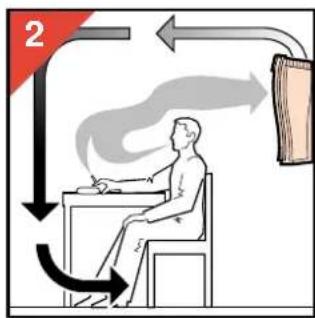
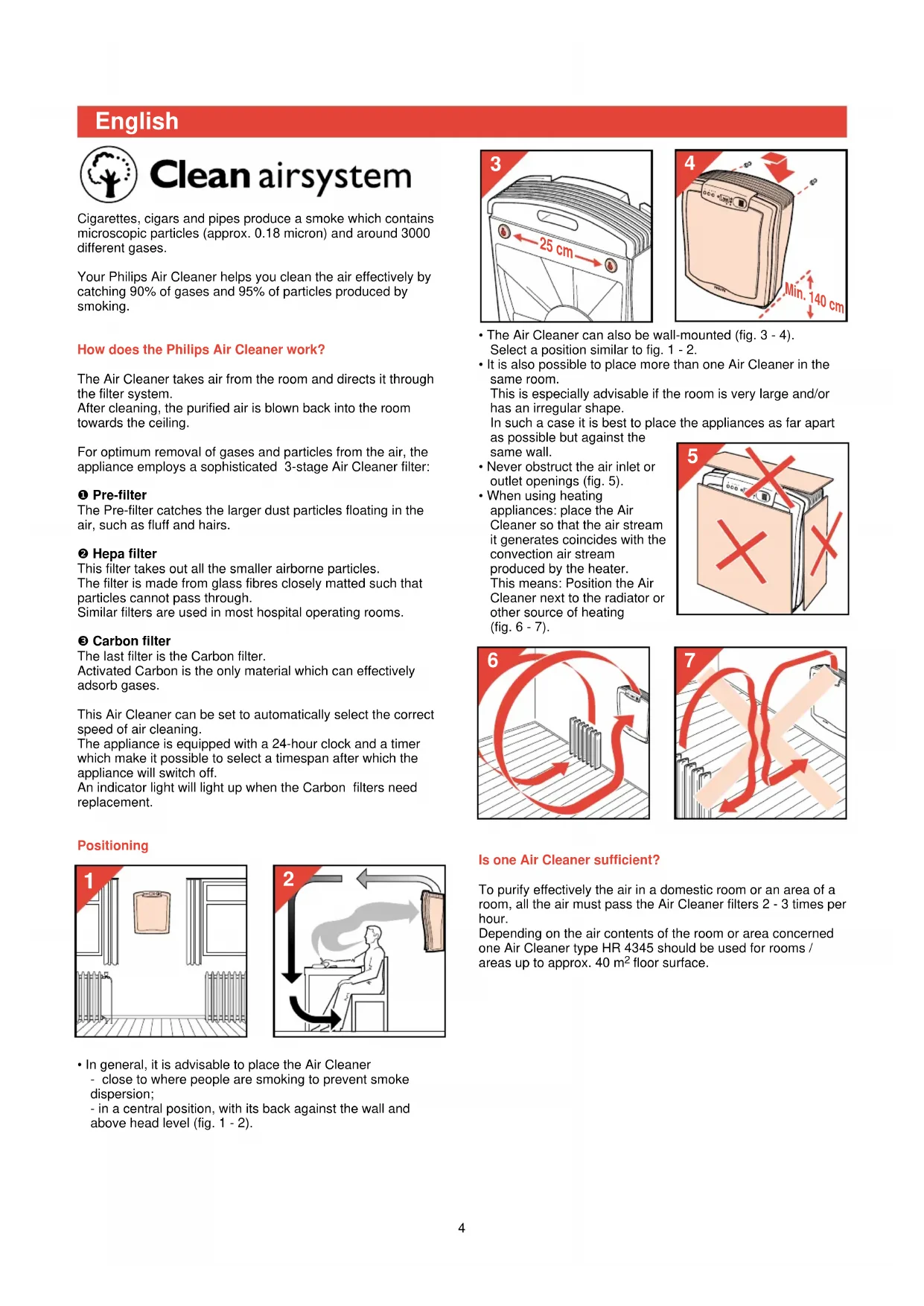
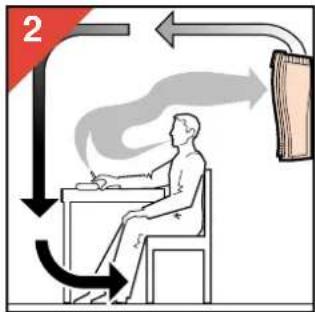
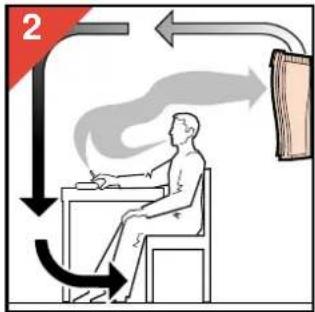
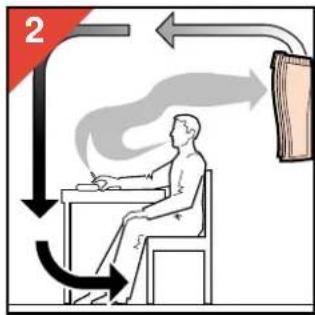
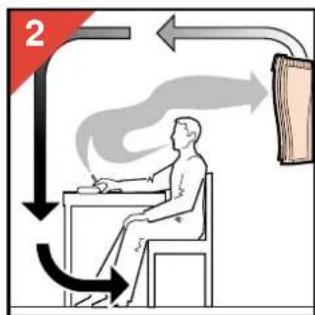
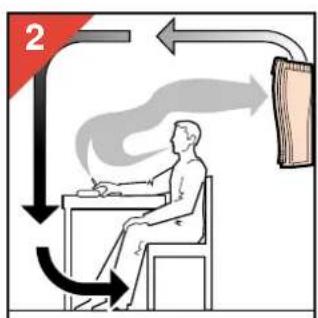
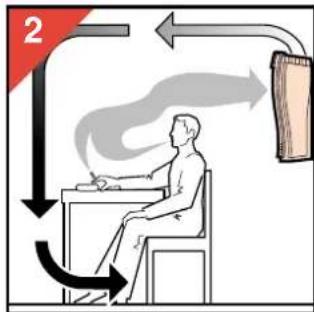
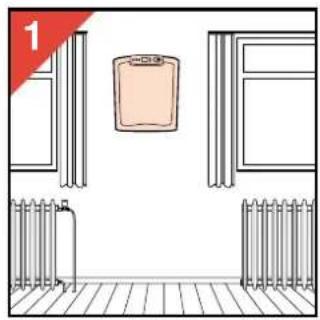
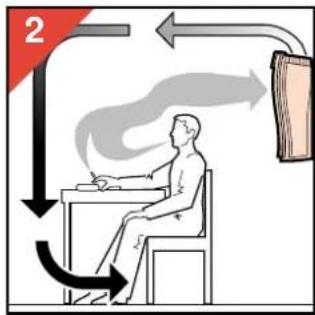
- In general, it is advisable to place the Air Cleaner - close to where people are smoking to prevent smoke dispersion; - in a central position, with its back against the wall and above head level (fig. 1 - 2).
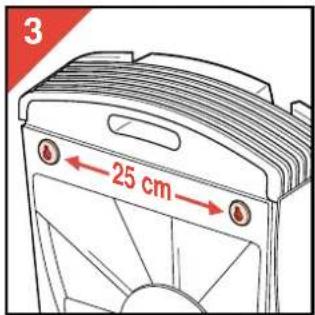
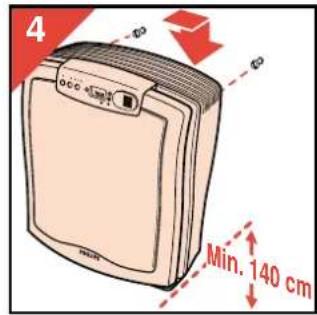
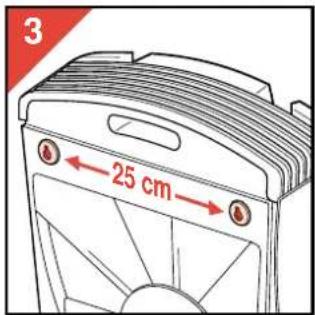
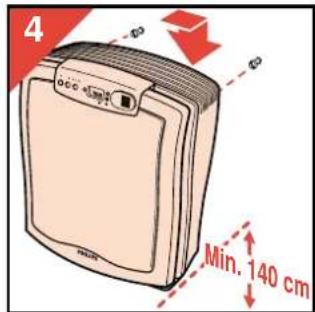
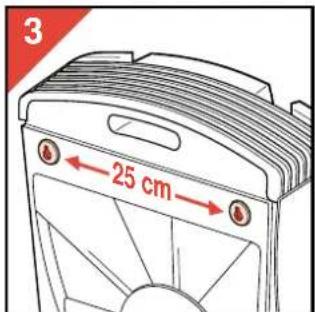
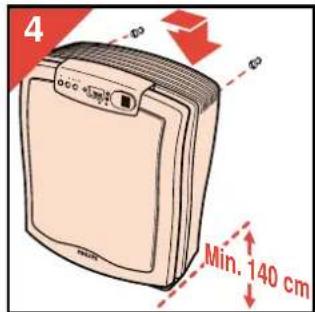
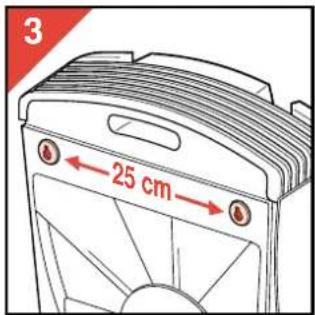
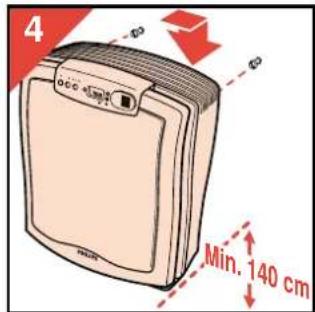
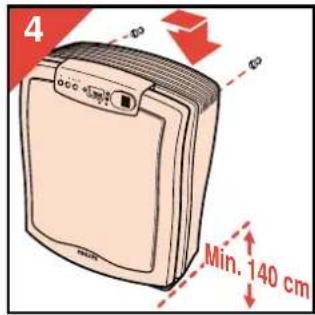
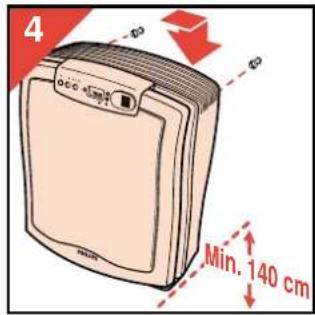
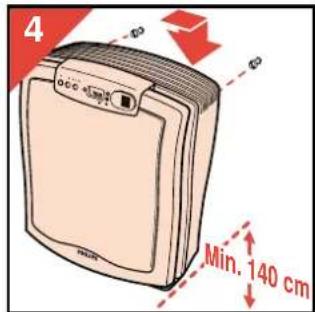
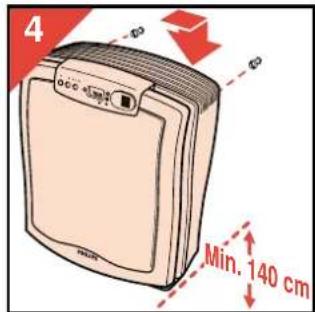
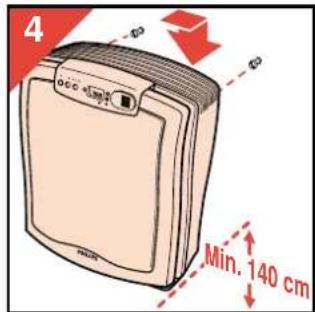
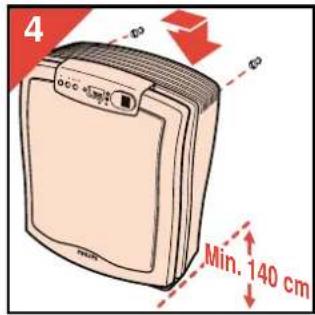
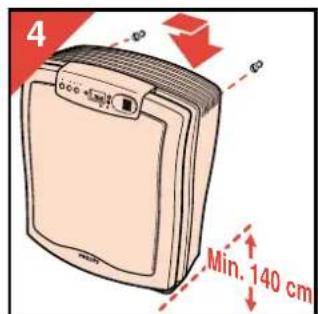
- The Air Cleaner can also be wall-mounted (fig. 3 - 4). Select a position similar to fig. 1 - 2.
- It is also possible to place more than one Air Cleaner in the same room. This is especially advisable if the room is very large and/or has an irregular shape. In such a case it is best to place the appliances as far apart as possible but against the same wall.
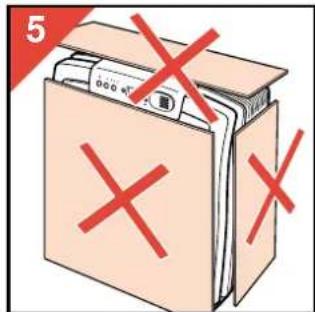
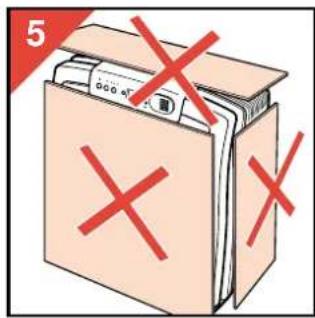
- Never obstruct the air inlet or outlet openings (fig. 5).
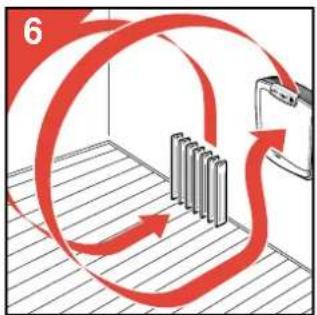
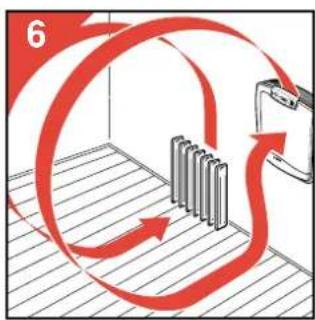
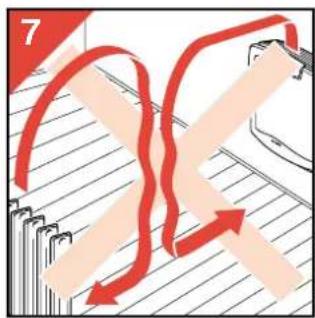
- When using heating appliances: place the Air Cleaner so that the air stream it generates coincides with the convection air stream produced by the heater. This means: Position the Air Cleaner next to the radiator or other source of heating (fig. 6 - 7).
![graph TD A["7"] --> B["Process Step"] B --> C["Layer 1"] B --> D["Layer 2"] B --> E["Layer 3"] B --> F["Layer 4"] B --> G["Layer 5"] B --> H["Layer 6"] B --> I["Layer 7"]](/content/2026/04/590066/images/c453ae54ac048b2e8c2f841290084b6b9aaab61f0852c52e4d23d3f4dfd808d5.jpg)
Is one Air Cleaner sufficient?
To purify effectively the air in a domestic room or an area of a room, all the air must pass the Air Cleaner filters 2 - 3 times per hour.
Depending on the air contents of the room or area concerned one Air Cleaner type HR 4345 should be used for rooms / areas up to approx. 40 m² floor surface.
Important
- Read these instructions in conjunction with the illustrations before using the appliance. (Also see fold-out page 3.)
- Do not immerse the appliance in water or other liquids.
- Do not use the appliance outdoors or in a humid environment.
- The appliance can be cleaned with a damp cloth. First remove the mains plug from the wall socket.
- When disassembling: do not touch moving parts. Allow the fan to stop in its own time.
- Use only the original Philips filters and carbon material.
- Do not obstruct the air inlet and air outlet grilles. Do not place the appliance on a soft surface such as a bed or couch.
- Keep the mains cord away from heated surfaces.
- If the mains cord of this appliance is damaged, it must only be replaced by Philips or their service representative, as special tools and/or parts are required.
• The appliance has an influence upon the air circulation in the room. In general, it is not advisable to use it near an open hearth fire.
• After a power failure first switch the appliance on. After this the clock and the timer can be reset.
- Do not expose the smoke sensor to a direct heat source or strong smells. For example, do not use the air cleaner as a suction device over the cooker.
- Do not direct an aerosol spray in the direction of the smoke sensor.
- Switch off the "Auto" function if you leave the room where the appliance is placed for a long time.
- Save these instructions for further reference.
General description (fig. 8)
Air inlets (3)
B Pre-filter
© Hepa filter
D Carbon filters (2)
E Control panel
F Air outlet
G Handle
H Cord storage
Fan
Description of the control panel (fig. 9)
On/Off button with indicator light
On/Off button for automatic operation ("Auto") with indicator light
Speed control with indicator lights
1 = low speed
2 = normal speed
turbo= high speed
Button for setting the timer and clock
N Display
Buttons for setting the time (up and downwards)
P Button 'reset' of Carbon filters replacement indicator
Carbon filters replacement indicator (indicator light)
R Smoke sensor
Switch for adjusting the smoke sensor
▲for small rooms (up to ± 20 m²)
▲ for larger rooms (up to ± 40 m²)
Making ready for use
- Fill the carbon filters with the granules provided. Please refer to section "Replacing the carbon filter granules" (fig. 43-51).
- Insert the mains plug into a wall socket. The indicator light above the on/off button, the digits (00:00) and the clock symbol ⚙start flashing. (This will also happen
after a power failure.)
The display is not illuminated.
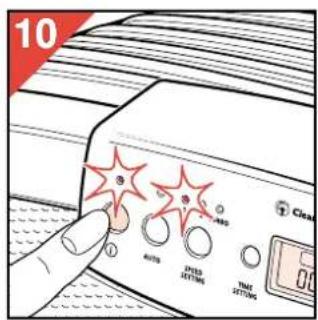
- Press the on/off switch (fig. 10).
The appliance starts operating at speed 1 and the display lights up orange.
The indicator light above the on/off button remains on to indicate that the appliance is switched to the "on" position.

Manual setting
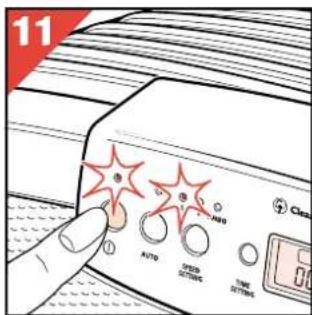
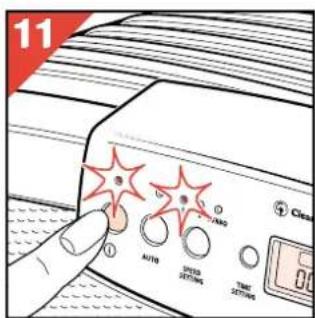
- Switch the appliance on (fig. 11)
The indicator light above the on/off button comes on and the display lights up orange. The appliance starts operating at speed 1.
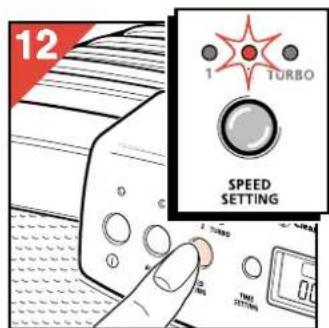
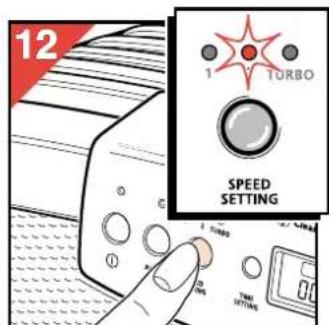
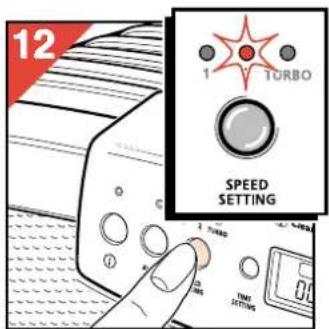
- Select speed 1, 2 or "Turbo" by pressing the speed selector (fig. 12).
The indicator lights will indicate the selected speed.
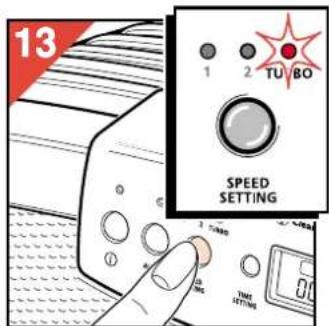
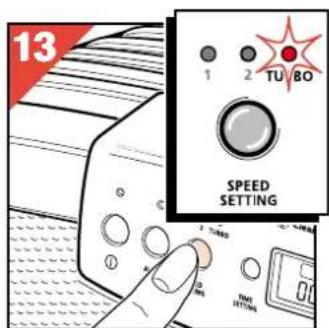
- For quick air cleaning, first set the speed selector to the "Turbo" setting (fig. 13).
After approximately half an hour, set the switch to speed 2.
- To maintain clean, fresh air in your room all the time, you can run your machine continuously on speed 1 or 2, depending on room size and the degree to which the air tends to contaminate.
"Auto function"
The "Auto" function ensures that the Air Cleaner automatically selects the optimum speed to remove smoke from the air effectively.
The built-in smoke sensor (R) detects the concentration of smoke in the room where the Air Cleaner has been placed.
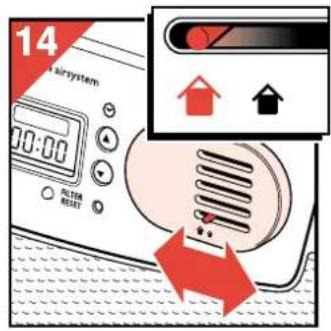
- For proper sensing, set the slide switch (S) to the correct
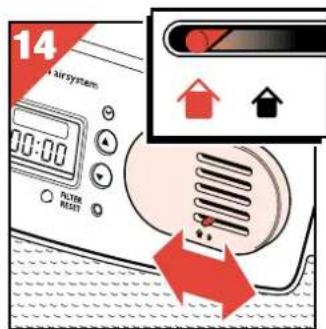
position for small (▲) or larger (▲) room (fig. 14). According to the concentration of smoke the Air Cleaner automatically selects a higher or a lower speed.
Setting the "Auto function"
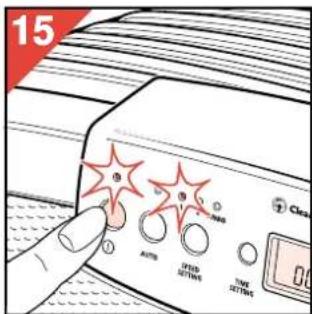
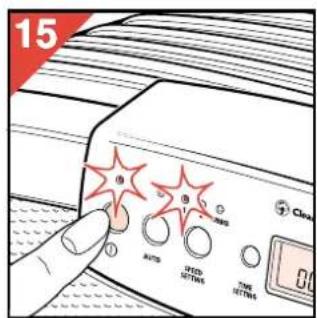
- Switch the appliance on (fig. 15)
The indicator light above the on/off button comes on and the display lights up orange.
The appliance starts operating at speed 1.
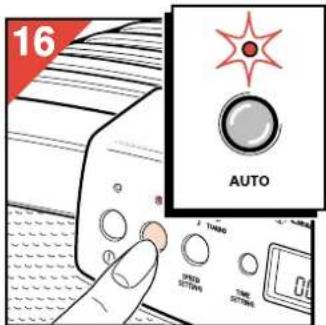
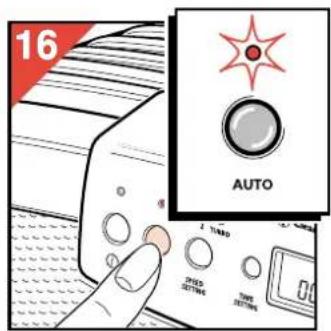
- Press the "Auto" button (fig. 16).
If you selected "Auto" within the first three minutes after you switched the appliance on, the "Auto" indicator light will flash orange for a max. of three minutes while it measures the air quality in the room.
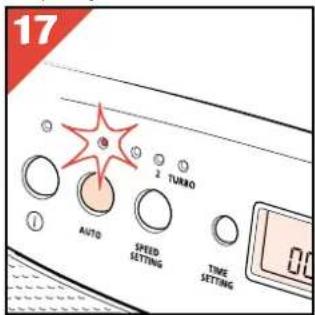
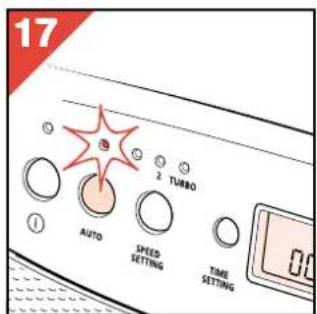
- If the air is clean, the Air Cleaner switches to the stand-by position and the "Auto" indicator light will turn green (fig. 17). The indicator light above the on/off button will remain on.
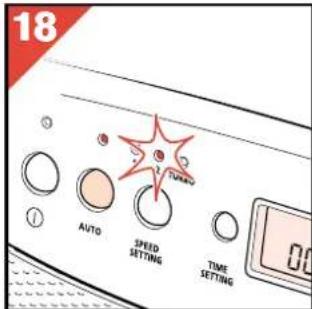
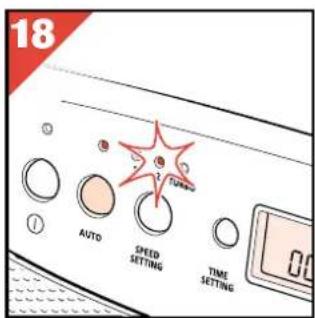
- If the smoke sensor detects pollution, the "Auto" indicator light will remain orange continuously and the appliance will switch automatically to speed 1, 2 or turbo (fig. 18).
- If you wish to quit the "Auto" function, press the "Auto" button again.
The indicator light above this button will go out.
How to set the clock
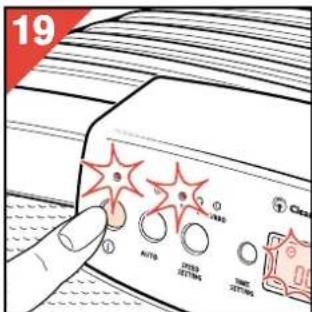
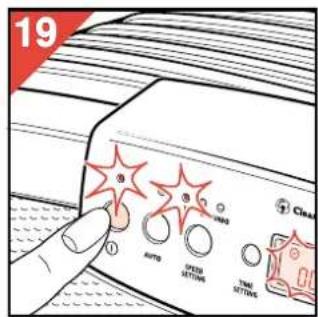
- When connecting the Air Cleaner to the mains (and also after a power failure) the clock must be set (again). The indicator light above the on/off button, the clock symbol and the digits (☐☐:☐☐) will flash to indicate this.
Switch the appliance on (fig. 19) The clock symbol ⊙ and the digits (☐☐:☐☐) remain flashing. The display lights up.
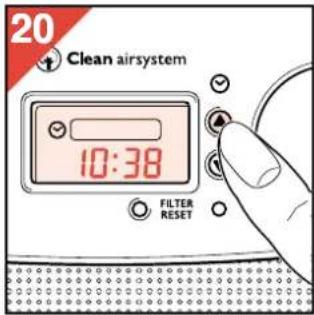
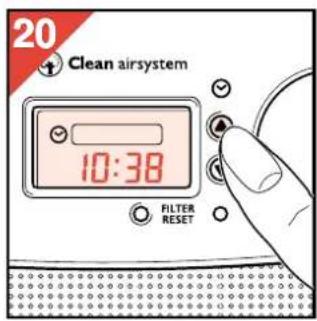
- Press button ▲ or button ▼ to set the time (fig. 20).
The digits will scroll faster if you press and hold the button pressed-in longer.
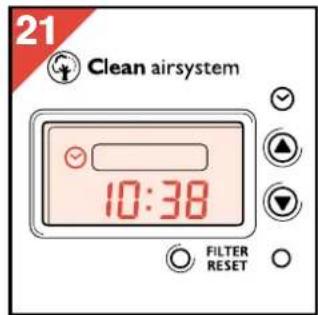
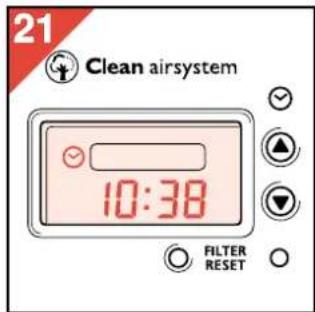
- The clock time and the clock symbol Ⓧ in the display will no longer flash (fig. 21).
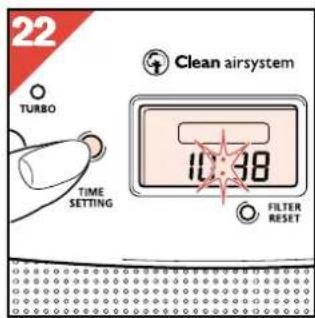
- Press the "time setting" button (M) to initiate the clock (fig. 22).
The clock symbol Ⓧ goes out. The colon flashes to indicate that the clock is operating.

How to change the set clock time
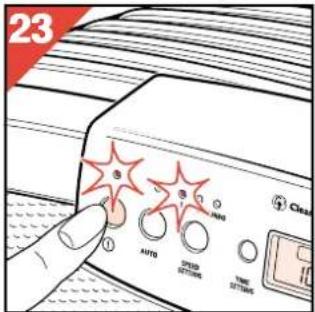
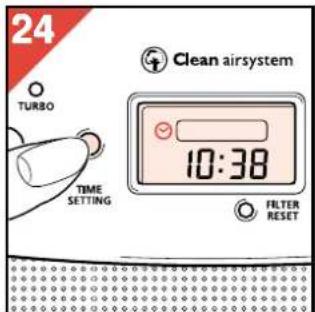
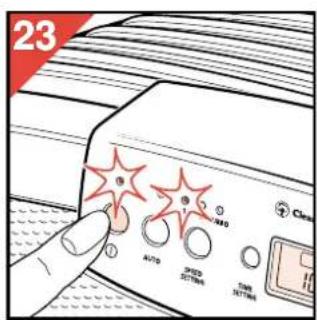
- Switch the appliance on (fig. 23)
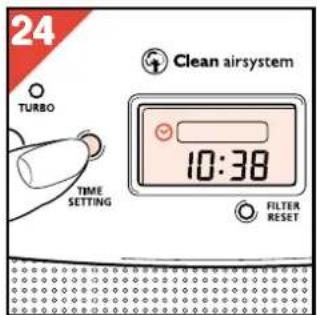
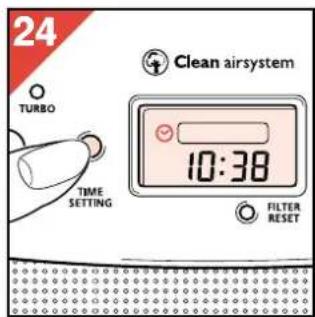
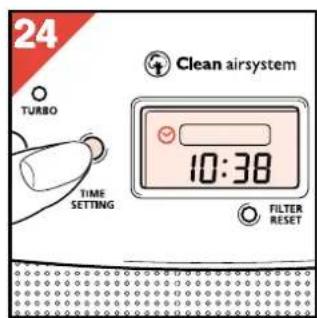
- Press the "time setting" button (M) (fig. 24). The clock symbol ⏻ becomes visible.
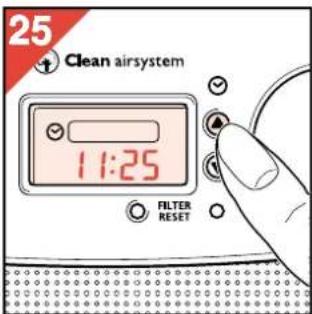
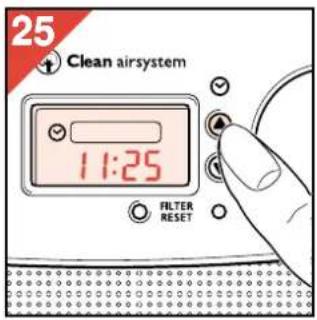
- Press button ▲ or button ▼ to set the new time (fig. 25). (See "Setting the time of day".)
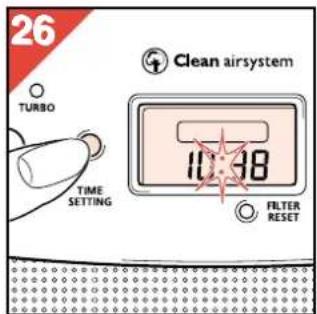
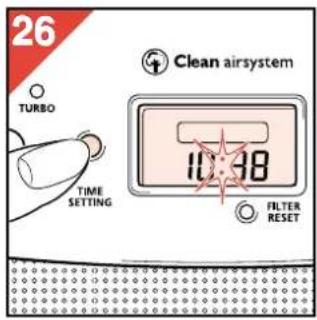
- Finally press the "time setting" button (M) again (fig. 26).
Timer
• Using the timer, you can set how long and at what speed you wish the Air Cleaner to operate.
You can use this function e.g. if you want to use the Air Cleaner for a number of hours during or after smoking. You may also find the timer handy if you often use the appliance for the same period of time.
After switching on, the timer counts down the set operating time and then switches the Air Cleaner off.
- You can program the Air Cleaner in the "Auto" function or in a speed you select.
How to set/change the timer setting
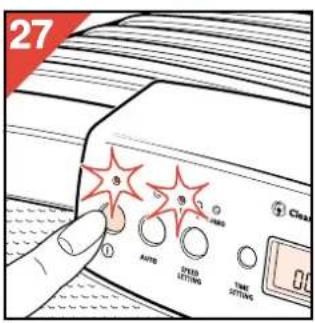
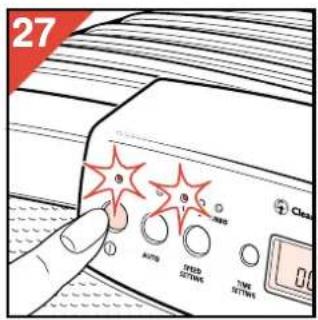
- Switch the appliance on (fig. 27)
- Select the required speed.
("Auto" or with the manual speed selector.)
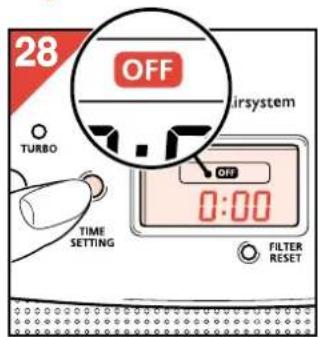
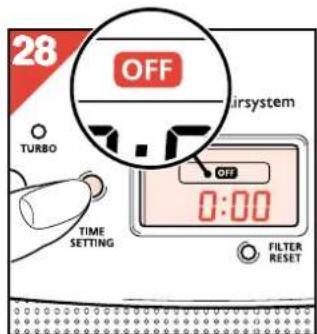
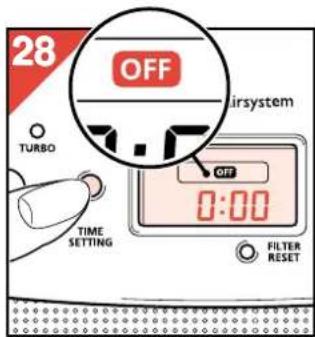
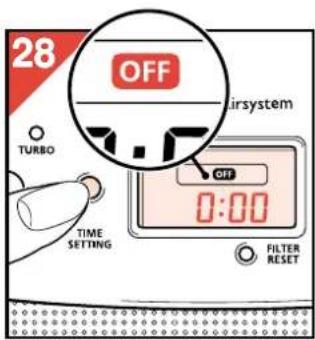
- Press the "time setting" button (M) twice (fig. 28).
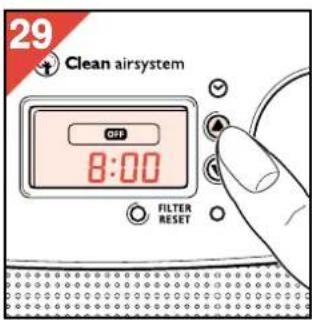
The "OFF" symbol comes on and the display shows 0:00 or the previously set operating time.
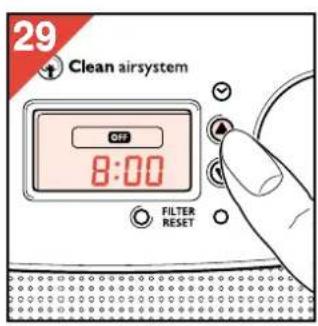
- Press button ▲ or button ▼ to set the operating time with one minute precision (fig. 29).
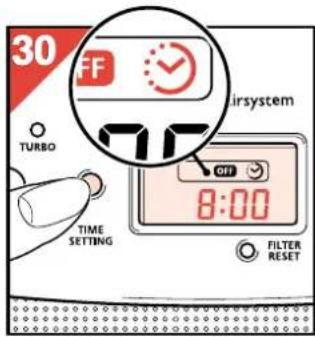
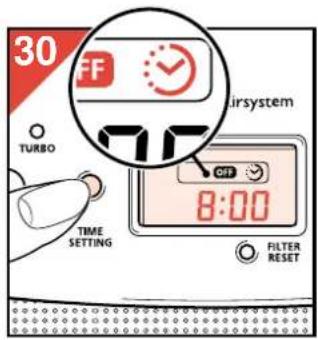
- Press the "time setting" button (M) (fig. 30).
The "OFF" symbol remains visible. The timer symbol ⚙ comes on as well.
After 3 seconds the colon starts flashing to indicate that the timer is counting down from the set time.
- Please note: If the timer symbol 😊 has started flashing and/or has disappeared, this denotes that the setting was not successful.
If this happens, try again to set the timer.
- When the set operating time has elapsed, the Air Cleaner will switch off.
The display lighting, the indicator light above the on/off button, "OFF" symbol and the timer symbol ⏻ will go out.
- After switching off the timer, the program remains stored in the memory.
You can re-activate the program using the "time setting" button (M). (See section "Fast timer setting".)
How to switch off the timer
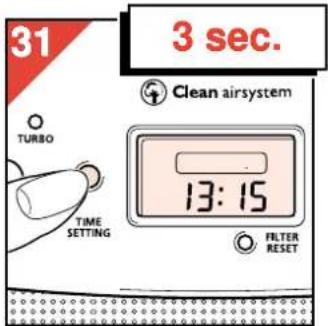
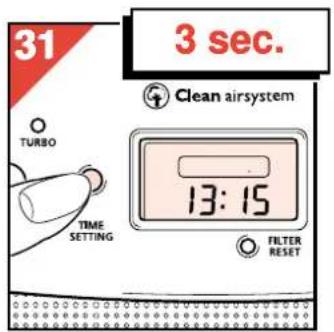
- To switch off the timer (prematurely), press and hold the "time setting" button (M) for at least 3 seconds (fig. 31).
The clock time will appear in the display.
Fast timer setting
If you had previously programmed an operating time for the appliance, you can use this setting again quickly and simply:
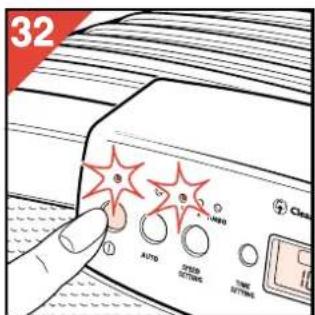
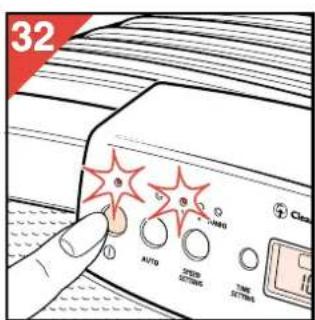
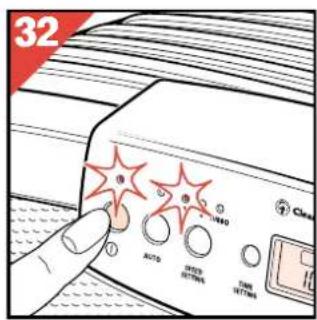
- Switch the appliance on (fig. 32)
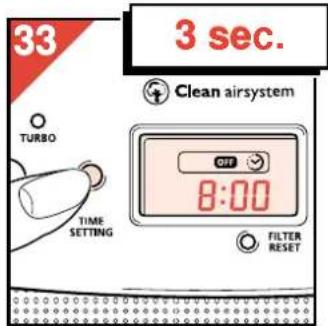
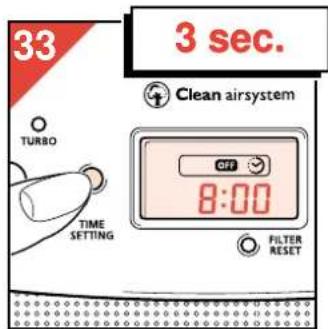
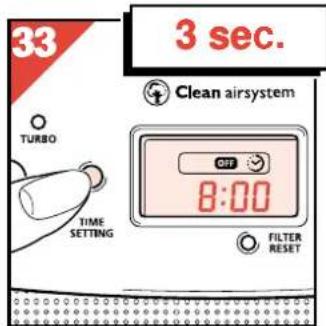
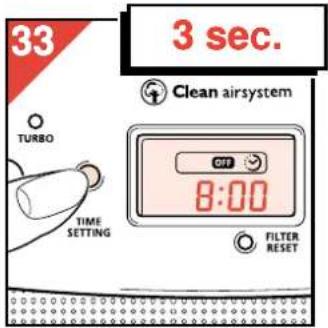
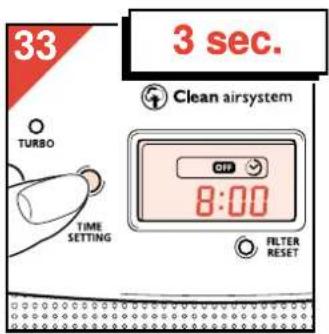
- Press and hold the "time setting" button (M) (at least for 3 seconds) until "OFF" and the timer symbol ⚙ come on (fig. 33).
The previously set operating time will become visible. The counting down begins.
Watching the clock while the timer is counting down
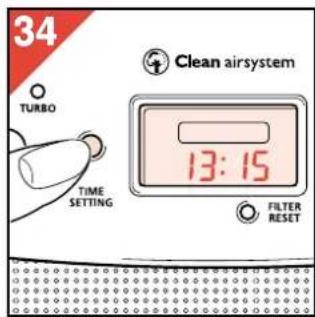
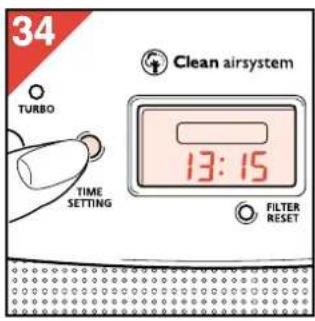
You can watch the clock time while the timer is counting down the operating time, by pressing the "time setting" button (M) once (fig. 34). The normal clocktime will be briefly displayed. Then the count down will return in the display.
How to clean or replace filters
- Remove and clean the pre-filter at least every two months.
- Remove and replace the Carbon filter granules when the filter replacement indicator comes on.
- Remove and replace the Hepa filter every second time when you replace the Carbon filter granules.
- Check the filters right away if the appliance becomes noisier. Clean and/or replace the filters if necessary.
- It may be necessary to clean or replace the filters more frequently. This depends on the condition of the air to be filtered.
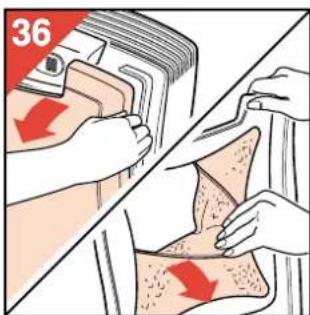
Removing the filters
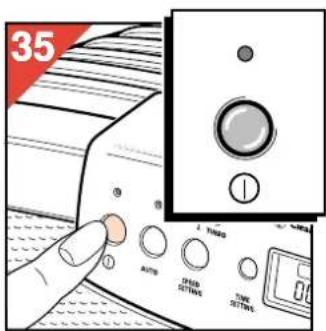
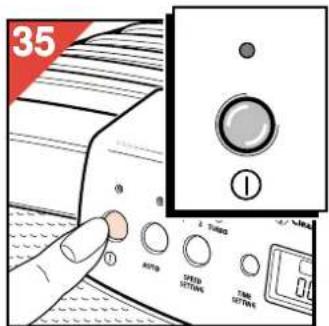
- Switch the appliance off (fig. 35).
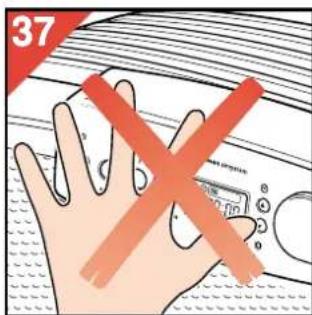
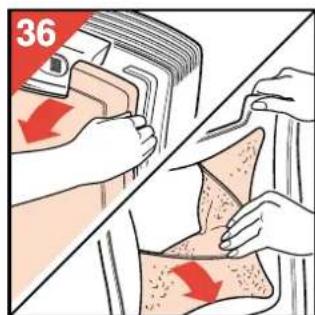
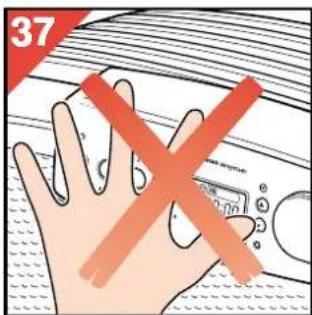
- Remove the front cover with the pre-filter (fig. 36). Please note: Do not push against the control panel when pulling off the front cover (fig. 37).
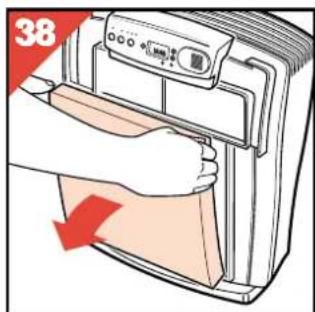
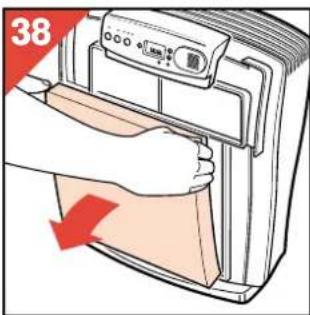
- Remove the Hepa filter (fig. 38).
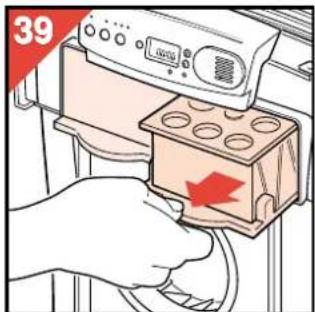
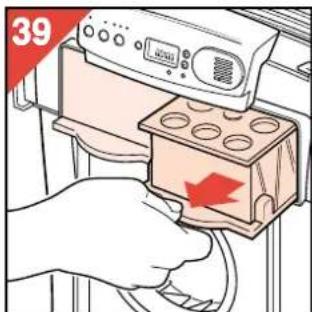
- Remove the Carbon filters (fig. 39).
- To place the filters back reverse this process.
Safety lock
The front grill has a safety lock.
This lock switches the motor off if the cover is removed while
the Air Cleaner is still switched on.
Cleaning the Pre-filter
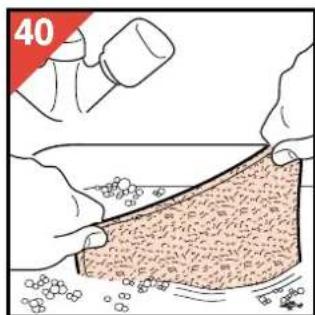
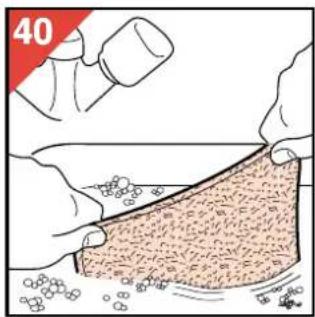
- Wash (fig. 40) or vacuum clean the Pre-filter. You can remove fluff or hairs e.g. using a soft brush.
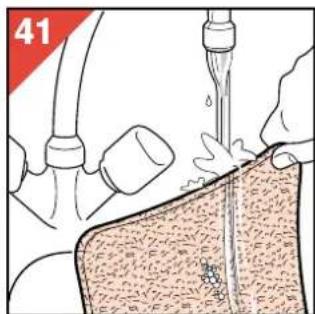
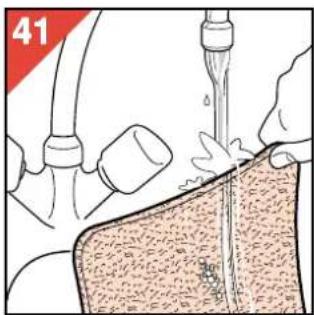
- If washed with a detergent, rinse the filter with clean warm water (fig. 41).
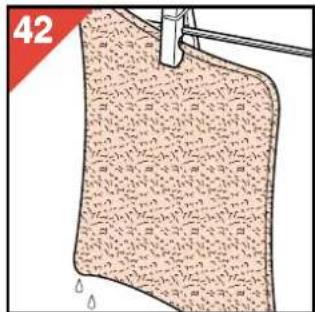
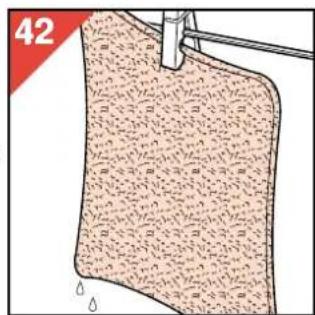
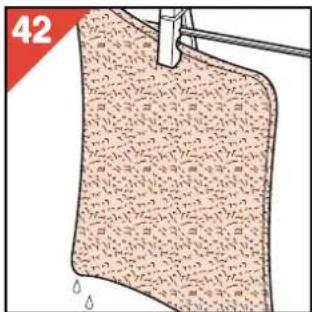
- Allow the filters to air-dry thoroughly (fig. 42) before reassembly.
Replacing the Hepa filter
Remove and replace the Hepa filter every second time when you replace the Carbon filter granules.
New Hepa filters are available at your dealer under number HR 4940.
Replacing the Carbon filters granules
- Remove and replace the Carbon filters when the Carbon filter replacement indicator (Q) starts flashing (firstly) or is on
continuously (later).
Do not forget to reset the indicator when ready. (See "Resetting the Carbon filter replacement indicator".)
- New carbon granules are available at your dealer under number HR 4941.
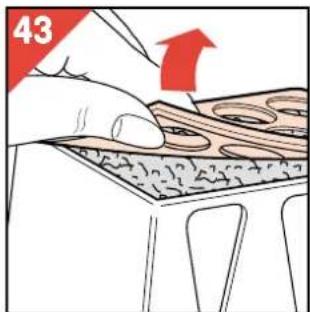
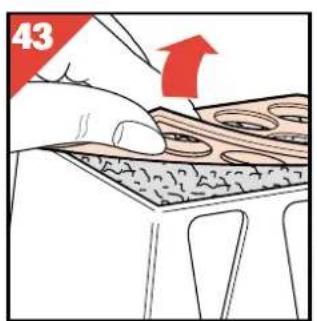
- Carefully remove the lid (fig. 43).
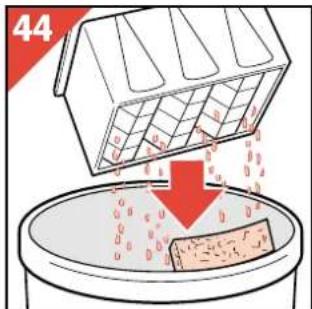
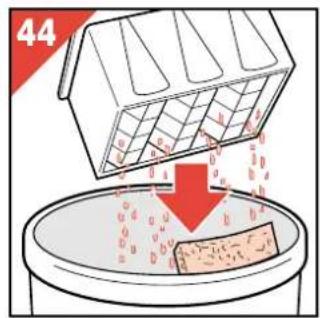
- Tip out the foam screen and the old carbon granules into a disposal bin (fig. 44).
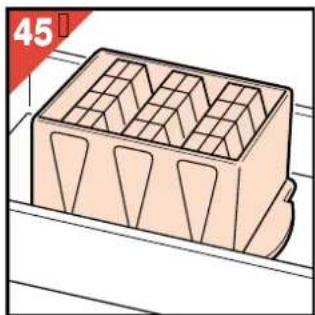
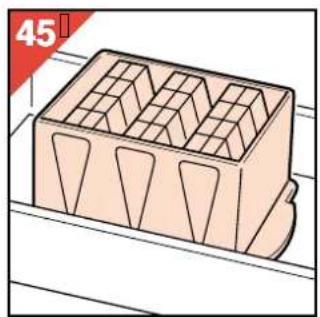
Place the filter case into the box (fig. 45).
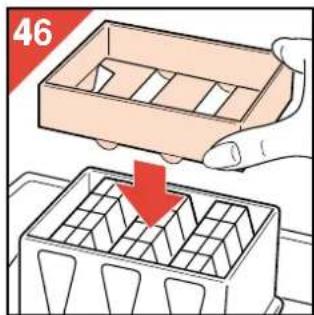
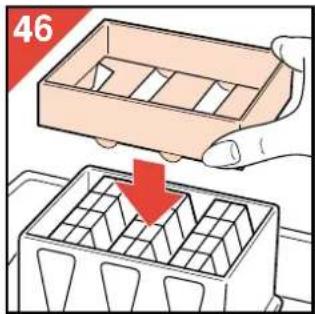
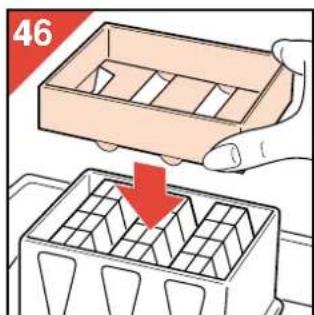
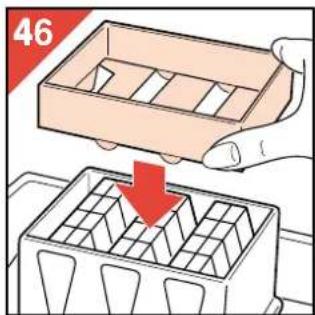
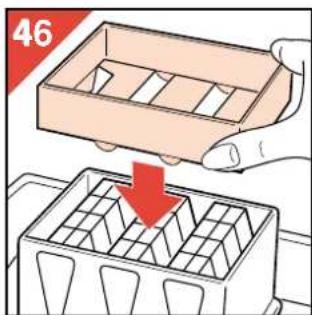
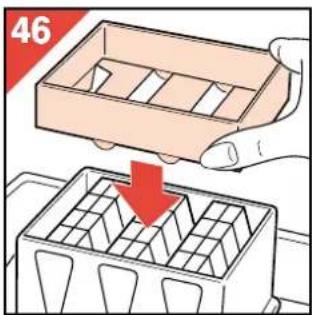
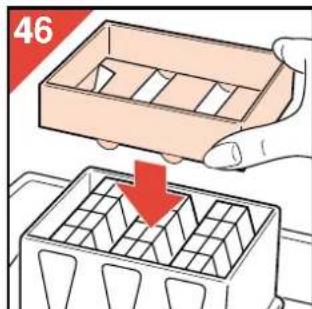
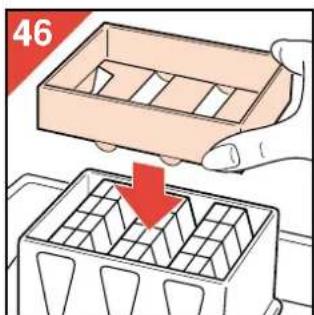
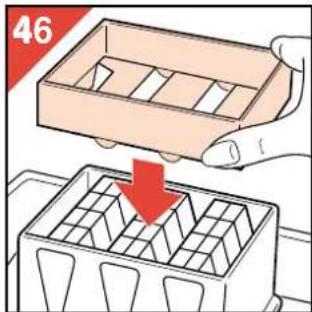
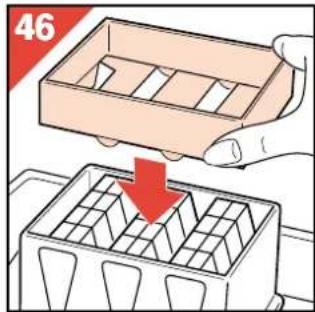
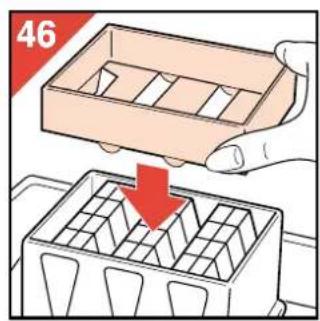
- Fit the card funnel on to the filter case (fig. 46).
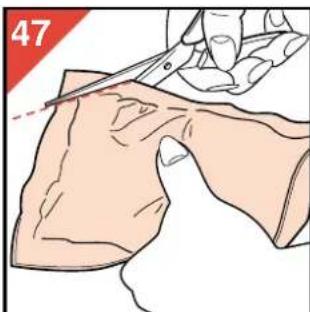
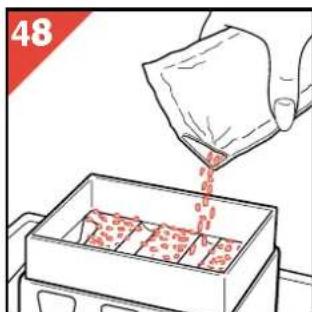
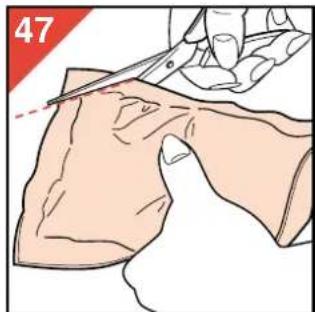
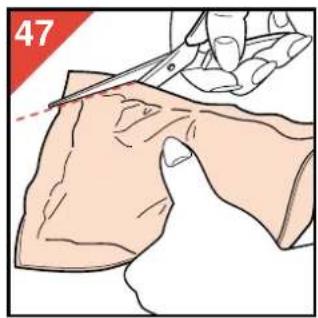
- Cut off the corner of the poly bag which contains the new carbon granules (fig. 47).
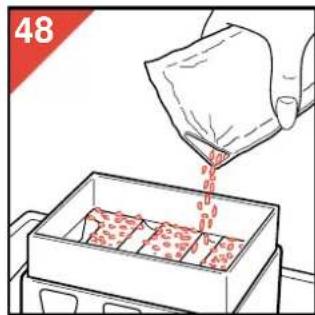
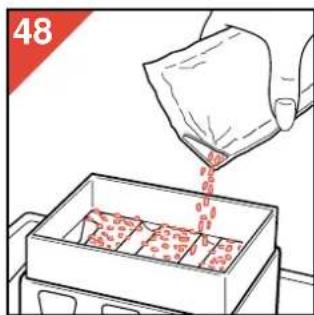
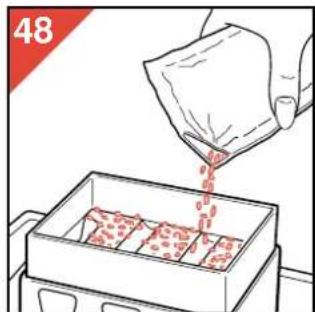
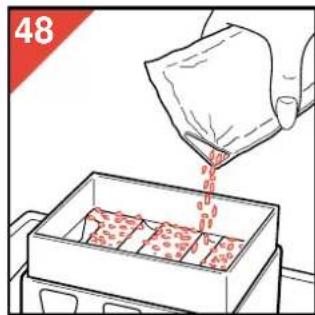
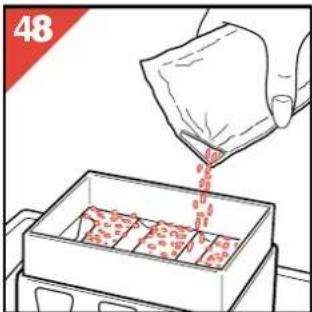
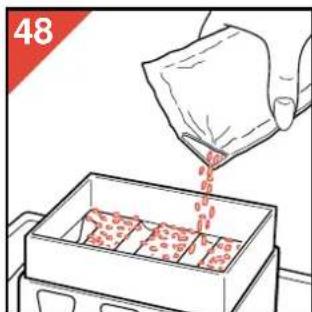
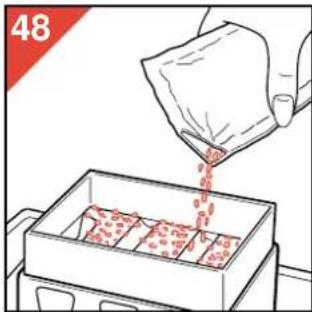
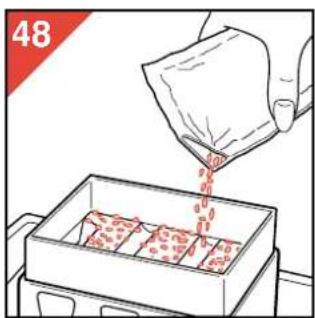
- Pour in a complete bagful of new carbon granules (fig. 48).
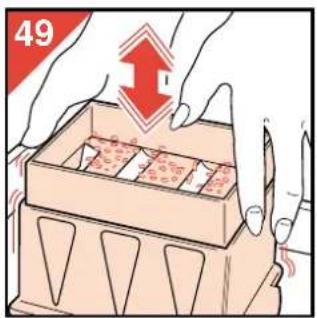
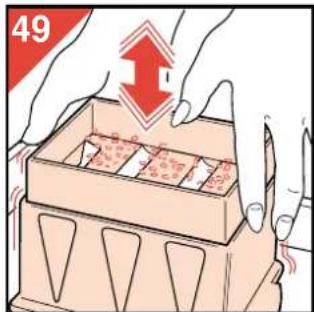
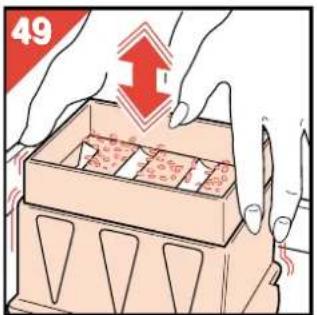
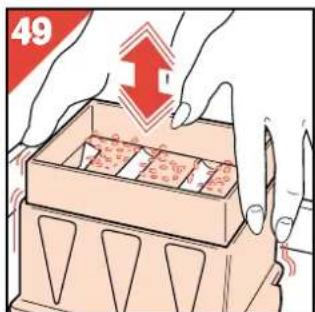
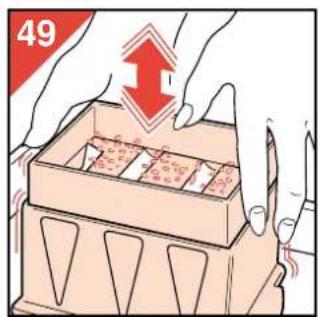
- Tap and shake the filter case to settle the contents (fig. 49).
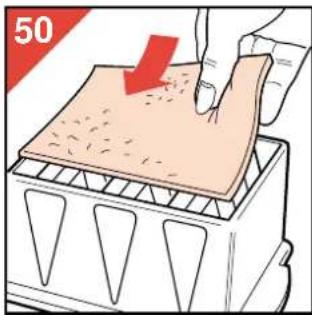
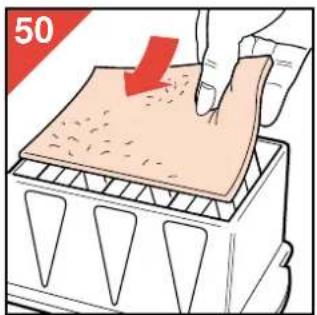
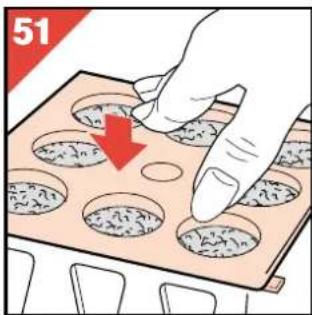
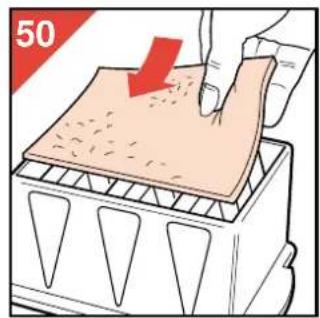
- Place a new foam screen over the carbon granules (fig. 50).
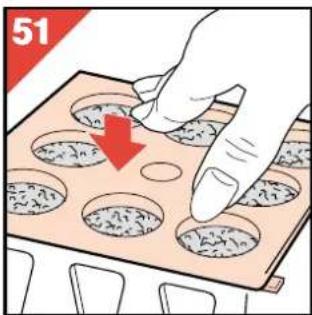
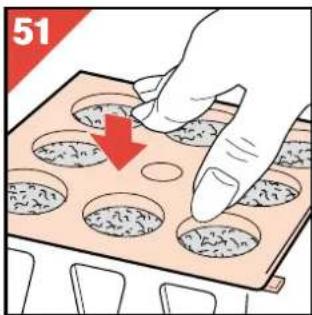
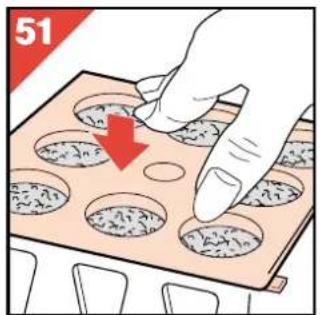
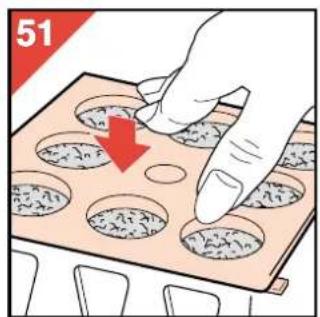
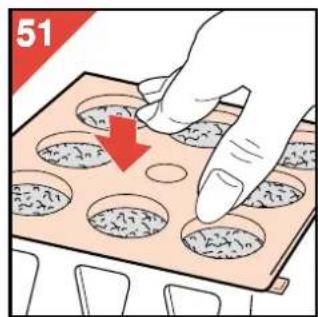
- Refit the lid (fig. 51).
- Repeat this procedure for the other Carbon filter.
Resetting the Carbon filters replacement indicator
After replacing the Carbon filters, the Carbon filters replacement indicator needs resetting:
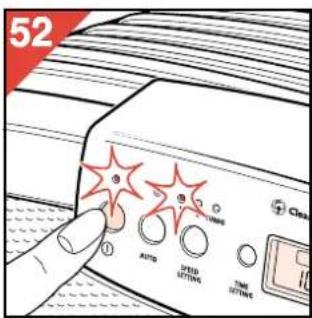
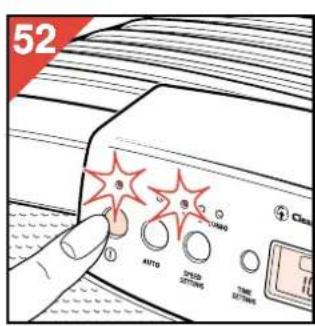
- Switch the appliance on (fig. 52)
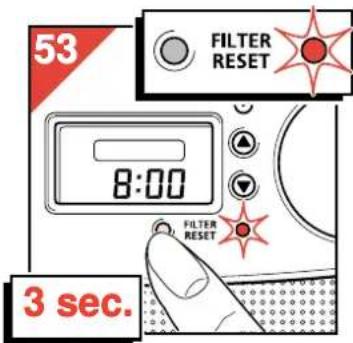
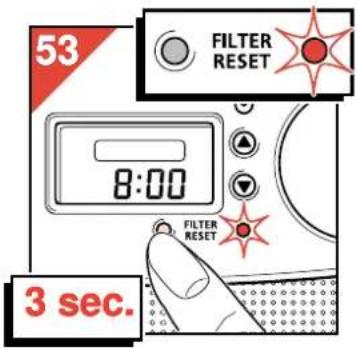
- Press and hold the Carbon filters reset button (P) during at least 3 seconds (fig. 53).
The indicator light stays (or comes) on.
After some time it will go out to indicate that the indicator has been reset.
Automatic overheating safety device
To prevent damage and reduce safety risks the overheating safety device switches off the fan motor if it becomes too hot.
To indicate that the appliance is still in switched-on position and connected to the mains, the indicator light will remain on.
If this happens:
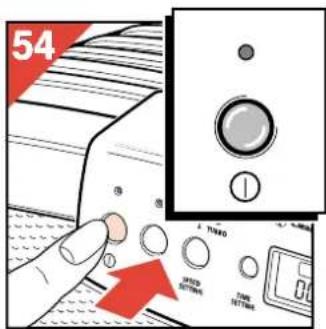
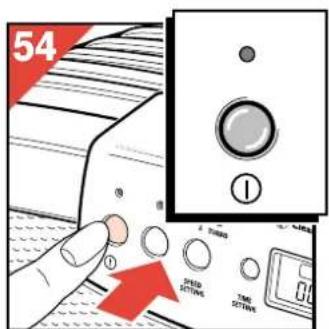
- Switch the appliance off (fig. 54).
(The indicator light goes out.)
- Remove the mains plug from the wall socket.
- Wait for the motor to cool down (approx. 15 minutes).
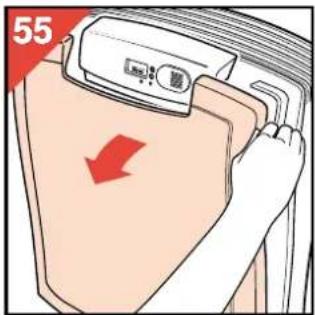
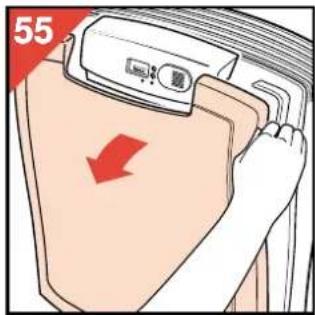
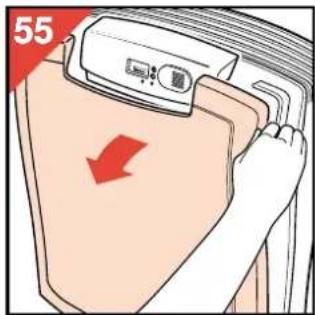
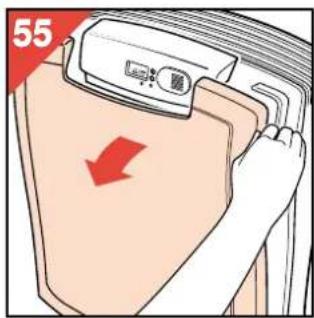
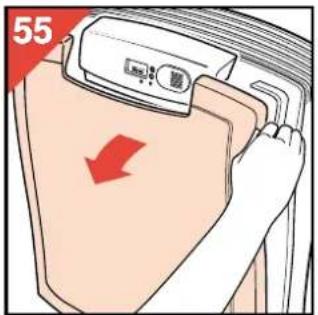
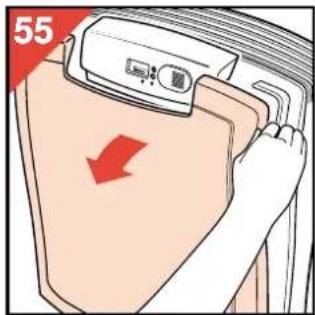
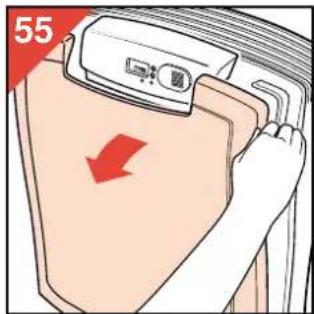
- Remove the front cover (fig. 55). Check that the filters are not blocked and that nothing is obstructing the airflow.
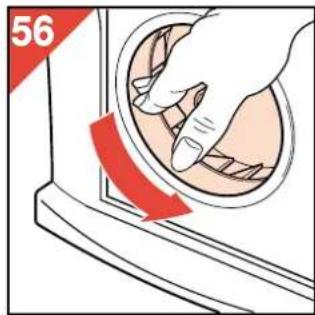
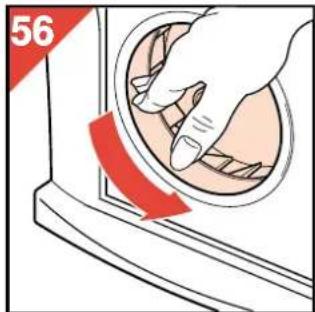
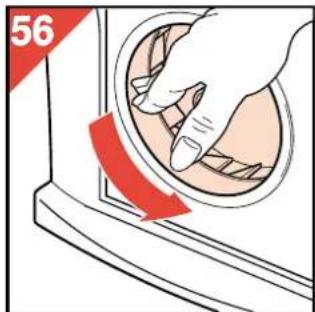
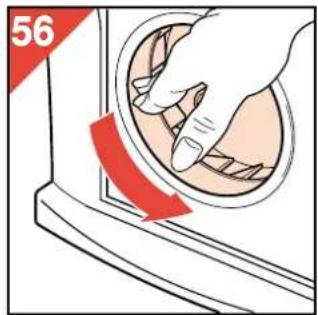
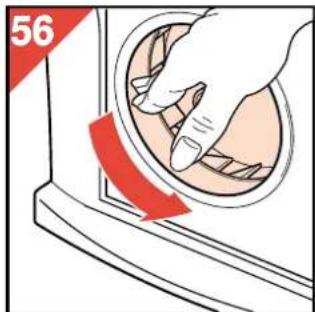
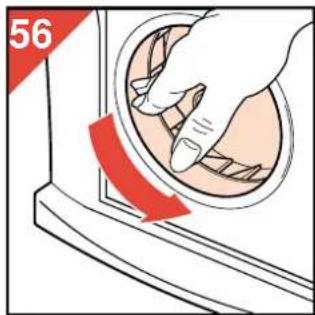
- Check that the fan can rotate freely if moved by hand (fig. 56).
- Close the appliance. Put the mains plug back into the wall socket and switch on.
If the automatic overheating device is activated repeatedly, it is advisable to take the appliance to your dealer for technical inspection.
For U.K. only:
Fitting a different plug
This appliance is fitted with a BS 1363 13 Amp. plug. Should you need to replace the plug, connect the wires as follows:
Brown wire to the Live (L) terminal of the new plug. Blue wire to the Neutral (N) terminal of the new plug.
Always fit the same value of fuse as that originally supplied with your appliance. Only use BS 1362 approved fuses.
As a guide only: Appliances under 700 W can have a 3 Amp. fuse (red) and all others should have a 13 Amp. fuse (brown).
When disposing of an old plug (particularly the moulded type which has been cut from the mains cord) always remove the
Français

Clean airsystem
Réglage manuel


- Ligue o aparelho (fig. 15).
- Tænd for apparatet (fig. 15).
Hurtig timer-indstilling.
- Luftrenseren kan også monteres på veggen (fig. 3-4). Velg en posisjon tilsvarende fig. 1-2.
- Det er også mulig å plassere mer enn en luftrenser i samme rom. Dette anbefales spesielt hvis rommet er veldig stort og/eller har en uregelmessig form.
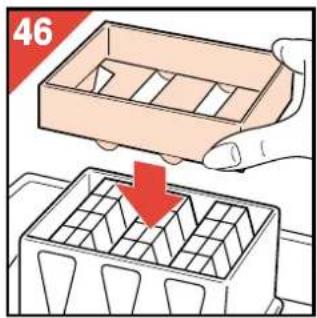
- Sett filterbeholderen i boksen (fig. 45). - Plasser trakten i filterbeholderen (fig. 46).
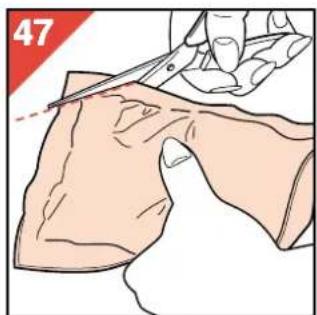
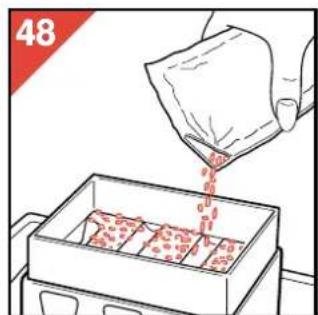
- Klipp av hjørnet i plastposen som inneholder det nye kullfilter materiale (fig. 47). - Hell hele posen i filterbeholderen (fig. 48).

![graph TD A["Top Step"] --> B["Bottom Step"] B --> C["Rightmost Step"] style A fill:#f9f,stroke:#333 style C fill:#bbf,stroke:#333](/content/2026/04/590066/images/624783f13feae20681039248e8ee2ed8ae51a7a717603e4d1922962685c2d46a.jpg)
![graph TD A["Start"] --> B{Condition} B -->|Yes| C["Process Step 1"] B -->|No| D["Process Step 2"] C --> E["End"] D --> E style A fill:#f9f,stroke:#333 style E fill:#bbf,stroke:#333](/content/2026/04/590066/images/34f6612a75317a4e05434b4b94369aa909925e189de175e029f3f5d3dc0b122c.jpg)
| 1998 | 2000 | 2003 | |
| (£) | (£) | (£) |
# 0 # 0 # 3 # * - - 1 # # # # # >


- ENGLISH PAGE 4
- FRANÇAIS PAGE 10
- HOW DOES THE PHILIPS AIR CLEANER WORK
- ① PRE-FILTER
- ② HEPA FILTER
- ③ CARBON FILTER
- POSITIONING
- IS ONE AIR CLEANER SUFFICIENT
- IMPORTANT
- GENERAL DESCRIPTION (FIG. 8)
- DESCRIPTION OF THE CONTROL PANEL (FIG. 9)
- MAKING READY FOR USE
- MANUAL SETTING
- AUTO FUNCTION
- SETTING THE "AUTO FUNCTION
- HOW TO SET THE CLOCK
- HOW TO CHANGE THE SET CLOCK TIME
- TIMER
- HOW TO SWITCH OFF THE TIMER
- FAST TIMER SETTING
- WATCHING THE CLOCK WHILE THE TIMER IS COUNTING DOWN
- HOW TO CLEAN OR REPLACE FILTERS
- SAFETY LOCK
- CLEANING THE PRE-FILTER
- REPLACING THE HEPA FILTER
- REPLACING THE CARBON FILTERS GRANULES
- RESETTING THE CARBON FILTERS REPLACEMENT INDICATOR
- AUTOMATIC OVERHEATING SAFETY DEVICE
- FOR U.K. ONLY
- FITTING A DIFFERENT PLUG
- FRANÇAIS
- CLEAN AIRSYSTEM
- RÉGLAGE MANUEL
- 0 # 0 # 3 # * - - 1
Brand : PHILIPS
Model : HR4345
Category : Air purifier