ManualGo.com
HR2653J - Drill MAKITA - Free user manual and instructions
Find the device manual for free HR2653J MAKITA in PDF.



Download the instructions for your Drill in PDF format for free! Find your manual HR2653J - MAKITA and take your electronic device back in hand. On this page are published all the documents necessary for the use of your device. HR2653J by MAKITA.
USER MANUAL HR2653J MAKITA
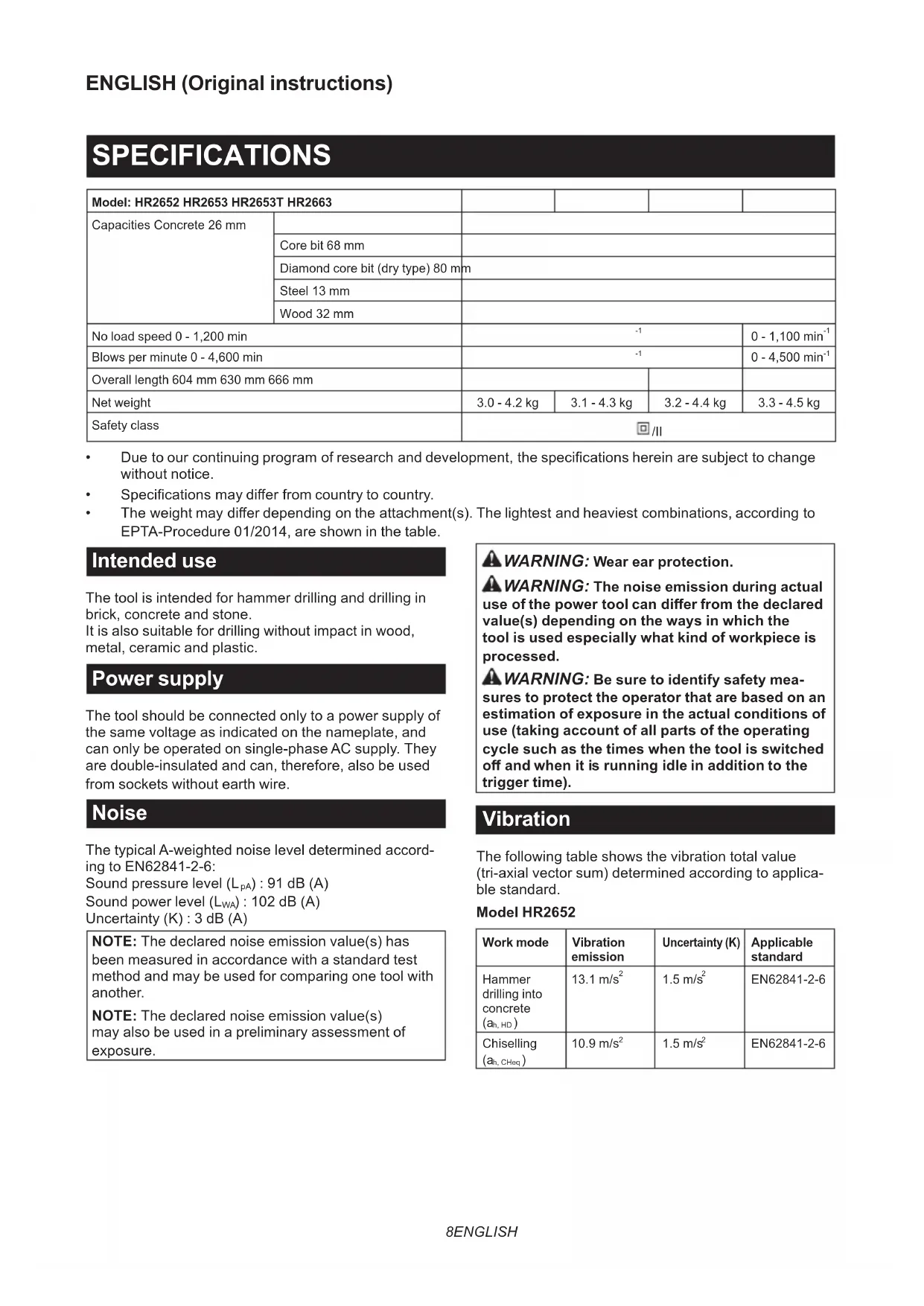
- Specicationsmaydierfromcountrytocountry.
- Theweightmaydierdependingontheattachment(s).Thelightestandheaviestcombinations,accordingto EPTA-Procedure 01/2014, are shown in the table. Intended use The tool is intended for hammer drilling and drilling in brick, concrete and stone. It is also suitable for drilling without impact in wood, metal, ceramic and plastic. Power supply The tool should be connected only to a power supply of the same voltage as indicated on the nameplate, and can only be operated on single-phase AC supply. They are double-insulated and can, therefore, also be used from sockets without earth wire. Noise The typical A-weighted noise level determined accord- ing to EN62841-2-6: Sound pressure level (L
) : 102 dB (A) Uncertainty (K) : 3 dB (A) NOTE: The declared noise emission value(s) has been measured in accordance with a standard test method and may be used for comparing one tool with another. NOTE: The declared noise emission value(s) may also be used in a preliminary assessment of exposure.
WARNING: Wear ear protection.
WARNING: The noise emission during actual
use of the power tool can dier from the declared value(s) depending on the ways in which the tool is used especially what kind of workpiece is processed.
WARNING: Be sure to identify safety mea-
sures to protect the operator that are based on an estimation of exposure in the actual conditions of use (taking account of all parts of the operating cycle such as the times when the tool is switched o and when it is running idle in addition to the trigger time). Vibration The following table shows the vibration total value (tri-axial vector sum) determined according to applica- ble standard. Model HR2652 Work mode Vibration emission Uncertainty (K) Applicable standard Hammer drilling into concrete
EN62841-2-6 NOTE: The declared vibration total value(s) has been measured in accordance with a standard test method and may be used for comparing one tool with another. NOTE: The declared vibration total value(s) may also be used in a preliminary assessment of exposure.
WARNING: The vibration emission during
actual use of the power tool can dier from the declared value(s) depending on the ways in which the tool is used especially what kind of workpiece is processed.
WARNING: Be sure to identify safety mea-
sures to protect the operator that are based on an estimation of exposure in the actual conditions of use (taking account of all parts of the operating cycle such as the times when the tool is switched o and when it is running idle in addition to the trigger time). EC Declaration of Conformity For European countries only The EC declaration of conformity is included as Annex A to this instruction manual. SAFETY WARNINGS General power tool safety warnings
WARNING: Read all safety warnings, instruc-
tions, illustrations and specications provided with this power tool. Failure to follow all instructions listedbelowmayresultinelectricshock,reand/or seriousinjury. Save all warnings and instruc- tions for future reference. The term "power tool" in the warnings refers to your mains-operated (corded) power tool or battery-operated (cordless) power tool.
ROTARY HAMMER SAFETY WARNINGS
Safety instructions for all operations
1. Wear ear protectors. Exposure to noise can
2. Use auxiliary handle(s), if supplied with the
Hold the power tool by insulated gripping sur- faces, when performing an operation where the cutting accessory may contact hidden wiring or its own cord. Cutting accessory contacting a "live" wire may make exposed metal parts of the power tool "live" and could give the operator an electric shock. Safety instructions when using long drill bits with rotary hammers
1. Always start drilling at low speed and with the
bit tip in contact with the workpiece. At higher speeds, the bit is likely to bend if allowed to rotate freely without contacting the workpiece, resulting inpersonalinjury.
2. Apply pressure only in direct line with the bit
and do not apply excessive pressure. Bits can bend, causing breakage or loss of control, result- inginpersonalinjury. Additional safety warnings
Wear a hard hat (safety helmet), safety glasses and/ or face shield. Ordinary eye or sun glasses are NOT safety glasses. It is also highly recommended that you wear a dust mask and thickly padded gloves.
Be sure the bit is secured in place before operation.
Under normal operation, the tool is designed to produce vibration. The screws can come loose easily, causing a breakdown or accident. Check tightness of screws carefully before operation.
4. In cold weather or when the tool has not been
used for a long time, let the tool warm up for a while by operating it under no load. This will loosen up the lubrication. Without proper warm-up, hammering operation is dicult.
Always be sure you have a rm footing. Be sure no one is below when using the tool in high locations.
6. Hold the tool rmly with both hands.
7. Keep hands away from moving parts.
8. Do not leave the tool running. Operate the tool
only when hand-held.10 ENGLISH
9. Do not point the tool at any one in the area
when operating. The bit could y out and injure someone seriously.
10. Do not touch the bit, parts close to the bit, or
workpiece immediately after operation; they may be extremely hot and could burn your skin.
11. Some material contains chemicals which may
be toxic. Take caution to prevent dust inhala- tion and skin contact. Follow material supplier safety data.
12. Do not touch the power plug with wet hands.
SAVE THESE INSTRUCTIONS.
WARNING: DO NOT let comfort or familiarity
with product (gained from repeated use) replace strict adherence to safety rules for the subject product. MISUSE or failure to follow the safety rules stated in this instruction manual may cause serious personal injury. FUNCTIONAL DESCRIPTION CAUTION: Always be sure that the tool is switched o and unplugged before adjusting or checking function on the tool. Switch action CAUTION: Before plugging in the tool, always check to see that the switch trigger actuates properly and returns to the "OFF" position when released. CAUTION: Switch can be locked in “ON” posi- tion for ease of operator comfort during extended use. Apply caution when locking tool in “ON” position and maintain rm grasp on tool. ►Fig.1: 1. Switch trigger 2. Lock button ►Fig.2: 1. Switch trigger 2. Lock button To start the tool, simply pull the switch trigger. Tool speed is increased by increasing pressure on the switch trigger. Release the switch trigger to stop. For continuous operation, pull the switch trigger, push in the lock button and then release the switch trigger. To stop the tool from the locked position, pull the switch trigger fully, then release it. Reversing switch action CAUTION: Always check the direction of rotation before operation. NOTICE: Use the reversing switch only after the tool comes to a complete stop. Changing the direc- tion of rotation before the tool stops may damage the tool. NOTICE: If the switch trigger cannot be depressed, check to see that the reversing switch is fully set to position / (A side) or / (B side). For HR2652/HR2653/HR2653T This tool has a reversing switch to change the direc- tion of rotation. Move the reversing switch lever to the position (A side) for clockwise rotation or to the posi- tion (B side) for counterclockwise rotation. ►Fig.3: 1. Reversing switch lever For HR2663 This tool has a reversing switch to change the direc- tion of rotation. Move the reversing switch lever to the position (A side) for clockwise rotation or the position (B side) for counterclockwise rotation. ►Fig.4: 1. Reversing switch lever NOTE: When you operate the tool in counterclock- wise rotation, the switch trigger is pulled only halfway and the tool runs at half speed. For counterclockwise rotation, you cannot push in the lock button. Changing the quick change chuck for SDS-plus For HR2653T The quick change chuck for SDS-plus can be easily exchanged for the quick change drill chuck. Removing the quick change chuck for SDS-plus CAUTION: Before removing the quick change chuck for SDS-plus, be sure to remove the bit. Grasp the change cover of the quick change chuck for SDS-plus and turn in the direction of the arrow until the change cover line moves from the symbol to the symbol. Pull forcefully in the direction of the arrow. ►Fig.5: 1. Quick change chuck for SDS-plus
2. Change cover 3. Change cover line
Installing the quick change drill chuck Check the line of the quick change drill chuck shows the symbol. Grasp the change cover of the quick change drill chuck and set the line to the symbol. Place the quick change drill chuck on the spindle of the tool. Grasp the change cover of the quick change drill chuck and turn the change cover line to the symbol until a click can clearly be heard. ►Fig.6: 1. Quick change drill chuck 2. Spindle
3. Change cover line 4. Change cover11 ENGLISH
Selecting the action mode NOTICE: Do not rotate the action mode chang- ing knob when the tool is running. The tool will be damaged. NOTICE: To avoid rapid wear on the mode change mechanism, be sure that the action mode changing knob is always positively located in one of the three action mode positions. Rotation with hammering For drilling in concrete, masonry, etc., rotate the action mode changing knob to the symbol. Use a tungsten- carbide tipped bit (optional accessory). ►Fig.7: 1. Rotation with hammering 2. Action mode changing knob Rotation only For drilling in wood, metal or plastic materials, rotate the action mode changing knob to the symbol. Use a twist drill bit or wood drill bit. ►Fig.8: 1. Rotation only Hammering only For chipping, scaling or demolition operations, rotate the action mode changing knob to the symbol. Use a bull point, cold chisel, scaling chisel, etc. ►Fig.9: 1. Hammering only Adjusting the nozzle position Pushintheguidewhilepressingtheguideadjustment button, and then release the button at the desired position. ►Fig.10: 1. Guide 2.Guideadjustmentbutton NOTE:Beforeadjustingthenozzleposition,release thenozzleforwardcompletelybypressingtheguide adjustmentbutton. Adjusting the drilling depth Slidethedepthadjustmentbuttontothedesiredposi- tion while pressing it. The distance (A) is the drilling depth. ►Fig.11: 1.Depthadjustmentbutton Torque limiter NOTICE: As soon as the torque limiter actuates, switch o the tool immediately. This will help pre- vent premature wear of the tool. NOTICE: Drill bits such as hole saw, which tend to pinch or catch easily in the hole, are not appro- priate for this tool. This is because they will cause the torque limiter to actuate too frequently. The torque limiter will actuate when a certain torque level is reached. The motor will disengage from the output shaft. When this happens, the drill bit will stop turning. Hook CAUTION: Never hook the tool at high loca- tion or on potentially unstable surface. For HR2663 ►Fig.12: 1. Hook The hook is convenient for temporarily hanging the tool. To use the hook, simply lift up hook until it snaps into the open position. When not in use, always lower hook until it snaps into the closed position. ASSEMBLY CAUTION: Always be sure that the tool is switched o and unplugged before carrying out any work on the tool. Side grip (auxiliary handle) CAUTION: Always use the side grip to ensure safe operation. CAUTION: After installing or adjusting the side grip, make sure that the side grip is rmly secured. Installthesidegripsothatthegroovesonthegriptin the protrusions on the tool barrel. Turn the grip clock- wisetosecureit.Thegripcanbexedatdesiredangle. ►Fig.13: 1. Side grip Grease Coat the shank end of the drill bit beforehand with a small amount of grease (about 0.5 - 1 g). This chuck lubrication assures smooth action and longer service life. Installing or removing drill bit Clean the shank end of the drill bit and apply grease before installing the drill bit. ►Fig.14: 1. Shank end 2. Grease Insert the drill bit into the tool. Turn the drill bit and push it in until it engages. After installing the drill bit, always make sure that the drill bit is securely held in place by trying to pull it out. ►Fig.15: 1. Drill bit To remove the drill bit, pull the chuck cover down all the way and pull the drill bit out. ►Fig.16: 1. Drill bit 2. Chuck cover Chisel angle (when chipping, scaling or demolishing) The chisel can be secured at the desired angle. To change the chisel angle, rotate the action mode changing knob to the O symbol. Turn the chisel to the desired angle. ►Fig.17: 1. Action mode changing knob Rotate the action mode changing knob to the symbol. Then make sure that the chisel is securely held in place by turning it slightly.12 ENGLISH Depth gauge The depth gauge is convenient for drilling holes of uniform depth. Loosen the side grip and insert the depth gaugeintotheholeonthesidegrip.Adjustthedepth gauge to the desired depth and tighten the side grip rmly. ►Fig.18: 1. Hole 2. Depth gauge NOTE: Make sure that the depth gauge does not touch the main body of the tool when attaching it. Installing or removing dust collection system To remove the dust collection system, pull the tool while pressingthelock-obutton.Toinstallit,insertthetool into the dust collection system all the way until it locks in place with a little click. ►Fig.19: 1.Lock-obutton Dust cup Optional accessory Use the dust cup to prevent dust from falling over the tool and on yourself when performing overhead drilling operations. Attach the dust cup to the bit as shown in thegure.Thesizeofbitswhichthedustcupcanbe attached to is as follows. Model Bit diameter Dust cup 5 6 mm - 14.5 mm Dust cup 9 12 mm - 16 mm ►Fig.20: 1. Dust cup Dust cup set Optional accessory Before installing the dust cup set, remove the bit from the tool if installed. Install the dust cup set on the tool so that the sym- bol on the dust cup is aligned with the groove in the tool. ►Fig.21: 1. symbol 2. Groove NOTE: If you connect a vacuum cleaner to the dust cup set, remove the dust cap before connecting it. ►Fig.22: 1. Dust cap To remove the dust cup set, remove the bit while pulling the chuck cover in the direction of the arrow. ►Fig.23: 1. Bit 2. Chuck cover Hold the root of dust cup and pull it out. ►Fig.24 NOTE:Ifthecapcomesofromthedustcup,attach it with its printed side facing up so that groove on the captsintheinsideperipheryoftheattachment. ►Fig.25 OPERATION CAUTION: Always use the side grip (auxiliary handle) and rmly hold the tool by both side grip and switch handle during operations. CAUTION: Always make sure that the work- piece is secured before operation. CAUTION: The dust collection system is intended for drilling in concrete only. Do not use the dust collection system for drilling in metal or wood. CAUTION: When using the tool with the dust collection system, be sure to attach the lter to the dust collection system to prevent dust inhalation. CAUTION: Before using the dust collection system, check that the lter is not damaged. Failure to do so may cause dust inhalation. CAUTION: The dust collection system col- lects the generated dust at a considerable rate, but not all dust can be collected. NOTICE: Do not use the dust collection system for core drilling or chiseling. NOTICE: Do not use the dust collection system for drilling in wet concrete or use this system in wet environment. Failure to do so may cause malfunction. ►Fig.26 Hammer drilling operation CAUTION: There is tremendous and sudden twisting force exerted on the tool/drill bit at the time of hole break-through, when the hole becomes clogged with chips and particles, or when striking reinforcing rods embedded in the concrete. Always use the side grip (auxiliary handle) and rmly hold the tool by both side grip and switch handle during opera- tions. Failure to do so may result in the loss of control ofthetoolandpotentiallysevereinjury. Set the action mode changing knob to the symbol. Position the drill bit at the desired location for the hole, then pull the switch trigger. Do not force the tool. Light pressure gives best results. Keep the tool in position and prevent it from slipping away from the hole. Do not apply more pressure when the hole becomes clogged with chips or particles. Instead, run the tool at an idle, then remove the drill bit partially from the hole. By repeating this several times, the hole will be cleaned out and normal drilling may be resumed. NOTE: Eccentricity in the drill bit rotation may occur while operating the tool with no load. The tool auto- matically centers itself during operation. This does not aectthedrillingprecision.13 ENGLISH Chipping/Scaling/Demolition Set the action mode changing knob to the symbol. Holdthetoolrmlywithbothhands.Turnthetoolon and apply slight pressure on the tool so that the tool will not bounce around, uncontrolled. Pressing very hard on the tool will not increase the eciency. ►Fig.27 Drilling in wood or metal CAUTION: Hold the tool rmly and exert care when the drill bit begins to break through the workpiece. There is a tremendous force exerted on the tool/drill bit at the time of hole break through. CAUTION: A stuck drill bit can be removed simply by setting the reversing switch to reverse rotation in order to back out. However, the tool may back out abruptly if you do not hold it rmly. CAUTION: Always secure workpieces in a vise or similar hold-down device. NOTICE: Never use “rotation with hammering” when the drill chuck is installed on the tool. The drill chuck may be damaged. Also,thedrillchuckwillcomeowhenreversingthetool. NOTICE: Pressing excessively on the tool will not speed up the drilling. In fact, this excessive pressure will only serve to damage the tip of your drill bit, decrease the tool performance and shorten the service life of the tool. Set the action mode changing knob to the symbol. For HR2652/HR2653/HR2663 Optional accessory Attach the chuck adapter to a keyless drill chuck to which1/2"-20sizescrewcanbeinstalled,andthen install them to the tool. When installing it, refer to the section “Installing or removing drill bit”. ►Fig.28: 1. Keyless drill chuck 2. Chuck adapter For HR2653T Use the quick change drill chuck as standard equip- ment. When installing it, refer to "changing the quick change chuck for SDS-plus". Hold the ring and turn the sleeve counterclockwise to open the chuckjaws.Placethebitinthechuckasfarasitwillgo.Holdthe ringrmlyandturnthesleeveclockwisetotightenthechuck. ►Fig.29: 1. Sleeve 2. Ring To remove the bit, hold the ring and turn the sleeve counterclockwise. Diamond core drilling NOTICE: If performing diamond core drilling operations using “rotation with hammering” action, the diamond core bit may be damaged. When performing diamond core drilling opera- tions, always set the action mode changing knob to the position to use "rotation only" action. Beating dust on the lter CAUTION: Do not turn the dial on the dust case while the dust case is removed from the dust collection system. Doing so may cause dust inhalation. CAUTION: Always switch o the tool when turning the dial on the dust case. Turning the dial while the tool is running may result in the loss of control of the tool. Bybeatingthedustonthelterinsidethedustcase, youcankeepthevacuumeciencyandalsoreduce the number of times to dispose of the dust. Turn the dial on the dust case three times after col- lecting every 50,000 mm
of dust or when you feel the vacuum performance declined. NOTE: 50,000 mm
of dust equivalents to drilling 10 holesofø10mmand65mmdepth(14holesofø3/8″ and2″depth). ►Fig.30: 1. Dust case 2. Dial Disposing of dust CAUTION: Always be sure that the tool is switched o and unplugged before carrying out any work on the tool. CAUTION: Be sure to wear dust mask when disposing of dust. CAUTION: Empty the dust case regularly before the dust case becomes full. Failure to do so may decrease the dust collection performance and cause dust inhalation. CAUTION: The performance of dust collection decreases if the lter in the dust case become clogged. Replace the lter with new one after approximately 200 times of dust fulllment as a guide. Failure to do so may cause dust inhalation.
1. Remove the dust case while pressing down the
lever of the dust case. ►Fig.31: 1. Lever
2. Open the cover of the dust case.
3. Disposeofthedust,andthencleanthelter.
►Fig.33 NOTICE: When cleaning the lter, do not touch the lter with brush or similar, or blow com- pressed air on the lter. It may damage the lter. Blow-out bulb Optional accessory After drilling the hole, use the blow-out bulb to clean the dust out of the hole. ►Fig.3414 ENGLISH Using dust cup set Optional accessory Fit the dust cup set against the ceiling when operating the tool. ►Fig.35 NOTICE: Do not use the dust cup set when drill- ing in metal or similar. It may damage the dust cup set due to the heat produced by small metal dust or similar. NOTICE: Do not install or remove the dust cup set with the drill bit installed in the tool. It may damage the dust cup set and cause dust leak. MAINTENANCE CAUTION: Always be sure that the tool is switched o and unplugged before attempting to perform inspection or maintenance. NOTICE: Never use gasoline, benzine, thinner, alcohol or the like. Discoloration, deformation or cracks may result. To maintain product SAFETY and RELIABILITY, repairs,anyothermaintenanceoradjustmentshould beperformedbyMakitaAuthorizedorFactoryService Centers, always using Makita replacement parts. Replacing lter of dust case
1. Remove the dust case while pressing down the
case and the cover of the dust case as shown in the gure.Whilepressingandbendingthesidesoflter case,liftuptheltercasewiththeat-bladescrewdriver andremovetheltercase. ►Fig.37: 1. Flat-blade screwdriver 2. Filter case
3. Cover of the dust case
5. Close the cover of the dust case, and then attach
it to the tool. Replacing sealing cap Optional accessory Replace a sealing cap at regular intervals as a worn or damagedsealingcapmayaectthesuctionperformance.
Insertaat-bladescrewdriver,withitsatsurfaces vertical, into one of the release holes placed on the sides of thenozzlehead.Tilttheat-bladescrewdriveratanangleto squeezeandpopthecubehookofthesealingcapoutofthe molded receptacle. Then peel the rubber edges of the sealing capawayfromtherimsofthenozzleheadopening. ►Fig.40: 1. Sealing cap 2. Cube hook 3. Release hole 4.Nozzlehead
2. Set one of cube hooks of a renewed sealing cap
intothemoldedreceptacleinthenozzleheadwitha recessed surface of the sealing cap facing forwards. ►Fig.41: 1. Cube hooks 2. Receptacles 3. Sealing cap 4. Recessed surface
3. Place the other hook into the receptacle on the
Gently lay the rubber edges of the sealing cap down overtherimsofthenozzleheadopeningfrombottomtotop. ►Fig.43:
1. Rubber edges 2. Sealing cap 3.Nozzlehead
OPTIONAL ACCESSORIES CAUTION: These accessories or attachments are recommended for use with your Makita tool specied in this manual. The use of any other accessories or attachments might present a risk of injurytopersons.Onlyuseaccessoryorattachment for its stated purpose. If you need any assistance for more details regarding these accessories, ask your local Makita Service Center.
- Schlüsselloses Bohrfutter