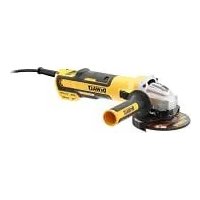
DWE4357 - Sander DEWALT - Free user manual and instructions
Find the device manual for free DWE4357 DEWALT in PDF.


| Product type | Sander / Angle grinder |
| Brand | DeWalt |
| Model | DWE4357 |
| Rated power input | 1700 W |
| Voltage | 230 V ~ |
| No-load speed | 2200 – 10500 min⁻¹ (variable) |
| Disc diameter | 125 mm |
| Max. grinding disc thickness | 6.4 mm |
| Spindle diameter | M14 |
| Spindle length | 18.5 mm |
| Weight | 2.41 kg (with side handle and guard) |
| Sound pressure level | 89 dB(A) |
| Sound power level | 97 dB(A) |
| Vibration (grinding) | 5.6 m/s² (uncertainty K=1.5 m/s²) |
| Vibration (sanding) | < 2.5 m/s² |
| Main functions | Grinding, sanding, metal brushing, cutting |
| Special features | Variable speed, electronic brake, Kickback Brake, E-Clutch, Constant Clutch, soft start, voltage cut-off |
| Handle | Side handle (mountable left or right) |
| Protection type | Double insulation (class II) |
| Maintenance | Regular cleaning of ventilation slots, no lubrication required, use compressed air for dusting |
| Accessories included | 2 protective guards (types A and B), side handle, support flange, locking nut, hex key, manual |
| Spare parts / repairability | Use only DEWALT parts; repair by authorized centers; discs, brushes, back-up pads available as accessories |
| General information | Compliant with standards EN62841-1 and EN62841-2-3; CE certifications |
Frequently Asked Questions - DWE4357 DEWALT
User questions about DWE4357 DEWALT
0 question about this device. Answer the ones you know or ask your own.
Ask a new question about this device
Download the instructions for your Sander in PDF format for free! Find your manual DWE4357 - DEWALT and take your electronic device back in hand. On this page are published all the documents necessary for the use of your device. DWE4357 by DEWALT.
USER MANUAL DWE4357 DEWALT
English (original instructions) 37
Fig. B Fig. C


Fig. D
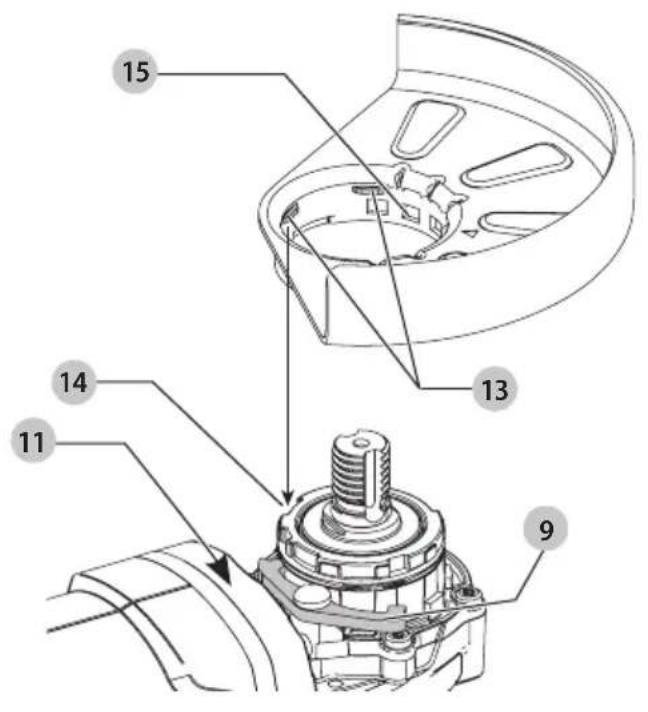
Fig. E

Fig. F

Fig. G
natural_image
Line drawing of hands using a power tool to adjust or clean a motor (no text or symbols present)SMÅ VINKELSLIBERE DWE4347, DWE4357, DWE4369
Tillykke!
DWE4347, DWE4357, DWE4369
DEWALT erklærer, at produkterne beskrevet under Tekniske data er udformet i overensstemmelse med: 2006/42/EF, EN62841-1:2015+A11:2022, EN62841-2-3:2021+A11:2021.
natural_image
Pure mechanical diagram showing a lever and fulcrum without any text, numbers, or symbolsVinkel
natural_image
Illustration of wood logs and a wooden log with two circular insets showing gear (no text or symbols)DWE4347, DWE4357, DWE4369
DWE4347, DWE4357, DWE4369
natural_image
Illustration of wood grain and a rolled log inside a circular frame (no text or symbols)SMALL ANGLE GRINDERS
DWE4347, DWE4357, DWE4369
Congratulations!
You have chosen a DEWALT tool. Years of experience, thorough product development and innovation make DEWALT one of the most reliable partners for professional power tool users.
Technical Data
| DWE4347 DWE4357 DWE4369 | ||||
| Voltage V | AC | 230 230 230 | ||
| Type 2 2 2 | ||||
| Power input W | 1700 1700 1700 | |||
| Rated no-load speed | min-1 | 10500 | 2200–10500 | 1800–8000 |
| Grinding wheel diameter | mm | 125 | 125 | 125 |
| Grinding wheel thickness (max) | mm | 6.4 | 6.4 | 6.4 |
| Cutting off wheel diameter | mm 125 125 125 | |||
| Cutting off wheel thickness (max) | mm | 3 | 3 | 3 |
| Wire wheel diameter | mm 115 115 115 | |||
| Wire wheel thickness (max) | mm | 13 | 13 | 13 |
| Spindle diameter | M14 M14 M14 | |||
| Spindle length | mm | 18.5 | 18.5 | 18.5 |
| Weight | kg | 2.39 | 2.41 | 2.53 |
| * weight includes side handle and guard | ||||
| Noise and vibration total values (triax vector sum) according to EN62841-2-3: | ||||
| LPA (emission sound pressure level) | dB(A) | 89 | 89 | 89 |
| LWA (sound power level) | dB(A) | 97 | 97 | 97 |
| K (uncertainty for the given sound level) | dB(A) | 3 | 3 | 3 |
| Surface grinding | ||||
| Vibration emission value ah,AG= | m/s2 | 5.6 5.6 4.2 | ||
| Uncertainty K = m/s2 1.5 1.5 1.5 | ||||
| Disc sanding | ||||
| Vibration emission value ah,DS= | m/s2 | < 2.5 < 2.5 < 2.5 | ||
| Uncertainty K = m/s2 1.5 1.5 1.5 | ||||
| Concrete grinding | ||||
| Vibration emission value ah,CG = m/s | 2 | 5.54 | ||
| Uncertainty K = m/s | 2 | 1.5 1.5 1.5 | ||
| Cutting off | ||||
| Vibration emission value ah,CO = m/s | 2 | 5.54 | ||
| Uncertainty K = m/s | 2 | 1.5 1.5 1.5 | ||
The vibration emission level given in this information sheet has been measured in accordance with a standardised test given in EN62841 and may be used to compare one tool with another. It may be used for a preliminary assessment of exposure.
WARNING: The declared vibration emission level represents the main applications of the tool. However if the tool is used for different applications, with different accessories or poorly maintained, the vibration emission
may differ. This may significantly increase the exposure level over the total working period. An estimation of the level of exposure to vibration should also take into account the times when the tool is switched off or when it is running but not actually doing the job. This may significantly reduce the exposure level over the total working period.
Identify additional safety measures to protect the operator from the effects of vibration such as: maintain the tool and the accessories, keep the hands warm, organisation of work patterns.
CAUTION: Working with the wire brush or the abrasive drawing can lead to different vibration levels!
WARNING: Grinding thin sheets of metal or other easily warning structures with a large surface can result in a total noise emission much higher (up to 15 dB) than the declared noise emission values. Such workpieces should as far as possible be prevented from emitting sound by suitable measures such as the application of heavy flexible damping mats. The increased noise emission is also to be considered for both the risk assessment of noise exposure and selecting adequate hearing protection.
EC-Declaration of Conformity
Machinery Directive

Small Angle Grinders DWE4347, DWE4357, DWE4369
DEWALT declares that these products described under
Technical Data are in compliance with:
2006/42/EC, EN62841-1:2015+A11:2022, EN62841-2-3:2021+A11:2021.
These products also comply with Directive 2014/30/EU and 2011/65/EU. For more information, please contact DEWALT at the following address or refer to the back of the manual.
The undersigned is responsible for compilation of the technical file and makes this declaration on behalf of DEWALT.

Vice President of Engineering, PTE-Europe Director Engineering
65510, Idstein, Germany
25.10.2023
DECLARATION OF CONFORMITY
MACHINERY AND RADIO EQUIPMENT
REGULATIONS

Small Angle Grinders DWE4347, DWE4357, DWE4369
DEWALT declares that these products described under "technical data" are in compliance with:
EN62841-1:2015+A11:2022, EN62841-2-3:2021+A11:2021.
These products conform to the following UK Regulations
The Supply of Machinery (Safety) Regulations, 2008, S.I. 2008/1597 (as amended).
The Radio Equipment Regulations 2017, S.I. 2017/1206 (as amended)
The Restriction of the Use of Certain Hazardous Substances in Electrical and Electronic Equipment Regulations 2012, S.I. 2012/3032 (as amended).
For more information, please contact DEWALT at the following address or refer to the back of the manual.
The undersigned is responsible for compilation of the technical file and makes this declaration on behalf of DEWALT.
natural_image
Abstract line drawing with intersecting strokes and no text or symbolsKarl Evans
Vice President Professional Power Tools EANZ GTS
270 Bath Road, Slough
SL1 4DX
England
25.10.2023

WARNING: To reduce the risk of injury, read the instruction manual.
Definitions: Safety Guidelines
The definitions below describe the level of severity for each signal word. Please read the manual and pay attention to these symbols.
DANGER: Indicates an imminently hazardous situation which, if not avoided, will result in death or serious injury.
WARNING: Indicates a potentially hazardous situation which, if not avoided, could result in death or serious injury.
CAUTION: Indicates a potentially hazardous situation which, if not avoided, may result in minor or moderate injury.
NOTICE: Indicates a practice not related to personal injury which, if not avoided, may result in property damage.
Depotes risk of electric shock.
Davates risk of fire.
General Power Tool Safety Warnings
WARNING: Read all safety warnings, instructions, indications and specifications provided with this power tool. Failure to follow all instructions listed below may result in electric shock, fire and/or serious injury.
SAVE ALL WARNINGS AND INSTRUCTIONS FOR FUTURE REFERENCE.
The term "power tool" in the warnings refers to your mains-operated (corded) power tool or battery-operated (cordless) power tool.
1) Work Area Safety
a) Keep work area clean and well lit. Cluttered or dark areas invite accidents.
b) Do not operate power tools in explosive atmospheres, such as in the presence of flammable liquids, gases or dust. Power tools create sparks which may ignite the dust or fumes.
c) Keep children and bystanders away while operating a power tool. Distractions can cause you to lose control.
2) Electrical Safety
a) Power tool plugs must match the outlet. Never modify the plug in any way. Do not use any adapter plugs with earthed (grounded) power tools.
Unmodified plugs and matching outlets will reduce risk of electric shock.
b) Avoid body contact with earthed or grounded surfaces such as pipes, radiators, ranges and refrigerators. There is an increased risk of electric shock if your body is earthed or grounded.
c) Do not expose power tools to rain or wet conditions. Water entering a power tool will increase the risk of electric shock.
d) Do not abuse the cord. Never use the cord for carrying, pulling or unplugging the power tool. Keep cord away from heat, oil, sharp edges or moving parts. Damaged or entangled cords increase the risk of electric shock.
e) When operating a power tool outdoors, use an extension cord suitable for outdoor use. Use of a cord suitable for outdoor use reduces the risk of electric shock.
f) If operating a power tool in a damp location is unavoidable, use a residual current device (RCD) protected supply. Use of an RCD reduces the risk of electric shock.
3) Personal Safety
a) Stay alert, watch what you are doing and use common sense when operating a power tool. Do not use a power tool while you are tired or under the influence of drugs, alcohol or medication. A moment of inattention while operating power tools may result in serious personal injury.
b) Use personal protective equipment. Always wear eye protection. Protective equipment such as a dust mask, non-skid safety shoes, hard hat or hearing protection used for appropriate conditions will reduce personal injuries.
c) Prevent unintentional starting. Ensure the switch is in the off-position before connecting to power source and/or battery pack, picking up or carrying the tool. Carrying power tools with your finger on the switch or energising power tools that have the switch on invites accidents.
d) Remove any adjusting key or wrench before turning the power tool on. A wrench or a key left attached
to a rotating part of the power tool may result in personal injury.
e) Do not overreach. Keep proper footing and balance at all times. This enables better control of the power tool in unexpected situations.
f) Dress properly. Do not wear loose clothing or jewellery. Keep your hair and clothing away from moving parts. Loose clothes, jewellery or long hair can be caught in moving parts.
g) If devices are provided for the connection of dust extraction and collection facilities, ensure these are connected and properly used. Use of dust collection can reduce dust-related hazards.
h) Do not let familiarity gained from frequent use of tools allow you to become complacent and ignore tool safety principles. A careless action can cause severe injury within a fraction of a second.
4) Power Tool Use and Care
a) Do not force the power tool. Use the correct power tool for your application. The correct power tool will do the job better and safer at the rate for which it was designed.
b) Do not use the power tool if the switch does not turn it on and off. Any power tool that cannot be controlled with the switch is dangerous and must be repaired.
c) Disconnect the plug from the power source and/or remove the battery pack, if detachable, from the power tool before making any adjustments, changing accessories, or storing power tools. Such preventive safety measures reduce the risk of starting the power tool accidentally.
d) Store idle power tools out of the reach of children and do not allow persons unfamiliar with the power tool or these instructions to operate the power tool. Power tools are dangerous in the hands of untrained users.
e) Maintain power tools and accessories. Check for misalignment or binding of moving parts, breakage of parts and any other condition that may affect the power tool's operation. If damaged, have the power tool repaired before use. Many accidents are caused by poorly maintained power tools.
f) Keep cutting tools sharp and clean. Properly maintained cutting tools with sharp cutting edges are less likely to bind and are easier to control.
g) Use the power tool, accessories and tool bits, etc. in accordance with these instructions, taking into account the working conditions and the work to be performed. Use of the power tool for operations different from those intended could result in a hazardous situation.
h) Keep handles and grasping surfaces dry, clean and free from oil and grease. Slippery handles and grasping surfaces do not allow for safe handling and control of the tool in unexpected situations.
5) Service
a) Have your power tool serviced by a qualified repair person using only identical replacement parts. This will ensure that the safety of the power tool is maintained.
SAFETY INSTRUCTIONS FOR ALL OPERATIONS Safety Warnings Common for Grinding, Sanding, Wire Brushing, or Cutting-Off Operations:
a) This power tool is intended to function as a
grinder, sander, wire brush, or cut-off tool. Read all safety warnings, instructions, illustrations and specifications provided with this power tool. Failure to follow all instructions listed below may result in electric shock, fire and/or serious injury.
b) Operations such as polishing are not recommended
to be performed with this power tool. Operations for which the power tool was not designed may create a hazard and cause personal injury.
c) Do not convert this power tool to operate in a way
which is not specifically designed and specified by the tool manufacturer. Such a conversion may result in a loss of control and cause serious personal injury.
d) Do not use accessories which are not specifically designed and specified by the tool manufacturer.
Just because the accessory can be attached to your power tool, it does not assure safe operation.
e) The rated speed of the accessory must be at least
equal to the maximum speed marked on the power tool. Accessories running faster than their rated speed can break and fly apart.
f) The outside diameter and the thickness of your
accessory must be within the capacity rating of your power tool. Incorrectly sized accessories cannot be adequately guarded or controlled.
g) The dimensions of the accessory mounting must fit
the dimensions of the mounting hardware of the power tool. Accessories that do not match the mounting hardware of the power tool will run out of balance, vibrate excessively and may cause loss of control.
h) Do not use a damaged accessory. Before each use
inspect the accessory such as abrasive wheels for chips and cracks, backing pad for cracks, tear or excess wear, wire brush for loose or cracked wires.
If power tool or accessory is dropped, inspect for damage or install an undamaged accessory. After inspecting and installing an accessory, position yourself and bystanders away from the plane of the rotating accessory and run the power tool at maximum no-load speed for one minute. Damaged accessories will normally break apart during this test time.
i) Wear personal protective equipment. Depending on application, use face shield, safety goggles or safety glasses. As appropriate, wear dust mask, hearing protectors, gloves and workshop apron capable of stopping small abrasive or workpiece fragments.
The eye protection must be capable of stopping flying debris generated by various applications. The dust mask or respirator must be capable of filtrating particles generated
by the particular application. Prolonged exposure to high intensity noise may cause hearing loss.
j) Keep bystanders a safe distance away from work area. Anyone entering the work area must wear personal protective equipment. Fragments of workpiece or of a broken accessory may fly away and cause injury beyond immediate area of operation.
k) Hold the power tool by insulated gripping surfaces only, when performing an operation where the cutting accessory may contact hidden wiring or its own cord. Cutting accessory contacting a "live" wire may make exposed metal parts of the power tool "live" and could give the operator an electric shock.
1) Position the cord clear of the spinning accessory. If you lose control, the cord may be cut or snagged and your hand or arm may be pulled into the spinning accessory.
m) Never lay the power tool down until the accessory has come to a complete stop. The spinning accessory may grab the surface and pull the power tool out of your control.
n) Do not run the power tool while carrying it at your side. Accidental contact with the spinning accessory could snag your clothing, pulling the accessory into your body.
o) Regularly clean the power tool's air vents. The motor's fan will draw the dust inside the housing and excessive accumulation of powdered metal may cause electrical hazards.
p) Do not operate the power tool near flammable materials. Sparks could ignite these materials.
q) Do not use accessories that require liquid coolants.
Using water or other liquid coolants may result in electrocution or shock.
Kickback and Related Warnings:
Kickback is a sudden reaction to a pinched or snagged rotating wheel, backing pad, brush or any other accessory. Pinching or snagging causes rapid stalling of the rotating accessory which in turn causes the uncontrolled power tool to be forced in the direction opposite of the accessory's rotation at the point of the binding.
For example, if an abrasive wheel is snagged or pinched by the workpiece, the edge of the wheel that is entering into the pinch point can dig into the surface of the material causing the wheel to climb out or kick out. The wheel may either jump toward or away from the operator, depending on direction of the wheel's movement at the point of pinching. Abrasive wheels may also break under these conditions.
Kickback is the result of power tool misuse and/or incorrect operating procedures or conditions and can be avoided by taking proper precautions as given below.
a) Maintain a firm grip with both hands on the power tool and position your body and arms to allow you to resist kickback forces. Always use auxiliary handle, if provided, for maximum control over kickback or torque reaction during start-up. The operator can
control torque reactions or kickback forces, if proper precautions are taken.
b) Never place your hand near the rotating accessory.
Accessory may kickback over your hand.
c) Do not position your body in the area where power tool will move if kickback occurs. Kickback will propel the tool in direction opposite to the wheel's movement at the point of snagging.
d) Use special care when working corners, sharp edges, etc. Avoid bouncing and snagging the accessory. Corners, sharp edges or bouncing have a tendency to snag the rotating accessory and cause loss of control or kickback.
e) Do not attach a saw chain woodcarving blade, segmented diamond wheel with a peripheral gap greater than 10 mm or toothed saw blade. Such blades create frequent kickback and loss of control.
Safety Warnings Specific for Grinding and Cutting-Off Operations:
a) Use only wheel types that are specified for your power tool and the specific guard designed for the selected wheel. Wheels for which the power tool was not designed cannot be adequately guarded and are unsafe.
b) The grinding surface of center depressed wheels must be mounted below the plane of the guard lip. An improperly mounted wheel that projects through the plane of the guard lip cannot be adequately protected.
c) The guard must be securely attached to the power tool and positioned for maximum safety, so the least amount of wheel is exposed towards the operator. The guard helps to protect the operator from broken wheel fragments, accidental contact with wheel and sparks that could ignite clothing.
d) Wheels must be used only for specified applications. For example: do not grind with the side of cut-off wheel. Abrasive cut-off wheels are intended for peripheral grinding, side forces applied to these wheels may cause them to shatter.
e) Always use undamaged wheel flanges that are of correct size and shape for your selected wheel.
Proper wheel flanges support the wheel thus reducing the possibility of wheel breakage. Flanges for cut-off wheels may be different from grinding wheel flanges.
f) Do not use worn down wheels from larger power tools. A wheel intended for larger power tool is not suitable for the higher speed of a smaller tool and may burst.
g) When using dual purpose wheels always use the correct guard for the application being performed. Failure to use the correct guard may not provide the desired level of guarding, which could lead to serious injury.
Additional Safety Warnings Specific for Cutting-Off Operations:
a) Do not "jam" the cut-off wheel or apply excessive pressure. Do not attempt to make an excessive depth of cut. Overstressing the wheel increases the loading and susceptibility to twisting or binding of the wheel in the cut and the possibility of kickback or wheel breakage.
b) Do not position your body in line with and behind the rotating wheel. When the wheel, at the point of operation, is moving away from your body, the possible kickback may propel the spinning wheel and the power tool directly at you.
c) When the wheel is binding or when interrupting a cut for any reason, switch off the power tool and hold it motionless until the wheel comes to a complete stop. Never attempt to remove the cut-off wheel from the cut while the wheel is in motion otherwise kickback may occur. Investigate and take corrective action to eliminate the cause of wheel binding.
d) Do not restart the cutting operation in the workpiece. Let the wheel reach full speed and carefully re-enter the cut. The wheel may bind, walk up or kickback if the power tool is restarted in the workpiece.
e) Support panels or any oversized workpiece to minimize the risk of wheel pinching and kickback. Large workpieces tend to sag under their own weight. Supports must be placed under the workpiece near the line of cut and near the edge of the workpiece on both sides of the wheel.
f) Use extra caution when making a "pocket cut" into existing walls or other blind areas. The protruding wheel may cut gas or water pipes, electrical wiring or objects that can cause kickback.
g) Do not attempt to do curved cutting. Overstressing the wheel increases the loading and susceptibility to twisting or binding of the wheel in the cut and the possibility of kickback or wheel breakage, which can lead to serious injury.
Safety Warnings Specific for Sanding Operations:
a) Use proper sized sanding disc paper. Follow manufacturer's recommendations, when selecting sanding paper. Larger sanding paper extending too far beyond the sanding pad presents a laceration hazard and may cause snagging, tearing of the disc or kickback.
Safety Warnings Specific for Wire Brushing Operations:
a) Be aware that wire bristles are thrown by the brush even during ordinary operation. Do not overstress the wires by applying excessive load to the brush. The wire bristles can easily penetrate light clothing and/or skin.
b) If the use of a guard is specified for wire brushing, do not allow any interference of the wire wheel or brush
with the guard. Wire wheel or brush may expand in diameter due to work load and centrifugal forces.
Additional Safety Rules for Grinders
a) Do not use Type 11 (flaring cup) wheels on this tool. Using inappropriate accessories can result in injury.
b) Always use side handle. Tighten the handle securely.
The side handle should always be used to maintain control of the tool at all times.
Residual Risks
In spite of the application of the relevant safety regulations and the implementation of safety devices, certain residual risks cannot be avoided. These are:
- Impairment of hearing.
• Risk of personal injury due to flying particles. - Risk of burns due to accessories becoming hot during operation.
- Risk of personal injury due to prolonged use.
- Risk of dust from hazardous substances.
Electrical Safety
The electric motor has been designed for one voltage only. Always check that the power supply corresponds to the voltage on the rating plate.

Your DEWALT tool is double insulated in accordance with EN62841; therefore no earth wire is required.
If the supply cord is damaged, it must be replaced only by DEWALT or an authorised service organisation.
WARNING: We recommend the use of a residual current rating with a residual current rating of 30mA or less.
Using an Extension Cable
If an extension cable is required, use an approved 3-core extension cable suitable for the power input of this tool (see
Technical Data). The minimum conductor size is 1.5 mm ^2 ; the maximum length is 30 m.
When using a cable reel, always unwind the cable completely.
Package Contents
The package contains:
1 Anglegrinder
1 Type A Guard
1 Type B Guard
1Sidehandle
1 Backingflange
1Clampnut
1Hexkey
1 Instructionmanual
- Check for damage to the tool, parts or accessories which may have occurred during transport.
• Take the time to thoroughly read and understand this manual prior to operation.
Markings on Tool
The following pictograms are shown on the tool:

Read instruction manual before use.

Wear ear protection.

Wear eye protection.

Always operate with two hands.

Do not use the guard for cut-off operations.

Electronic brake.
Date Code Position (Fig. D)
The date code 11, which also includes the year of manufacture, is printed onto the gear case.
Example:
2023 XX XX
Year and Week of Manufacture
Description (Fig. A, B)
WARNING: Never modify the power tool or any part of it. Damage or personal injury could result.
1 Spindle lock button
2 Spindle
3 Sidehandle
4 Backing flange
5 Clamp nut
6 Guard
7 Slider switch
8 Variable speed dial (DWE4357, DWE4369)
9 Guard release lever
10 LED Indicator
Intended Use
Your heavy-duty small angle grinder has been designed for professional grinding, sanding, wire brushing and cutting applications.
DO nOT use grinding wheels other than centre depressed wheels and flap discs.
DANGER: Do not use for wood cutting or woodcarving. It is not to use toothed blades of any kind. Serious injury can result.
DO nOT use under wet conditions or in the presence of flammable liquids or gases.
Your heavy-duty angle grinder is a professional power tool.
DO nOT let children come into contact with the tool.
Supervision is required when inexperienced operators use this tool.
- Young children and the infirm. This appliance is not intended for use by young children or infirm persons without supervision.
- This product is not intended for use by persons (including children) suffering from diminished physical, sensory or mental abilities; lack of experience, knowledge or skills unless they are supervised by a person responsible for their safety. Children should never be left alone with this product.
Features
Anti-vibration Side Handle
DWE4369
The anti-vibration side handle offers added comfort by absorbing the vibrations caused by the tool.
No-Volt
The No-volt function stops the grinder restarting without the switch being cycled if there is a break in the power supply.
E-Clutch
This unit is equipped with an E-Clutch (Electronic Clutch), which in the event of a stall or wheel pinch, the unit will be shut off to reduce the reaction torque to the user. The switch needs to be cycled (turned on and off) to restart tool.
Brake
When the slider switch is released the motor immediately turns off and electronically brakes stopping the accessory quickly.
Kickback Brake™
When a severe pinch, stall, or bind-up event is sensed the electronic brake engages with maximum force to quickly stop the wheel, reduce the movement of the grinder, and shut the grinder off. The switch needs to be cycled (turned off and then on) to restart tool.
Constant Clutch™
When overloaded or stalled the motor torque is reduced. If load is reduced the torque and RPM will increase. If the tool is stalled for an extended amount of time it will shut-off and require the switch to cycle to restart.
Electronic Soft Start
This feature limits the initial start up momentum, allowing the speed to build up gradually over a 1 second period.
LED Indicator (Fig. A)
The LED indicator 10 will remain lit green during normal activity, or blink in a pattern of red light to alert you a tool protection feature has been activated. Refer to the LED Guide at the back of this manual for explanations of blink patterns.
ASSEMBLY AND ADJUSTMENTS
WARNING: To reduce the risk of serious personal injury, turn tool off and disconnect tool from power source before making any adjustments or removing/installing attachments or accessories. Be sure the trigger switch is in the OFF position. An accidental start-up can cause injury.
Attaching Side Handle (Fig. B)
WARNING: Before using the tool, check that the handle is tightened securely.
Screw the side handle 3 tightly into one of the holes on either side of the gear case. The side handle should always be used to maintain control of the tool at all times.
Guards
CAUTION: Guards must be used with all grinding wheels, cutting wheels, sanding flap discs, wire brushes, and wire wheels. Refer to Figure A to see guards provided with the unit. Some applications may require purchasing the correct guard from your local dealer or authorized service centre.
CAUTION: When using a Type A (cut-off) wheel guard for facial grinding, the wheel guard may interfere with the workpiece causing poor control.
CAUTION: When using a Type B (grinding) wheel guard for cutting-off operations with bonded abrasive wheels, there is an increased risk of exposure to emitted sparks and particles, as well as exposure to wheel fragments in the event of wheel burst.
CAUTION: When using a Type A (cut-off), Type B (cut-off) wheel guard for cutting-off and facial operations in concrete or masonry, there is an increased risk of exposure to dust and loss of control resulting in kickback.
CAUTION: When using a Type A (cut-off), Type B (grinding) wheel guard with a wheel-type wire brush with a thickness greater than the maximum thickness as specified in Technical Data, the wires may catch on the guard leading to breaking of wires.
NOTE: Edge grinding and cutting can be performed with Type 27 wheels designed and specified for this purpose; 6 mm thick wheels are designed for surface grinding while thinner Type 27 wheels need to be examined for the manufacturer's label to see if they can be used for surface grinding or only edge grinding/cutting. A Type A (cut-off) wheel guard must be used for any wheel where surface grinding is forbidden. A Type A (cut-off) (previously called type 1/41) wheel guard must be used for any dual purpose (combined grinding and cutting-off abrasive) wheels. Cutting can also be performed by using a Type 1/41 wheel and a Type A cut-off wheel guard previously called Type 1/41 guard.
NOTE: See the Accessory and Guard Applications chart to select the proper guard / accessory combination.
Adjusting and Mounting Guard (Fig. C, D)
CAUTION: Turn unit off and unplug the tool before removing any adjustments or removing or installing attachments or accessories.
CAUTION: BEFORE operating the tool, identify which good adjustment option your tool is set to.
Adjustment Options
For guard adjustment, the guard release lever 9 engages one of the alignment holes 15 on the guard collar using a ratcheting feature. Your grinder offers two options for this adjustment.
- One-touch ^TM : In this position the engaging face is slanted and will ride over to the next alignment hole when guard is rotated in a clockwise direction (spindle facing user) but self-locks in the anti-clockwise direction.
- Two-touch ™: In this position the engaging face is straight and squared off. It will NOT ride over to the next alignment hole unless guard release lever is pressed and held while simultaneously rotating the guard in either a clockwise or anti-clockwise direction (spindle facing user).
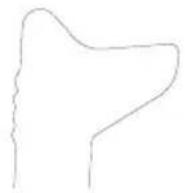
One-Touch™

Two-Touch™
Setting Guard Adjustment Options
To adjust the guard release lever 9 for desired adjustment option:
- Remove screw 12 using a T20 bit.
- Remove the guard release lever taking note of the spring position. Choose the end of the lever for the desired adjustment option. One-touch will use the slanted end of the lever 9 to engage the alignment holes 15 on the guard collar. Two-touch will use the squared end to engage the alignment holes 15 on the guard collar.
- Replace the lever, positioning the chosen end under the spring 20. Ensure the lever is in proper contact with the spring.
- Replace screw and torque to 2.0–3.0 Nm. Ensure proper installation with spring return function by depressing guard release lever 9.
Mounting Guard (Fig. D)
CANTION: Prior to mounting guard, ensure the screw, level, and spring are fitted correctly before mounting the guard.
- With the spindle facing the operator, press and hold the guard release lever 9.
- Align the lugs 13 on the guard with the slots 14 on the gear case.
-
Push the guard down until the guard lugs engage and rotate them in the groove on the gear case hub. Release the guard release lever.
-
To position the guard: One-touch™: Rotate the guard clockwise into the desired working position. Press and hold the guard release lever 9 to rotate the guard in the anti-clockwise direction.
Two-touch™: Press and hold the guard release lever 9. Rotate the guard clockwise or anti-clockwise into the desired working position.
NOTE: The guard body should be positioned between
the spindle and the operator to provide maximum operator protection.
The guard release lever should snap into one of the alignment holes 15 on the guard collar. This ensures that the guard is secure.
- To remove the guard, follow steps 1–3 of these instructions in reverse.
Flanges and Wheels
Mounting Non-Hubbed Wheels (Fig. E)
WARNING: Failure to properly seat the flange/clamp nut/wheel could result in serious injury (or damage to the tool or wheel).
CAUTION: Included flanges must be used with Type 2 grinding wheels and Type 41 and Type 42 cutting wheels. See the Accessory and Guard Applications chart for more information.
WARNING: A closed, two-sided cutting wheel guard is required when using cutting wheels.
WARNING: Use of a damaged flange or guard or fail ure proper flange and guard can re suit in injury due to wheel breakage and wheel contact. See the Accessory and Guard Applications chart for more information.
- Place the tool on a table, guard up.
- Install the unthreaded backing flange 4 on spindle 2 with the raised centre (pilot) facing the wheel.
- Place wheel 16 against the backing flange, centring the wheel on the raised centre (pilot) of the backing flange.
- While depressing the spindle lock button and with the hex depressions facing away from the wheel, thread the clamp nut 5 on spindle so that the lugs engage the two slots in the spindle.
- While depressing the spindle lock button, tighten the clamp nut 5 using a hex wrench.
- To remove the wheel, depress the spindle lock button and loosen the clamp nut.
Mounting Sanding Backing Pads (Fig. B, F)
NOTE: Use of a guard with sanding discs that use backing pads, often called fiber resin discs, is not required. Since a guard is not required for these accessories, the guard may or may not fit correctly if used.
WARNING: Failure to properly seat the flange/clamp nut/wheel could result in serious injury (or damage to the tool or wheel).
WARNING: Proper guard must be reinstalled for grinding wheel, cutting wheel, sanding flap disc, wire brush or wire wheel applications after sanding applications are complete.
- Place or appropriately thread backing pad 17 on the spindle.
- Place the sanding disc 18 on the backing pad 17.
-
While depressing spindle lock 1, thread clamp nut 19 on spindle, piloting the raised hub on the clamp nut into the centre of san ding disc and backing pad.
-
Tighten the clamp nut by hand. Then depress the spindle lock button while turning the sanding disc until the sanding disc and clamp nut are snug.
- To remove the wheel, grasp and turn the backing pad and sanding pad while depressing the spindle lock button.
Mounting Wire Cup Brushes and Wire Wheels (Fig. A, B)
WARNING: Failure to properly seat the flange/clamp nut/wheel could result in serious injury (or damage to the tool or wheel).
CAUTION: To reduce the risk of personal injury, with work gloves when handling wire brushes and wheels. They can become sharp.
CAUTION: To reduce the risk of damage to the tool, which or brush must not touch guard when mounted
or while in use. Undetectable damage could occur to the accessory, causing wires to fragment from accessory wheel or cup.
Wire cup brushes or wire wheels install directly on the threaded spindle without the use of flanges. Use only wire brushes or wheels provided with a M14 threaded hub. These accessories are available at extra cost from your local dealer or authorised service centre.
- Place the tool on a table, guard up.
- Thread the wheel on the spindle by hand.
- Depress spindle lock button 1 and use a wrench on the hub of the wire wheel or brush to tighten the wheel.
- To remove the wheel, reverse the above procedure.
NOTICE: To reduce the risk of damage to the tool, properly seat the wheel hub before turning the tool on.
Prior to Operation
• Install the guard and appropriate disc or wheel. Do not use excessively worn discs or wheels.
- Be sure the inner and outer flange are mounted correctly. Follow the instructions given in the Accessory and Guard Applications chart.
- Make sure the disc or wheel rotates in the direction of the arrows on the accessory and the tool.
- Do not use a damaged accessory. Before each use inspect the accessory such as abrasive wheels for chips and cracks, backing pad for cracks, tear or excess wear, wire brush for loose or cracked wires. If power tool or accessory is dropped, inspect for damage or install an undamaged accessory. After inspecting and installing an accessory, position yourself and bystanders away from the plane of the rotating accessory and run the power tool at maximum no-load speed for one minute. Damaged accessories will normally break apart during this test time.
OPERATION
Instructions for Use
WARNING: Always observe the safety instructions and applicable regulations.
WARNING: To reduce the risk of serious personal injury, turn tool off and disconnect tool from power source before making any adjustments or removing/installing attachments or accessories. Be sure the trigger switch is in the OFF position. An accidental start-up can cause injury.
WARNING: Ensure all
- Ensure all materials to be ground or cut are secured in place.
- Secure and support the workpiece. Use clamps or a vise to hold and support the workpiece to a stable platform. It is important to clamp and support the workpiece securely to prevent movement of the workpiece and loss of control. Movement of the workpiece or loss of control may create a hazard and cause personal injury.
- Support panels or any oversized workpiece to minimize the risk of wheel pinching and kickback. Large workpieces tend to sag under their own weight. Supports must be placed under the workpiece near the line of cut and near the edge of the workpiece on both sides of the wheel.
• Always wear regular working gloves while operating this tool.
• The gear becomes very hot during use.
- Apply only a gentle pressure to the tool. Do not exert side pressure on the disc.
• Always install the guard and appropriate disc or wheel. Do not use excessively worn disc or wheel.
- Be sure the inner and outer flange are mounted correctly.
- Make sure the disc or wheel rotates in the direction of the arrows on the accessory and the tool.
- Avoid overloading. Should the tool become hot, let it run a few minutes under no load condition to cool the accessory. Do not touch accessories before they have cooled. The discs become very hot during use.
- Never work with the grinding cup without a suitable protection guard in place.
- Do not use the power tool with a cut-off stand.
- Never use blotters together with bonded abrasive products.
- Be aware, the wheel continues to rotate after the tool is switched off.
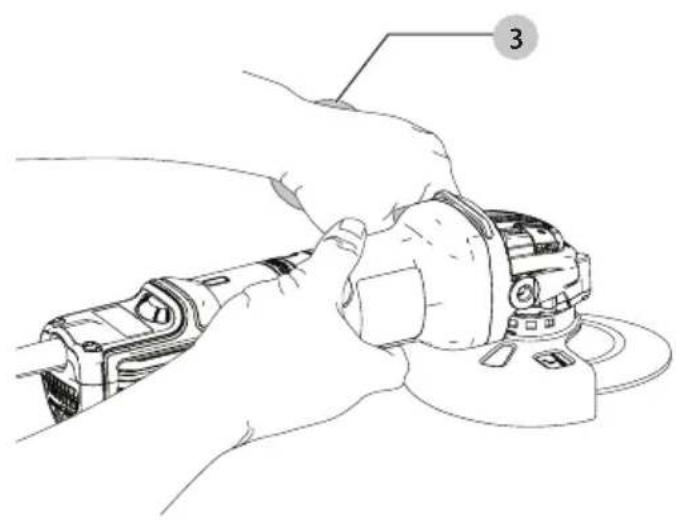
Proper Hand Position (Fig. G)
WARNING: To reduce the risk of serious personal injury, ALWAYS use proper hand position as shown.
WARNING: To reduce the risk of serious personal injury, ALWAYS hold securely in anticipation of a sudden reaction.
Proper hand position requires one hand on the side handle 3, with the other hand on the body of the tool, as shown in Figure G.
Variable Speed Dial (Fig. A)
DWE4357, DWE4369
WARNING: Regardless of the speed setting, the rated speed of the accessory must be at least equal to the maximum speed marked on the power tool.
The variable speed dial offers added tool control and enables the tool to be used at optimum conditions to suit the accessory and material.
- Turn the dial 8 to the desired level. Turn the dial upward for higher speed and downwards for lower speed.
Slider Switch (Fig. A)
CAUTION: Hold the side handle and body of the tool family to maintain control of the tool at start up and during use and until the wheel or accessory stops rotating. Make sure the wheel has come to a complete stop be fore laying the tool down.
NOTE: To reduce unexpected tool movement, do not switch the tool on or off while under load conditions. Allow the grinder to run up to full speed before touching the work surface. Lift the tool from the surface before turning the tool off. Allow the tool to stop rotating before putting it down.
To start the tool, slide the ON/OFF slider switch 7 toward the front of the tool. To stop the tool, release the ON/OFF slider switch.
For continuous operation, slide the switch toward the front of the tool and press the forward part of the switch inward. To stop the tool while operating in continuous mode, press the rear part of the slider switch and release.
Spindle Lock (Fig. B)
The spindle lock 1 is provided to prevent the spindle from rotating when installing or removing wheels. Operate the spindle lock only when the tool is turned off, unplugged from the power supply, and has come to a complete stop.
NOTICE: To reduce the risk of damage to the tool, do not engage the spindle lock while the tool is operating. Damage to the tool will result and attached accessory may spin off possibly resulting in injury.
To engage the lock, depress the spindle lock button and rotate the spindle until you are unable to rotate the spindle further.
Surface Grinding, Sanding and Wire Brushing
CAUTION: Always use the correct guard per the instructions in this manual.
WARNING: Metal dust build-up. Extensive use of flap can in metal applications can result in the increased potential for electric shock. To reduce this risk, insert an RCD before use and clean the ventilation slots daily by blowing dry compressed air into the ventilation slots in accordance with the below maintenance instructions.
To perform work on the surface of a workpiece:
-
Allow the tool to reach full speed before touching the tool to the work surface.
-
Apply minimum pressure to the work surface, allowing the tool to operate at high speed. Material removal rate is greatest when the tool operates at high speed.
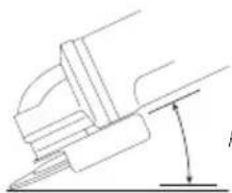
natural_image
Pure mechanical diagram showing a lever and pivot point without any text or symbolsAngle
- Maintain an appropriate angle between the tool and work surface. Refer to the chart according to particular function.
| Function Angle |
| Grinding 20°-30° |
| Sanding with Flap Disc 5°-10° |
| Sanding with Backing Pad 5°-15° |
| Wire Brushing 5°-10° |
- Maintain contact between the edge of the wheel and the work surface.
- If grinding, sanding with flap discs or wire brushing move the tool continuously in a forward and back motion to avoid creating gouges in the work surface. - If sanding with a backing pad, move the tool constantly in a straight line to prevent burning and swirling of work surface.
NOTE: Allowing the tool to rest on the work surface without moving will damage the work piece.
- Remove the tool from work surface before turning tool off. Allow the tool to stop rotating before laying it down.
CAUTION: Use extra care when working over an edge, as a sudden sharp movement of grinder may be experienced.
Precautions To Take When Working on a Painted Workpiece
- Sanding or wire brushing of lead based paint is NOT RECOMMENDED due to the difficulty of controlling the contaminated dust. The greatest danger of lead poisoning is to children and pregnant women.
- Since it is difficult to identify whether or not a paint contains lead without a chemical analysis, we recommend the following precautions when sanding any paint:
Personal Safety
- No children or pregnant women should enter the work area where the paint sanding or wire brushing is being done until all clean up is completed.
- A dust mask or respirator should be worn by all persons entering the work area. The filter should be replaced daily or whenever the wearer has difficulty breathing.
NOTE: Only those dust masks suitable for working with lead paint dust and fumes should be used. Ordinary painting masks do not offer this protection. See your local hardware dealer for the proper N.I.O.S.H. approved mask.
- NO EATING, DRINKING or SMOKING should be done in the work area to prevent ingesting contaminated paint particles. Workers should wash and clean up BEFORE eating, drinking
or smoking. Articles of food, drink, or smoking should not be left in the work area where dust would settle on them.
Environmental Safety
- Paint should be removed in such a manner as to minimize the amount of dust generated.
- Areas where paint removal is occurring should be sealed with plastic sheeting of 4 mils thickness.
- Sanding should be done in a manner to reduce tracking of paint dust outside the work area.
Cleaning and Disposal
- All surfaces in the work area should be vacuumed and thoroughly cleaned daily for the duration of the sanding project. Vacuum filter bags should be changed frequently.
- Plastic drop cloths should be gathered up and disposed of along with any dust chips or other removal debris. They should be placed in sealed refuse receptacles and disposed of through regular trash pick-up procedures.
During clean up, children and pregnant women should be kept away from the immediate work area. - All toys, washable furniture and utensils used by children should be washed thoroughly before being used again.
Edge Grinding and Cutting
WARNING: Do not use edge grinding/cutting wheels for some edge grinding applications because these wheels are not designed for side pressures encountered with surface grinding. Wheel breakage and injury may result.
CAUTION: Wheels used for edge grinding and cutting may break or kick back if they bend or twist while the tool is being used. In all edge grinding/cutting operations, the open side of the guard must be positioned away from the operator.
NOTICE: Edge grinding/cutting with a Type 27 wheel must be limited to shallow cutting and notching—less than 13 mm in depth when the wheel is new. Reduce the depth of cutting/notching equal to the reduction of the wheel radius as it wears down. Refer to the Accessory and Guard Applications chart for more information. Edge grinding/cutting with a Type 41 wheel requires usage of a Type A guard.
- Allow the tool to reach full speed before touching the tool to the work surface.
- Apply minimum pressure to the work surface, allowing the tool to operate at high speed. Grinding/cutting rate is greatest when the tool operates at high speed.
- Position yourself so that the open-underside of the wheel is facing away from you.
- Once a cut is begun and a notch is established in the workpiece, do not change the angle of the cut. Changing the angle will cause the wheel to bend and may cause wheel breakage. Edge grinding wheels are not designed to withstand side pressures caused by bending.
- Remove the tool from the work surface before turning the tool off. Allow the tool to stop rotating before laying it down.
Metal Applications
When using the tool in metal applications, make sure that a residual current device (RCD) has been inserted to avoid residual risks caused by metal swarf.
If the power supply is shut off by the RCD, take the tool to an authorised DEWALT repair agent.
WARNING: In extreme working conditions, conductive dust can accumulate inside the machine housing when working with metal. This can result in the protective insulation in the machine becoming degraded with a potential risk of an electrical shock.
To avoid build-up of metal swarf inside the machine, we recommend to clear the ventilation slots on a daily basis. Refer to Maintenance.
Cutting Metal
For cutting with bonded abrasives, always use the guard Type A.
When cutting, work with moderate feed, adapted to the material being cut. Do not exert pressure onto the cutting disc, tilt or oscillate the machine.
Do not reduce the speed of running down cutting discs by applying sideward pressure.
The machine must always work in an upgrinding motion.
Otherwise, the danger exists of it being pushed uncontrolled out of the cut.
When cutting profiles and square bar, it is best to start at the smallest cross section.
Rough Grinding
Never use a cutting disc for roughing.
Always use the guard Type B.
The best roughing results are achieved when setting the machine at an angle of 30^ to 40^ . Move the machine back and forth with moderate pressure. In this manner, the workpiece will not become too hot, does not discolour and no grooves are formed.
Cutting Stone
The machine shall be used only for dry cutting.
For cutting stone, it is best to use a diamond cutting disc. Operate the machine only with additional dust protection mask.
Working Advice
Exercise caution when cutting slots in structural walls.
Slots in structural walls are subject to the country-specific regulations. These regulations are to be observed under all circumstances. Before beginning work, consult the responsible structural engineer, architect or the construction supervisor.
MAINTENANCE
Your DEWALT power tool has been designed to operate over a long period of time with a minimum of maintenance.
Continuous satisfactory operation depends upon proper tool care and regular cleaning.
WARNING: To reduce the risk of serious personal injury, turn tool off and disconnect tool from power source before making any adjustments or removing/installing attachments or accessories. Be sure the trigger switch is in the OFF position. An accidental start-up can cause injury.

Lubrication
Your power tool requires no additional lubrication.

Cleaning
WARNING: Blow dirt and dust out of the main housing in dry air as often as dirt is seen collecting in and around the air vents. Wear approved eye protection and approved dust mask when performing this procedure.
WARNING: Never use solvents or other harsh chemicals for cleaning the non-metallic parts of the tool. These chemicals may weaken the materials used in these parts. Use a cloth dampened only with water and mild soap. Never let any liquid get inside the tool; never immerse any part of the tool into a liquid.
Optional Accessories
WARNING: Since accessories, other than those offered by DWALT, have not been tested with this product, use of such accessories with this tool could be hazardous. To reduce the risk of injury, only DEWALT recommended accessories should be used with this product.
WARNING: Accessories must be rated for at least the speed recommended on the tool warning label. Wheels and other accessories running over their rated accessory speed may fly apart and cause injury. Threaded accessories must have a M14 hub. Every unthreaded accessory must have a 22 mm arbor hole. If it does not, it may have been designed for a circular saw. Use only the accessories shown in the Accessory and Guard Applications chart of this manual. Accessory ratings must always be above tool speed as shown on tool nameplate.
WARNING: Handle and store all abrasive wheels carefully to prevent damage from thermal shock, heat, mechanical damage, etc. Store in a dry protected area free from high humidity, freezing temperatures or extreme temperature changes.
WARNING: Do not use a bonded abrasive wheel that is missing expiration (EXP) date as marked near center of wheel (if provided). Expired wheels are more likely to burst and cause serious injury. Store bonded abrasive wheels in dry location without temperature or humidity extremes. Destroy expired or damaged wheels so they cannot be used.
Consult your dealer for further information on the appropriate accessories.
The capacity of this tool is 125 mm diameter x 6 mm thick grinding or cutting wheels. It is important to choose the correct guards, backing pads and flanges to use with grinder accessories. See the Accessory and Guard Applications chart for information on choosing the correct accessories.
Protecting the Environment

Separate collection. Products and batteries marked with this symbol must not be disposed of with normal household waste.
Products and batteries contain materials that can be recovered or recycled reducing the demand for raw materials. Please recycle electrical products and batteries according to local provisions. Further information is available at www.2helpU.com.
LED Guide
The section provides a list of possible LED blink patterns, their causes and corrective solutions. The user or maintenance personnel can perform some corrective actions, and others may require the assistance of qualified DEWALT technician or your dealer.
| No-Volt Protection | |
| Problem Solution | |
| The switch is in the on position and power has been applied. The unit stayed off. | Cycle the switch to restart. |
| Kick Back Brake | |
| Problem Solution | |
| A pinch has been sensed by the tool and the kickback brake has activated. | Inspect accessory for damage from pinch and replace if necessary. Adjust work piece and tool position as necessary and cycle switch to restart. |
| Thermal Protection | |
| Problem Solution | |
| The unit has shut down to prevent permanent damage due to overheating. | Ensure intake and exhaust vents are not blocked by users hands, clothing or debris during use. Reduce frequency of feathering the tool on/off and cycle switch to restart and/or unplug the unit and then plug it back in. |
| Stall/Overload Protection | |
| Problem Solution | |
| The unit has been in a stalled condition for an extended period and it has shut down. | Remove load from tool and cycle the switch to restart. |
| Problem Power Line | |
| Problem Solution | |
| The unit is running on a poor quality power source like a low quality generator. This power may damage the tool. | Try another power source, reduce extension cord length or reduce equipment used on the power source at one time. |
| Guard Types | |
| Type B(Shallow, Grinding) | Type A(Closed cut off) |
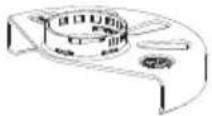 |  |
Type A (Type 41) guards are intended for use with Type 41 (1A) cutting wheels and Type 42 (27A) wheels marked for cutting only. Adding with wheels other than Type 27 and Type 29 require different accessory guards. Always use the smallest proper guard possible that does not contact the accessory.
NOTE: Type A (cut-off) and Type B (grinding) wheel guards where previously referred to as Type 1/41 and Type 27 wheel guards.
| Additional Information for Guards and Accessories | |
| When using segmented diamond wheels, use only diamond wheels with a peripheral gap not greater than 10 mm and negative rake angle. |  |
| DO NOT USEsegmented diamond wheels with a peripheral gap greater than 10 mm and/or a positive rake angle. | 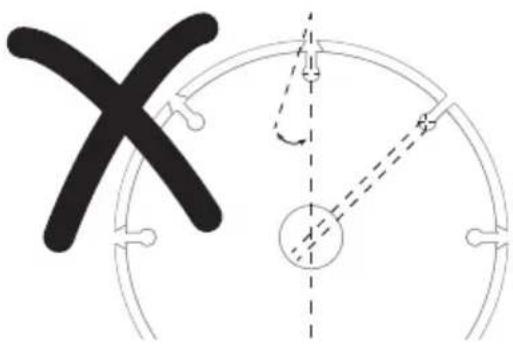 |
| For all grinding, sanding, and wheel type wire brushing accessories, the lowest portion of the accessory must be contained within the guard enclosure with 2 mm or greater clearance to the bottom lip of guard. | 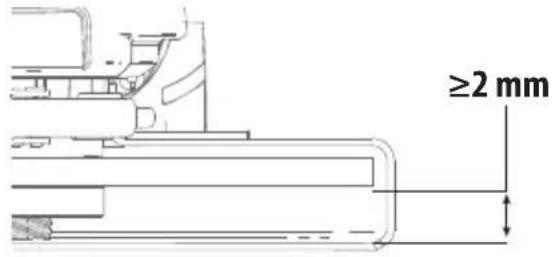 |
Accessory and Guard Applications
| Accessory Type | Accessory | Guard | Assembly for Reference | |
| Surface Grinding | Wheel Type 27 | 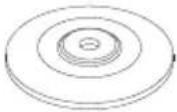 | 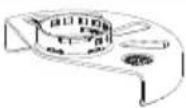 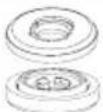 Type B (Grinding) Type B (Grinding) | 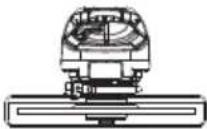 |
| Cutting Off | Wheel Type 41 (1A) (metal) | 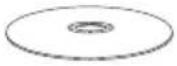 |  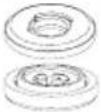 Type A (Closed cut off) Type A (Closed cut off) | 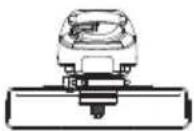 |
| Wheel Type 42 (27A) (metal) | 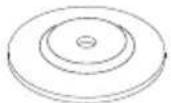 |  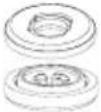 Type A (Closed cut off) Type A (Closed cut off) | 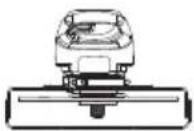 | |
| Wheel Type 41 (1A)(masonry/concrete) | 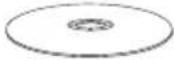 | 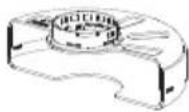  Type A (Closed cut off) Type A (Closed cut off) | 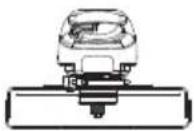 | |
| Diamond Cutting Wheel(masonry/concrete) | 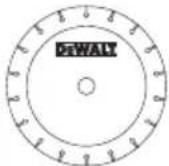 | 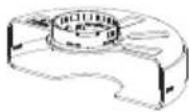 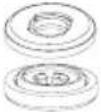 Type A (Closed cut off) Type A (Closed cut off) | 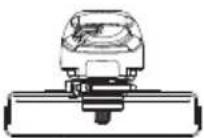 | |
| ^4 For acceptable diamond wheel geometry referenceAdditional Information for Guards and Accessories Chart. | ||||
| Abrasive Wheels ForMaterials Other Than MetalOr Masonry/Concrete |  | 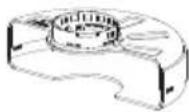  Type A (Closed cut off) Type A (Closed cut off) | 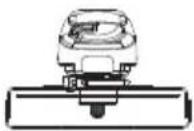 | |
| Dual Purpose(combinedcut-off andgrinding) | Dual Purpose Abrasive Wheel |  |   Type A (Closed cut off) Type A (Closed cut off) |  |
| Wire Brushing | Wheel-Type Wire Brush |  |  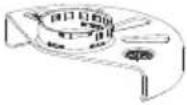 Type A or Type B (Closed cut off or Grinding) Type A or Type B (Closed cut off or Grinding) |  |
Cup Type Wire Brush Guard no rec  | 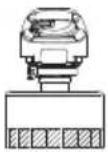 | |||
| Sanding | Flap Disc (Type 27 / Type 29) |  |   Type B (Grinding) Type B (Grinding) |  |
| Flexible Abrasive(e.g. sandpaper)(supported by a flexiblebacking pad) |  |   Guard not required Guard not required |  | |
| ^6 Rubber backing pad and sanding clamp nut (included with rubber backing pad) available at additional cost from yourlocal DFWALT dealer or authorised DFWALT service centre. | ||||
| Guidelines for Guards and Accessories for DWE4347, DWE4357, DWE4369 | ||
| Non-approved Wheels for DWE4347, DWE4357, DWE4369 | Type 11 / T11 |  |
| Hubbed Wheel Wrench | Hubbed wheel wrench available at additional cost from your local DEWALT dealer or authorised DEWALT service centre. | |
DANGER: Do not use for wood cutting or woodcarving.
But use toothed blades of any kind. Serious injury
can result.

natural_image
Illustration of wooden logs and gear (no text or symbols)AMOLADORAS ANGULARES PEQUEÑAS
DWE4347, DWE4357, DWE4369
¡Enhorabuena!
natural_image
Illustration of wood grain and a rolled log inside a circular frame (no text or symbols)PETITES MEULEUSES D'ANGLES
DWE4347, DWE4357, DWE4369
Félicitations !
natural_image
Illustration of wooden logs and gear (no text or symbols)SMERIGLIATRICI ANGOLARI PICCOLE
DWE4347, DWE4357, DWE4369
Congratulazioni!
natural_image
Illustration of wood logs and a wooden log with two circular insets showing gear (no text or symbols)KLEINE HOEKSLIJPMACHINES
DWE4347, DWE4357, DWE4369
BEWAAR ALLE WAARSCHUWINGEN EN INSTRUCTIES ALS TOEKOMSTIG REFERENTIEMATERIAAL
natural_image
Illustration of wooden logs and gear (no text or symbols)SMÅ VINKELSLIPERE DWE4347, DWE4357, DWE4369
Gratulerer!
natural_image
Illustration of wooden logs and a cylindrical object with two circular patterns (no text or symbols)DWE4347, DWE4357, DWE4369
Gratulerer!
natural_image
Illustration of wooden logs and a rolled log inside a circular frame with gear-like patterns (no text or symbols)PIENET KULMAHIOMAKONEET
DWE4347, DWE4357, DWE4369
Onnittelut!
65510, Idstein, Germany
25.10.2023

Electronic Soft Start
natural_image
Illustration of wood grain and a rolled log inside a circular frame (no text or symbols)LITEN VINKELSSLIP DWE4347, DWE4357, DWE4369
Gratulerar!
DWE4347, DWE4357, DWE4369
natural_image
Illustration of wooden logs and gear gears inside a circular frame (no text or symbols)KÜÇÜK AVUÇ İÇİ TAŞLAYICILAR
DWE4347, DWE4357, DWE4369
Tebrikler!
natural_image
Illustration of wood logs and a gear mechanism (no text or symbols)MIKPOI ΓΩNIAKOI TPOXOI
DWE4347, DWE4357, DWE4369
Συγχαρητήρια!
natural_image
Illustration of wood logs and a cylindrical object with two gear-like rings around them (no text or symbols)| Belgique etLuxembourg België en Luxemburg | D:LWALT - Belgium BVBAEgidie Walschaertsstraat 162800 Mechelen | Tel: NL 32 15 47 37 63Tel: FR 32 15 47 37 64Fax: 32 15 47 37 99 | www.dewalt.beenduser.BE@sBDinc.com |
| Danmark | D:LWALT (Stanley Black&Decker AS)Roskildevej 222620 Albertslund | Tel: 70 20 15 10Fax: 70 22 49 10 | www.dewalt.dkkundeservice.dk@sbdinc.com |
| Deutschland D:LWALT | Richard-Klinger-Str. 1165510 Idstein | Tel: 06126-21-0Fax: 06126-21-2770 | www.dewalt.deinfodwge@sbdinc.com |
| Ελλάς | D:E:WALT (Ελλάς) A.E.ΕΔΡΑ-ΓΡΑΘΕΙΑ : Στριβανος 7& Α. Βουλαγμένης, Γωράδα 166 74, ΑθήναSERVICE : Ημαρος Τόπος 2 (Χών Αδάμ) – 193 00 Ασπρόπυργος | Τηρ: 00302108981616Φας: 00302108983570 | www.dewalt.grGreece.Service@sbdinc.com |
| España | D:LWALT Ibérica, S.C.A.Parc de Negocios “Mās Blau”Edificio Muntadas, c/Bergadá, 1, Of. A608820 El Prat de Llobregat (Barcelona) | Tel: 934 797 400Fax: 934 797 419 | www.dewalt.esrespuesta.postventa@sbdinc.com |
| France | D:LWALT (Stanley Black & Decker France SAS)62 Chemin de la Bruyère69570 Dardilly, France | Tel: 04 72 20 39 20Fax: 04 72 20 39 00 | www.dewalt.frscufr@sbdinc.com |
| SchweizSuisseSvizzera | D:F:WALTIn der Luberzen 428902 Urdorf | Tel: 044– 755 60 70Fax: 044– 730 70 67 | www.dewalt.chservice@rofoag.ch |
| Ireland D:F:WALT | Building 4500, Kinsale RoadCork Airport Business ParkCork, Ireland | Tel: 00353-2781800Fax: 01278 1811 | www.dewalt.ieSales.ireland@sbdinc.com |
| Italia D:E:WALTvia Energypark 620871 Vimercate (AlB), IT | Tel: 800-01435339 039-9590200Fax: 39 039-9590311 | www.dewalt.it | |
| Nederlands D:F:WALT | Netherlands BV Postbus 83,6120 AB BORN | Tel: 31 164 283 063Fax: 31 164 283 200 | www.dewalt.nl |
| Norge D:F:WALT | Postbaks 46130405 Oslo, Norge | Tel: 45 25 13 00Fax: 45 25 08 00 | www.dewalt.nokundeservice.no@sbdinc.com |
| Österreich D:L:WALT | Werkzeug Vertriebsges m.b.HOberlaacerstrasse 248, A–1230 Wien | Tel: 01– 66116–0Fax: 01– 66116–614 | www.dewalt.atservice.austria@sbdinc.com |
| Portugal | D:E:WALTEd. D Dinis, Quina da FonteRua dos Malhoes 2 2A 2o Esq.Oeiras e S. Juliao da Barra, paço de Arcos e Caxias2770 071 Paço de Arcos | Tel: +351 214667500Fax: +351214667580 | www.dewalt.ptresposta.posvenda@sbdinc.com |
| Suomi | D:E:WALTPL4700521 Helsinki, Suomi | Puh: 010 400 4333Faksi: 0800 411 340 | www.dewalt.fiaslakaspalvelu.fi@sbdinc.com |
| Sverige | D:L:WALTBOX 9443122 MölndalSverige | Tel: 031 68 61 60Fax: 031 68 60 08 | www.dewalt.sekundservice.se@sbdinc.com |
| Türkiye | D:E:WALT Turkey Alet Üretim Tic. Ltd.Şti.İçerenköy Mahaltesi Umut Sokak No: 10–12 / 82–83–84 Kat: 19Ataşehir-Istanbul, Türkiye | Tel: +90 216 665 2900Faks: +90 216 665 2901 | tr.dewalt.globalsupport@dewalt.com.tr |
| United Kingdom | D:L:WALT, 270 Bath Road;Slough, Berks SL1 4DX | Tel: 01753-567055Fax: 01753-572112 | www.dewalt.co.ukemeaservice@sbdinc.com |
| Australia / New Zealand | D:E:WALT810 Whitehorse Road Box HillVIC 3128 Australia | Tel: Aust 1800 654 155Tel: NZ 0800 339 258 | www.dewalt.com.auwww.dewalt.co.nz |
| Middle East Africa | D:L:WALTP.O. Box – 17164,Jebel Ali Free Zone (South), Dubai, UAE | Tel: 971 4 812 7400Fax: 971 4 2822765 | www.dewalt.aesupport@dewalt.ae |


- SMÅ VINKELSLIBERE DWE4347, DWE4357, DWE4369
- Tillykke!
- DWE4347, DWE4357, DWE4369
- SMALL ANGLE GRINDERS
- Congratulations!
- EC-Declaration of Conformity
- Small Angle Grinders DWE4347, DWE4357, DWE4369
- DECLARATION OF CONFORMITY
- MACHINERY AND RADIO EQUIPMENT
- Definitions: Safety Guidelines
- General Power Tool Safety Warnings
- SAVE ALL WARNINGS AND INSTRUCTIONS FOR FUTURE REFERENCE.
- 1) Work Area Safety
- 2) Electrical Safety
- 3) Personal Safety
- 4) Power Tool Use and Care
- 5) Service
- SAFETY INSTRUCTIONS FOR ALL OPERATIONS Safety Warnings Common for Grinding, Sanding, Wire Brushing, or Cutting-Off Operations:
- Kickback and Related Warnings:
- Safety Warnings Specific for Grinding and Cutting-Off Operations:
- Additional Safety Warnings Specific for Cutting-Off Operations:
- Safety Warnings Specific for Sanding Operations:
- Safety Warnings Specific for Wire Brushing Operations:
- Additional Safety Rules for Grinders
- Residual Risks
- Electrical Safety
- Using an Extension Cable
- Package Contents
- Markings on Tool
- Date Code Position (Fig. D)
- Description (Fig. A, B)
- Intended Use
- Features
- Anti-vibration Side Handle
- DWE4369
- No-Volt
- E-Clutch
- Brake
- Kickback Brake™
- Constant Clutch™
- Electronic Soft Start
- LED Indicator (Fig. A)
- ASSEMBLY AND ADJUSTMENTS
- Attaching Side Handle (Fig. B)
- Guards
- Adjusting and Mounting Guard (Fig. C, D)
- Adjustment Options
- Setting Guard Adjustment Options
- Mounting Guard (Fig. D)
- Flanges and Wheels
- Mounting Non-Hubbed Wheels (Fig. E)
- Mounting Sanding Backing Pads (Fig. B, F)
- Mounting Wire Cup Brushes and Wire Wheels (Fig. A, B)
- Prior to Operation
- OPERATION
- Instructions for Use
- WARNING: Ensure all
- Proper Hand Position (Fig. G)
- Variable Speed Dial (Fig. A)
- DWE4357, DWE4369
- Slider Switch (Fig. A)
- Spindle Lock (Fig. B)
- Surface Grinding, Sanding and Wire Brushing
- Precautions To Take When Working on a Painted Workpiece
- Personal Safety
- Environmental Safety
- Cleaning and Disposal
- Edge Grinding and Cutting
- Metal Applications
- Cutting Metal
- For cutting with bonded abrasives, always use the guard Type A.
- Rough Grinding
- Never use a cutting disc for roughing.
- Always use the guard Type B.
- Cutting Stone
- The machine shall be used only for dry cutting.
- Working Advice
- Exercise caution when cutting slots in structural walls.
- MAINTENANCE
- Lubrication
- Cleaning
- Optional Accessories
- Protecting the Environment
- LED Guide
- AMOLADORAS ANGULARES PEQUEÑAS
- ¡Enhorabuena!
- PETITES MEULEUSES D'ANGLES
- Félicitations !
- SMERIGLIATRICI ANGOLARI PICCOLE
- Congratulazioni!
- KLEINE HOEKSLIJPMACHINES
- BEWAAR ALLE WAARSCHUWINGEN EN INSTRUCTIES ALS TOEKOMSTIG REFERENTIEMATERIAAL
- SMÅ VINKELSLIPERE DWE4347, DWE4357, DWE4369
- Gratulerer!
- PIENET KULMAHIOMAKONEET
- Onnittelut!
- LITEN VINKELSSLIP DWE4347, DWE4357, DWE4369
- Gratulerar!
- KÜÇÜK AVUÇ İÇİ TAŞLAYICILAR
- Tebrikler!
- MIKPOI ΓΩNIAKOI TPOXOI
- Συγχαρητήρια!
Brand : DEWALT
Model : DWE4357
Category : Sander